
Intel Core i7-3960X Extreme Edition - Sandy Bridge-E has Arrived
The 3960X Extreme Edition CPU is the top model of the 2nd generation Intel Core i7 series and is clocked at 3.3GHz with turbo speeds up to 3.9GHz. Features quad-channel memory support, 40-lane PCIe controller and comes unlocked for overclockers. Find out if it delivers!

Sandy Bridge Evolved for Workstation Deployment
When Intel's Sandy Bridge microprocessor architecture based processors debuted in January this year, it brought a massive leap in performance for the mainstream users at a reasonable price point. In fact, its performance leap was so good that it ate into the expensive enthusiast segment of products that used the Intel X58 platform to support the Nehalem and Westmere based processors. These processors used an earlier generation of the Core microarchitecture and were the best in class since late 2008.
Consequently with the launch of the Sandy Bridge based processors, adoption of the lntel X58 platform almost grew to a halt because the mainstream audience and their workloads don't benefit from such a complex processor. After all, both Nehalem and Westmere were workstation class CPUs which Intel repackaged them to also offer something powerful for enthusiasts and serious home content creators who use professional grade software in tandem with high workloads to benefit from these processors. They were also often sought after by overclocking enthusiasts to push the performance envelope and tweak their system to their heart's content.
So was the enthusiast segment neglected after Sandy Bridge? On the contrary, Intel was busy qualifying an updated architecture for the workstation segment. Codenamed the Sandy Bridge-E architecture, it has all of what the original Sandy Bridge architecture has (minus the integrated graphics engine) and adds on a few more updates to make it the meanest enthusiast processor they've created.
Since our sneak peeks of the Sandy Bridge-E processors in September at this year's Intel Developers Forum,(IDF 2011), we have waited with bated breath for its arrival. And from various leaked slides sprouting around the net, we've long since confirmed that the top of the line new offering is the Intel Core i7-3960X Extreme Edition CPU which is also fondly referred to as the 2nd generation of Core i7 Extreme Edition processors. Our appetite was further whetted when X79 motherboards (the new platform supporting the Sandy Bridge-E) started to be delivered at our doorsteps but there was still no sight of the processor. With its arrival today, it marks added impetus of Intel’s Tick-Tock strategy in an effort to maximize its now mature 32nm manufacturing process (and for informational sake, we're still in the "Tock" portion of the cadence since Sandy Bridge-E is a natural evolution of the initial Sandy Bridge architecture). So lets get started with all you need to know of the new processors in detail.
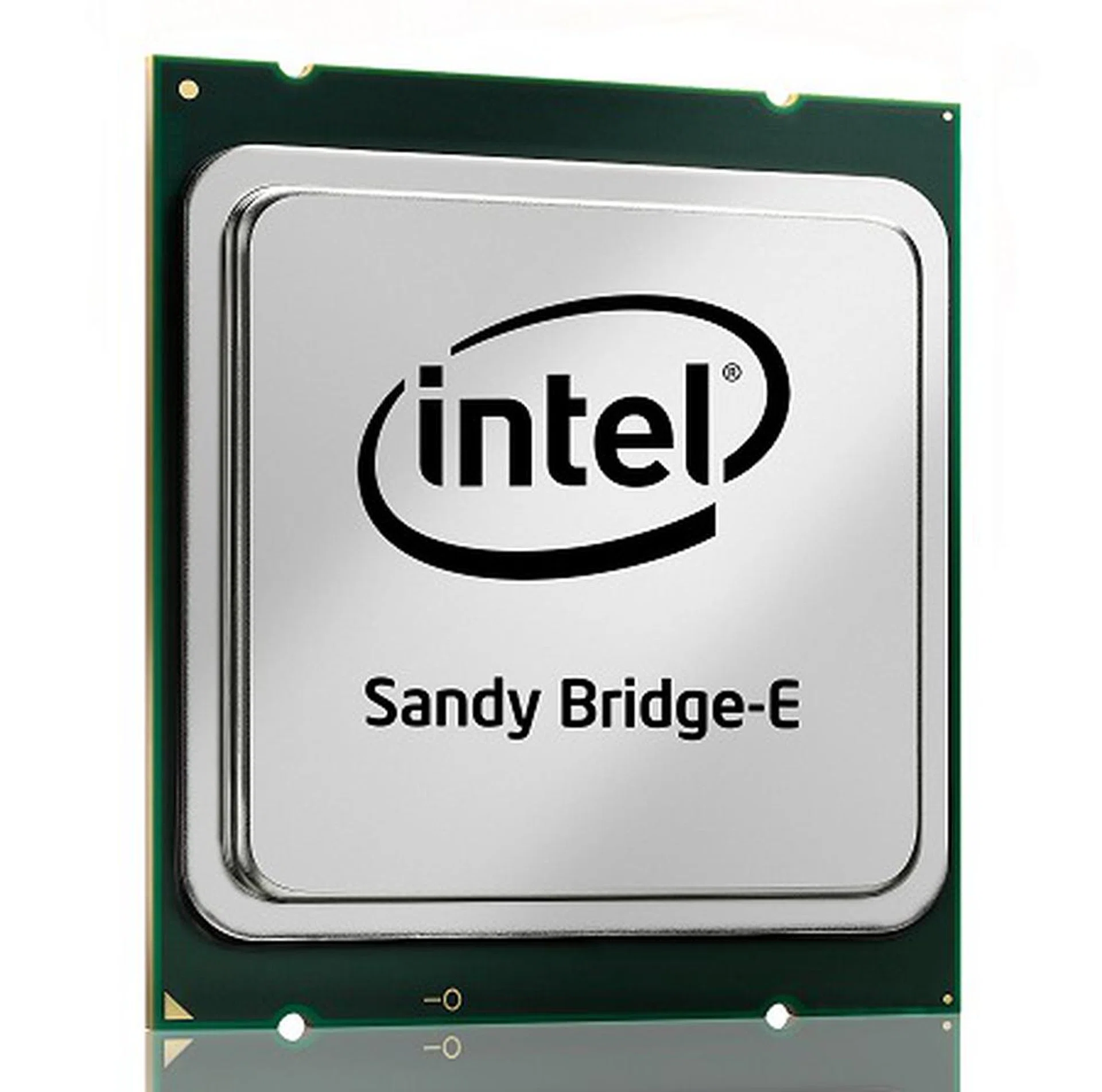
The new enthusiast class processors.
Architecture Differences from Nehalem / Westmere
Quad-Channel Memory Controller
In terms of big ticket features, the Sandy Bridge-E is the first-ever consumer processor architecture (and as well as its platform) to support a quad-channel DDR3 memory architecture! Not only that, the default supported memory speeds go up to 1600MHz DDR in addition to 1333MHz and 1066MHz still being options too. Now this is a massive thrust in memory bandwidth. While impressive, it's not going to help most enthusiasts other than than the most demanding content creation tasks.
Taking a step back to contrast from Nehalem, Intel's first serious processor for the hardcore enthusiast and home workstation segment, it was also the first Intel CPU to integrate the memory controller on the die. It was also the first consumer platform to support a tri-channel memory controller instead of the dual-channel version which was already common. However as we've found, the extra memory controller was of little assistance as the platform had more than enough bandwidth. Going by the fact that even the current dual-channel memory architecture based Sandy Bridge isn't memory starved, you'll soon see that all the extra memory channels isn't going to benefit the typical enthusiast. Clearly, this processor has its roots for the multi-processor market.
6 Cores and Beyond?
The Sandy Bridge-E architecture currently supports up to 6 processing cores support up to 12 execution threads in parallel if HyperThreading is fully taken advantage of. This aspect is no different from the first generation Core i7 processors such as the Intel Core i7-980X and 990X, which were the first six-core iterations from Intel. Even the 32nm process technology used to fabricate both architectures are similar. However, this is probably where the similarities end.
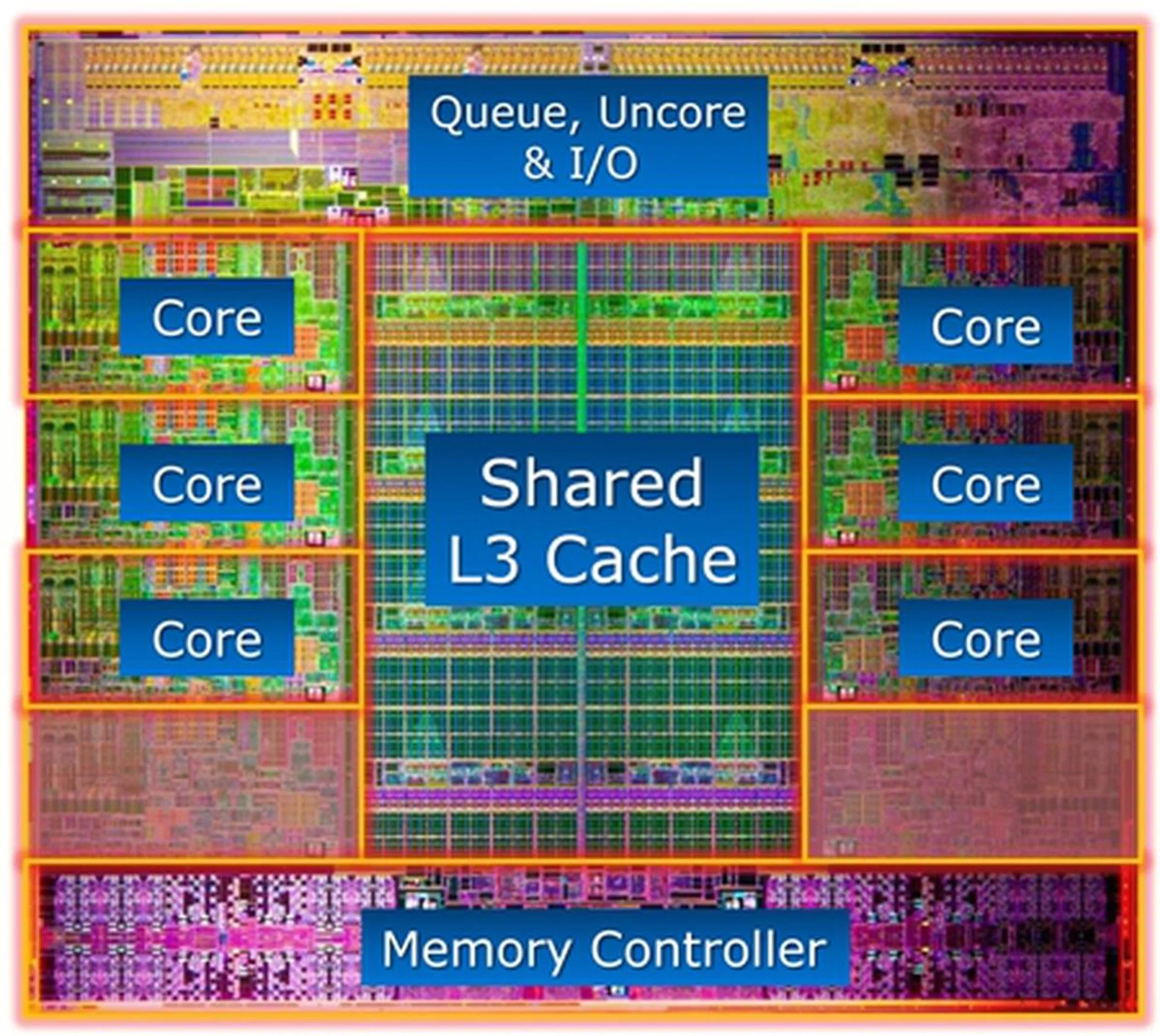
The Core i7-3960X processor die in its full glory. Notice the unlabelled portions of the die above the memory controller, it is said that this processor will be replaced by the i7-3980X processor which is rumored to sport eight cores making it the first consumer octacore Intel processor.
While Intel has shared the die structure of the Sandy Bridge-E processor, they've mysteriously not labelled two areas of the die which resemble yet another two cores. If you put together this rumor of an upcoming 8-core Sandy Bridge-E processor to eclipse the current top of the line Core i7-3960X in Q4 2012 as well as the above die structure, it kind of makes sense that the Sandy Bridge-E architecture really does support eight CPU cores. But we'll have to wait for many more months before that takes place.
Integrated PCIe Gen 3 Capable Controller
That's not all, Sandy Bridge-E is also the first enthusiast class CPU architecture to fully integrate a PCIe controller on board and it support 40 PCIe lanes. This is a stark contrast against the the old Nehalem and Westmere cores, which don't have a PCIe controller and needed to rely on the Intel X58 Platform Controller Hub (PCH) chipset to support 36 PCIe lanes. So the Sandy Bridge-E is living up to its mainstream brother to integrate all the needed functions within the CPU (minus the GPU) with the exception of the some common I/O functions that will as usual be handled by the IOH chipset. However, unlike the Sandy Bridge which supports just 16 PCIe 2.0 lanes from its core, the Sandy Bridge-E will presumably support 40 PCIe 3.0 lanes. We say presumably because Intel hasn't been able to qualify the platform and CPU capabilities with a real PCI 3.0 x16 card and as such, marketing materials still officially mention PCIe 2.0 support only. With 40 lanes, the CPU alone can support the following PEG configurations:-
- Dual PCIe x16 slots + Single PCIe x8 slot
- Single PCIe x16 slot + Triple PCIe x8 slots
- Single PCIe x16 slot + Dual PCIe x8 slots + Dual PCIe x4 slots
This is probably the only reason why an ardent gamer would be keen to get the Sandy Bridge-E platform - to take advantage to the new architecture and its massive built-in support for multi-way graphics card support. Both 3-way SLI and CrossFireX would be supported on most major brands, pending the actual board implementation. As for PCIe 3.0 support, that's a bit sticky for now. Even if Intel's claims of possible support for 8GT/s PCIe transfer rate does come to pass after qualifications, consumers have to also ensure their motherboard's PCIe switching components that distribute the PCIe lanes are capable of operating at those high speeds to truly support PCIe 3.0. Else, it would just be PCIe 3.0 compatible. MSI has already clarified their implementation versus Gigabyte's claim on this matter for the Z68 mainstream chipset, but it's valuable information to ensure you know what marketing you're buying into. As far as we know, MSI and ECS both use a true PCIe 3.0 implementation for their X79 motherboards at this point of time but more information on other vendors will follow soon in the future.
More L3 Cache + All the Sandy Bridge Goodness
To support the massive memory throughput and functions integrated within this huge processor, the Sandy Bridge-E will have up to 15MB of L3 cache. The current top of the line Core i7- 3960X will feature this this wile other variants would have lesser L3 cache.
Last but not least, like the Sandy Bridge architecture, the newer Sandy Bridge-E supports HyperThreading, Intel Turbo Boost 2.0 and Trusted Execution Engine features. It also support all the new instruction sets introduced to-date such as VT-x, VT-d, VT-c, AES, AVX, SSE 4.1 and SSE4.2 for hardware assisted virtualization, speedier encryption and decryption using the Advanced Encryption Standard, and Advanced Vector Extensions (AVX) instruction set to benefit floating point intensive applications such as a digital photo editing and content creation to accelerate motion, facial recognition tracking as well as computational simulation and analysis.
A Newer and Larger Socket - LGA2011
With all the above features and functions crammed into the Sandy Bridge-E processor, its transistor count has shot up to 2.27 billion! This is double that of the Westmere architecture (sporting six cores too) at 1.17 billion transistors. With both of them also fabricated with the 32nm process technology, you can easily guess that the die size too has nearly doubled from 248mm2 on Westmere to 435mm2 on the Sandy Bridge-E. This is one expensive chip to manufacture. Now that so much is on the processor, it needs more power and data lines, not to mention a much wider memory path to support quad memory channels, inevitably, a new socket is needed to support its infrastructure. Enter the LGA2011.
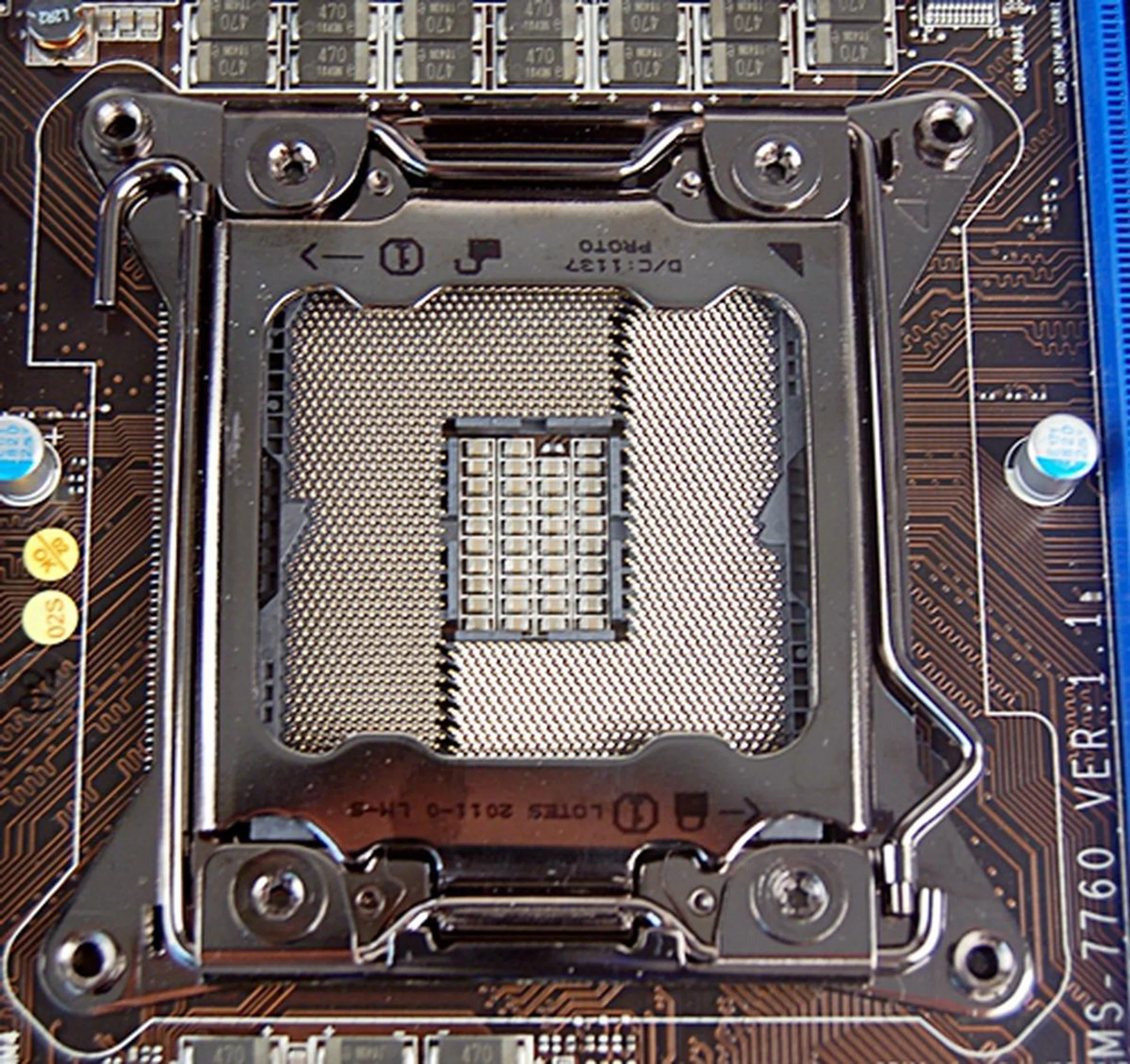
The LGA2011 CPU socket is larger than the usual CPU sockets found on consumer computing platform with its 2,011 pins! This is mostly the result of a quad-memory controller implementation, integrated PCIe controller with 40 PCIe lanes and more power/control lines to manage this complex CPU. After all, this is a workstation-class processor. Extra caution must be exercised in mounting the Sandy Bridge-E processor as the sheer number of pins translate to higher risks of them being bent due to carelessness.
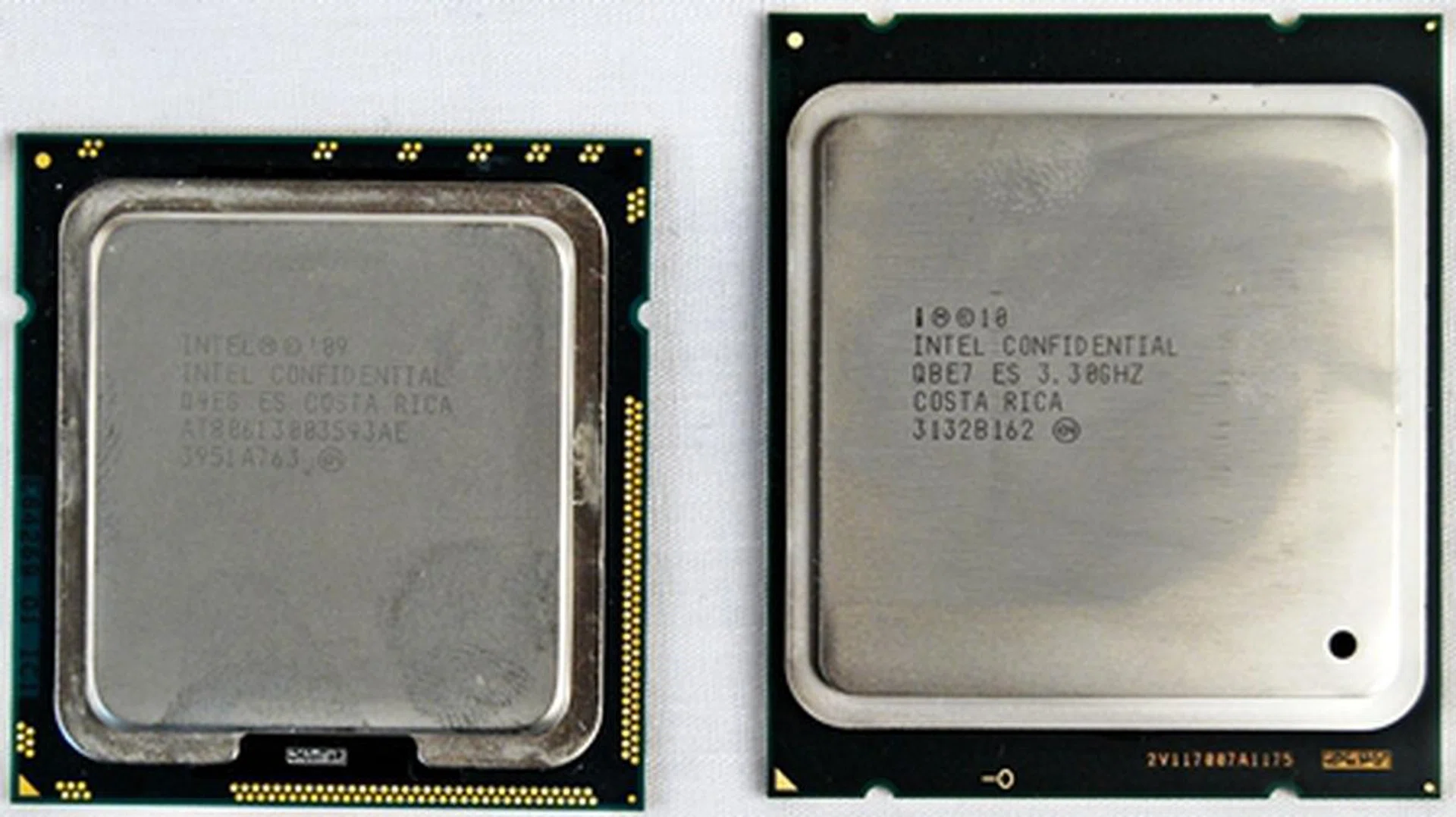
Compared here is the new top of the line Core i7-3960X LGA2011 packaged processor on the right versus an LGA1366 processor to the left which is represented by our Core i7-980X Extreme Edition.
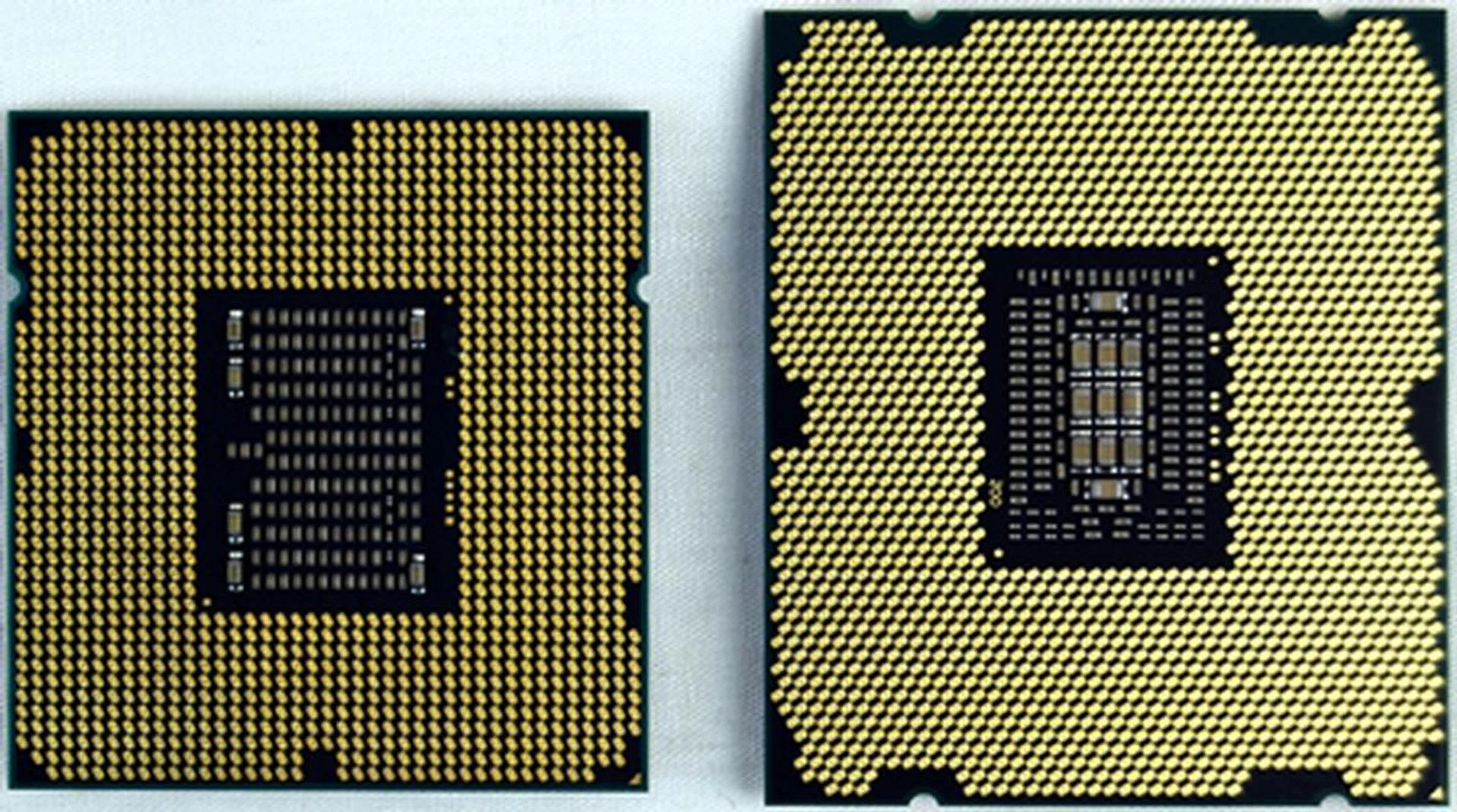
Shown here on their backs is their contact pads interfacing with the motherboard socket. On the left, the LGA1366 faces off with the LGA2011 on the right.
As mentioned, the increase in die size of Sandy Bridge-E processors can be attributed to the integration of a complex memory controller and PCIe controller in addition to the new features and larger cache. Increased data and power lines are required to support all of its functions and this this results in a larger package with far more contact pads on the processor and an identical number of contact points on the CPU socket, 2,011 to be exact.
Sandy Bridge-E Processor Models Compared
With information gleaned from our press kit, Intel has announced three desktop versions of the Sandy Bridge-E processors. The top of the line offering is the Intel Core i7-3960X CPU Extreme Edition. Second in line is a Core i7-3960K and fortunately as its suffix suggests, it's also unlocked. For those wondering about the suffix differences, "X" denotes a the CPU as Intel's top processor, is multiplier unlocked, and is tagged with the traditional US$1,000 pricing or thereabout. "K" on the other hand just denotes that its a multiplier unlocked processor.
The last model is the Core i7-3820, a quad-core edition which will be launched in early 2012. No pricing information has been shared of it yet. For now, we've prepared two tables to compare the new Core i7 processors against the previous generation Core i7 processors:-
Processor Model
| Clock Speed | Cores/Threads | L3 Cache | Direct Media Interface Gen 2 (DMI2) | Max TDP (W) | Retail Price (US$) (1k units) |
Core i7-3960X Extreme Edition | 3.3GHz
(3.9 GHz Max Turbo Frequency) | 6/12 | 15MB | 20Gb/s | 130 | $990 |
Core i7-3930K | 3.2GHz
(3.8 GHz Max Turbo Frequency) | 6/12 | 12MB | 20Gb/s | 130 | $555 |
Core i7-3820 | 3.6GHz
(3.9 GHz Max Turbo Frequency) | 4/8 | 10MB | 20Gb/s | 130 | N.A.
(to be announced in Q1, 2012) |
Processor Model
| Clock Speed | Cores/Threads | L3 Cache | QuickPath Interconnect | Max TDP (W) | Retail Price (US$) (1k units)
|
Core i7-990XExtreme Edition | 3.46GHz
(3.73 GHz Max Turbo Frequency) | 6/12 | 12MB | 6.4QT/s | 130 | $999 |
Core i7-980XExtreme Edition | 3.33GHz
(3.6 GHz Max Turbo Frequency) | 6/12 | 12MB | 6.4QT/s | 130 | $999 |
Core i7-980 | 3.33GHz
(3.6 GHz Max Turbo Frequency) | 6/12 | 12MB | 4.8QT/s | 130 | $583 |
Core i7-975 Extreme Edition | 3.33GHz
(3.6 GHz Max Turbo Frequency) | 4/8 | 8MB | 6.4QT/s | 130 | ~$969 |
The Intel X79 Chipset & Platform
The second generation i7 processors are using Direct Media Interface Gen 2 to communicate with the PCH. The DMI2 has a bandwidth of PCIe 2.0 x4 (2GB/s) which is approximately 20Gb/s. Their predecessors were still using Intel's QuickPath Interconnect to communicate with the southbridge chips. The 2nd generation i7 processors have a new socket LGA2011.
Another bone of contention that has been laid to rest is the fact the Sandy Bridge-E processors feature PCIe Gen 3 as its controller is 8 GT/s-capable; however, the validation of PCIe Gen 3 capable switching components amongst motherboard manufacturers seem to have started a war of words between two prominent board makers. Hence, Intel has seemingly decided to err on the side of caution and kept mum on their PCIe Gen 3 capabilities as evident in the X79 chipset block diagram.
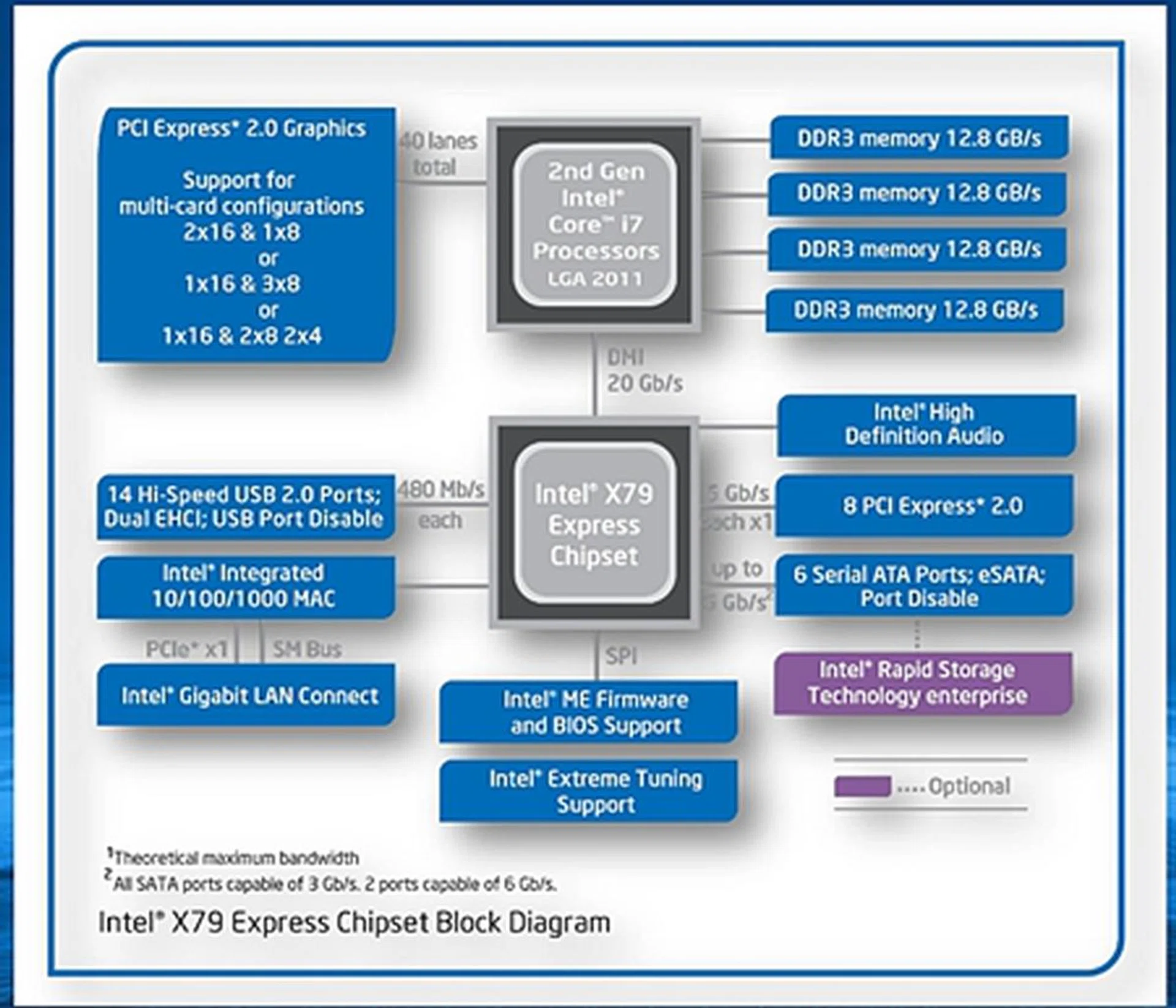
The X79 chipset block diagram.
As seen from the block diagram above, there is still no official word on its support for PCIe Gen 3.0 though motherboard makers have implemented their own compliant switching components on their X79 offerings. There is no native support for USB 3.0 as well. In comparison with AMD FX990, its storage options are similar, if not even worse than its archrival. Thankfully, most boards more than make up for this with third party controllers and other options.
X79 Motherboards Showcased
We have covered a fair bit of news and even done previews for Intel X79 motherboard offerings and availability. For your follow-up, we've rounded them up here:-
- ASUS ASUS Rampage IV Extreme, Sabertooth X79, P9X79 Series
- ASRock X79 Extreme Series
- Biostar TPower X79
- ECS X79R-AX motherboard
- Gigabyte's X79 Motherboards
- MSI X79A-GD65 (8D)
Intel's Own - The Intel DX79SI Motherboard
This board features the Intel Express X79 chipset and it is currently the only X79 board we have observed to included terse worded instructions on its LGA2011 CPU socket. It instructs on which of the two latches should be moved first when removing or mounting the processor. In our preview article for the MSI X79A-GD65 (8D), we took a close look at the LGA2011 CPU socket paying special attention to the two latches. The instructions on the other boards we have previewed were pictorial in nature, we naturally took preference to instructions in writing.
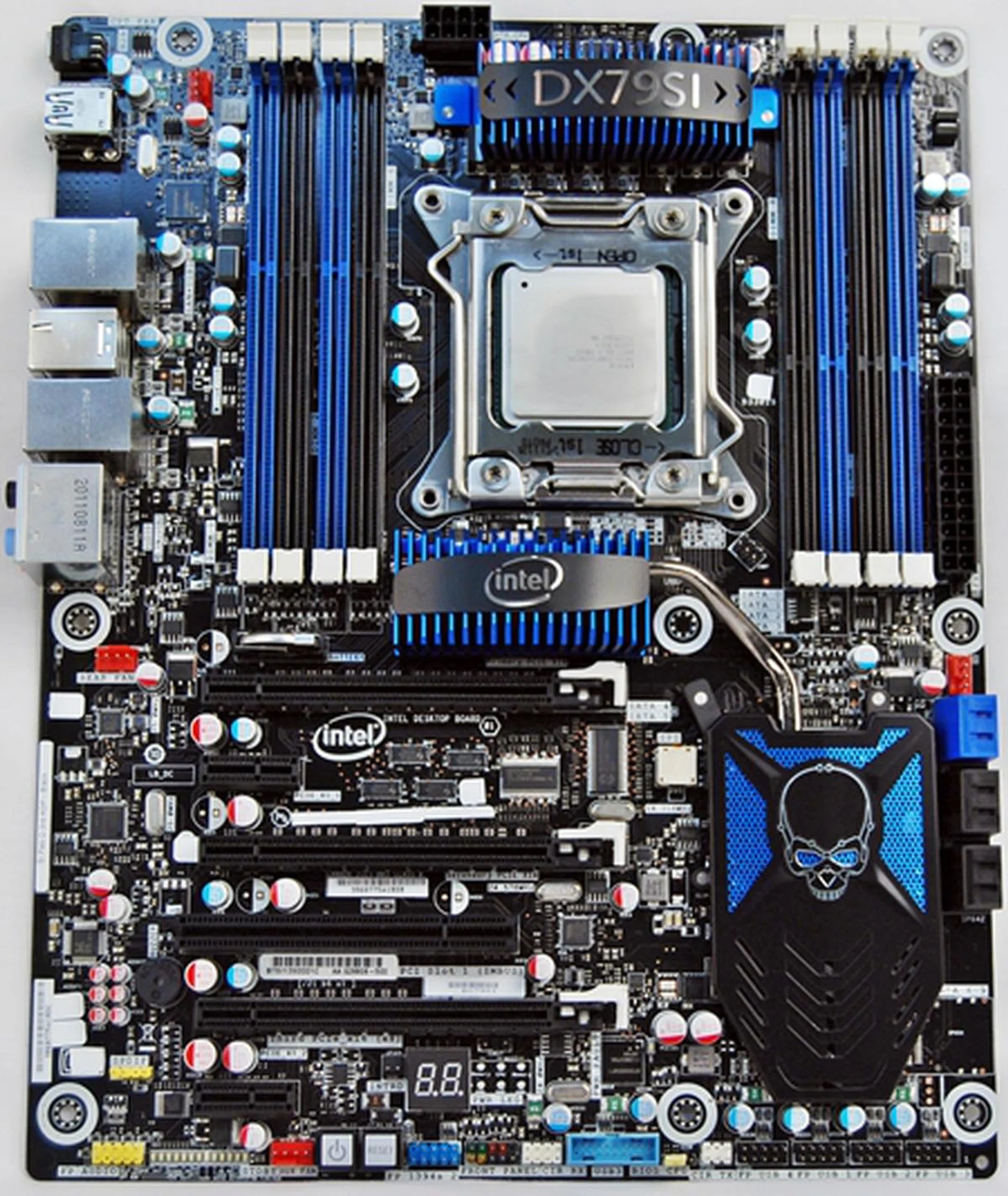
The Intel DX79SI Siler features eight DIMM slots and sports a blue-black color scheme that is similar to mainstream X79 motherboards from MSI, Gigabyte and ASUS. ASRock seems to be the exception for now as their X79 boards are decked out in opulent colors of gilded gold set against black PCBs.
Notice the gap between the USB 3.0 ports and the Gigabit LAN connector resting on top of the pair of USB 2.0 ports? We are left wondering what was left out by Intel.
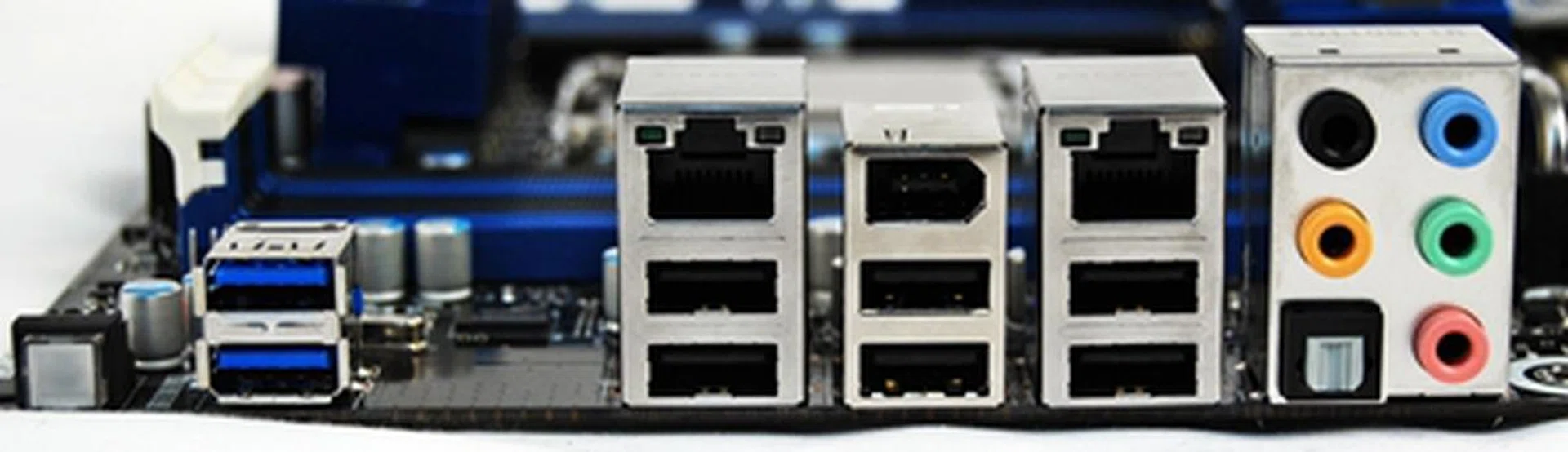
Mind the gap and it left us wondering what Intel left out between the USB 3.0 ports and its onboard Gigabit LAN connector coupled with two USB 2.0 ports.
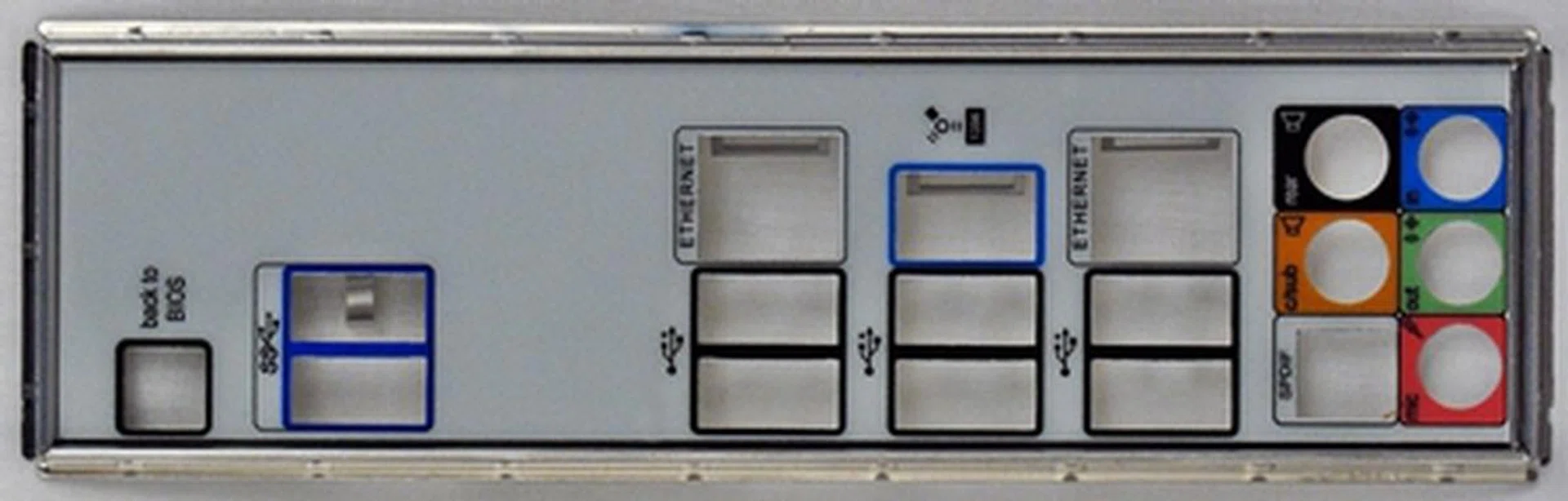
After a cursory examination of the motherboard chassis back-plate, we found no answers to fill the gap.
The Cooling Proposition
As a confirmation of rumors, Intel will not be shipping CPU coolers with boxed and retailed versions of the Sandy Bridge-E processors. It was speculated that the chip maker had intentions to reduce manufacturing costs; however, the most logical explanation was that Intel has its intention of promoting its own brand of cooling solution.
In collaboration with Asetek, a leader in liquid cooling solutions, Intel is offering its own brand of sealed liquid cooling thermal solution, the Intel Active Thermal Solution RTS2011LC. This customized cooling solution is compatible with LGA2011, LGA1366, LGA1155 and LGA1156 processors. According to Intel, its pump, cold plate and water block are integrated thus improving the reliability of this kit. The estimated retail price of the cooling system is US$100.
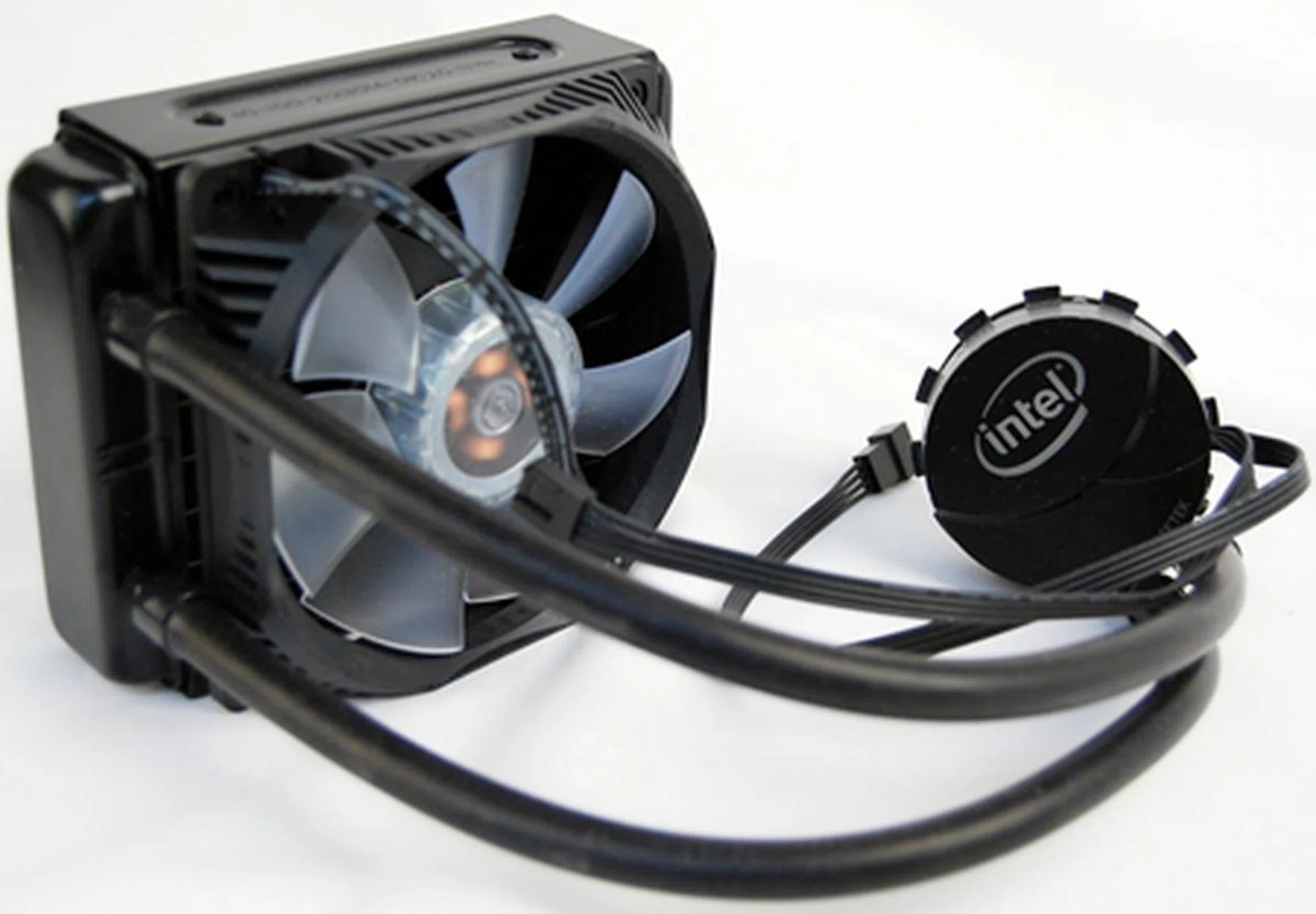
The Intel RTS2011LC liquid cooling solution manufactured by Asetek. The installation process was rather straight forward as we utilized one mounting bracket and four corresponding screws to secure the copper base of the water block to the CPU. Instructions were sparse, but we could deduce how to put them together on our own.
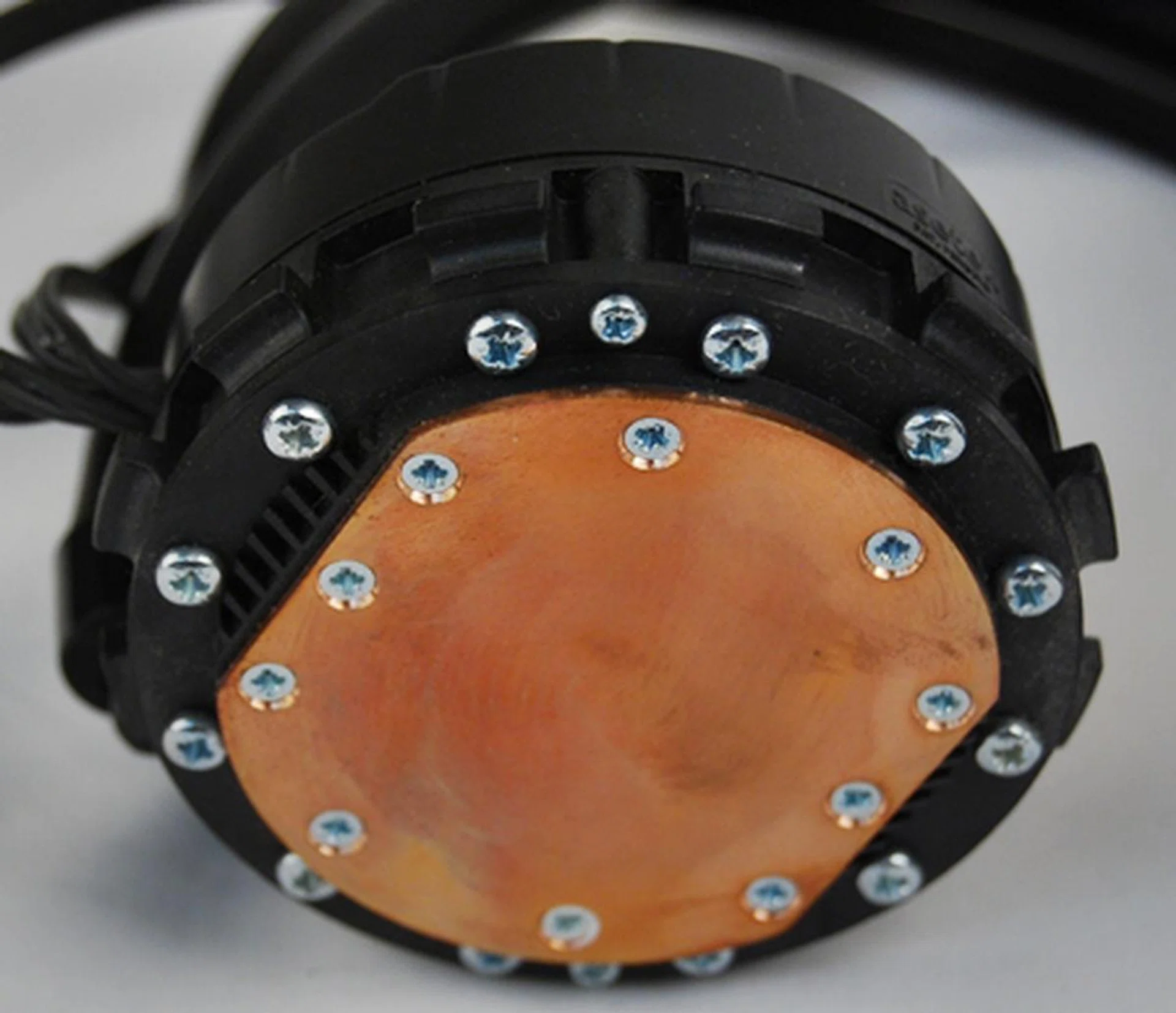
The copper plate of the water block viewed up close. The countersunk screws attaching the copper plate ensures a flushed contact with the processor.
The RTS2011LC bears some resemblance to the Corsair Hydro H50 CPU Cooler in terms of its build and simplicity in liquid cooling engineering design. It is also manufactured by Asetek and as such the apple does not fall too far from the tree.
For rig builders who prefer air cooling, Intel also offers its own CPU cooler from about US$20 that is future proofed as it is compatible with Sandy Bridge-E as well as Ivy Bridge processors. It is targeted at business and corporate users who do not demand the extreme cooling solution of the RTS2011LC.
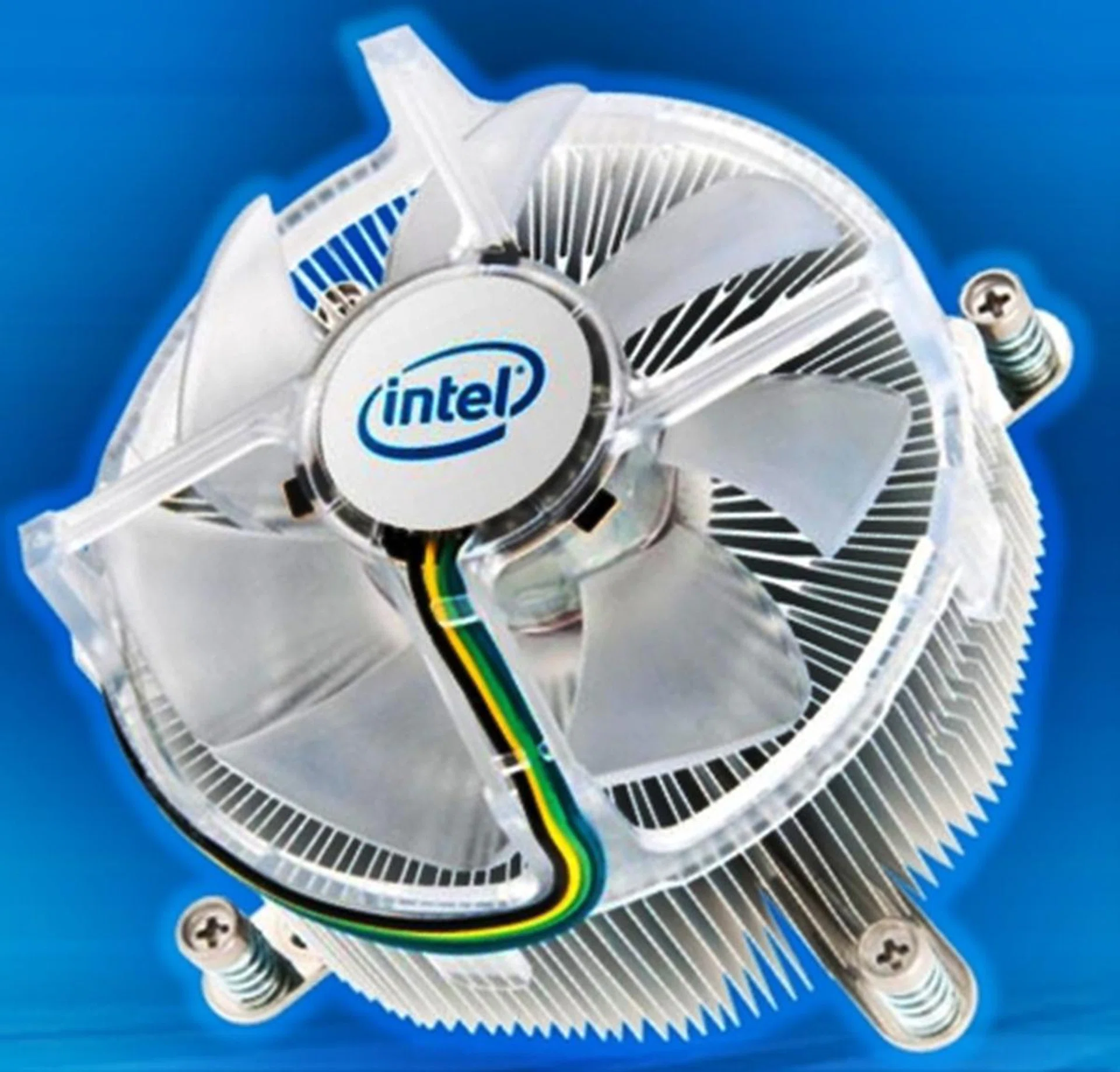
This CPU cooler is available from Intel as a separate retail SKU and it will not break your bank as it is priced at a modest US$20 and below. It will be made available for sale through retailers and distributors. We missed those packaged stock CPU coolers already but enthusiasts shouldn't mind this at all.
Test Setup
The main supporting cast of our test setup is the Intel desktop board, the DX79SI which is also known as 'Siler'. We have decided to bump up the memory capacity to 8GB as we are using two sets of Kingston HyperX 4GB Memory Kit. This is so that we will fill up the first four DIMM slots of the board and due to the fact that the Intel Core i7-3960X is the first CPU we are testing with quad-channel memory support. We changed the clock frequency of the memory modules to its rated frequency of 1600MHz for the initial run of our benchmark suite to see if the increased memory frequency offers any assistance in performance. In another run, we obtained a separate set of results with the memory modules’ clock frequency set lower to 1333MHz - this will better align with findings from the rest of our comparisons which also have memory set at 1333MHz.
In our test setup, the cooling solution is provided by the Intel Active Thermal Solution RTS2011LC, a closed liquid cooling system. For comparisons, we brought out the Westmere-based 6-core Intel i7-980X along with the Sandy Bridge-based Core i7-2600K/Core i5-2500 and contenders from AMD such as the recent FX-8150 and the Phenom II X6-1100T. Although Intel has a speedier Core i7-990X, we stuck with the 980X as it's clock compatible with the Core i7-3960X which we're pitting it against. This will really help us show the difference from the new generation versus the previous generation of processors.
Our full test setup for all the platforms are as follows:-
Intel Core i7-3960X Test Configuration
- Intel Desktop Board DX79SI (Intel X79 Express chipset), BIOS version 0280
- 4 x 2GB Kingston HyperX DDR3-1600 (CAS 9-9-9-27) (Also ran at DDR3-1333MHz, CAS 7-7-7-20)
- Zotac GeForce GTX 260 (ForceWare 197.45)
- Western Digital Caviar Black 1TB SATA 6Gbps hard drive (one single NTFS partition)
- Windows 7 Ultimate 64-bit
- Intel INF 9.2.3.1022
Intel P67 Test Configuration
- CPU: Intel Core i7-2600K, Core i5-2500
- ASUS P8P67 Deluxe (BIOS: 0602)
- 2 x 1GB Kingston HyperX DDR3-1333 (CAS 7-7-7-20)
- Zotac GeForce GTX 260 OC (ForceWare 197.45)
- WD Caviar Black 1TB, SATA 6G (Intel SATA 6G)
- Windows 7 Ultimate (64-bit)
- Intel INF 9.2.0.1015
For our comparison, we have a number of Intel processors, from the Core i7 to the Core i3 and on both X58 and P55 chipsets. There's even a H55 chipset for the integrated graphics segment, not to mention the AMD contingent.
Intel Core i7-980X Test Configuration (LGA1366)
- Gigabyte X58A-UD3R (BIOS: FD)
- 3 x 1GB Kingston HyperX DDR3-1333 (CAS 7-7-7-20)
- Zotac GeForce GTX 260 OC (ForceWare 197.45)
- WD Caviar Black 1TB, SATA 6G (Marvell SATA 6G)
- Windows 7 Ultimate (64-bit)
- Intel INF 9.2.0.1015
AMD FX-8150 Test Configuration
- ASUS Crosshair V Formula (AMD 990FX + SB950, 0813 BIOS)
- 2 x 2GB Kingston HyperX DDR3-1333 (7-7-7-20)
- Zotac GeForce GTX 260 OC (ForceWare 197.45)
- AMD Chipset driver
- WD Caviar Black 1TB SATA 6G (AMD SATA 6G)
- Microsoft Windows 7 Ultimate (64-bit)
AMD Phenom II X6-1100T Test Configuration
- ASUS Crosshair IV Formula (AMD 890FX + SB850, 0702 BIOS)
- 2 x 1GB Kingston HyperX DDR3-1333 (7-7-7-20)
- Zotac GeForce GTX 260 OC (ForceWare 197.45)
- AMD Chipset driver
- WD Caviar Black 1TB SATA 6G (Marvell SATA 6G)
- Microsoft Windows 7 Ultimate (64-bit)
Benchmarks
The following benchmarks were used to test the CPUs:
CPU Benchmarks
- BAPCo SYSmark 2007 Preview (ver 1.06)
- Futuremark PCMark Vantage (ver 1.03.1, 64-bit)
- Lightwave 3D 9.0 (64-bit)
- 3ds Max 8 (SP2)
- Cinebench 11.5 (64-bit)
- Handbrake 0.9.4
- Futuremark 3DMark Vantage (ver 1.03.1)
- Far Cry 2
- Battlefield Bad Company 2
Results - SYSmark 2007 Preview
While some tech sites cast doubt on Bapco's SYSmark benchmarking suite, we see no reason not to use it. It's clearly one the most useful benchmarking suites out there that juggles several real life applications while introducing pauses and wait states that mimic real usage patters as best as a repeatable script can over several productivity and content creation tasks. Although the 2007 Preview edition is growing a bit old, we're still continuing this a little longer while we gather enough test results on newer editions before retiring the older benchmark.
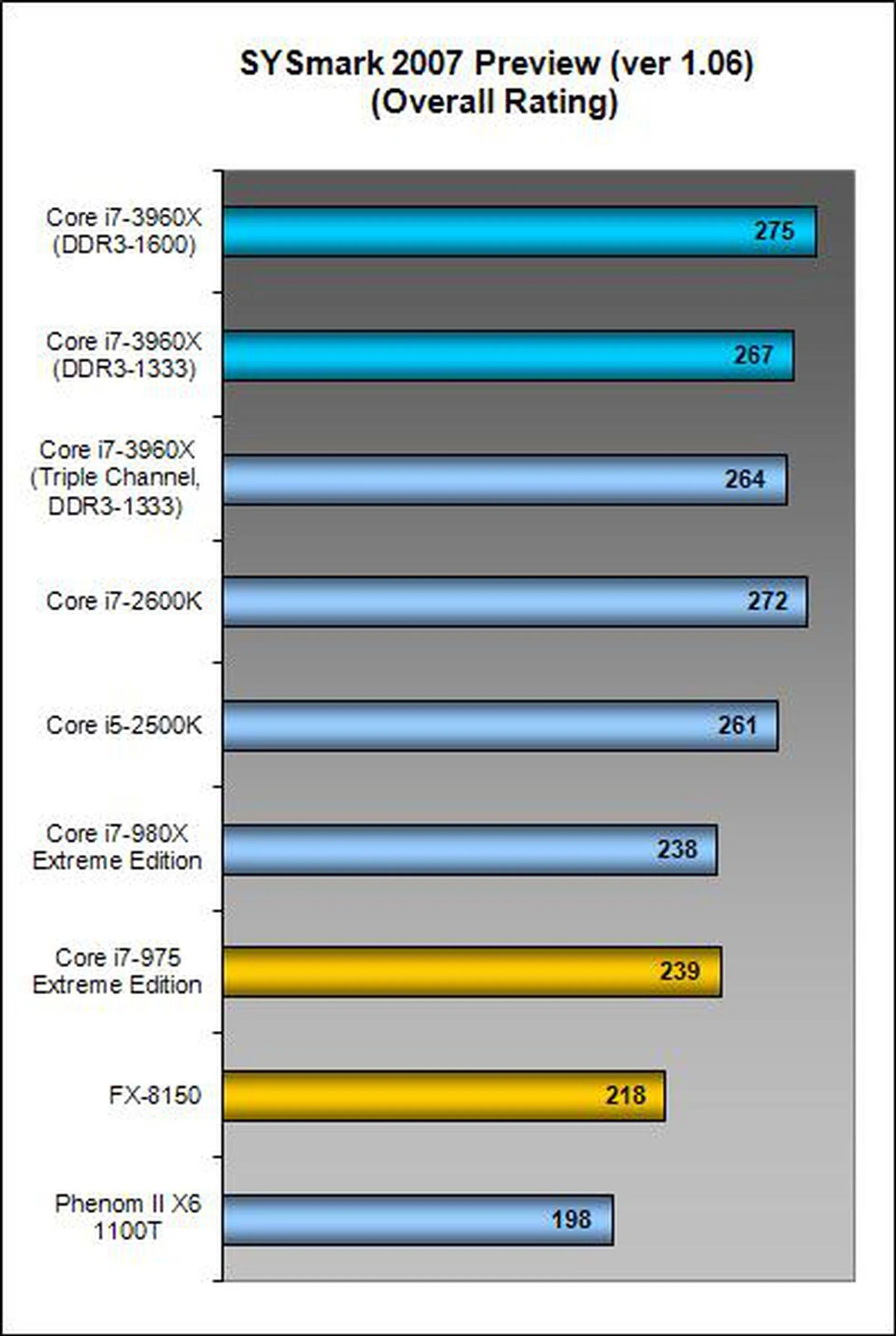
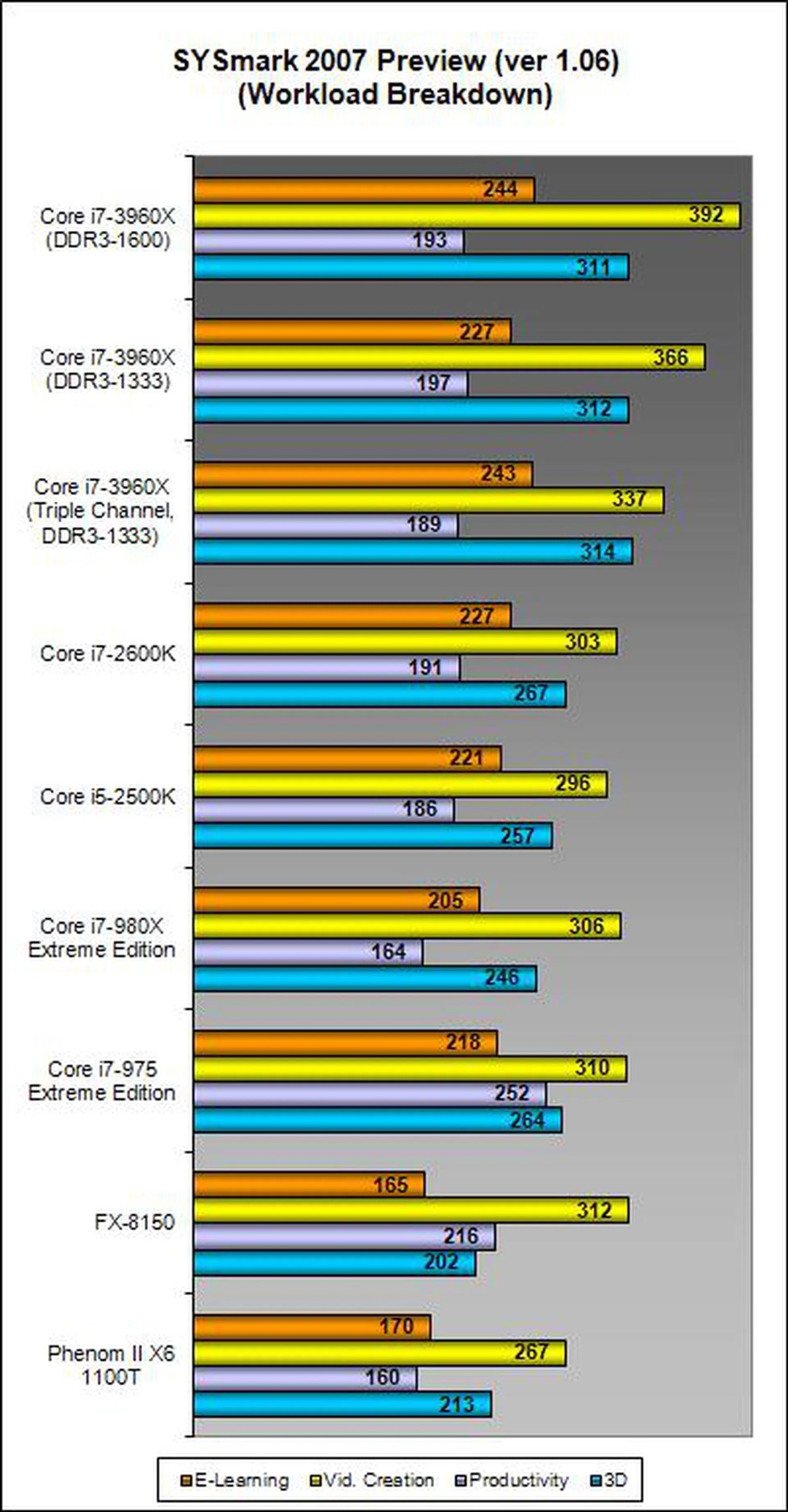
Speaking of results, the new kid on the block was hardly any faster than the compared processors and platforms in this test. For some technical reason, the AMD FX-8150 platform failed to produce results. The Core i7-3960X outperform AMD's Phenom II X6 1100T by almost 39% in terms of overall rating. By utilizing memory modules of higher clock frequencies, we eked out a slight increase (approximately 3%) in overall performance - pretty much within our usual expectations. While that might not have seemed like much at all, we peered at the detailed set of results and noticed that the video creation test suite recorded a much more notable 7% increase in performance when using DDR3-1600 over DDR3-1333. So while general users may not see any benefits to splurge on more expensive memory, certain usage scenarios and workloads will pay off. You just need to identify what you spend time most on the PC and justify if the extra spent on the memory is worth your while.
In any case, SYSmark has shown that the new platform using the same memory frequency as the other testbeds is about on par with the existing Sandy Bridge based Intel Core i7-2600k dual-core processor when tested with this benchmarking suite. This should set the expectations straight as not anybody can benefit from a workstation class platform. The results breakdown however shows something notable - the new platform excels in 3D and video content creation tasks. In these tasks, the Core i7-3960X is about 20% to 30% speedier than the Core i7-980X and the Core i7-2600K. So take note content creators!
Results - Futuremark PCMark Vantage
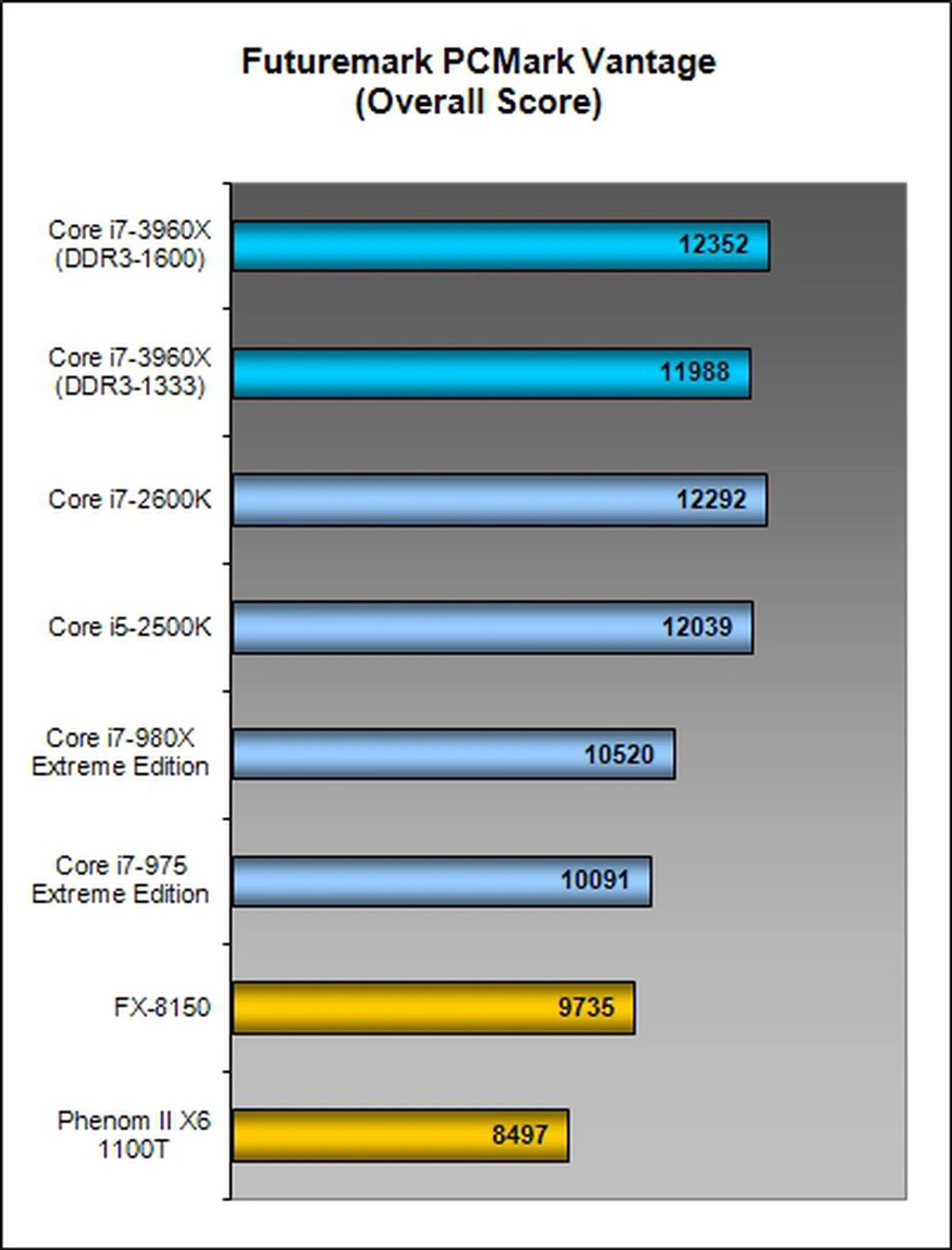
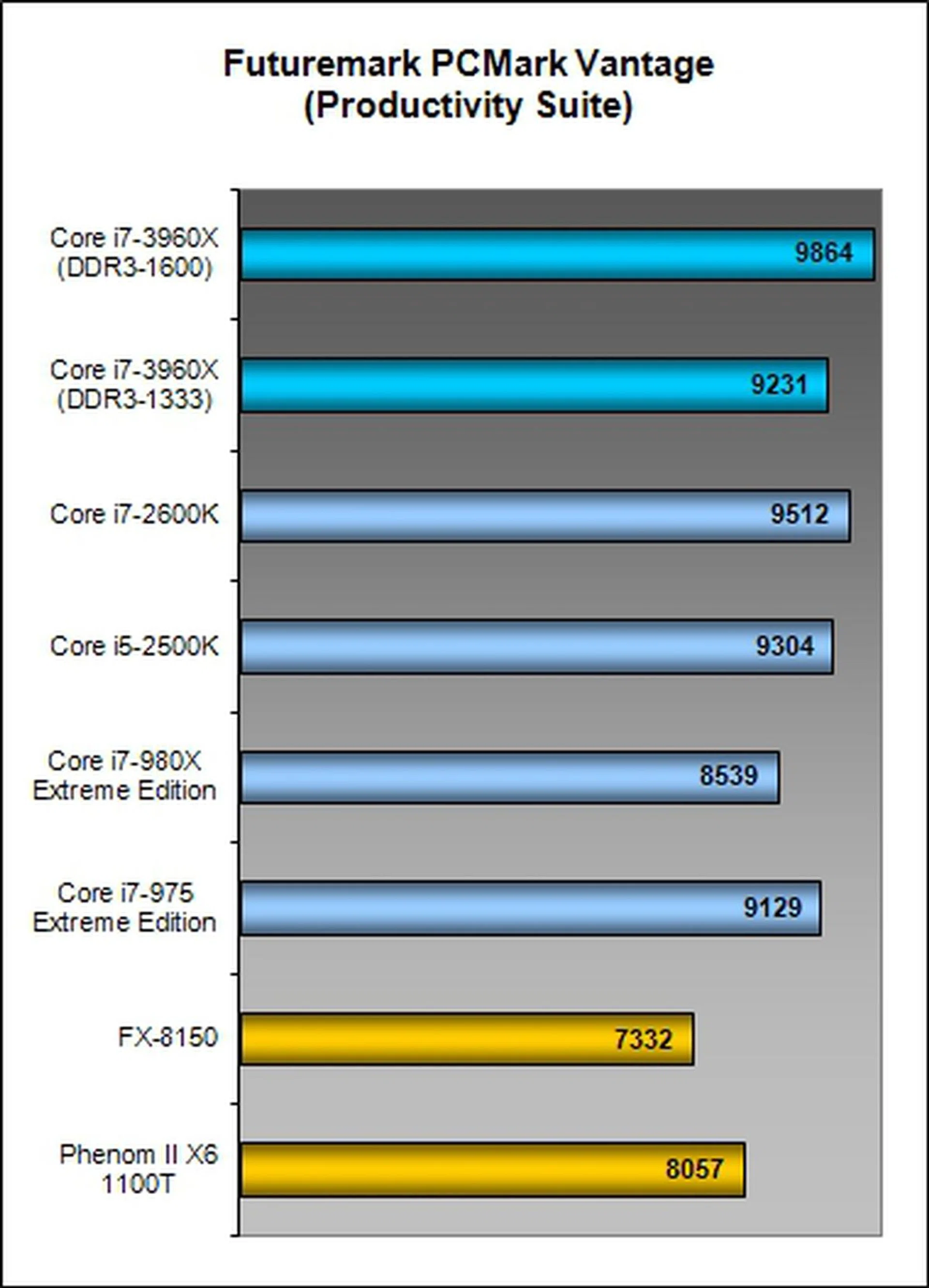
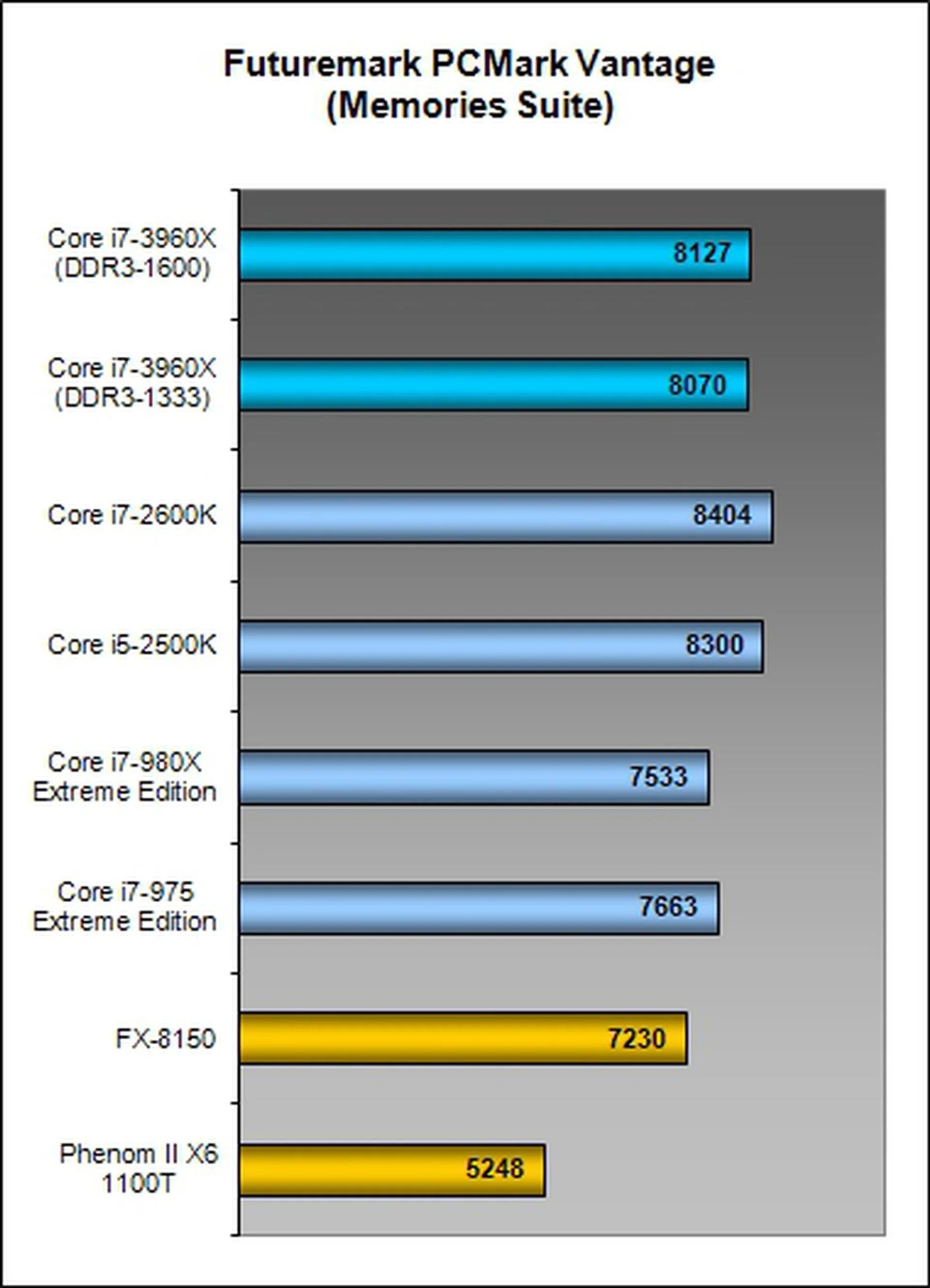
Like SYSmark 2007, PCMark Vantage also has a diverse range of tests, but not as taxing as the former. While the new Core i7-3960X manages to get ahead of the Core i7-980X by a good margin, it's again only on par with a Core i5-2500K, much less than a Core i7-2600K. Running the new platform on faster memory clock speeds produces very little boost just like in SYSmark. PCMark Vantage has more productivity tasks than multimedia content creation workloads and as such the scores of the Sandy Bridge-E hover around that of the existing Sandy Bridge platform.
Results - Lightwave 3D 9.0
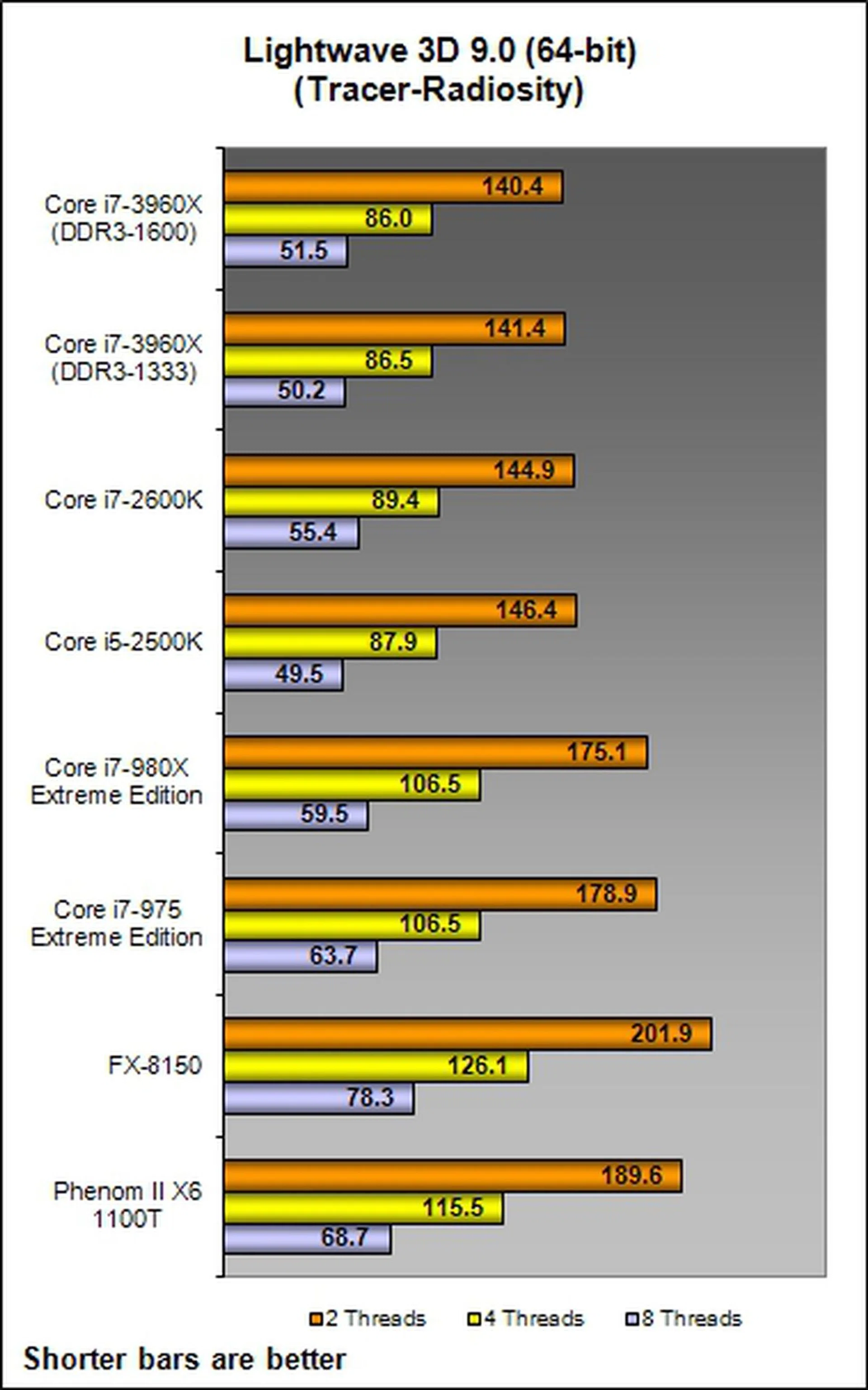
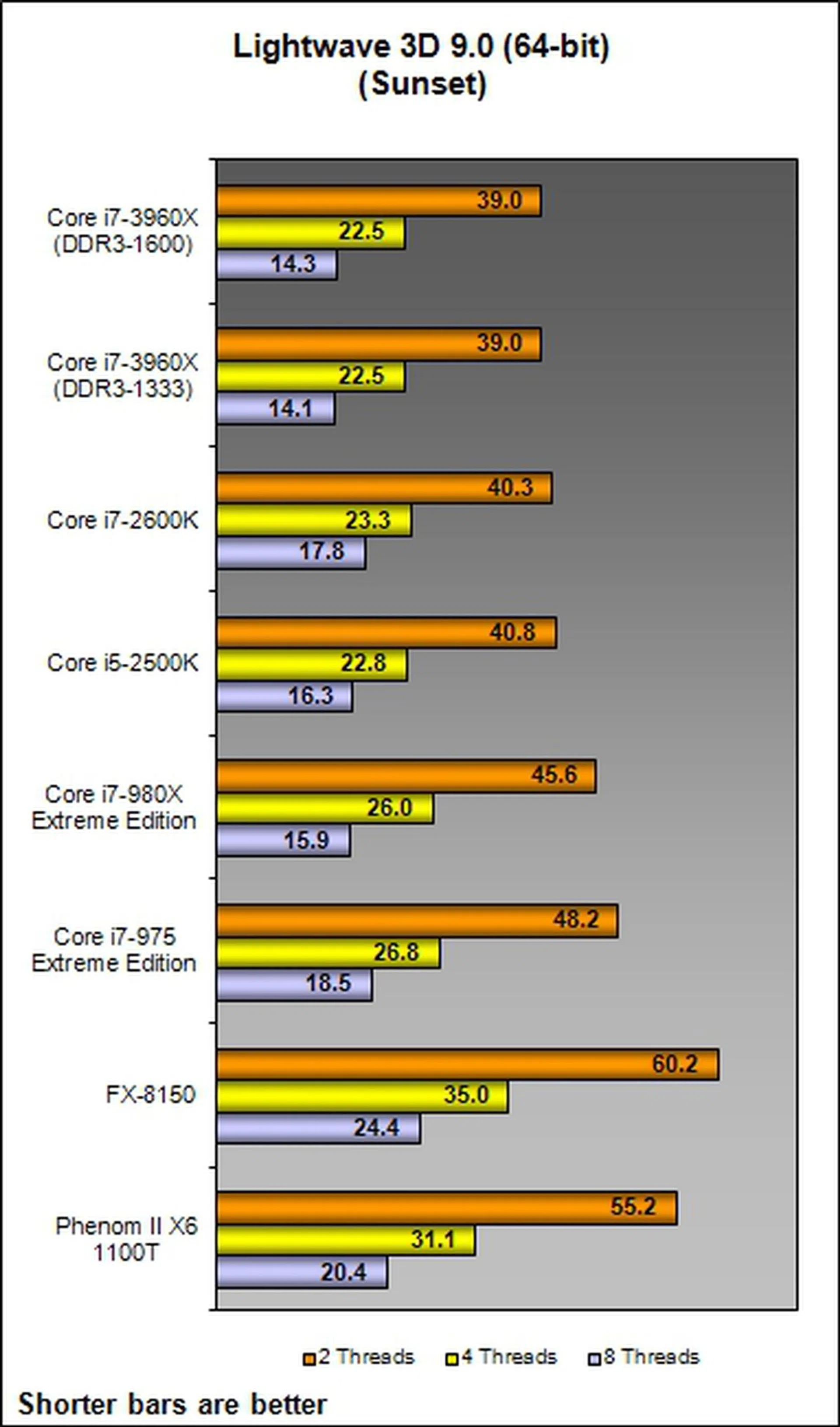
In this rendering benchmark, we first set ran the dual and then quad-threaded workloads to render the Tracer-Radiosity scene. The Core i7-3960X came out over 20% speedier than the old Core i7-980X hex-core processor from the perspective of clock for clock improvement. However it's only marginally better than the existing mainstream Sandy Bridge processors. A similar outcome was noticed in the slightly less taxing Sunset render scene.
When focusing on the 8-threaded workload setting, we again noted the Core i7-3960X registering nearly a 20% increment over the older hex-core processor. The mainstream Core i5-2500K and i7-2600K both managed to come close to what the second generation Core i7 can achieve, but the latter still held a slight lead (sometimes up to 10%). Using faster memory at 1600MHz hardly mattered in these rendering tasks as the memory bandwidth was clearly not an issue and it's more of the processor's own raw horsepower to crunch through the workloads.
We should expect to see better performance and increased productivity as future software upgrades allow content creation applications to take full advantage the Sandy Bridge-E architecture. Notice we didn't mention anything about the AMD platform as it's far from competing; in fact, the new FX-8150 is less attractive than the old Phenom II X6 processor here. This might be the result of the new execution architecture introduced.
Results - Cinebench 11.5 & Handbrake 0.9.4
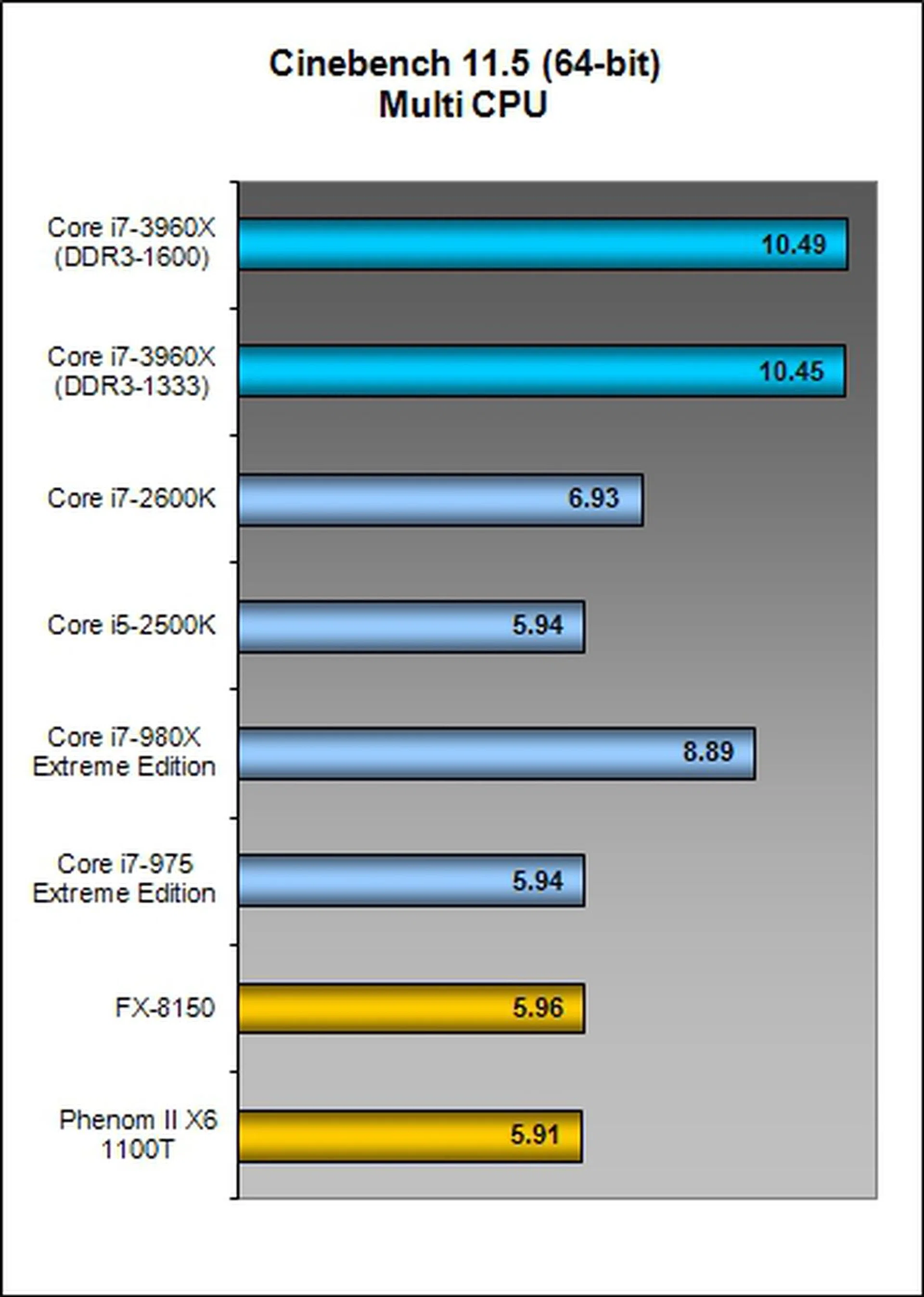
A stellar victory was achieved by the Sandy Bridge-E processor in both the Cinebench rendering program as well video encoding on Handbrake. This can be attributed to both software being well threaded and hence being able to take advantage of the extra processing cores along with HyperThreading technology. For the Cinebench 11.5 test, the Core i7-3960X out-performed the pair of AMD CPUs and the Core i5-2500K by almost approximately 76%! Against the Core i7-2600K and the Core i7-980X, the newcomer was 50% and 24% speedier respectively.
For the video encoding test administered by Handbrake 0.9.4, the Core i7-3960X pulled in first, shaving almost 15% off the timing of its closest competitor, the Intel Core i7-980X. Compared to the best mainstream Sandy Bridge, it still held a near 30% performance advantage.

Results - 3ds Max 8 (SP2)
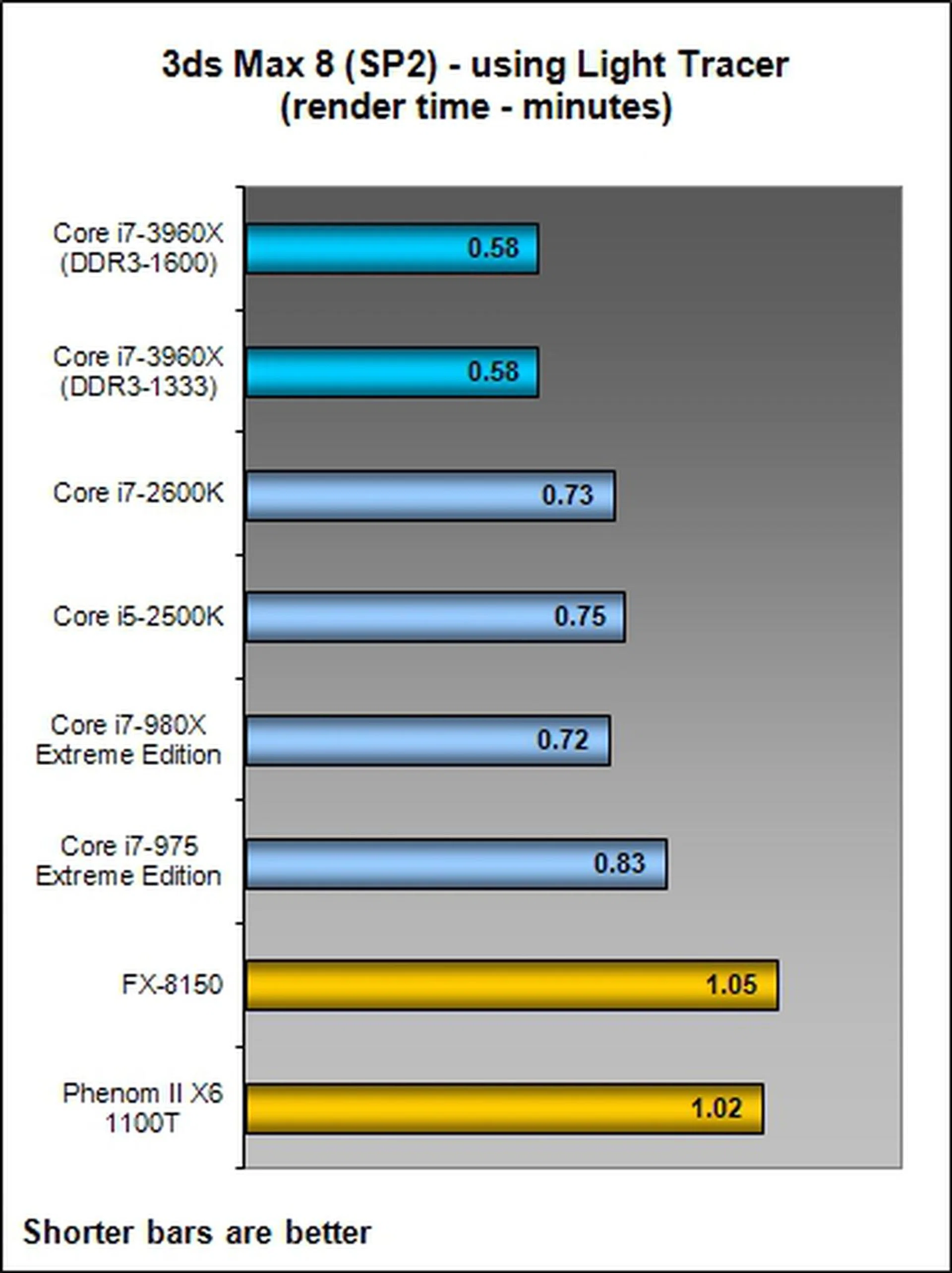
The Intel Core i7-3960X processor continues to prove its mete against the AMD FX-8150 as the former was almost twice as fast on these rendering tasks. Compared with the Intel contingent, the Core i7-3960X was leading by almost 30% when using the Light Tracer render for our workload. Surprisingly though, the difference almost was only down to a few percentage points when using the more strenuous Radiosity renderer.

Results - Futuremark 3DMark Vantage
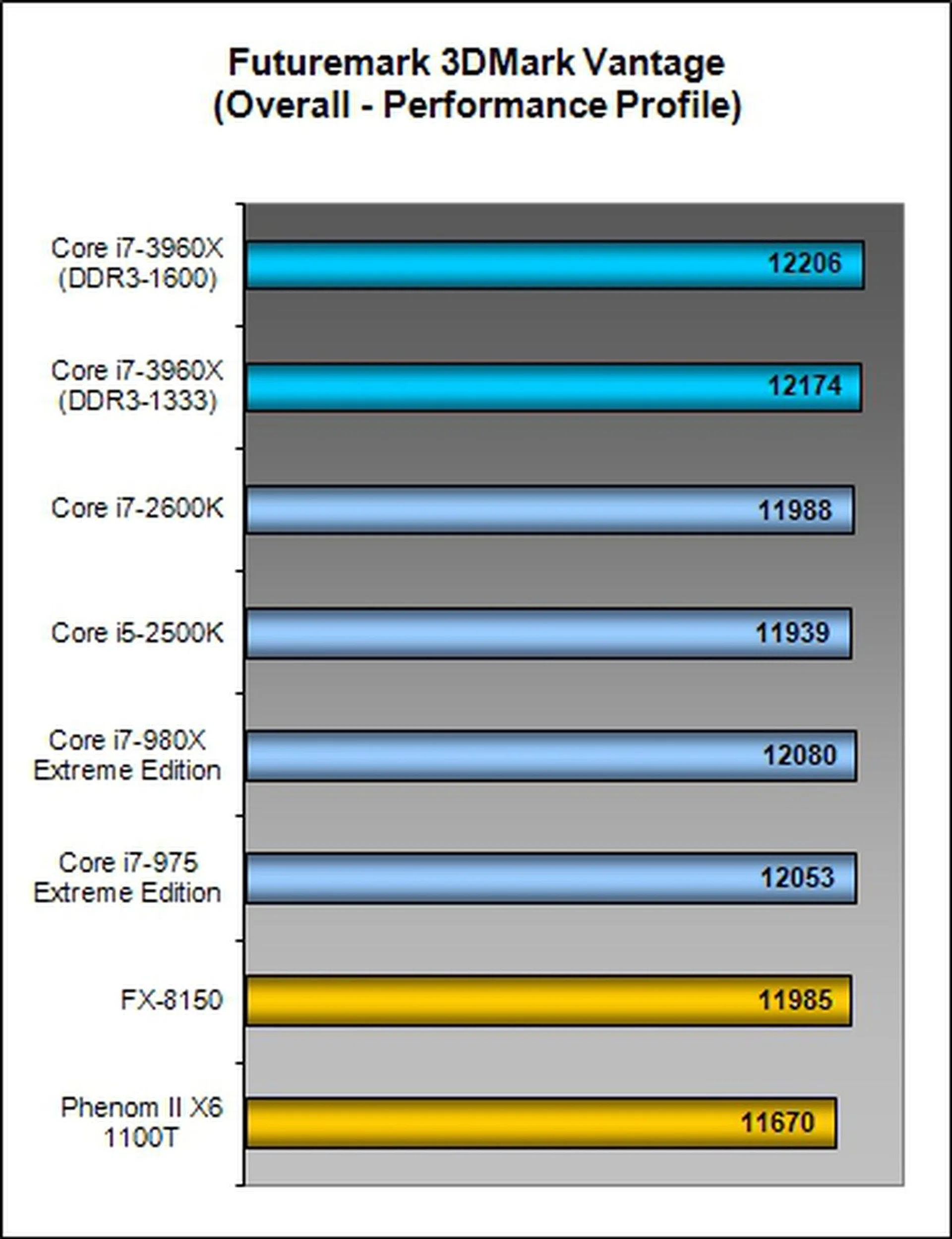
When it comes to the overall 3DMark Vantage score, it's more or less determined by your graphics card. The new Sandy Bridge-E manages results similar but not better than the mainstream Sandy Bridge processors. The rest of the comparisons however do reveal notable performance differences.
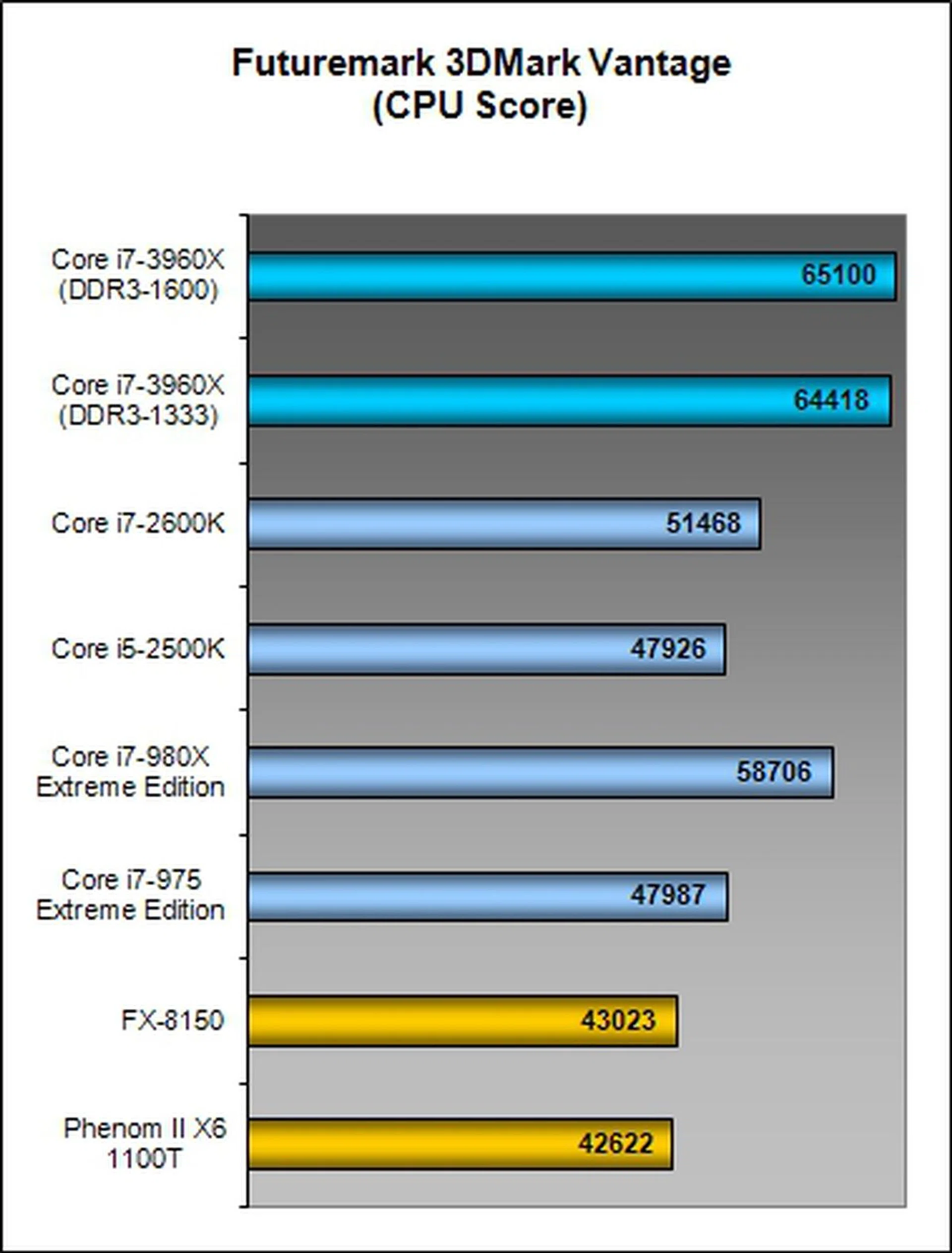
The scores from the CPU portion of the tests showed us the prowess of the Intel Core i7-980X as it pulled in second to its successor with only a slightly less than 10% margin to beat. The other CPUs were trailing at least by a 21% margin with the poorest showing from the Phenom II X6 1100T.
Results - Far Cry 2 & Battlefield Bad Company 2
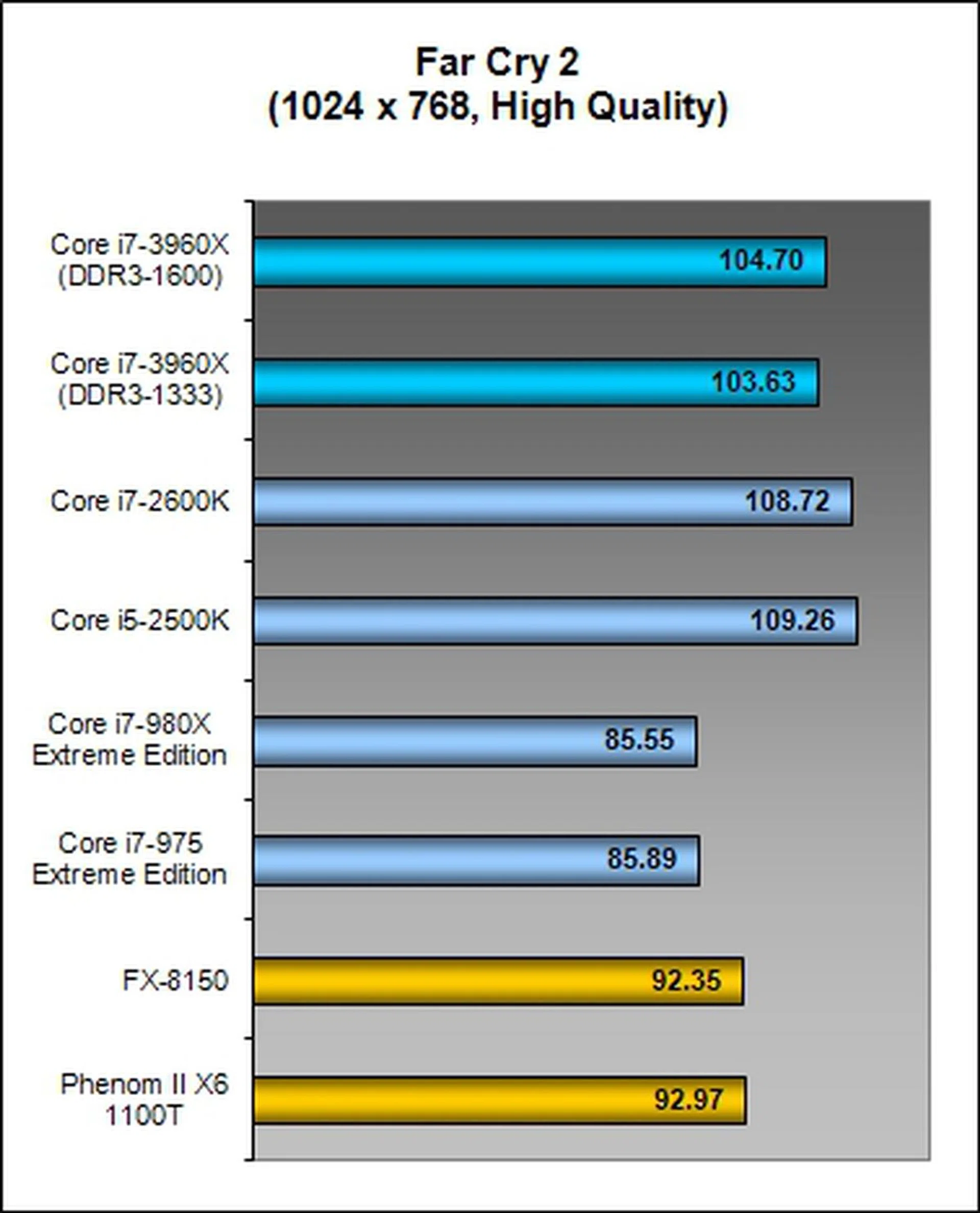
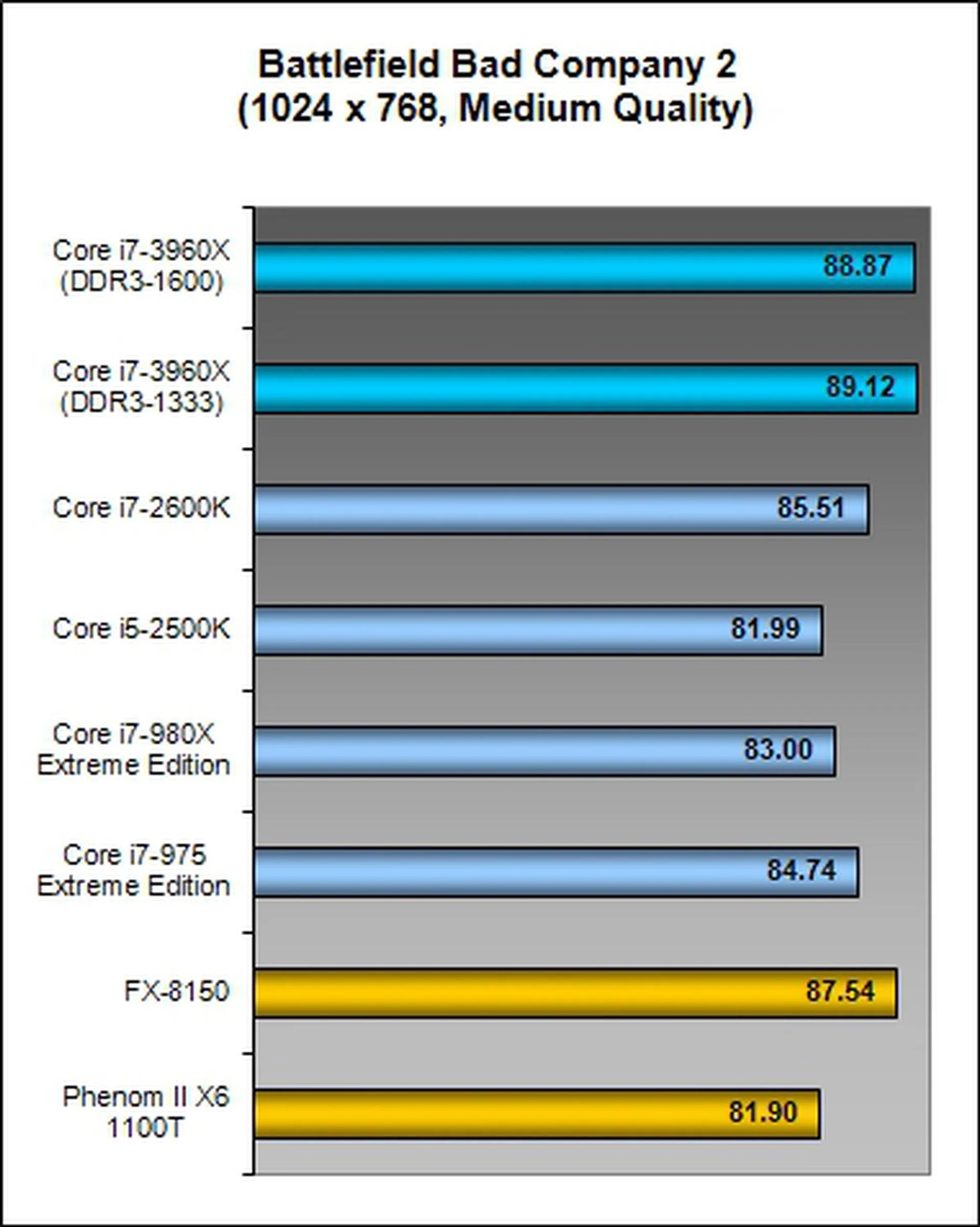
The Sandy Bridge-E CPU came up tops in the Battlefield benchmark, but it was closely trailed by the AMD FX-8150, a surprising comeback from taking the backseat for most of the tests. However,on Far Cry 2, things returned back to normal for the AMD contingent as the Intel Sandy Bridge processors took the lead and was even outperforming the Core i7-3960X by 4.5%.
Of course we're purposely testing these game benchmarks at settings where the GPU isn't the bottleneck and to see if the CPU can scale any. More often than not, you would crank up the resolution or game quality settings to a level that's as playable as the graphics card can churn out decent frame rates. At those settings, you can be sure that as long as you've got a somewhat decent CPU, the GPU's capabilities matter a lot more than ever. As such, treat the findings on this page as a form of performance potential in games for different CPUs.
Power Consumption
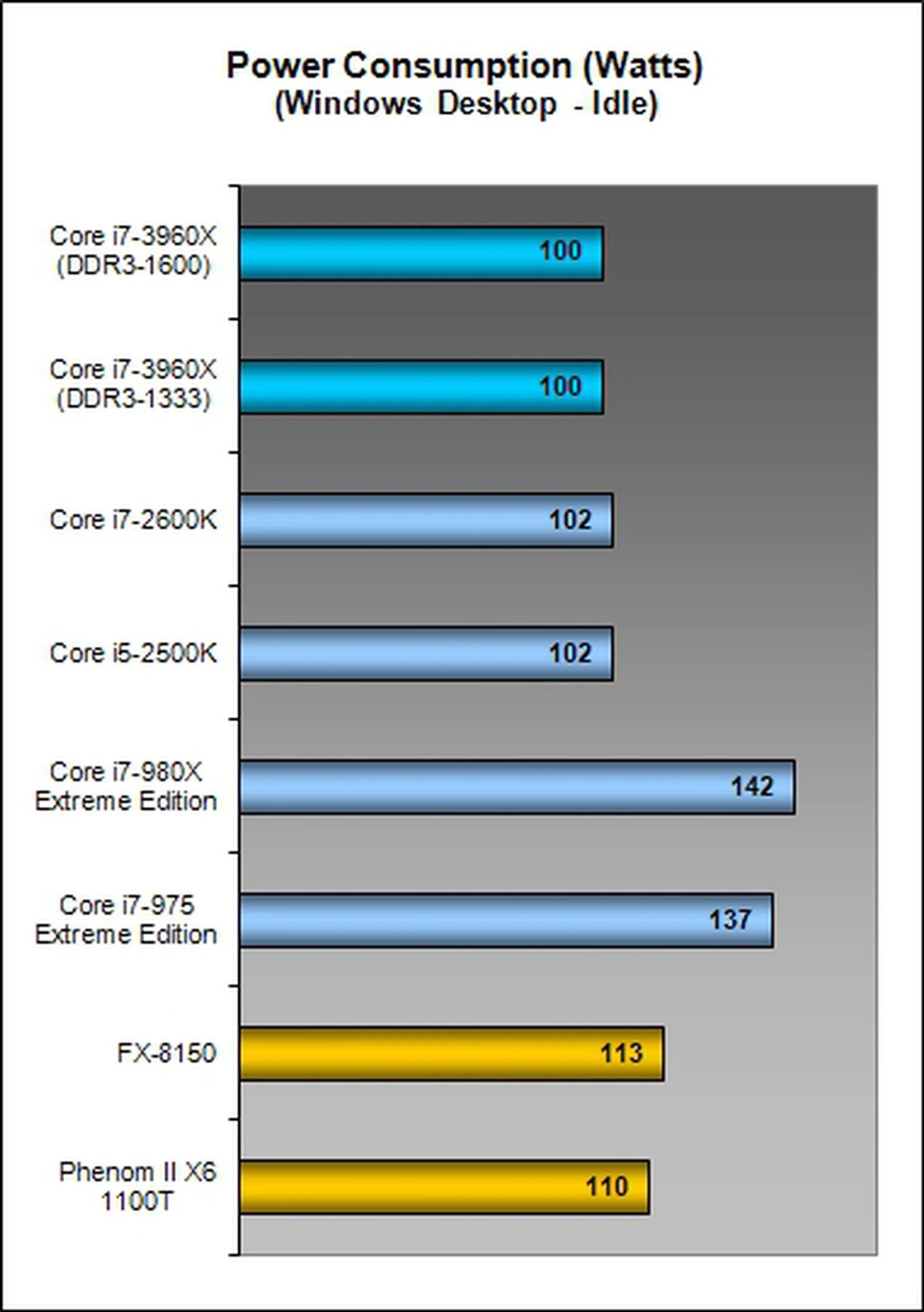
The Sandy Bridge-E processor's idle power consumption is in-line with the existing Sandy Bridge processors, sipping along at about 100W. What's surprising is how efficiently the workstation processor shuts off unnecessary portions of the CPU to achieve an idle power draw equivalent to a mainstream processing platform. Power savings compared to the old hex-core Core i7-980X is about 40%!
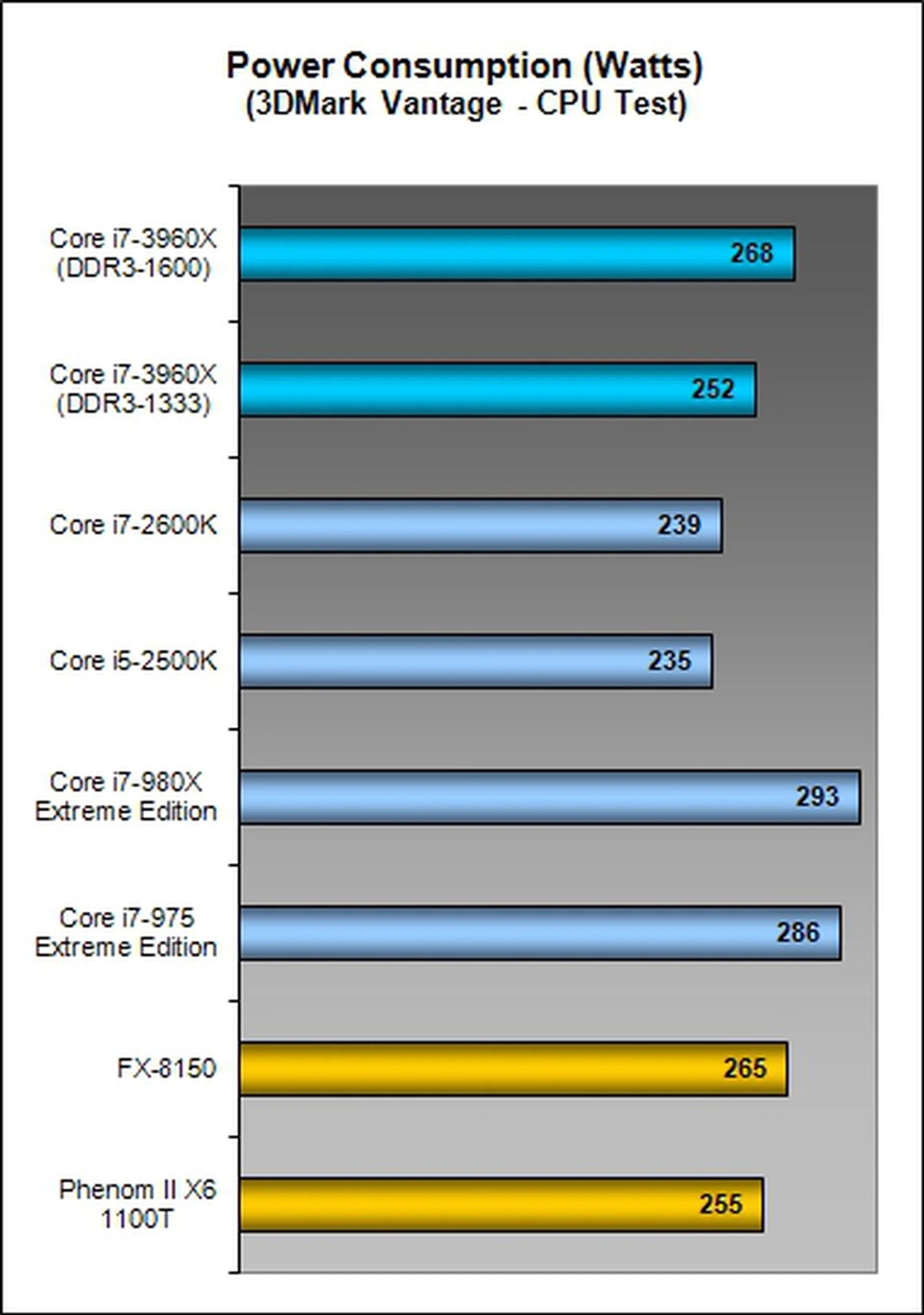
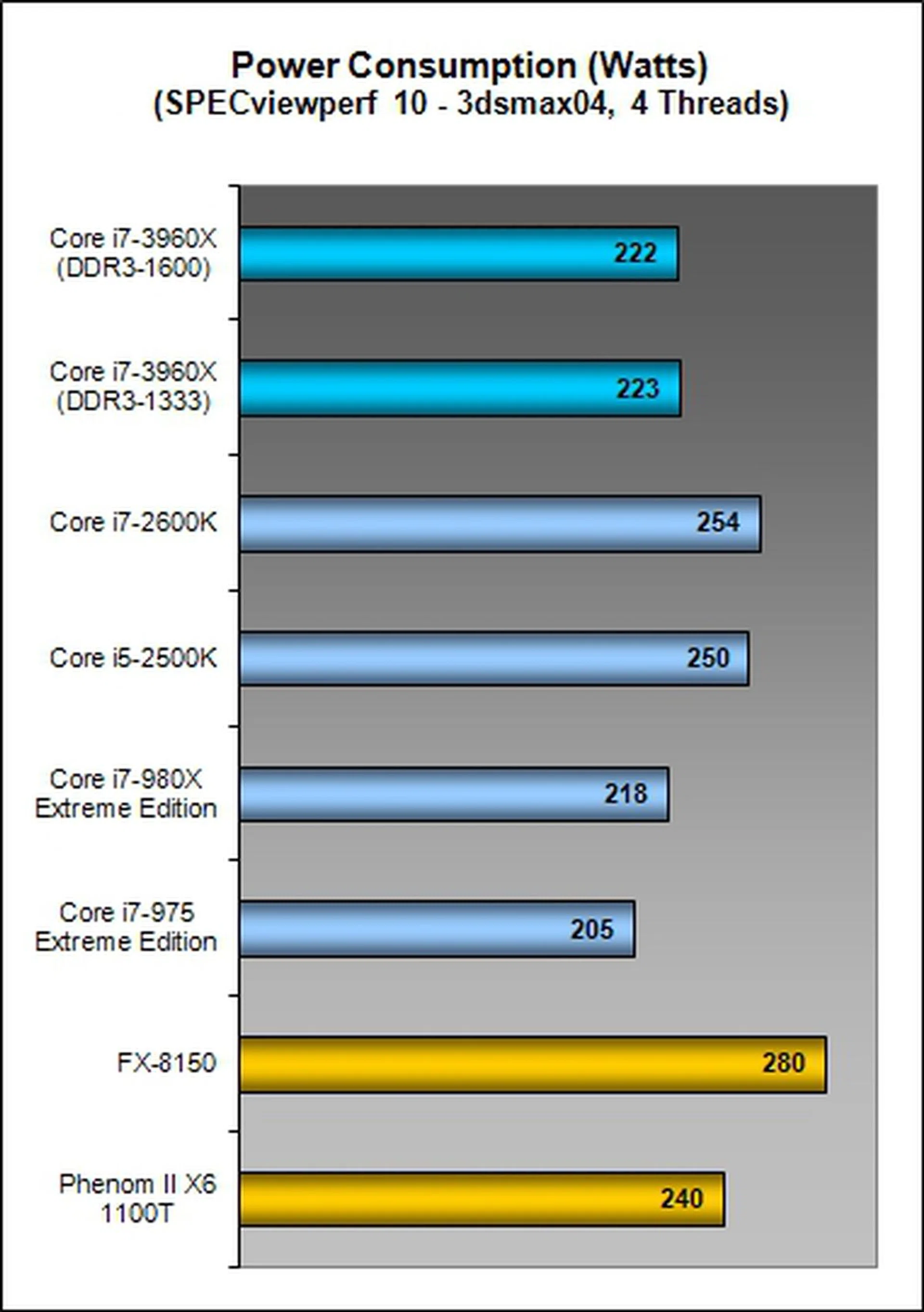
With heavier workloads such as the 3DMark Vantage CPU test, we see the effects of a 130W TDP based processor as compared to the 95W TDP rating of the Sandy Bridge CPUs. Naturally the Sandy Bridge-E processor consumes more power but it was still better than its predecessor and the AMD counterparts. but the 4-thread rendering test of 3dsmax04 seems to show an exception in this situation.
Interestingly on SPECviewperf 10 when setting the workload for four threads, the six-core processors consumed less power than their quad-core based mainstream Sandy Bridge counterparts. Either the scheduling isn't very efficient and the presence of CPUs with more cores enabled them to complete the workload sooner, or SPECviewperf 10 and the OS are actually taking advantage of the multi-core processors to schedule workloads as sooner than expected. Either way, the result is clear that heavily threaded workloads get to complete faster on the six-core processors, thus consume less overall power.
Only Power Users Need Apply
To recap, the Core i7-3960X Extreme Edition is Intel's new top of the line six-core processor capable of crunching up to 12 threads simultaneously with HyperThreading technology just like its predecessors, the Core i7-990X and i7-980X. They are even based on the same 32nm manufacturing process technology and sport the same 3.3GHz base clock speeds (though the 990X runs at 3.46GHz).
What's new however is the upgraded microprocessor architecture taking after the Sandy Bridge architecture in some aspects and hence it's known by the codename of Sandy Bridge-E. This overhaul brings the newcomer some serious new features like a quad-channel DDR3-1600MHz capable memory controller, an on-die 40-lane PCIe controller that can operate at PCIe 3.0 speeds, supports various flexible PEG slot arrangements, a huge 15MB L3 cache juggle all that data going in and out of various functions of the CPU, and new instruction sets to support SSE 4.2, AES and AVX instructions.
What you have in the end is a massive 2.27 billion transistor chip, which is double the transistor count of the previous top of the hill processor, the Westmere base Intel Core i7-990X and i7-980X. To an almost similar extent, the die size too has almost doubled its predecessor. To support this new monster chip and its massive LGA2011 package, you'll need a brand new platform based on the Intel X79 chipset. Clearly, this is no ordinary processor for tweakers and enthusiasts, but it's a processor architecture developed for the workstation market just as how the Westmere did in the past. On the internet, you'll find sources pointing to the Intel Xeon E5 processor launch in the first quarter of 2012, which is based on the Sandy Bridge-EP architecture that's identical to the reviewed Sandy Bridge-E, except that it supports dual processors using QPI links on the Patsburg chipset. The combined workstation platform is codenamed Romley.
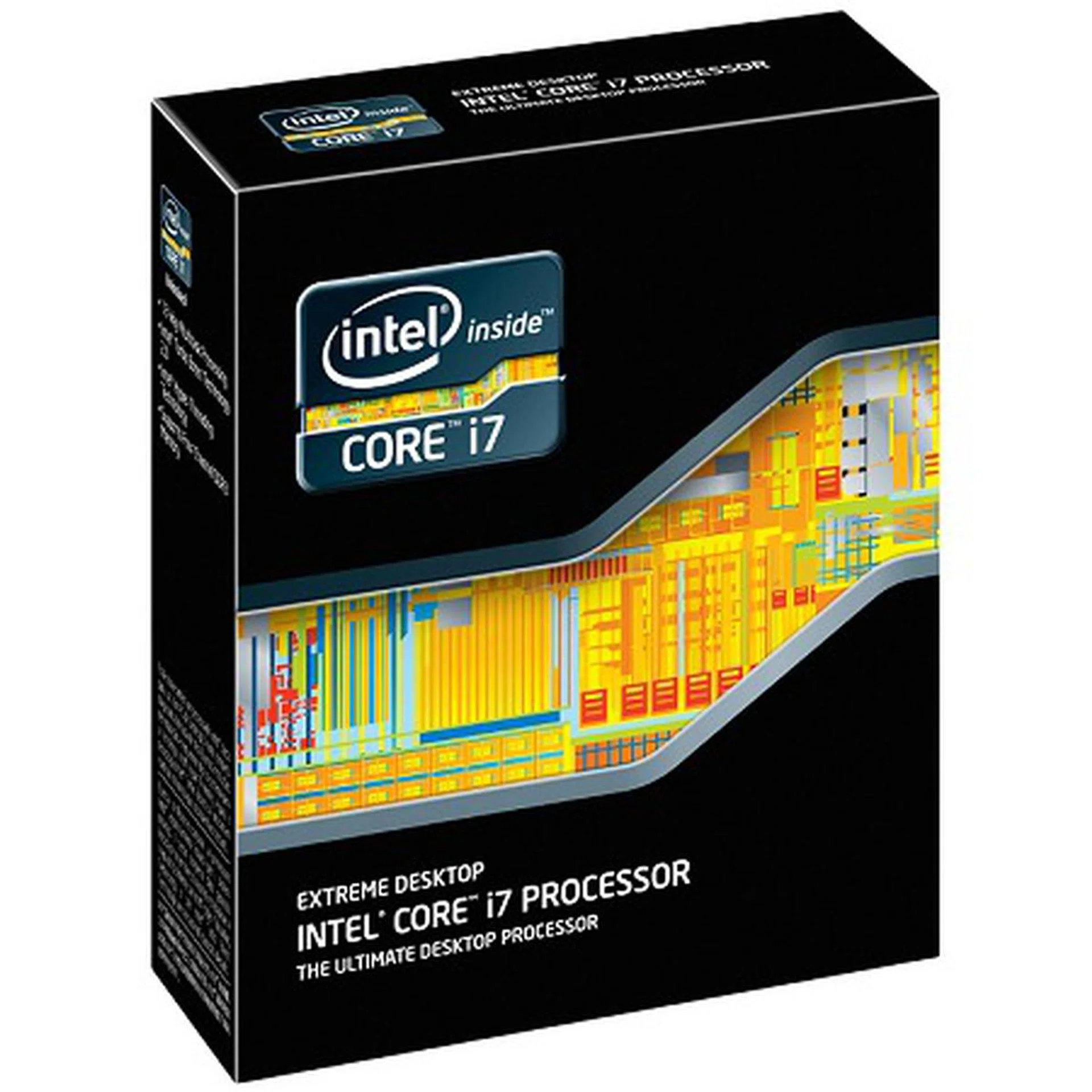
The Core i7-3960X is the cream of the crop processor Intel has to offer to enthusiasts based on the Sandy Bridge-E architecture. However not everyone can appreciate the engineering that has gone into this CPU as it was build to address workstation needs - not the typical home user who has a lot of spare cash.
We got to agree that the Core i7-3960X is a serious piece of engineering to address the enthusiast home workstation market segments. But what exactly is its net benefit? From our various tests, we can safely conclude that if you dabble solely in 3D, graphics or video content creation tasks and video encoding workloads, you stand to gain from 15% to 30% improvement over the next fastest Intel competitor. Focusing on the top mainstream enthusiast Core i7-2600K processor, it was generally not much faster than the Core i7-3960X Extreme processor in most test scenarios. In some of these more demanding tasks, at most you can see a 15% to 30% lead. When compared to the old Westmere Core i7-980X processor, you generally get a 20% to 30% speed boost throughout our test suite.
If only small amounts of your time is spend on these demanding workloads, it doesn't make sense to buy into a Sandy Bridge-E based processor. The bigger and more demanding the workloads, the more you get out of this processor.
What left us in discomfort is the hefty price tag of the CPU itself which is approximately S$1,275 (a direct cost translation from the US pricing). We assume that an adequate Intel X79 chipset based motherboard with 4 or more DIMM slots and 3 PCIe slots will cost no less than S$400, which is a hefty price to pay. Plus you'll also need to fork out more cash for a cooling solution with the cheapest air cooling option that will cost about S$40 from Intel.
Despite the processor and platform's workstation roots, why Intel is pitching this to power users and enthusiast gamers with big pockets is because of the processor's ability to work with massive multi-GPU scaling. This group of users are likely to have three monitors or more and link up multiple graphics cards to power the many more pixels required to be crunched to address ultra widescreen gaming. If they dabble with 3D gaming, then the workload nearly doubles again and you'll need serious graphics horsepower. While you could get a somewhat equal level of support from the Nehalem and Westmere processors on the Intel X58 platform, their technology is now nearly three years old and we've seen how much more efficient and faster the new Sandy Bridge-E is. The new processors offer even more PCIe lanes and supposedly are even Gen 3 ready. So if you buy into the "future-proofing" concept, this new platform can be seen as an investment of sorts.
Yet another target audience for the Intel Core i7-3960X are the overclockers and extreme power users who do not mind spending for their hobbies and paying extra for liquid cooling solutions. These users will likely also splurge on memory kits with higher overclocking overheads as this Sandy Bridge-E processor is just screaming to be overclocked. Its CPU Frequency Multiplier comes unlocked, making overclocking rather straightforward by setting its CPU ratios and fine-tuning its Bus Clock Ratio. This makes investing in a good cooling system as well as memory modules with higher rated clock frequencies natural choices to push the Sandy Bridge-E CPU to higher levels.
In short, just like the Intel Core i7-980X, this new Core i7-3960X processor is ideal for a select target group of users who spend a lot of time creating intense multimedia content and individuals with very deep pockets to power their passion like indulging in an extreme gaming rig or are keen overclocking enthusiasts toying around with the latest and greatest. For early adopters of the Nehalem or Westmere microprocessor architectures, the Intel Core i7-3960X Sandy Bridge-E processor may be the upgrade your system is sorely missing. To save half the cost of the processor, you do have another option - get the Intel Core i7-3930K as it's not much different.
As for the rest of the mainstream audience who have already adopted the Sandy Bridge processors, it's worth your while to wait for Ivy Bridge processors which is touted to be launched in March 2012.
Our articles may contain affiliate links. If you buy through these links, we may earn a small commission.