

Note: This review was first published on 5 July 2022 and is republished again as year-end offers have it going for less than S$1,700, which makes it a good consideration. Buy-links are available at the end of the second page.
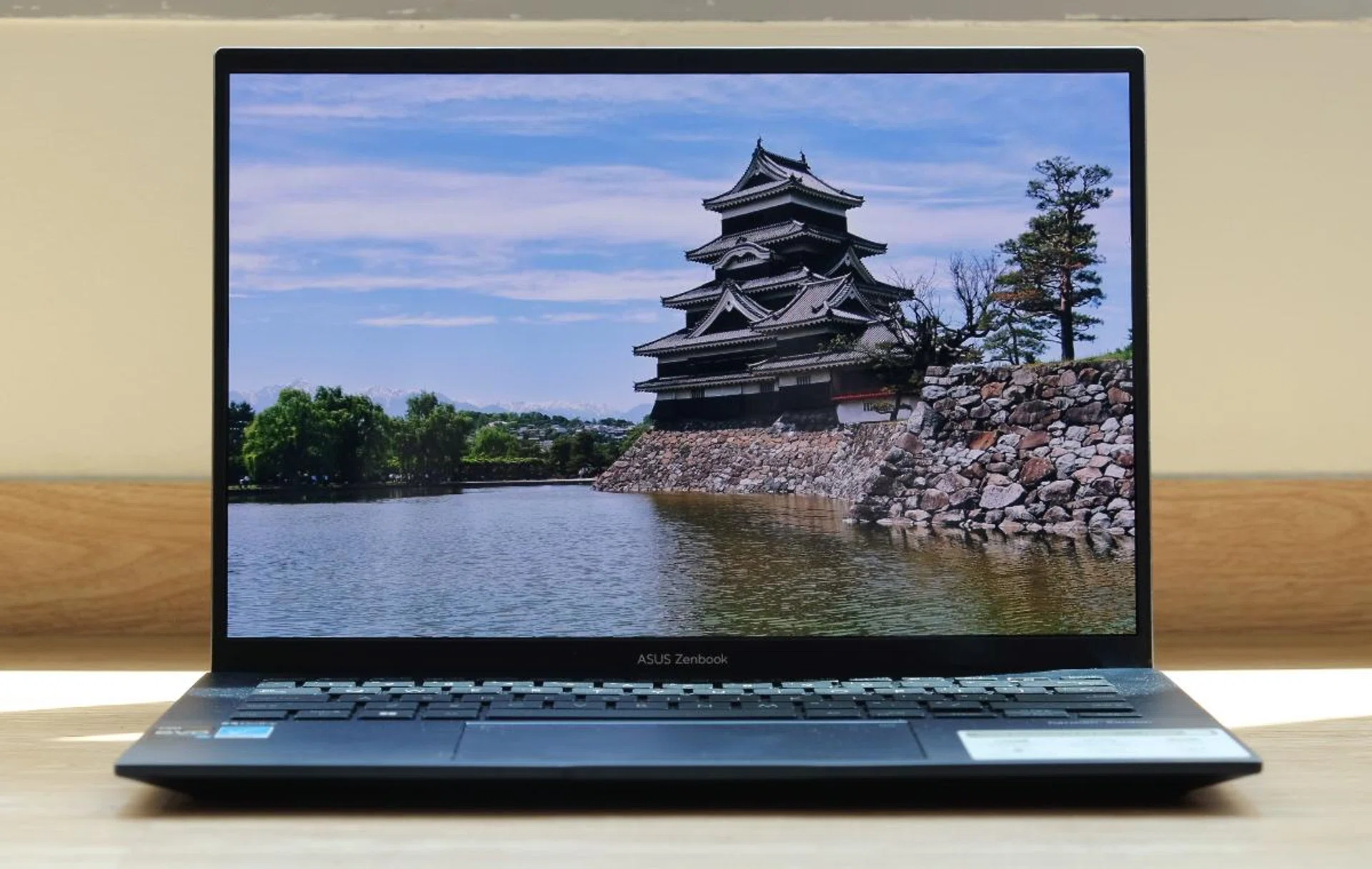
The new ZenBook 14 OLED UX3402 is one of the most affordable notebooks you can buy that comes with an OLED display.
OLED goes mainstream
If you have been following the developments of ASUS notebooks closely, you’ll notice that they all have something in common. OLED. ASUS is going big and hard on OLED displays. We have had the ZenBook 14X OLED, the ZenBook 14X OLED Space Edition, and then the dual-display ZenBook Pro 14 Duo. And now, even the most basic ZenBook is getting an OLED display. This is the new ZenBook 14 OLED UX3402.
Design & features
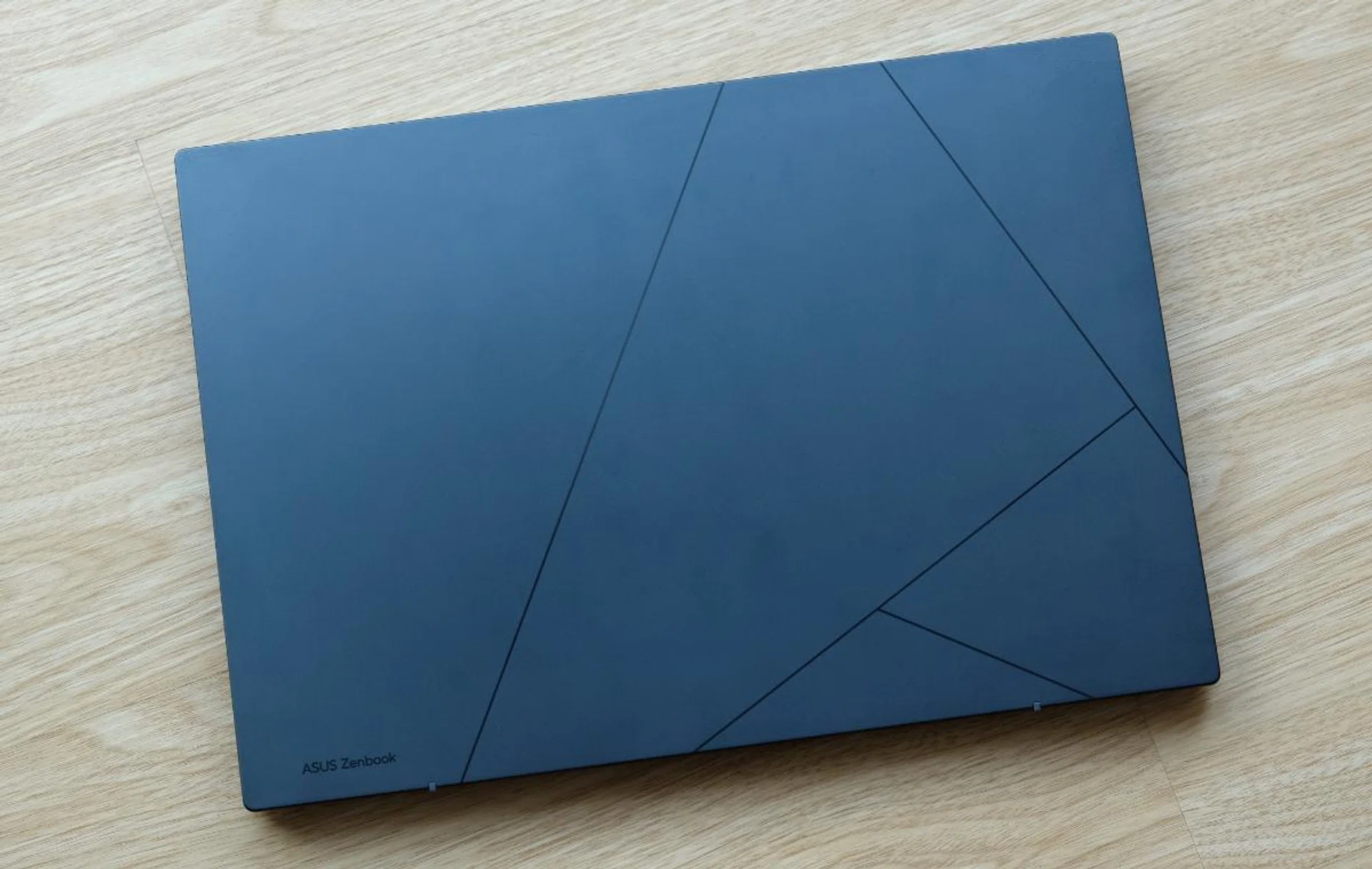
The lid sports a more minimalist design.
The ZenBook 14 OLED UX3402 is part of ASUS’ new 2022 ZenBook lineup. Though you won’t mistake it for anything other than a ZenBook, it does have some significant design changes.
The lid no longer features the signature ZenBook concentric circles. Instead, it has geometric lines inspired by ZenBook’s new monogram “A” logo. And in the corner, a subtle label reminding you that this is indeed an ASUS ZenBook. The concentric circles aren’t gone, however, because you’ll still find them on the end caps of the redesigned hinges.
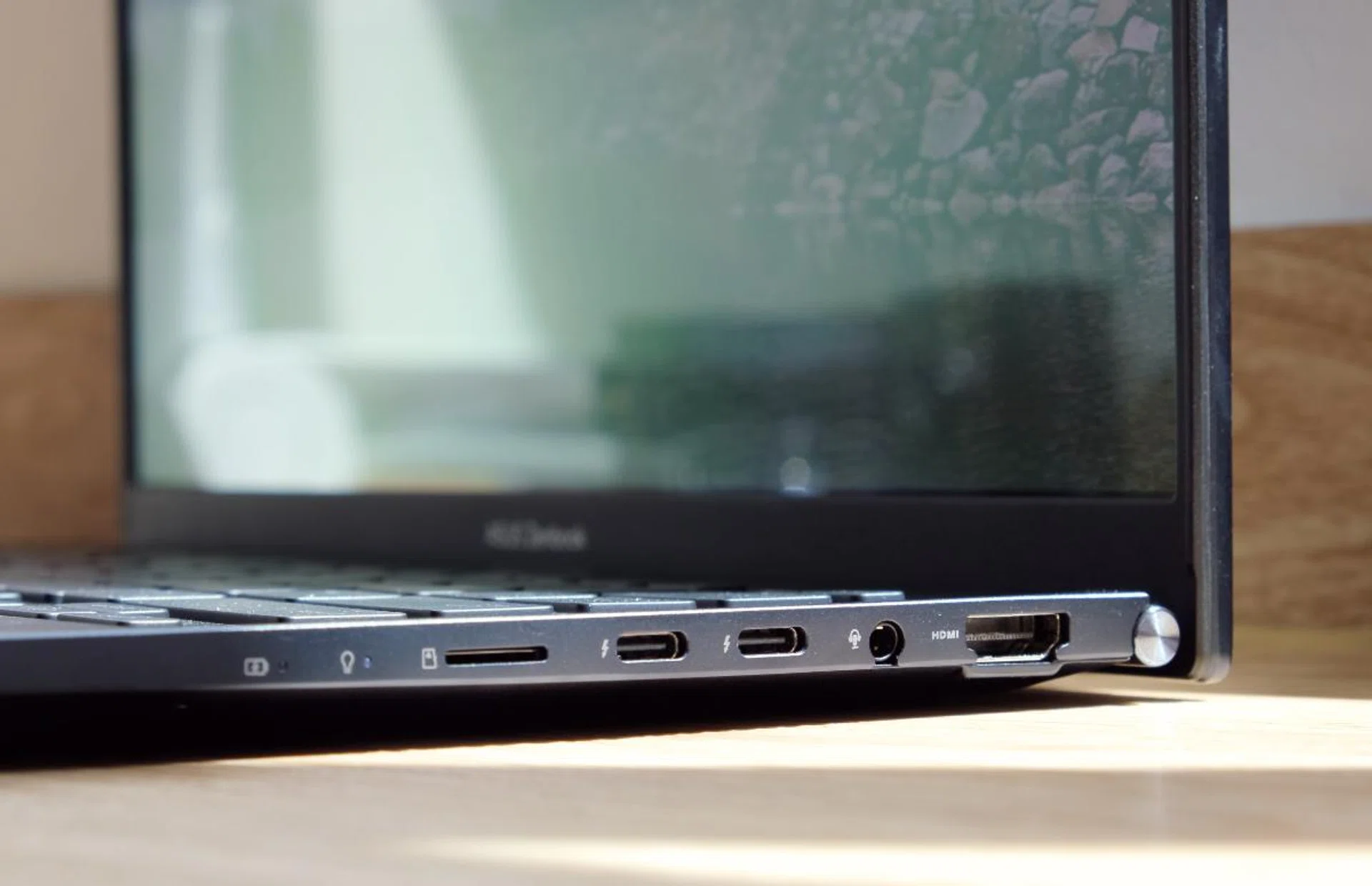
Though its fairly thick, connectivity is good. How many notebooks can you think of that come with USB-C, USB-A, and full-size HDMI ports?
The ZenBook 14 OLED has an all-aluminium body. Its weight is an entirely decent 1.39kg and its thickness is 16.9mm. In my hands, it feels neither overly cumbersome nor super light. I’d say it’s just about as heavy and as thick as most people would want for an everyday notebook. There’s also a tiny bit of flex if you exert enough pressure on the chassis. Perhaps what’s more important to know is that the notebook meets the MIL-STD-810H standard for durability. This means it has some resistance to extreme temperatures and humidity, vibration, and drops.
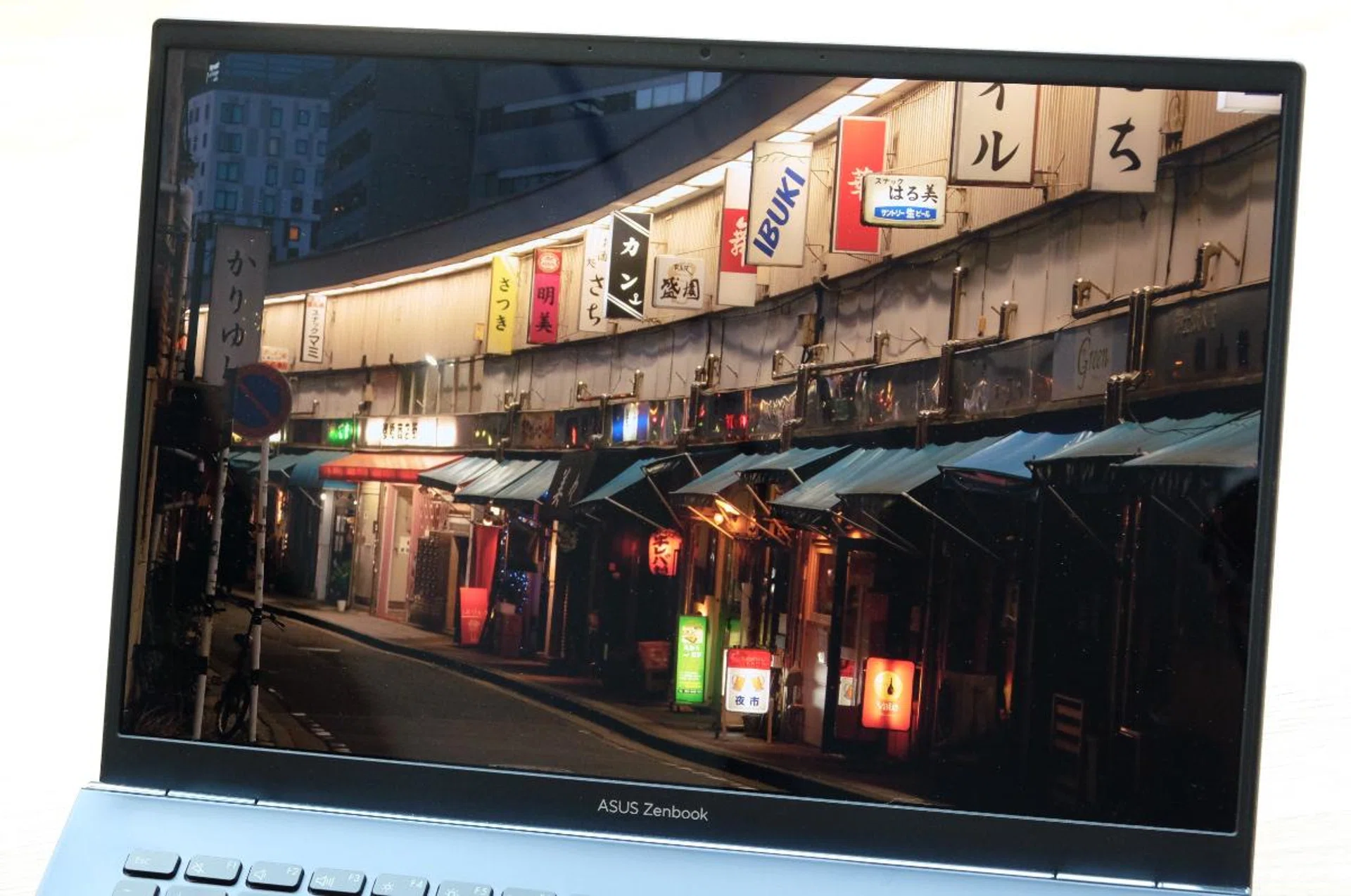
The OLED display is gorgeous and a real step up from the IPS LCD panels you see on most notebooks.
The highlight has to be the display. It’s a 14-inch OLED display that appears to be identical to the ones on the earlier ZenBook models I reviewed because they have the same specifications. Like those, this OLED display has a resolution of 2880 x 1800 pixels and a 90Hz refresh rate. It also supports 100% of the DCI-P3 colour space, is Pantone-validated, and meets VESA’s DisplayHDR True Black 500 requirements. It’s a technically impressive display for sure, and it’s just as brilliant in real life. It’s sharp, crisp, wonderfully vivid, and blacks are truly inky black. It’s a big step up from the IPS LCD panels you see on most notebooks (even very good ones).
Another highlight of the notebook is that it’s powered by Intel’s newest 12th Gen Core processors. Specifically, this model has the Core i7-1260P, which has four performance cores and eight efficiency cores. This is paired with 16GB of LPDDR5 memory and a 512GB PCIe 3.0 NVMe SSD. Combined with a large 75Wh battery, ASUS claims a battery life of up to 18 hours. These are very decent specifications to have for an everyday notebook. Connectivity is pretty good too. There are two USB-C Thunderbolt 4 ports, a single USB-A USB 3.2 Gen 2 port, an HDMI 2.0b port, a microSD card reader, and a 3.5mm audio combo jack. One thing to note is that apart from the USB-A port, all the ports are on the notebook's right side.
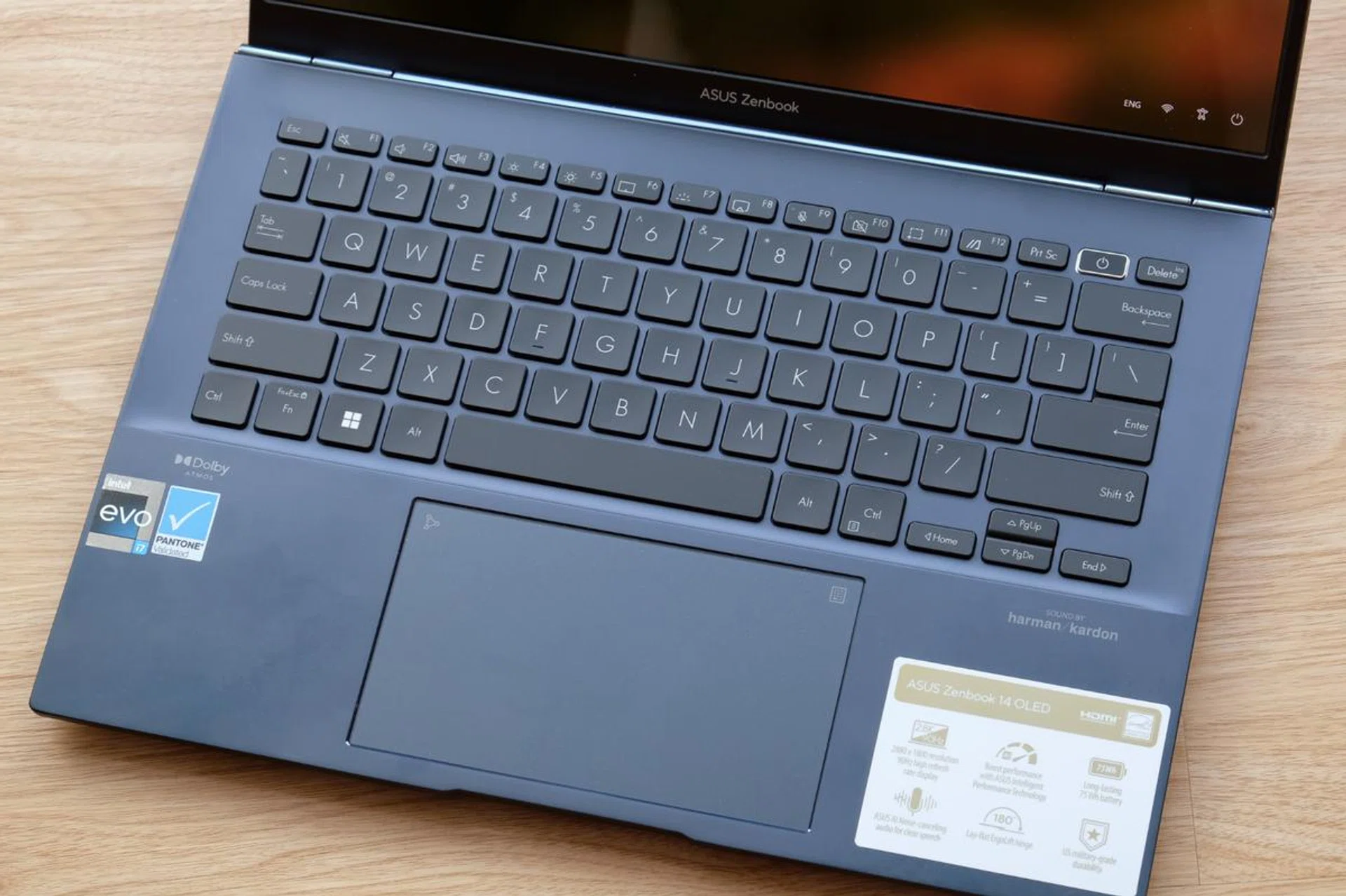
The keyboard and trackpad are class-leading examples.
ZenBooks typically have pretty good keyboards, and this new model is no different. The key caps are slightly dished to help guide your fingers. The claimed key travel is 1.4mm, which is relatively long for a notebook. More important, however, is that the weight of the keys is well-judged. This, when coupled with the long key travel, makes the entire keyboard feel tactile and pleasant to use. The trackpad is accurate and responsive. It is also huge – almost as large as the one on the Yoga 9i. It also has a virtual Numpad function if you have to get down to crunching some numbers and prefer a traditional number pad layout for ease of data entry.
Performance analysis
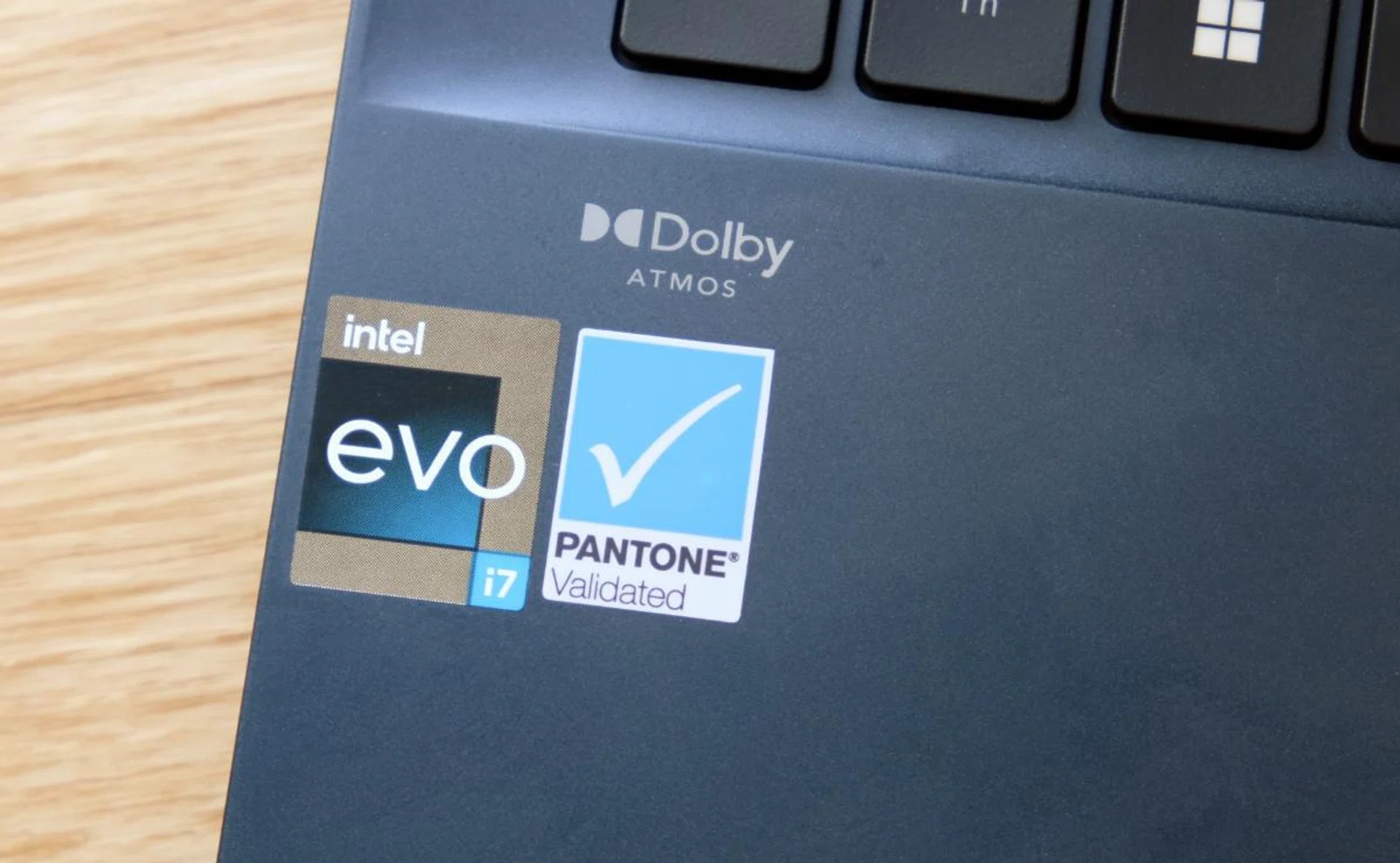
The ZenBook 14 OLED UX3402 is powered by Intel's newest Alder Lake processor.
To recap, the ZenBook 14 OLED UX3402 is powered by Intel’s Alder Lake processors with a big-core + little-core implementation. In this unit, we have a Core i7-1260P which features four performance cores and eight efficient cores. This is paired with 16GB of LPDDR5 memory and a 512GB PCIe 3.0 SSD. There’s no discrete graphics so all graphics processing duties are handled by the integrated Intel Iris Xe GPU. That aside, the ZenBook 14 OLED UX3402 is Intel Evo certified as per the badge it carries that denotes its impressive connectivity standards, excellent battery life (as you'll see later) and has excellent responsiveness.
This notebook’s most obvious rival, insofar as performance is concerned at least, is the Lenovo Yoga 9i which is also powered by a Core i7-1260P Alder Lake processor.
Let's see how it stacks up against other ultraportable notebooks.
Model | Display | Processor | Memory | Storage | Graphics |
ASUS ZenBook 14 OLED UX3402 | 14-inch,2.8K, OLED, touchscreen | Intel Core i7-1260P | 16GB | 512GB SSD | Intel Iris Xe |
14-inch, 4K, OLED, touchscreen | Intel Core i7-12700H | 16GB | 1TB SSD | Intel Iris Xe | |
13.5-inch, 3K2K, OLED, touchscreen | Intel Core i7-1165G7 | 16GB | 1TB SSD | Intel Iris Xe | |
14-inch, QHD+, OLED | AMD Ryzen 7 5800U | 16GB | 512GB SSD | NVIDIA GeForce MX450 | |
14-inch,2.8K, OLED, touchscreen | Intel Core i7-1260P | 16GB | 512GB SSD | Intel Iris Xe | |
13-inch, PixelSense Flow, 120Hz refresh rate | Intel Core i7-1185G7 | 16GB | 256GB SSD | Intel Iris Xe | |
14-inch, Full-HD, non-touch (4K, as tested) | Intel Core i5-1155G7 | 16GB | 512GB SSD | Intel Iris Xe |
CPU performance
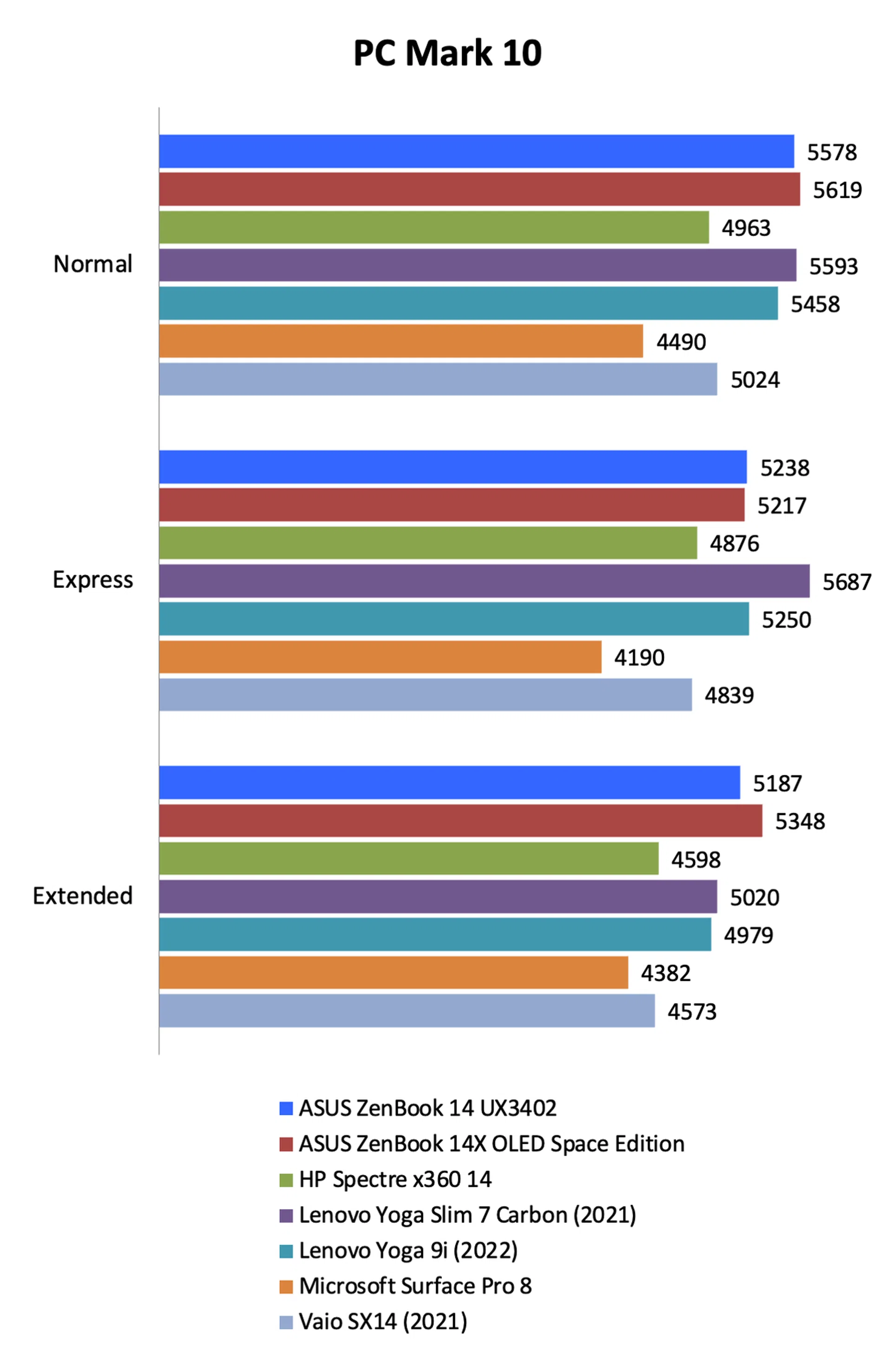
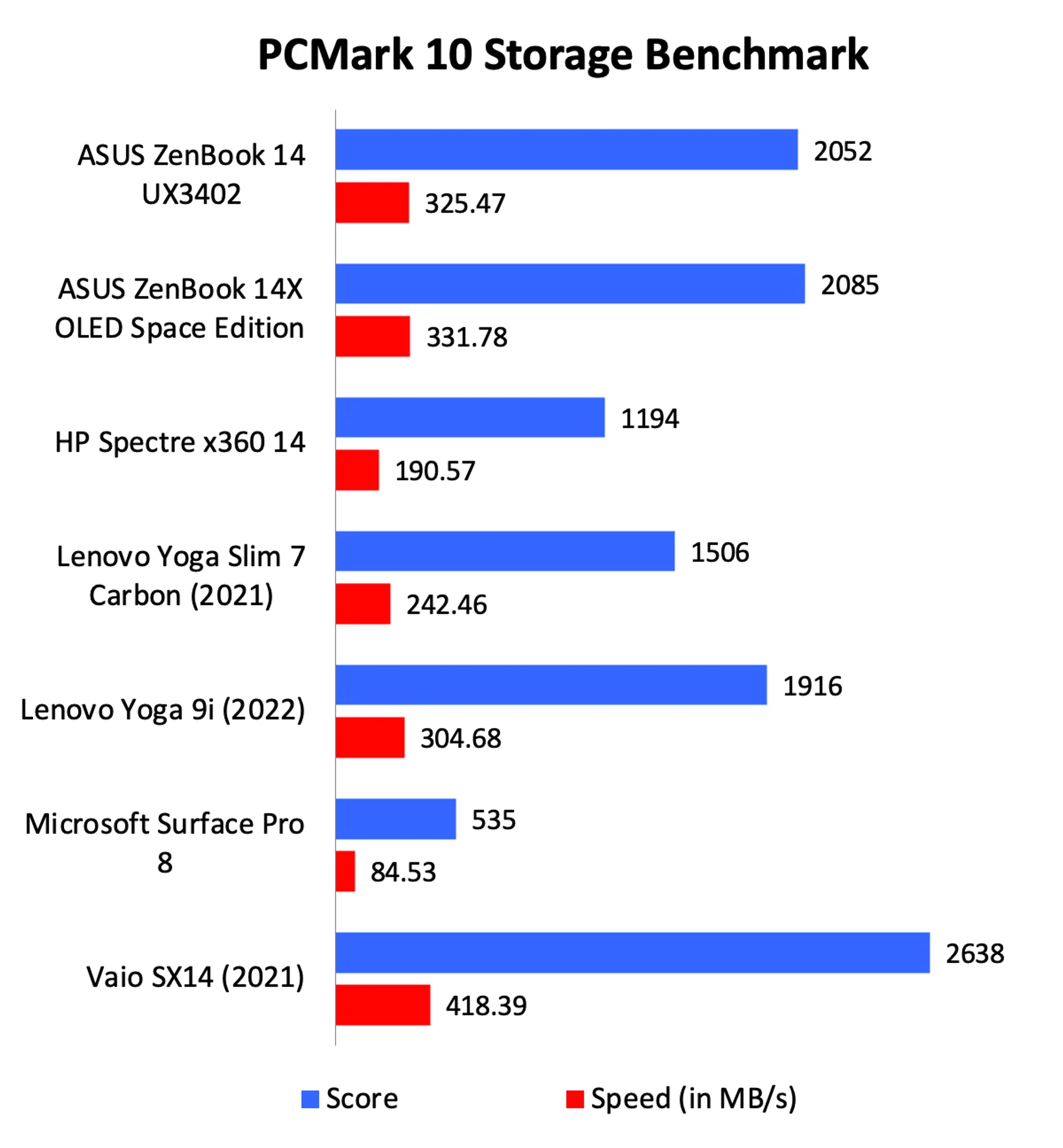
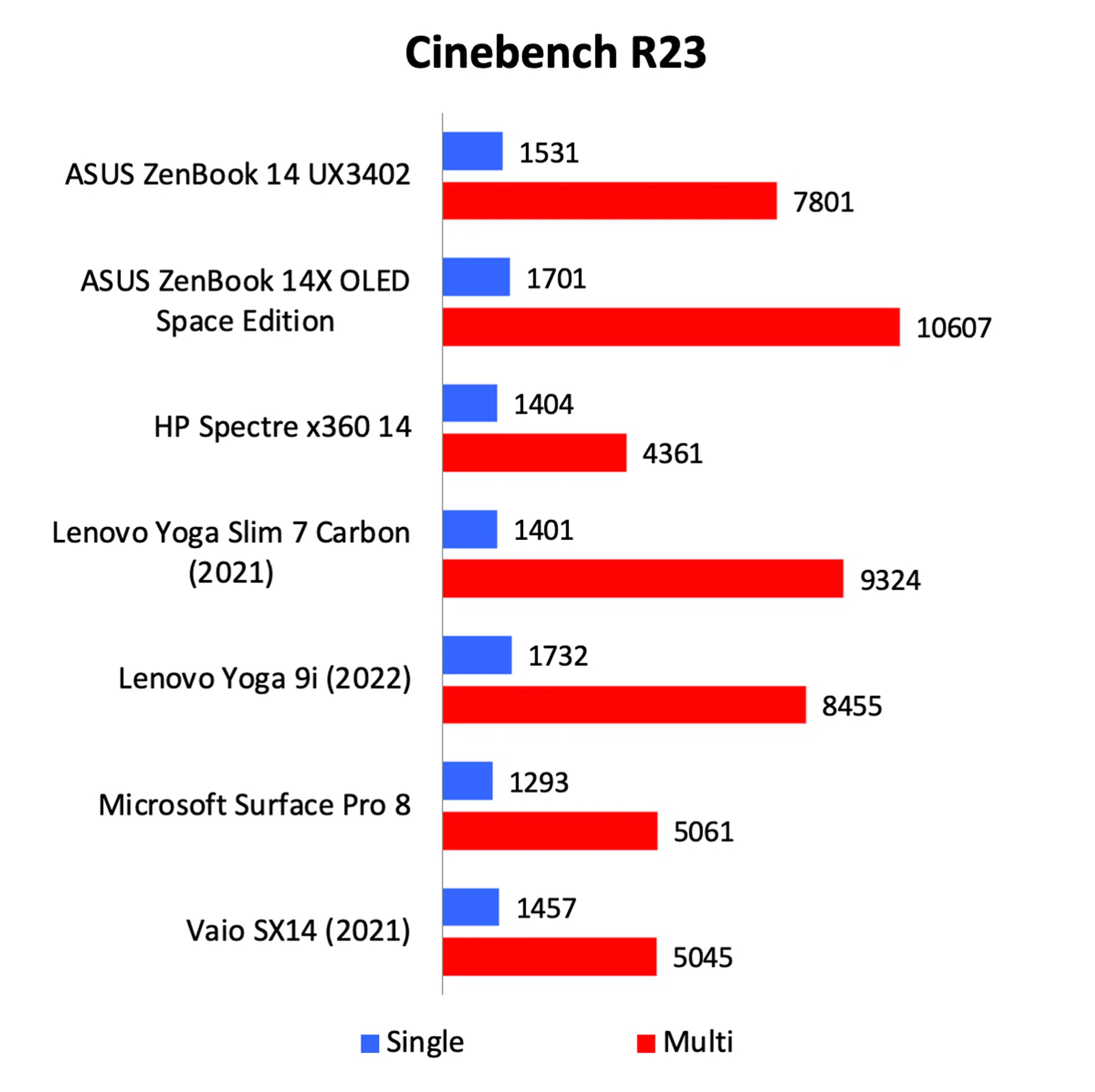
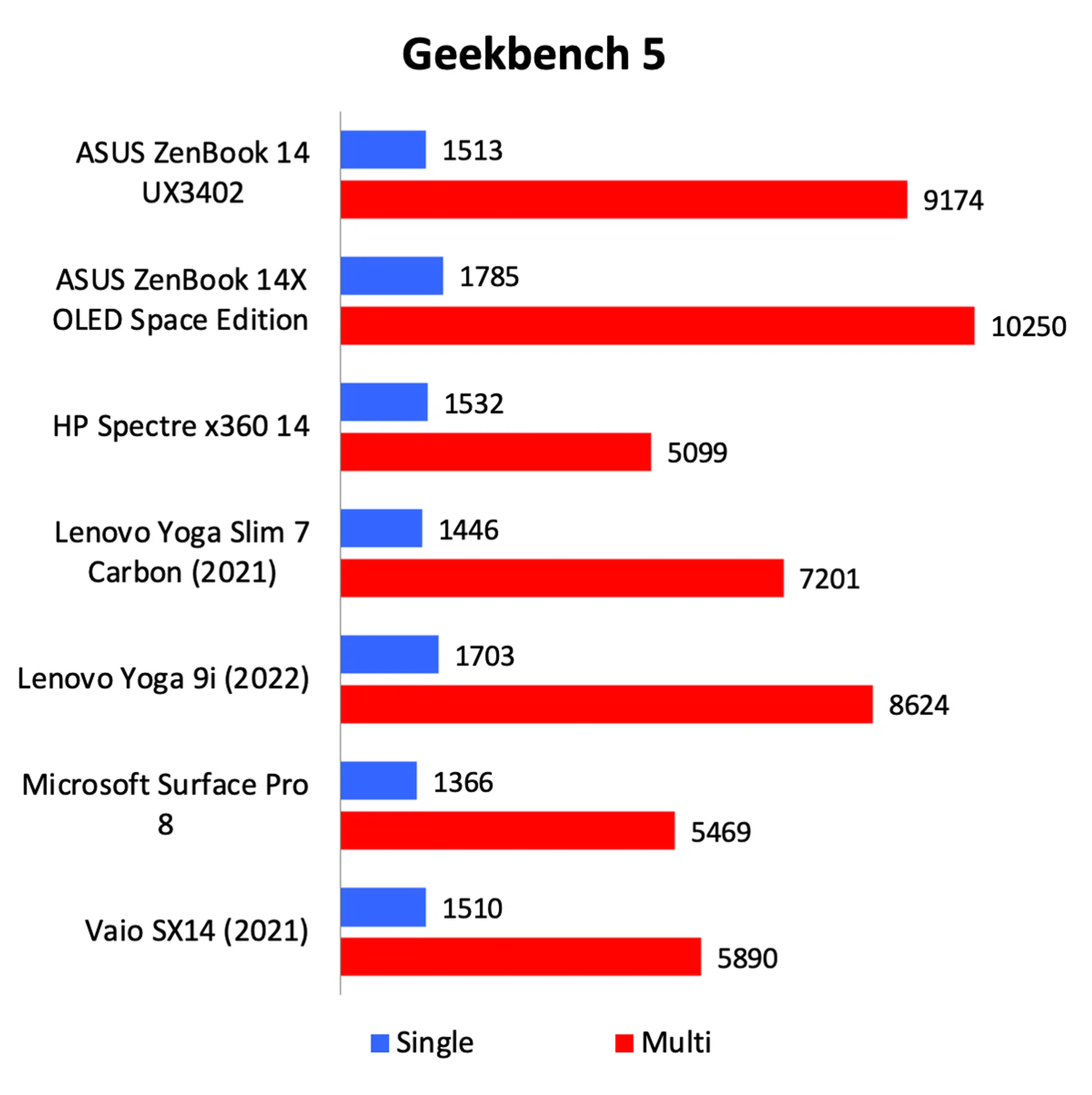
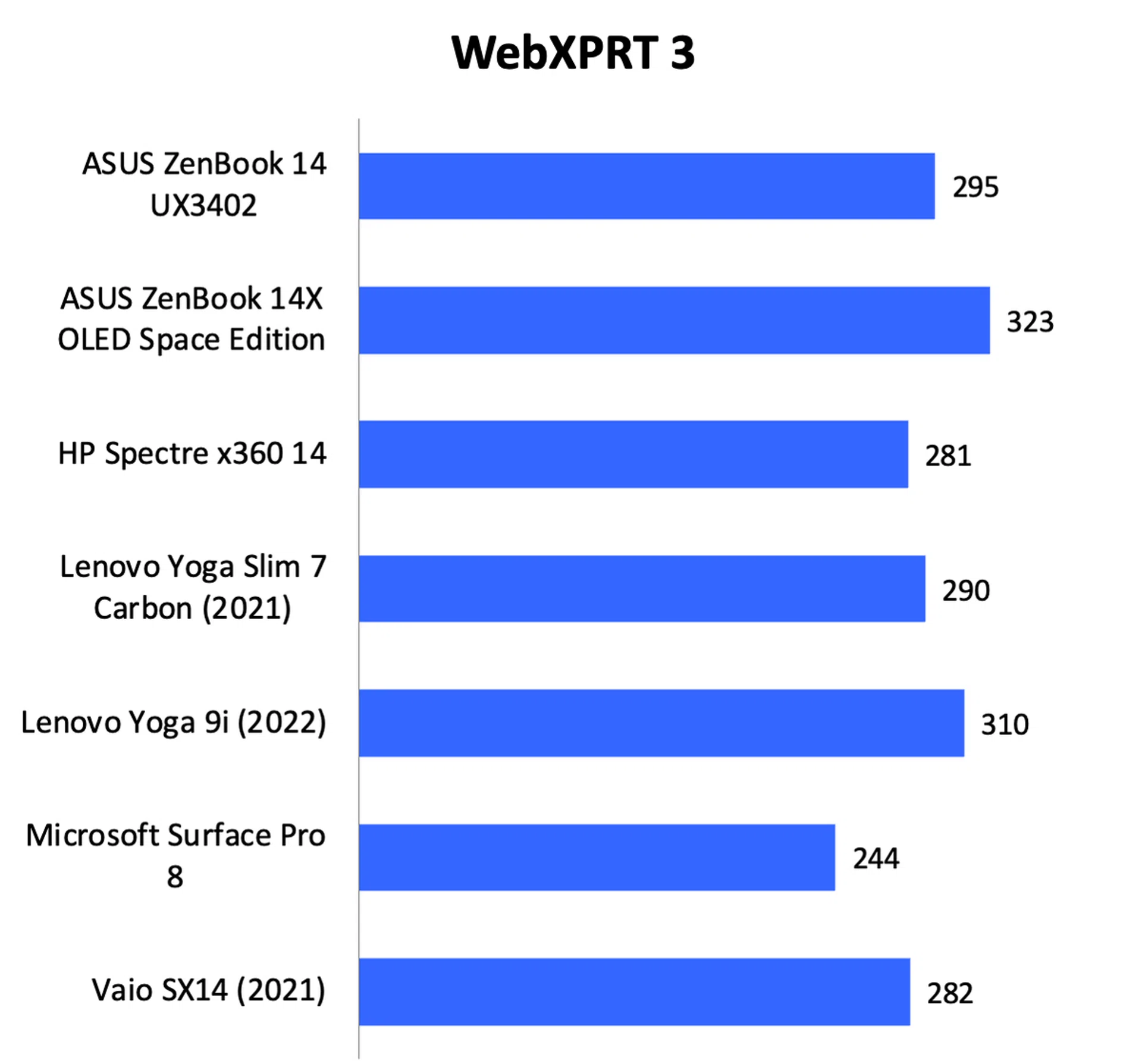
Overall, the ZenBook 14 OLED UX3402’s CPU performance can best be described as decent. It was clearly a step up from the older notebooks that were powered by Intel’s 11th Gen Core processors and it was, unsurprisingly, a little slower than the ZenBook 14X OLED Space Edition which is powered by a more powerful H-series 12th Gen core processor. Against its closest rival, the Yoga 9i, the ZenBook has the leg-up on PCMark. However, it trailed slightly on Cinebench, Geekbench, and WebXPRT. One thing worth mentioning is that the ZenBook gets quite loud and hot when taxed. To be fair, this issue of heat and noise is a problem that plagues all Intel notebooks, but this ZenBook felt a tad warmer than the others.
Graphics performance
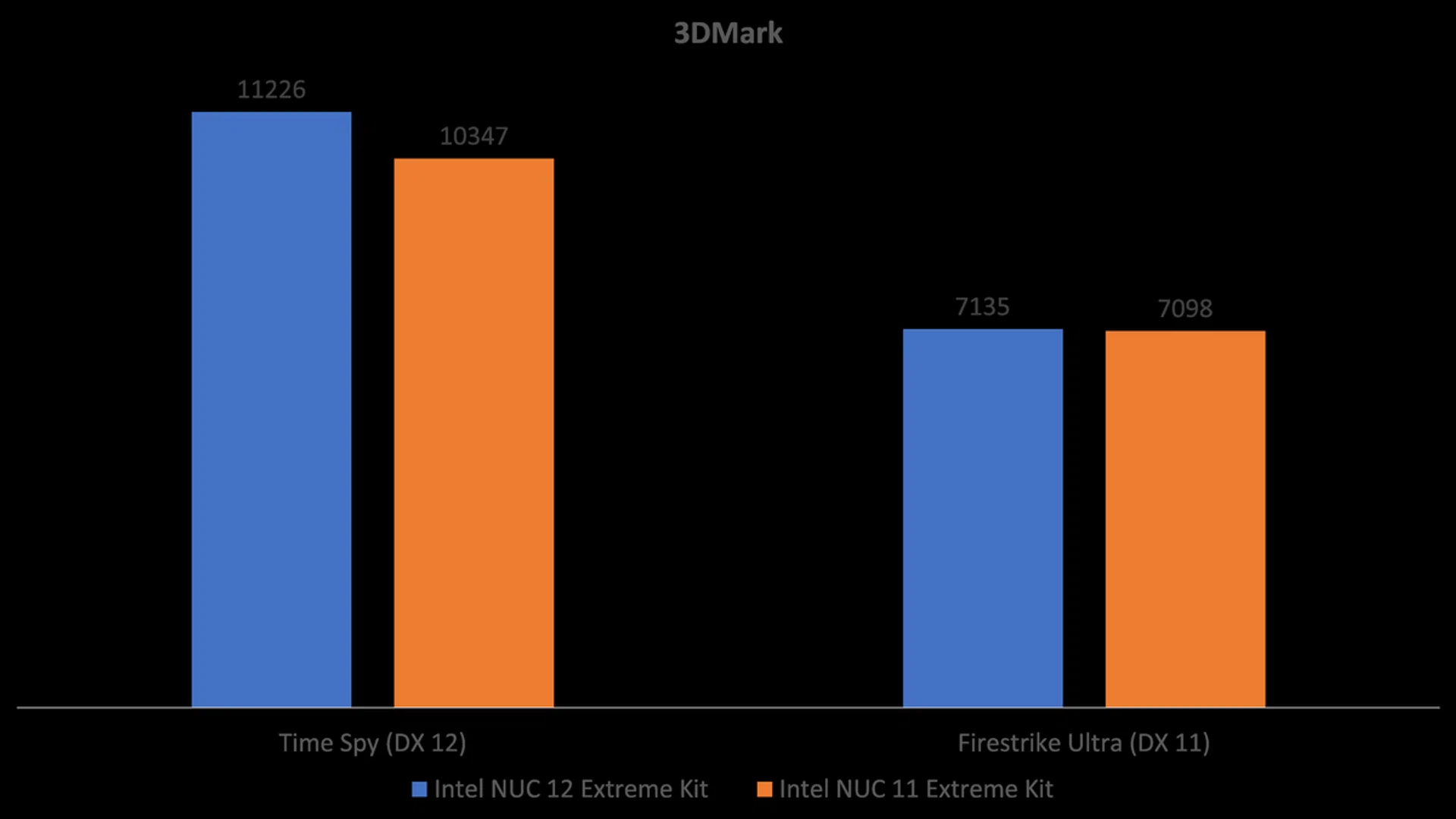
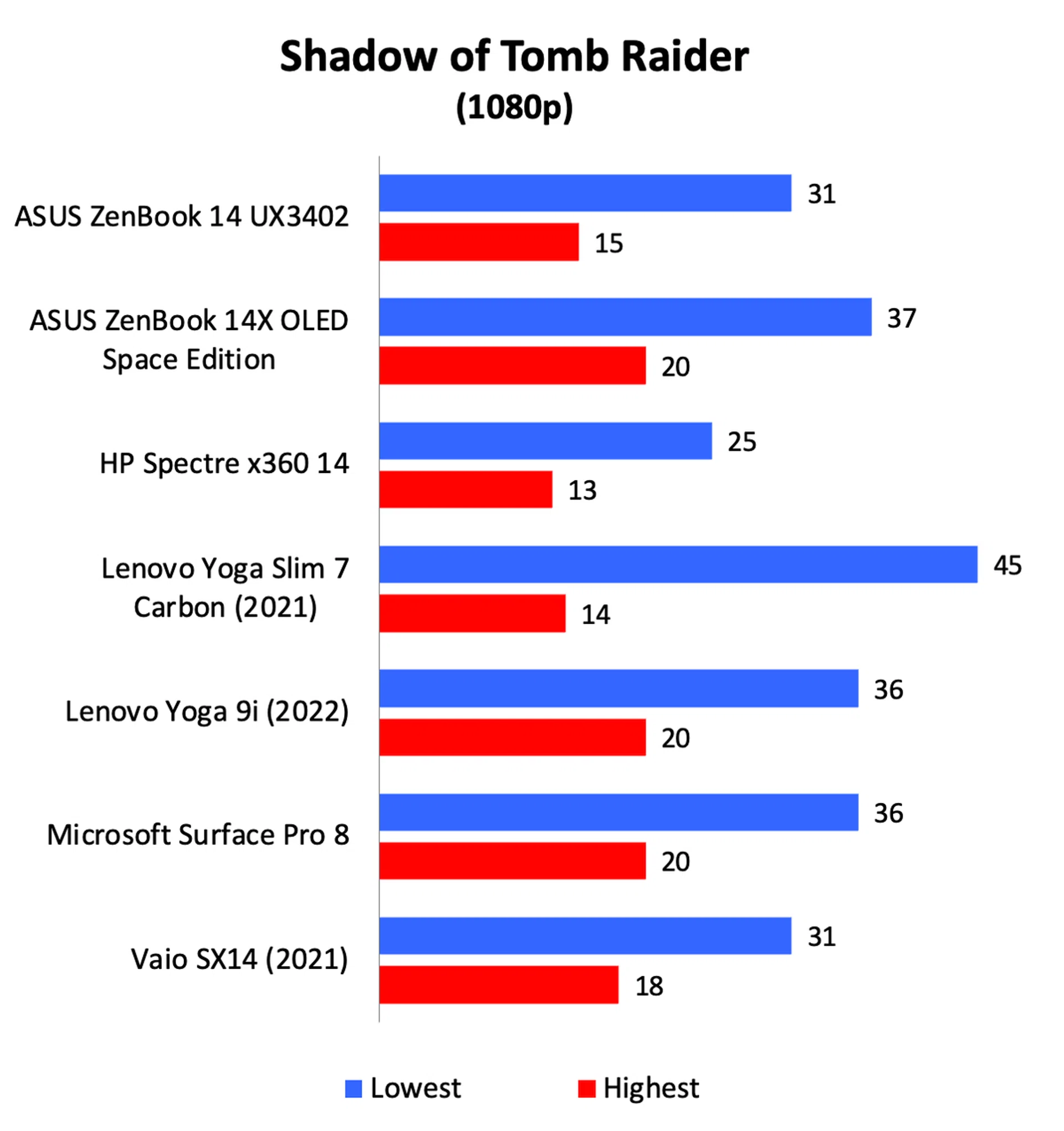
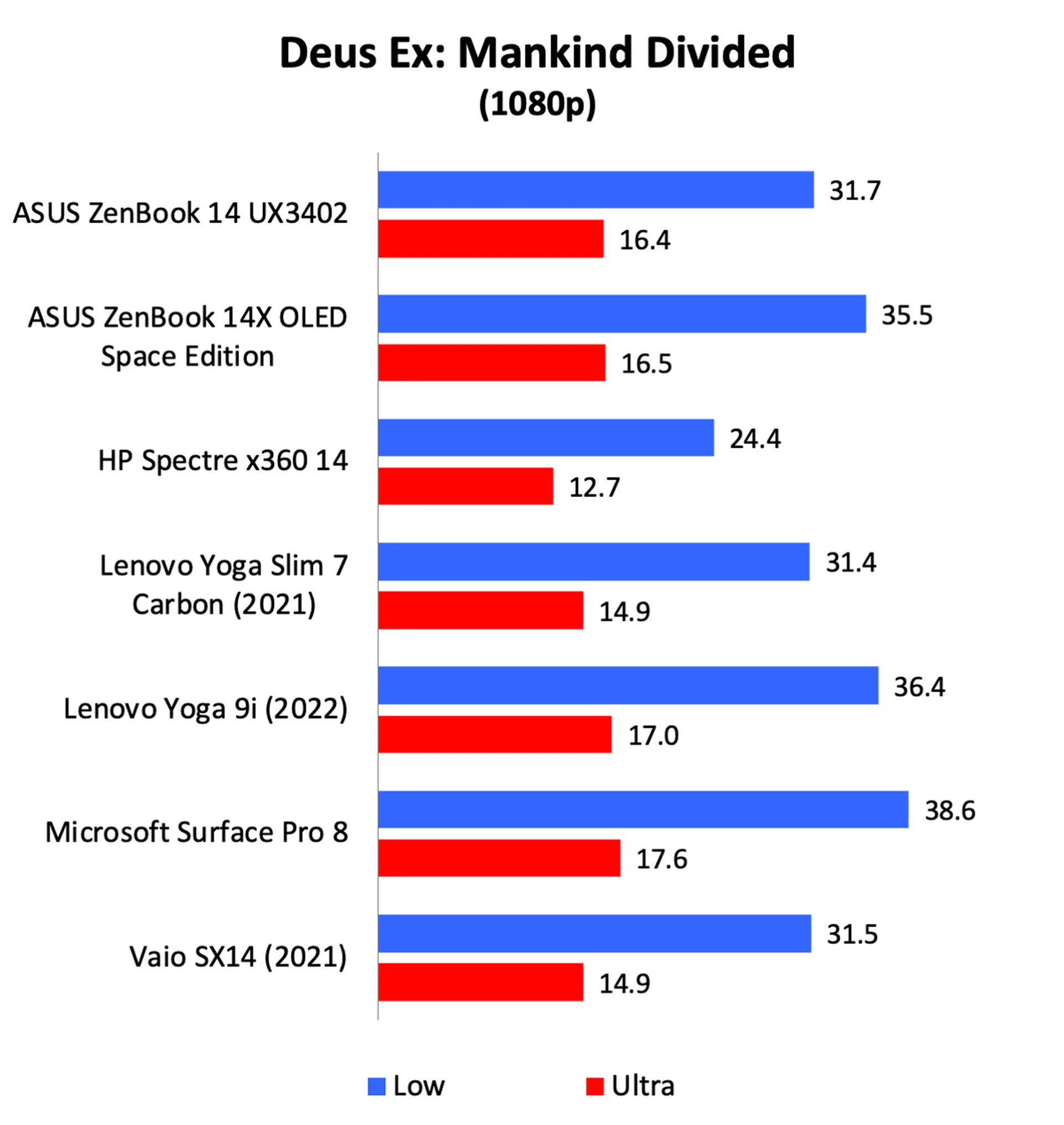
The graphics performance was a little disappointing. Even though it had to rely on the old integrated Intel Iris XE GPU, I was hoping for a little boost thanks to the new CPU cores. However, its scores were on the lower end of the scale when compared to other notebooks with similar integrated GPUs. If I had to guess, its performance was limited by just how hot it ran.
Battery life
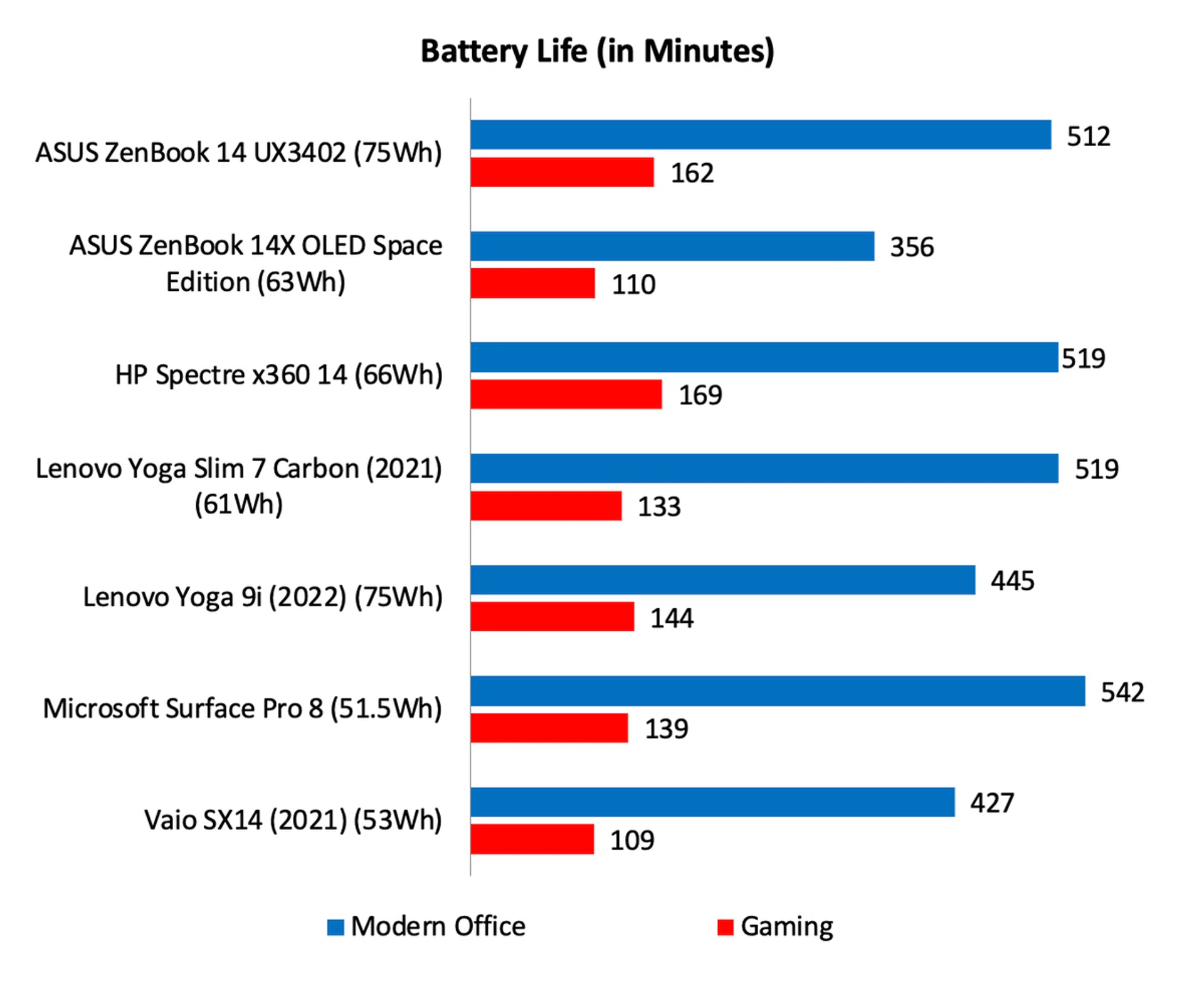
Note: Battery tests were conducted using PCMark 10's battery benchmark with display set to 100% brightness.
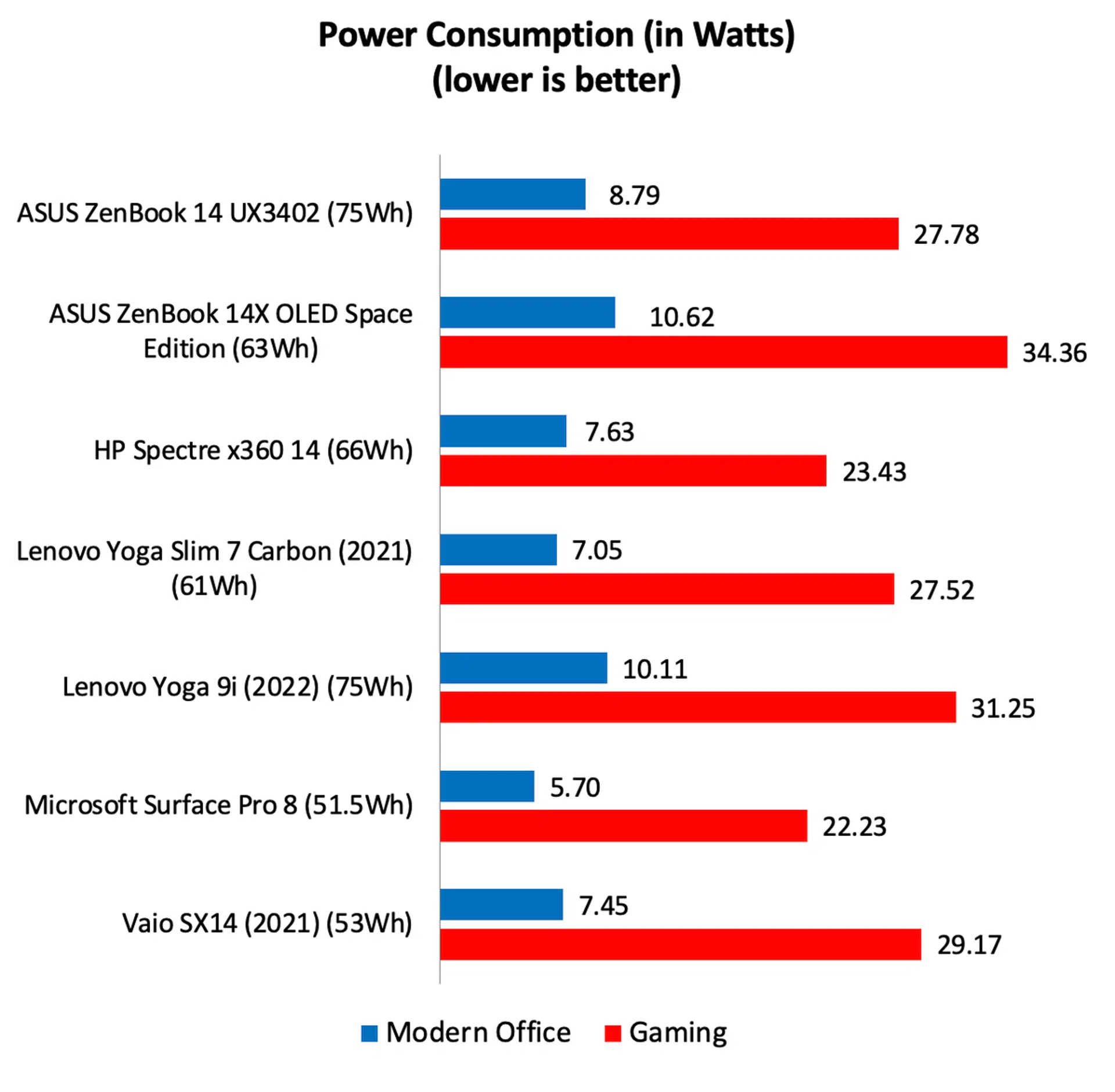
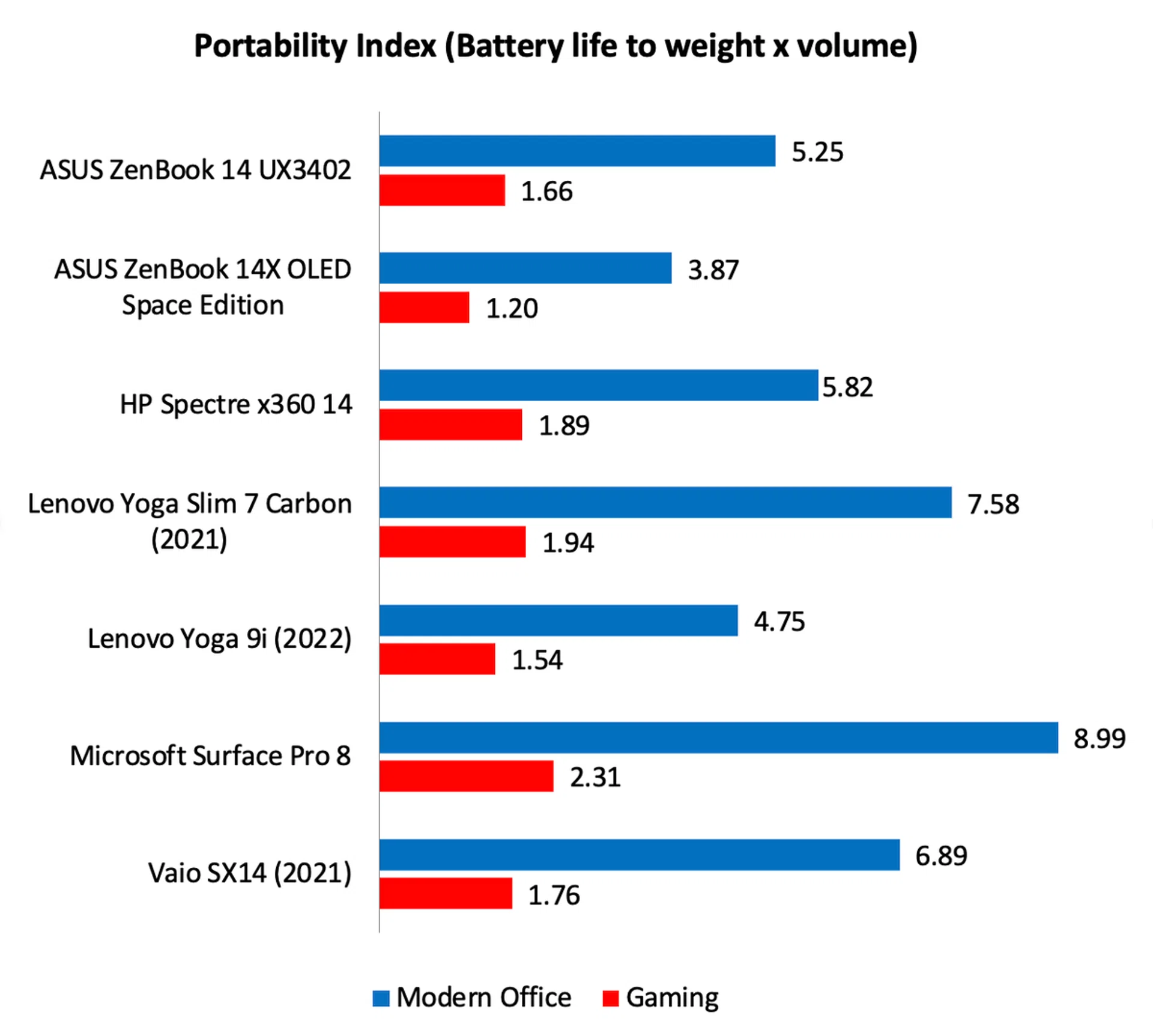
With its 75Wh battery, the ZenBook 14 OLED UX3402 has one of the largest batteries in its class. So it wasn’t entirely surprising to see that it lasted a very healthy 8 hours and 32 minutes. Even on the more intensive Gaming workload, it was only 18 minutes away from lasting a whole three hours. Looking at the power consumption figures, we can see that they were only marginally higher than the other notebooks despite having an OLED display with above average refresh rates.
Mainstream price, high-end features
ASUS’ big push for OLED display must be viewed as a positive. What used to be a high-end feature can now be found on a wide range of ASUS notebooks with prices starting well below S$2,000. In fact, this particular ZenBook, at S$1,899 (official price), isn’t even the most affordable ASUS notebook to sport an OLED display.
Apart from its fantastic OLED display, the ZenBook 14 OLED UX3402 also has a relatively light all-aluminium body, decent performance thanks to Intel’s latest processors, great connectivity, excellent keyboard and trackpad, and a fairly long battery life.

Despite the minor niggles, the ZenBook 14 OLED UX3402 must be considered as one of the best value notebooks in the market today.
Are there niggles? Sure, there are. Build quality doesn’t feel absolute tip-top, and the webcam can be an issue if you have to often take meetings remotely. The notebook also gets noisy and warm when taxed, but as I said, the same can be said for just about any Intel-powered notebook.
The most obvious rival is Lenovo’s Yoga Slim 7 Carbon. The Lenovo also has an OLED display and, because of its carbon fibre chassis, is considerably lighter. However, the ZenBook counters with its lower price tag and superior connectivity. The ZenBook has Thunderbolt ports, which is arguably the Yoga Slim 7 Carbon greatest weakness.
All things considered, the ZenBook 14 OLED UX3402 is remarkable value and should be considered as one of the best bang for buck notebooks you can buy right now, especially with some of the current year-end offers pushing the price below S$1,700. If you are shopping for a notebook, this absolutely has to be on your shortlist.
Note: You can find the ASUS ZenBook 14 OLED UX3402 on the ASUS Online Store and the ASUS Official Store on Lazada.
Our articles may contain affiliate links. If you buy through these links, we may earn a small commission.