

Note: This review was first published on 23 October 2021.
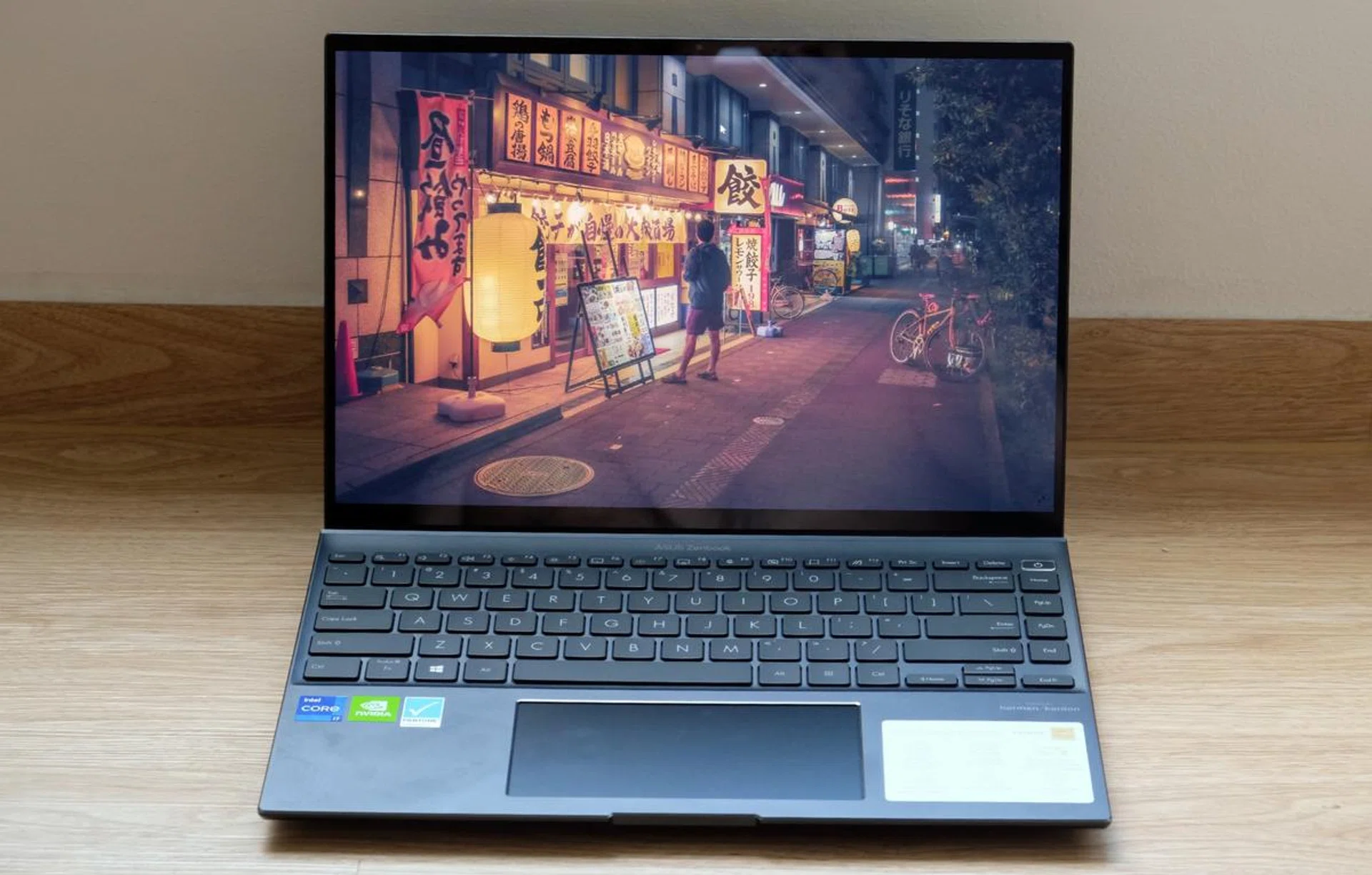
We are seeing more notebooks outfitted with OLED displays. This is the ASUS ZenBook 14X OLED.
OLED is coming
Every flagship-class phone has an OLED display and it looks like that’s going to be true too for notebooks. Increasingly, we are seeing more flagship-class notebooks outfitted with equally high-end OLED displays. ASUS did this earlier with the ZenBook Pro Duo 15 OLED and the ZenBook Flip S. And now, they are putting an OLED display in a traditional clamshell-style notebook. This is the new ZenBook 14X OLED.
The ZenBook 14X is the latest addition to ASUS’ ever-growing ZenBook 14 lineup. It joins others like the dual-screen ZenBook Duo 14 and the more basic ZenBook 14 UX425. If you are looking for a traditional clamshell-style notebook, this is ASUS’ top-tier option.
Design & specifications
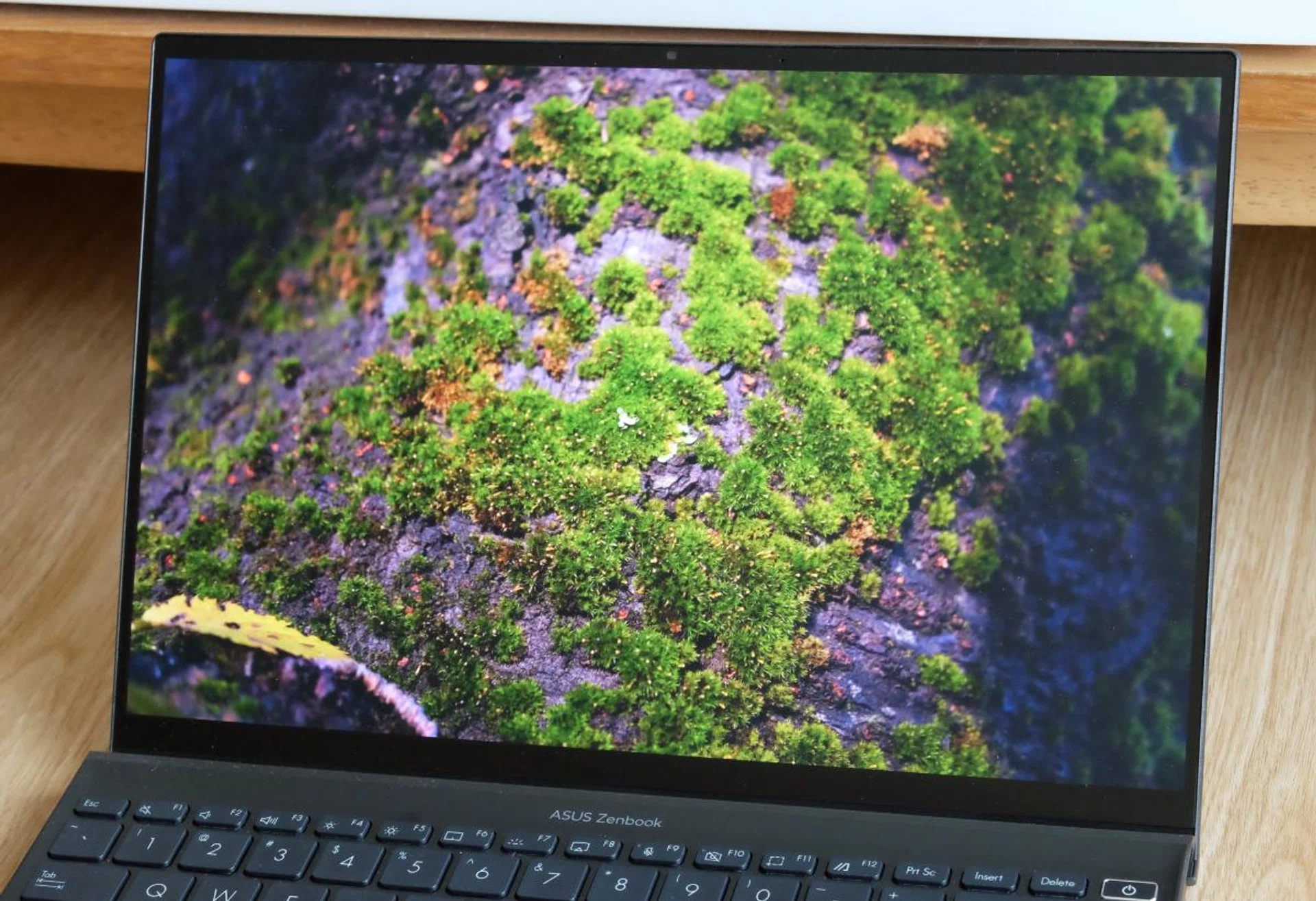
Predictably, the OLED display looks great.
With its angular profile and subtle but distinctive spun-metal finish on the front panel, the ZenBook 14X is unmistakably a ZenBook. It comes in Pine Grey, which is supposed to be a light shade of grey but ends up looking like black most of the time. Build quality is good. There’s little flex in the chassis and the notebook generally feels like a quality item.
The highlight of this notebook is its display. It’s a 14-inch OLED display with a resolution of 2880 x 1800 pixels. ASUS says it covers 100% of the P3 colour space, is Pantone validated, and has 550 nits of brightness. It’s hard to verify these claims without a professional measuring tool, but the fact is this display looks excellent. As you’d expect, blacks are a particular highlight, but equally important, other colours look vivid but realistic and the display gets sufficiently bright. It makes even a great IPS display look pedestrian.
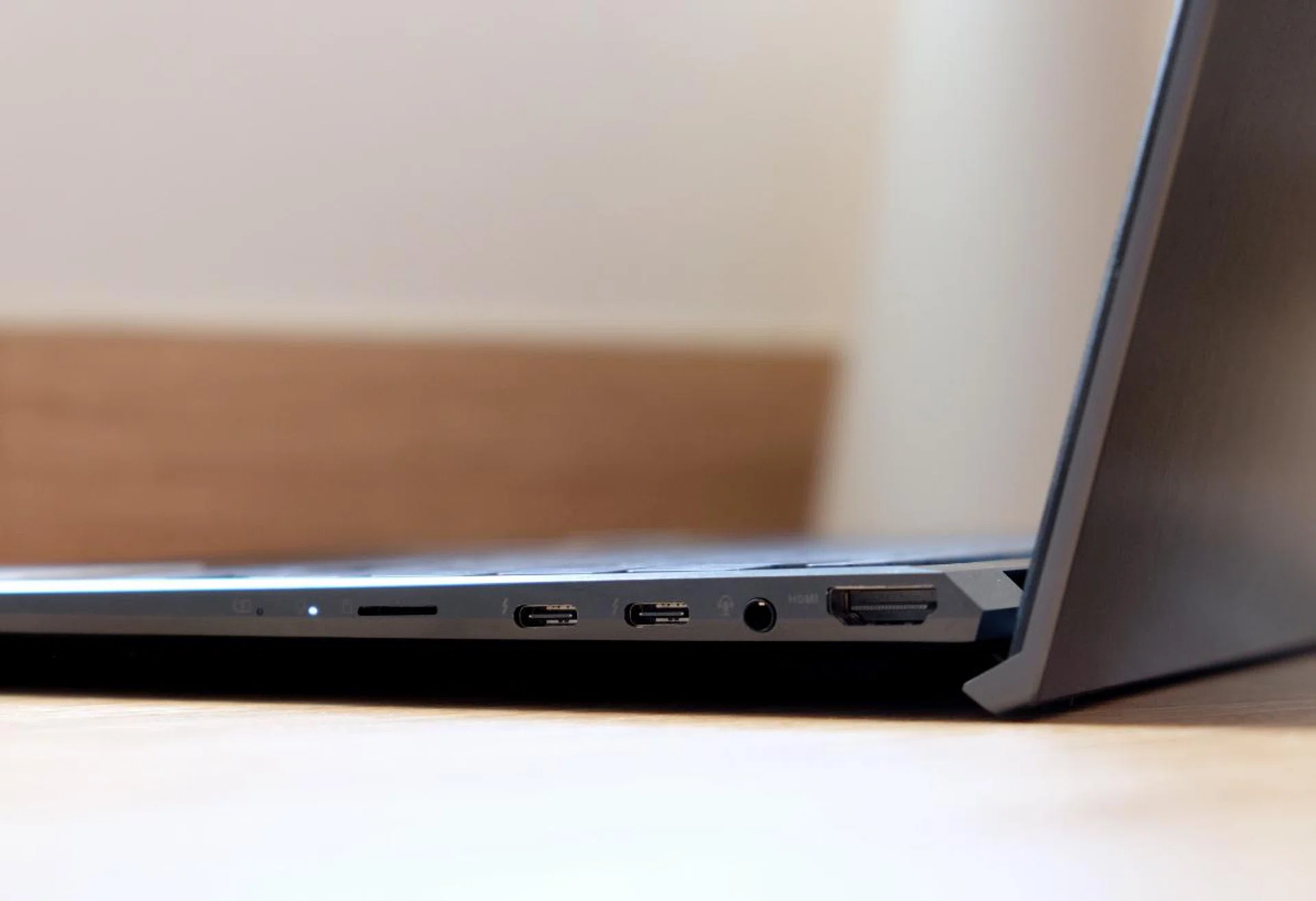
On the right side of the notebook are two USB-C Thunderbolt 4 ports and a proper full-size HDMI 2.0b port.
At 16.9mm and 1.4kg heavy, it’s slightly chunkier and heavier than other similarly-sized ZenBooks. There are good reasons for that: it has better ports and discrete graphics. Apart from two USB-C Thunderbolt 4 ports, it also has a full-sized HDMI 2.0b port, a USB 3.2 Gen 2 Type-A port, a 3.5mm audio jack, and a microSD card reader.
ASUS offers the ZenBook 14X in two configurations and here are the specifications of the two models.
Model | UX5400 | UX5401 |
Display | 14-inch, 16:10, 2880 x 1800 pixels touchscreen OLED display | |
Processor | Intel Core i7-1165G7 | |
Memory | 16GB 4266MHz LPDDR4x | |
Storage | 1TB PCIe x4 M.2 SSD | |
Graphics | NVIDIA GeForce MX450 | Intel Iris Xe |
Touchpad | ScreenPad | NumberPad |
Price | S$2,398 | S$2,198 |
Clearly, the two are largely identical except the base model has integrated graphics and doesn’t get ASUS’ ScreenPad. Since the price difference isn't exorbitant, I suspect many will be tempted to go for the step-up model since it has discrete graphics. The unit I'm testing is the step-up UX5400 and we’ll see the benchmark results on the next page if the extra S$200 will be a worthwhile outlay.
Keyboard and trackpad
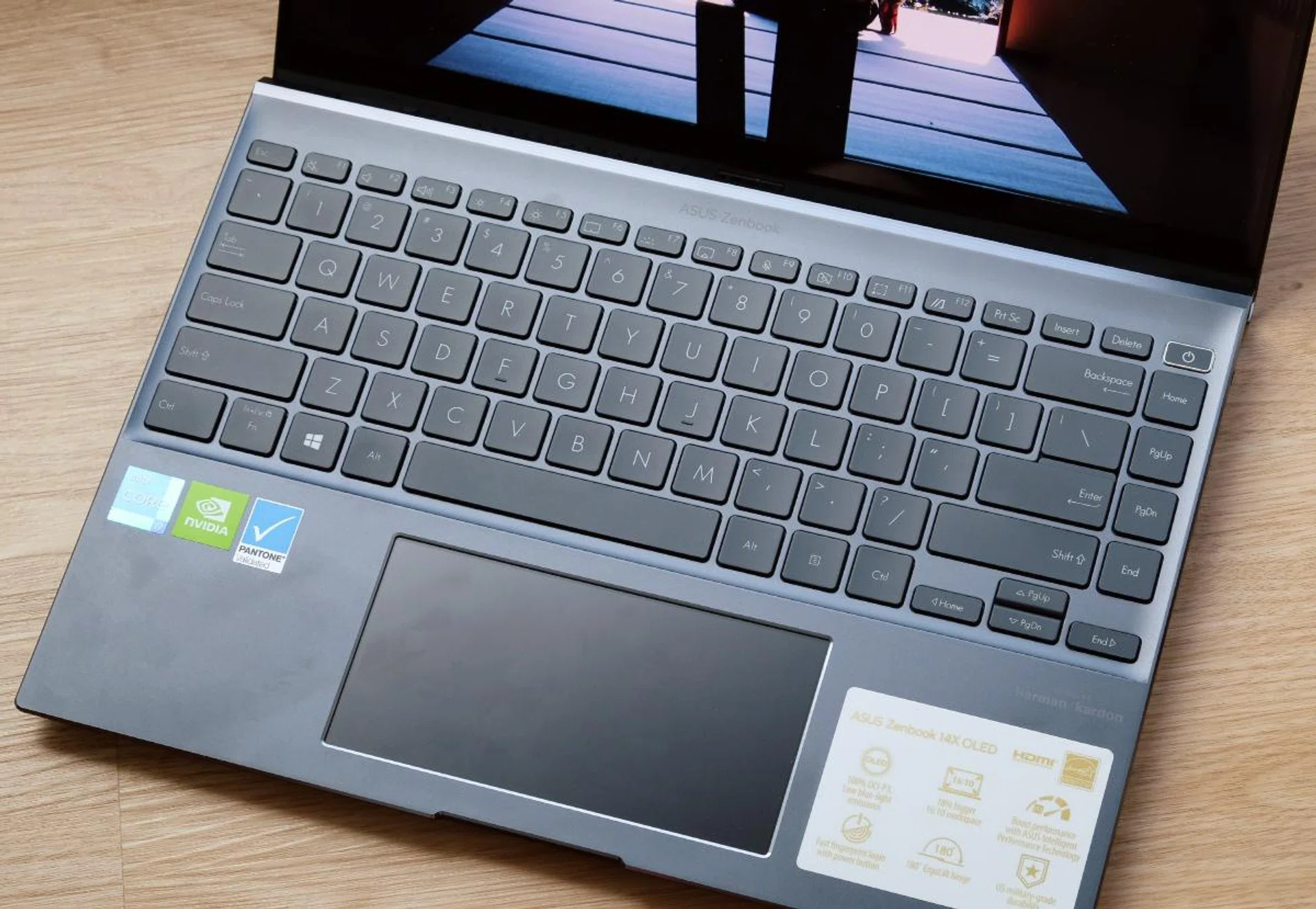
The keyboard is very decent but users will need to get used to the extra column of navigational keys on the right.
ZenBook keyboards have typically been decent and it’s no different for the ZenBook 14X. The keys are of a good size and the layout is fairly conventional – save for the additional column of navigational keys. There’s not much in the way of key travel but the general feeling of the keys is mostly positive, and at least they don’t feel vague and mushy. The keyboard also benefits from ASUS' ErgoLift design which uses the display cover as a prop to lift the back of the notebook up by a couple of degrees. This creates a gentle tilt that makes it more pleasant to type on. Overall, this is a very solid keyboard.
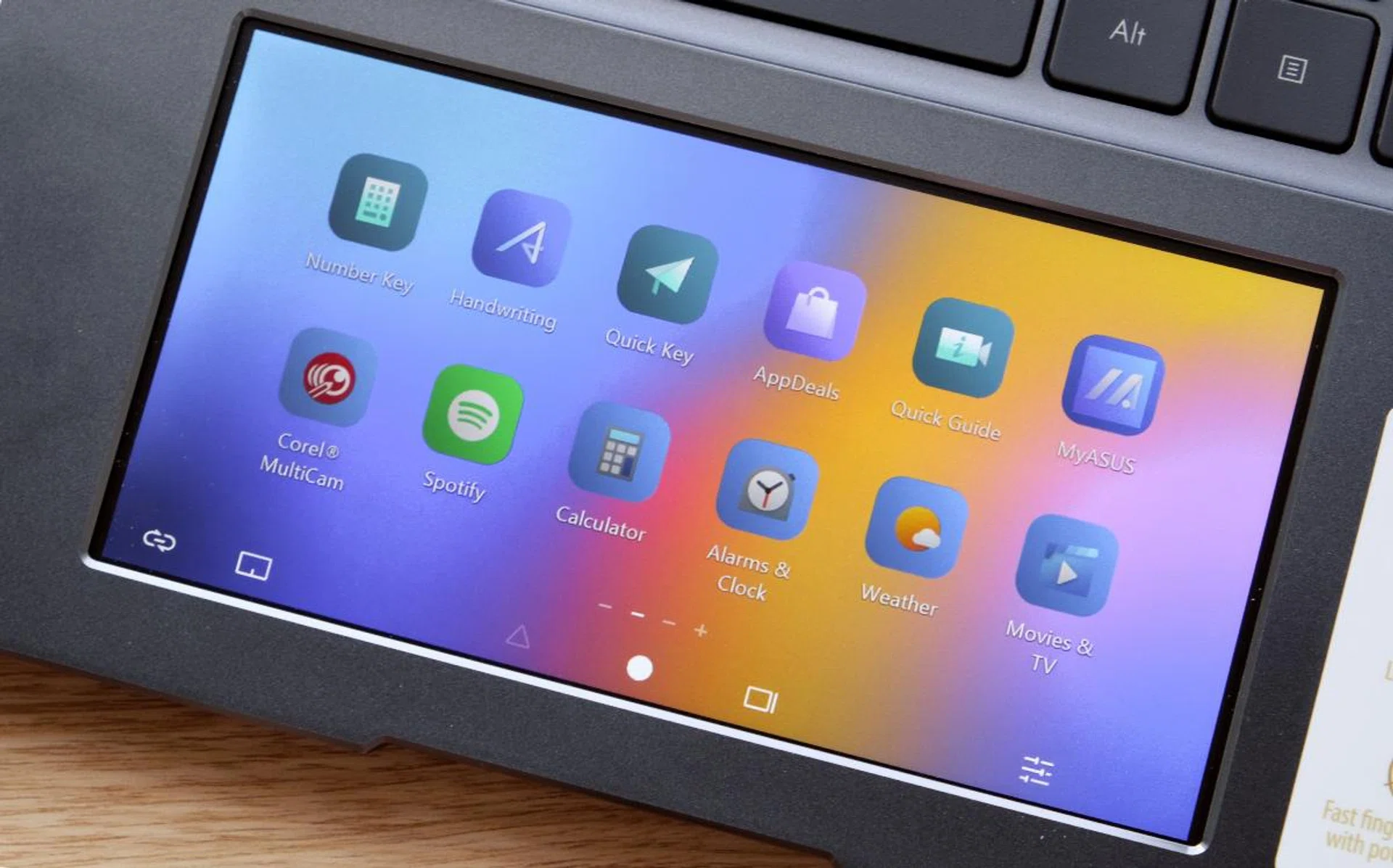
I'm not convinced about the ScreenPad's utility as a secondary display. As you can see, it looks fuzzy. But at least it's large, so it works well when used solely as a regular trackpad.
The trackpad is ASUS’ ScreenPad 2.0 and you can use it as a regular trackpad or as a secondary display. As a secondary display, it can be used to show optimised versions of popular apps like Spotify or shortcuts for other apps like Word and Excel. I wrote about the ScreenPad at length in my review of the ZenBook 14 UX434 and my thoughts haven’t changed. As a secondary display, its utility is debatable – it isn’t large enough to be easily legible and the picture quality is quite fuzzy. But as a trackpad, because it's large and responsive, I have no complaints. The extra functionality will take a little exploration to see how it best fits your personal needs, but since the primary trackpad function works well, the secondary display is a nice extra.
Performance analysis
The ZenBook 14X OLED is powered by a Core i7 Tiger Lake processor and features NVIDIA discrete graphics.
The ASUS ZenBook 14X OLED is powered by the same Core i7 version of Intel's Tiger Lake processor that is found in nearly every other notebook in its class. It also has 16GB of memory and is one of the few notebooks to feature discrete NVIDIA GeForce MX450 graphics. We will be comparing its performance against other comparable ultraportable notebooks like ASUS' own ZenBook 14 Ultralight, the Acer Swift 5, Dell XPS 13, and more.
Model | Display | Processor | Memory | Storage | Graphics |
ASUS ZenBook 14X OLED | 14-inch, WQXGA+, OLED, touchscreen | Intel Core i7-1165G7 | 16GB | 1TB SSD | NVIDIA GeForce MX450 |
Acer Swift 5 | 14-inch, Full-HD, touchscreen | Intel Core i7-1165G7 | 16GB | 1TB SSD | Intel Iris Xe |
ASUS ZenBook 14 Ultralight | 14-inch, Full-HD | Intel Core i7-1165G7 | 16GB | 1TB SSD | NVIDIA GeForce MX450 |
Dell XPS 13 | 13.4-inch, 4K+, touchscreen | Intel Core i7-1165G7 | 16GB | 512GB SSD | Intel Iris Xe |
LenovoYoga Slim 7i Carbon | 13.3-inch, 2560 x 1600 pixels | Intel Core i7-1165G7 | 16GB | 512GB SSD | Intel Iris Xe |
LG gram 14 | 14-inch, Full-HD+ | Intel Core i7-1165G7 | 16GB | 512GB SSD | Intel Iris Xe |
MSI Prestige 14 Evo | 14-inch, Full-HD | Intel Core i7-1185G7 | 16GB | 512GB SSD | Intel Iris Xe |
Razer Book 13 | 13.4-inch, 4K+, touchscreen | Intel Core i7-1165G7 | 16GB | 512GB SSD | Intel Iris Xe |
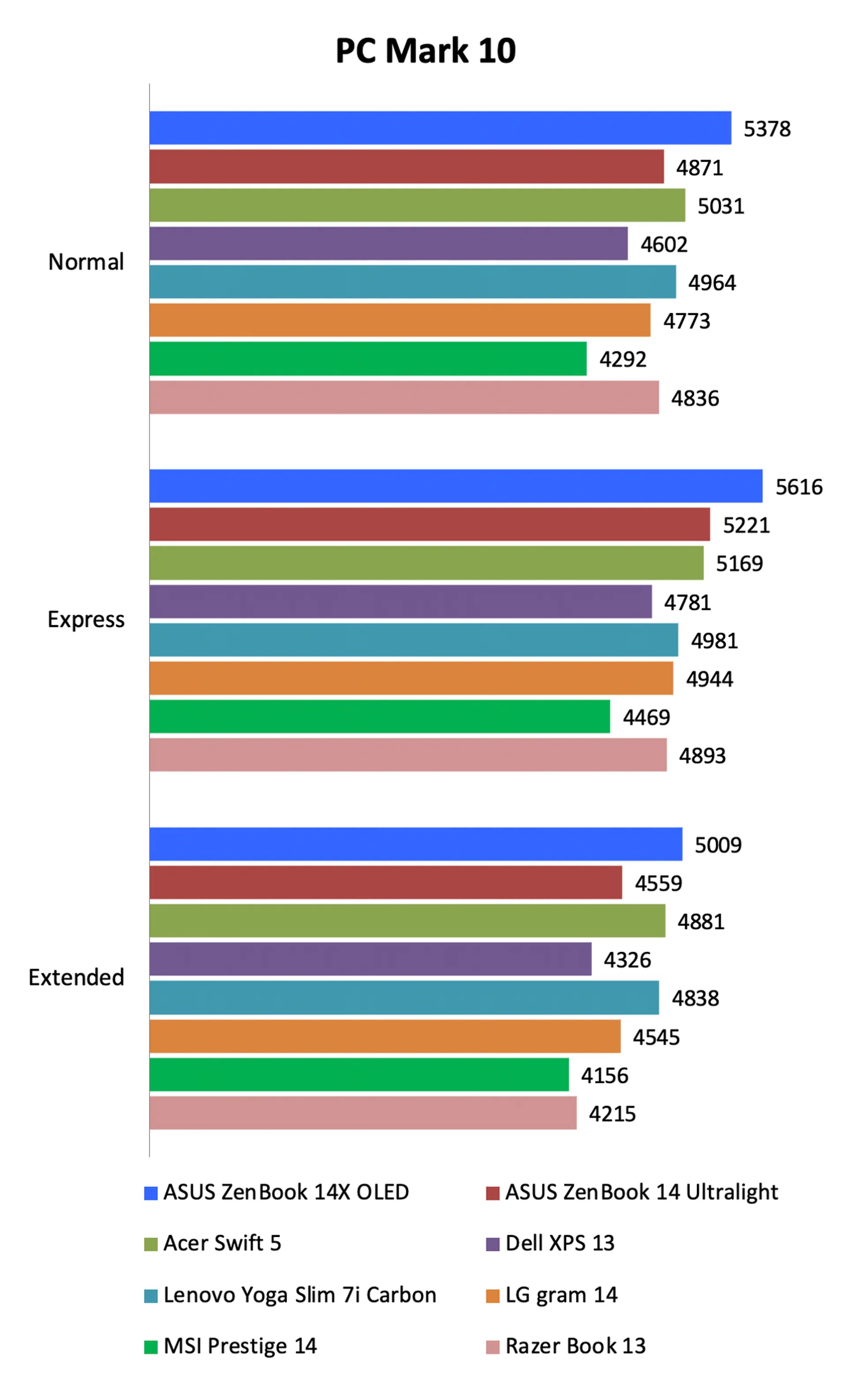
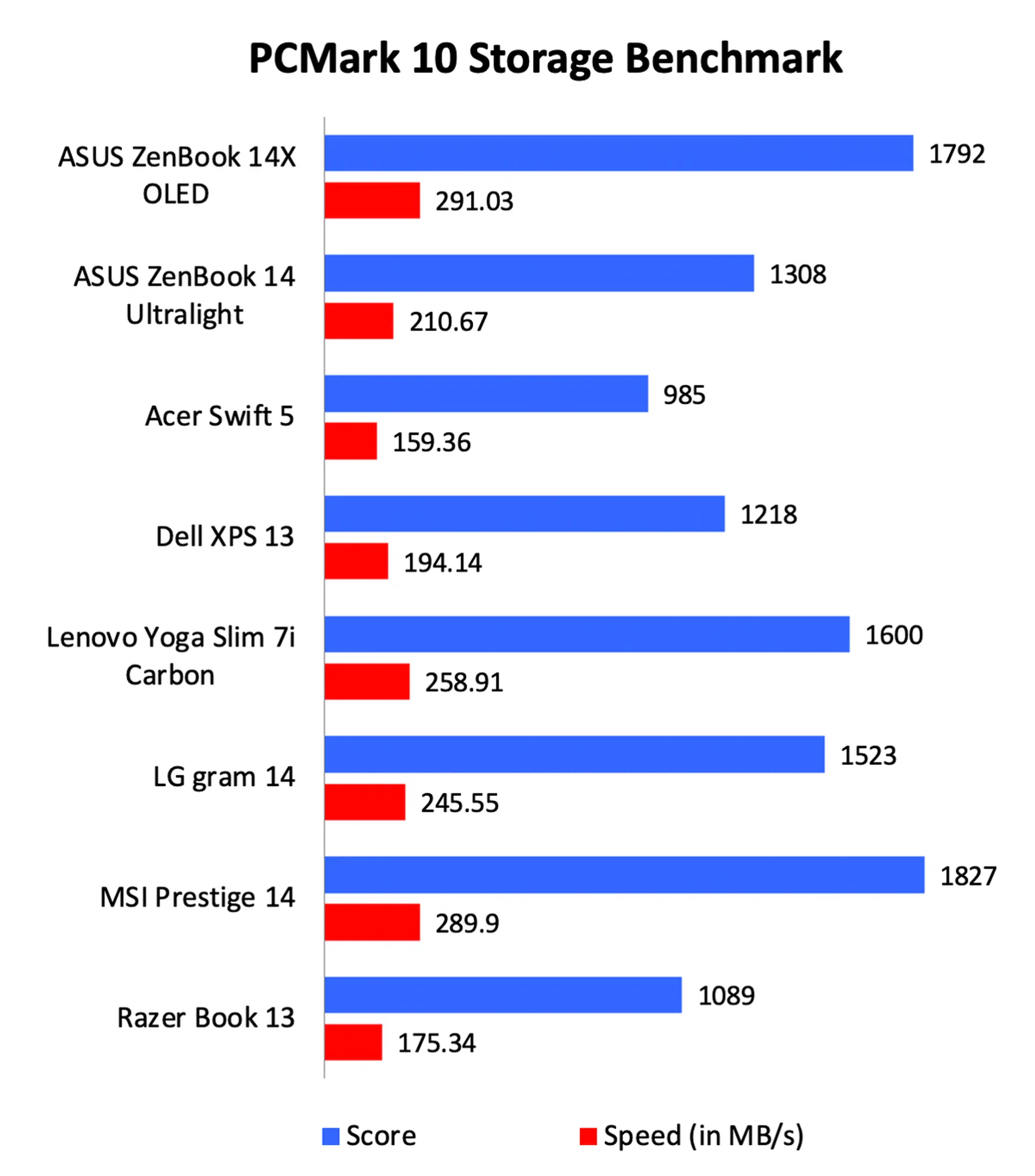
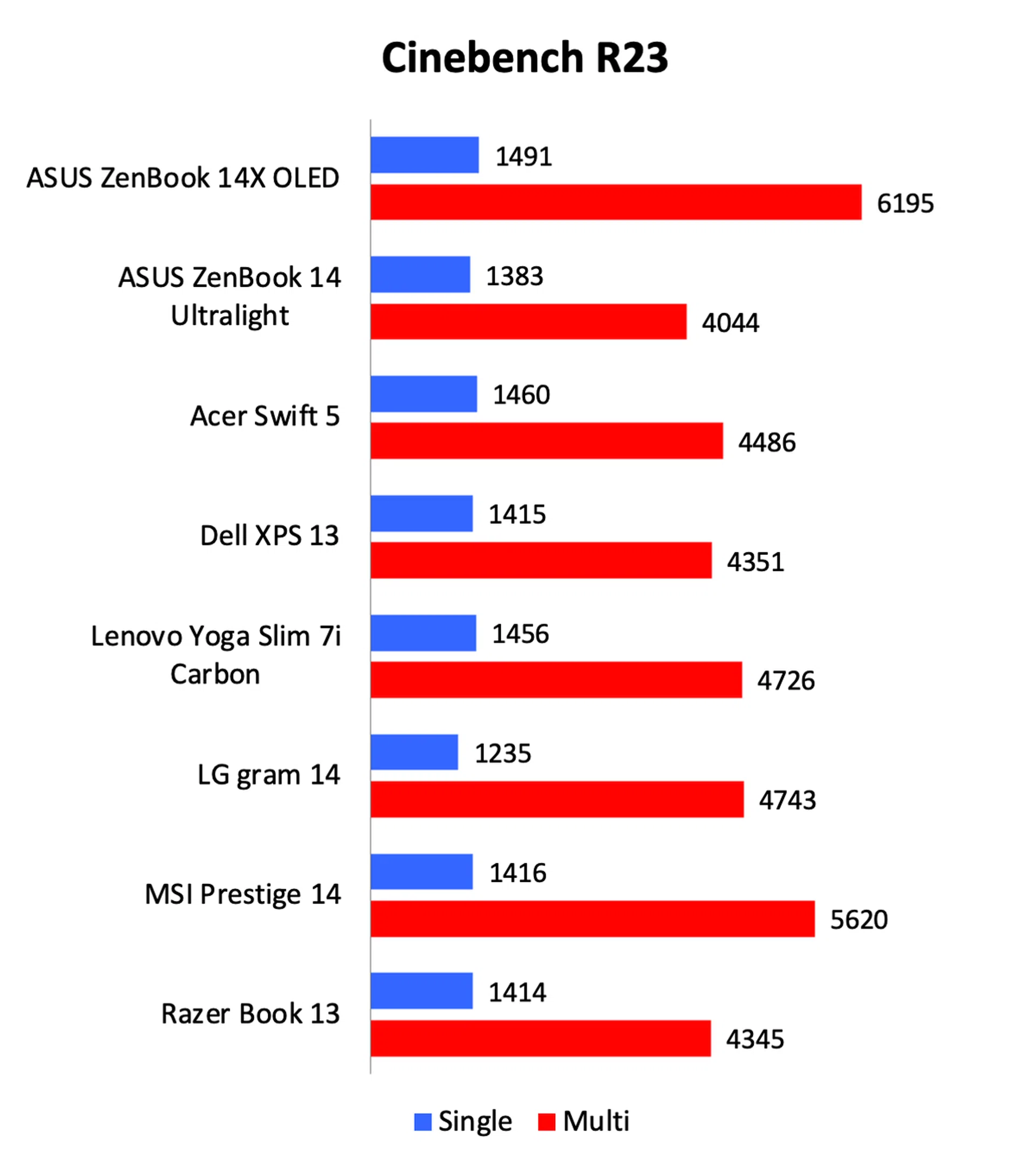
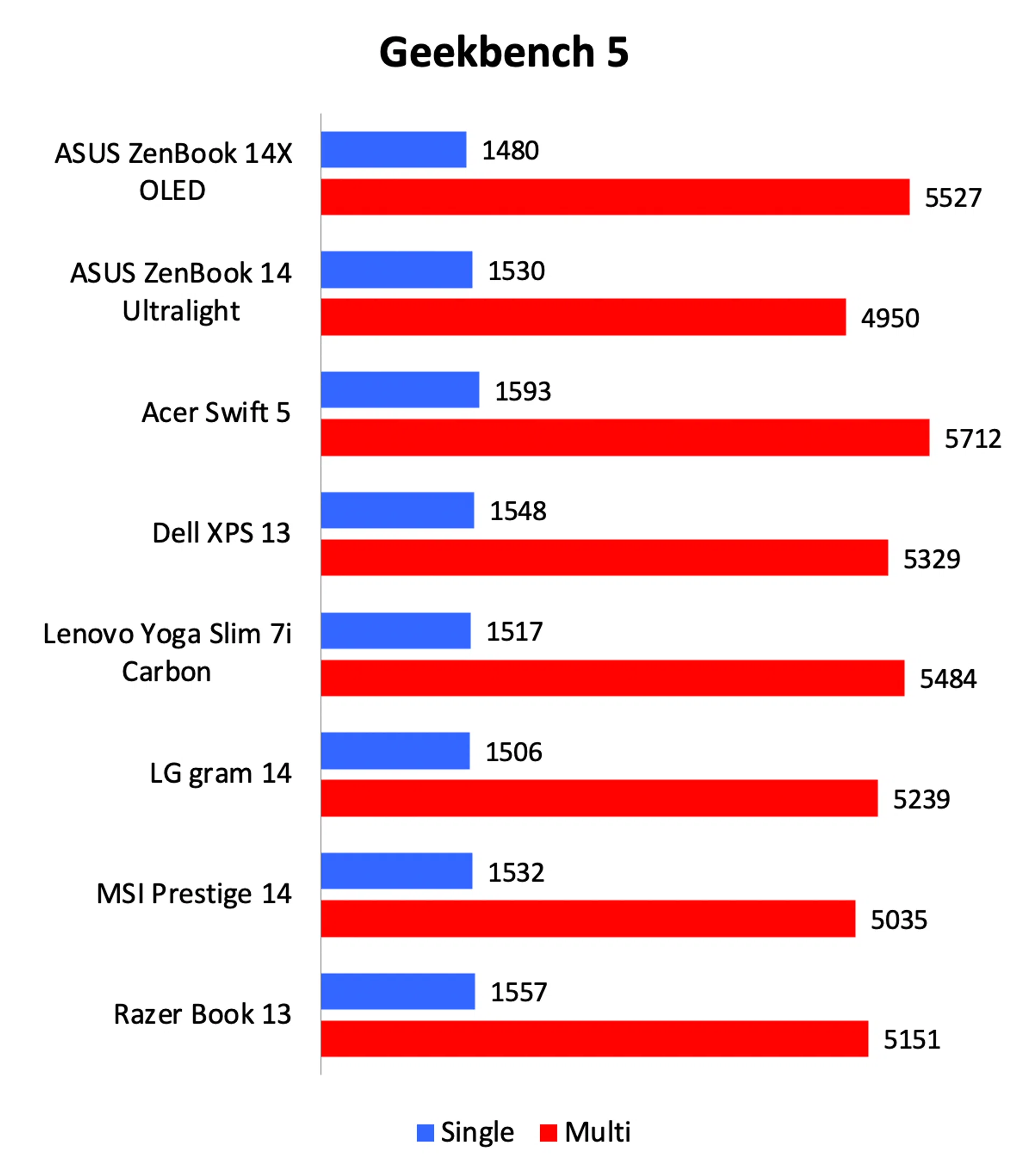
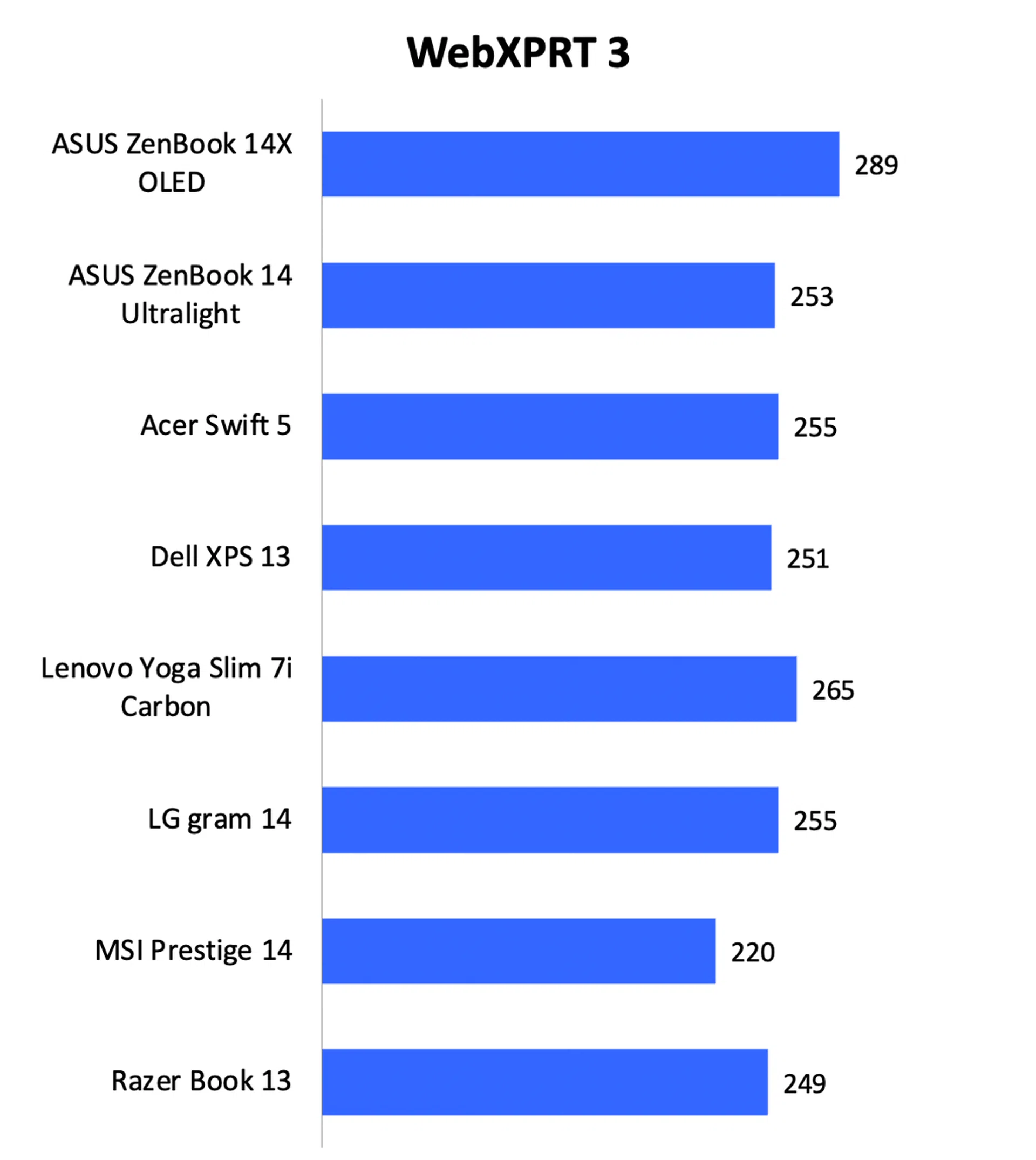
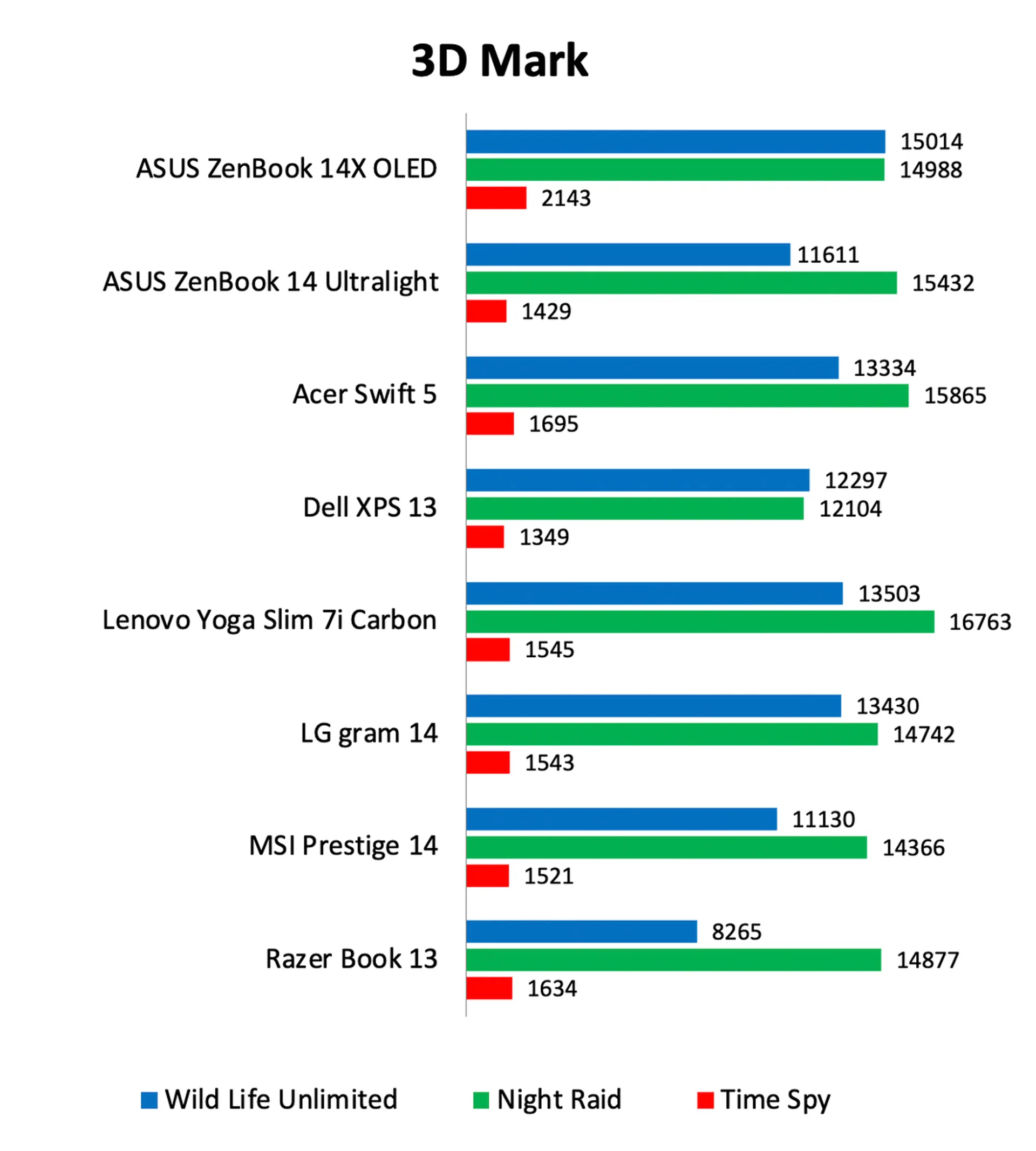
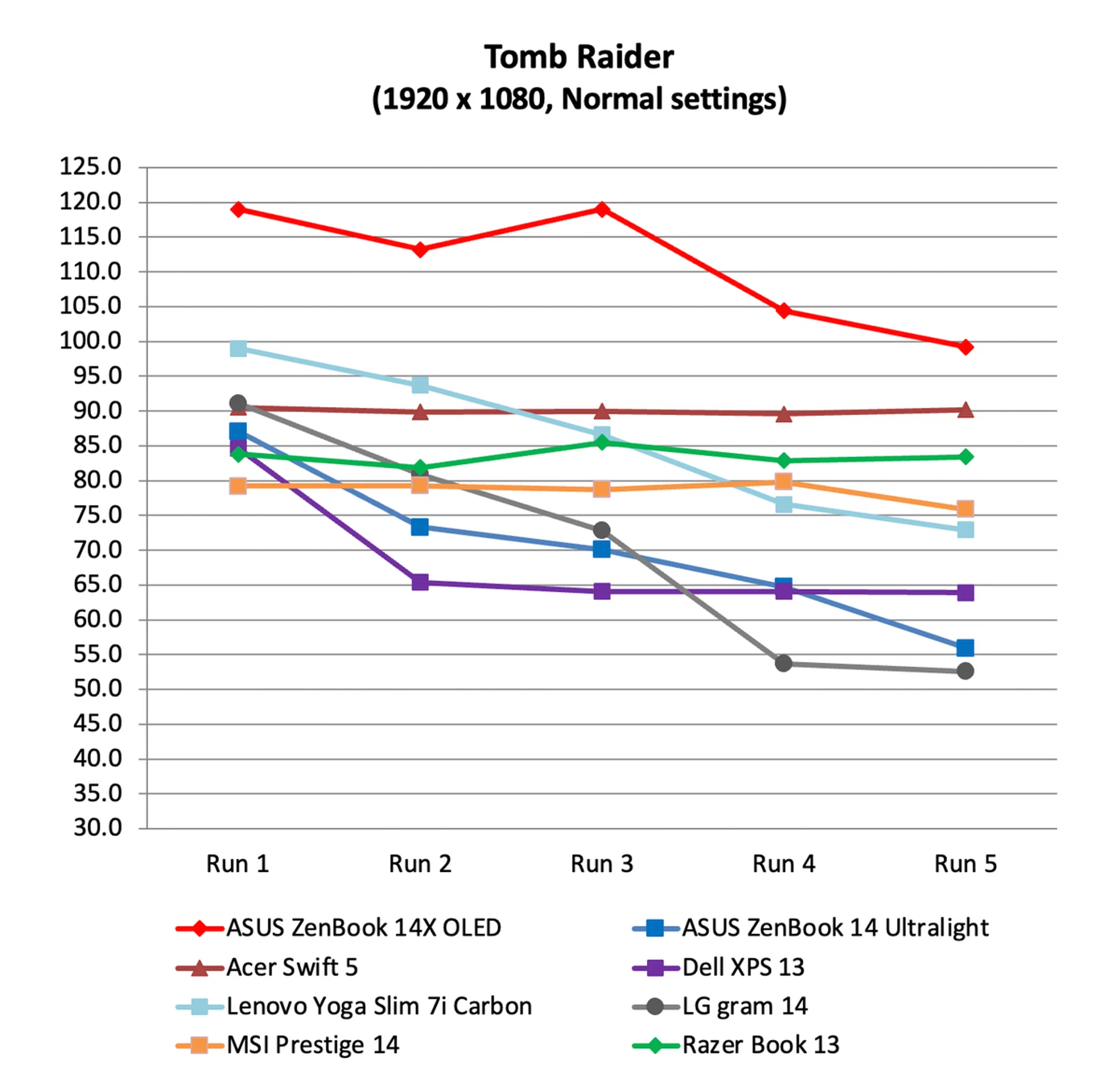
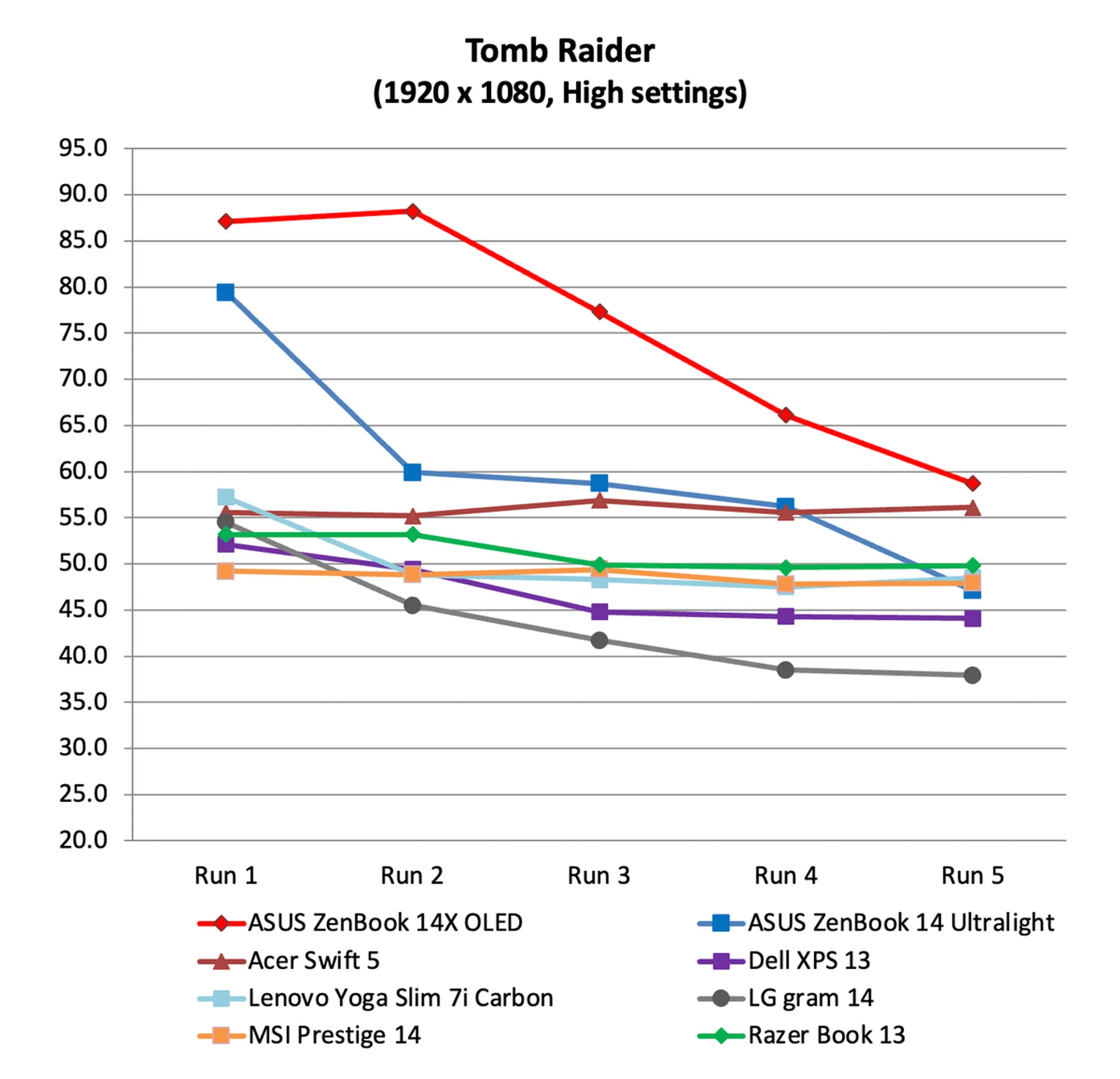
Performance was generally very good. Perhaps because of its IceCool Plus cooling system, the ZenBook 14X OLED confidently outscored the ZenBook 14 Ultralight, which shares the same specifications. It turned out the best scores on most benchmarks including PCMark 10, Cinebench, WebXPRT 3, and Tomb Raider. However, thermal throttling is an issue as evidenced by how frame rates dropped after a couple of runs on Tomb Raider. If it’s any consolation, this is an issue that plagues most ultraportable notebooks. And even at its lowest, the ZenBook 14X OLED was still managed the highest frame rates. Even at its poorest, it recorded close to 60fps on the more intensive High graphics setting.
Battery life
Note: Battery tests were conducted using PCMark 10's battery benchmark with display set to 100% brightness.
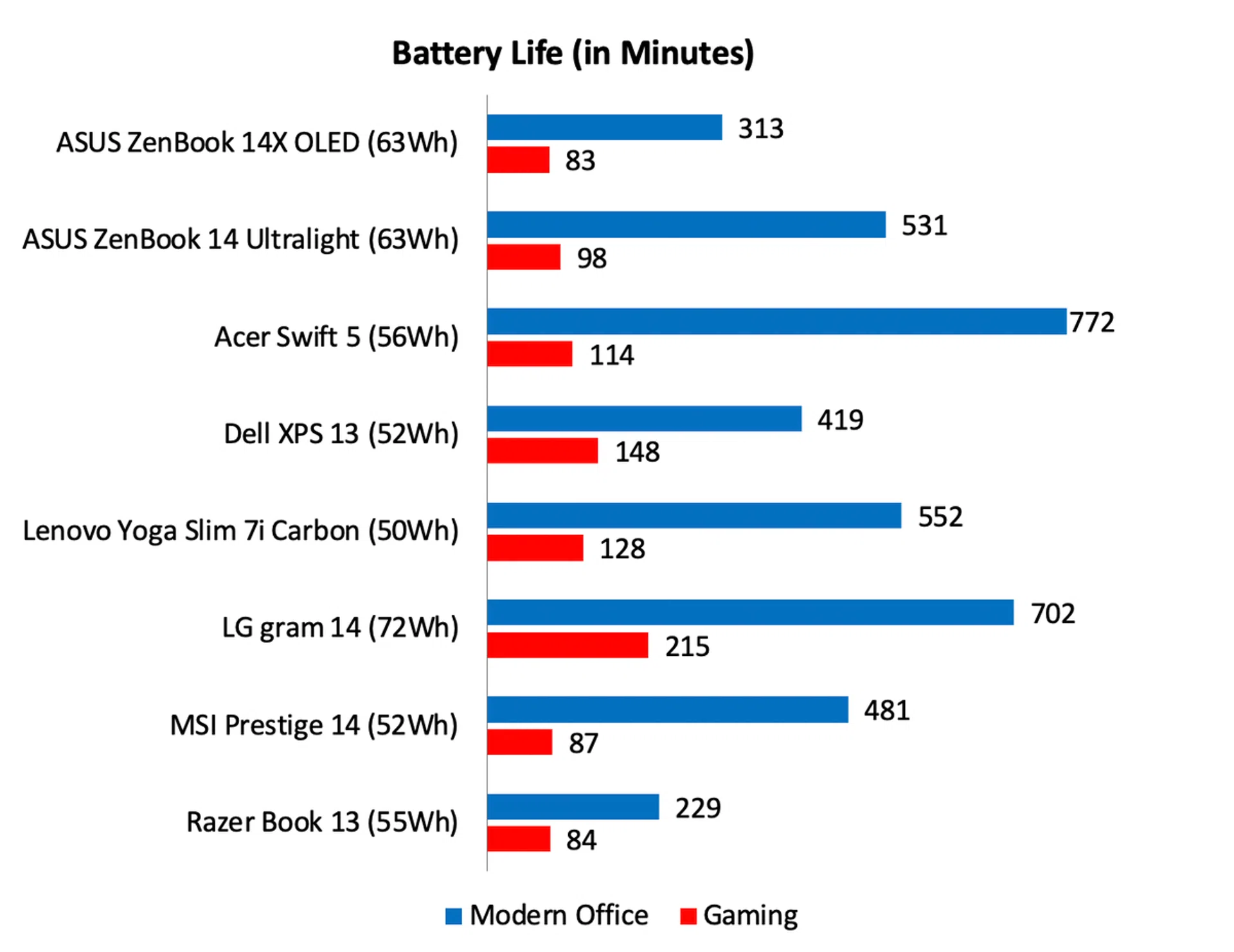
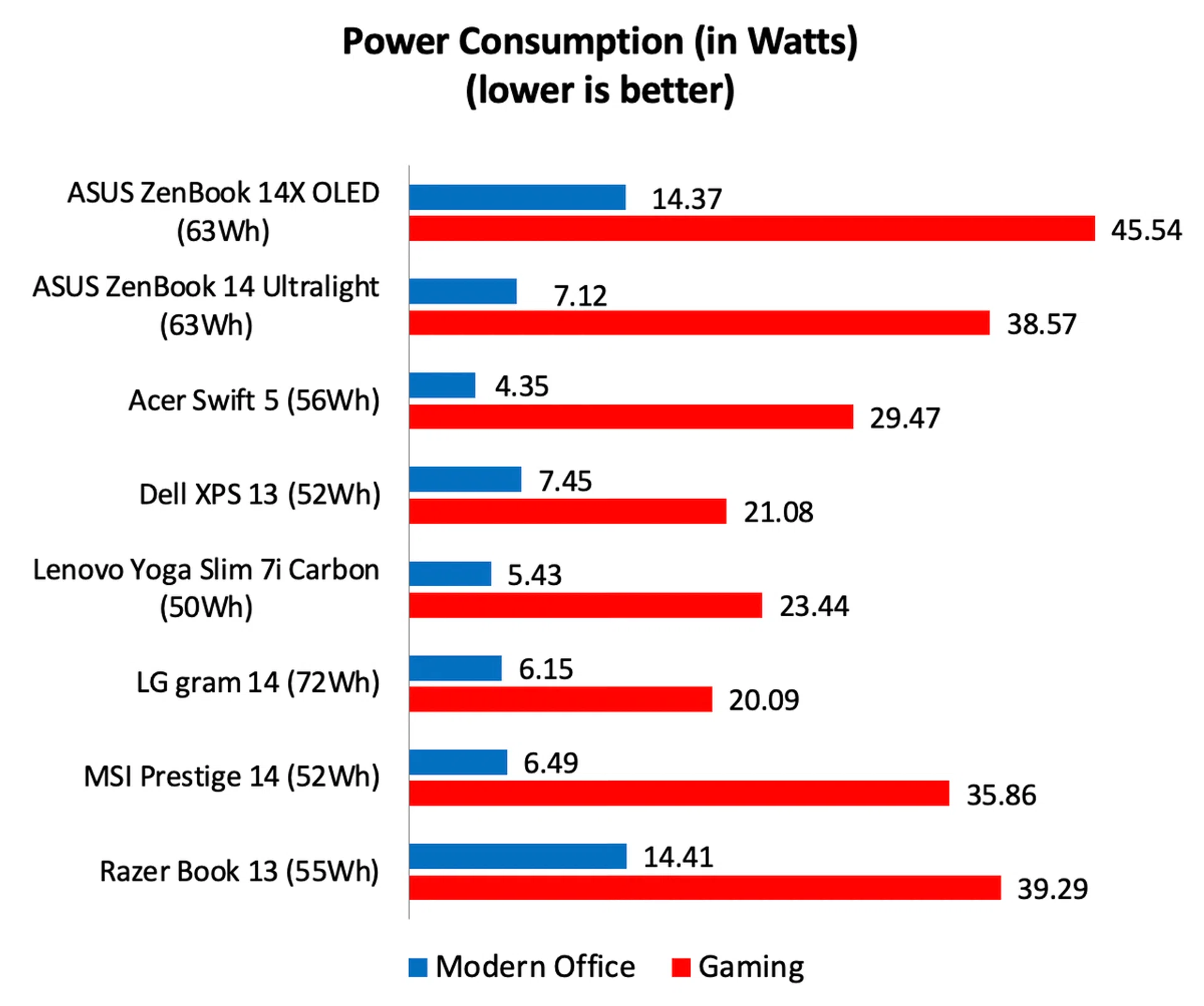
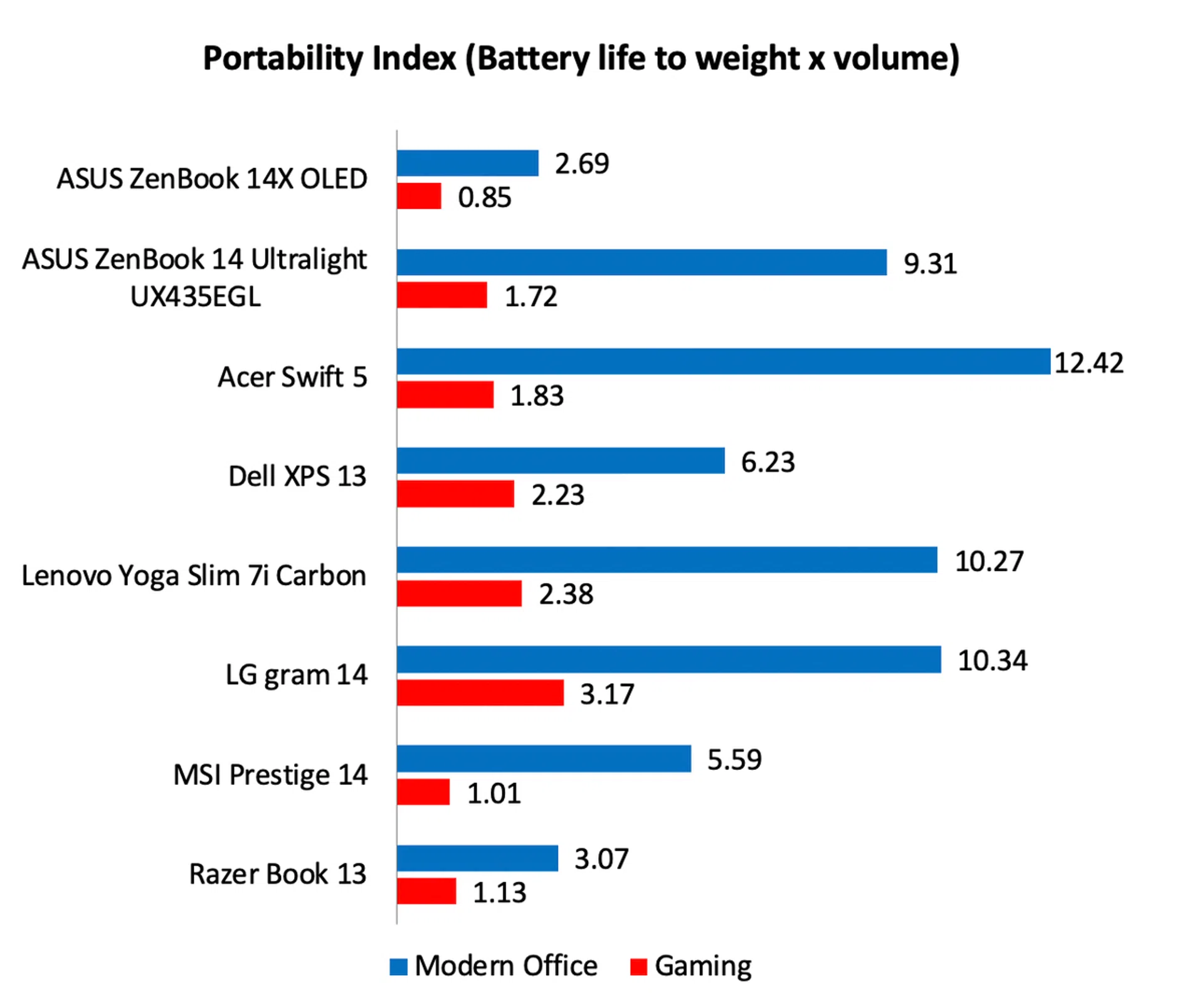
Battery life is arguably the ZenBook 14X OLED’s downfall. Despite having the same battery capacity and similar specifications as the ZenBook 14 Ultralight, it managed just over 5 hours, or 313 minutes to be exact. That’s a whopping 218 minutes or 41% less than the ZenBook 14 Ultralight. I had expected the ScreenPad as well as the higher resolution and brightness of the main display to put a greater strain on the battery but certainly not to this extent. Looking at the power consumption figures, we can see that on the Modern Office workload, it was consuming about double the energy of the ZenBook 14 Ultralight. Consequently, the ZenBook 14X OLED recorded the lowest Portability Index scores among notebooks of its class.
Is this the best ZenBook?
The ZenBook 14X OLED makes a strong case for being the best all-around 14-inch ZenBook that ASUS currently sells. Obviously, that OLED display is a large part of the reason why, but its performance was also very good and it has a good offering of ports. The price is hard to fault too because you’d expect a notebook with an OLED display to cost substantially more but that’s not the case. Compared to a ZenBook 14 Ultralight with similar specifications, the ZenBook 14X OLED is just S$200 more (S$2,398). That’s a premium I think most people will gladly pay once they see how just much better the OLED display is.
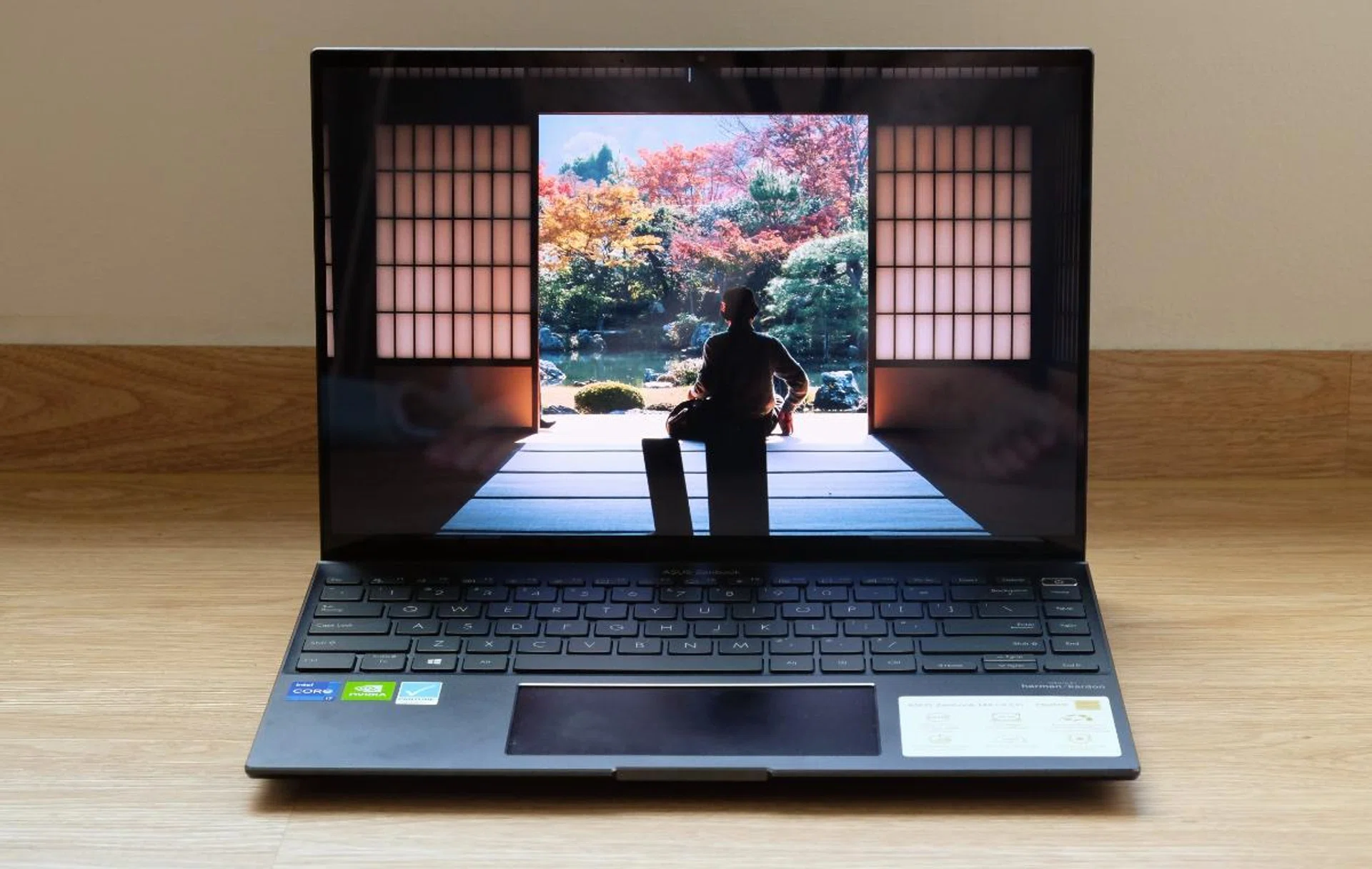
If a great display and performance are important to you, the ZenBook 14X OLED ticks those boxes.
Where the ZenBook 14X OLED disappoints is in its battery life. No matter how you look at it, at just over five hours, it’s one of the poorest showings in its class. Sure, you could probably stretch its battery to six or even seven hours if you dial back the brightness but it doesn’t hide the fact that a ZenBook 14 Ultralight with comparable system specifications lasted nearly 70% longer. Thermal throttling is a concern too, though, to be fair, it’s a problem that plagues all notebooks of this class. However, it’s something to note especially if you intend to run intensive applications like gaming or video-editing for extended periods.
Ultimately, the ZenBook 14X OLED’s well below-average battery life means it’s probably not for everyone. And luckily, our great ultraportable notebook shootout shows that there is no shortage of alternatives But if it were me, I'll opt for the ZenBook 14 Ultralight. It's cheaper now (S$2,198) and while it's display is no where near as nice, it counters with slimmer, lighter dimensions and excellent battery life. For me, these are far more important considerations for an ultraportable notebook. Nevertheless, its excellent display and class-leading performance should find itself no shortage of fans, especially if you don't expect yourself to be moving around or travelling much.
You can find the ASUS ZenBook 14X OLED UX5400 for S$2,398 on ASUS' online store, Lazada, and .
Our articles may contain affiliate links. If you buy through these links, we may earn a small commission.