

Note: This review was first published on 22 December 2022.
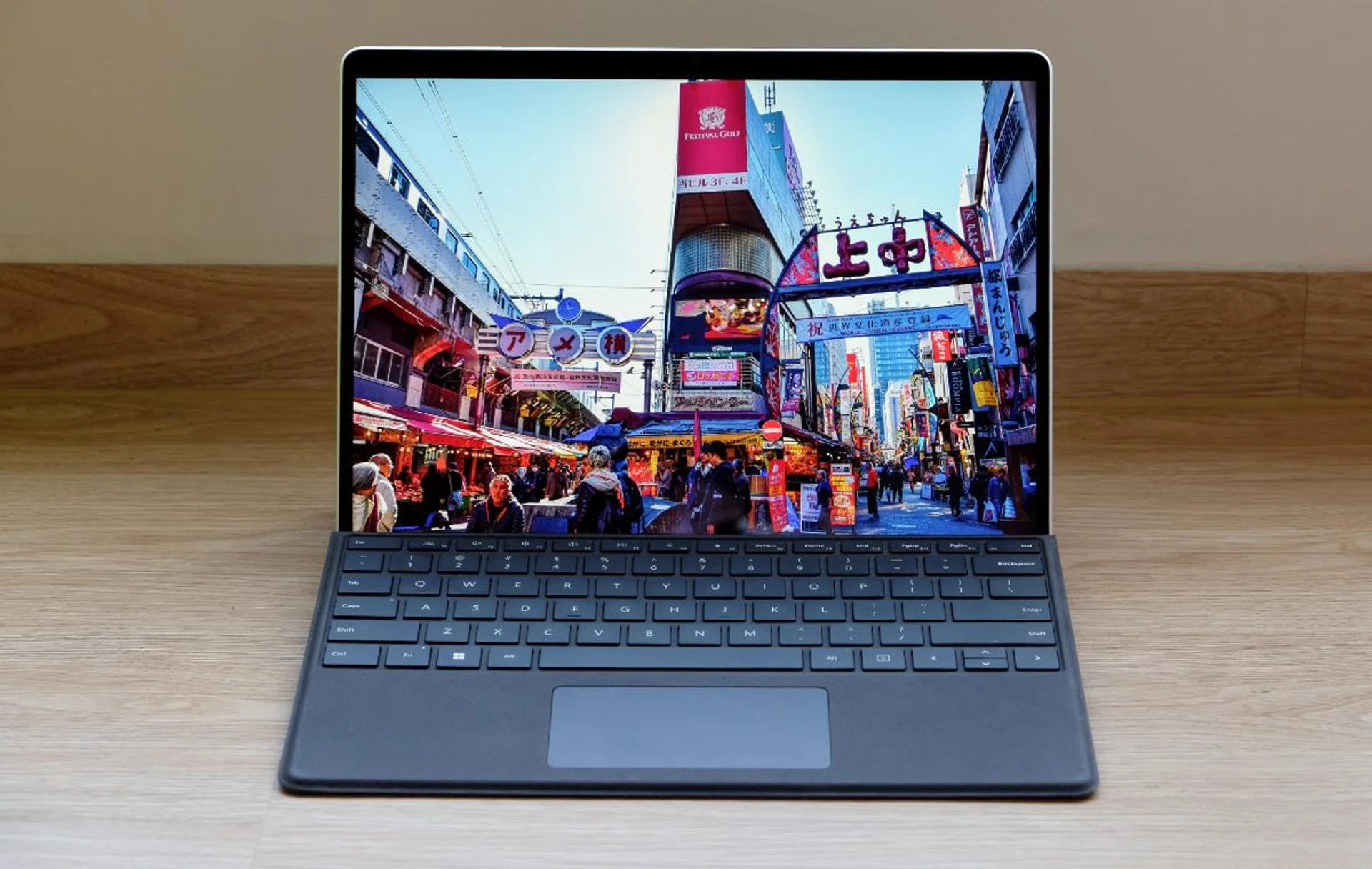
The newest Surface Pro 9 is a spec-bump update, so let's see just how good it is.
A spec-bump update
For 2022, Microsoft decided to do something confusing. It’s merging the Intel and ARM-based versions of its Surface Pro device and calling both devices the Surface Pro 9. If you remember, the ARM-based versions used to be known as the Surface Pro X.
The one we are interested in, and the one that most people are likely going to buy, is the Intel version. Without going into too much details, that’s because the ARM-based version continues to be plagued with compatibility and performance issues. My advice to readers is to avoid that model unless you are prepared to sacrifice usability and work around its quirks and limitations.
The TL;DR version:
This is still one of, if not the best 2-in-1 ultraportable Windows device you can buy. The only stumbling block is its high price.
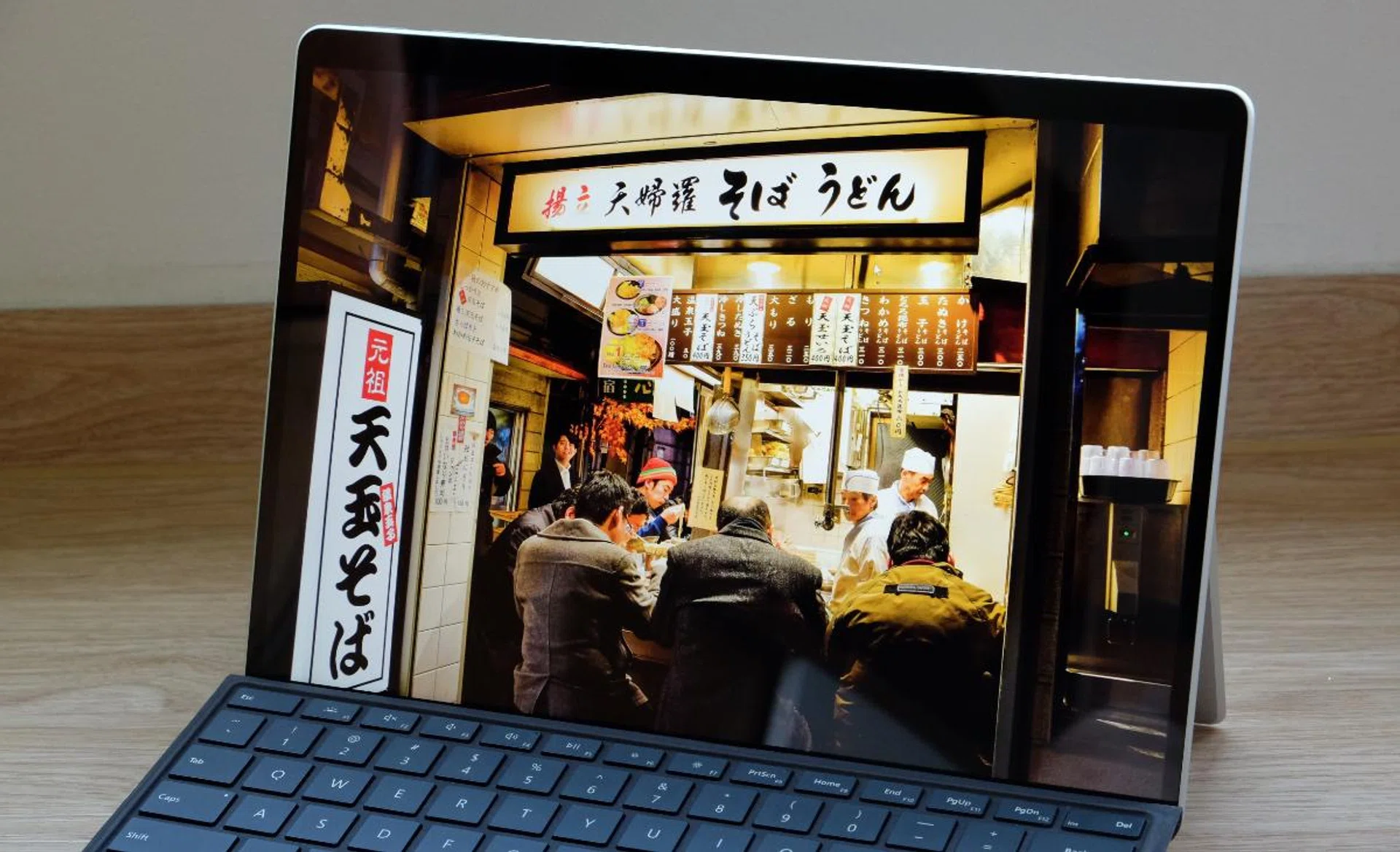
It may not be an OLED display but it still looks great.
So back to the Intel-powered Surface Pro 9. Physically, it’s identical to last year’s model. This means it’s a well-made device that feels very high quality. It’s also remarkably slim and light at just 9.3mm thin and weighs 879g. Unlike convertible notebooks, which can sort of “transform” into a tablet, the Surface Pro 9 is a tablet first and foremost, and can be comfortably held in one hand – and that has always been one of its biggest selling points. You turn it into a notebook by attaching a keyboard.
There are four colours to choose from: Platinum, Sapphire, Forest, and Graphite. But curiously, these colours are limited to the configuration you want. For example, the Core i7 models only come in Platinum and Graphite while Sapphire and Forest are specifically limited only to the Core i5 model with 8GB of memory and a 256GB SSD. We've no idea why.
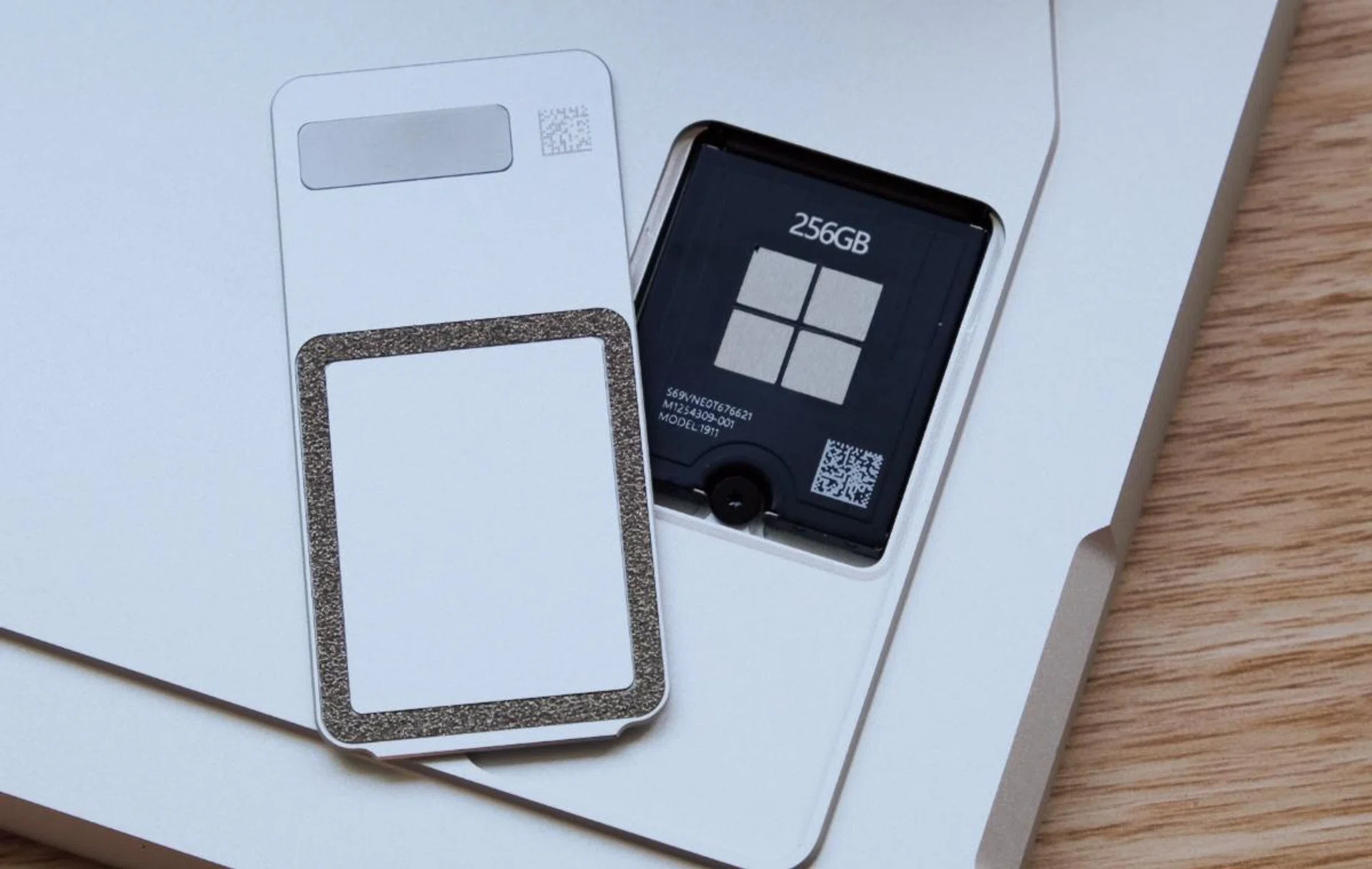
You can upgrade the storage yourself if you can find an M.2 2230 drive.
Speaking of storage, the Surface Pro 9 has upgradeable storage like its predecessor. The drive can be accessed by removing a cover behind the device and can be easily swapped. The only problem is that it uses an M.2 2230 form factor drive which is a little harder to find than the usual M.2 2280 that's a bit longer like this.
The display is unchanged which is not a bad thing because the 13-inch PixelSense display is a thing of beauty. It may not be OLED but I doubt most users will notice or care. The fact is, it looks sharp, colours look punchy, and it gets very bright. The unusual 3:2 aspect ratio also means more vertical space to see your emails, documents, and spreadsheets.

Ports are unchanged, which means you get two USB-C ports that support Thunderbolt 4 and USB4. Also note how thin it is.
The ports are also the same so you get two USB-C ports that support Thunderbolt 4 and USB4. There’s also a Surface Connect port that can be used with the Surface Dock and a Surface Type Cover port that connects to Microsoft’s various Type Cover keyboards.
The big change is the processor. The Surface Pro 9 gets Intel’s 12th Gen Core processors. But because Microsoft wants to push for longer battery life, it’s using a lower-power U-series processor – unlike most other ultraportables we’ve reviewed so far which are equipped with the more powerful P-series processor.
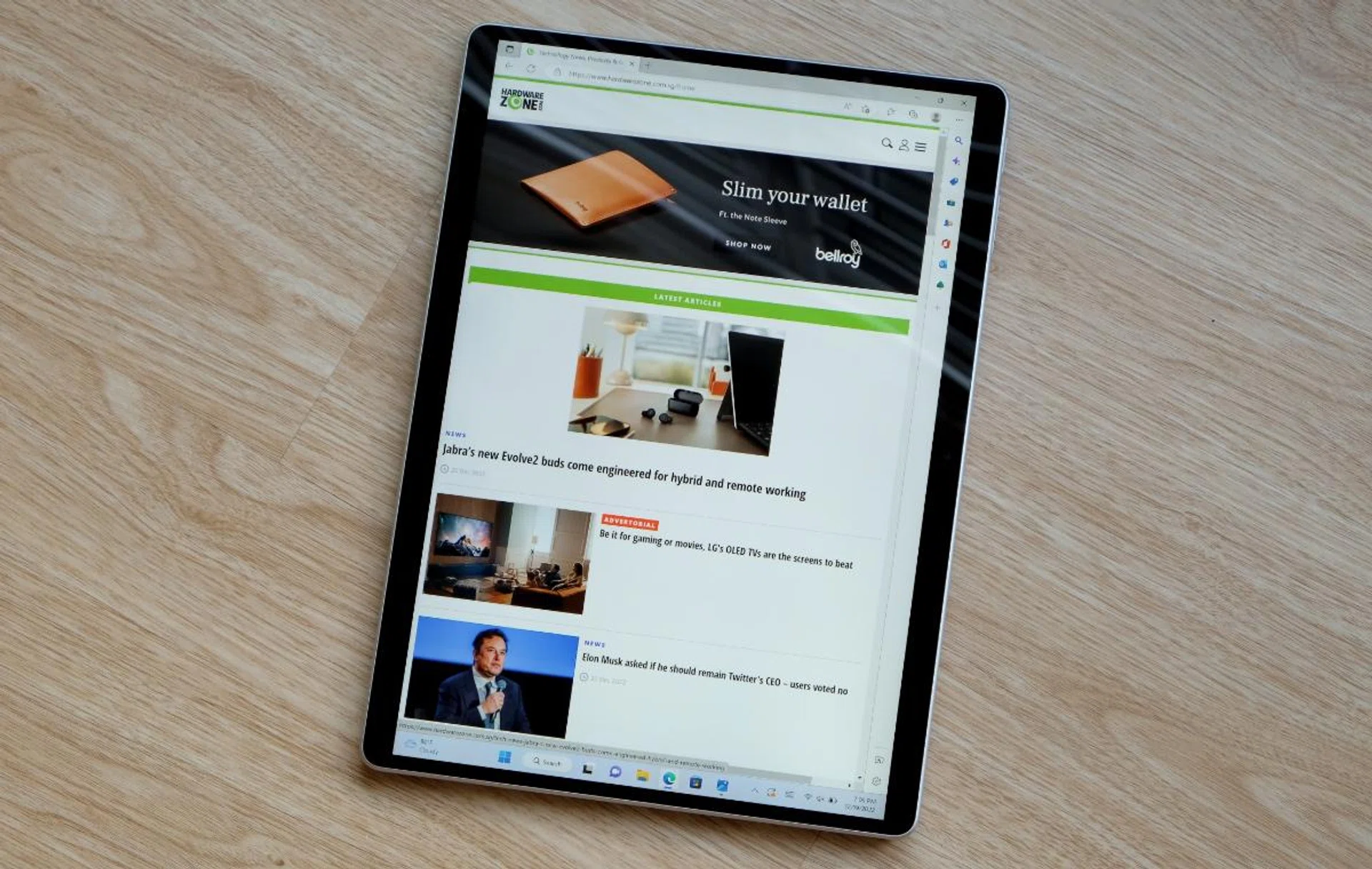
One of the best things about the Surface Pro 9 is that it is light enough to be used as a tablet.
The difference between the two is their TDP – thermal design power i.e. the power consumption under maximum load. The U-series chips have lower TDP figures and are designed to provide longer battery lives. In the Surface Pro 9, you get the choice of the Core i5-1235U or Core i7-1255U. Both are 10-core chips with two performance cores and eight efficiency cores. Unsurprisingly, the Core i7 variant has higher clock speeds and its integrated graphics processor has more execution units.
Connectivity has been improved with the support for the newer Wi-Fi 6E standard. This lets the Surface Pro 9 tap into the less congested 6GHz band (at least for now), but you will need a Wi-Fi 6E-capable router to take advantage of this.
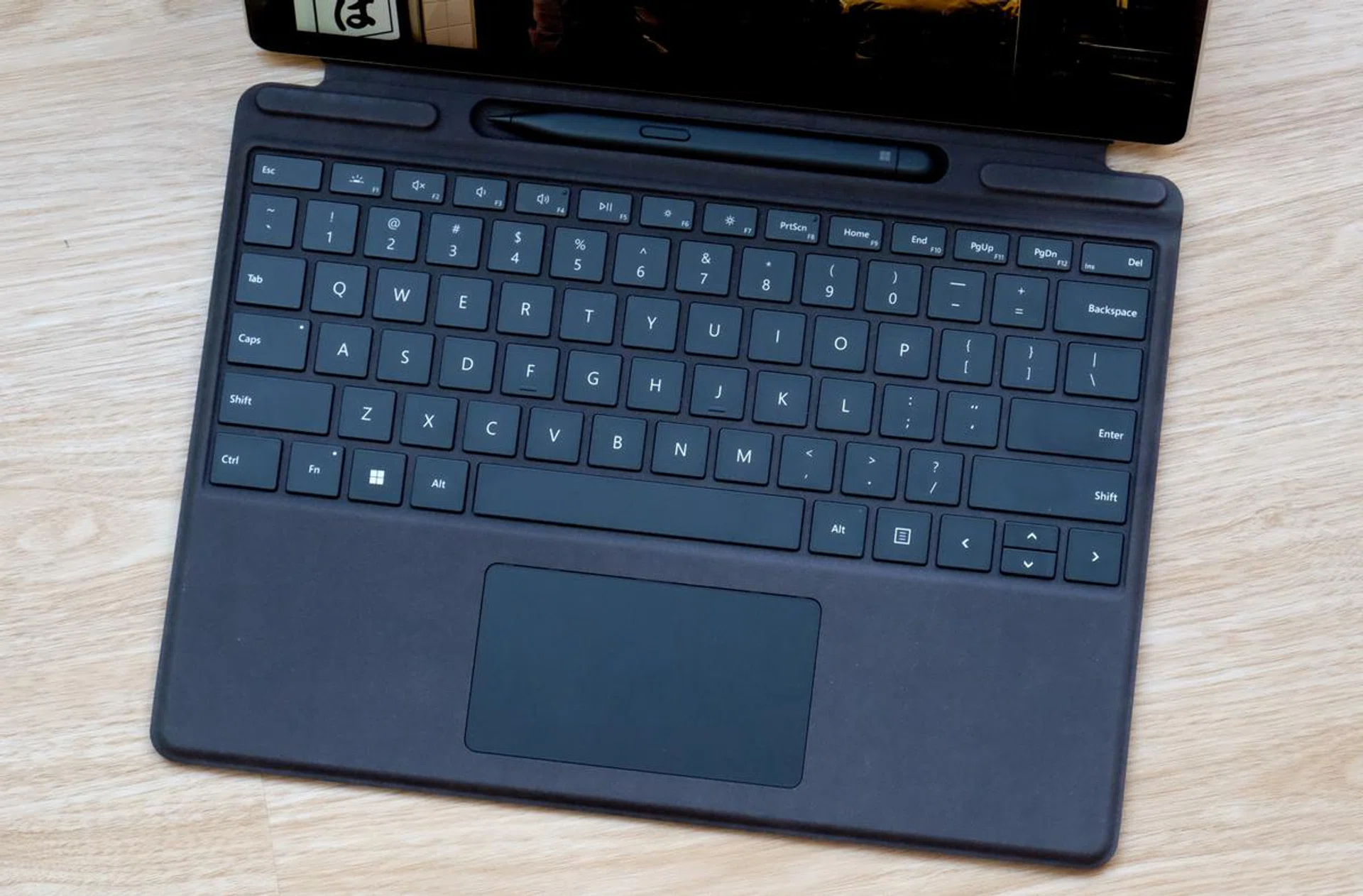
The Surface Pro keyboard is pricey but it's a must-have accessory for any Surface Pro owner.
Accessories, as ever, are sold separately and are pricey. The Surface Slim Pen 2 is S$208 while a Surface Pro keyboard starts at S$268. The Surface Dock 2, which provides power and acts as a hub for USB devices and external monitors, is S$388. If it’s any consolation, the accessories work well. The Type Cover, in particular, is a must-have accessory for the Surface Pro if you wish to use it to its fullest capabilities.
Performance analysis
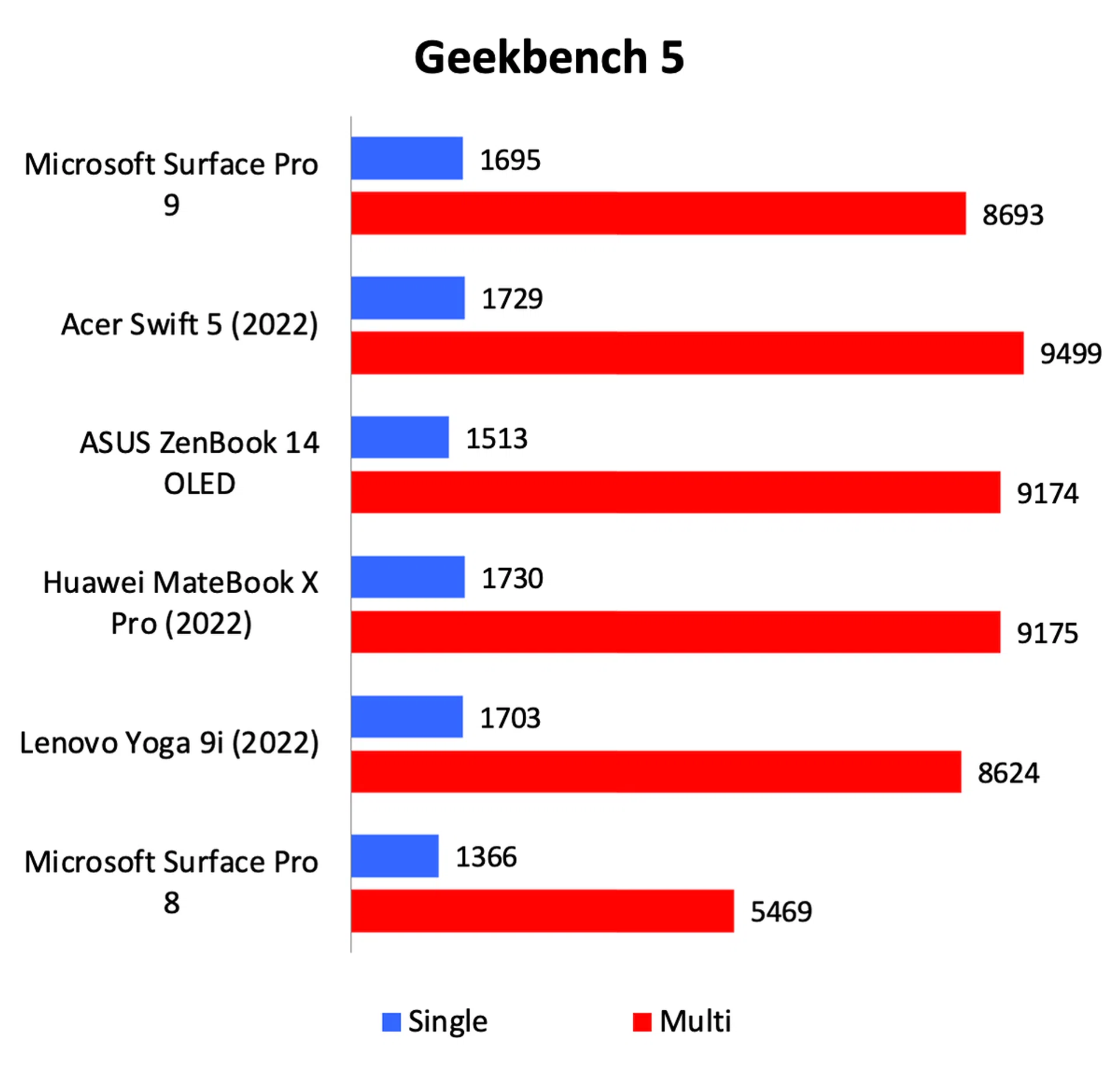
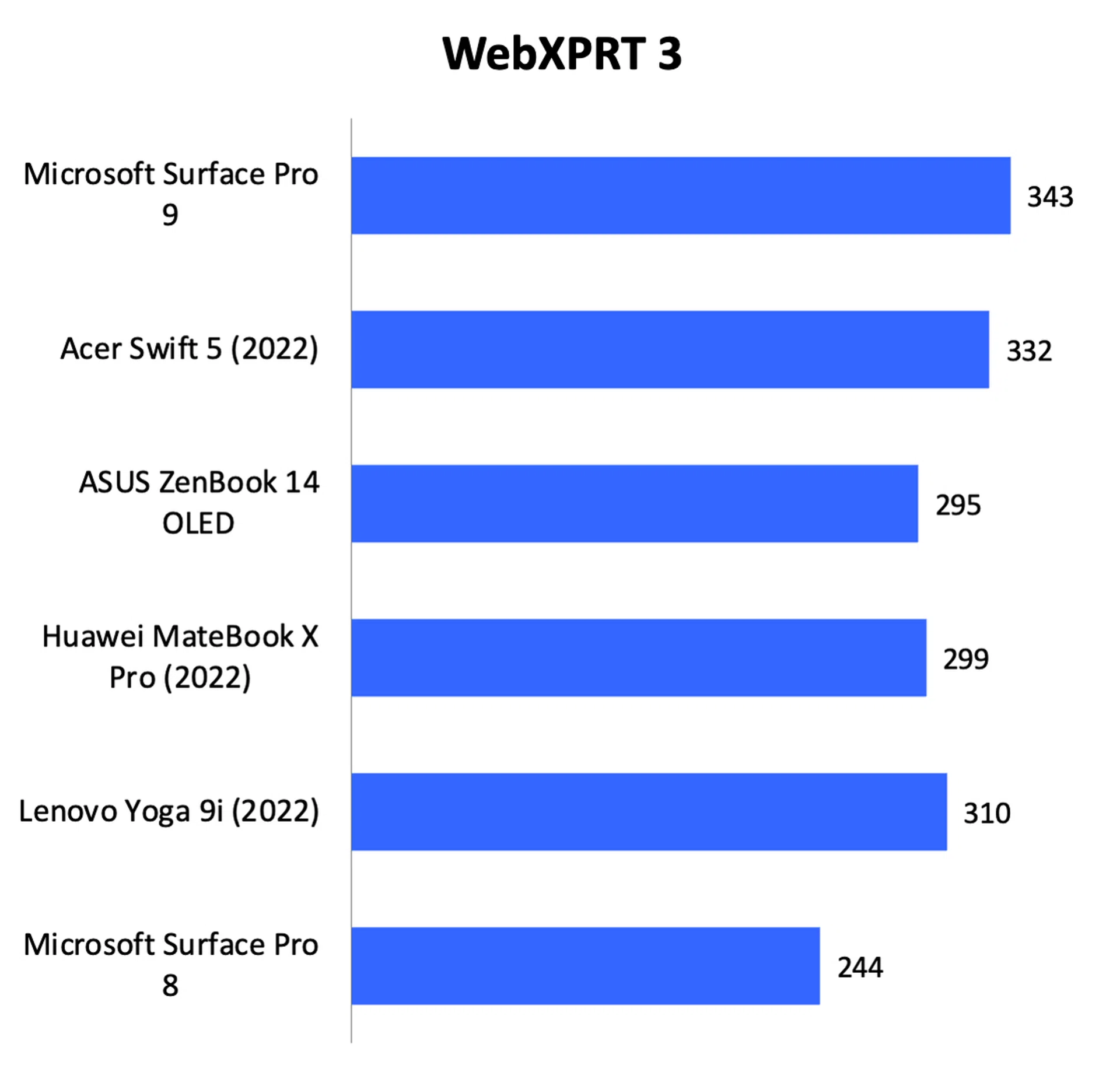
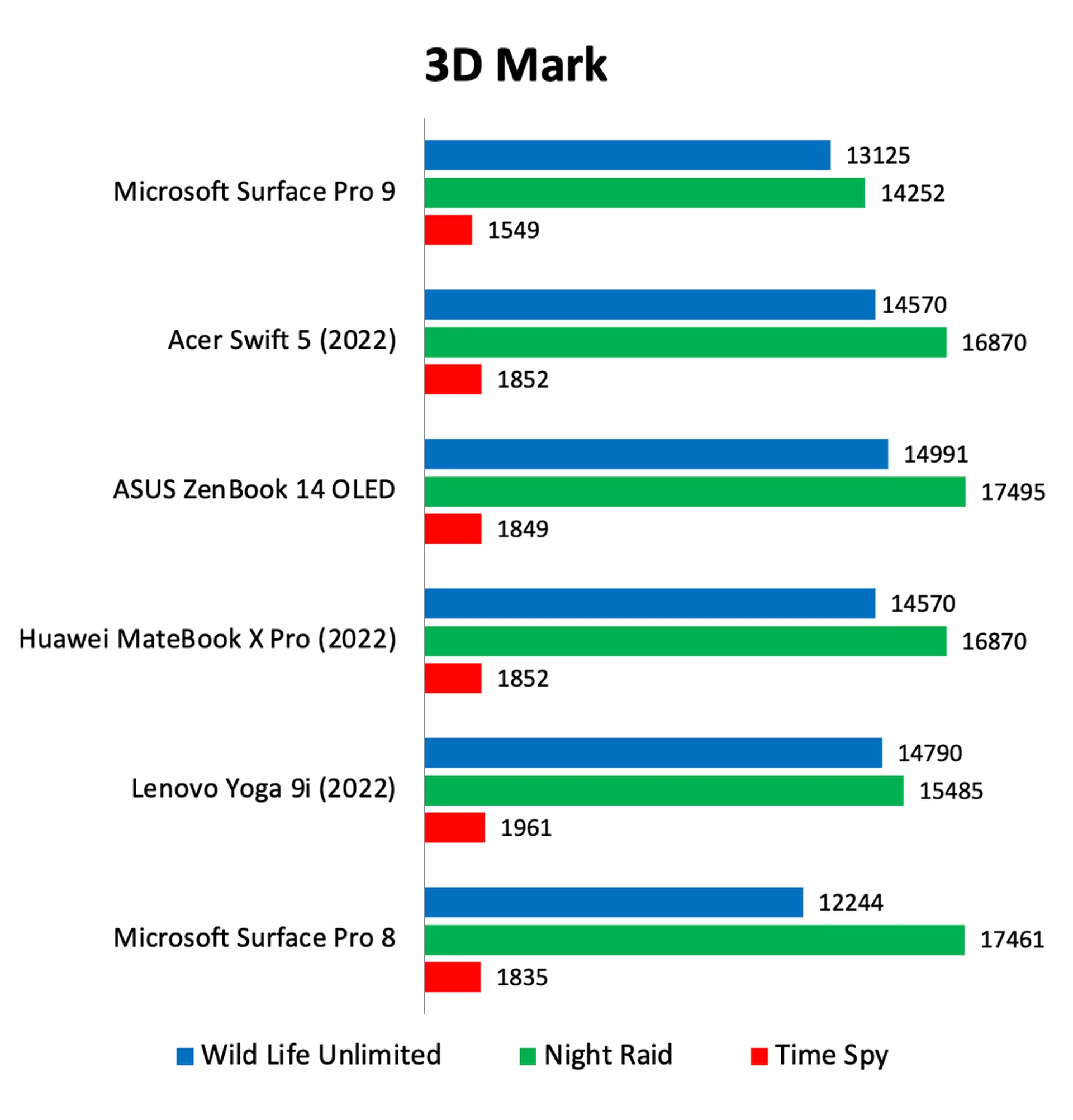
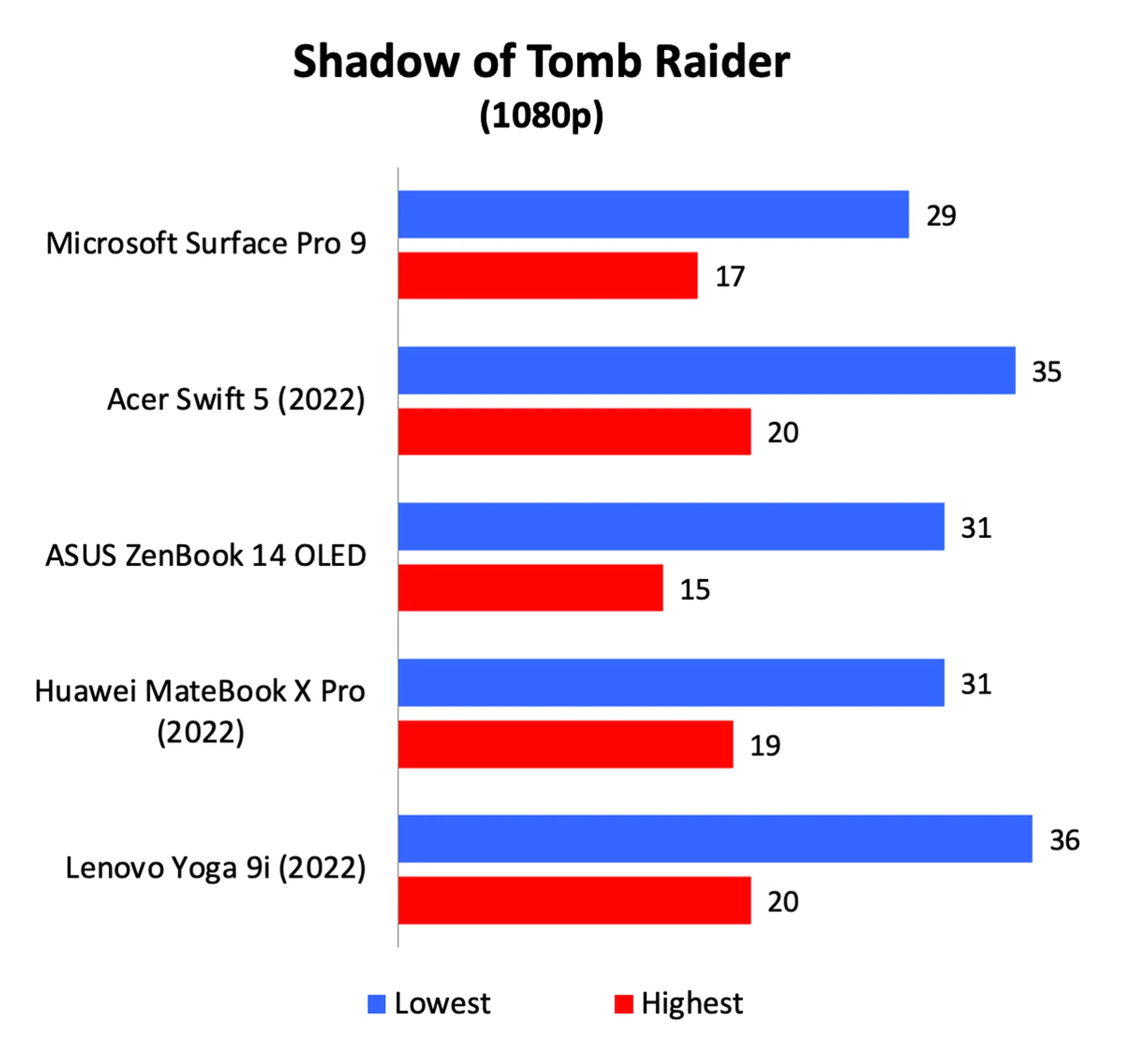
To recap, the Surface Pro 9 that I received for testing is powered by an Intel Core i7-1255U processor with 16GB of memory and a 256GB SSD. Since this is supposed to be the more power-efficient Alder Lake processor, it will be interesting to see how it performs against other ultraportable notebooks with the more powerful P-series processor and also against its predecessor, the Surface Pro 8.
Here’s how it stacks up against other ultraportable portable notebooks that I’ve recently tested.
Model | Display | Processor | Memory | Storage | Graphics |
Microsoft Surface Pro 9 | 13-inch, PixelSense Flow, 120Hz refresh rate | Intel Core i7-1255U | 16GB | 256GB SSD | Intel Iris Xe |
14-inch, WQXGA, IPS, touchscreen | Intel Core i7-1260P | 16GB | 1TB SSD | Intel Iris Xe | |
14-inch, 2.8K, OLED, touchscreen | Intel Core i7-1260P | 16GB | 512GB SSD | Intel Iris Xe | |
14.2-inch, 3k, IPS, touchscreen | Intel Core i7-1260P | 16GB | 1TB SSD | Intel Iris Xe | |
14-inch, 2.8K, OLED, touchscreen | Intel Core i7-1260P | 16GB | 512GBSSD | Intel Iris Xe | |
13-inch, PixelSense Flow, 120Hz refresh rate | Intel Core i7-1185G7 | 16GB | 256GB SSD | Intel Iris Xe |
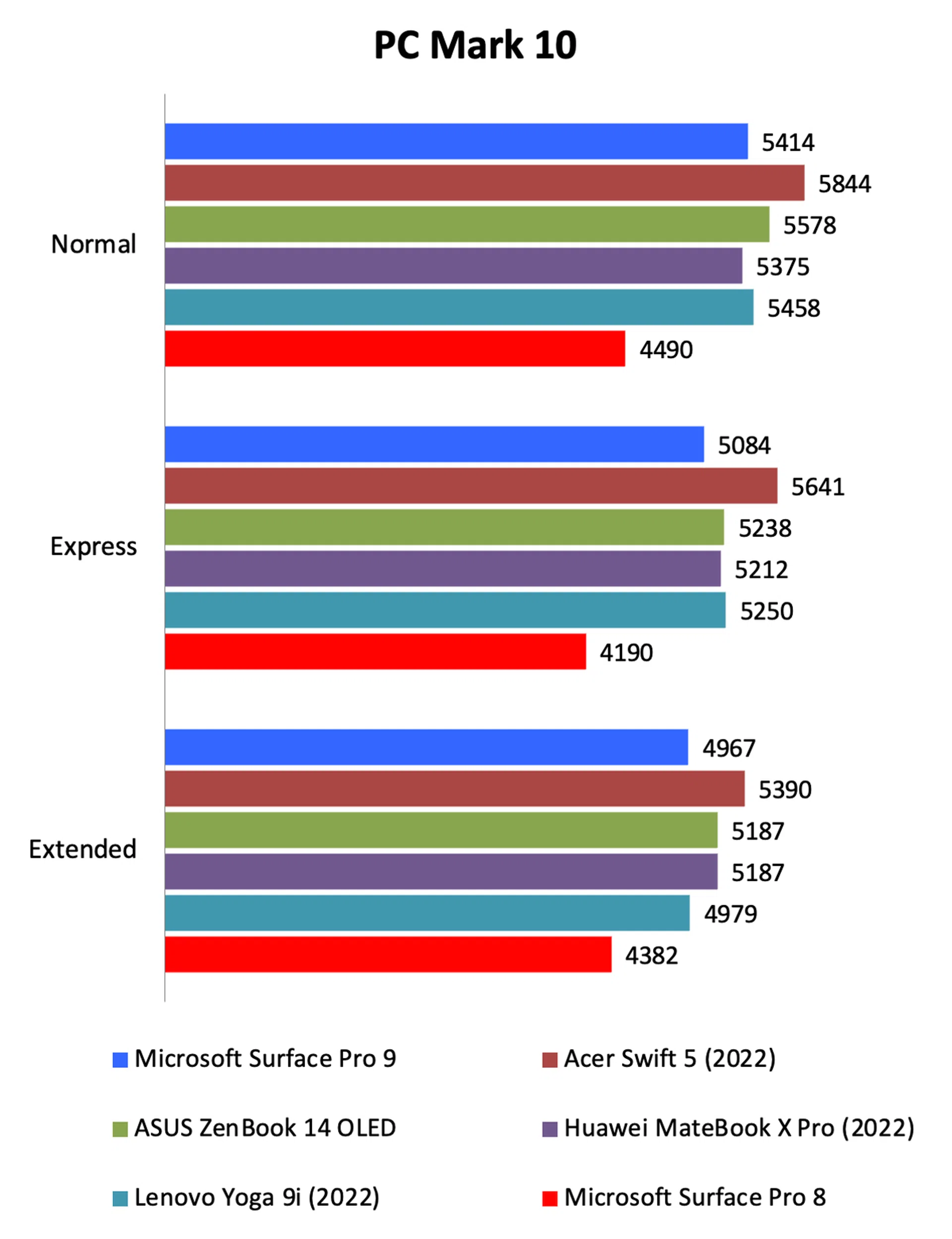
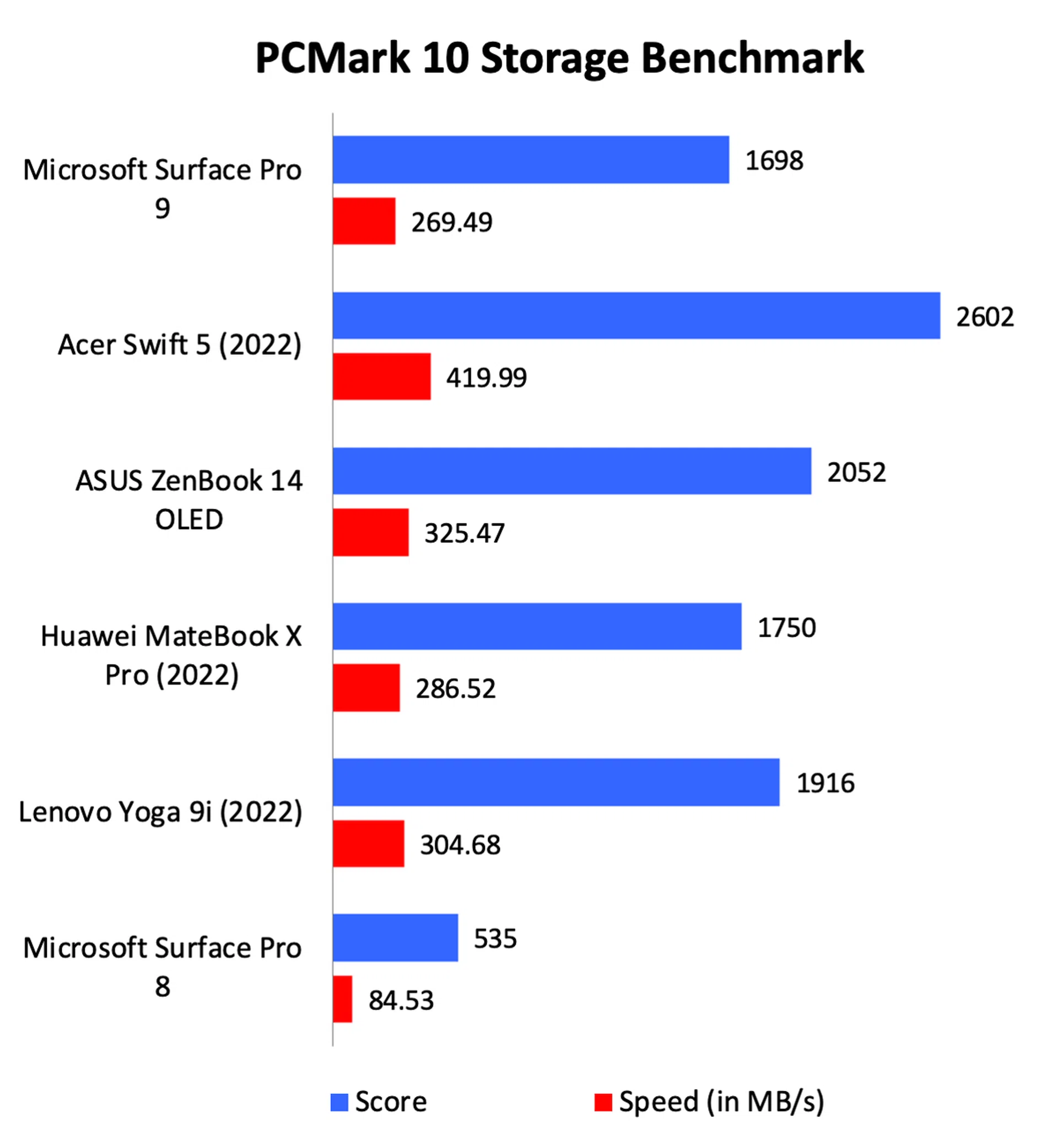
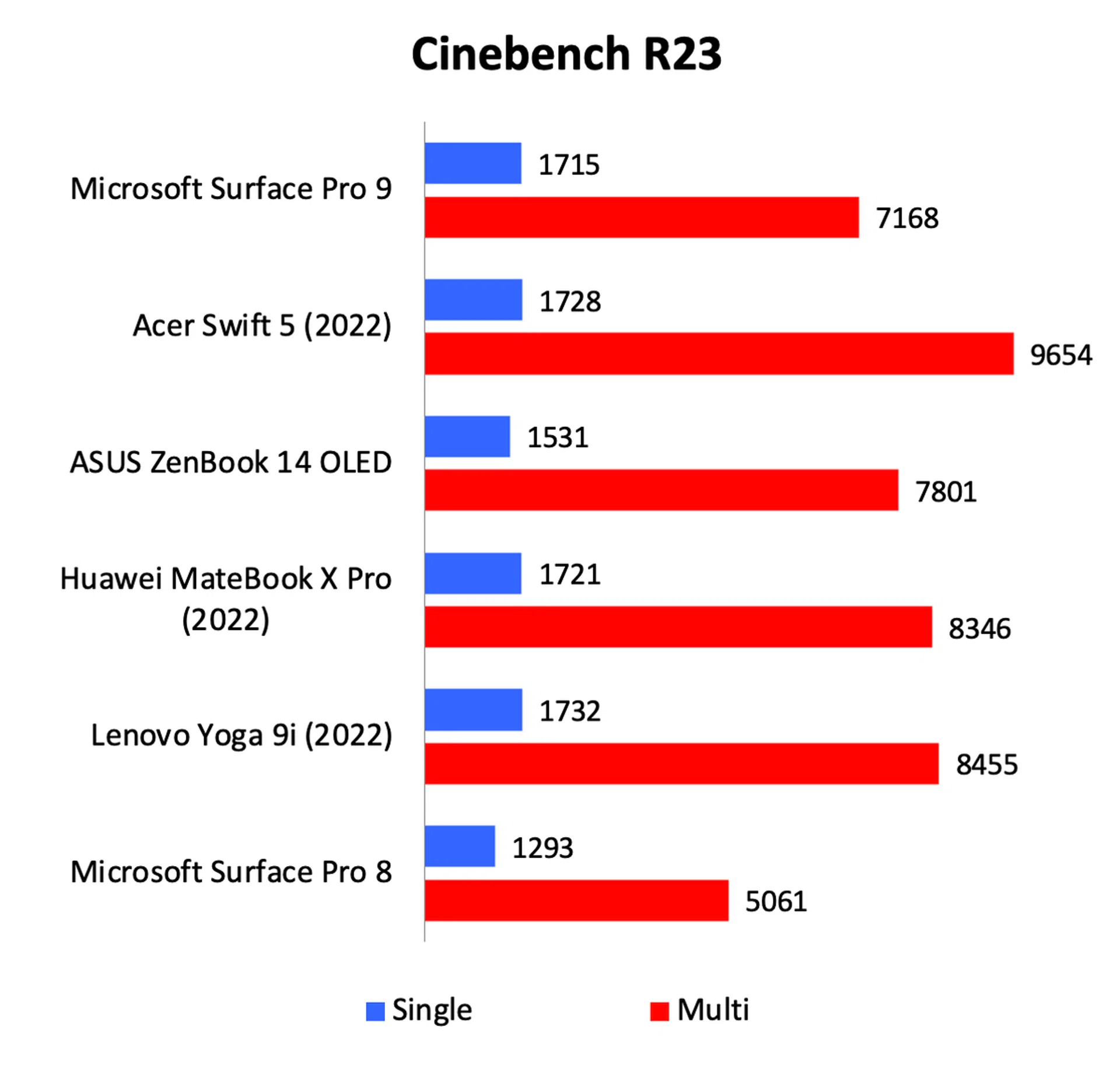
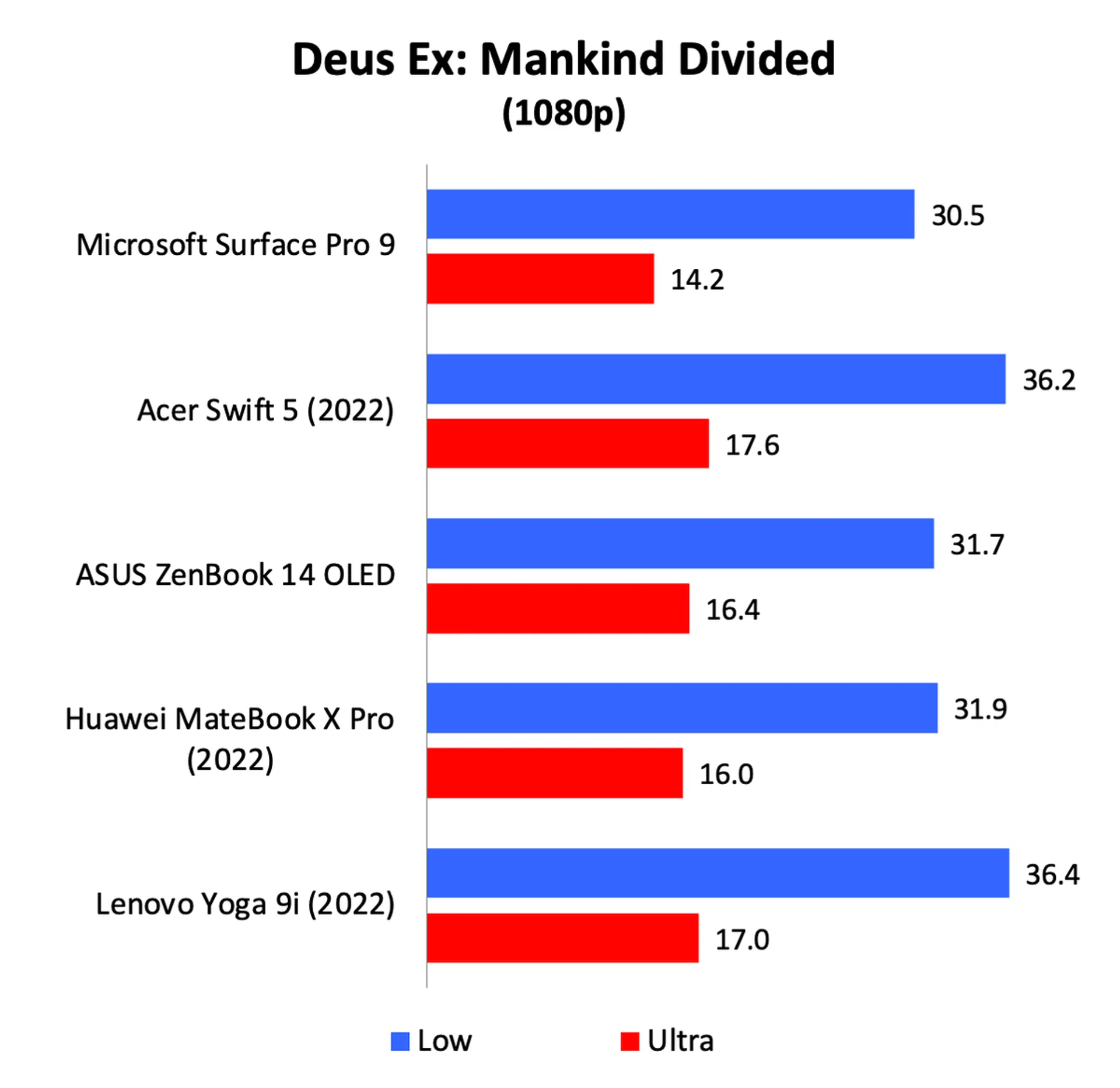
Despite having a less powerful U-series processor, the Surface Pro 9 managed results that were almost on a par with ultraportable notebooks that have more powerful P-series processors. Looking at the results from Geekbench and Cinebench, we can see that single-core performance was nearly as good as any notebook with a P-series processor and it is only in multi-core performance that it starts to lag, and even then, the difference isn’t all that great. Graphics performance wasn’t too shabby either, though it must be said that this isn’t a gaming machine at all. If you do want to play games, be prepared to dial back the graphics settings significantly.
Crucially, in the real world, the Surface Pro 9 feels every bit as fast and responsive as the other ultraportables. You can’t tell that it has a lower-power U-series processor, and that must be viewed as a positive. Also, CPU performance is much improved over its predecessor. The only negative I found is that it can get quite warm when it’s taxed, but thankfully the fans aren’t obnoxiously loud.
Battery life
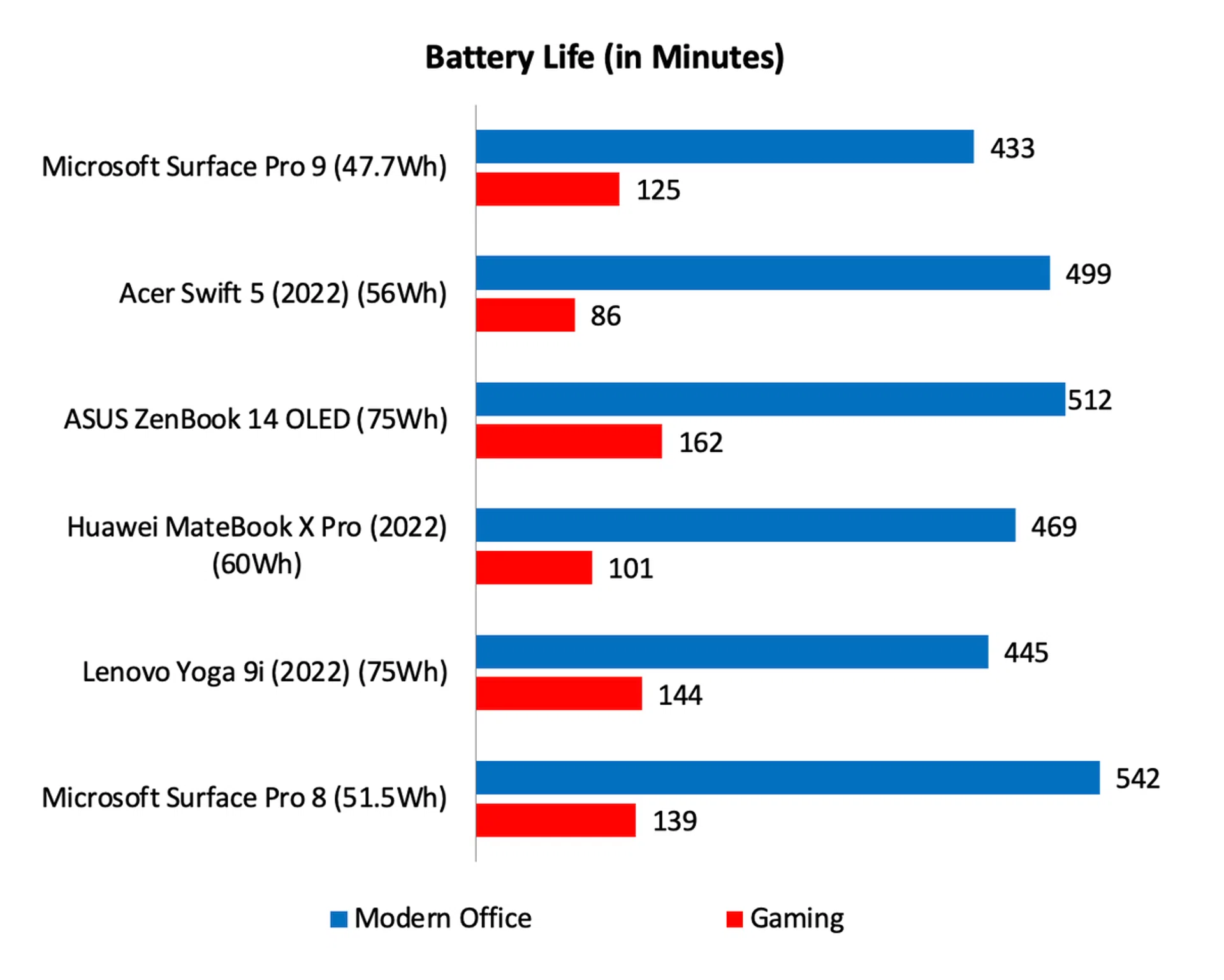
Note: Battery tests were conducted using PCMark 10's battery benchmark with the display set to 100% brightness.
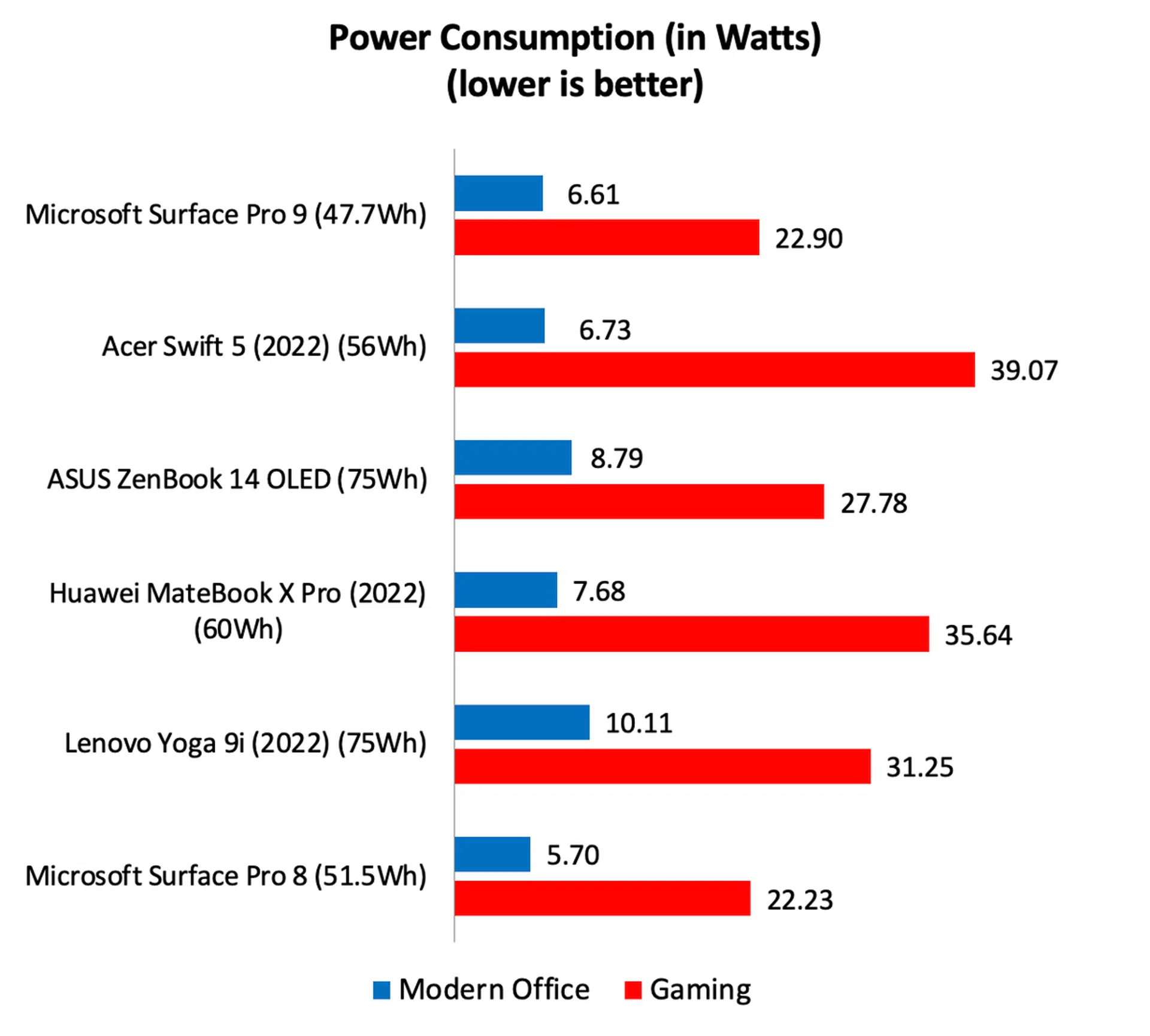
One interesting thing about the Surface Pro 9 is that despite having the same physical dimensions as its predecessor, it actually has a smaller battery capacity – 47.7Wh vs. 51.5Wh. It doesn’t sound like much, but it’s actually a 7.3% reduction in battery capacity. This, coupled with the fact that Intel’s new processor doesn’t seem to be any more power efficient (as evidenced by the power consumption figures), means a significant drop in battery life. Whereas the Surface Pro 8 could manage over 9 hours in our battery life test, the new Surface Pro 9 checks itself out at a little over 7 hours. It’s decent for a device of its size and weight, but there’s no denying that it’s also a lot less than what its predecessor could manage.

Still the best 2-in-1 ultraportable notebook
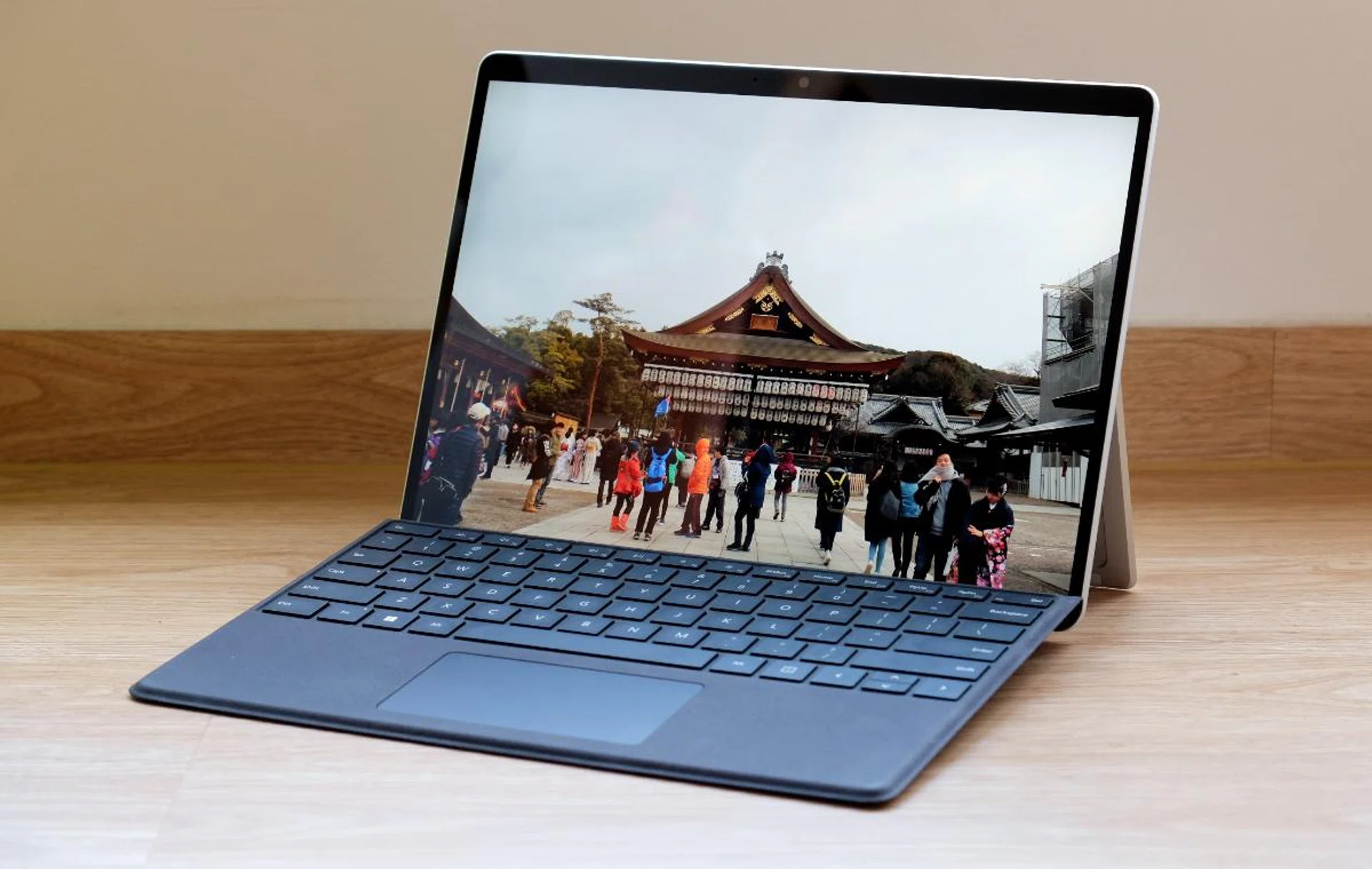
Though the improvements are minor, the Surface Pro 9 is still one of the best 2-in-1 Windows devices you can buy.
Though the Surface Pro 9 isn’t vastly different or even improved from its predecessor, there’s no question that it’s still one of, if not the best 2-in-1 notebook you can buy today. Most of this stems from the fact that unlike other convertible notebooks, the Surface Pro 9 can truly be used as tablet. This gives it a versatility that is unmatched by its rivals.
But it’s by no means perfect. Despite having Intel’s newest Alder Lake processors, power consumption hasn’t improved. This, coupled with the slightly smaller battery, means battery life has gone down quite significantly, which reduces its portability score.
The bigger hurdle for most readers, however, is likely going to be its price. Though prices start at S$1,588, I can’t see too many people opting for that configuration seeing that it only comes with 8GB of memory and a 128GB SSD. Realistically, you are going to at least want the Core i5 model with 16GB of memory and 256GB of storage and that’s S$2,188.
Processor | Memory | Storage | Price |
Core i5-1235U | 8GB | 128GB | S$1,588 |
Core i5-1235U | 8GB | 256GB | S$1,738 |
Core i5-1235U | 16GB | 256GB | S$2,188 |
Core i7-1255U | 16GB | 256GB | S$2,488 |
Core i7-1255U | 16GB | 512GB | S$2,938 |
Core i7-1255U | 32GB | 1TB | S$3,988 |
The accessories are the ones that will really get to you. Prices of the Surface Pro keyboard start at S$268 and the Surface Pen is S$208. If you want both, definitely get the keyboard and pen bundle which is better value at S$428. No matter what, it’ll add to the cost of your Surface Pro 9 system considerably.
The system I tested has a Core i7 processor, 16GB of memory, and 256GB of storage which is S$2,488. If you add the keyboard and pen, that goes up to S$2,916. Even if you add the keyboard alone, which I consider a must-have accessory, it’s still S$2,756. The Surface Pro has never been a cheap device, and the same is true for this latest version.
If you are looking for a Windows device that is equal parts notebook and tablet, there’s no contest. The Surface Pro is the best device for this. Build quality is tip-top, the display is brilliant, performance is good, and battery life remains decent, even if it’s not quite as good as the model it replaces. Really, the only stumbling block is its price.
You can buy the Microsoft Surface Pro 9 on the Microsoft Online Store (comes with free Surface Slim Pen 2), the Microsoft Flagship Store on Lazada, and the Microsoft Authorized Store on Shopee.
Our articles may contain affiliate links. If you buy through these links, we may earn a small commission.