

Note: This review was first published on 9 November 2022.
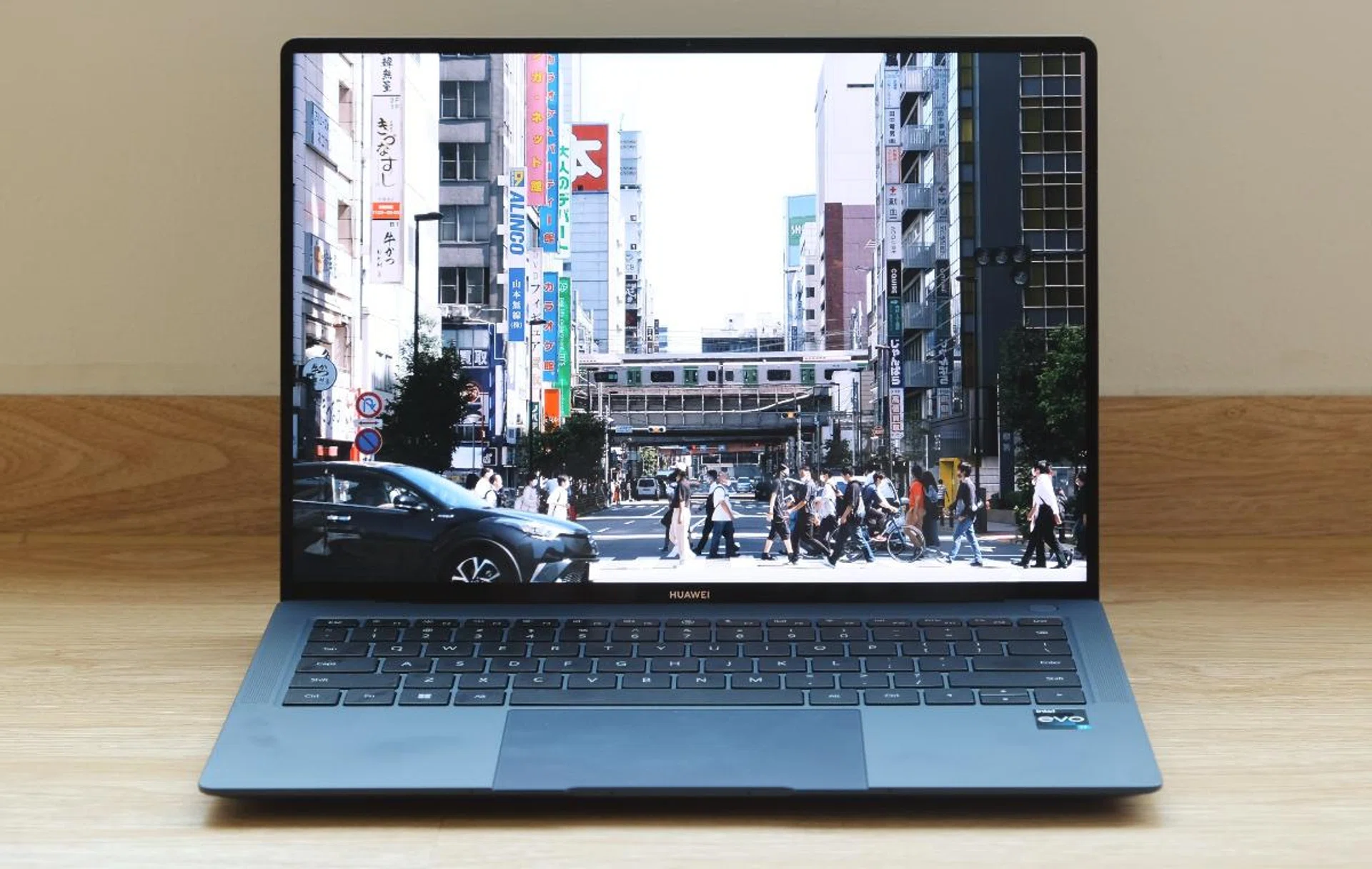
The MateBook X Pro is Huawei's flagship ultraportable notebook.
Huawei's finest
Huawei’s flagship ultraportable notebook is the MateBook X Pro and it has recently been given a thorough makeover. The key updates are its larger 14.2-inch display and Intel’s newest 12th Gen Core processors.
The TLDR version:
A mostly decent and well-rounded notebook that is let down by its high asking price. For the same money, there are fancier and more versatile alternatives. Buy only if you can find it at a heavy discount.
Although the display is larger, Huawei is sticking with a 3:2 aspect ratio which I find preferable for work. There’s more vertical space, so you can view a little more of a document, spreadsheet, or email. It has a resolution of 3120 x 2080 pixels, meets VESA’s DisplayHDR 400 standards, and supports the P3 colour space. Maximum brightness is claimed to be 500 nits, and it has an above-average refresh rate of 90Hz. This isn’t an OLED display, so blacks look more like dark grey, but even then, this is mostly a great display and I think most users will have no complaints.

Though the display doesn't use an OLED panel, colours still mostly look great. It also has an above-average refresh rate of 90Hz which makes everything you do look and feel fluid.
The chassis is made of magnesium alloy and it has a special coat to give it a textured finish that feels like some kind of soft-touch material. I’ve never felt a notebook that feels quite like this before. It almost feels like it’s in some sort of a notebook sleeve and yet it isn’t. And because it's magnesium, the MateBook X Pro weighs just 1.26kg. The bezels are thin and Huawei claims a 92.5% screen-to-body ratio. Consequently, the notebook, despite having a larger 14.2-inch display, is roughly the same size as most 13-inch notebooks. Thickness is at 15.5mm. All in all, the MateBook X Pro is a very portable notebook.
The other big change is under the hood in the form of Intel’s new Alder Lake 12th Gen Core processor. We are only getting a single processor option, and that’s the fairly powerful Core i7-1260P processor, which has four performance cores and eight efficiency cores. It should offer a good blend of performance and efficiency. This is paired with 16GB of LPDDR5 memory and a 1TB PCIe 4.0 SSD.
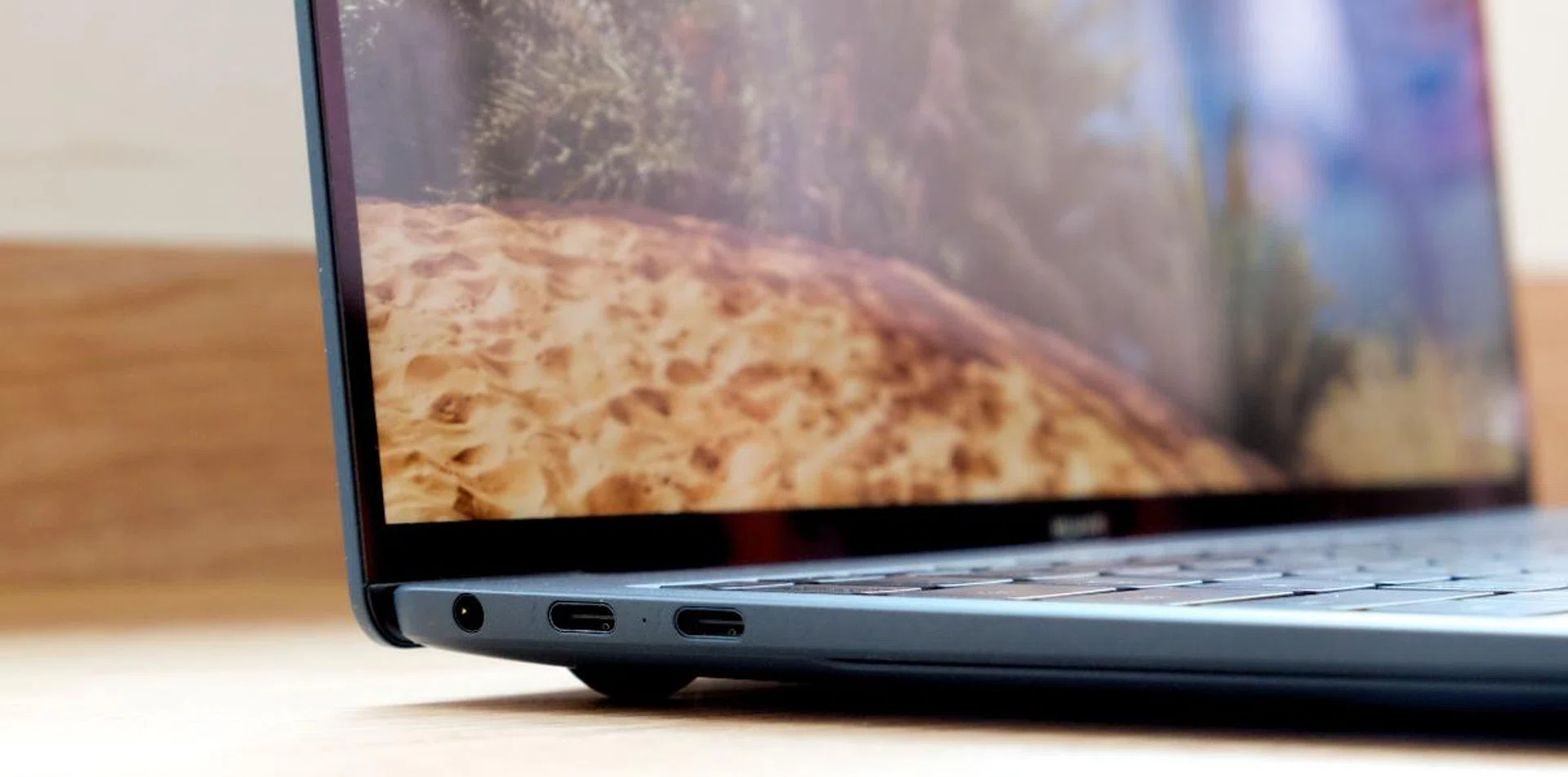
There are four USB-C ports. The two on the left support Thunderbolt 4.
As for ports, you have four USB-C ports – two on each side. The two on the left support Thunderbolt 4 while the two on the opposite side are USB 3.2 Gen 2. You can also use any of the USB-C ports for charging. Apart from a 3.5mm audio combo jack, take note that you don't get any other ports. There is no HDMI port, USB-A port, or memory card reader.
The keyboard and trackpad are both good. The keyboard feels positive, the size is good, and the layout is sensible. That said, I would have preferred a smidge more resistance to the keys and an inverted “T” layout for the arrow buttons. Also, the keys are prone to smudges as you can probably tell from the photo below. The clickable trackpad is large, accurate, and responsive. Curiously, the trackpad extends to the bottom of the notebook so there’s a notch at the bottom.
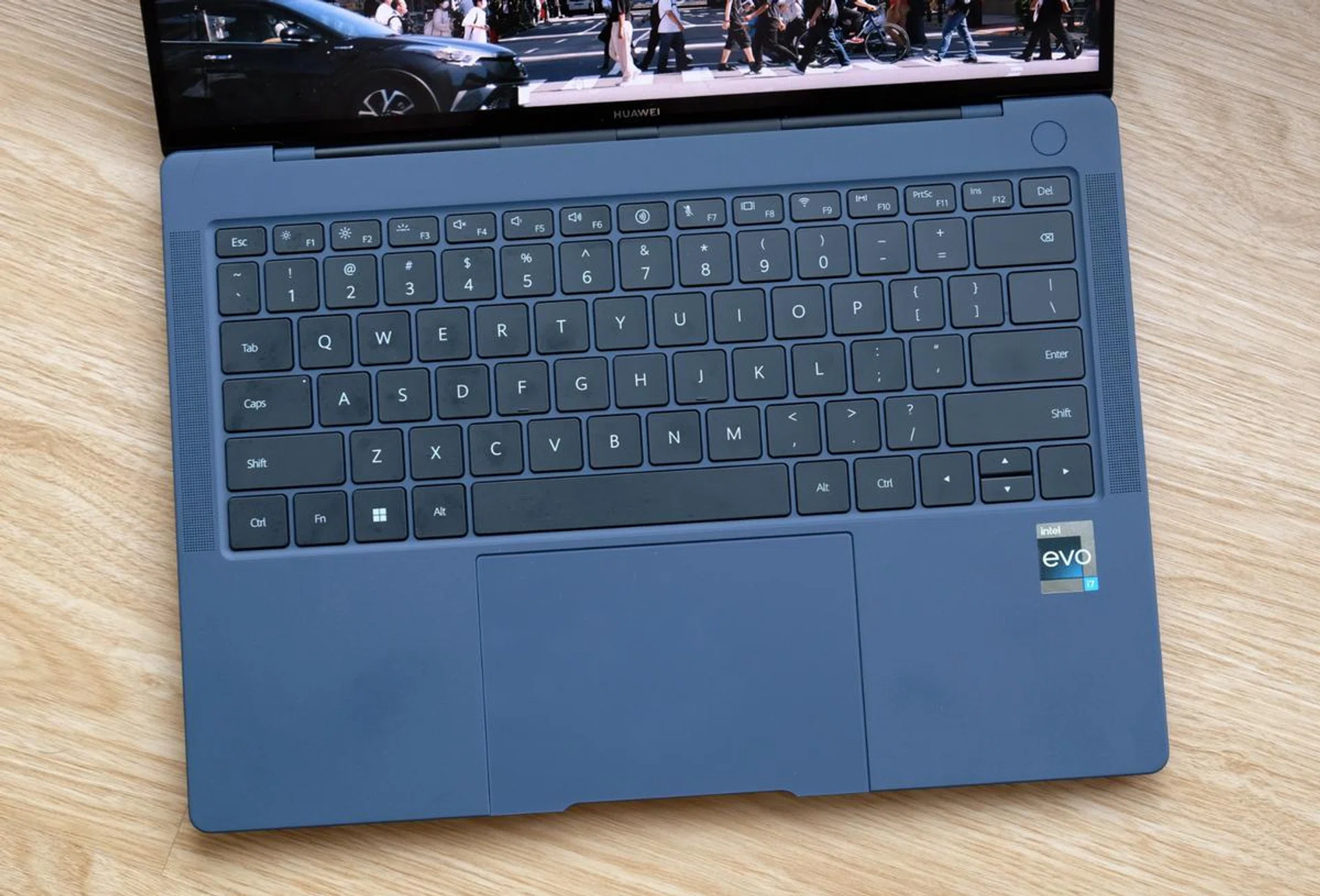
The keyboard feels nice to type on but the key caps don't resist smudges well.
The web camera, which used to be hidden in a button, has been repositioned to the more conventional position above the display. Though the image quality isn’t the best since it’s only a 720p unit, at least you have more flattering camera angles. Huawei says the MateBook X Pro has a six-speaker sound system and it does get remarkably loud. Sound quality, however, is only slightly above average. There’s palpable bass when you turn up the volume and distortion is kept to quite low levels even at high volumes. However, it sounds muffled.
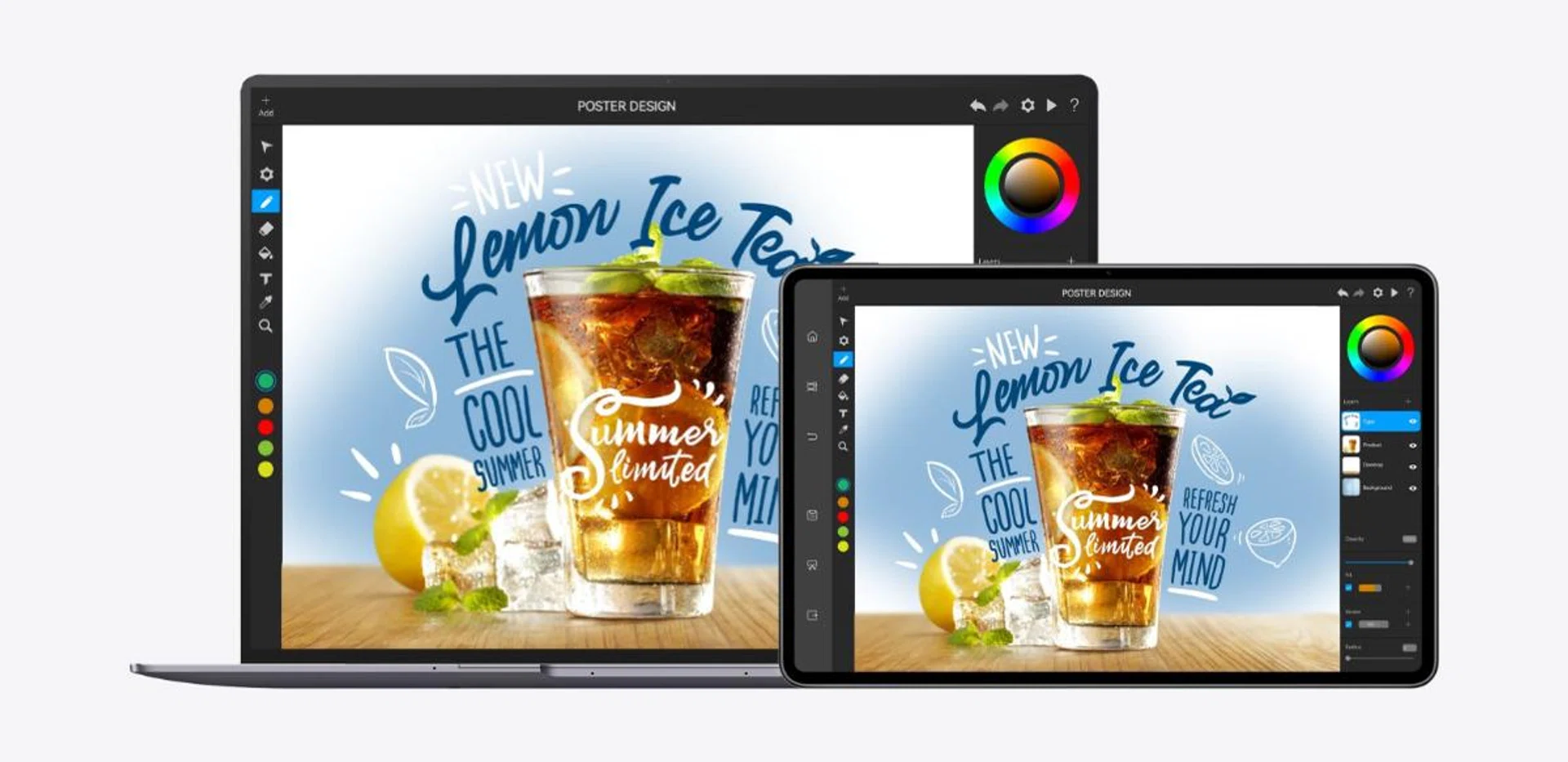
With Super Device, you can use a compatible MatePad as a secondary display for your MateBook X Pro.
If you own other Huawei devices like a phone or tablet, then you’ll be happy to know that the new MateBook X Pro supports Huawei’s Super Device feature which lets you do pretty cool things like use apps from your Huawei phone on the MateBook X Pro, or extend the MateBook X Pro’s display by using the MatePad as a secondary display. If this sounds somewhat familiar, it’s because you can do the same with Apple devices as well. Unfortunately, I didn’t have other Huawei devices with me to test this feature out.
Performance analysis
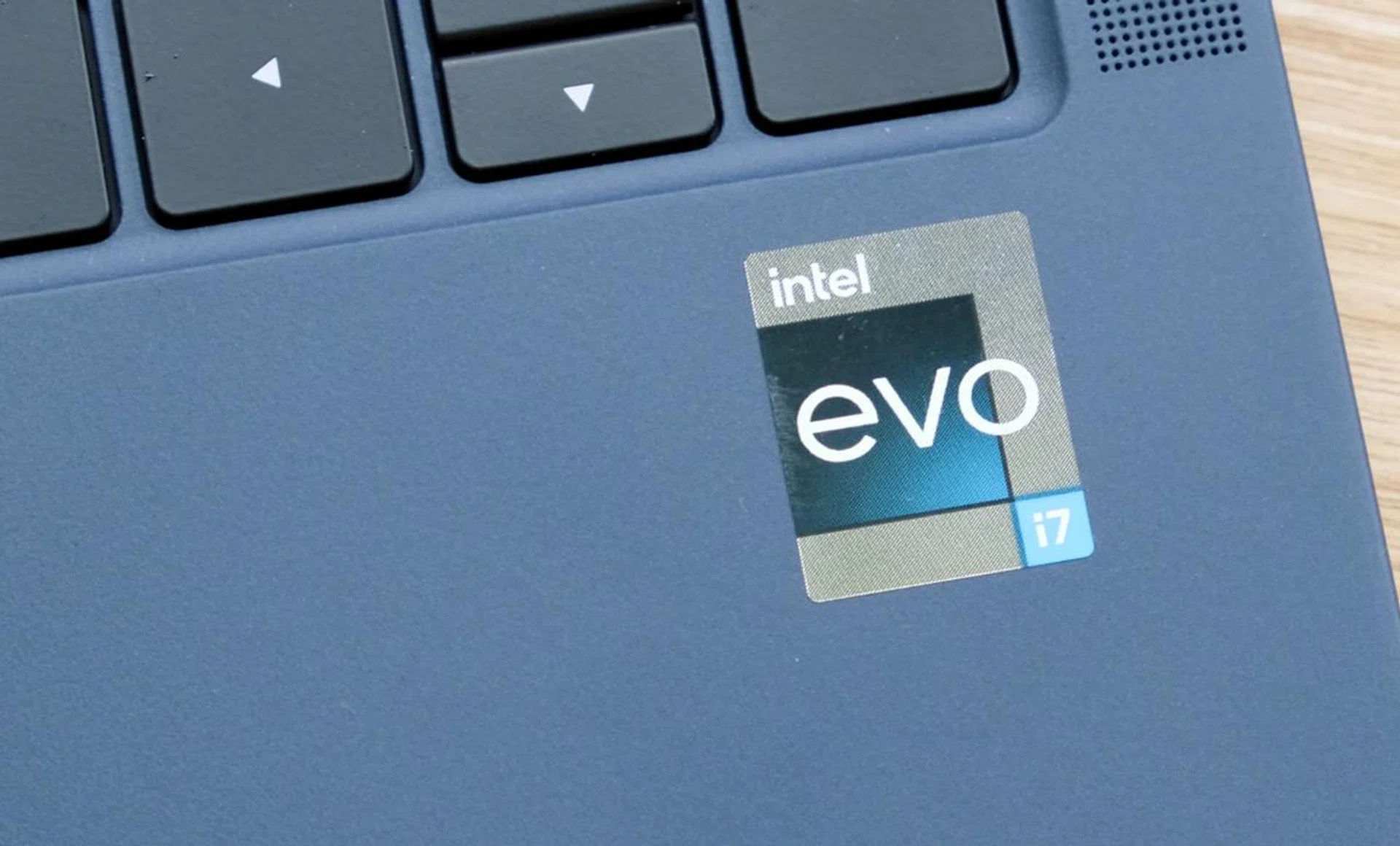
The latest version of the MateBook X Pro is powered by an Intel Alder Lake processor.
To recap, the MateBook X Pro is powered by a Core i7-1260P processor. This is Intel's newest Alder Lake mobile processor with a big-core + little-core implementation. It also has 16GB of LPPDR5 memory and a 1TB PCIe 4.0 SSD. Here's how it stacks up against other recently tested ultraportable notebooks.
Model | Display | Processor | Memory | Storage | Graphics |
Huawei MateBook X Pro (2022) | 14.2-inch, 3k, IPS, touchscreen | Intel Core i7-1260P | 16GB | 1TB SSD | Intel Iris Xe |
14-inch, 2.8K, OLED, touchscreen | Intel Core i7-12700H | 16GB | 1TB SSD | Intel Iris Xe | |
14-inch, 2.8K, OLED, touchscreen | Intel Core i7-1260P | 16GB | 512GBSSD | Intel Iris Xe | |
14-inch, QHD+, OLED | AMD Ryzen 7 5800U | 16GB | 512GB SSD | NVIDIA GeForce MX450 | |
13-inch, PixelSense Flow, 120Hz refresh rate | Intel Core i7-1185G7 | 16GB | 256GB SSD | Intel Iris Xe | |
14-inch, Full-HD, non-touch (4K, as tested) | Intel Core i5-1155G7 | 16GB | 512GB SSD | Intel Iris Xe |
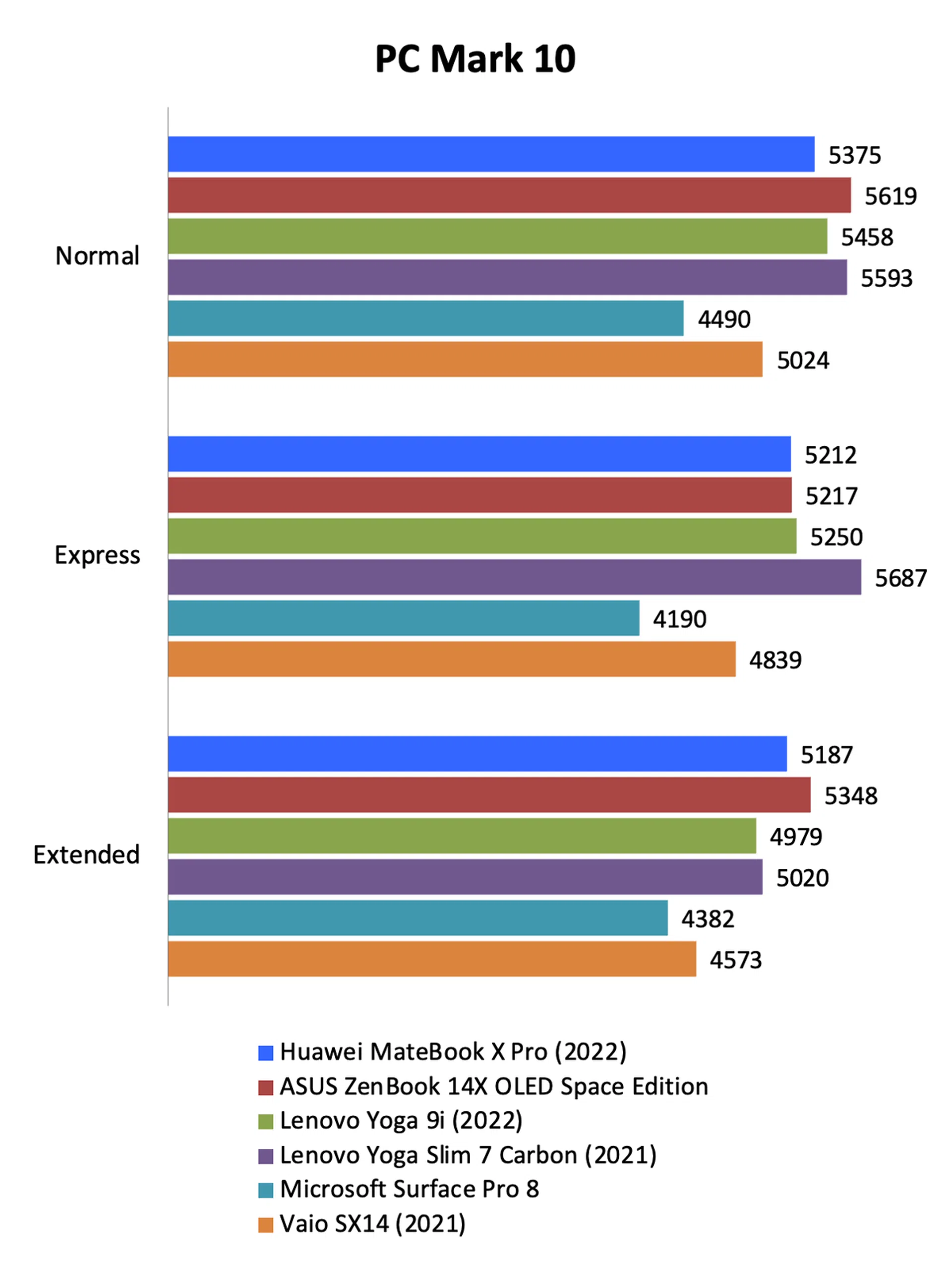
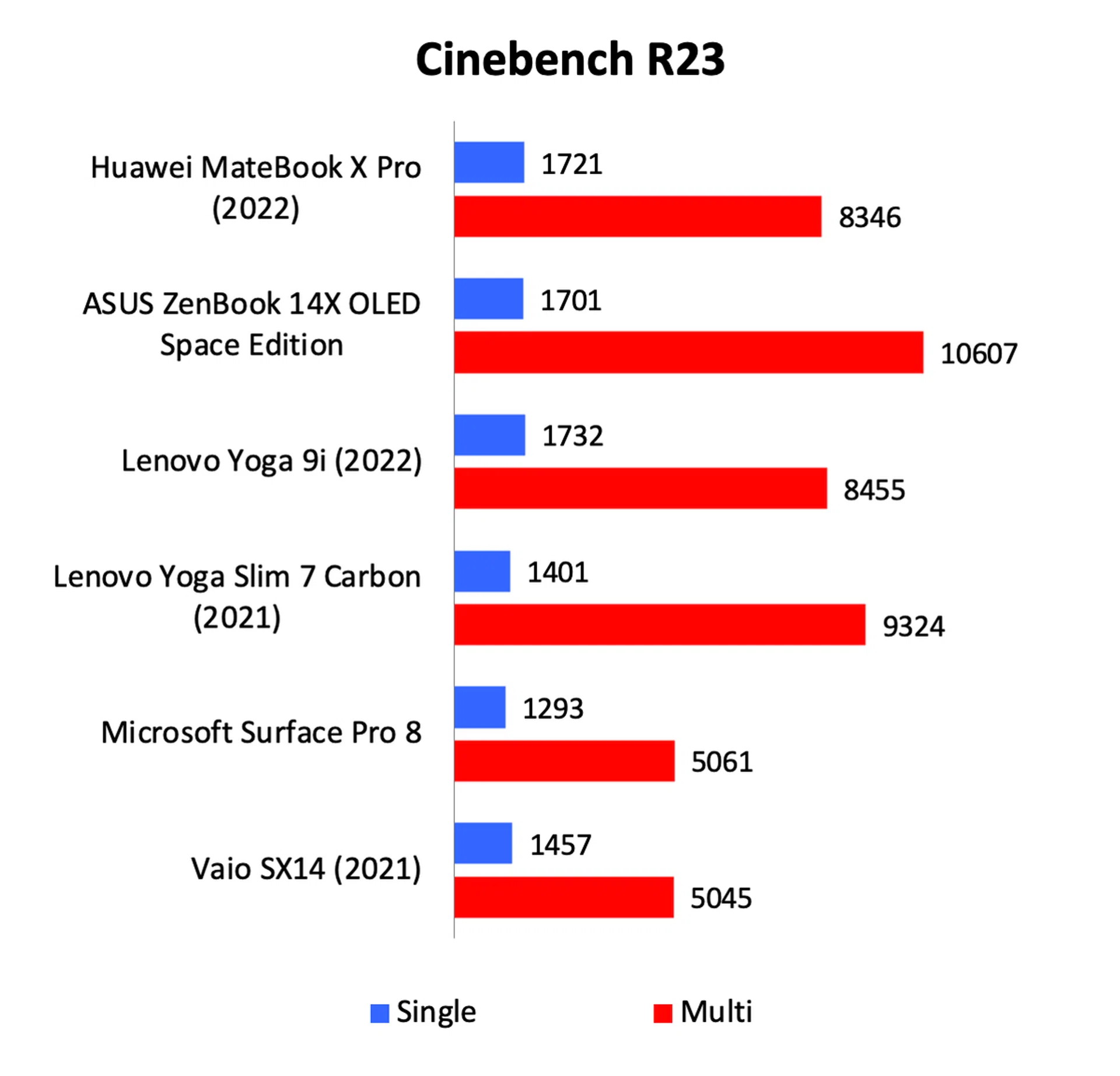
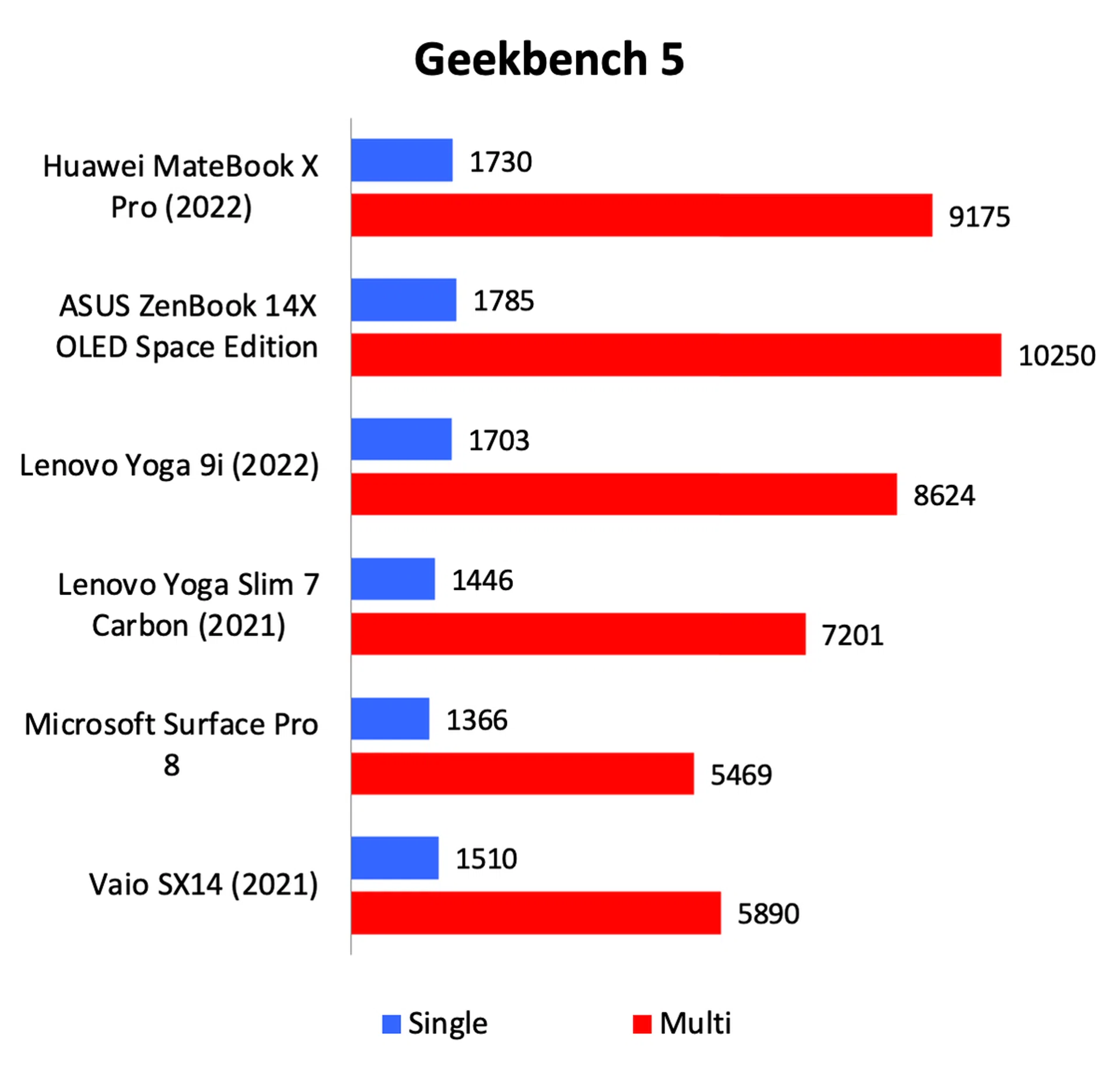
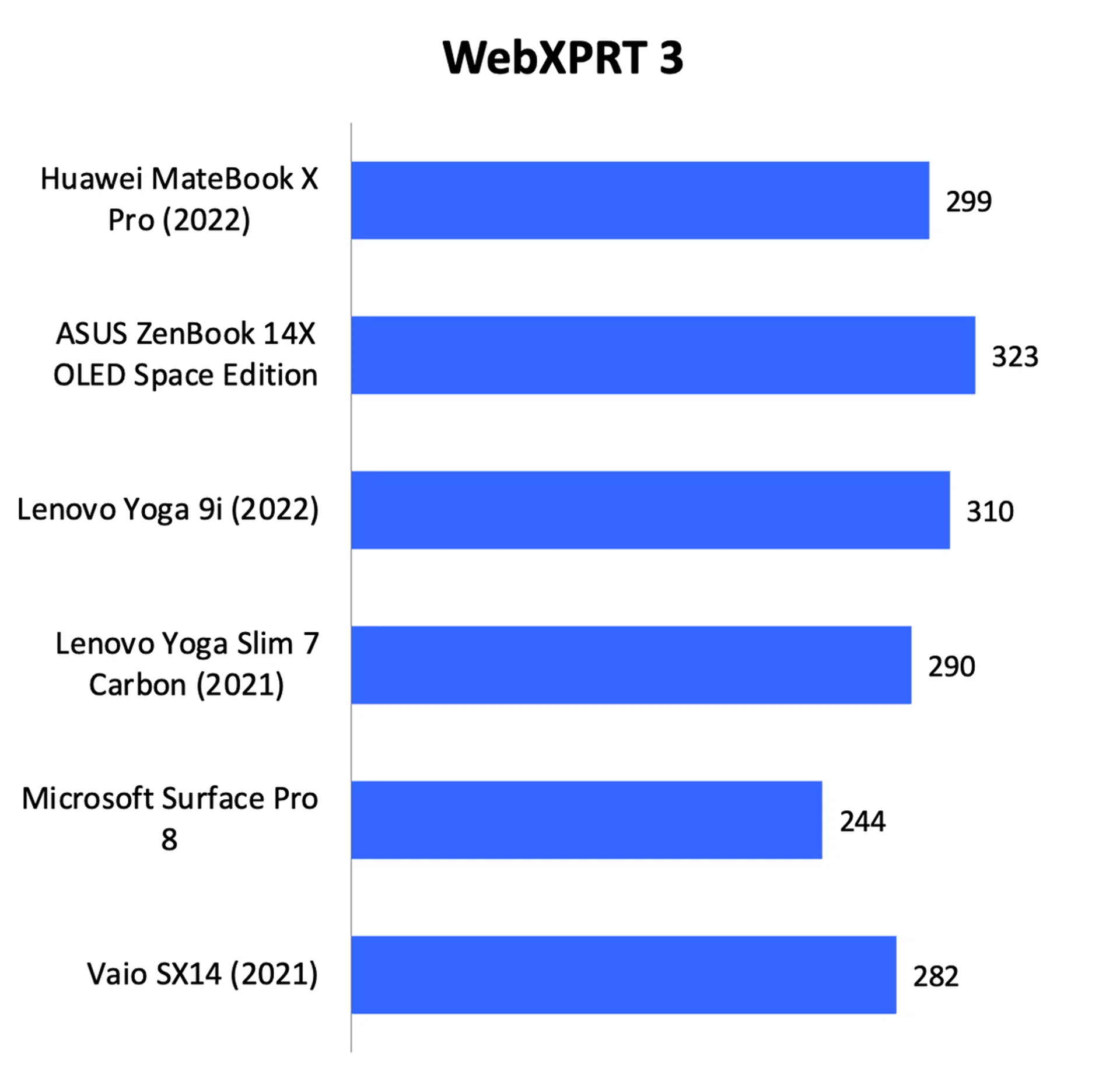
Overall, its performance was decent. It was on par with Lenovo’s Yoga 9i which is powered by the same Core i7-1260P processor. However, it was outclassed by the ASUS ZenBook 14X OLED Space Edition which uses a more powerful H-series processor. Looking at its scores on the Cinebench and Geekbench benchmarks, it’s clear that it has significantly more compute performance than notebooks powered by older 11th Gen core processors like the Microsoft Surface Pro 8 and Vaio SX14.
In the real world, the performance advantage over older notebooks is less outstanding. It's still a fast machine, but it's not like last year's notebooks are slouches. That said, one thing worth pointing out is that the MateBook X Pro is that it’s surprisingly quiet compared to other notebooks in its class. It also doesn’t feel quite as warm.

Graphics performance
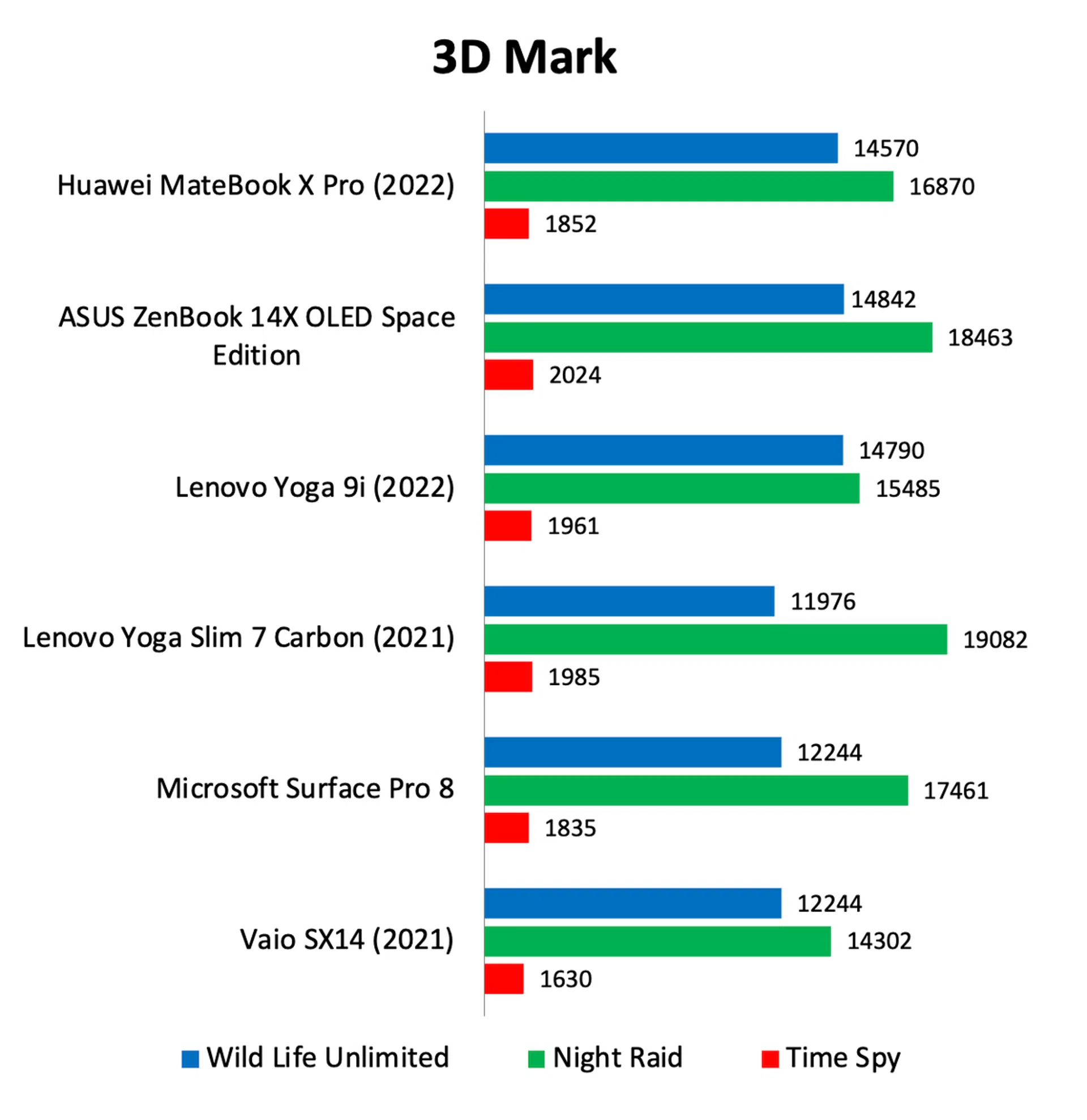
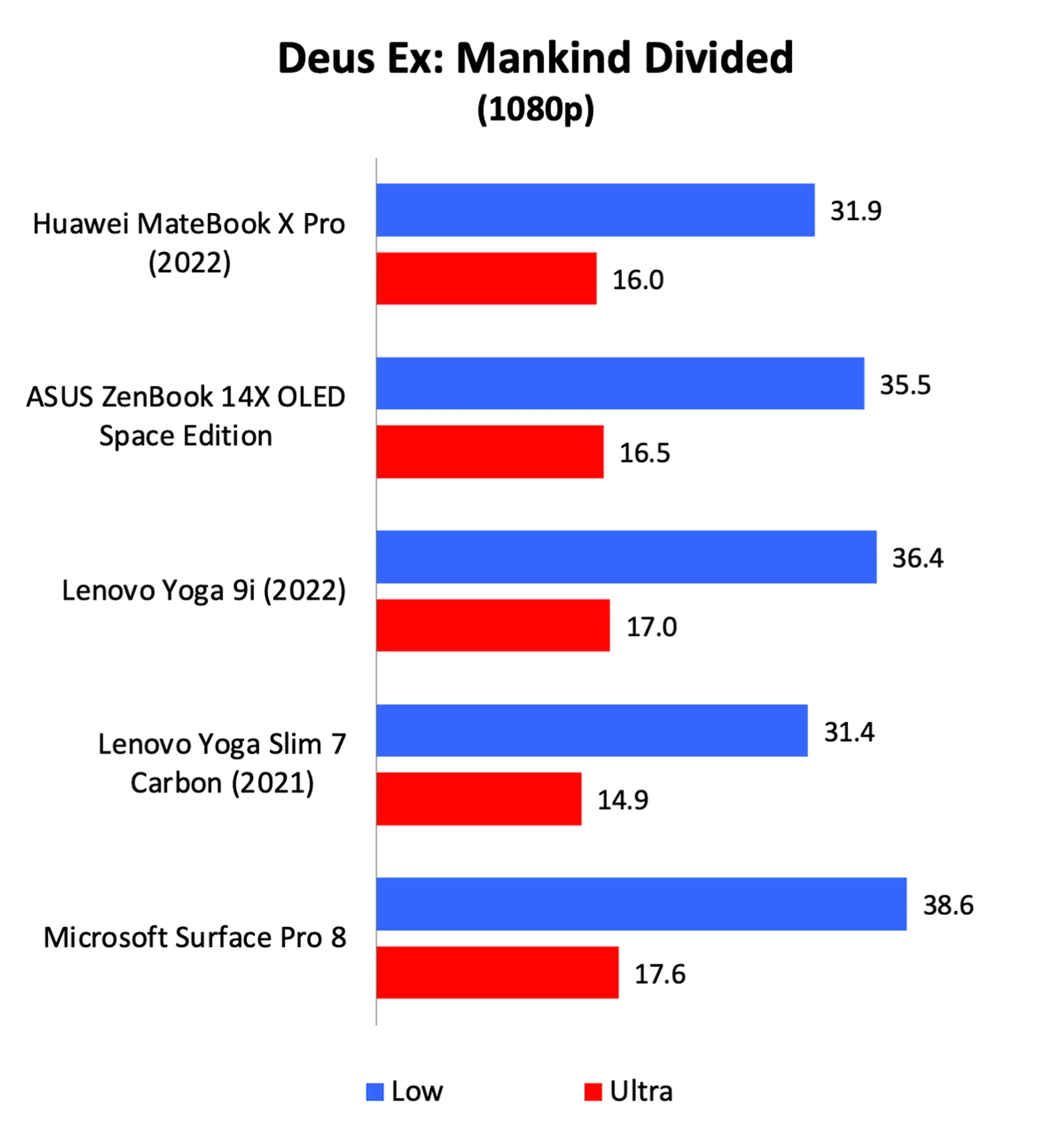
Graphics performance was a little underwhelming. It’s powered by an integrated Intel Iris Xe GPU so I wasn’t expecting fireworks, but even then, it was slightly slower than the Yoga 9i, particularly in games. Still, at the kind of frame rates we are talking about, I’m not sure that’s going to matter. 31.9fps vs. 36.4fps is not night and day and is still barely adequate for gaming. These are not gaming machines.

Battery life
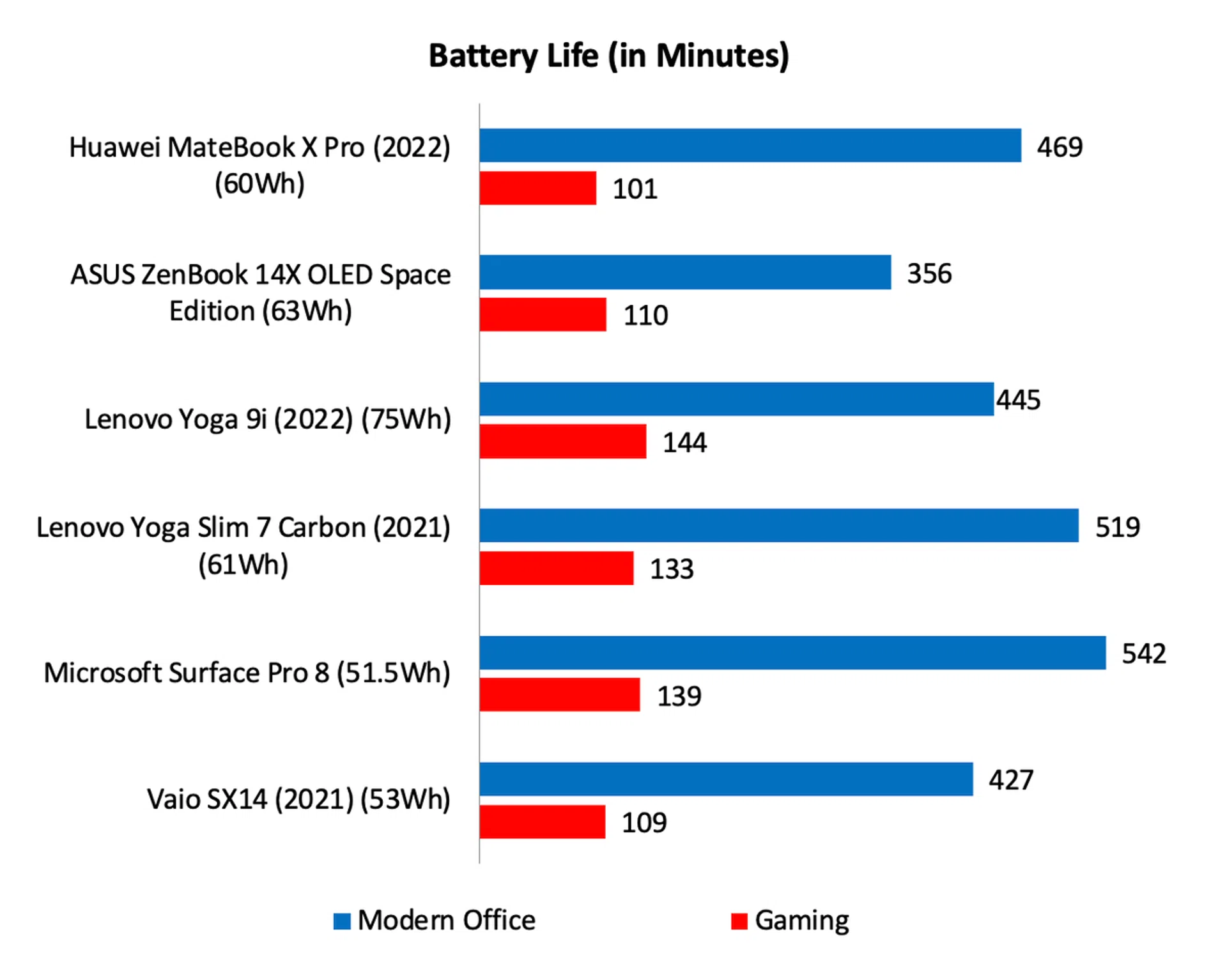
Note: Battery tests were conducted using PCMark 10's battery benchmark with the display set to 100% brightness.
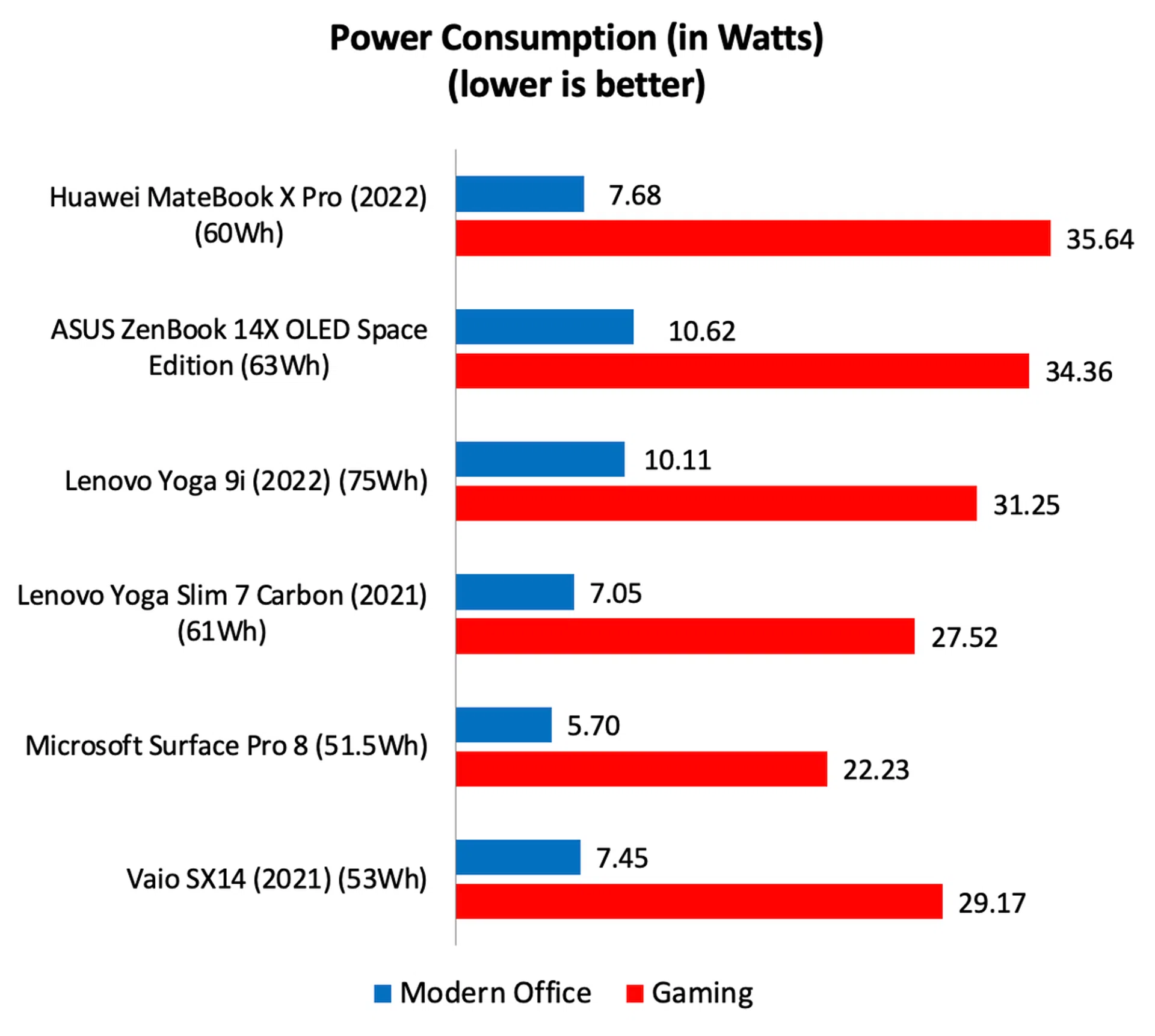
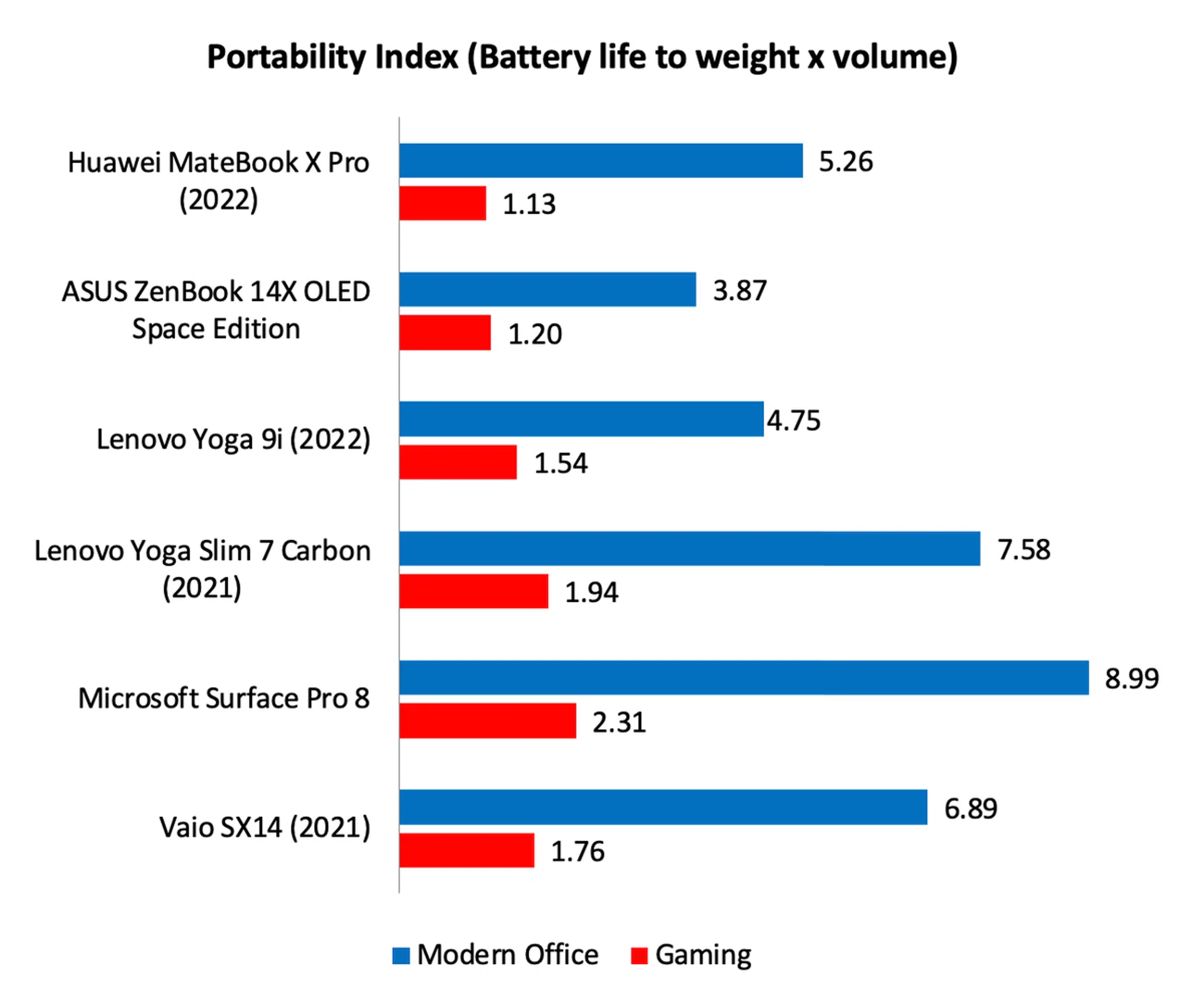
Although the MateBook X Pro only has a 60Wh capacity battery, it managed to last nearly 8 hours long in our intensive battery test. Stretching it to 10 hours shouldn’t be a problem if you turn the display’s brightness down to more reasonable levels. The only other notebooks that lasted longer were the Lenovo Yoga Slim 7 Carbon and the Microsoft Surface Pro 8.
Uncompetitively priced
The problem with the Huawei MateBook X Pro is that, at S$2,798, it’s priced too high. It’s not a bad notebook; it's actually very well-rounded. Sure, the design is a bit bland, but the build quality is high, the display is great, it's slim and light, and both its performance and battery life are decent, if not above average. To add, the keyboard is pleasant to type on, the trackpad is wonderfully large and responsive, and the speakers get surprisingly loud.
However, the ASUS ZenBook 14 OLED UX3402 is nearly a whole grand less at S$1,899, and it’s not like it’s any less well-equipped. Furthermore, it has the benefit of a gorgeous OLED display. One could argue that the MateBook X Pro costs about as much as a similarly-spec’ed Lenovo Yoga 9i and Dell XPS 13 Plus but the Lenovo and Dell both look and feel even more expensive. And the Yoga 9i is more versatile thanks to its convertible design.
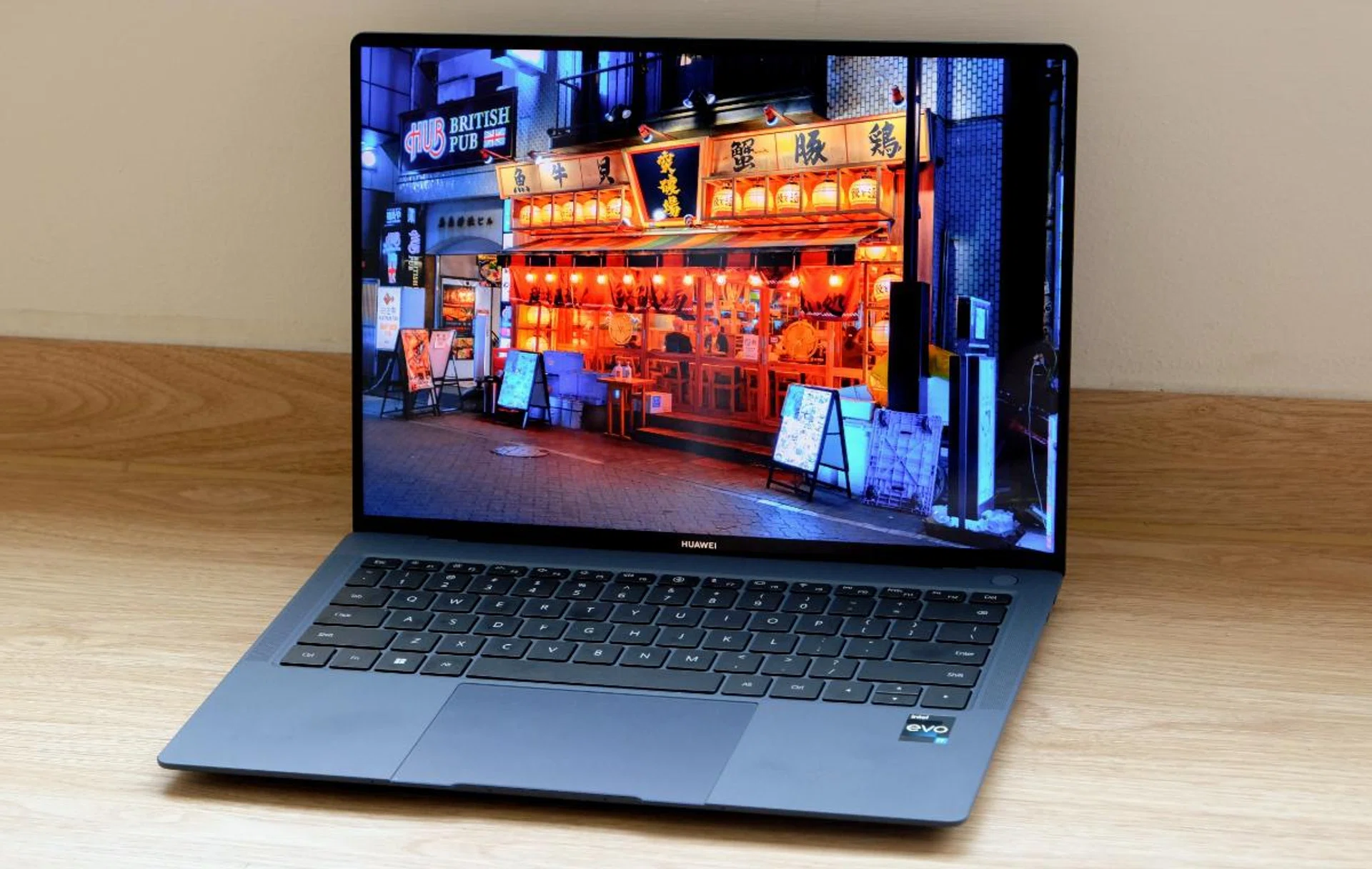
The MateBook X Pro is not a bad notebook but it's priced too high to be considered good value.
And if you want a Huawei notebook with the Super Device feature that lets you use it with other Huawei devices, there are less pricey alternatives like the S$1,798 MateBook 14 or the even more affordable S$1,298 MateBook D16.
Perhaps Huawei could have introduced a more affordable version with 512GB of storage instead of 1TB. Or they could have done more to distinguish the MateBook X Pro. Giving it a convertible design like the Yoga 9i would be a good place to start.
Is there any reason one should get a MateBook X Pro over a more affordable Huawei notebook or any other less expensive notebook for that matter? Only if you absolutely must have the most portable and premium-looking and feeling ultraportable notebook that Huawei makes. Otherwise, it makes more sense to spend your money elsewhere.
You can find the Huawei MateBook X Pro at the Huawei Official Store on Lazada or the Huawei Official Store on Shopee.
Our articles may contain affiliate links. If you buy through these links, we may earn a small commission.