
Intel NUC DC3217BY Kit - Leading the Downsizing Revolution
Measuring just 4 by 4 inches, the palm-size Intel’s Next Unit of Computing (NUC) Mini-PC is here in our labs. We take it for a spin to see how it fares in our benchmarks.

Downsize Me
Recently, we reported that Intel would be exiting its motherboard business after the launch of their fourth-generation Core processors. And according to Intel spokesperson, Dan Snyder, that division of Intel will instead focus on other areas including their Next Unit of Computing (NUC) devices.
The NUC Mini-PC is an ultra small form factor PC that has a motherboard that measures just 4 x 4 inches (about 10 x 10cm). This is considerably smaller than even mini-ITX motherboards (such as this and this), which are popular amongst HTPC enthusiasts. Right now, Intel is offering two SKUs - DC3127IYE and DC3127BY - with a third (DCCP847DYE) that is slated to be released soon. The one we have with us in our labs is the DC3127BY.
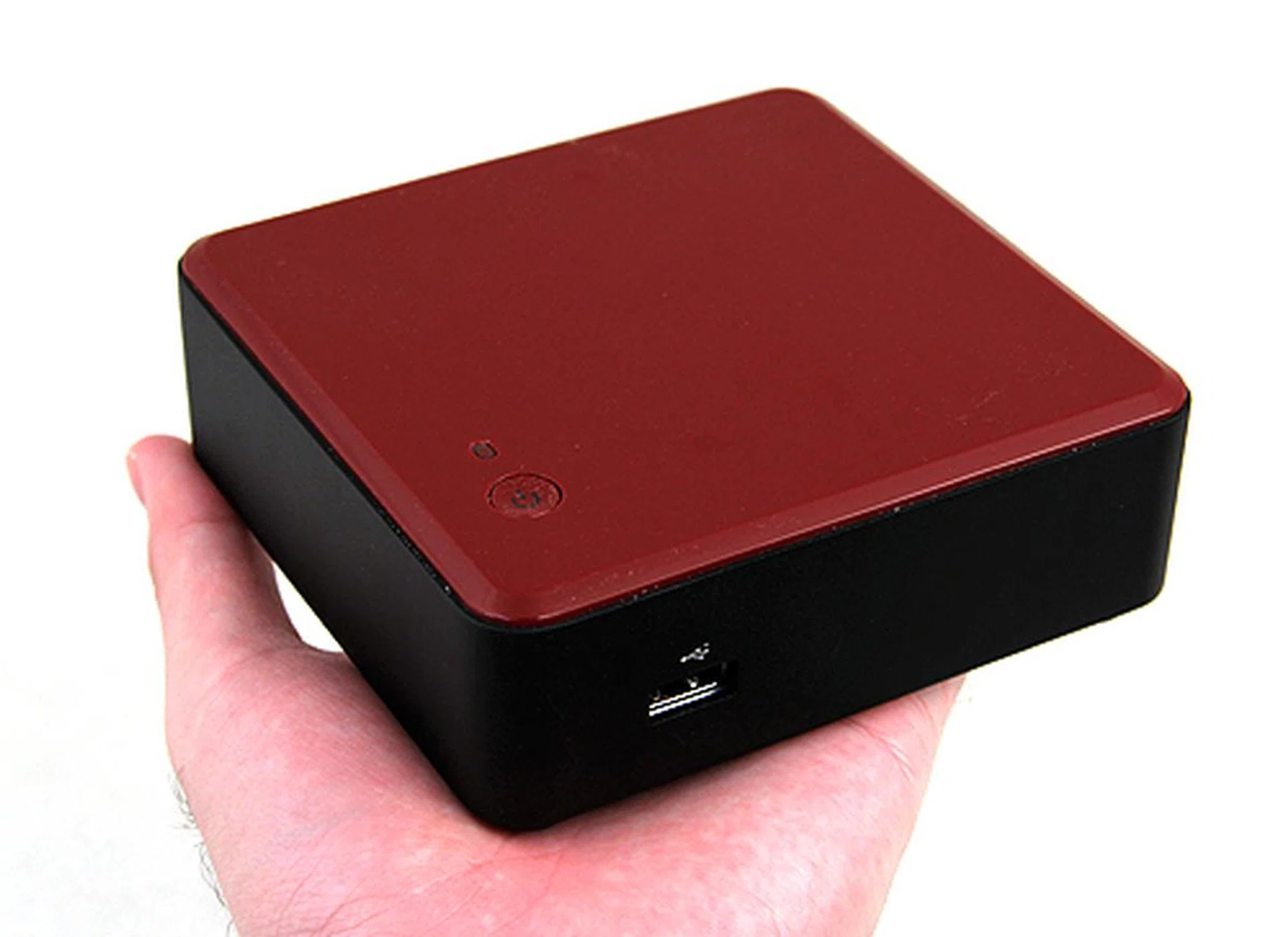
Measuring just 4 by 4 inches and weighing just over half a kilogram, the Intel NUC Mini-PC fits in the palm of your hand and is really portable (you'd still need a monitor, keyboard and mouse, though).
The main difference between the two offerings is that the DC3127IYE has an additional HDMI port and a Gigabit Ethernet jack, whereas the DC3127BY trades the two for a Thunderbolt port. However, both boards are equipped with the same Core i3-3217U processor. This is a fairly basic dual-core Ivy Bridge processor that runs at 1.8GHz and has just 3MB of L3 cache. Hyper-threading is supported and the graphics component of this processor is provided for by the Intel HD Graphics 4000 GPU. Fortunately it also has a low TDP of just 17W. As designated by the "U" at the back of the processor model, these processors are ultra low voltage processors targeted at slim Ultrabooks.
Intel DC3127IYE | Intel DC3127BY | |
Processor | Intel Core i3-3217U | Intel Core i3-3217U |
Chipset | Intel QS77 Express | Intel QS77 Express |
Memory | 2 x DDR3 SO-DIMM slots | 2 x DDR3 SO-DIMM slots |
HDMI | 2 | 1 |
Gigabit Ethernet | 1 | 0 |
Thunderbolt | 0 | 1 |
USB | 3 x USB 2.0 | 3 x USB 2.0 |
That said, despite the basic processor, the NUC Mini-PC is actually targeted at enthusiasts who want an additional complementary system, rather than mainstream users. Looking at the specs, we think the NUC Mini-PC will be perfect as a HTPC, allowing users to browse the web with ease on their TVs, and at the same time, with a large external storage device attached, act as a capable media player. Furthermore, the NUC Mini-PC does not work out of the box as it requires users to provide their own memory, storage and OS. Wireless connectivity is also optional as a wireless card needs to be separately purchased. But perhaps most bewildering of all is that only the power adapter is provided, but not the power cord. As such, this kit is more of a 'barebones' unit.
Here’s a quick look at the DC3127BY kit.
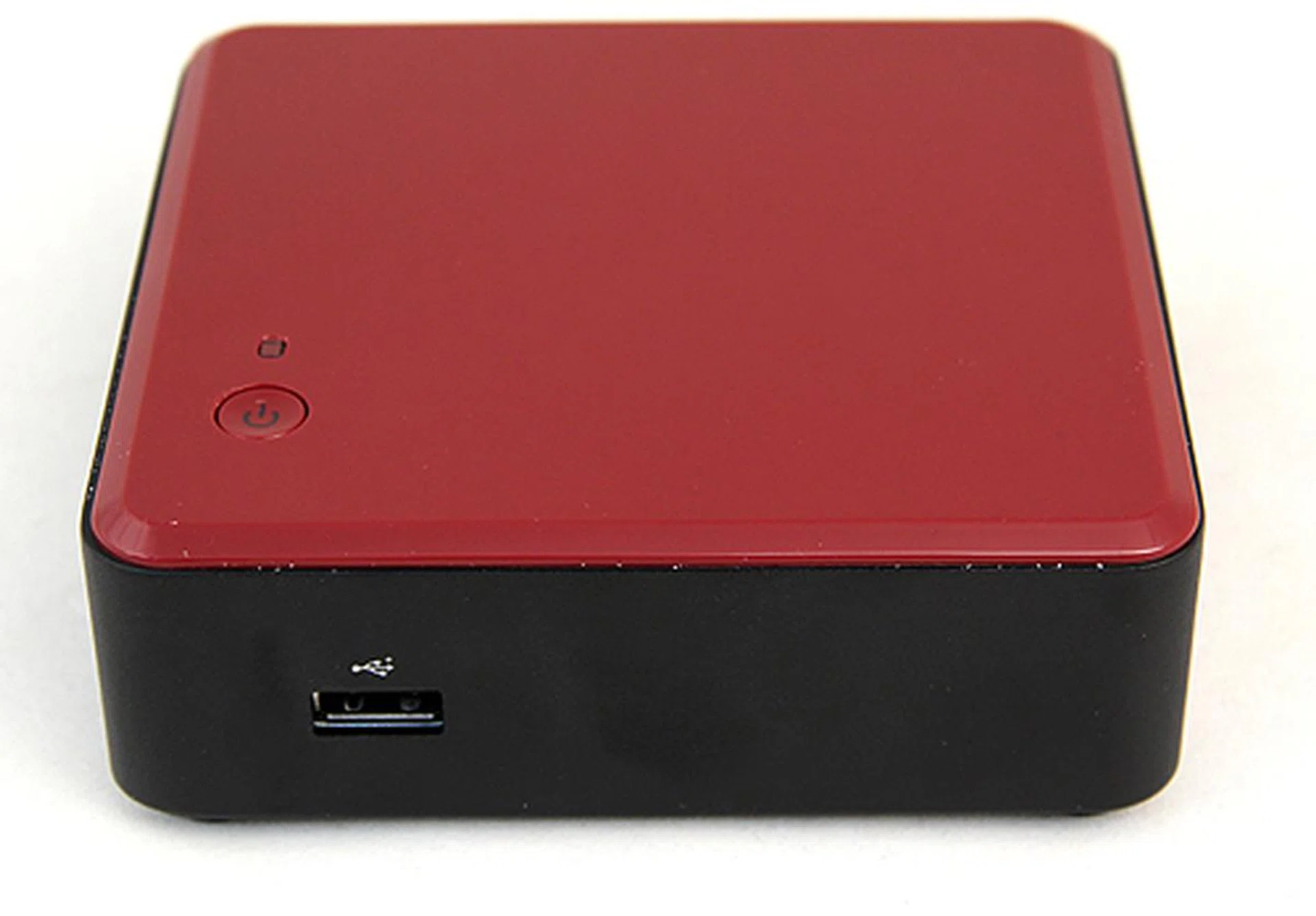
Round the front, there's a single USB 2.0 port. And on the top, there's a single power button. There's no reset button.
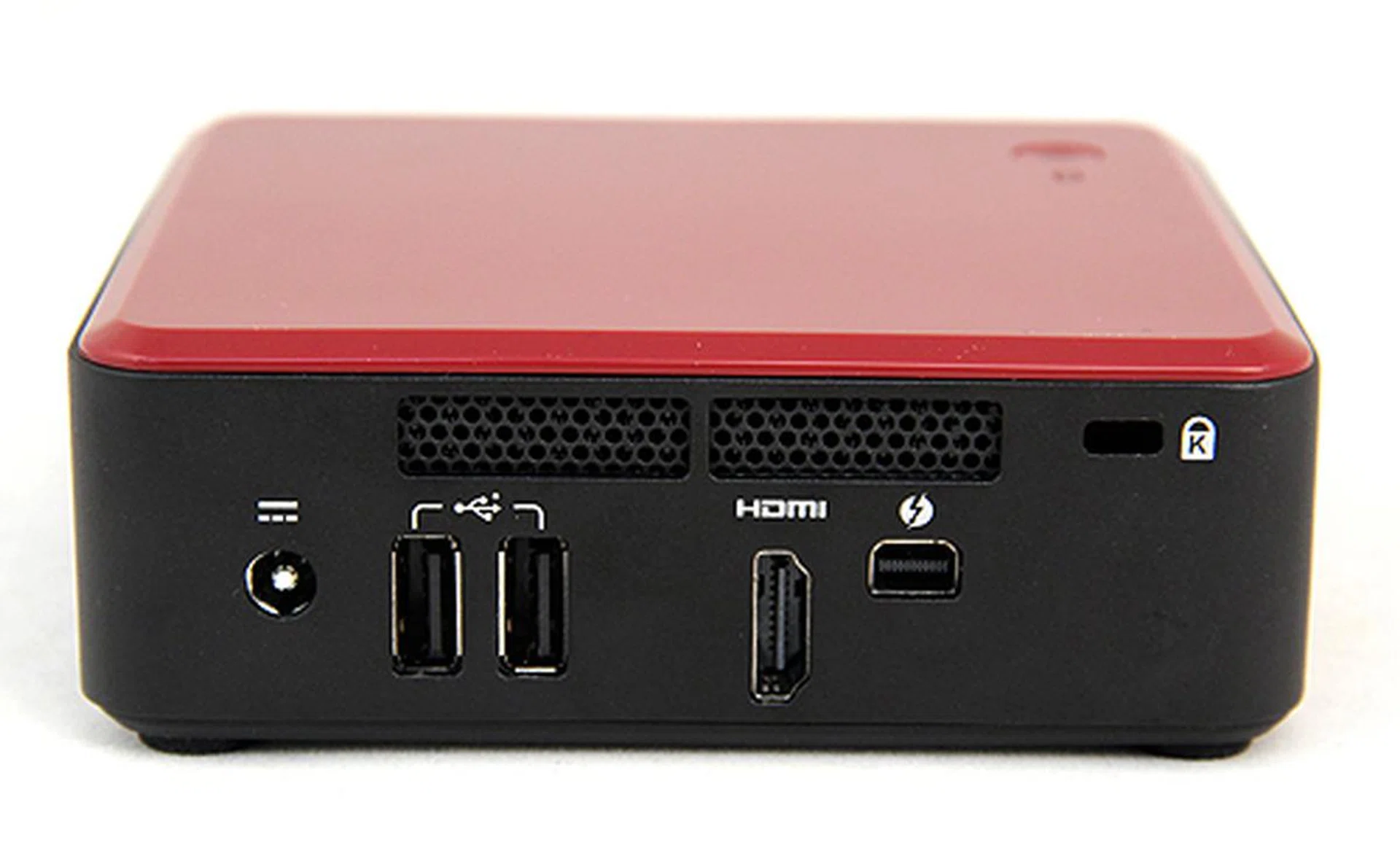
At the back, the DC3127BY has two USB 2.0 ports, a Thunderbolt port and a HDMI port to drive displays. The DC3127IYE, on the other hand, eschews the Thunderbolt port for an additional HDMI port and a Gigabit Ethernet jack. For commercial deployment, it even has a Kensington slot.
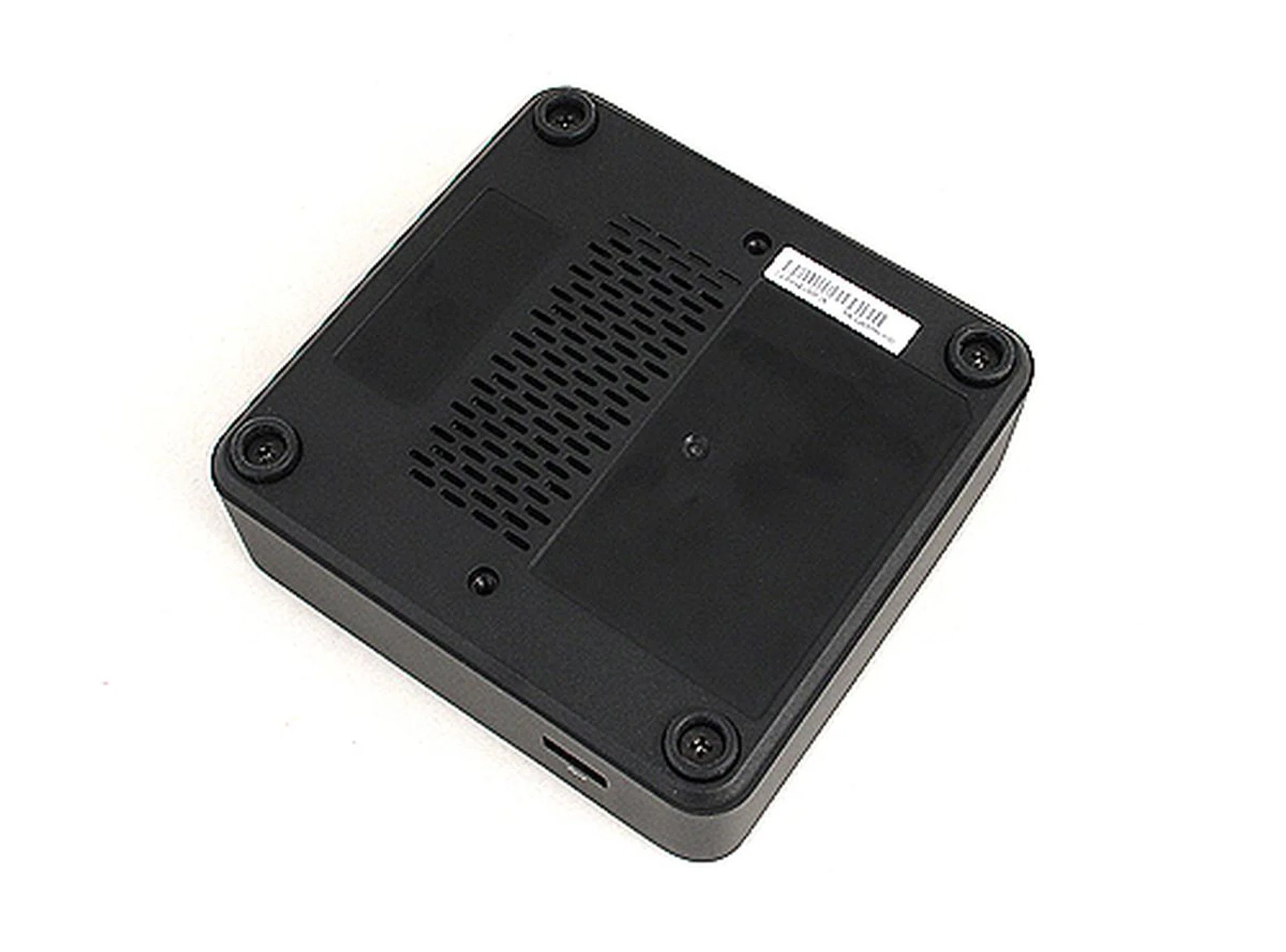
The kit requires you to provide your own memory and storage. To install them, you'd need to remove the bottom cover below.
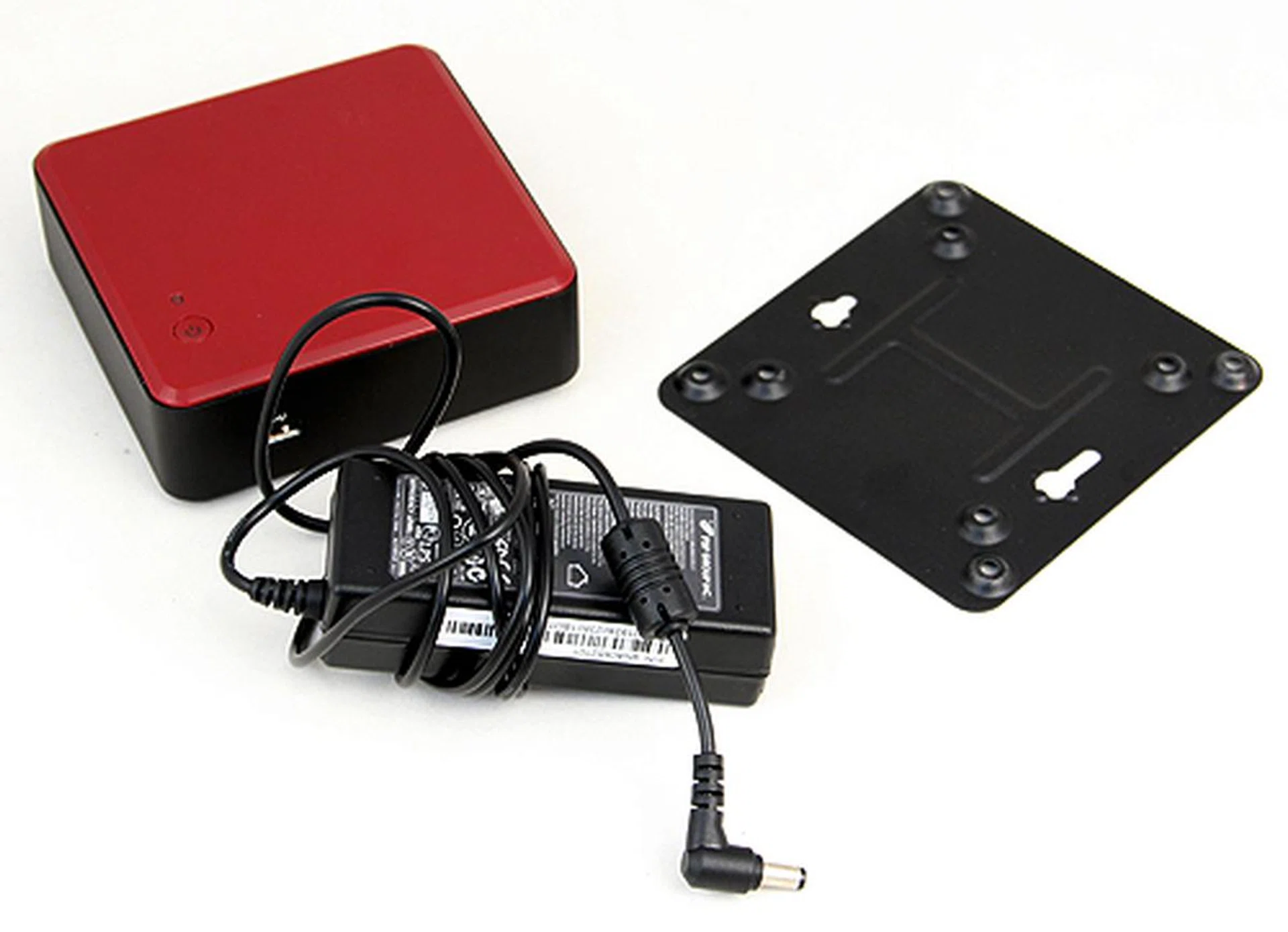
The kit includes a VESA mount so users can attach them behind displays and also a power adapter. Strangely, Intel has decided not to provide a power cord.
Installation
As we’ve mentioned, the Intel NUC Mini-PC requires users to provide and install their own memory (SO-DIMM), storage (mSATA) and wireless Mini-PCIe card. Since there's no LAN port, it's mandatory for you to source a wireless Mini-PCIe card for internet connectivity. Installation was a straightforward process, requiring users only to remove the screws on the bottom panel and then inserting the memory modules, mSATA SSD and wireless card into the appropriate slots.
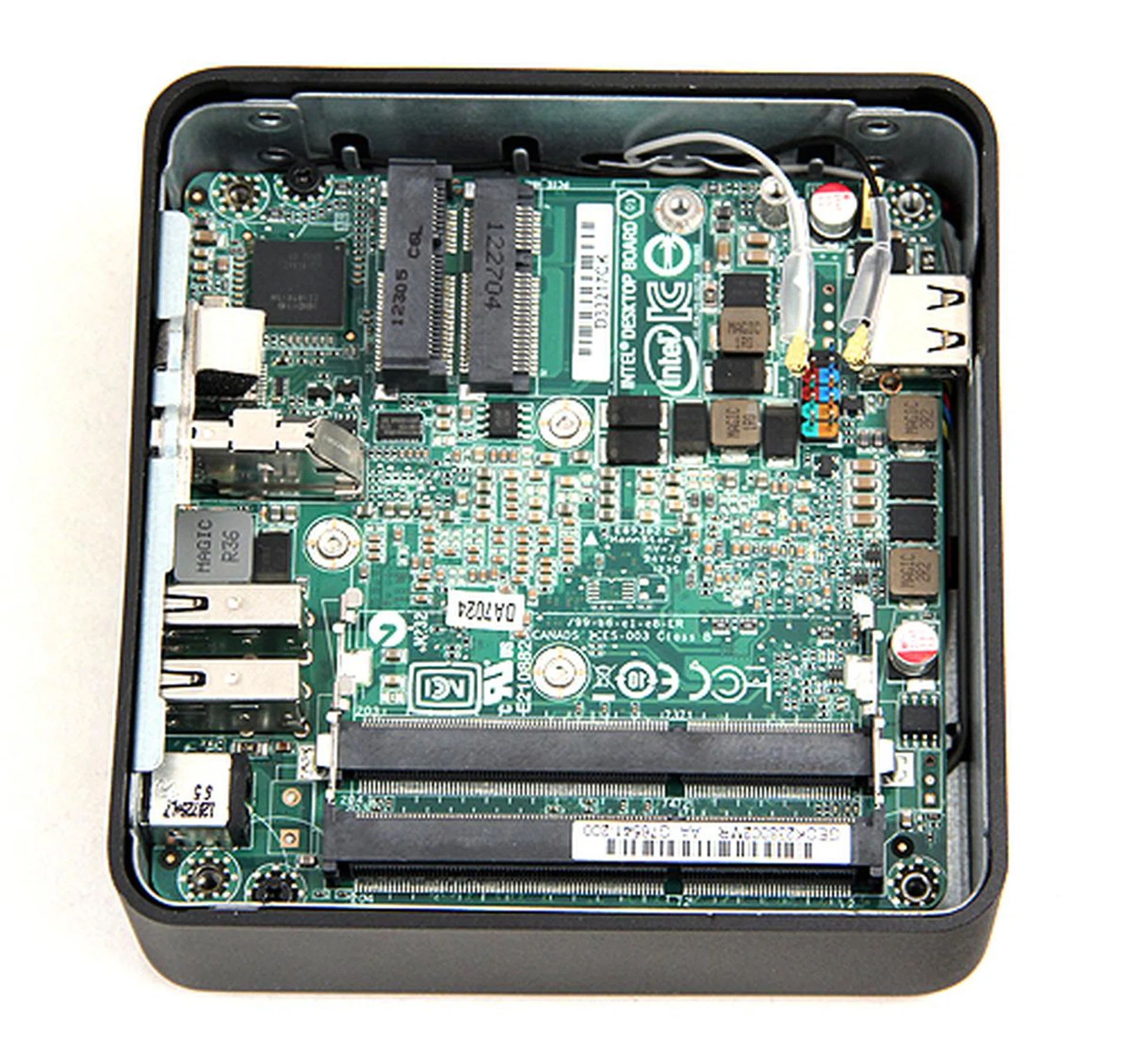
After undoing the bottom panel, we are presented with the motherboard. To the top are the mSATA slot and Mini-PCIe slot for the wireless card. At the bottom of the picture are the two SO-DIMM memory slots.
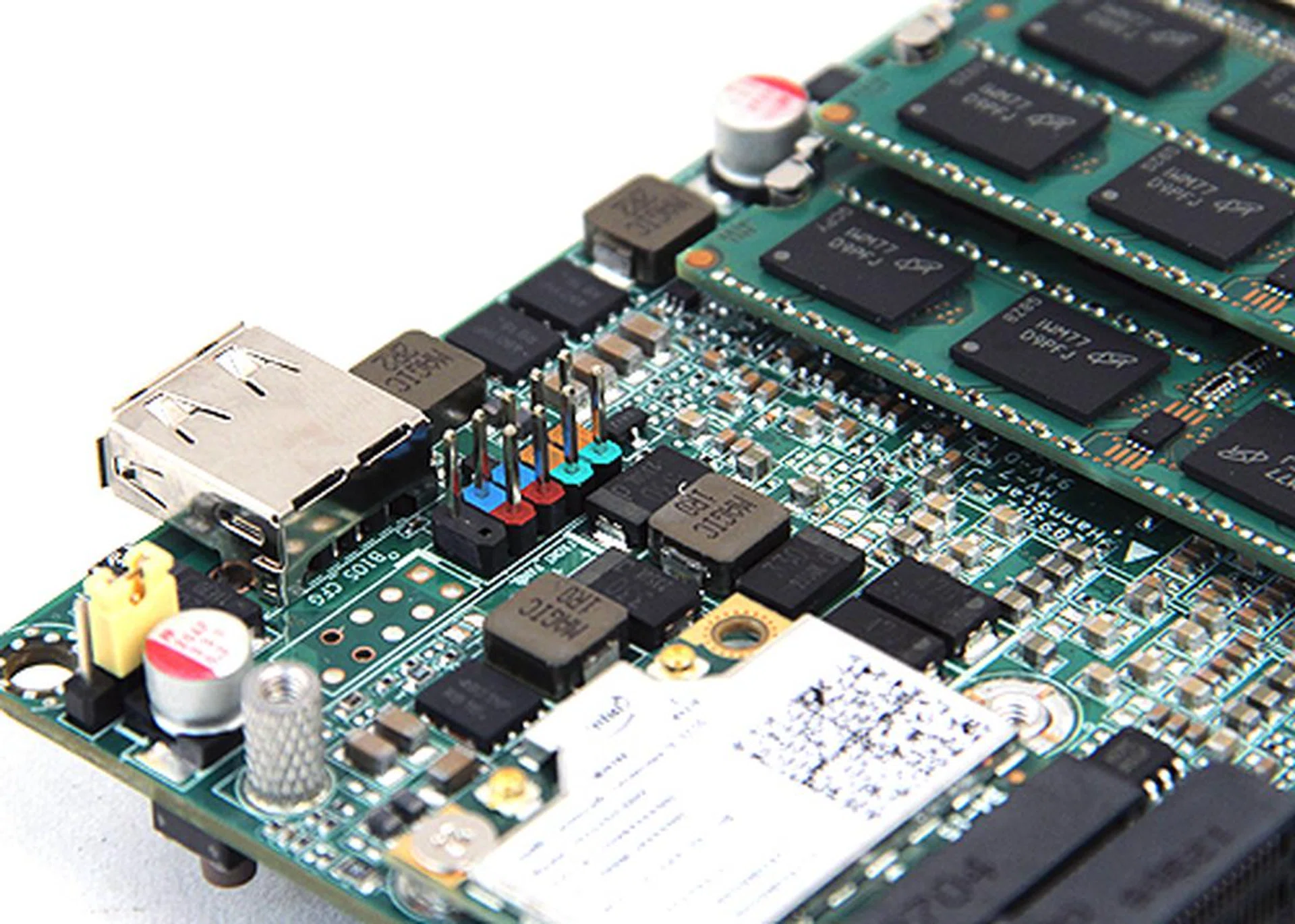
Oddly there's a front panel header and an unsoldered USB header. We figure that Intel is also selling this compact motherboard to OEM vendors who would likely put together their own mini chassis depending on the requirements of their partners. Thus the reason these headers are factored into the basic design of the board.
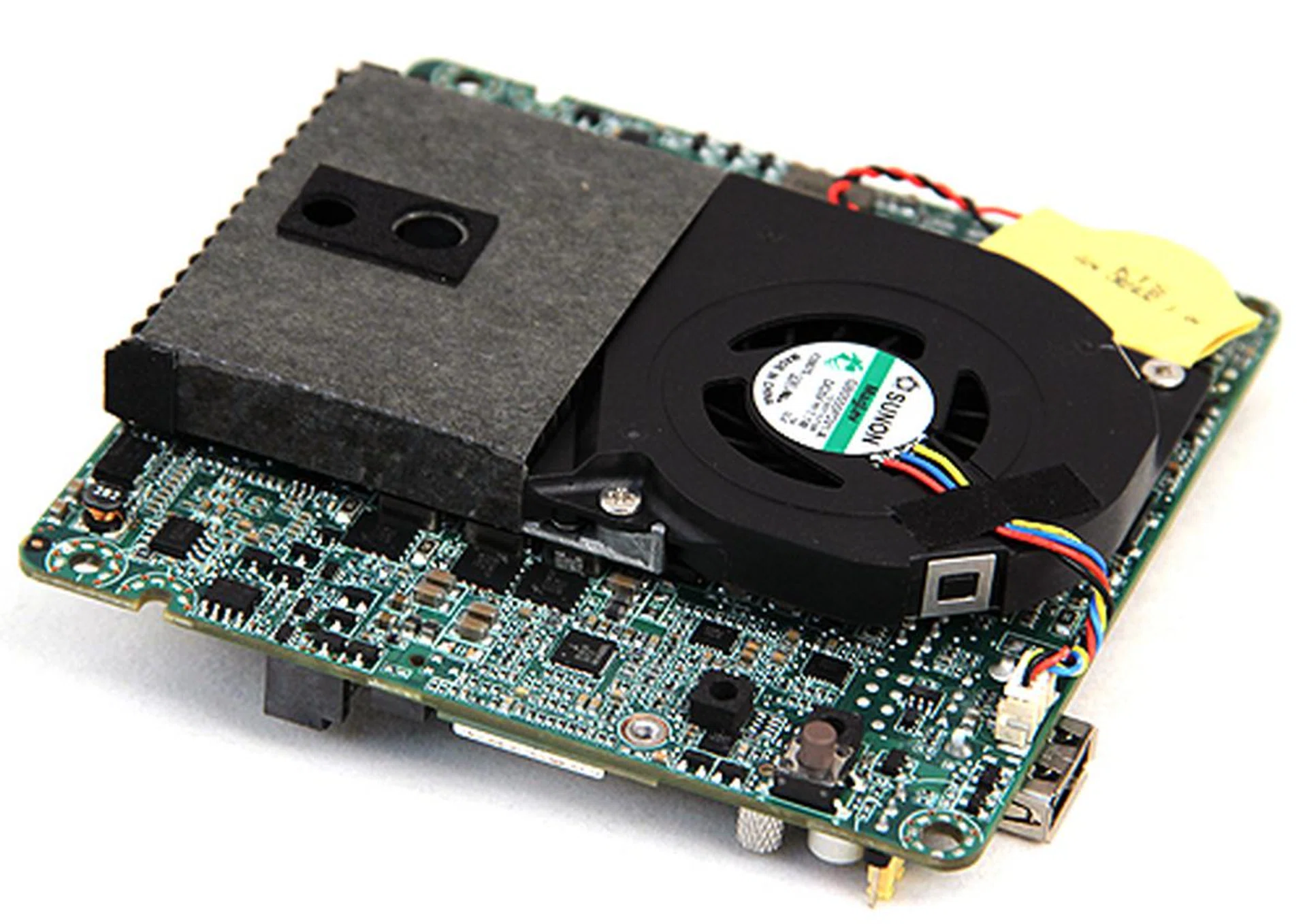
Flipping the motherboard over, we can see the blower type cooler which conceals the soldered on Core i3-3217U processor. The cooler is very quiet.
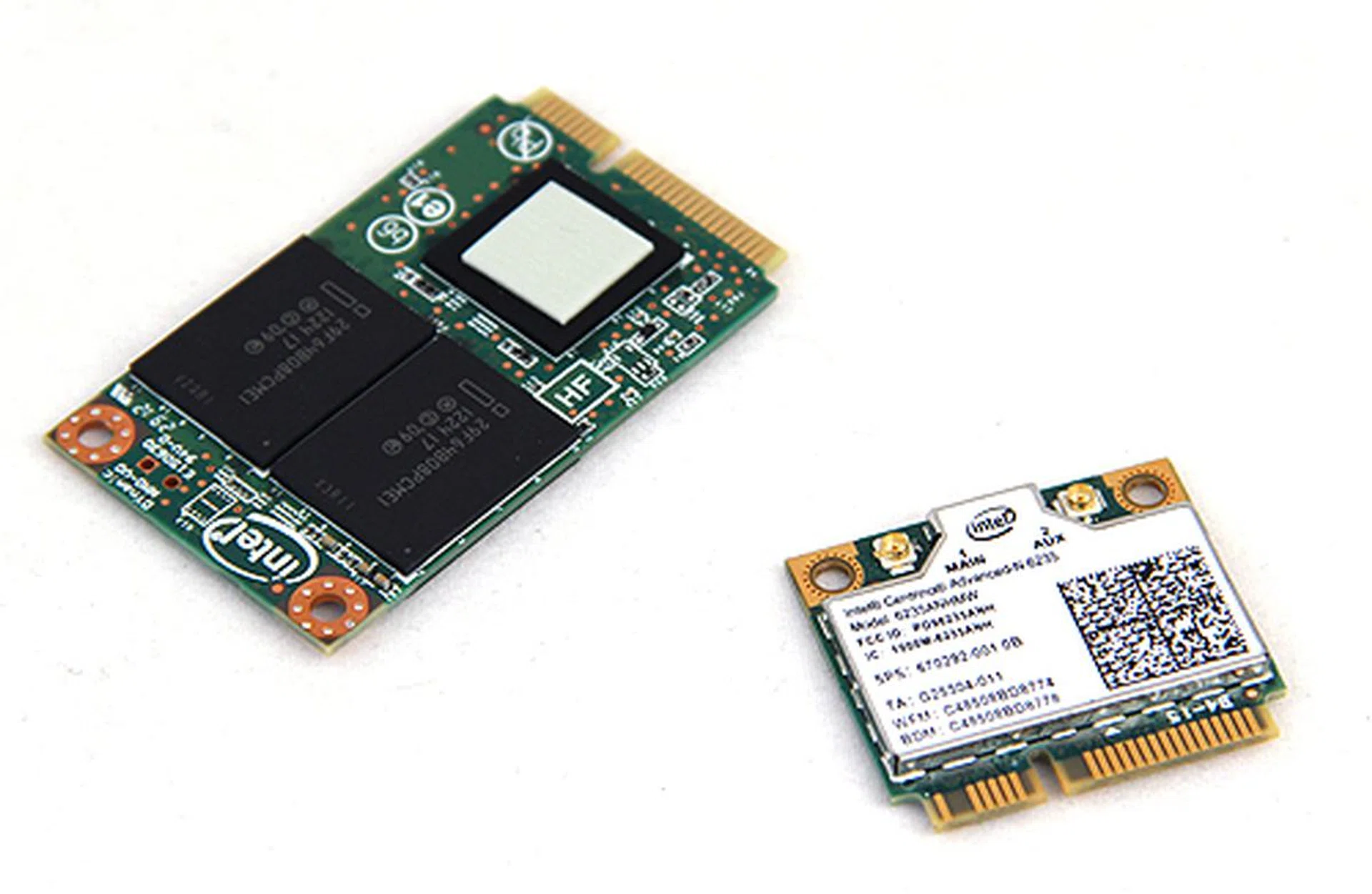
Users have to provide their own storage (in the form of an mSATA SSD) and wireless connectivity is also optional. In our tests, we're going to load the kit with an Intel SSD 520 Series mSATA SSD and an Intel Advanced Centrino N6235 wireless card.
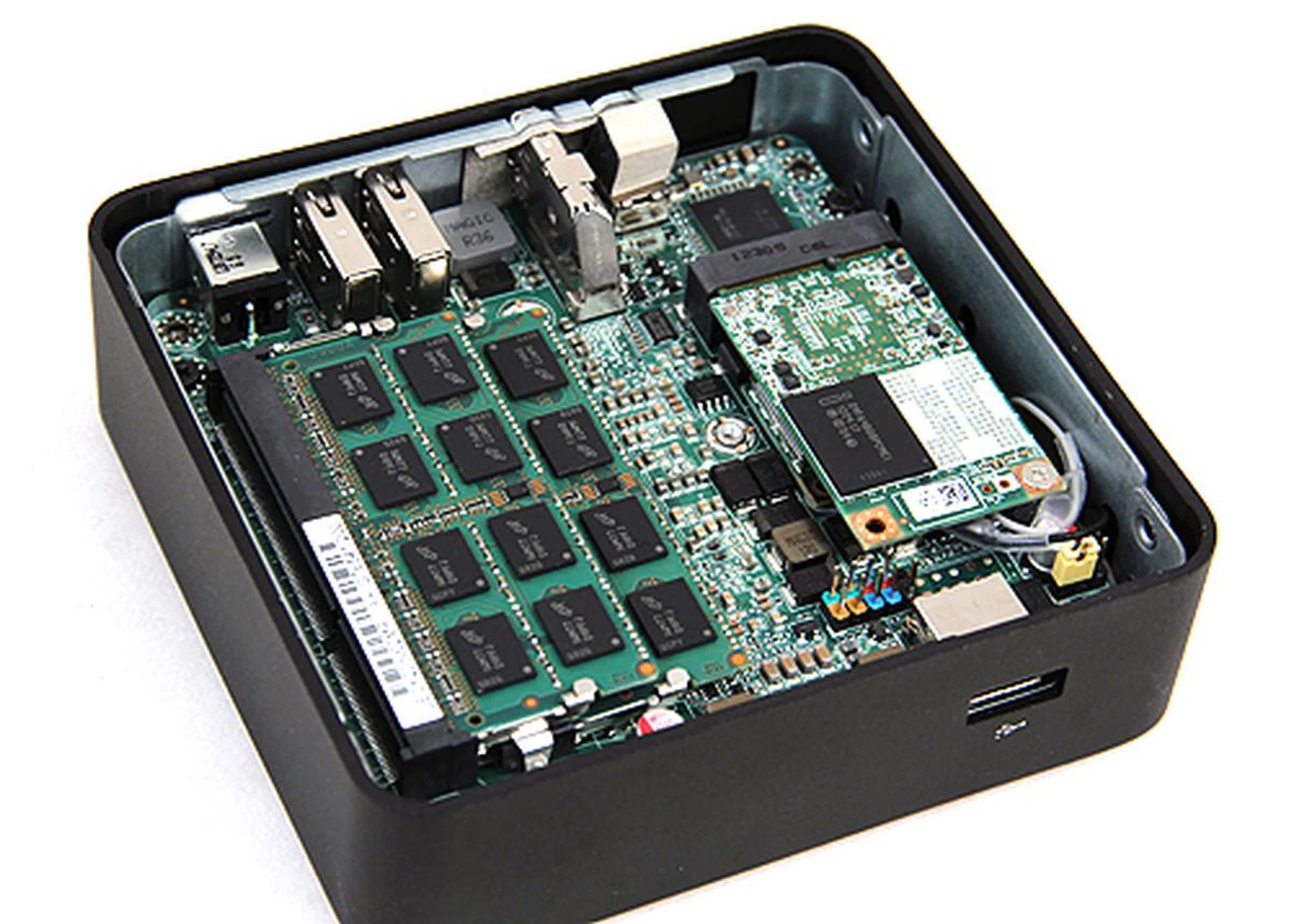
Here's what the Intel NUC Mini-PC looks like with the components installed, including the SO-DIMM memory.
Test Setup
Here’s the test configuration of Intel NUC DC3127BY.
- Intel Desktop Board D33217CK
- Intel Core i3-3127U
- Strontium 4GB DDR3 SO-DIMM
- Intel SSD 520 Series mSATA
- Windows 7 Ultimate 64-bit / Windows 8 Pro
To evaluate the Intel NUC PC, we’ll be comparing it against results we garnered from our review of the AMD A10-5800K Trinity APU. Specifically, we are keen to find out how the NUC Mini-PC will fare against the new AMD Trinity APUs and the Intel Core i3-3220 processor. Although it’s not a fair comparison because the NUC Mini-PC has a very basic processor and uses a custom form factor motherboard with limited upgrade options, we want to see how Intel’s Mini-PC solution fares against setups which use the current crop of entry to mid-range processors.
Initially, we wanted to include SYSmark 2007 Preview and 3DMark 11 to the list of benchmarks, but the Intel NUC Mini-PC failed to complete the two benchmarks. Therefore, the list of benchmarks used are as follows:
- SYSmark 2012
- FutureMark PCMark 7
- Far Cry 2
- Battlefield: Bad Company 2
It should be an interesting match-up against the Trinity APUs since these processors do not have the raw computing power of Intel’s processors, but make up for that with more competent integrated GPUs. Given the pedigree of the Ivy Bridge architecture and also the fact that the NUC PC has a very fast mSATA SSD, we fully expect the Intel NUC PC to storm ahead in our computing benchmark setups still using a HDD. However, given its Intel HD Graphics 4000 GPU, we think it might struggle on our gaming benchmarks, giving the Trinity APUs a chance to shine. The Intel Core i3-3220 processor is one of the newer entry to mid-range Ivy Bridge processor and on paper, it should blitz the NUC PC’s Intel Core i3-3217U processor (but don't forget the effects of a fast SSD within the NUC system, which could tip the scales in its favor yet).
SYSmark 2012 Results
Last year, BAPco released SYSMark 2012, the latest edition of their popular benchmarking software. Designed to test systems running on the new Windows 8 OS (as well as Windows 7), SYSMark 2012 puts the system through a rigorous series of various workloads ranging from office productivity, data analysis, media creation and 3D modeling.
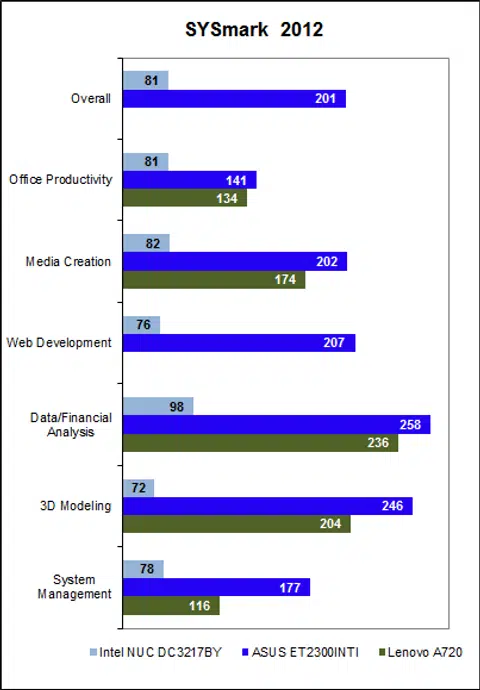
The latest edition of BAPco’s SYSmark benchmarking software is still relatively new and we are still in the midst of collecting results. As such we haven't yet garnered results that are directly comparable to the Intel NUC kit. What we have rounded up in terms of results are from the ASUS ET2300INTI and Lenovo IdeaCentre A720 AIOs, which are equipped with quad-core processors - the Core i7-3770 and Core i7-3610QM respectively. Unsurprisingly, the Intel NUC Mini-PC, despite having a speedy mSATA SSD, was left trailing the two AIO’s wake. This gives you an idea of what kind of performance you can expect to have in comparison with mainstream systems.
That said, despite the disappointing results, one must remember that SYSmark is a pretty intensive benchmark and potential users of the Intel NUC Mini-PC would probably not be using it to do things such as editing videos and designing webpages, tasks which form part of SYSmark's complex grading process.
PCMark 7 Results
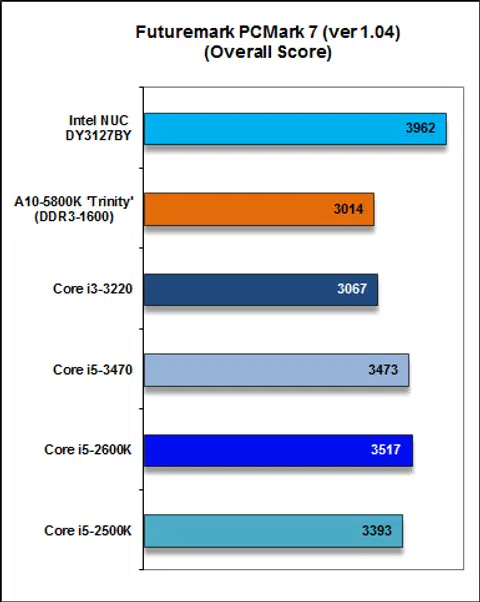
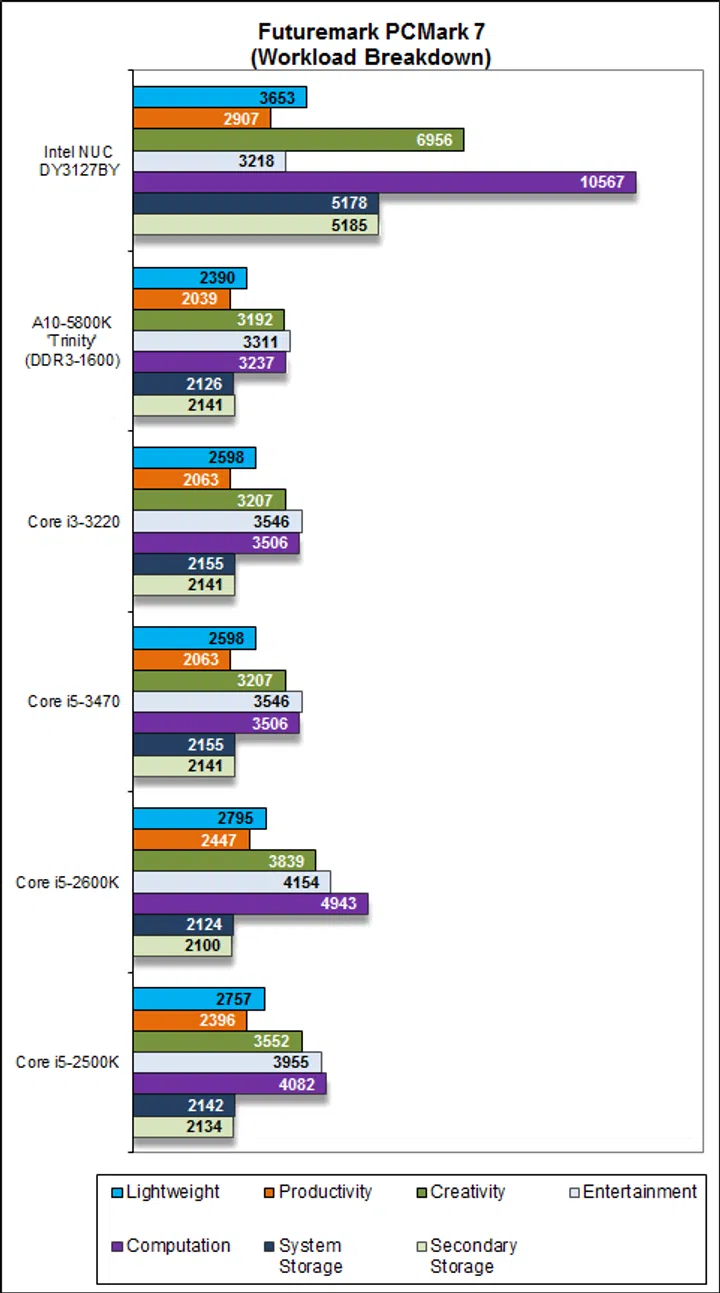
PCMark 7 is the current benchmark suite from FutureMark that tests the performance of Windows 7 machines. It tests a wide range of mainstream workloads such as simple word processing, media creation and web browsing. And here, the Intel NUC Mini-PC stormed ahead easily surpassing our AMD A10-5800K Trinity and Intel Core i3-3220 test setups. This has much to do with its very speedy Intel SSD 520 Series mSATA SSD that we've equipped it. Thanks to its speedy drive, it was able to rack up the highest scores as this benchmark is sensitive to storage susbsystem performance.
Far Cry 2 Results
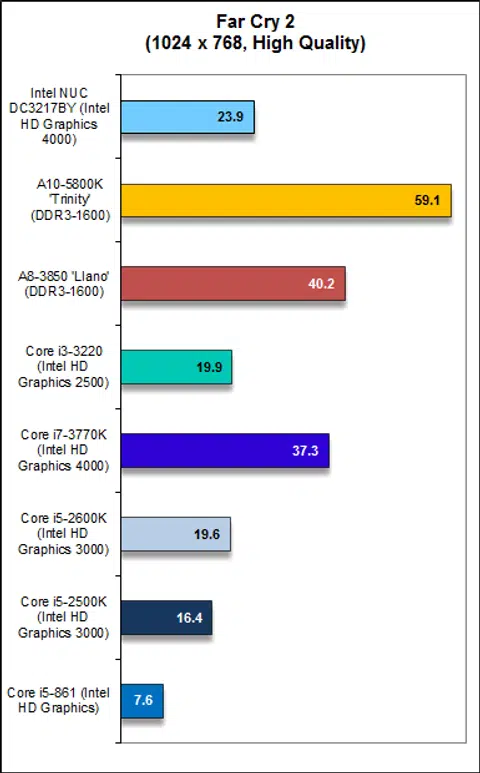
Gaming benchmarks rely on both the processor's computing and graphics processing prowess and it is clear that the Core i3-3217U processor in the Intel NUC Mini-PC isn’t the most capable processor around. Far Cry 2 is a fairly old game, but the Intel NUC Mini-PC managed only 23.9 fps and this was on a very modest resolution of 1024 x 768. That said, it's a marked improvement over earlier Intel processors with the Intel HD Graphics 3000 and 2500 GPU. Clearly, while the Intel NUC Mini-PC is good for everyday mainstream computing tasks such as word processing and web browsing, it is still a long way from being a decent basic gaming machine.
Battlefield: Bad Company 2 Results
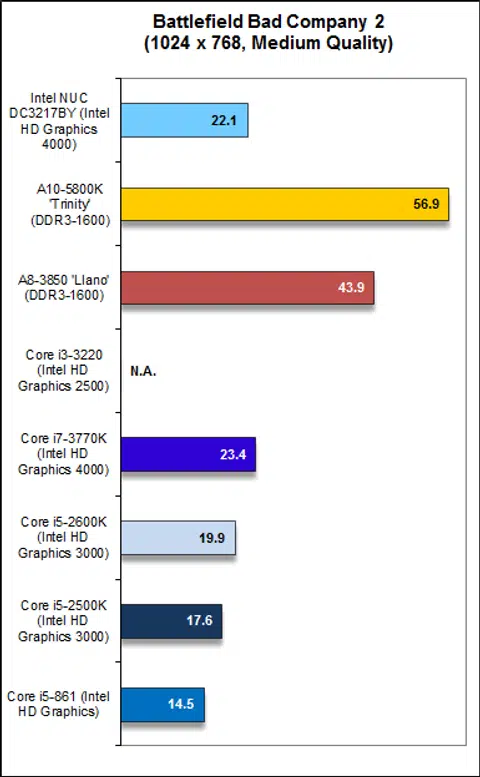
Bad Company 2 was one of the first DirectX 11 titles to hit the market and the Intel NUC Mini-PC could only manage 22.1 fps, which is not too bad actually, considering it's just a tad lesser than the mighty Core i7-3770K's score of 23.4 fps. Evidently, for even light gaming, the Intel integrated GPUs still has a lot of catching up to do.
Mini Novelty
After spending some time with it, the Intel NUC Mini-PC is an interesting proposition. Mostly, we are impressed with its size. It’s really tiny and fits easily in the palm of your hands. In total, its volume is only about 520cm3, which is smaller than most ready-made mini-PCs that are out in the market, such as ASUS’ EeeBox PC and Sapphire’s Edge, both of which have volume in excess of 1000cm3. That said, they are smaller alternative’s such as Zotac’s Zbox nano XS, which comes in at just 415cm3. Nevertheless, the Intel NUC Mini-PC is still remarkably small and portable.
Size aside, the Intel NUC Mini-PC is also a decent performer. Although results on SYSmark 2012 was underwhelming, the unit was actually pretty impressive on PCMark 7. And in normal usage, we found the NUC Mini-PC to be pretty brisk and responsive. Of course, much of this has to do with its very speedy mSATA SSD, which more than makes up for the unit’s lack of computing power. It also helps that we fitted our NUC Mini-PC with 8GB of memory (it can accommodate up to 16GB of memory). All in all, in most practical usage scenarios such as word processing, watching HD videos and web browsing, we have no complaints with the Intel NUC Mini-PC.
In terms of connectivity, our kit - the DC3127BY - has three USB 2.0 ports, a Thunderbolt port and a HDMI port for display. Realistically, with just three USB ports, unless you have a wireless keyboard and mouse combo, you’d be left with a single USB port. You do have a Thunderbolt port, but Thunderbolt-enabled devices are still not widespread at this moment and they also command a considerable premium. Additionally, because it does not have an Ethernet jack like alternative kit - the DC3127IYE - hence you would definitely need the add-on wireless card (or a wireless USB adapter) if you wish to have Internet connectivity. If you choose a wireless USB adapter, you would probably be left with no free USB ports. Furthermore, none of the USB ports are SuperSpeed (USB 3.0).
General connectivity aside, another point of concern is the lack of an audio output jack, which means audio has to be strictly passed through HDMI or digitally via USB speakers or USB based audio processors, thus making the NUC Mini-PC difficult to pair with standard speakers and headphones that rely on the humble 3.5mm audio output jack.
According to international pricing, the DC3127BY kit will retail for around US$315, with the DC3217IYE kit being slightly cheaper at US$299. While this sounds affordable, do not forget that this is a barebones kit and you’ll need to provide your own storage, memory, wireless solution and even OS. In our review spec, this is the additional cost you will be looking at:
- Intel SSD 520 180GB mSATA SSD - US$200
- Intel Centrino Advanced-N 6235 Wireless Card - US$30
- SO-DIMM DDR3 8GB memory - US$50
- Windows 8 Pro (OEM) - US$139
All in, you are looking at a total system cost of around US$734. With this amount, you could build a decent regular ATX form factor PC with better components and tons more performance. At this price, it is also significantly more costly than other mini-PC SFF barebones systems from competitors such as Shuttle, Zotac and Sapphire, which typically retail at the US$200 mark and with an AMD based option, these could perform better. Just take a look at the even smaller Zbox Nano XS AD13 Plus that's even more compact and has a better range of connectivity options.
Locally, we’ve received word from Intel that the DC3127IYE kit will retail for S$429. And looking at international retail prices, the DC3127BY kit we have will likely retail for slightly more - maybe around S$450. Add in all the other necessary components and you are looking at close to a grand.
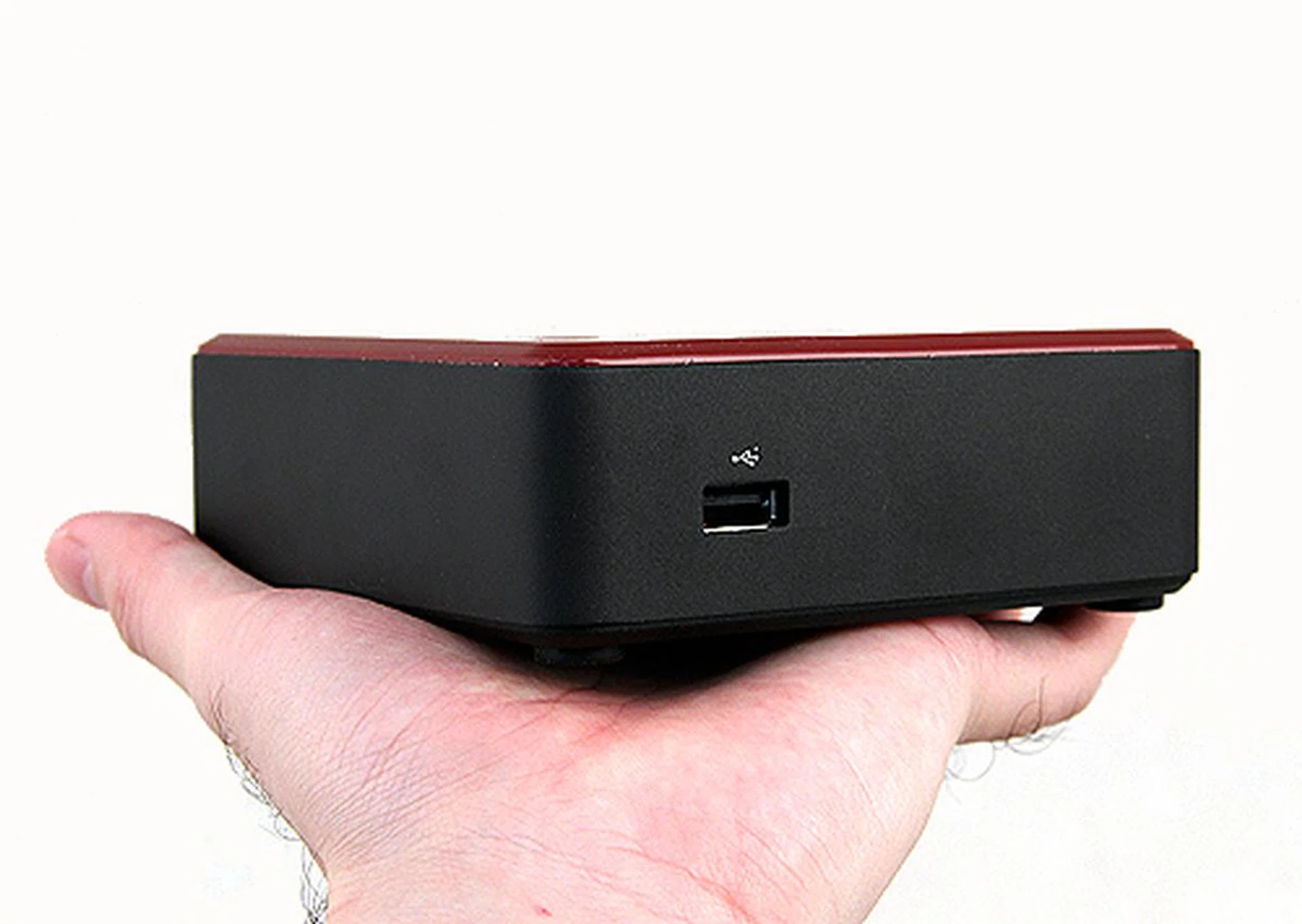
Incredibly compact, but a novelty at best at this point given its high cost and foibles.
All things considered, we can’t help but think that the Intel NUC Mini-PC is, at this point of time at least, a bit of a novelty. For sure, it is incredibly compact and it has decent performance for its intended uses, but it does have its restrictions and shortcomings. To begin, mSATA SSDs are not easy to source locally at this moment and so is a suitable wireless card. Furthermore, the absence of USB 3.0 might be a deal-breaker to some; and the lack of a dedicated audio jack makes it difficult to pair it with desktop speakers and headphones.
Therefore, the Intel NUC Mini-PC is best suited as a HTPC or as a complementary system for well-heeled enthusiasts who wants something compact for simple tasks such as web browsing and watching videos. Even so, we've highlighted other more competitive options that can do the same and may not cost as much. The Mac mini is attractively-priced and it's a fully equipped system that's ready to run right out the box. And then there's alternatives from Zotac and Sapphire, which, on paper might not be as powerful, but should do the job just as well.
That said, it is deeply impressive that Intel can cram this much performance into such a tiny form factor and when Haswell does hit the market later this year, we can’t wait to see what else Intel can do to improve on their NUC Mini-PC concept.
Our articles may contain affiliate links. If you buy through these links, we may earn a small commission.