

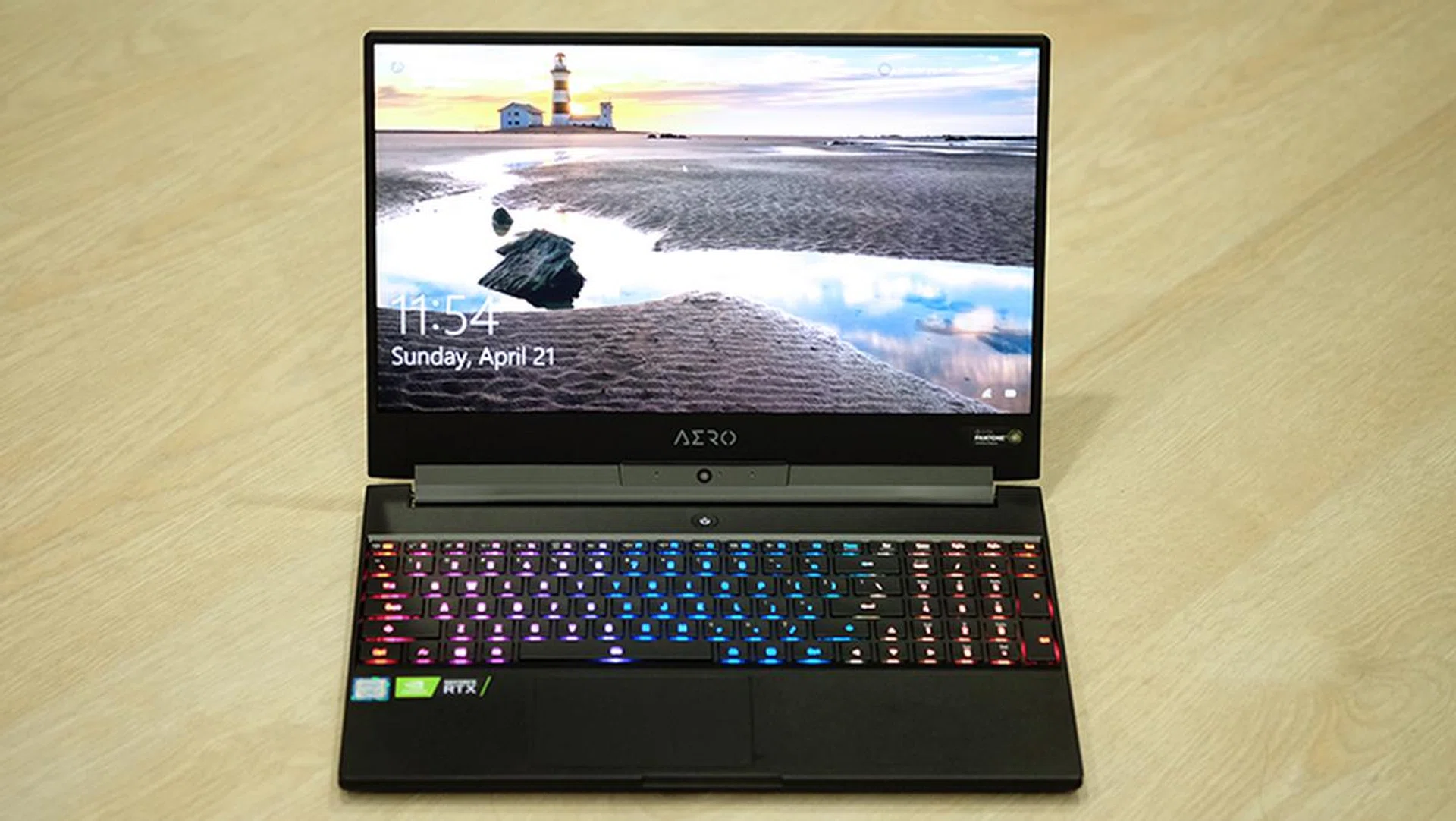
Meet the new Gigabyte Aero 15 Classic XA.
New processors for gaming laptops
Intel has just announced new 9th-generation 45W processors for gaming laptops, finally following up on the launch of its desktop chips late last year. However, the new CPUs are still based on the 14nm process and don't offer significant new features outside of the higher base and turbo boost frequencies. In other words, we're still dealing with very iterative improvements until Intel's 10nm Ice Lake chips.
Still, this means another round of hardware updates for gaming laptops, not long after a wide-ranging refresh that saw manufacturers add NVIDIA's new GeForce RTX graphics cards to their line-ups recently.
Gigabyte's new Aero 15 Classic XA is one of the first to get an update to the new processors, and the Classic series will offer up to an overclockable Core i9-9980HK chip - which is a top of the line enthusiast mobile processor from Intel. The Classic XA I have for review today is a more modest offering, but it still comes quite quite beefy specs.
Here's an overview of its specifications:
- 15.6-inch 1,920 x 1,080-pixel IGZO 240Hz display
- Intel Core i7-9750H processor
- 16GB DDR4-2666 dual-channel RAM
- NVIDIA GeForce RTX 2070 Max-Q
- Intel 760p 512GB M.2 PCIe SSD
- 94.24Wh Li-polymer battery
- 356.4 x 250 x 18.9mm
- 2kg
It costs S$3,699 and Gigabyte is throwing in a backpack and M6880X mouse to sweeten the deal.
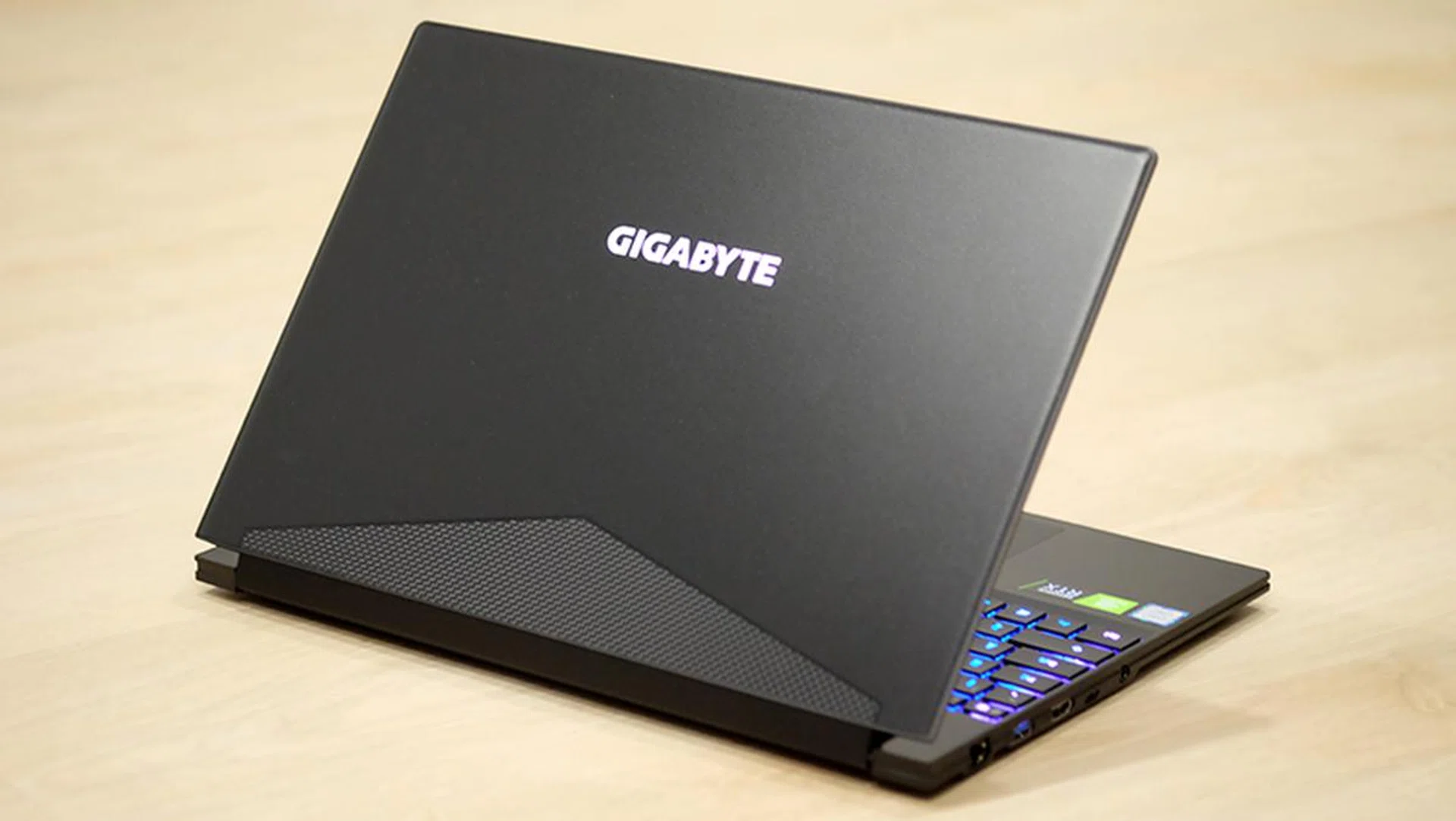
Gigabyte's laptop continues to be one of the simpler and more tasteful ones around.
A killer display
Other than that the new Intel 9th-generation Core processor , there's one other new feature that we haven't yet seen on a laptop. The new Aero 15 Classic XA is one of the first gaming laptops to come with a native 240Hz display, a super high refresh rate that promises to offer butter-smooth gameplay. That said, while this is definitely an exciting specification to have on paper, it doesn't really translate into super tangible real-world gains.
I've used a 240Hz monitor before, and that was with a desktop GeForce GTX 1080 Ti that can push more frames than the GeForce RTX 2070 Max-Q in the Aero 15 Classic XA. Long story short, I could barely tell the difference between a 144Hz screen and the 240Hz one, and the same goes for the Aero 15's 240Hz panel. You really need a powerful GPU to make the most of such a high refresh rate, and a mobile graphics card, even one as good as the GeForce RTX 2070 Max-Q, still doesn't really cut it.
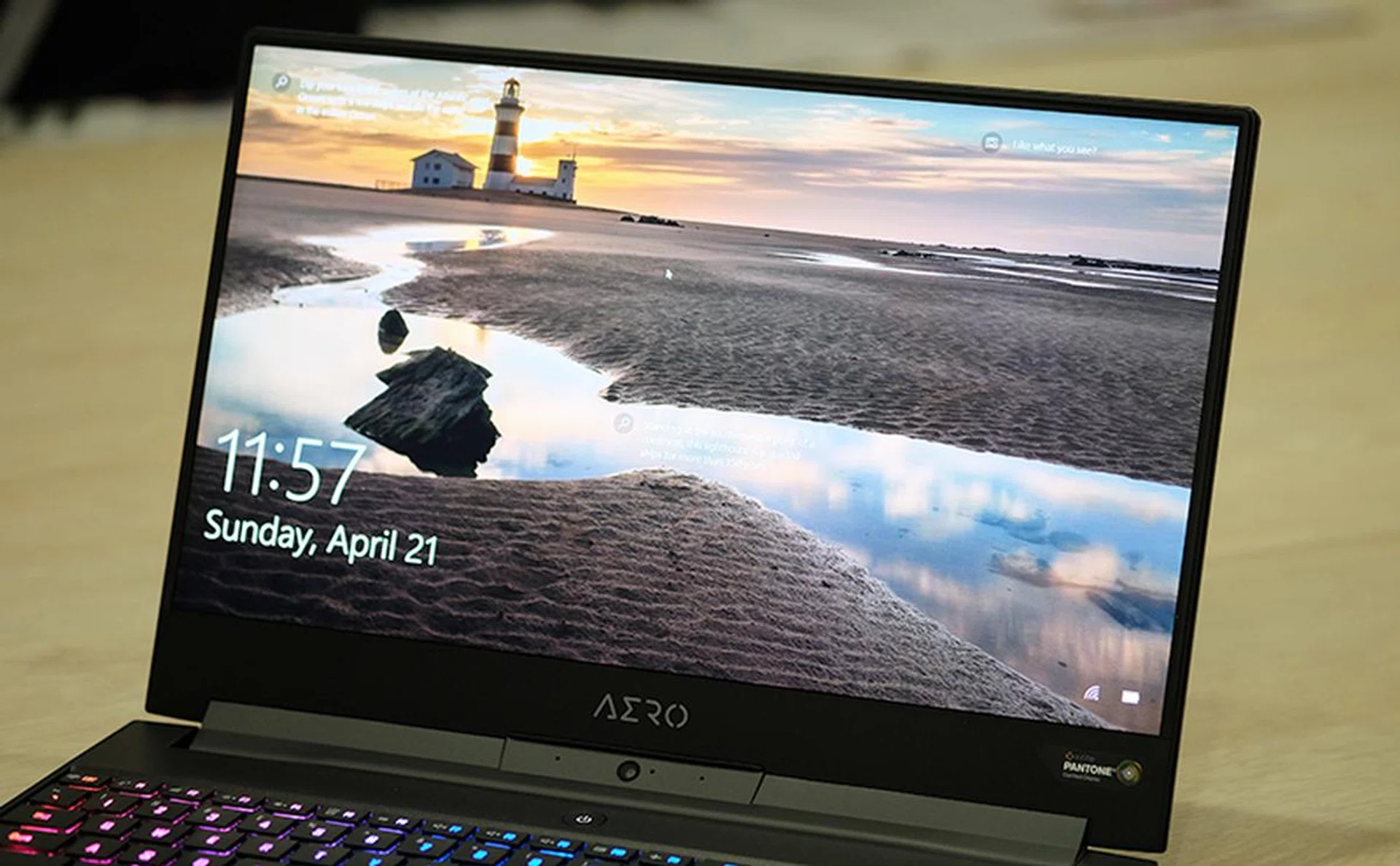
The 240Hz display is excellent, with bright, accurate colors and good viewing angles.
Nevertheless, it does mean that you need G-Sync even less now and problems like stuttering and tearing should be less apparent. That's because each frame persists on screen for an even shorter period of time, so I'm not about to snub the feature outright, especially since it doesn't seem to have driven up the cost of the notebook when compared to the previous generation. Progress has to start somewhere, and maybe one day we'll have mobile GPUs that are fast enough to truly take advantage of it.
Gigabyte is also still highlighting the manufacturers of individual components in the laptop, which is a really nice touch. This means a PCIe SSD from Intel, Samsung DDR4 memory, Killer Wi-Fi, and a Sharp IGZO display with a 4ms response time. Like previous Aero laptops, the display is really the best part of the laptop. Its bright and color reproduction looks excellent, probably because of its X-Rite Pantone calibration. Viewing angles are great as well, and I have no complaints. This particular model also uses an IGZO panel, which is a slightly different display technology than conventional screens.
In a nutshell, IGZO theoretically enables higher resolution displays, lower power consumption, and higher refresh rates. It is also not a panel type like IPS or OLED. Instead, it is a backplane technology – the materials and designs used for the thin-film transistors that turn individual pixels on and off – comprising a transparent, semiconducting compound that uses Indium Gallium Zinc oxide as the semiconductor in place of amorphous silicon (a-Si). IGZO transistors are smaller than their counterparts that use a-Si, so manufacturers can easily scale up the display resolution and squeeze more pixels in. The smaller size also means that the layer of IGZO transistors doesn’t block as much of the backlight as a-Si would for the same pixel densities, which means that lower brightness levels, and hence less power, is required for a certain output. Finally, the higher electron mobility of these transistors also enables higher refresh rates and faster pixel switching, which is probably how the 240Hz refresh rate came about. You can learn even more about the beginnings of IGZO display technology when it first debuted.
There's more to like beyond the display
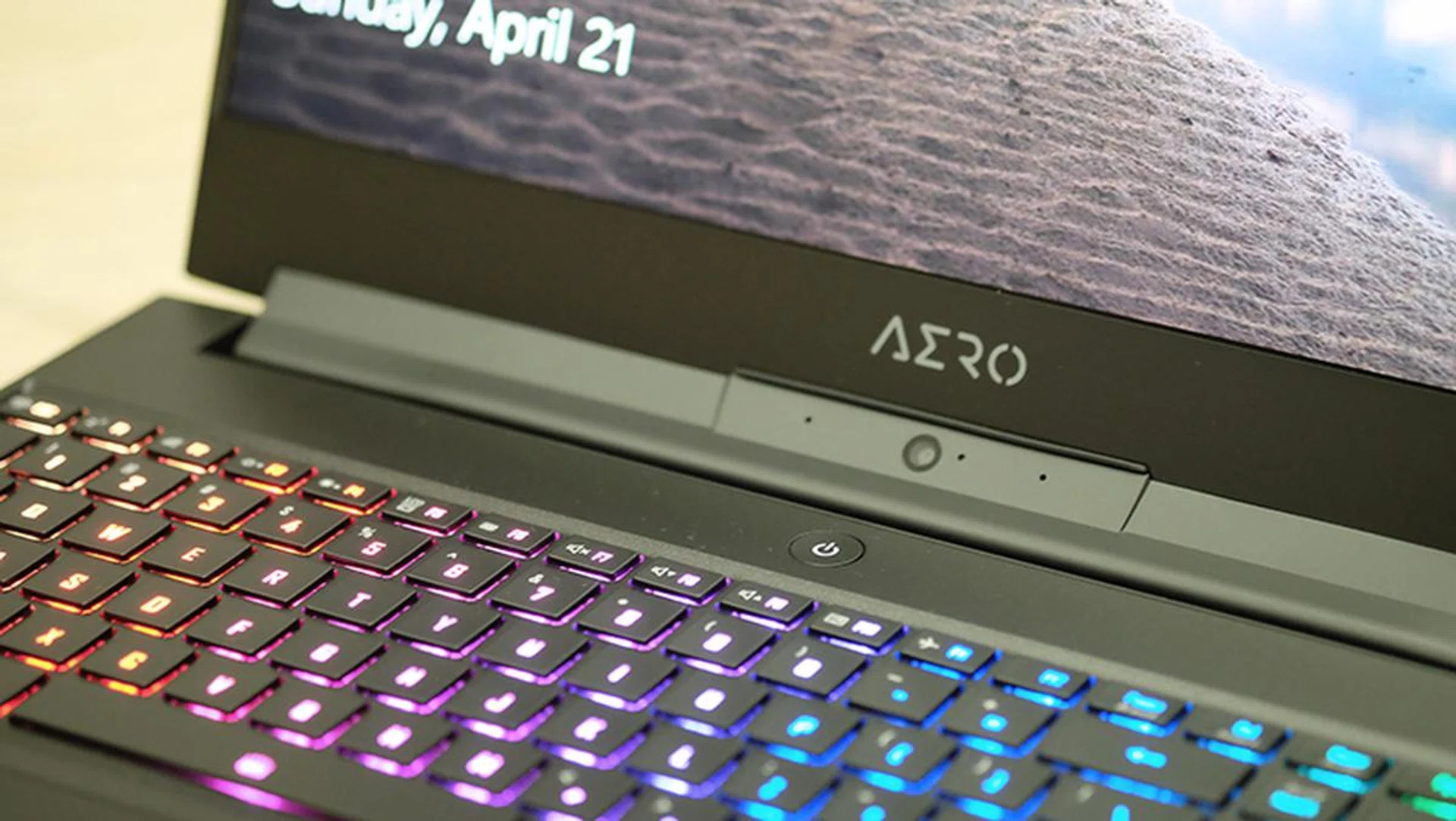
The keyboard also deserves special mention. It makes the best use of available space and spans the entire width of the laptop. In addition, the keys feel pleasantly tactile for a laptop keyboard, and the backlighting is bright and even, with support for per-key customizations as well.
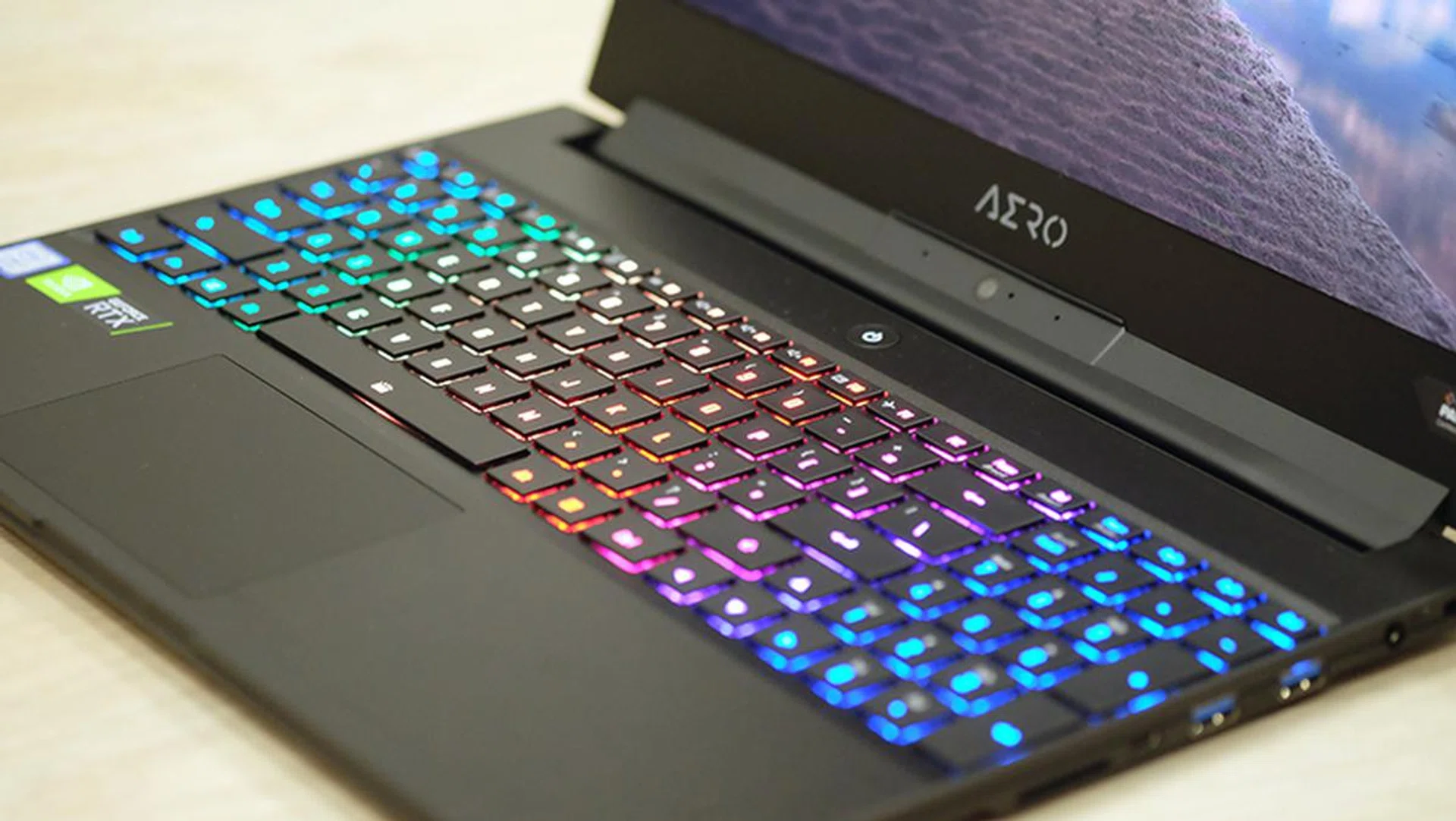
The keyboard supports per-key RGB customizations.
Other than that, the Aero 15 Classic XA is pretty much the same laptop as the Aero 15Y v9 (the new laptop is part of the v10 generation) I reviewed earlier this year. It has super thin bezels, a compact and slim design, and great battery life. There's a wide range of ports and connectors as well, including one Thunderbolt 3, two USB 3.1 (Gen 1) Type-A, one USB 3.1 (Gen 2) Type-A, one HDMI 2.0, and one USB 3.1 Type-C with DisplayPort 1.4 out. On top of that, there's also an Ethernet jack and a single UHS-II SD card reader.
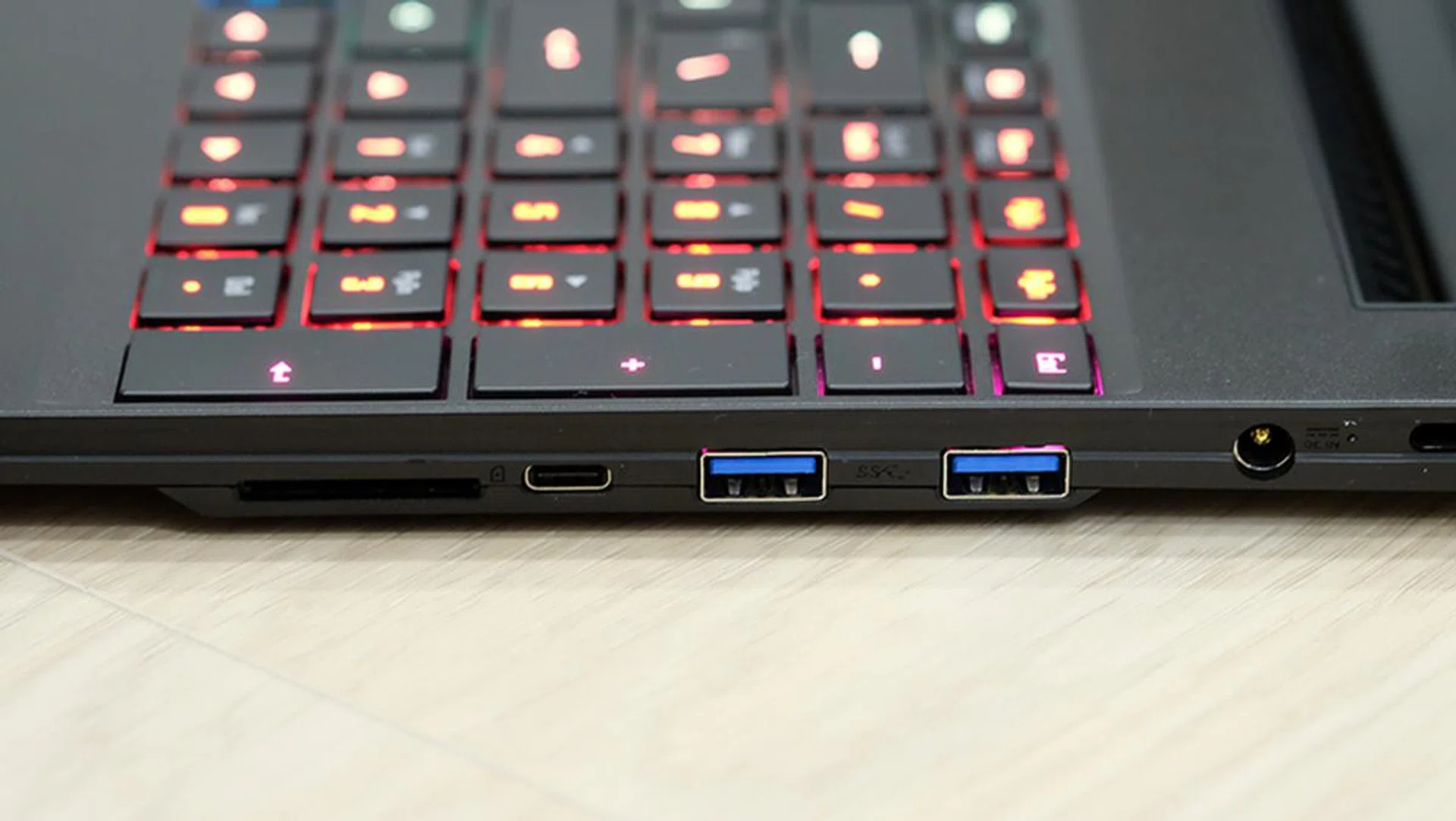
A look at the ports on the right.
Test setup and performance
Here's a full list of the notebooks we're looking at:
- Gigabyte Aero 15 Classic XA
- ASUS ROG Zephyrus S GX531GW
- Lenovo Legion Y740
- Razer Blade 15
I've included two other laptops that are also equipped with an NVIDIA GeForce RTX 2070 Max-Q and the previous generation's Intel Core i7-8750H processor to provide a measure of how much additional performance the 9th-generation chip offers. In addition, the Razer Blade 15 was included to show how the Aero 15 Classic XA stacks up against a GeForce RTX 2080 Max-Q.
The Aero 15 Classic XA ships with the same AI features that were introduced on the Aero 15Y v9. It's supposed to intelligently distribute power between the CPU and GPU, depending on the task at hand. It does confer a small boost in synthetic benchmarks, and it's definitely unique, but it also feels slightly gimmicky and isn't really a stand-in for raw performance.
[hwzcompare]
[products=663755,663338,660213,661877]
[width=200]
[caption=Test notebooks compared]
[showprices=1]
[/hwzcompare]
I ran the notebooks through the following benchmarks:
- PCMark 10
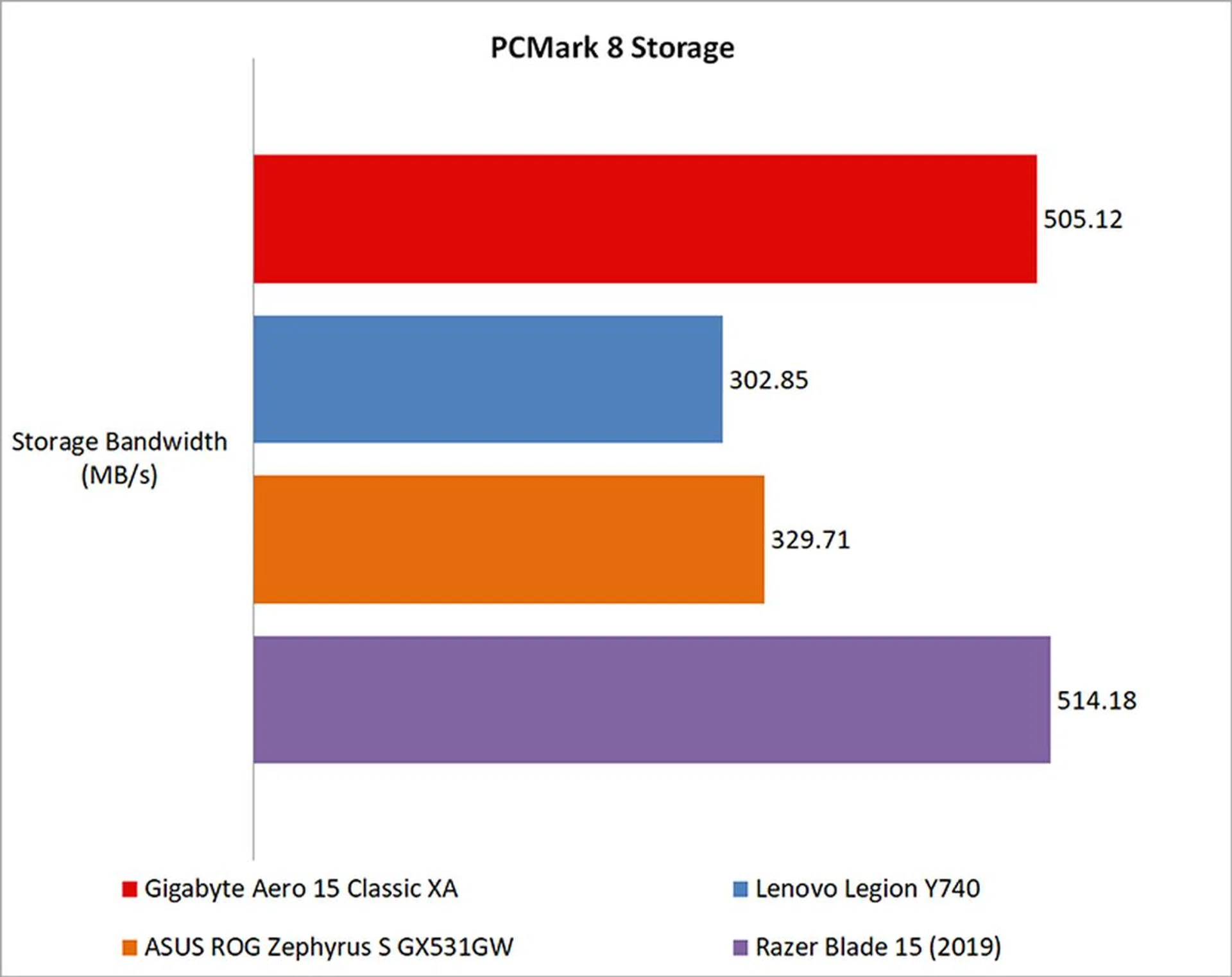
- PCMark 8
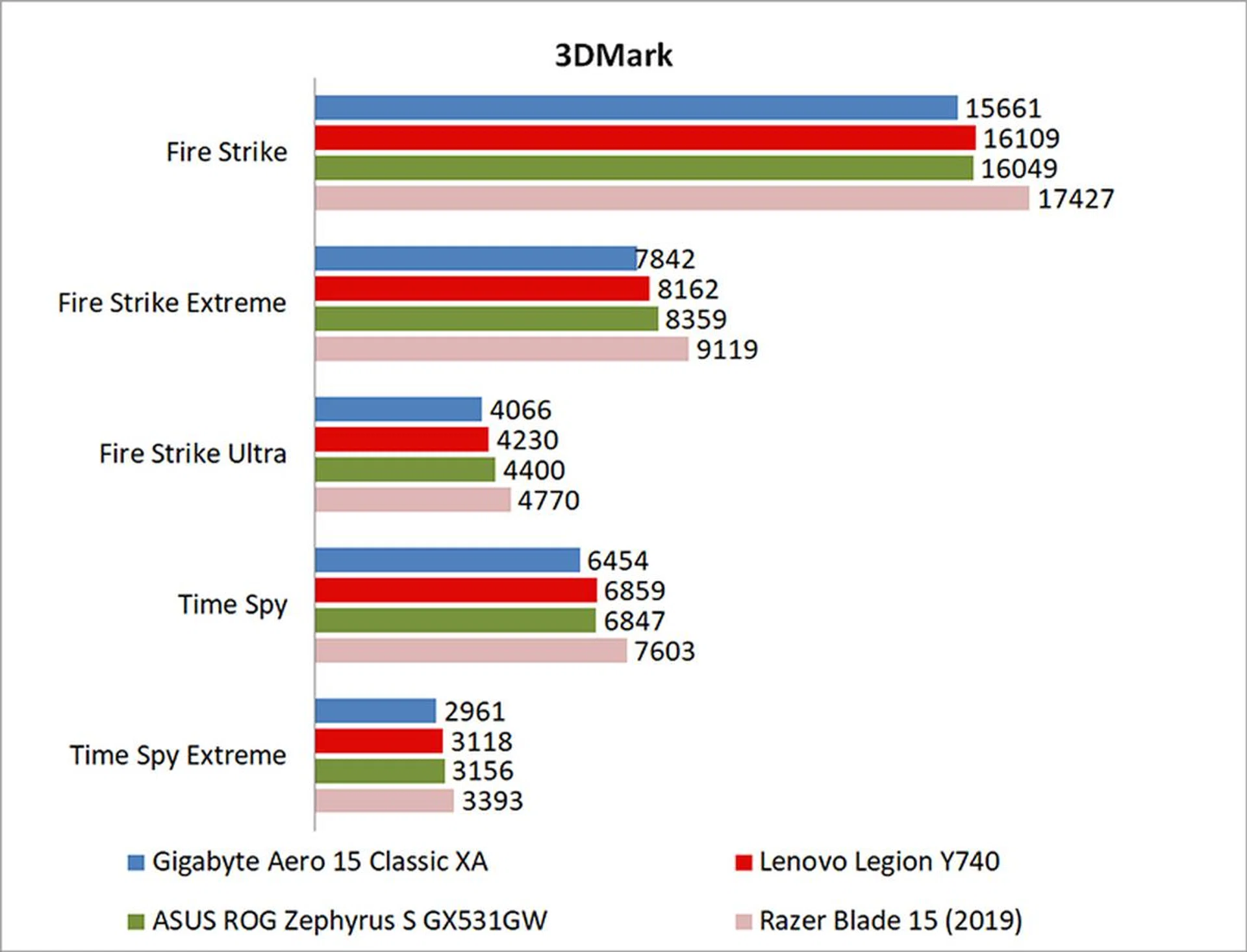
- 3DMark
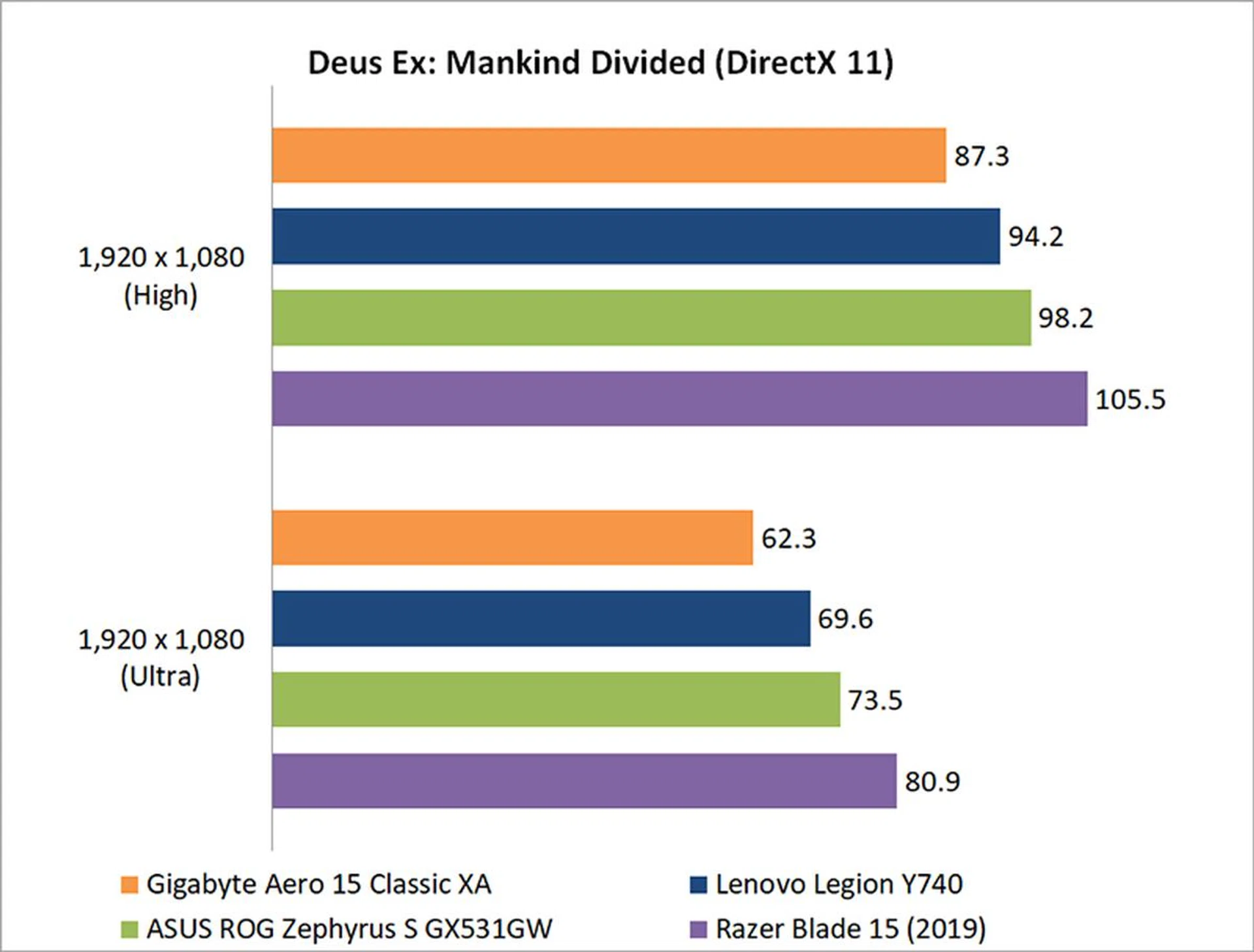
- Deus Ex: Mankind Divided
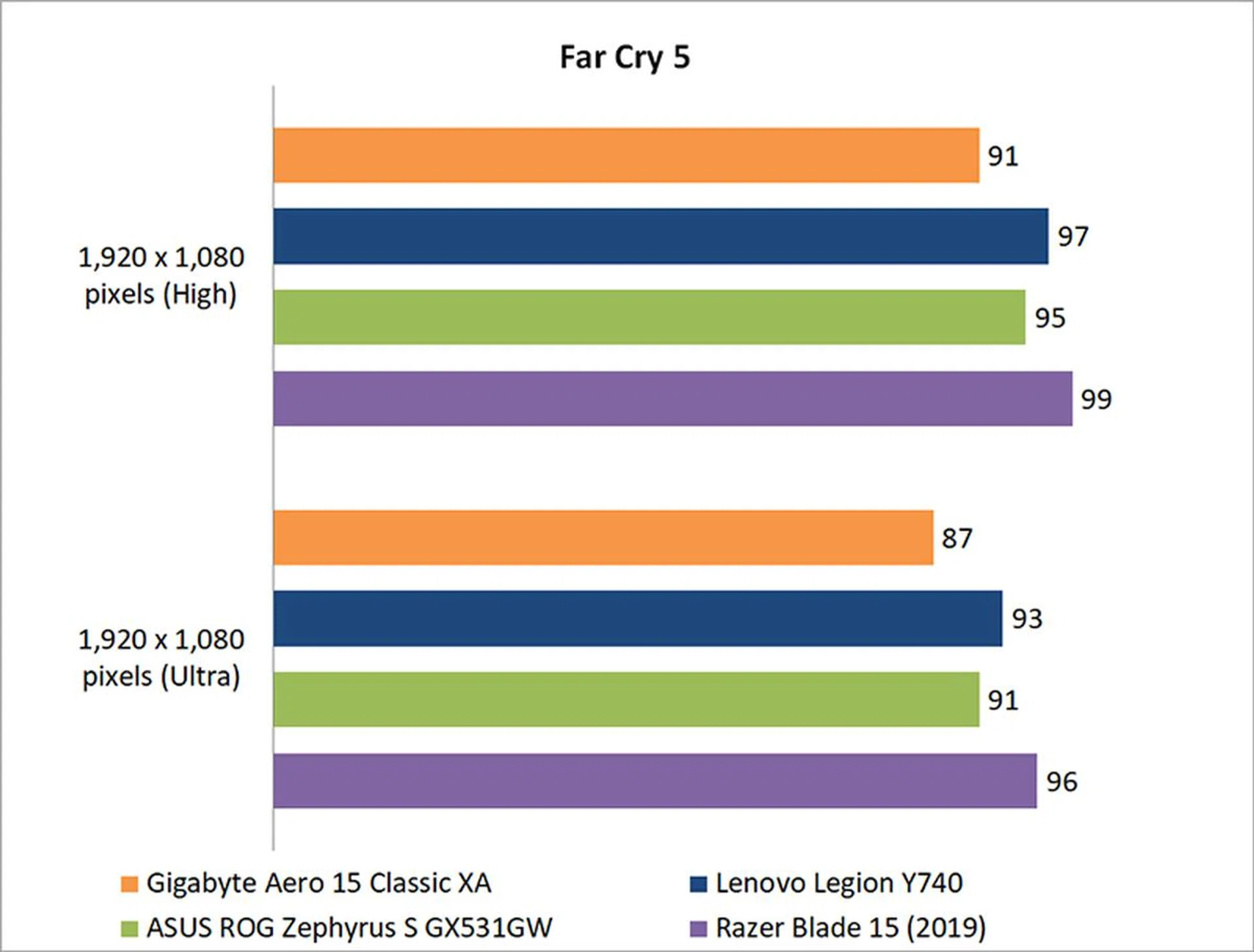
- Far Cry 5
- Tom Clancy's The Division
- Shadow of the Tomb Raider
How does it do in daily computing tasks?
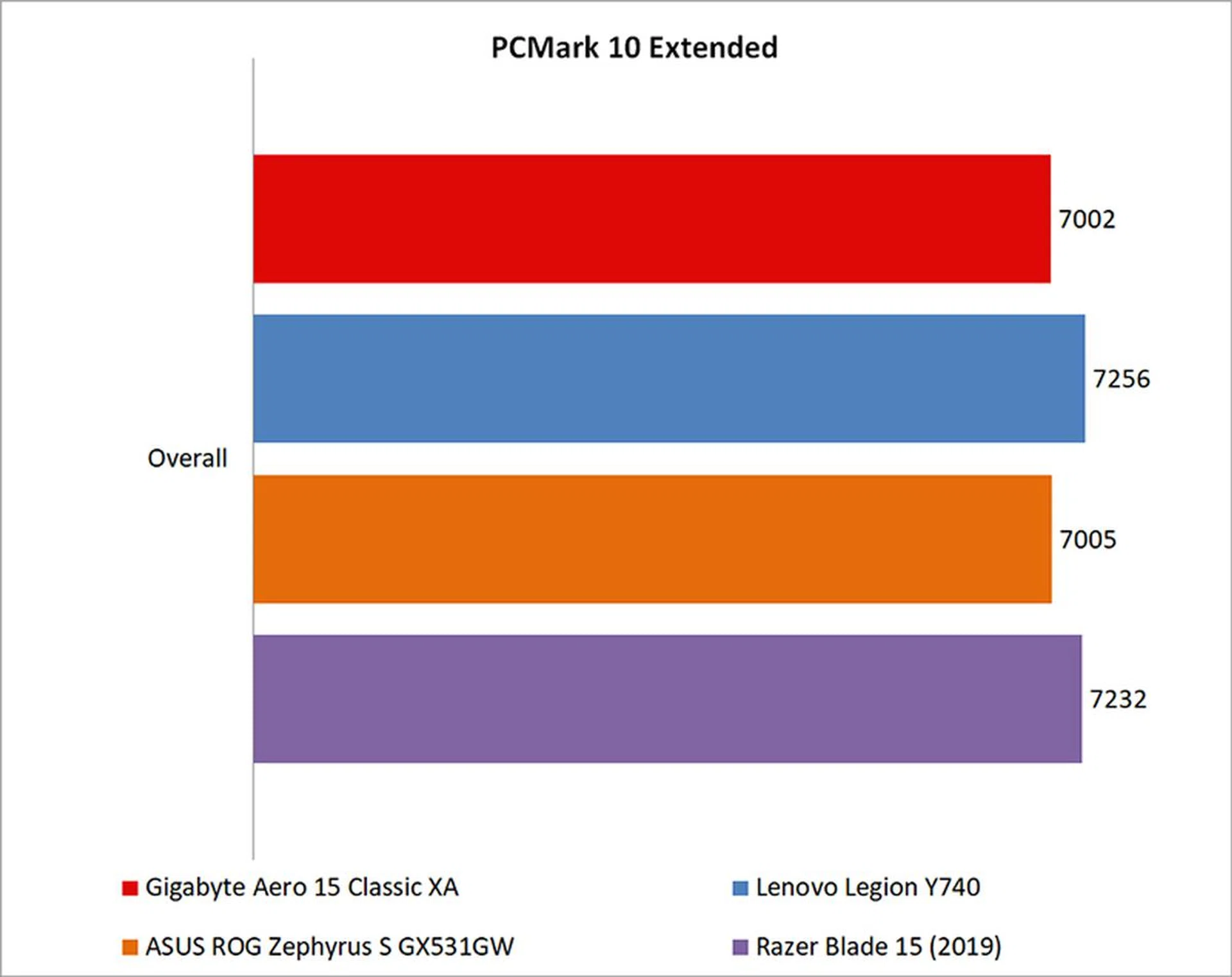
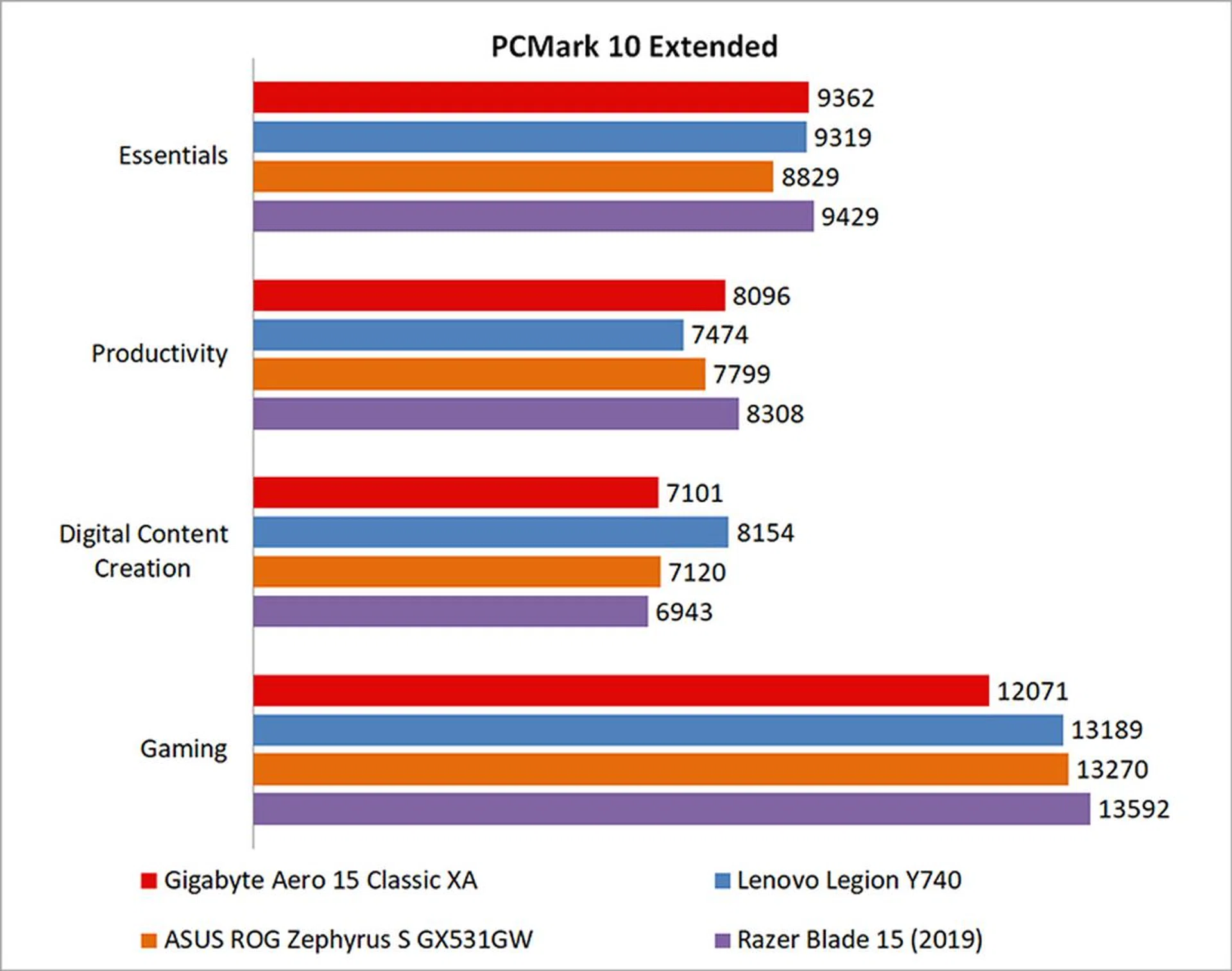
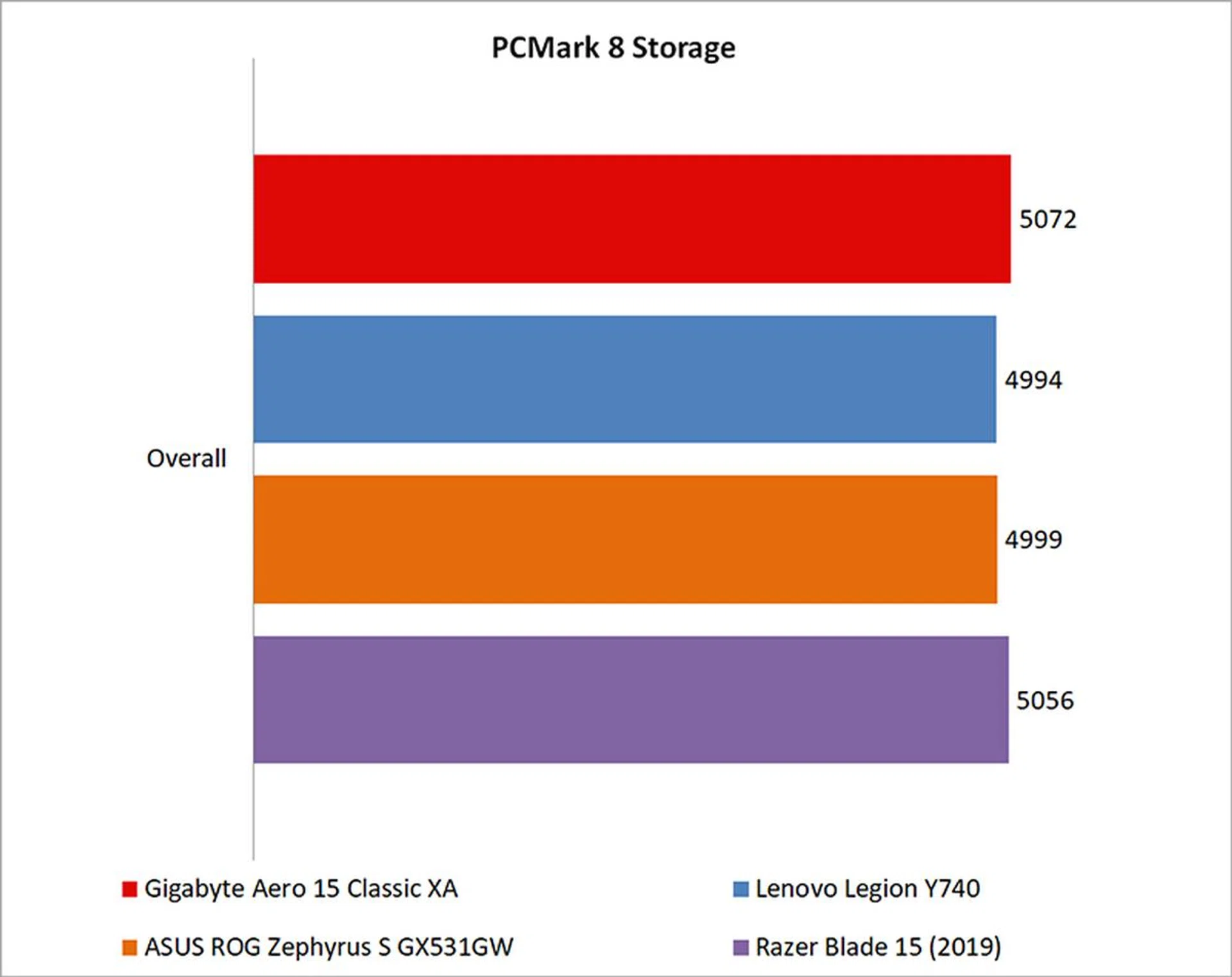
Overall, the Aero 15 Classic XA turned out very mediocre results. Despite its higher clocked Core i7-9750H chip, the Aero 15 still failed to beat the older notebooks, largely due to its lackluster performance in the gaming benchmark in PCMark 10 Extended.
Having said that, I should add that this notebook's performance should not be taken as a representation of how the Core i7-9750H performs compared to the Core i7-8750H. As you'll notice here and in the gaming benchmarks as well, the laptop doesn't seem able to keep up with its counterparts, and I think that's a problem that's rooted more in performance throttling due to cooling issues rather than the new chip itself. Furthermore, OEMs have quite a lot of control over how they tune the entire system's performance profile, so it's also possible that Gigabyte just decided to go with something less aggressive.
Either way, I'll have to wait till I get my hands on more notebooks equipped with the 9th-generation Intel Core processors to get a better idea of how the new chip performs.
How fast is it in games?
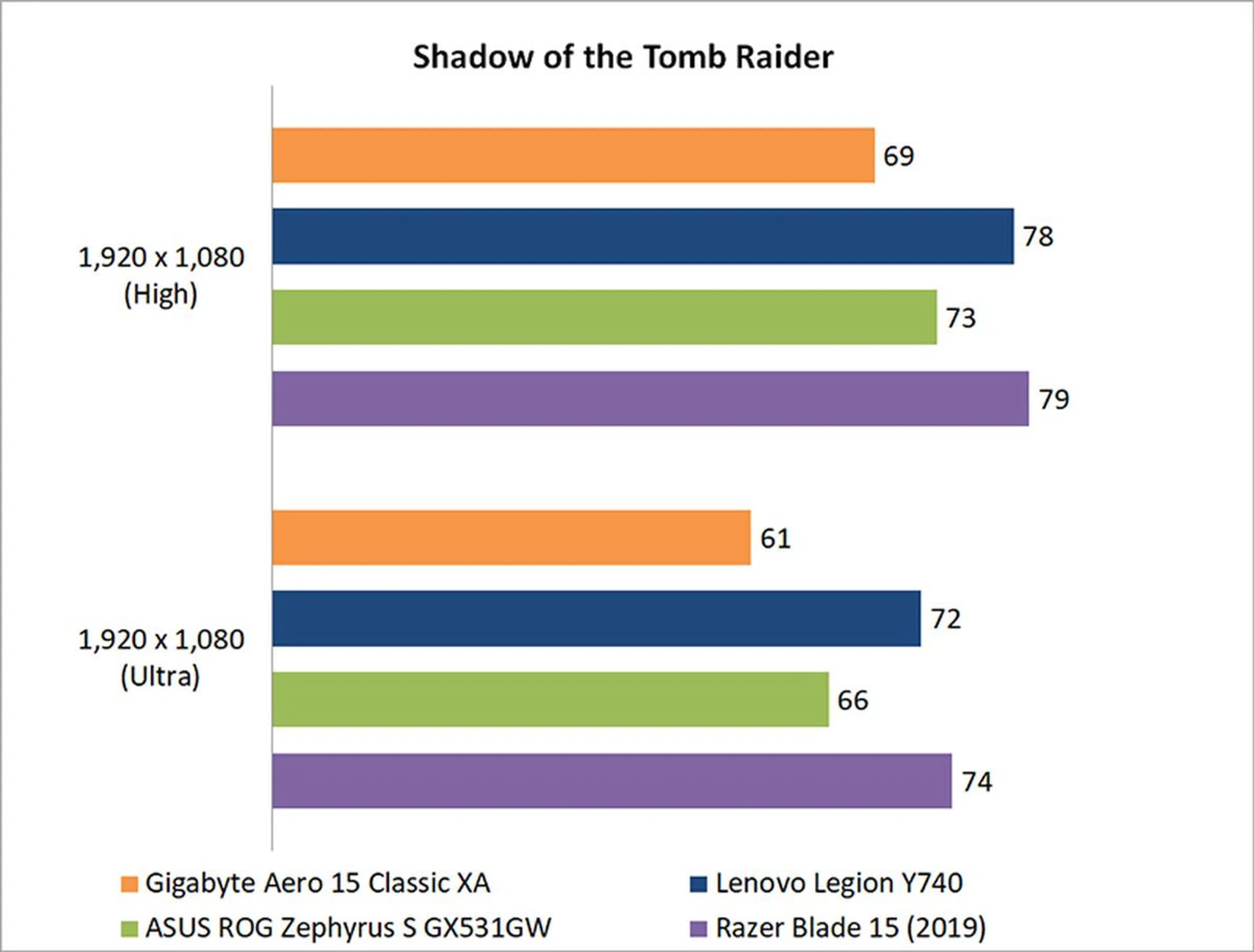
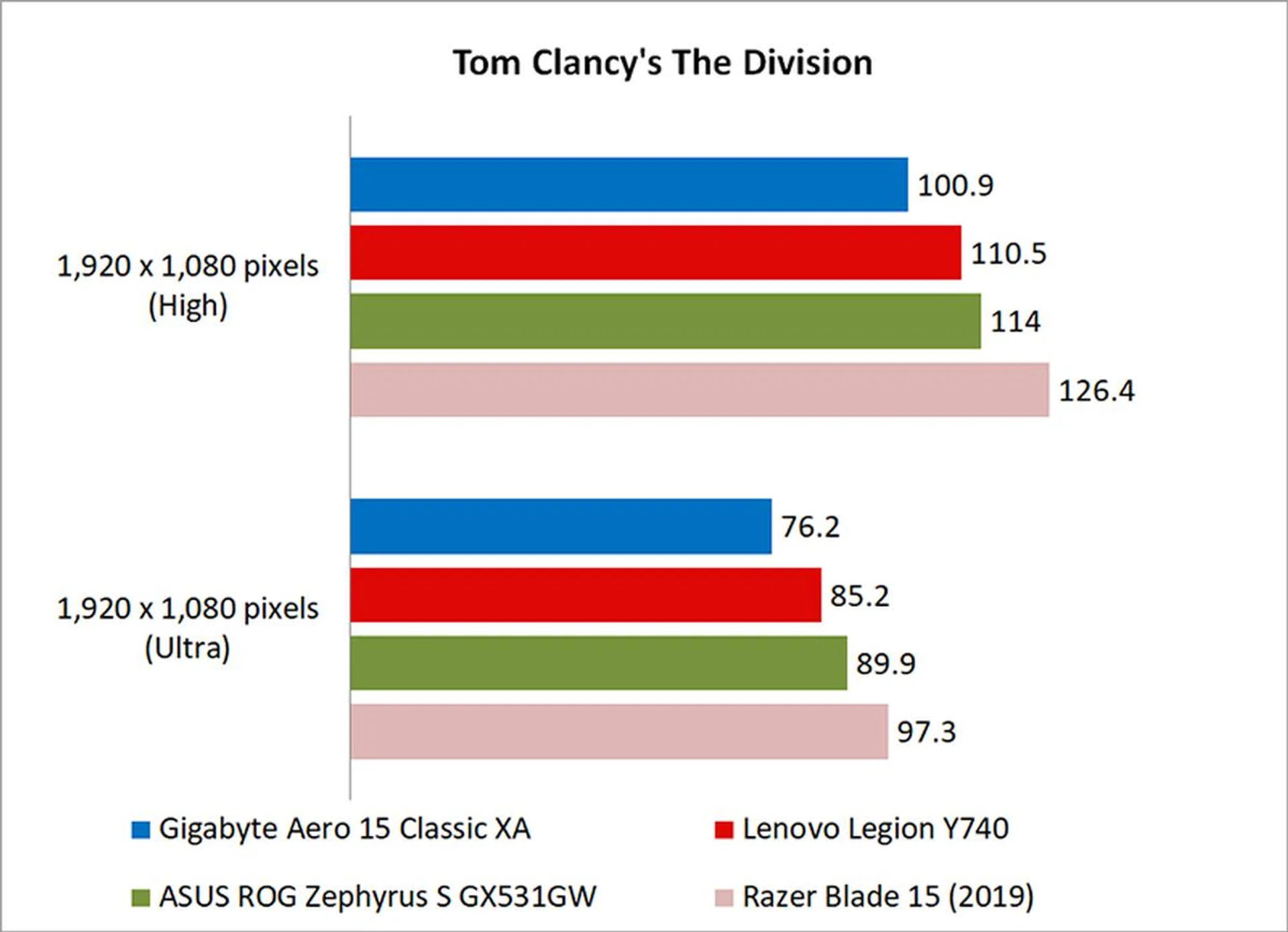
It's really disappointing that the Aero 15 Classic XA still falls behind laptops equipped with the older and lower clocked Core i7-8750H. I can't say for sure what exactly the problem is, especially since there's a slightly confusing array of performance options to choose from.
For starters, there's the AI features powered by Microsoft Azure AI (you'll have to refer to the manual to see what each mode does since it's not immediately apparent), which I tested out with select games. I did notice an increase of a handful of frames in Far Cry 5 and a smaller increase in Deus Ex: Mankind Divided, but the results were pretty much unchanged for Tom Clancy's The Division and Shadow of the Tomb Raider. From my limited testing, it looks like there are inconsistent gains across the board, so I don't think it's that big of a game changer. And even then, in Far Cry 5, which showed the largest benefit, the improved result only brought the Aero 15 Classic XA to the same level as the ASUS ROG Zephyrus S and Lenovo Legion Y740, still an unimpressive result given that the Gigabyte laptop has a more powerful processor.
On top of that, Gigabyte's Control Center software has a section called Device Information, under which you can supposedly control the CPU clock speeds and GPU power draw. Mind you, I only knew this because of the review guide Gigabyte provided me, and it's not stated anywhere in the software itself or even in the user manual.

Gigabyte's Control Center software provides more controls for performance and fan speeds.
Basically, to theoretically achieve the best possible performance, you want to put the power plan in high performance mode and click the numbered squares to ensure that all of them are lit up in orange. The confusing interface aside, I find it troubling that even after taking these steps to ensure maximum performance, the laptop still underperformed. For good measure, the laptop's fans were even set to run at full speed.
Nevertheless, the Aero 15 Classic XA was still 3 per cent behind the Lenovo Legion Y740 in 3DMark Fire Strike and an alarming 12 per cent behind in Shadow of the Tomb Raider.
How good is the battery life?
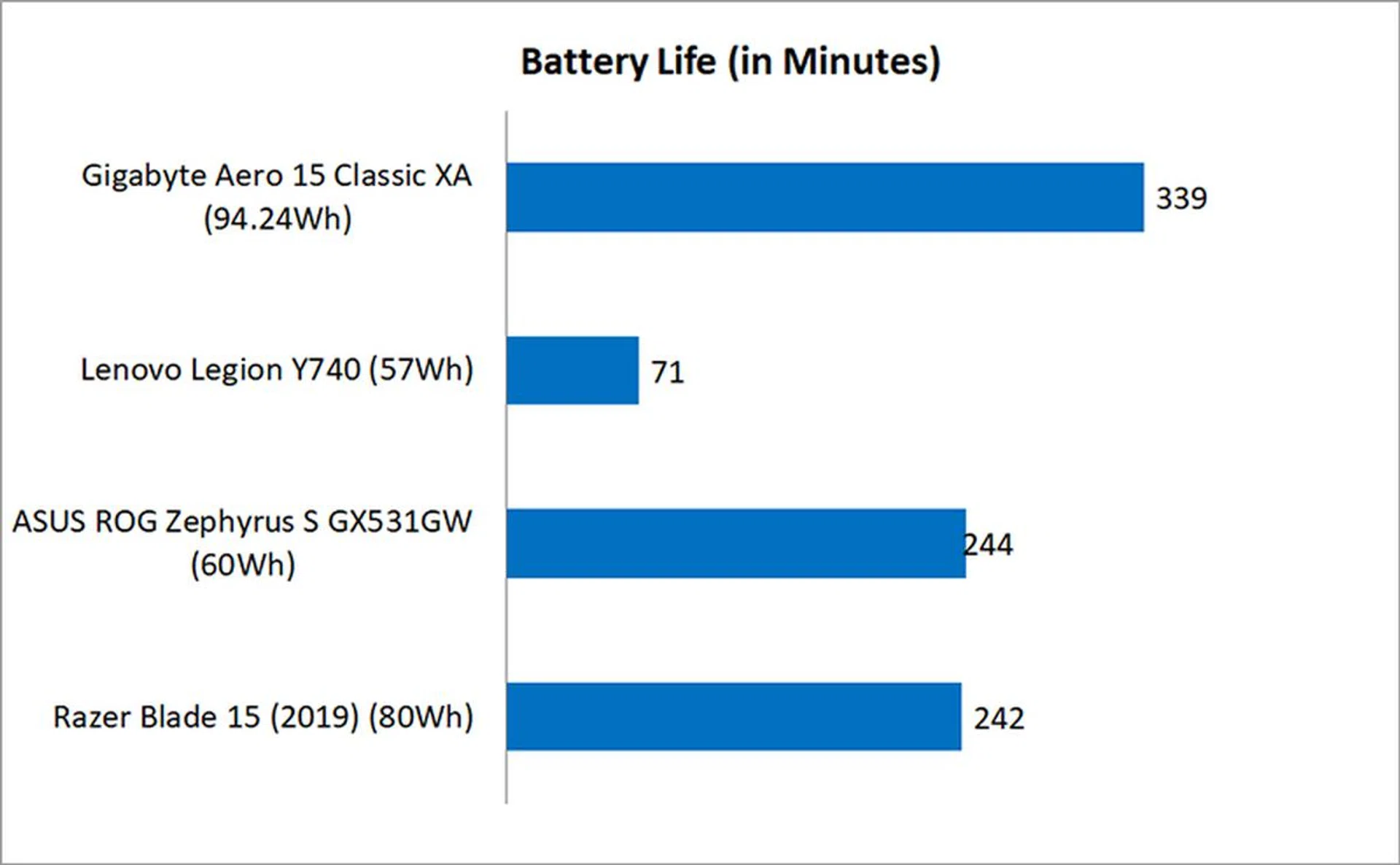
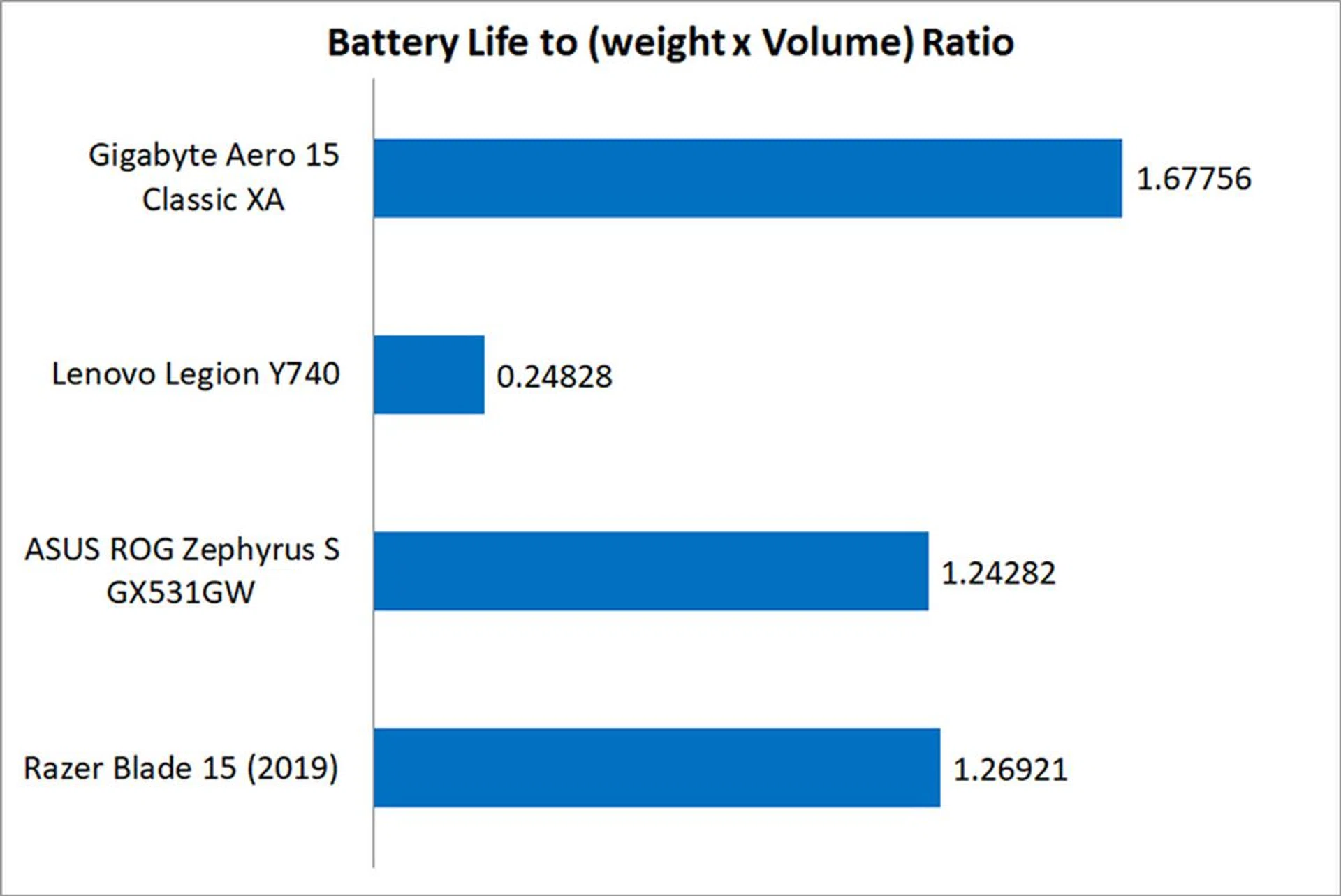
The Aero 15 Classic XA's saving grace continues to be its absolutely stellar battery life. That's something you can't ever take away from Gigabyte's Aero 15 series, and it has been a class leader for the past few years. It lasted over five hours in PCMark 8 Home's battery life test, which is pretty impressive.
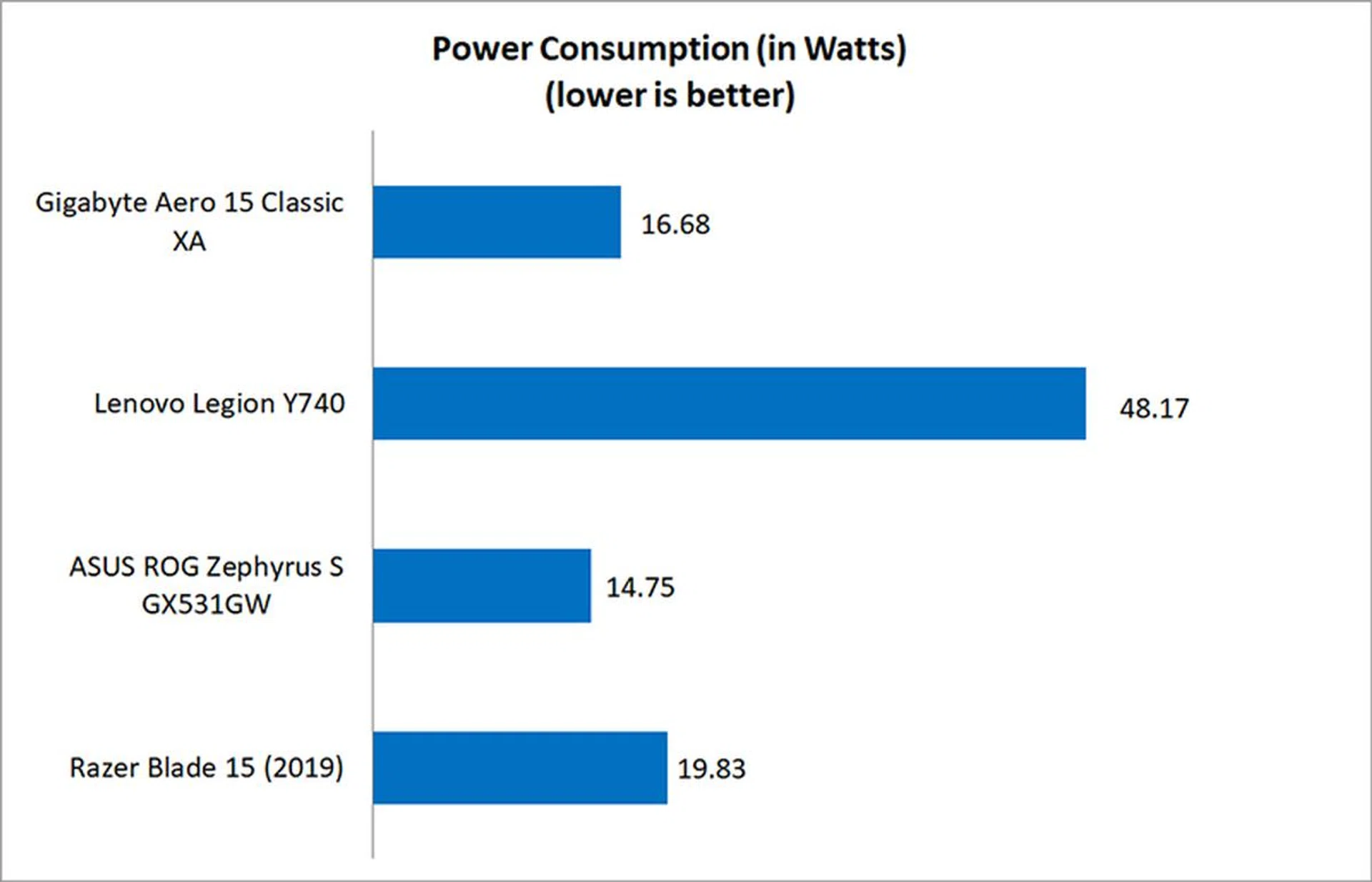
The large battery, good power efficiency, slim and compact design, all come together to produce a gaming laptop that has consistently topped our portability index. The index is intended to take into account things like chassis dimensions, weight, and battery life, and the Aero 15 Classic XA remains king of the hill in this department.
Does it run hot?
Unfortunately, the Gigabyte Aero 15 Classic XA does get pretty hot. The palm rests do get quite warm to touch, and I think you should definitely game in an air-conditioned room.
With that said, the previous Aero 15Y v9 also had some issues with heat and thermal throttling, so I also want to talk a bit more about thermal management here. Removing the bottom lid reveals two fans and two heat pipes, in addition to easily accessible RAM and M.2 slots, which is a nice plus point in terms of upgradeability. However, it looks like both the CPU and GPU share the two heat pipes, so there doesn't seem to be independent cooling for either. And as you'll see from the performance numbers in the next section, I think the laptop could do with an upgrade in terms of cooling.
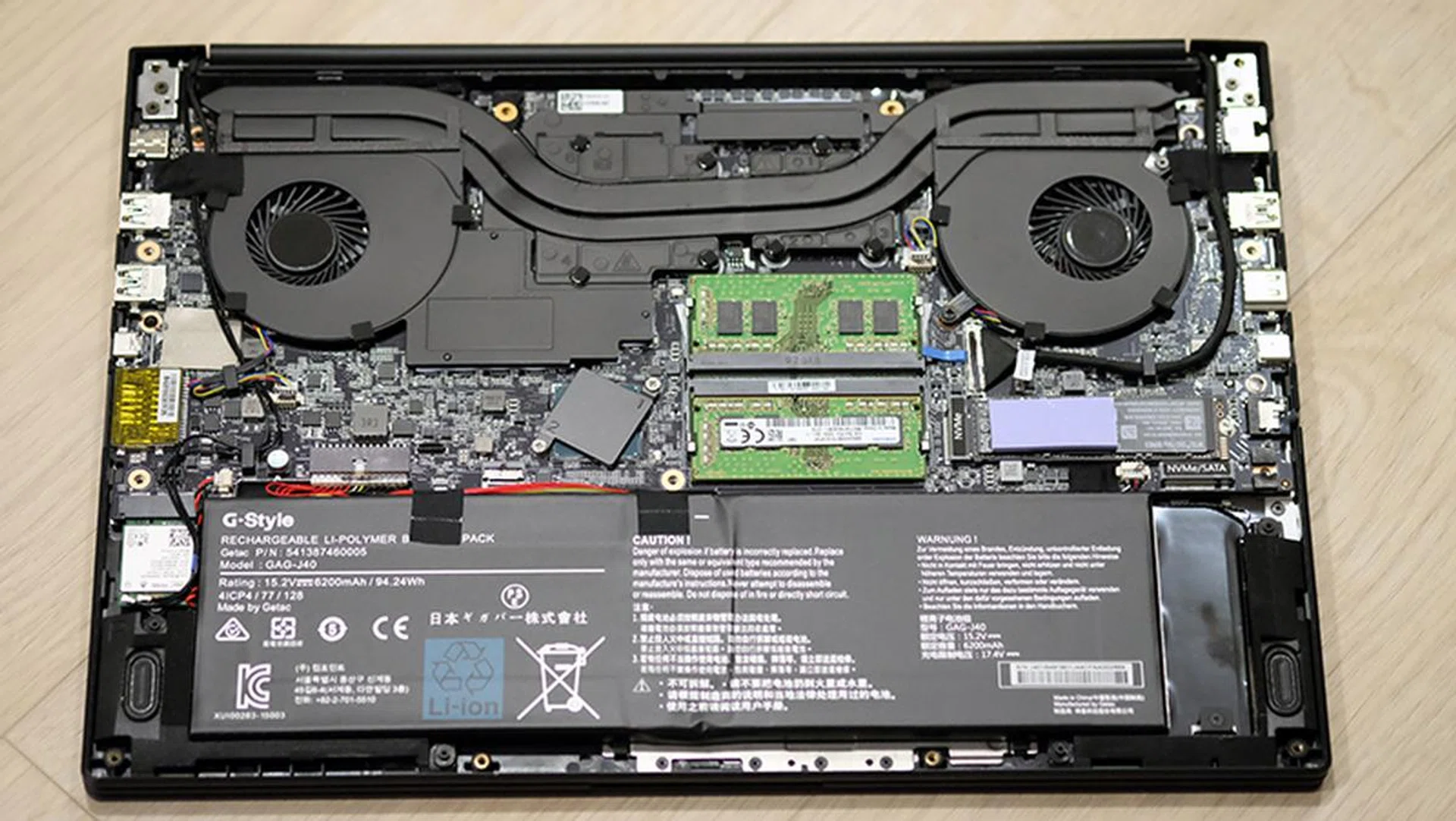
It's difficult to say what the problem here is, but one thing that stands out compared to other notebooks like the ASUS ROG Zephyrus S and Lenovo Legion Y740 is the number of exhaust vents. The Aero 15 Classic XA has large intake vents at the bottom, but only one exhaust vent above the keyboard. To be fair, the Razer Blade 15 also doesn't have a ton of vents, but it makes up for that with separate heat pipes for both the CPU and GPU.
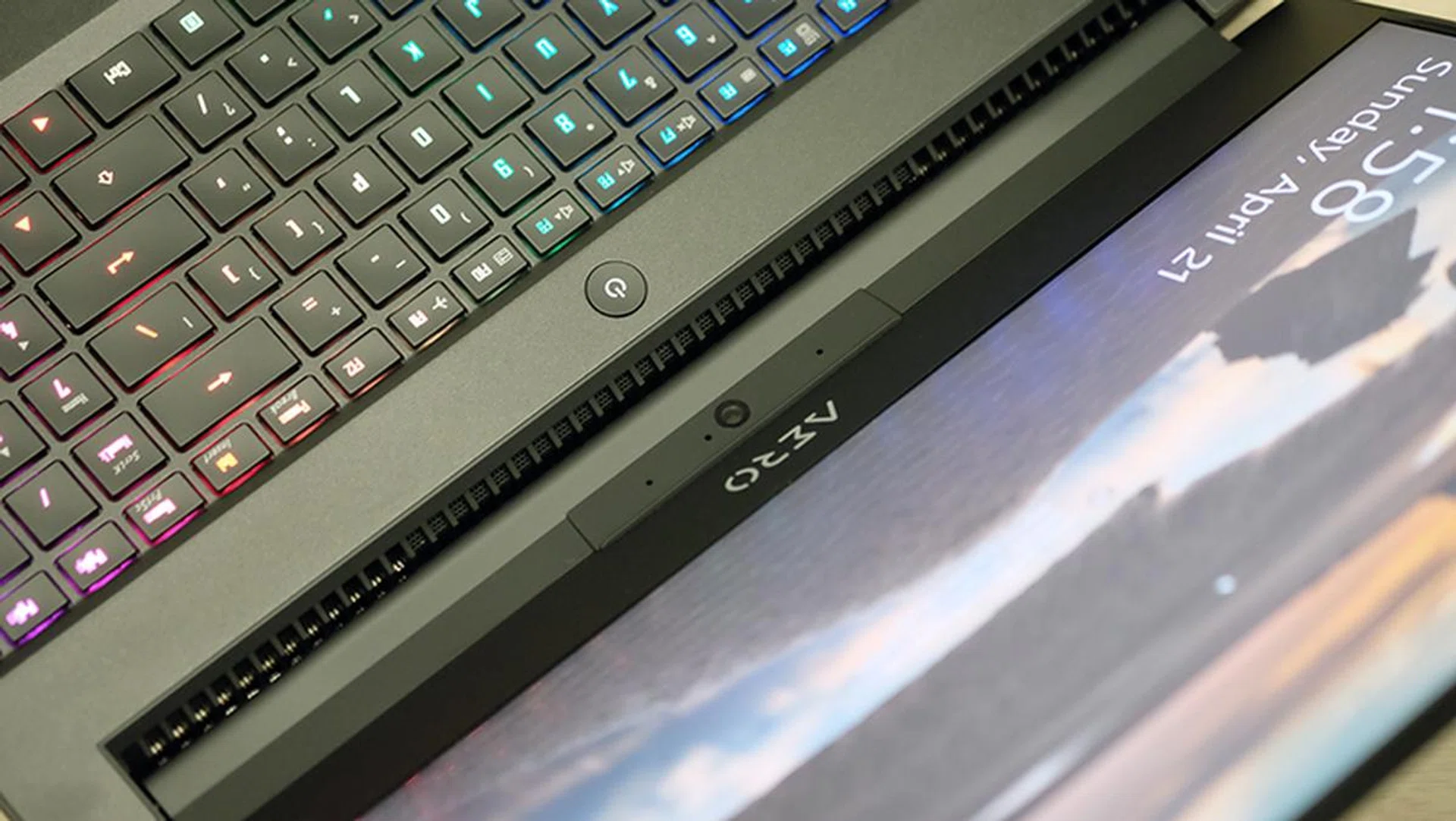
Exhaust vents line the area above the keyboard.
That said, heat appears mostly concentrated around the power button of the notebook, and the surrounding area frequently gets searing hot, sometimes to the point where you can't hold a finger to it for more than a couple of seconds.
I recorded the peak CPU and GPU temperatures after running 40 loops of 3DMark's Fire Strike Extreme stress test, and the numbers actually don't appear too alarming in and of themselves. However, compared to the other notebooks, these numbers are actually pretty high. For example, while the Lenovo Legion Y740 also had a peak CPU temperature of 79°C, it had a markedly lower GPU temperature of just 63°C. Similarly, the ASUS ROG Zephyrus S had a higher GPU temperature of 86°C, but its CPU temperatures were conversely quite a bit lower at 69°C.
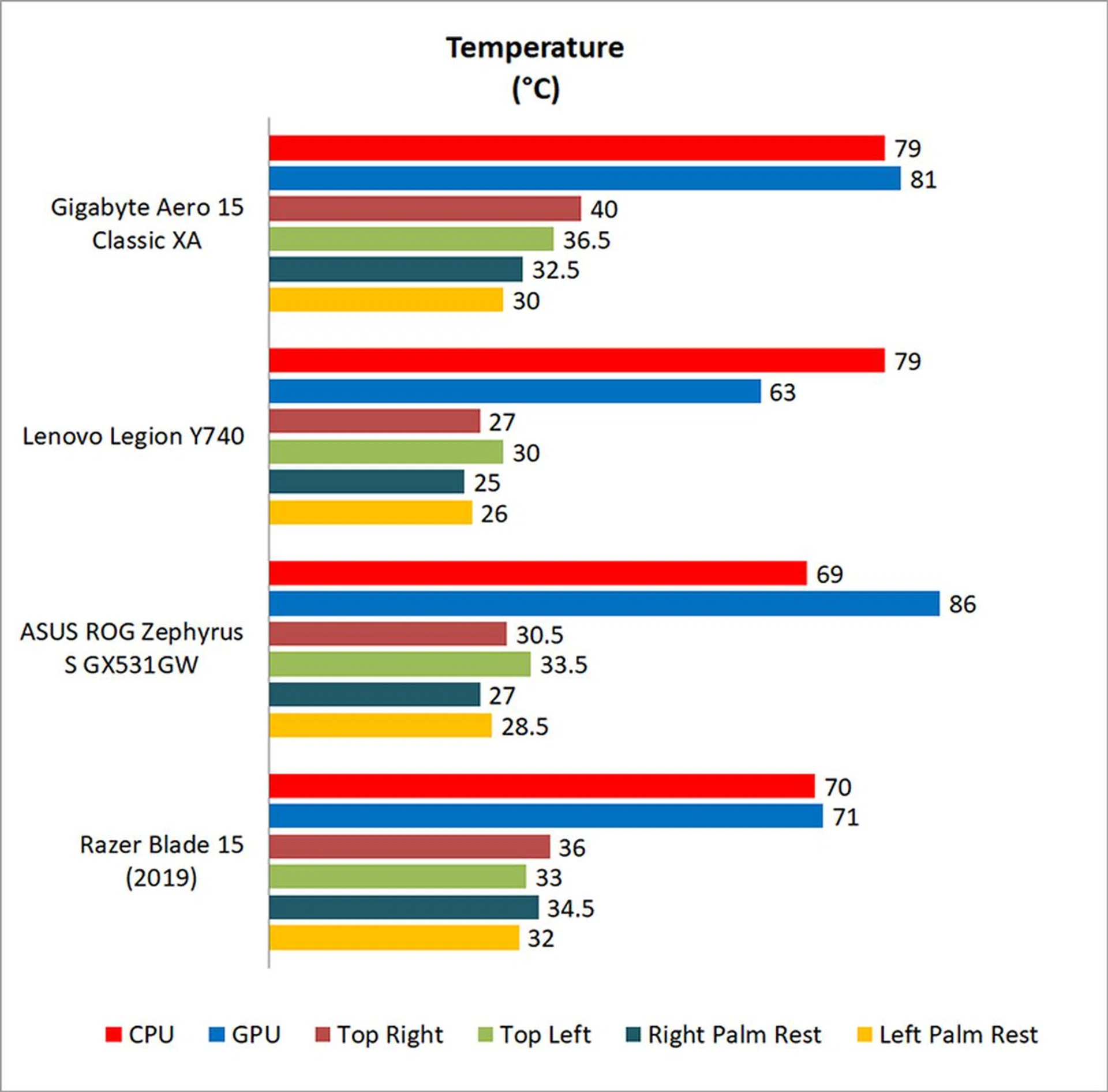
These numbers don't say anything alone, but after you look at the performance numbers on the previous page, it's possible that the combination of high numbers on both the CPU and GPU is what's affecting its performance potential. There is no independent cooling for either the CPU or GPU, and this could be a side effect of that.
Conclusion: A good laptop with serious flaws
The Gigabyte Aero 15 Classic XA reeks of unfulfilled promise. It's got an attractive, tasteful design, gorgeous 240Hz display, and a compact and slim aluminum chassis. The hardware is top-notch as well, with the latest 9th-generation hexa-core Core i7 chip, NVIDIA GeForce RTX 2070 Max-Q, and internal components from reputable vendors. What's more, battery life is truly excellent, and there are few laptops that even come close.
But all that doesn't mean much if the Aero 15 Classic XA can't show up where it really matters, which is to churn out excellent numbers in games. I'm still really disappointed as to how the laptop performed. When I reviewed the Aero 15Y v9, I thought that maybe cramming an overclockable chip and a GeForce RTX 2080 Max-Q into such a slim chassis was just too ambitious a configuration, and that a slightly less powerful hardware combination would do better.
Well, the Aero 15 Classic XA is precisely that laptop. There's no overclockable chip and the GPU is a GeForce RTX 2070 Max-Q and not a 2080-class GPU. Still, performance is behind the curve, even when compared against laptops with the older Core i7-8750H processor, which is pretty unacceptable.
Taken on its own, the Aero 15 Classic XA is great. It's plenty fast and will probably run any game at 1080p. At S$3,699, it's also quite reasonably priced for its specifications. It's only when you compare it against other similarly configured options that you realize what you're missing.
Our articles may contain affiliate links. If you buy through these links, we may earn a small commission.