

If it ain't broke, don't fix it
NVIDIA's new GeForce RTX graphics have finally made their way to laptops, which means that some sweet, sweet performance is now going to be available on your next portable gaming system. NVIDIA's GeForce RTX 2060, 2070, and 2080 all serve up some tantalizing performance, and if the previous generation Pascal cards are anything to go by, the mobile Turing cards shouldn't be that far behind their desktop counterparts.
The new Gigabyte Aero 15Y v9 is the latest version of the company's excellent slim-and-light gaming notebook. At first glance, it offers much of the same as its predecessor, but Gigabyte is now making a renewed push to highlight its choice of quality components, such as an AUO display panel and Samsung memory. More importantly, the Aero 15Y now supports much more powerful hardware than before, which is seriously impressive considering that the notebook's dimensions remain unchanged and it is still as sleek as ever.
Here's an overview of its specifications:
- 15.6-inch 3,840 x 2,160-pixel IPS 60Hz display
- Intel Core i9-8950HK processor (2.90GHz, 12MB L3 cache)
- Samsung 32GB DDR4-2666 dual-channel RAM
- NVIDIA GeForce RTX 2080 Max-Q
- Intel 760p 2TB PCIe M.2 SSD
- 94.24Wh battery
- 356.4 x 250 x 18.9mm
- 2kg
The above will cost S$6,099, propelling the Aero 15Y into the rarefied echelons of ultra-premium gaming notebooks. At the very least, it's clear what you're getting for the price, which is cutting-edge gaming performance and hardware, in a package that looks like it should house a mid-range GPU instead.
Here's a closer look at what the new Aero 15Y brings to the table in the following pages.
So what's really new?
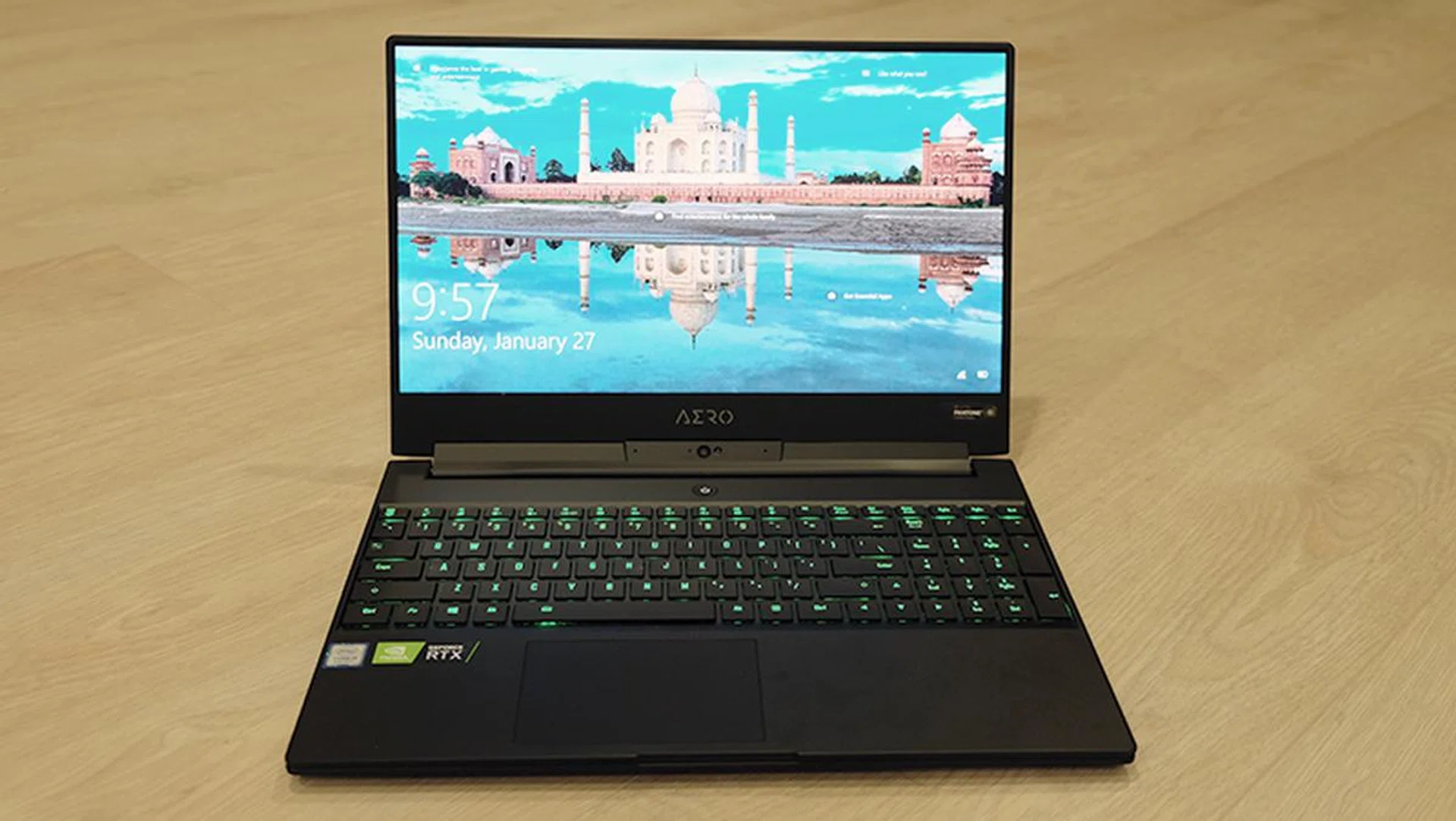
The edge-to-edge display is one of the best things about the notebook.
The Aero 15Y is very similar to the Aero 15X I reviewed previously, so I won't be rehashing many of the details I talked about previously. Furthermore, just as the Aero 15X offered small but thoughtful improvements over the original Aero 15, the Aero 15Y takes the same approach with a fresh round of under-the-hood tweaks that improve the overall user experience.
For example, Gigabyte has finally included a Windows Precision Touchpad on the new Aero 15Y, a long overdue change that adds a greater degree of reliability and accuracy to the built-in trackpad. Windows Precision Touchpads do really feel a lot better than third-party solutions, and they also support convenient multi-finger gestures. Gigabyte has still stuck with a small-ish plastic trackpad though, and I'd really have liked to see a larger glass trackpad like the one on the Razer Blade.
However, what really stands out is Gigabyte's decision to call attention to the provenance of the components it's using. The company is using a 4K IPS panel from AU Optronics (the 1080p models use LG panels), Samsung memory, and an Intel 760p SSD. In addition, it features a Killer E2500 Gigabit Ethernet Controller and a Killer Wireless-AC 1550i network adapter, both of which can work together to enable a maximum throughput of up to 2.783Gbps, thanks to Killer DoubleShot Pro technology. The existing Aero 15X relied on an Intel solution for networking, but Gigabyte has opted for a more gaming-oriented solution this time around.
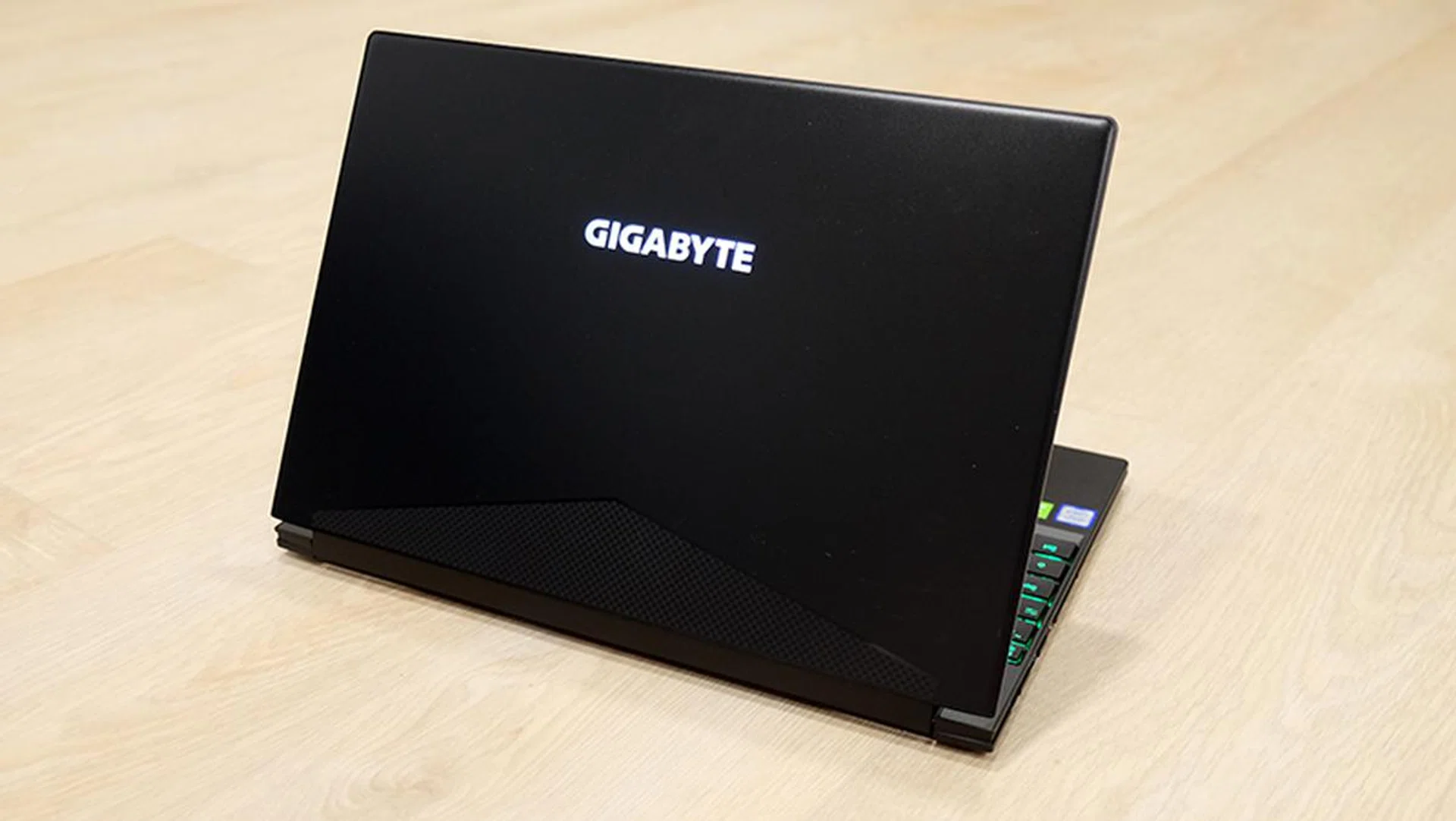
The Aero 15Y wouldn't look out of place in an office.
The switch to a Killer networking solution isn't that huge, and some folks still tend to prefer Intel. However, I like that Gigabyte is talking about where its components come from, and I personally find it quite a confidence-inspiring move that more manufacturers should follow.
Finally, the laptop also now ships with Nahimic 3 software, which comes with Music, Movie, Communication, and Gaming modes to suit the task at hand. You'll be able to tweak the sound signature to your preference as well, and you can adjust bass, treble, and voice levels. This is the same software that has been a mainstay on MSI's gaming notebooks for a while now.
There's also a slightly gimmicky Sound Tracker feature that superimposes a radar over your game, serving as a visual indicator of where sounds are coming from. This sounds useful on paper, but unless you're really super inept at identifying directional cues, I think most people will still leave this off.
The speakers still support Dolby Atmos, and they're actually pretty decent. They're located at the bottom of the laptop and peep out through tiny grilles, but they pump out surprisingly loud and full-bodied sound.
How does it stand out?
But now that manufacters everywhere are in the middle of releasing their GeForce RTX notebooks, the Aero 15Y is up against some stiff competition. Its key selling point is probably its support for the overclockable Intel Core i9-8950HK processor, which still isn't that common on a notebook of this size.
That aside, the display has to be one of the best parts of the laptop. The edge-to-edge bezels ensure a more immersive viewing experience, and the 4K IPS panel is a joy to look at. It is crisp and bright, and its X-Rite Pantone color calibration with a Delta-E value of less than 1 means that colors should be pretty accurate. The original Aero 15 was designed for both gamers and creators, and the same goes for the Aero 15Y as well, which also ships with Windows 10 Pro instead of Home.
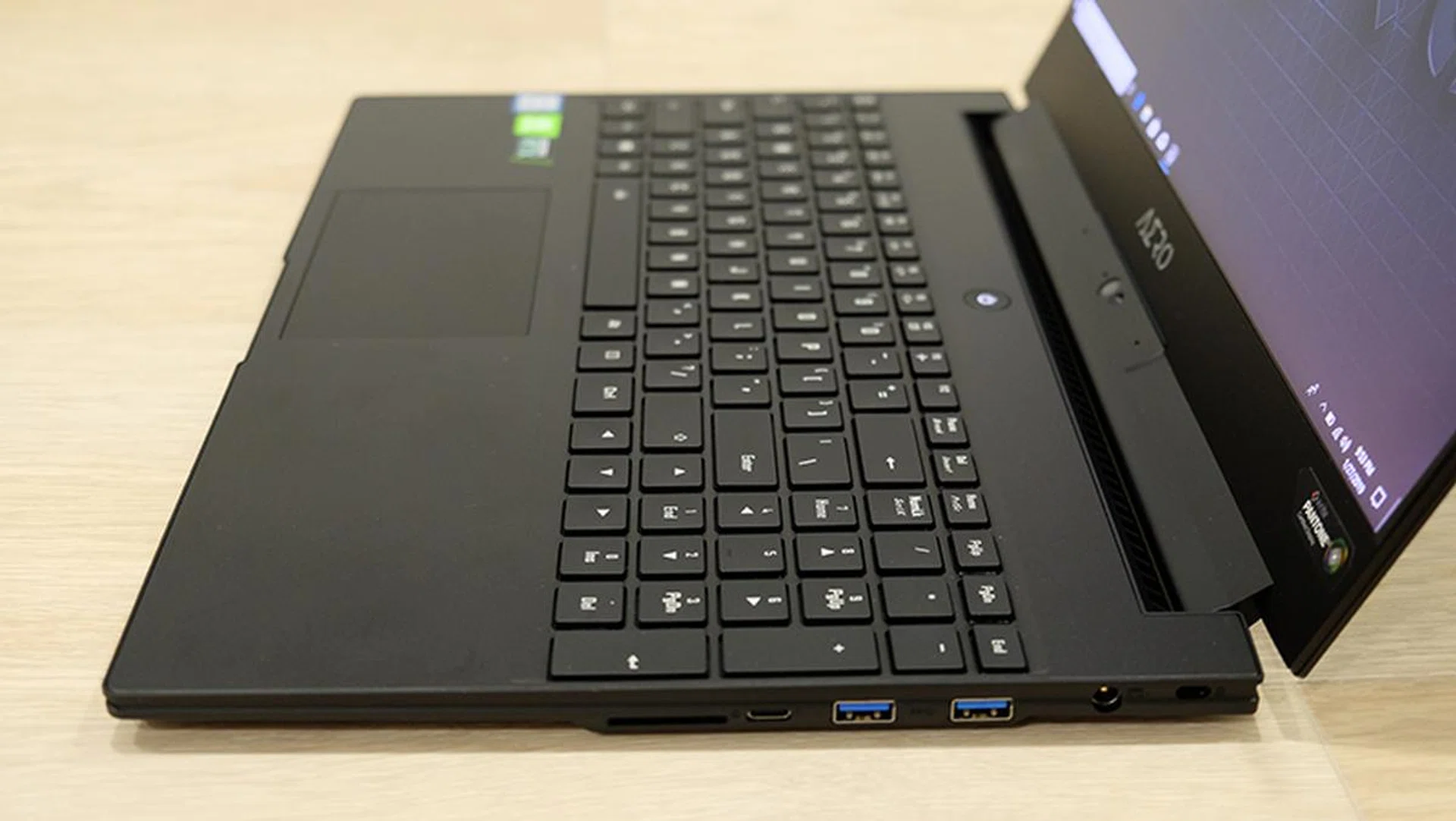
Gigabyte has managed to cram a full-sized keyboard on the laptop.
One trade-off of this design is the need for a bottom-mounted webcam, which makes for some unflattering camera angles.
However, while a 4K display sounds great on paper, it's really not that practical for a gaming system. It also drives the price of the unit up considerably, and I'd take a 1080p 144Hz panel over a 4K 60Hz display any day. Furthermore, as the performance results on the next page will show, the notebook isn't really up to the task of delivering a smooth experience at 4K, so gamers will probably end up turning the resolution down anyway.
Moving on, the keyboard deserves praise as well. It's one of the best I've used on a Max-Q notebook, and it offers good key travel and pleasantly tactile feedback. In addition, there is support for per-key RGB backlighting and you can customize the keyboard using the built-in Control Center software. Some of you may find the full-sized keyboard a little cramped, but I think it's just a matter of getting used to it.
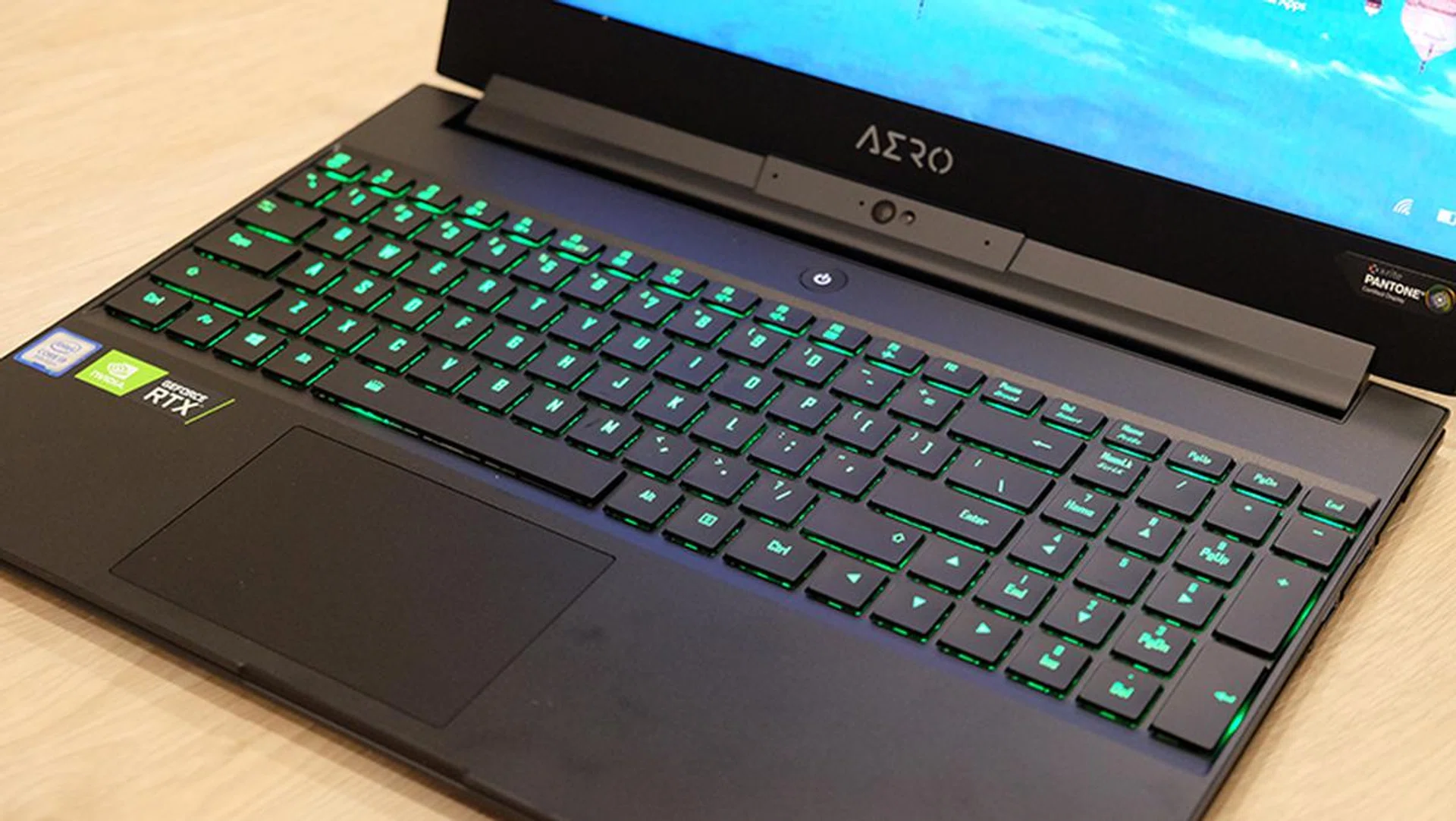
The keyboard feels really good to type on.
I also really like the inclusion of the full-sized UHS-II SD card reader, which really says a lot about Gigabyte's focus on content creators and not just gamers. Not a lot of business notebooks feature an SD card reader, let alone a gaming notebook, so it's really nice that Gigabyte has thought to include one. This is a feature carried over from its predecessor, and the selection of connectors remains unchanged, including one Thunderbolt 3, two USB 3.1 (Gen 1) Type-A, and one USB 3.1 (Gen 2) Type-A port. There is also an HDMI 2.0, one DisplayPort 1.4 output, and an Ethernet jack.
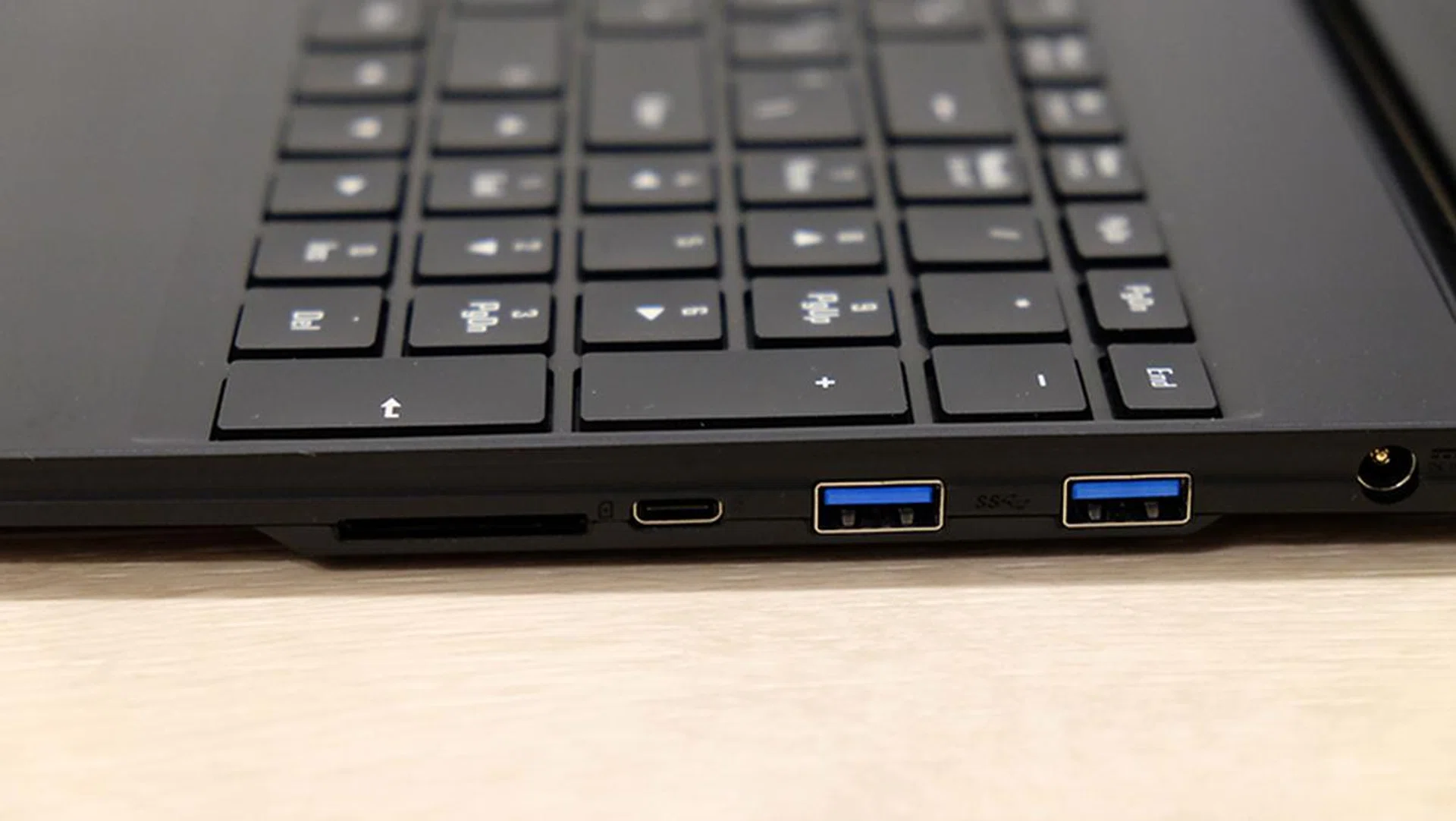
There's a Thunderbolt 3 port on the right as well, beside the SD card slot.
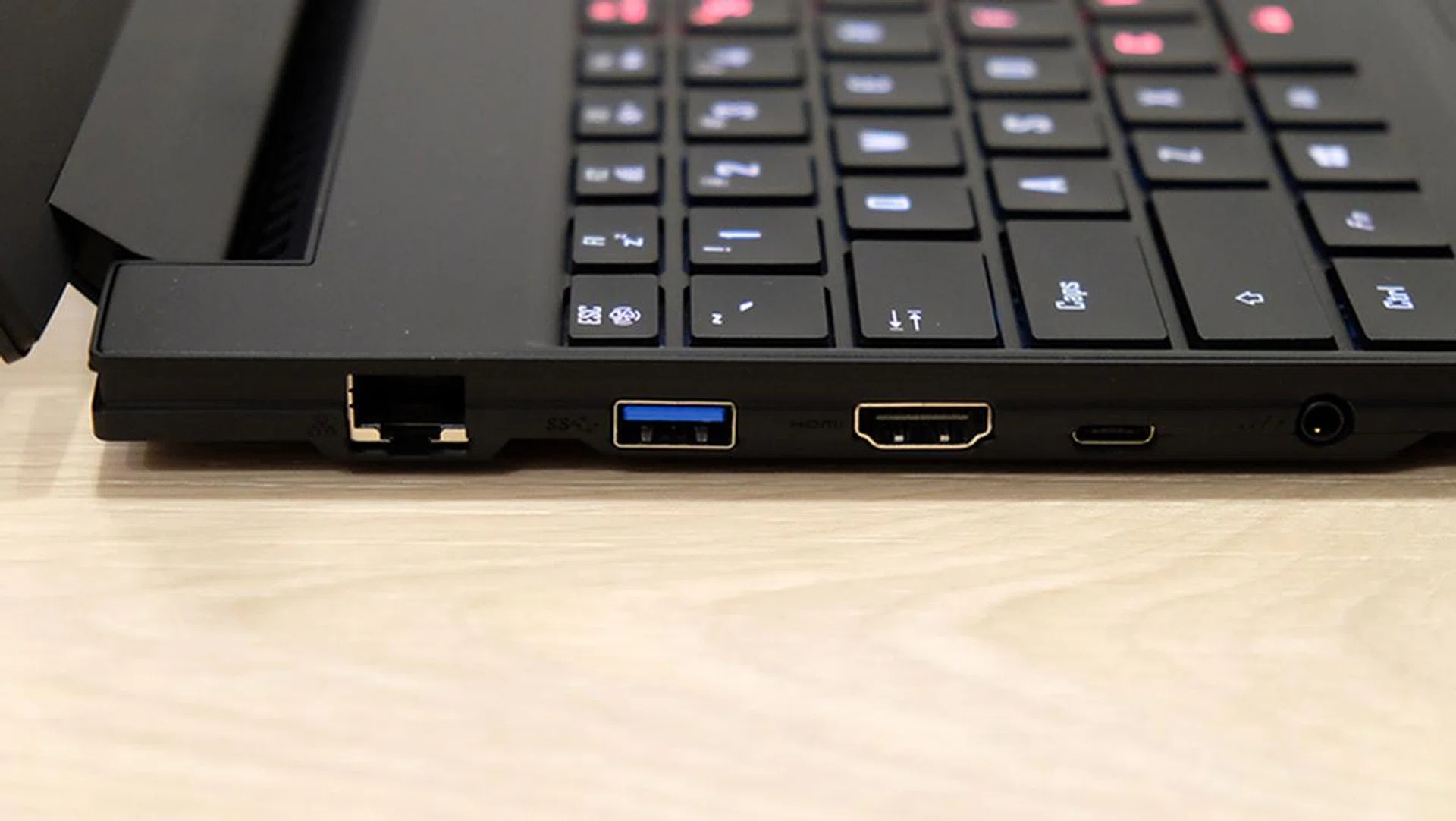
A look at the ports on the left.
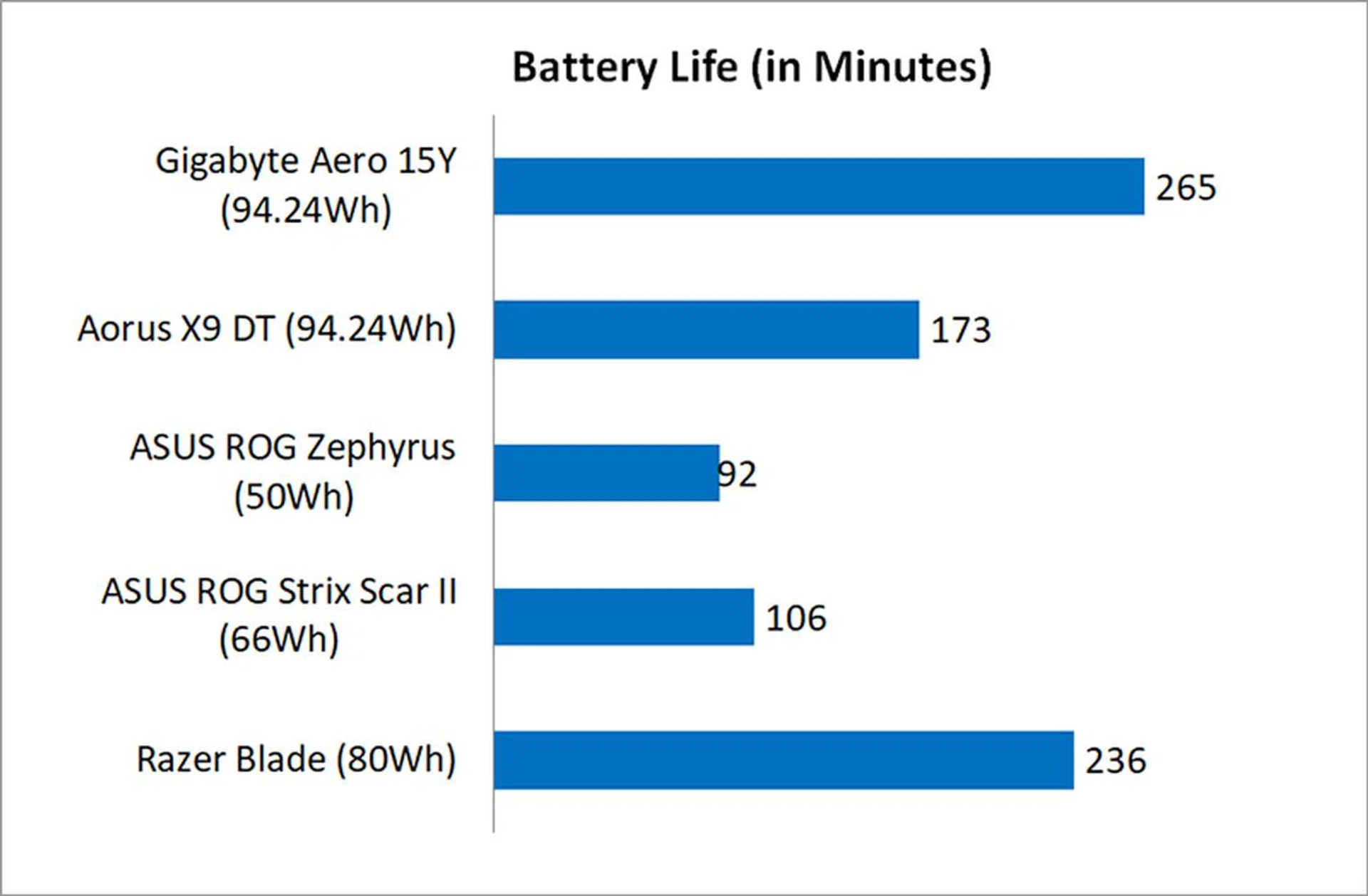
To cap things off, Gigabyte has retained the generous 94.24Wh battery on the Aero 15Y. Battery life has always been this model's strong point, and that's the case with the latest version as well. It handily beats out most of the competition, which scores it big points in the mobility department.
What's this thing about Azure AI?
But for all the talk of small, incremental improvements, the headline feature on the Aero 15Y is probably its ability to intelligently distribute power between the CPU and GPU, depending on the task at hand. It is powered by Microsoft's Azure AI, and it can supposedly reduce heat and noise by optimizing things like fan speeds. For example, if you just launched a game, the AI would allocate more power to the GPU, initiate Gaming mode, and ramp up fan speeds. But if you were working in a content editing app, it might instead divert more power to the CPU and reduce fan speeds.
You'll see the AI widget in the top right hand corner of the screen when you boot up, and you can choose between AI Edge and AI Cloud modes or disable it entirely. As you'll see in the next page, I generally observed the best results in AI Edge, which does all the processing locally on the laptop itself.
Test setup and performance
Here's a full list of the notebooks we're looking at:
- Gigabyte Aero 15Y
- Aorus X9 DT
- ASUS ROG Zephyrus GX501
- ASUS ROG Strix Scar II
- Razer Blade
I've included a mix of notebooks equipped with both the Max-P and Max-Q versions of the GeForce GTX 1080 and GeForce GTX 1070 to see how the GeForce RTX 2080 Max-Q stacks up against the best of Pascal.
[hwzcompare]
[products=657507,649659,634366,644562,642009]
[width=200]
[caption=Test notebooks compared]
[showprices=1]
[/hwzcompare]
I ran the notebooks through the following benchmarks:
- PCMark 10
- PCMark 8
- 3DMark
- VRMark
- Deus Ex: Mankind Divided
- Tom Clancy's The Division
How does it do in daily computing tasks?
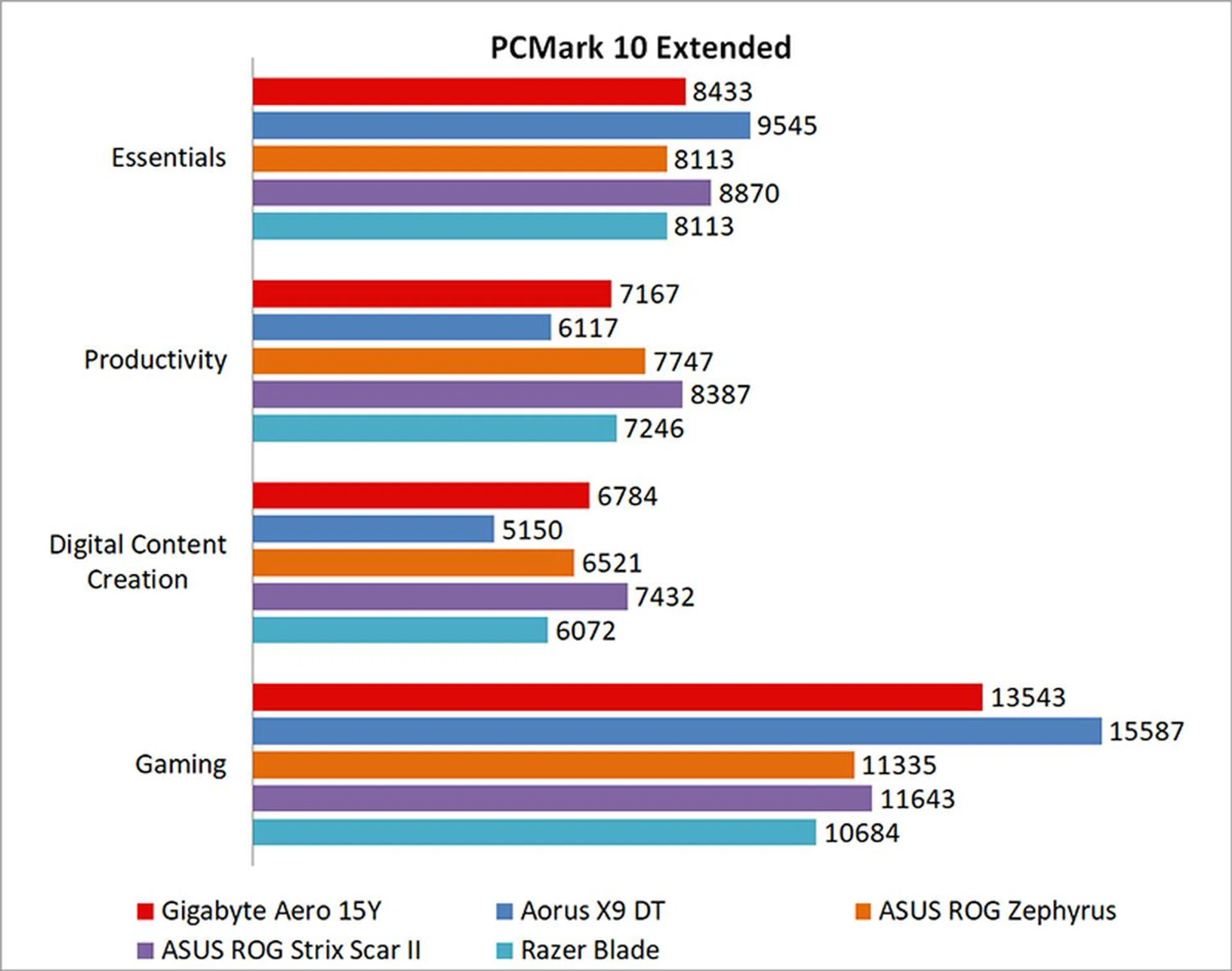
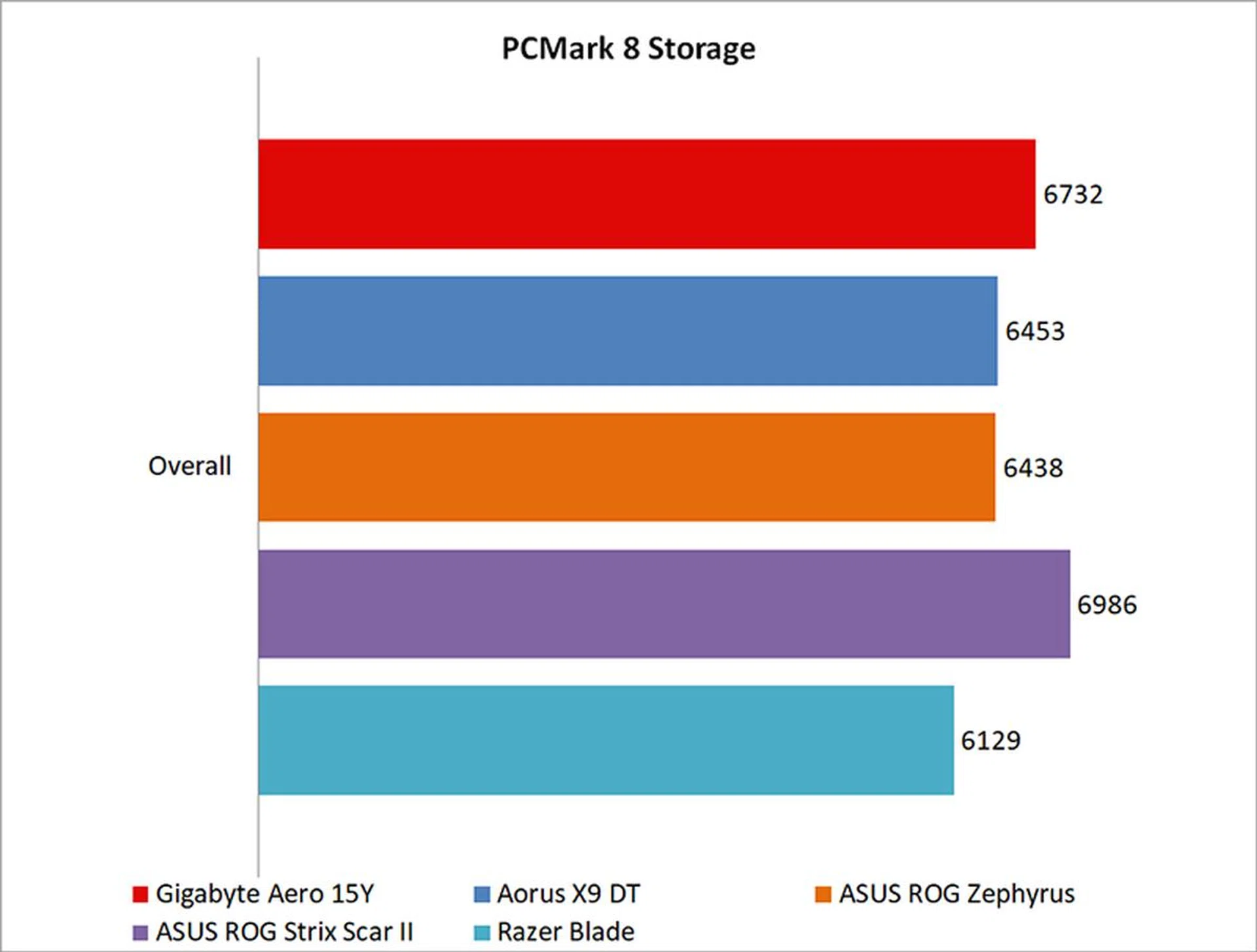
The Aero 15Y did reasonably well here, beating out even the Aorus X9 DT, a beast of a notebook with the same overclockable chip and a GeForce GTX 1080. However, there weren't exactly significant differences compared to even the ROG Zephyrus and its GeForce GTX 1080 Max-Q, where the Aero 15Y managed just a small 4 per cent lead.
You'll also want to pay attention to the gaming benchmark in the breakdown of PCMark 10 Extended scores, where the Aero 15Y fell somewhere behind a full-fledged GeForce GTX 1080 and its Max-Q counterpart.

How fast is it in games?
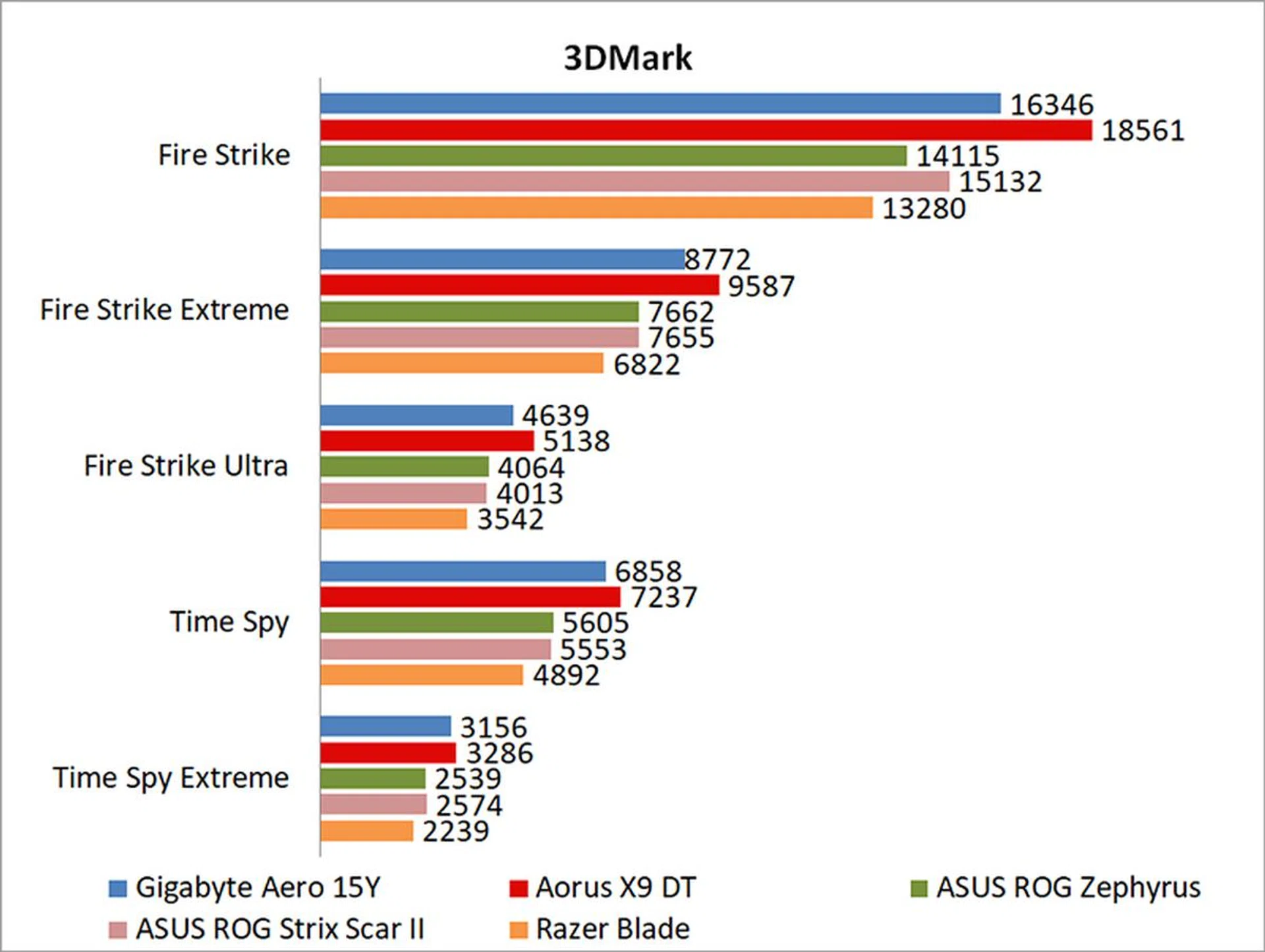
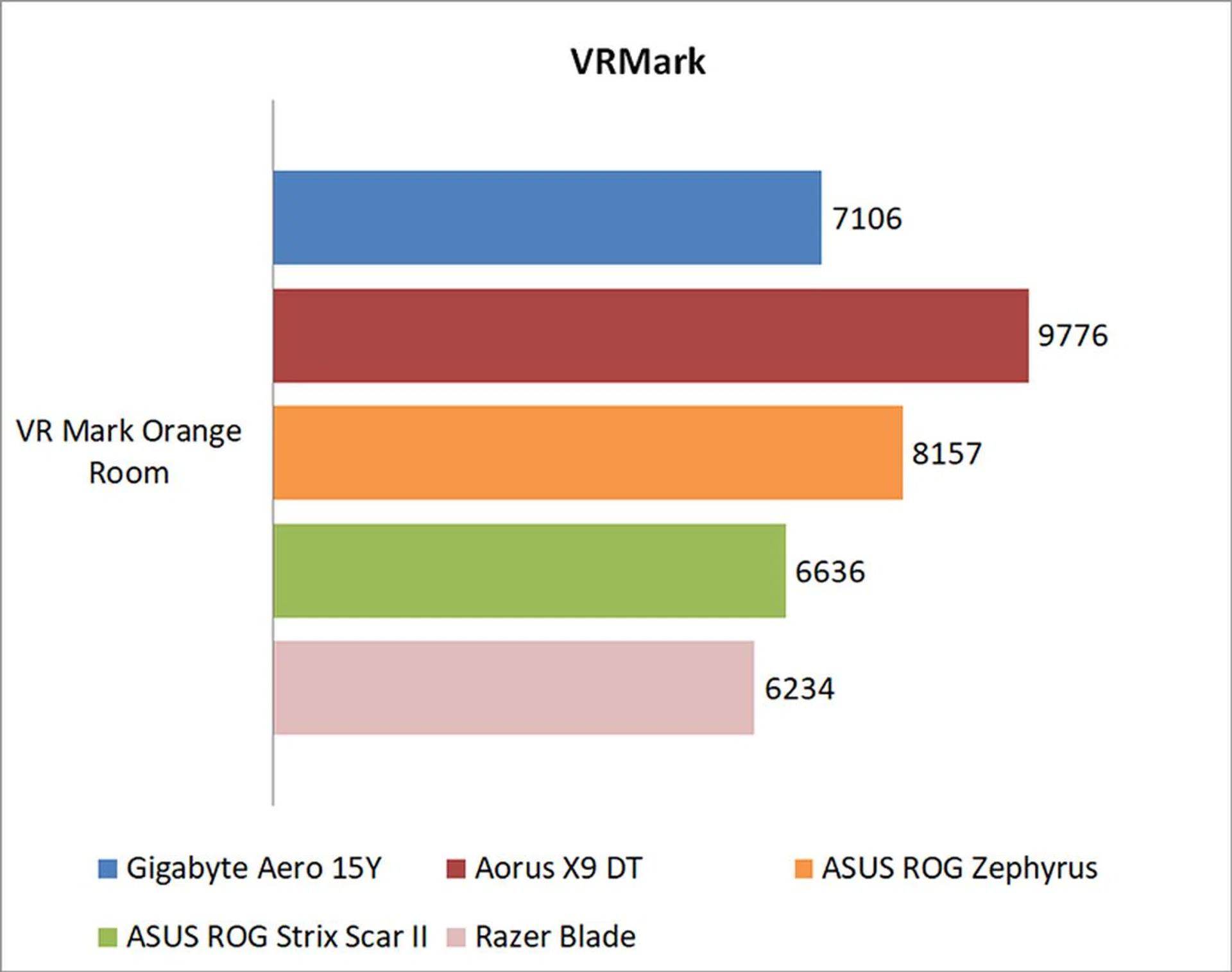
In 3DMark Fire Strike, it was roughly 14 per cent faster than the ASUS ROG Zephyrus, which is equipped with an Intel Core i7-7700HQ and NVIDIA GeForce GTX 1080 Max-Q. However, the GeForce GTX 1080 in the Aorus X9 DT was still faster than the GeForce RTX 2080 Max-Q by around 12 per cent. That said, the Aero 15Y widened its lead over the Zephyrus to roughly 20 per cent in the more CPU-intensive Time Spy benchmark, probably thanks to its more powerful CPU.
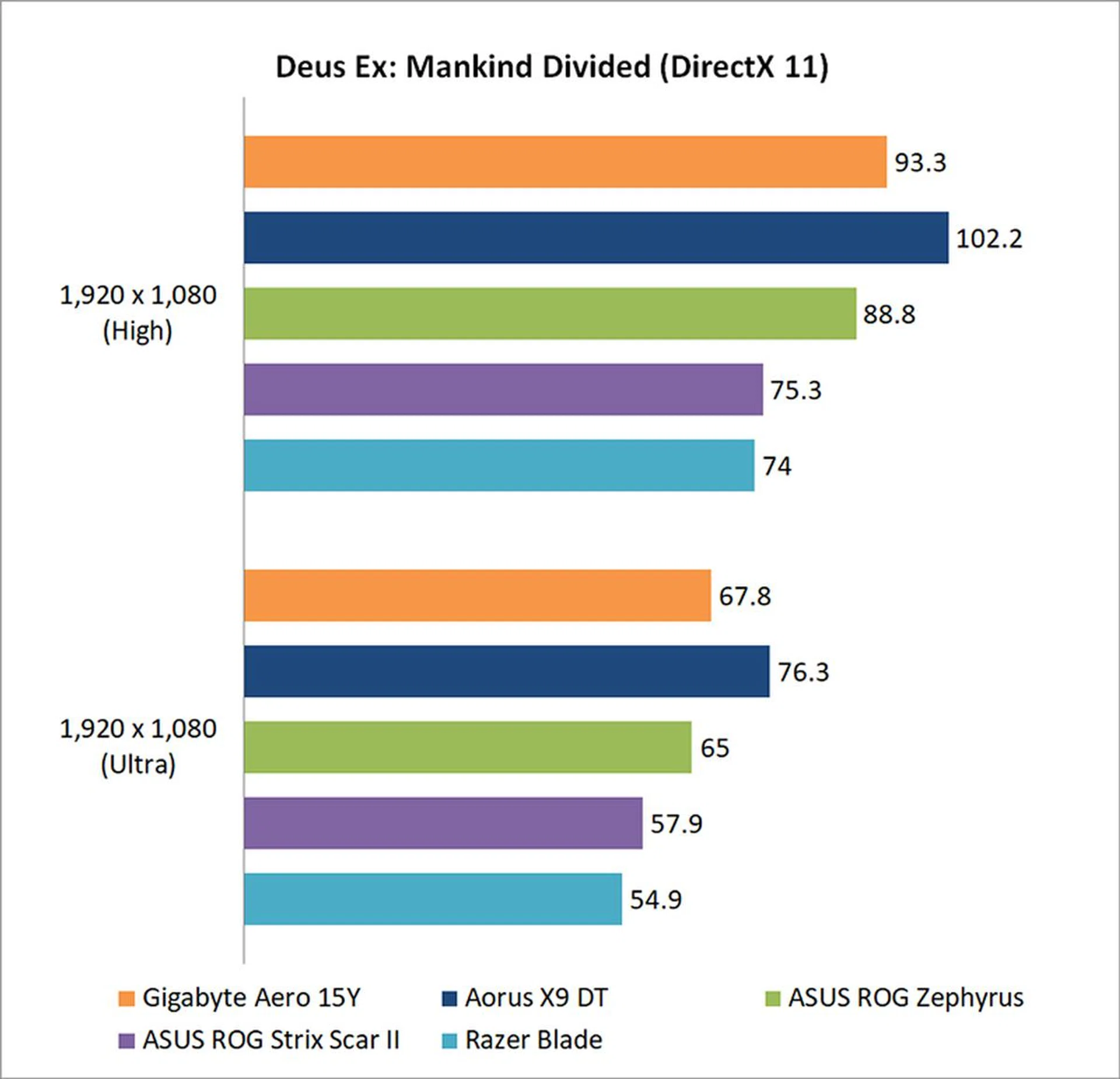
Real-world games were more of a mixed bag. The Aero 15Y did better in Mankind Divided, where it eeked out a 5 per cent lead at 1080p and High settings.
However, even though the Aero 15Y comes with a 4K display, its hardware isn't really capable of delivering a smooth experience. For instance, at High settings and a 4K resolution, the Aero 15Y managed an average of 31FPS in Mankind Divided. Things were slightly better in The Division, where it posted an average of 39.2FPS, but that's also not something I'd call a playable experience.

Do the AI features make a difference?
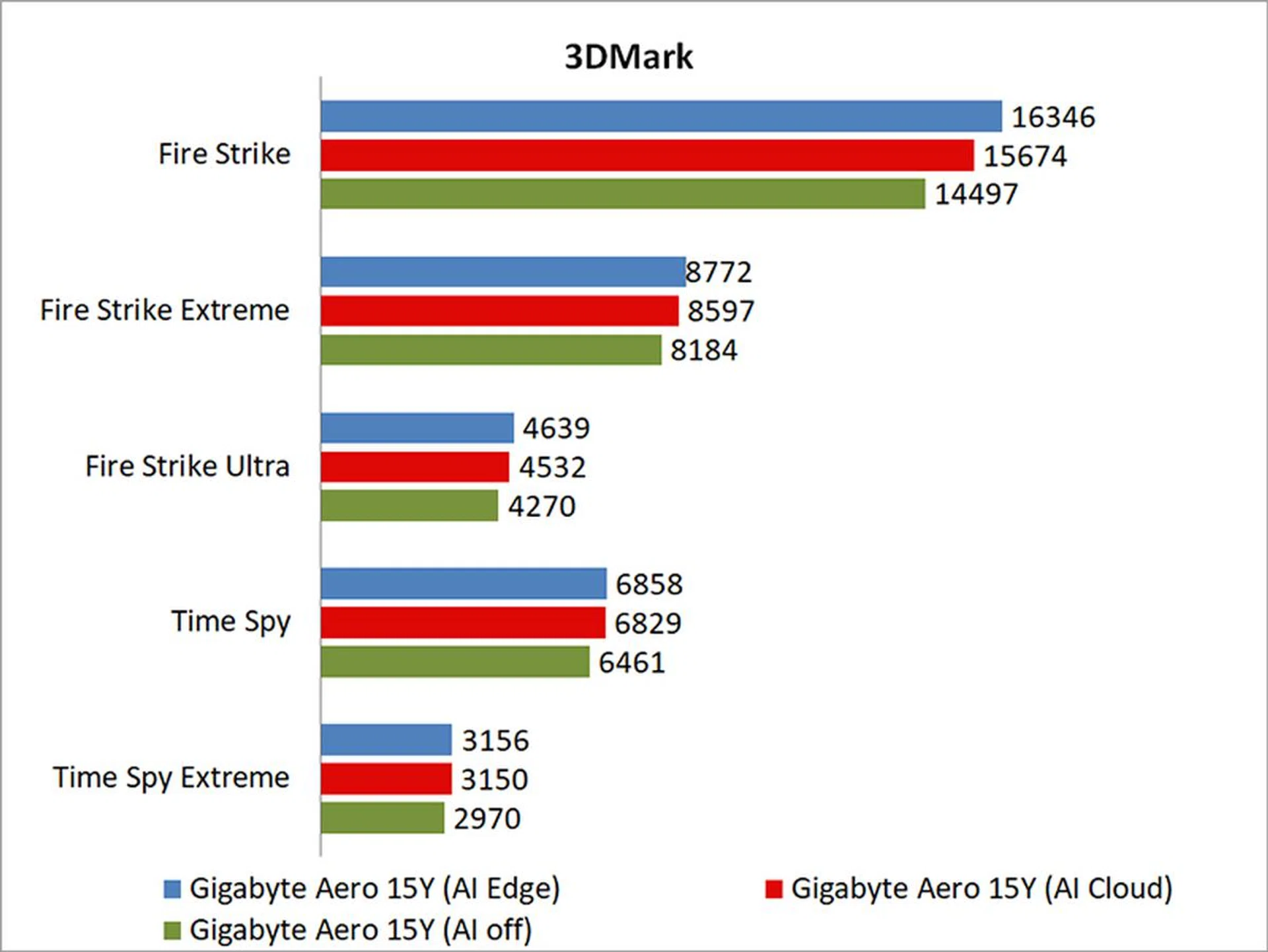
As it turns out, yes. The AI Edge mode runs locally on the laptop itself, and in 3DMark Fire Strike at least, it was nearly 12 per cent faster than when the AI was disabled. I'd refrain from extrapolating and saying that this result will apply to all games, but if you're in need of a performance boost, you can definitely try to take advantage of the built-in AI features.
How good is the battery life?
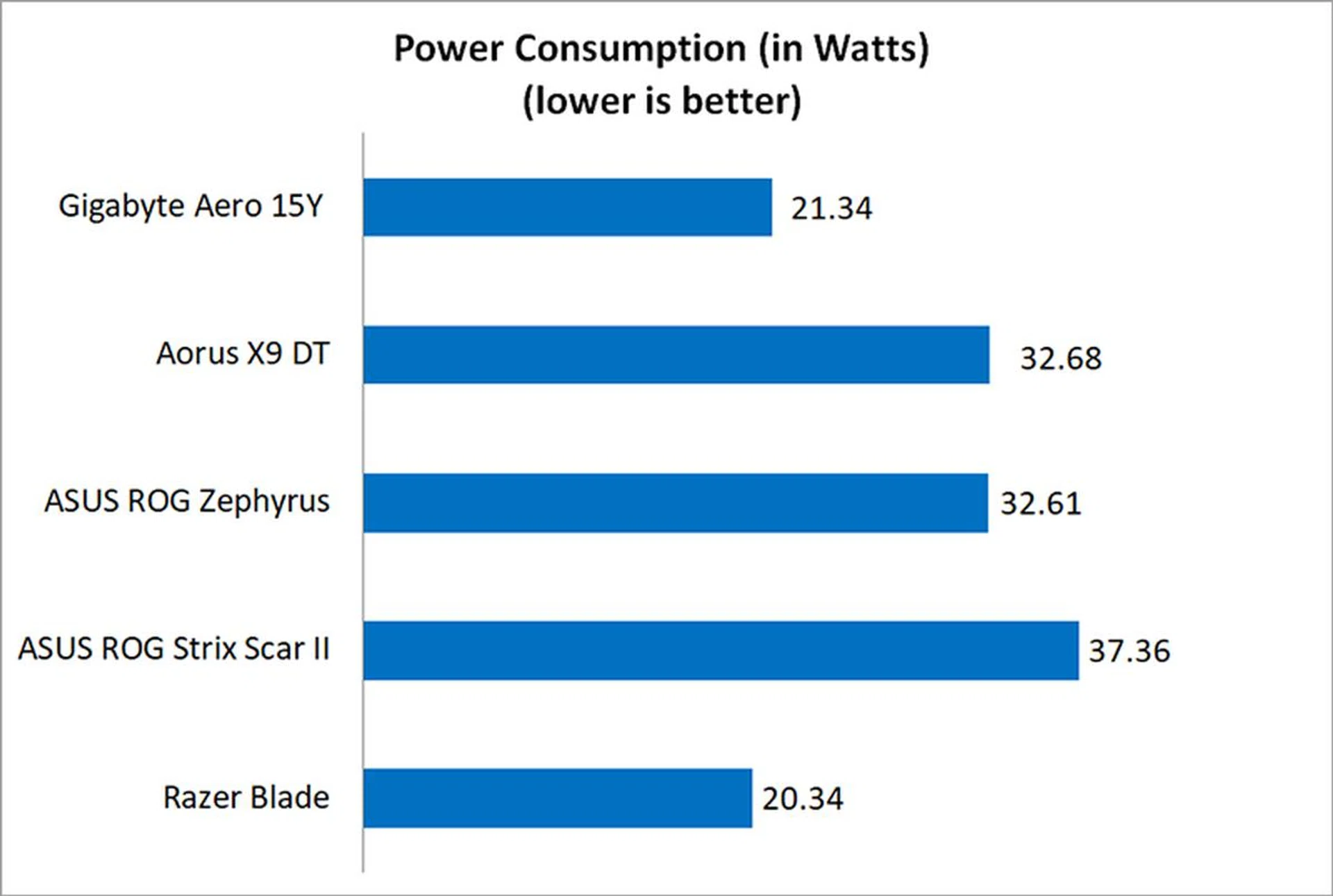
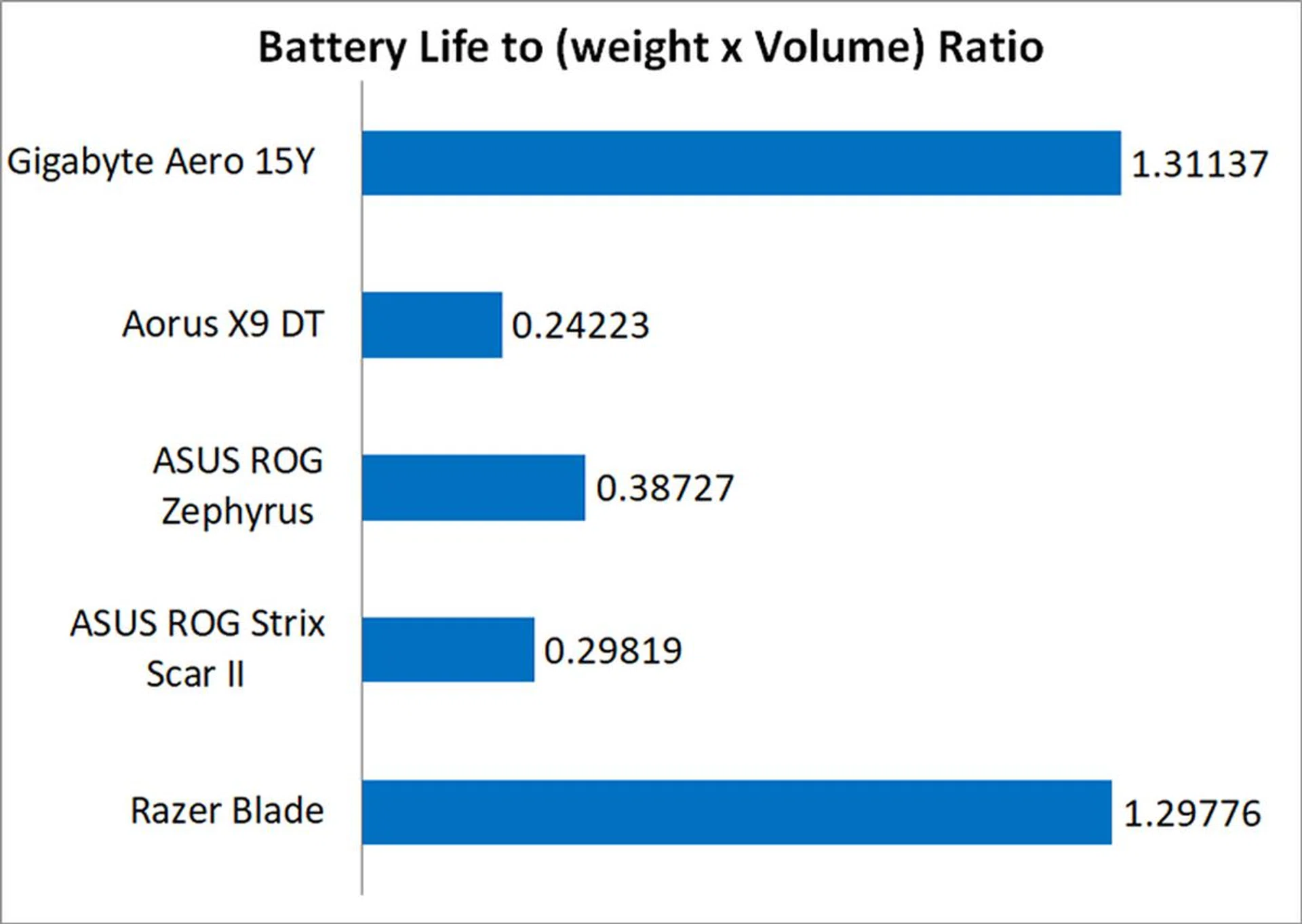
Excellent, actually. The Aero 15Y lasted over 4 hours in PCMark Home's battery life test, which is more than can be said for some ultrabooks. But this is a powerful gaming notebook, and it's impressive that Gigabyte hasn't neglected battery life and mobility. The large battery really helps here, and it remains one of the biggest I've seen on a gaming notebook. Still, Gigabyte has managed to maintain its slim form factor, which shows that there's really no reason why others shouldn't be following in its footsteps.
Many slim and light gaming notebooks end up dragged down by middling battery life, but the Aero 15Y successfully avoids this pitfall, which is why it's truly one of the most portable gaming notebooks you can buy today.
Does it run hot?
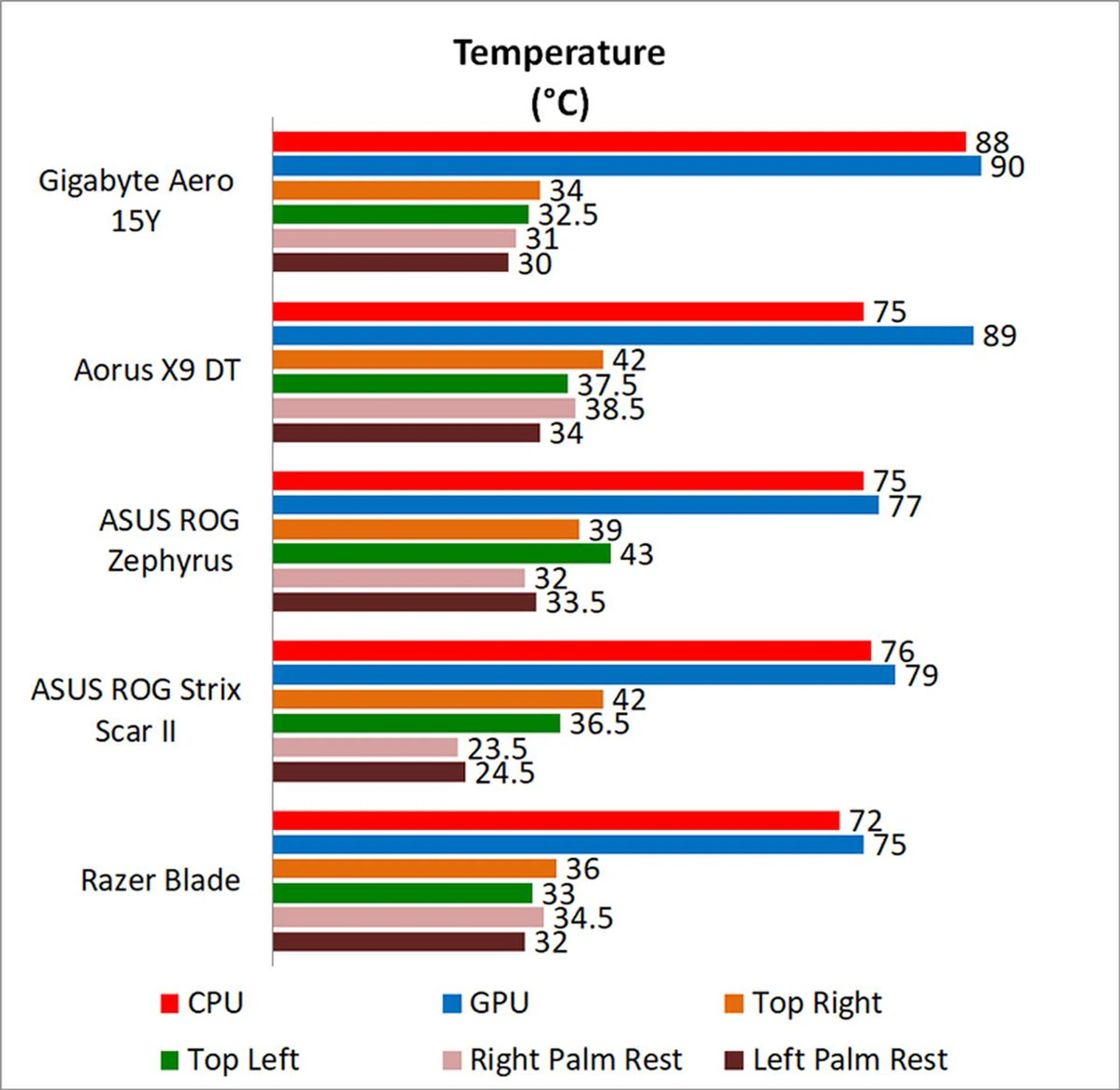
Unfortunately, yes. The Aero 15Y gets pretty hot in a room without air conditioning, and the palm rests can get pretty warm to touch. Things improve significantly when you turn the AC on though, but the area around the power button still gets really toasty.
The Aero 15Y also runs quite loud. In Gaming mode, the fans kick up an audible whir, although they're still not as loud as the ones on the ASUS ROG Zephyrus S. That said, this laptop is probably best paired with headphones to drown out the noise from the fans. Alternatively, you can put the fans in Quiet or Silent modes, but you probably should prioritize cooling while gaming.
In addition, you can set up a custom fan curve if you really want to get your hands dirty, where you'll be able to assign different fan speeds to specific temperature thresholds.
A portable machine that also wants to be a desktop replacement

This is one of the most portable 15.6-inch gaming notebooks around.
Gigabyte has made another stellar laptop with the Aero 15Y v9. It continues to be one of the most portable 15.6-inch laptops you can buy today, thanks to its slim design and excellent battery life. At around 2kg, it isn't the lightest, but it is still sprightly enough to put in your backpack without feeling like you're lugging around a brick.
However, while the NVIDIA GeForce RTX 2080 Max-Q and Intel Core i9-8950HK processor serve up some impressive performance, the improvement over the previous generation's hardware is modest at best and not game-changing.
Instead, I'd like to call attention to the changes Gigabyte has made with this generation of Aero laptops. The company has retained the sleek aluminum body but thrown in quality of life changes such as the precision touchpad, which is a small but vital change. Then there's Microsoft's Azure AI features, which seem gimmicky at first but are actually pretty neat and result in some noticeable differences in select benchmarks. At the very least, Gigabyte is trying to innovate and differentiate itself from the crowd.
In many ways, the Aero 15Y is a great laptop, offering a great keyboard, display, and speakers. If there's one downside, it's that it runs quite hot, but the same could be said of many slim gaming notebooks today.
This particular 4K model seems calculated to appeal to creators who might want the higher resolution, but gamers would definitely be better served going for a 1080p screen that can do 144Hz. This configuration will cost you a whopping S$6,099, but if you're looking at the Aero 15Y as just a gaming laptop, as I'm assuming most folks will, it makes a lot more sense to shell out for the 1080p model. That comes with a GeForce RTX 2070 Max-Q and costs just S$3,899, which is a far more palatable price.
Having said all that, I really have few complaints about the Aero 15Y as a whole, and I think it will be very competitive going forward. I just wish Gigabyte was offering a version with a GeForce RTX 2080 Max-Q and a 1080p 144Hz display.
Our articles may contain affiliate links. If you buy through these links, we may earn a small commission.