

Black beauty
Now that NVIDIA's new mobile GeForce RTX 20-series GPUs are available, laptop manufacturers have wasted no time in giving their notebooks a shot of some ray tracing goodness. The new Razer Blade 15 Advanced may look the same as last year's model, but it's really quite a different beast altogether.
Before I go over the differences, here's an overview of its specifications:
- 15.6-inch 1,920 x 1,080-pixel 144Hz IPS display
- Intel Core i7-8750H processor (2.2GHz, 9MB L3 cache)
- 16GB dual-channel DDR4-2667 memory
- NVIDIA GeForce RTX 2080 Max-Q
- 512GB PCIe M.2 SSD
- 80Wh Li-ion polymer battery
- 355 x 235 x 17.8mm
- 2.14kg
The above configuration will cost you a good S$4,679, but that's the price you pay for the most powerful mobile graphics engine on the planet. Having said that, it looks like performance can vary quite a bit between different Max-Q notebooks, and thermal design matters a lot, so it'll be interesting to see how the Razer Blade 15 does in this aspect.
So what's changed?
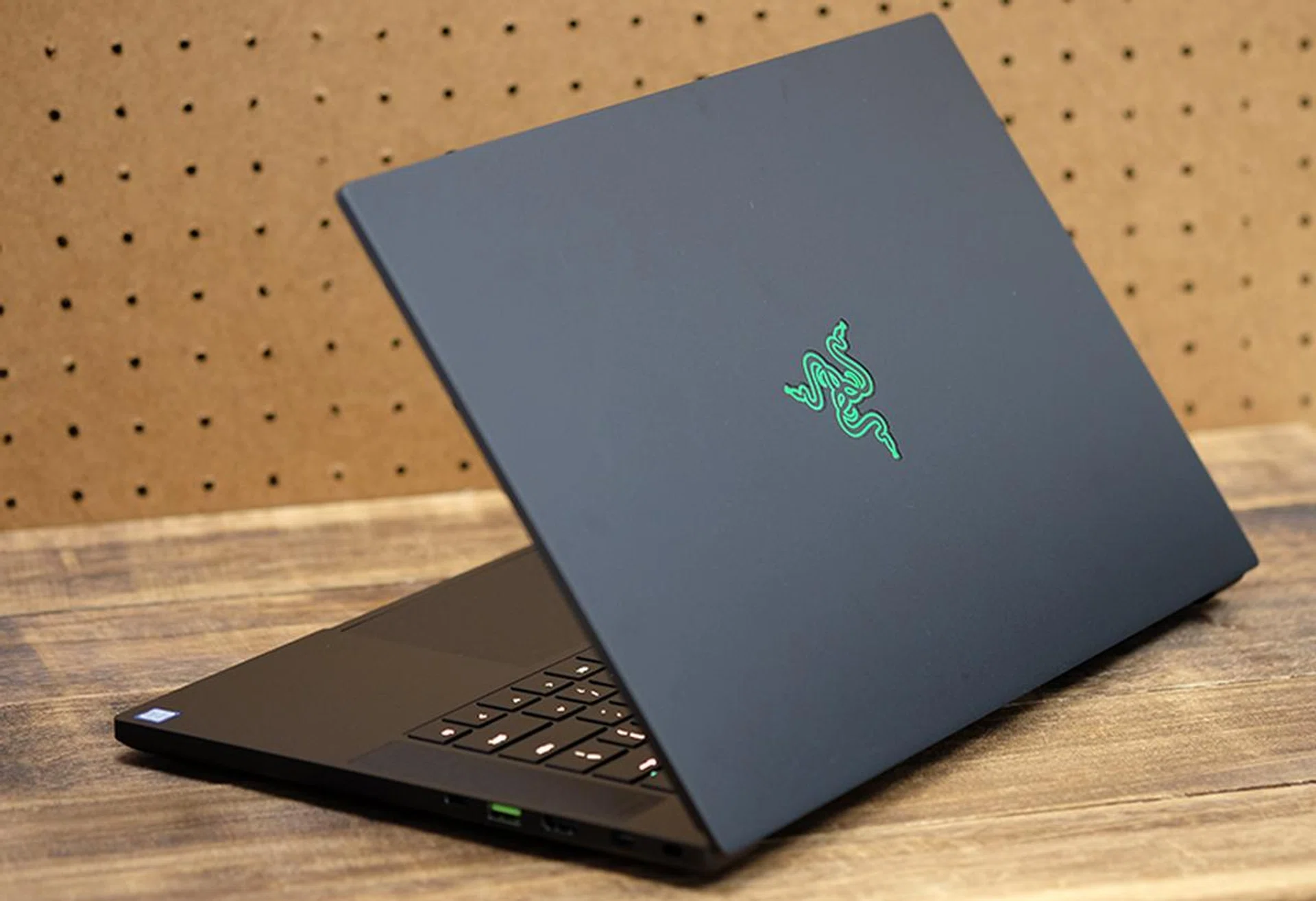
The triple-headed snake logo on the glows when you power the laptop on.
Other than the vastly more powerful GeForce RTX 2080 Max-Q, Razer has made a couple of small changes under the hood. The webcam is now paired with a Windows Hello infrared camera, so you can log in quickly using facial recognition. Razer first introduced this feature on its new Blade Stealth ultrabook, and the Blade 15 is merely following in its footsteps. Either way, it's a nice inclusion that helps make the Blade 15 more competitive in a stacked field. The webcam has just a 720p resolution though, which delivers passable, but not great, video quality.
The Blade 15 is also a hair thicker than its predecessor, measuring just 17.8mm to the latter's 17.3mm. Still, that's a negligible increase compared to the performance boost you're getting.
The wireless card has also changed from an Intel Wireless-AC 9260 to the Wireless-AC 9560, but this difference is pretty inconsequential. Both of them are dual-band 2x2 modules that support speeds of up to 1.73Gbps, and the only difference is that the 9560 is also available in the smaller M.2 1216 form factor.
What's good about it?
In my view, the Blade 15 remains one of the most attractive Max-Q gaming notebooks on the market. Its build quality is second to none, and the unibody aluminum chassis is solid in a way few other gaming notebooks are.
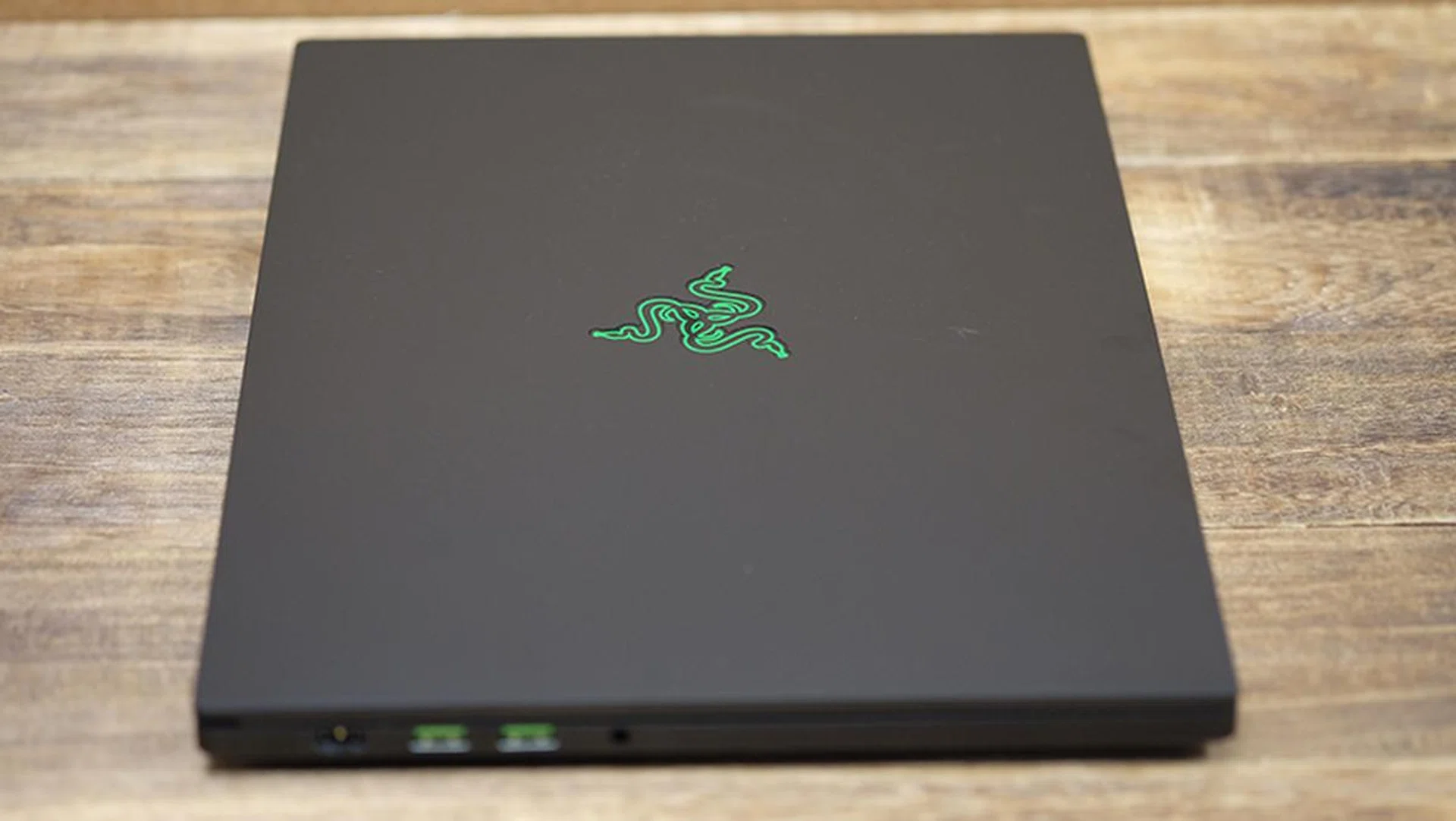
The Blade 15 looks much like a solid block of metal.
The display covers 100 per cent of the sRGB color space, and colors appear bright and vivid. The panel has supposedly already been calibrated at the factory, and it shows here. Furthermore, with most gaming laptops, I always feel like the screen could use a boost in brightness, but this is less of a problem with the Razer Blade 15. The screen also has a matte coating to help with reflections, and it works really well.
The 144Hz display makes a return here as well, and I think it really should be standard on all gaming notebooks. The high refresh rate makes gameplay (and even dragging around windows on your desktop) feel far more fluid and responsive, and it's one of the biggest changes you can make to improve your gaming experience.
The display is framed by super thin 4.9mm bezels that help create a more immersive experience. More importantly though, there's still space at the top for the webcam and Windows Hello infrared camera, so nobody has to look up your nostrils. The slim bezels also reduce the space footprint of the laptop, so you get a 15.6-inch screen in a chassis that's closer to the size of a 14-inch model.
Then there's the excellent glass precision trackpad. Quite frankly, it's great. I know that the trackpad isn't the most important thing on a gaming notebook, especially when you're going to be using a mouse with it most of the time, but Razer's attention to detail here still adds to the overall user experience. This bodes well if you intend to tote this notebook around for work, which suits it well given the fairly muted outlook. The buttons are integrated into the trackpad, so it looks really sleek, and its generous size gives you plenty to work with. In comparison, the trackpads on many gaming laptops are much smaller and feel far more cramped.
The keyboard itself supports per-key RGB backlighting, so you'll have plenty of customization options within the Synapse 3 software.

The keyboard supports per-key RGB backlighting.
Overall, the notebook feels quite thoughtfully designed. Port placement is good, and the sides aren't interrupted by any vents spewing out hot air at your hand. The Blade 15 also has a single Thunderbolt 3 port on the right, a feature that for some reason still isn't found on many gaming laptops. Arguably, gaming laptops need a Thunderbolt 3 port more than an ultrabook, as you're more likely to want to hook it up to an external graphics dock for additional graphics horsepower.
The Blade 15 also has three USB 3.1 (Gen 1) ports, one mini DisplayPort 1.4, and a full-sized HDMI 2.0b output. The laptop uses a proprietary power connector located at the rear of the notebook's left profile. The placement of the connector may seem like a minor detail, but I've encountered a number of laptops where the power connector is located awkwardly in the middle, sandwiched between vents and USB ports. Razer's design lets you easily route the power cable to the back of the laptop, which is quite helpful.

The Blade 15 uses a proprietary power connector.
The absence of side vents is also a pretty good decision aesthetically speaking, since it makes for a cleaner look and adds to the impression that the laptop is a solid block of metal.
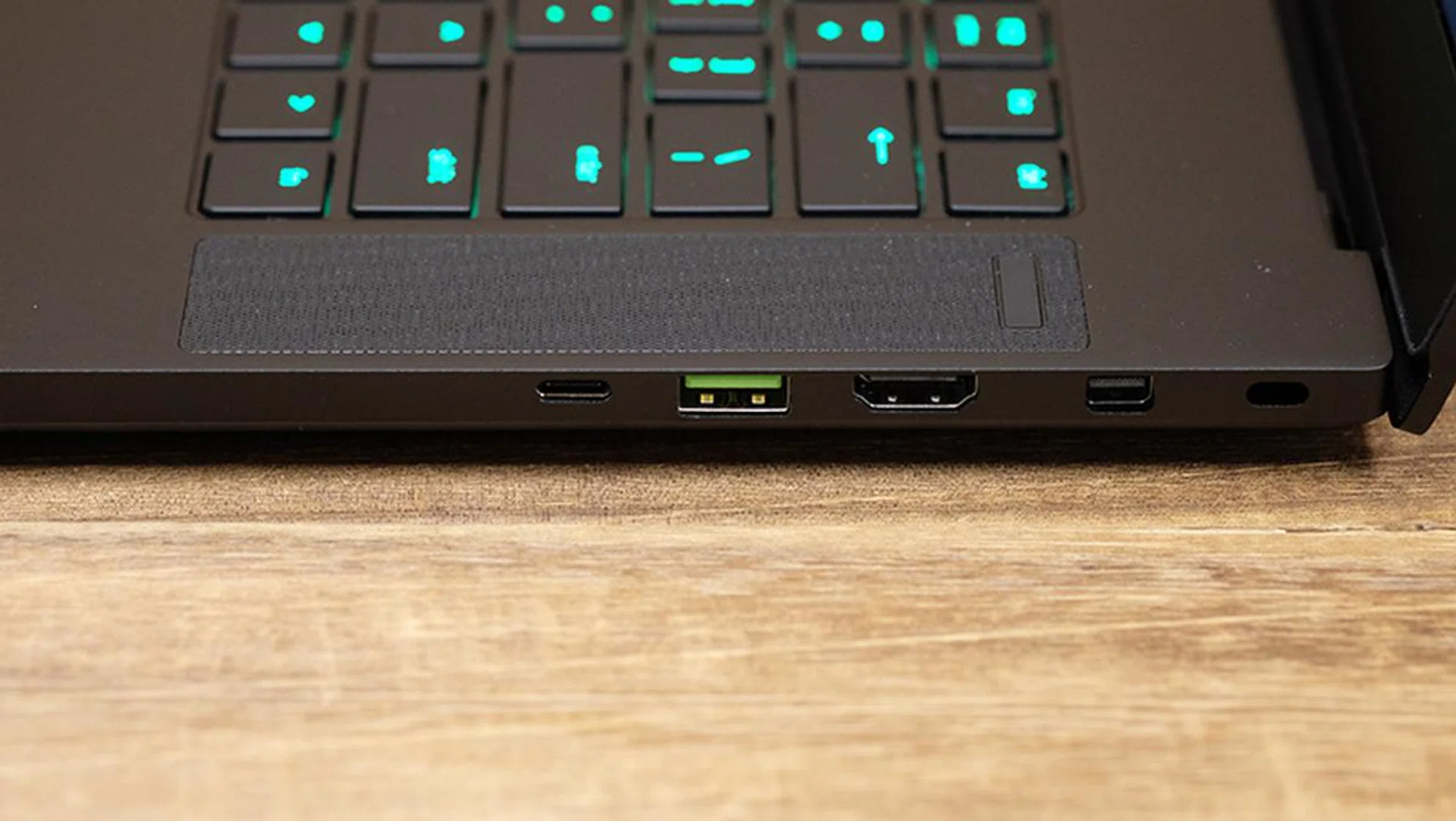
The Thunderbolt 3 port is located on the right.
What's not so hot?
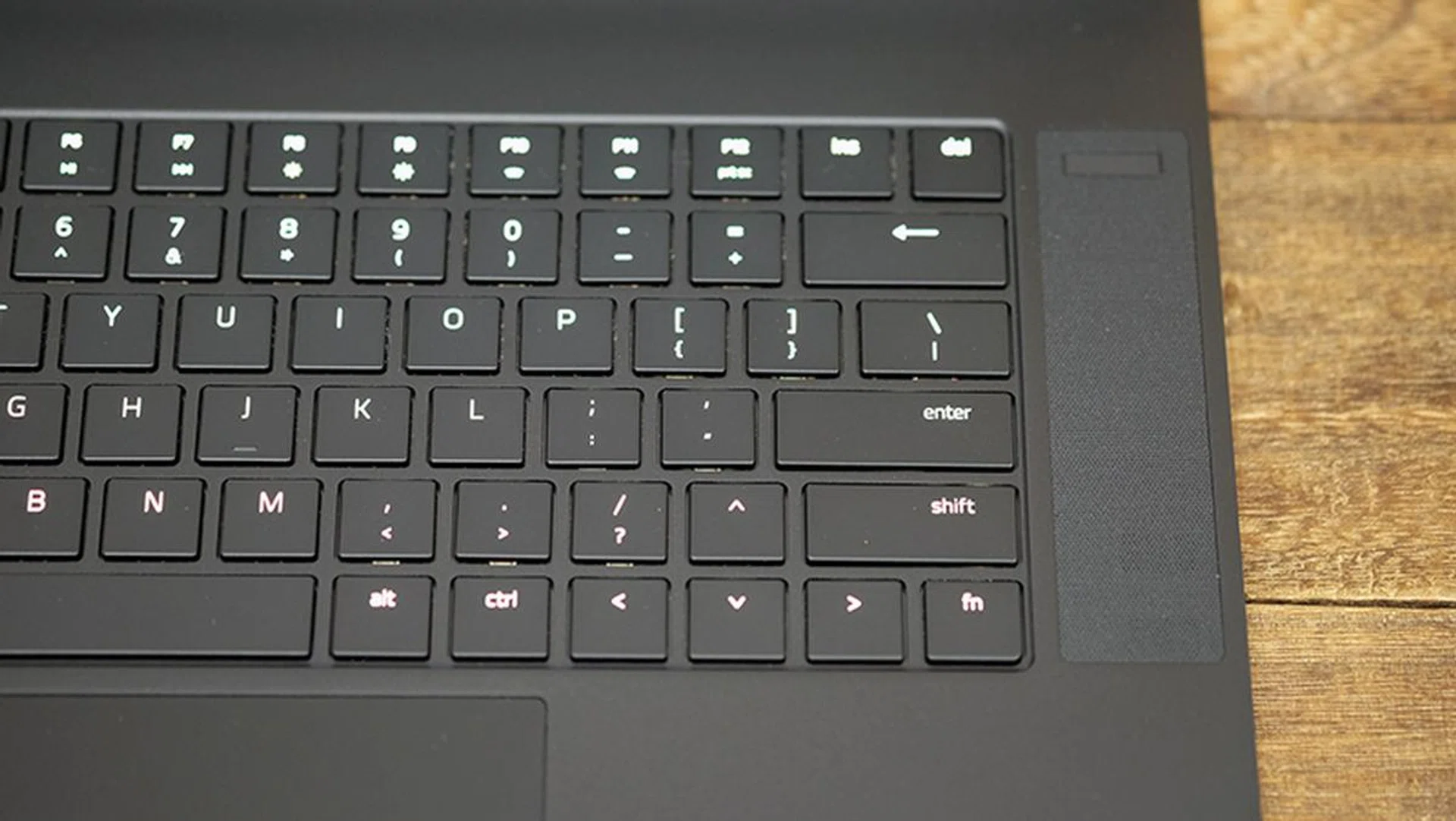
The right Shift key sits in an odd place.
My main complaint about the Blade 15 would be the non-standard location of the right Shift key. Instead of sitting next to the question mark, it lets the top arrow key come between it and the latter. In other words, if you're in the habit of using the question mark in tandem with the right Shift key, you may find this layout pretty grating.
The laptop also gets super noisy when it's working hard, so you definitely need to put on headphones to block out the whir of the fans. You can customize the fan speed in Synapse 3, and the noise problem is made worse by the fact that you'll probably want to set the fans to maximum to squeeze every drop of performance from the laptop and reduce heat. That said, I have yet to encounter a Max-Q notebook that actually managed to get a handle on noise output, so the Blade 15 is no worse than the competition in this respect.
Test setup and performance
Here's a full list of the notebooks we're looking at:
- Razer Blade (2019)
- Razer Blade (2018)
- Gigabyte Aero 15Y v9
- ASUS ROG Zephyrus S GX531GW
- ASUS ROG Zephyrus GX501
I've included a mix of notebooks equipped with both the Max-P and Max-Q versions of the GeForce GTX 1080 and GeForce GTX 1070 to see how the GeForce RTX 2080 Max-Q stacks up against the best of Pascal.
[hwzcompare]
[products=661877,642009,657507,660213,634366]
[width=200]
[caption=Test notebooks compared]
[showprices=1]
[/hwzcompare]
I ran the notebooks through the following benchmarks:
- PCMark 10
- PCMark 8
- 3DMark
- VRMark
- Deus Ex: Mankind Divided
- Tom Clancy's The Division
How does it do in daily computing tasks?
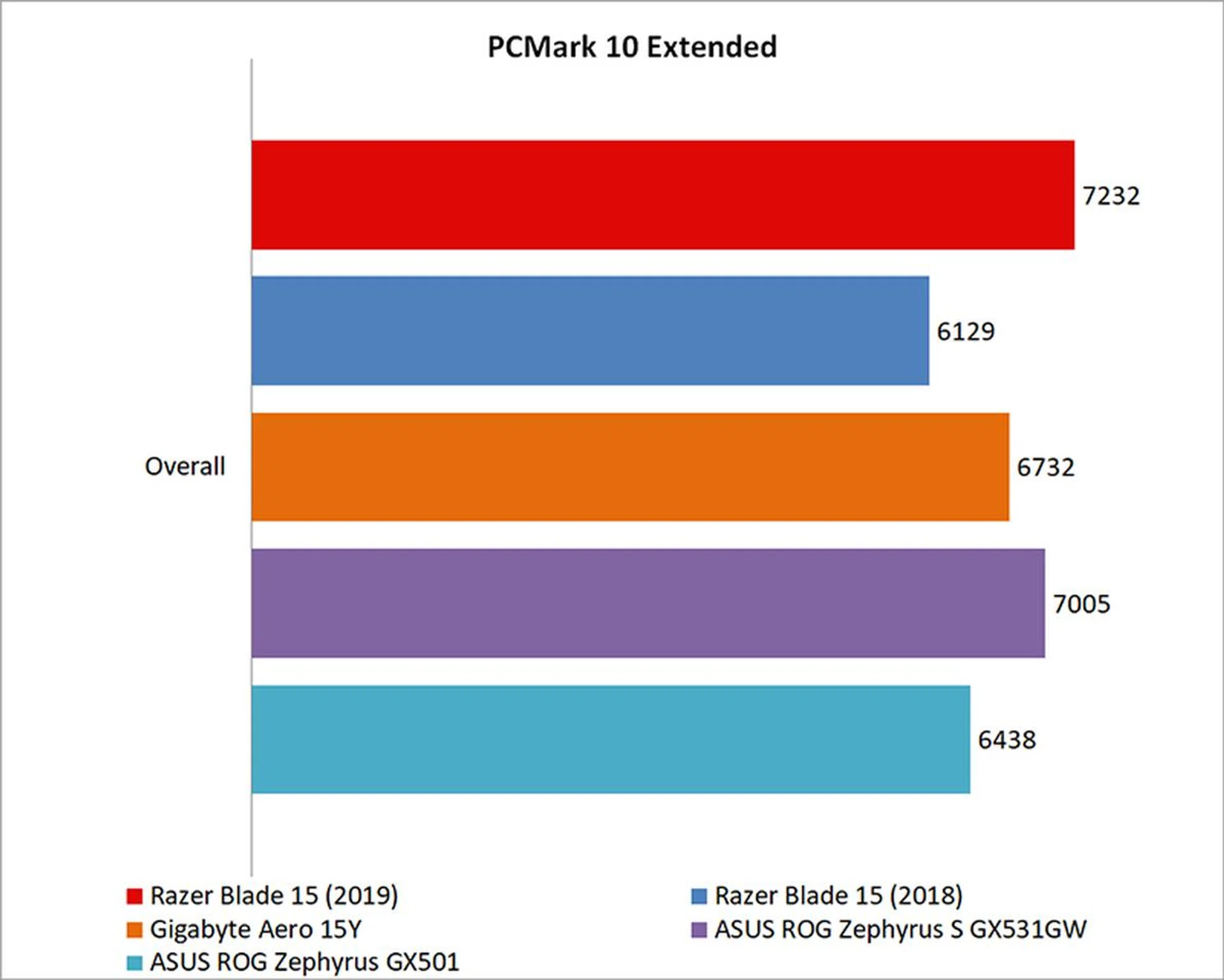
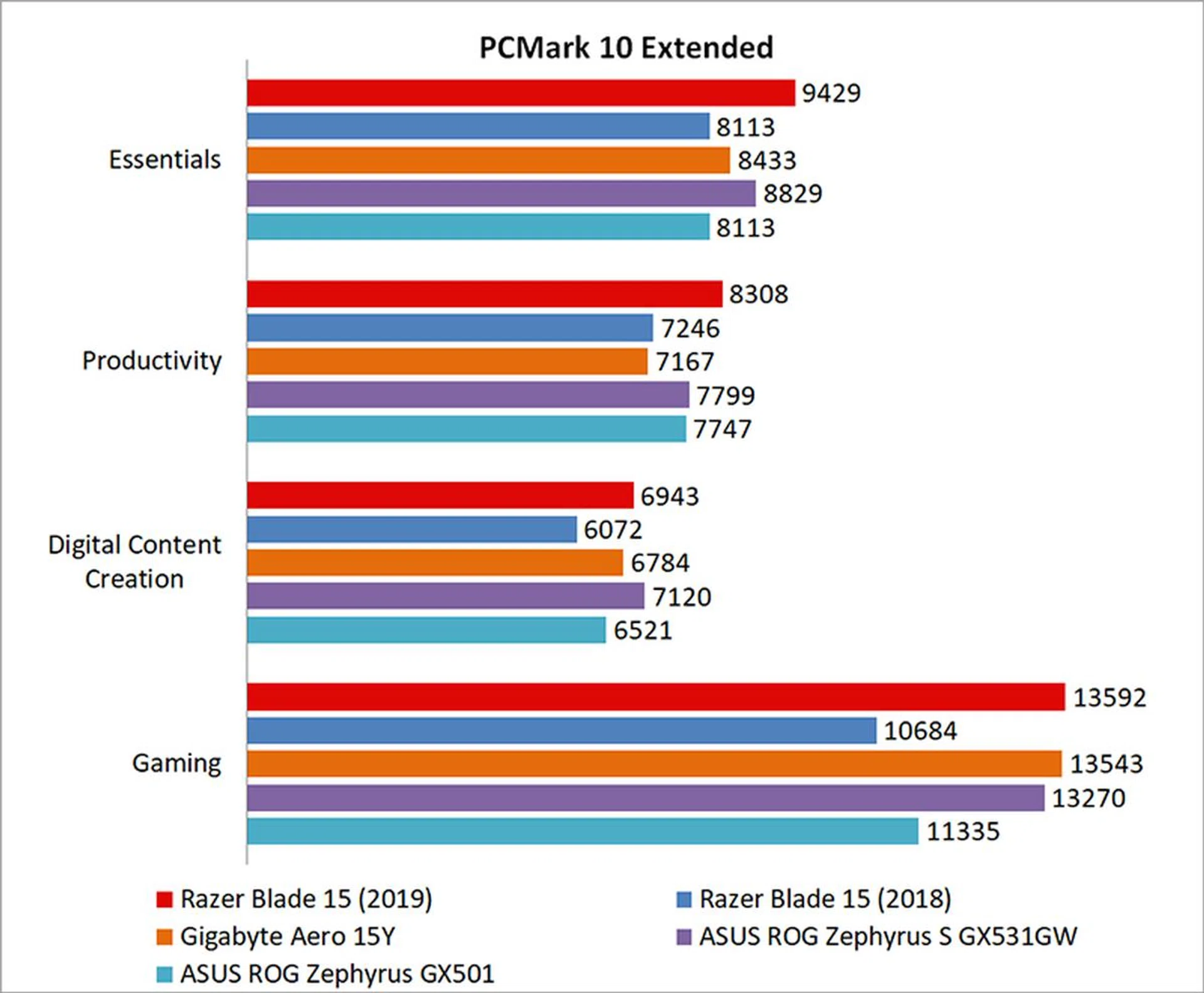
The Razer Blade 15 (2019) did really well in PCMark 10 Extended, topping the charts in terms of overall scores. On the one hand, that's not particularly surprising, since none of the other laptops – with the exception of the Gigabyte Aero 15Y – have a GPU that can match the power of the NVIDIA GeForce RTX 2080 Max-Q. But speaking of the Gigabyte notebook, it only serves to highlight how much thermal design matters and how fast the Razer Blade 15 is. Despite also being equipped with a GeForce RTX 2080 Max-Q and a more powerful overclockable Intel Core i7-8950HK processor, the Aero 15Y was unable to keep up with Razer's laptop.
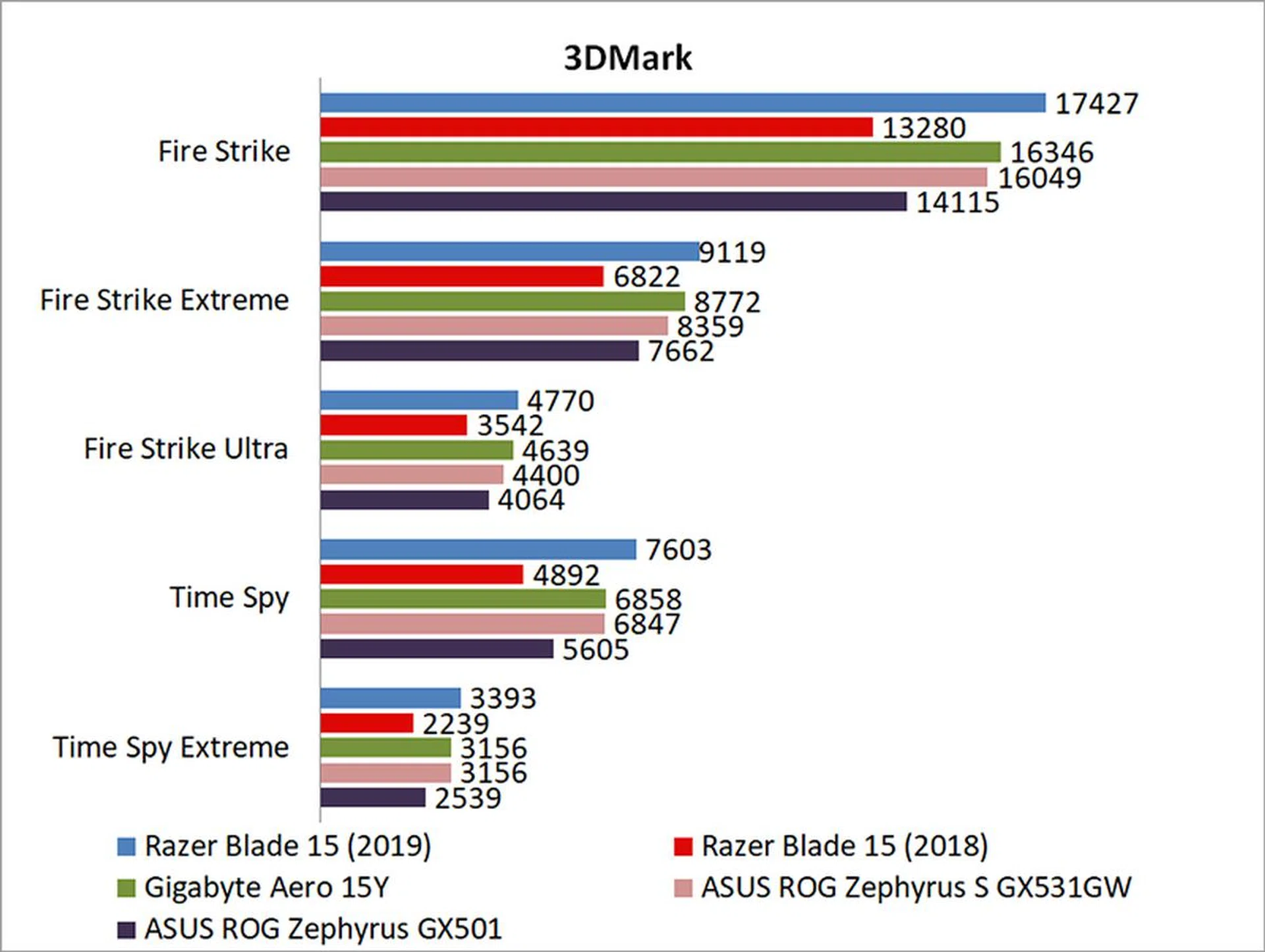
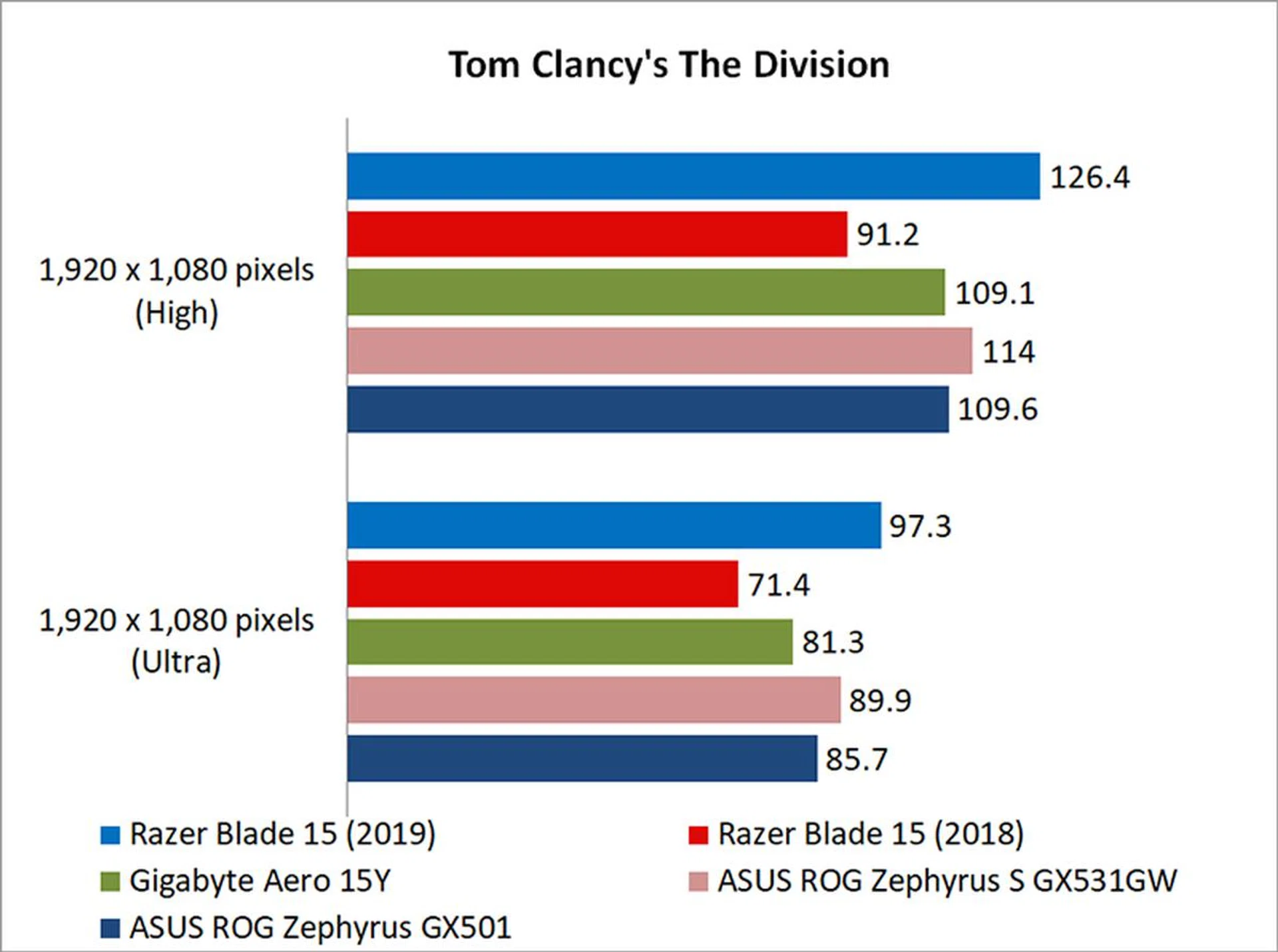
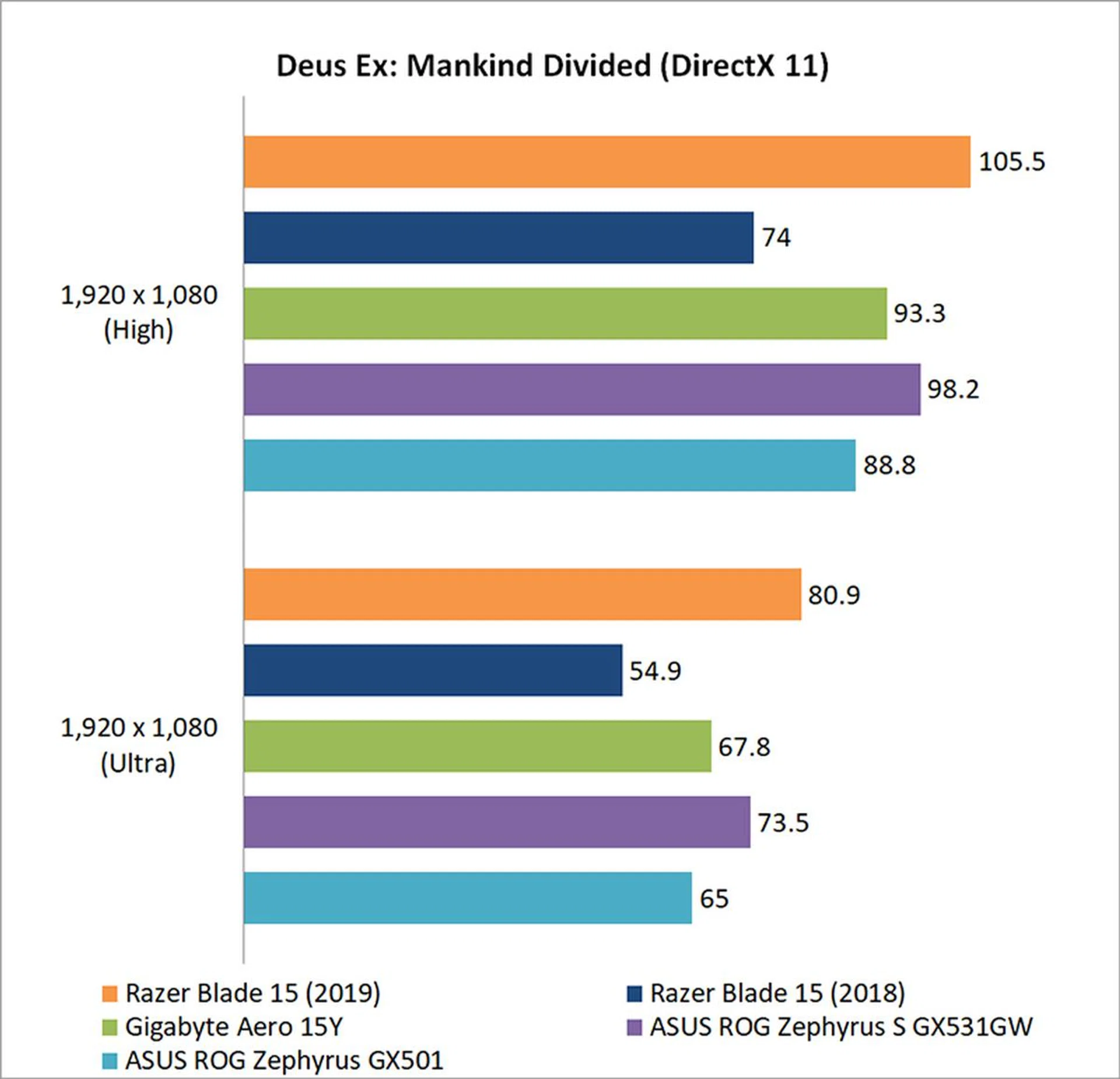
That's something you'll see in the following gaming benchmarks as well, showing that you don't necessarily need an overclockable chip to achieve excellent gaming performance.
On the storage front, all the tested notebooks were neck-and-neck with each other, and I don't think you should notice significant differences in terms of real-world usage.

How fast is it in games?
The new Razer Blade 15 shines when it comes to gaming performance. In 3DMark Fire Strike, it was a good 27 per cent faster than its predecessor, and 21 per cent faster than the ASUS ROG Zephyrus GX501, which is equipped with last generation's flagship GeForce GTX 1080 Max-Q GPU.
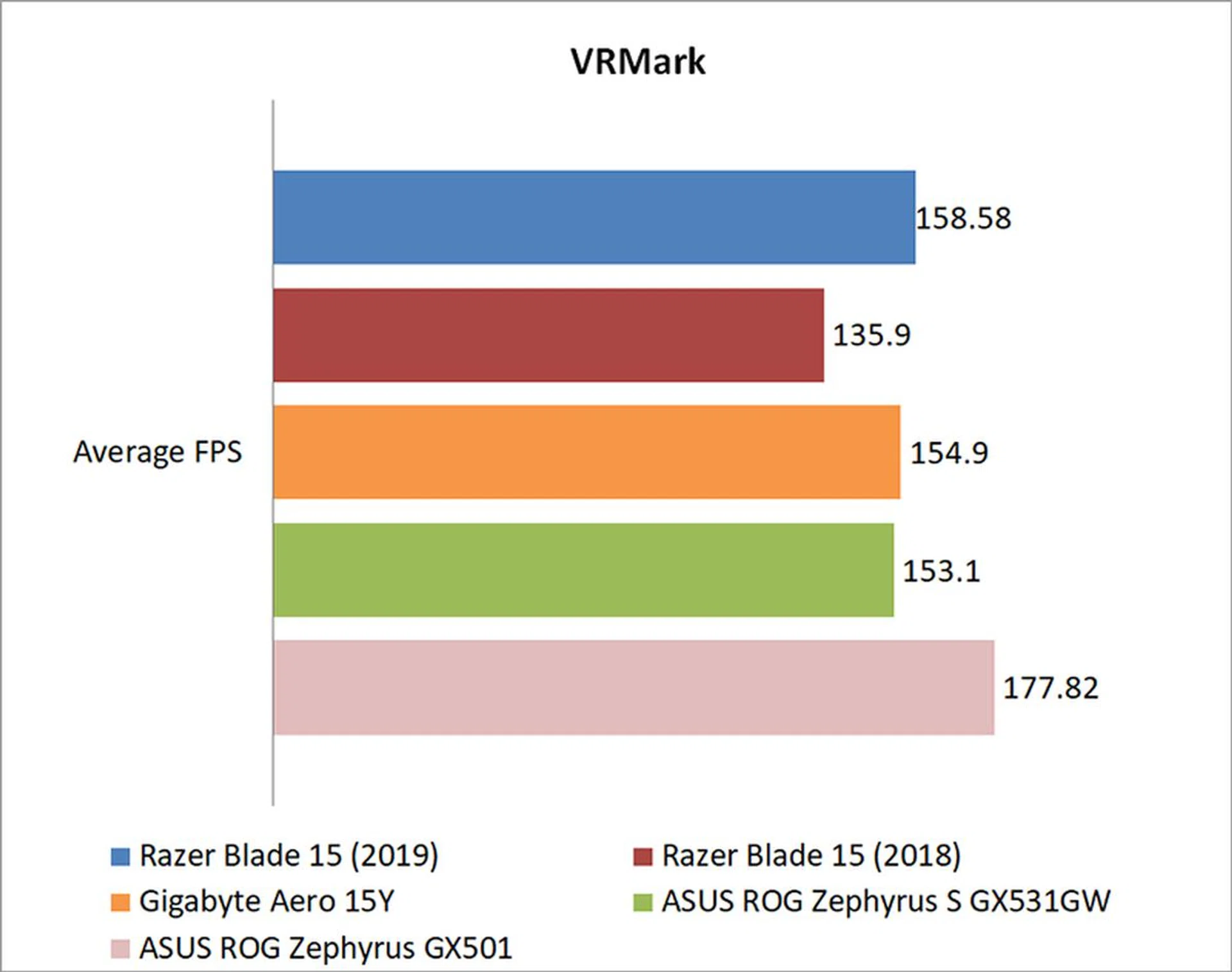
However, it lost out to the ROG Zephyrus GX501 in VRMark, a benchmark which doesn't seem able to take advantage of the shift toward processors that feature more cores at lower clock speeds. The quad-core Core i7-7700HQ in the Zephyrus has a higher 2.80GHz base clock, versus 2.20GHz on the Core i7-8750H, which probably helped improve its performance.
That aside, most folks aren't looking to run VR games on their laptops, and the good news is the Blade 15 performs admirably in actual games. It had no problems running both The Division and Deus Ex: Mankind Divided at Ultra settings and 1080p, although maximizing the 144Hz refresh rate is quite another matter altogether. Compared to the ASUS ROG Zephyrus S GX531GW and its GeForce GTX 2070 Max-Q, the new Razer Blade 15 is just under 10 per cent faster.

How good is the battery life?
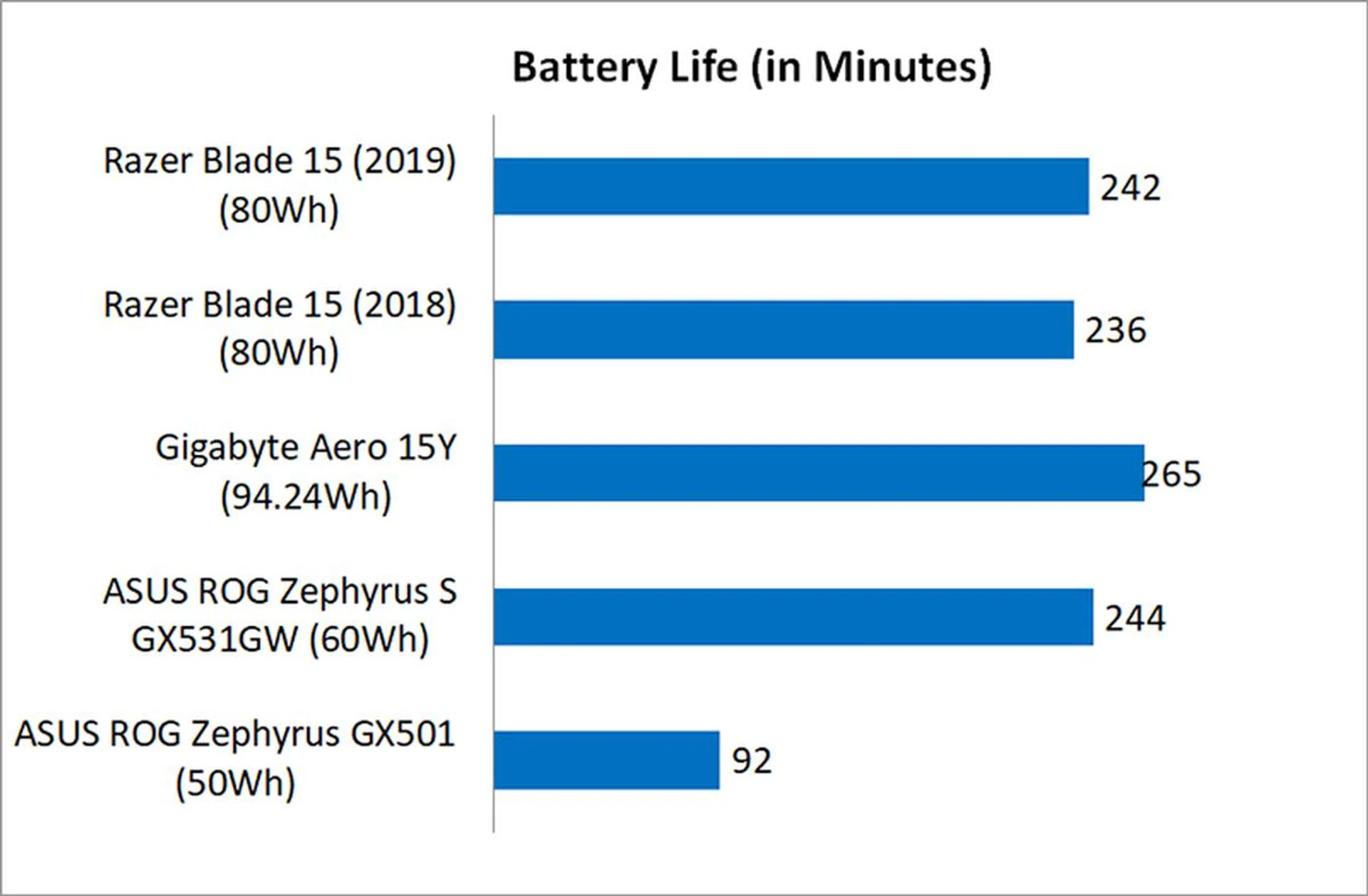
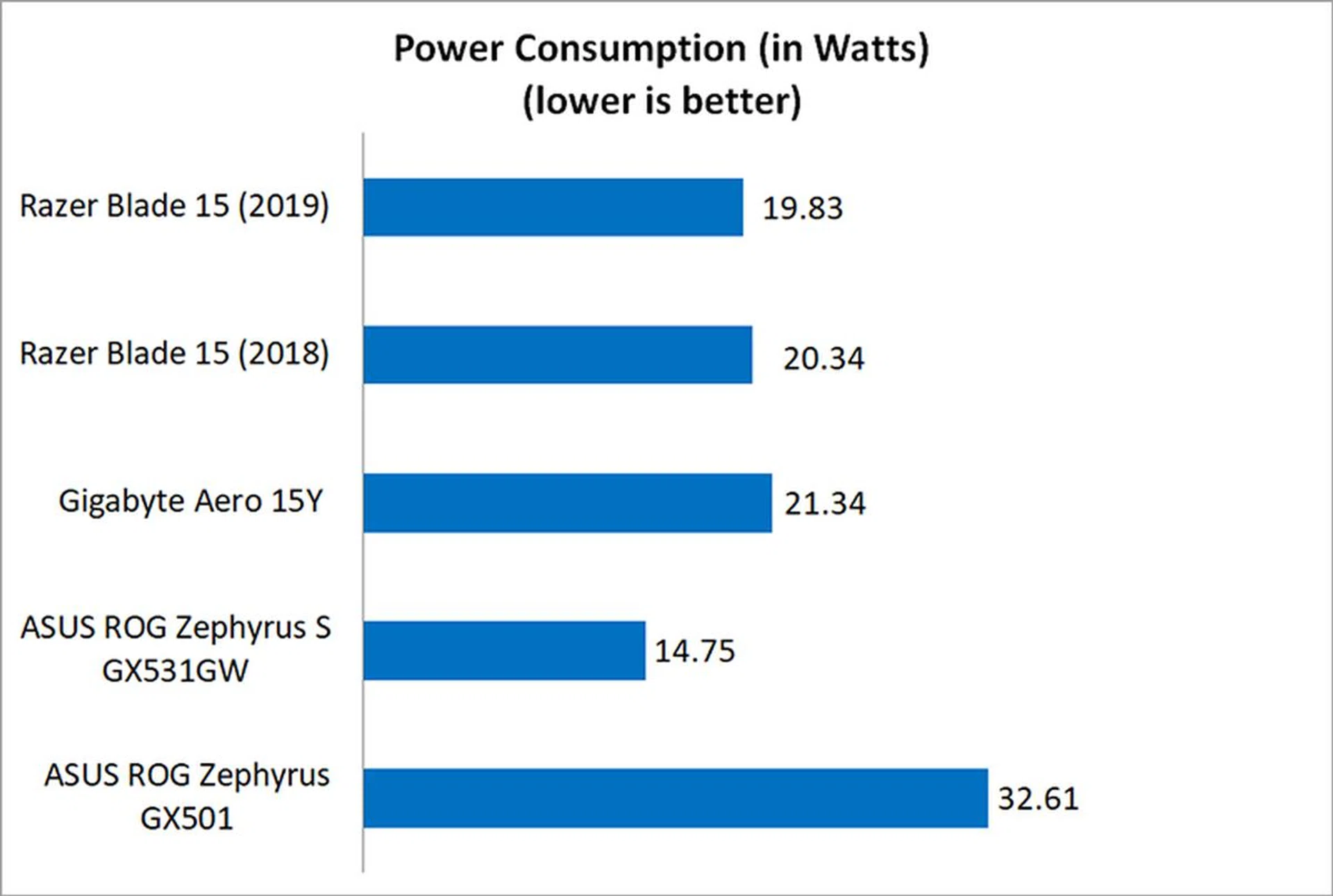
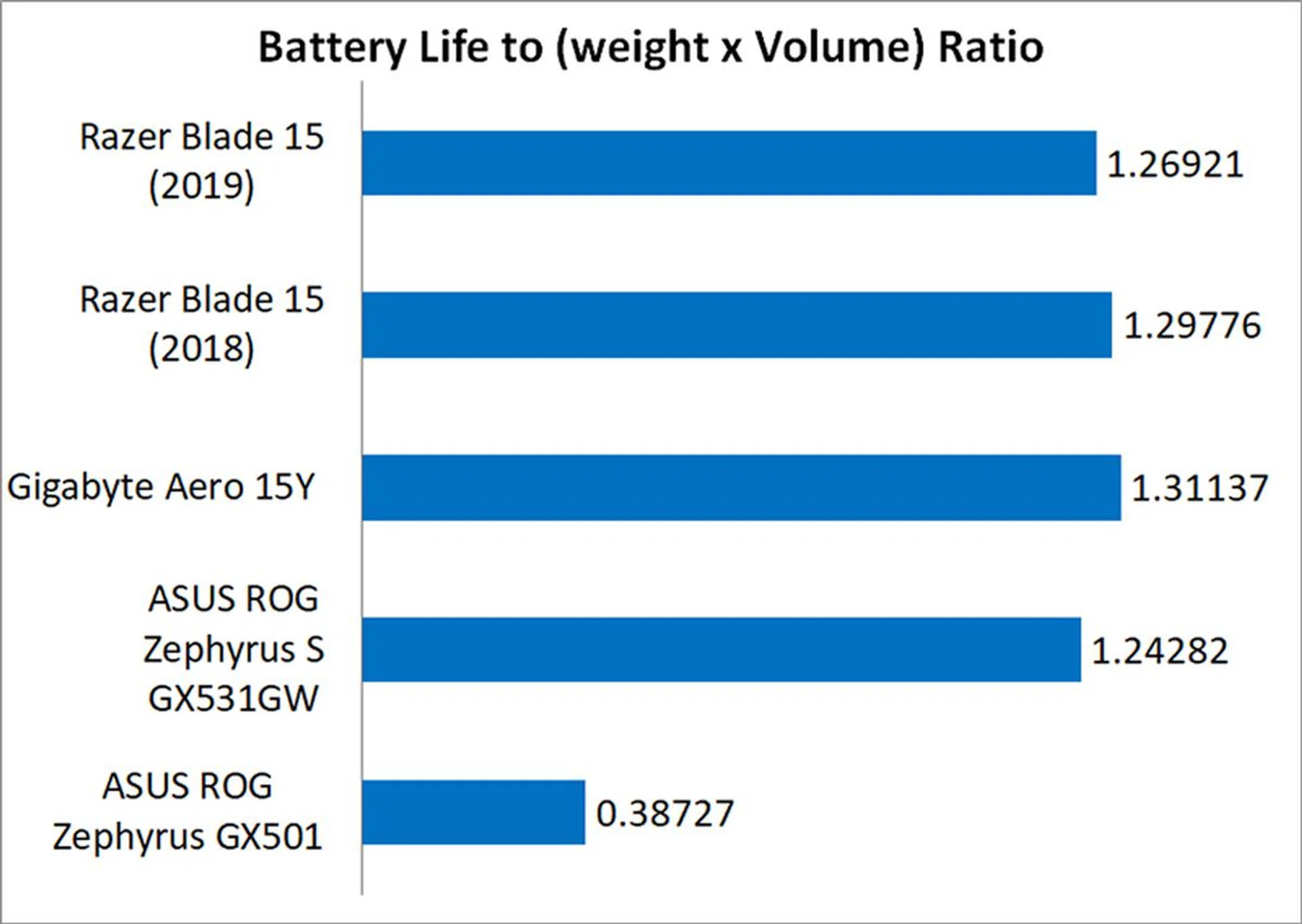
Battery life was one of the strongest points on last year's Blade 15, and that remains the case here as well. The generous 80Wh battery gives the Blade 15 solid battery life for a gaming laptop, even though it still falls behind the Gigabyte Aero 15Y and its even larger 94.24Wh battery. That said, the Blade 15 still comes in near the top of its class, and it's good battery life and slim form factor make it a truly mobile powerhouse.
That's borne out in the portability index, which aims to be an objective measure of portability by taking into account factors like weight, dimensions, and battery life. The Blade 15 came in only slightly behind the Gigabyte Aero 15Y, which practically offers the best battery life on any gaming notebook today.
Does it run hot?
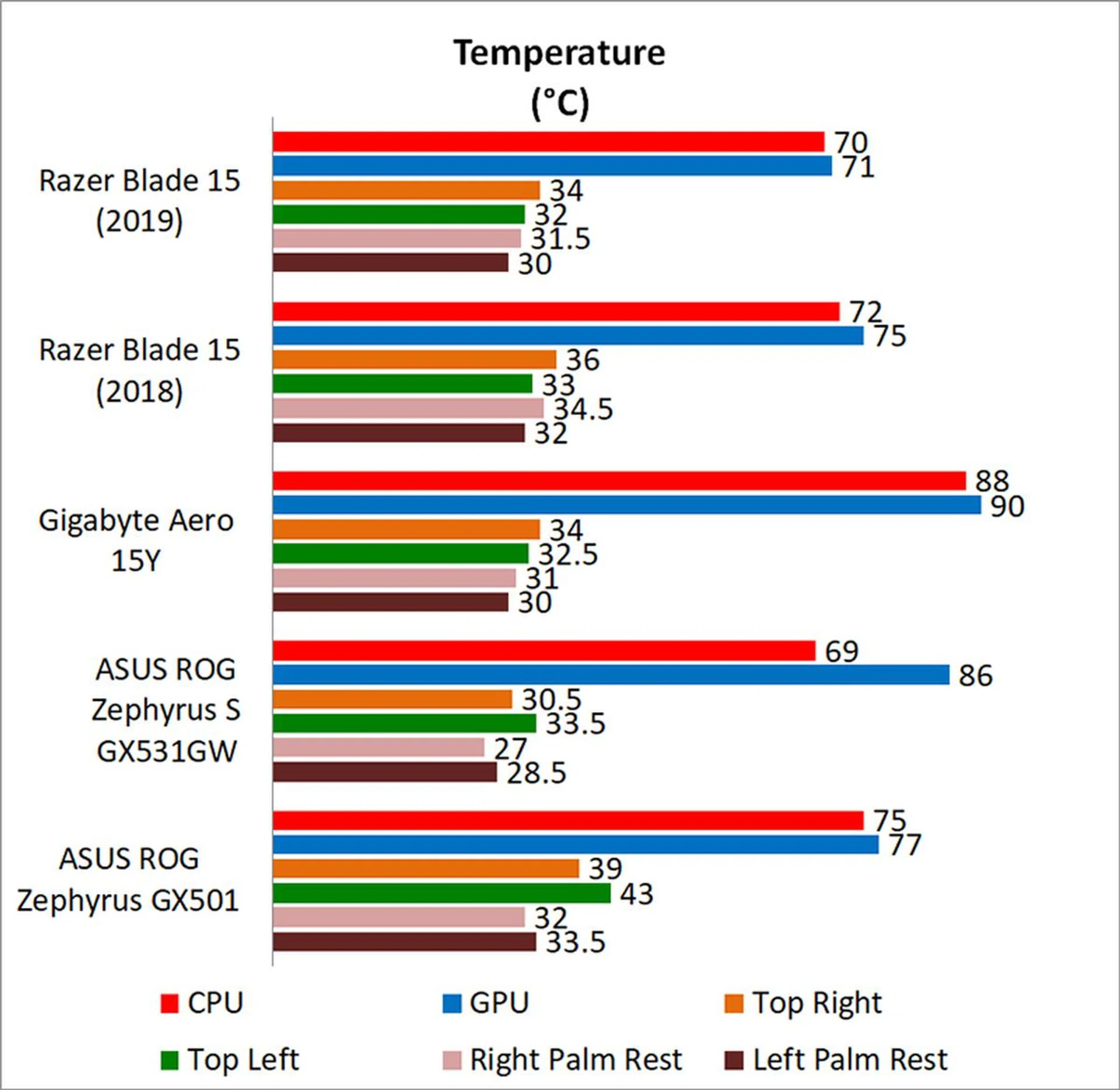
Temperature is always a chief concern with any slim and light gaming notebook, and the Blade 15 is no exception. Surface temperatures are slightly lower compared to its predecessor, as are the CPU and GPU temperatures. That said, that still doesn't mean that the new Blade 15 is a chilly beast, and it still gets noticeably warm during intense gaming sessions. However, at the very least, it seldom gets too hot to touch, and the heat doesn't seem to extend to the keyboard or the WASD keys, an important point if you're going to be gaming for hours on end.
Having said that, I should point out that the default fan profile appears insufficient to allow the GeForce RTX 2080 Max-Q to operate to its fullest potential. Razer's Synapse 3 software lets you manually configure the fan speeds, and you should use this to set the fan speeds to maximum. Of course, this does mean that the notebook will churn up quite the racket, but it's actually still a tad quieter than the Zephyrus S, and the noise is easily blocked out with a headset. Woe to anyone who is sitting near you though.
This is one handsome laptop

2019's version of the Razer Blade 15 is cut from the same cloth as its predecessor. It is slightly thicker and heavier to accommodate the more powerful NVIDIA GeForce RTX 2080 Max-Q, but its design remains largely unchanged. Some design quirks also remain, such as the non-standard location of the right Shift key, which I know some people find to be supremely annoying. Still, this is hardly a deal breaker, and there's still a lot to like about the laptop.
Elsewhere, Razer added support for Windows Hello facial authentication, but at its core, the new Blade 15 is very simply a faster version of last year's model. That's not necessarily a bad thing, and the Blade 15 remains the most compact 15.6-inch gaming notebook on the market and one of the best-looking ones to boot.
Its build quality is truly second to none, and its subtle, minimalist design means it won't stick out as much in an office setting. However, what I really like about it is how much attention Razer has paid to the details. For instance, while many gaming laptops still feature lackluster trackpads and dim displays, the Blade 15 boasts a bright and vivid screen and a large glass precision trackpad. Its chassis also remains undisturbed by vents at the side that might blow hot air onto your mousing hand, although I really wish that Razer would release a version without the illuminated triple-headed snake logo on the lid.
The Blade 15 will cut a huge chunk out of your wallet, but that's the price you pay for a top-end GPU and good design. To be sure, it's hardly perfect, and noise and heat concerns are very real. However, I could say the same of pretty much any slim and light gaming laptop, and the fact remains that the Blade 15 stands up well against the competition and is simply very, very fast. The Razer Blade 15 is priced at S$4,679 is available directly from Razer or you could also get it from Lazada.
Our articles may contain affiliate links. If you buy through these links, we may earn a small commission.