

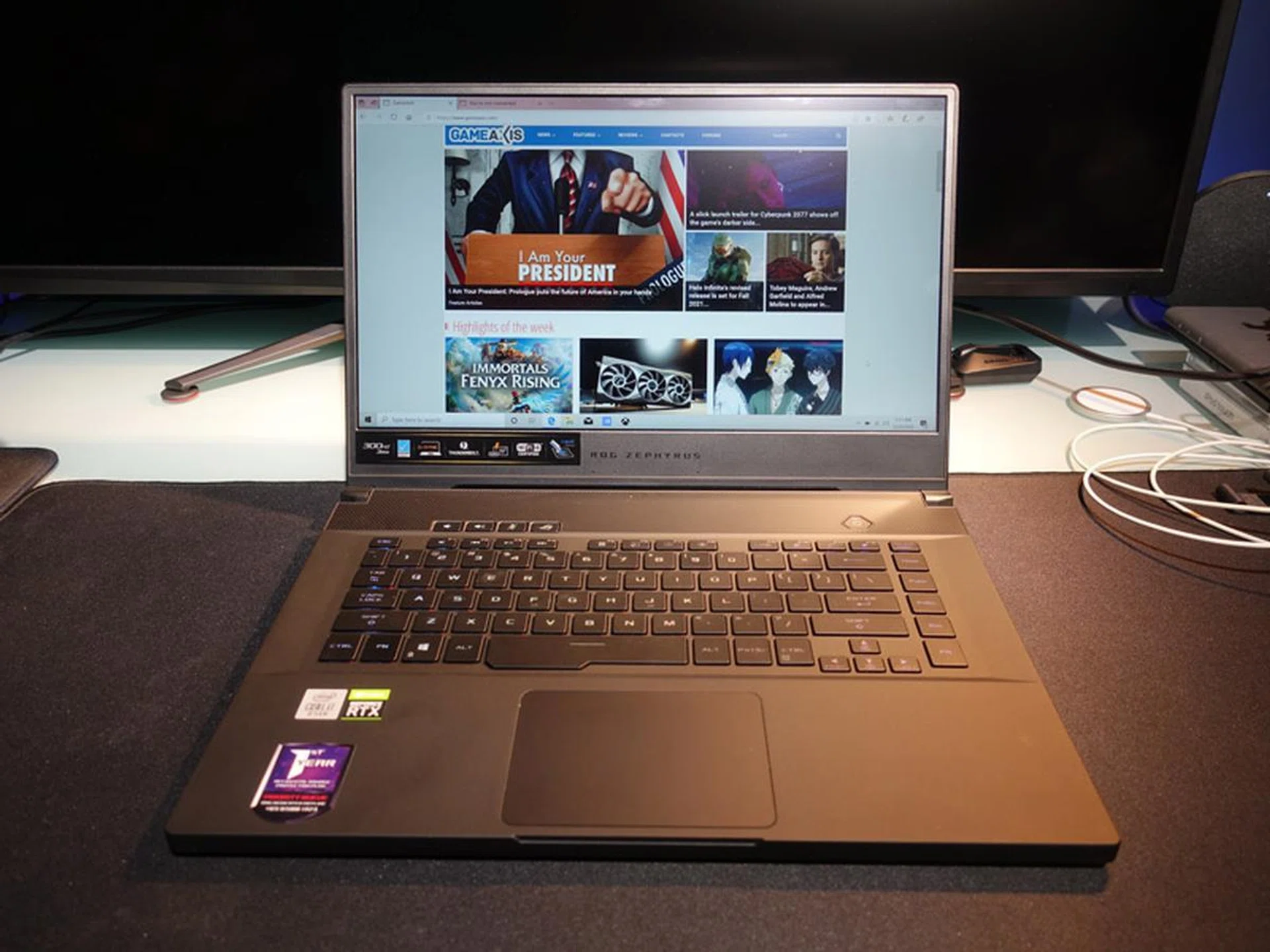
Can you tell that the ASUS ROG Zephyrus S15 is a gaming notebook? Lose those decals, and nobody would know!
Unassuming and powerful
It is 2021 and it might seem a little odd that I am still reviewing a gaming notebook that was launched late last year. Well, be that as it may be, ASUS’ ROG Zephyrus S15 GX502 is still worth looking at if you’re looking for a gaming ultraportable with a solid performance. Let’s take dive in.
If you find the Zephyrus S15 GX502 oddly familiar, it’s because you’ve most likely read our review of its predecessor, the ROG Zephyrus S GX502, way back in 2019. The Zephyrus S15 then, essentially comes with updated hardware to allow it to run much faster, better thermals, dual-channel memory (finally!), 300Hz display, and some other minor refinements to what was already a great design. At the same time, however, it is still expensive, and also still lacks the big battery capacity and some of the features available with the competition.
Looks and Feels
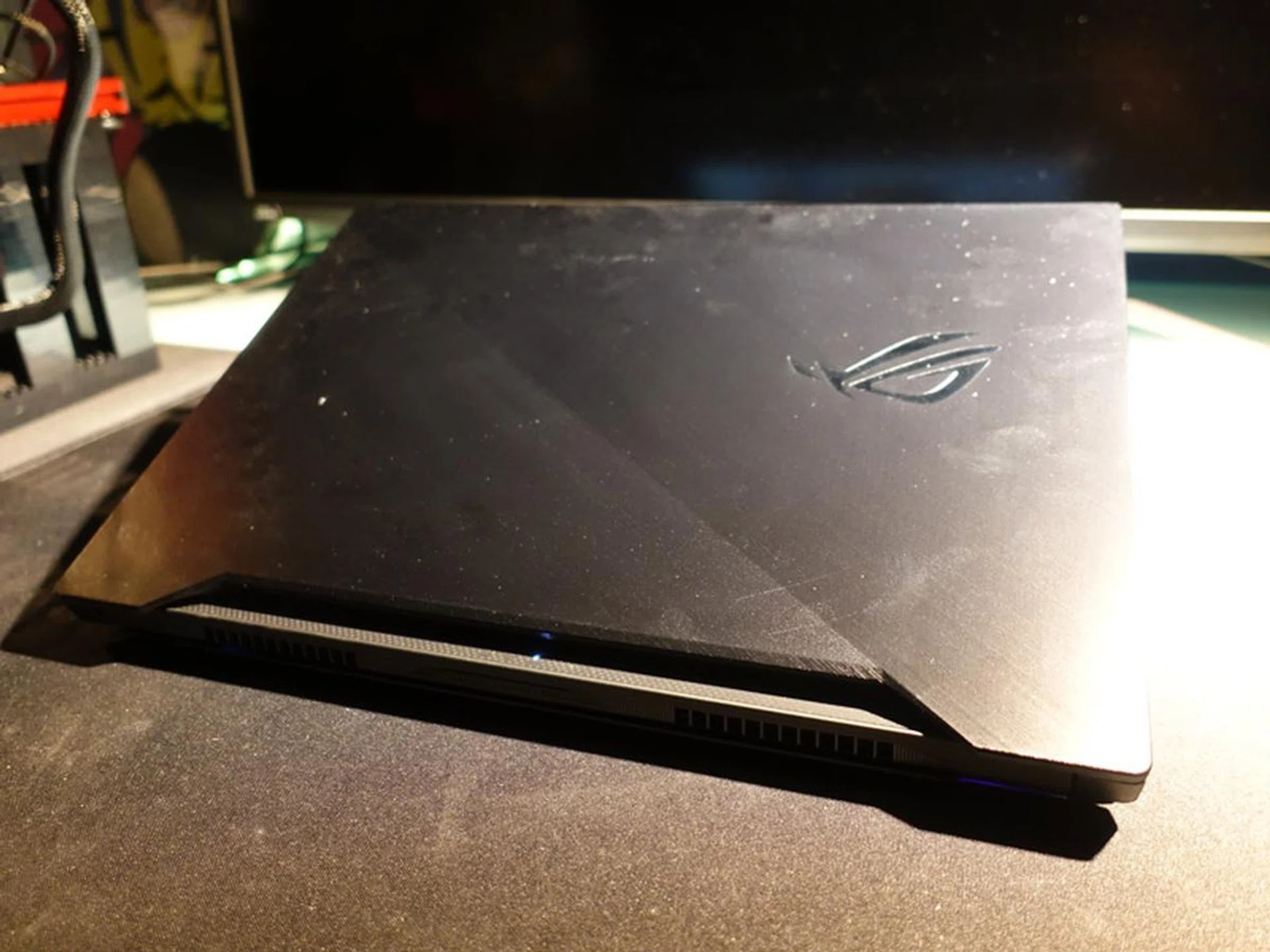
The lid is quite susceptible to dust and dirt.
Not much has changed on the new Zephyrus S15’s exterior, so this means that it still retains the same compact and lightweight 15-inch form factor, at a whisker shy of just 2kg. It has the distinctive blocky design that is reminiscent of the Razer Blade 15, and features a sturdy magnesium-alloy chassis that is reinforced by a honeycomb structure under the palm rests to minimise flexing. The result is a robust-feeling notebook that seems well put together.
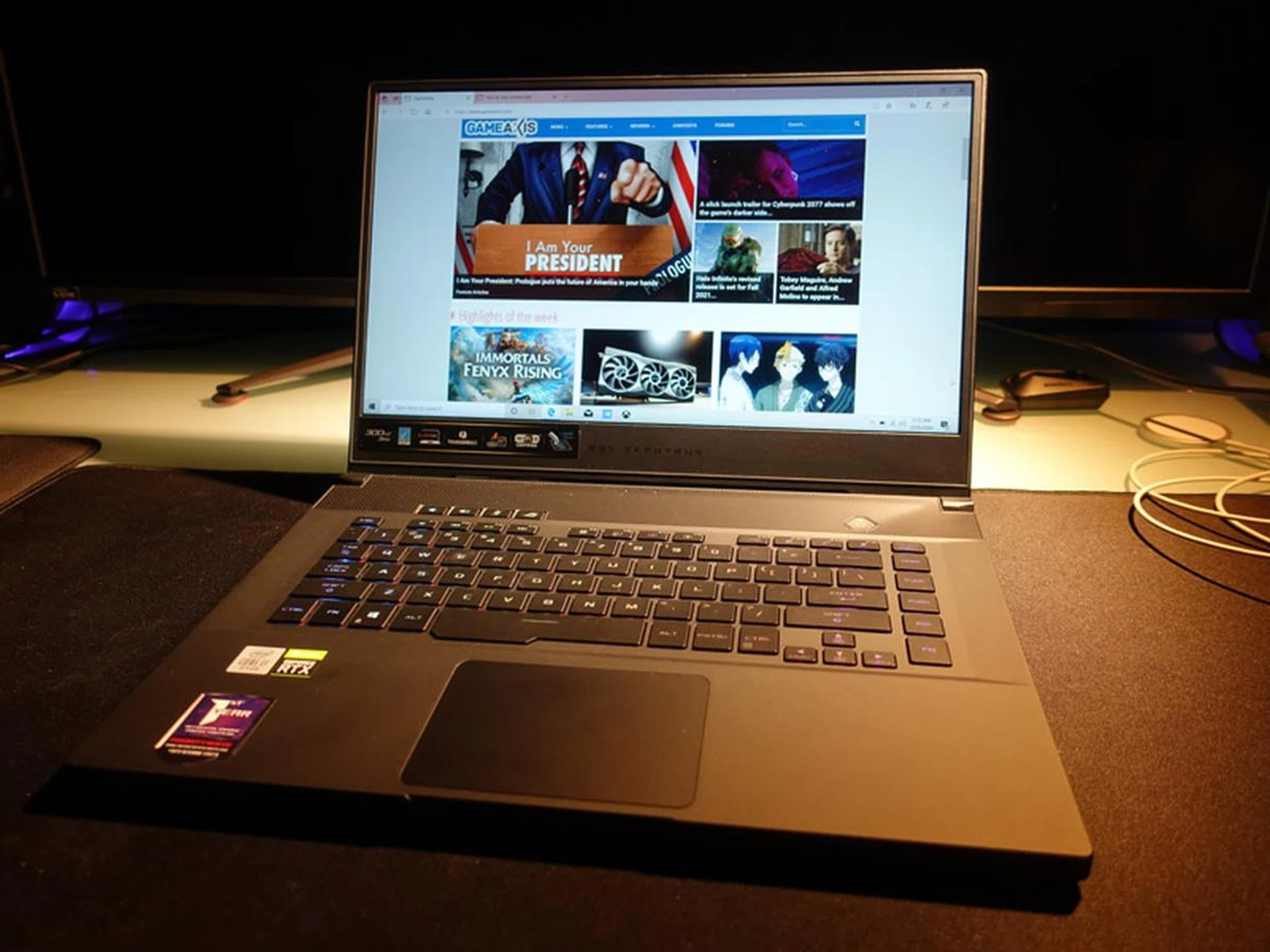
The Zephyrus S15 is also a more conventional notebook design as compared to its loftier ROG siblings.
Build quality is top-notch, and I have no complaints about any creaking or unwanted sagging in crucial areas. I’m also pleasantly surprised by the soft-touch finish coating (which I really like, by the way), and it appears to resist fingerprints quite well. The lid boasts an attractive brushed metal finish that runs diagonally across its surface. Quite frankly, I think it looks great, and the design is pretty tasteful overall. When viewed from the front, it looks like it could almost pass off as a business notebook, and ASUS did say that it hopes the laptop will appeal to content creators as well and not just gamers.
Power inside
The Zephyrus S15 is not just all looks. For 2020, the gaming notebook comes with Intel’s 10th Gen Core i7-10875H Processor running at 2.3GHz and NVIDIA’s GeForce RTX 2080 Super Max-Q – which is a step up from its predecessor’s RTX 2070 Max-P GPU. It was impressive then, but I find it incredulous that ASUS still managed to cram in the power-hungry GeForce RTX 2080 Super Max-Q into a chassis that is still extremely competitive with the slimmest notebooks out there.
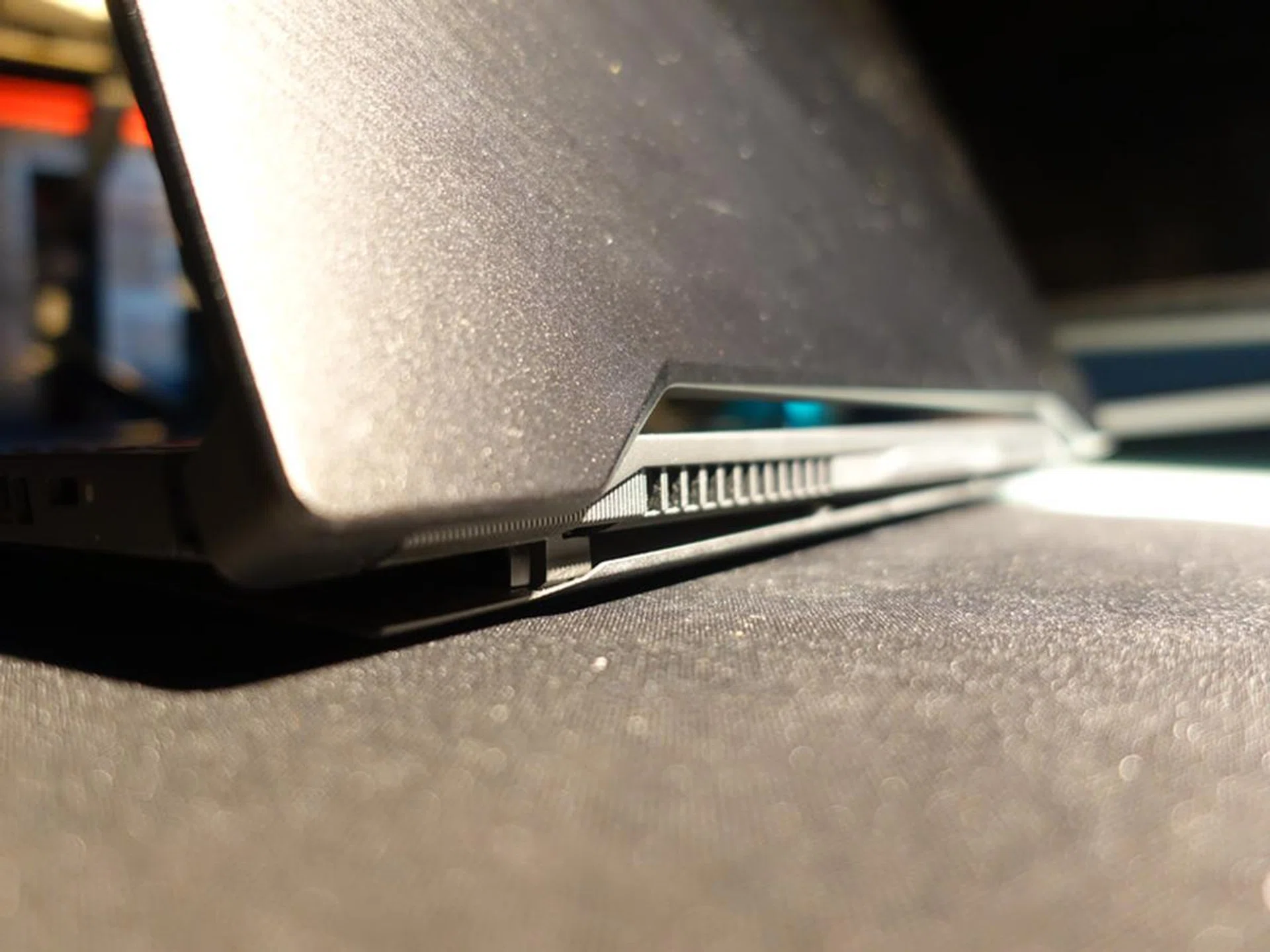
The Active Aerodynamic System is now into its third-generation that comes with better and more stable hinges.
That aside, the Zephyrus S still retains a few key design innovations from last year's model. First and foremost, it still employs the Active Aerodynamic System - a unique-to-ROG trapdoor-like cooling-system at the bottom - that mechanically raises the bottom of the laptop from the desk. This lets the bottom fans draw in more air, and hot air is in turn exhausted through four vents at the back and sides of the laptop.
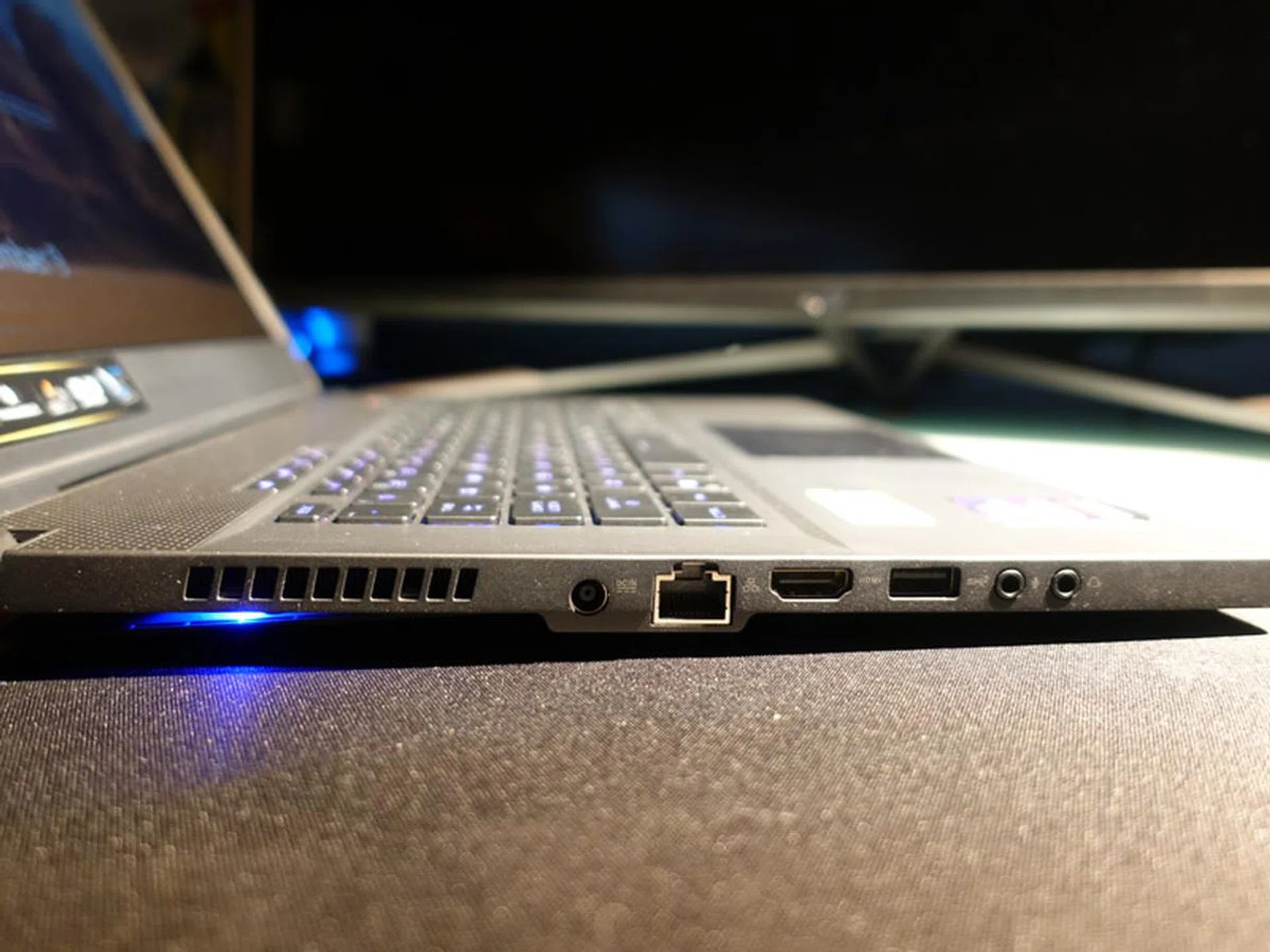
Ports: 1x Ethernet, 1x HDMI, 1x Type A USB 3.2 (Gen 2), Mic-in, Headphone Jack.
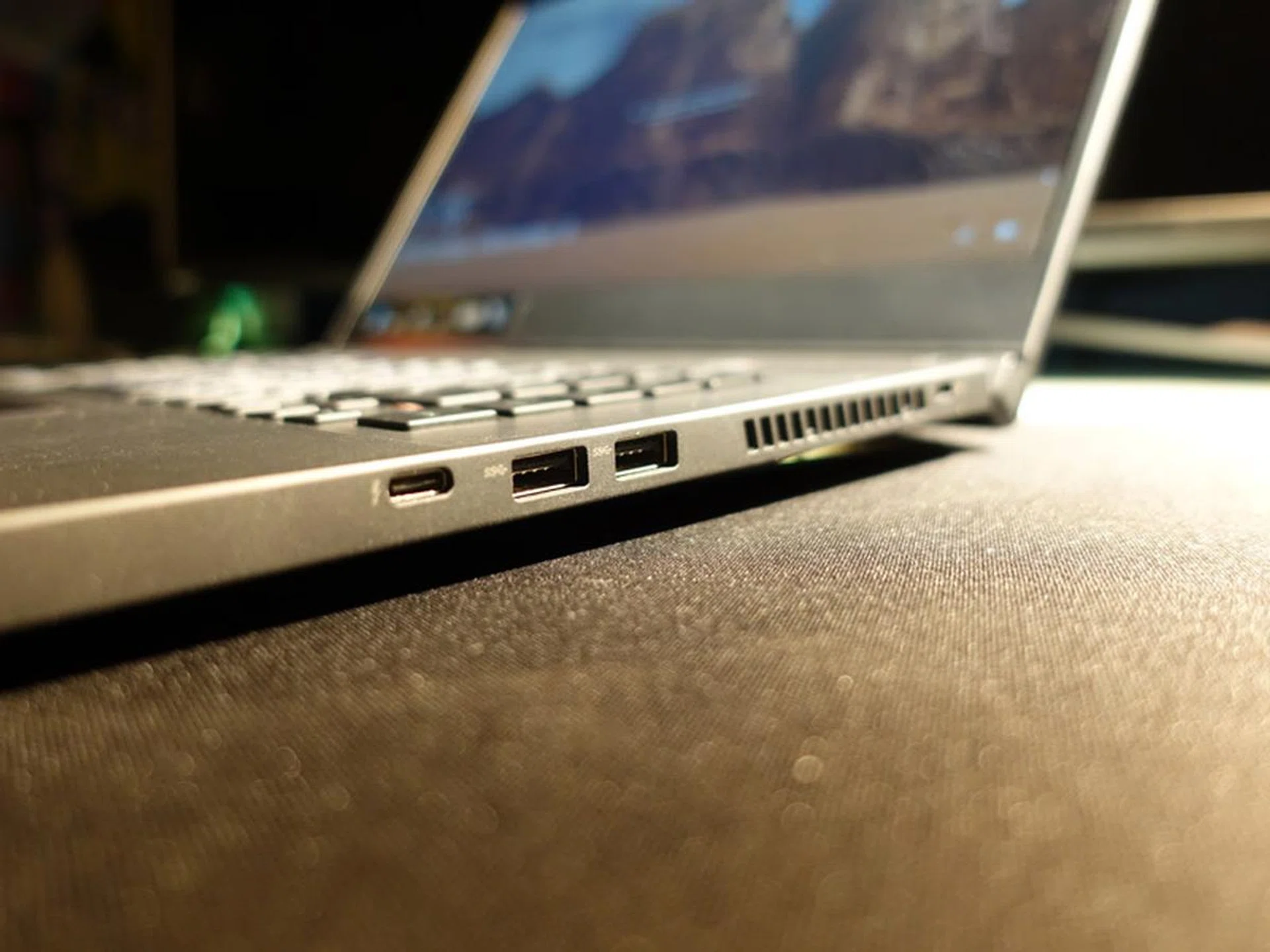
Ports: 2x Type A USB 3.2 (Gen 1), 1x Type C USB 3.2 (Gen 2)
The fans themselves also feature the anti-dust cooling design that we've seen on many ASUS laptops of late. This system relies on centrifugal force to drive dust particles into special dust tunnels, so they don't clog up the cooling fins in the long run and ensure more consistent cooling performance further down the road.
Display, Keyboard and Speakers
It’s a slight shame that the Zephryus S15 still retains the same Full-HD 1,920 x 1,080-pixel display, and not a QHD or 1440p one as I’d hoped. Nonetheless, fans of serious shooter games will be happy to know that the screen’s refresh rate has been bumped up to 300Hz here. It’s probably overkill for mortals like you and me, but esports gamers would no doubt welcome the upgrade. As for the screen, I found it was bright enough for the most part, and colours appeared sufficiently vivid, with no particular bias toward the warmer or cooler end of the spectrum.
The screen is framed on three sides by pretty slim bezels, which helps reduce the notebook's footprint. This also comes at the expense of a built-in webcam, as the svelteness of the bezel meant it’s not practical to put one at any of the three sides. In place of it, ASUS has bundled the external GC21 webcam that’s actually pretty good and arguably better than most if not all built-in webcam out there, since it can also record at 1080p@60fps. It also means that one USB port on the Zephyrus S15 will be occupied when in use though.
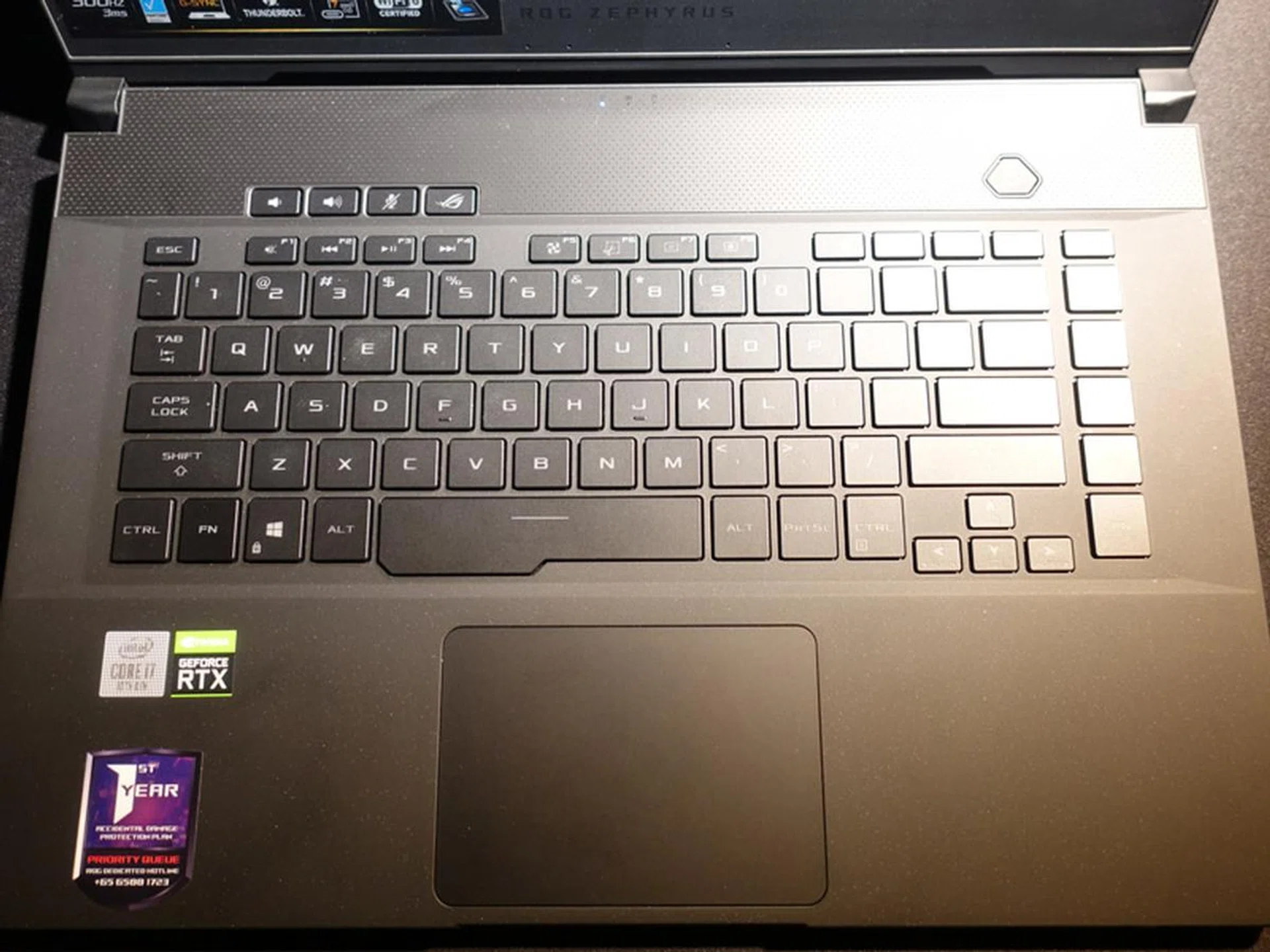
On the keyboard front, the Zephyrus S15 shares the same layout and keys as its Zephyrus S predecessor. Anyway, I like that the layout has been modelled after regular desktop keyboards as well, with the appropriate spacings between the blocks of function keys. The precision touchpad feels great as well, and the integrated left- and right-click buttons help create a cleaner and more modern look.
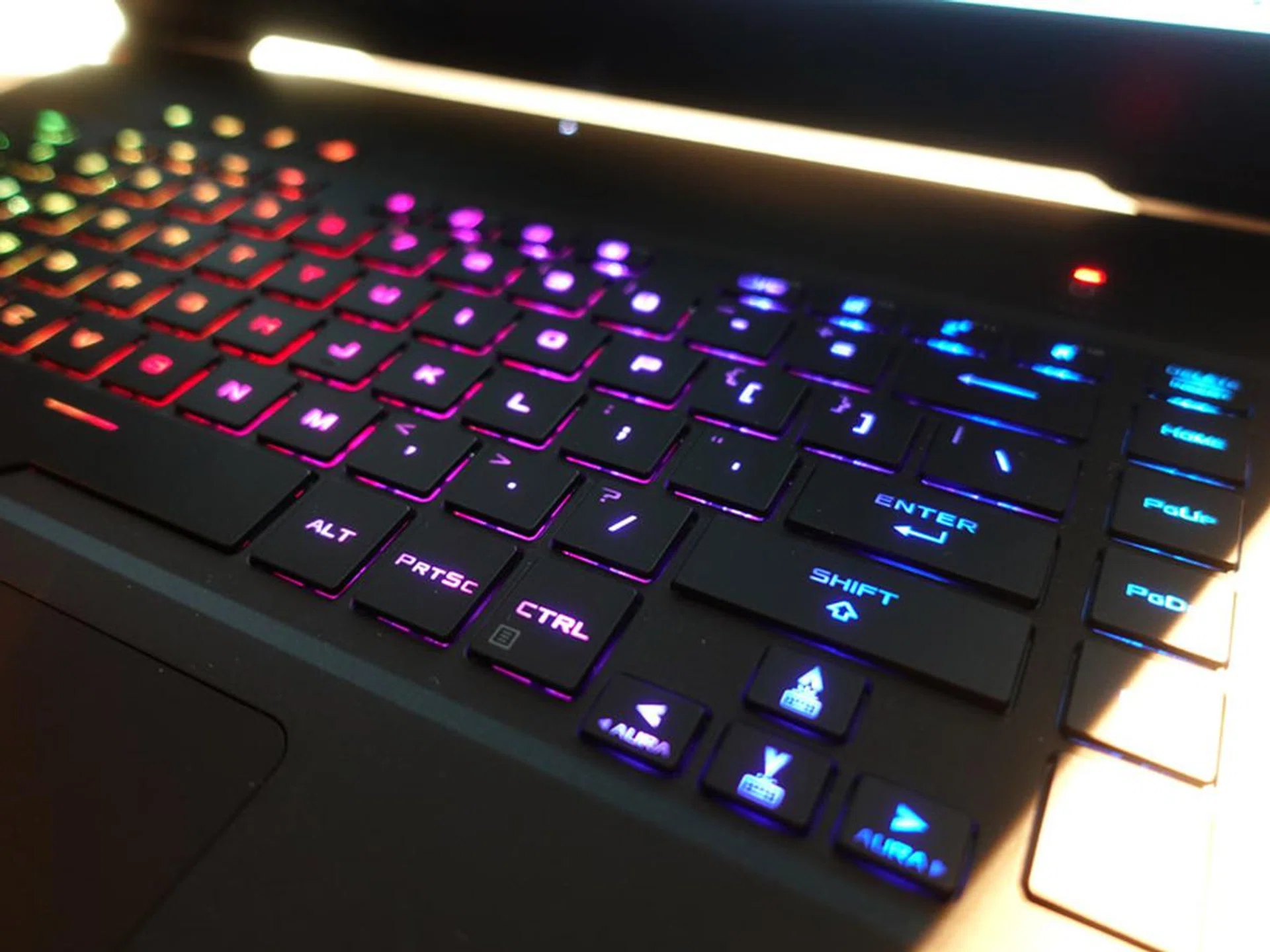
No doubt, you'll get full RGB backlight control for the keyboard.
Finally, the dual 2.5W stereo speakers sit at the bottom of the laptop. They're about average for laptop speakers, and while they do get loud enough, they tend to lack definition. The low-end also sounded kind of anaemic, and there's noticeable distortion at maximum volume. You will want to stick with your favourite headphones or external speakers for gaming and music here.
Now let’s check out the gaming notebook’s performance on the following pages.
Test Setup and Performance
To compare the ROG Zephyrus S15 at hand, I have opted to refer these 15-inch notebooks:
- Razer Blade 15 (2020)
- ROG Zephyrus Duo 15 GX550
- Gigabyte Aero 15 OLED XB
ROG ZephyrusS15 | Razer Blade 15 (2020) | |||
Processor | IntelCore i7-10875H Processor 2.3 GHz | Intel Core i7-10750H @ 2.6GHz | Intel Core i9-10980HK @2.4GHz | Intel Core i7-10875H @ 2.3GHz |
Graphics | NVIDIA GeForce RTX 2080 Super Max-Q | NVIDIA GeForce RTX 2070 with Max-Q | NVIDIA GeForce RTX 2080 Super Max-Q | NVIDIA GeForce RTX 2070 Super with Max-Q |
Memory | 32GB | 16GB | 32GB | 16GB |
Storage | 1TB SSD | 512GB SSD | 2x 1TB SSD | 512GB SSD |
Admittedly, choosing the notebooks to compare was a bit of a challenge as NVIDIA updates their GeForce drivers very frequently, and in some cases giving noticeable performance boost over older drivers. So, some of the past notebooks above weren’t tested with newer drivers, simply because these notebooks were returned to their respective brands after we finished reviewing them. In any case, while these benchmark numbers may not be a definitive comparison, they still make for good references.
These are the games and benchmarks that I ran on the Zephyrus S15:
- PCMark 10
- 3DMark
- SYSmark 2018
- Deus Ex: Mankind Divided
- Shadow of the Tomb Raider
How good is it for work?
PCMark 10 Extended evaluates systems based on workloads that can be categorized into four distinct groups, comprising Essentials, Productivity, Digital Content Creation, and Gaming. This includes tests such as app start-up times, web browsing, word processing and spreadsheets, photo and video editing, and rendering and visualization tasks. Finally, gaming performance is evaluated using the Fire Strike benchmark.
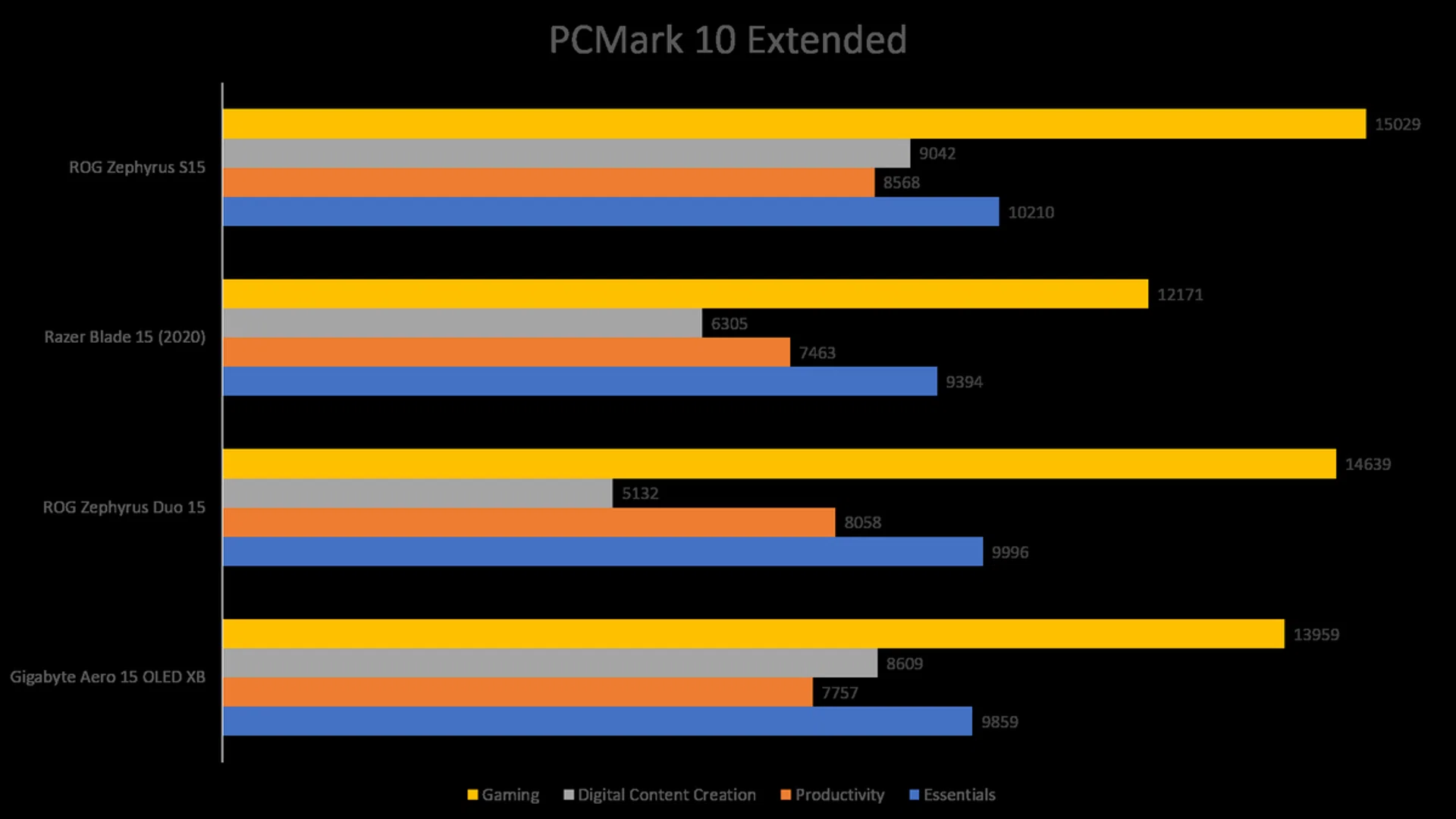
That the Zephyrus S15 outperformed the Gigabyte and Razer's notebooks isn't a surprise, given its superior specifications. It even managed to beat the Zephyrus Duo 15, whose performance - especially in Digital Content Creation - is likely hampered by it having to power two displays.
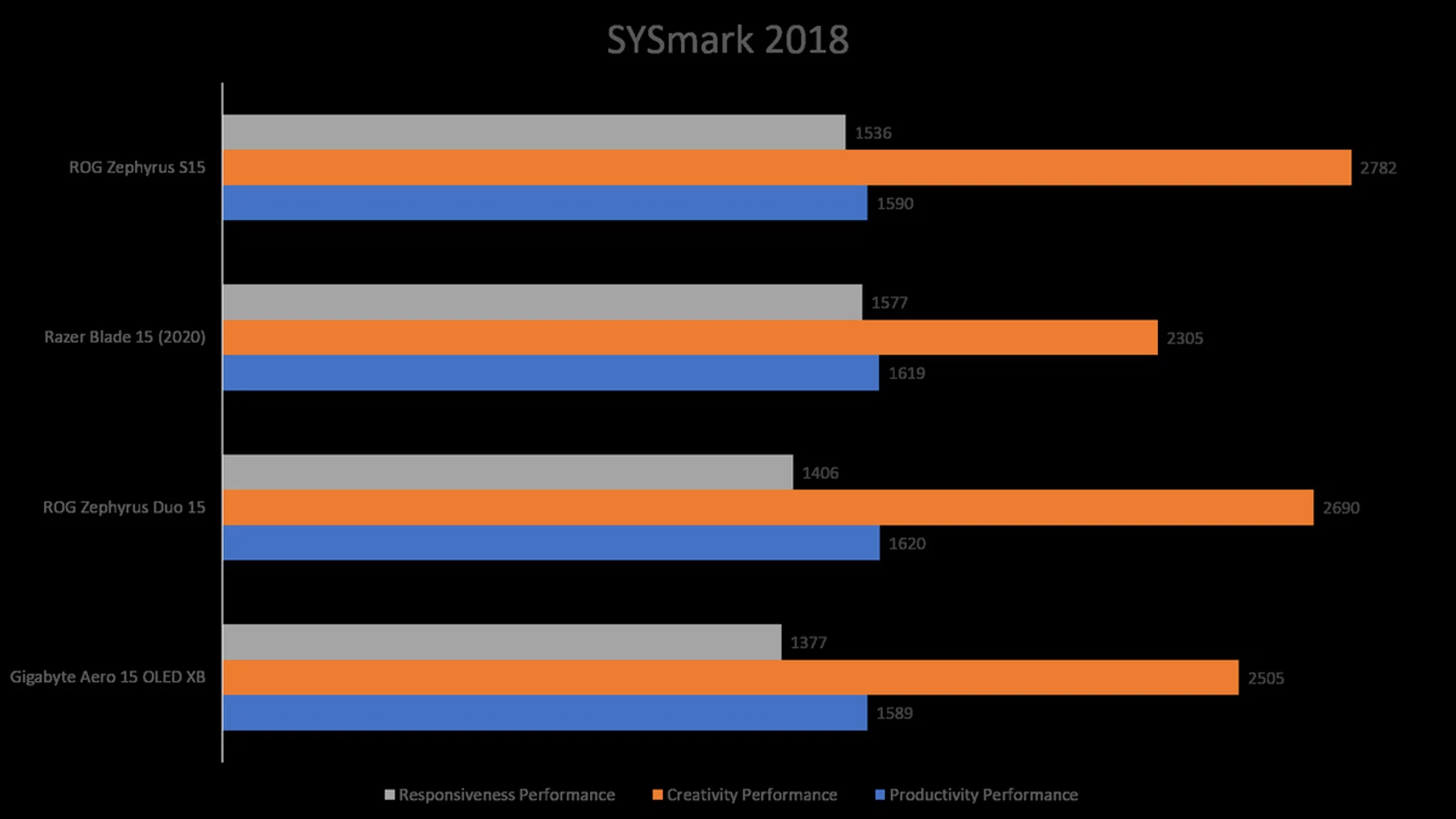
Unlike PCMark 10, which is a synthetic benchmark tool and the results are great as a reference point of a computer’s performance, SYSmark 2018 is an application-based benchmark that reflects “real world” usage patterns of business users in the areas of Productivity, Creativity and Responsiveness. This means using popular Microsoft and even Adobe applications rather than less obscure options used in PCMark 10.
We can see that the Zephyrus S15 did pretty well here, with the Razer Blade 15 giving it the closest run for its money except in the Creativity Performance segment - where the ROG's notebook superior GPU (and newer drivers) gave it the edge.
How about play?
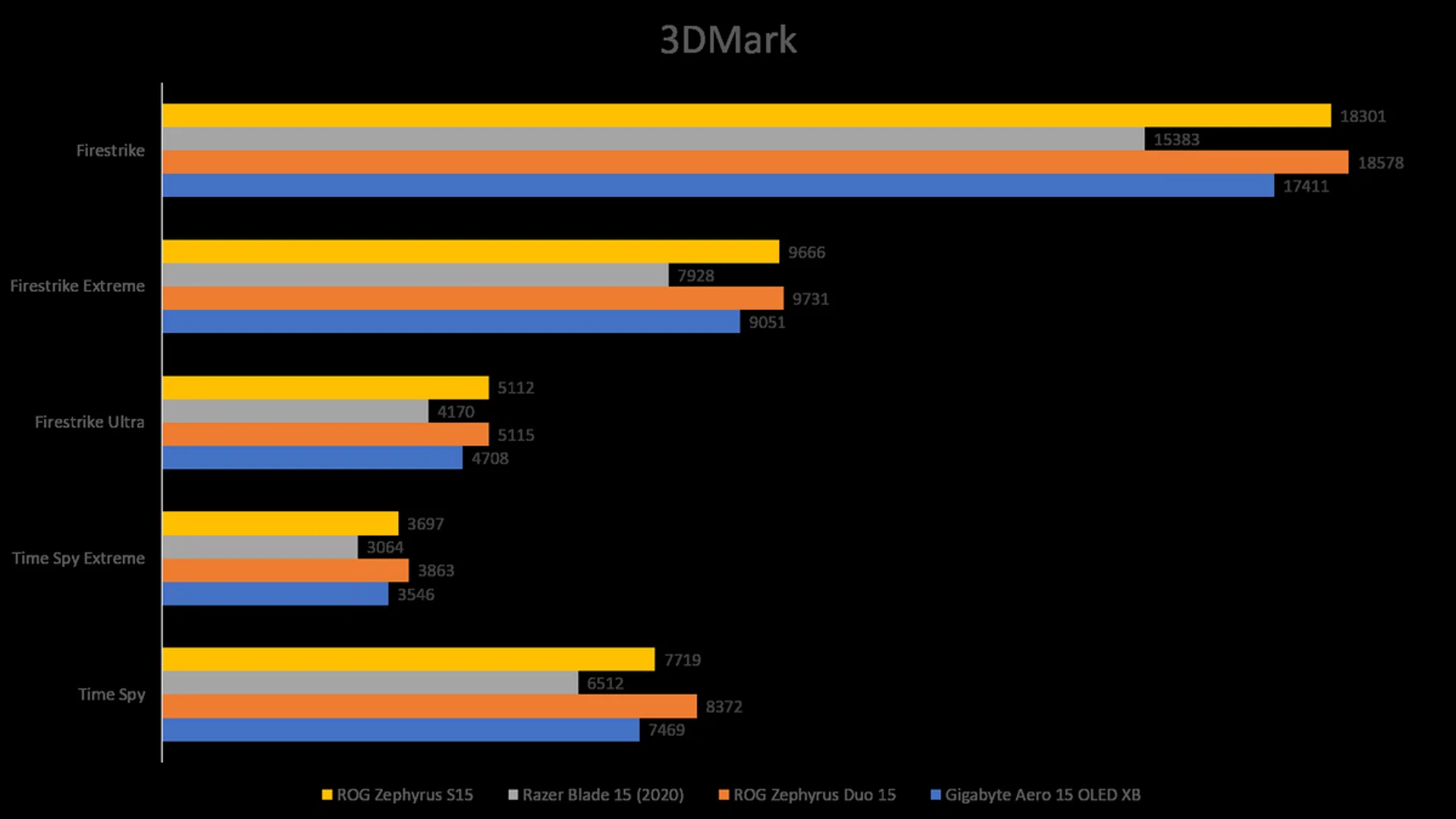
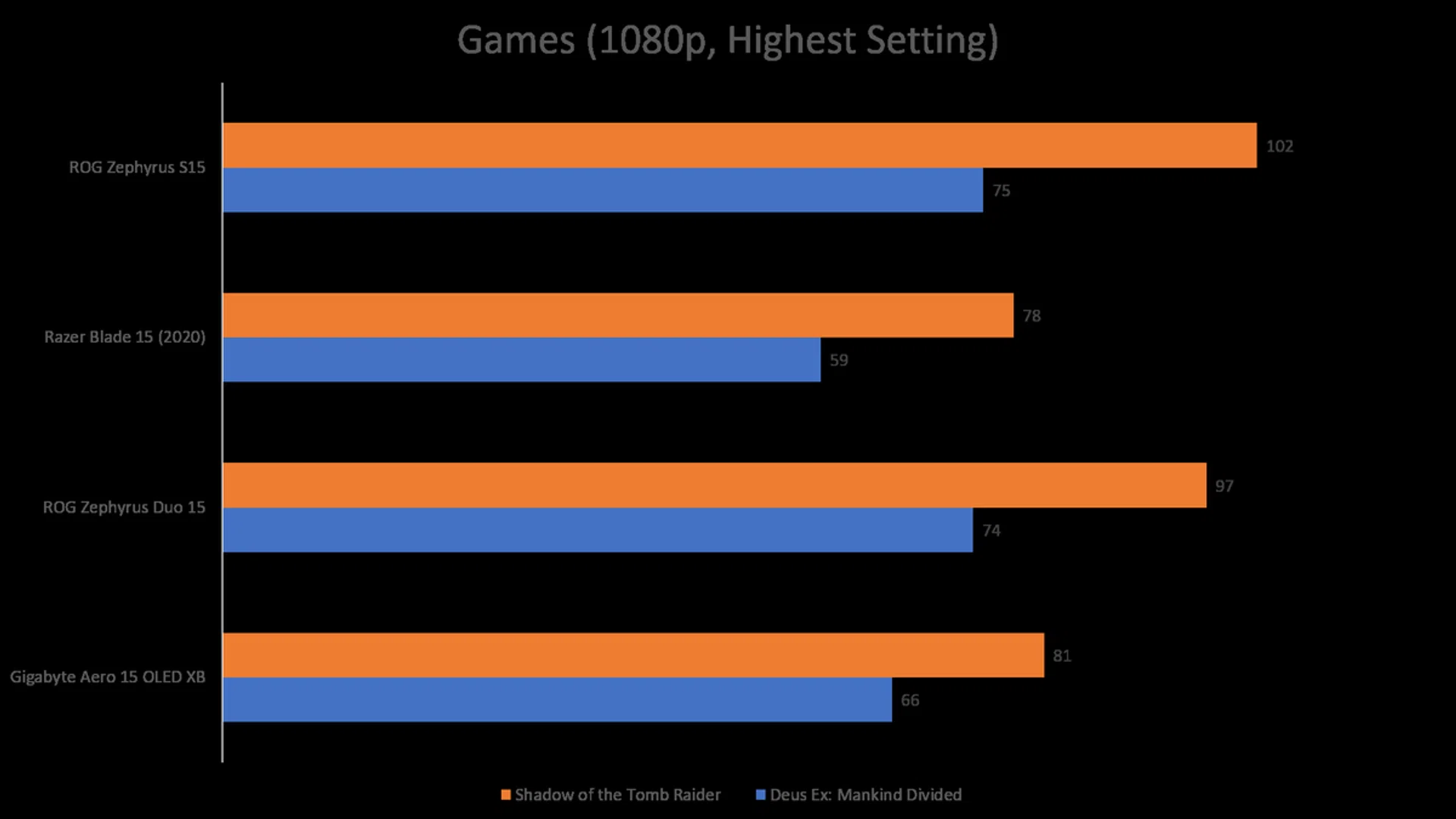
In our gaming benchmarks, the Zephyrus S15 and the Zephyrus Duo 15 pretty much ate up the competition (notably, the Zephyrus Duo 15 did it with ease even with the secondary display turned on). But some context needs to be explained here. You see, the gaming notebook is powered by the latest GeForce RTX 2080 Super with Max-Q mobile GPU, while our test unit’s display only supports up to Full-HD resolution. That is a lot of excess power to play games at 1080p resolution, and if specs-friendly games like Counter-Strike: Global Offensive or League of Legends are the only games you play all the time then the Zephyrus S15 is obviously an overkill - although you do get the luxury of turning up most games' graphics settings to the highest.
Battery Life - PCMark
I tested the battery life using PCMark 10's Modern Office battery life benchmark. All the notebooks were set to 100 per cent display brightness and had Wi-Fi enabled. The keyboard backlight was left on.
Overall, battery life was mediocre for the Zephyrus S15. Now, you must be wondering wouldn't the Gigabyte notebook make the worst-performing notebook here? Well yes, it is, but you have to take into account that the Aero 15 OLED XB (as its name implies) has a more power-hungry 4K OLED display too. By all accounts, the Zephyrus S15's poor battery performance actually made the Aero 15 OLED XB's look good.
Gigabyte Aero 15 OLED XB | ROG Zephyrus Duo 15 | Razer Blade 15 (2020) | ROG Zephyrus S15 |
236mins | 312mins | 276mins | 250mins |
Closing Statement

The latest ROG Zephyrus S15’s understated and tasteful design holds great appeal for me, and it also certainly didn’t escape my attention that many of 2020’s best-looking gaming notebooks can also pass off as business or content creators’ notebooks. May this trend long continue.
It’s not just the looks either. The Zephyrus S15 (the GX502 variant, in particular) also packs some great hardware under the hood, including a GeForce RTX 2080 Super and a generous 1TB SSD. However, the best thing about it may be the fact that it packs all that in a body that is as slim and light as any ultraportables out there. Sure, battery life does take a hit here but it’s a small price to pay so much performance potential in a portable package.
Perhaps the biggest improvement is the use of a dual-channel memory configuration here. One of the biggest peeves of ours with the previous Zephyrus S, and still befuddles our mind, was ASUS opting to go with a single-channel memory configuration with the latter. Yes, a dual-channel memory configuration does have a noticeable performance improvement over a single-channel memory one. So, while the price of the Zephyrus S15 remains the same as the older Zephyrus S at S$3,998, you do get an additional 16GB for a total of 32GB and that does count for something, even if just a little.
For my money, and despite some very minor nit-picks from me, such as a FHD instead of a QHD display, the Zephyrus S15 GX502 is quite possibly the most balanced gaming notebook in the market right now – in terms of power, form factor and build quality. You could find one that fills any two qualities, but rarely do you find one that checks all three.
Our articles may contain affiliate links. If you buy through these links, we may earn a small commission.