

4K: The next display frontier
The display industry can be a pretty fickle-minded one. After Avatar in 2009, 3D was said to be the next big thing. But it never really took off. Right now, the key buzzword is 4K and this is one development that seems set to stay. The reason is for this is quite simple, unlike 3D, which requires specific hardware and even lighting conditions to be enjoyed fully, 4K is much more straightforward. Play 4K content on a 4K display and viewers can immediately enjoy and appreciate the added benefits of all those additional pixels. So is it any surprise then that we are seeing 4K displays on notebooks?
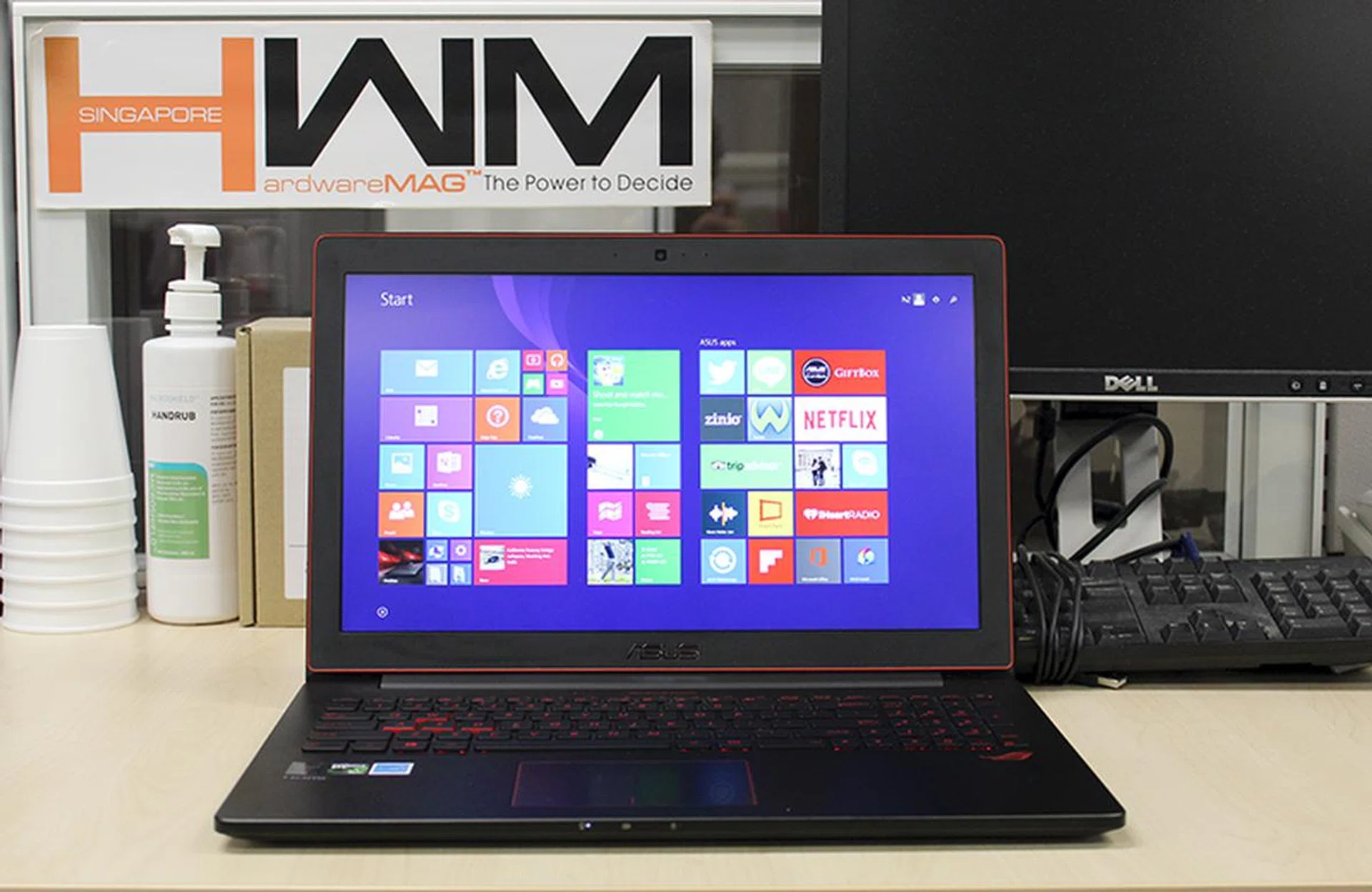
It's been a long wait, but it's finally here. The ROG G501 is ASUS' ultra slim and light 4K gaming machine.
Last year at Computex, ASUS unveiled a new 15.6-inch gaming notebook called the ROG GX500. It was a super slim notebook that measured just 19mm thick and weighed only 2.2kg. But more importantly, it had a 4K display - a rarity in those days and still isn’t all that common today. Unfortunately, that notebook was powered by an NVIDIA GeForce GTX 860M mobile GPU, which seemed underpowered to us. Fortunately, a year on, NVIDIA has launched its new GeForce 900M series GPU which promises greater performance and power efficiency.

Taking advantage of this, ASUS has tweaked the ROG GX500 prior to launch and has renamed it, dubbing it the ROG G501. It has also outfitted the new notebook with NVIDIA’s newest GeForce GTX 960M mobile GPU, but will it be enough? Let’s find out.
The Hardware
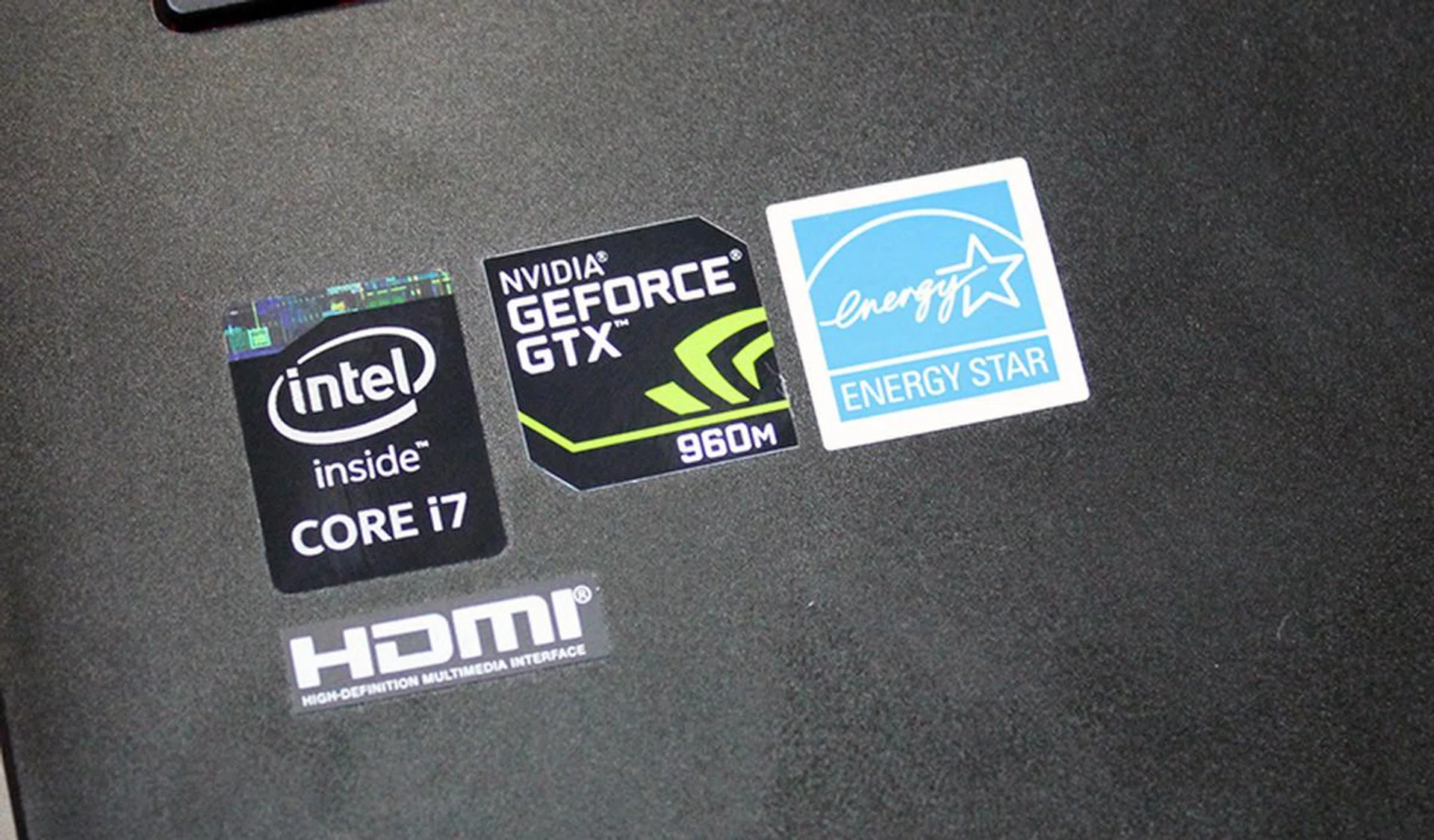
Core i7, check. But the use of NVIDIA's mid-range GeForce GTX 960M mobile GPU is a cause for concern - especially for 4K gaming.
Despite Intel recently announcing the release of the first quad-core mobile processors based on the newer Broadwell architecture, the ASUS ROG G501 notebook is powered by a quad-core Intel Core i7-4720HQ processor (2.6GHz, 6MB L3 cache), which is based on the older Haswell architecture. Broadwell is the 14nm die shrink of the Haswell architecture, which typically brings about minor improvements to performance and power efficiency. In this case, the Core i7-4720HQ processor is still a fairly powerful beast, so users shouldn’t worry about missing out on too much performance.
On the graphics front, the ROG G501 is equipped with NVIDIA’s new GeForce GTX 960M mobile GPU, which offers a good blend of performance as well as power and thermal characteristics, allowing ASUS to keep the ROG G501 slim. However, the GeForce GTX 960M is not much of an upgrade over the older GeForce GTX 860M. In fact, the GeForce GTX 860M is already based on the new Maxwell architecture and has been used in other slim gaming notebooks such as the HP Omen. If you recall, the launch of the new GeForce GTX 800M series mobile GPUs was a bit of a messy affair and it included GPUs that used a mix of Kepler and Maxwell architectures, and the GeForce GTX 860M and GTX 850M were the first mobile GPUs to be based on the newer Maxwell architecture. Nevertheless, the GeForce GTX 960M does sport slightly higher clock speeds than the GeForce GTX 860M (1096MHz vs.1020MHz), which should give it a slight advantage in terms of performance.
ASUS has generously bestowed the ROG G501 with 16GB of DDR3L 1600MHz RAM and storage comes in the form of 512GB PCIe x4 SSD. ASUS also offers the ROG G501 with SATA-based SSDs and mechanical hard disk drives.
On a whole, the ROG G501’s specifications can be described as adequate and certainly decent. Our biggest concern, however, is the somewhat lackluster choice of GPU, which could hamper the ROG G501’s ability to run games decently at its native 4K resolution.
Design and Features
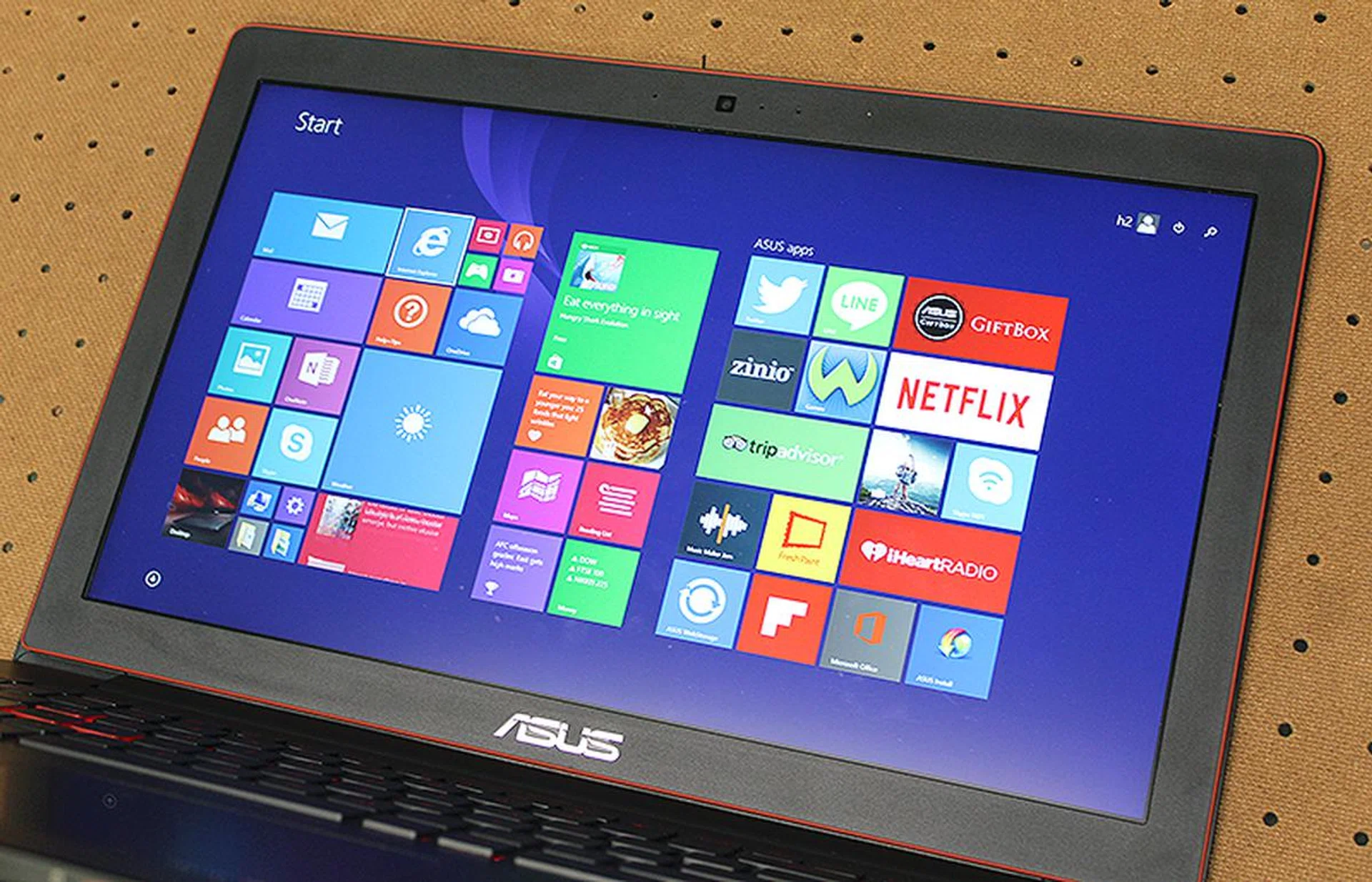
The ASUS ROG G501's bezel is thick and an eyesore. However, the 4K panel itself is wonderfully crisp and sharp.
One of the key highlights of the ASUS ROG G501 is its svelte design and slim chassis. The chassis is mostly aluminum and exudes a premium look and feel. It measures just 20.6mm thick and weighs only 2kg, which makes about as thick and lighter than the GX500 unit that we saw at Computex last year. The aluminum is black and ASUS has employed different finishings on the panels to give the ROG G501 more visual pizzazz. The external panels are all brushed, whereas the internal panels such as the palm rests have a matte finish.
Remember I mentioned earlier than the chassis is mostly aluminum? That’s because the bezel surround the display is plastic. The choice of material is puzzling as most premium notebooks these day employ an edge-to-edge glass panel that looks more pleasant and classy. Choice of material aside, the bezel is also fairly large, measuring almost 20mm or 2cm at its thickest point.
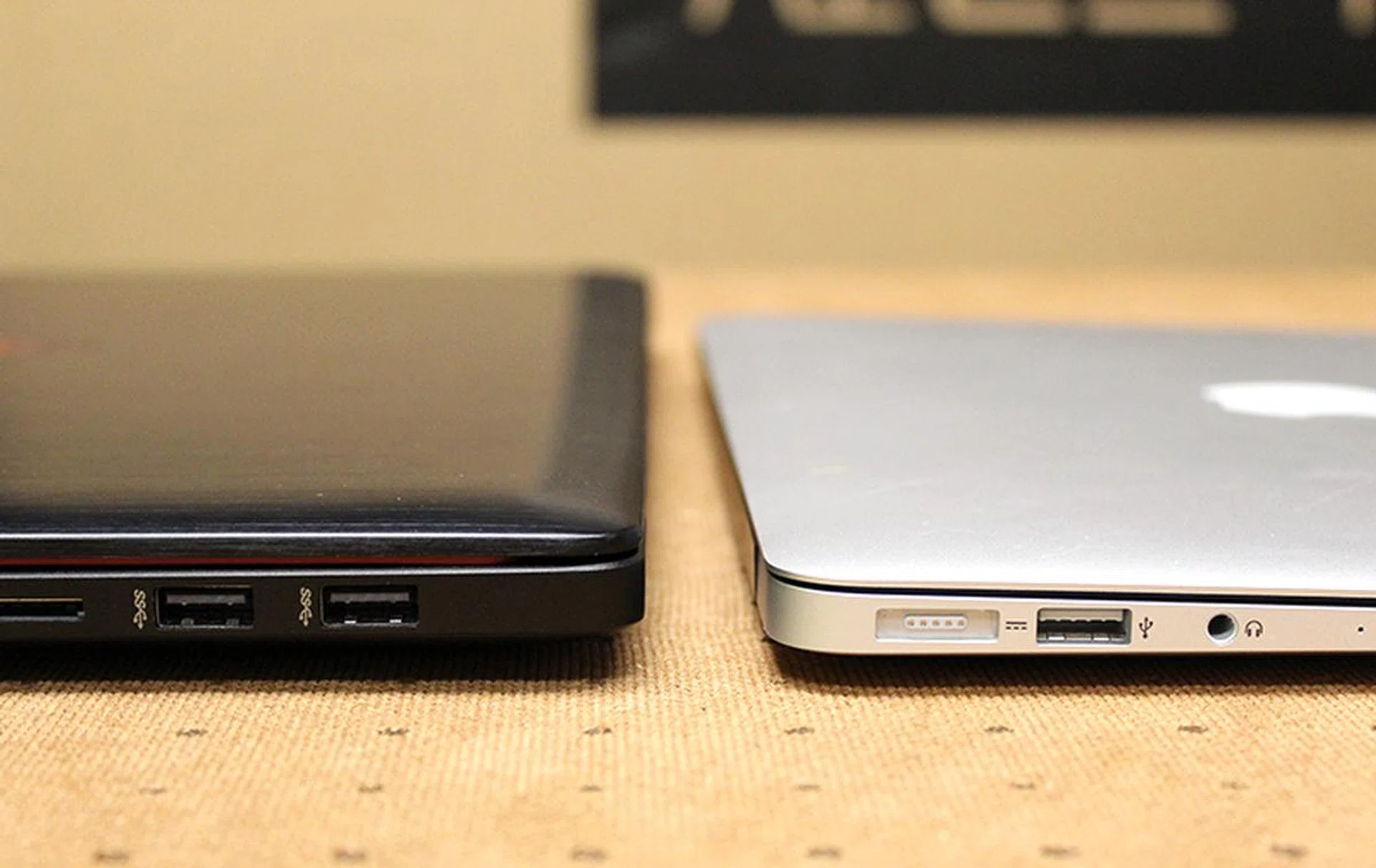
The ROG G501 isn't all that much thicker than a MacBook Air.
Fortunately, the ROG G501 redeems itself with its ultra-high resolution display. The 15.6-inch display supports 4K resolution, which means a native screen resolution of 3,840 x 2,160 pixels. If you do the math that’s over four times as many pixels as Full-HD (1,920 x 1,080 pixels). And on a 15.6-inch display, that means a pixel density count of 282 pixels per inch, which means text and images look incredibly sharp and smooth, most of the time. I say “most of the time” because Windows 8, up till now, still has incredibly iffy support for ultra-high resolution displays. For the most parts, everything is rendered as it should, but there are certain menus and applications that still run into trouble and end up looking fuzzy. Windows 10, which is available now as a free update for many systems, should rectify this problem. Sharpness aside, we had no problems with its brightness or viewing angles, but contrast is a little lacking so the display tends to look a little soft and lacks punch.
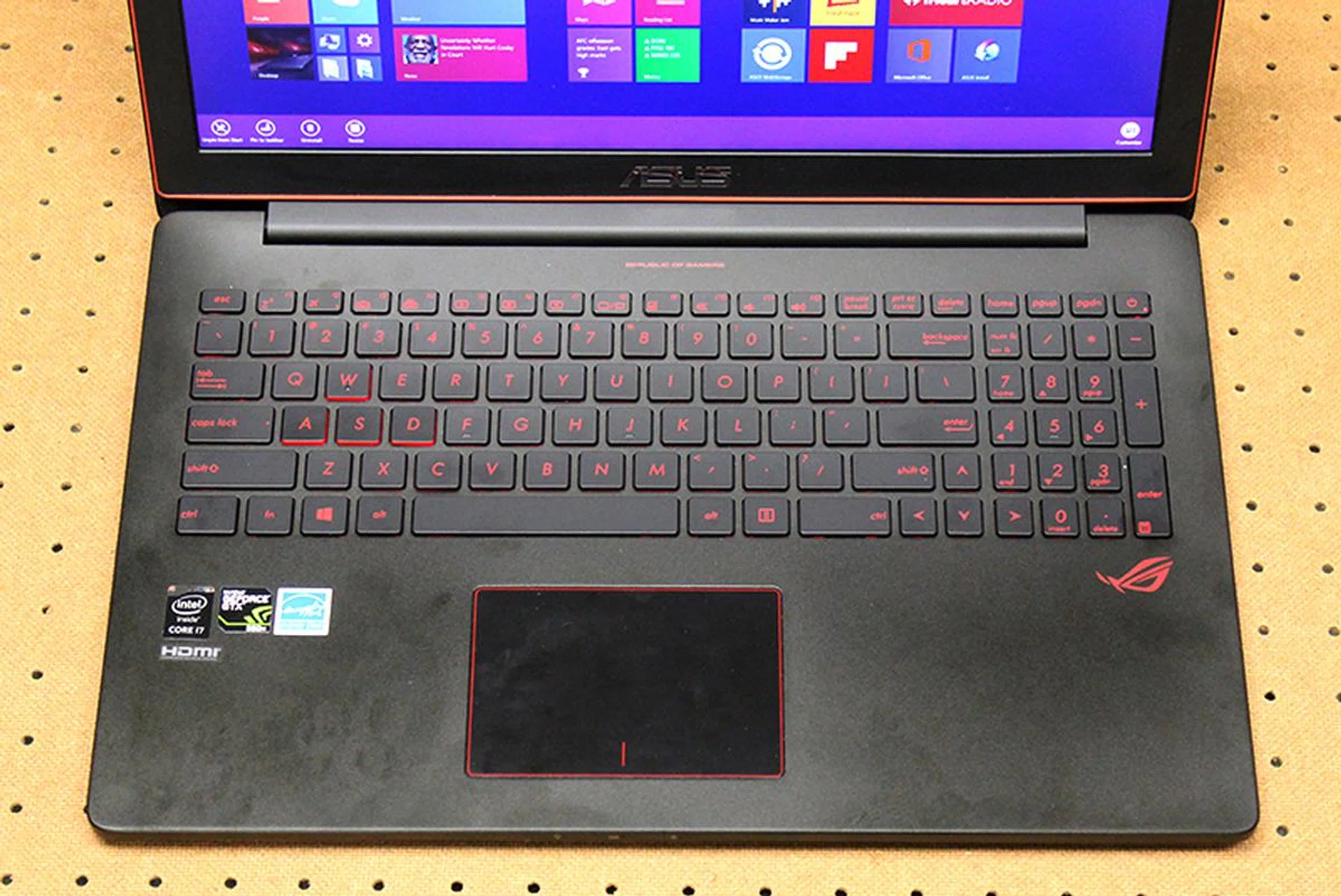
We wished that ASUS would have given the ROG G501 macro keys as they can come in handy in certain games.

The "WASD" keys are specially highlighted with bolder red accents. The red back lights are sadly non-customizable.
In keeping with the traditional ROG color scheme of red and black, the keyboards have red accents as well as non-customizable red black lights. The “WASD” keys are also specially marked for quick identification. And according to ASUS, the keys have up to 1.6mm of travel and this feels about right. Unfortunately, they feel just a tad too mushy, and I would have preferred it if ASUS upped the actuation force by a little.
Still, this is only a minor gripe. What’s conspicuously missing is macro keys of any sort. Macro keys let users map commands for quick execution and it is a nifty feature that is becoming increasing popular on most gaming notebooks these days. Even smaller 13-inch notebooks like the recently reviewed Aorus X3 Plus V3 have macro keys so there’s really no excuse for them to be missing on the ROG G501.
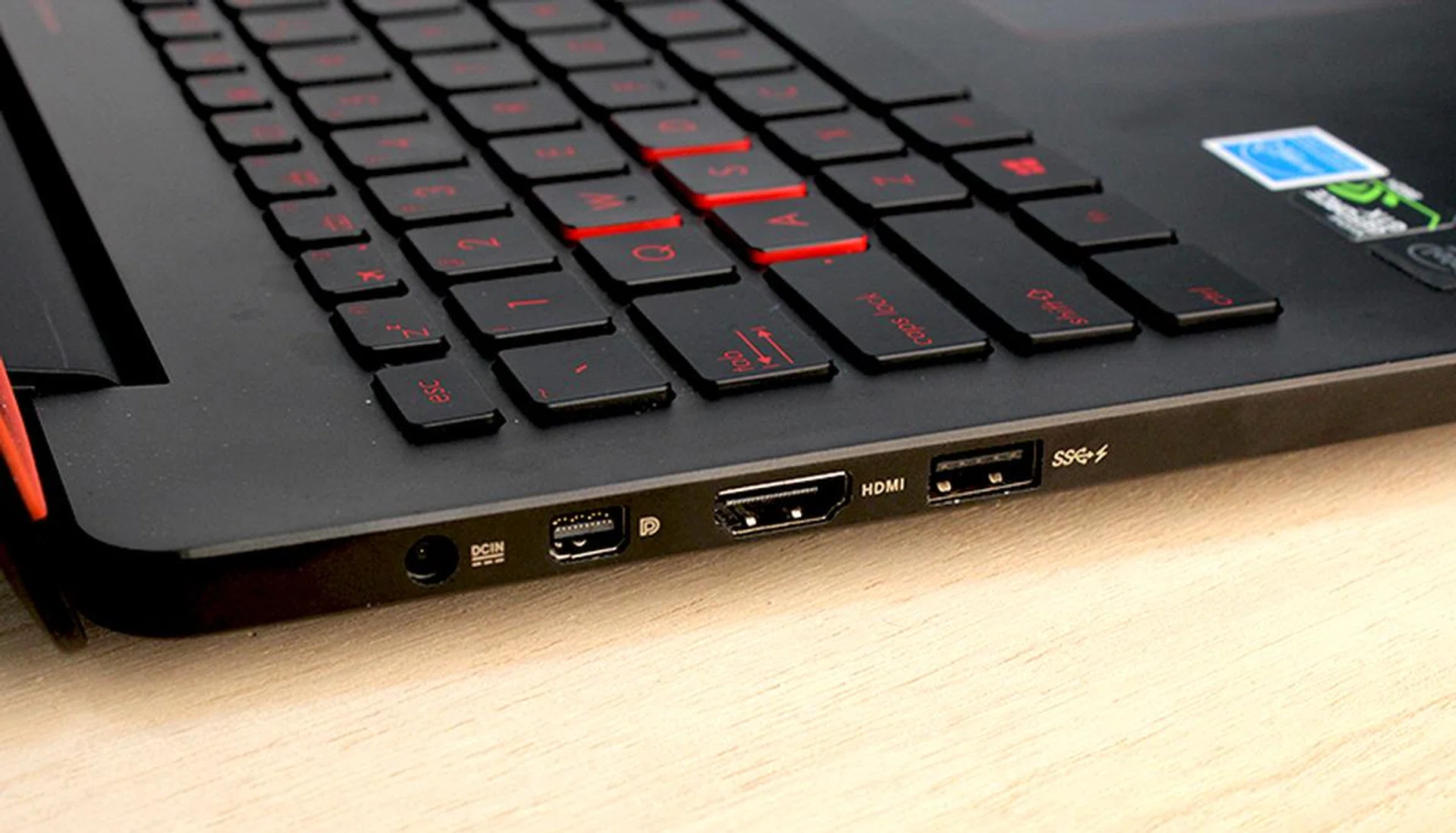
On the left, users can find the DC-in jack, Mini-DisplayPort, HDMI port and a single USB 3.0 port.
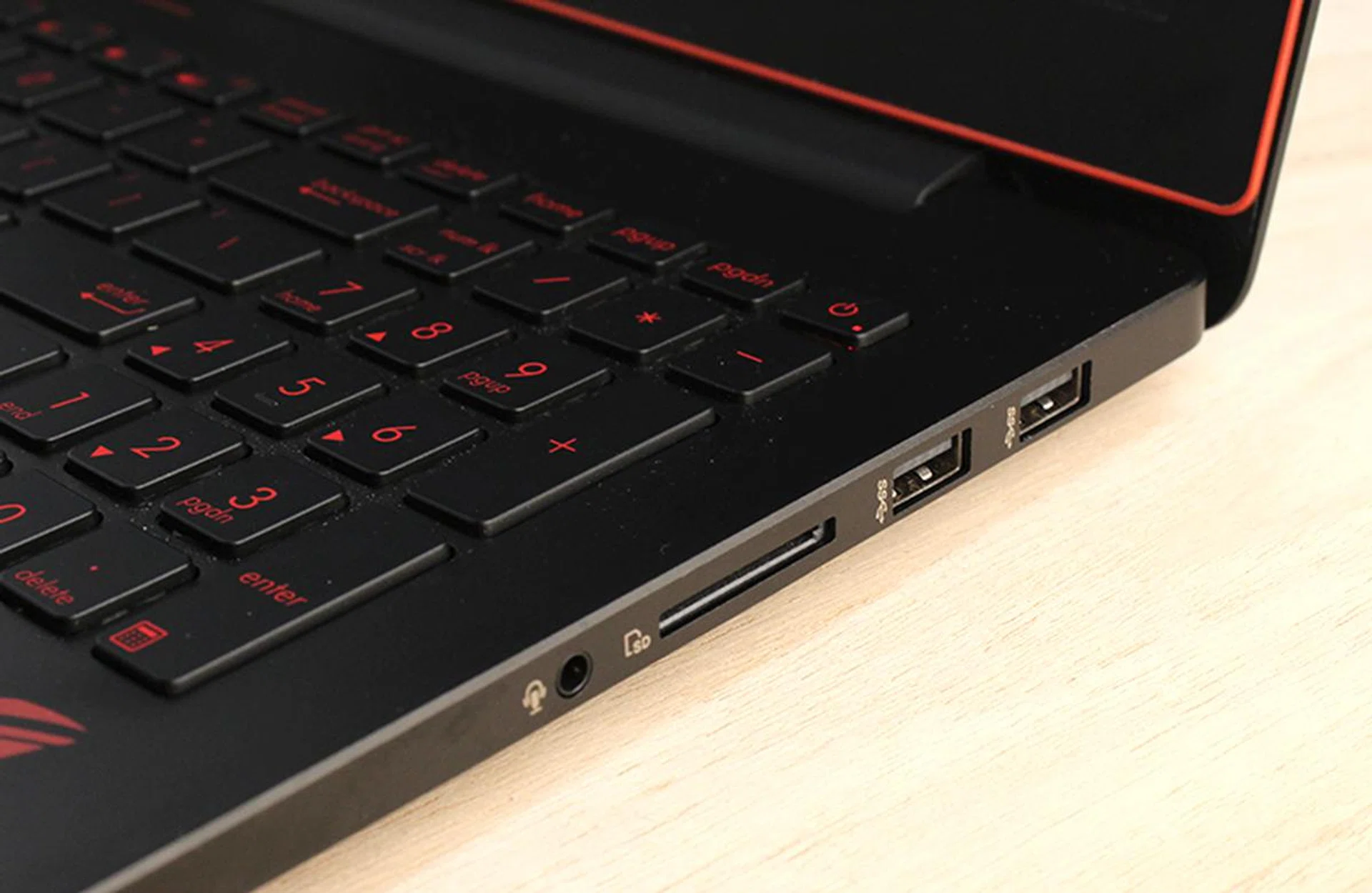
On the right side of the ROG G501 are another two USB 3.0 ports, an SD card reader slot, and the 3.5mm audio combo jack.
In terms of connectivity, the ROG G501 has got most bases covered. There are three USB 3.0 ports in total and video output comes in the form of an HDMI port and a mini-DisplayPort. There’s also the usual 3.5mm audio jack and SD card reader. The ROG G501 also has an Intel Wireless-AC 7260 adapter which means it supports the latest 802.11ac wireless standard (2x2 streams and up to 867Mbps) and Bluetooth 4.0. Unfortunately, there's no Ethernet jack, but ASUS does provide a USB to Ethernet adapter.
The ROG G501 has two stereo speakers and MaxxAudio technology and an ROG feature called ROG AudioWizard that lets you select modes to best suit your usage needs. Unfortunately, no matter how much we tried to tune and tweak the audio settings, the ROG G501 still came off sounding weak and detached. Volume is not an issue, but the sound lacks any sort of body and bass and sounds tired and thin. Best stick to your speakers and headphones.
Performance Benchmarking
We have tested the ASUS ROG G501 using our usual suite of benchmarking utilities and games. For comparison, we will be including results from other 15-inch machines such as the Aftershock W15 and SM-15. And to see how the GeForce GTX 960M fares against the heavy hitters, we have included results of the ASUS ROG G751 and Gigabyte P35X V3, which are equipped with the NVIDIA GeForce GTX 970M and GTX 980M respectively.
Here is the list of benchmarks and games used for testing:
- PC Mark 8
- 3D Mark 2013
- Tomb Raider
- Middle Earth: Shadow of Mordor
And here are how the notebooks stack up against each other.
[hwzcompare]
[products=515610,495400,497090,490921,485575]
[width=275]
[caption=Test Notebooks Compared]
[showprices=0]
[/hwzcompare]
PCMark 8
Despite having a slightly quicker processor than the HP Omen, the ASUS ROG G501’s scores on PCMark 8 is best described as erratic, especially on the “Work” scenario where it managed just 3315 points - some 27% behind the HP Omen. Then again, the Gigabyte P35X V3 also had problems with this particular scenario and its specifications are also very similar to the HP Omen. On a whole, the ASUS ROG G501 consistently trailed the HP Omen and this should not be the case. If it’s any consolation, PCMark 8 is only a synthetic benchmark.
3D Mark 2013
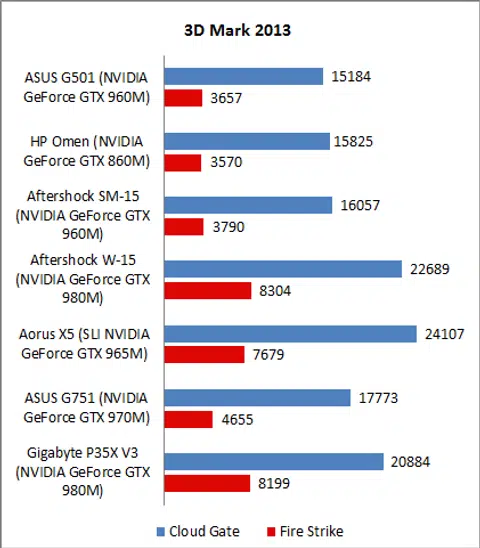
Again, despite the faster clocked GeForce GTX 960M mobile GPU in the ASUS ROG G501, it was not convincingly quicker than the HP Omen. The ASUS ROG G501’s scores were also slightly behind that of the Aftershock SM-15 - by around 4% - which is also powered by an NVIDIA GeForce GTX 960M mobile GPU. The top performing machines here were the Aftershock W-15, thanks to its powerful desktop-class CPU and GeForce GTX 980M mobile GPU; and also the Aorus X5, no doubt because of its twin GeForce GTX 965M mobile GPUs in SLI.
Tomb Raider
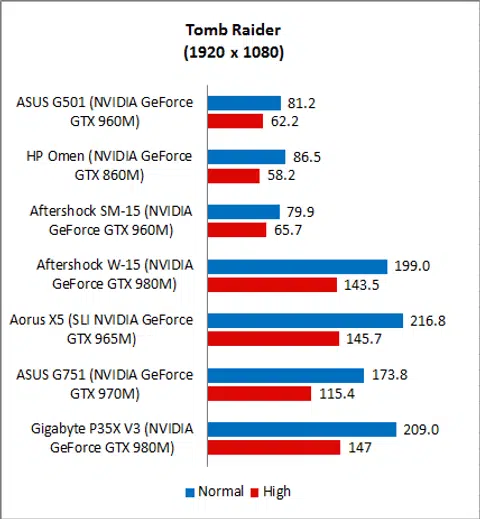
On to real world game benchmarks and the ASUS ROG G501 could not post a convincing win over the HP Omen. Their frame rates on Tomb Raider were very comparable, with the HP machine taking a 6% lead on “Normal” settings and the the ASUS machine taking a 7% lead on “High” settings. Scores between the ASUS ROG G501 and the similarly equipped Aftershock SM-15 were also very close.
However, the important thing to note here is the gulf in performance between the GeForce GTX 960M and the GeForce GTX 970M. The ASUS ROG G751, which is powered by the latter, was over twice as quick on “Normal” and a whopping 85% faster on “High”.
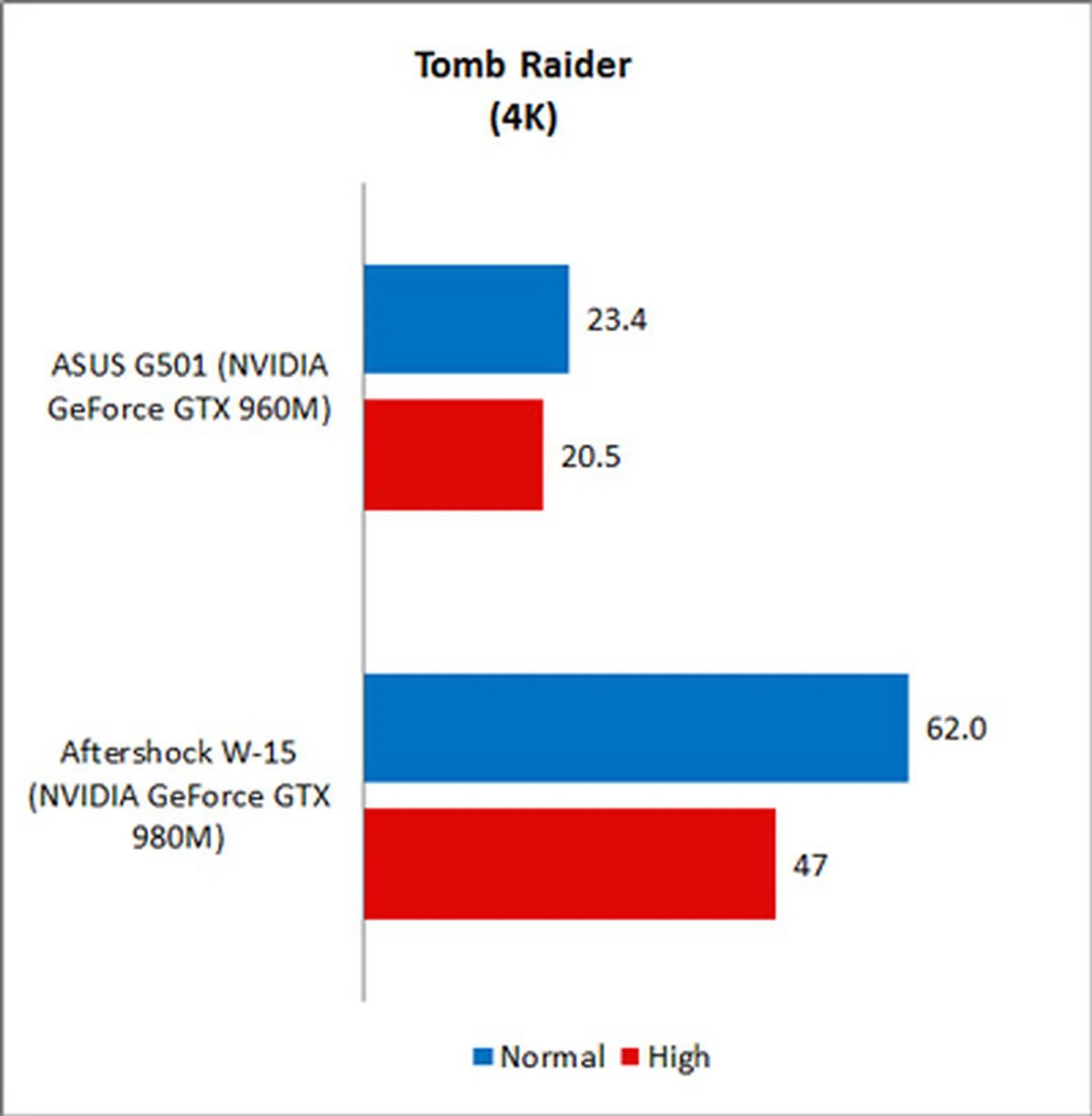
Finally, looking at 4K gaming performance, it is clear that the GeForce GTX 960M is not quite up to snuff. At 4K resolution, the ASUS ROG G501 managed just 23.4fps on “Normal”. The GeForce GTX 980M in the Aftershock W-15, however, was more than capable, posting well above 30fps on both settings levels.
Shadow of Mordor
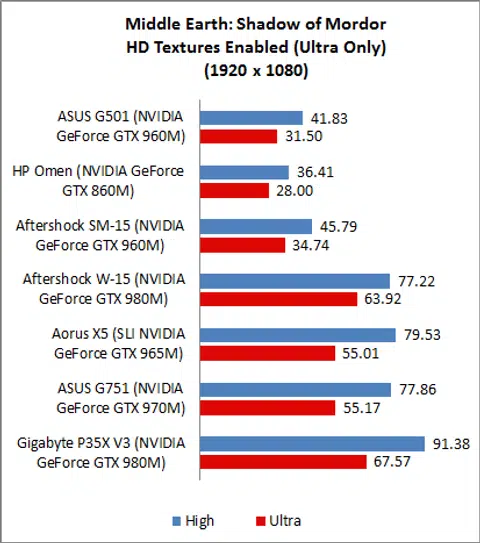
On Shadow of Mordor, the ASUS ROG G501 posted significant leads over the HP Omen and was about 11% quicker overall across the two settings. However, the ROG G501 trailed the Aftershock SM-15 by around 9%. Again, the gulf in performance between the GeForce GTX 960M and the GeForce GTX 970M is clear to see. Overall, the ASUS ROG G751 was around 80% faster than the ROG G501.
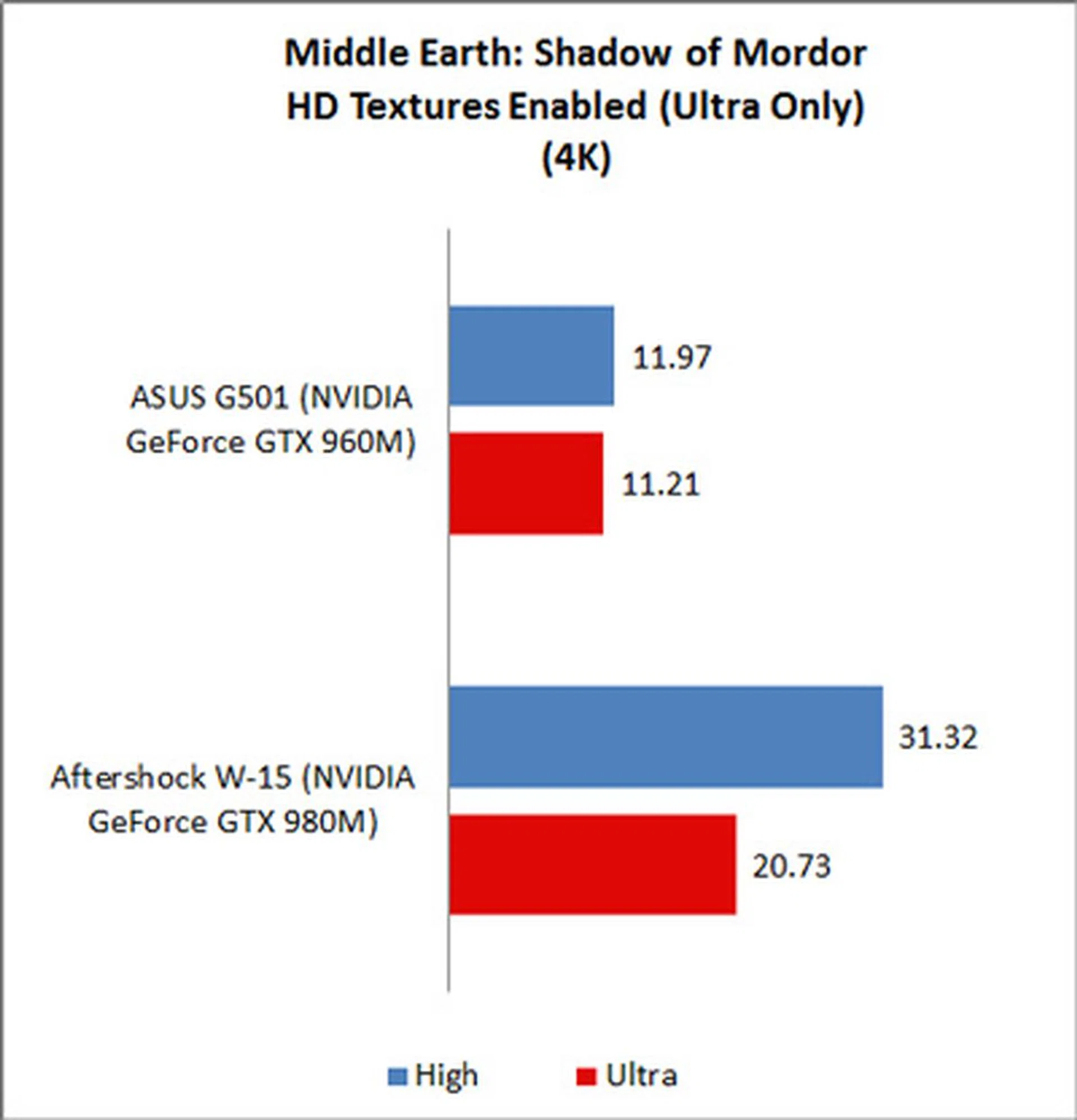
Expectedly, given the intensity of Shadow of Mordor, 4K gaming performance of the ROG G501 was dismal as it managed just around 11fps. It wasn’t much better for the Aftershock W-15 and its GeForce GTX 980M and it barely managed 31fps on “High” settings.
Temperature
The ASUS ROG G501 features ASUS’ Hyper Cool technology which includes dual independent fans and copper heatsinks for better cooling performance. The idea is to quickly draw heat away from the keyboard area (where the CPU and GPU typically reside) so that gamers can play more comfortably.
In our tests, we found that the ROG G501’s GPU-Z temperature was on the high side. At 79 degrees Celsius, this means that the ROG G501 is over 12% warmer than the 15-inch HP Omen and Aftershock SM-15. Even so, the ROG G501 recorded the lowest surface temperatures on average, but then the other two competing 15-inch notebooks were only just very slightly warmer. The Gigabyte P35X V3 recorded the highest temperatures as it crams a high performance GeForce GTX 980M mobile GPU into a chassis that's only about 21mm thick.
Battery Life & Power Consumption
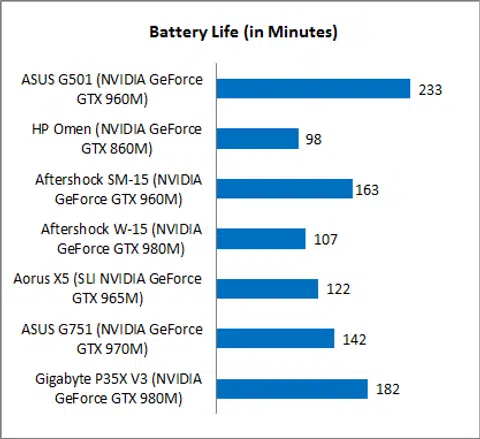
The ASUS ROG G501’s battery life was 233 minutes, which is very nearly 4 hours and impressive for a gaming notebook. Even the second placed Gigabyte P35X V3 was nearly an hour behind. The reason for the ROG G501’s amazing battery life can be attributed to the size of its battery, which is a whopping 96Wh - even greater than that of the ASUS ROG G751 which is a larger 17-inch notebook.
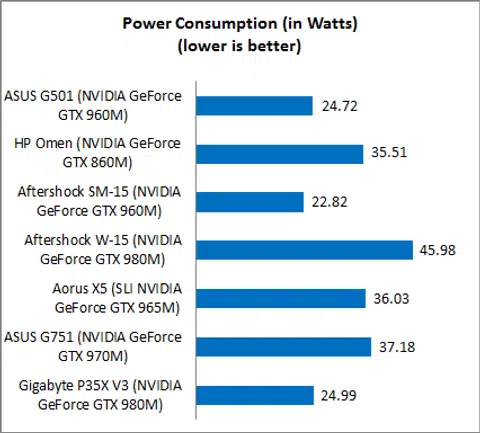
Diving deeper, we can see that its power consumption was measured at 24.72W, which is over 30% better than the HP Omen, but over 9% more than the Aftershock SM-15.
Portability Index
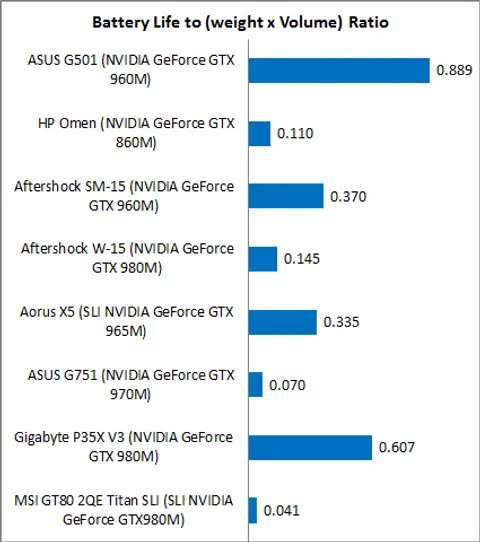
Our Portability Index factors in battery life, weight and volume so you can see which notebook is the most worthwhile to carry around. And bearing in mind the ASUS ROG G501’s slim dimensions, manageable weight and long battery, is it any wonder that it scored the highest amongst all the gaming notebooks? Its ratio of 0.889 is over twice as good as the HP Omen and Aftershock SM-15, and only the thin and light Gigabyte P35X V3 came close to challenging it.
A Handsome Gaming Machine
It has taken a long time but ASUS’ ultra slim and light 4K gaming machine is finally upon us. The unfortunate thing is that by now, 4K gaming machines are not so much of a novelty anymore. Local custom notebook specialists Aftershock can spec 4K displays on most of their 15-inch notebooks and so can Alienware. Even Lenovo has a 4K gaming notebook out now. As a result, ASUS blew their chance to be one of the first 4K gaming notebooks in the market.
Fortunately, it doesn’t really matter that much because the sad fact is that the ASUS ROG G501 is barely capable of 4K gaming. Even on our older test game of Tomb Raider, the ROG G501 only managed around 20fps, which is far from the playable threshold of 30fps. That said, actual gaming performance is decent for a notebook with its specifications and certainly inline with other notebooks of comparable specifications, such as the HP Omen and Aftershock SM-15. Even so, it does not disguise the fact that there are far more capable 15-inch gaming machines around. The Aftershock W-15, Aorus X5 and Gigabyte P35X V3 are fine examples.
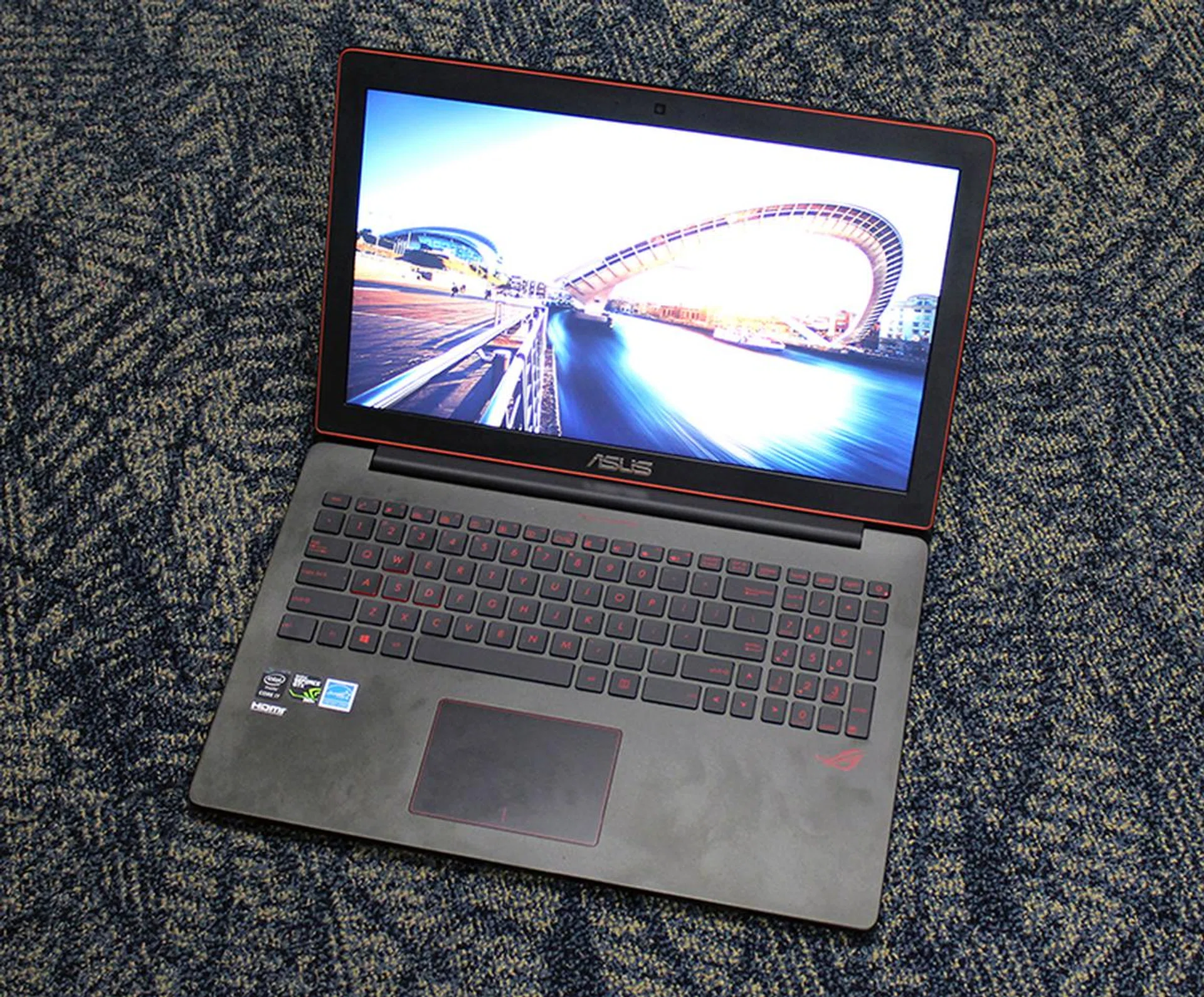
Having a 4K display is nice and all, but unfortunately the GeForce GTX 960M is not quite up to task for driving it for games.
Clearly, performance is not one of the ASUS ROG G501’s strong suits, and picking this notebook for its gaming prowess would be like buying a Lamborghini for its ability to transport goods. Where the ASUS ROG G501 excels is its portability. At just slightly over 20mm thick and weighing just 2kg, the ROG G501 is incredibly light for a 15-inch gaming machine. Furthermore, it has an extremely large capacity battery which gives it a long battery life, therefore making it a viable portable gamer. "Portability" and "Gaming" don't normally go together, but the ASUS ROG G501 is the perfect example of an execption to the norm.
Our buying advice
With its 4K display and slim dimensions, you would expect to pay a premium but the ASUS ROG G501 is actually quite decently priced with prices beginning at S$2,698. Our model, which is the highest spec’ed one with a 512GB PCIe-based SSD is S$2,898. A HP Omen with similar specifications and storage capacity will set you back over S$3200. That said, there are more affordable machines that offer similar gaming performance such as the Aftershock SM-15 - the exact tested model and whose results we have included in the page before retails at S$1,812. The tradeoff is that the SM-15 is no where near as thin and light as the ROG G501.
But if you really want a 15-inch gaming notebook capable of 4K gaming, our pick would be the Aftershock W-15. With its powerful desktop CPU and NVIDIA GeForce GTX 980M mobile GPU, it can serve up playable frame rates on some titles at 4K resolution. But note that at over S$3300, it costs considerably more than even our top-spec ROG G501. There's the Alienware 15 too, but with a 4K display and similar specifications, that too will set you over S$3300. However, neither of these options are portable and are more suitable as desktop replacement machines.
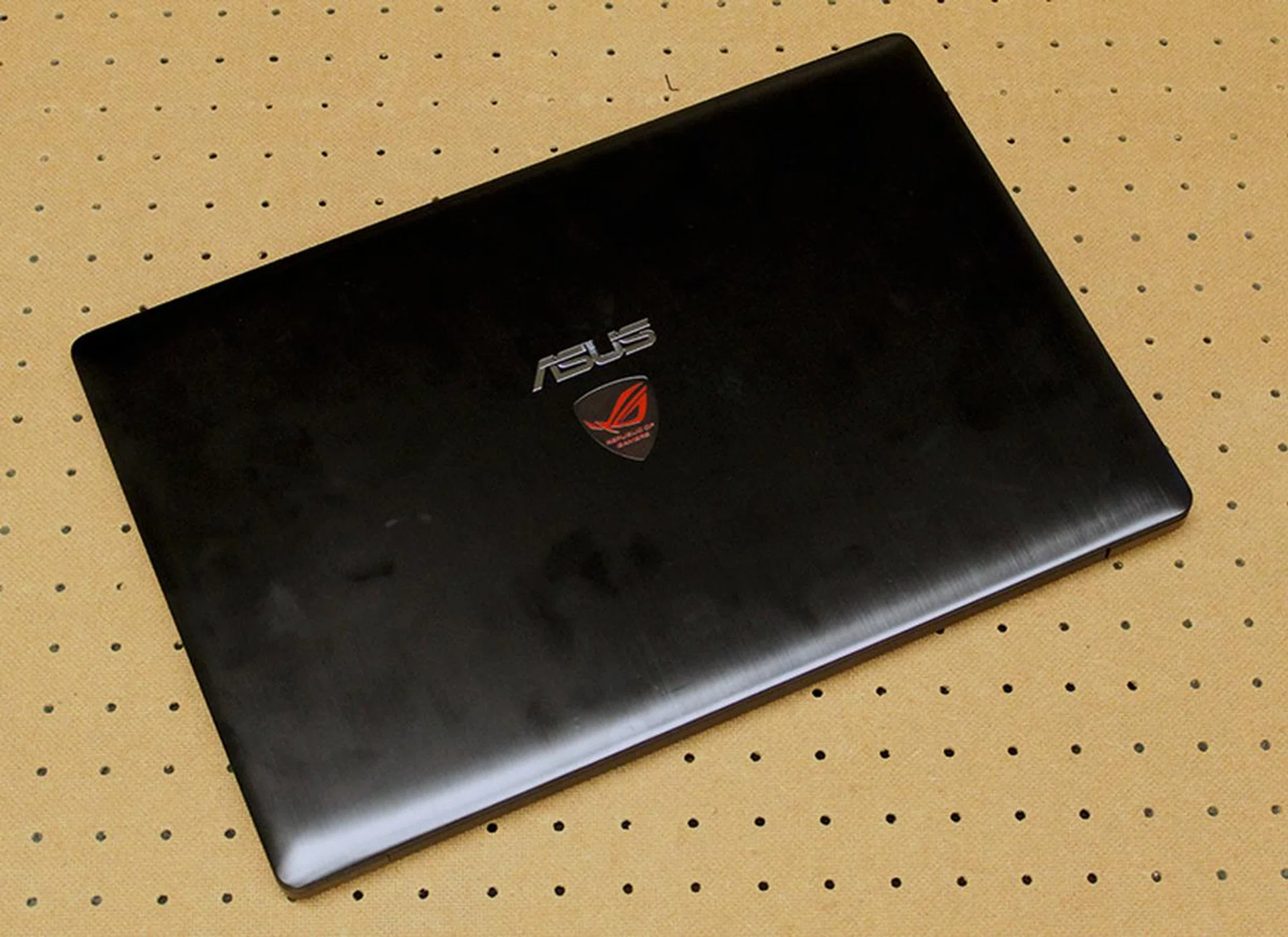
Buy it only if you really love that ROG badge.
Interestingly, ASUS has another notebook with eerily similar specifications to the ROG G501 and that is the ZenBook UX501. Like the ROG G501, it measures around 20mm thick and weighs around the same at 2kg. It also has a quad-core Core i7 processor, GeForce GTX 960M mobile GPU and a 4K display as an option (the base model comes with a Full HD screen). The only difference is that comes with 8GB of RAM as standard and there’s no option for a PCIe-based SSD (but it does use a SATA SSD). If you can live with that , then ZenBook UX501 is worth your consideration as it is much more affordable with prices beginning from S$2,198.
All things considered, the ASUS ROG G501 is not a compelling buy even if it offers decent performance. Its unique selling point of a 4K display is no longer as fresh and as attractive, and even so, it fails to provide a decent 4K gaming experience. It is certainly extremely slim and light for a gaming notebook, but then ASUS also has a more affordable alternative in the ZenBook UX501, which is similar to the ROG 501 in so many ways that we like to think of it as a ROG G501 with a smart suit on. At the end of the day, buy it if you really appreciate ASUS and love the ROG branding. And if you do, opt for the highest spec'ed model with 512GB of PCIe-based SSD storage as its only a S$200 premium over the entry-level model.
Our articles may contain affiliate links. If you buy through these links, we may earn a small commission.