
HP Omen: HP's first stab at the gaming notebook market
With HP trying to re-enter the lucrative premium gaming notebook market, does the Omen spell doom for its competitors? We spent some time evaluating their gorgeous new Omen gaming notebook and we tell you how it fares along with design details you wouldn't have expected from a gaming notebook.

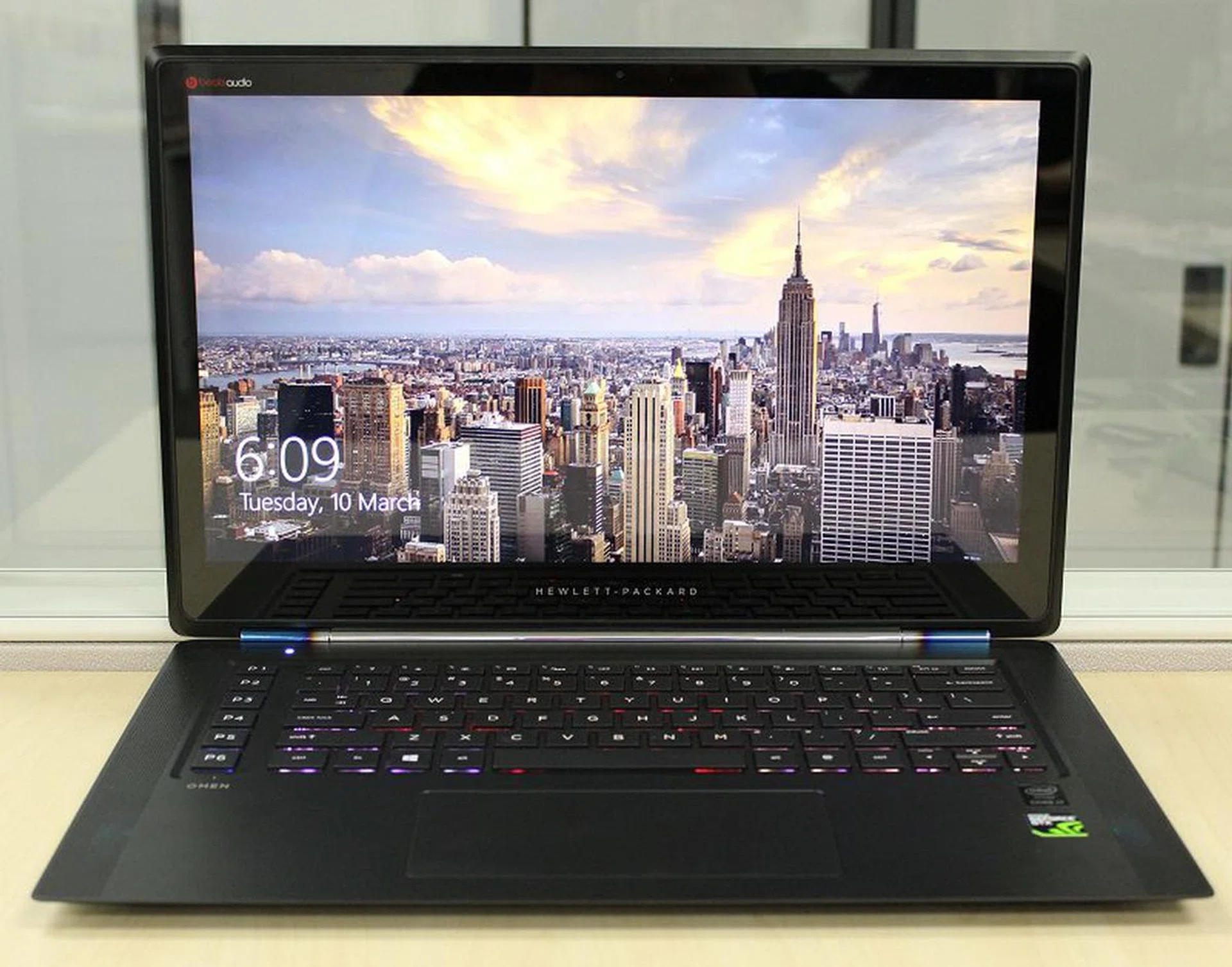
Shiny, sleek and sexy. Does the HP Omen have what it takes to hang with the big boys?
The Overview
In the past year or so, we have seen a resurgence in gaming notebooks and just about every major PC manufacturer has its own line of specialized gaming notebooks now. Dell has their Alienware line, ASUS has their ROG line and now, HP has their Omen. Of course, the moniker Omen isn't exactly new. Parallel to Dell's purchase of Alienware, HP too purchased a custom premium gaming PC manufacturer called VoodooPC. And back in the day, VoodooPC had a desktop PC called the Omen. While the new Omen isn't a desktop, the fact that HP is using the same name suggests that they're banking on brand recognition, which means that the Omen line is back in business. Will it stick around long enough to be a major contender or will its first outing be its last?
The Hardware
The new Omen is nothing like its distant desktop ancestor. It's a sleek black gaming laptop, with smooth edges and a very angular design. Its 15.6-inch Full HD (1,920 x 1,080 pixels resolution) IPS display packs a hidden surprise for gaming notebooks; it's a touchscreen, which is a rarity among gaming machines. In fact, it's the first gaming laptop we've reviewed this year that has a touchscreen. It's running on Windows 8.1 and under the hood, the HP Omen is powered by a NVIDIA GeForce GTX 860M with 2GB GDDR5 of framebuffer, with an Intel Core i7-4710 processor (2.5GHz, 6MB cache), 8 GB RAM and 128GB SATA SSD storage. The HP Omen also uses a Intel Dual-Band Wireless AC7260 card (2x2) for Wi-Fi connectivity, as well as Bluetooth 4.0.
On the audio side of things, it has two Beats Audio speakers, set into the base on the left and right though we felt the performance from them was a bit lacking, with tinny sound and unsatisfying bass when we tried the new Battlefield Hardline beta on the machine.
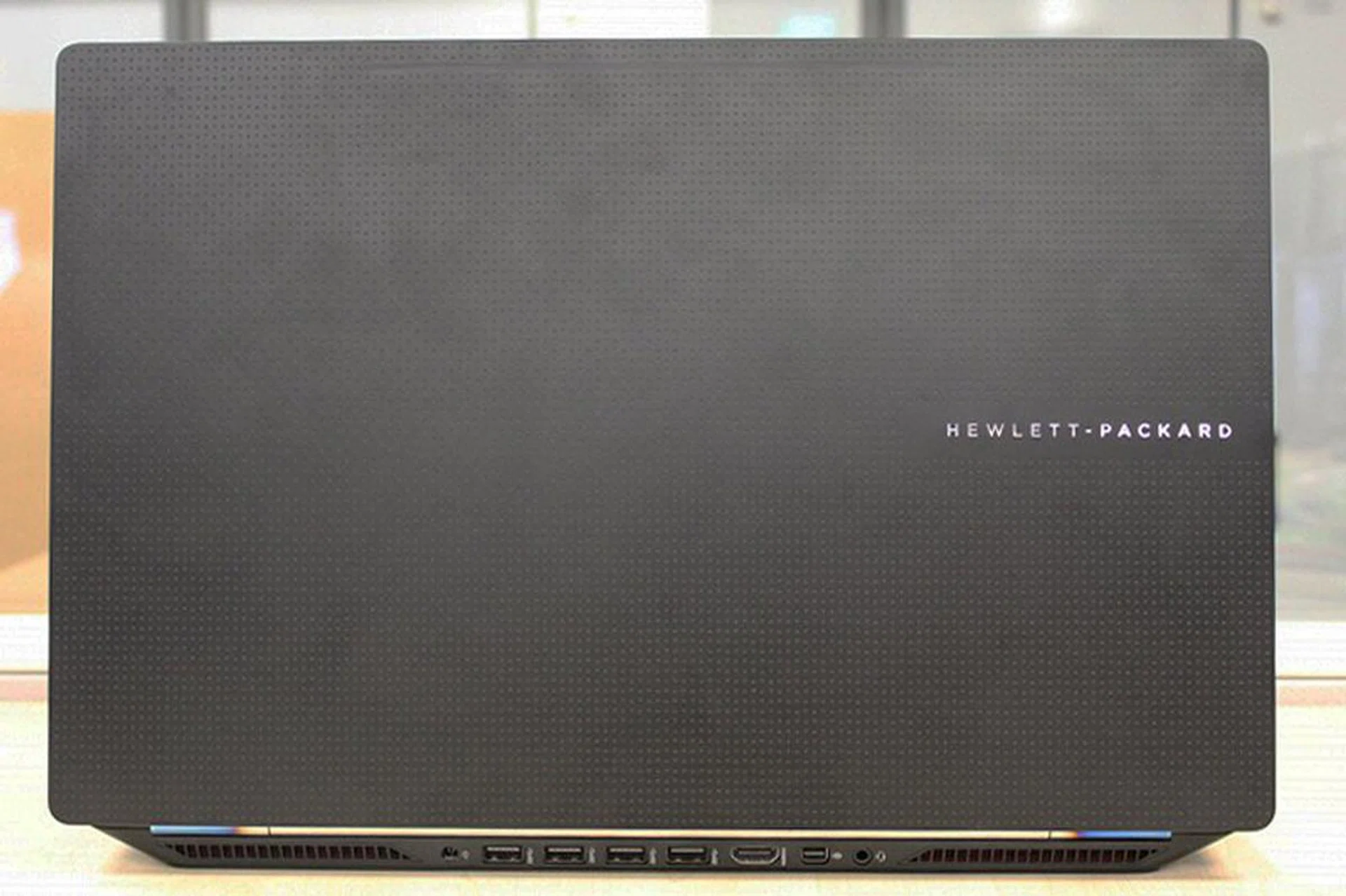
The aluminium chassis of the HP Omen gives it a nice classy look, even from behind.
Unlike most notebooks, which go for a smooth finish, the HP Omen's is textured with teeny squares, to give it a bumpy texture as you run your hand over it.The bumpy texture also makes it easier to grip, with the added benefit of making it look unique. The HP Omen's not a large machine either as you would normally associate with gaming notebooks. In fact, it looks more like an Ultrabook than a hardcore gaming machine. It measures just under 2cm thick, and comes in at 2.19kg. Though it is slightly slightly heavier than the sub-2kg MSI GS60 2PE Ghost Pro, we can forgive it because its entire chassis is crafted out of aluminum. As a result of this, it feels extremely solid and has a premium feel that is unmatched by its rivals.
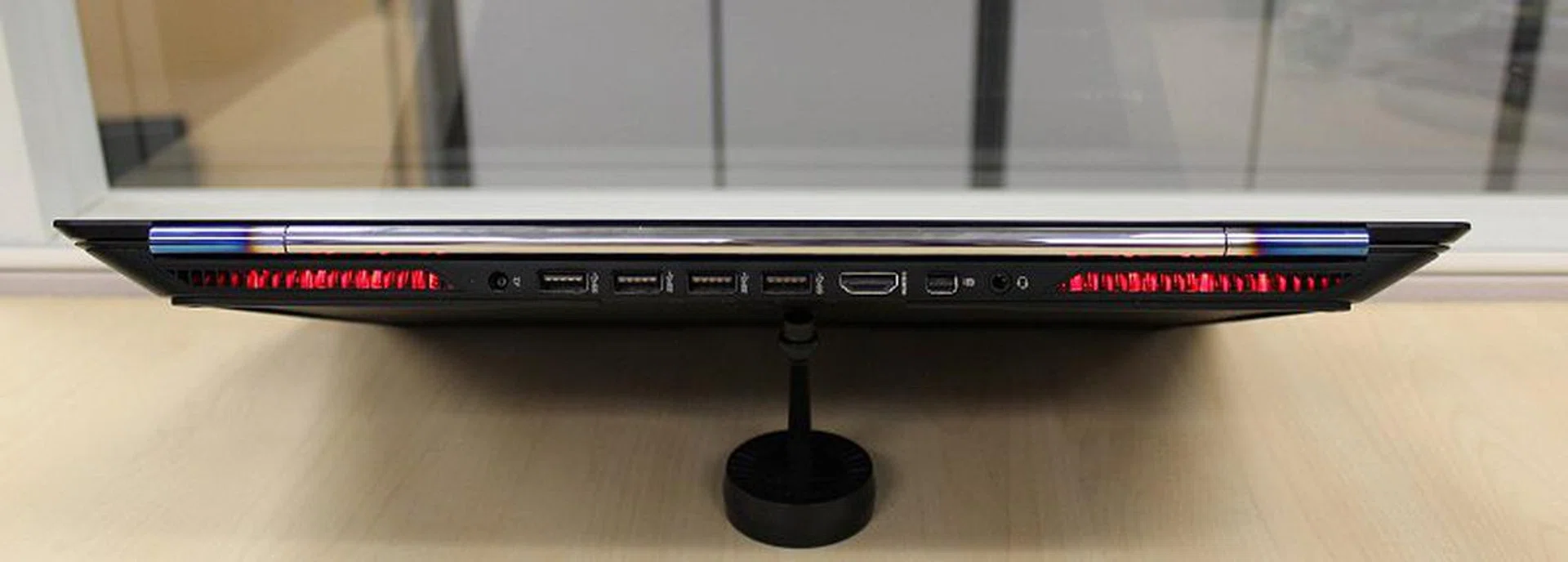
Other than the SD card slot that's on the right side of the machine, surprsingnly, all the other I/O connectivity such as the USB 3.0 ports, HDMI, mini-DisplayPort and the audio jacks are on the back of the machine.
We've said in numerous reviews that we would prefer our USB ports to be at the sides for easy access. Imagine our horror when we saw that all the ports on the HP Omen were at the back. We figured that it was because of the aggressively slanted side profile design which made installation of ports at the sides rather hard, if not outright impossible. Given the notebook's priority in having a great design, we concede that HP probably made the best out of the situation but it still annoyed us that we had to completely turn the machine around (or fumble blindly for the ports at the rear) every single time we wanted to to plug in (or out) a USB device. Despite the annoyance, this decision has enabled HP to design a really swell looking product that has a very uniform appearance at most angles.
If there's one thing the HP Omen does very well, it's the aesthetics. The stylish (and subdued) red lighting that emanates from its rear exhausts is a far cry from the garish lighting on some of the notebooks we've reviewed. The metal bar that serves as a hinge is also unique in that its sides are discolored, reminding us of the burnt titanium exhaust tips that is often seen on high-end aftermarket exhaust systems for exotic supercars. Petrolheads are sure to love this detail.
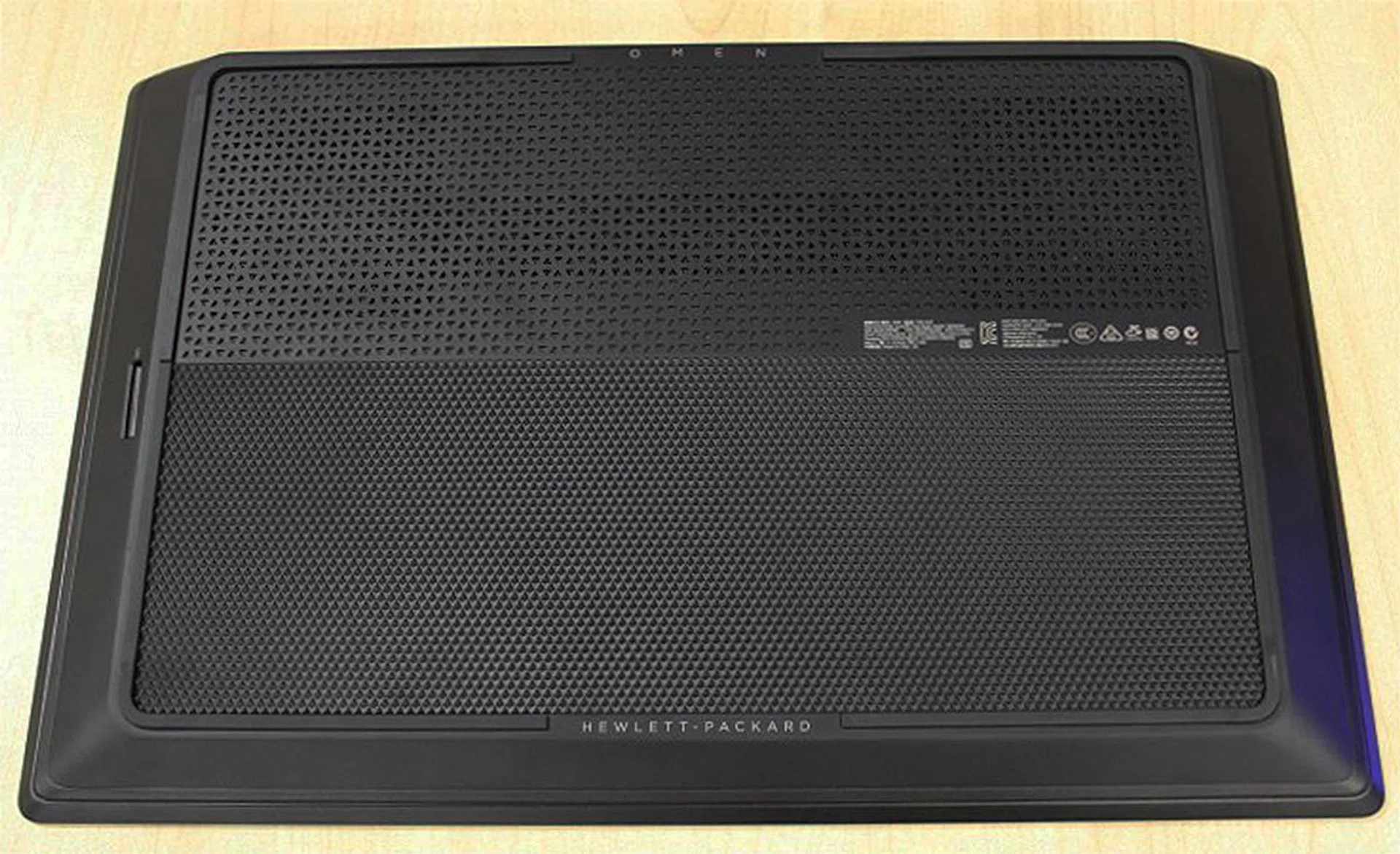
Despite the fact that the bottom will never get much attention, HP didn't skimp out on the design details.
The textured scheme HP has going for it even extends underneath the notebook. Despite there being no reason for anybody to look underneath (the HP Omen isn't upgradable), HP still went ahead and designed a great looking shell all around. Here's a close look at the texture in case anybody is curious:-
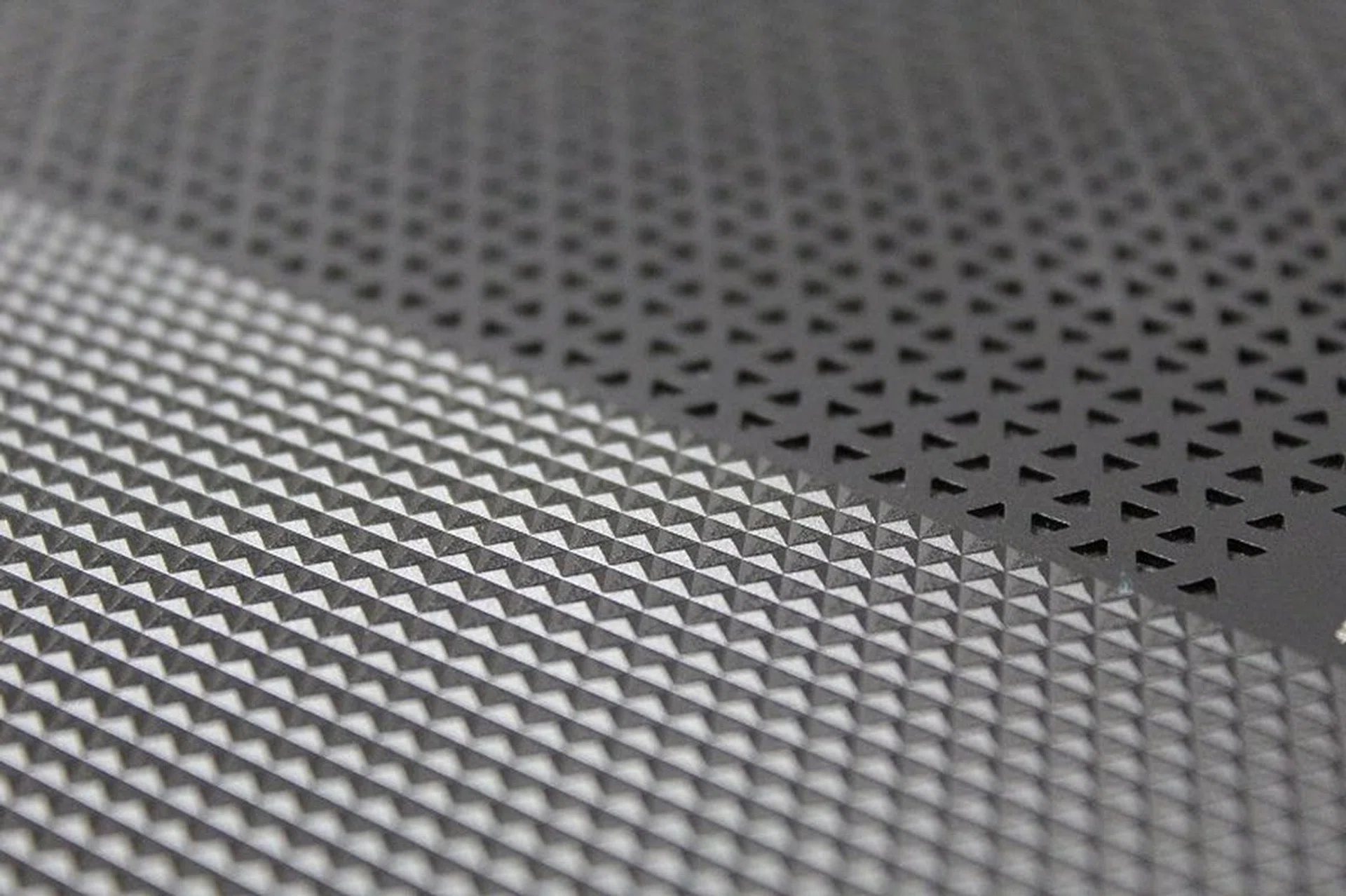
A close-up of the textured chassis. This shot is taken from underside of the notebook, near the middle.
Like nearly every other recent gaming notebook in the market, the HP Omen uses a conventional chiclet keyboard, with the usual array of keys, though it lacks a numpad. The keyboard is set in a depression in the chassis, though we didn't notice much (if any) difference from a regular chiclet keyboard. As such, it shares the downfall of all chiclet mobile keyboards, namely they're too shallow and aren't great for typing or gaming. The notebook also has shortcut keys at the sides which are customizable, similar to the the designs found on the Aorus or Gigabyte machines.
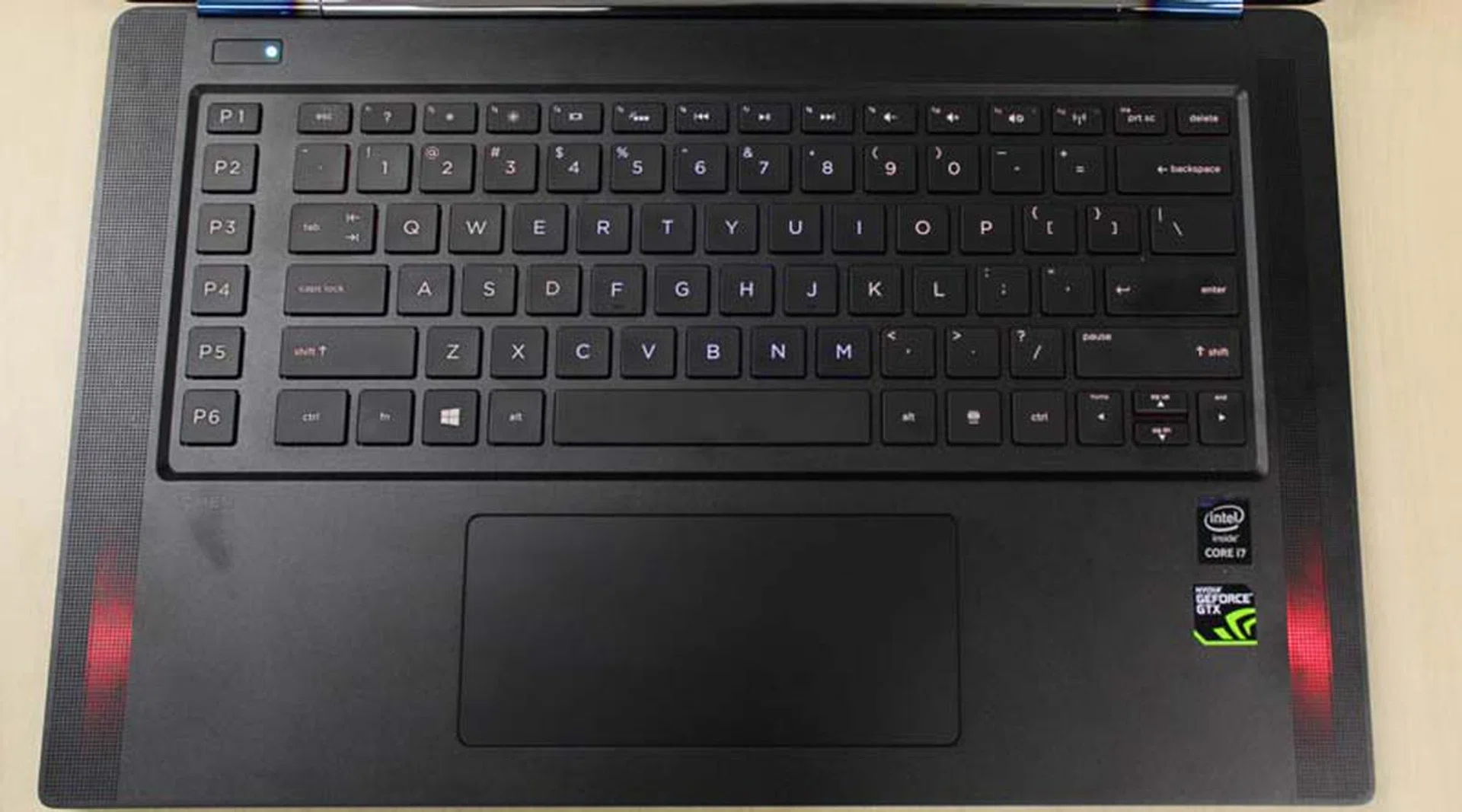
The backlighting isn't that strong. In this shot, it's actually turned on, but you can barely make out the red tint to the keys.
HP's machine has one of the more robust customization suites we've ever seen for a notebook. You can customize the colors of the keyboard backlights (which are divided into various sections), but you can also customize other lighting options such as the power button and the speakers with any color you want. All of this is done with an intuitive software that just has you clicking your preferred color and its location.
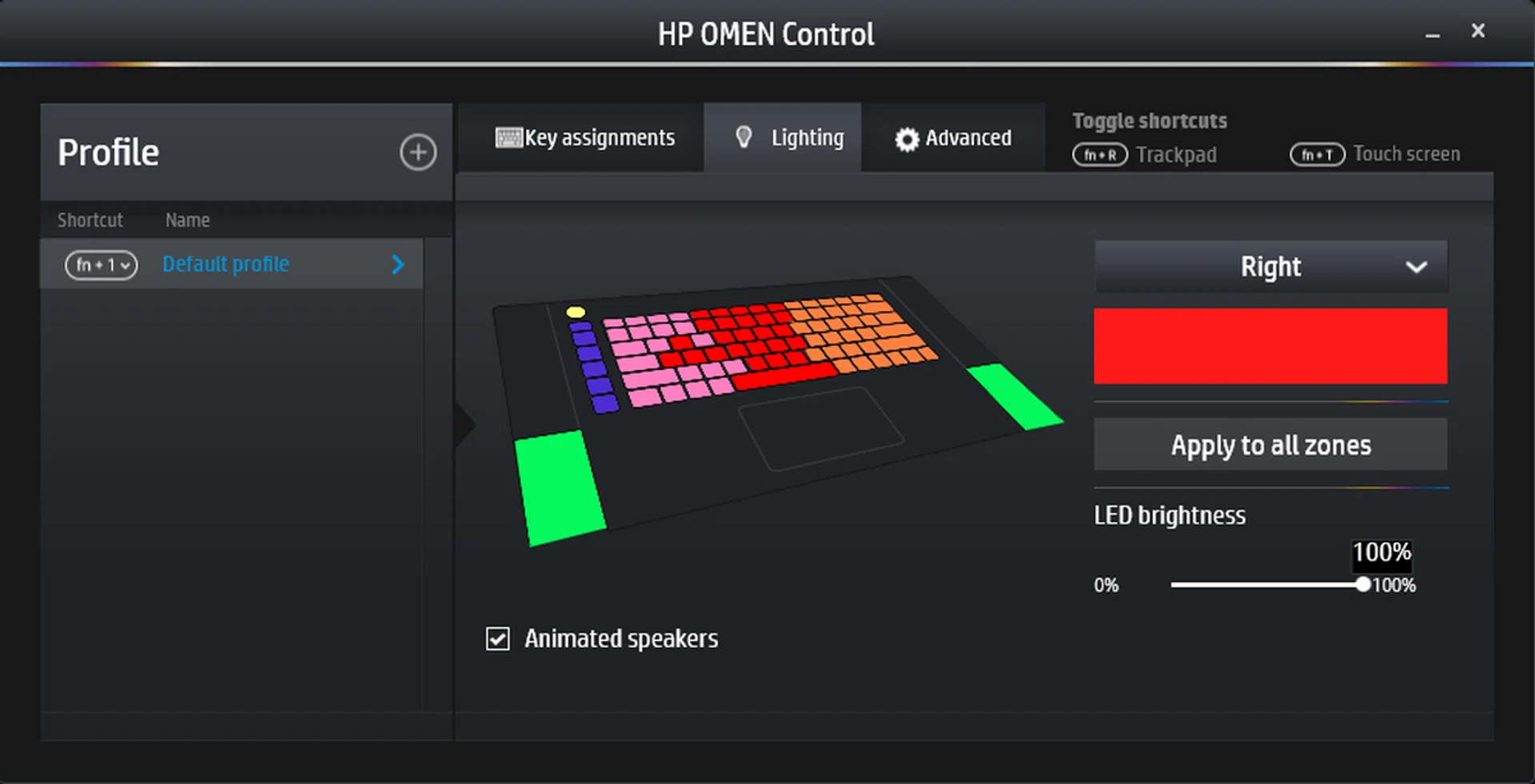
Each color represents an area where you can customize the backlights. Note that the speakers can only be customized as a pair, but we'll respect that limitation for uniformity in appearance.
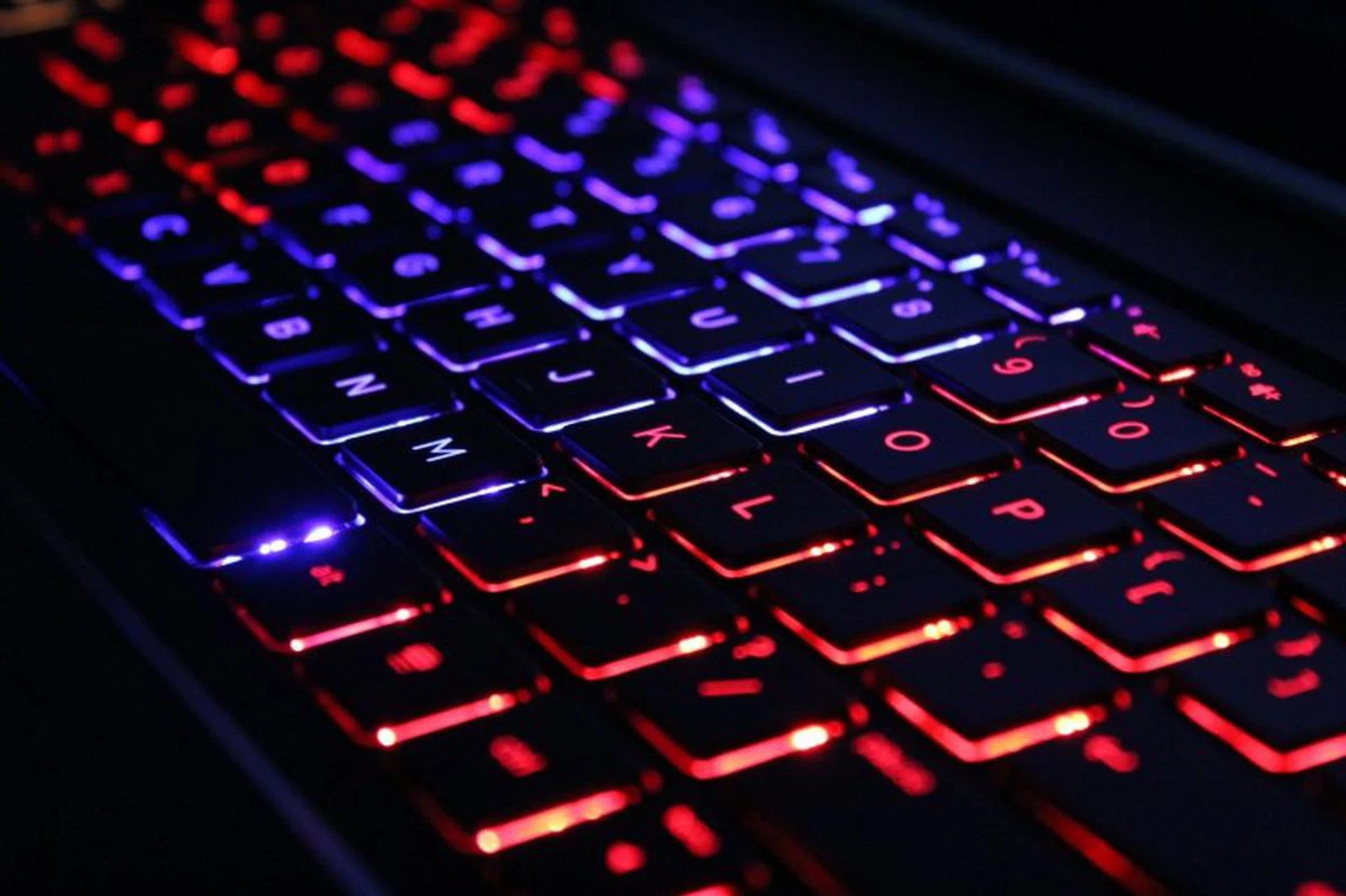
Seen here in the dark, the keys exhibit some backlight bleeding, but overall quality is great.
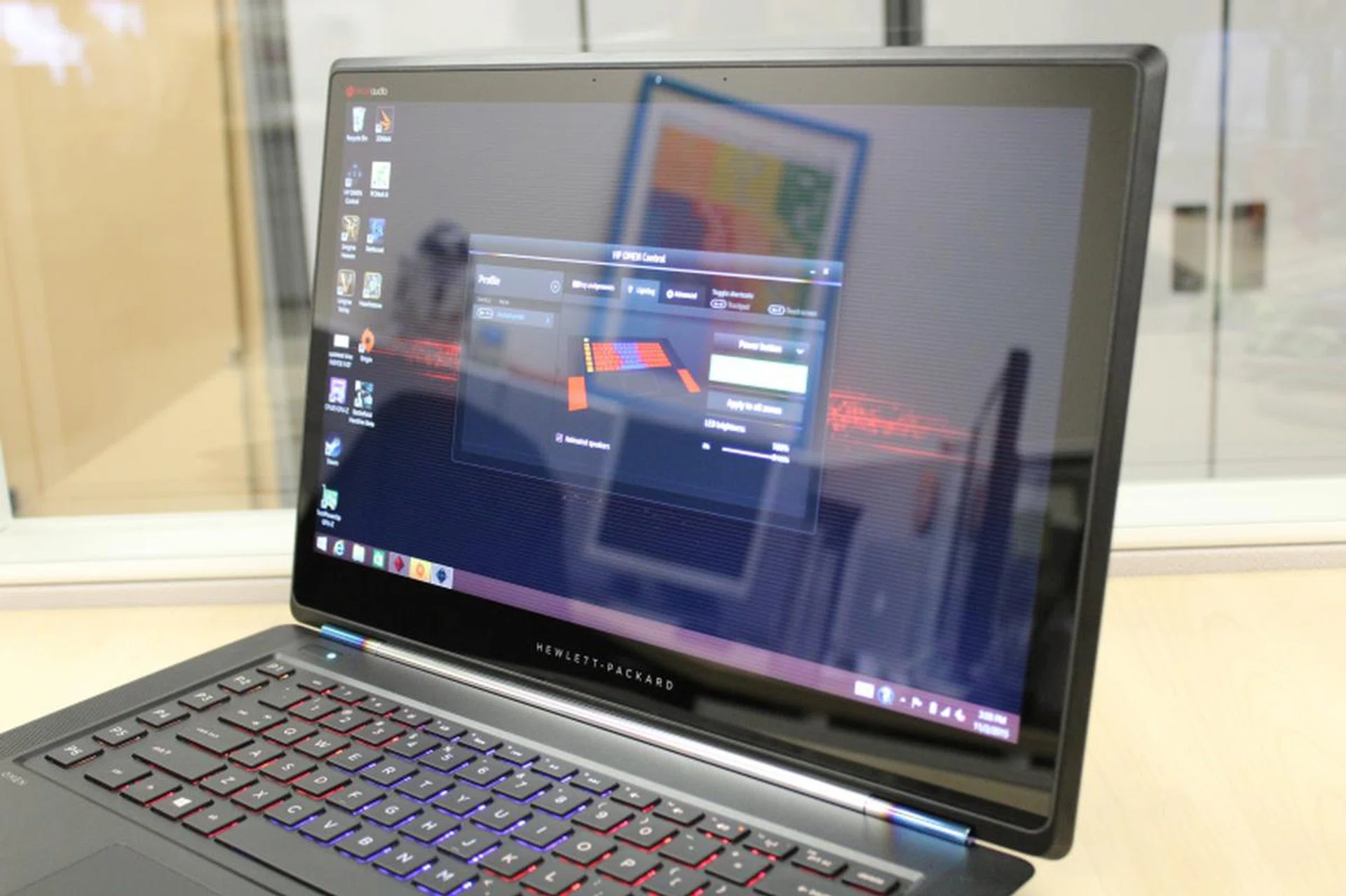
The glossy screen supposedly has an anti-glare coating but it is still a problem when viewing the display at an angle.
The HP Omen is the first gaming notebook we've reviewed this year that has a touchscreen display. It's a glossy Full HD screen, and though it may look nice for its vibrant reproduction, viewing angles can be a tricky as the reflections can seriously mess up what the screen is showing. Luckily, that's the only visual issue you might have with the display. If you're using its touchscreen to quickly execute certain functions, the display is rather smudge resistant and it took a few hours of repeated usage before we noticed smudge buildup.
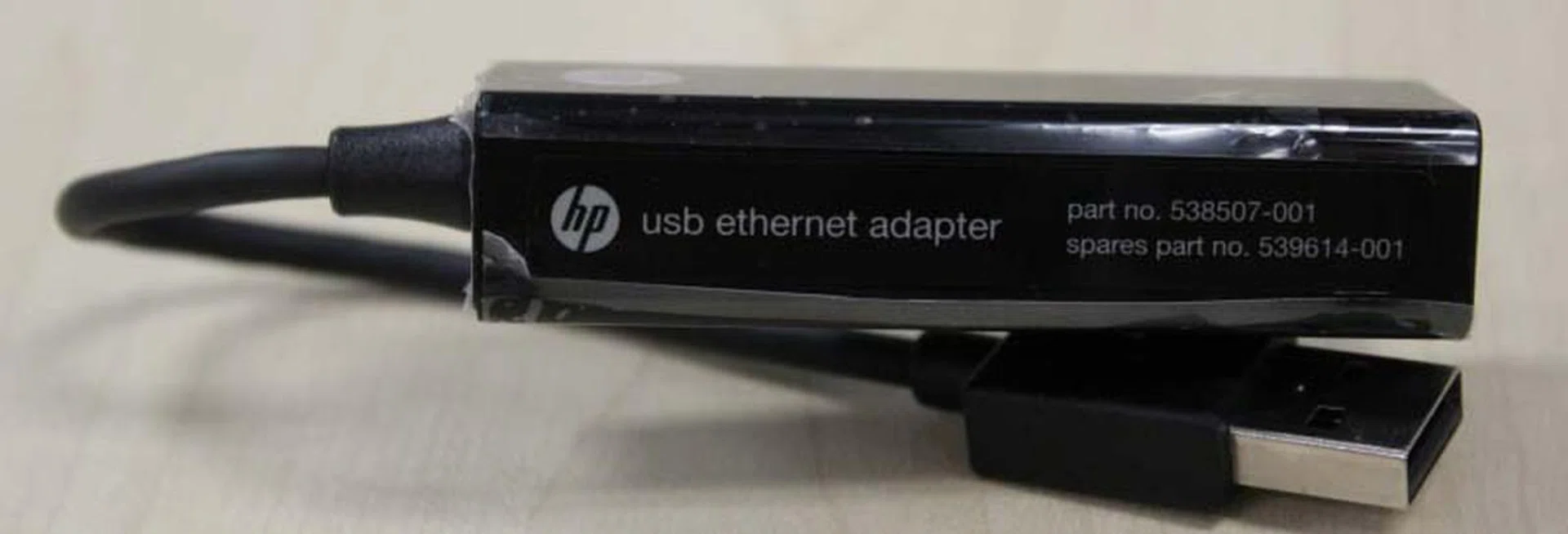
As the chassis is so thin, sacrifices had to be made. One of them is the lack of an Ethernet port. HP provides an Ethernet adapter free because of that. It plugs into any of the USB ports, which means if you use it, you will have one less USB port free.
It's nice that HP is willing to provide options. For those using wired connections, HP bundles an Ethernet adapter free with the Omen. Size considerations means they had to nix having a built-in Ethernet port but with the adapter, those using wired connections aren't left high and dry. Nevertheless, it still means one less USB port if it's used. So for users who rely on many USB devices, this could be a concern depending on your usage.
Now that we've seen how the HP Omen looks and what it brings to the table, our next section will put it to the test and see how its hardware stacks up.
Testing Setup
As per the standard procedure, we'll be using the usual array of test software to benchmark the performance of the HP Omen system. It'll be tested on PC Mark 8, a general all purpose benchmarking software, which will rate the HP Omen based on its main components (processor, storage, general performance). Once that's done, we'll be testing it with 3D Mark 2013, which tests the graphical capabilities of the machine. Of course, we'll still follow up with gaming tests, with benchmarks on Tomb Raider and Middle Earth: Shadow of Mordor using each game's native benchmarking tools. Follow that, we'll be using Futuremark's Powermark to analyze its power consumption, battery life and mobility characteristics.
To summarize, here are our benchmarks:
- PC Mark 8
- 3D Mark 2013
- Tomb Raider
- Middle Earth: Shadow of Mordor
- Powermark
[hwzcompare]
[products=495400,465008,465013,490921,485575]
[width=275]
[caption=Test Notebooks Compared]
[showprices=0]
[/hwzcompare]
As for our comparison choices, we chose the above specific machines either because of their class, size and specs. Clearly, the HP Omen notebooks specs classify it as a mid-range multimedia and gaming machine, a terrirotry we've tested fewer machines than the hardcore gaming notebooks. As such, we decided to stack appropriate machines to show off a range of results rather than just a couple of similar ones. Since there's pretty much no way a NVIDIA GeForce 860M can realistically compete with higher-end gaming notebooks equipped with NVIDIA GeForce GTX 900M series of GPUs, variety makes for a better match and understanding of how the Omen fares in the grand scheme of things. That's also why we scoured our vaults and brought back the MSI GS60 2PE Ghost Pro and the Aftershock X17-V2 which share somewhat similar hardware to the HP Omen.
PC Mark 8
Looking at the numbers gave us quite a surprise. Despite the HP Omen using a last generation graphics card, it still holds up remarkably well as the rest of its components are on par with current standards. In fact, in the Work benchmark (which tests performance of programs one might be using at work, such as video chat and web browsing), the HP Omen outperforms its rivals. In fact, the ASUS ROG G751JT's score of 4428 compared to the HP Omen's score of 4604 had the HP Omen leading by a nearly 9% margin. No matter how you cut it, that's pretty significant lead.
The HP Omen begins to show performance being hampered when it comes to the more strenuous Apps suite though, as the pure horsepower of its rivals outpaces it by a notable margin. In the Adobe test, the HP Omen posted a paltry score of 4073, which is about an 18.2% drop in performance when compared to the Gigabyte P35X V3's score. This is due to Adobe being a design program, which benefits from the GPU's horsepower. Since the HP Omen is using a NVIDIA GeForce GTX 860M, it stands to reason its performance will be weaker. Similarly, the MSI GS60 2PE Ghost Pro and the Aftershock X17-V2 are also using an older NVIDIA GeForce GTX 800M series graphics card and they too reflect results somewhat similar to the HP Omen. This shows that the HP Omen is actually performing well for its specs and there are no other hardware disparities to be concerned about. Should you need higher performance, you'll just need to invest in a high-end machine.
3D Mark 2013
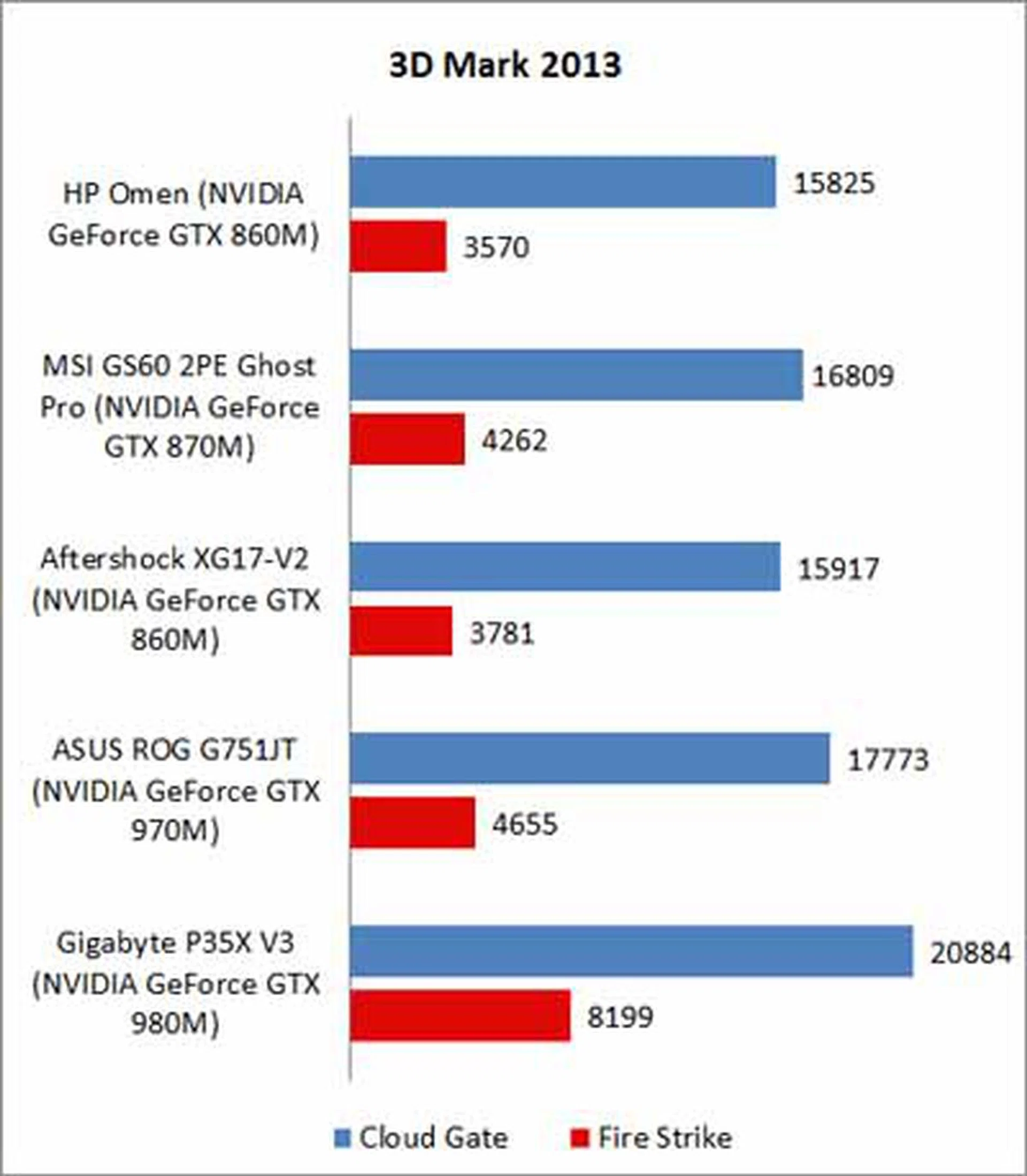
Unlike its initial decent showing in PC Mark 8, the HP Omen's use of an older GPU proved to be its limitation in competing with higher-tier gaming notebooks. It was outperformed by more 12% by the ASUS ROG G751JT, in Cloud Gate. Still, Cloud Gate uses older DirectX routines, which new games no longer use (or use modified versions of it). As such, Fire Strike is a much more accurate presentation of how the HP Omen would perform on today's games.
The HP Omen's score of 3570 might seem decent when compared to the ASUS's 4655 but it's a whopping 30.3% margin. When compared to the Gigabyte P35X V3, the difference is even more obvious, with the Gigabyte machine performing more than twice as well as the HP Omen. Fortunately it doesn't fare badly when you put it up against similarly configured systems such as the MSI GS60 2PE Ghost Pro and the Aftershock X17-V2, once again suggesting that it has adequate muscle for gaming at decent graphical settings but probably not enough to handle games with maxed out graphical settings. So while the HP Omen isn't a powerhouse by today's standards, at the very least, it manages to keep its performance to accepted norms for its class - a highly portable mid-range multimedia gaming machine.
Tomb Raider
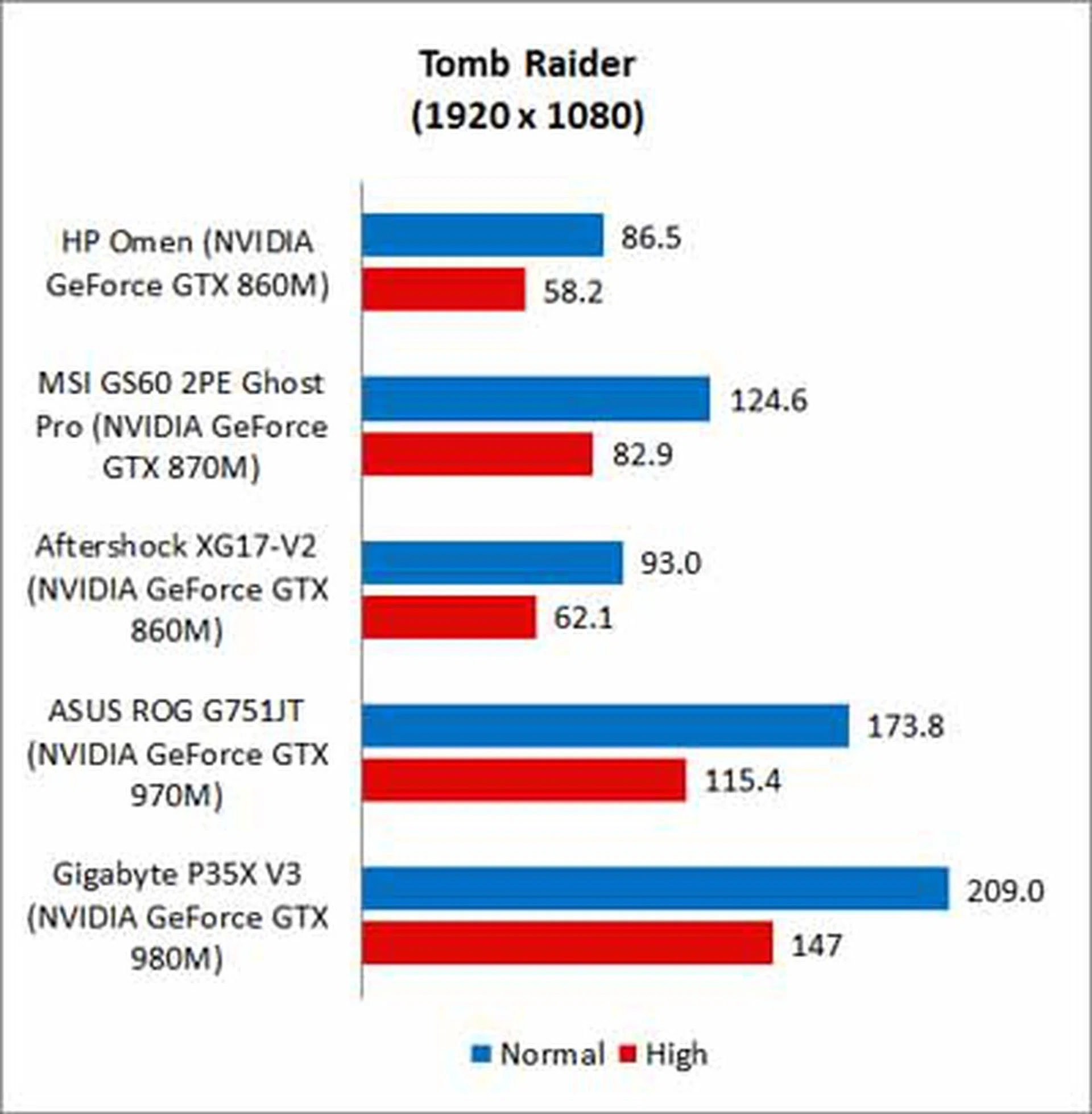
Despite Tomb Raider being the older game in our gaming bechmark, the NVIDIA GeForce GTX 860M in the HP Omen still struggled to keep up with the pack. On both Normal and High, it posted FPS scores under 100. Yes, it's very playable, even on High (which is near enough to the magic 60 FPS figure that you won't be able to tell the difference) and we feel that's good enough for a machine with an older graphics card. It's pretty much accepted fact that there's no way the HP Omen can perform to the standards of the compared ASUS or Aorus machines but considering that the similarly configured Aftershock X17-V2 managed 62.3 FPS on high settings, the Omen is a tad below expectation. Still, the HP Omen manages to clock a decent 58.2 FPS, which is more than playable with a decent visual quality.
Middle Earth: Shadow of Mordor
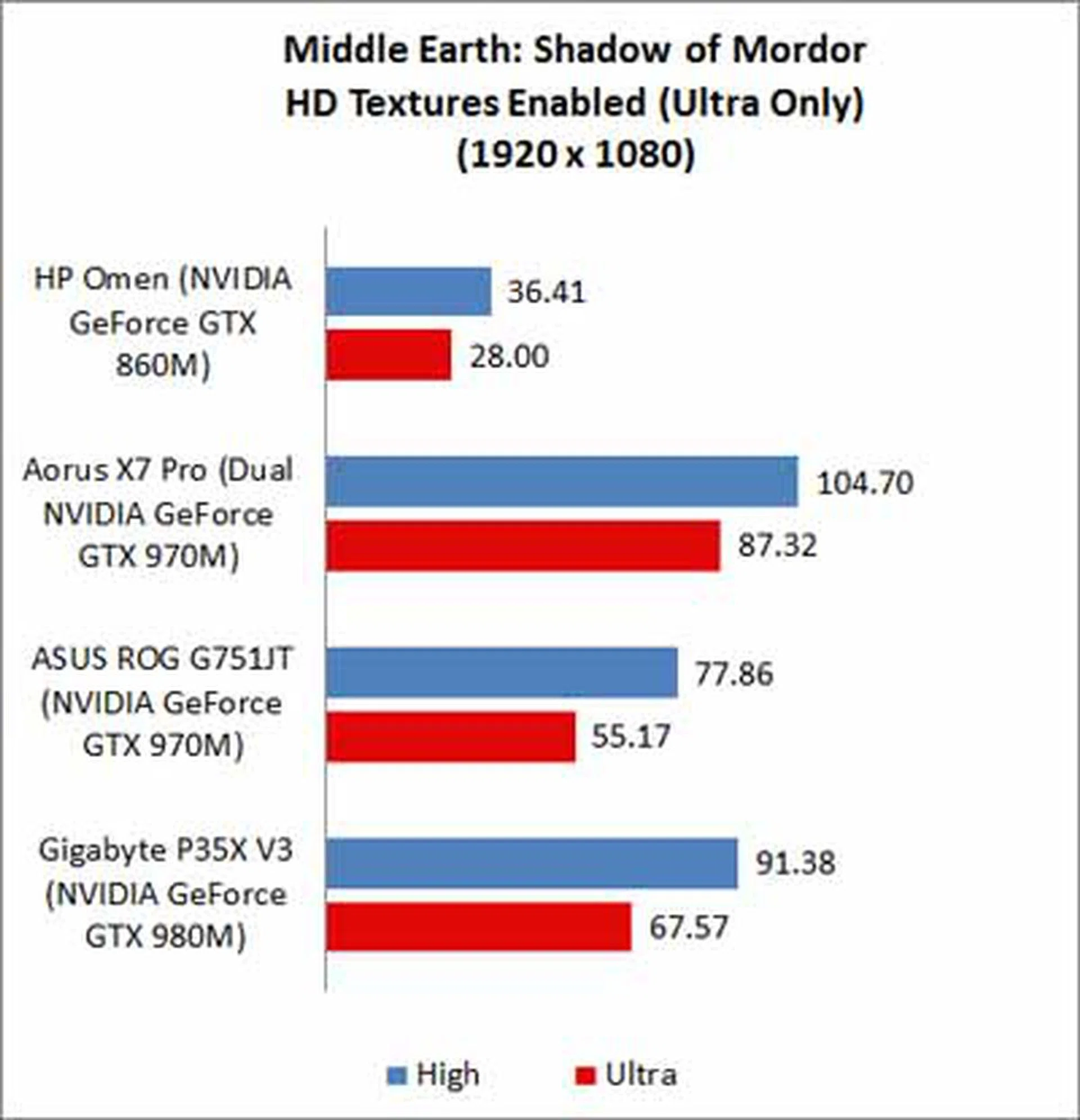
Middle Earth: Shadow of Mordor is one of the most demanding games in recent memory. It is so demanding on higher resolutions on Ultra settings, that even SLI machines have trouble getting framerates past 100. Since this is a relatively new gaming benchmark added to our gaming notebook tests, we're unable to show you how the MSI GS60 2PE Ghost Pro and the Aftershock X17-V2 fare as we no longer have these machines in our lab. Going back to the results we can see HP Omen manages 36.4 FPS, which might seem like a letdown, but at least it is above the base playable threshold of 30 FPS.
Temperature

The HP Omen is one of the thinner gaming notebooks we've reviewed but that slim nature obviously comes with a few limitations. In the HP Omen's case, it's the temperature. Though the HP Omen is one of the hotter machines, the heat output is rather uniform, with it mainly distributed on the top half of the chassis. While 30 degrees Celsius isn't exactly cool, it's not going to burn your hands off either. HP's cooling could be stronger but at least it got the the heat distribution part right.
With the heavy lifting down, in the next page we'll be taking a look at the HP Omen's battery and power consumption performance.
Battery Life and Power Consumption
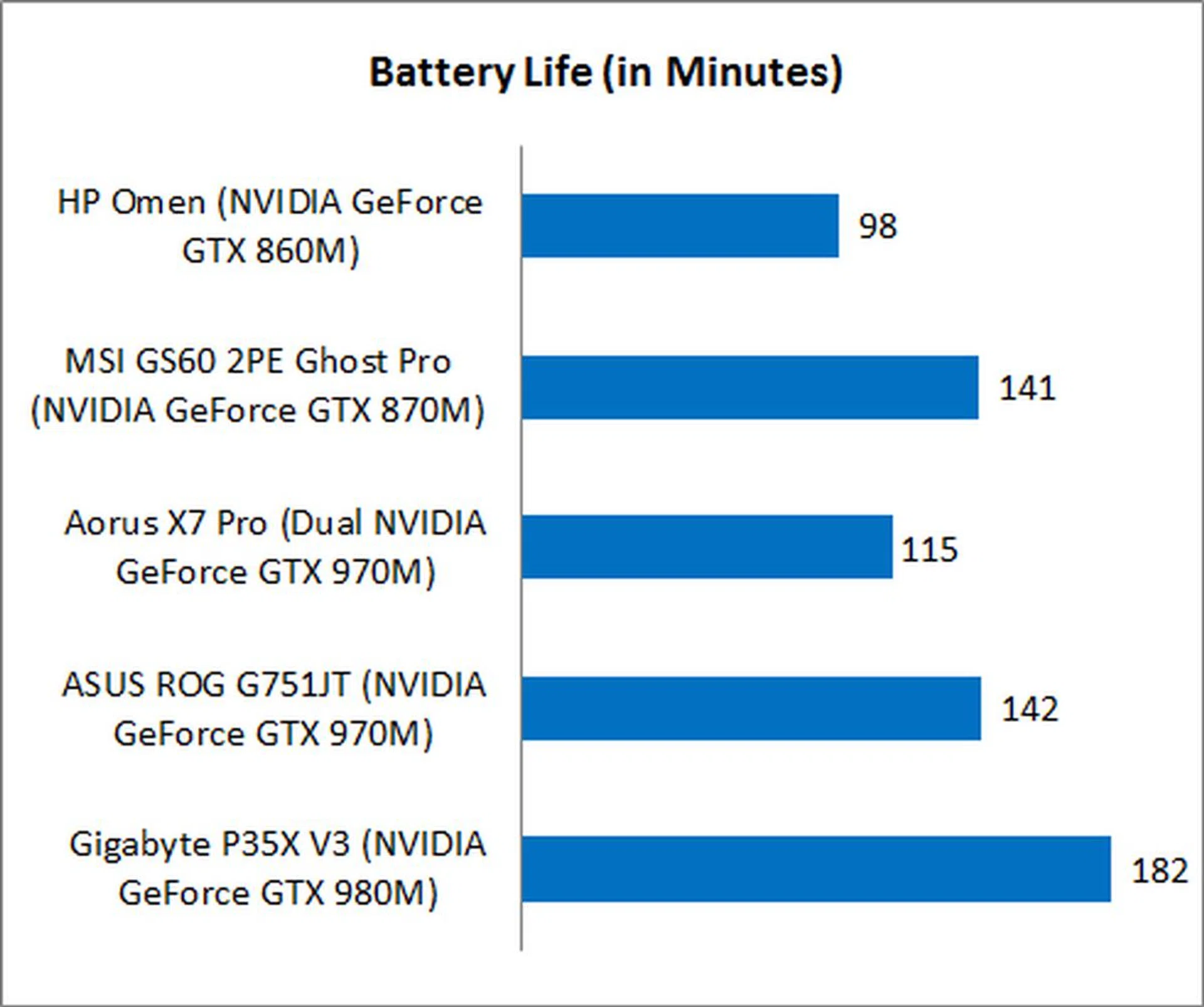
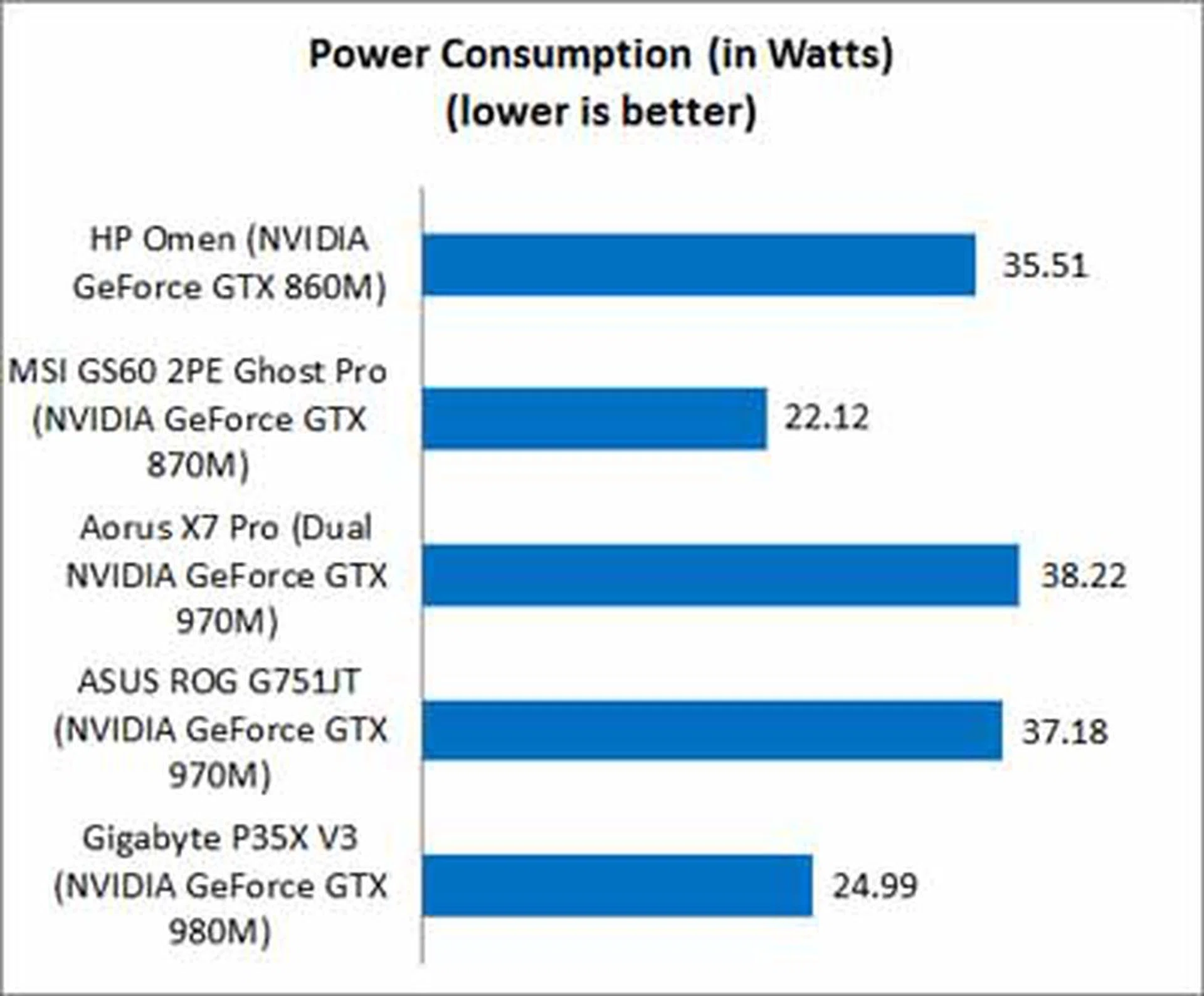
The HP Omen has one of the shortest battery life we've ever seen in recent times and it's not even an SLI machine. It lasted just 98 minutes! Take note that this figure was with NVIDIA's Battery Boost tech enabled. While its low capacity battery (58Wh) might be a culprit, it doesn't quite explain its extra high power consumption as compared to the similarly sized MSI notebook with a better GPU and an even lower battery capacity. Even if you consider the high-end 15.6-inch gaming notebook from Gigabyte with a top-of-the-line GeForce GTX 980M GPU and higher resolution display, it packs a much higher capacity battery, doesn't weigh much more than the HP Omen and manages lower power consumption and lasts twice as long without needing to recharge. Touchscreens are known to consume more power than normal displays and while it compounds HP Omen's longevity issue, it's definitely not the reason for its showing. Clearly HP needs to customize their machine better where power efficiency is concerned.
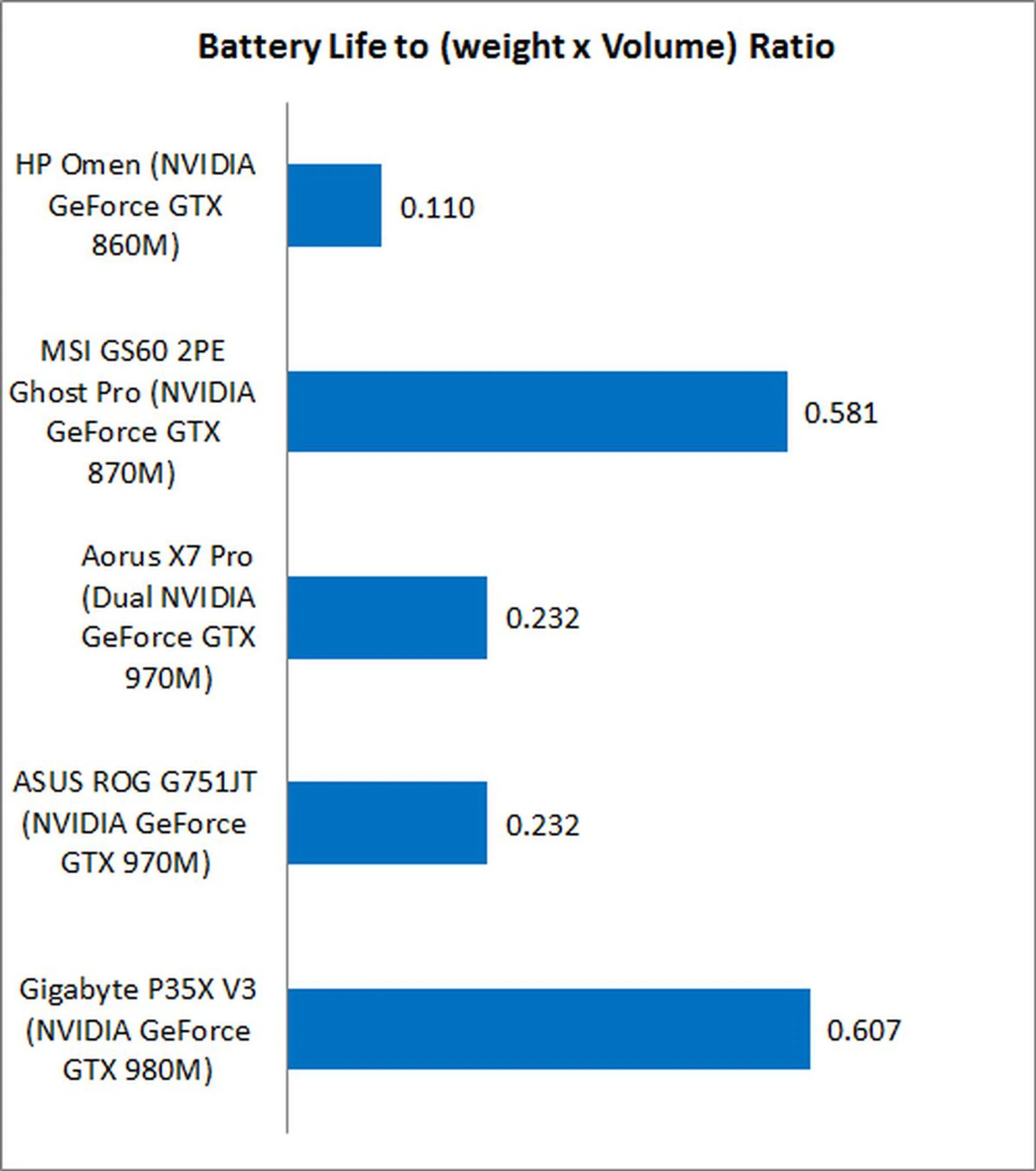
As the HP Omen's battery life is incredibly short, its portability is massively hobbled going by our Portability Index that takes battery life, physical dimensions and weight into consideration. The machine may be one of the lightest (bested in weight only by the MSI GS60 2PE Ghost Pro) but it's also the one with the shortest lifespan and in the end, that means it's just not worth the trade-off if you intend to game in situations where you're not plugged in to the wall.
Now that we've seen all the HP Omen has to offer, we'll be concluding our review on the next page so continue on for our verdict on the HP Omen.
Designed to be a stunner
While we'd like to come right out and say we're not thrilled by the HP Omen, that would be an outright lie. Apart from its middling performance expected from its hardware choices, the design and effort gone into constructing the HP Omen was something that really took us by surprise. We really didn't think a S$2,299 notebook could feel and look so good. We expected a cheap plastic bulky chassis, not the sleek and svelte build the HP Omen turned up in. Only the Gigabyte Aorus X7 Pro could somewhat compete aesthetically, but it doesn't better HP Omen's level of design details and it costs a whole lot more at S$3,999.
The fact that HP went one step further and made the HP Omen out of quality materials is a testament to how focused the company is on aesthetics and build to differentiate itself from everything else in the market. While the MSI GS60 2PE Ghost Pro is lighter, it doesn't look as good as the HP Omen. The fact that the HP Omen is so thin belies the fact that the machine is very sturdy and oozes of quality. While the display has a slight wobble to it, the base is very solid and firmly grounded. What we're basically saying is that HP's nailed the design, quality and all the physical characteristics of the HP Omen.
In fact, the machine's excellent build quality even extends to the touchscreen. There hasn't been a gaming notebook with a touchscreen in recent memory and HP's decision to pack one in with the HP Omen is a good choice. We concede that there aren't a lot of great touchscreen games, but having a touchscreen for other uses far outweighs its limited functionality in the gaming scene. Its always great having input choices since Windows 8 is built from the ground up to take advantage of touchscreens, there's really no downside to having one on the HP Omen. In fact, you only stand to gain in notebook functionality with Windows 8 and its apps in mind.
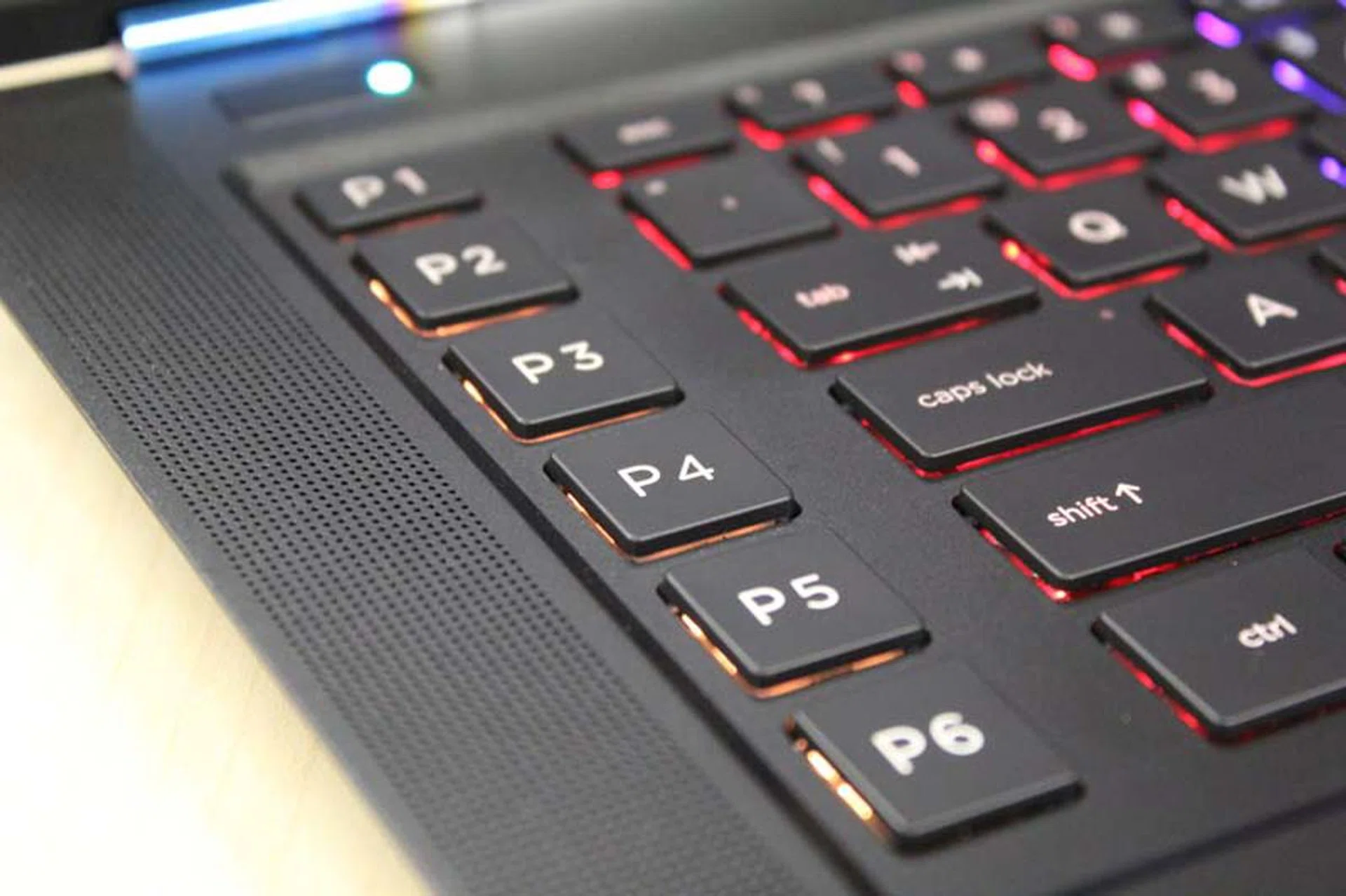
We like that you can customize the backlights for the shortcut keys so you can easily differentiate them, even in the dark.
We'd also like to highlight the keyboard. While it's a generic chiclet keyboard, the presence of shortcut keys is a welcome addition (though we really didn't use them). Still, at least it's there as an option for gamers who want to customize their experience and we have to give HP props for that. Speaking of the keyboard, we also love the backlight options that HP has given its users. HP's got a ton of customization options, with the keyboard alone having three separate sections for coloration. Even the sides and power button lights can be customized to any color you want and that's impressive.
Speaking of choice, HP also gives its customers a choice on which version of the HP Omen they'd like to have based on their usage needs. We've listed both models and their specifications below.
HP Omen15-5024tx (our reviewed model) | HP Omen15-5007tx | |
Processor | Intel Core i7-4710 (2.5GHz, 6MB cache) | Intel Core i7-4710 (2.5GHz, 6MB cache) |
RAM | 8GB DD3L | 16GB DDR3L |
Graphics | NVIDIA GeForce GTX860M with 2GB GDDR5 | NVIDIA GeForce GTX860M with 4GB GDDR5 |
Storage | 128GB SSD | 512GB SSD |
OS | Windows 8.1 | Windows 8.1 |
Price | S$2,299 | S$3,399 |
The HP Omen does get a lot of things right, but that doesn't mean it doesn't have its share of faults. The battery life is rather lacklustre, lasting around 98 minutes in our benchmarks. That's not much of an issue if you often have access to a power outlet, or you don't intend to game outside of your home, friend's place or a LAN gaming center. However the main concern with the HP Omen is that it uses the NVIDIA GeForce GTX 860M GPU. It's an outgoing discrete graphics chip and its inclusion in the HP Omen is a rather puzzling decision, especially since even the higher specced model uses it. Despite that, the NVIDIA GeForce GTX 860M in the HP Omen still has some teeth. True, it may not run today's intensive games on the highest settings, but it can still deliver reasonable gaming performance in most games as long as you don't set the graphical quality too high.
Looking at it from the MSI GS60 2PE Ghost Pro's perspective, the HP Omen isn't outmatched as you'd expect, especially the cheaper model (the one we're reviewing). Considering that the MSI GS60 2PE costs S$3,199, the S$2,299 asking price of the HP Omen isn't that bad. It's safe to say that the HP Is a decent alternative to the MSI GS60 2PE Ghost Pro, if you're willing to trade a bit on performance. At the very least, the HP Omen gives premium ultrabooks a run for their money where design and aesthetics are concerned. The Lenovo Yoga 3 Pro (the base model) for example, is the same price as the HP Omen at S$2,299. This puts the HP Omen in a very enviable position, as it can be considered as a gaming-capable premium ultrabook of sorts. Of course the HP Omen is still a much larger machine with a 15.6-inch screen, but its steep angular design does help pass it off as an ultrabook in certain respects (minus the expected battery life).
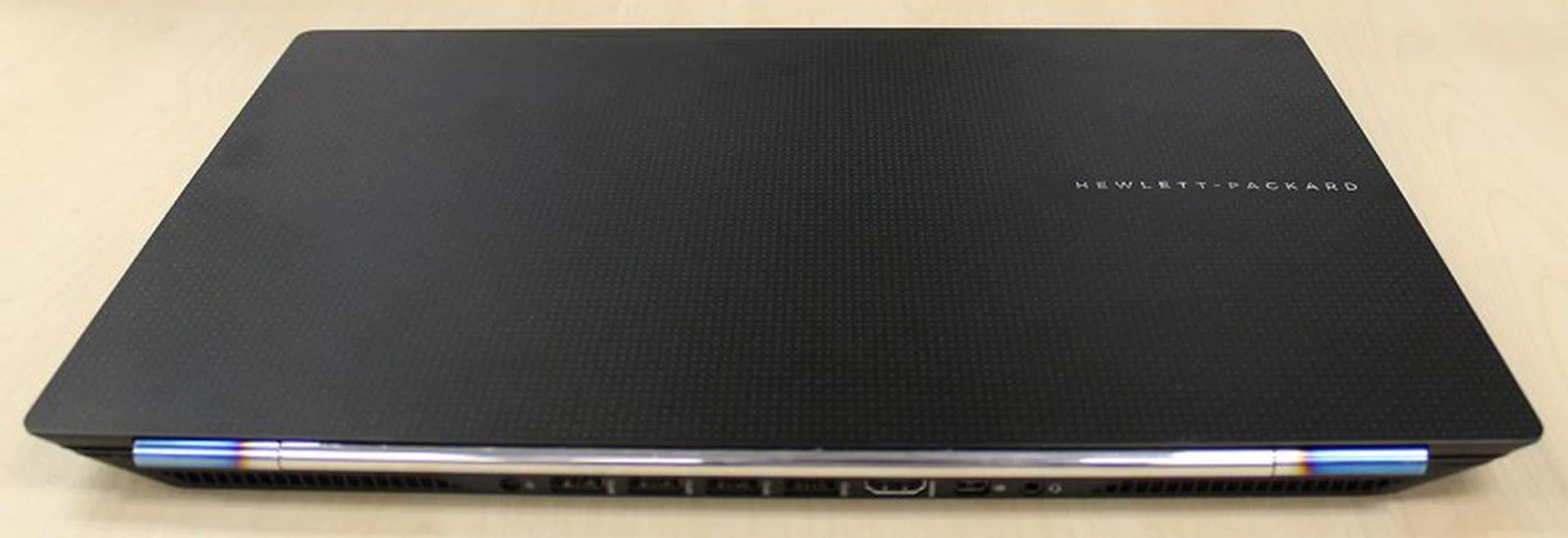
The HP Omen might not feature the latest gaming hardware, but its overall performance is decent, plus it looks and feels absolutely fantastic.
HP also offers the Omen with higher specifications with the main differences being 16GB of RAM and 512GB of PCIe-based SSD storage, but at a much higher price of S$3,399. Our recommendation is to skip this model as it is priced much too high. The additional 8GB of RAM will do nothing for gaming performance and will also have no bearing on performance unless you intend to run many intensive applications at once or multiple virtual machines. The larger 512GB PCIe-based SSD is much welcomed since the standard 128GB SATA-based SSD is a bit limited in storage, but the premium HP charges does not make financial sense. It's much more economical to get a separate external hard disk drive for added storage.
All things considered, the HP Omen is a decent first attempt at the gaming market. Its high build quality and attractive design should sit well with the target audience, but unfortunately, it is letdown by its choice of GPU used and less than ideal power consumption. All said and done, the HP Omen makes for a very premium gaming-grade 'ultrabook' for either mainstream users or for gamers who value design and aesthetics over cutting-edge hardware. Now if only the base HP Omen comes fitted with a 256GB SATA SSD, it would be more palatable for its asking price and improve the notebook's usability as games do gobble up space quickly these days.
Our articles may contain affiliate links. If you buy through these links, we may earn a small commission.