
Nokia XL is a dead on arrival experiment
The premise sounded great - a Nokia phone running an Android OS variant, but appears to work like a Windows Phone device. The Nokia XL is the largest of the Nokia X series with a 5-inch screen, but can the Microsoft-forked version of Android compete with other budget phones, including the company's own Lumia devices? We give you the lowdown and why it might have been a mistake.

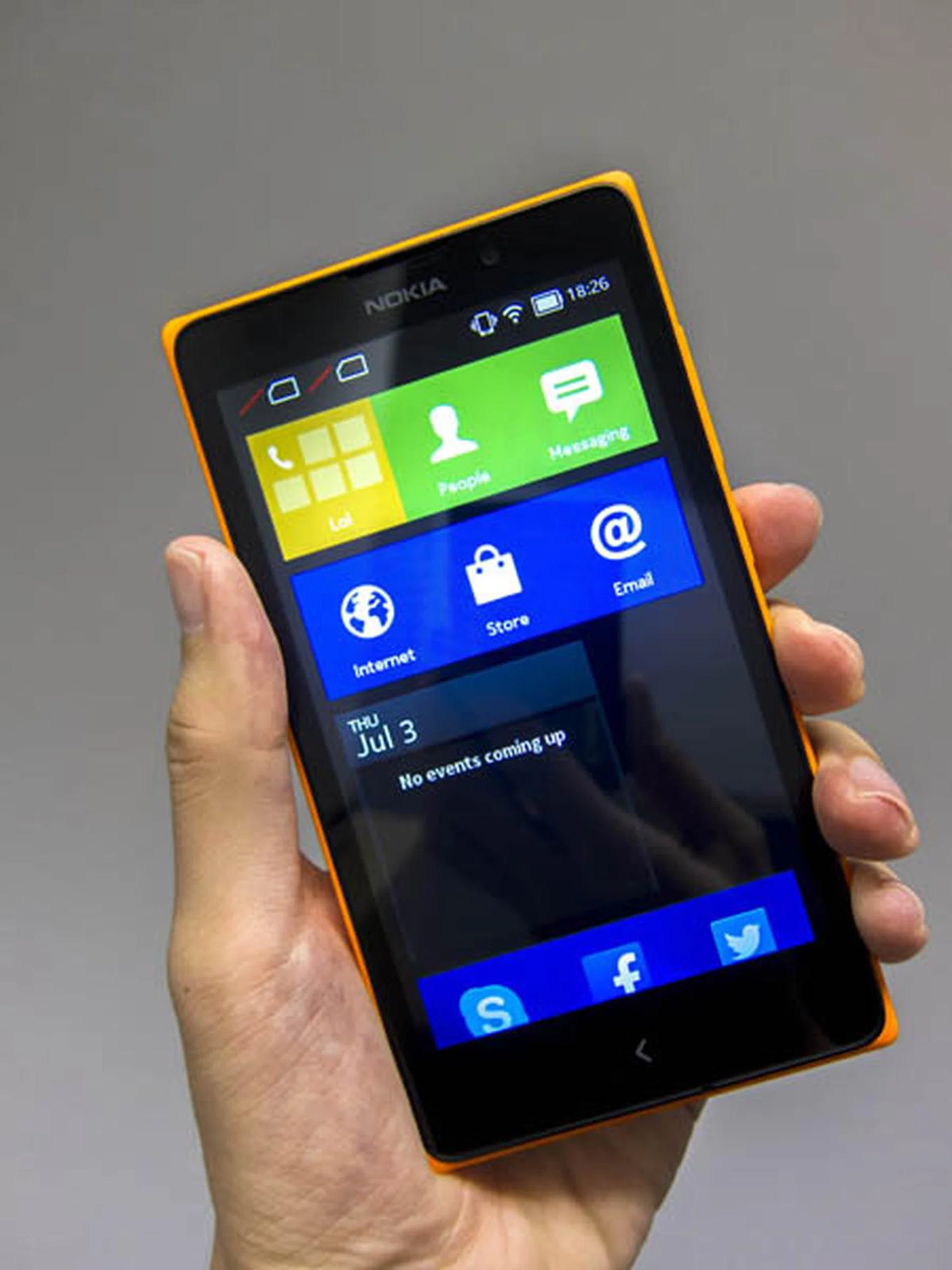
The Nokia XL
Overview
For a long time, Android fans who reminisce the heydays of Nokia have constantly hoped for the company to adopt the Android OS that might have made Nokia a more desirable choice of smartphone to get. After all, they've made pretty good devices with the Lumia 625, 925, 1020, 1520 and many others. The only aspect holding them back is really their app ecosystem, which while it's steadily improving, leaves much to be desired about. So you can see why a change in OS might have stirred things up for the better - at least according to those who love Nokia devices but prefer a different platform to get the most out of their device.
Of course, when Microsoft acquired Nokia's Device and Services division last September, all such hopes quickly vaporized. Despite this major milestone that signifies total commitment to the Windows Phone ecosystem, Microsoft surprised everyone at MWC 2014 by announcing not one, but a trio of devices running on an OS based off the Android Open Source Project (AOSP) earlier this year in February. Branded as the Nokia X, X+, and the XL, they come with a small catch: the Android OS is a fork of their own called the Nokia X software platform with almost every Google related service removed and replaced with Microsoft's equivalent.
We've covered the basics you need to know about the Nokia X devices and Nokia X software platform here and here, so in this article, we'll be diving right into the device by evaluating the Nokia XL with more details of the Nokia X software in the following pages.
For the techies who've been following these developments closely, you'll realize that Nokia announced a newer Nokia X2 device at the tail end of June, and subsequently sent the entire Nokia X series to the grave in favor of low cost Lumia devices. So then, why are we reviewing the Nokia XL? For one, it was only launched in the local market just over a month back and secondly, it' still available for purchase. Thirdly, we would like to figure out how this low cost phone stands up against other recent budget phones that are increasingly gaining traction. And lastly, this is probably our last chance to check out a different take of the Android OS implemented by Nokia/Microsoft.
So let's get started!
Design
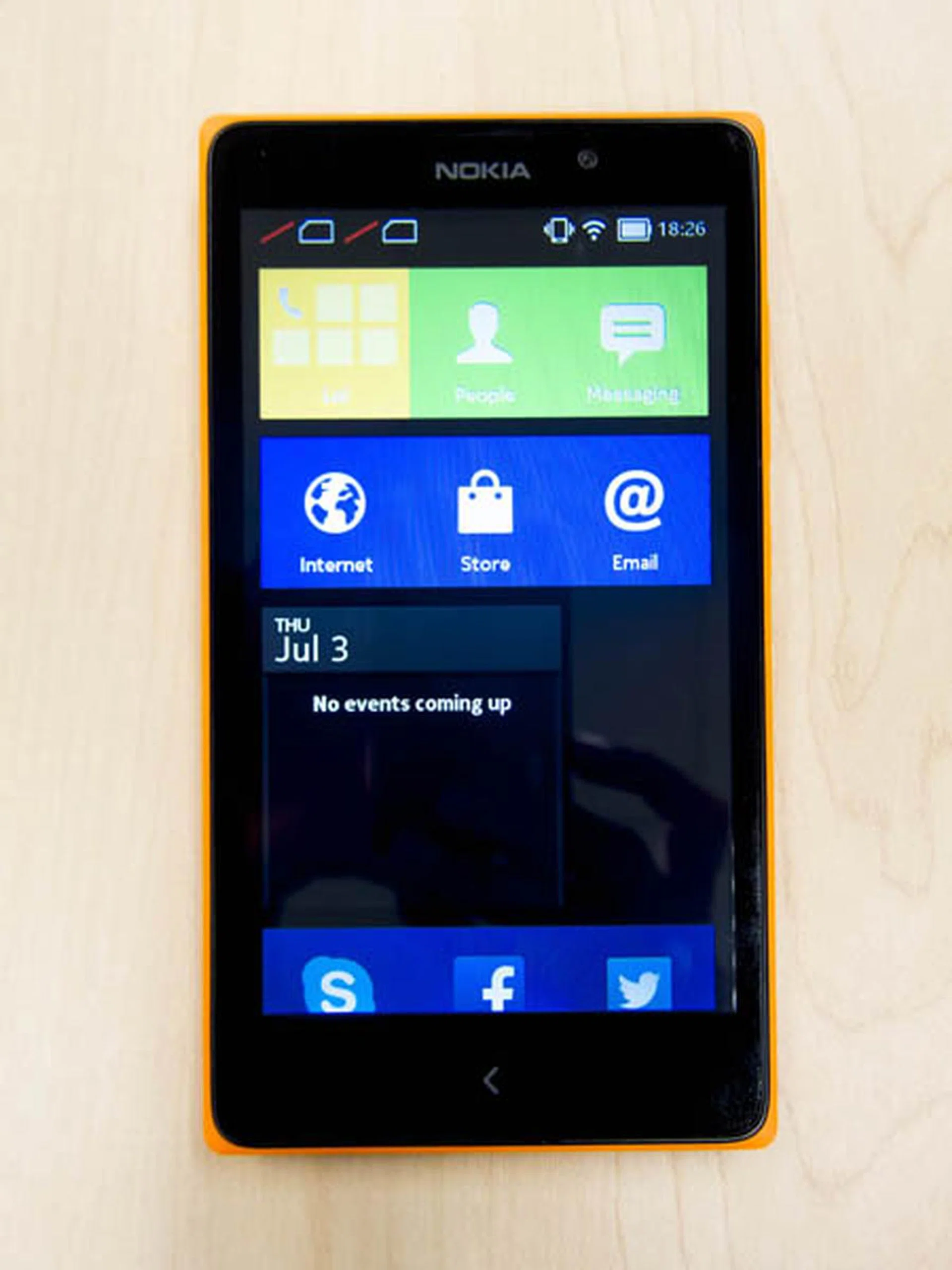
Nokia’s Android, or more accurately referred to as the Nokia X 1.0 series, is marketed as an entry-level smartphone, targeted at the emerging markets. It was meant to be a step-up replacement device to basic feature phones at an affordable entry point to get the masses familiar and interested in using the device/interface so that these users would eventually buy into Nokia Lumia Windows Phone devices when they crave for more power and features. Amongst the three in this series, the Nokia XL is the most 'premium' of them, with relatively better processing hardware, as well as having bigger screen.
The Nokia XL is of a 5-inch form factor and resembles very close to that of its Lumia cousins as far as the exterior appearances are concerned. Most recent Nokia phones are available in many different colors, and the XL is no exception; it comes in lime green, white, black, orange, and yellow. As show, our review set is in orange. However, Nokia has made concerted alterations to the design of the XL: the corners are more obtuse, which screams budget, differentiating it from the smooth rounded corners found in the Lumia series.
The power and volume buttons are located on the right side of the phone - a design that's consistent with larger phones. Below the screen lies only one capacitive button, which is the Back button. There are no other buttons, not even a Home button. This odd choice of button configuration will lead to a slew of usability problems for the user, which we'll detail more in the second page covering the software functions.
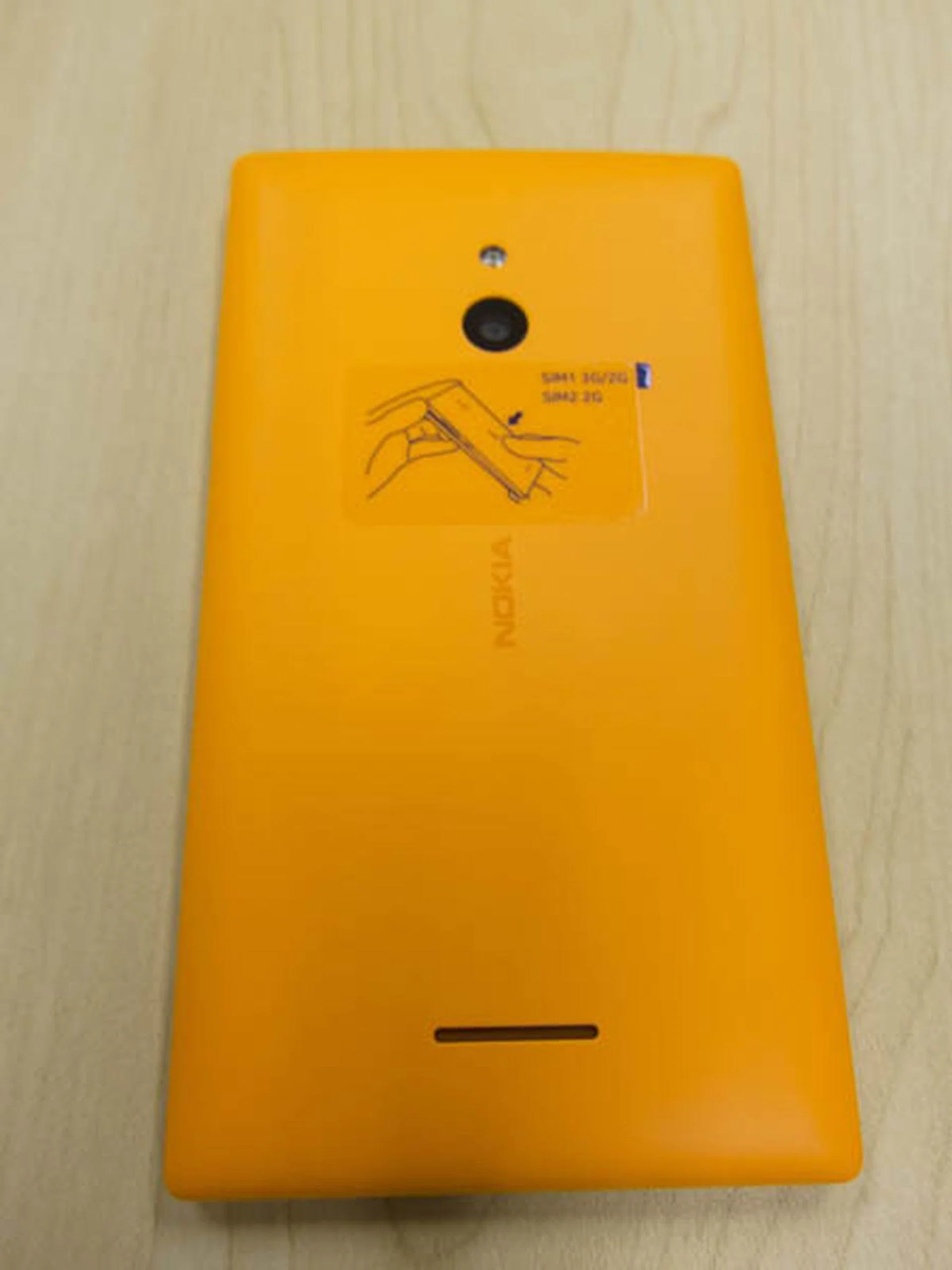
The colourful orange back cover
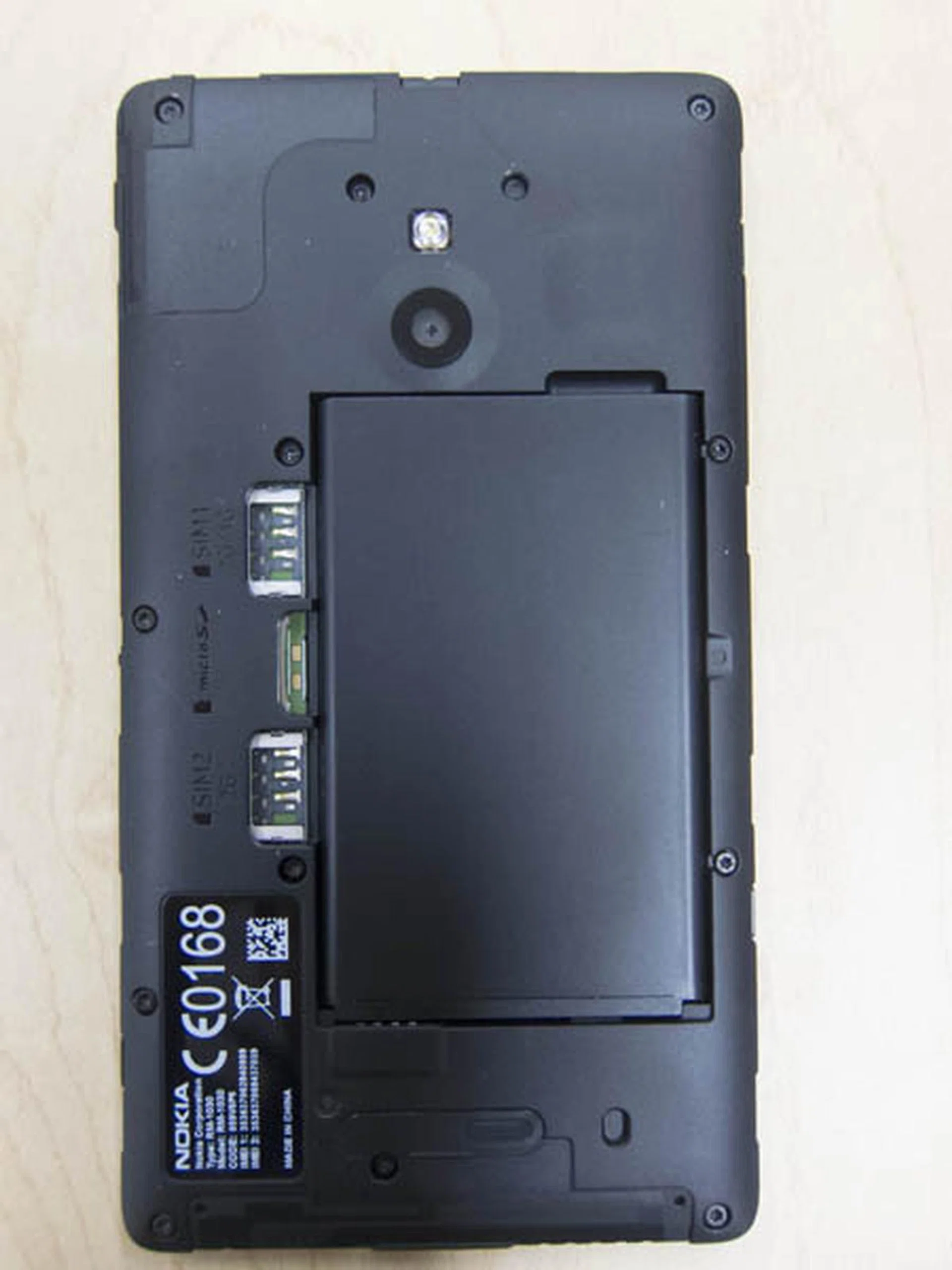
Underneath the Nokia XL, you can see the removable battery, dual SIM slots and a microSD card slot.
The Nokia XL has a removable back cover, whereby when removed, reveals a removable battery, along with two micro-SIM card slots. Do take note that only one slot is capable of supporting 3G, while the other does not.
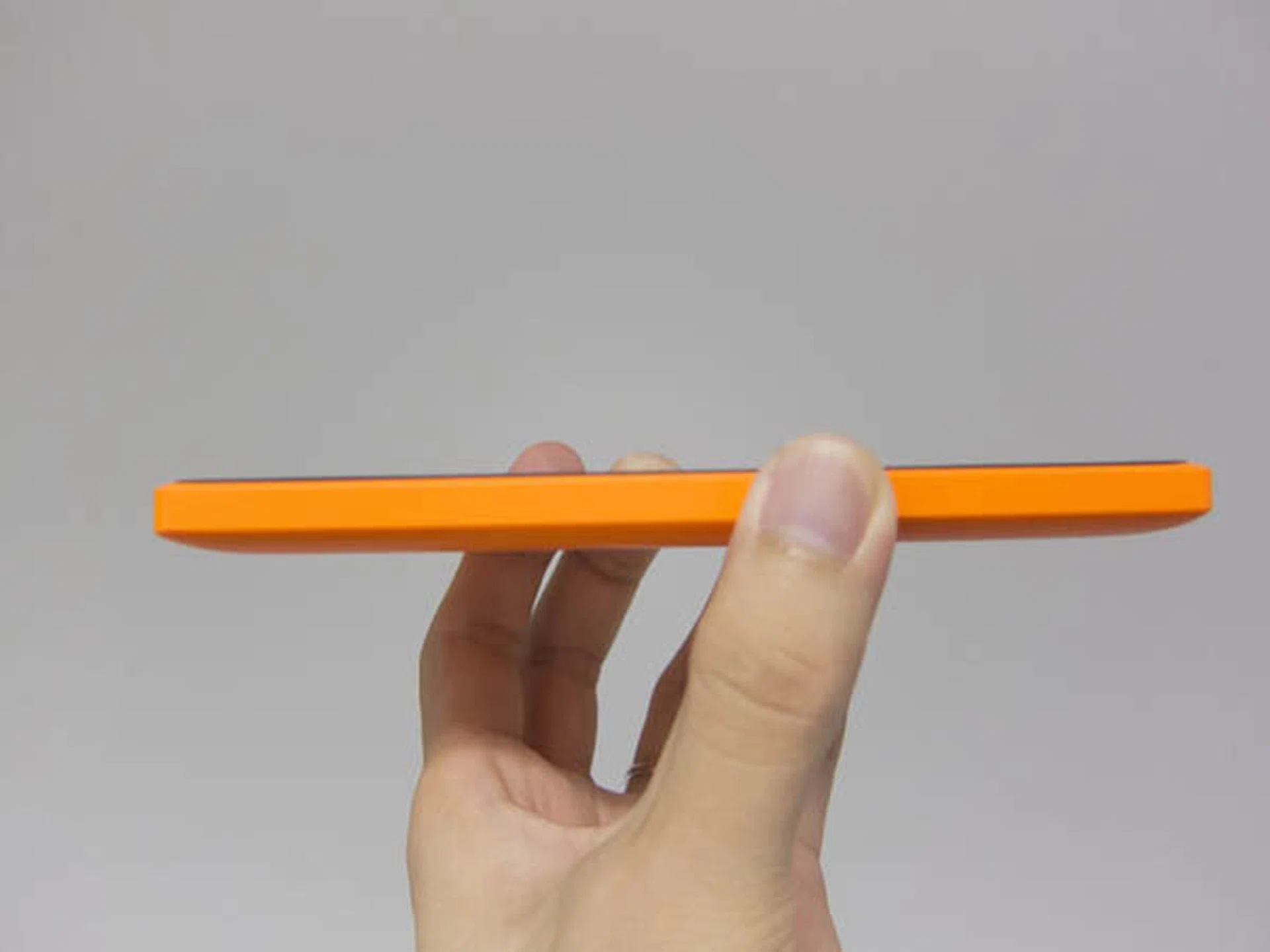
The sides of the Nokia XL are rather thick.
Holding the phone, one will find it to be somewhat bulky, comparable to to some phablets or worse. The phone's thick 10.8mm side profile and 190g weight are the culprits, but given its entry-level positioning, it is perhaps tolerable.
The phone sports a 5-inch IPS LCD screen, with a screen resolution of just 800 x 480 pixels. Such screen resolution is remarkably low even for an entry-level smartphone. Yielding a pixel density of 187ppi, the display looks awkwardly pixelated. The color reproduction looks just about average as well. Overall, other than the screen size, and the good viewing angles, the display is reminiscent of the iPhone 3GS or HTC Dream days.
The Nokia XL comes with 4GB of internal storage, much like the Xiaomi Redmi. However, much of it is occupied by the OS. For the remaining space, 1.12GB is partitioned for apps installation, leaving only 1 GB of user storage. Fortunately, the phone's internal storage is complemented by microSD expandable storage - supporting up to 32GB capacity cards. As such it doesn't support the new SDXC standard, which means 64GB microSD are unlikely to work. Again, this limitation is on par with other old or budget devices, such as the Xiaomi Redmi.
Nokia X Platform UI 1.0
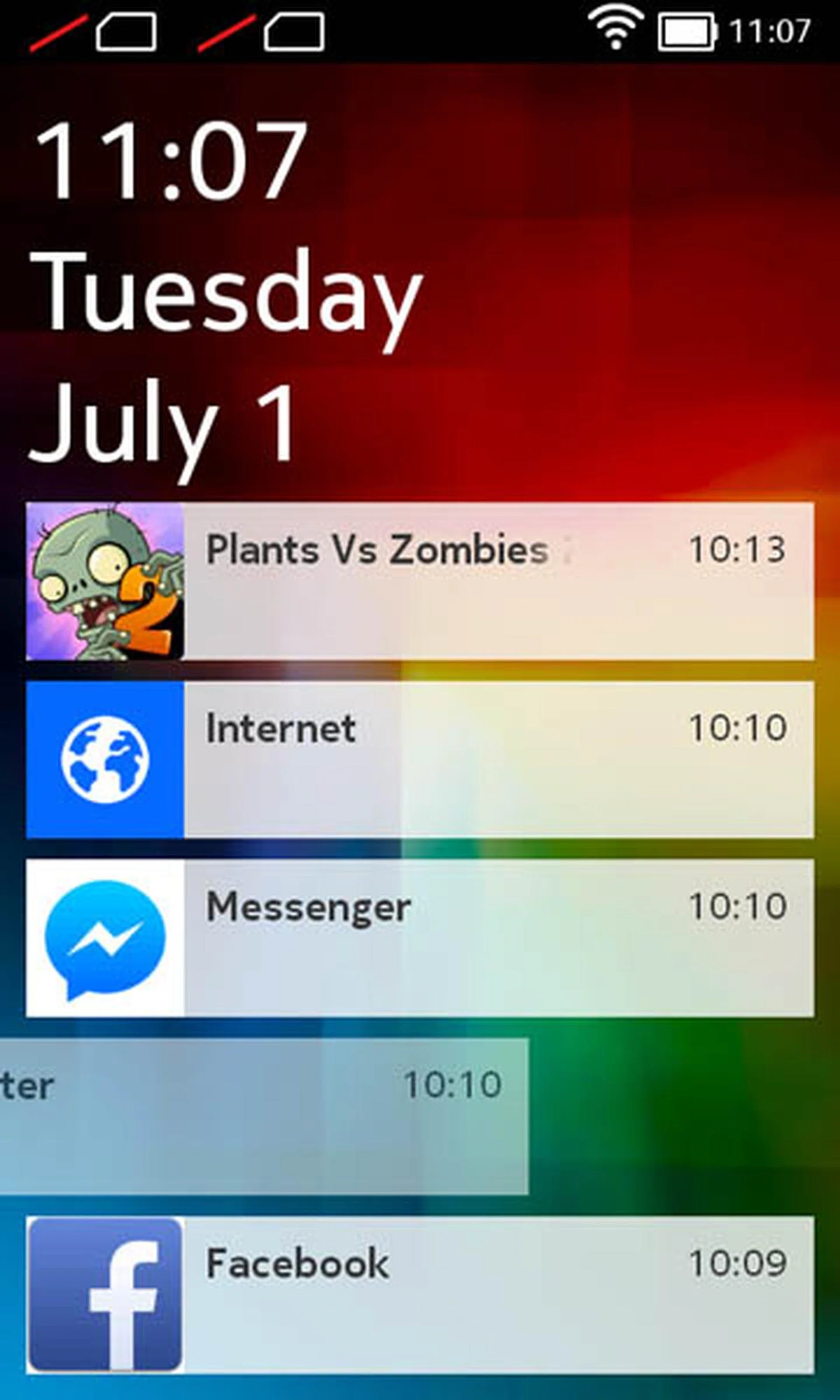
Nokia XL runs on Nokia X Platform UI 1.0, which is a fork of Android 4.1.2. Care must be taken in distinguishing between Nokia’s form of Android, and the various Android variants that are commonly reviewed by our team. Nokia’s form of Android is based on Android open-source platform (AOSP) code, without going through the compatibility tests instituted by Google; Nokia built their own services upon the open-source code, particularly Microsoft services, and then pushed it out to the market.
Essentially, Nokia X Platform UI 1.0 is a heavily altered Android, with every Google service ripped out and replaced with Microsoft and Nokia's offerings. The consequences of such a strategic decision may not be immediately be visible to the layman, but there are marked differences between Nokia’s Android, and the conventional Android OS variants deployed on major devices. One is that there is no Google Play Store in the Nokia X Platform. Instead, it is replaced by Nokia X Store, Nokia’s own curated app store. The other differences are as follows:
- No linking of Google services in any form or share options
- No Google Maps
- No Google Now
- No Google Push Notification service
In lieu of these aspects, Nokia has complemented the platform with their own version of the services, which will be covered in this section.
For the rest of the article, "conventional Android phones" shall refer to the Android systems typically found in most other Android phones, particularly those that actually has Google Play Store.
Home Screen
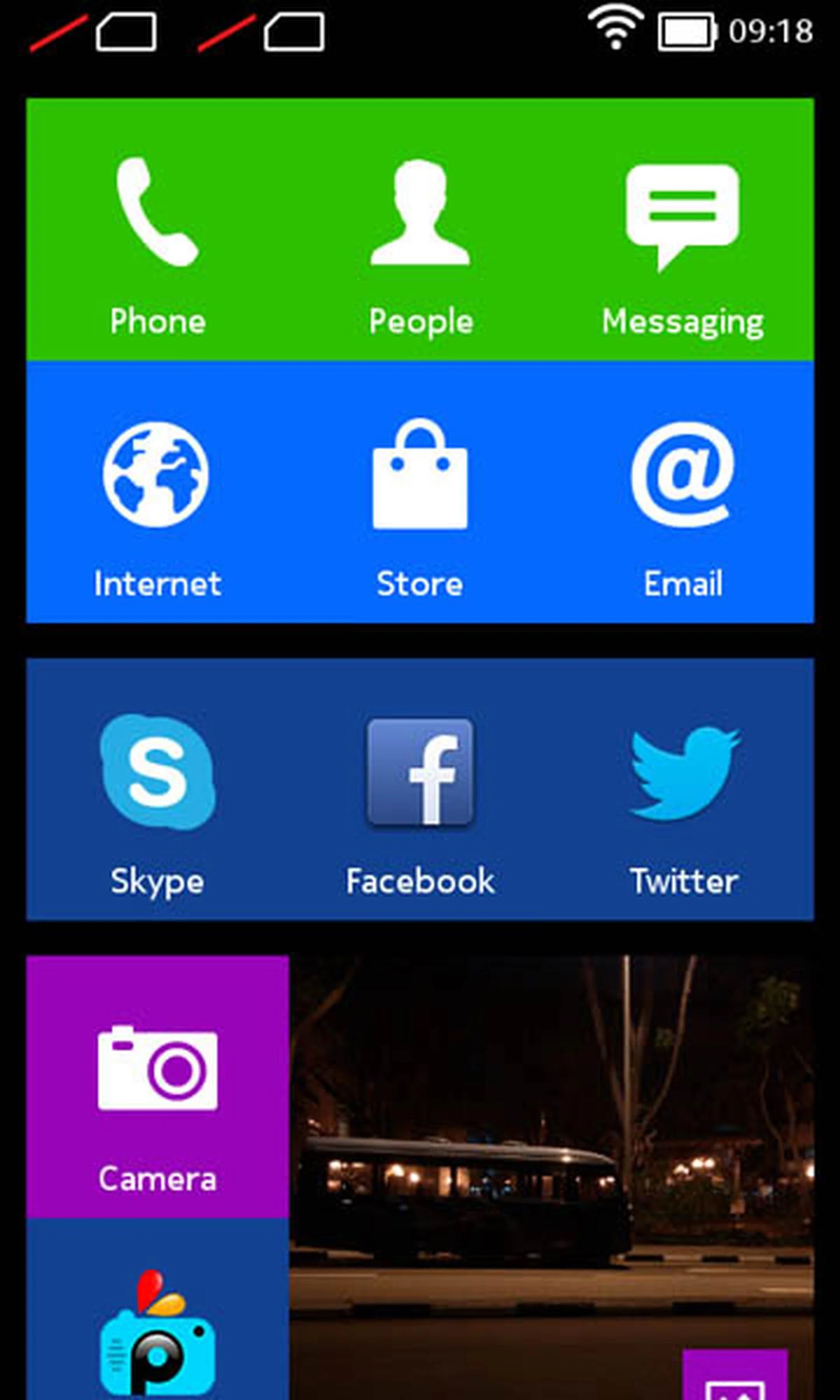
Windows Phone UI on budget
For those who are accustomed to using an Android based device, the Nokia X Platform UI 1.0's home screen will look very unfamiliar. In fact, the home screen is very similar to that of the Windows Phone UI interface. It is vertical-scroll home screen, populated by what looks like tiles from the Windows Phone UI. One can move and resize the tiles, the same way as you would on a true Windows Phone device. There is no fixed dock at the bottom of the screen; all icons, including the Phone launcher, are places on the main home screen, similar to that of the Windows Phone 8 user interface.
The one minor difference is that the Nokia X Platform UI 1.0 will allow you to add Android widgets on the home screen, just like any other Android phone. However, one cannot resize any widget, even if the widget is declared resizable in the first place.
So in short, it looks like Windows Phone, but it doesn't run Windows Phone apps and it allows you to run Android apps, but only those from the Nokia X Store. It's a very bizarre permutation that will take time to get accustomed to as it doesn't follow either the full Android route, or that of the Windows Phone path. But wait, there's more to be aware of...
App Drawer, or the lack thereof
Another major difference that Android users, or even Windows Phone users may encounter is the total absence of an App Drawer; all app launchers are located on the home screen. Swiping left and right does not bring the full list of apps.
Such design brings about inconvenience, especially when the user has installed a lot of apps. While an iOS-like paginated horizontal scroll will work fine, to scroll through a non-paginated vertical-scrolling interface to find one installed app would be tedious.
To remedy this somewhat, there is a Search bar at the top of the home screen to find the desired app (that is if you recall what you were looking for). The search bard can be revealed by slightly dragging up the home screen when it is at the top level. Even so, the given circumstances of where and how you can evoke search before typing to search what your require takes significant effort, and thus, the whole user experience feels displaced.
Fastlane
Nokia’s Fastlane is an interface which displays the user’s most recently accessed apps and notifications in reverse chronological order. As such, the Fastlane partly complements the lack of an app drawer by allowing the user to quickly launch apps that are commonly accessed. You can get to Fastlane by swiping the main home screen left or right.
The one Back button, and menu as a drawer
On phones running on conventional Android systems, they would almost always implement visible and clear buttons (be it soft or hard keys) corresponding to at least two conventional system keys: the Home and the Back button. On the Nokia Platform UI however, there is only one button: the Back button.
While by Android convention, one exits an Android app by repeatedly pressing the Back button until one returns to the home screen, it presents an interesting situation when one is using the Browser. In a Browser app, pressing the back button returns the user to the previous page; it only exits the app when there are no other previous pages in the browsing history. Imagine then if the user has navigated through tens of web sites, and suddenly decides to make a call. On a conventional Android system, the user will just need to tap the Home button to return to the home screen, and then tap on the Call or Dialer app. What about in the Nokia UI? Does the user need to press the back buttons tens of times before he can go back to the home screen?
It took quite some time for us to find out, but there indeed exists a Home system key on the Nokia Platform UI 1.0. This is activated by long-pressing the Back key.
While this sounds easy and long pressing a key to activate secondary functions isn't exactly new, it's not at all intuitive on this platform. That's because long pressing takes a whole one second to register our intended action; this breaks user experience as the Home key is the most used in any mobile device. As a qualification to this statement, its recently announced successor, the Nokia X2, will indeed have a home button, as a correction to the broken user experience.
Unlike conventional Android phones, there is no way to activate the task switcher, as there is none. While it's complemented by Fastlane, it's just a 'shortcut' to previously opened apps or tasks and it does not stop processes.
While most Android apps have been updated to implement menus as soft buttons in the app, there still exists legacy apps whereby the menu is activated traditionally by a menu key. For modern conventional Android systems without a menu key, such apps will have the Menu Overflow button displayed in the system bar. However, for Nokia X Platform UI 1.0, the menu is rendered as a closed drawer at the bottom of the screen, which can be activated by dragging out the drawer. It’s not very obvious initially and may take some time getting used to.
Nokia Here Maps
To make up for the lack of Google Maps, Nokia has incorporated Here maps, their own mapping solution. One advantage that Here Maps have over Google Maps is the easy ability to download maps for offline usage.
A field test was done to determine its usefulness under offline usage. Here are the parameters set:
- SIM card removed
- Wi-Fi turned off
Amazingly, it is able to triangulate rather accurately. Our test locations were locked on in about 10 seconds, despite not having any other signal to assist in geolocation.
Do take note that this offline mode works only when the "Internet Connection" option in Settings is turned off. Yet, to get directions, one must remember to turn on this setting again, even if one is connected to a 3G or a Wi-Fi network by then.
Oddly however, the Here Maps fails at times when it is connected over Wi-Fi. One of the field tests was conducted in Science Park I. Yet, the phone was located to be near Pioneer MRT, even with the Internet Connection option was turned off. Such mismatch of location was only resolved by turning off the Wi-Fi connection.
With regards to mapping capability, Here Maps still has quite some way to catch up to Google Maps or even Apple Maps, at least in the context of usage in Singapore. Various new landmarks that are easily located in Google Maps, such as SUTD, NUS, NTU, cannot be located using Here Maps. Having said that, we noticed some landmarks that are still under construction are already showing up on Here Maps, without any indication that they do not yet exist, examples being the future Downtown line stations. This will thoroughly confuse users, especially tourists to Singapore who may think that the Downtown line is ready for use.
Nokia X Store
In place of Google Play Store, the Nokia X Platform UI comes with Nokia X Store. This is the default gateway to getting apps on Nokia XL. Unfortunately, the offerings in Nokia X Store are mediocre, compared to Google Play, Apple App Store, Windows Phone Marketplace, Blackberry App World, or even the Nokia Ovi Store.
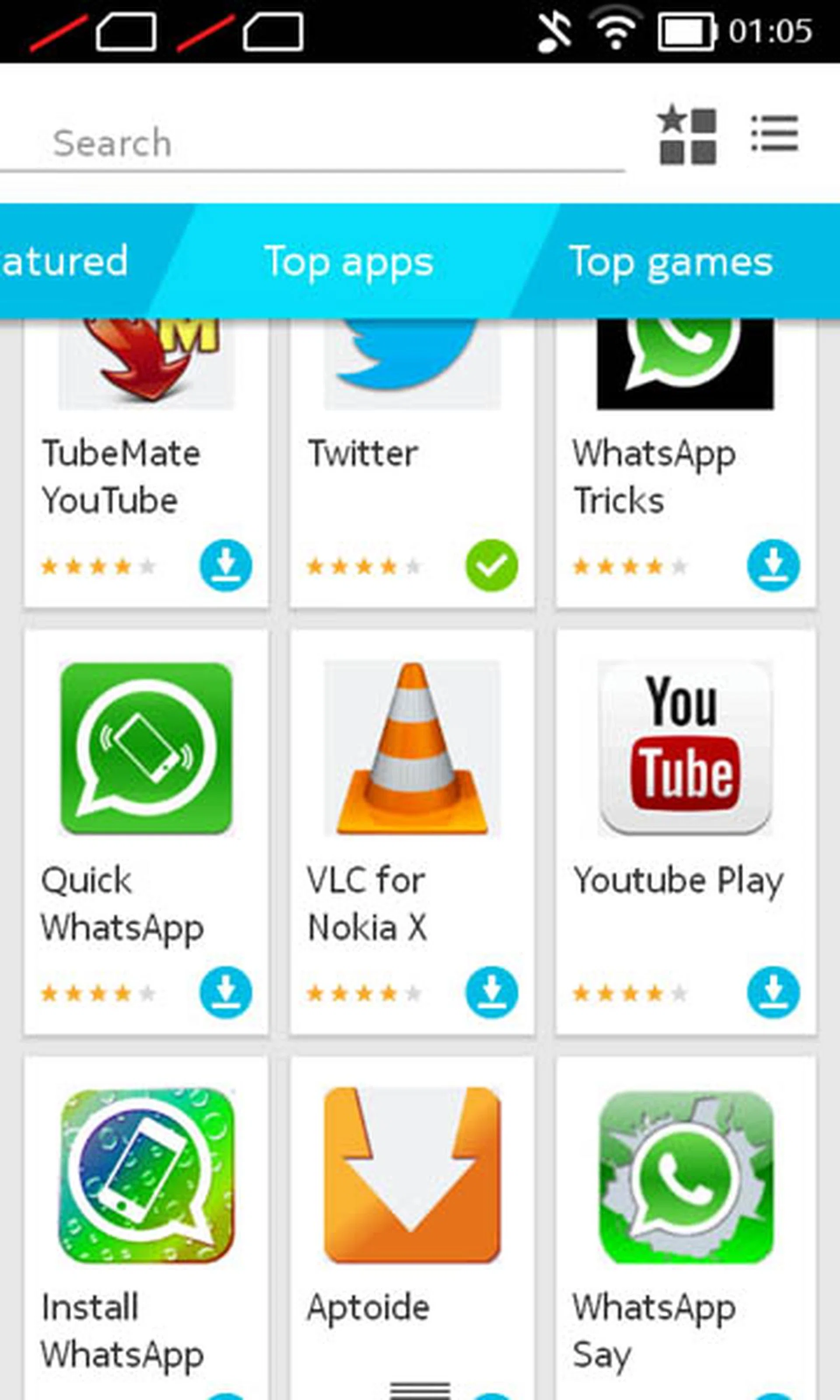
"Install Whatsapp", "Quick Whatsapp", "Whatsapp Say". These are not legit Whatsapp, yet they top the Apps chart in Nokia X, with suspiciously positive reviews.
First, the quality of the apps are suspect. While Nokia has claimed that they will have more stringent checking of apps in the Nokia X Store, the facts say otherwise. A quick browse on the Top Apps section revealed many "spoofware" - apps that masquerade other legitimate apps, but offer little or no functionalities. Some examples are the existence of "Google Search", "Google Translate", and many various apps containing the word "WhatsApp", but are actually spoof apps created by unknown companies, and offer unrelated or no functionality. For instance, the "Install WhatAap"” app turns out to be no more than just showing words.
Yet, these apps are suspiciously getting high ratings, despite the fact that they are spoof apps. Legit users would’ve downranked such spoof apps, and even reported it to Nokia. The fact that such apps still remain, and in such overwhelming numbers that they top the Nokia X Store, contradicts Nokia’s claims of stringent checks on apps submitted. Worse still, they flood the app store. Such a phenomenon is bad for the end user, for he or she can be misled into thinking that these spoof apps, being top-rated, are legit.
In spite of that, there exist common legit apps in the Nokia X Store, such as Facebook and Twitter. They work just like how they operate on conventional Android systems. However, due to the extra effort needed to port an existing app for use in the Nokia UI Platform, these apps lag behind their respective counterparts in conventional Android systems.
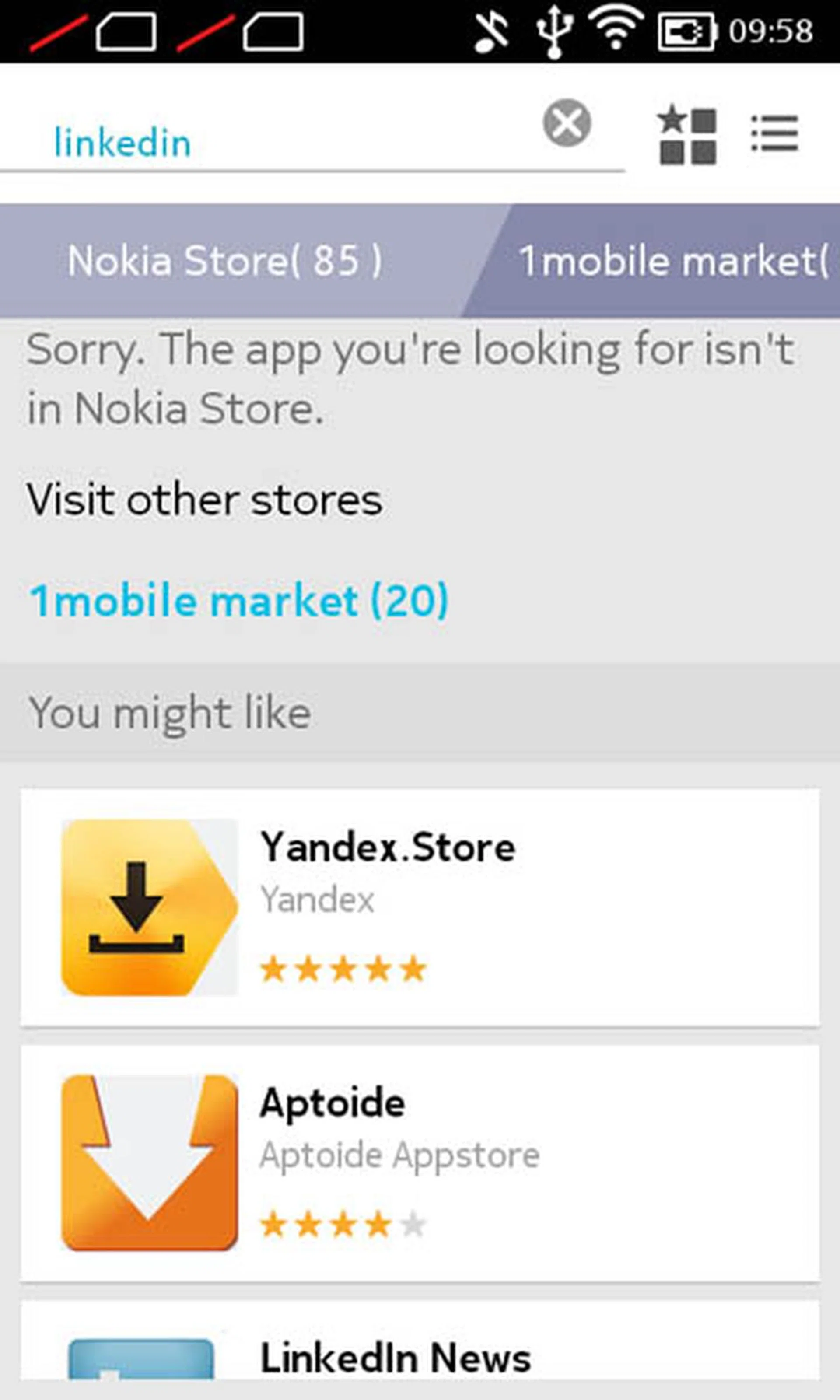
If all else fails, Nokia X Store will assist in directing the user to other stores. Compatibility with Nokia XL not guaranteed.
Interestingly, the Nokia X Store also contains apps that lead to other third-party app stores, such as SlideMe. Whenever the user needs an app that is not available in the Nokia X Store, he or she will be redirected to these third-party stores. Do note that these stores offer apps that may not be compatible with the Nokia UI Platform, and may also be outdated.
Sideloading
The other way of getting existing Android apps is through sideloading, i.e. copying over the APK installer file into Nokia XL, and running the installer. Does it work? We tested extracting the APK, and installing some apps that are commonly used in Singapore and are not available in the Nokia X Store. Apps that are made by Google are excluded from the test, for obvious reasons.
- WhatsApp: Installs, but throws error message
- SG Buses: Does not install
- POSB App: Does not install
- UOB App: Does not install
- OCBC App: Does not install
- GrabTaxi: Installs and runs. Actual booking not tested.
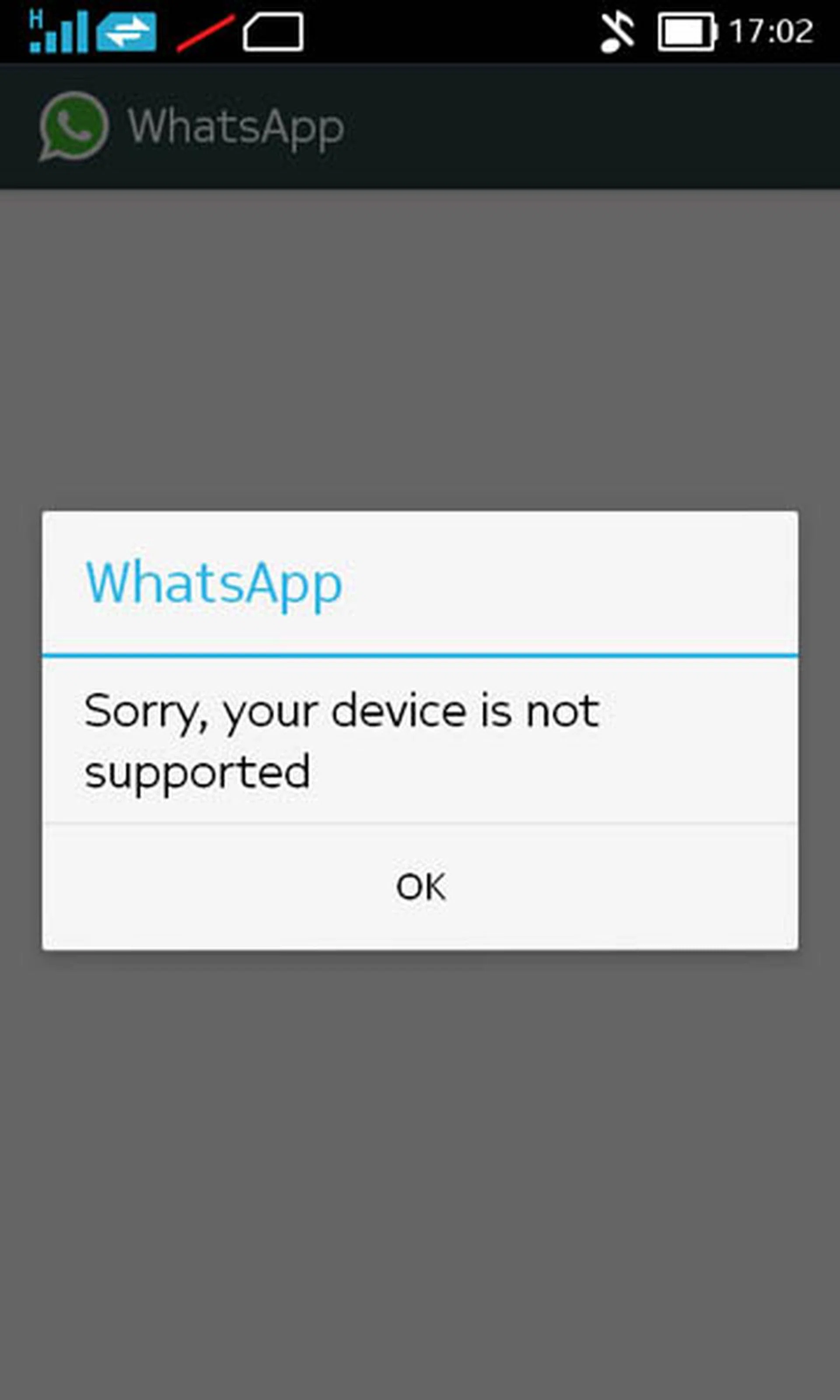
WhatsApp is able to install on Nokia XL. However, it is not sanctioned by WhatsApp.
As such, despite Nokia X having an Android core, many existing Android apps will not be able to install or run on it. This can be attributed to the fact that many legit apps incorporate some Google services - especially push notification - and thus will not work on Nokia XL out of the box.
While there are workarounds to overcome the lack of essential apps, those methods are nonetheless unofficial, are unsupported by official sources, and therefore may break intermittently.
Software Update Status
Many had hoped that since Nokia has been acquired by Microsoft, surely Microsoft/Nokia will work hard to deliver timely updates to their devices, given that Microsoft had previously snubbed Android for fragmentation and slow updates. The recent unveiling of Nokia X2 comes along with the debut of Nokia X Platform UI 2.0, which is based on Android 4.3. Unfortunately, Nokia has publicly announced that the current Nokia X series phones will not receive an OS-level upgrade to Platform UI 2.0.
As such, Nokia XL is stuck with Platform UI 1.0, i.e. Android 4.1, just less than 4 months after its first release overseas, and barely a month after its debut in Singapore.
Performance
The Nokia XL is powered by a Qualcomm dual-core 1.0GHz processor, a very low-end processor by today’s standards. It comes with 786MB of RAM and 4GB of internal storage. How does the phone perform, relative to the other budget phones in the market?
Sunspider
SunSpider JavaScript helps measure the browsing performance of a device when processing JavaScript. It not only takes into consideration the underlying hardware performance, but also assesses how optimized a particular platform is at delivering a high-speed web browsing experience.
After an initial test with all the other devices in the comparison list, we felt compelled to add the old Nexus S into the test mix just to make a point of how outdated its hardware platform is. For those who forgot, the Nexus S is a Google Nexus device released in late 2010, more three and a half years ago.
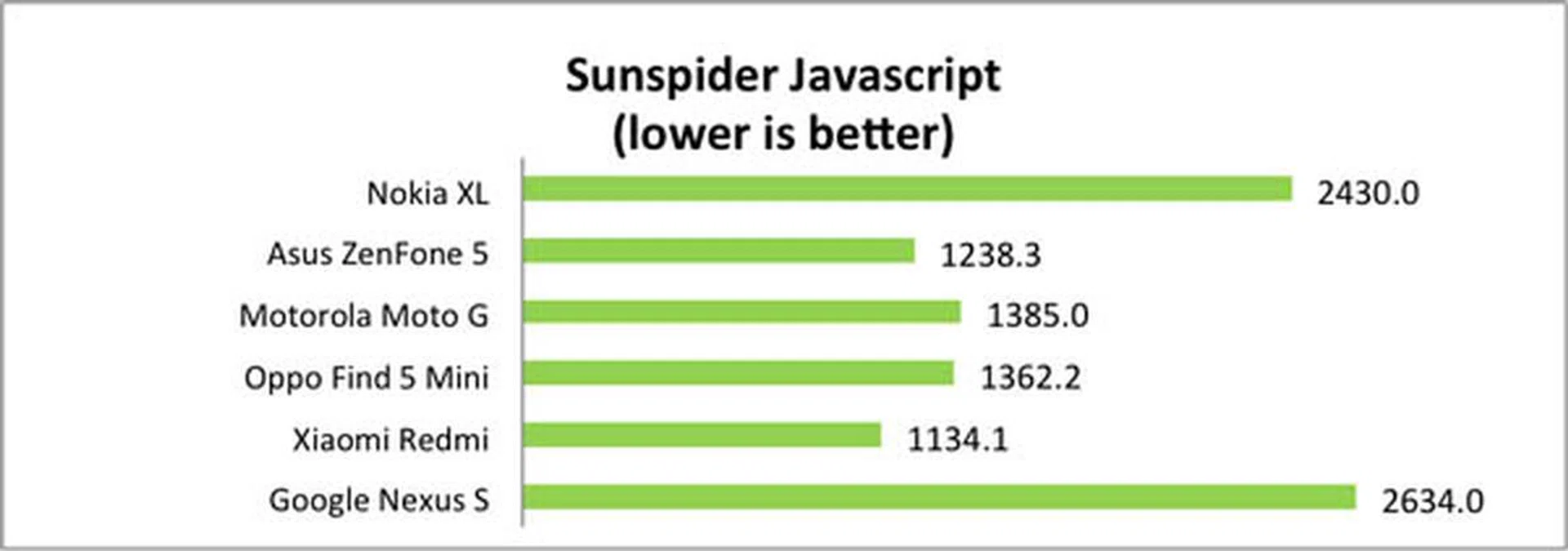
Sunspider 1.0.2 scores
As seen in the results, the Sunspider score is remarkably slow compared to other budget phones of the same category. It is about twice as slow as the ZenFone 5, and the speed is comparable to that of Nexus S.
Quadrant
Quadrant evaluates a device's CPU, memory, I/O and 3D graphics performances. Note that Quadrant is currently not available in the Nokia X Store. For this test, we had to extract the APK from a rooted phone, transfer it to the Nokia XL, and then ran the installer. Once again, we see that the score of the Nokia XL is the lowest, about half the score generated by the Xiaomi Redmi.
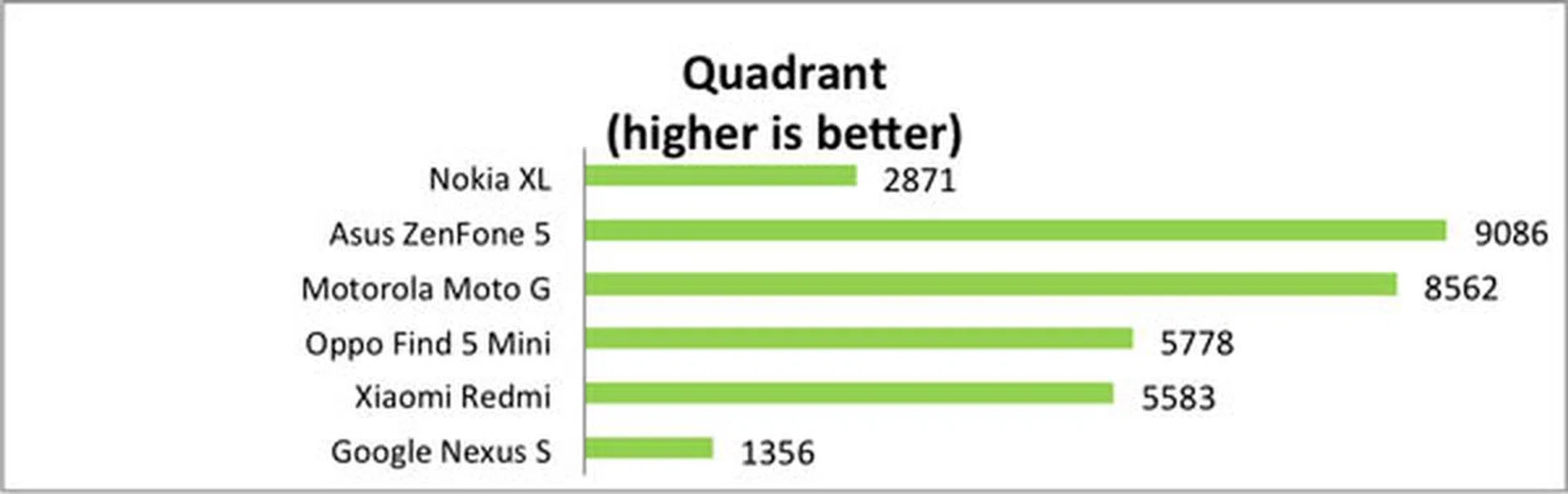
Quadrant scores
Real world usage experience
The benchmark scores, to a certain extent, translate into actual usage experience. Despite the existence of Project Butter in Android 4.1 Jelly Bean, the OS version which the Nokia X Software platform was designed upon, most transitions were found to be sluggish, and app launch times are slow. In short, using the Nokia XL brings back memories of using the HTC Desire from back in 2010 when such an experience was borderline tolerable. These days however, such sluggish experience is unacceptable even on budget devices.
Video playback was another highly problematic area. A 720p video file is completely unplayable, with stuttering and at times the video frame hanging for up to 15 seconds! Even a 480p video is barely smooth, with intermittent stutters. We haven't really come across a phone with this much basic usability issues in a long while.
Battery Life
Our standard battery test for mobile phones includes the following parameters:
- Looping a 800 x 480-pixel video with screen brightness and volume at 100%
- Wi-Fi and Bluetooth connectivity turned on
- Constant data streaming through email and Twitter
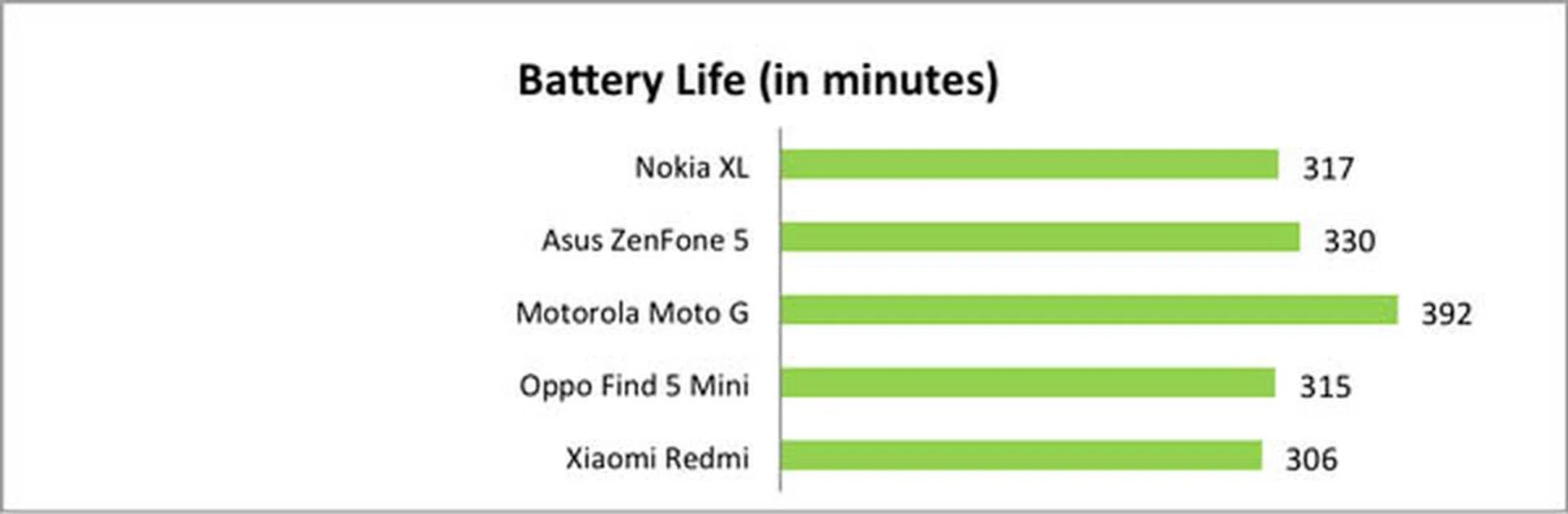
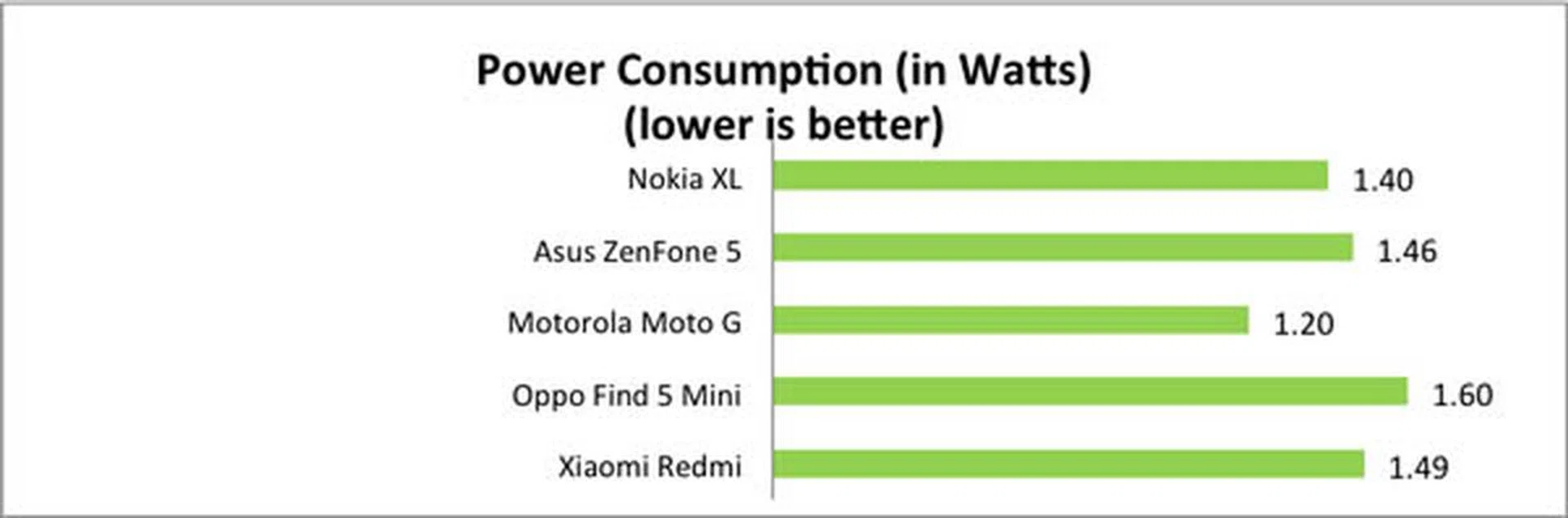
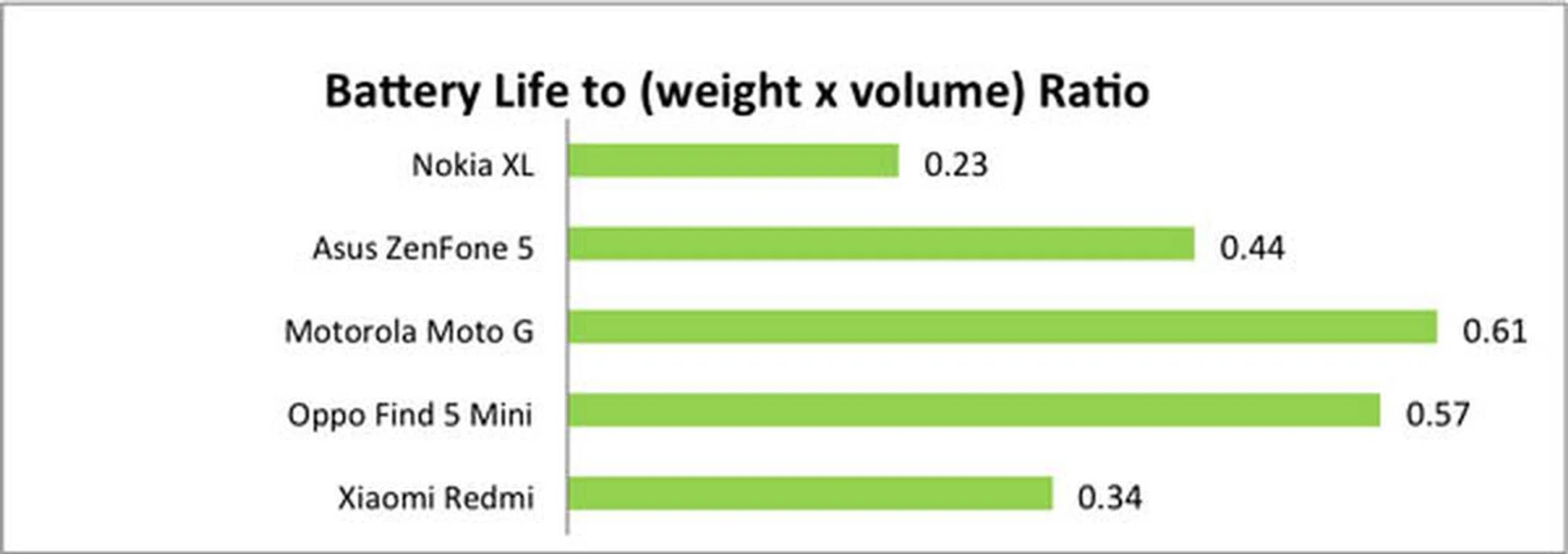
For once, there was a small glimmer of hope in terms of performance testing via battery life up-time. As can be seen in the graphs above, Nokia XL's battery life is comparable to the other budget smartphones. However, the portability ration ranking is thoroughly the worst amongst all the devices due to its heft and physical size.
Camera Performance
Nokia XL sports a 5-megapixel back camera, and a 2-megapixel front camera. Being a budget phone, the camera is only fit for very basic generic purposes. On low light, it performs rather poorly. We'll let the photos do the talking for themselves.
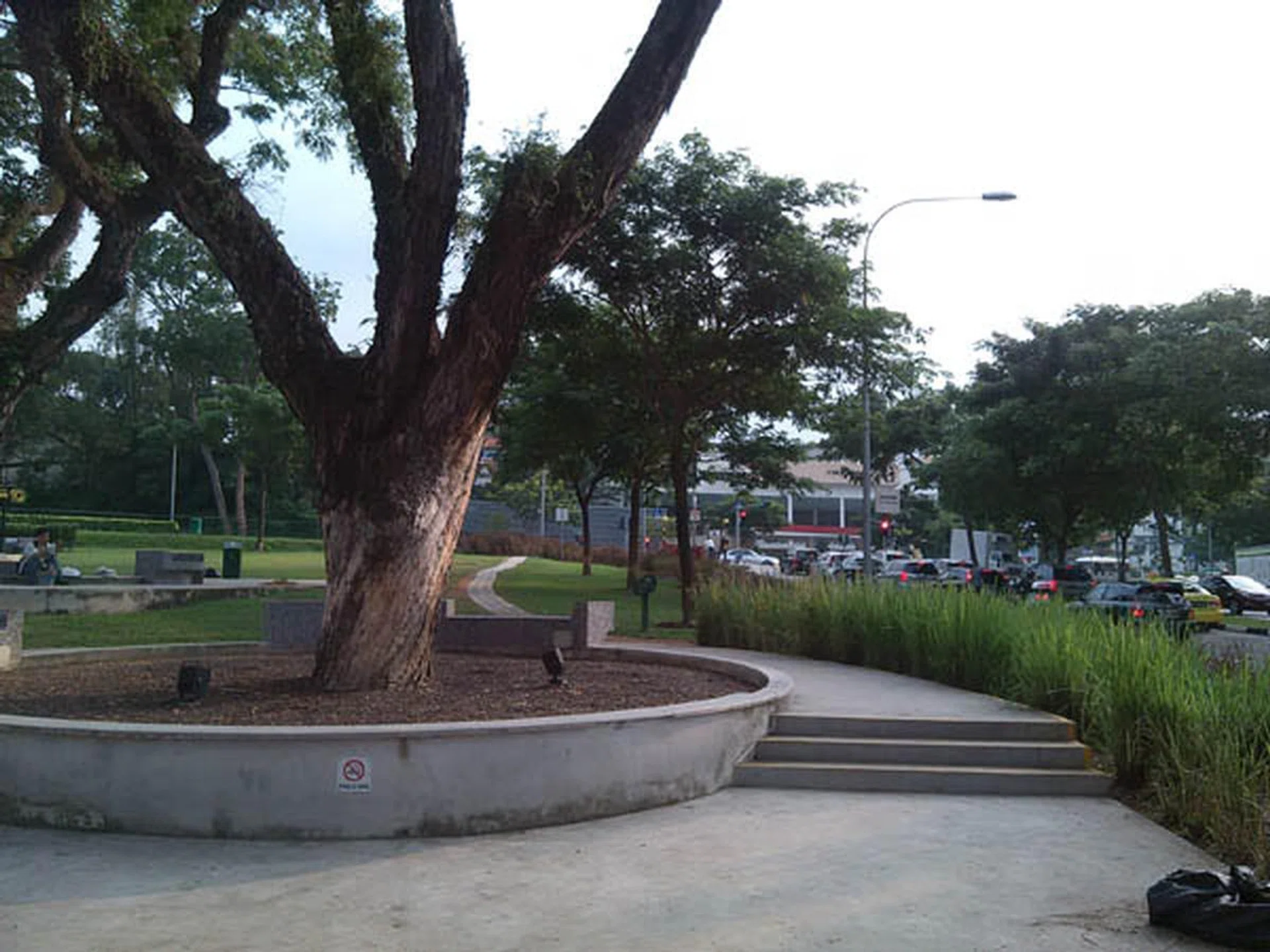
A fairly average day shot.

A night shot.
Besides the sub-par imaging quality when put up against other budget phones we've drawn up for comparisons, the Nokia XL records video at a maximum of 480p resolution. This is rather low, given that other budget phones can handle at least 720p video recording, with a notable exception of Xiaomi Redmi being able to even record at 1080p and costs 40% cheaper. This also probably explains the horrible video playback experience we've noted earlier.
Conclusion
The release of Nokia XL is puzzling. It started out looking to be a good alternative, but it has become the perfect case where looks can be deceiving. Had the Nokia XL launched a couple of years ago - even as an entry-level phone, it might have been a decent device. However, given the plethora of other entry-level offerings today, the Nokia XL significantly pales against them. The price does not justify its sub-par performance either. With an official selling price of S$239, one can get a Xiaomi Redmi, Redmi Note, ASUS ZenFone 5, or a Motorola Moto G - all of which sport better screens, perform reasonably well, have a much better camera, and far better app offerings than the Nokia XL.
Even without factoring the price, the recent announcement that the whole Nokia X series would be canned effectively renders Nokia XL "dead on arrival", just a little more than a month after its launch in Singapore. This is not the first time that Nokia/Microsoft have taken such curt actions on product support; in 2012, just after 2 months of launching Lumia 900, Microsoft announced that the phone will never receive Windows Phone 8 upgrade (it managed to get Windows Phone version 7.8 as a consolation). Conversely, conventional well-known Android phones receive at least one major OS update after its launch, even in their earlier years when fragmentation was a big issue.
The fact that the Nokia X Store is laden with spoofware shows how committed Nokia really is in crafting their own Android experience - close to zero. Compare that to Amazon during its early years of its launch of Fire OS, also their own 'fork' of Android OS: they were committed in curating seamless user experience, henceforth they spared no effort in vetting app submissions, resulting in their App Store mostly clean of spoofware.
Considering all of the above points, we do not recommend this phone to anyone - it doesn't offer, value performance or features from any aspect that would satisfy anyone in this day and age. There are far better alternatives even if this phone were to somehow get discounted at half its suggested price point. Should one need a budget Android phone, other than a Xiaomi Redmi, one can consider one of the following, and still get their money’s worth:
- Xiaomi Redmi Note (SRP: S$199. Only purchasable online periodically)
- Asus Zenfone 5 (SRP: $249, available from S$219)
- Motorola Moto G (SRP: $318, available from S$240)
If you don't necessarily need an Android based device and for die-hard Nokia fans, one can get the similar looking Nokia Lumia 635, running on the latest Windows Phone 8.1 platform for a similar SRP of S$239. If you're curious about its performance, it convincingly outdoes the Nokia XL in every department. It is also the most affordable 4G LTE device in market at the time of publishing this article. This makes you wonder what is the relevancy of Nokia XL if the company's own alternatives are better options. Should you prefer to trade the 4G capability for a slightly larger screen (4.7-inch vs. 4.5-inch) and larger battery capacity, the older Lumia 625 might still be lingering around for consideration too (and yes, it would fare better than the 'new' Nokia XL).
Our articles may contain affiliate links. If you buy through these links, we may earn a small commission.