
Note: This review was first published on 28 January 2026.
Intel has spent the better part of the past two years talking about balance. Balance between performance and efficiency, between raw CPU power and battery life, and between what a thin-and-light laptop should be capable of versus what it actually delivers in day-to-day use. With its new Core Ultra Series 3 platform (codename Panther Lake) – and specifically its champion Core Ultra X9 388H – this is the first time in a while where Intel’s claims don’t immediately sound like wishful thinking. On paper, this is meant to be the chip that finally closes the gap between high-performance laptops and machines that can actually last a full workday without hunting for a power socket.
The pitch behind the Core Ultra Series 3 platform is actually pretty simple. My editor-in-chief, Vijay Anand, was invited by Intel for an early preview at this year’s CES and you can check his full 101 feature here. But the TL;DR version is this: Intel wants Panther Lake to behave like a scaled-down Arrow Lake when you need performance, while borrowing the power discipline it learned from Lunar Lake when you don’t. That means enough headroom for gaming and creative workloads, without the usual penalty of fans screaming or battery life free-falling. Intel has even gone as far as suggesting that the integrated graphics performance (by the very impressive Arc B390) here is similar to entry-level NVIDIA GeForce RTX 4050 Laptop GPU. As I’ll get into later, that comparison isn’t entirely off the mark – though there are a few caveats worth unpacking.
It’s also worth remembering where Intel was coming from. Meteor Lake and Lunar Lake were not bad platforms by any stretch, but they rarely felt class-leading when it came to CPU-bound tasks. Single-core responsiveness was fine, multi-core workloads were so-so, but competitors like AMD’s latest mobile Ryzen chips – and more recently Qualcomm’s Snapdragon X series – often had the upper hand in workloads that mattered for productivity-heavy users. If your day revolved around browser tabs, spreadsheets, code compilation, or CPU-limited games, Intel wasn’t always the obvious choice. Panther Lake feels like a deliberate attempt to change that narrative.
For testing, Intel sent over the new and yet-to-be released ASUS ZenBook Duo (2026) configured with the Core Ultra X9 388H as one of its early Panther Lake showcase machines. It’s an interesting, if slightly unconventional, pairing. The ZenBook Duo’s dual-screen setup and large 99Wh battery introduce variables that can skew perceptions of battery life and thermals, especially compared to more conventional clamshell laptops. Still, it provides a useful look at what this processor can do when given ample power and cooling headroom. And don’t worry, my standalone review of this Zenbook Duo is coming up shortly.
Welcome Panther Lake
In my tests, I leaned towards real-world benchmarking tools rather than purely synthetic ones. That meant relying on suites like SysMark and MobileMark 30, which are designed to reflect how Windows PCs are actually used day to day. Instead of isolating raw hardware behaviour, these tests focus on responsiveness, productivity workloads, and content creation tasks such as photo and video editing.
Alongside that, I ran a mix of video encoding and AI workloads to see how Intel’s latest mobile flagship stacks up against its immediate predecessor and its most direct AMD rival. For reference, the systems used were:
- MSI Swift 16 AI Evo: Intel Core Ultra 9 285H (Lunar Lake)
- HP ZBook: AMD Ryzen AI Max Pro 390 (Strix Halo)
- ASUS Zenbook Duo: Intel Core Ultra X9 388H (Panther Lake)
That said, these aren’t like-for-like systems, and a few caveats are worth flagging upfront. The HP ZBook, for instance, packs 64GB of memory compared to the 32GB found in both the MSI and ASUS machines, but it also runs on a smaller 74Wh battery versus the 97Wh and 99Wh batteries in the Intel laptops. Each brand also optimise their respective laptops down to the BIOS level too. In other words, the results that follow should be read less as absolute rankings and more as a reflection of how each platform behaves in realistic, shipping laptops – trade-offs and all.
Productivity and Content Creation
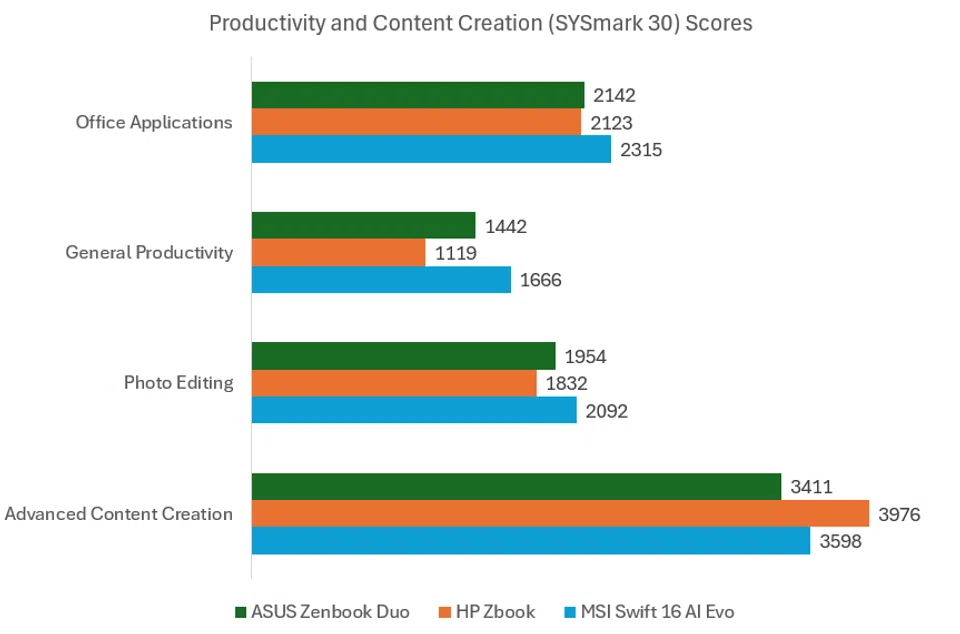
The higher the score, the better.
Looking at the SysMark 30 results, what stood out to me wasn’t a runaway win for any one platform, but just how consistent the Core Ultra X9 388H is across the board. In Office Applications and General Productivity, the ASUS Zenbook Duo doesn’t always post the highest score, but it’s never meaningfully behind either. More importantly, the gaps here are small enough that, in day-to-day use, most people would struggle to feel a real difference. For documents, emails, spreadsheets, and a browser full of tabs, all three systems are already operating well past the point of feeling slow.
The separation starts to show once workloads lean harder on sustained CPU performance. In General Productivity, the Zenbook Duo edges ahead of both the Lunar Lake-based MSI system and the AMD-powered ZBook, despite the latter’s clear advantage in memory capacity. This seems to suggest Panther Lake’s gains aren’t coming purely from brute force, but from better efficiency and scheduling.
Photo editing follows a similar pattern. The Core Ultra X9 388H again sits comfortably ahead of Lunar Lake and just above the Ryzen AI Max Pro 390. Truth be told, these aren’t dramatic wins but they don’t need to be. What matters is that the uplift is consistent, rather than isolated to one specific workload. From a practical standpoint, that points to a platform that feels more responsive and predictable when you bounce between different creative tasks, rather than one that excels only in ideal conditions.
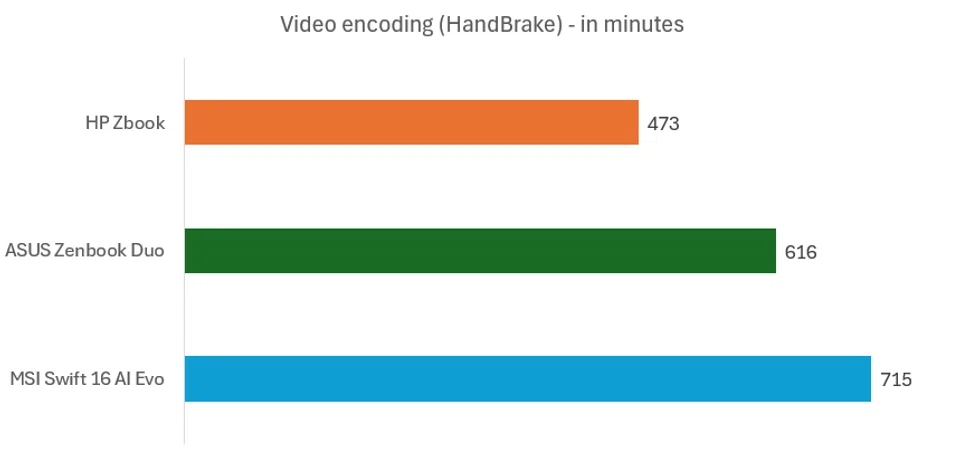
The shorter the time, the better.
Advanced Content Creation is where the chart becomes more nuanced. The HP ZBook takes the top spot here, which isn’t particularly surprising given its higher memory configuration and workstation-leaning design. What’s more interesting is where the Zenbook Duo lands. Sitting between the ZBook and the MSI Swift 16 AI Evo, the Core Ultra X9 388H delivers a level of performance that feels respectable for a consumer-focused laptop without discrete graphics. We can also see this with our Video encoding test with Handbrake. It reinforces the idea that Panther Lake is designed not just for short bursts of speed, but for holding its own when workloads become heavier and more sustained.
Taken as a whole, these SysMark 30 results don’t suggest a dramatic leap forward overnight. What they do show is Intel restoring competitiveness in the mobile space where it is flagging badly in the desktop side. The improvement over Lunar Lake is clear, and against AMD’s current mobile flagship, Intel is no longer chasing from behind either. If anything else, Panther Lake feels like a step back into genuinely competitive territory for Team Blue.
AI workloads
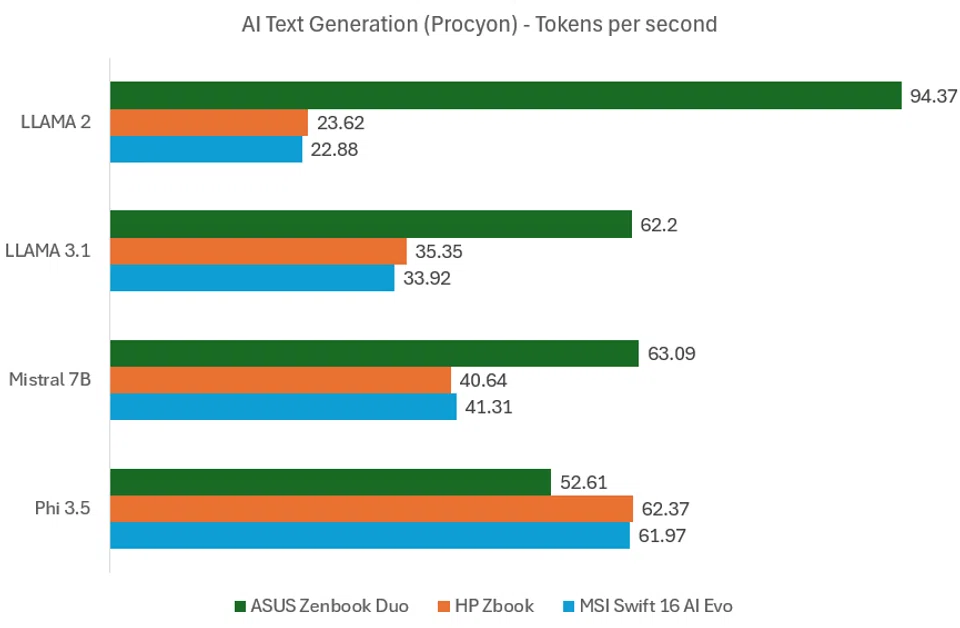
The higher the token per second score, the better
The Procyon AI text generation results make Panther Lake’s strengths immediately obvious. In most of the models tested, the Core Ultra X9 388H in the Zenbook Duo delivers noticeably higher token-per-second output than both the Lunar Lake-based MSI system and AMD’s Ryzen AI Max Pro 390. In cases like LLaMA 2, the gap is wide enough that it’s hard to dismiss, and it points to more than just incremental CPU or GPU gains. A faster or better-utilised NPU, combined with Intel’s maturing AI software stack, is likely playing a meaningful role here.
That advantage carries over into LLaMA 3.1 and Mistral 7B, where the Zenbook Duo continues to lead by a comfortable margin. The consistency across multiple models matters, as it suggests Panther Lake’s gains aren’t tied to one-off optimisations. For anyone experimenting with local language models, that kind of predictable behaviour is often more valuable than chasing peak numbers in a single test.
Phi-3.5 is the exception. Here, the HP ZBook and MSI Swift 16 AI Evo edge ahead, a useful reminder that AI workloads remain highly model-dependent and that no platform dominates every scenario. Even so, the Core Ultra X9 388H still puts in a solid showing.
Gaming Benchmarks
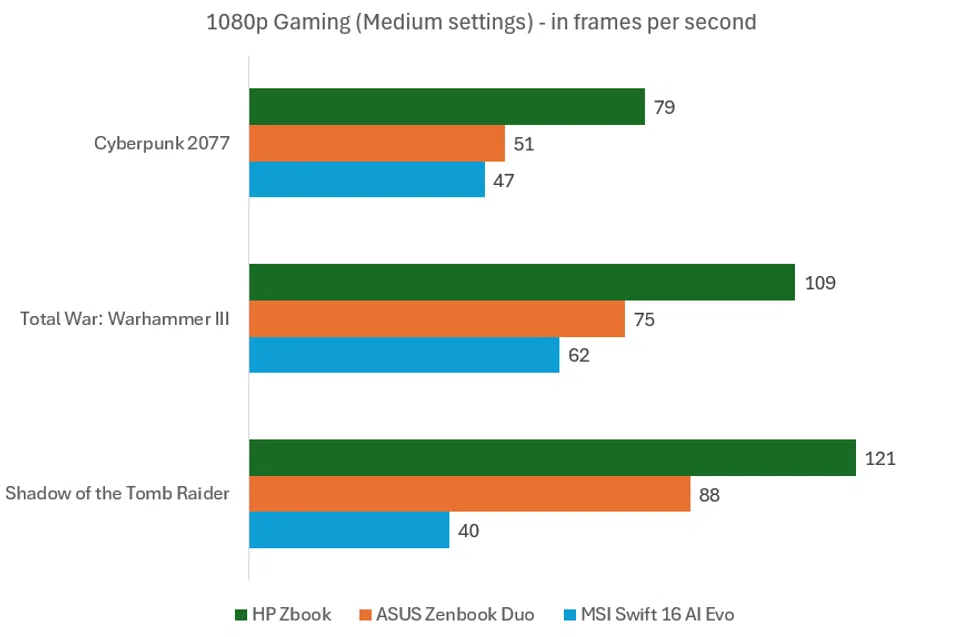
Taken as a whole, the gaming results show just how far integrated graphics have come on modern laptops – and also where the limits still are. At 1080p with medium settings, the Core Ultra X9 388H in the Zenbook Duo holds its own across all three titles tested, comfortably outperforming the MSI Swift 16 AI Evo and staying closer to the ZBook than previous Intel platforms would have managed. Games like Total War: Warhammer III and Shadow of the Tomb Raider are particularly telling here, where frame rates are high enough to feel genuinely smooth rather than merely playable.
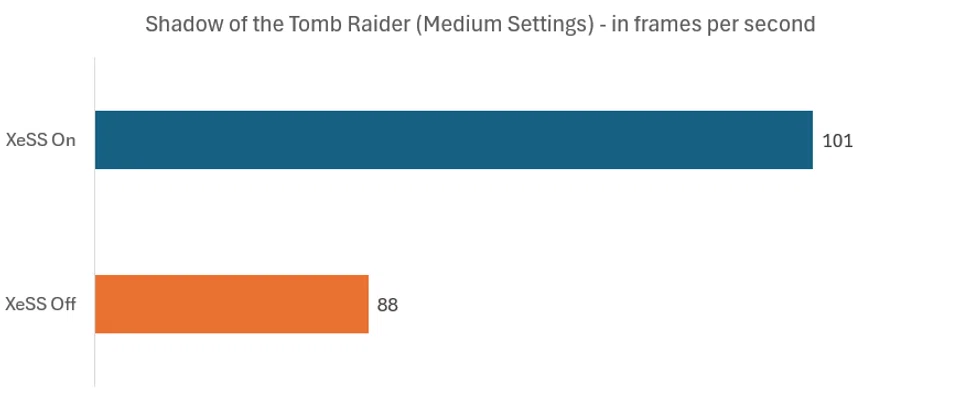
The higher the frames per second, the better.
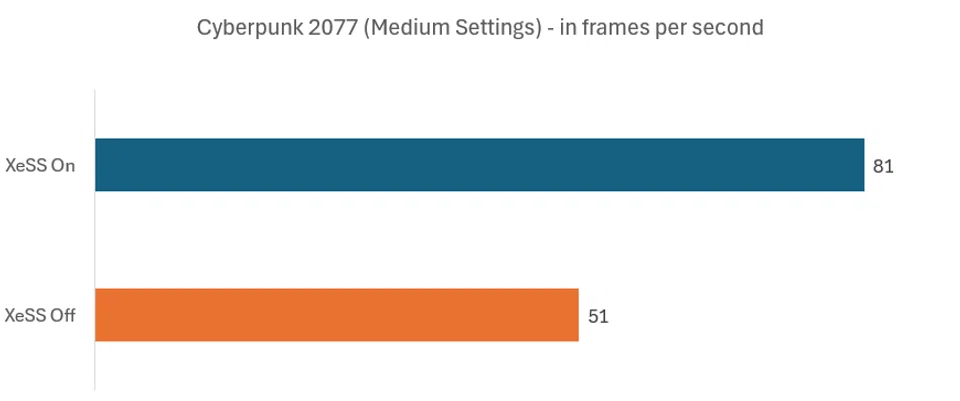
The higher the frames per second, the better.
Cyberpunk 2077 remains the stress test. At native settings without upscaling, performance is clearly more constrained, and that’s where Intel’s software stack starts to matter just as much as the silicon itself. With XeSS disabled, frame rates sit firmly in “playable, but compromised” territory. Switch XeSS on, however, and the jump is immediate and meaningful. An increase from the low 50s to over 80fps in Cyberpunk 2077 fundamentally changes how the game feels and play – in a good way.
The same pattern shows up in Shadow of the Tomb Raider. XeSS pushes performance well past the 100fps mark, smoothing out dips and giving the integrated GPU far more breathing room. What’s notable isn’t just the raw uplift, but how consistent the gains are. XeSS doesn’t feel like a last-resort toggle here; it feels like a feature Intel expects users to rely on, much like DLSS has become on Nvidia systems.
It’s all good here but Panther Lake isn’t going to replace your specialised gaming laptops, but for a thin-and-light laptop – especially one not even marketed as a gaming machine – the experience is far more viable than it used to be. With XeSS enabled, Panther Lake moves from “can it run?” to “this actually works”, and that’s a meaningful shift for Intel’s integrated graphics ambitions. And good new for many mainstream gamers too.
Battery life and power efficiency
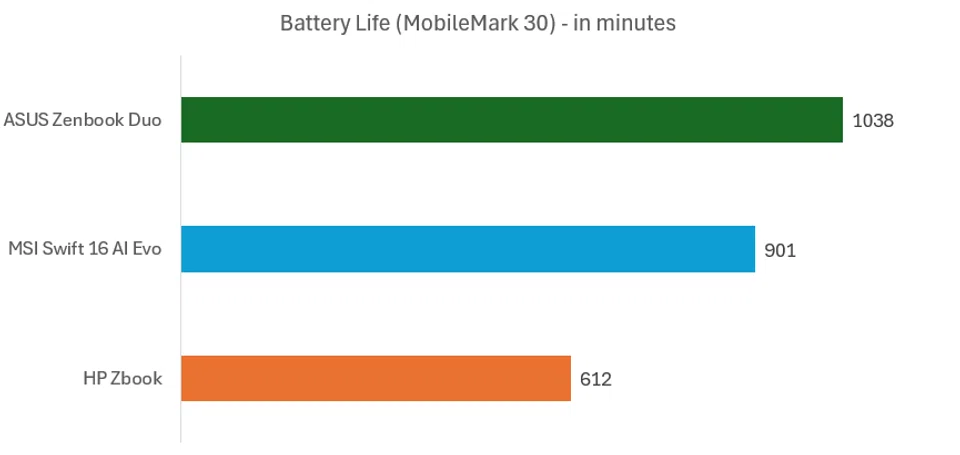
The higher the score, the better.
The MobileMark 30 results put Panther Lake’s efficiency claims into clearer perspective, where it delivers the longest runtime of the three systems tested. Clocking over 17 hours, it comfortably outlasts both the Lunar Lake-based laptop and the AMD-powered one, which trails some distance behind.
What makes this result more interesting is the context. The MSI Swift 16 AI Evo isn’t exactly inefficient, and its sub-15 hours result is still respectable for a performance-oriented thin-and-light. That said, Panther Lake manages to stretch its advantage even further, suggesting Intel’s power management improvements aren’t limited to idle or light workloads, but hold up under a sustained, mixed-use scenario like MobileMark 30.
The HP ZBook’s shorter runtime is less surprising given its workstation focus and smaller battery, but it does highlight the trade-offs at play. Raw performance and memory capacity come at a cost, and in this case, battery life is where that cost is most visible.
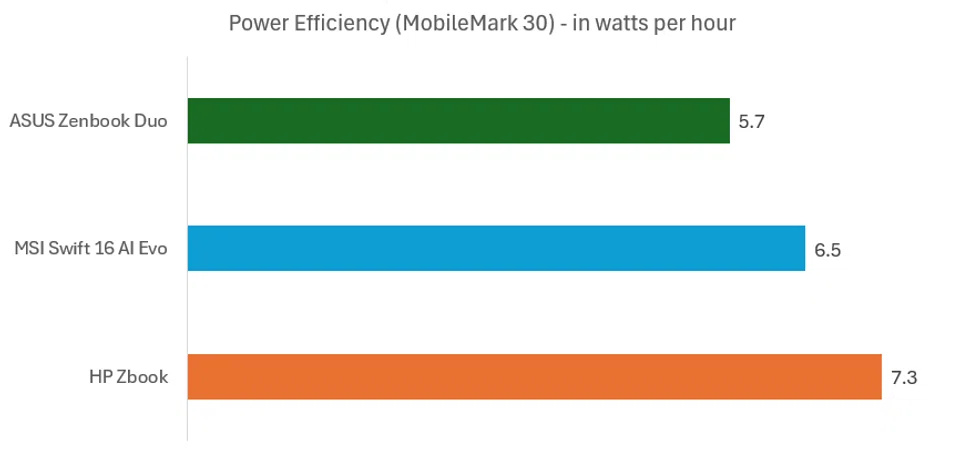
The lower the wattage, the better
Viewed through the lens of power efficiency rather than raw runtime, Panther Lake’s advantage becomes even clearer. Based on the MobileMark 30 results, the Zenbook Duo averages around 5.7w under sustained, mixed-use of both productivity and content creation workloads. That’s a notably low figure for a full Windows laptop.
By comparison, the Lunar Lake-based Swift 16 AI Evo averages about 6.5w, while the Strix Halo-powered HP ZBook sits closer to 7.3 watts. Those numbers help explain why Panther Lake stretches its battery further, even when battery capacities may not be dramatically different on older or AMD mobile silicon. This isn’t just about stuffing a larger battery into the chassis; it’s about how efficiently the platform uses the power it has.
Final thoughts
After spending time with Panther Lake (and the ASUS Zenbook Duo), it’s clear that Intel’s story here isn’t about chasing a single headline win or topping every chart outright. Across productivity, content creation, AI workloads, gaming, and battery life, the Core Ultra X9 388H behaves like a well-rounded laptop platform rather than one built to impress only in controlled benchmarks.
That balance matters, because I honestly thought that 2025’s crop of laptop processors were the best we’d seen in years – whether you bought a laptop powered by AMD, Intel or even Qualcomm you would have walked away happy. But early signs suggest 2026 could be even better. Performance has reached a point where compromises are less obvious, and the differences between platforms are increasingly about how they feel to live with, not just what they score.
Of course, Intel is also first out of the gate this time. AMD will eventually respond with Ryzen AI 400, and Qualcomm’s Snapdragon X2 Elite Extreme is still waiting in the wings. That context matters. With Intel traditionally commanding around 80 percent of the laptop processor market, an early lead could prove meaningful.
What stands out most about the Core Ultra X9 388H is that it finally delivers on Intel’s long-promised idea of balance. CPU performance is competitive again, AI workloads show real intent rather than box-ticking, integrated graphics paired with XeSS are genuinely great, and battery life no longer feels like the price you pay for speed. Panther Lake doesn’t reinvent the laptop overnight, but it does make Intel laptops easier to recommend without caveats.
And with AMD and Qualcomm still to show their hands, this feels less like the end of a conversation and more like the opening move in what could be a very interesting year for laptops. We’re not done yet.