
Razer Blade 15 (9th Gen) review: Still the same sharp looker
The Razer Blade 15 (9th Gen) may look exactly the same as its predecessor, but it comes with a couple of feature upgrades.


Image Source: Razer
Sharp as ever
The design of the updated Razer Blade 15 hasn't changed much since last year when Razer trotted out a revamped, angular design that was swankier than ever. Sure, there have been some changes to the laptop's dimensions, but these were small adjustments in the range of millimetres, and the overall look of the laptop has remained largely the same.
The Blade 15 now comes in two flavours – the Base model and the 'Advanced' model (which doesn't have any special identifier). The former only supports up to an NVIDIA GeForce RTX 2060 GPU, and is thicker than its more powerful sibling at 19.9mm. It does have something the Advanced version lacks though, and that's a Gigabit Ethernet port.
Meanwhile, the Advanced model will take up to an NVIDIA GeForce RTX 2080 Max-Q GPU and offer more premium display options, including up to a 240Hz refresh rate screen.
Here's an overview of the specifications of my unit:
- 15.6-inch 1,920 x 1,080-pixel 240Hz IPS display
- Intel Core i7-9750H processor (2.60GHz, 12MB L3 cache)
- 16GB DDR4-2667 dual-channel memory
- NVIDIA GeForce RTX 2070 Max-Q
- 256GB PCIe M.2 SSD
- 80Wh battery
- 355 x 235 x 17.8mm
- 2.15kg
The above will cost you S$3,839, a steep price considering that there are quite a number of cheaper notebooks with very similar specifications. Is the Blade 15 worth its premium price tag? That's what we plan to assess, so read on to find out.
What should I know?
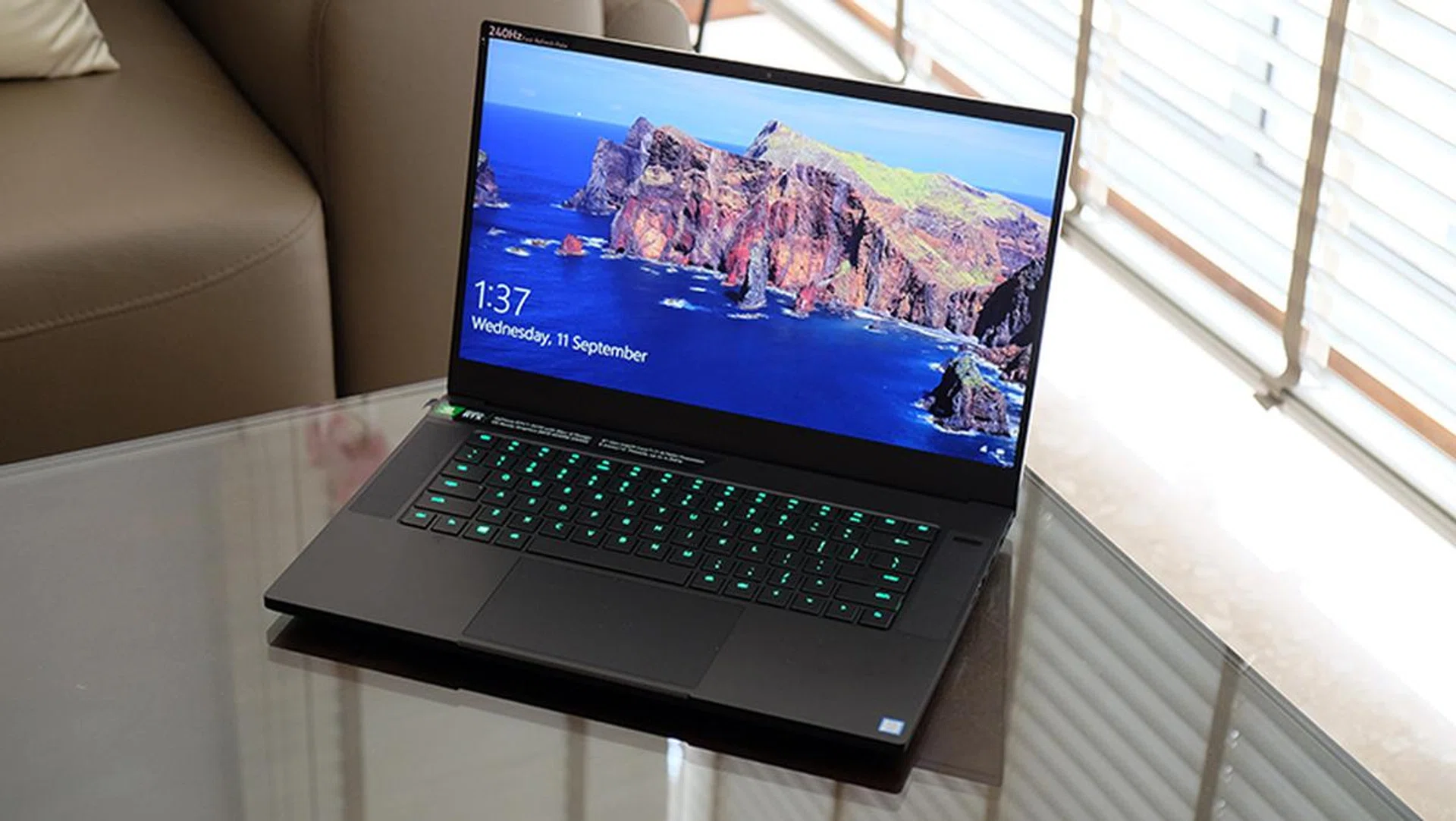
The Blade 15 is one of the best-looking gaming laptops around.
The Razer Blade 15 is simply unparalleled when it comes to design. I think the ASUS ROG Zephyrus S GX502 could give it a run for its money, but the Blade 15's jet black aluminium body and its more subtle aesthetic is hard to ignore.
One of the things I like about the Razer Blade is how efficient the design is. Unlike on other laptops, you aren’t left staring at a patch of empty space and wondering if it could have been better utilised. The bezels are thin and yet the trackpad is blissfully large. The keyboard is also flanked by speakers that match it in height. The result is a well-balanced design that looks really elegant and sleek. In fact, all the elements of the laptop feel perfectly proportioned in relation to everything else, and I do think this is one of the best-looking gaming laptops available right now.
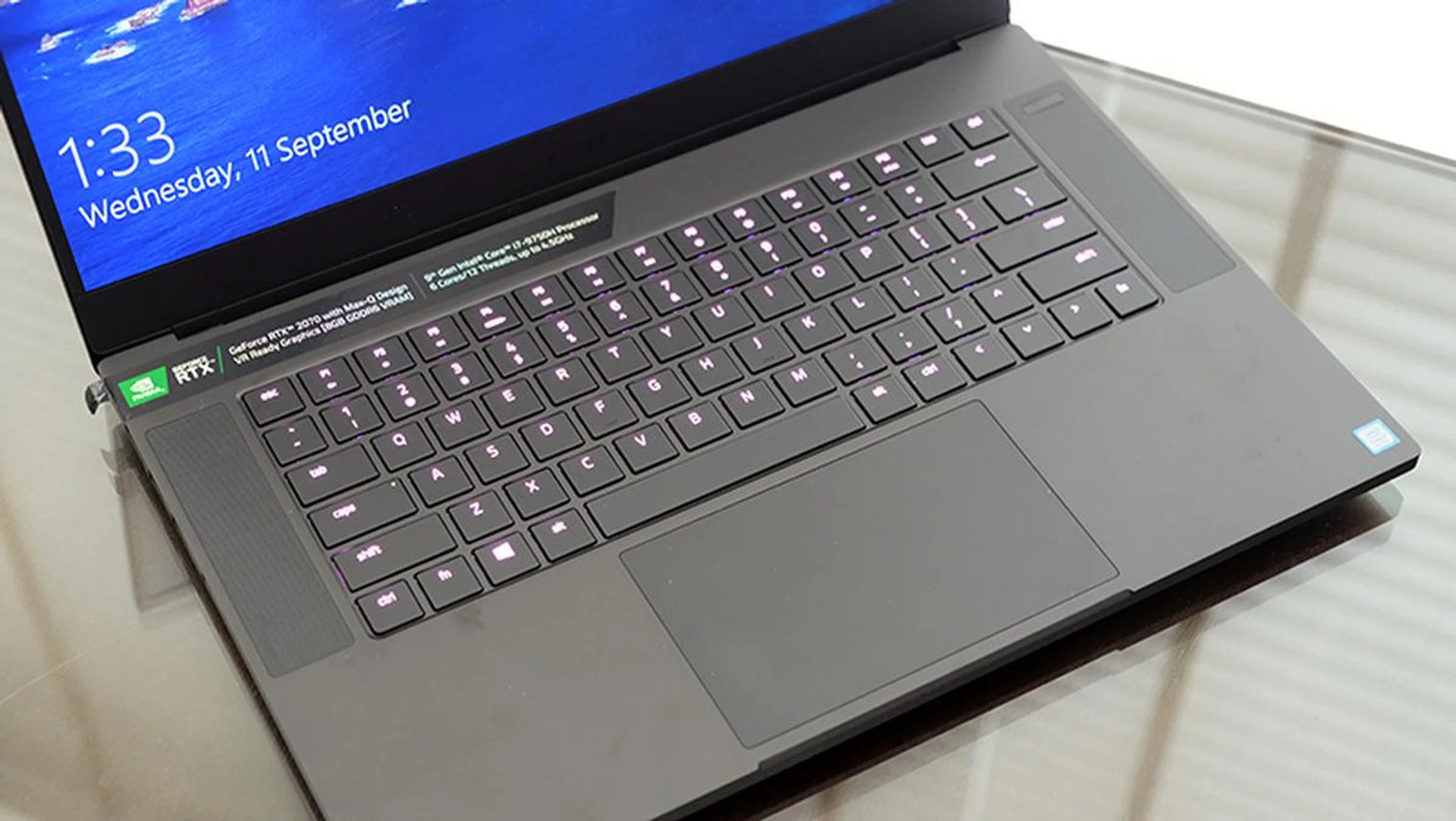
More notebooks should have trackpads that are as large as this one.
The trackpad is one of my favourite parts of the laptop. Its generous size means that you'll be able to navigate comfortably even without a mouse, a good thing too considering that the Blade 15's minimalist design means that you might even be considering it as a laptop for work. The base of your palm will inevitably brush up against the trackpad while typing, but the palm detection feature seems like it's doing its job as I never encountered any unwanted inputs. The left- and right buttons are integrated into the trackpad as well, so the entire thing looks really clean.
The quality of the RGB backlighting is top-notch too. Many gaming laptops offer per-key customisations like the Blade 15, but the lighting is either too dim to be properly visible under bright lighting, or they suffer from uneven lighting around the secondary legends. The Blade 15 has none of these problems, and the backlighting is bright and highly customisable.
Key travel does feel shallow, but that's the price you pay for a laptop as slim as this one.

The back of the notebook can attract some smudges.
Then there's the display, which I find to be one of the better ones on a gaming laptop today. Short of the OLED screens offered by brands like Gigabyte, Alienware, and even Razer itself, the IPS offerings generally seem to be lacking in terms of brightness and colour vibrance. They're not terrible, but they're not particularly enjoyable to look at either. On the other hand, the Blade 15's IPS display is bright and vivid. It was pleasing to the eyes, and Razer is also claiming 100 per cent coverage of the sRGB colour space.
There's also an IR webcam in the top bezel, so you'll be able to take advantage of Windows Hello's facial recognition features. This isn't something that many gaming laptops have today either, and it's a thoughtful addition on Razer's part.
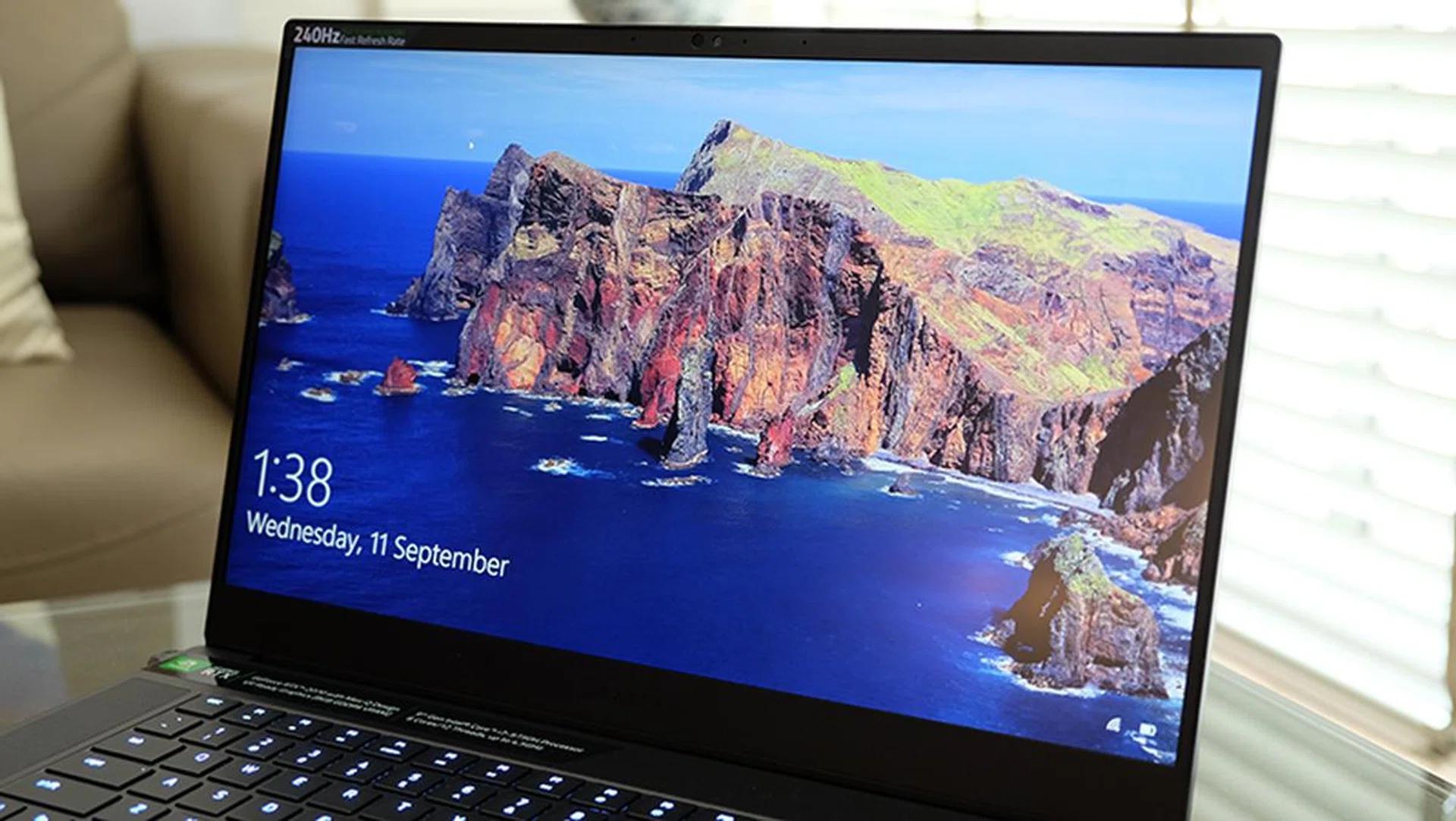
Razer has managed to squeeze a Windows Hello IR webcam into the top bezel.
Separately, the screen also supports a 240Hz refresh rate. While the difference between 60Hz and 240Hz is like that between night and day, the difference between 144Hz and 240Hz is less obvious. The law of diminishing returns hits hard here, and you'll also have a hard time pushing out enough frames to take full advantage of the refresh rate with just a GeForce RTX 2070 Max-Q. It's a great feature to have on paper – it's just not super useful, especially when it probably is driving the price up by a fair bit. According to Razer's site, you could get the 144Hz screen version for over S$300 less. There's one caveat to this edition - it's basically the same version that was launched earlier this year with the Intel's 8th-gen processor, which we go into more detail later covering differences.
The front-facing speakers are good as well. They're loud and sound reasonably clear and punchy. Overall, they make for a pretty decent showing for laptop speakers.
The sides also aren't interrupted by any vents belching hot air on your hand. In total, you'll find three USB 3.2 (Gen 2, Type-A), one Thunderbolt 3, one mini DisplayPort 1.4, and a full-sized HDMI 2.0b output. The laptop uses a proprietary power connector located at the rear of the notebook's left side. The placement of the connector may seem like a minor detail, but I've encountered a number of laptops where the power connector is located awkwardly in the middle, sandwiched between vents and USB ports. Razer's design lets you easily route the power cable to the back of the laptop, which is quite helpful.
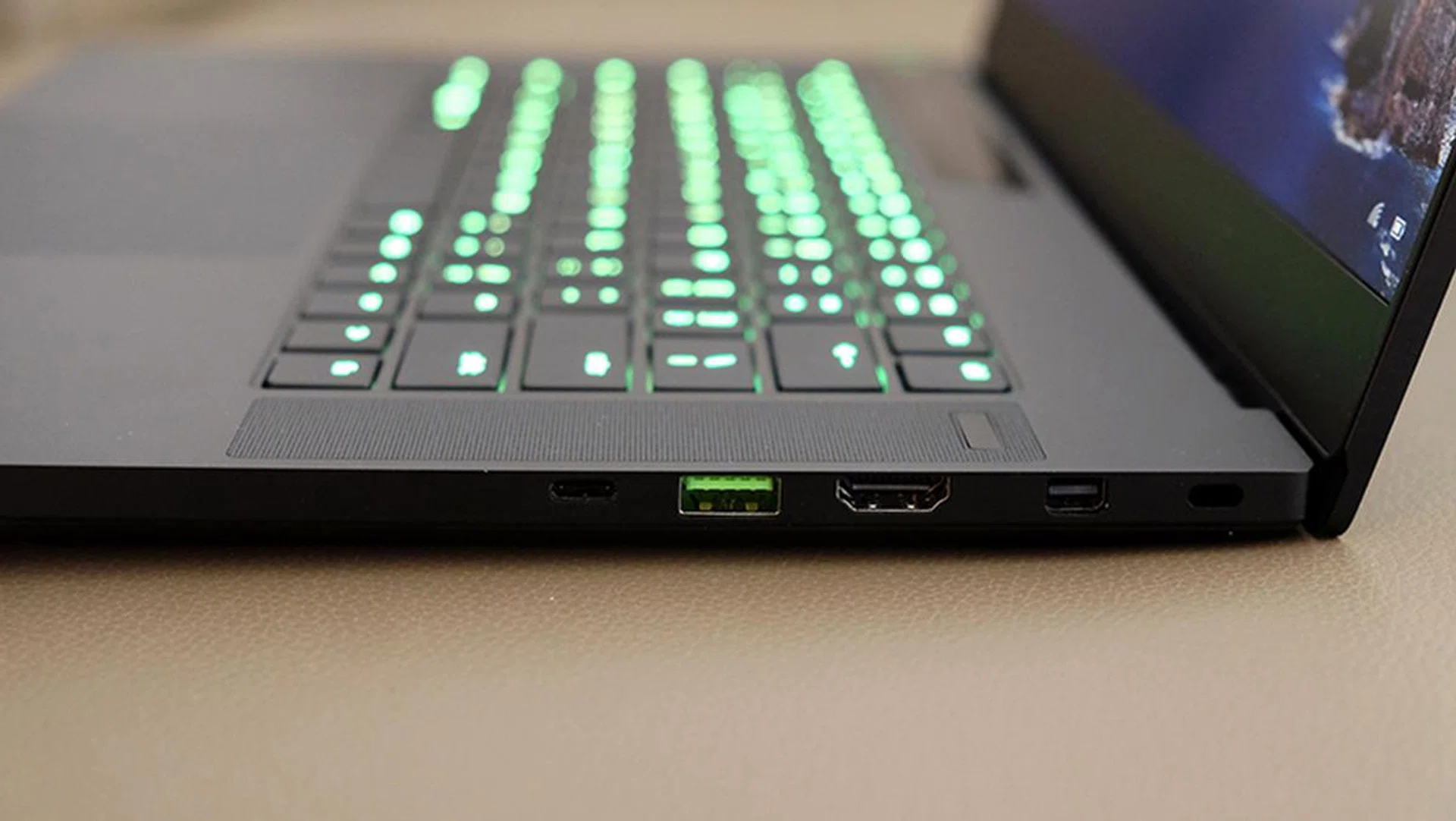
The Thunderbolt 3 port is located on the right, along with the USB Type-A and the DisplyPort connector.
The Thunderbolt 3 port is a useful addition for connecting to external displays or docks, but you won't be able to charge the laptop with it.
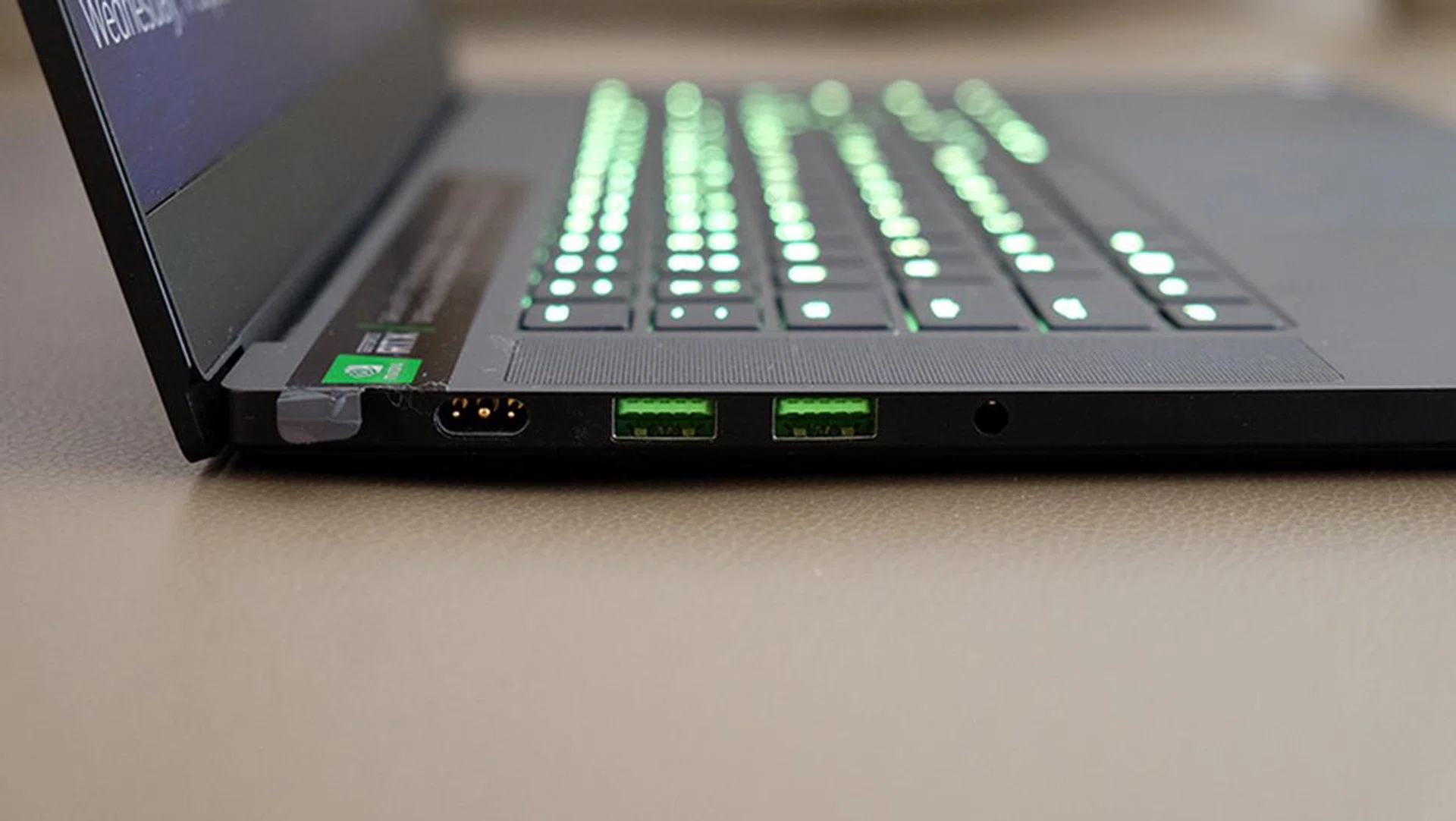
Razer uses a proprietary power connector for the Blade.
Has anything changed from the 8th Gen model?
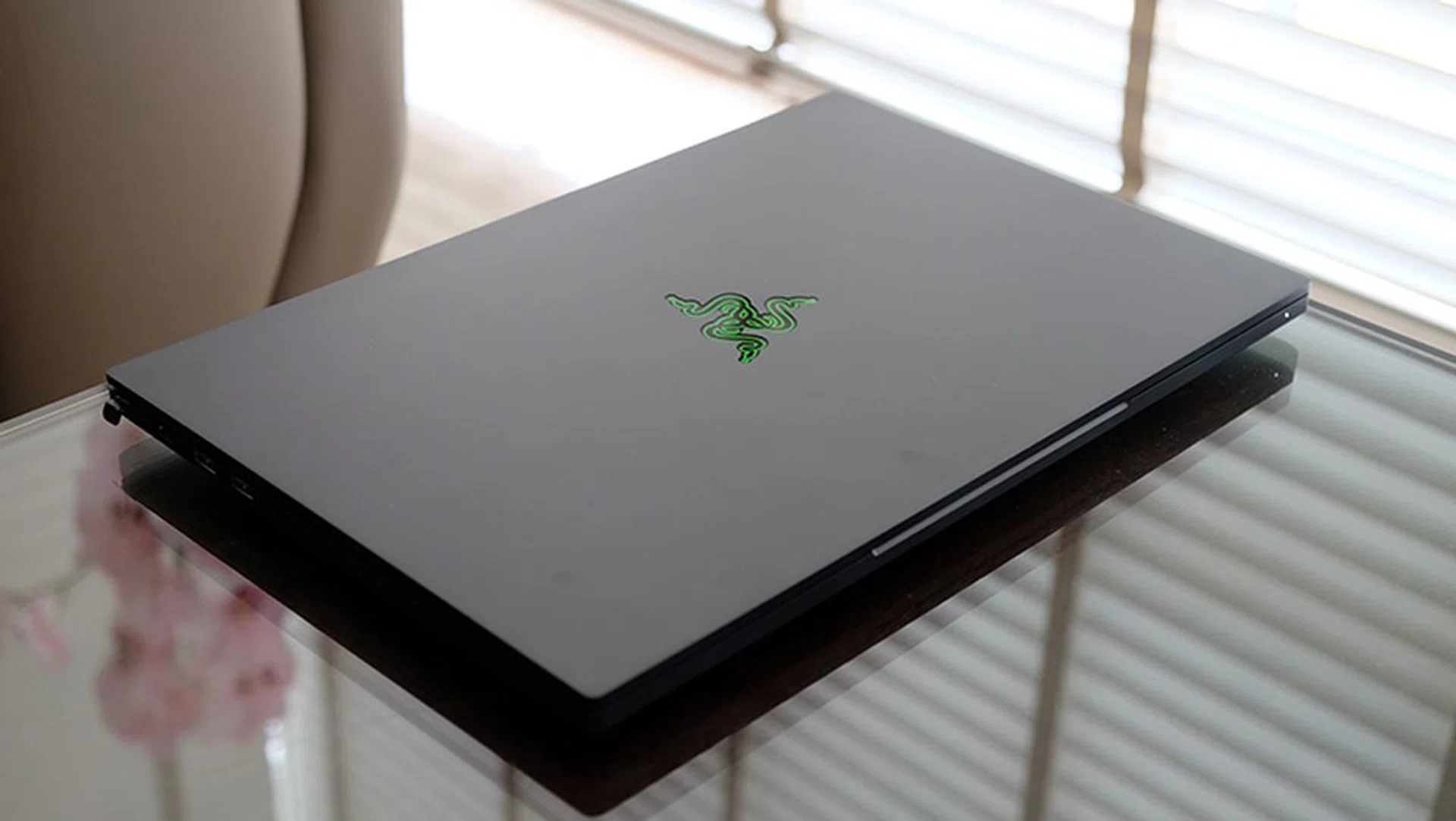
The 9th Gen model comes with a couple of small upgrades.
Actually, yes. The Razer Blade 15 with the 9th Gen Intel processors ships with a couple of small feature updates.
All three Type-A USB ports have been upgraded to support faster USB 3.2 (Gen 2) speeds, up from the previous generation's Gen 1 specification. In addition, Razer has swapped out the Intel Wireless-AC 9560 module on the 8th Gen model for the brand new Intel Wireless-AX200, which supports the latest Wi-Fi 6 standard. There still aren't many client devices that offer Wi-Fi 6, so this is a nice-to-have feature if you're worried about future-proofing.
What's not so hot?
My biggest sticking point with the Blade 15 is still the non-standard keyboard layout. Do you hit the right Shift key when you need to use a question mark? Then you'll find a bone to pick here as well. Instead of sitting next to the question mark, it lets the top arrow key come between it and the latter. It's not completely unusable, but it's sure to throw a wrench into the works at first while you try to get used to it. But if you frequently shuffle between a desktop and the Blade 15, then this is won't be easy to shake off.
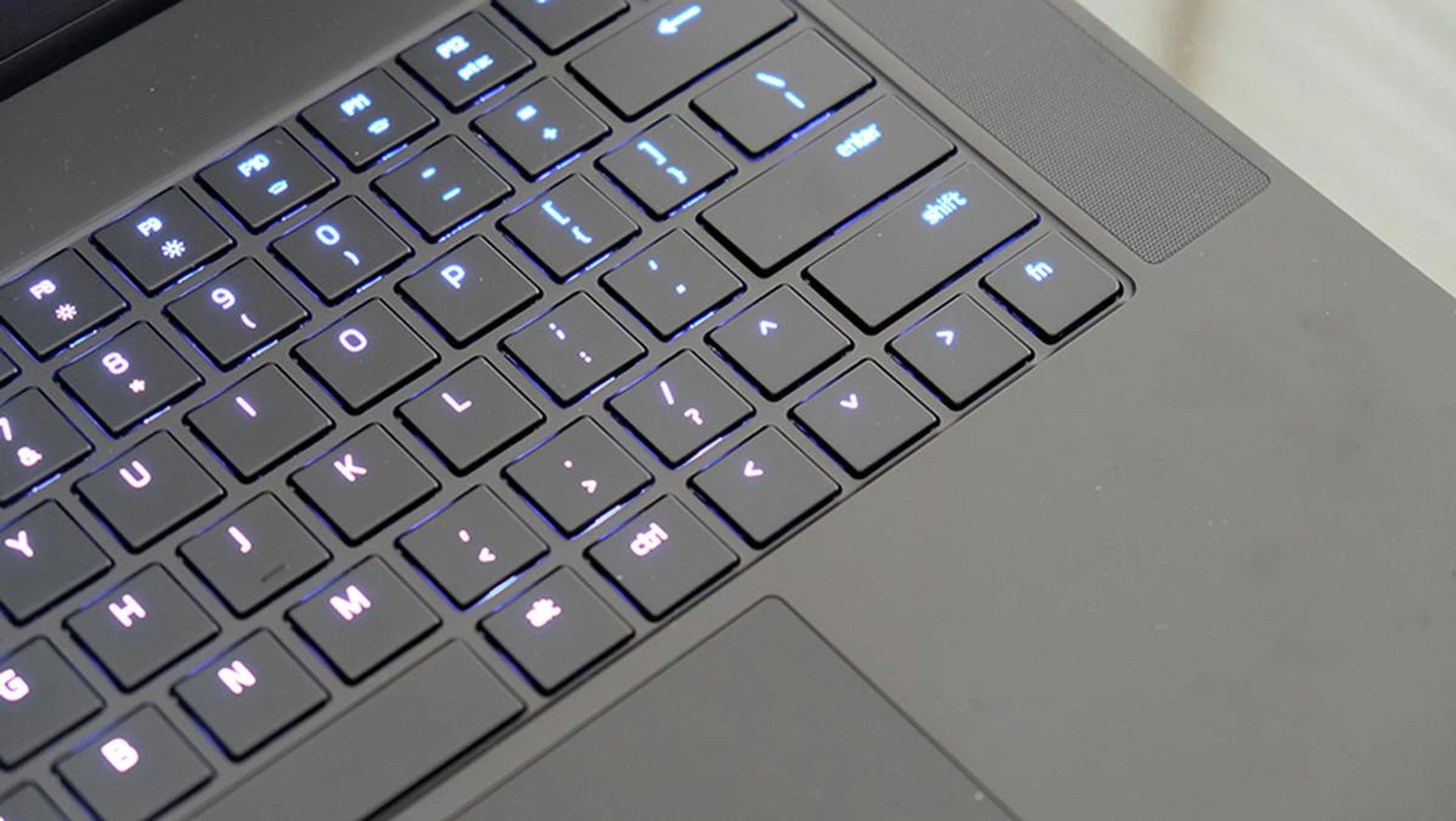
Just look at that Shift key.
The Blade 15 also gets quite hot while gaming. Is the entire aluminium body just acting as a giant heat sink and soaking up the heat? I don't know, but I'd run this laptop with ample ventilation and cooling (perhaps a notebook cooler?) where possible. The Synapse 3 software does offer manual fan controls though, and turning up the fan speeds does help.
The fans are very audible, but they're tolerable. They only really ramp up when gaming, so you don't have to worry too much about excessive noise when browsing the web or working. Synapse also lets you choose between Balanced and Performance modes, with the latter having a more aggressive fan profile.
Test setup and performance
Here's a full list of the notebooks we're looking at:
- Razer Blade 15
- Acer Predator Triton 500
- Gigabyte Aero 15 OLED XA
- Lenovo Legion Y740
I've chosen to compare the Blade 15 against the other GeForce RTX 2070 Max-Q laptops we've reviewed so far to give you an idea of how it stacks up against the immediate competition.
[hwzcompare]
[products=673300,667965,669286,672308]
[width=200]
[caption=Test notebooks compared]
[showprices=1]
[/hwzcompare]
I ran the notebooks through the following benchmarks:
- PCMark 10
- AS SSD
- 3DMark
- Deus Ex: Mankind Divided
- Far Cry 5
- Metro Exodus
- Shadow of the Tomb Raider
- Tom Clancy's The Division 2
How good is it for work?
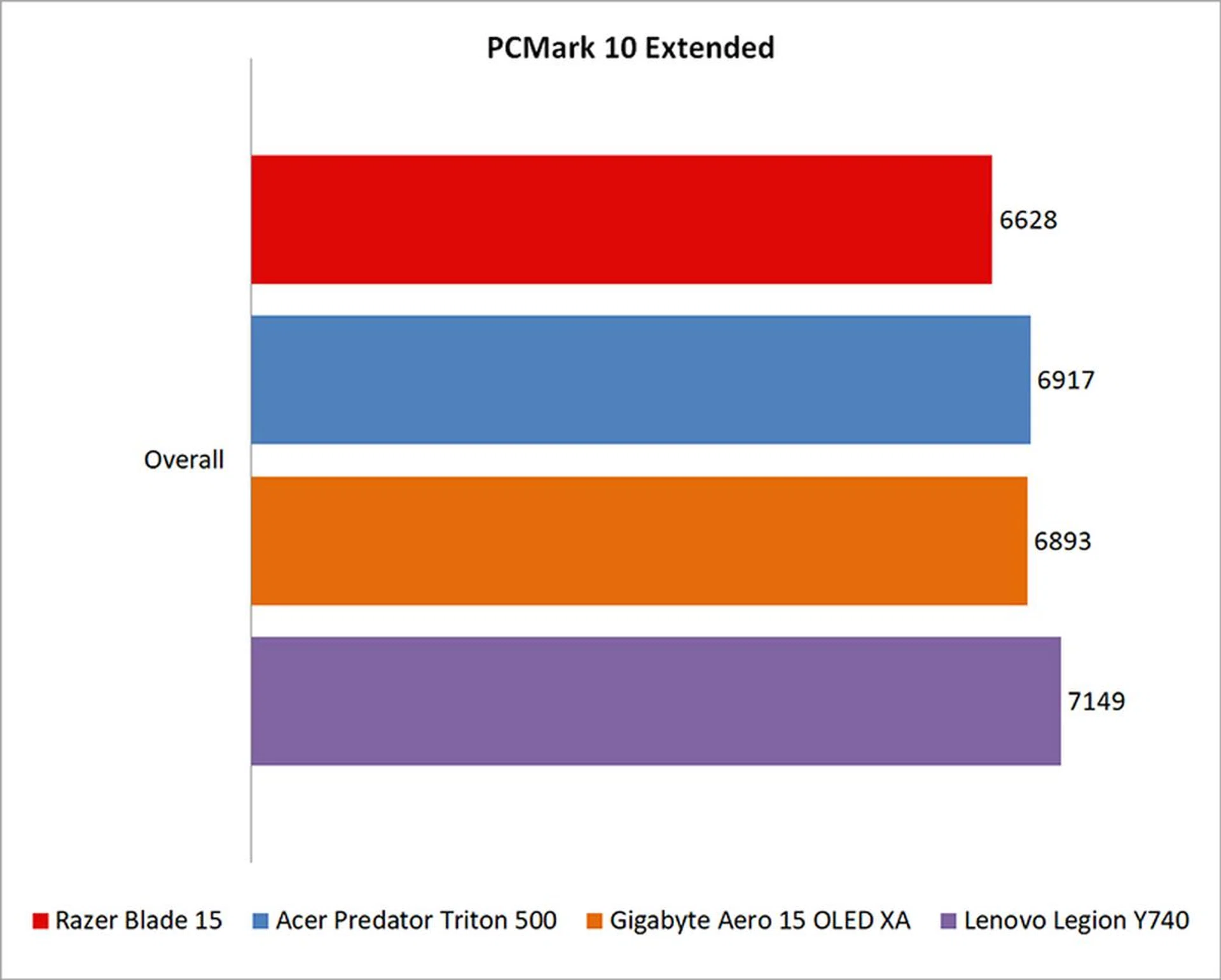
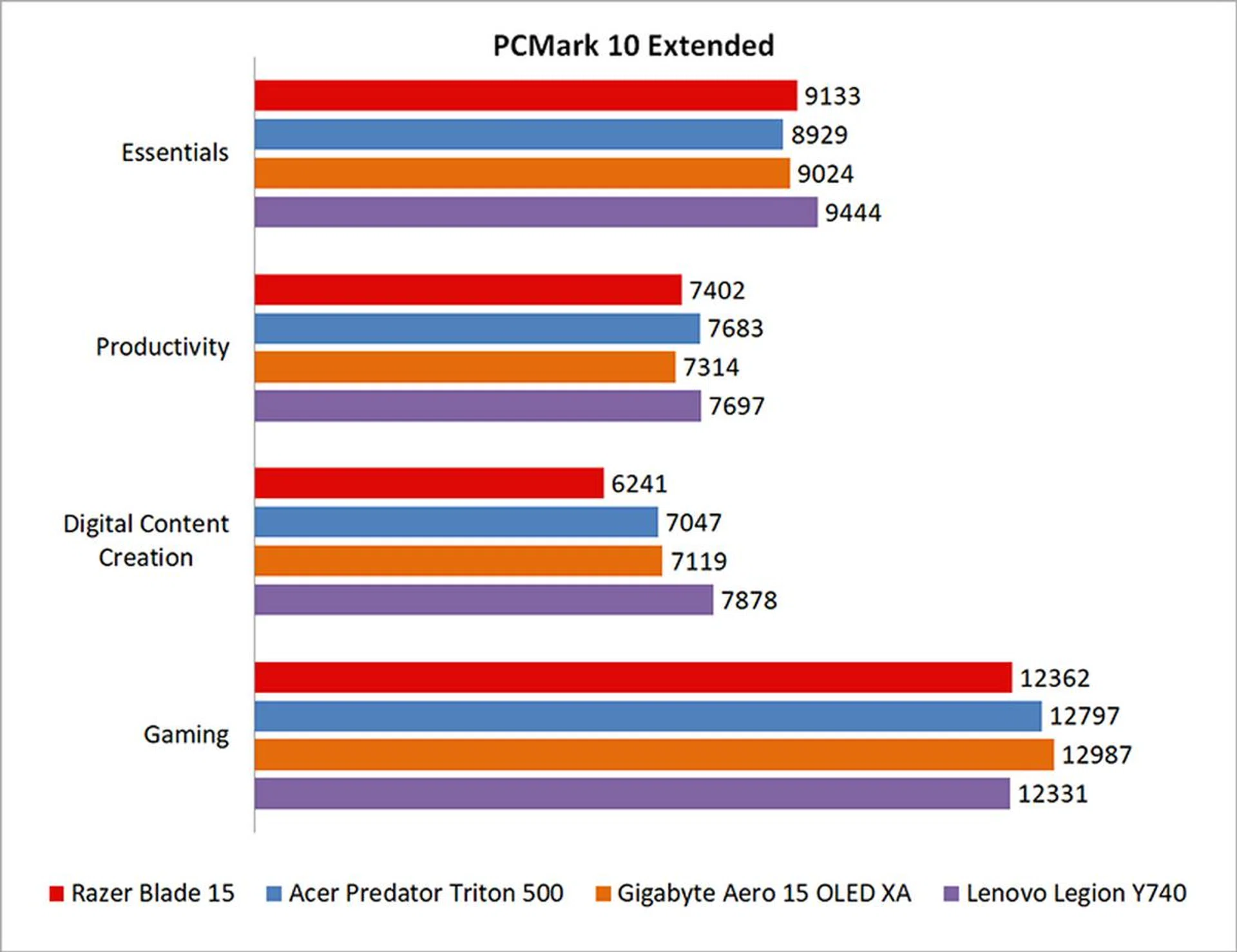
PCMark 10 Extended evaluates systems based on workloads that can be categorized into four distinct groups, comprising Essentials, Productivity, Digital Content Creation, and Gaming. This includes tests such as app start-up times, web browsing, word processing and spreadsheets, photo and video editing, and rendering and visualization tasks. Finally, gaming performance is evaluated using the Fire Strike benchmark.
As expected, performance in PCMark 10 was very similar for all the laptops. That said, there was still a 7 per cent difference between the Blade 15 and the Lenovo Legion Y740 in terms of overall scores, although I don't expect that this will amount to a tangible difference in real-world use.
What's the storage performance like?
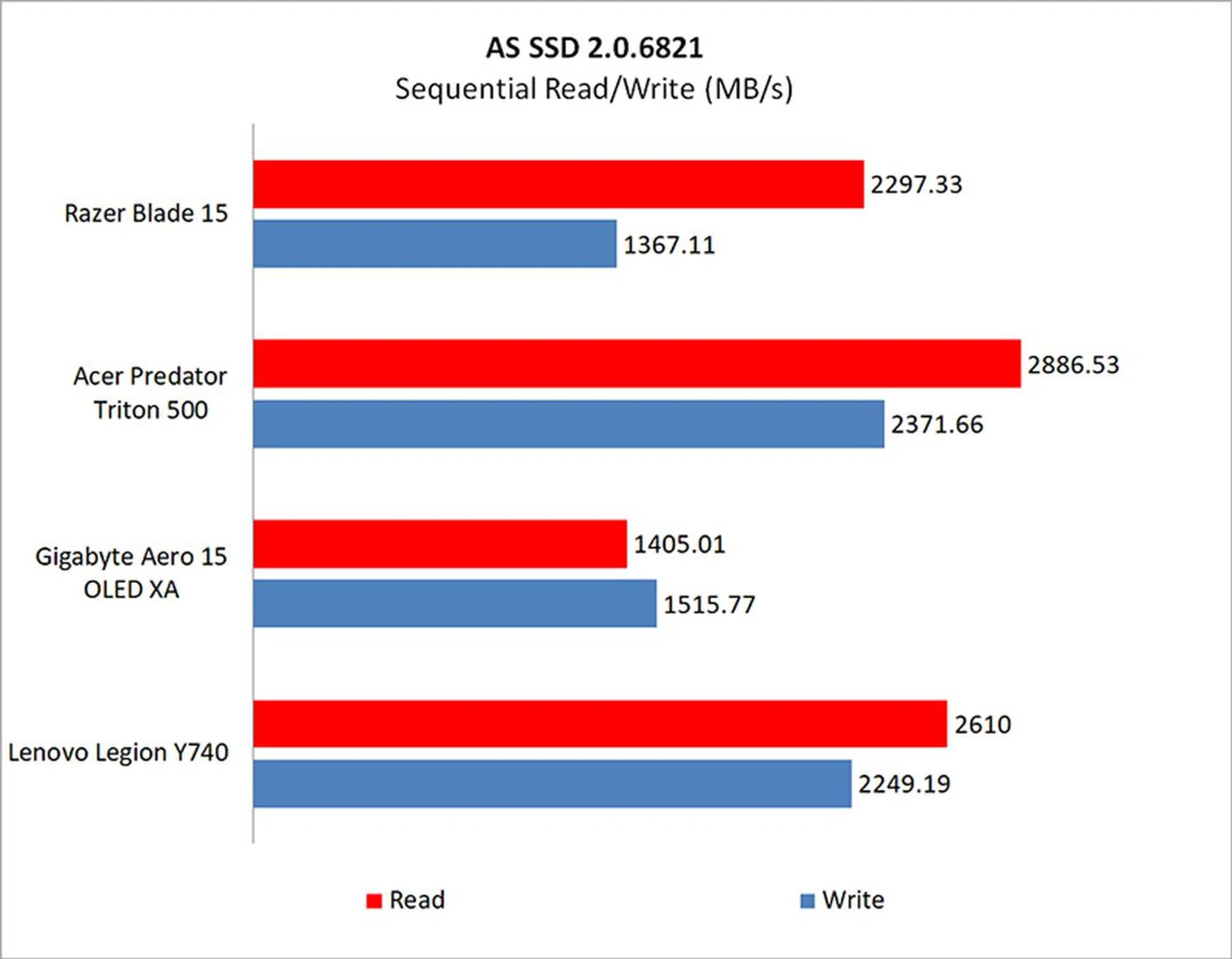
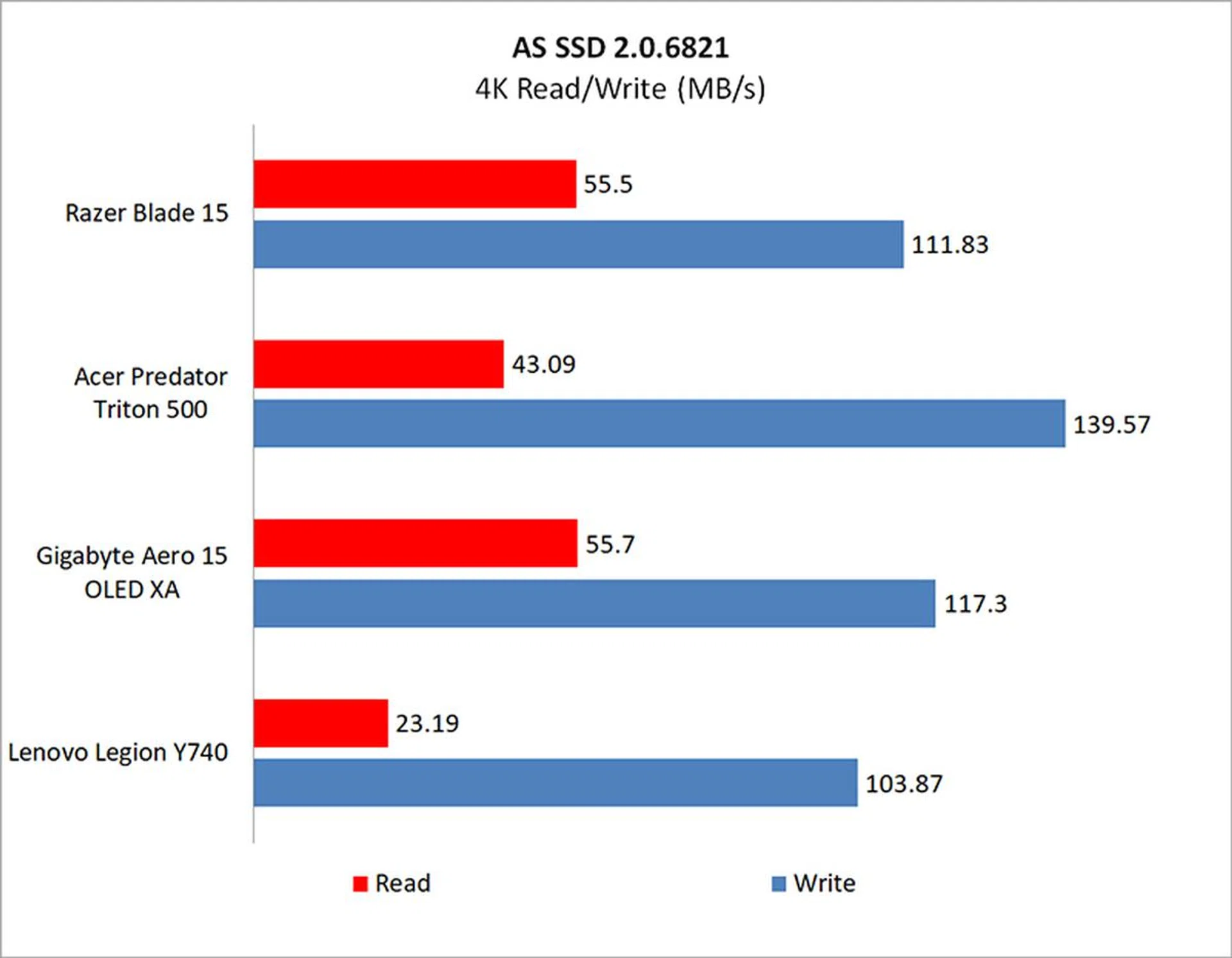
The Blade 15 is equipped with a 256GB Samsung PM981 PCIe M.2 SSD. This is a smaller capacity than the other notebooks, which all come with a 512GB drive. If you want a 512GB SSD on the Blade 15, it'll cost you S$3,999.
The Razer laptop fell somewhere in the middle of the pack in AS SSD for most of the benchmarks, although its sequential write performance could have been better.

How fast is it in games?
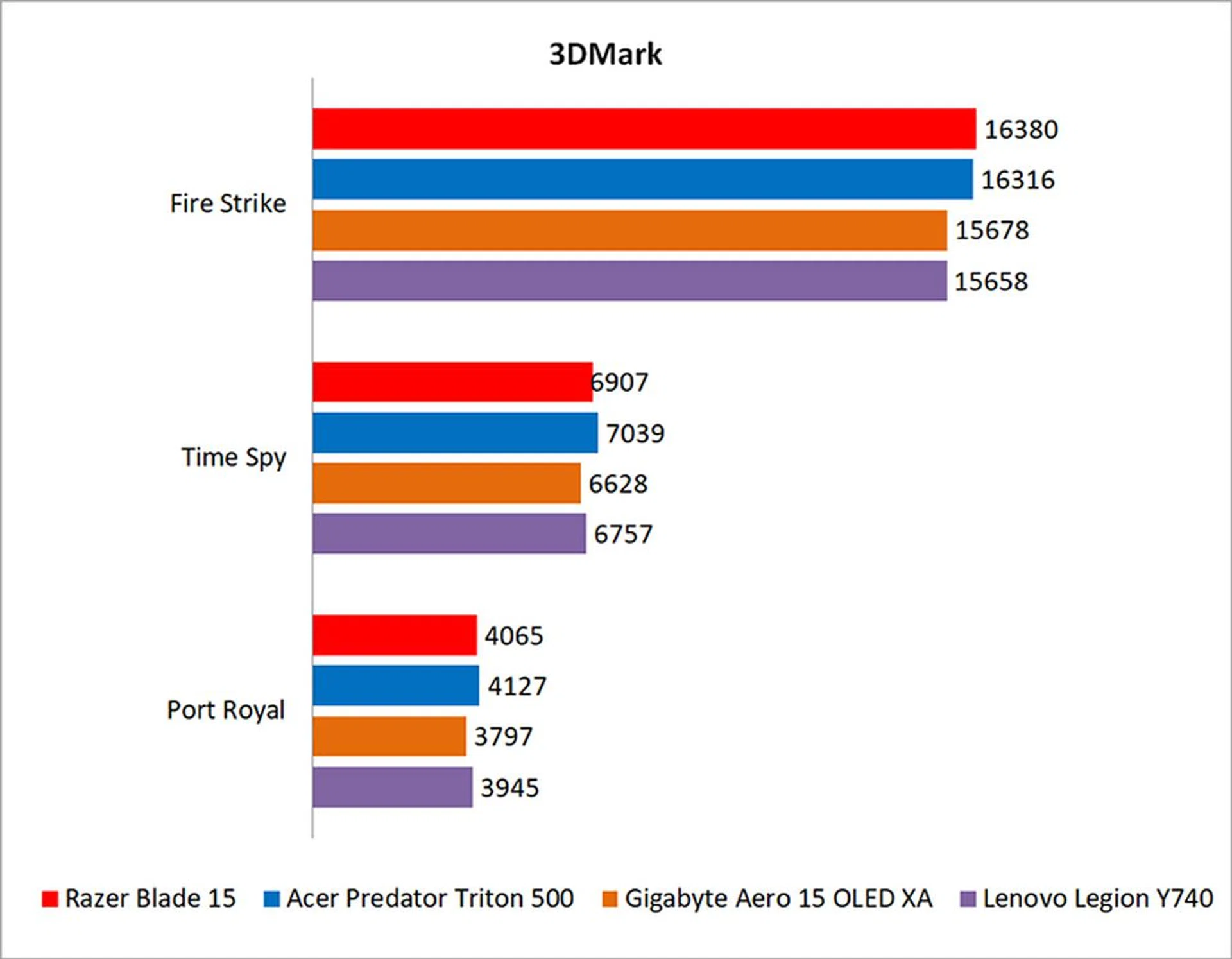
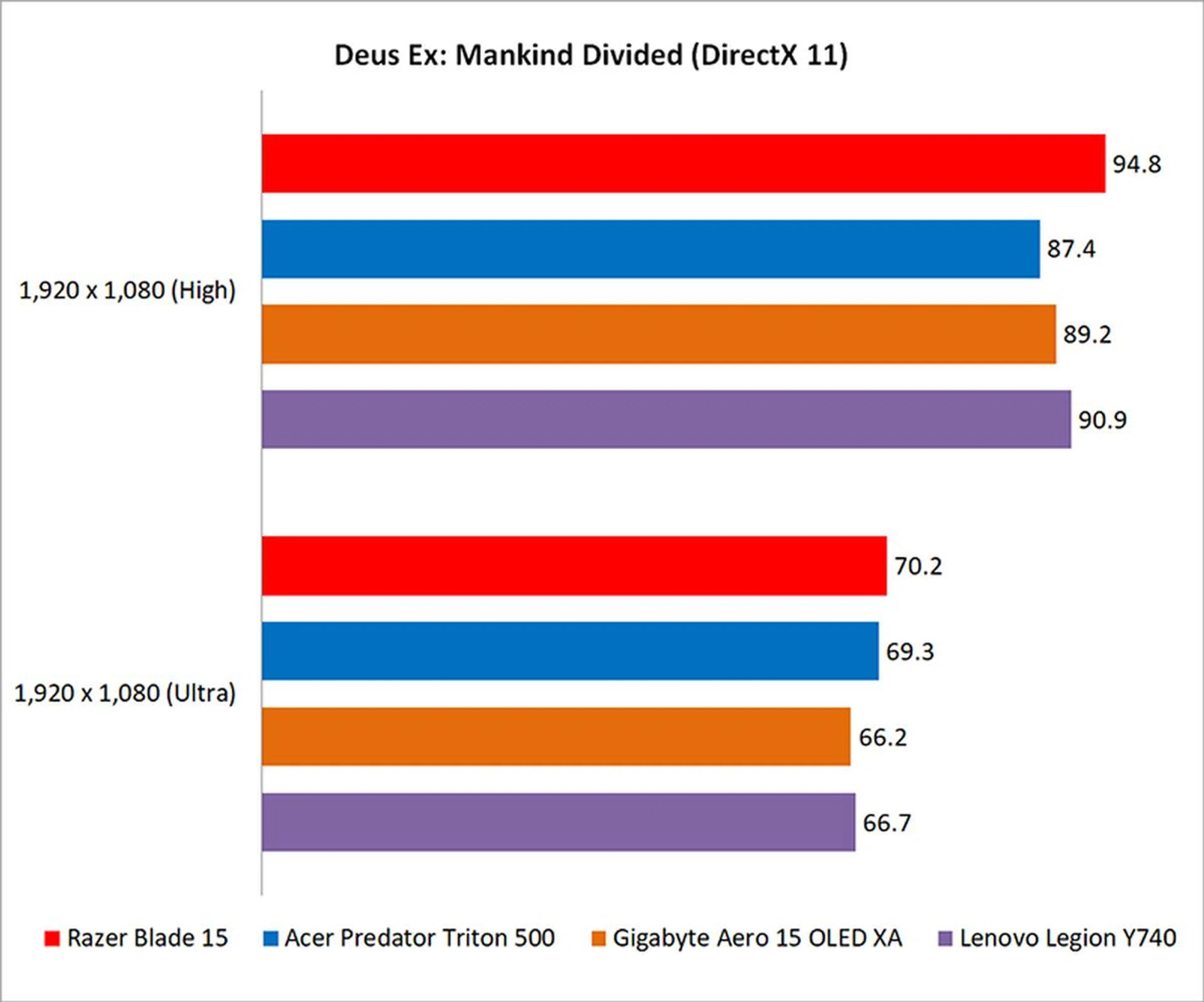
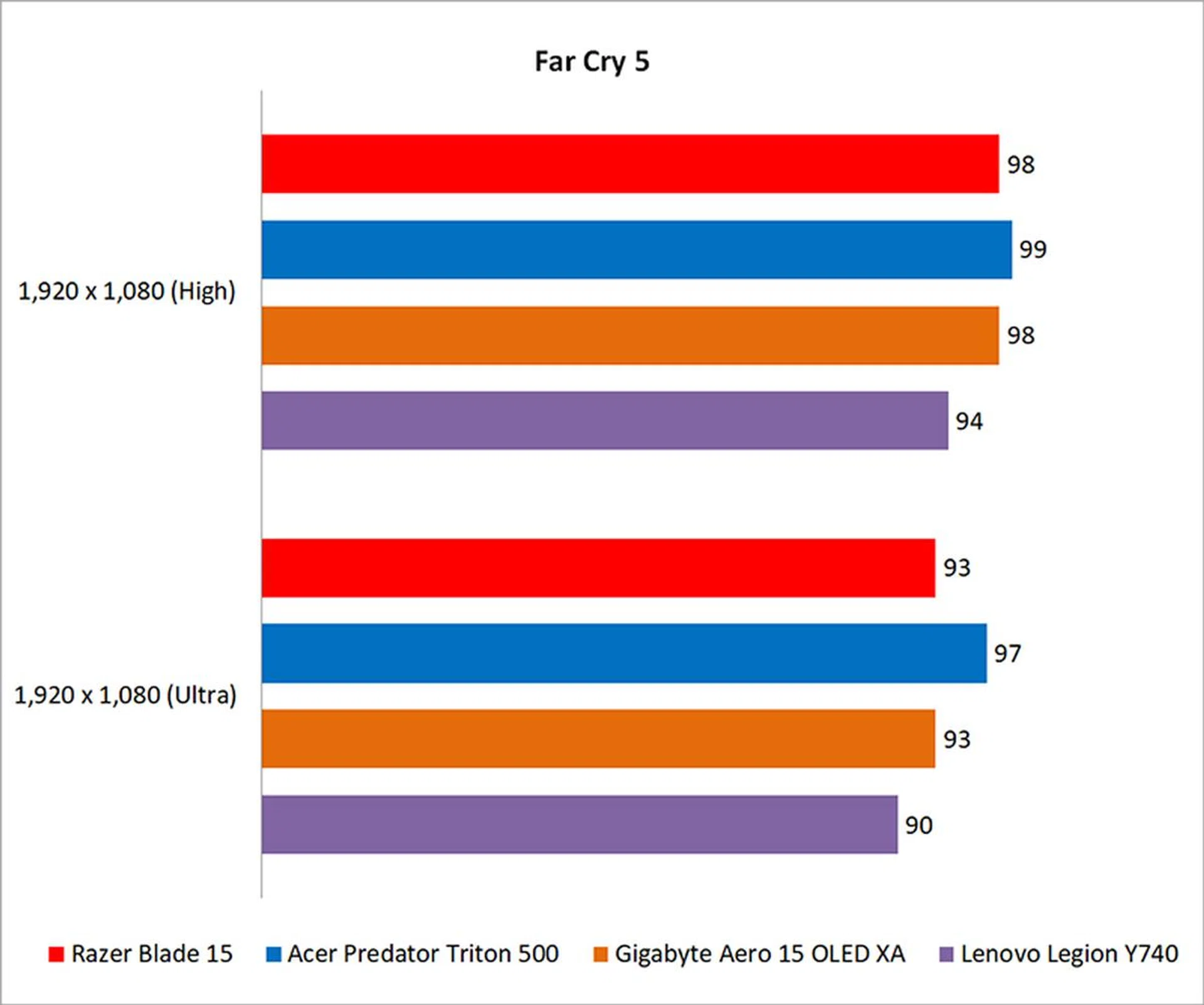
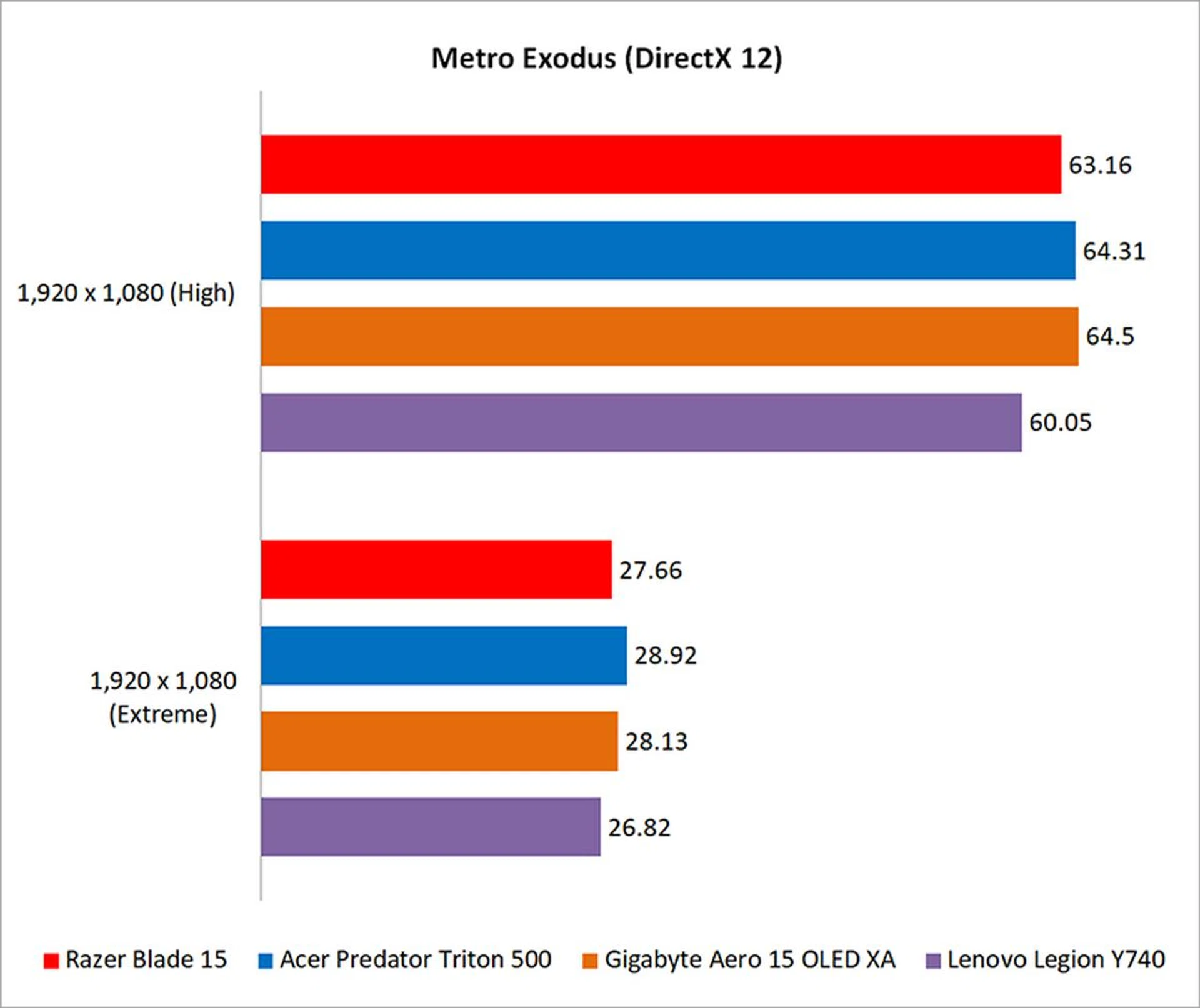
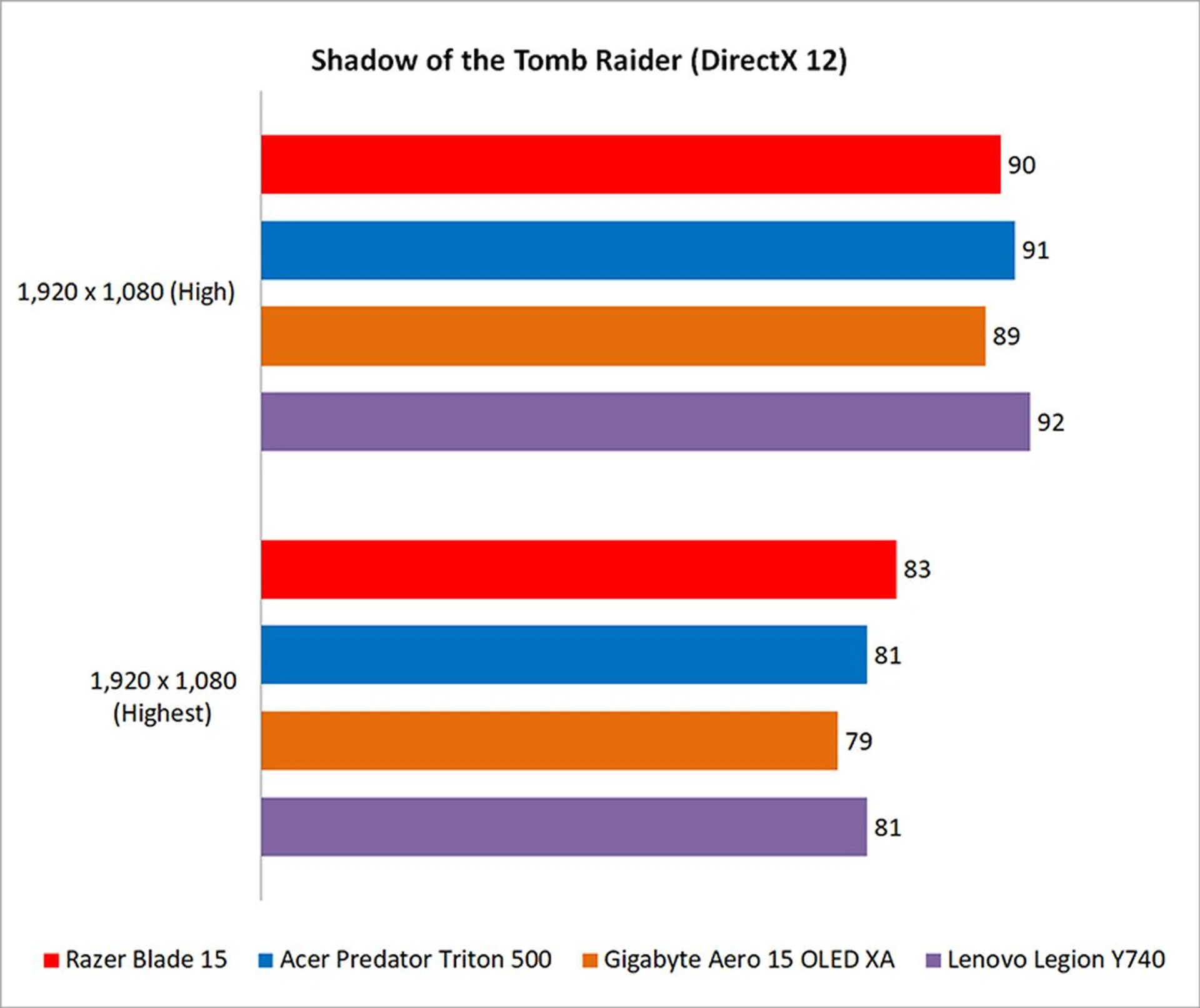
All the notebooks turned out very similar numbers again since they sport nearly identical configurations, so no one laptop really has a significant advantage. That said, the Blade 15 held its own against the competition, and I don't think you'll experience any performance issues with the laptop. Put simply, gaming performance is excellent. It'll run just about any AAA game at 1080p, although coming close to 240fps is another matter entirely.

How good is the battery life?
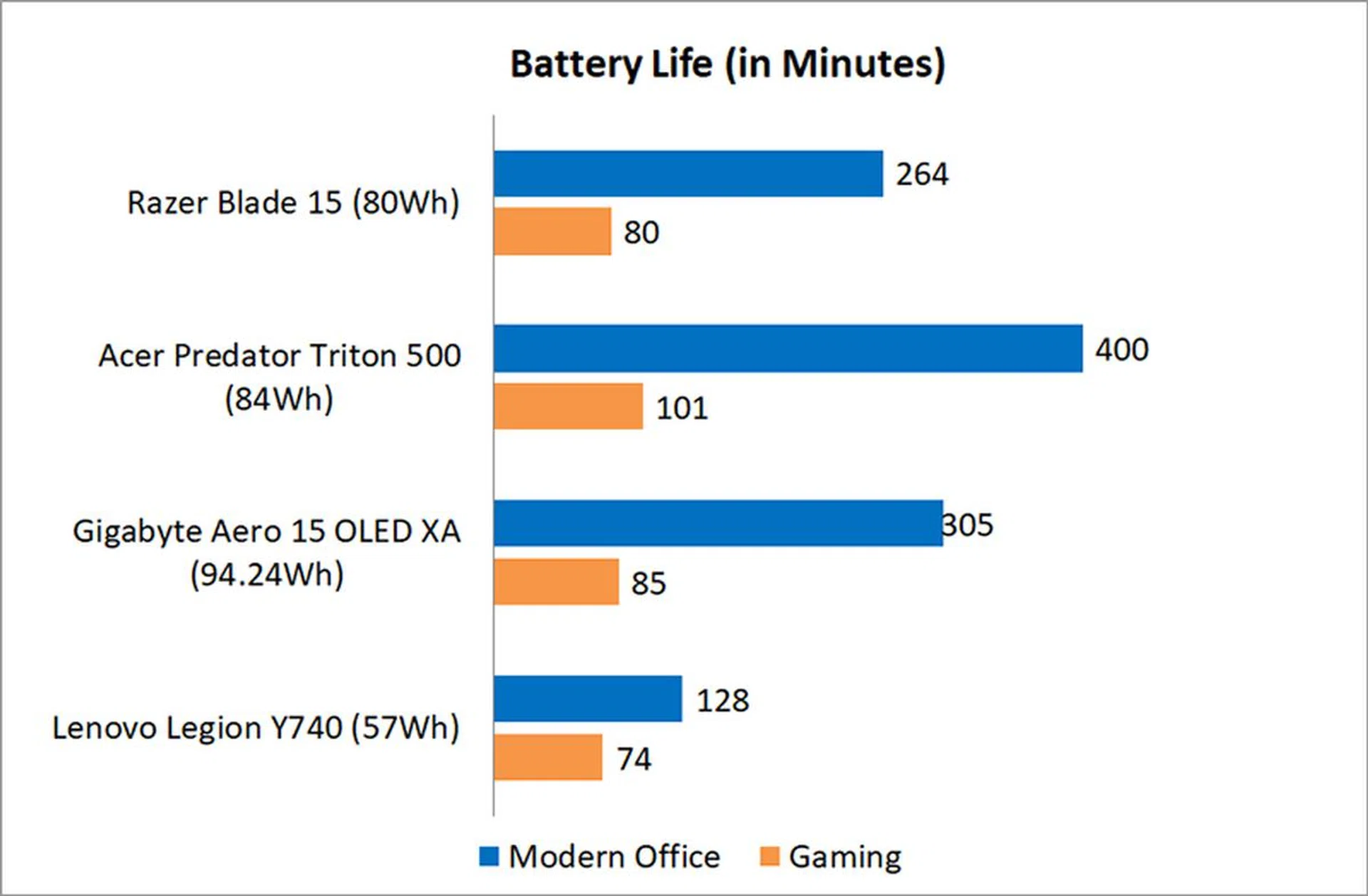
I tested the battery life using PCMark 10's new Modern Office and Gaming battery life benchmarks. All the notebooks were set to 100 per cent display brightness and had Wi-Fi enabled. The keyboard backlight was disabled.
Battery life on the Blade 15 is decent for this class of laptop, thanks to the 80Wh battery. However, there's still distance to cover before it can really be considered class-leading, seeing as how the Acer and Gigabyte laptops both lasted longer.
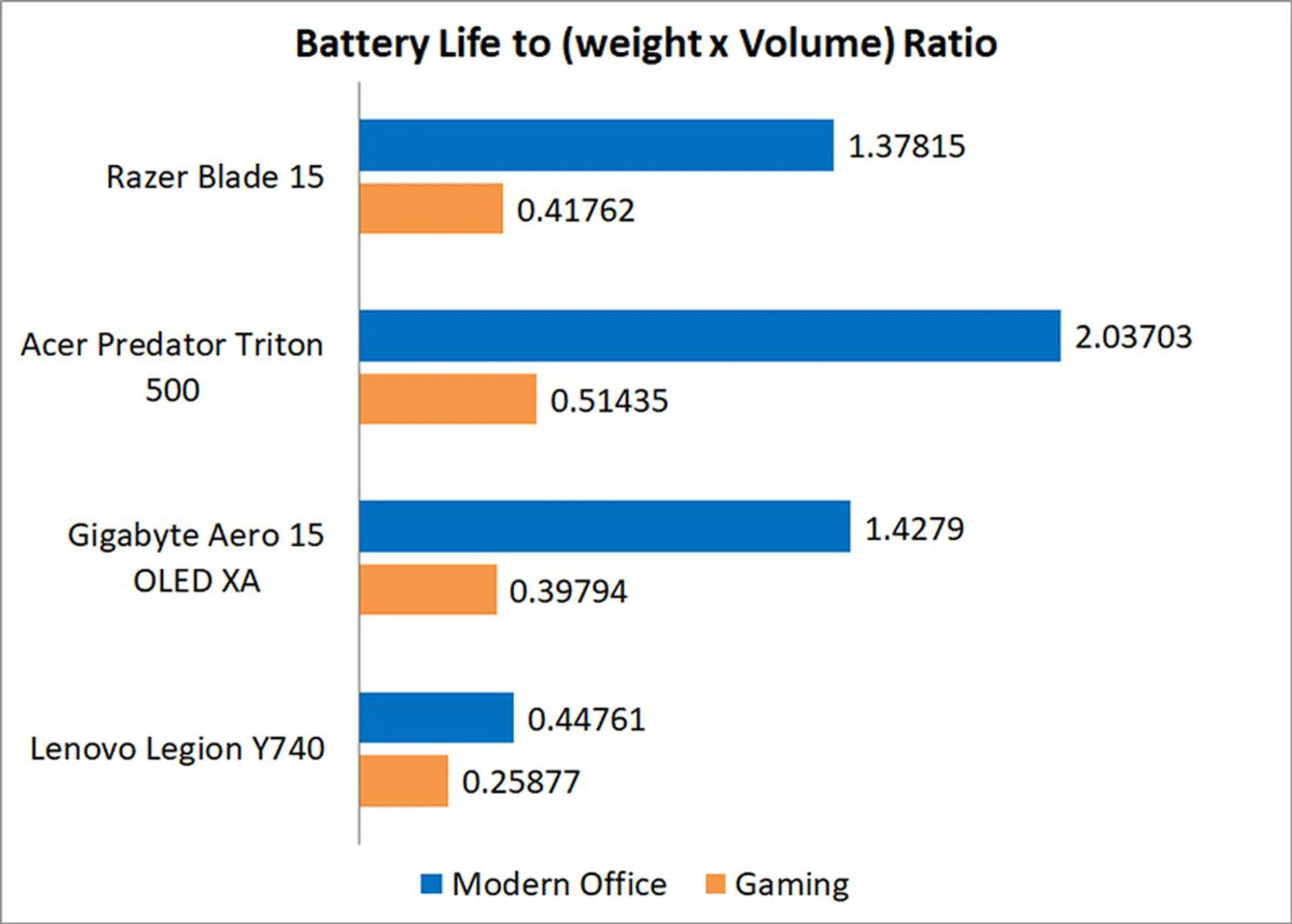
When it comes to our portability index, which takes into account factors such as chassis dimensions, weight, and battery life, the Blade 15 performed quite respectably. It lost out to the Acer and Gigabyte laptops, but it's still far better than something like the Lenovo Legion Y740. To sum things up in a few words – it's not amazing, but it'll do.

Is the cooling performance good?
Unlike the other laptops reviewed here, the Blade 15 uses vapour chamber cooling technology instead of conventional heat pipes. This covers both the CPU and GPU, and the vacuum-sealed vaporised liquid helps dissipate heat from other components as well.
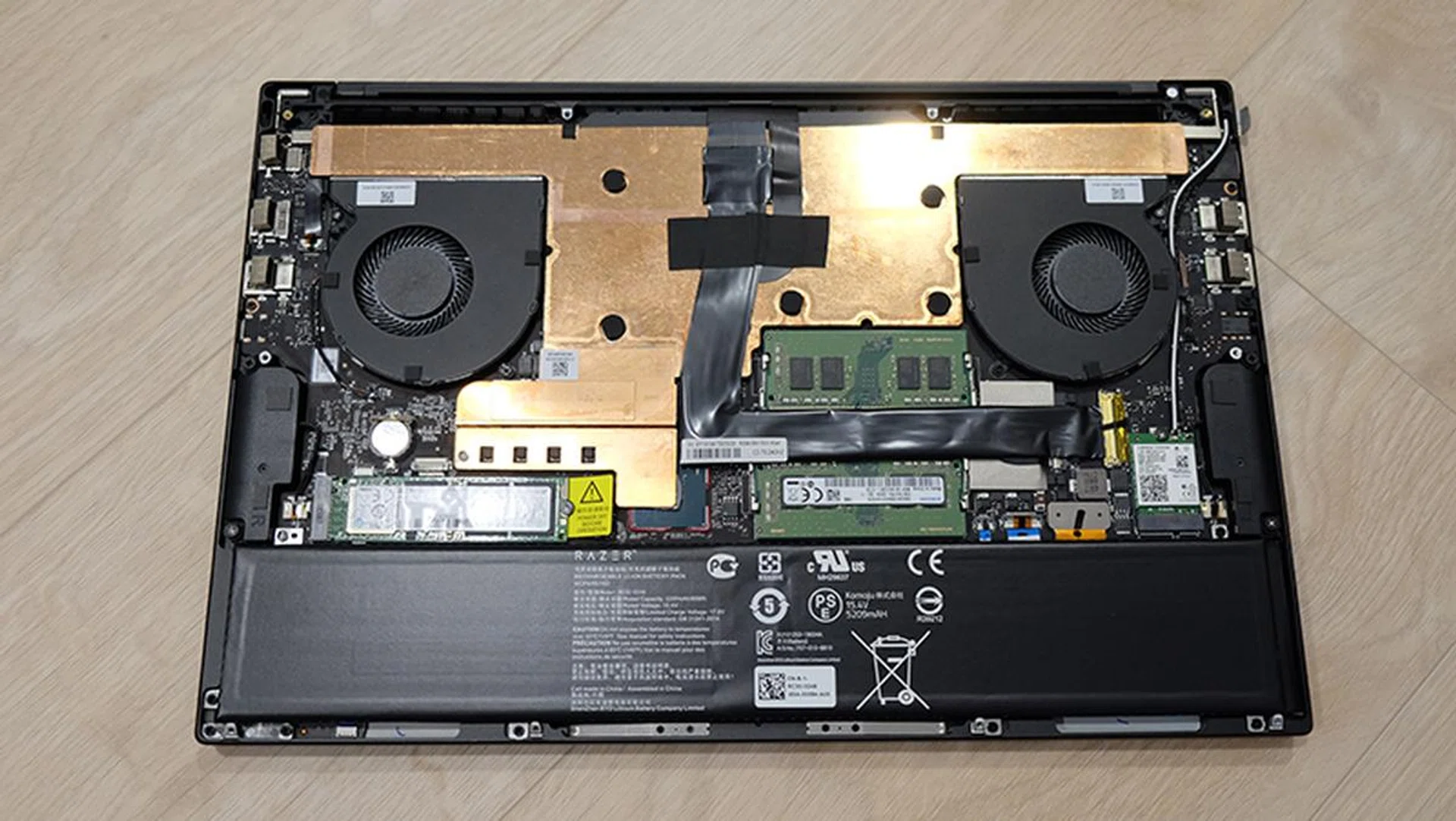
You can see here the vapour chamber cooling system that the Blade 15 uses.
One thing to note is that surface temperatures on the Blade 15 are noticeably higher than that on the competing notebooks here. I measured the temperatures after 40 loops of 3DMark Fire Strike Extreme, which gives the notebook plenty of time to work up a sweat.
That said, while the Blade 15 can get quite toasty, I wouldn't worry too much about it. It gets warm but never uncomfortably hot, and more importantly, the WASD key cluster doesn't heat up excessively.
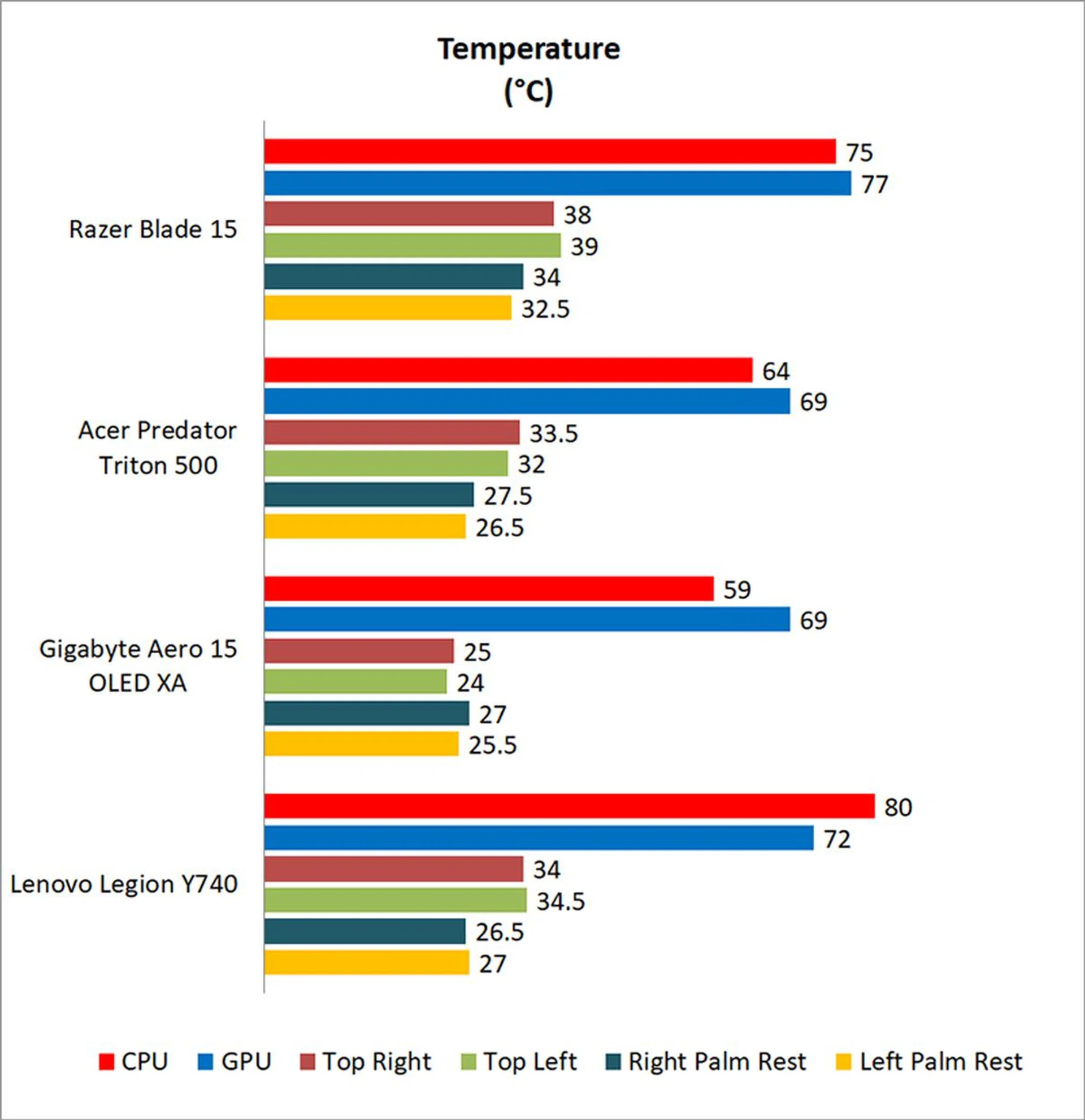

Image Source: Razer
Looks do matter
The Razer Blade 15 is one of the most stylish gaming laptops on the market right now. It doesn't need race car-inspired vents or aggressive curves to turn heads, which speaks volumes about the merits of its design.
You'll be getting the full package when you buy the Blade 15. Great gaming performance aside, the Blade 15 is equipped with a vivid 240Hz display, excellent build quality, and high-speed USB 3.2 (Gen 2) and Thunderbolt 3 connectors. It also comes with a Windows Hello-capable webcam and per-key RGB customisations. The memory and storage slots are easily accessible as well once you pop open the bottom cover, so upgrades should be a breeze.
Of course, the laptop has certain weaknesses as well. It's noisy and runs hot, but I'd argue that these are issues that you can actually do something about, such as manually setting the fan speeds or even getting a cooling pad for the laptop. Conversely, you won't be able to do anything about poor build quality or a dim display.
Battery life is decent, but not the best. I think Razer should do a lot better considering the S$3,839 price tag, but I think I can live with it, considering what the Blade 15 offers.
I'd also have liked to see an option for a 144Hz screen to bring the cost down – you're not going to be able to maximise that 240Hz display most of the time after all – but it looks like Razer isn't offering that with the 9th Gen processors. Having said that, if you don't mind settling for the Intel 8th Gen processor variant, you really aren't missing much and you could save S$300 more for a very similar proposition. It would also help if it came with double the storage capacity, but unfortunately, that's what you get by default.
If you want a gaming laptop that runs fast and looks good, it's really difficult to do better than the well-featured Razer Blade 15. You just need to be prepared to pony up the cash and get used to the position of the right shift key.
Our articles may contain affiliate links. If you buy through these links, we may earn a small commission.