

Note: This article was first published on 22nd October 2018.
The power of a desktop in a notebook
Gaming laptops are no longer hulking chunks of plastic and metal. Laptops like the Razer Blade and MSI GS65 Stealth Thin have shown that it's possible to be both powerful and super slim and light. They've gone a long way toward redefining expectations and setting new standards, even helping to more clearly delineate the line between desktop and gaming laptop.
Having said that, there's always room in the stratosphere for more extreme configurations. The Aorus X9 DT is a desktop replacement in every sense of the word. If for some reason what you want is a notebook that can replace your desktop – instead of an actual desktop – the X9 DT will tickle your fancy.
Here's an overview of its specifications:
- 17.3-inch 1,920 x 1,080-pixel IPS 144Hz G-Sync display
- Intel Core i9-8950HK (2.9GHz, 12MB L3 cache)
- 16GB dual-channel DDR4-2666 RAM
- NVIDIA GeForce GTX 1080
- 1TB PCIe SSD + 1TB HDD
- 428 x 305 x 22.9-25.4mm
- <!--td {border: 1px solid #ccc;}br {mso-data-placement:same-cell;}-->
3.2kg
The above will cost you a hefty S$5,999, a significant investment that could buy you two very good desktops. So why might you want to buy the X9 DT? Here's a closer look at what it brings to the table.
Built like a fast car
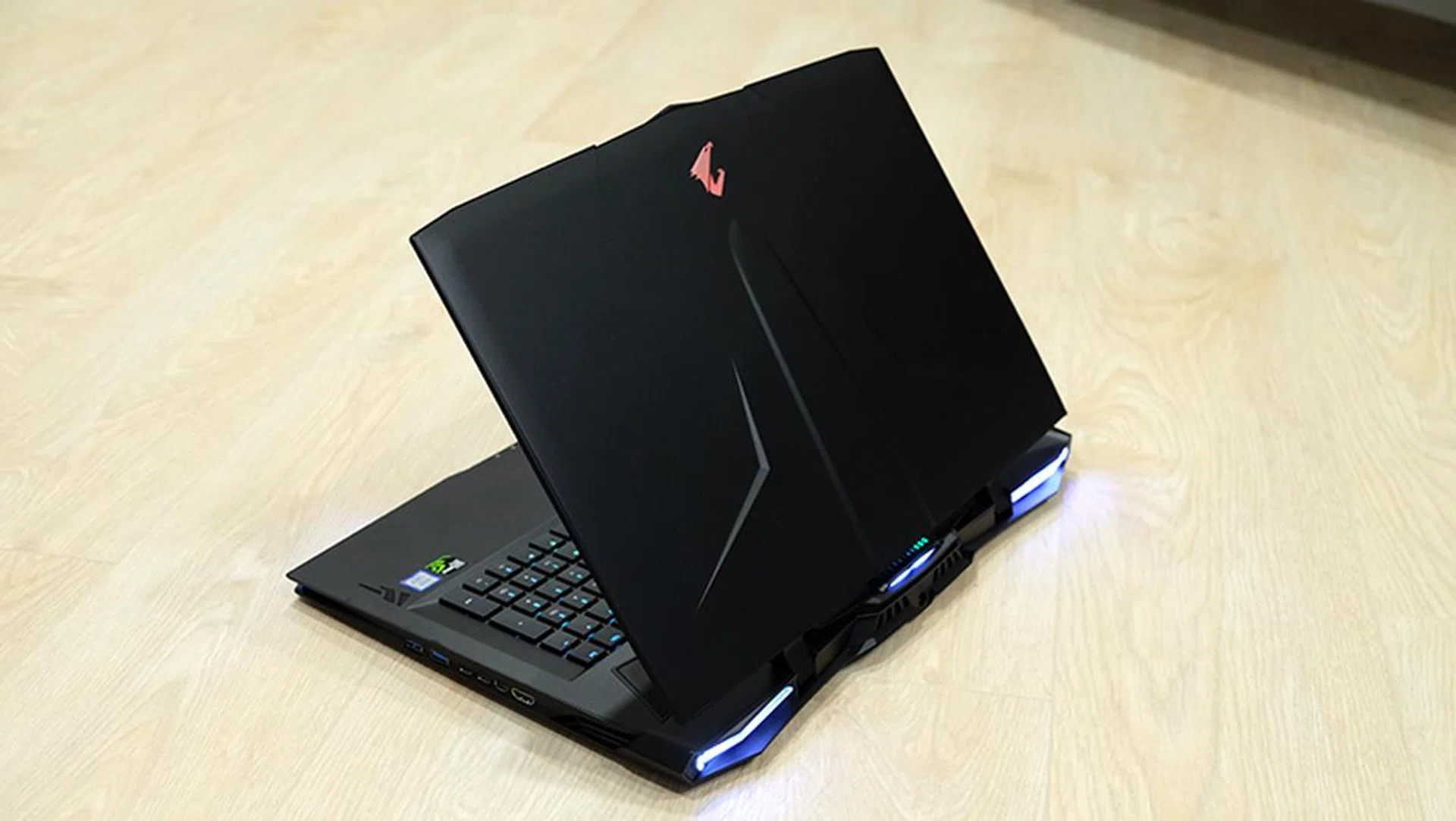
The Aorus X9 DT is a laptop that wants to be noticed.
The Aorus X9 DT eschews the minimalist ethos that so many 15.6-inch laptops are hewing to today. This is a gaming laptop, and it isn't shy about advertising that fact to the world. It is all aggressive curves and angles, complete with RGB lighting that peeks out from the edge of the laptop.
There have been some changes coming from the preceding X9 laptop however. Gigabyte has ditched the GeForce GTX 1070 SLI configuration in favor of a single GeForce GTX 1080. I like this move, because SLI can be quite problematic. In addition to the high power consumption, you can also run into issues such as micro-stuttering. Furthermore, performance is very much dependent on SLI profiles being added on the driver side for the games you play.
So while there’s technically been a decrease in graphics performance, I consider this a good move overall. After all, the laptop’s 17.3-inch display has only a 1,920 x 1,080-pixel resolution, which the GeForce GTX 1080 is perfectly capable of handling in just about any game.
The IPS display itself also sports a 144Hz refresh rate and NVIDIA G-Sync, so you’ll get a smooth and tear-free gaming experience. The difference is already noticeable at your desktop
Another nice feature is the X-Rite Pantone certification, which supposedly means more accurate colors. I didn’t verify this using proper testing equipment, but to my eyes at least, colors were reasonably vibrant and nothing seemed off to me. My only complaint would be the rather low peak brightness, and I found myself running the notebook at maximum brightness all the time.
The audio system now supports Dolby Atmos, but they’re honestly nothing to get excited about based on what I heard from the notebook's built-in speakers. Still, the laptop does feature an ESS Sabre Hi-Fi Audio DAC, so you’ll probably want to use headphones with it instead.
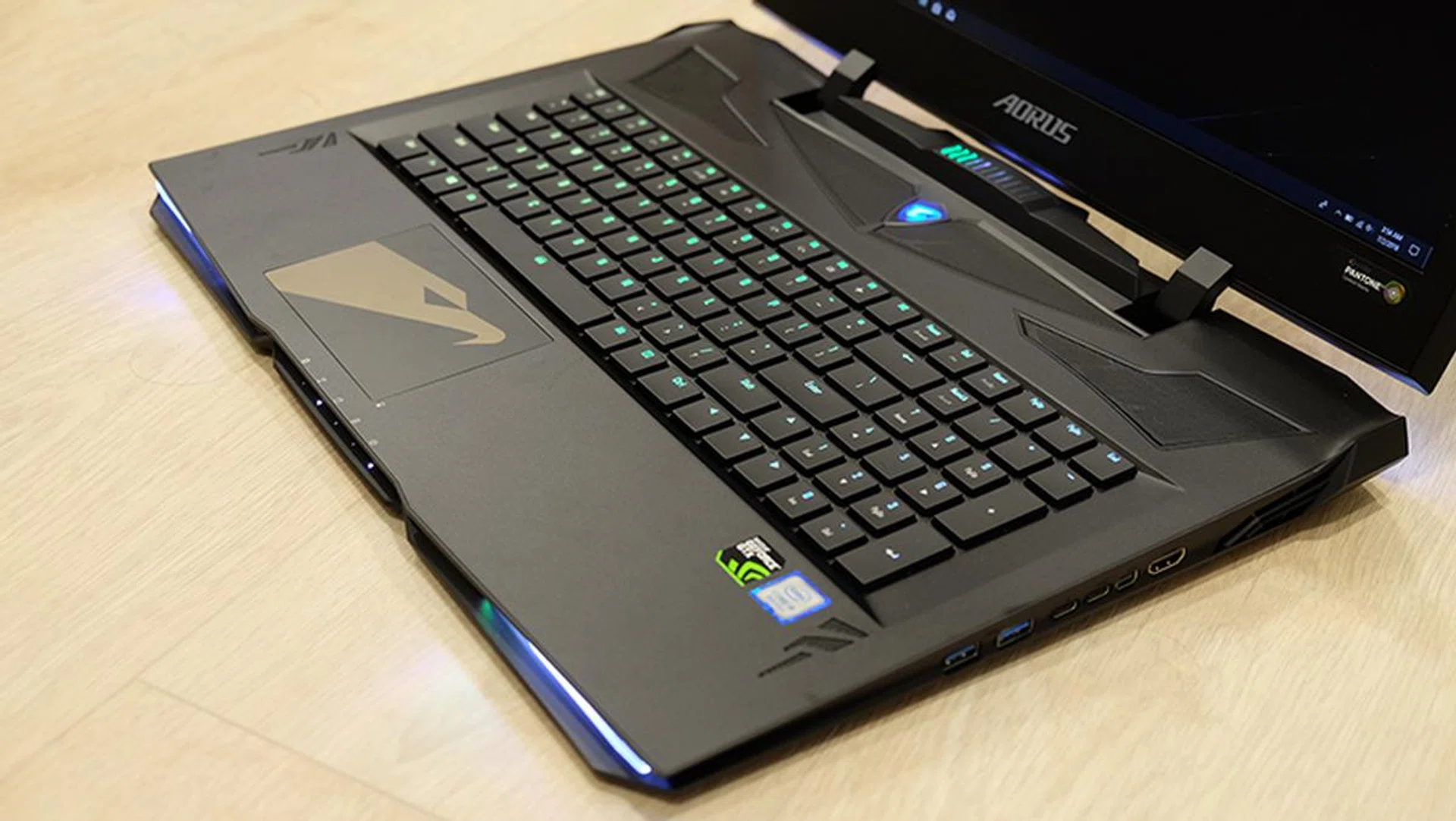
The keyboard offers per-key RGB backlighting.
What I do like is the laptop’s mechanical RGB backlit keyboard. I’d expect nothing less from a laptop of this caliber, and the keyboard provides great feedback, nice travel, and is a pleasure to type on. I like that Gigabyte went with tactile switches here as the clicky switches found on some gaming laptops can be pretty noisy and disruptive. On top of that, you also get per-key lighting controls for some truly fine-grained lighting customizations as well.
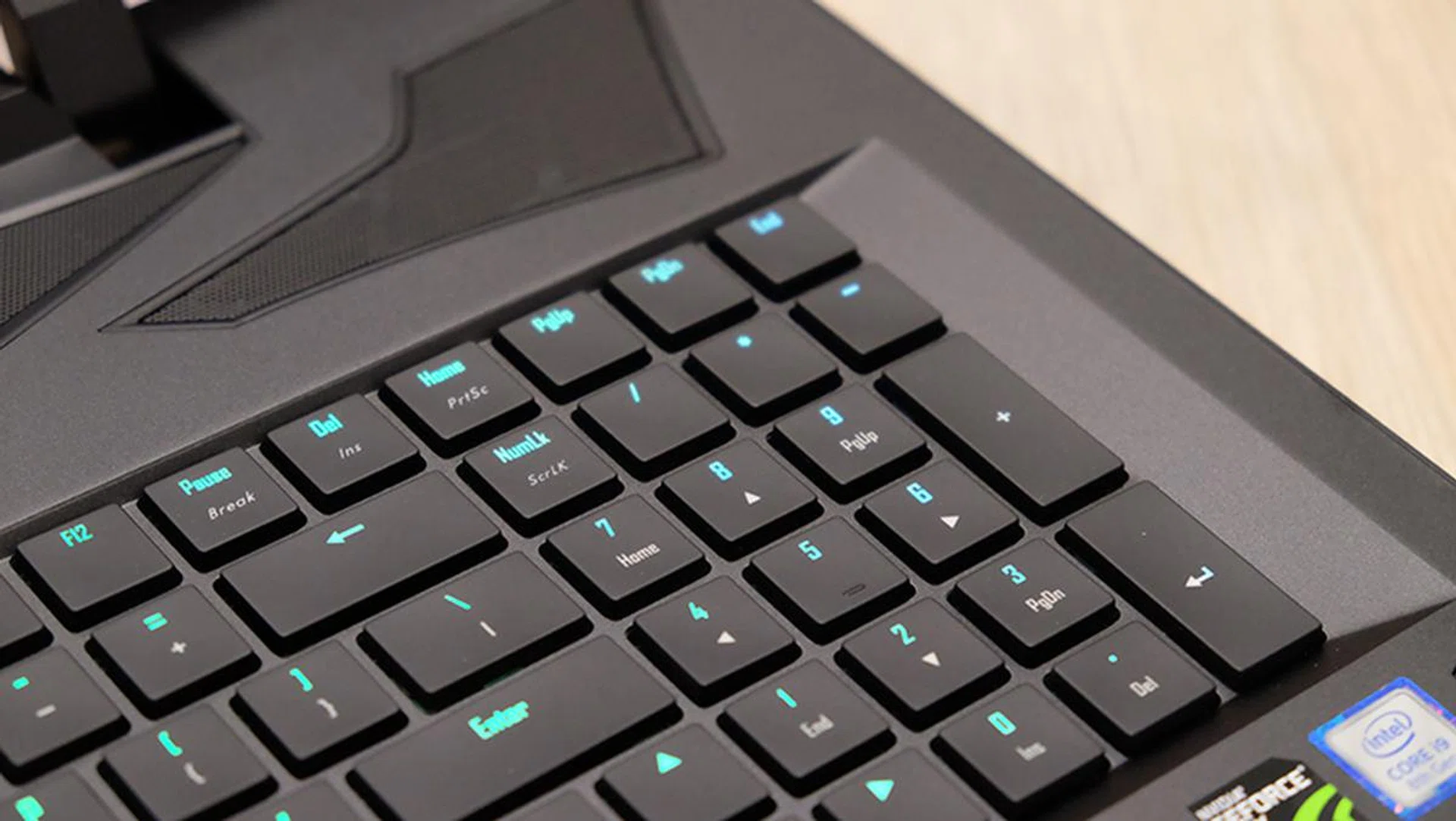
The tactile mechanical keyboard feels great to type on.
There are up to nine independent RGB lighting zones that you can customize on the laptop. In addition, you get an RGB heads-up display of sorts above the keyboard that is color-coded to display specific system information, such as fan speeds, temperature, or even battery level.
It’s excessive for sure, but I guess you can’t blame Aorus for trying to cram everything it can into the X9 DT, given the price it’s charging.
The trackpad is similarly excellent. It isn’t a Windows Precision Touchpad, so some gestures like the four-finger tap to open the Action Center won’t work, but it still feels responsive and accurate.
The overclockable Intel Core i9-8950HK processor is a welcome addition as well. The hexa-core chip sports a markedly higher 2.9GHz base clock compared to the Core i7-8750H’s 2.2GHz, and you can overclock it using the Command & Control utility. However, there actually isn’t that big a difference in performance between the default settings and the highest overclocking level.
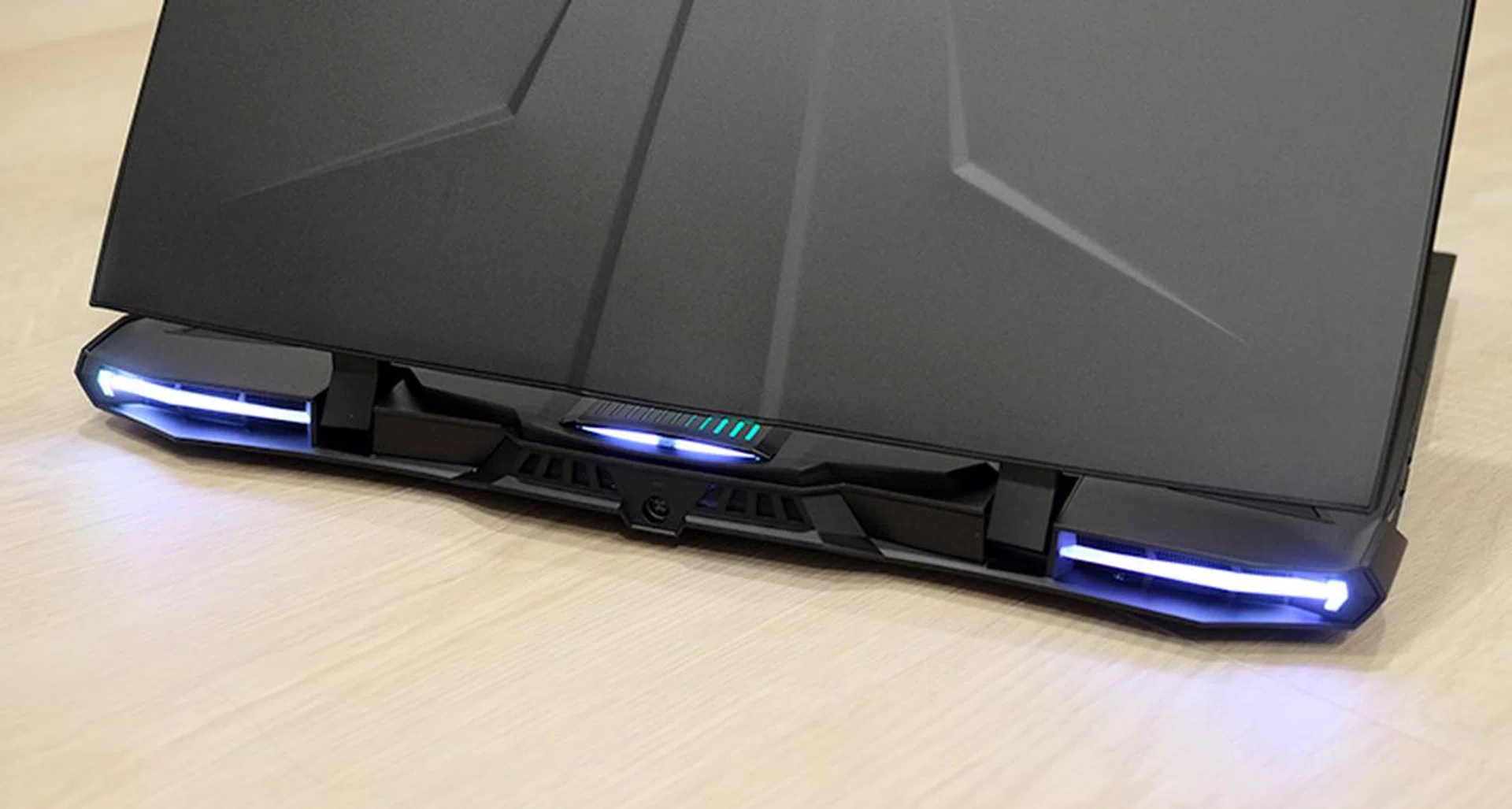
There are a total of nine independent lighting zones on the laptop.
All that powerful hardware needs to be kept cool, and the Aorus X9 DT sports no fewer than four fans. These draw in air through the bottom and exhaust them through vents at the sides, working in tandem with eight heat pipes to keep the crucial components running cool.
In addition, Aorus provides fairly extensive software controls for the fans. You can create your own custom 15-stage fan curve to suit your preferences, but the fact remains that the fans get very, very loud. They’re so loud that I wouldn’t even call them annoying. They’re downright invasive, and you’ll definitely need headphones to drown out the fans.
Finally, you get a wide range of ports and connectors for all your devices. This includes one Thunderbolt 3, two USB 3.1 (Gen 2) Type-A, one USB 3.1 (Gen 2) Type-C, and one USB 3.1 (Gen 1) Type-A port. There’s also a UHS-II SD card reader for speedy transfers and a Mini DisplayPort 1.4 and HDMI 2.0 output. In sum, this means you’ll be able to output to three displays at once and use the laptop as a true desktop replacement.
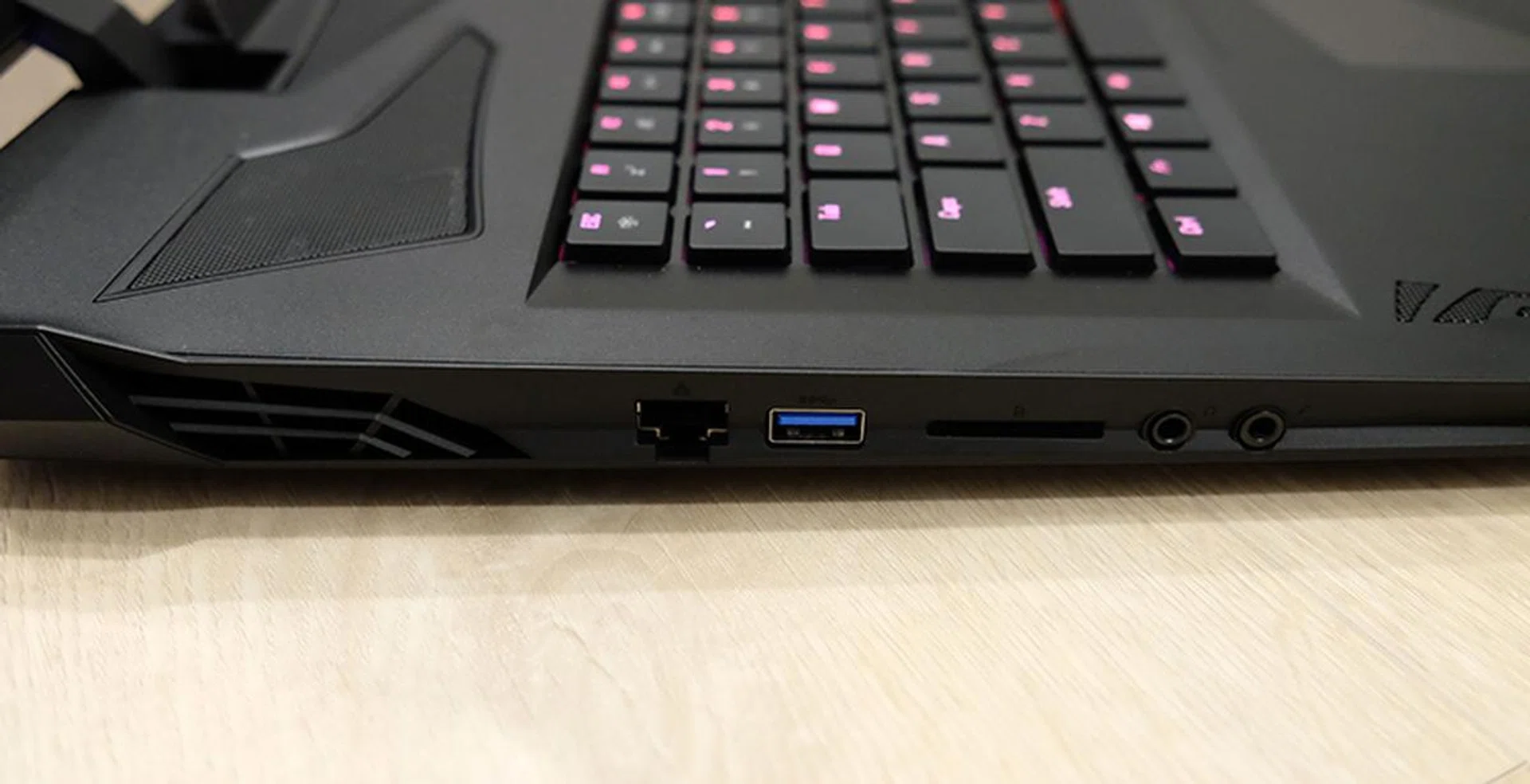
Here's a look at the ports on the left.
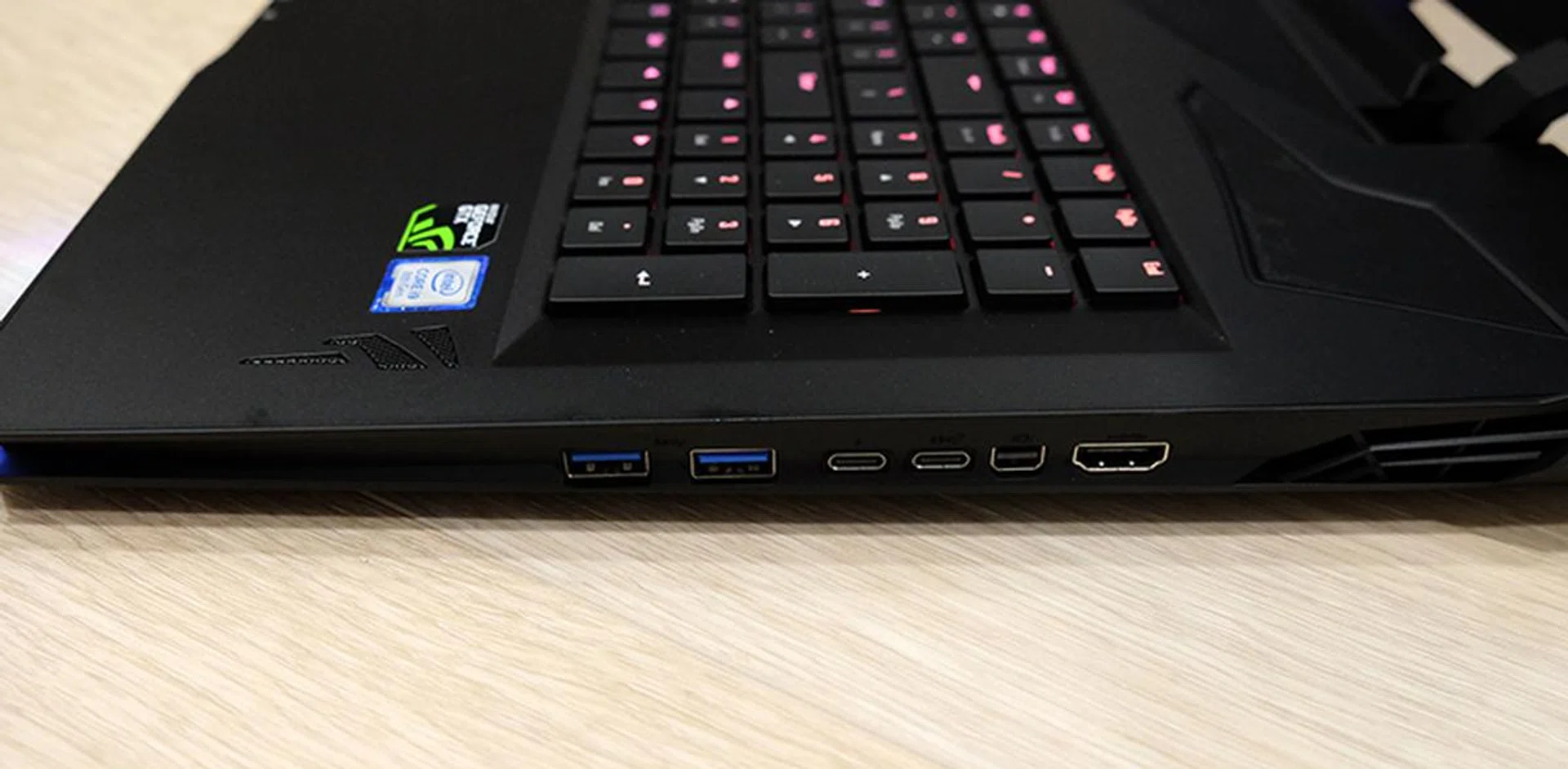
The Thunderbolt 3 port is located on the right.
Test setup
Here’s a full list of the notebooks we’re looking at:
- Gigabyte Aorus X9 DT
- MSI GT75VR 7RF Titan Pro
- ASUS ROG Scar II
- Razer Blade
The MSI GT75VR 7RF is equipped with last generation's Core i7-7820HK processor, also an overclockable chip, so you get an idea of how much of an improvement you get from upgrading to this generation's flagship laptop chip. Given that the Gigabyte Aorus X9 DT is the most powerful machine we've tested this year, we also included the ASUS ROG Scar II and Razer Blade to show the performance drop-off as you move down to the GeForce GTX 1070 and GeForce GTX 1070 Max-Q.
[hwzcompare]
[products=649659,618770,644562,642009]
[width=200]
[caption=Test notebooks compared]
[showprices=1]
[/hwzcompare]
We ran the notebooks through the following benchmarks:
- PCMark 10
- 3DMark
- VRMark
- Ashes of the Singularity
- Deus Ex: Mankind Divided
- Tom Clancy’s The Division
Benchmarks
PCMark 10 Extended
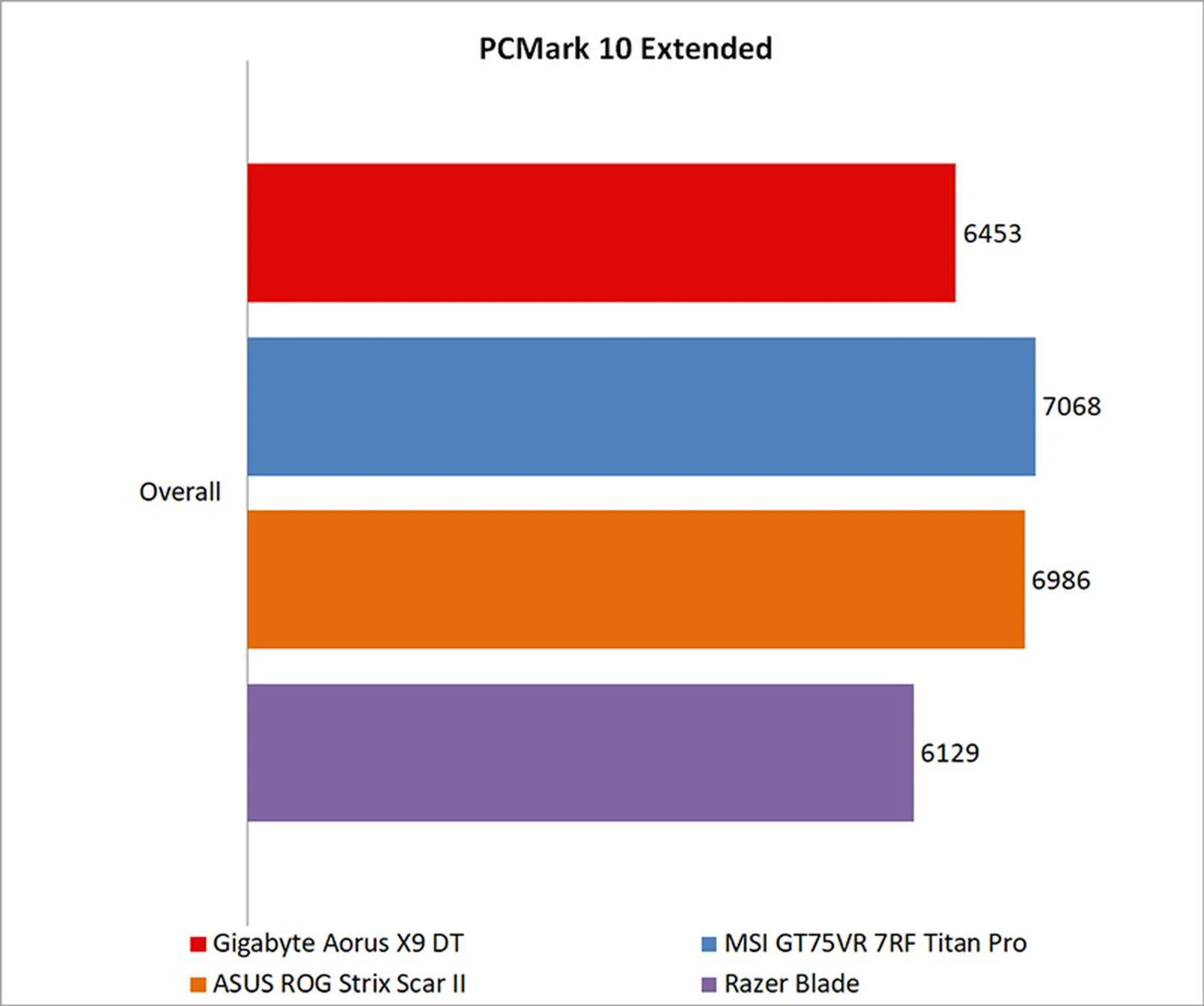
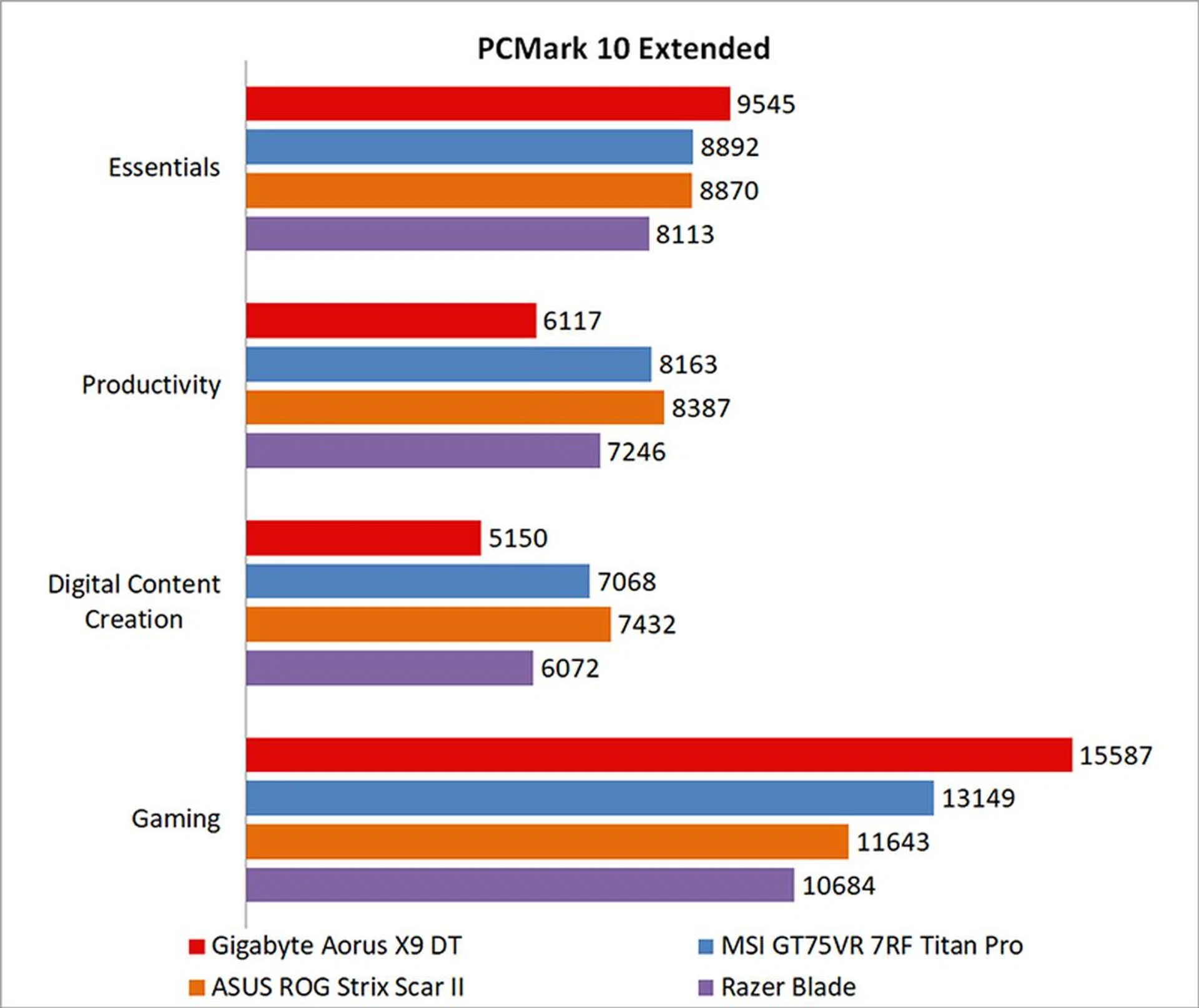
PCMark 10 Extended assesses the performance of systems in a variety of workloads, including basic computing tasks, productivity applications, digital content creation, and gaming. Compared to PCMark 8, it also adds in new test metrics, such as app startup times, which quantifies how long it takes to launch a variety of real-world apps, and a rendering and visualization workload to simulate professional graphics and engineering applications. In addition, existing workloads have been updated to reflect modern usage.
The Aorus X9 DT didn't really impress in PCMark 10. It was slightly ahead of the Razer Blade, but fell behind everything else, including the MSI GT75VR 7RF Titan Pro. That said, a look at the score breakdown shows that it did power ahead in the Gaming benchmarks, and it mainly lagged in the areas of Productivity and Digital Content Creation.
3DMark
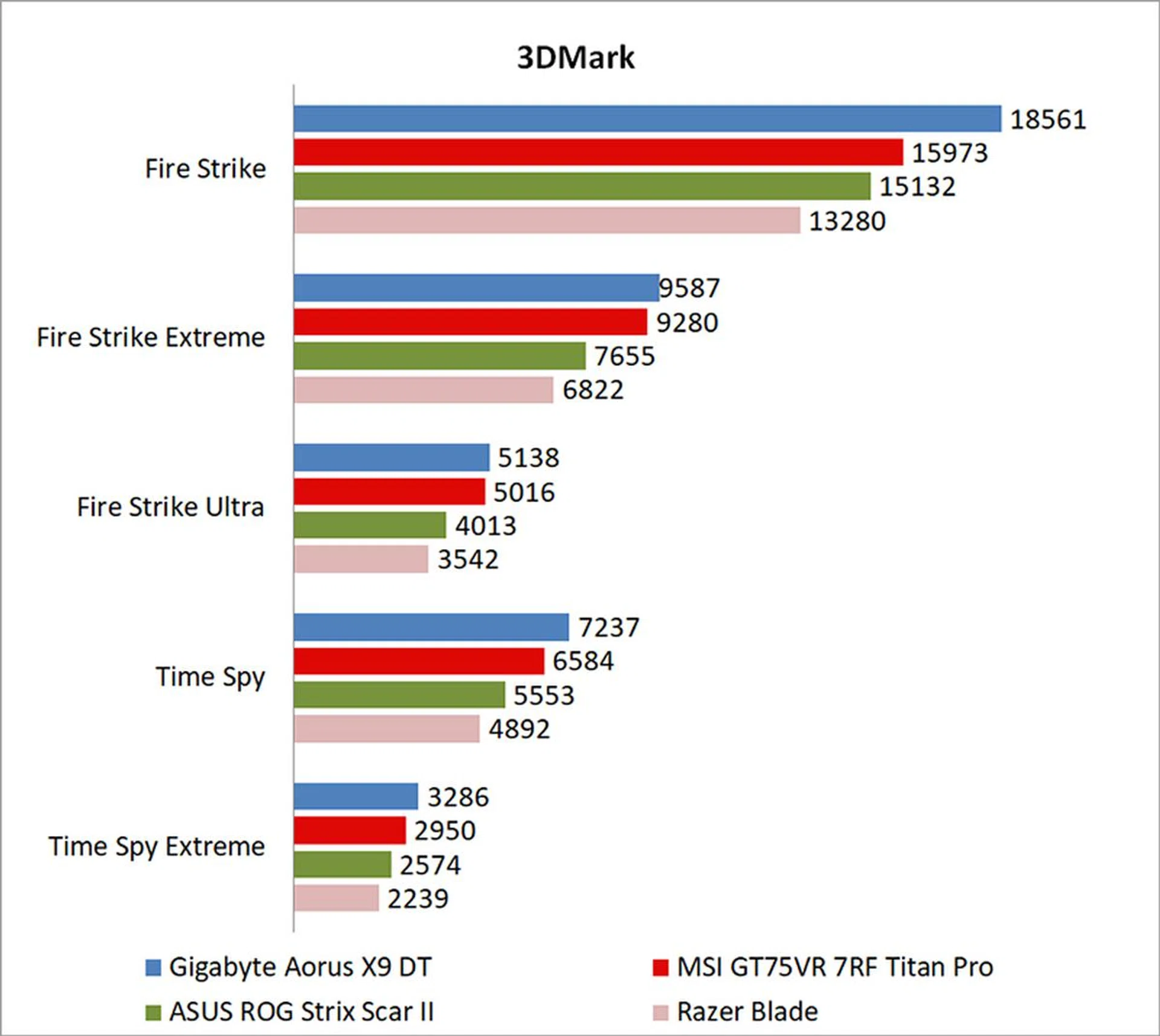
3DMark is a more relevant assessment of gaming performance, and it puts the system through a range of graphics and computational performance tests at different resolutions, starting at 1080p and going all the way up to 4K.
Fortunately, the Aorus notebook redeemed itself in 3DMark, coming ahead of the MSI laptop by roughly 15 per cent in the Fire Strike benchmark. It was also a good 33 per cent faster than the Razer Blade and its GeForce GTX 1070 Max-Q.
VRMark
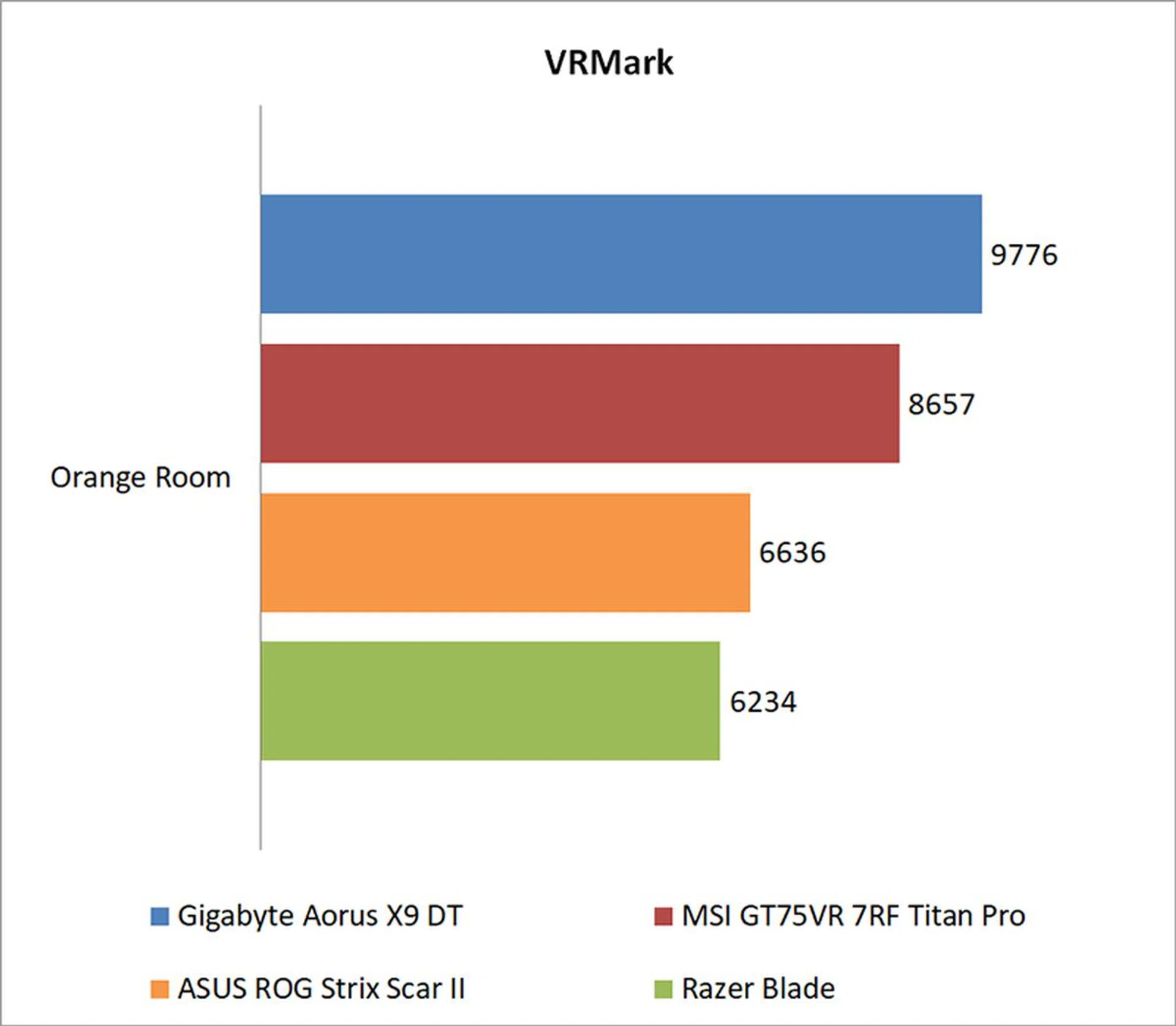
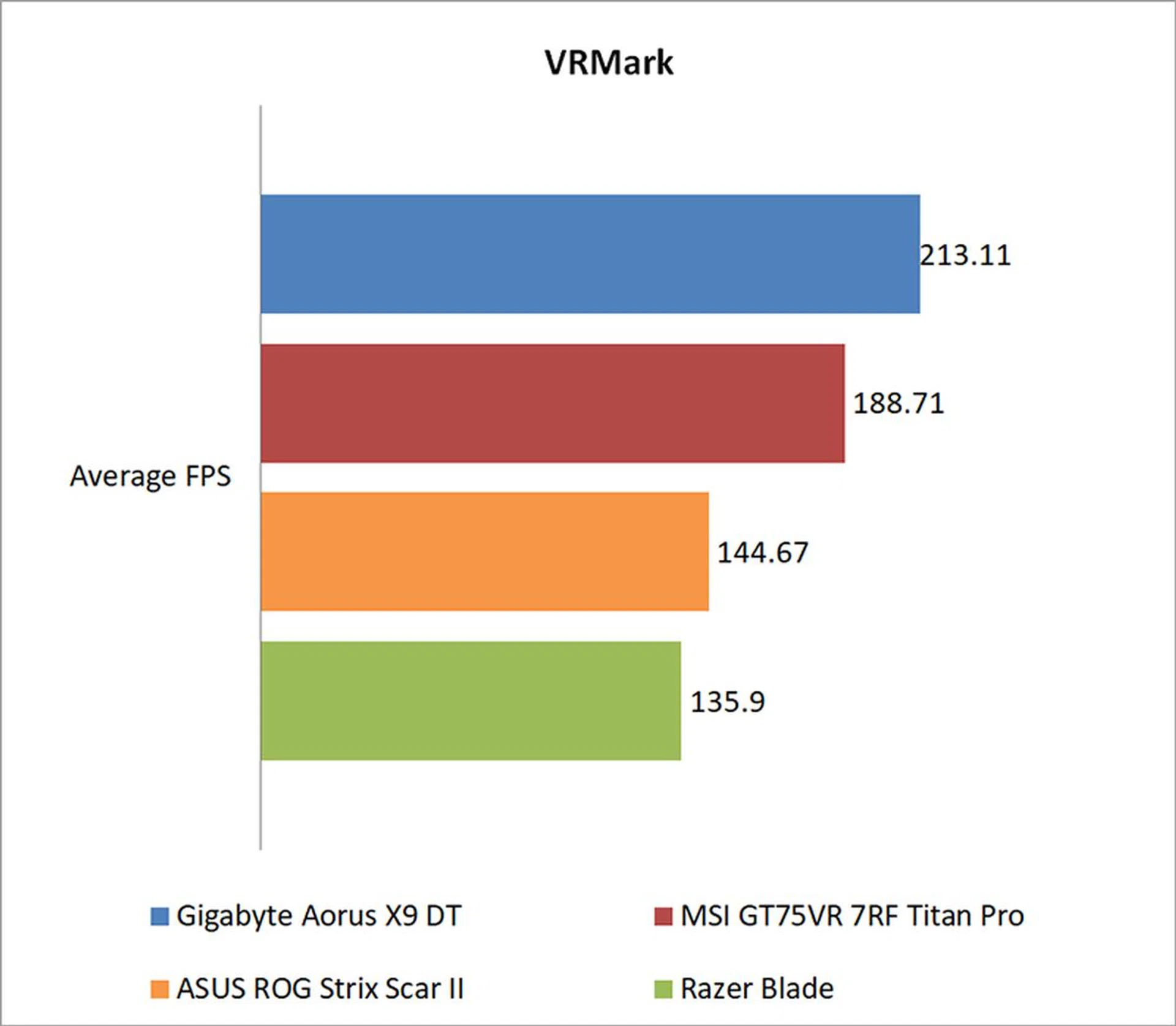
Futuremark’s VRMark benchmark is designed to assess a PC’s ability to handle high-performance headsets like the HTC Vive and Oculus Rift. If a PC passes the Orange Room test, it is ready for the latter two systems. The benchmark also has a target frame rate of 109FPS, and I've included the average FPS each notebook managed to provide a clearer measure of their respective performance.
The Aorus X9 DT also took the lead here, edging out the older specced Titan Pro by 12 per cent.
Ashes of the Singularity
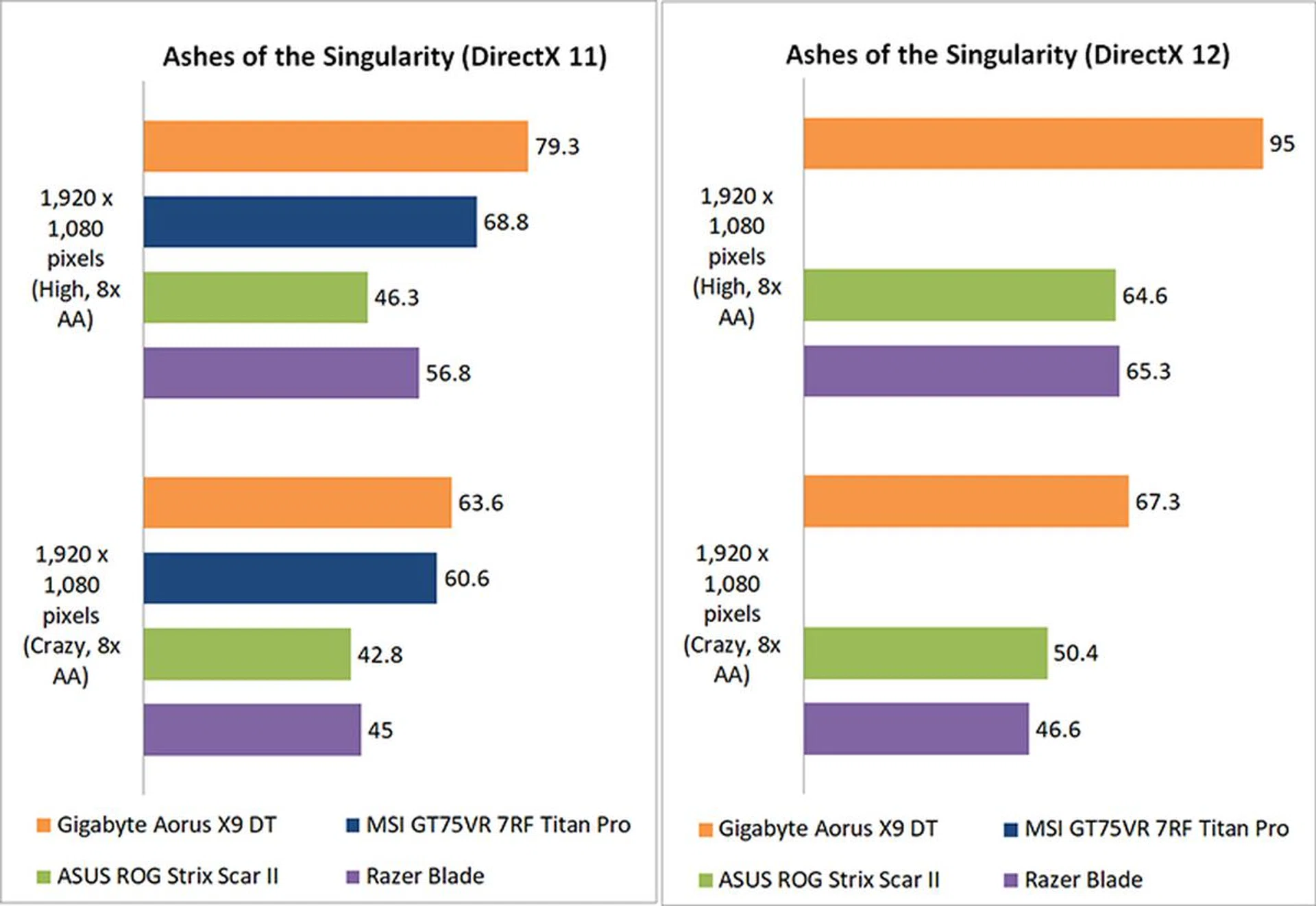
Ashes of the Singularity is a demanding real-time strategy game that puts thousands of units on screen, and it’s capable of pushing even the most powerful GPUs. However, it can be CPU-limiting at lower settings.
I don't have DirectX 12 results for the MSI laptop, so those figures are missing from the graph. That said, a look at the DirectX 11 numbers shows the Aorus X9 DT quite a bit ahead of everyone else, coming in at around 33 per cent ahead of the Razer Blade.
Deus Ex: Mankind Divided
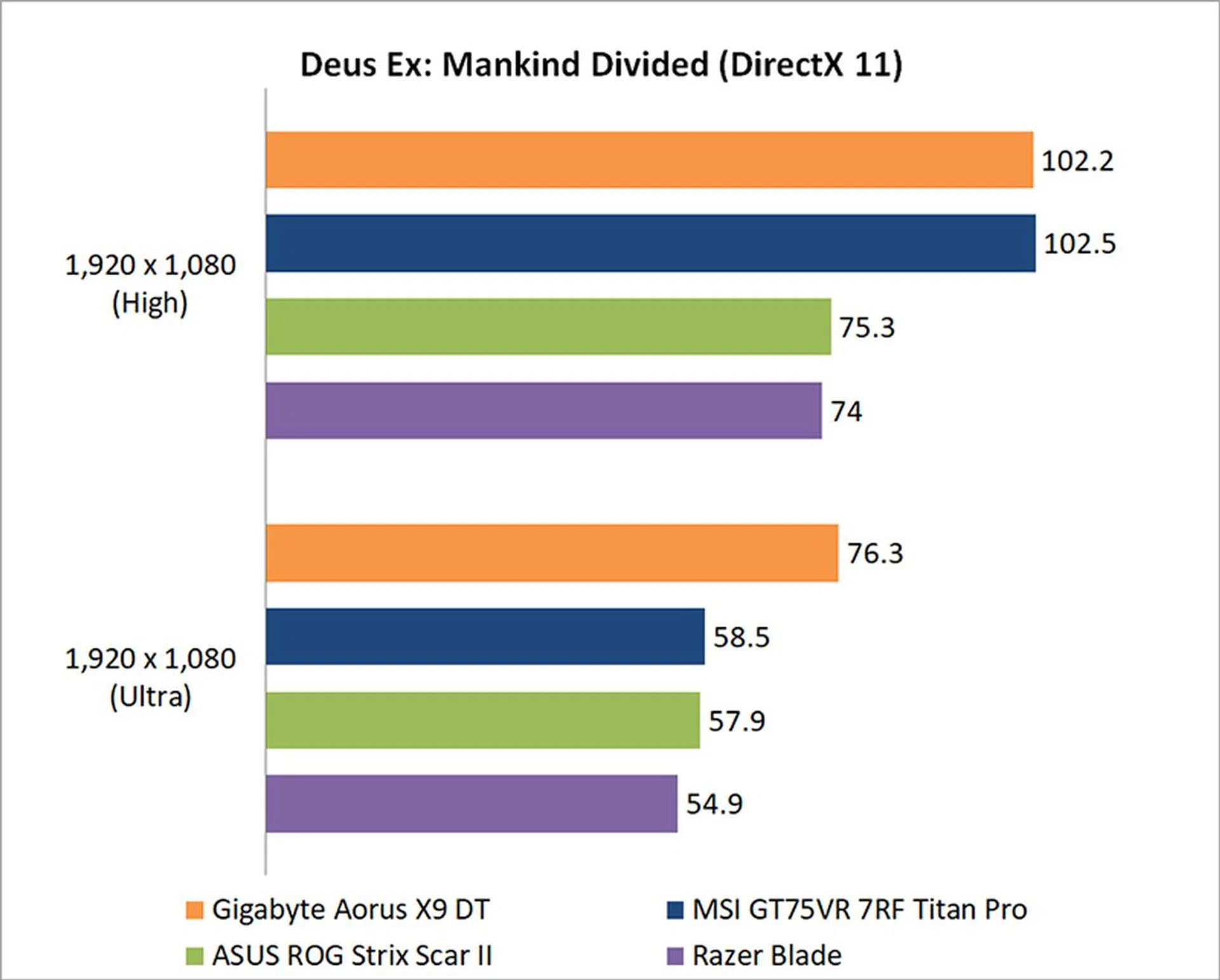
Mankind Divided is one of the most demanding titles to run today, but the Aorus X9 DT is more than capable of delivering a playable experience.
Oddly enough, it looks like the Aorus X9 DT and MSI GT75VR 7RF Titan Pro were forced into a situation where the CPU became the limiting factor at High settings. Conversely, the Aorus notebook had its chance to shine at Ultra settings, where it outstripped the MSI notebook by 26 per cent.
Tom Clancy's The Division
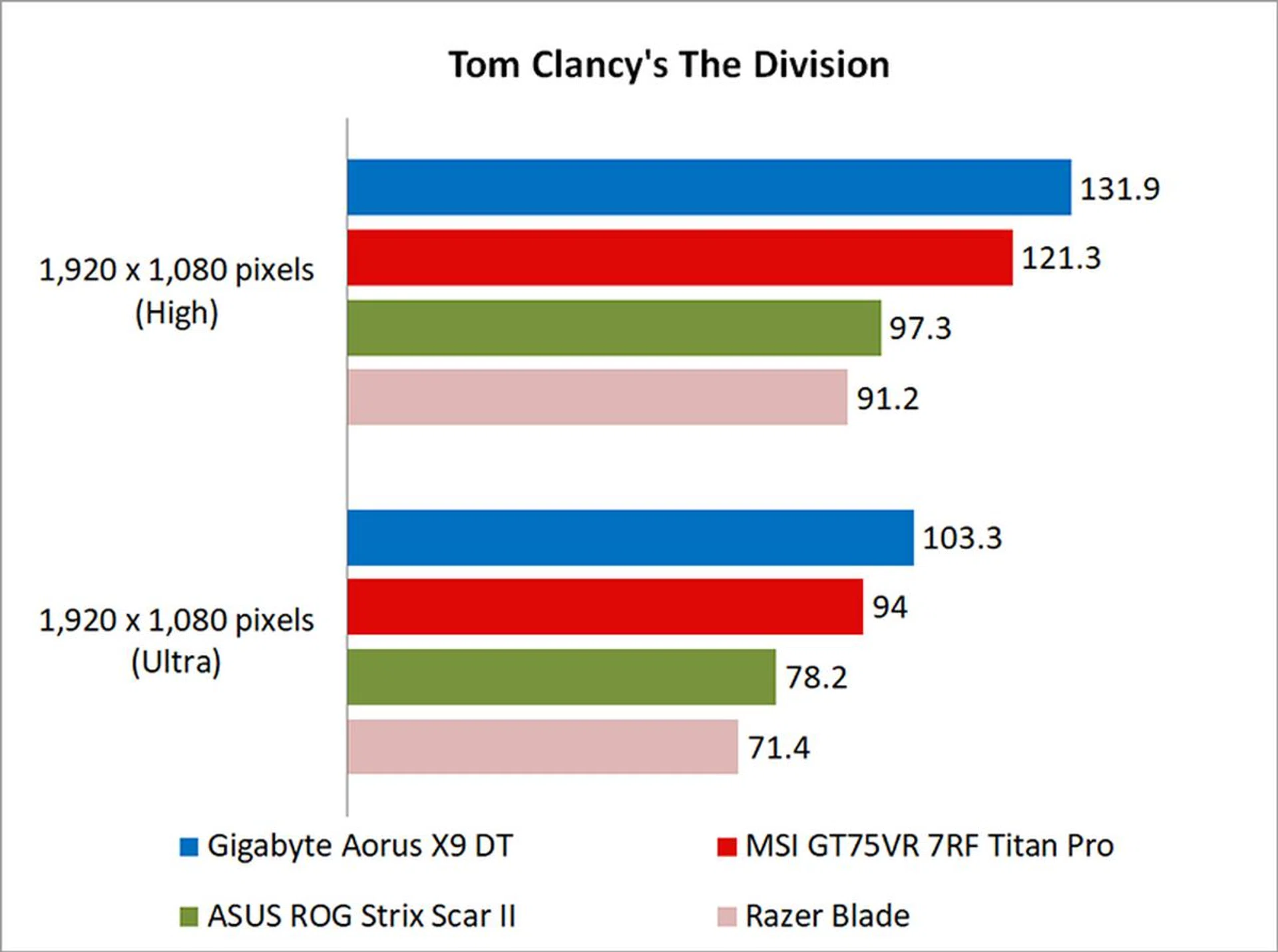
The Division isn’t as demanding to run as Ashes of the Singularity or Deus Ex: Mankind Divided, but its Snowdrop engine can still stress cards with the use of dynamic lighting and the like.
The Aorus X9 DT was 9 per cent faster than the MSI laptop here, and a good 36 per cent quicker than the Razer Blade.
Temperature, battery life and portability
Temperature
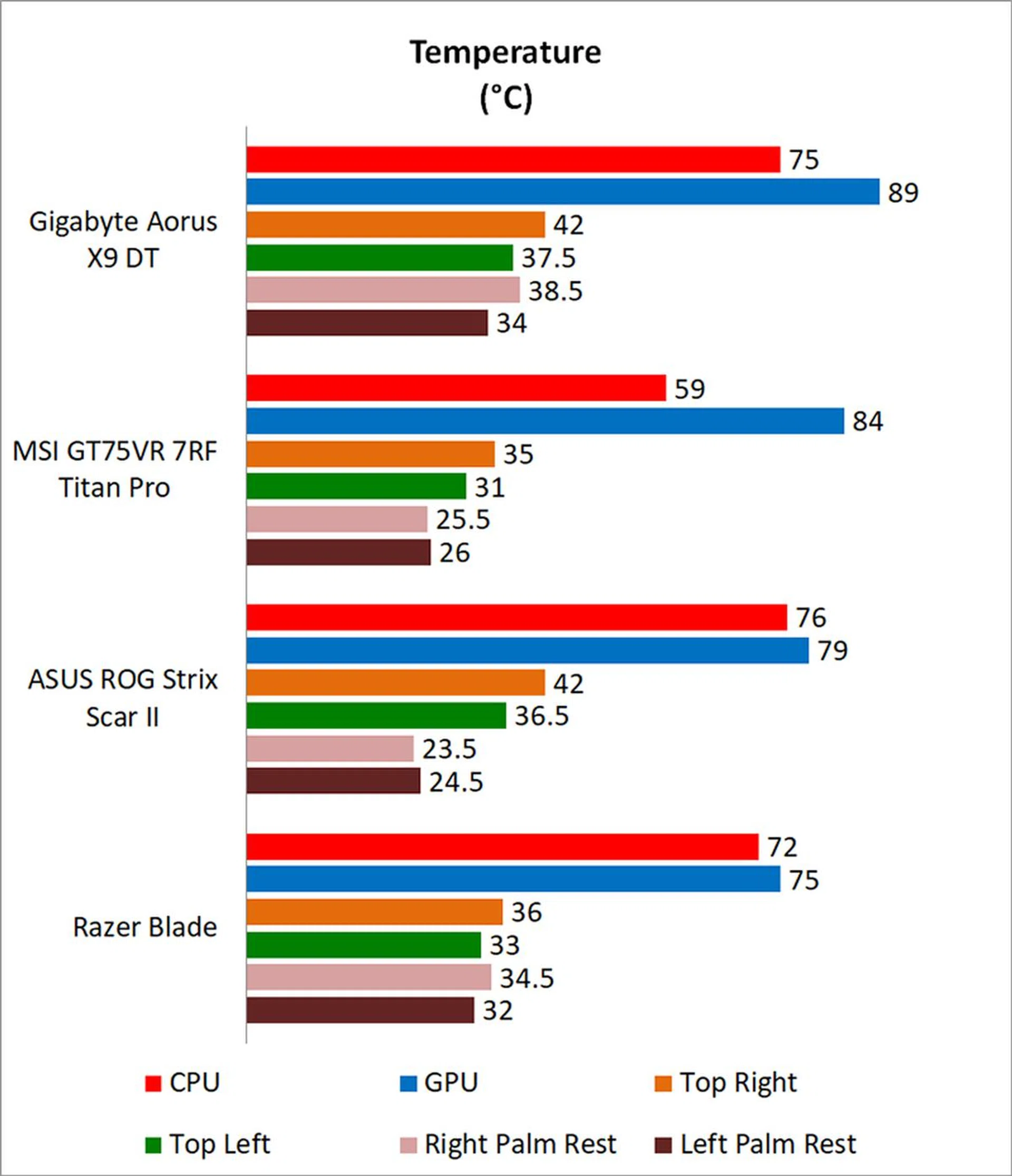
I measured the external temperatures of the four quadrants of the notebook after 40 loops of 3DMark's Fire Strike Extreme stress test. This amount of time is more than enough to get an idea of your average maximum running temperature for this workload.
The Aorus X9 DT ran fairly hot, despite its four fans and the ruckus it kicks up. At 25.4mm at its thickest point, I'd argue that it's actually quite thin for what it offers (the MSI laptop is also a lot thicker), so it may be that cooling has suffered slightly as a result.
Battery life and power consumption
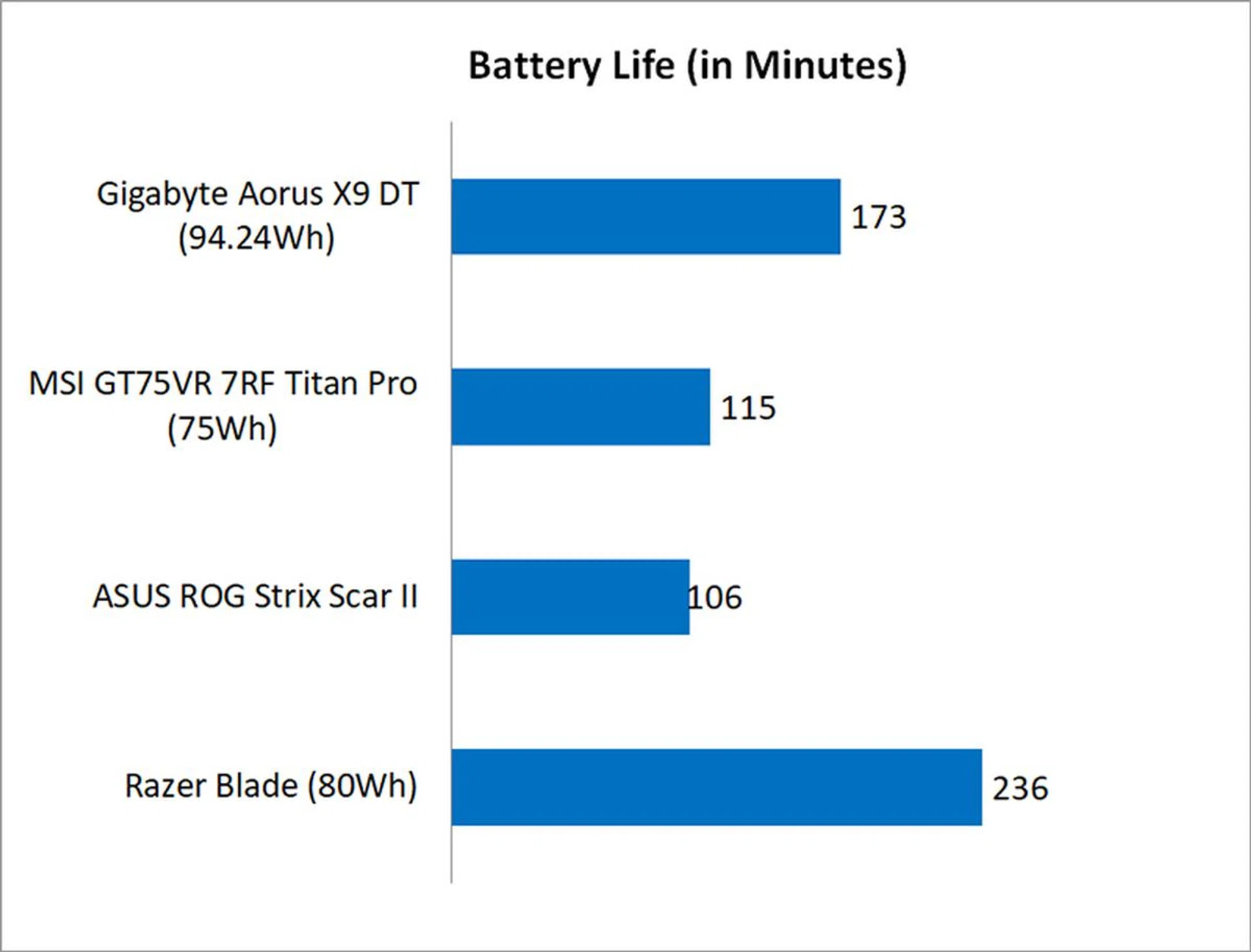
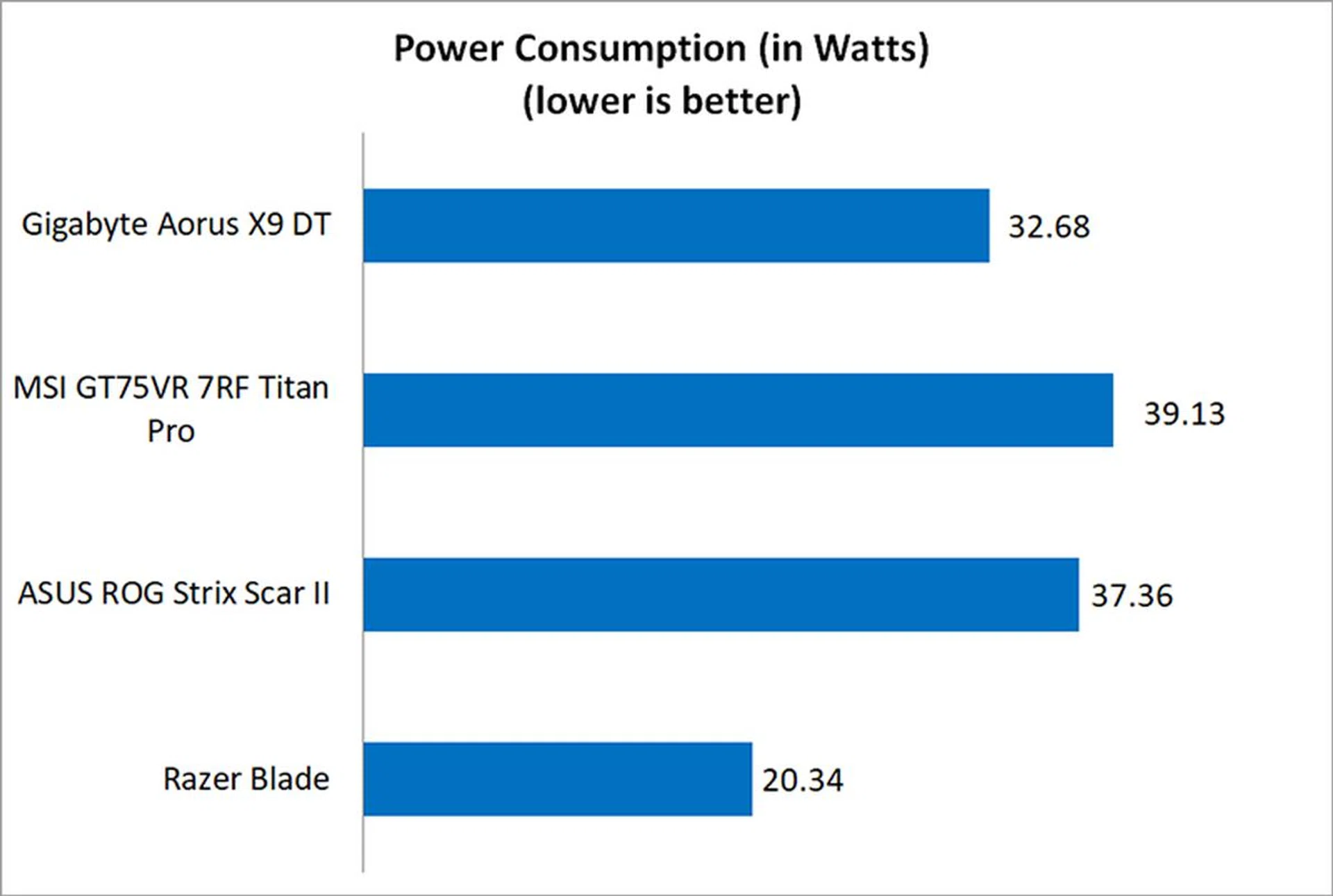
I used the built-in battery life benchmark in PCMark 8 Home to assess the battery life on the laptops.
The Aorus X9 DT actually lasted surprisingly long, probably thanks to its large 94.24Wh battery. For a desktop-replacement class notebook, it's pretty good in the battery life department.
Portability
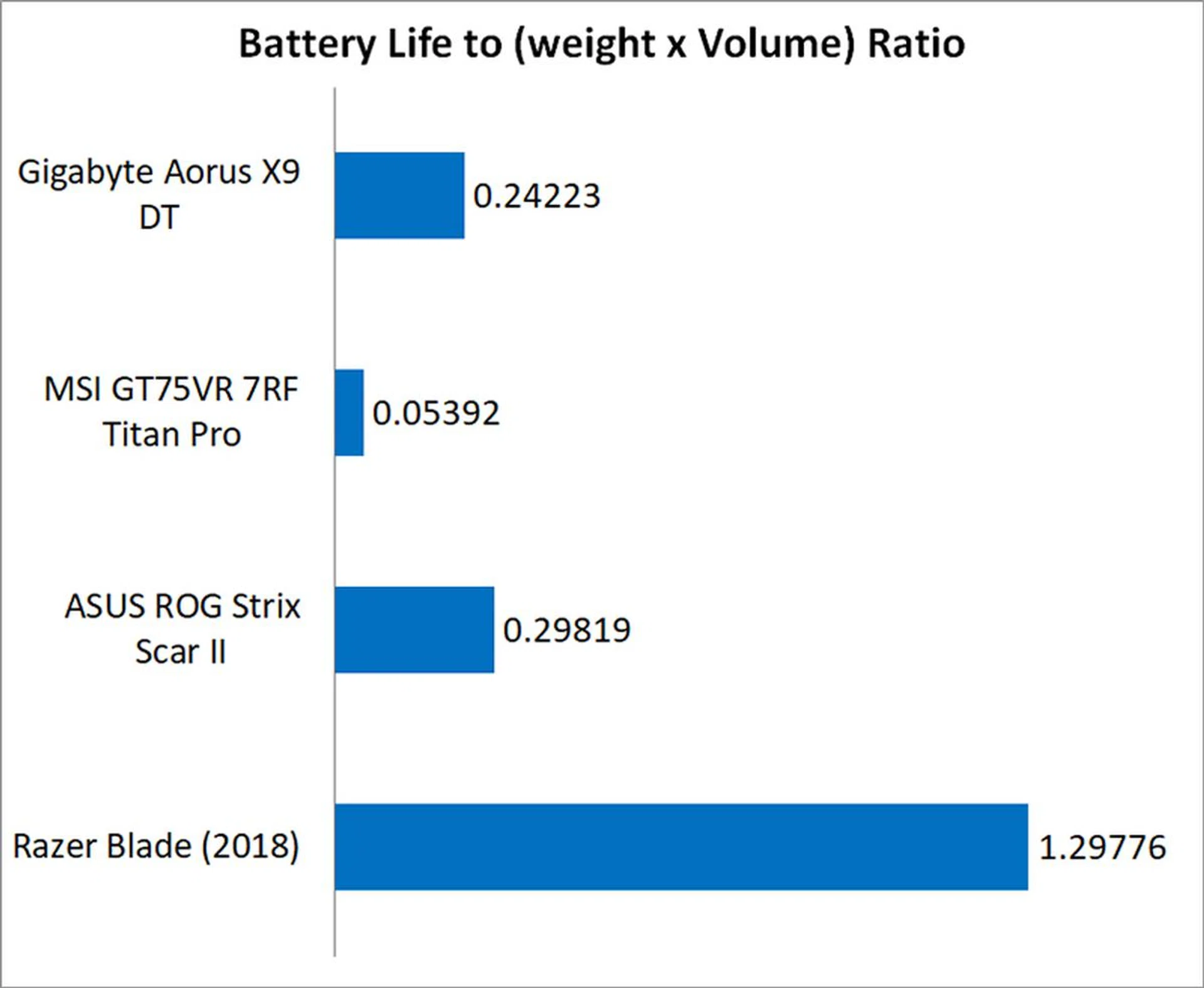
The portability index is an objective measure of how portable a notebook is, taking into account factors like size, weight, and battery life.
Despite its fairly decent battery life, the Aorus laptop was 'dragged down' in our portability index by its form factor and weight. It is, after all, a 17.3-inch notebook and considering this point, it managed to land a portability ratio very close to the ASUS ROG Strix Scar II notebook that has a 15.6-inch screen. Furthermore, it still fared a lot better than the MSI laptop.
A mobile desktop
The Aorus X9 DT is an absolute beast in benchmarks, outperforming just about everything we've tested so far. However, it's also possible that it's too powerful, because all that bleeding-edge hardware has necessitated a chassis so large and heavy (compared to the new class of portable gaming notebooks) that it doesn't have much use outside of being a desktop replacement.
I don't mean to undermine what the Aorus X9 DT does well. Compared to something like the MSI GT75VR 7RF Titan Pro, the Aorus laptop is relatively thin and has pretty decent battery life. However, that doesn't change the fact that if I were to drop S$5,999 on a super big and heavy laptop that I can barely fit into my bag, I could consider spending that money on a desktop. Not to mention, the notebook's cooling system can get noisy enough that it necessitates using headphones for gaming.
The case for a desktop replacement notebook
However, I can see the Aorus appealing to power users with very specific needs. For instance, maybe you attend frequent LAN parties and want to take a powerful rig along with you all the time. In that case, I can see the Aorus X9 DT coming in handy for those who want the best possible performance in a laptop form factor.
It's also great for those who are really short on space to house a large screen and a desktop, plus the associated cable clutter, like if you're staying put in a dormitory. For this group of users, having a desktop replacement notebook that offers top-notch performance and a large built-in screen, while being able to easily stow it all away when not required is a big plus point.
Niche appeal
Outside of these use cases, the Aorus X9 DT is a niche product for a specific audience. It is blindingly fast, but the additional performance it offers over something like the Razer Blade and its GeForce GTX 1070 Max-Q may not be quite worth the drastic increase in price. In the current day and age of Max-Q capable notebooks, many of them now offer a tantalizing combination of performance and portability. Furthermore, the GeForce GTX 1070 Max-Q is perfectly capable of playing any game at 1080p resolution.
Let's not forget that there are also much more compact machines with plenty of power and almost equivalent amount of connectivity options from the likes of the Acer Predator Titan 700 or the ASUS ROG GX501 Zephyrus - both of which are outfitted with a GeForce GTX 1080 Max-Q GPU and cost about as much as the Aorus X9 DT.
So what really makes the Aorus X9 DT or any other equivalent desktop replacement class machine stand out? Extreme performance. In addition to the performance figures seen from GeForce GTX 1070-class notebooks, take a peek at where the GeForce GTX 1080 Max-Q stands. It's clear that the Aorus X9 DT delivers much more performance, but the question is whether you would really ever need it on a 1080p resolution screen. Secondly, the large 17.3-inch screen is a treat for notebook-class gaming and bodes well for those who want the biggest, wicked notebook they can lug around or drop a powerful machine on their work desk without occupying a large footprint.
In summary, with the recent crop of Max-Q notebooks, you're paying for the design, portability, and performance. But with a laptop that doubles as a desktop replacement, you're really paying for pure performance. A desktop would deliver better performance for less money, but if you fit the profile for needing a desktop replacement notebook, this is precisely why notebooks like the Aorus X9 DT exist.
The Aorus X9 DT is not a bad product. It's a powerhouse that's actually reasonably slim. It's just that it is for gamers on the fringes who want the best performance that a laptop has to offer and have the cash to spare.
First published on Oct 22, 2018.
Our articles may contain affiliate links. If you buy through these links, we may earn a small commission.