
MSI GS65 Stealth Thin 8RF notebook review: Copper-accented gaming beauty
MSI's GS65 Stealth Thin 8RF falls into a burgeoning category of thin, light, and powerful notebooks that is continuing to redefine traditional expectations of a gaming laptop. Can it hold up to stiffer competition seen this year? We find out.

Note: This article was first published on 25th September 2018.
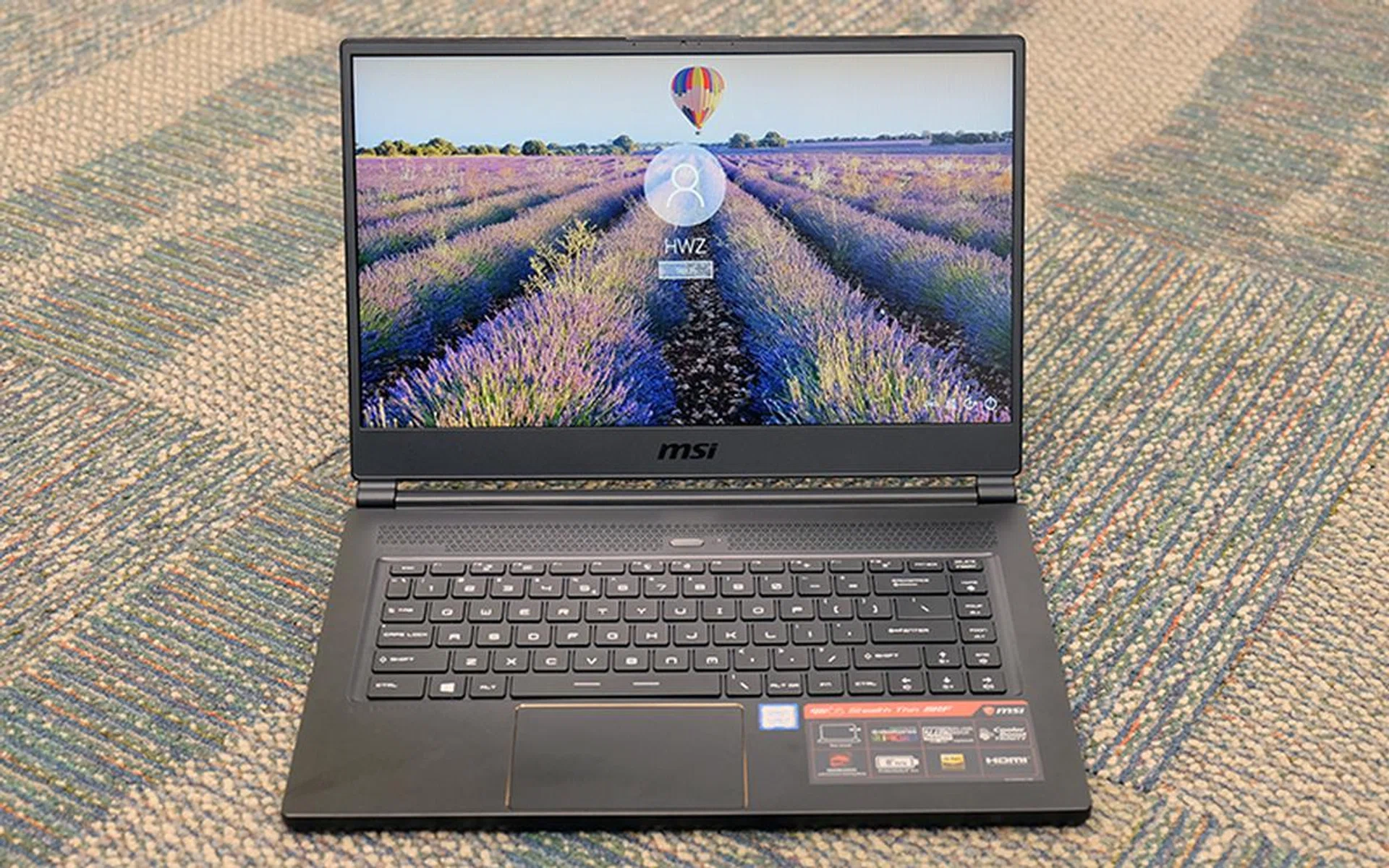
Every gaming notebook should be this thin
MSI's GS65 Stealth Thin 8RF falls into a burgeoning category of thin, light, and powerful notebooks that is continuing to redefine traditional expectations of a gaming laptop. It succeeds the GS63VR 7RF, already a class leader in its own right when it came to portable gaming notebooks, boasting a more refined design and an improved 144Hz display.
This year's model is also up against stiff competition from the likes of the Razer Blade, so it'll need to do a lot more to stay competitive.
Here's an overview of its specifications:
- 15.6-inch 1,920 x 1,080-pixel IPS-type display
- Intel Core i7-8750H (2.2GHz, 9MB L3 cache) processor
- 16GB dual-channel DDR4-2667 RAM
- NVIDIA GeForce GTX 1070 Max-Q
- Samsung PM981 512GB PCIe M.2 SSD
- 357.7 x 247.7 x 17.9 mm
- 1.88kg
That's plenty powerful and will run most games at 1080p resolution, but you'll have to pay a pretty penny for it. At S$3,799, it is a significant investment that you'll have to give careful thought to. Having said that, its price is more or less in line with rivals like the Razer Blade and Gigabyte Aero 15X, so this is pretty much par for the course.
But just how good is the GS65 Stealth Thin? Read on to find out.
You don't need strobing RGB lights
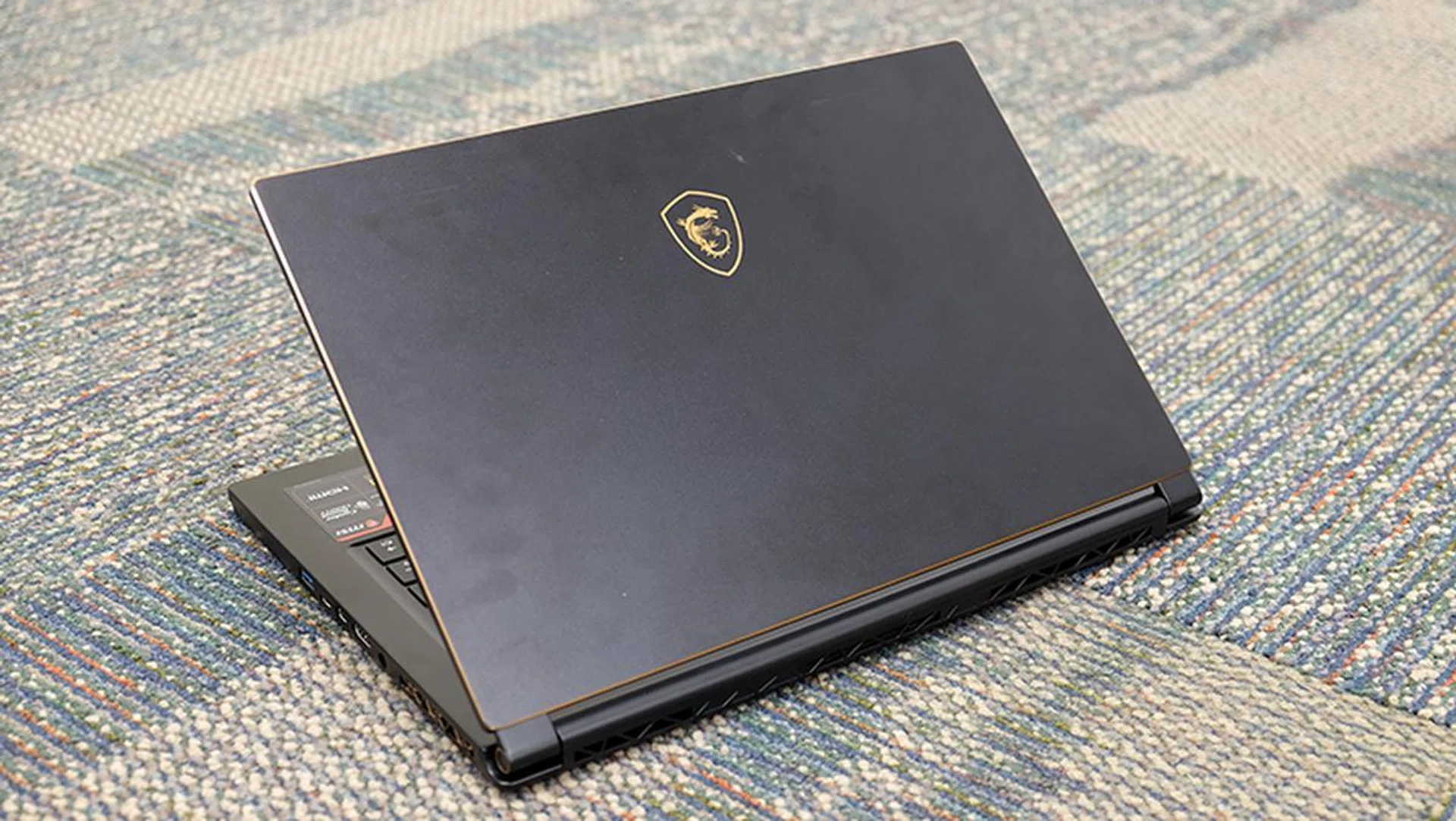
No flashing RGB lights on the lid.
I'm of the opinion that most of us don't need seizure-inducing RGB lights and huge flared vents on our laptops. The good news is that many laptop manufacturers seem to think so as well. The latest crop of gaming laptops sport blissfully clean designs, and something like the Razer Blade, Gigabyte Aero 15X, or Lenovo Legion Y530 won't look too out of place in a work meeting.
Having said that, it looks like MSI got the memo as well. The MSI GS65 Stealth Thin 8RF features a far more subdued design than its predecessor. The brushed metal finish is gone, and it now favors copper accents and a muted MSI Dragon logo on the lid. The rest of the black aluminum chassis is rather tasteful as well, although it’s a pity that the metal feels more like plastic than actual metal.
The laptop has a quiet, understated look to it that I like, while the copper accents on the edges help give it a more character.
Unfortunately, build quality is decent, but not the best. The palm rests, keyboard, and speaker grilles exhibit noticeable flexing and creaking when pressure is applied, although it’s nothing too alarming. Still, this was something I noticed on the previous model as well, so it's slightly disappointing that MSI hasn't improved this aspect.
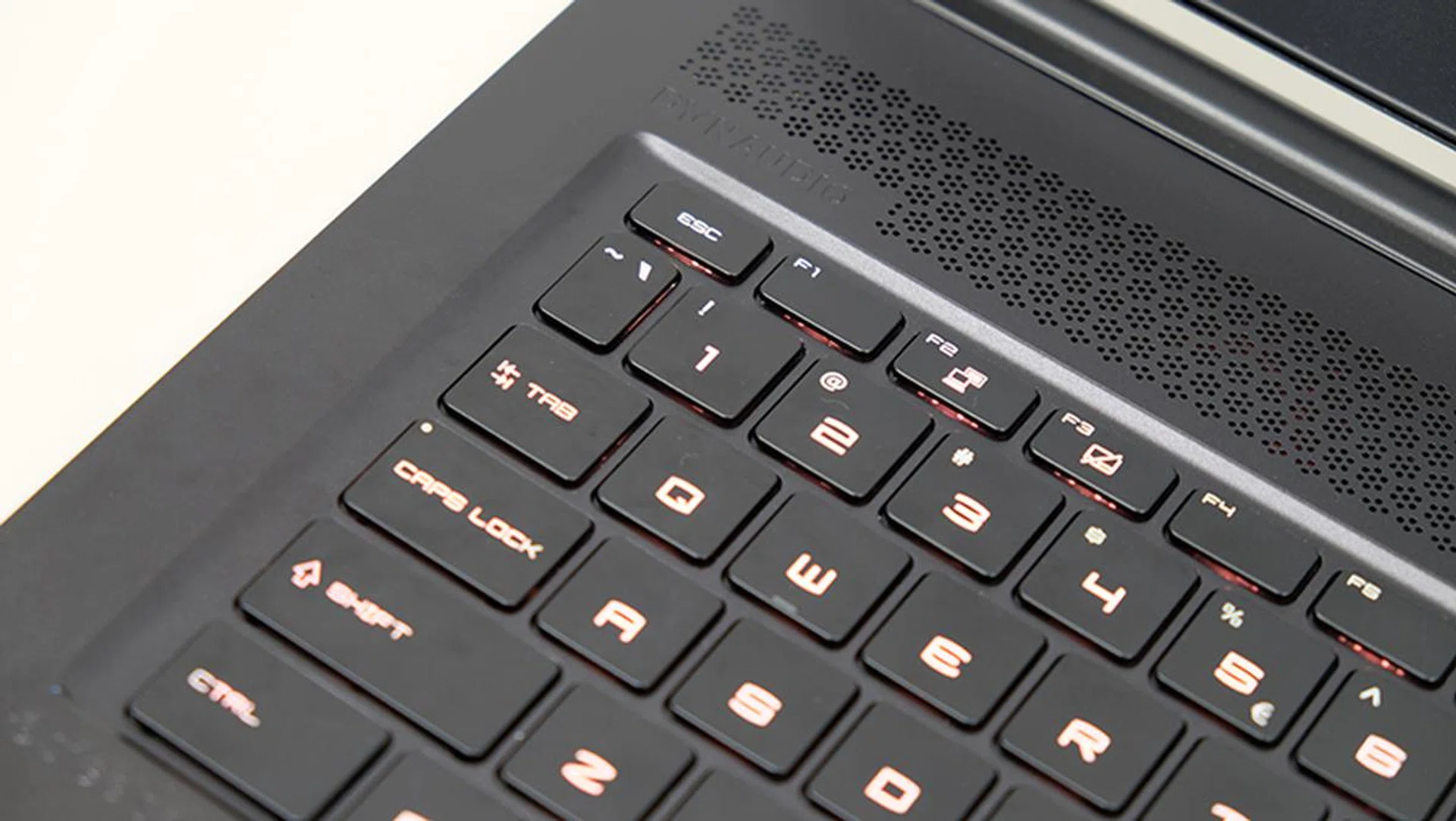
The chassis flexes in some areas when pressure is applied.
However, it's possible that the flexing is a concession MSI had to make in order to make the laptop so light. This is one of the most portable gaming laptops available. Its 1.88kg weight is truly impressive, and the large 82Wh battery ensures you get decent battery life.
It’s also super thin and boasts the slim bezels found on so many gaming laptops today, so you get a more compact space footprint overall. Check out last year's GS63VR Stealth compared to this year's GS65 Stealth and the difference is notable. That said, there’s still space on the top bezel for the webcam, so you won’t have to put up with any weird camera angles.
The SteelSeries keyboard supports per-key RGB backlighting, and it feels surprisingly nice to type on for such a thin laptop. The touchpad is also a Windows Precision Touchpad, which is great, but the integrated left- and right-click buttons could be improved in terms of feedback and responsiveness.
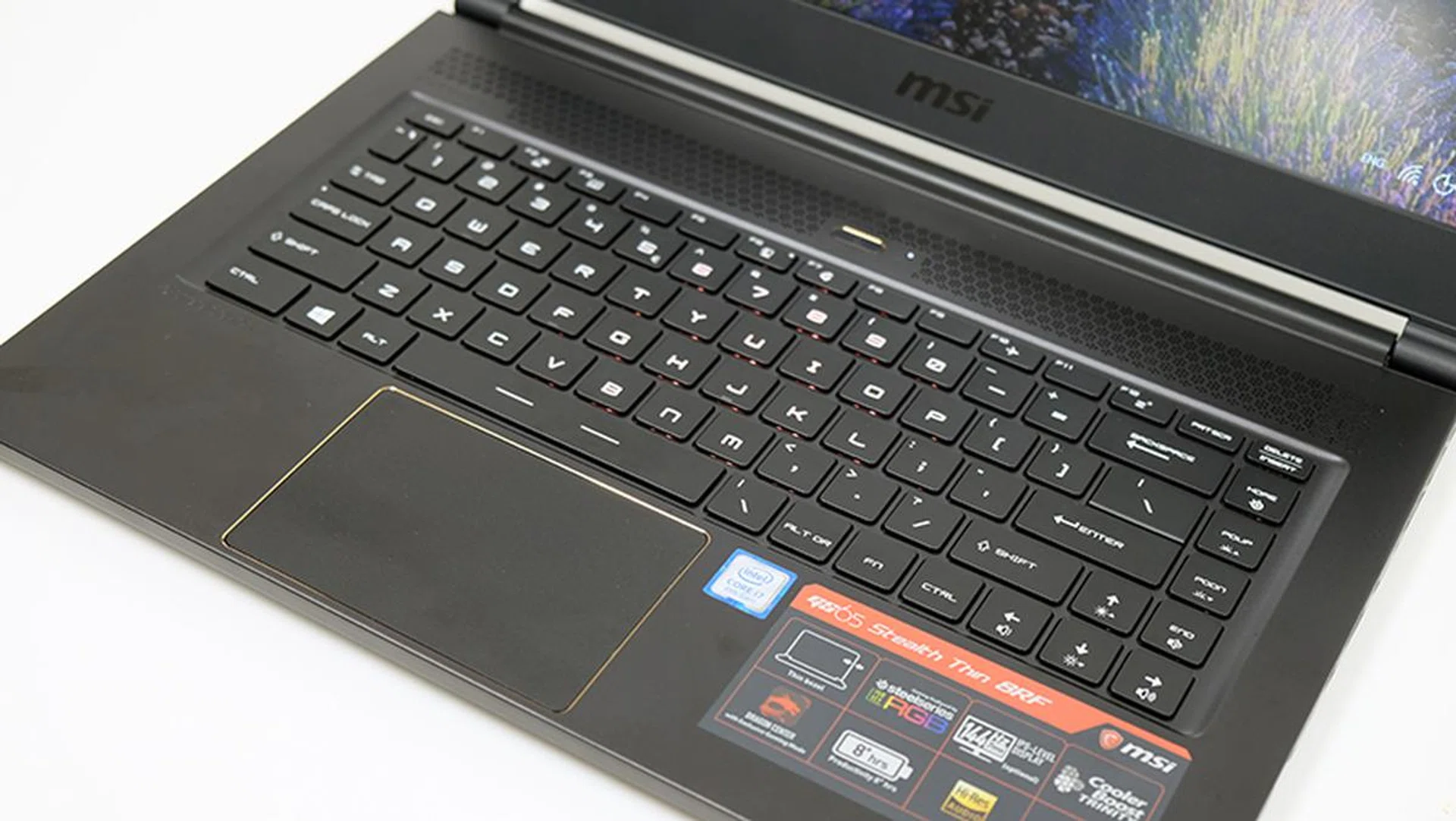
The Windows Precision Touchpad feels responsive and accurate.
The IPS display itself boasts vivid colors and deep blacks, and the speedy 144Hz refresh rate makes it even better to use. Games feel smooth and fluid, and the 144Hz refresh rate is apparent even when dragging windows around on your desktop. However, as with most of the other laptops in this category, the display was also a little on the dim side.
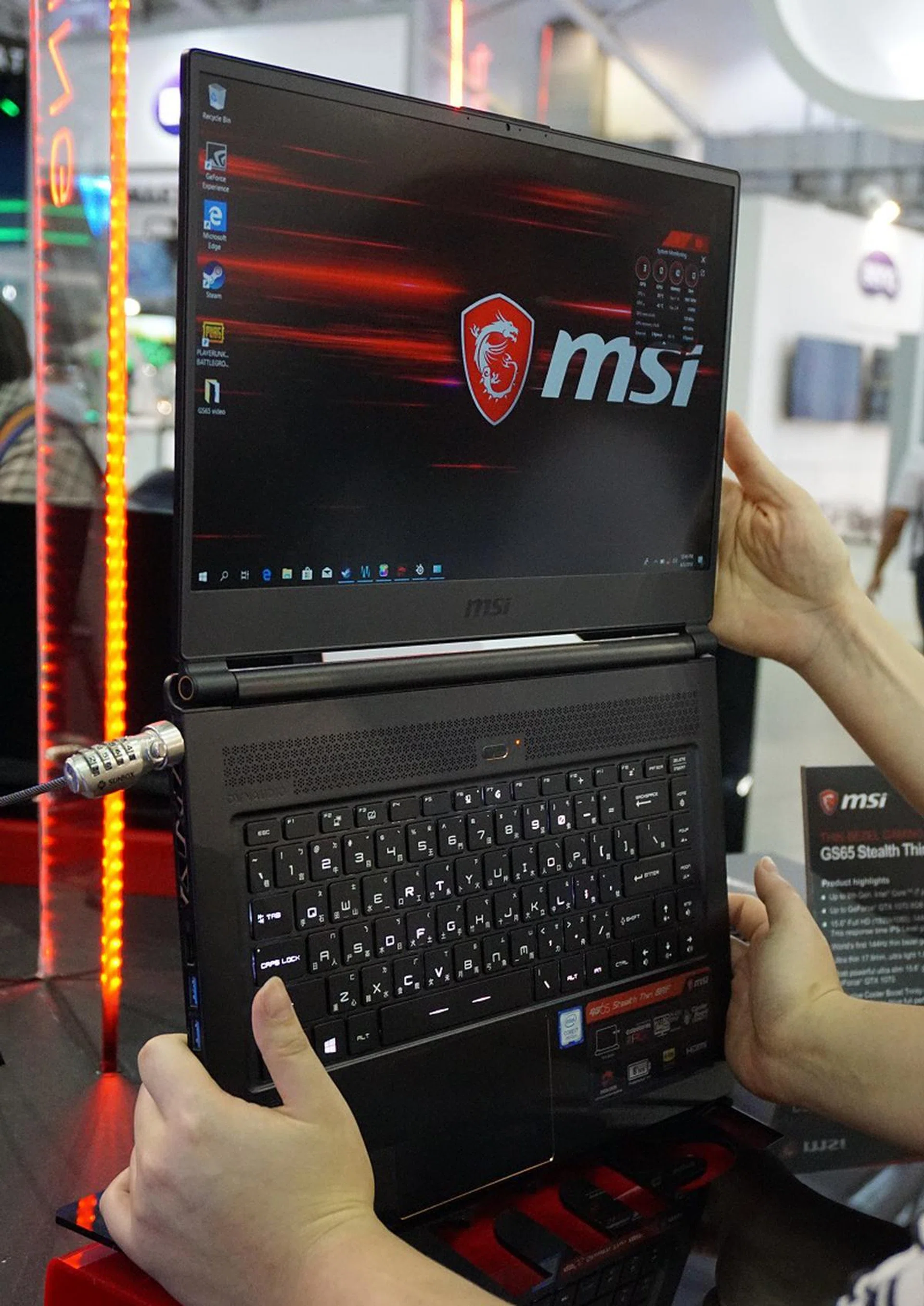
Surprisingly, the screen can still open to 180 degrees flat, if you do need the added flexibility.
The Dynaudio speakers sit above the keyboard. While they’re loud enough to fill a small room, they’re not particularly impressive and the low-end audio range produced is anemic at best.
When it comes to cooling, the GS65 Stealth Thin exhausts hot air out the sides and back. It is cooled by three fans, instead of the usual two, and four heat pipes provide independent cooling for both the CPU and GPU. The laptop also isn’t as loud as you’d expect, and it’s quieter than some of the competition.
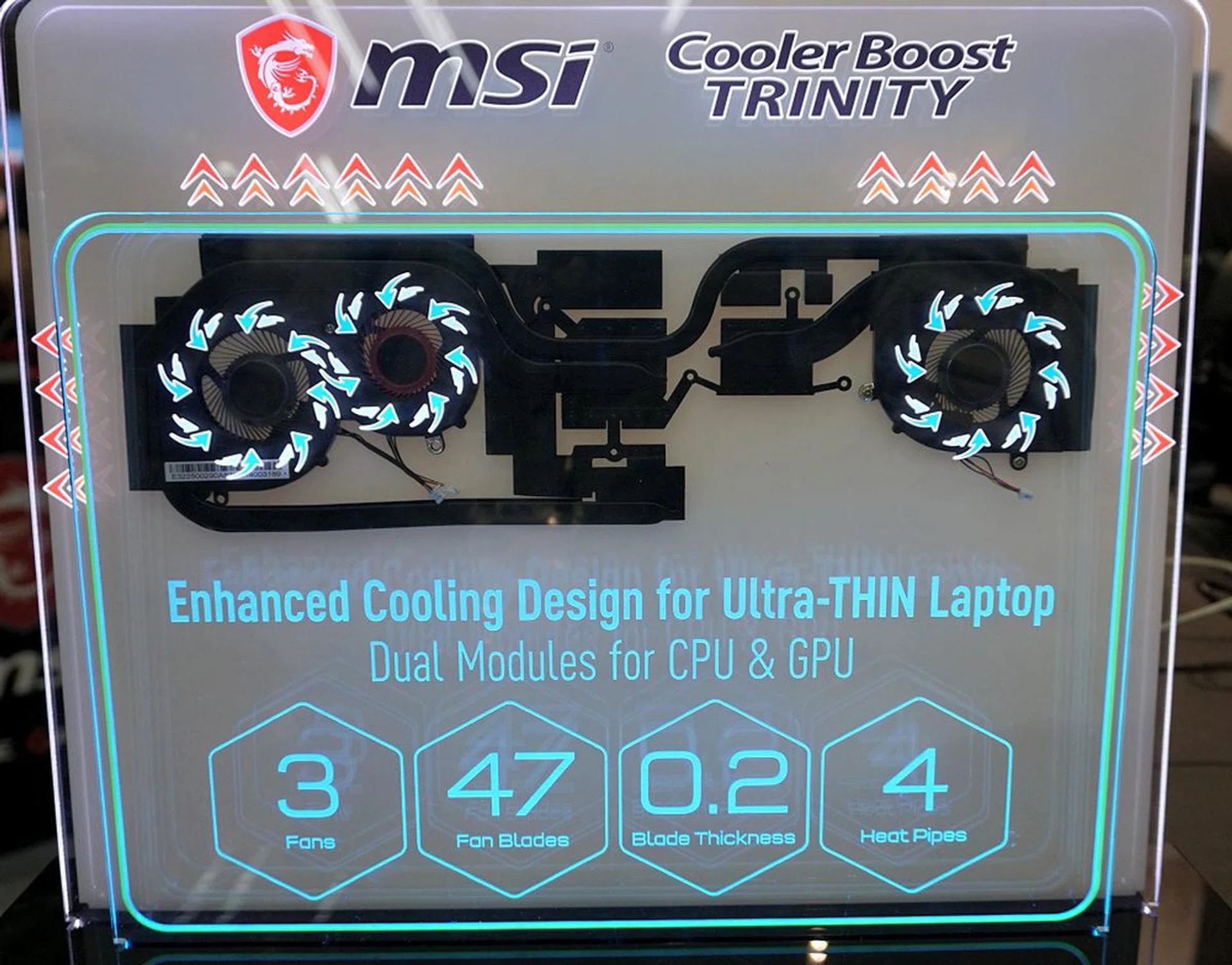
MSI has beefed up the GS65 Stealth Thin’s cooling subsystem with an enhanced cooler boost technology called Cooler Boost Trinity. Equipped with two dedicated modules to cool the CPU and GPU components, it employs 4 heatpipes and triple fans. The fan design too is updated with 47 blades and is ultra-thin at just 0.2mm to help move more air.
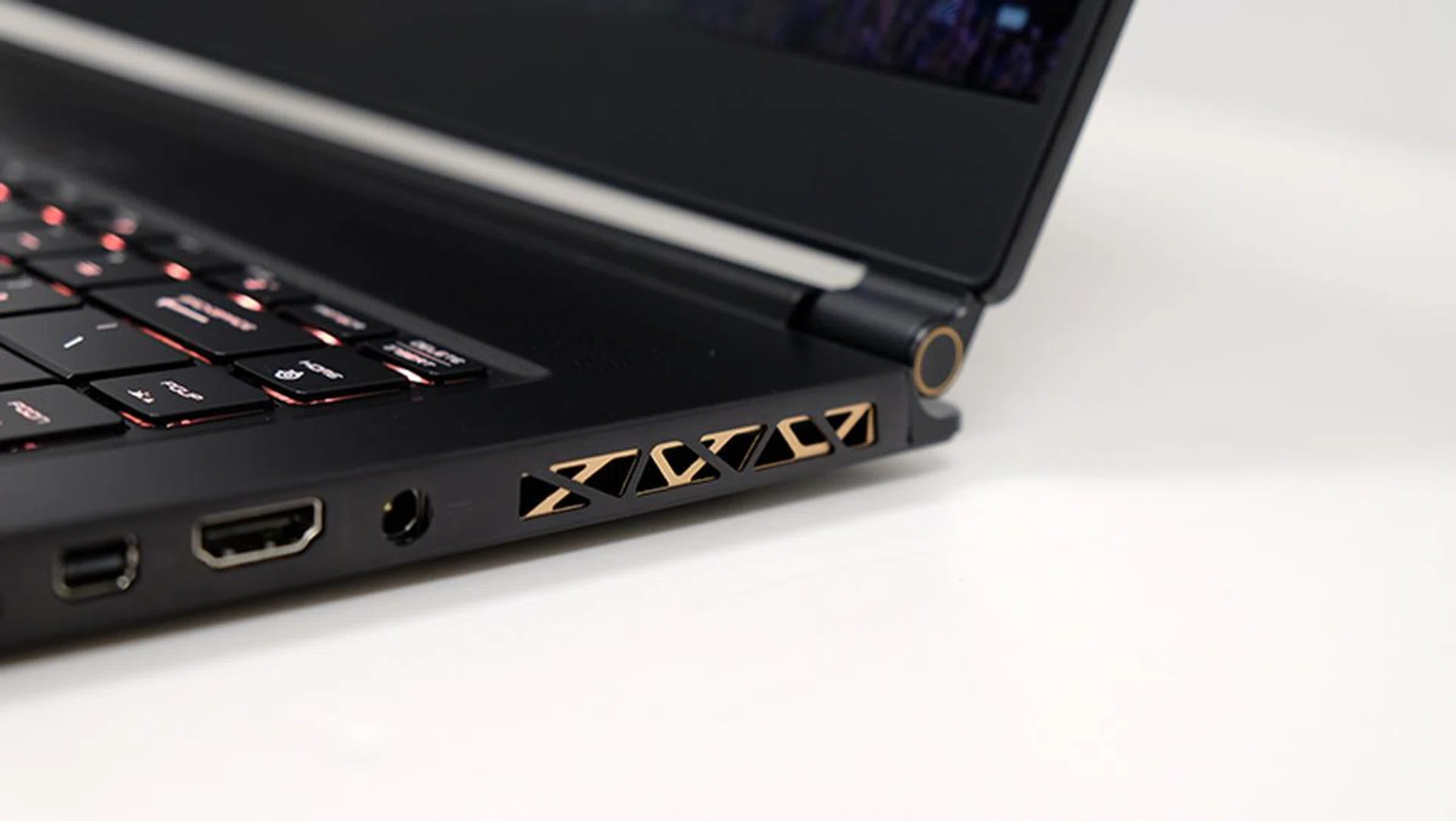
The vents at the side have copper detailing as well.
The palm rests generally stay quite cool, but the area above the keyboard can get quite hot to touch.
The GS65 Stealth Thin has most of the ports and connectors you’d expect, including three USB 3.1 (Gen 1) Type-A ports, a Thunderbolt 3 port, HDMI, and Mini DisplayPort outputs for support of up to three external monitors at once. Unfortunately, like most of its rivals, it’s also missing an SD card slot. That’s disappointing, because its simpler design means it’s also quite suited for use at work.
I'm also not a big fan of the placement of the power connector on the right edge of the notebook. It's located near the middle, so it's difficult to get the cable tucked away discreetly. Furthermore, it's likely to interfere with your mousing hand if you're a right-hander.
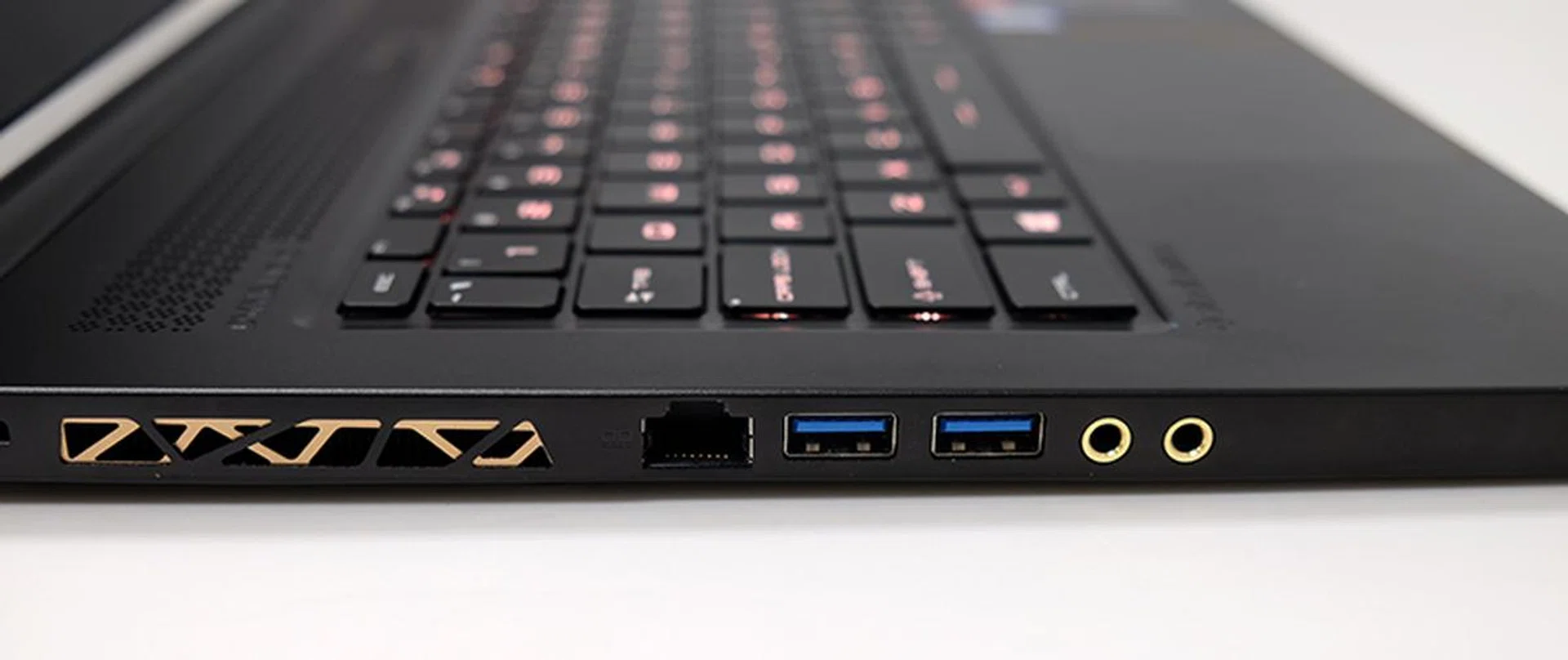
Here's a look at the ports on the right.
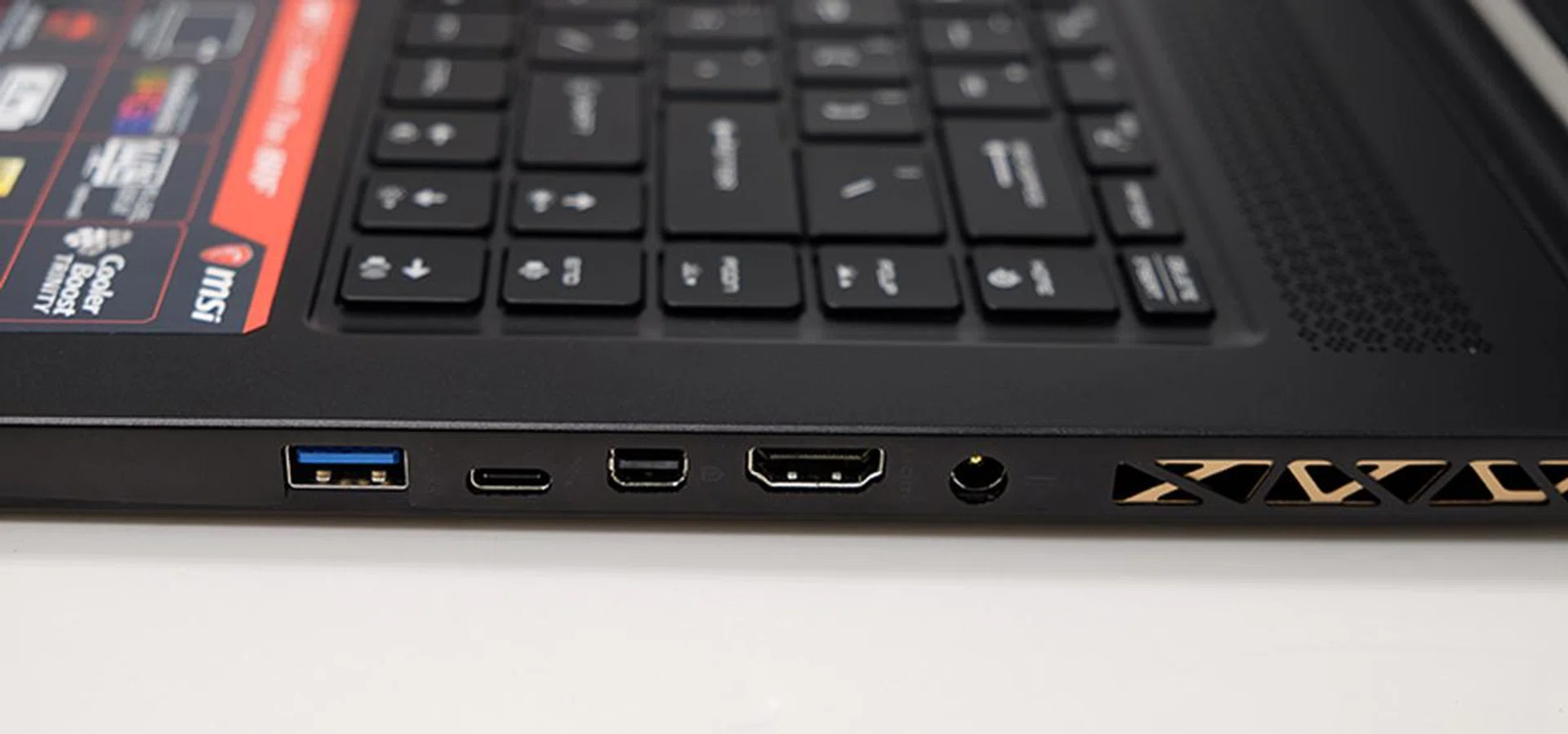
The Thunderbolt 3 port is located on the right side.
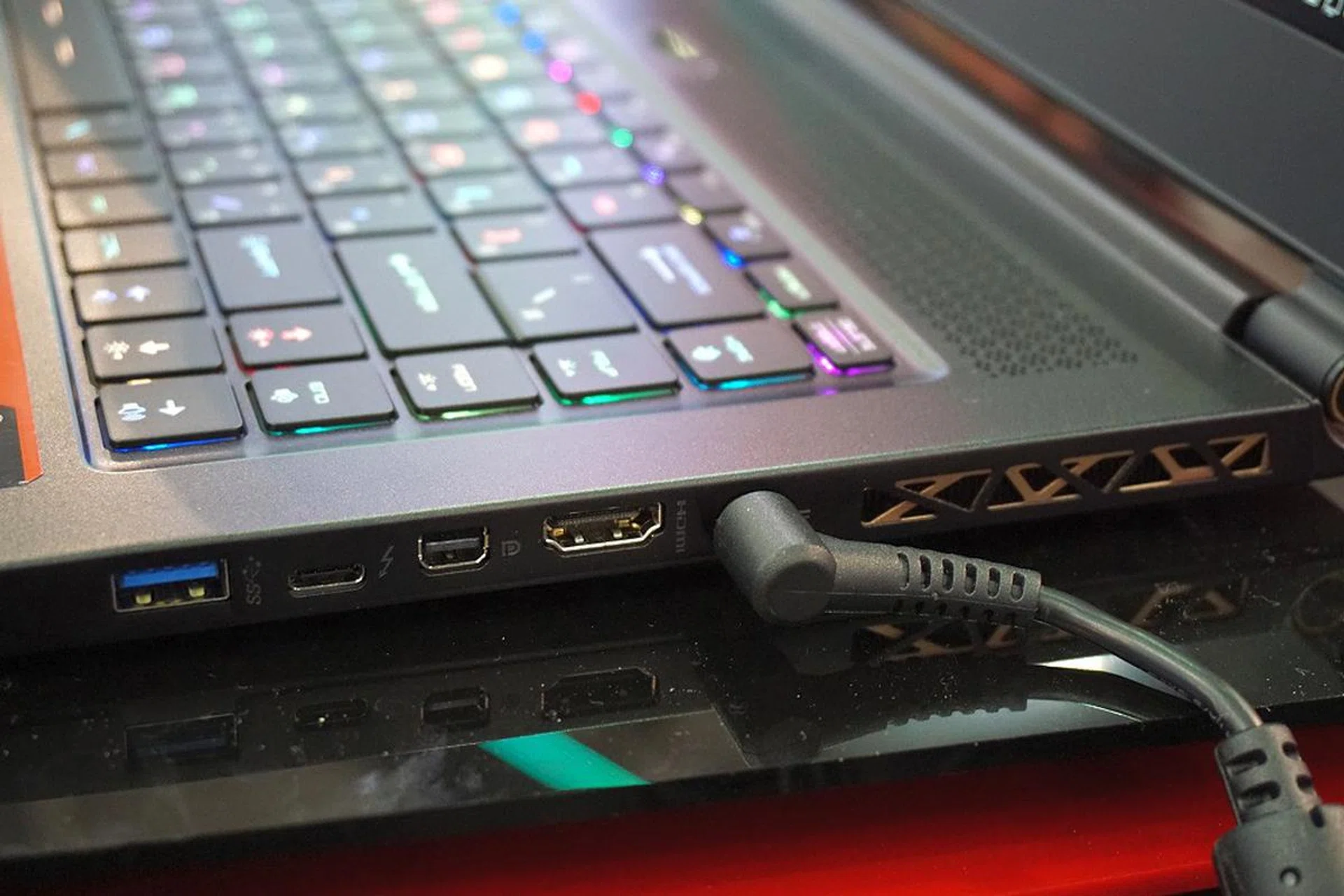
See what we mean? The location of the power connector might pose an issue to right-handed gamers and snaking the power cable neatly out of the way.
Networking is handled by a Killer Wireless-AC 1550i Wireless Network Adapter and Killer E2500 Gigabit Ethernet Controller. The Killer Wireless-AC 1550i is on par with the Intel Wireless-AC 9560 in that it also supports faster-than Gigabit Wi-Fi speeds and a maximum throughput of 1.73Gbps (and full compatibility with 802.11ac Wave 2 routers).
Finally, MSI’s Dragon Center 2 software provides useful tools for monitoring the laptop’s performance and tweaking various settings. For example, you can adjust the fan speeds to favor either noise levels or cooling, and also switch between different display profiles. Head over here for more details on MSI's new Dragon Center 2 software.
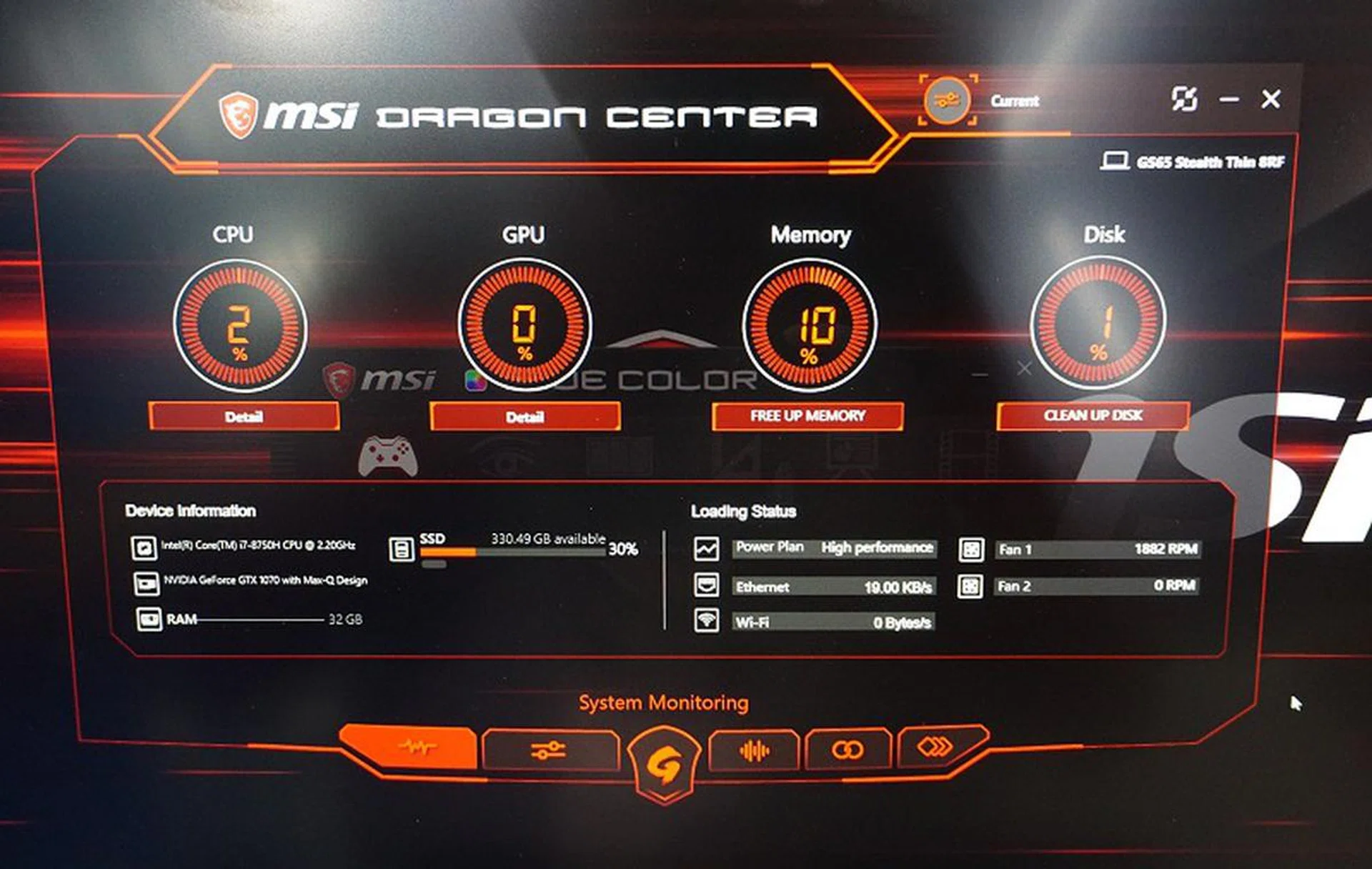
All the monitoring, maintenance and optimizing tools at your fingertips.
Test setup
Here’s a full list of the notebooks we’re looking at:
- MSI GS65 Stealth Thin 8RF
- Razer Blade (2018)
- Gigabyte Aero 15X
- Aftershock APEX-15
With the exception of the Aftershock APEX-15, all the notebooks are equipped with an NVIDIA GeForce GTX 1070 Max-Q. However, the GPU on the GS65 Stealth Thin is actually clocked lower at 1,101MHz, compared to 1,215MHz on the Razer and Gigabyte laptops, so it'll be interesting to see how it fares.
[hwzcompare]
[products=649344,642009,642013,644143]
[width=200]
[caption=Test notebooks compared]
[showprices=1]
[/hwzcompare]
The notebooks were put through the following benchmarks:
- PCMark 10
- 3DMark
- VRMark
- Ashes of the Singularity
- Deus Ex: Mankind Divided
- Tom Clancy’s The Division
Benchmarks
PCMark 10 Extended
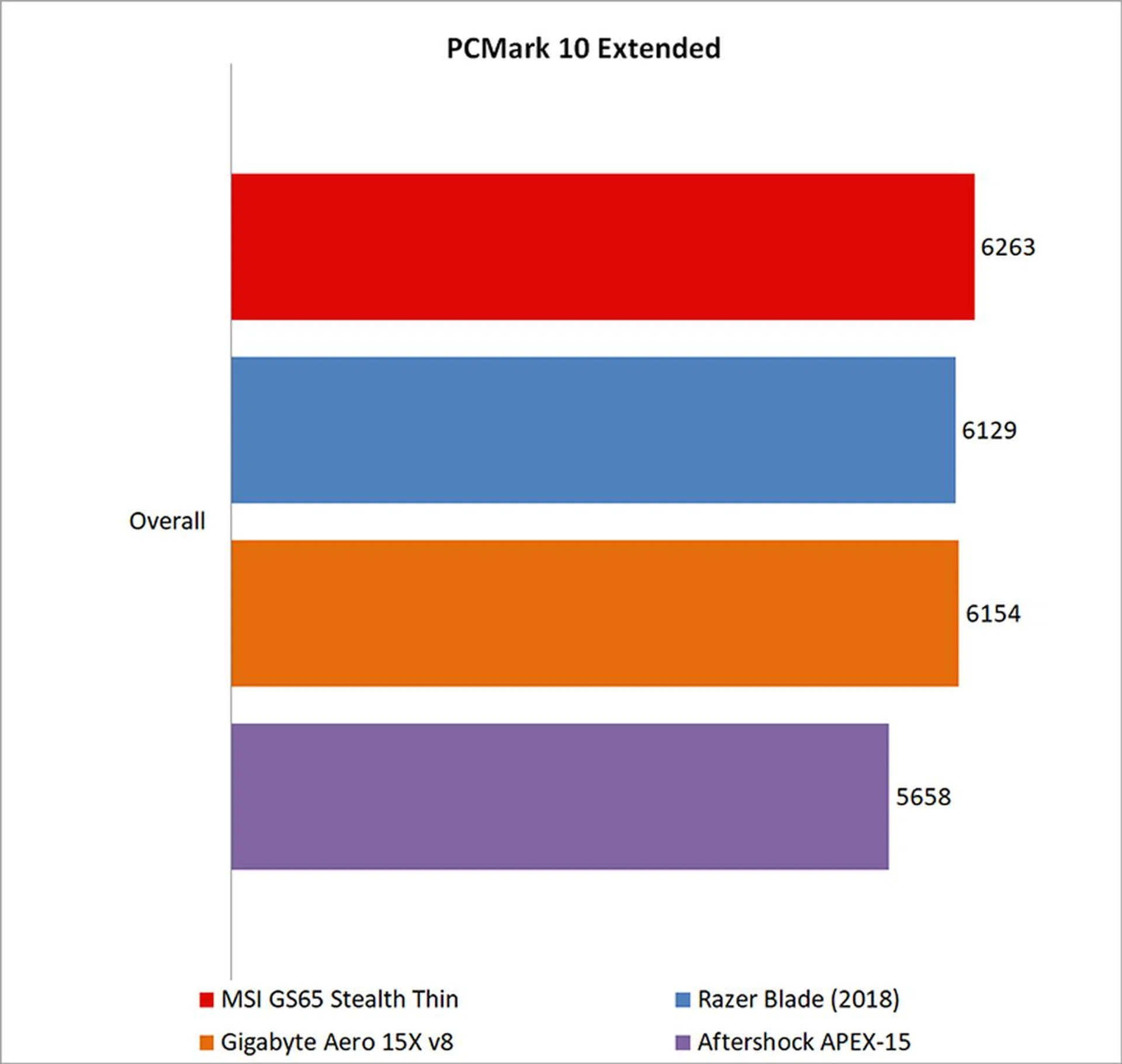
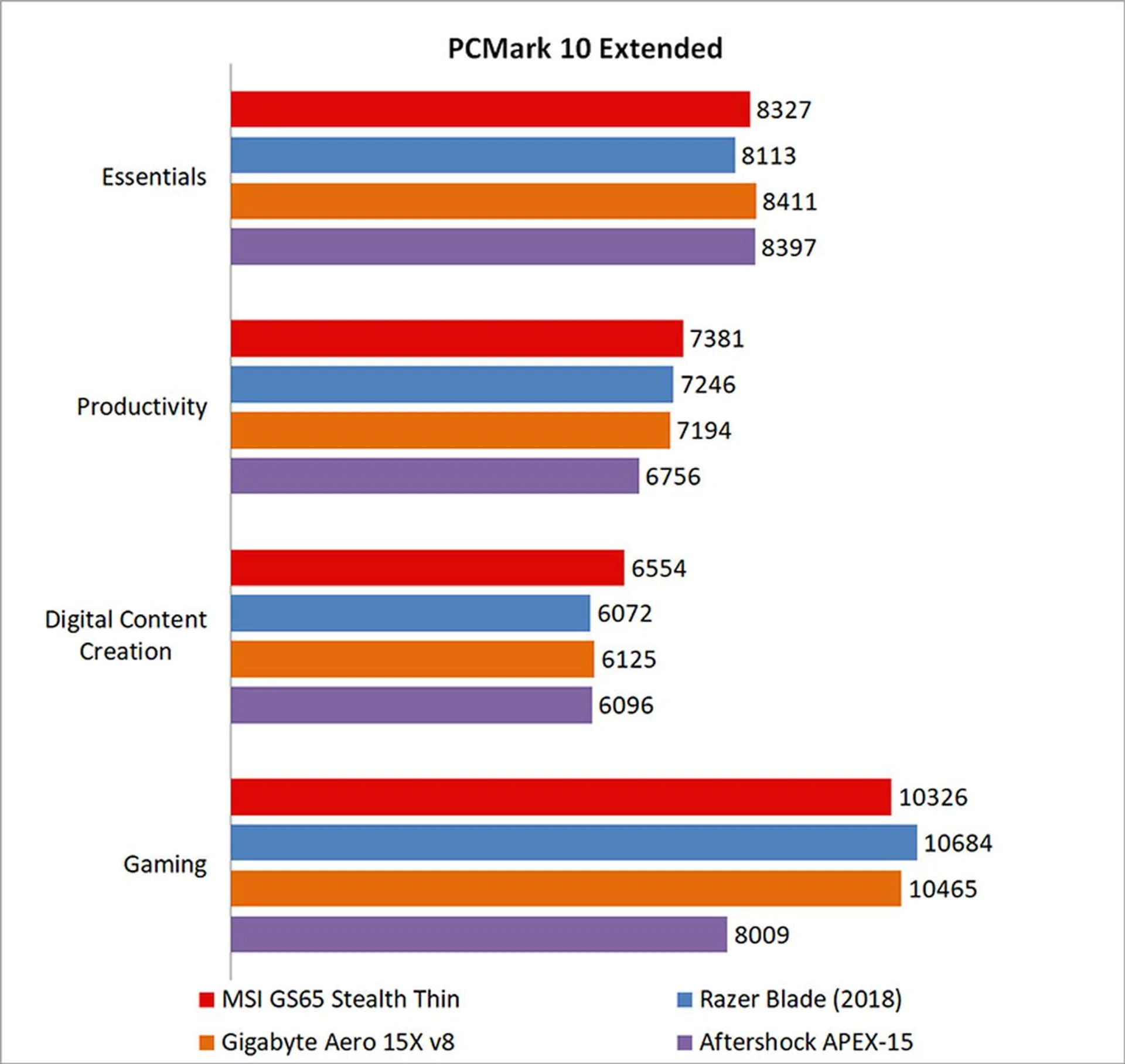
PCMark 10 Extended assesses the performance of systems in a variety of workloads, including basic computing tasks, productivity applications, digital content creation, and gaming. Compared to PCMark 8, it also adds in new test metrics, such as app startup times, which quantifies how long it takes to launch a variety of real-world apps, and a rendering and visualization workload to simulate professional graphics and engineering applications. In addition, existing workloads have been updated to reflect modern usage.
The MSI GS65 Stealth Thin performed in line with the rest of the GeForce GTX 1070 Max-Q laptops, even edging ahead to take the overall lead. It did fall behind a little in the Gaming benchmark, perhaps owing to its lower clocked GPU, but it made up for it with better performance in the more CPU-focused Essentials, Productivity, and Digital Content Creation tests.
3DMark
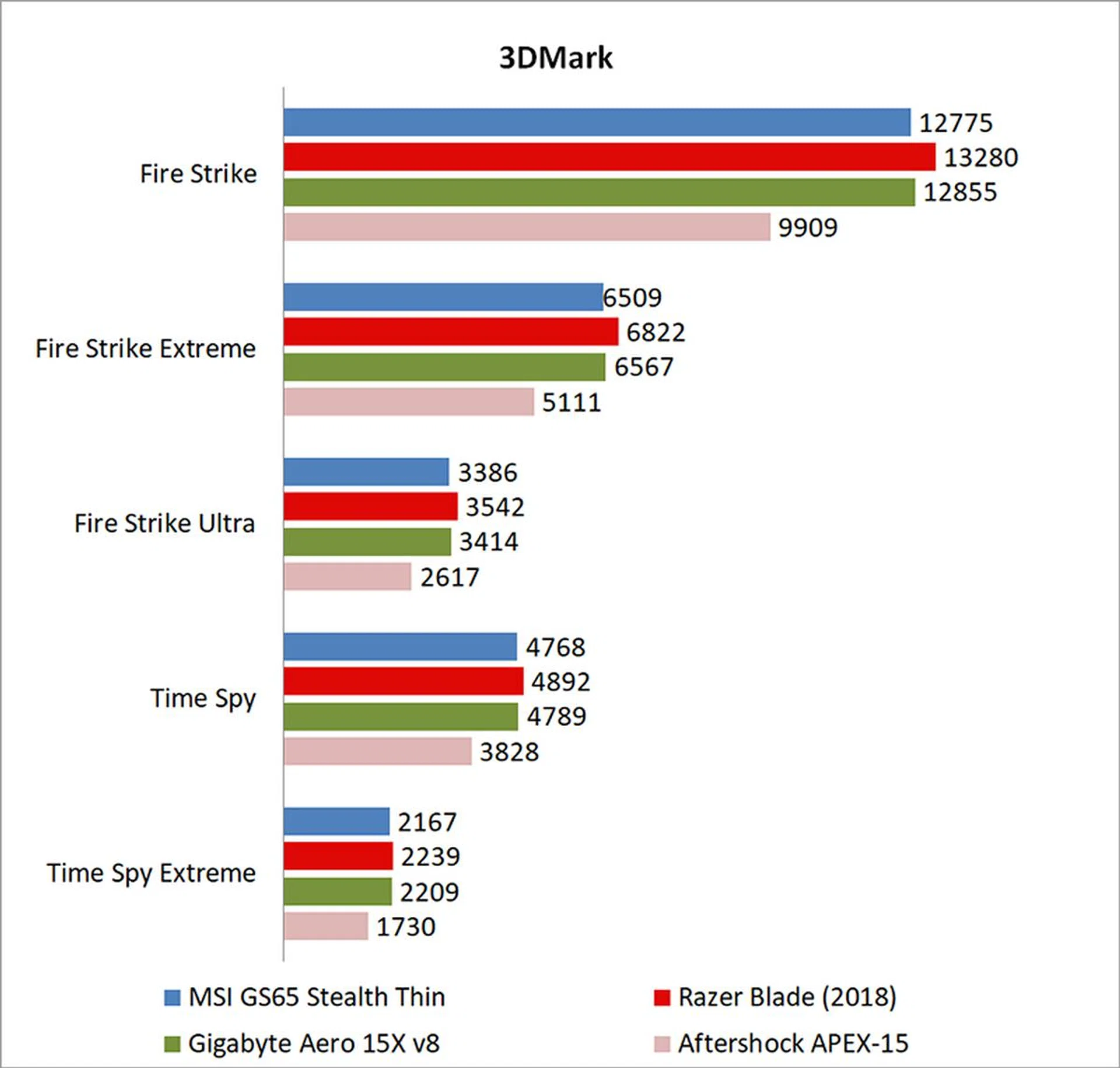
3DMark is a more relevant assessment of gaming performance, and it puts the system through a range of graphics and computational performance tests at different resolutions, starting at 1080p and going all the way up to 4K.
Owing to its lower clocked GPU, the MSI laptop consistently trailed the Razer Blade by a few percentage points, but it's honestly nothing I'd lose sleep over. As we'll see in the gaming benchmarks further down, it doesn't translate into much of a difference in the real world.
VRMark
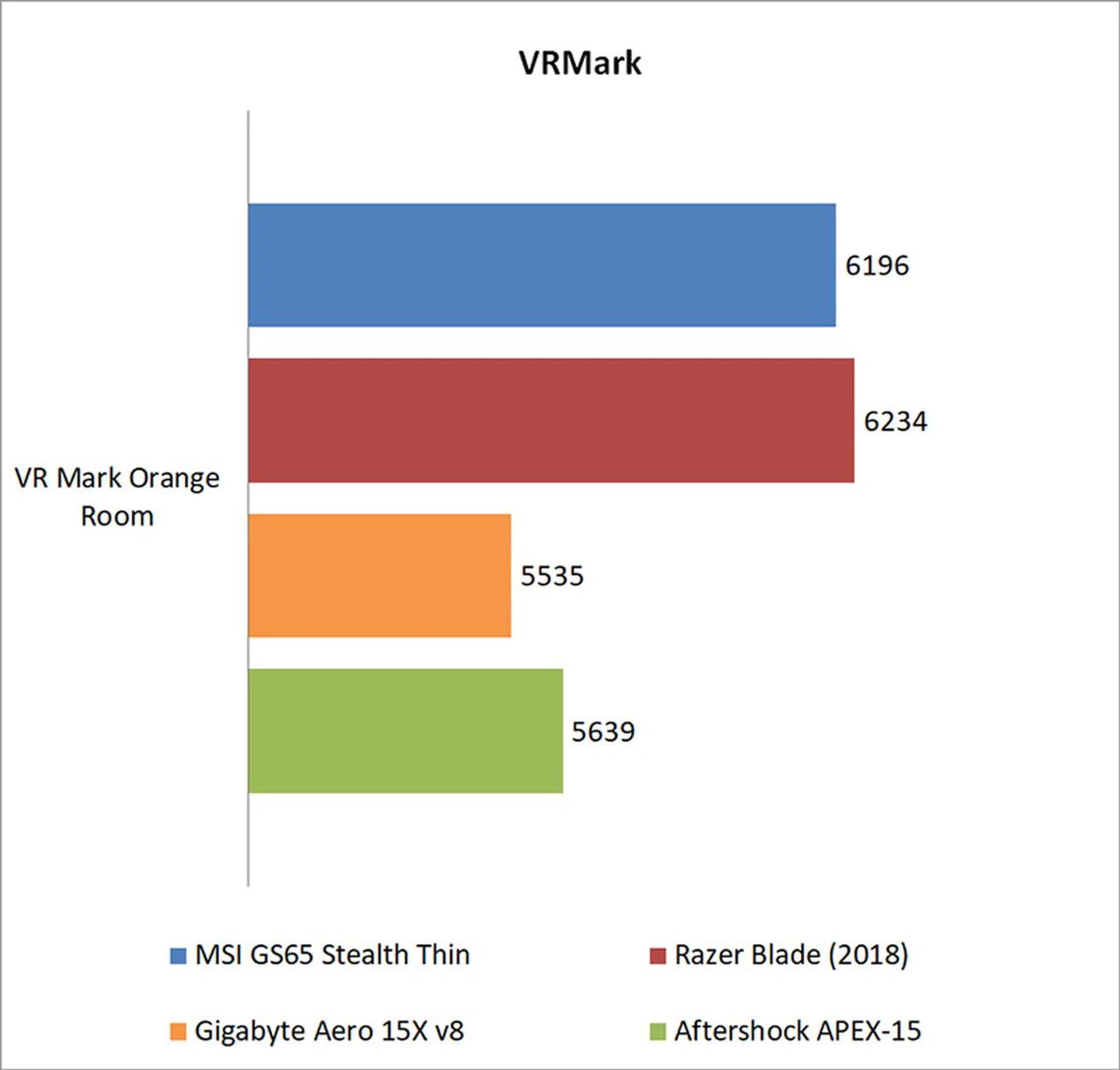
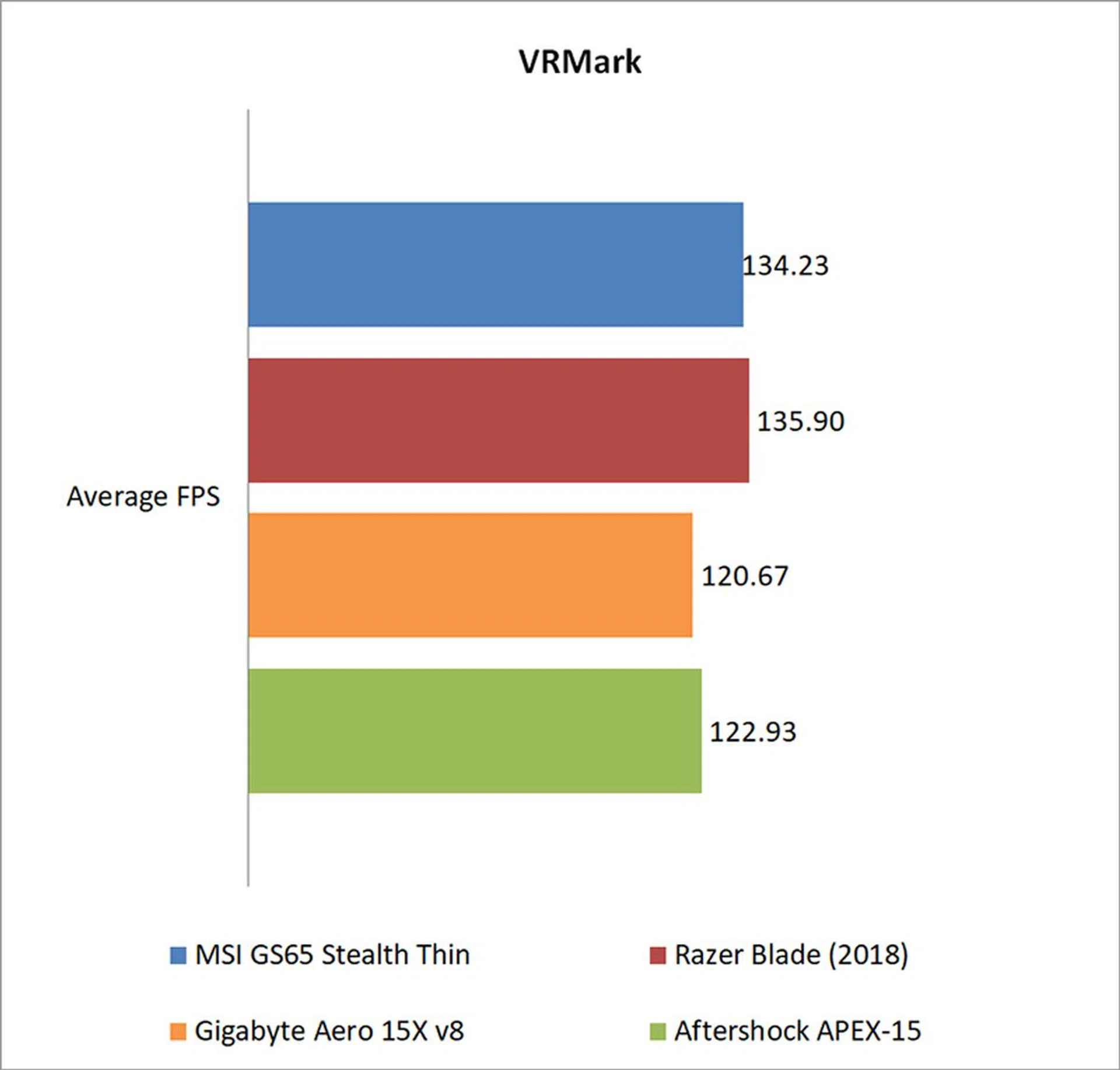
Futuremark’s VRMark benchmark is designed to assess a PC’s ability to handle high-performance headsets like the HTC Vive and Oculus Rift. If a PC passes the Orange Room test, it is ready for the latter two systems. The benchmark also has a target frame rate of 109FPS, and I've included the average FPS each notebook managed to provide a clearer measure of their respective performance.
The MSI GS65 Stealth Thin handled the Orange Room benchmark quite well, and you should have no problems running VR games.
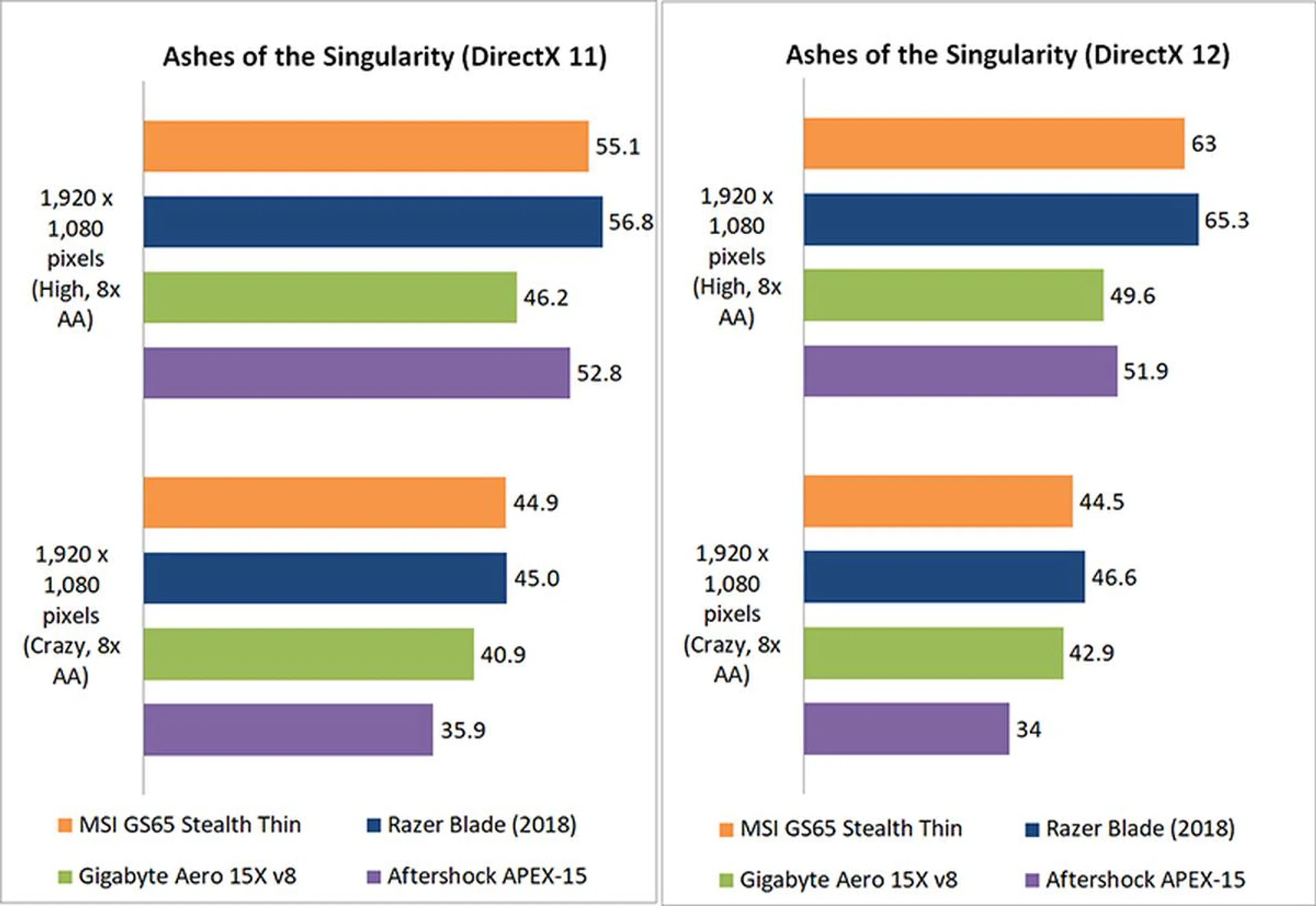
Ashes of the Singularity
Ashes of the Singularity is a demanding real-time strategy game that puts thousands of units on screen, and it’s capable of pushing even the most powerful GPUs.
As in 3DMark, the MSI laptop continued to trail the Razer laptop ever so slightly. However, the difference mostly amounts to a couple of frames, which can hardly be considered significant.
Deus ex: Mankind Divided
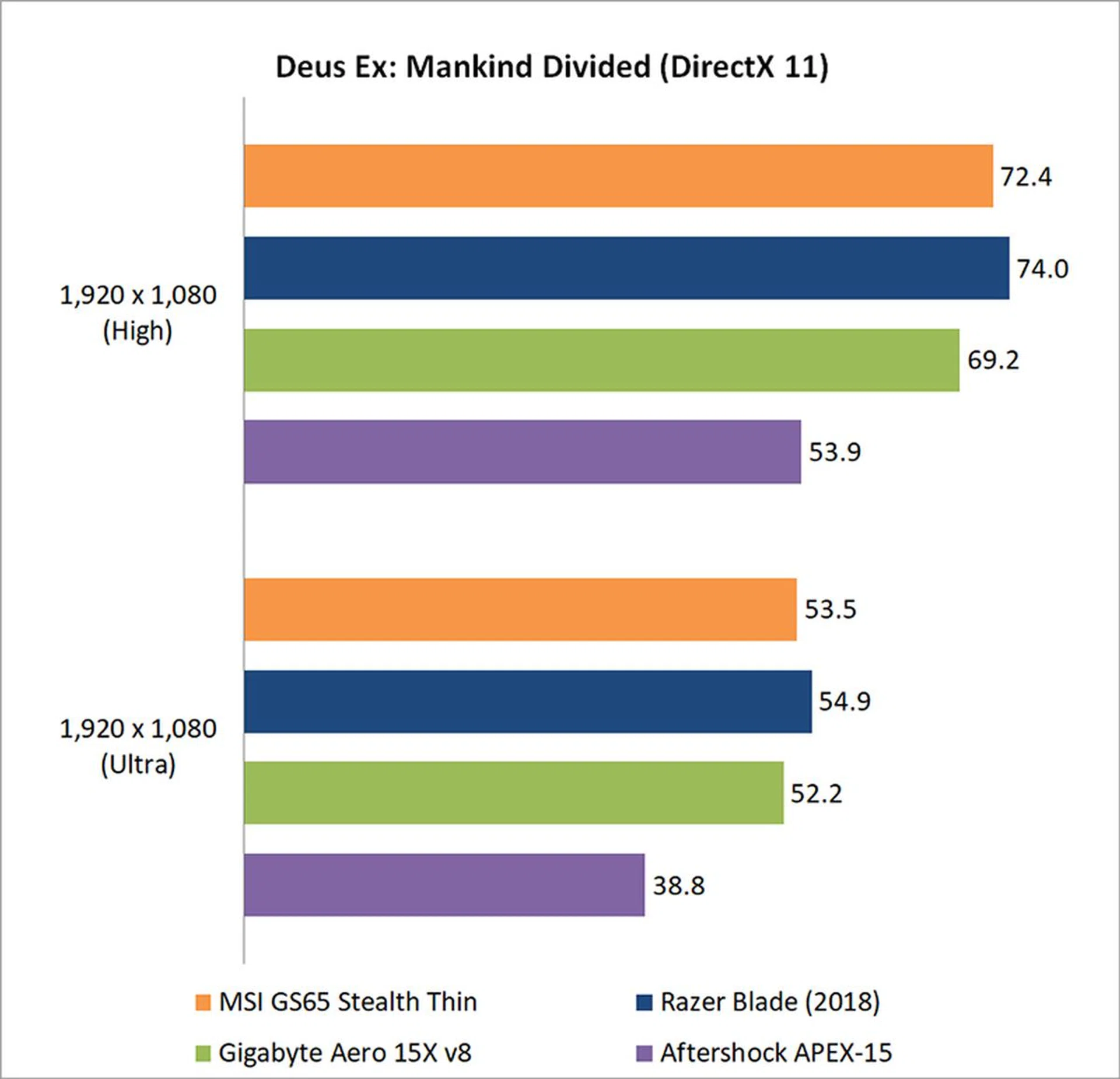
Mankind Divided is one of the most demanding titles to run today, but the MSI GS65 Stealth Thin is more than capable of delivering a playable experience. To its credit, it also outdid the Gigabyte Aero 15X despite the latter having a higher clocked GPU.
Tom Clancy's The Division
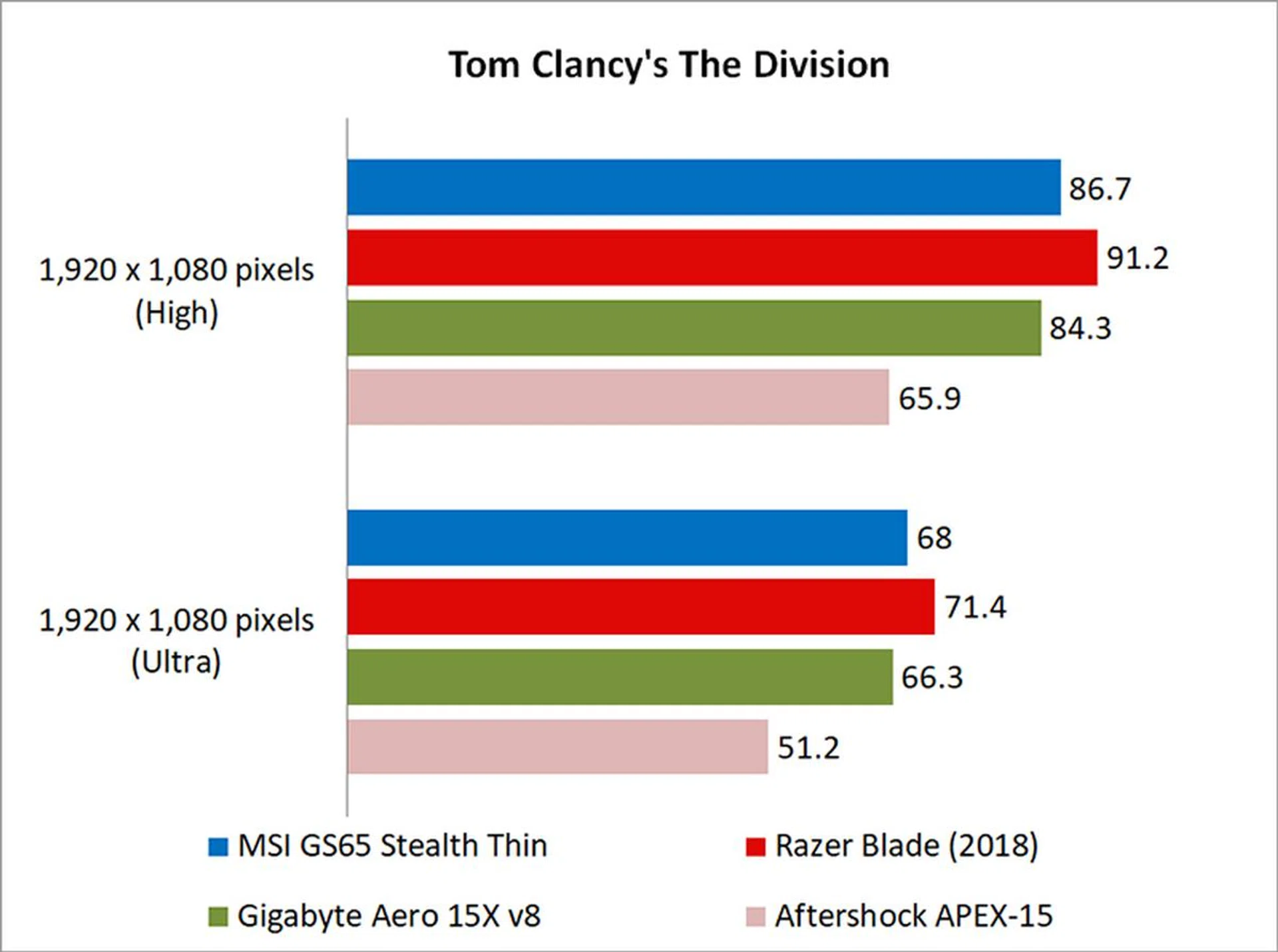
The Division isn’t as demanding to run as Ashes of the Singularity or Deus Ex: Mankind Divided, but its Snowdrop engine can still stress cards with the use of dynamic lighting and the like.
Once again, the MSI GS65 Stealth Thin came in between the Razer and Gigabyte laptops, an overall decent showing.
Temperature
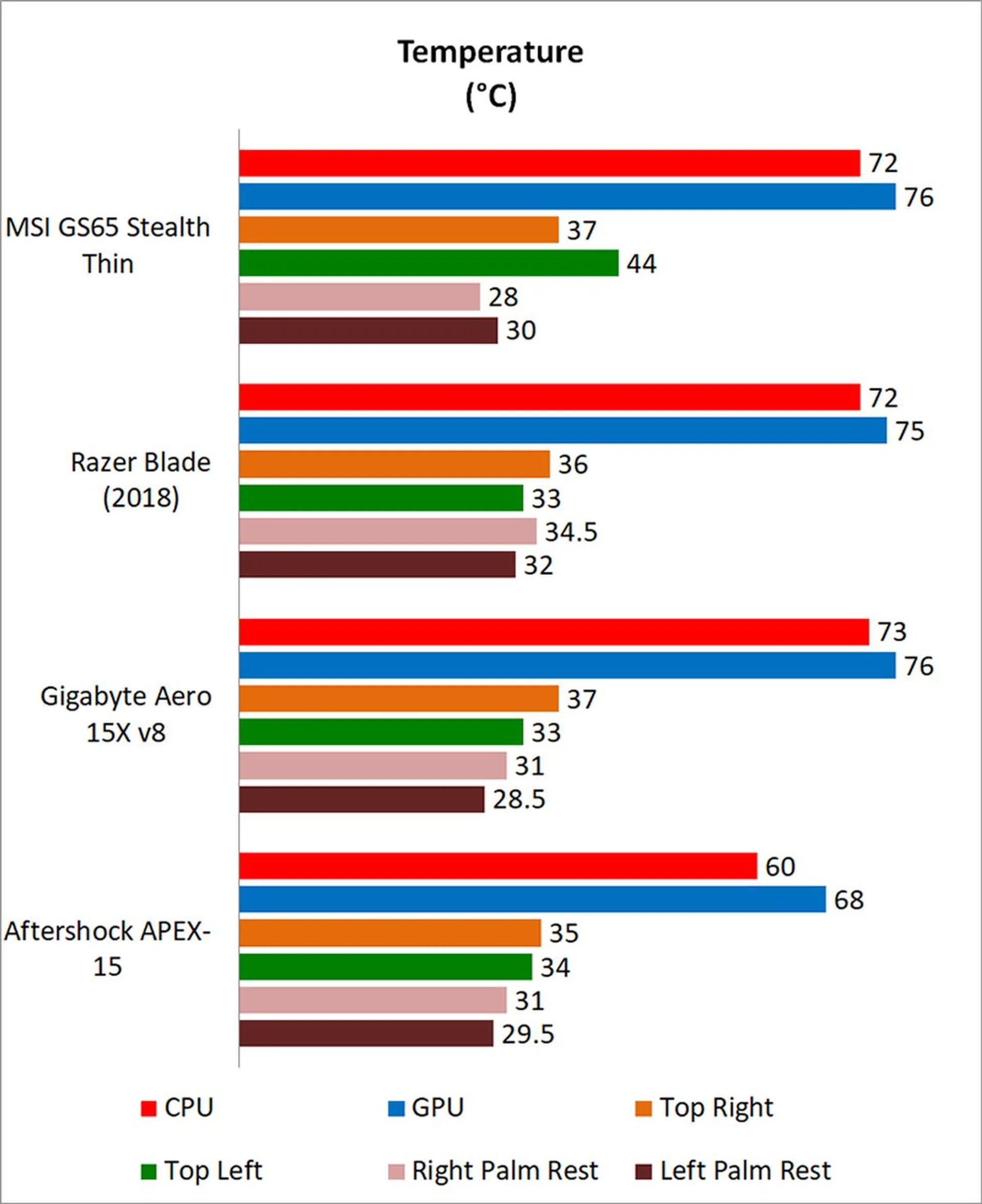
I measured the external temperatures of the four quadrants of the notebook after 40 loops of 3DMark's Fire Strike Extreme stress test. This amount of time is more than enough to get an idea of your average maximum running temperature for this workload.
One good thing about the MSI laptop is how cool the palm rests remain even when the laptop is working hard. Instead, most of the heat is concentrated in the area above the keyboard.
Battery life and Power consumption
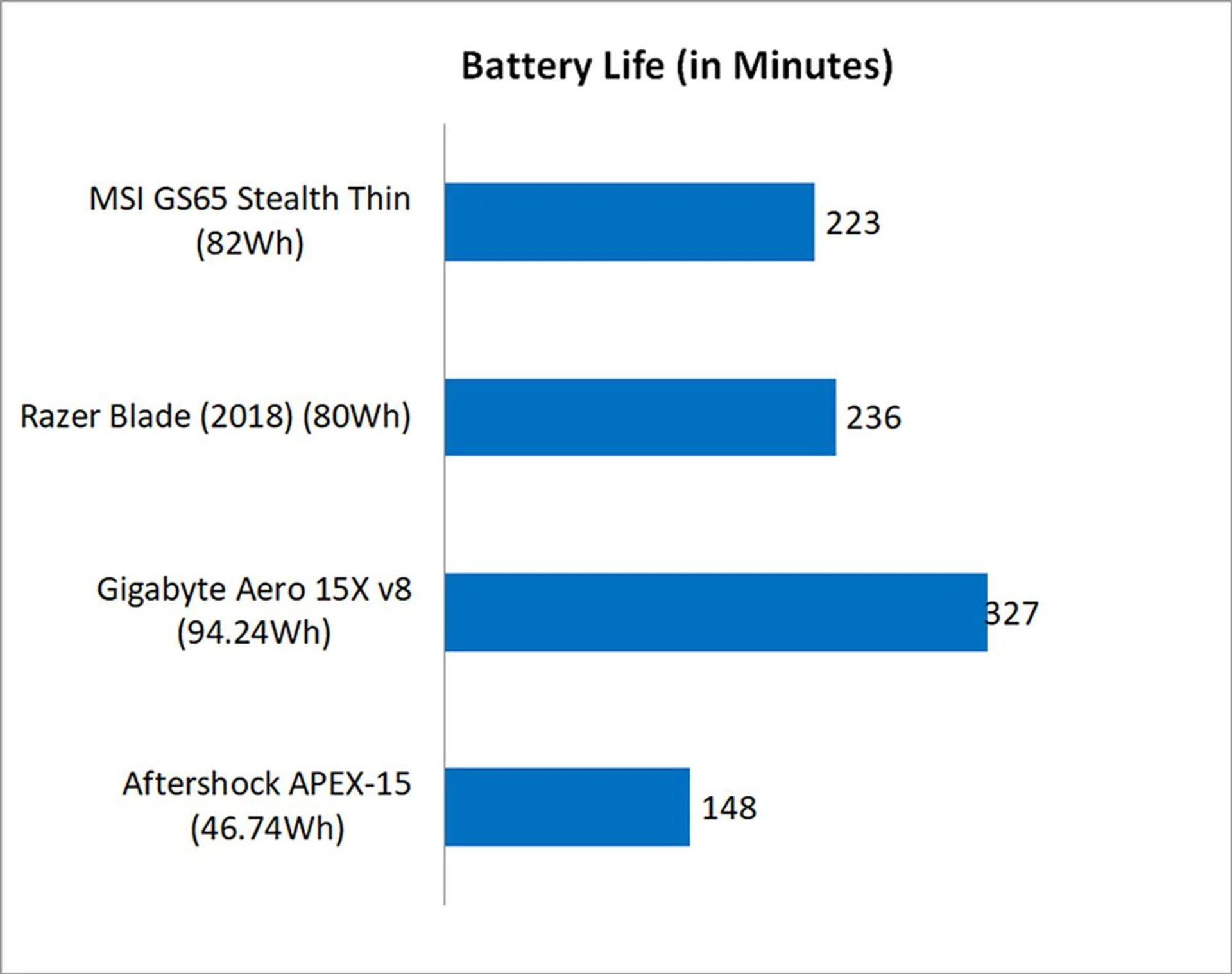
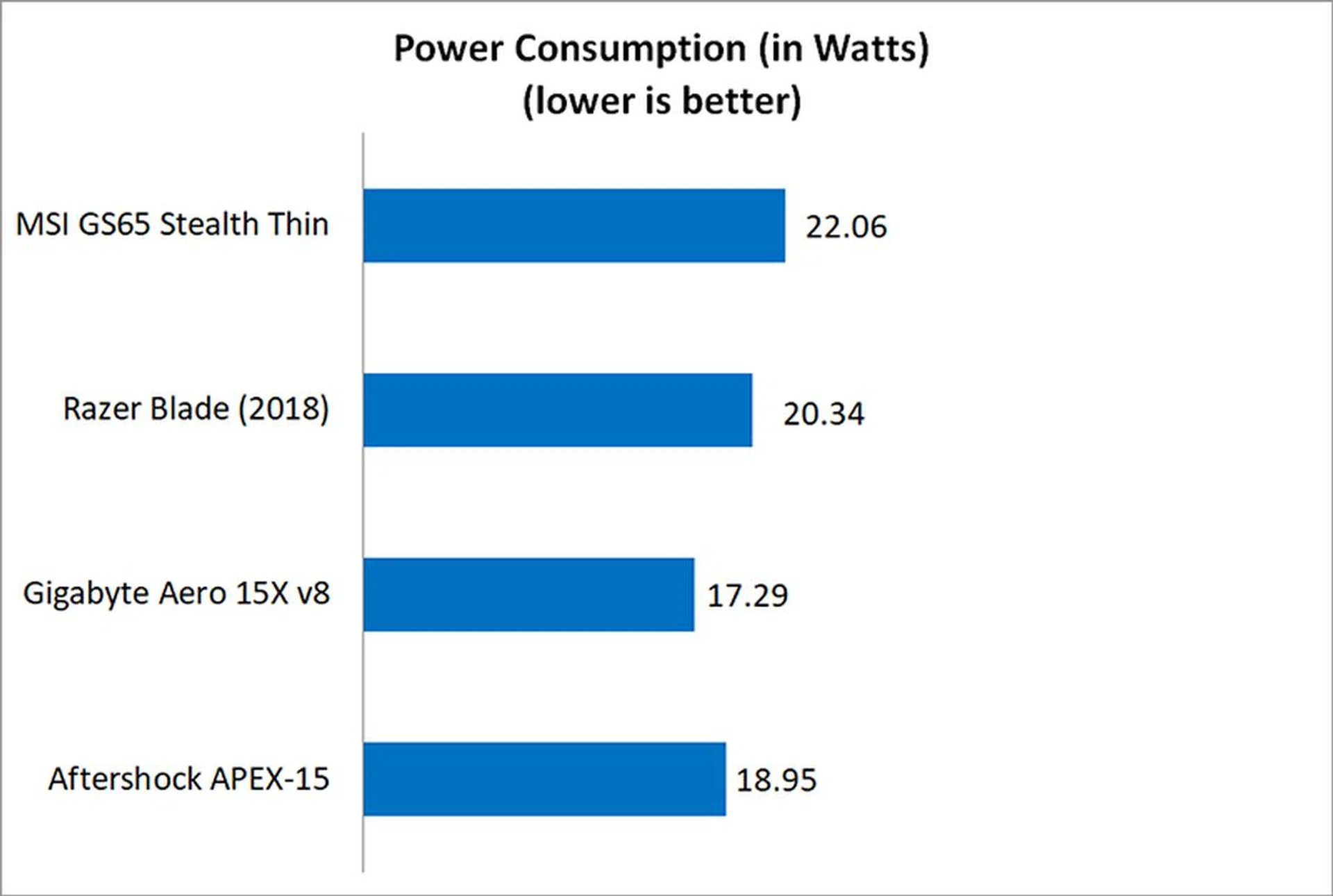
I used the built-in battery life benchmark in PCMark 8 Home to assess the battery life on the laptops.
The good-sized 82Wh battery on the MSI GS65 Stealth Thin means you won't have to hunt for a power outlet the moment you unplug your laptop. It's not quite up to par with the Gigabyte Aero 15X and its larger battery pack, but it's still a good showing nonetheless.
Portability
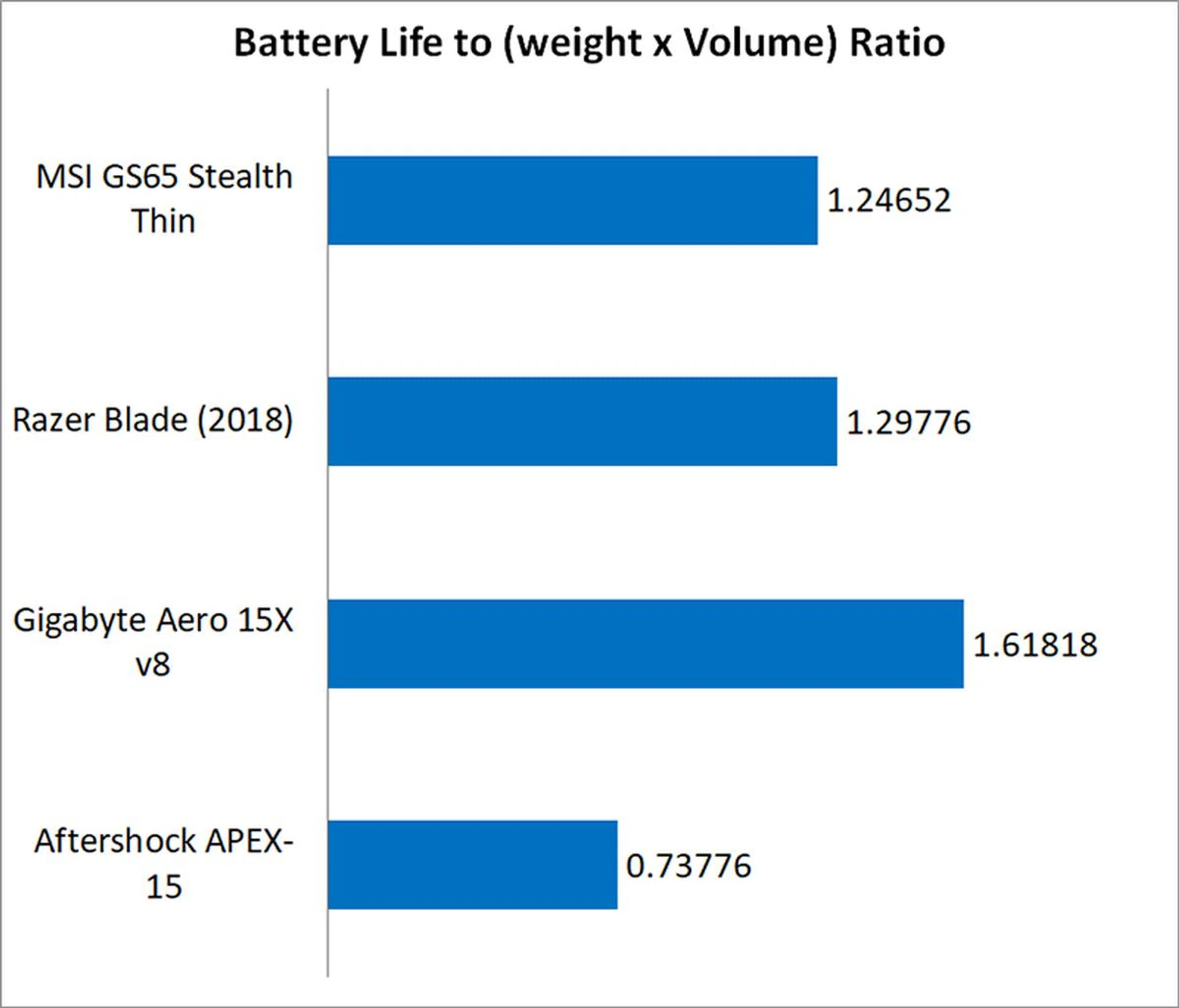
The portability index is an objective measure of how portable a notebook is, taking into account factors like size, weight, and battery life.
The Gigabyte Aero 15X was the clear winner here, thanks to its unparalleled battery life. That said, the MSI laptop didn't fare that badly either, coming in just a hair behind the Razer Blade.
A new breed of gaming notebooks
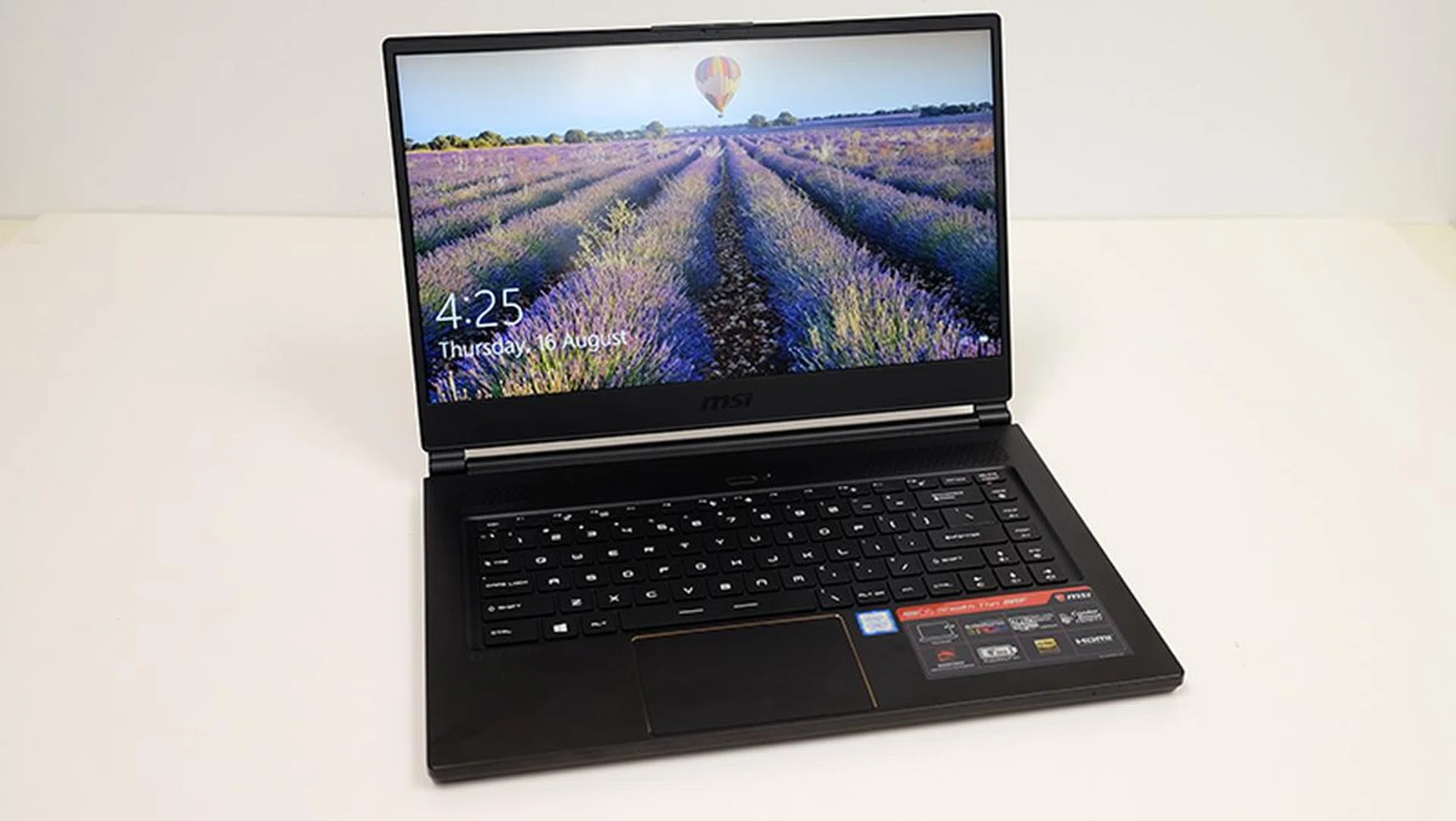
This is a versatile notebook that will work well for both work and play.
MSI's GS65 Stealth Thin 8RF is a worthy successor to the GS63VR 7RF. This is one of the slimmest gaming notebooks you can buy, and it's also probably one of the best.
It is just a smidgen thicker than the Razer Blade, but it is quite a bit lighter at just 1.88kg. The trade-off for this is that the build quality doesn't feel quite as good as Razer's monolithic aluminum chassis, but it's nothing to be alarmed about. This is still overall an excellent notebook that delivers great performance and battery life and is a good alternative to the Razer Blade.
In addition, its more minimalist design is a marked improvement over its predecessor, and the GS65 will do well for both work and play. Notebook manufacturers have increasingly shown a willingness to create slim, light, and powerful laptops that are equally at home at a LAN party or a client meeting, and the GS65 is MSI's play for customers who want the best of both worlds.
The one caveat attached to a machine like this is its stiff price tag. At S$3,799, the GS65 Stealth Thin is a hefty investment not to be made lightly. For the price, you could build a super powerful desktop and still have cash leftover. Having said that, a laptop like this isn't for someone who has no need for a portable gaming system. (For such users, they might be better served by MSI's Prestige PS42.)
It's for those who prize both mobility and performance, and that's a combination that isn't going to be cheap. Still, if you've the cash for it, the MSI GS65 Stealth Thin definitely deserves your consideration.
Our articles may contain affiliate links. If you buy through these links, we may earn a small commission.