

Note: This article was first published on 16th November 2018.
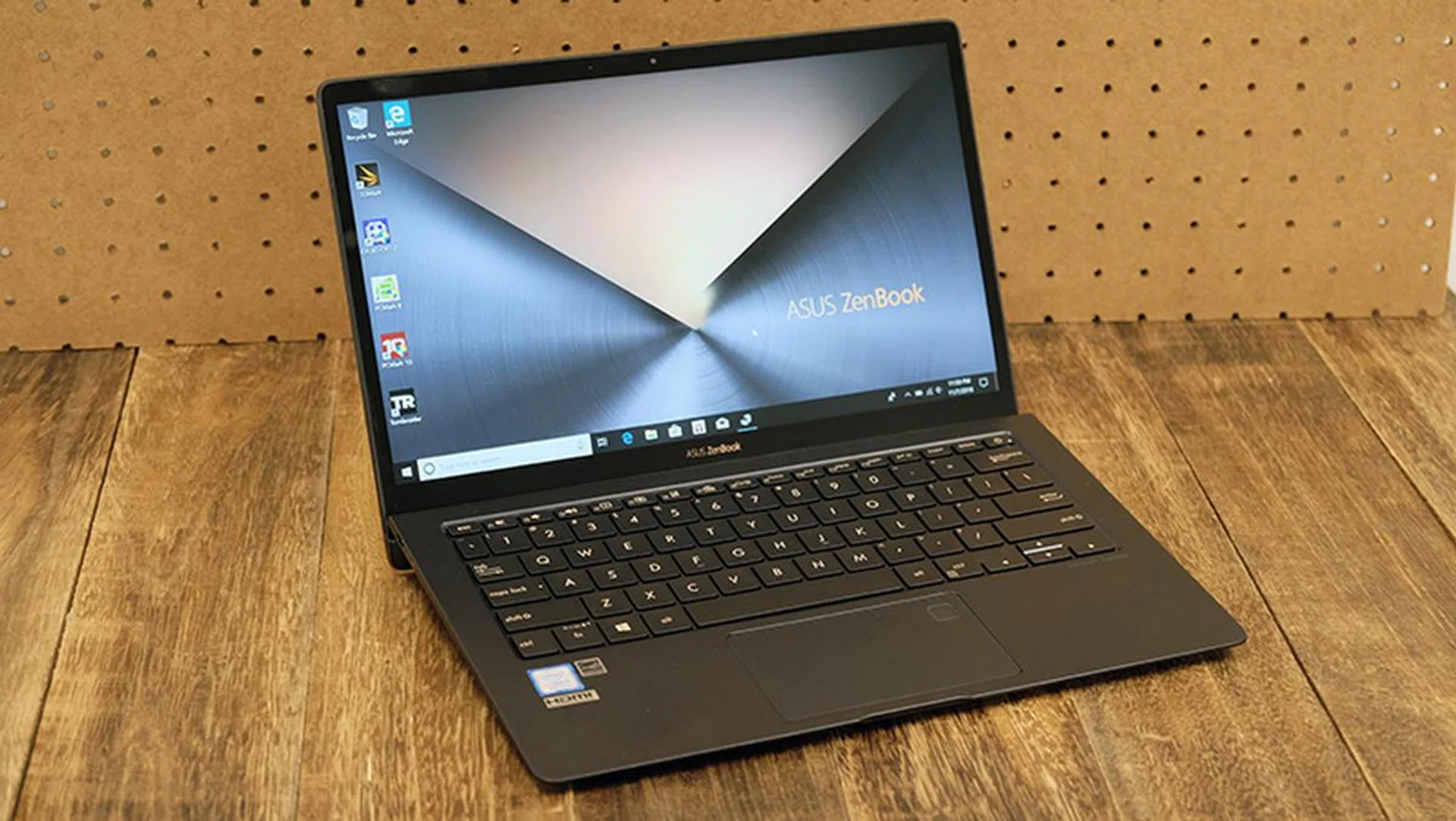
The ASUS ZenBook S is a tiny, capable notebook.
Check out that hinge
The ASUS ZenBook S UX391UA is a premium ultraportable cut from the same cloth as ASUS’ other ZenBooks. This means a solid unibody metal chassis and a familiar pattern of concentric circles on the lid.
However, there’s been a focus on ergonomics this time around. When you raise the lid, the back of the keyboard is automatically elevated to create a more comfortable typing angle. This is not unlike what HP does with the Envy 13, but the uplift provided by ASUS is much more tangible when typing and it does help the laptop differentiate itself from the crowd. In fact, ASUS first adopted this design style for their business-class ASUSPRO B9440 that debuted a year earlier and it is now selectively adopted in their new consumer line-up as well.
Here’s an overview of its specifications:
- 13.3-inch 1,920 x 1,080-pixel IPS display
- Intel Core i7-8550U (1.8GHz, 8MB L3 cache)
- 16GB dual-channel LPDDR3-2133 RAM
- 512GB PCIe SSD
- 50Wh Li-polymer battery
- 311 x 213 x 12.9mm
- 1.05kg
The above will cost you S$2,398, which is reasonably competitive compared to what something like the Dell XPS 13 is asking for similar specifications. But how good is it and should you buy it? Let's get cozy with the notebook over the next few pages before we dish out our verdict.
All about ergonomics and cooling
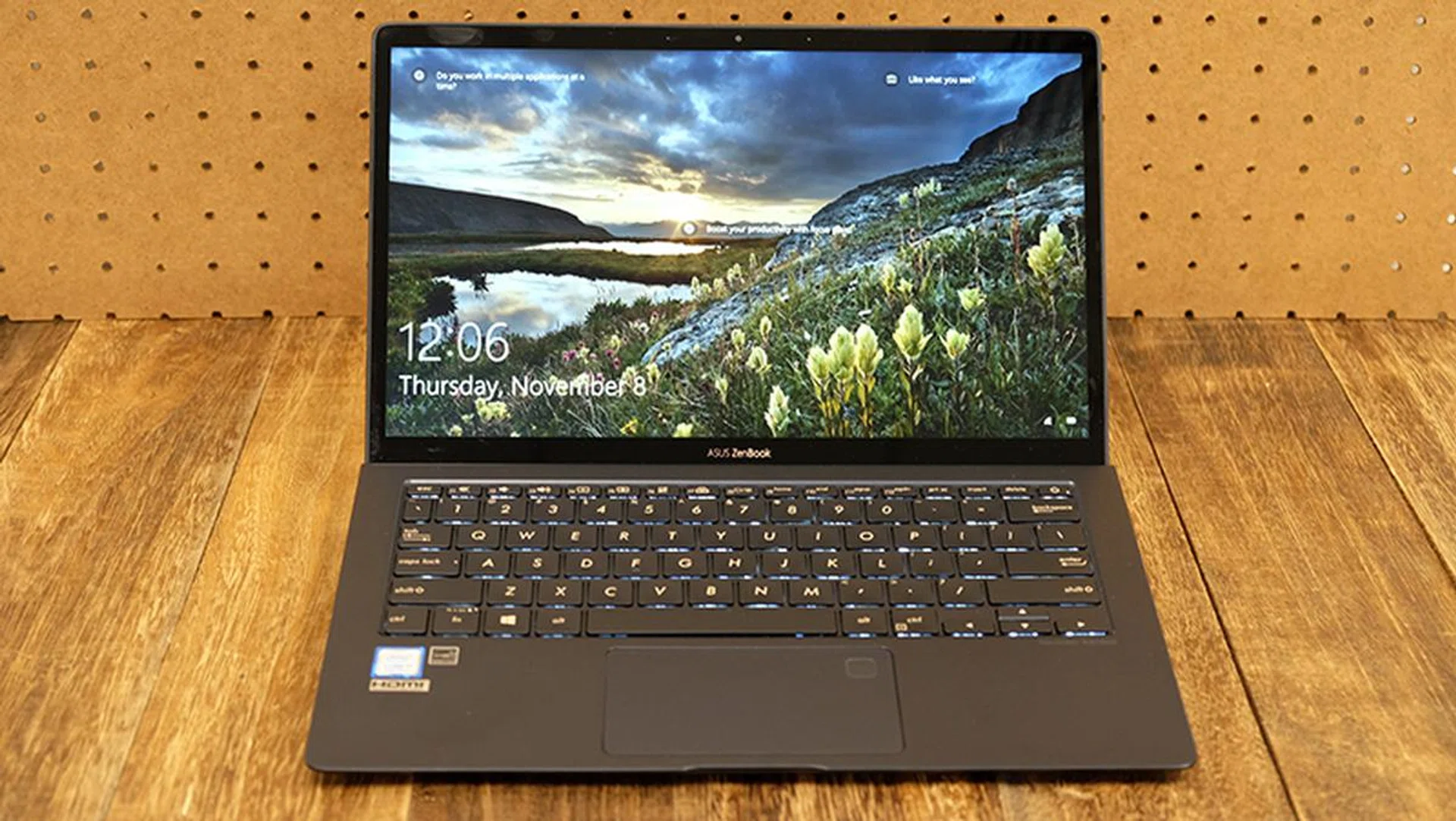
The ZenBook S comes equipped with a 1080p IPS display.
At first glance, the ASUS ZenBook S UX391 looks a lot like many of the company’s other ZenBooks. It’s drenched in a familiar blue hue that ASUS calls Deep Dive Blue, and the lid is etched with the series’ signature pattern of concentric circles. It’s a more subtle pattern than on some of the other ZenBooks though, and you can’t really see it until you peer closely.
The edges have also been accented with rose gold, a small detail that complements the overall look of the notebook quite well.
The ZenBook S wants to be a premium ultraportable that you can toss in your bag and forget it’s even there. To that end, it’s super light and slim, weighing just 1.05kg and measuring a mere 12.9mm thick. It’s not the thinnest notebook you can buy, but it sure cuts a very svelte figure.
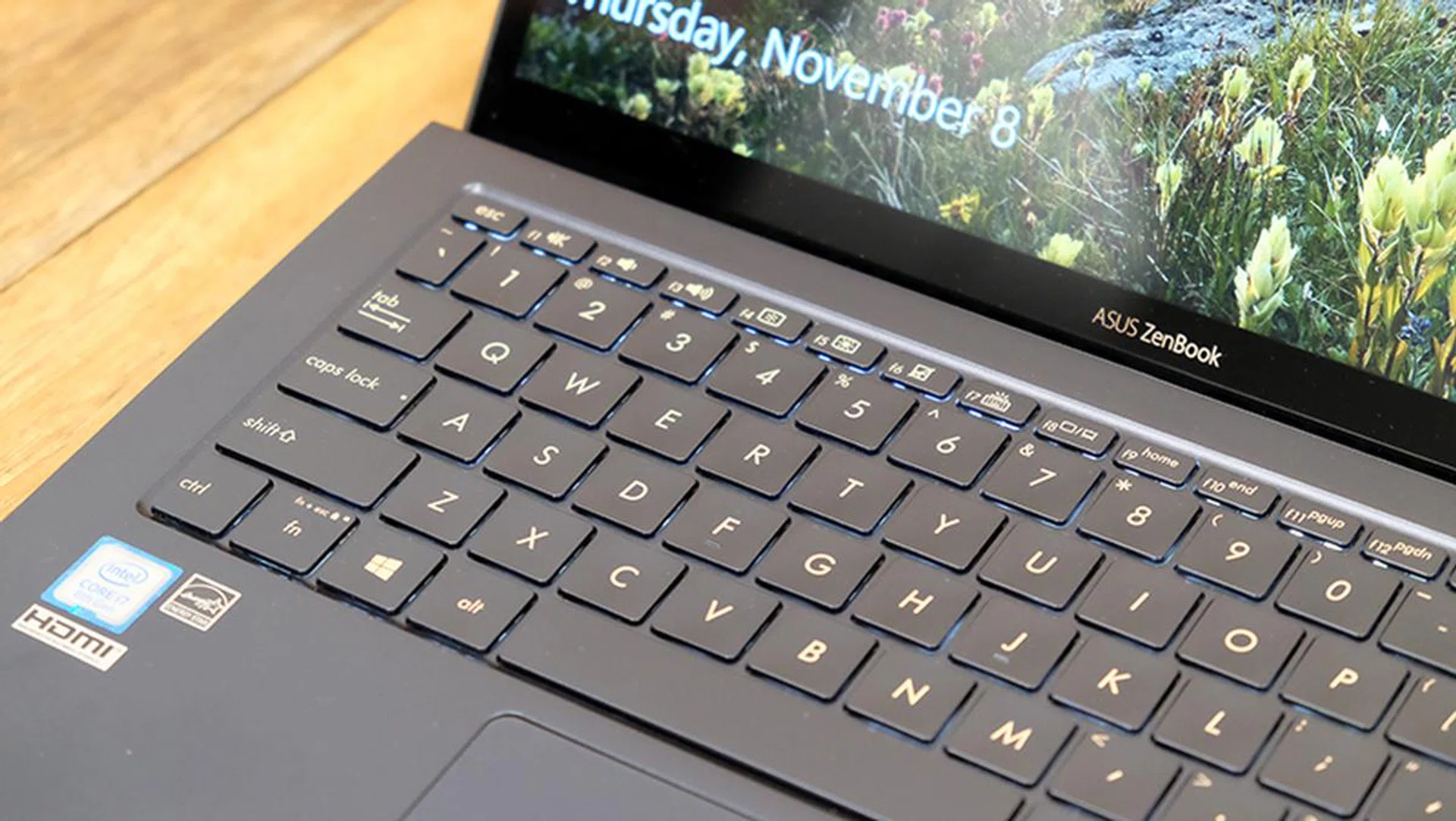
The laptop boasts a sleek unibody aluminum chassis.
In addition, it features a unibody aluminum alloy construction, which feels really solid and reassuring. There’s barely any discernible flex anywhere, and the notebook sure seems like it’ll be able to withstand being knocked around in your daily use. It’s also designed to pass MIL-STD 810G tests for drops, temperature, humidity, and altitude, so it’s in fact pretty hardy.
That said, the lid does seem a little prone to picking up scratches, so you might want to take extra care in that area.
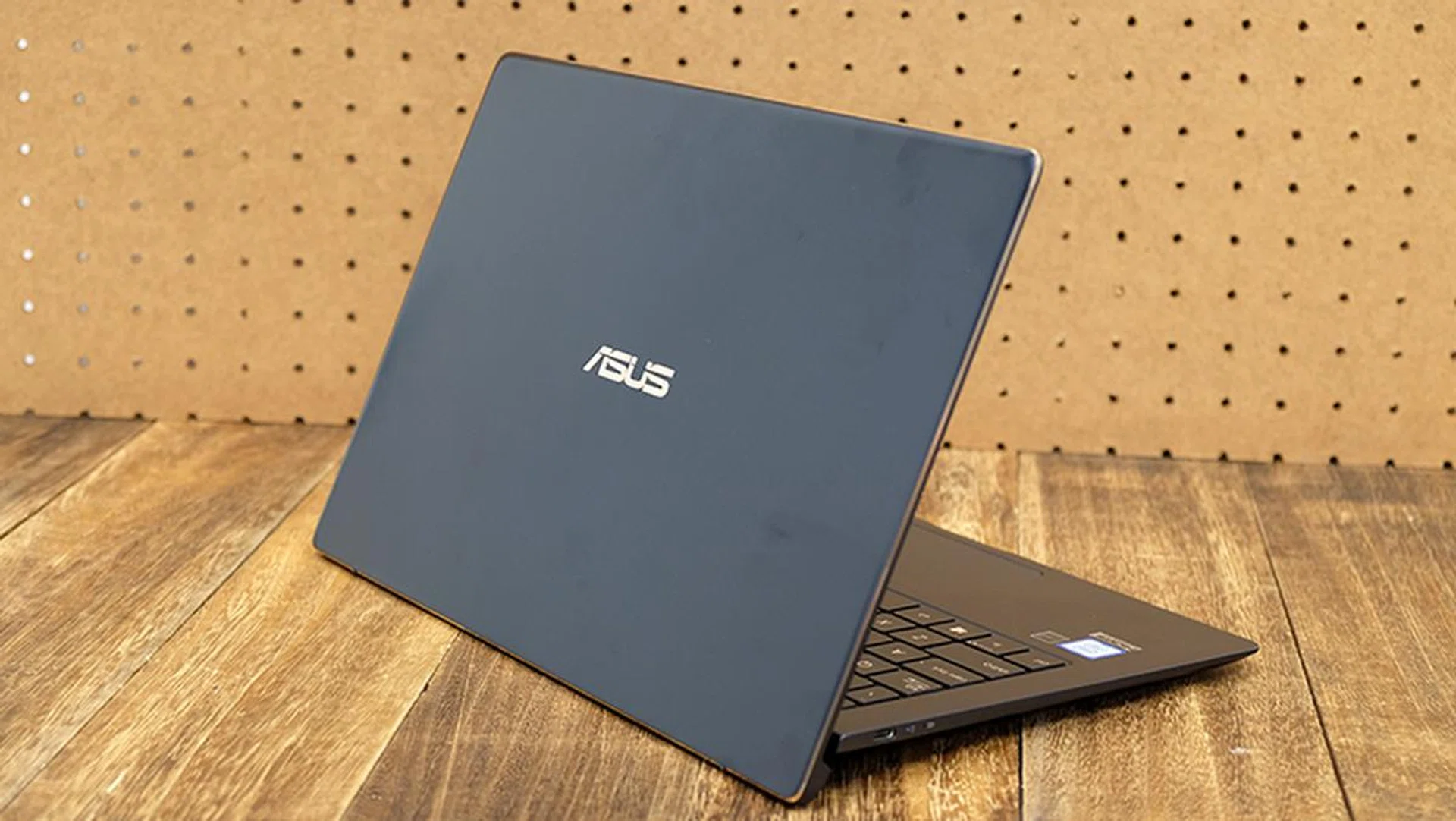
The lid is a little prone to picking up fingerprints.
However, the real standout feature on the notebook is probably what ASUS calls the ErgoLift hinge we first mentioned in the introduction. Put simply, it’s a hinge that elevates the keyboard to a more comfortable typing angle when the lid is raised. The ZenBook S’ keyboard is tilted at a 5.5-degree angle, which ASUS says it decided upon after extensive testing (such as the ASUSBPRO B9440 from 2017 that first featured this design).
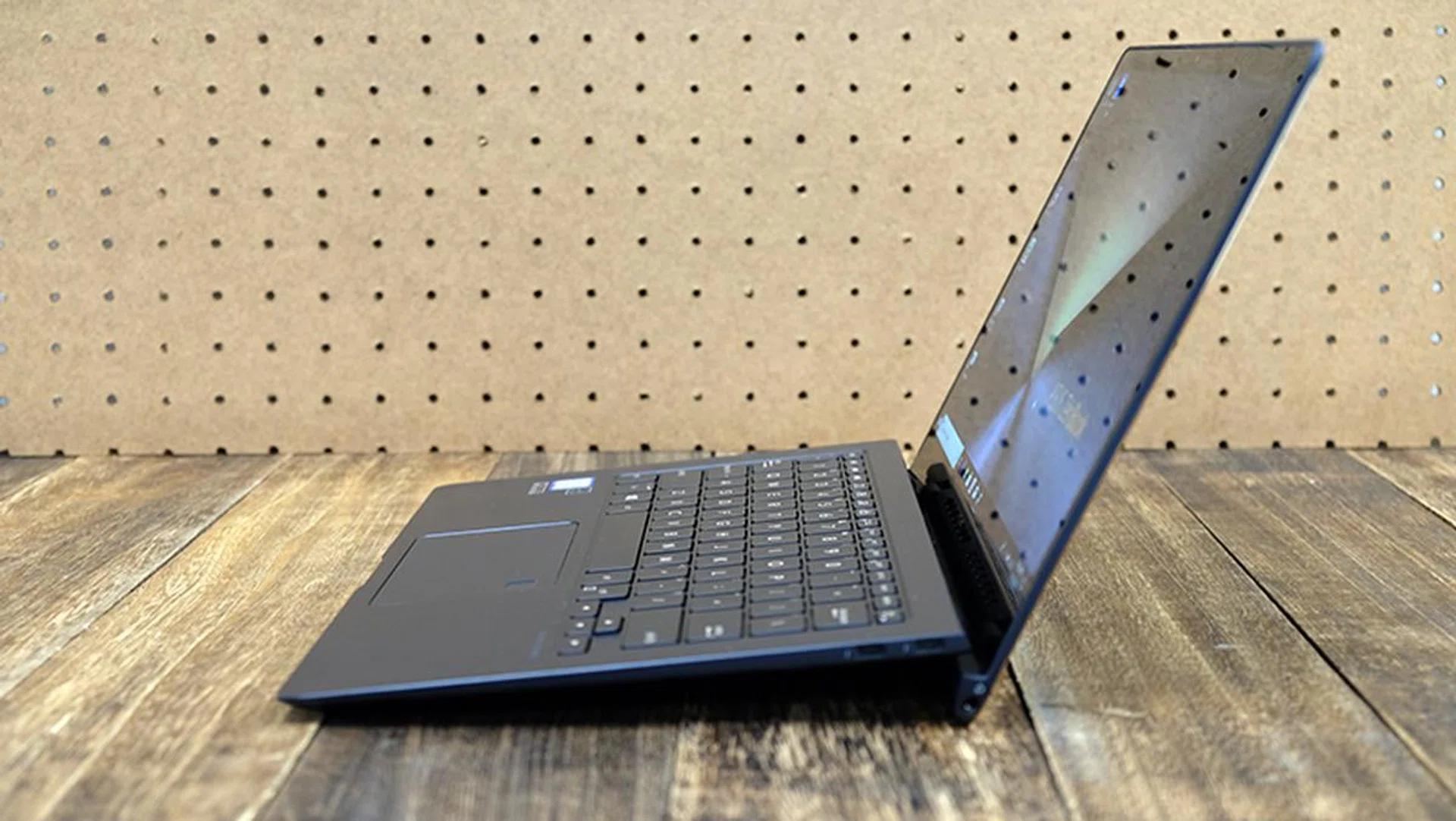
In addition to comfortable typing angle, the extra space between the bottom of the notebook and the table surface helps create more space for airflow.
I can’t speak to whether 5.5 degrees is more comfortable than some other figure like 10 or 12 degrees, but I can say that it’s quite comfortable to type on in practice. In addition, it feels quite good to use on your lap as well and the added air gap means that you’ll feel less discomfort from heat. The additional space between the laptop base and the tabletop also helps improve ventilation for the notebook, where cool air is drawn in through the bottom and expelled through vents hidden in the hinge.
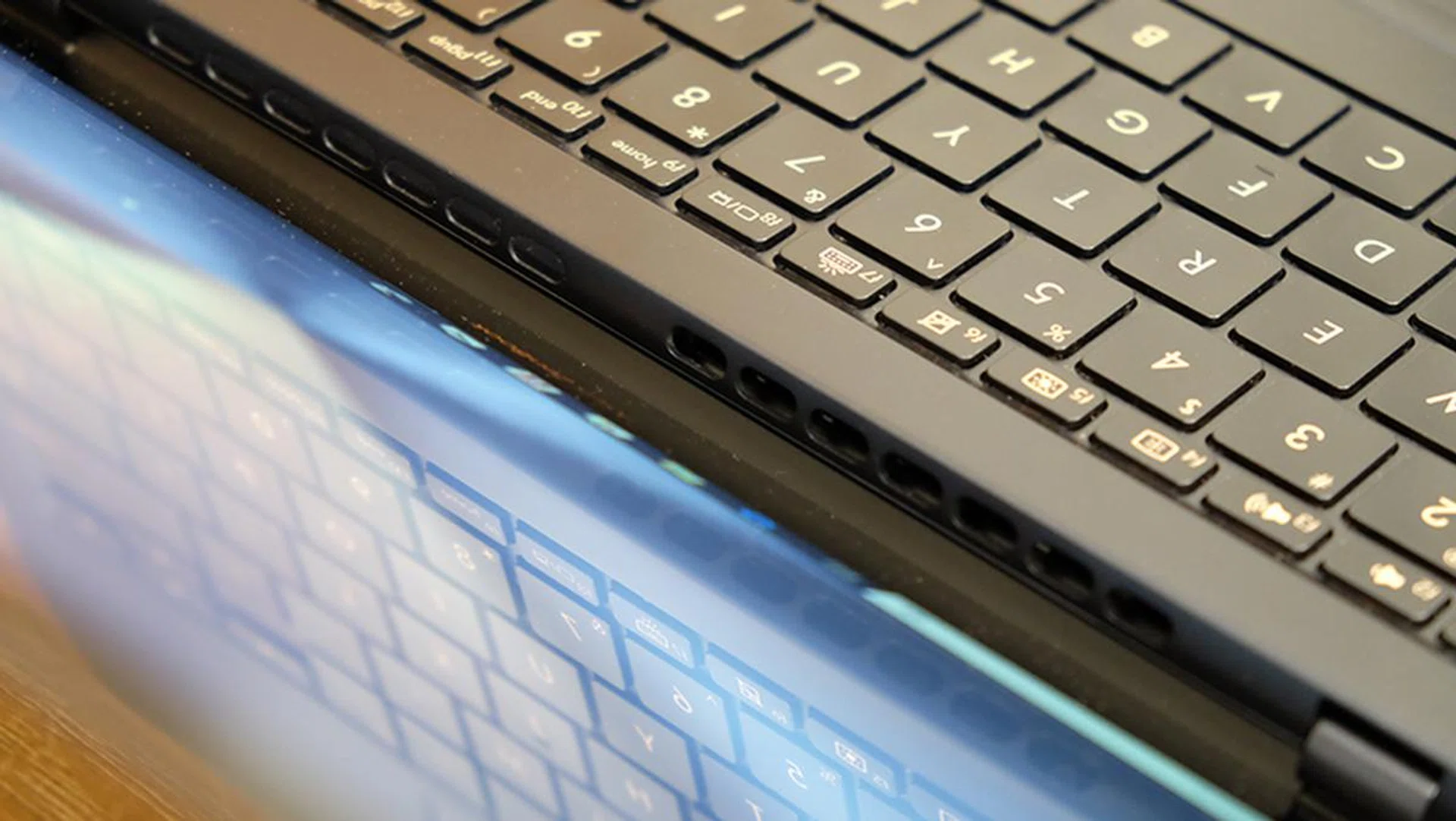
There are additional vents hidden in the hinge.
According to ASUS, this design also helps improve audio delivery by creating more space for the bottom-firing speakers. As it turns out, the sound quality on the notebook is pretty decent. Music came through pretty loud, with reasonably clear mids and a full low-end.
However, I’m not sure that the ErgoLift hinge actually helps with cooling that much. The notebook could still get pretty warm to touch, although things were noticeably improved in an air-conditioned room. The laptop is equipped with a single fan and heatpipe, but the good news is that the fan still stays quiet even under heavy load. This is a good improvement bearing in mind that we've previously reported some ZenBooks models can get quite noisy.
That aside, the keyboard and touchpad are excellent. There’s not a ton of travel distance on a laptop this thin, but I have no complaints about the overall response and feedback. The touchpad is also a glass-coated Windows Precision Touchpad, which feels slick, precise and responsive, or basically everything a touchpad should be. There’s a built-in fingerprint reader on the touchpad as well for Windows Hello biometric authentication.
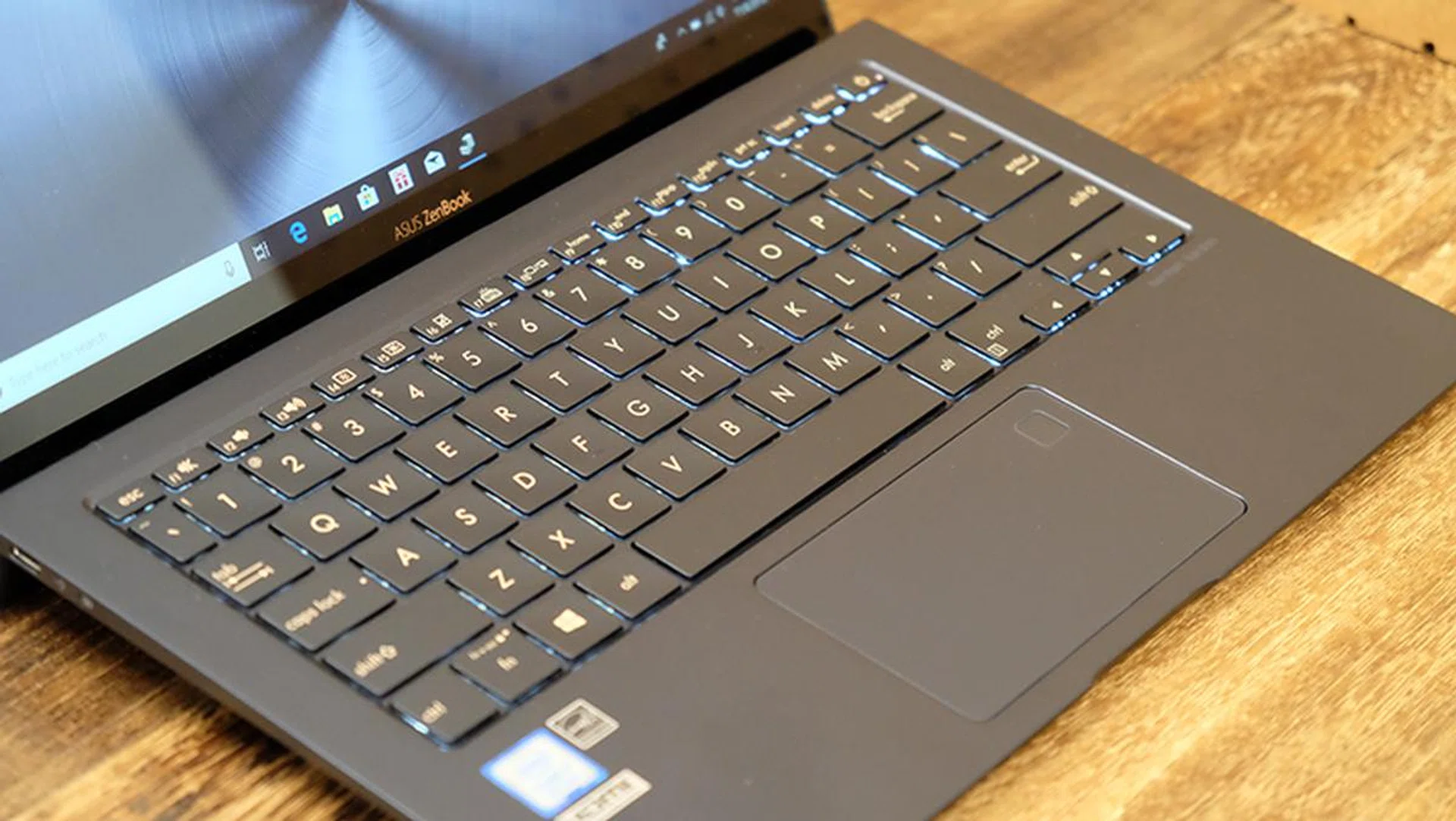
There's a fingerprint sensor built into the touchpad.
The 13.3-inch IPS display on the ZenBook S is great to look at, with bright, vivid colors that really popped. However, my review unit game with a glossy display that really picks up reflections under direct indoor lighting. Turning up the brightness helps somewhat, but the reflections can get quite annoying at times. The bezels aren’t the slimmest I’ve seen on a laptop, but at 5.9mm thin, they’re relatively unintrusive.
Networking is handled by a 2x2 Intel Dual Band Wireless-AC 8265 module, which is capable of a maximum throughput of up to 867Mbps.
Finally, the laptop comes with three USB Type-C ports, including two Thunderbolt 3 and one USB 3.1 (Gen 1) connector. The USB 3.1 (Gen 1) Type-C port sits on the left, and it supports Power Delivery, data, and display out. Furthermore, the two Thunderbolt 3 ports will let you connect up to two 4K displays each, so you can use the ZenBook S to set up a pretty neat workstation as well. On top of that, the laptop will work with a Thunderbolt 3 graphics enclosure like the ASUS XG Station Pro, so content creators can have access to additional graphics computing power when working at your desk.
You’ll be able to charge the laptop from any port, which can be pretty useful for cable management.
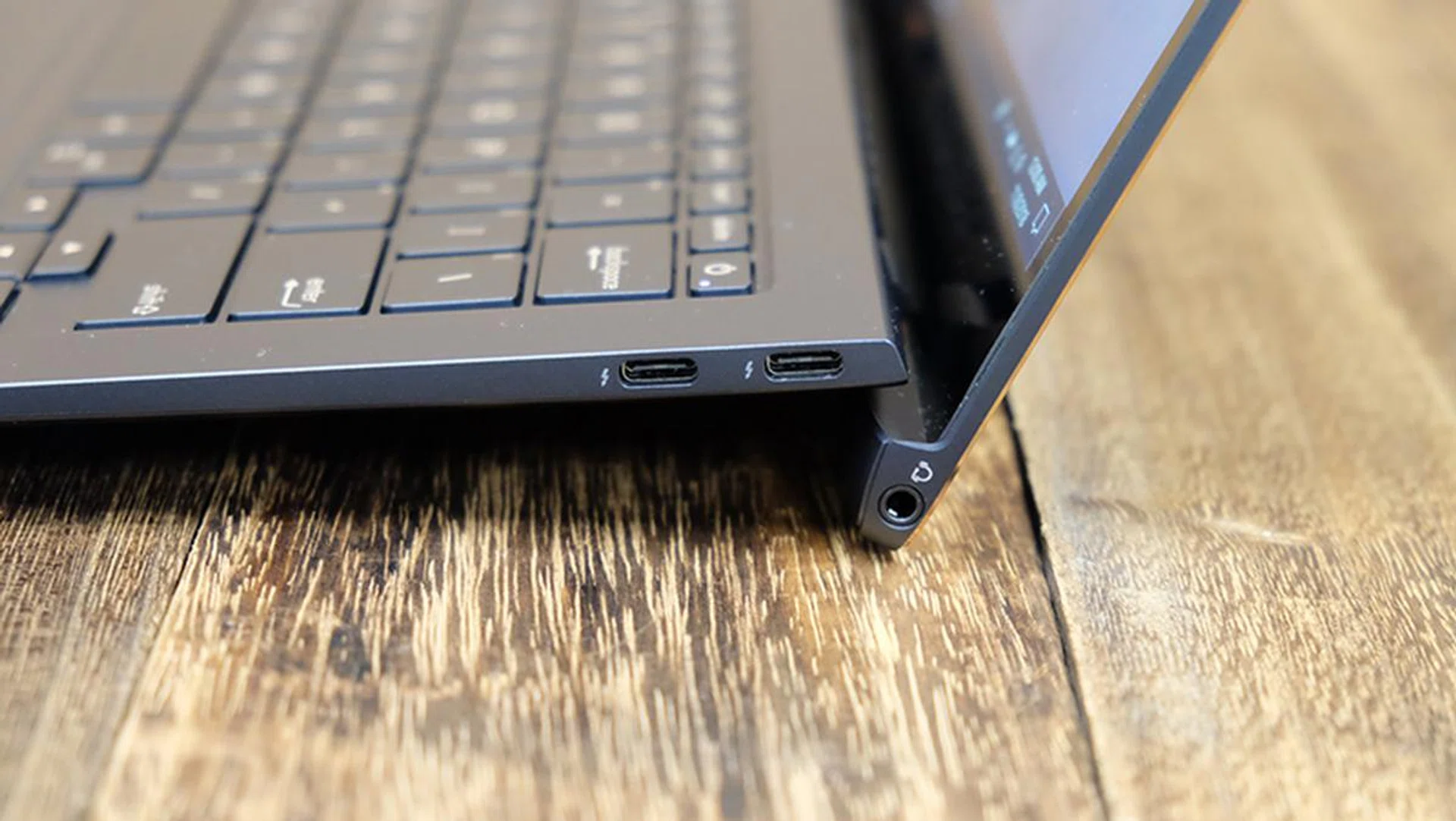
The two Thunderbolt 3 ports and 3.5mm headphone jack are located on the right.
Test setup
Here’s a full list of the notebooks we’re looking at:
- ASUS ZenBook S UX391
- Dell XPS 13
- HP Spectre
- Lenovo Yoga 920
[hwzcompare]
[products=651982,638335,630749,630752]
[width=200]
[caption=Test notebooks compared]
[showprices=1]
[/hwzcompare]
Next up, here are the benchmarks used:
- PCMark 10
- PCMark 8
- 3DMark
- Far Cry 2
- Tomb Raider
PCMark 10
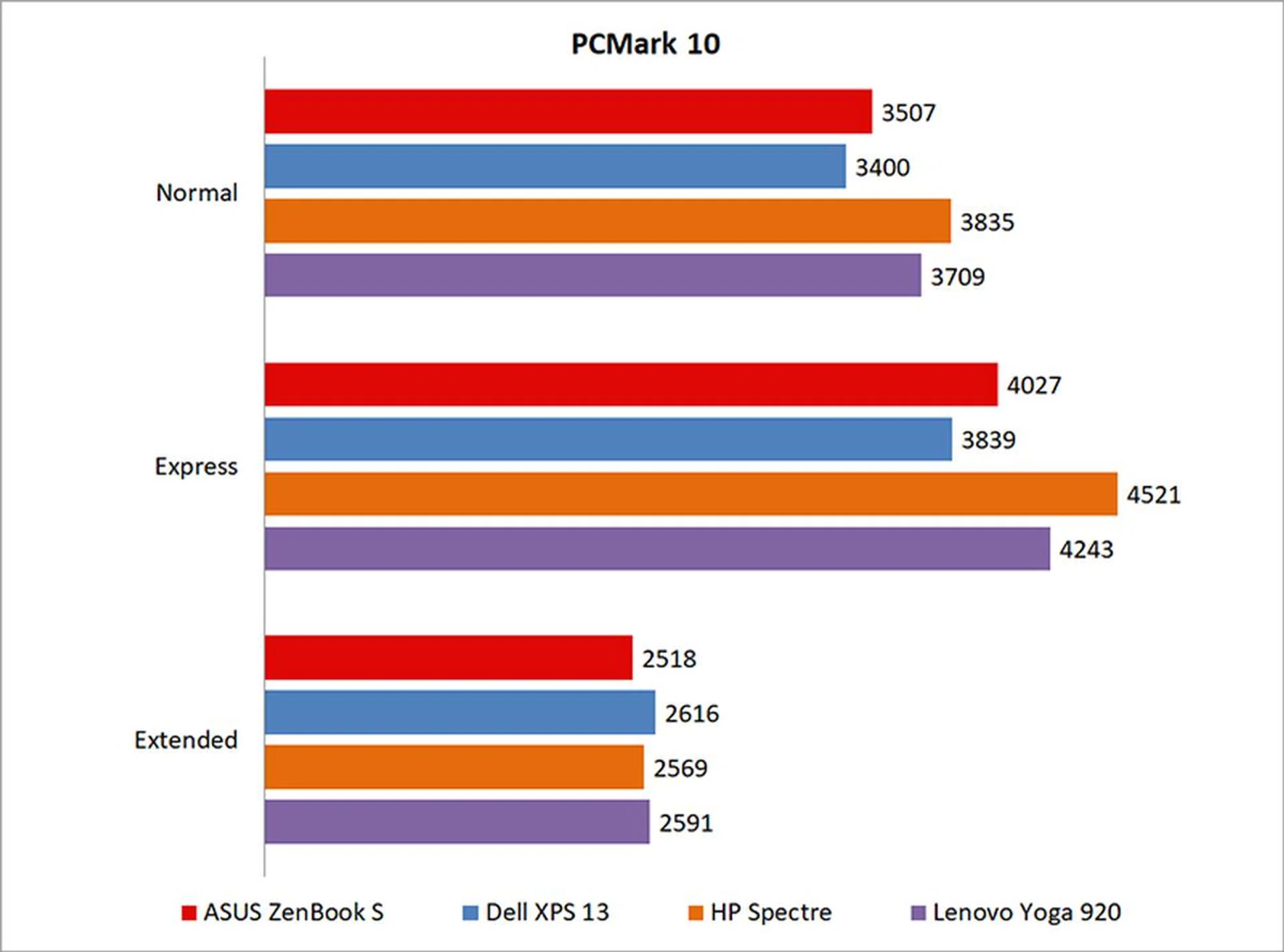
PCMark 10 offers different benchmark tests, each designed for a specific scenario. The regular PCMark 10 benchmark focuses on the modern office, and covers a wide variety of tasks encountered in an office scenario. On the other hand, the Express benchmark focuses on applications typically used by office workers in administration, sales, and managerial roles. Finally, the Extended benchmark gives the most comprehensive view of system performance, encompassing essentials, productivity, digital content creation, and even gaming.
The ZenBook S fell somewhere in the middle of the pack here. However, it did better than the Dell XPS 13, which is still one of the best performance oriented Windows ultrabooks you can get. And for reference, it's still quite a bit better than the LG gram 13.
PCMark 8 Storage
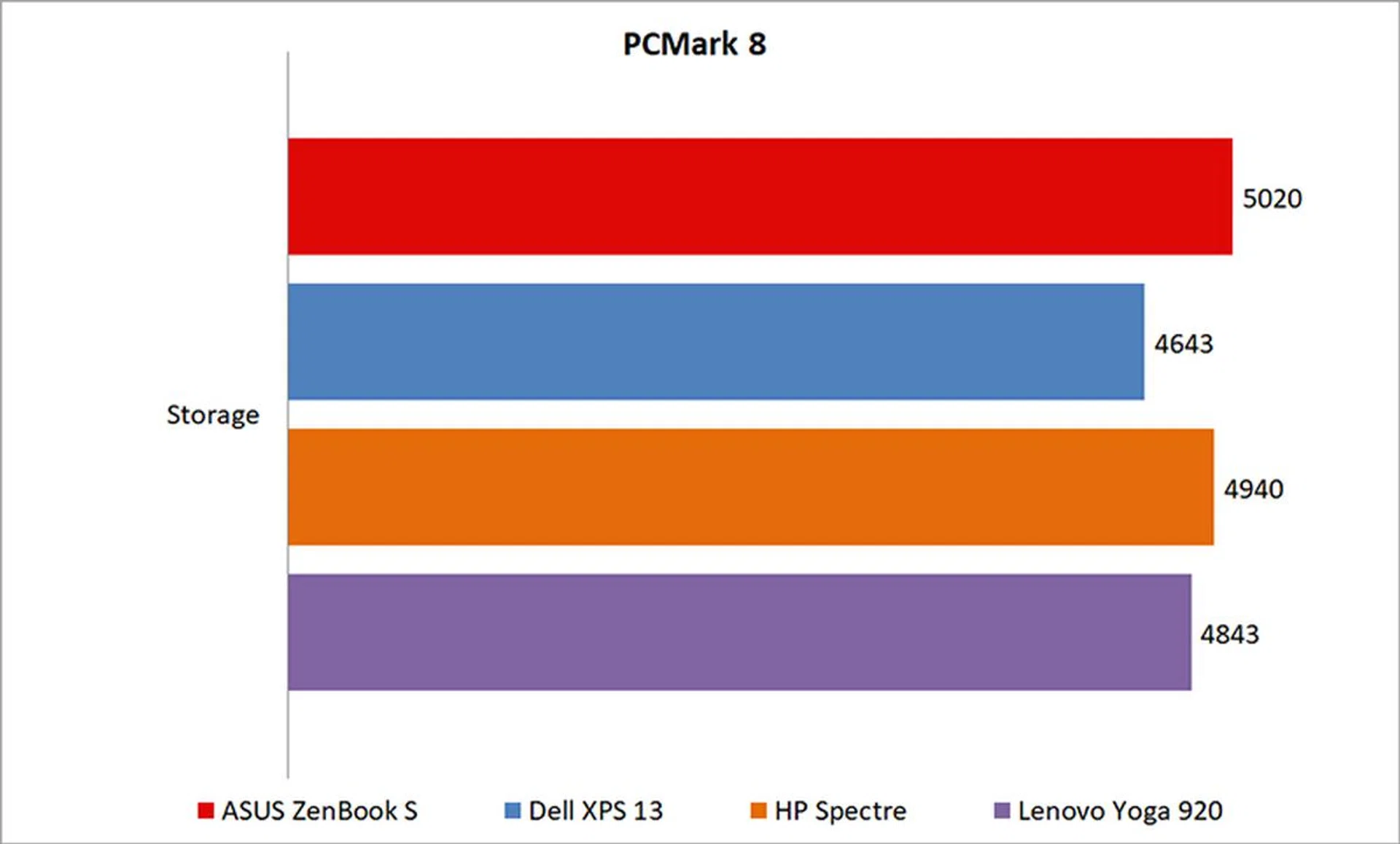
PCMark 10 doesn’t have a dedicated storage benchmark yet, so we’re using the one from PCMark 8 in the meantime.
The ZenBook S came out ahead of the competition here. It utilizes a speedy Samsung PM961 512GB PCIe M.2 SSD, which uses the company’s new Polaris controller, a decision that’s clearly paying off.
3DMark
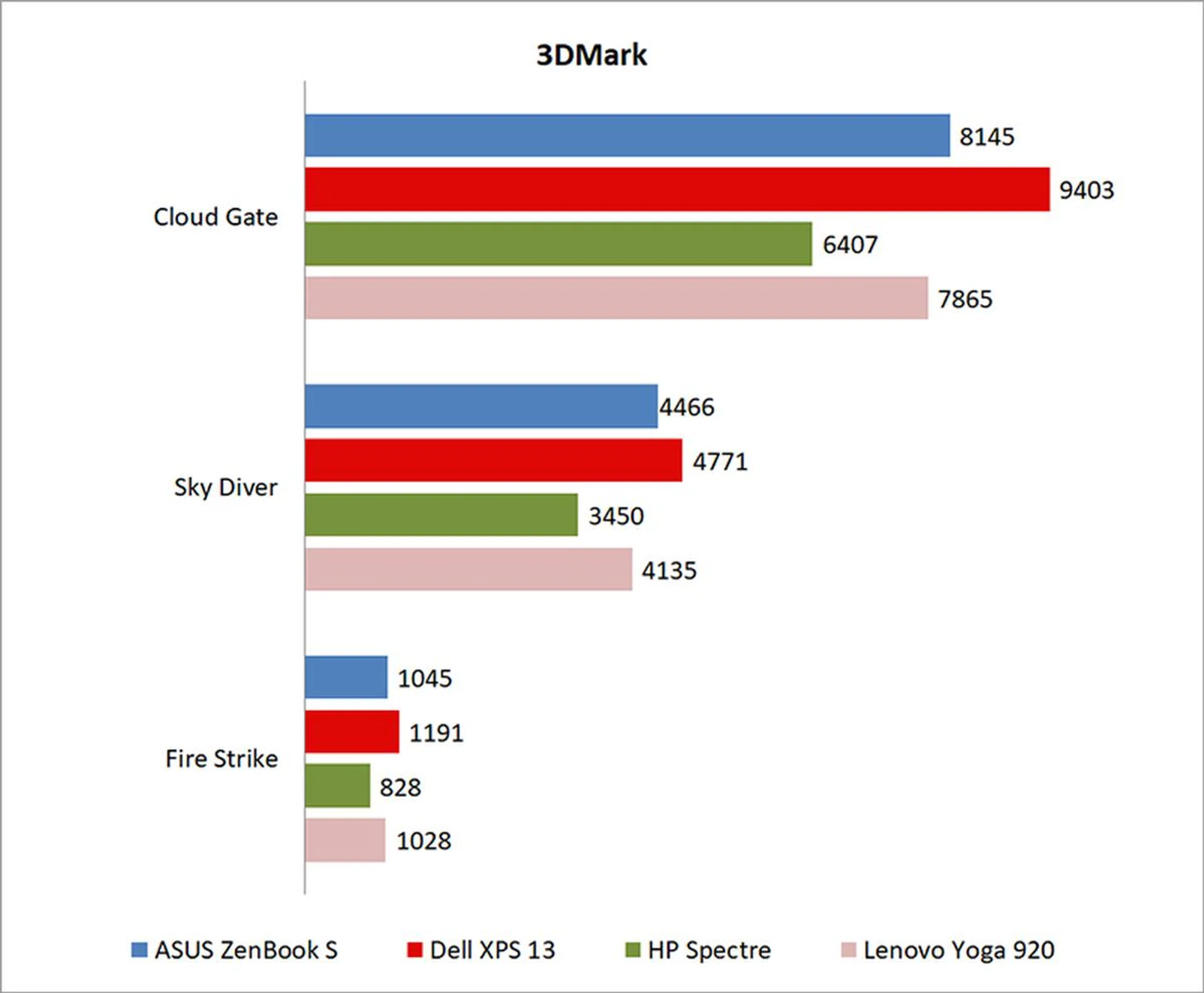
The ZenBook S lagged behind the XPS 13 in 3DMark, but it managed to edge out the other notebooks. In Cloud Gate, the XPS 13 was around 14 per cent faster. Fortunately, it's still plenty faster than the LG gram 13.
Far Cry 2
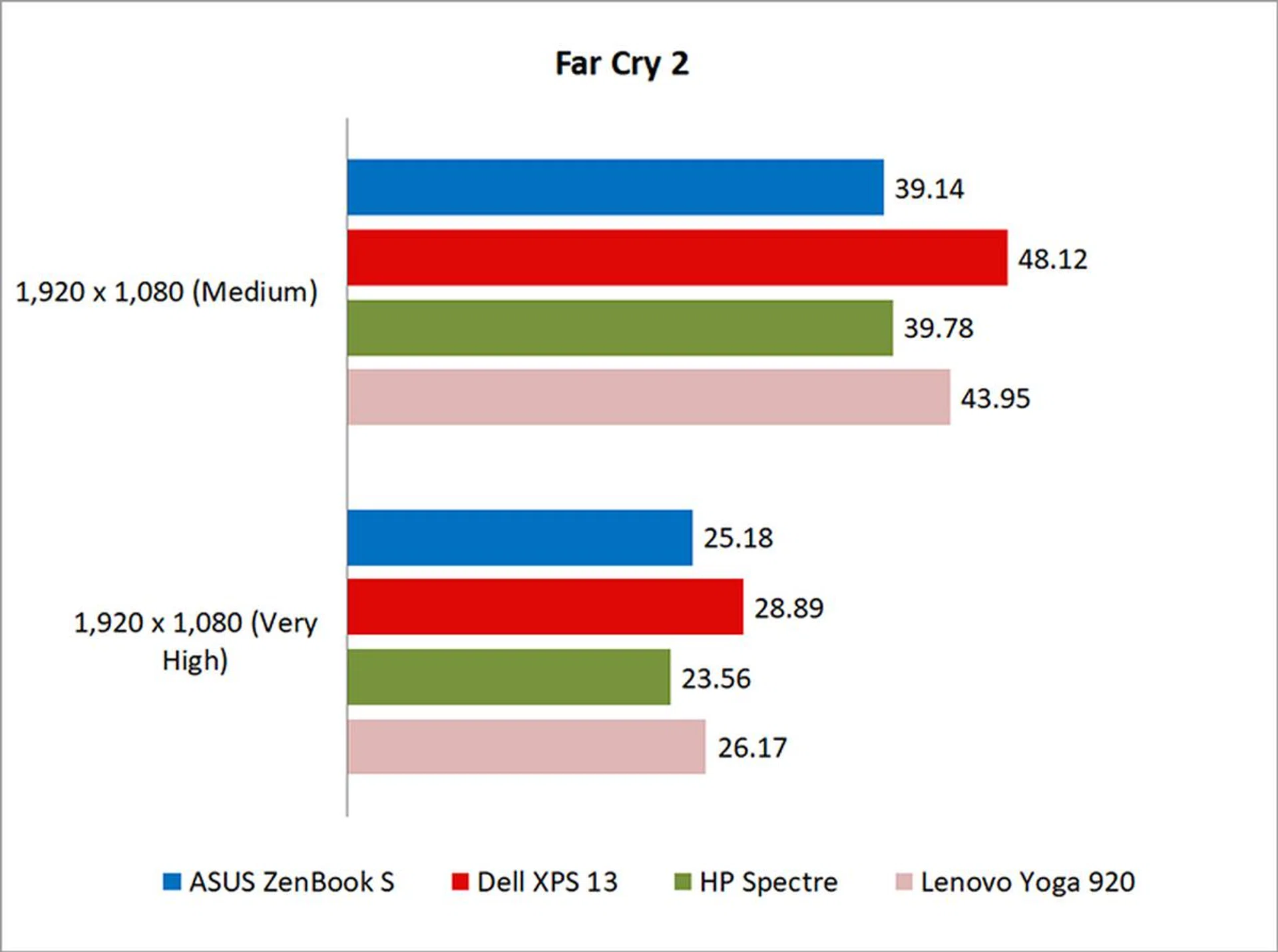
Unfortunately, the ZenBook S didn’t do as well in Far Cry 2. The XPS 13 remained the top performer by a sizeable margin, but the ZenBook S was just a hair behind both the HP Spectre and Lenovo Yoga 920 at Medium settings. Things evened out slightly at Very High settings, but the XPS 13 retained its lead.
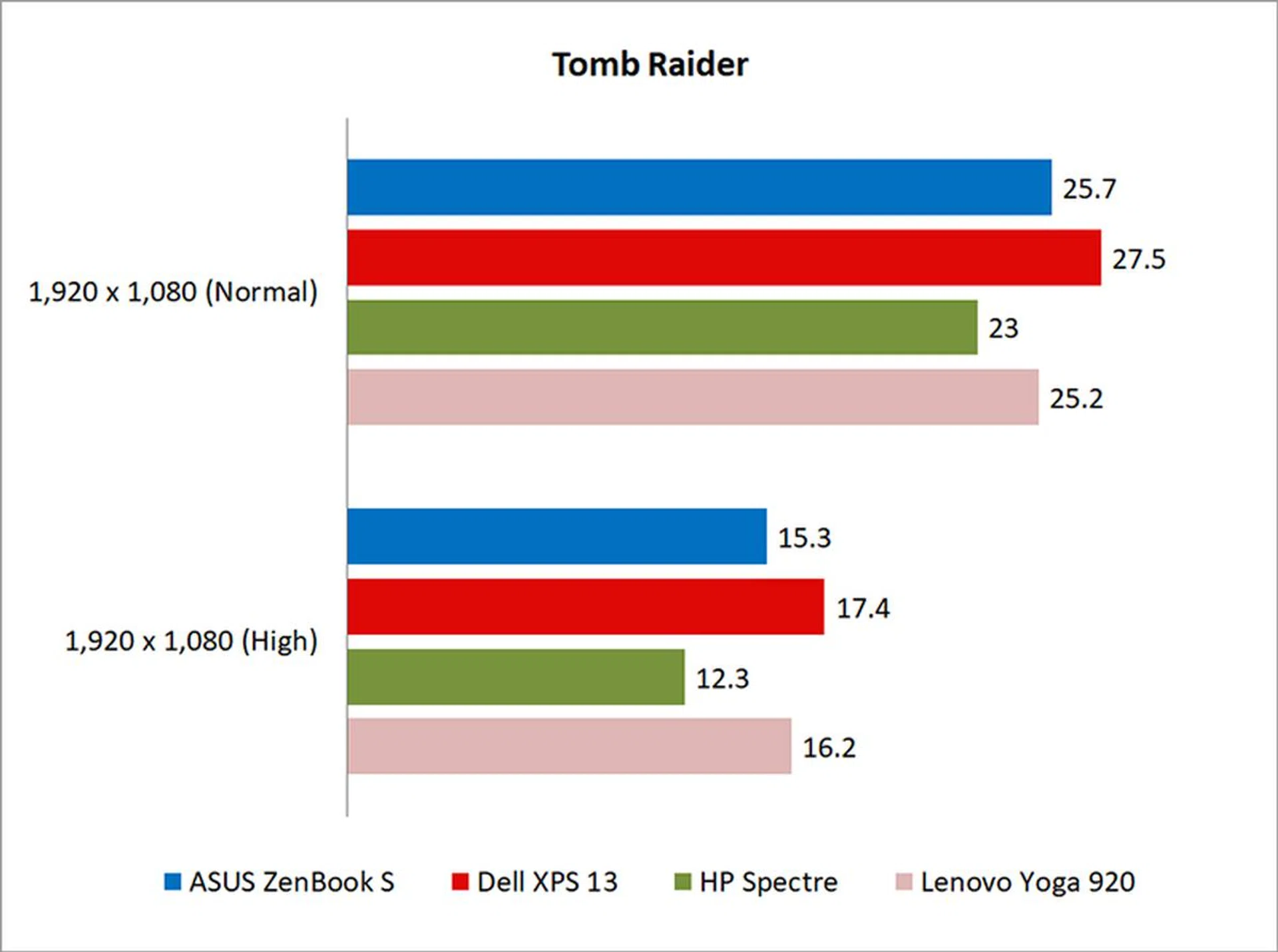
Tomb Raider
The XPS 13 came ahead in Tomb Raider as well, but the ZenBook S managed to hold its own with performance numbers somewhere in the middle of the pack.
Battery life and portability
Battery life and power consumption
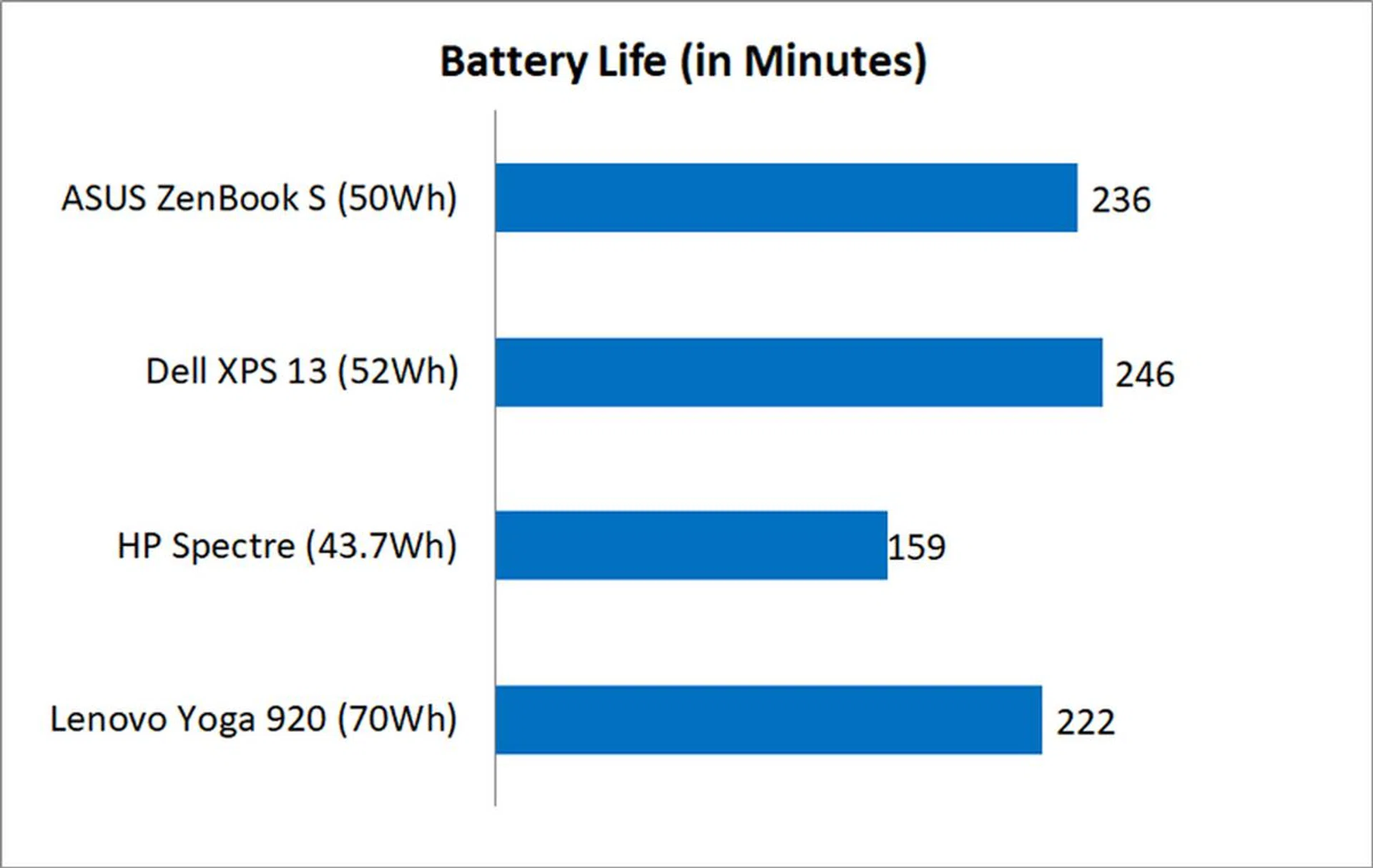
I used the built-in battery life benchmark in PCMark 8 Home to assess the battery life on the laptops.
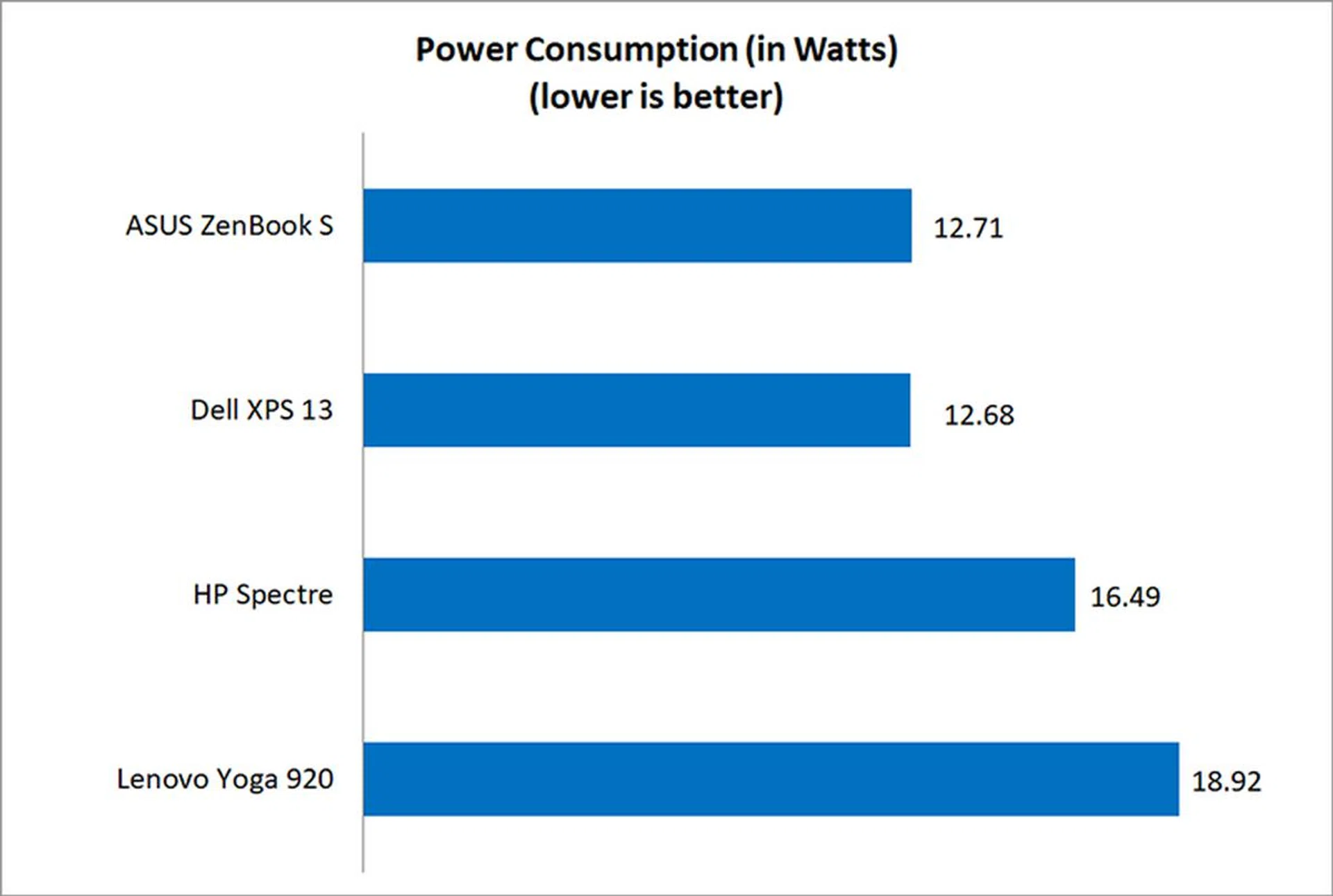
The ZenBook S performed nearly on par with the XPS 13 and both notebooks posted excellent power consumption figures. The ASUS laptop lasted nearly four hours in the benchmark, which consists of tasks such as word processing, email, web browsing and video conferencing. This is the place where nothing beats an LG gram notebook with its crazy long battery life, light weight and very low power consumption.
Portability
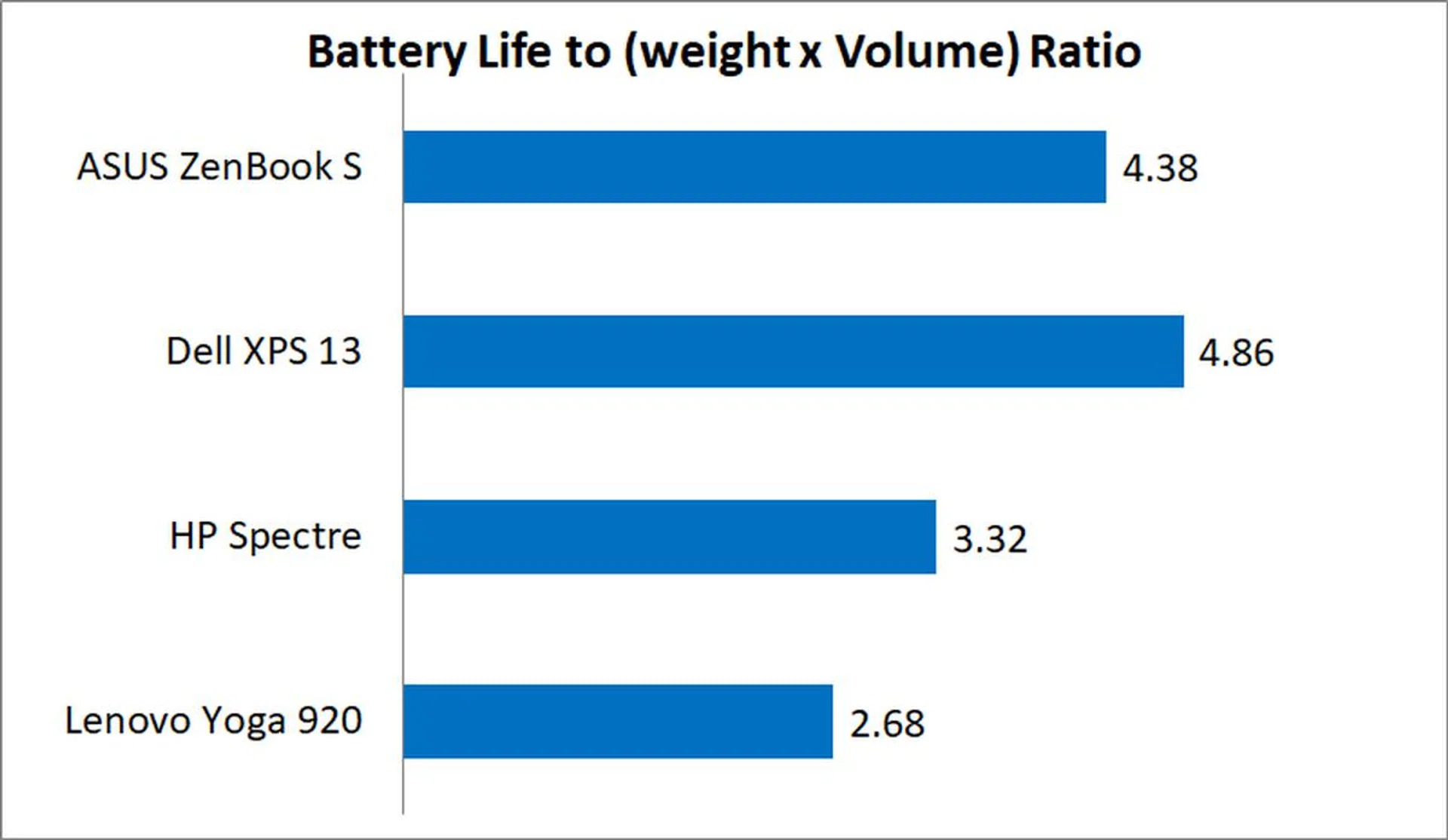
The portability index is an objective measure of how portable a notebook is, taking into account factors like size, weight, and battery life.
The ZenBook S did fairly well here, coming behind only the Dell XPS 13, which was helped along by its even more compact dimensions. Needless to say the LG gram 13 handily beats anything in its path, but it has been optimized for long battery uptime rather than all-out speed. Placing the outlier aside that the LG is, the ASUS ZenBook S fared admirably. Plus, it's also notably lighter than the Dell XPS 13.
A slick ultraportable
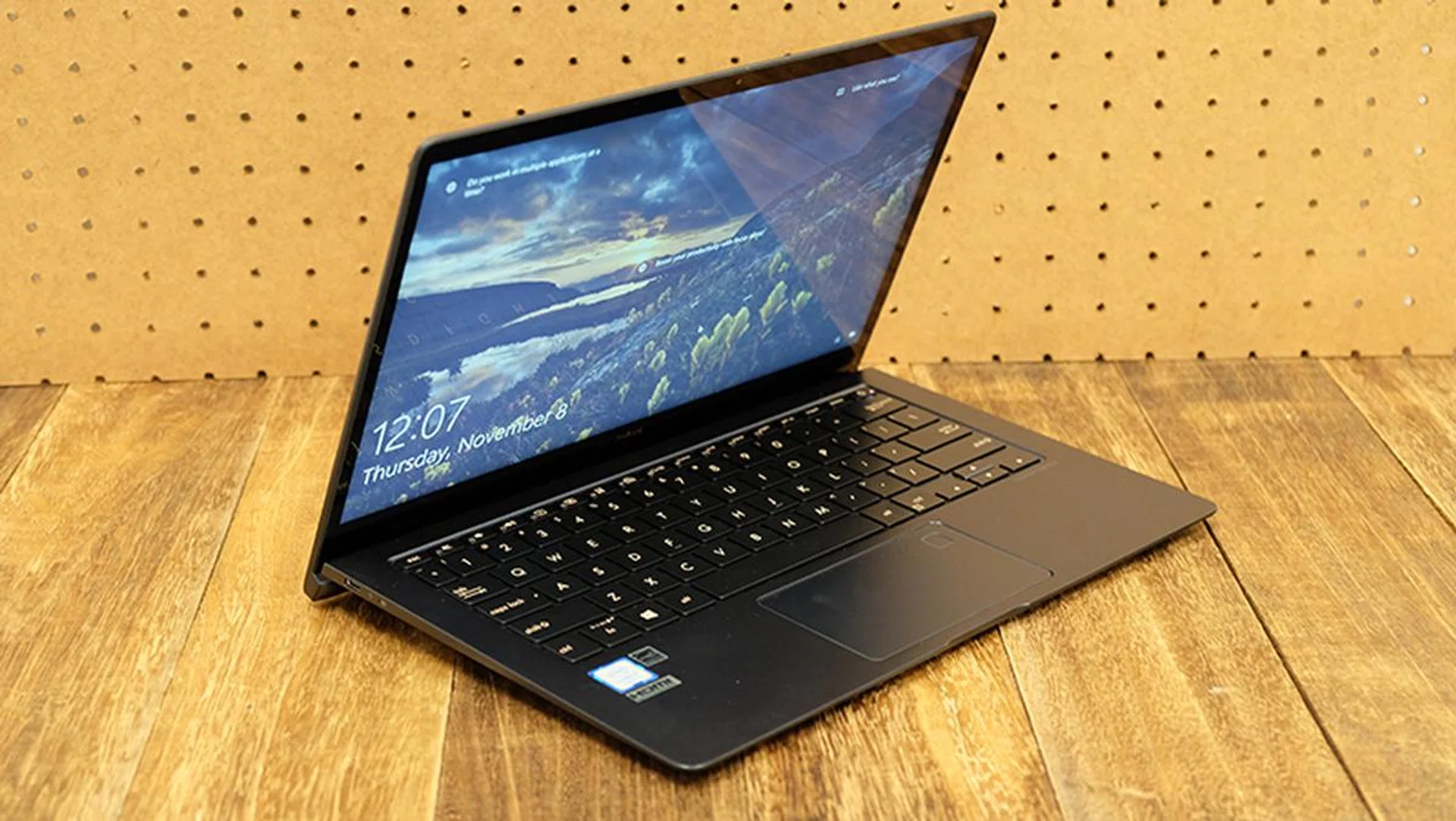
Not the best ultrabook, but certainly a very good one.
The ASUS ZenBook S is a solid choice if you’re looking for a capable Windows laptop that can handle just about any office-related task you throw at it. It is small, light, and quick, and you can’t really go wrong with it.
The ErgoLift hinge also helps it stand out from the crowd, and it does make it more comfortable to use on your lap for extended periods of time. The keyboard and the trackpad similarly feel excellent, so the ZenBook S does provide quite an enjoyable user experience overall. The 1080p glossy display isn’t as crisp or impressive as a 4K screen, but it’s certainly good enough for most purposes, even if the reflections can get a little annoying.
Finally, while it’s great to have a compact, lightweight chassis, good battery life in balance with no compromise productivity performance is what really separates excellent ultrabooks from the merely good. You want an ultraportable machine because you want to be able to use it easily on the road, and you can’t really do that if it isn’t going to last you a good amount of time. Fortunately, the ZenBook S serves up decent battery life, coming in only slightly behind the Dell XPS 13.
All things considered, the ASUS ZenBook S is simply a capable laptop. It doesn't have flashy features or a particularly eye-catching design, but it’ll serve you well if you decide to get one.
Our articles may contain affiliate links. If you buy through these links, we may earn a small commission.