

A desirable business notebook
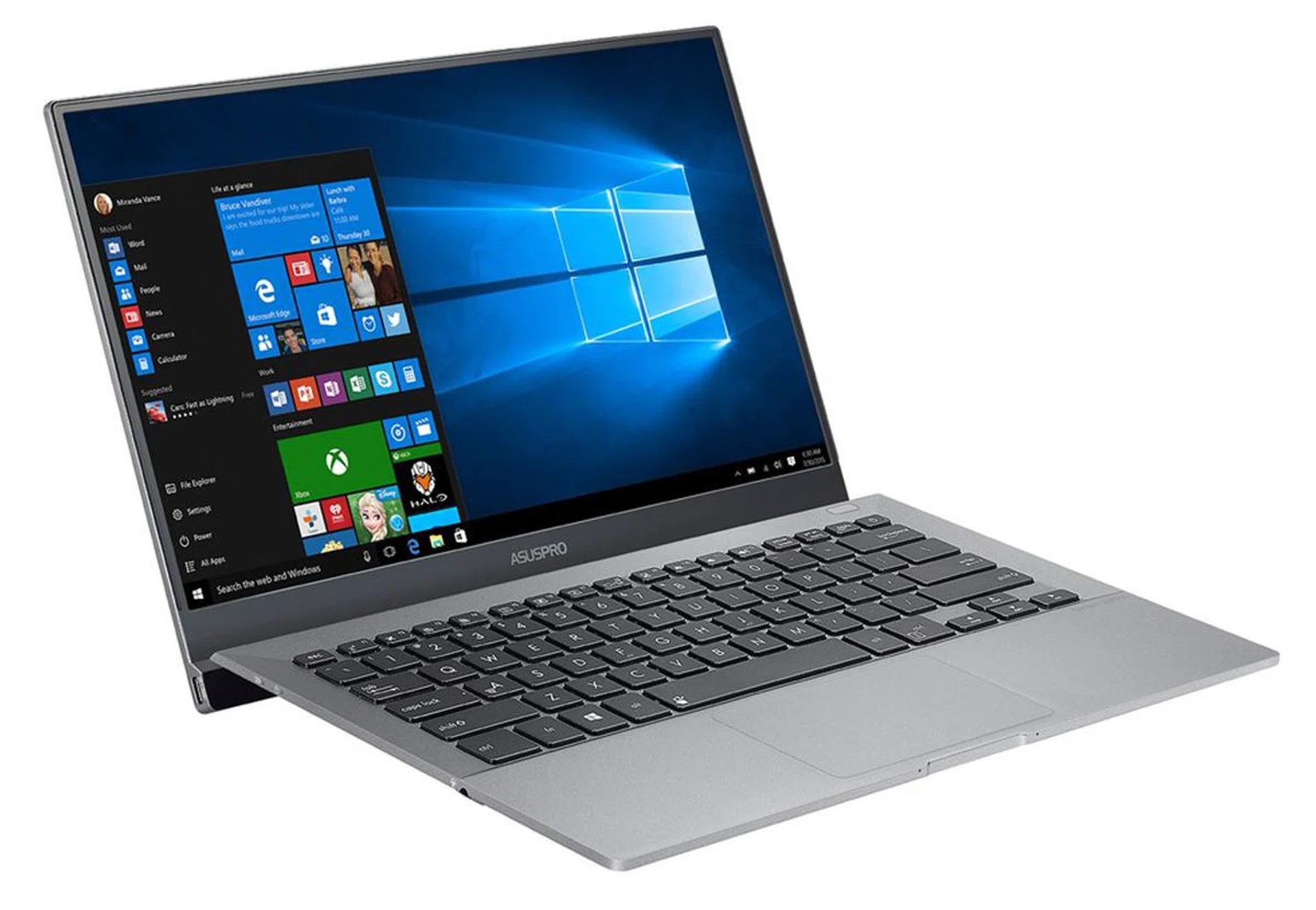
The ASUSPRO B9440 notebook was designed for business and professional users in mind.
If you are the corporate sort, chances are, you might have a company issued notebook. The problem with these notebooks is that they are often underwhelming. They are usually underpowered, quite bulky, and also not very pretty to look at. Yes, there’s the Lenovo ThinkPad X1 Carbon, which is a gorgeous business-class notebook, but it is also really pricey. ASUS wants to have a crack at this market, and their entry into this market is the new ASUSPRO B9440. ASUSPRO is the commercial/enterprise arm of ASUS and creates devices designed specifically for commercial/enterprise use. However, as we've found, the B9440 can appeal to commercial deployment needs as well as personal usage and so, you can easily find this model in retail stores.
Design
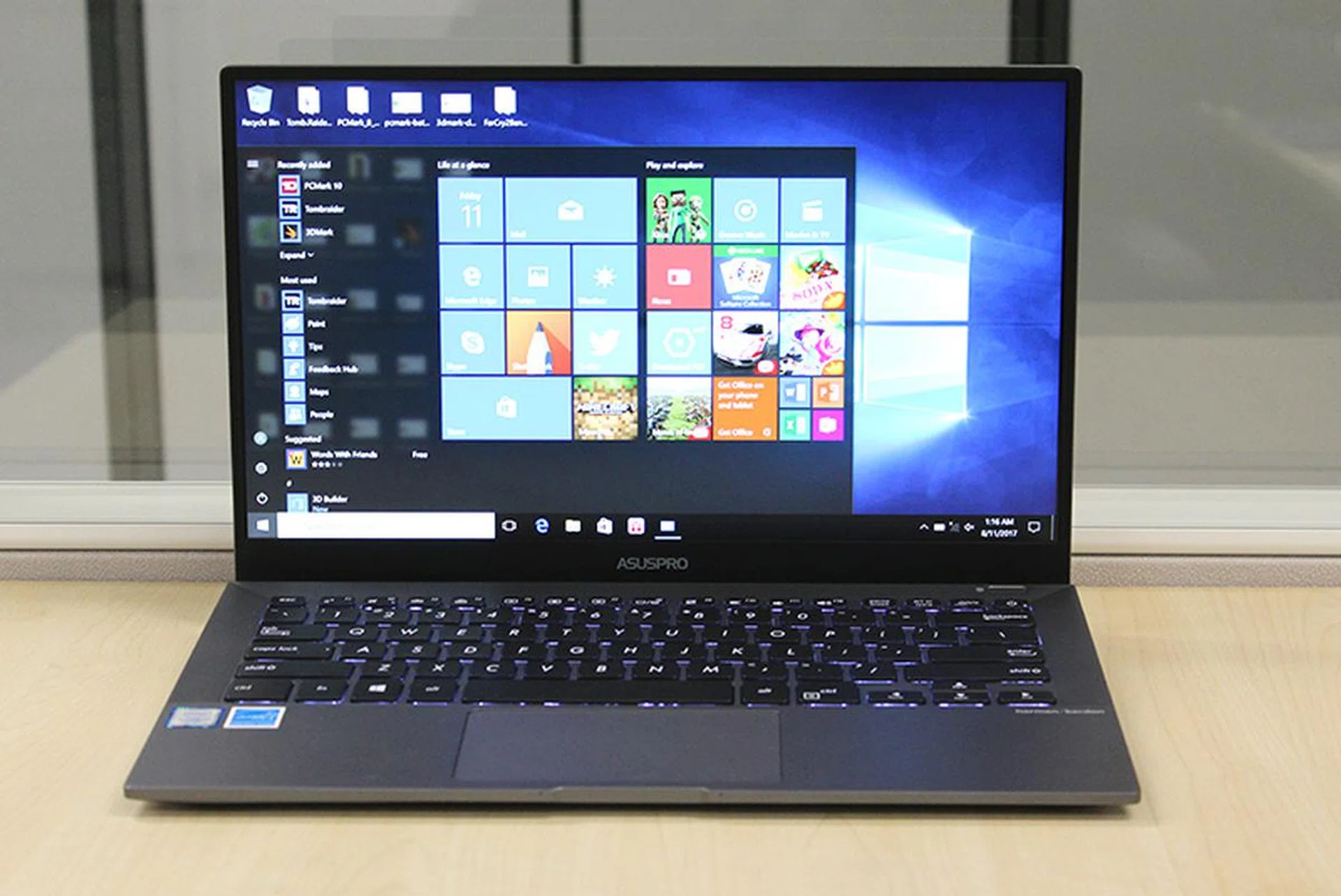
The ASUSPRO B9440 sports a sleek design with super-slim bezels and a unique hinge design.
The ASUSPRO B9440 is a thin and light business notebook that has been designed for utmost portability. Even though it has a 14-inch display, ASUS has actually managed to cram it into a chassis that is about the same size as other 13-inch notebooks. If this sounds familiar to you, that’s because the ZenBook 3 Deluxe has a similar design philosophy. In fact, as you will see later, the ASUSPRO B9440 shares many similarities to the ZenBook 3 Deluxe. It won't be a stretch to call the ASUSPRO B9440 is a business notebook version of the ZenBook 3 Deluxe.
On the whole, the ASUSPRO B9440 is actually pretty good-looking for a business notebook. The dull gray exterior might look a little bland, but one of the neat things about the B9440 is its unusual hinge. When opened, the hinge acts as a stand that props the keyboard up at an angle, making it easier to type. Apart from that, it gives the B9440 a unique profile that distinguishes it from other notebooks. The concept of having the lid open and prop up the keyboard isn't new, but it has traditionally only provided a very minor uplift to the notebooks we've assessed in the past; the B9440 however raises the keyboard to a very tangible degree that makes it a noteworthy design feature.
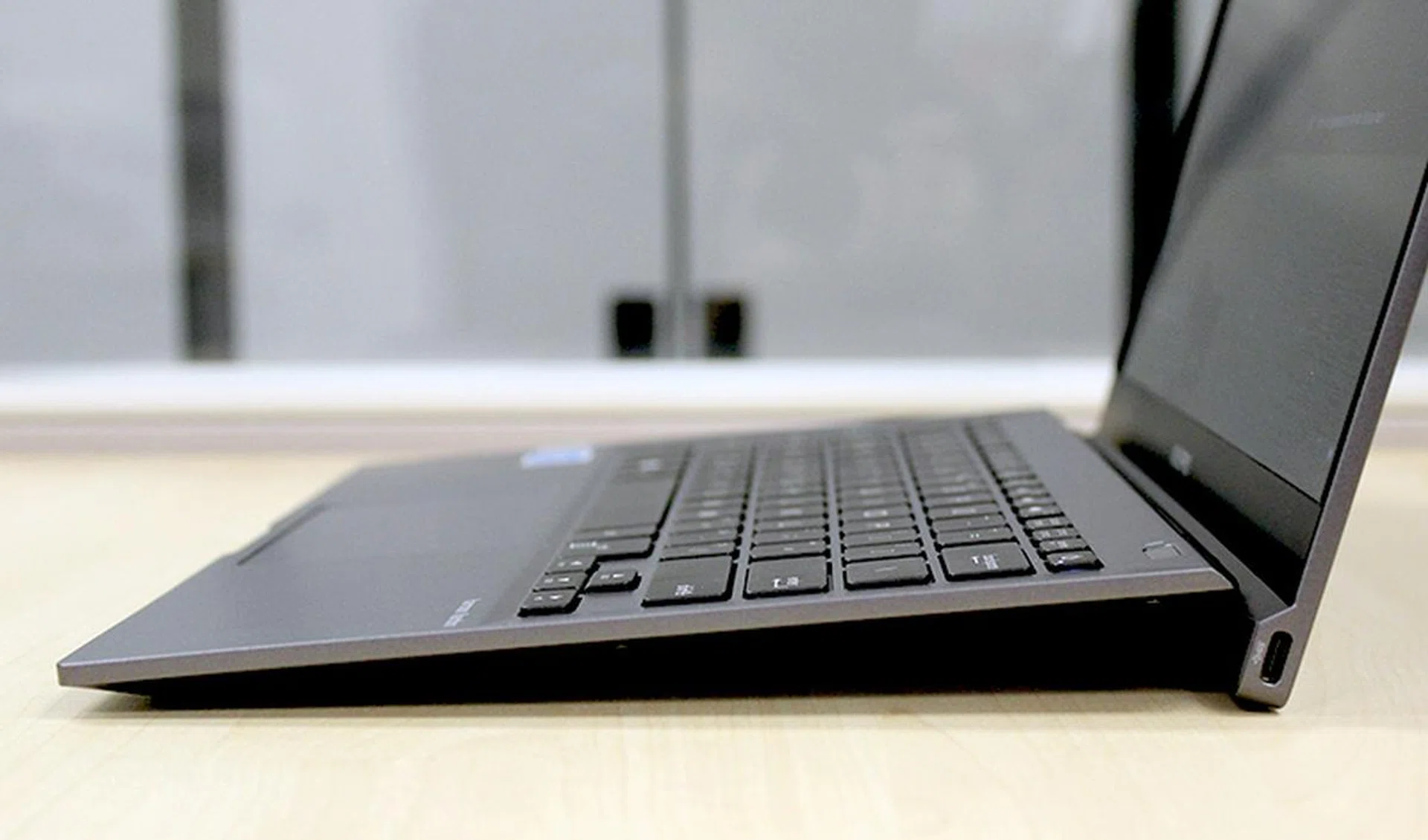
With the display opened, the hinge doubles up as a stand.
More importantly, the ASUSPRO B9440 is really thin and light. It measures just 15mm thick, and thanks to a magnesium alloy chassis, it weighs just 1.05kg. As I noted in the review of the LG gram notebooks, which also have magnesium alloy chassis, notebooks with magnesium alloy chassis have the tendency to feel plasticky, but this is not the case with the ASUSPRO B9440. The ASUSPRO B9440 feels more like aluminum to the touch. But even so, the ASUSPRO B9440 still exhibits the same flexing issues like the LG gram notebooks. Fortunately, it doesn't seem to flex as much as the LGgram notebooks.
If you are worried, ASUS says that the ASUSPRO B9440 has been designed to be rugged. It has passed MIL-STD 810G testing and numerous internal tests that include drop tests, panel pressure tests, keyboard durability tests, and even a hinge test that tests the reliability of the B9440’s unique hinge with over 50,000 open/close cycles.
Hardware & Features
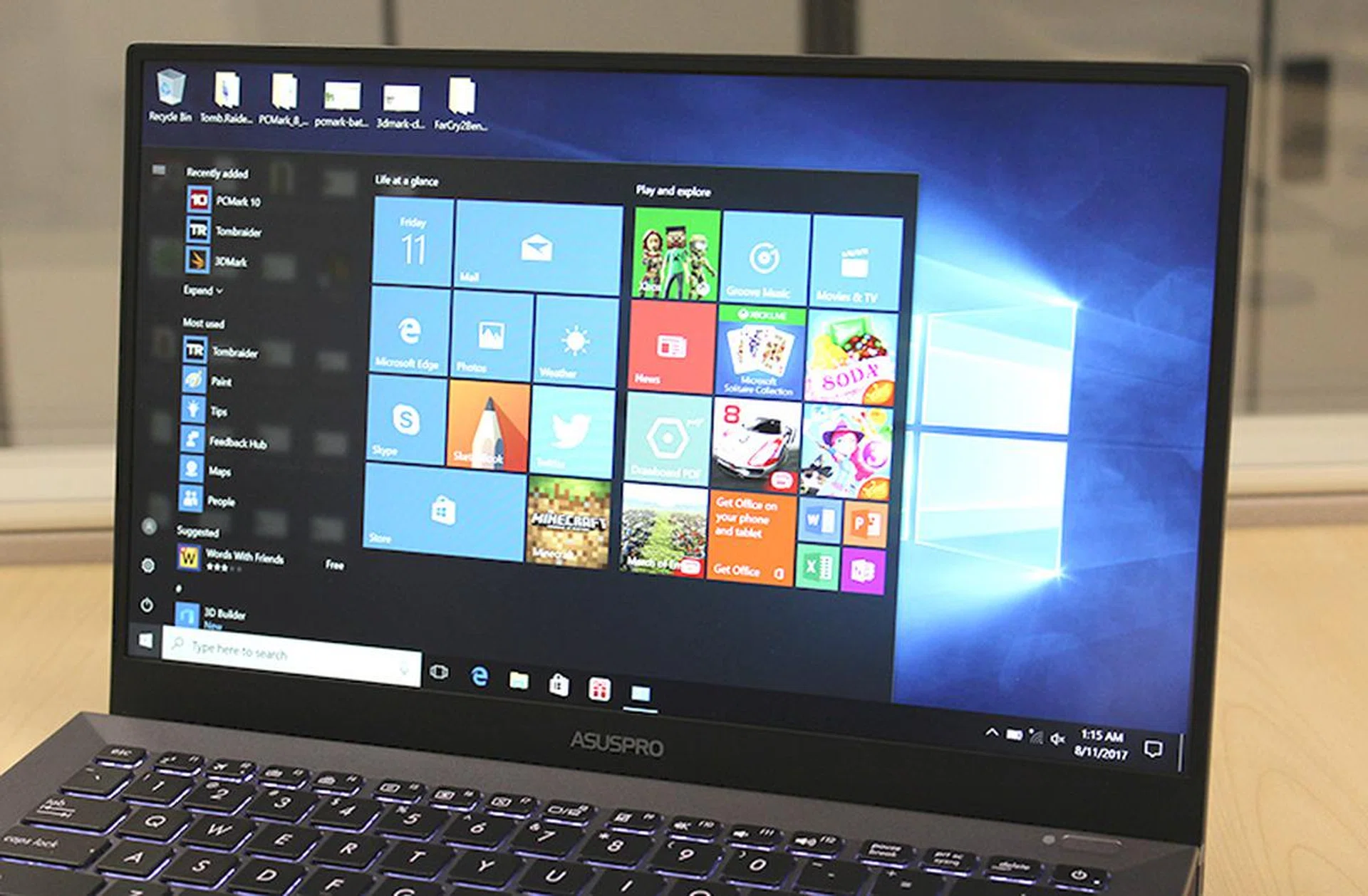
The Full-HD display has a matte finish to reduce reflection and glare. The bezel on the top and sides are just 5.4mm wide.
Like the ZenBook 3 Deluxe, the ASUSPRO B9440’s 14-inch display only supports Full-HD resolution (1,920 x 1,080 pixels). In today’s world of Retina, QHD, and 4K displays, a Full-HD display is starting to look a bit dated. However, fans of matte displays will be happy to know that the B9440’s display has a matte coating, which significantly reduces glare and reflections. It also means that the display is less harsh and easier on the eyes. However, the downside to this is that the display looks a bit hazy and muted.
The other thing noteworthy about the bezel is its super thin bezel, which only measures 5.4mm on the top and both sides, which is even thinner than the ZenBook 3 Deluxe’s. Obviously, this means that ASUS had to do away with the traditional positioning of the webcam above the display. However, unlike other notebooks like the LG gram and Dell XPS 13, which have their webcams relocated to the bottom of the display, ASUS has decided to do away with the webcam altogether. Yup, the B9440 has no webcam. Personally, I don’t think this is an issue since the quality of most integrated webcams is often questionable to begin with, but if you have to do video conferencing often, this could be an inconvenience to take note of. You won't miss out on Windows Hello functionality since most webcams on notebooks aren't qualified for it, but the the B9440 does have fingerprint based security that can still be tied to Windows Hello.
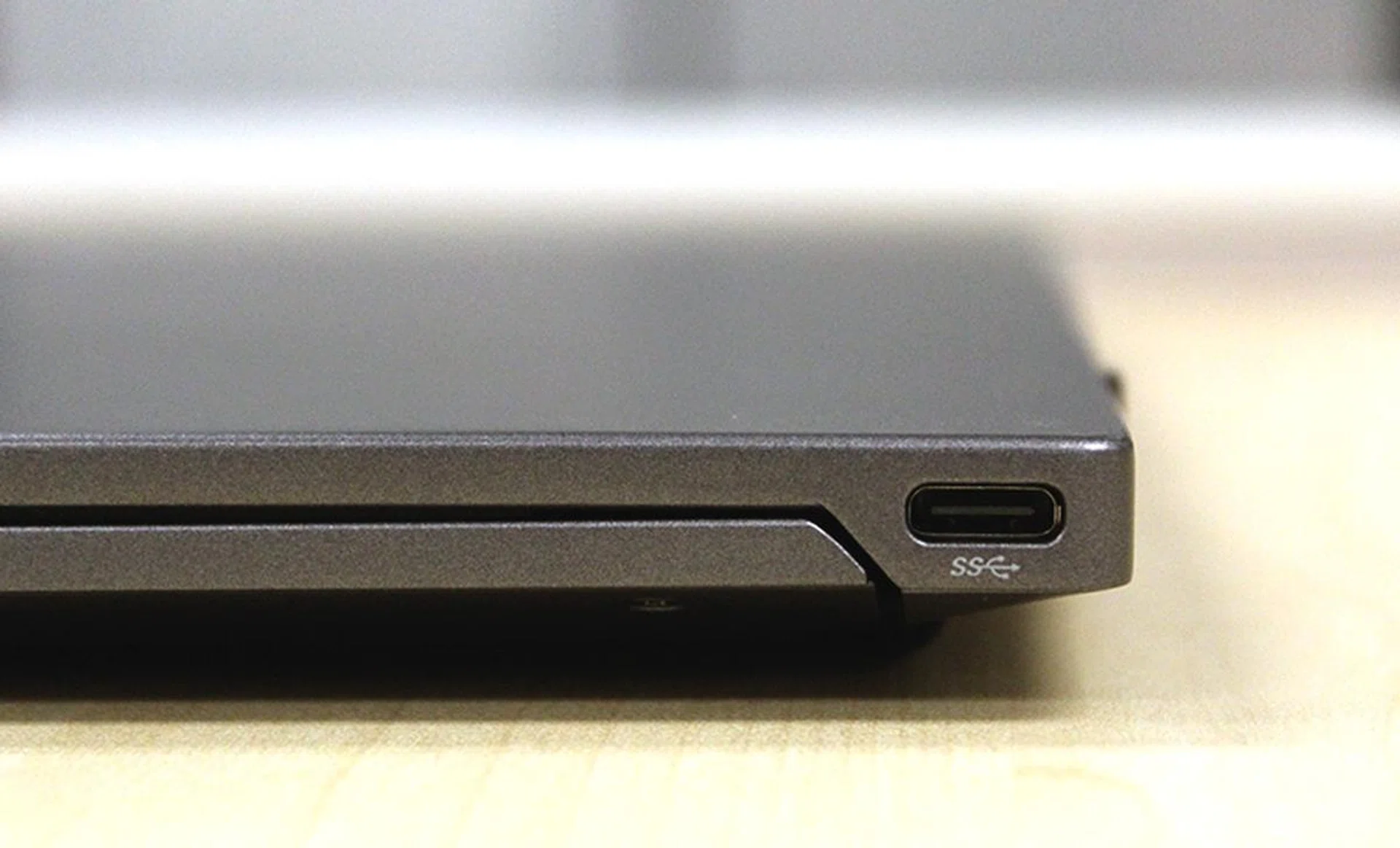
The ASUSPRO B9440 measures just 15mm thick.
The ASUSPRO B9440 is available in three SKUs, which I will detail in a table below. The unit I have on the hand is the range-topping one that comes with an Intel Core i7-7500U processor (2.7GHz, 4MB cache) with the Intel HD Graphics 620 integrated GPU, a generous 16GB of RAM, and a speedy 512GB M.2 SATA-based SSD. This is quite similar to the ZenBook 3 Deluxe I tested some weeks ago, although the ZenBook 3 Deluxe has a faster PCIe-based SSD.
Here are all the three SKUs of the ASUSPRO B9440:
ASUSPROB9440 | |||
OS | Processor | Memory | Storage |
Windows 10 Home | Intel Core i5-7200U(2.5GHz, 3MB cache) | 8GB | 256GBSSD |
Windows 10 Home | Intel Core i7-7500U(2.7GHz, 4MB cache) | 8GB | 512GBSSD |
Windows 10 Pro | Intel Core i7-7500U(2.7GHz, 4MB cache) | 16GB | 512GB SSD |
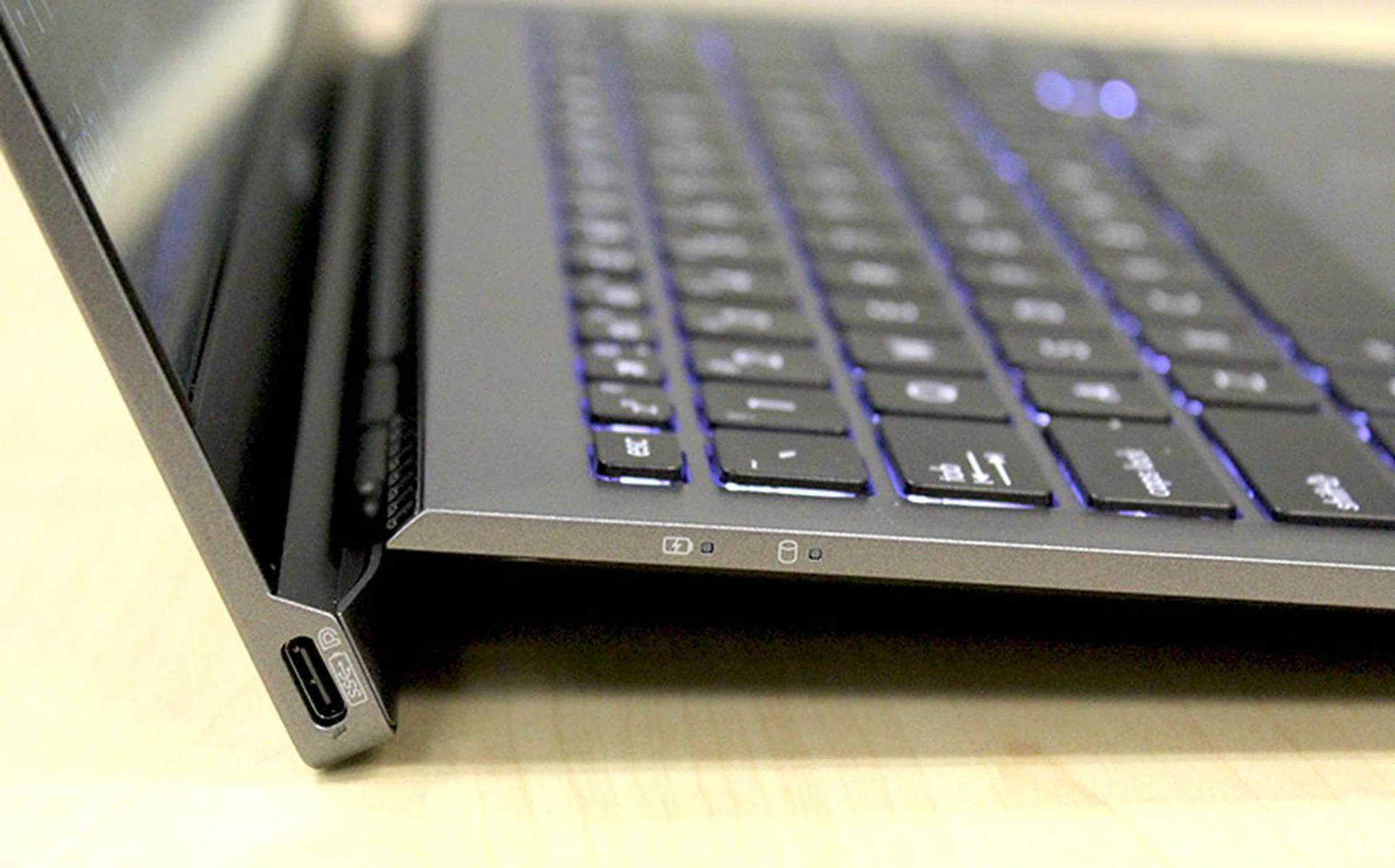
The two USB Type-C ports are integrated at the ends of the hinge. The left one supports power charging, video, and docking.
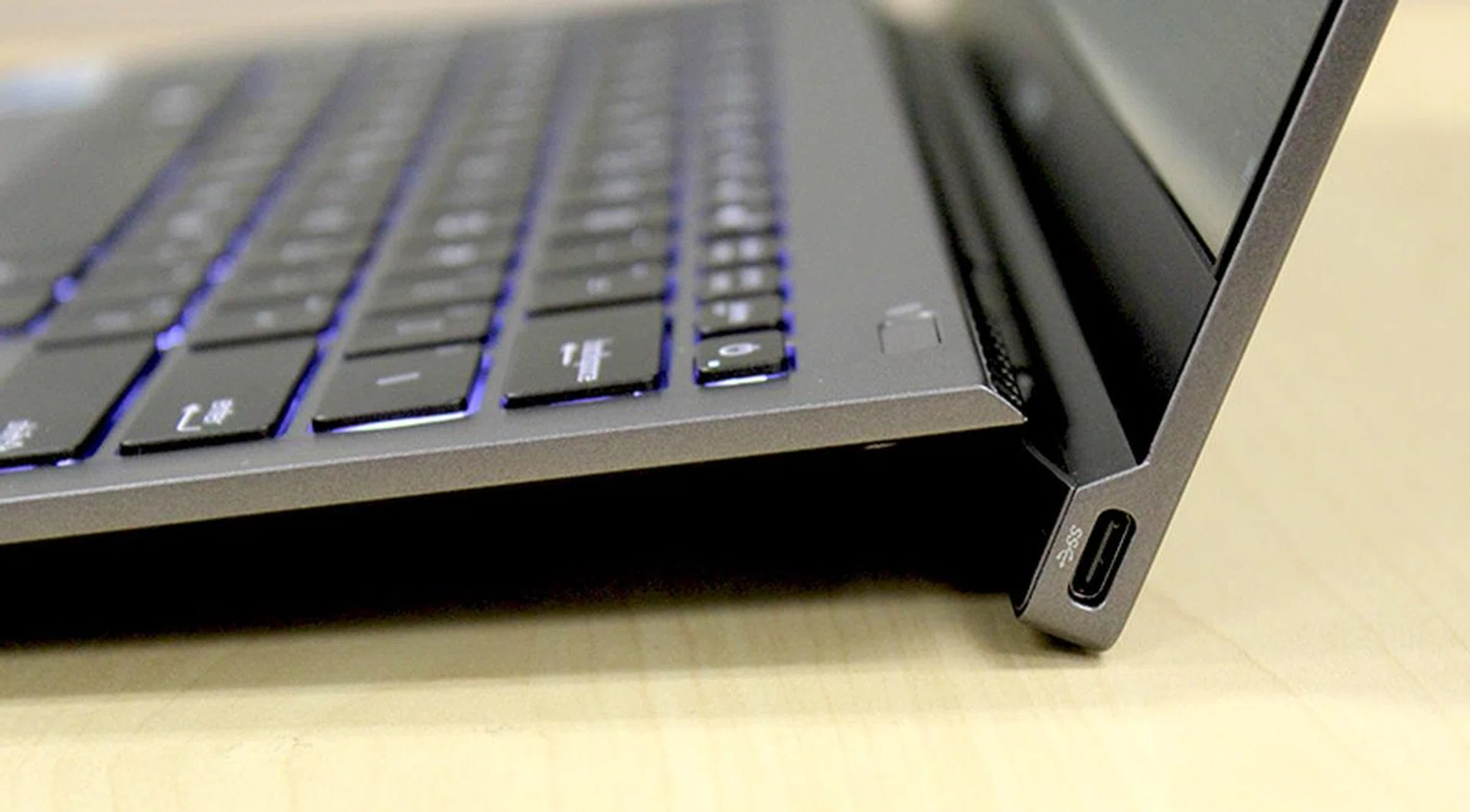
The port on the right is used solely for data.
On the connectivity front, ASUS has gone all out on USB Type-C, which is understandable given the slim dimensions of the notebook. The ASUSPRO B9440 comes with two USB Type-C ports and they are cleverly positioned at bottom of the display panel. Unfortunately, these ports do not support Thunderbolt 3. Instead, they support the USB 3.1 (Gen 1) standard, which means transfer speeds of up to 5Gbps.
The port on the left includes support for power delivery and docking, so there’s no separate power jack for power. The only other physical port that the B9440 has is a 3.5mm audio combo jack for both headphone-out and microphone-in. Wireless connectivity comes in the form of an Intel Wireless-AC 8260 adapter integrated within. This means support for 802.11ac and speeds of up to 867Mbps, as well as Bluetooth 4.1. To help users get used to only having just USB Type-C ports, ASUS provides a Mini Dock, which is a USB Type-C expansion hub that offers USB Type-A and Type-C as well as HDMI connectivity.
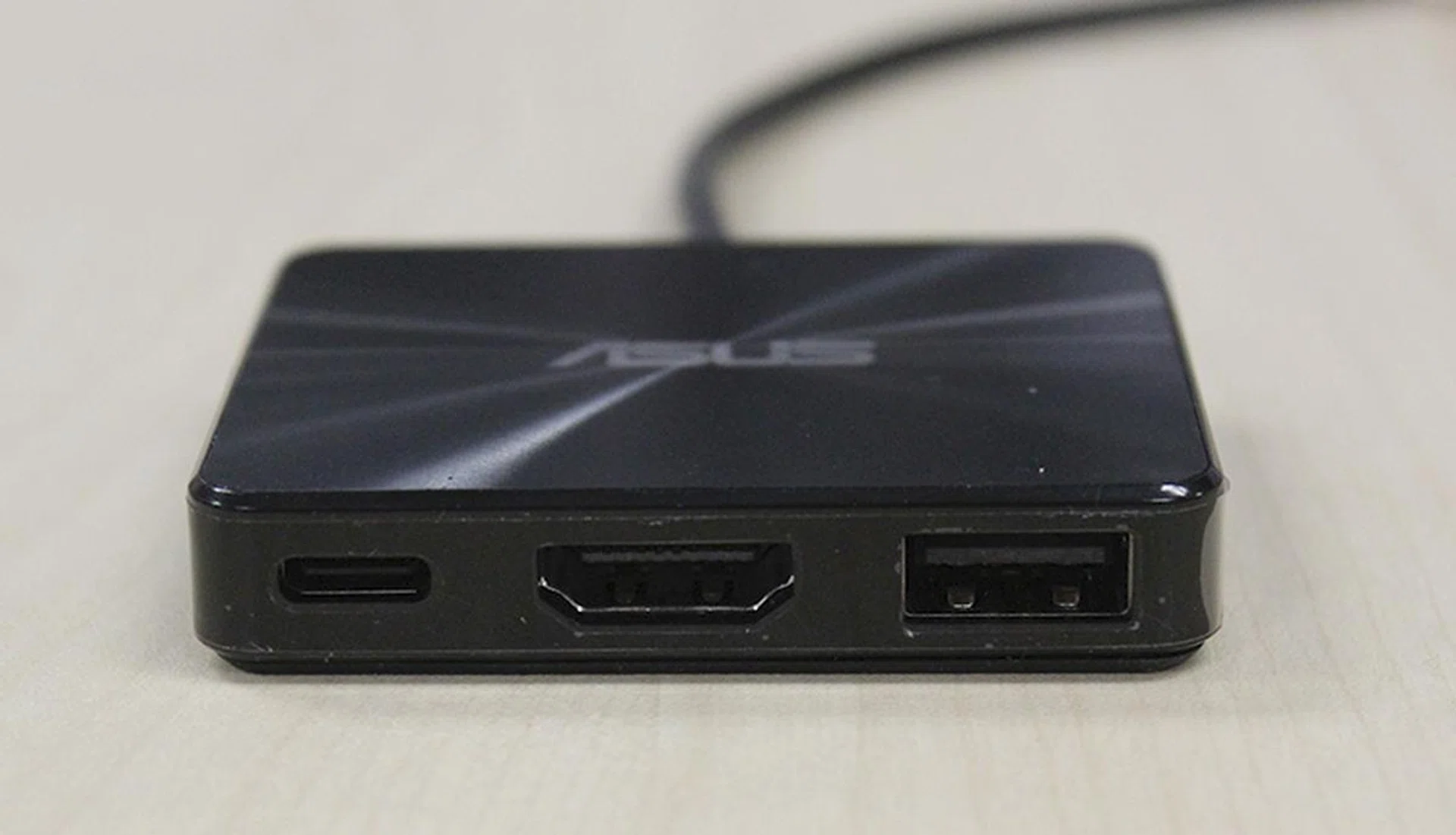
To help users get used to using the ASUSPRO B9440, the notebook comes with a Mini Dock, which is a USB Type-C expansion port that offers a USB Type-A port, a full-size HDMI port, and a USB Type-C port.
ASUS paid a lot of attention to the ASUSPRO B9440’s keyboard, which is great because this is a notebook designed for business and professional users, who will likely do a lot of typing. The B9440’s keyboard is one of the best that I have ever used. The keys have a slightly dished profile for a better sense of feel and accuracy, and also have backlighting for use in dimly lit environments (i.e. on a plane). In addition, considering the slim dimensions of the B9440, the keys have a generous amount of travel, which makes typing more pleasant. But more importantly, the sensation of these keys is really well-judged with a slightly higher actuation force that most notebook keyboards, which makes the B9440 excellent for typing. In fact, it feels quite similar to a keyboard with Topre switches.
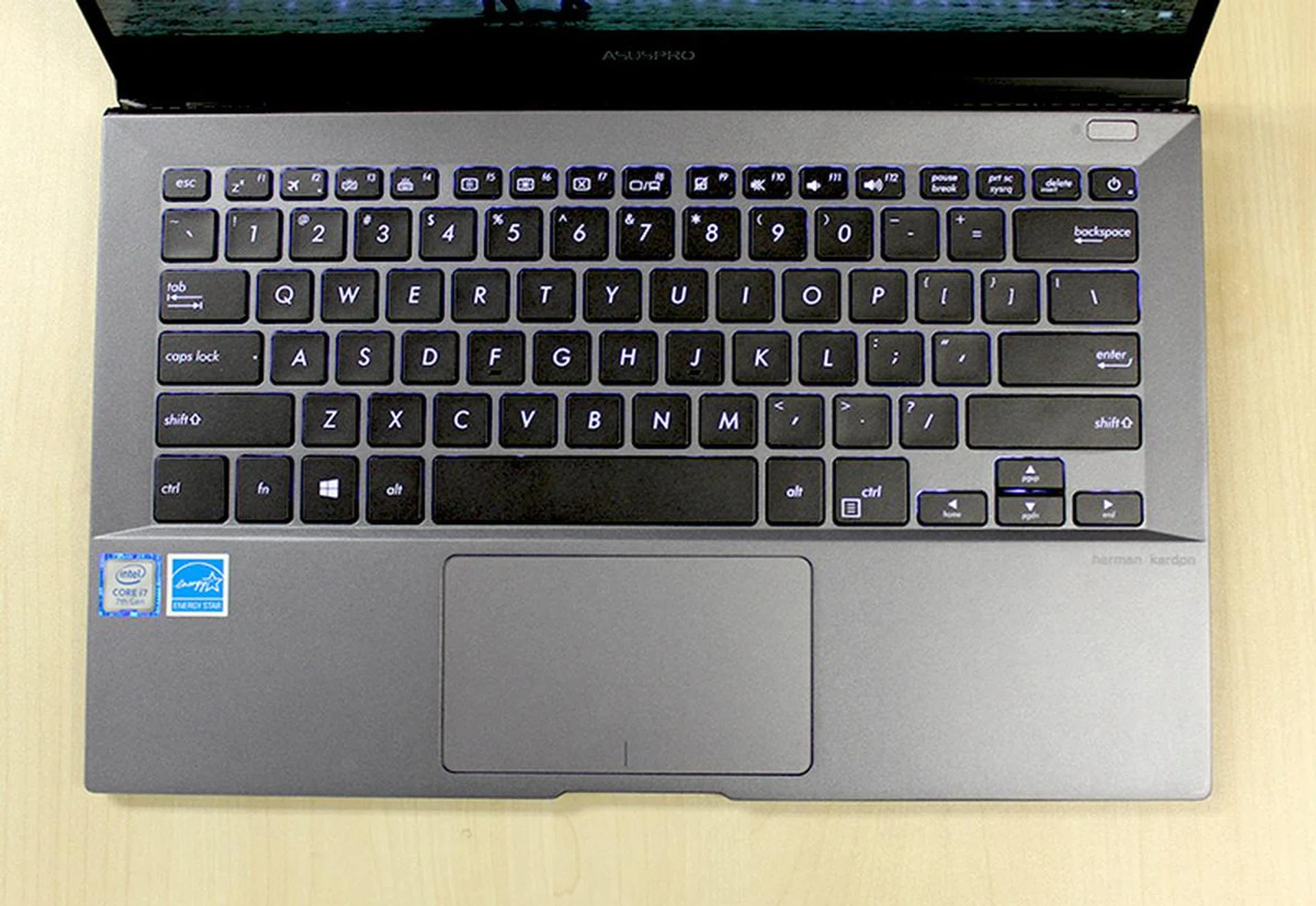
The keyboard is one of the best I have ever used. The keys almost feel like they use Topre switches!
What also helps make typing so good on the notebook is the keyboard-raising hinge. As mentioned earlier, unique hinge design of the ASUSPRO B9440 doubles up as a notebook stand when the notebook is opened. This lifts the notebook up at a 7-degree angle, which makes typing more comfortable. Finally, the keyboard is also spill-resistant and there's a fingerprint scanner to the top right of the keyboard.
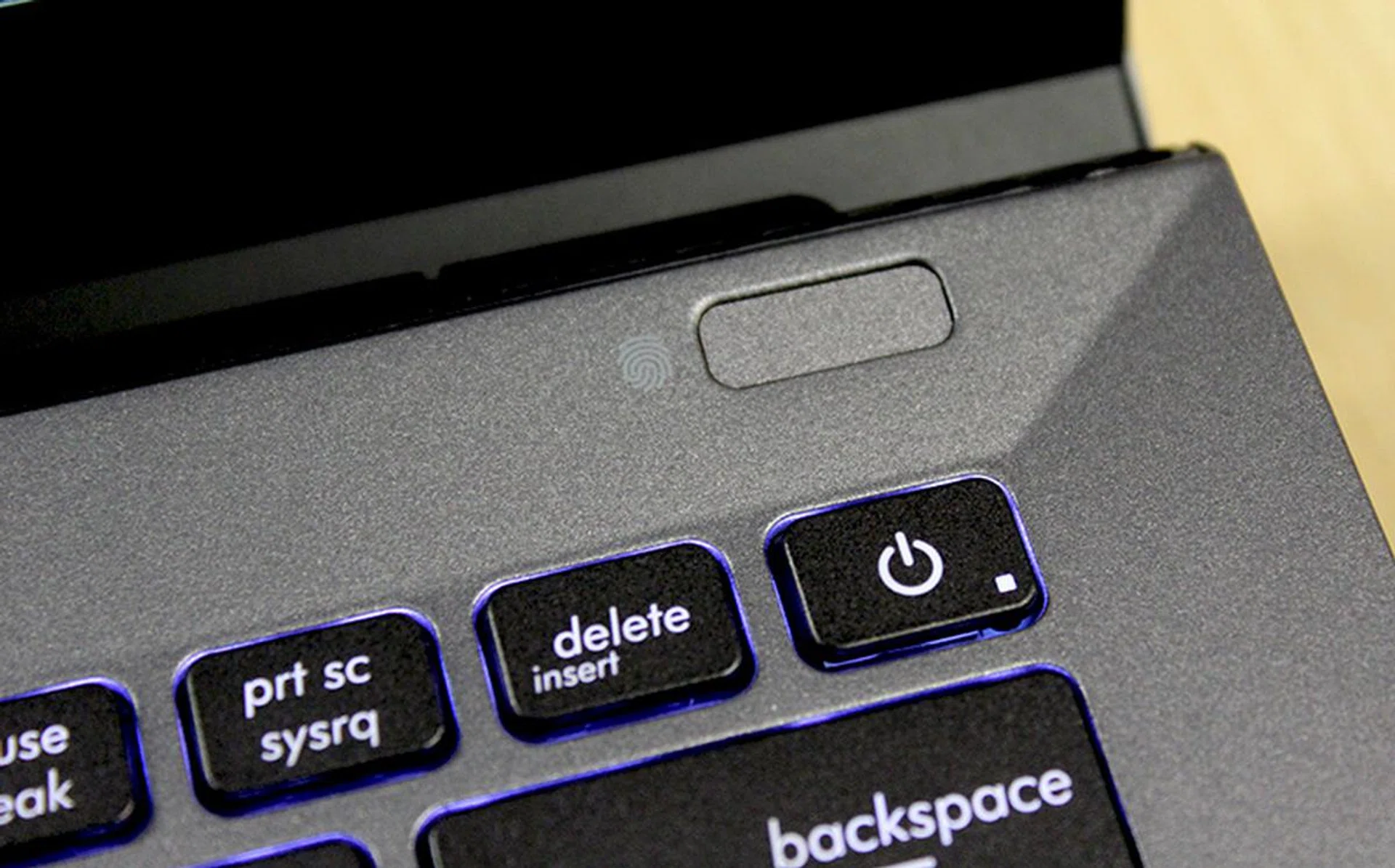
There is a fingerprint scanner to the top right of the keyboard.
Moving on, the trackpad is decent but not quite as good as the one on the ZenBook 3 Deluxe. I have two major gripes with it. The first is that it lacks height, which makes vertical scrolling a bit cumbersome. Secondly, there’s a slight haziness and vagueness to the trackpad so I don’t find it to be quite as accurate and precise as it should be.
Performance Analysis
To evaluate the performance of the ASUSPRO B9440, I will be comparing it closely to that of the ZenBook 3 Deluxe and ZenBook 3, because all three notebooks have very similar specifications. The only difference is that the ZenBook 3 Deluxe and ZenBook 3 have faster PCIe-based SSDs, whereas the B9440’s SSD uses the slower SATA interface. Included in the graphs for reference are also other similarly thin and portable notebooks like the recently reviewed LG gram 13 and 14, as well as the Dell XPS 13 and HP Spectre.
Here’s a list of all the benchmarks used:
- PCMark 8
- 3DMark (2013)
- Tomb Raider
- Far Cry 2
[hwzcompare]
[products=609544,606203,574502,607165,566538,545252]
[width=200]
[caption=ASUS ZenBook 3 Deluxe Compared]
[showprices=1]
[/hwzcompare]
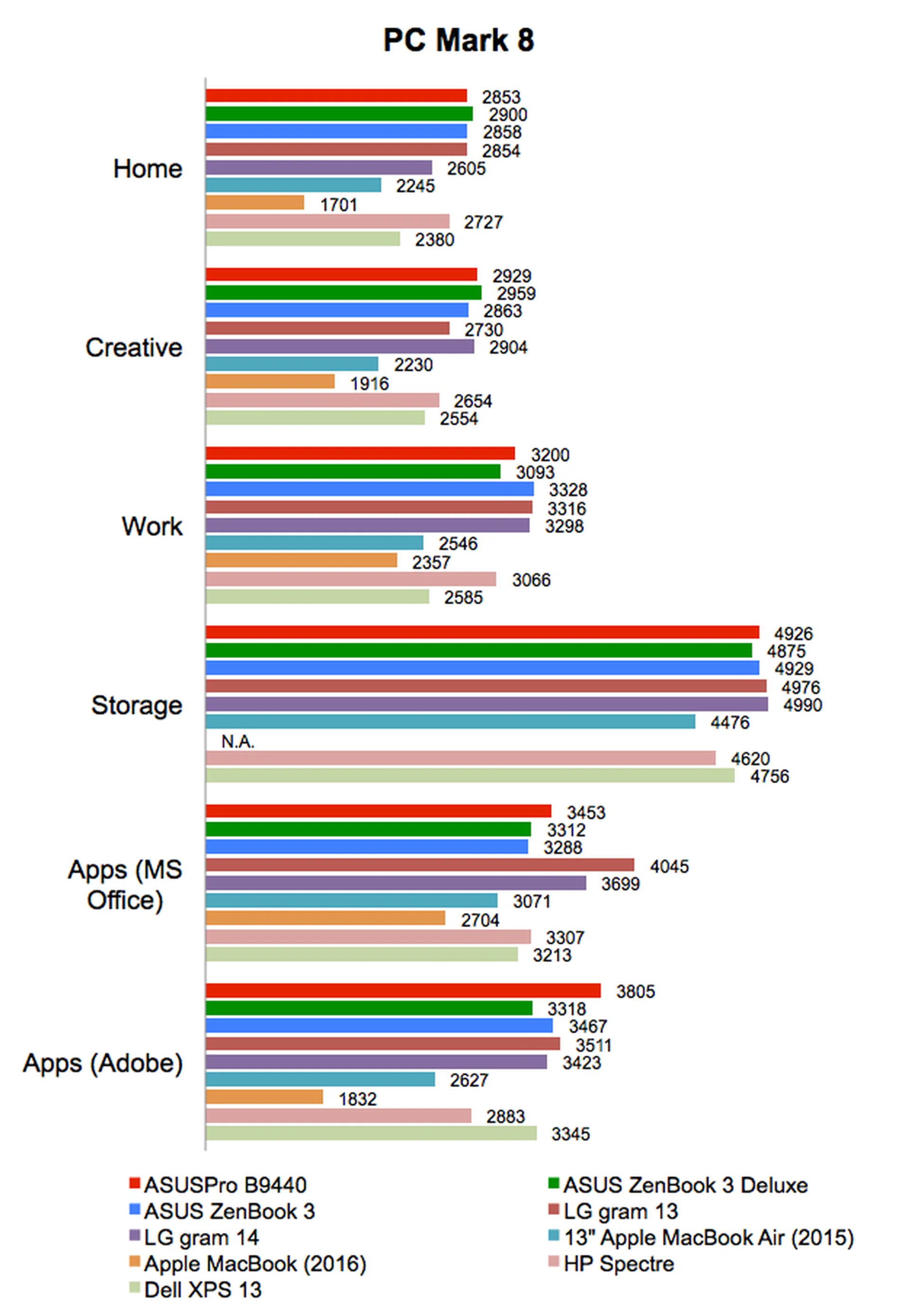
PCMark 8
PCMark 8 tests a system’s performance by putting it through different tasks that reflect the workloads of various kinds of users, for instance the casual home user or the working creative professional. Given the nearly identical specifications of the ASUSPRO B9440 and the ASUS ZenBook 3 Deluxe and ZenBook 3, it wasn’t surprising at all to see that all three notebooks managed comparable, if not nearly identical scores on PCMark 8. That said, the B9440 did stand out for its excellent showing on the Adobe workload, where it managed the highest score of 3805 points.
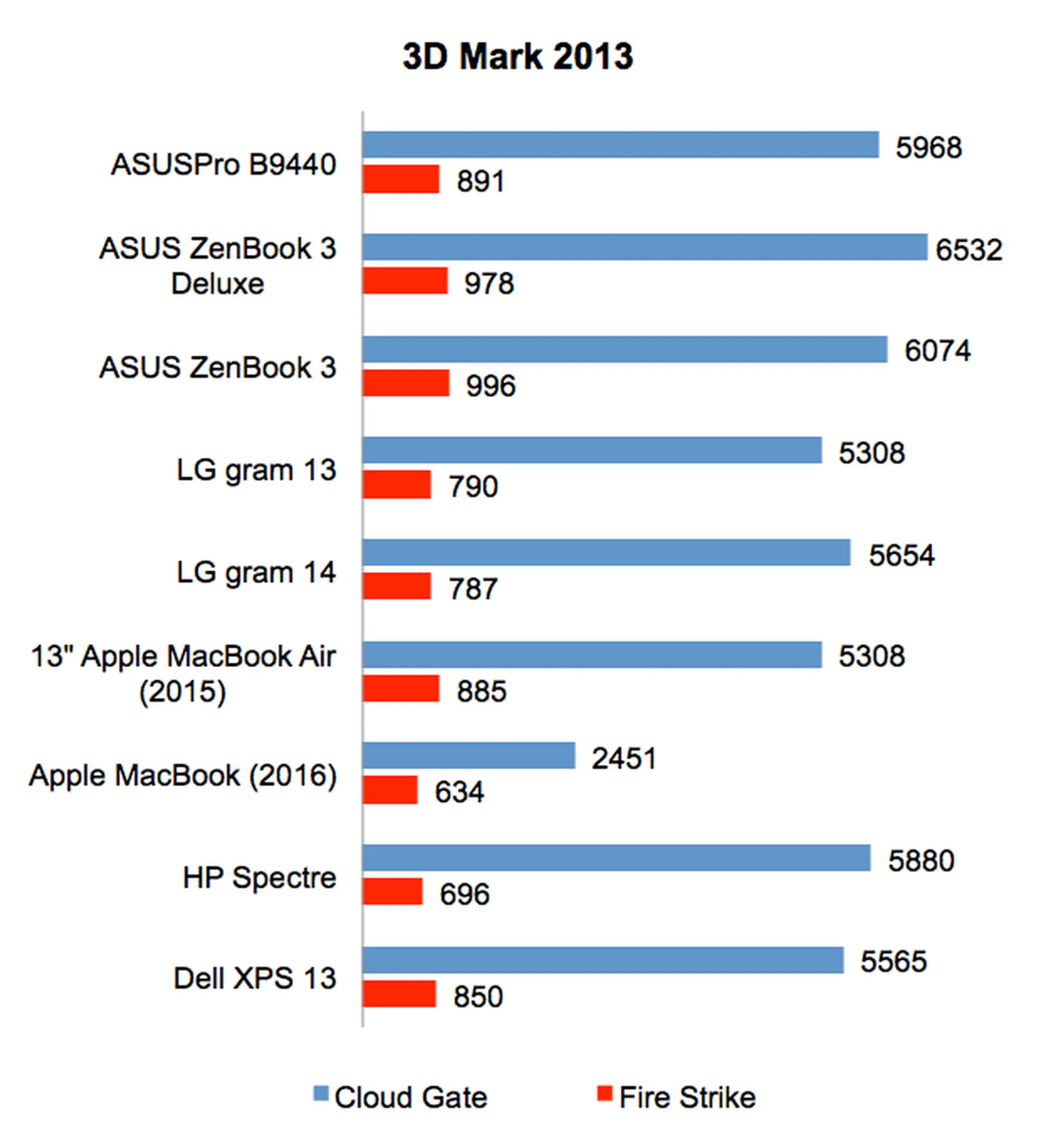
3DMark
Even though the ASUSPRO B9440 has similar specifications to the ASUS ZenBook 3 Deluxe, its 3DMark scores were noticeably lower. On the less intensive Cloud Gate scenario, it scored 5968 points, which was about 9% less than the ZenBook 3 Deluxe. On the more intensive Fire Strike scenario, it scored 891 points, which was again about 9% less than the ZenBook 3 Deluxe. That said, its overall scores actually puts it amongst one of the better performing notebooks. Most notably, the B9440 scored significantly better than the LG gram 13 and 14, both of which are also powered by the same class of new Intel Kaby Lake processors.
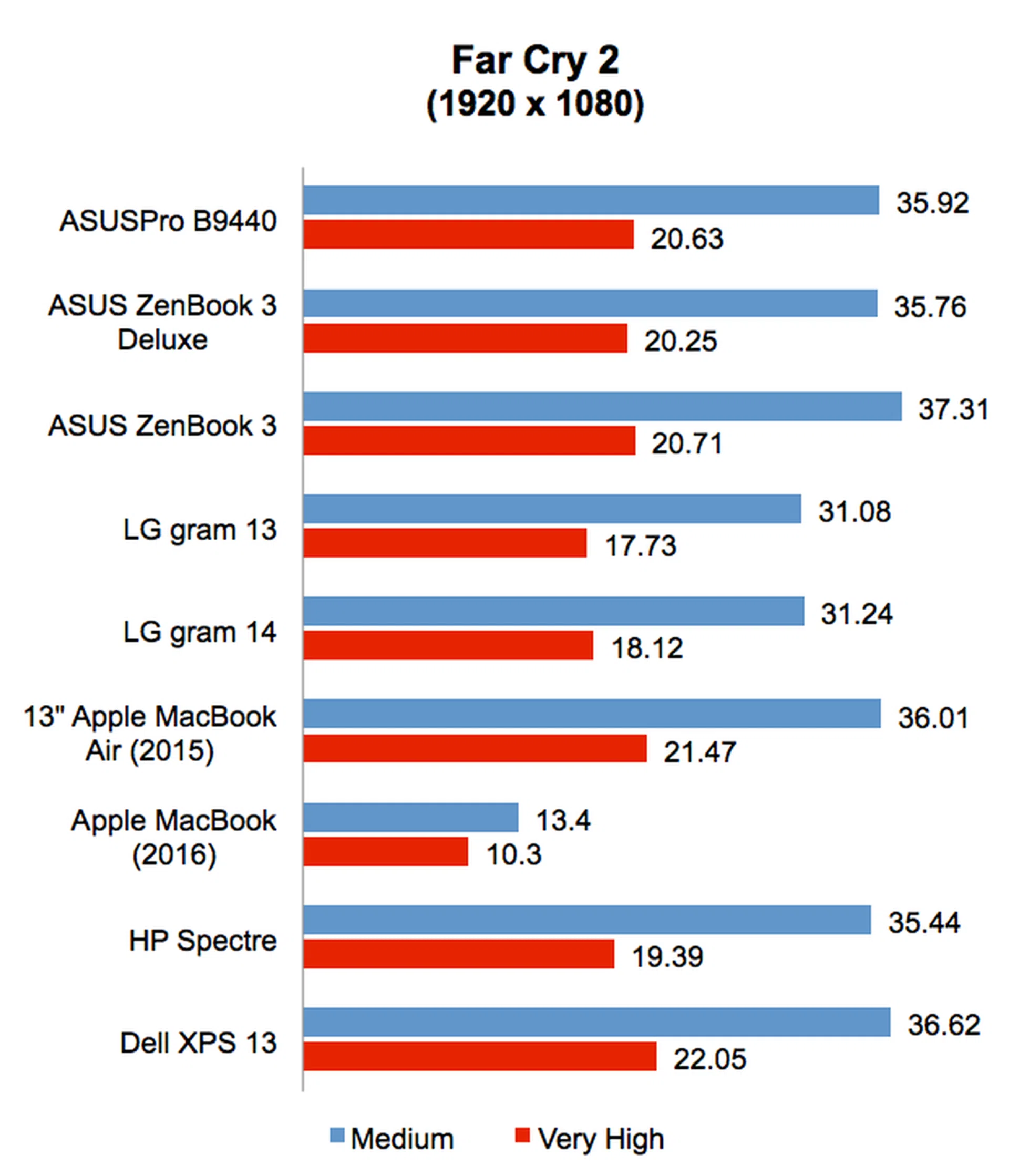
Far Cry 2
On Far Cry 2, the ASUSPRO B9440 managed identical frame rates to the ASUS ZenBook 3 Deluxe and ZenBook 3. It was also noticeably faster than the LG gram 13 and 14. That said, it wasn’t actually any faster than other notebooks like the Dell XPS 13 and HP Spectre, which are powered by older Intel Skylake processors.
Tomb Raider
Tomb Raider might be quite an old title, but it still looks pretty good. More importantly, it is still a stern test for integrated GPUs, which explains the overall poor performance here. Once more, the ASUSPRO B9440 managed comparable frame rates to the other two ASUS Ultrabooks, which is not surprisingly considering that they have nearly identical specifications. We can also see that the trio of ASUS notebooks has a commanding lead over the rest of the other notebooks, particularly over the LG gram 13 and 14.

Battery life & power consumption
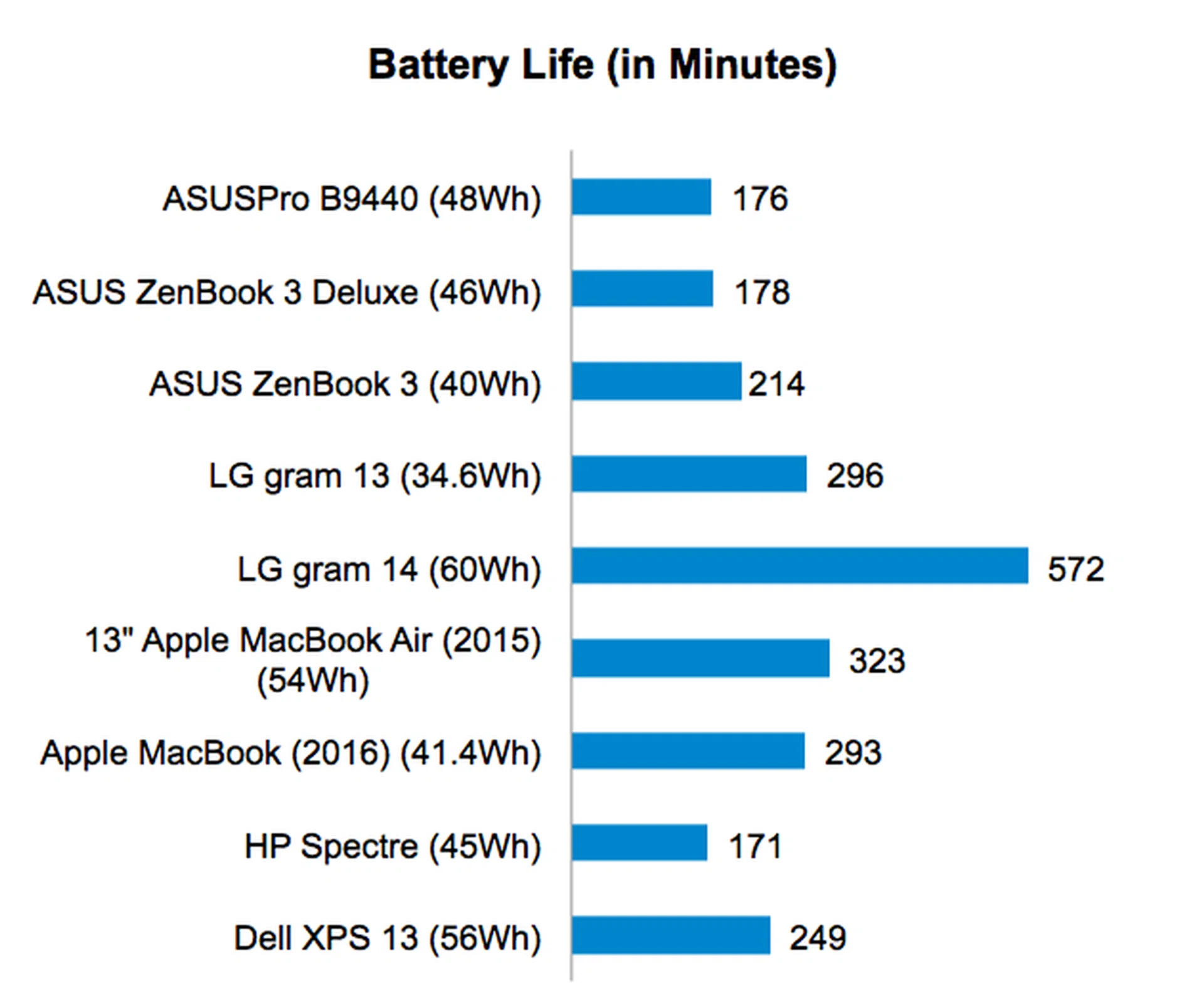
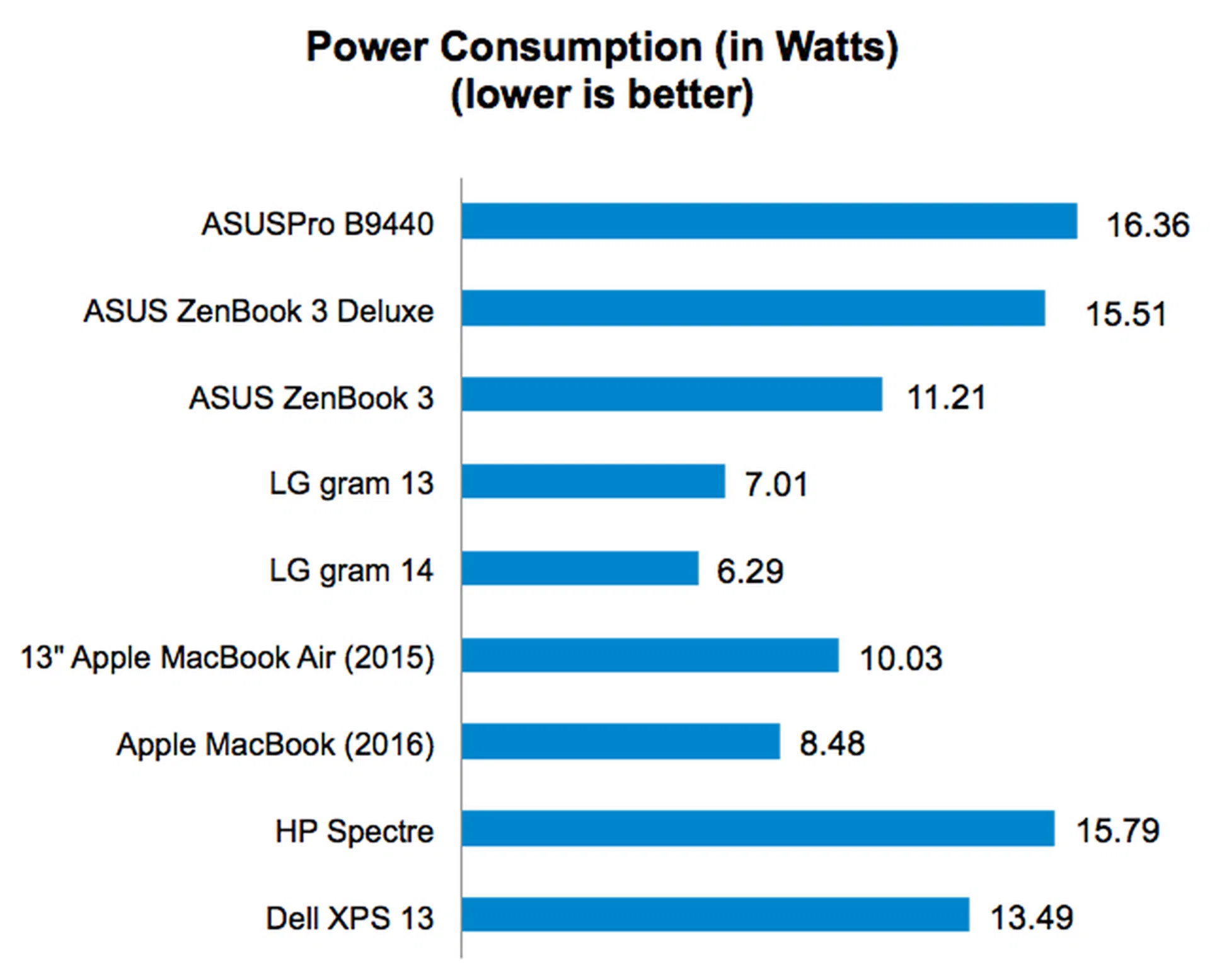
The ASUSPRO B9440 lasted just under three hours in our battery test, 176 minutes to be exact. This is about the same as the ZenBook 3 Deluxe, but less than the ZenBook 3’s 214 minutes. The B9440’s poor battery life can be attributed to its high power consumption. At 16.36W, it is the most power hungry notebook. Compared to the LG gram 13 and 14, which are powered by similar Kaby Lake processors, the B9440’s power consumption is more than twice as much. If it is any consolation, the B9440 features a quick-charging function that allows it to attain a 50% charge within 30 minutes.
Portability Index
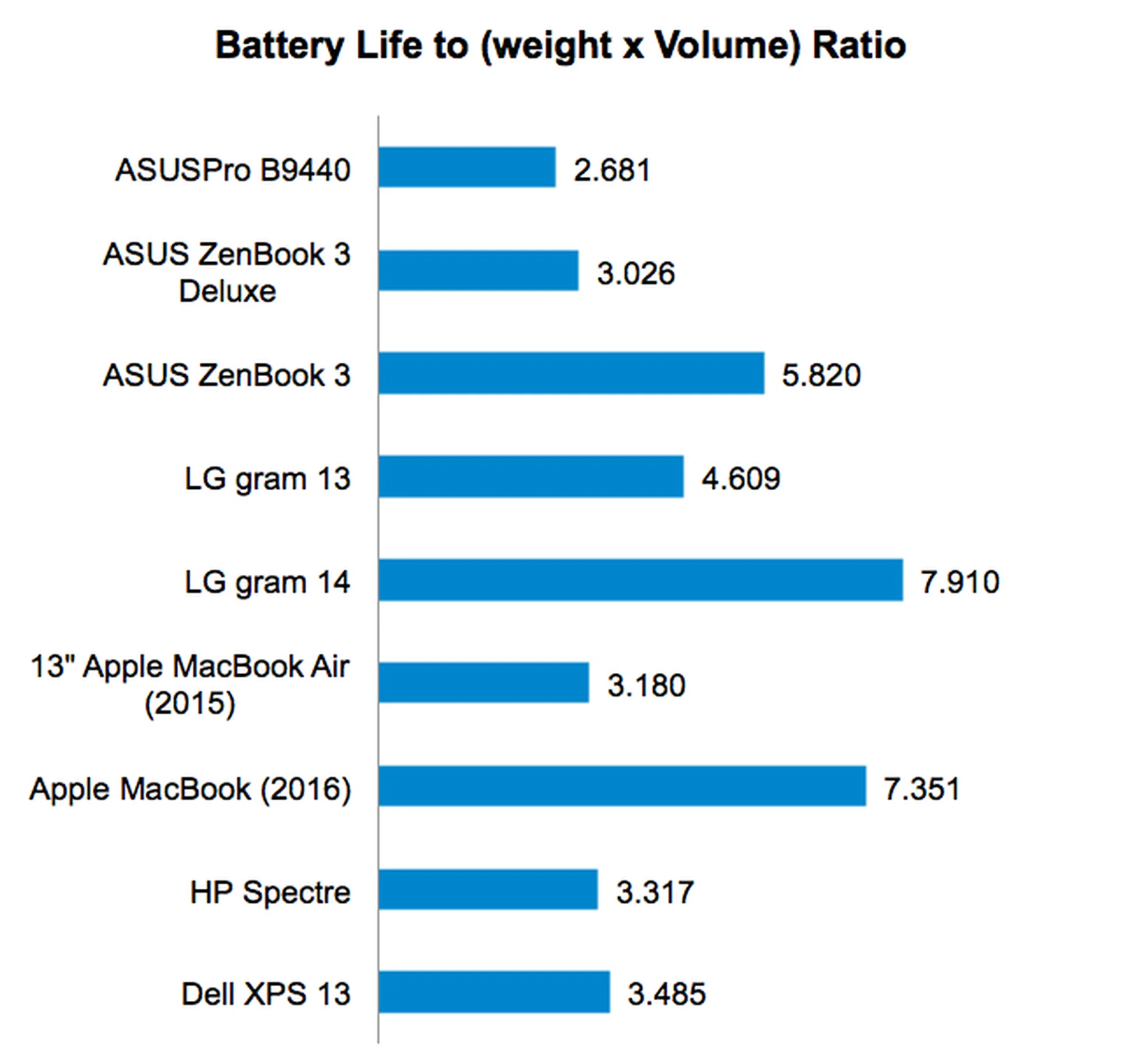
Our Portability Index factors in battery life, weight and volume so you can see which notebook is the most worthwhile to carry around. As a result of its disappointing battery life, the ASUSPRO B9440 did not score as well as one might expect in our Portability Index. Its ratio of 2.681 is actually the lowest even if it is one of the lightest and slimmest notebooks around. If you value battery life as much as portability, the LG gram 14 and Apple MacBook (2016) offers the best combination of portability and battery life.
A desirable notebook, but not without flaws
As I mentioned at the start of this review, the ASUSPRO B9440 shares a lot of similarities with ASUS’ ZenBook notebooks. And like the ZenBook notebooks, the B9440 is hard to fault in terms of design and aesthetics. The gray exterior might look a bit bland, but the actual design of the notebook chassis is quite special and attractive. The hinge, in particular, is really nifty and gives not only a different profile to the notebook, but also doubles up as a stand to prop the notebook up for more convenient typing.
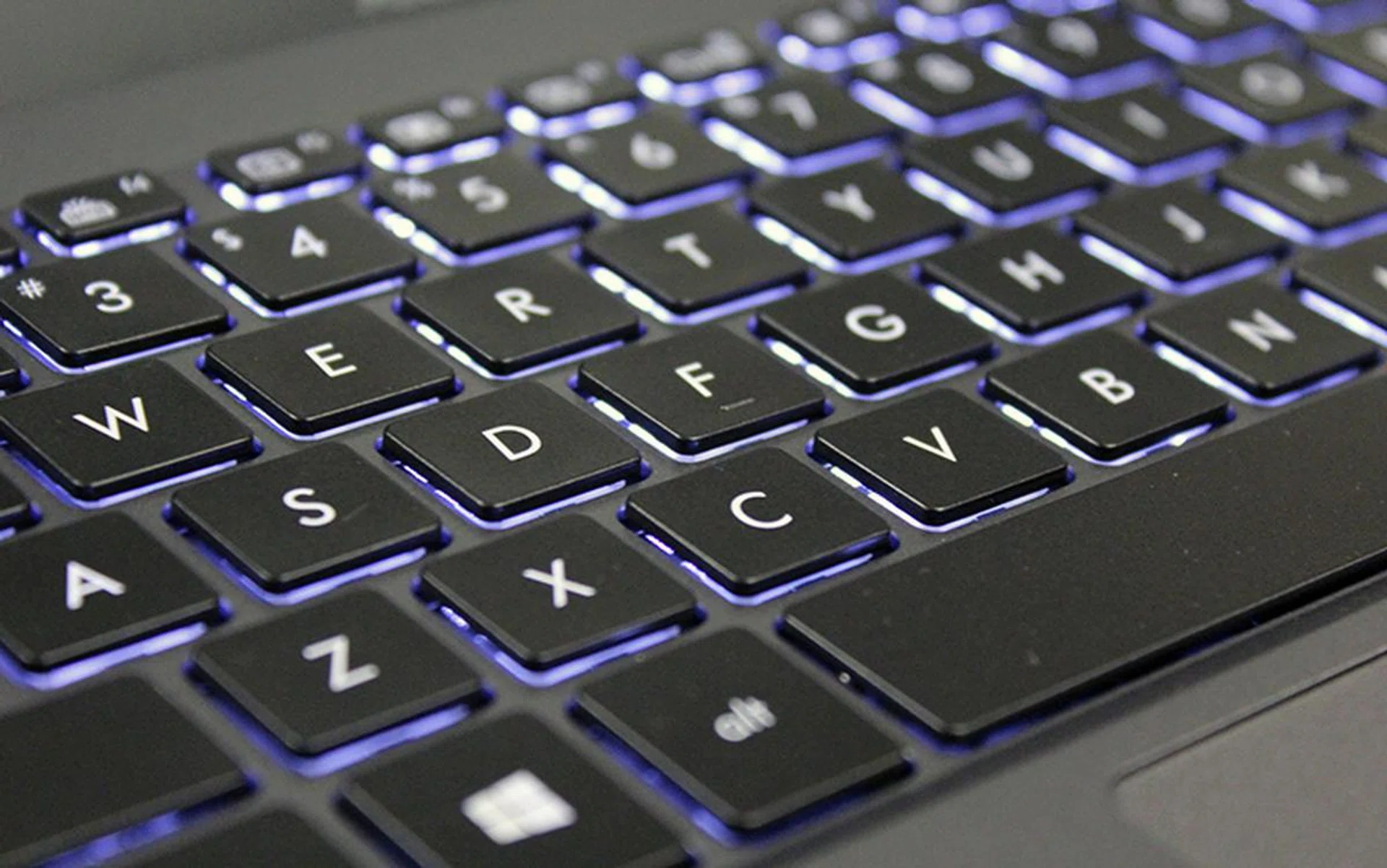
The ASUSPRO B9440's keyboard is one of the best I have used in any notebook.
Speaking of typing, the ASUSPRO B9440 has one of the best keyboards I have used on a notebook. It has a generous amount of travel and a feel that closely mimics that of Topre switches, of which a lot of people are fans of. Users who do a lot of typing are sure to love the B9440. Personally, I think this is the best thing about the B9440.
Performance is pretty decent. That said, I have only a tested a handful of Kaby Lake-powered notebooks thus far, but the ASUSPRO B9440 ranks as one of the faster ones. Certainly, compared to the LG gram series, the ASUS notebooks have significantly better graphics performance. However, overall performance does not seem to be greatly superior to that of older Skylake-powered notebooks, so don’t be expecting miracles from Intel’s new Kaby Lake processors.
As I noted in the review the ZenBook 3 Deluxe, the ZenBook 3 Deluxe’s fans were almost always spinning, which suggested that it has a heat management issue. In my tests, I also found the ZenBook 3 Deluxe would throttle performance if it was taxed for long periods. Fortunately, this was less of a problem for the ASUSPRO B9440. Although its fans still came on quite frequently, its performance was consistent even if it had been taxed for long periods.
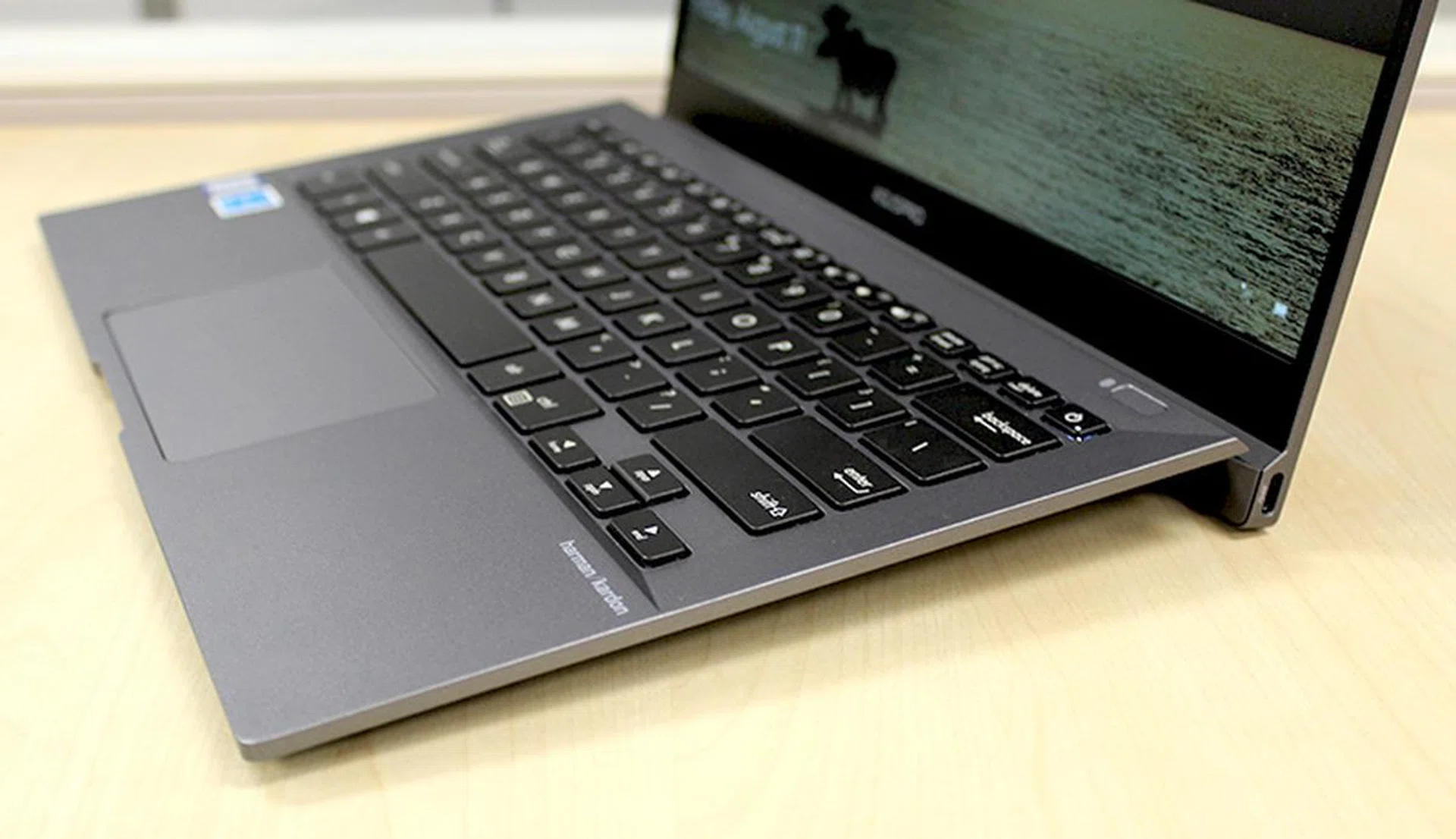
The hinge props the keyboard up at an angle making it more comfortable to type.
So far so good, but the ASUSPRO B9440 isn’t perfect. The matte display might be resistant to glare and reflection, but it is only Full-HD. In today’s ultra-high resolution world, a Full-HD display is starting to look dated and so is the B9440. Oh, and the B9440 doesn't have Thunderbolt 3 ports. Even though Thunderbolt 3 devices are still quite uncommon and pricey, support for faster and newer interfaces is always welcomed.
But more importantly, battery life is disappointing. At just under 3 hours, it runs for a markedly shorter time than its rivals. As a result, I’m afraid most users would suffer from too much battery anxiety if they were to use it outside for work. ASUS hopes that its quick-charging function would alleviate this issue, but, as I’m sure most users can attest to this, a power point doesn’t always present itself when you need it the most.
If it is any consolation, our battery test is quite demanding. In the real world, if you were using the ASUSPRO B9440 for less intensive tasks like typing documents, managing spreadsheets, and emails, you would very likely get a considerably longer battery life. What I’m saying is that although its battery life is below average when compared to its rivals, it is usable.
ASUSPROB9440 | ||||
OS | Processor | Memory | Storage | Price |
Windows 10 Home | Intel Core i5-7200U(2.5GHz, 3MB cache) | 8GB | 256GBSSD | S$2,098 |
Windows 10 Home | Intel Core i7-7500U(2.7GHz, 4MB cache) | 8GB | 512GBSSD | S$2,498 |
Windows 10 Pro | Intel Core i7-7500U(2.7GHz, 4MB cache) | 16GB | 512GB SSD | S$2,988 |
As the table below shows, the ASUSPRO B9440 is priced similarly to other premium Ultrabooks. If you can live with just a 256GB SSD, the entry-level SKU offers the most bang for the buck, coming at just over two grand at S$2,098. The mid-level SKU offers a faster processor and doubles the storage for S$400 more at S$2,498.
The top-of-the-line SKU costs substantially more at S$2,988 because it packs a fast Core i7 processor, 16GB of RAM, 512GB SSD, and Windows 10 Pro. The additional RAM and inclusion of Windows 10 Pro (the other two SKUs come with Windows 10 Home) cost a considerable premium.
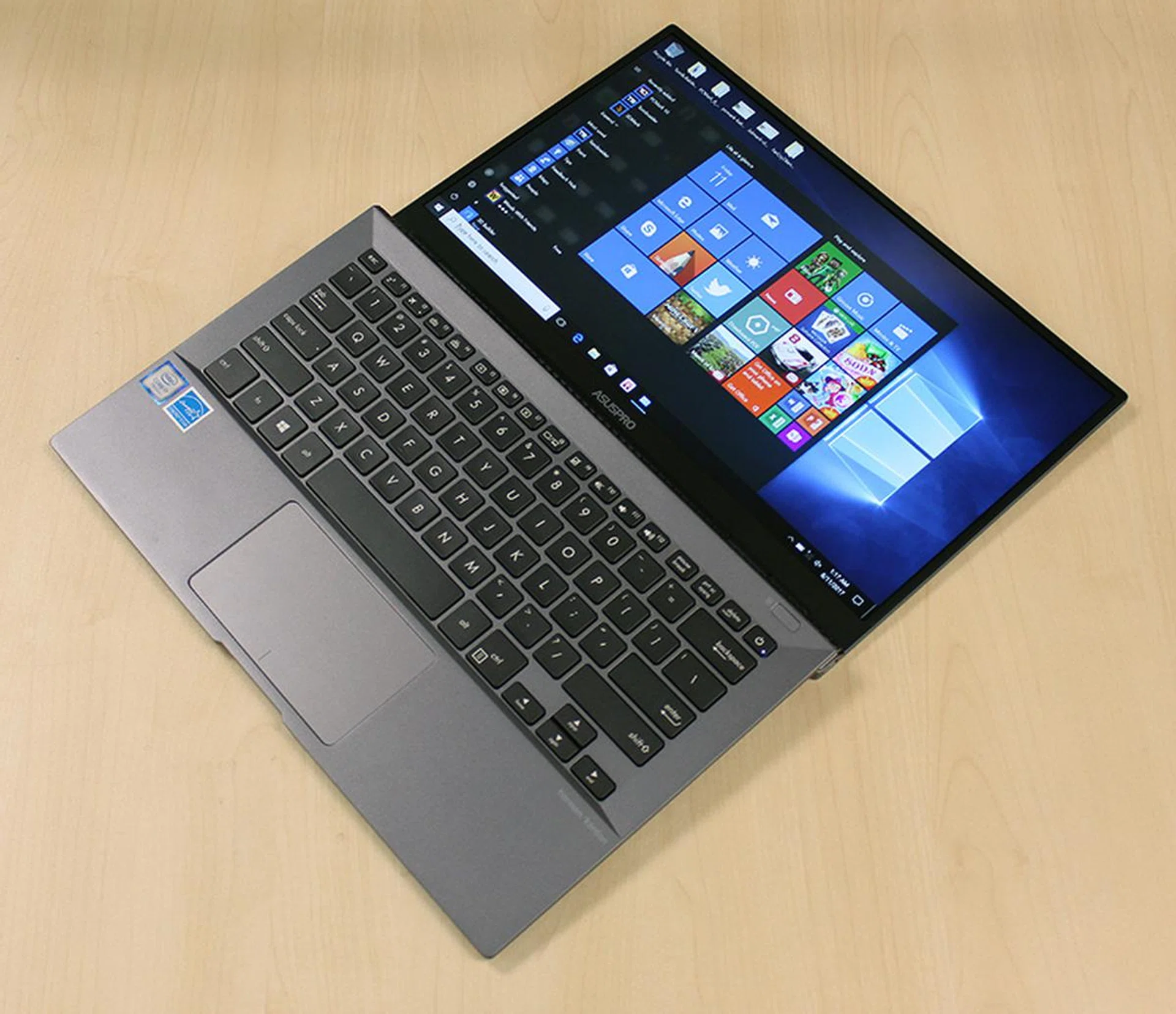
To regard the ASUSPRO B9440 simply as a good business notebook would be a mistake. It is a good notebook, period.
Overall, despite the less than ideal display and battery life, I find the ASUSPRO B9440 to be a really desirable notebook and definitely one of the top business notebooks. There is, after all, quite a lot to like about the notebook. It has a nice unique design that props the keyboard up, a superb keyboard, decent performance, a good build quality, and it is really thin and light. Let's not also forget that it passes MIL-STD 810G testing and that it has a spill-resistant keyboard. These are really useful and practical features to have. In fact, I think I prefer it to the ZenBook 3 Deluxe. That’s how much I like it.
Our articles may contain affiliate links. If you buy through these links, we may earn a small commission.