

Acer goes thin and light
Acer is stepping up its game with its Predator Triton series of gaming laptops. The Predator Triton 700 eschewed caution for a bold design that featured a see-through glass trackpad above the keyboard. It also packed in top-end specifications and an excellent mechanical keyboard, and the main drawback was the fact that the trackpad location just wasn't very practical.
The Predator Triton 500 follows a more conventional design, but it also feels more premium than Acer's other Predator Helios and Nitro laptops. For starters, the all-metal design is reassuringly solid, and it also features a relatively slim and light build that should make it quite attractive for those looking for a portable gaming notebook.
Here's an overview of its specifications:
- 15.6-inch 1,920 x 1,080-pixel 144Hz IPS display
- Intel Core i7-9750H processor
- 16GB DDR4-2666 RAM
- NVIDIA GeForce RTX 2070 Max-Q
- 512GB PCIe M.2 SSD
- 84Wh battery
- 358.5 x 255 x 17.9mm
- 2kg
The above will cost you S$3,198, which is no small amount of money. Do you want the Triton 500 for your next gaming laptop? Read on to find out.
Sleek and light
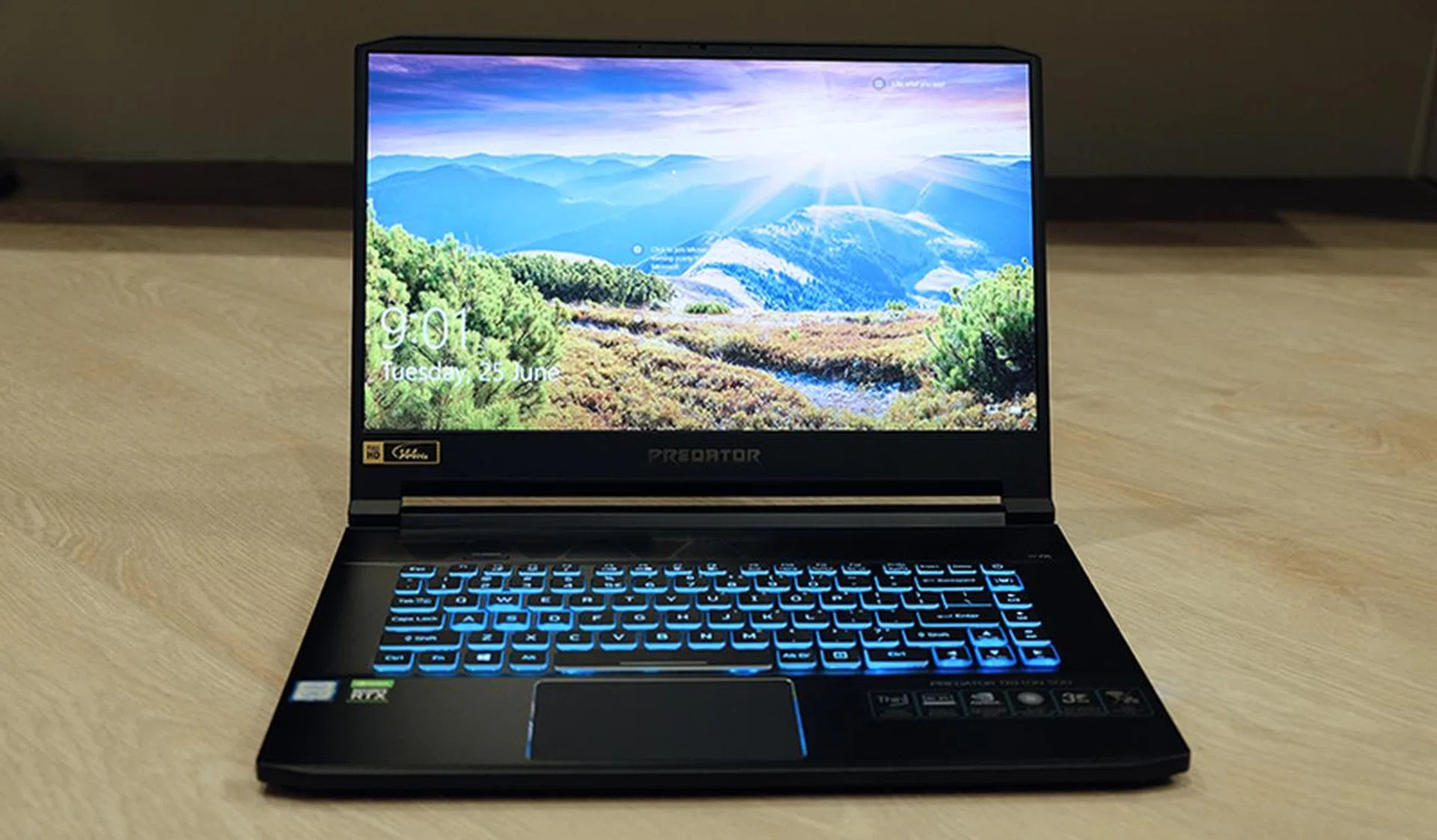
The Predator Triton 500 features a 144Hz IPS display.
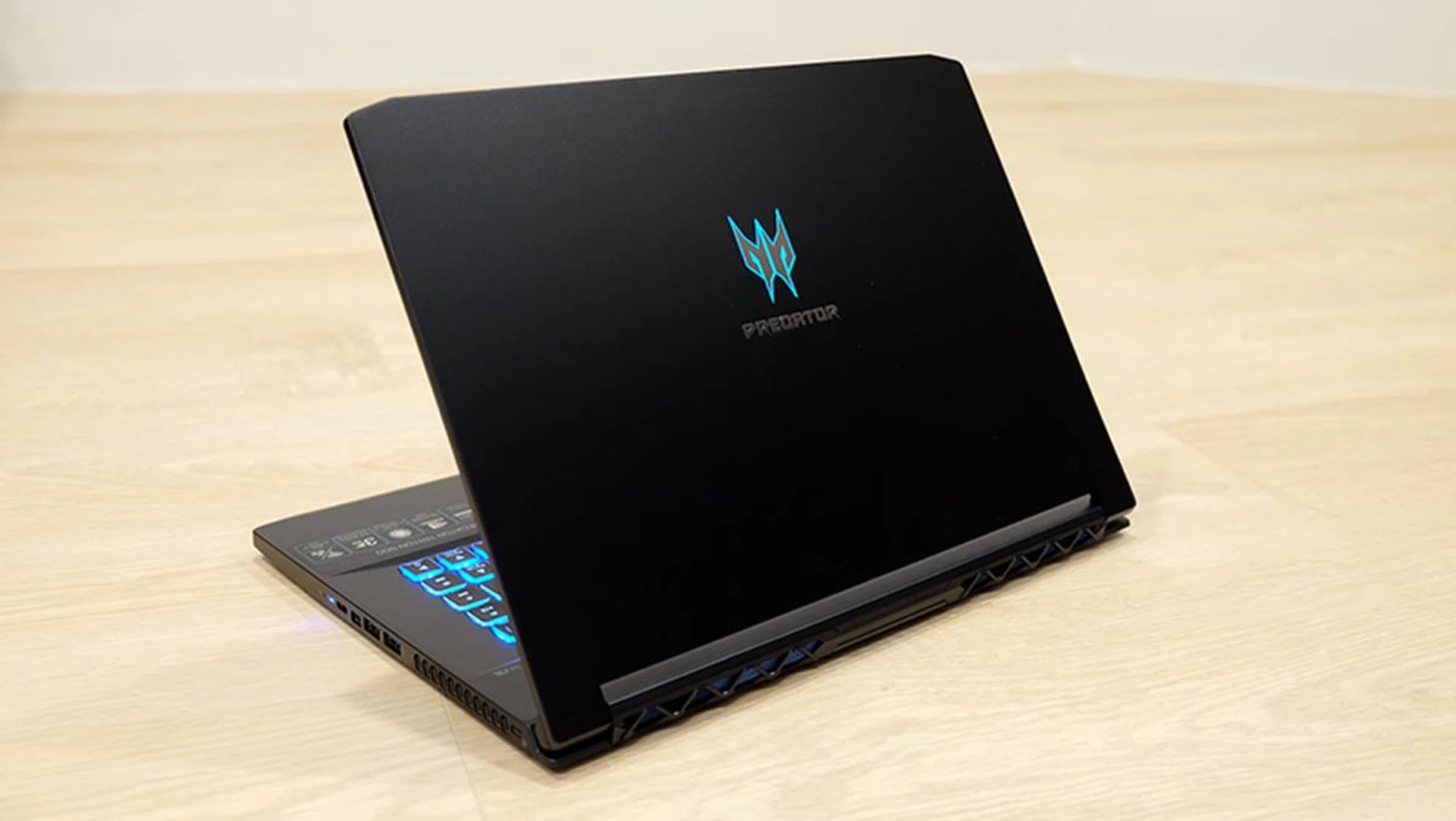
The Predator Triton 500 is one of the sleeker 15-inch gaming notebooks around, tipping the scales at just 2kg and measuring just 17.9mm thick. It has a pretty minimalist design for an Acer laptop. If you were expecting obnoxious vents and plenty of red, this laptop thankfully has none of that. Its dusky aluminum shell is best described as blue-gray, and it is complemented by translucent blue accents around select keys, such as the WASD key cluster and the arrow keys. The Predator logo on the lid lights up in blue as well, and I find the soft glow it gives off pretty attractive.
All things considered, it's not hard to see why Acer named the laptop after Triton, the messenger of the sea in Greek mythology and son of Poseidon. But aside from the small design touches that evoke the ocean, the Triton 500 has a pretty understated look, with a smooth lid and subtle angles that don't really scream for too much attention.
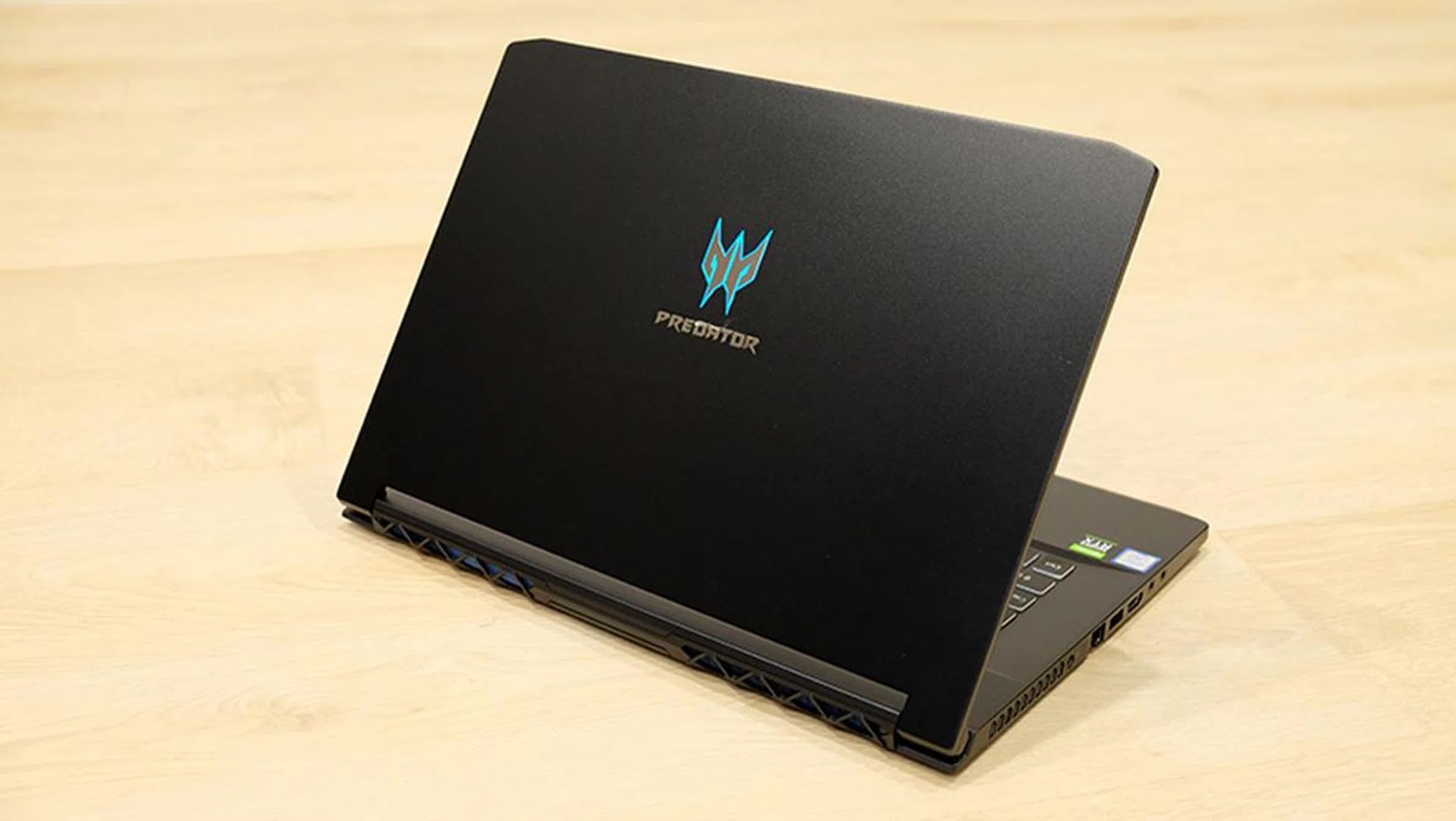
The laptop has a surprisingly tasteful design.
One thing that's not low-key though – the really jarring and awful boot-up sound sequence that sounds like something out of a cheesy sci-fi movie. There doesn't seem to be a way to turn it off, which makes powering on the laptop a really awkward affair if there's anyone in the vicinity.
Contrary to appearances, the triangular grilles above the keyboard are intake vents and not speakers. The actual speakers fire through teeny openings at the bottom of the notebook, and they unfortunately sound as tiny as they look. The sound coming from these just feel lacking in body and oomph, particularly at the low end, and clarity is not the best either.
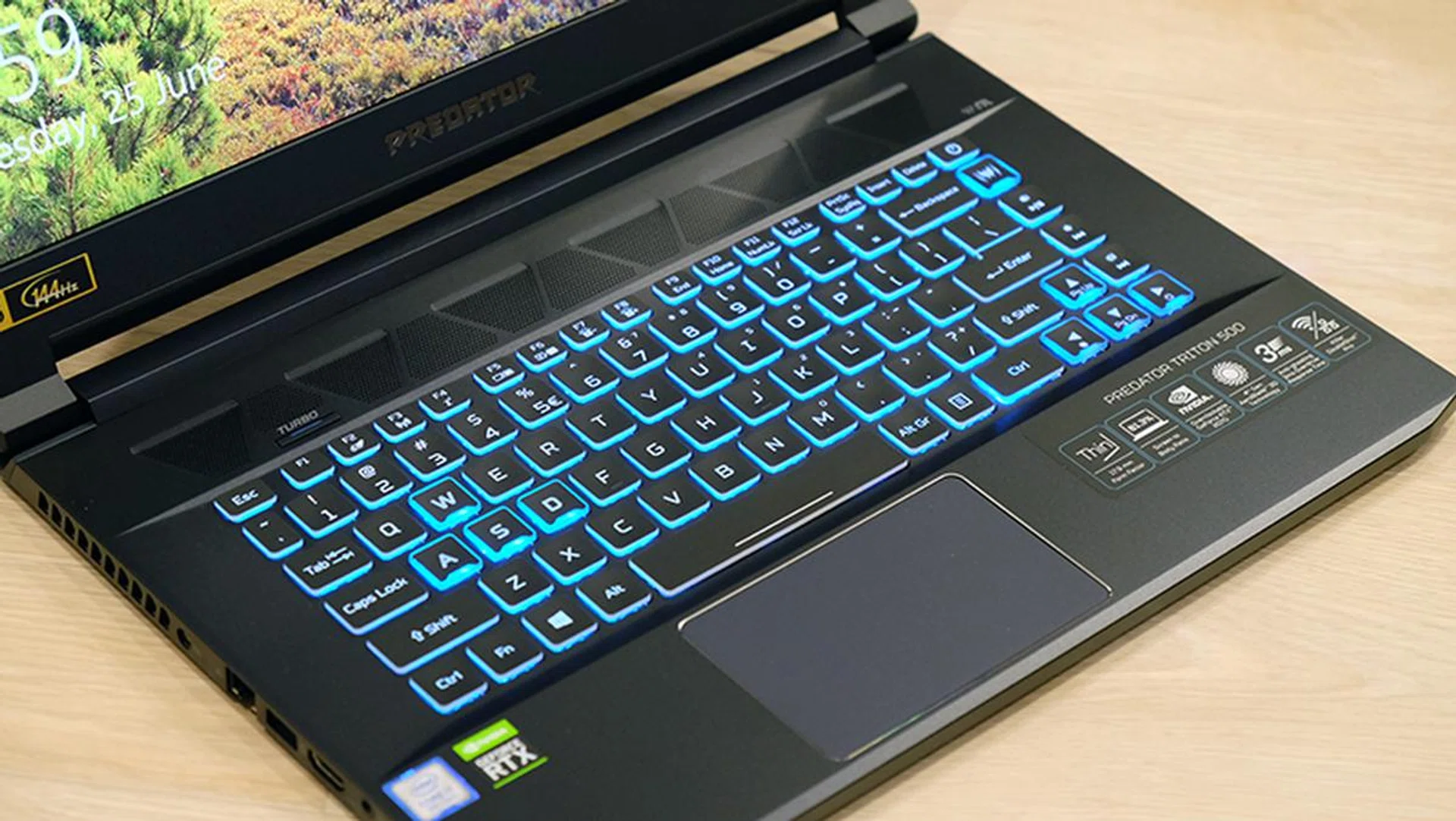
The keyboard has three independent lighting zones but no per-key customizations.
The good news is that the display is pretty good. It's nice and bright, and I couldn't discern any obvious bias toward the cooler or warmer end of the spectrum. The IPS panel means that viewing angles are excellent as well, with barely any color shift when looking at it from the side. More importantly, the 144Hz refresh rate ensures that everything from games to moving windows around on your desktop feels smooth and fluid. The GeForce RTX 2070 Max-Q still can't quite make full use of that refresh rate in AAA games, but the high refresh rate still goes a long way toward helping everything feel more responsive, especially in less demanding esports titles where you'll actually be able to achieve over 100fps.
The screen doesn't offer NVIDIA G-Sync, but variable refresh rate technology isn't as important when you have a high refresh rate panel like this one.
The display is framed by thin bezels on all three sides, which helps minimize the laptop's footprint. There's also enough room in the top bezel for the webcam, so you don't have to contend with awkward camera angles. However, you still have to deal with a rather thick bottom bezel and the Predator branding stamped on it. If Acer ever releases a second iteration of this laptop, I'd really like to see a slimmed down bottom bezel.
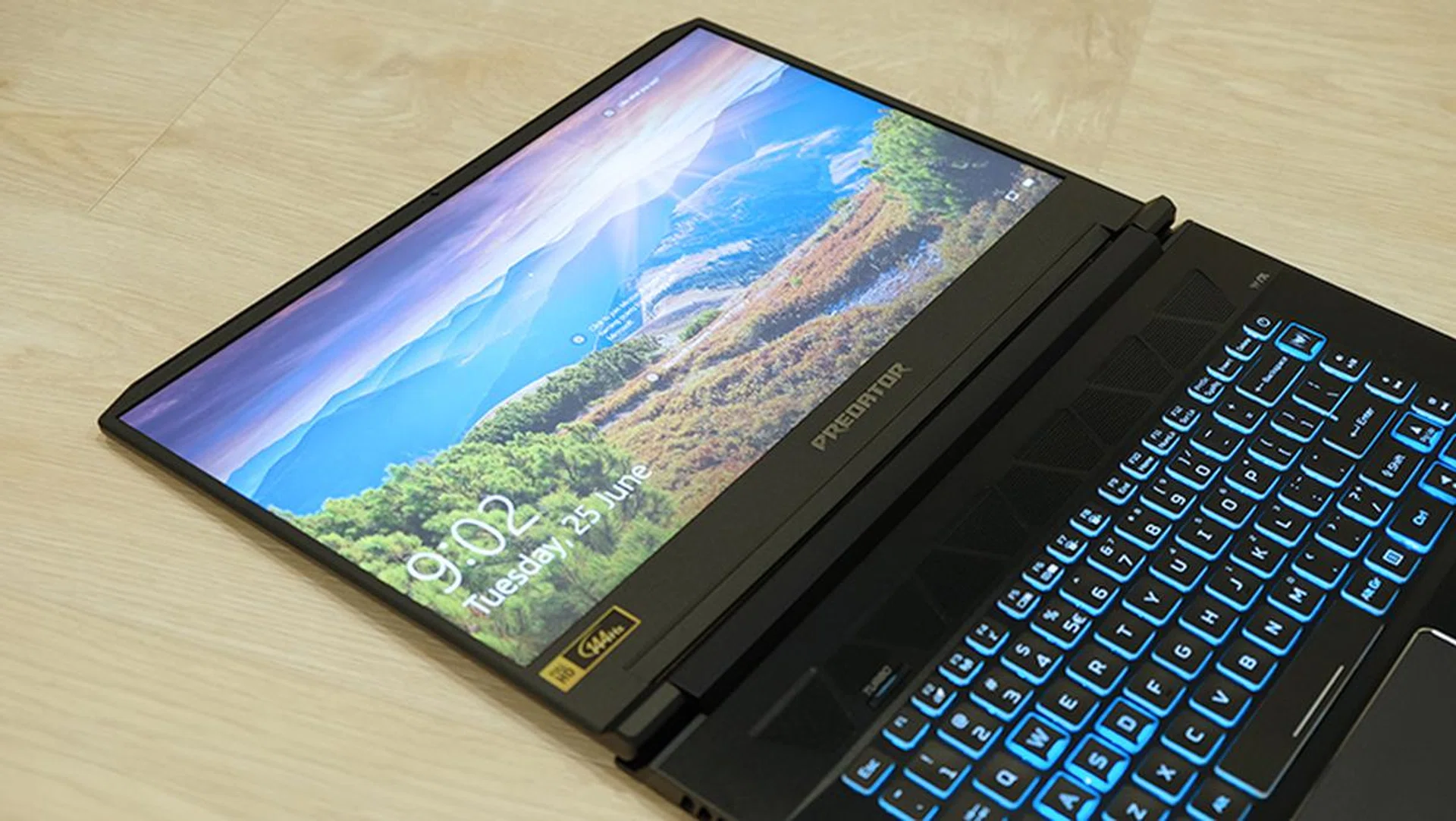
I'm not sure you'll ever need to, but you can also lay the screen completely flat.
The keyboard itself has a 1.6mm travel distance, which is okay but not great. I do miss the mechanical keyboard on the Triton 700, but Acer probably wouldn't have been able to make the laptop this thin. There is also no per-key RGB customization for the keyboard backlighting, and you're limited to just three independent lighting zones. That's pretty disappointing, and I think per-key backlighting should definitely be a feature at this price point. There is also no number pad, which may or may not be a deal-breaker for you. Personally, I don't find that too big a deal, but it might be important to you if you want to use the laptop for work.
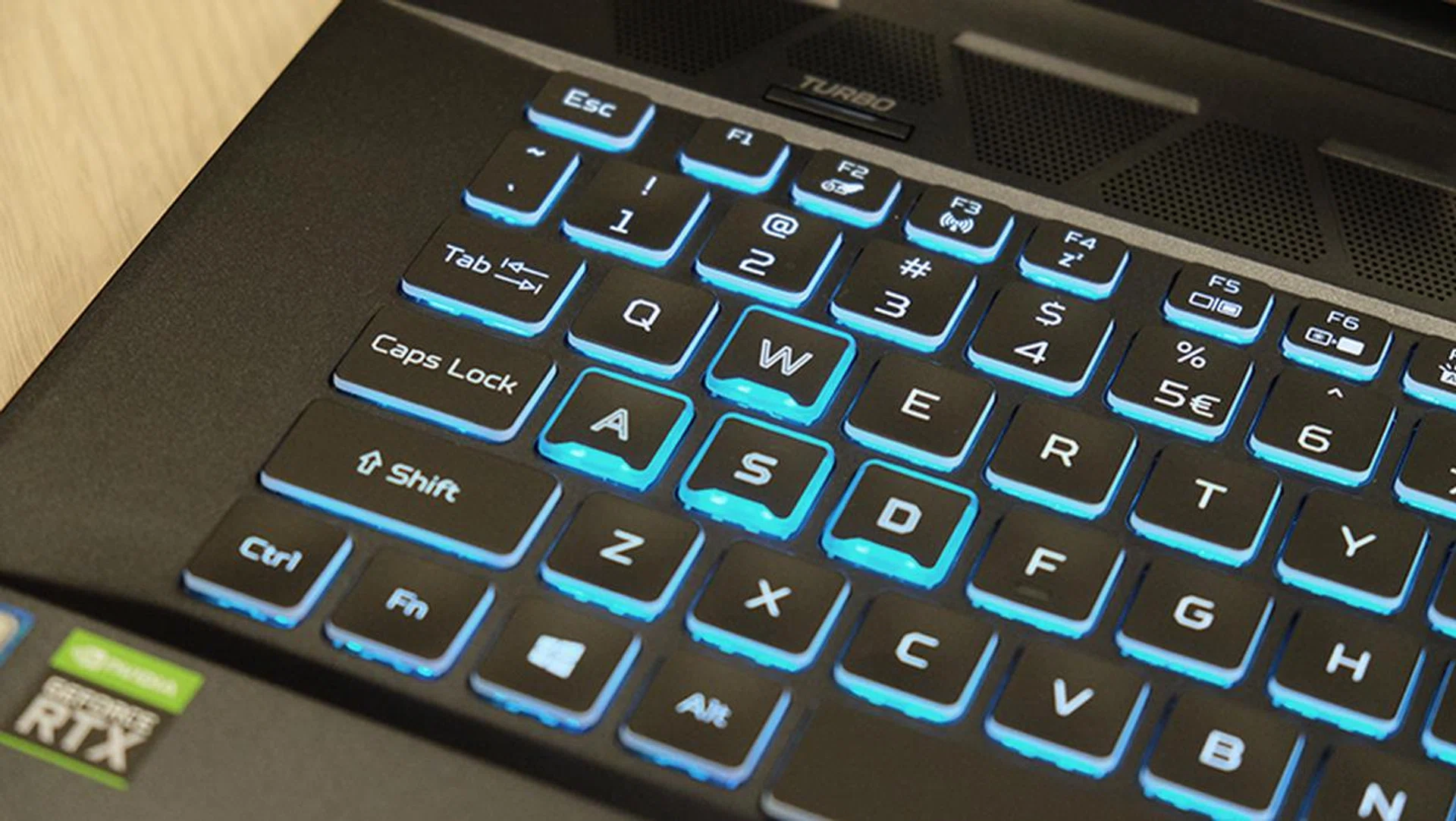
Acer designed the WASD keys to stand out.
The keyboard also has a dedicated button in the top-right corner for launching the PredatorSense software. I like the software quite a bit, and it offers easy and intuitive access to fan controls, GPU overclocking, lighting customizations, and a system monitoring panel. However, I can't say the same about the other software that comes pre-installed with the Triton 500. In fact, they're best described as bloatware, and one of the first things you'll want to do is probably uninstall nearly everything in the Control Panel that comes with Acer in its name.
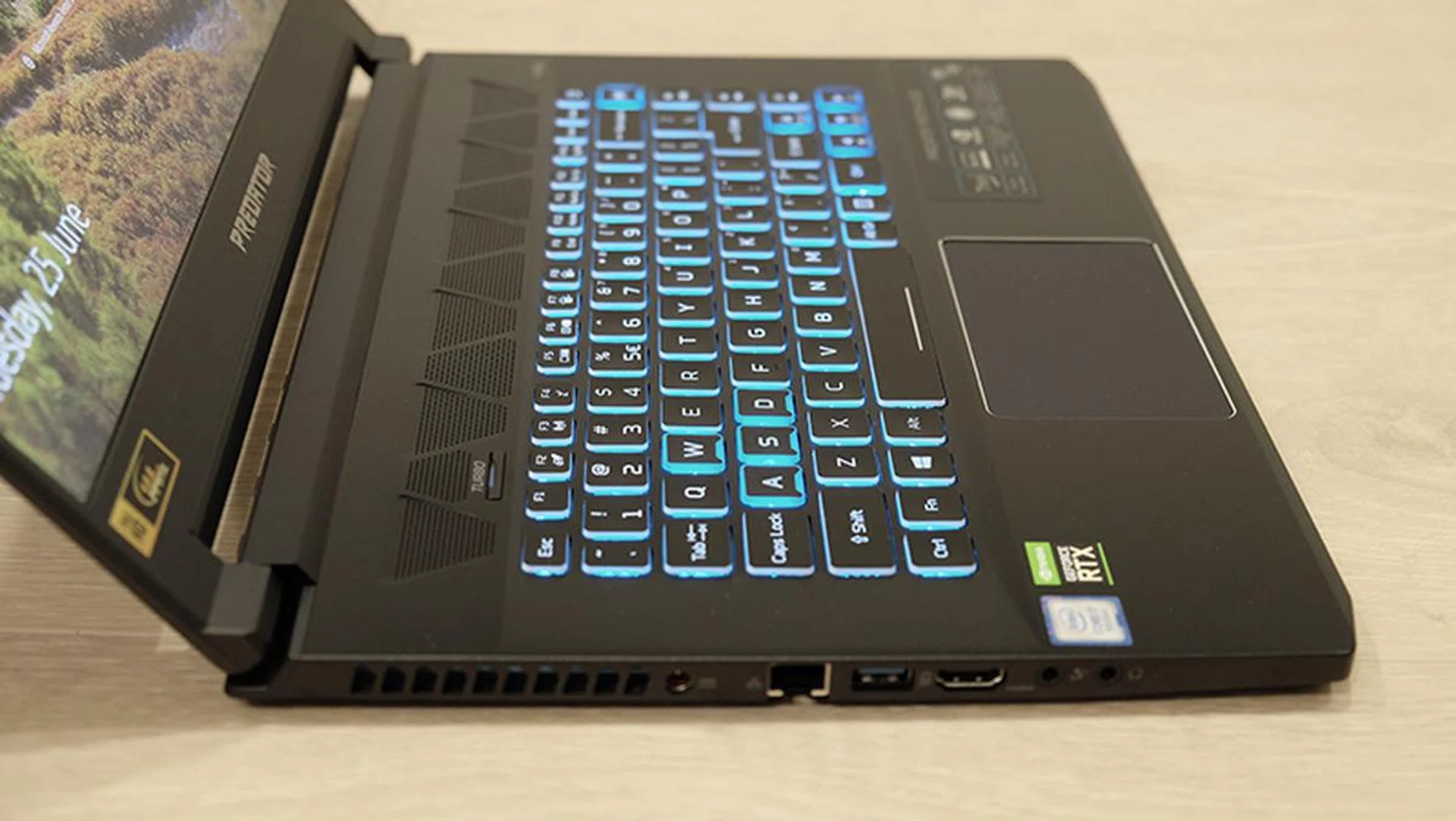
The trackpad is a little on the small side, especially for a 15.6-inch notebook. Fortunately, it's a Precision Touchpad, so tracking and gestures feel nice and accurate. The left- and right-click buttons are integrated into the touchpad as well, but while there's quite a bit of travel distance to each button, I felt like there could have been more resistance and feedback.
When it comes to ports and connectors, the Triton 500 has a pretty decent selection. It features three USB 3.1 (Gen 1) Type-A, one Thunderbolt 3, an Ethernet jack, one HDMI 2.0, and one Mini DisplayPort 1.4 output. There are also dedicated headphone and microphone jacks, but I particularly like the inclusion of the Thunderbolt 3 port, which oddly enough isn't yet a standard inclusion on gaming notebooks today. The Ethernet port is also powered by a Killer E3000 2.5G controller, which means it supports speeds up to 2.5Gbps, assuming you have compatible hardware.
I also wish that the I/O ports were either moved forward or pushed further back on the notebook. Right now they sit right smack in the middle, which is especially awkward for the power cable as it'll either end up blocking the vents or its adjacent ports.
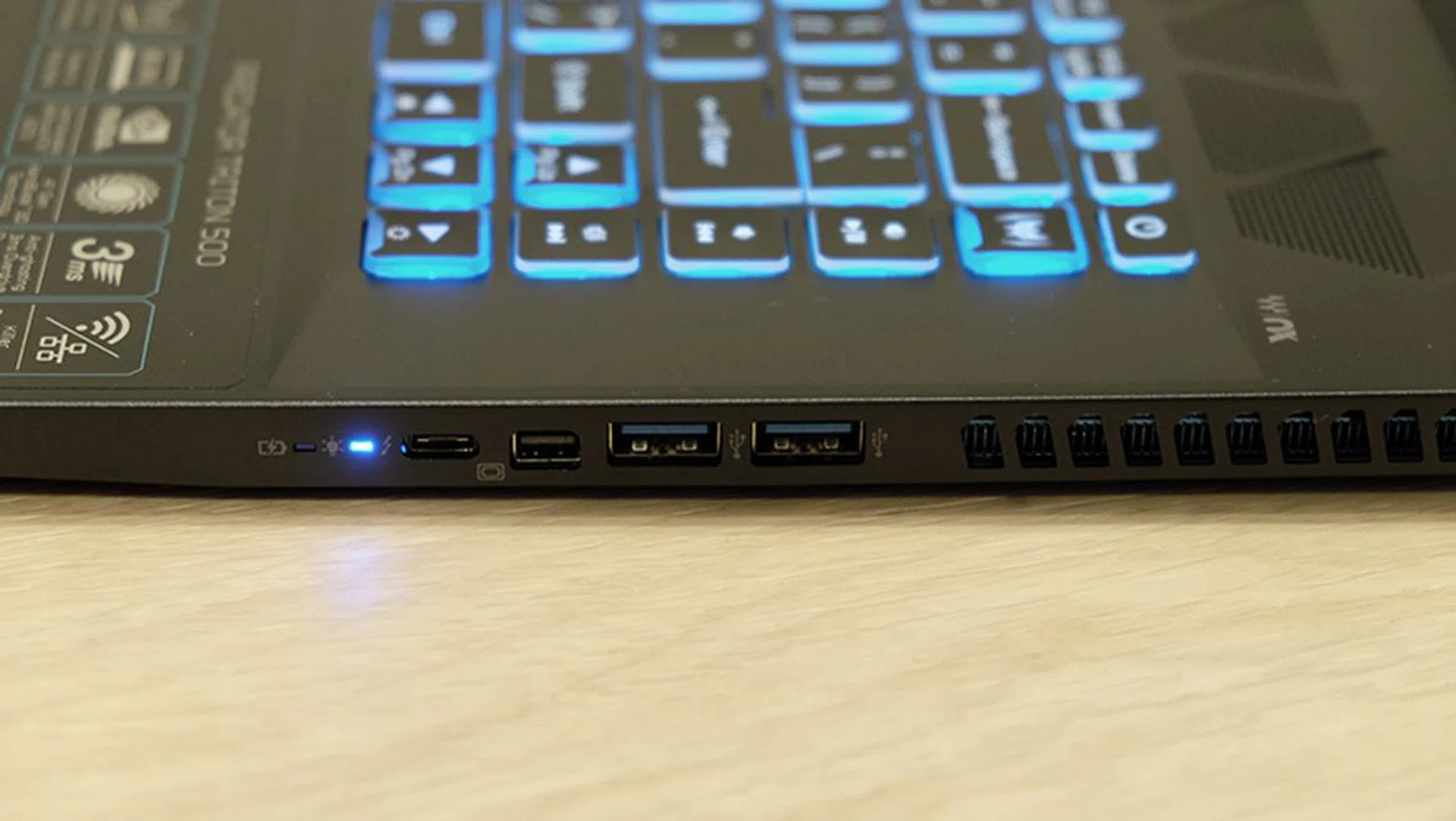
A look at the ports on the right.
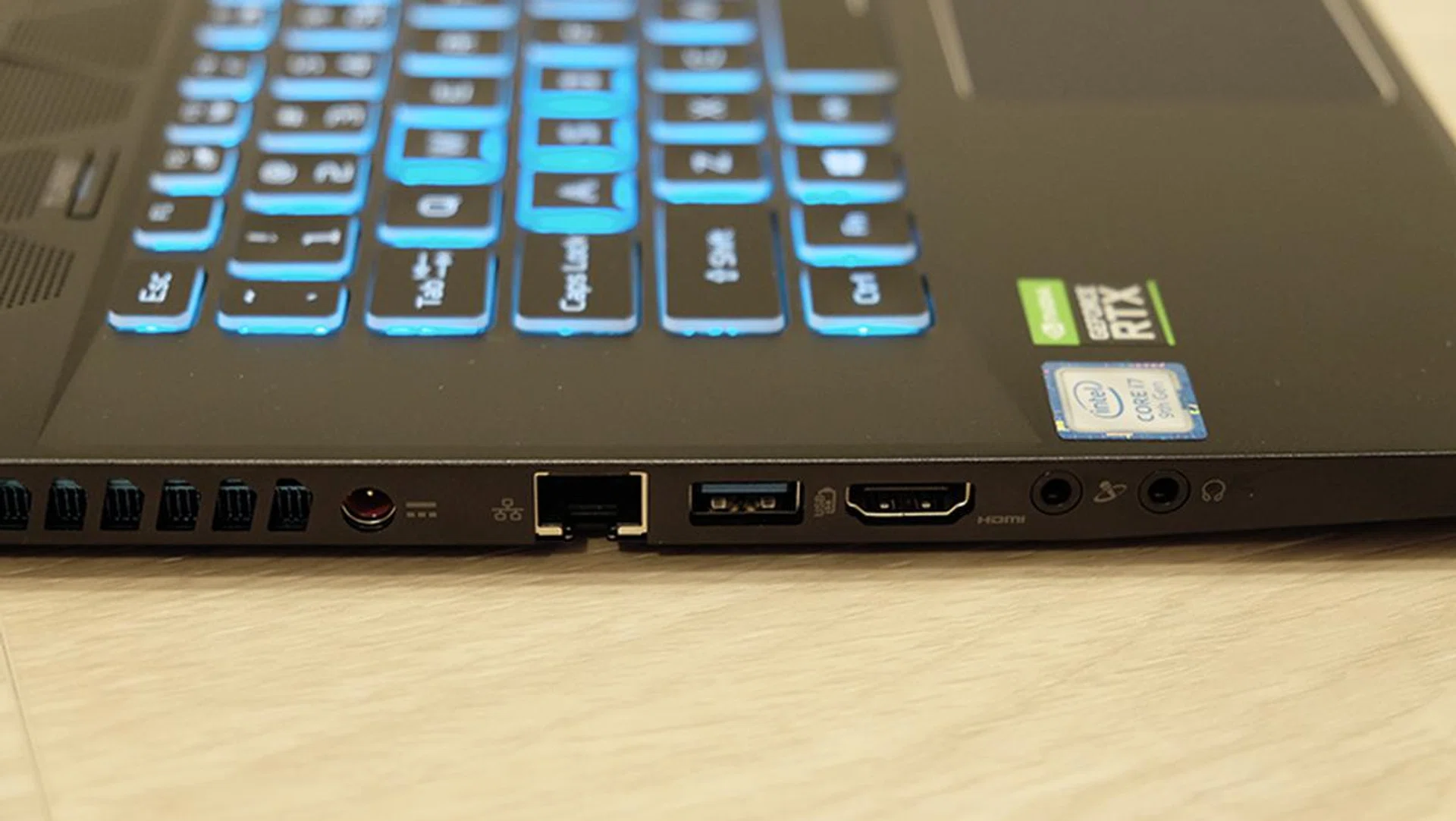
The Ethernet port on the left supports speeds up to 2.5Gbps.
Cooling is handled by a total of three fans and five heat pipes. Some are shared across the CPU and GPU, but they each also get their own dedicated heat pipes, as does the VRM circuitry. The three fans, of which two are dedicated to the GPU, do quite a good job of keeping the laptop cool, and there are four vents at the side where hot air is exhausted.
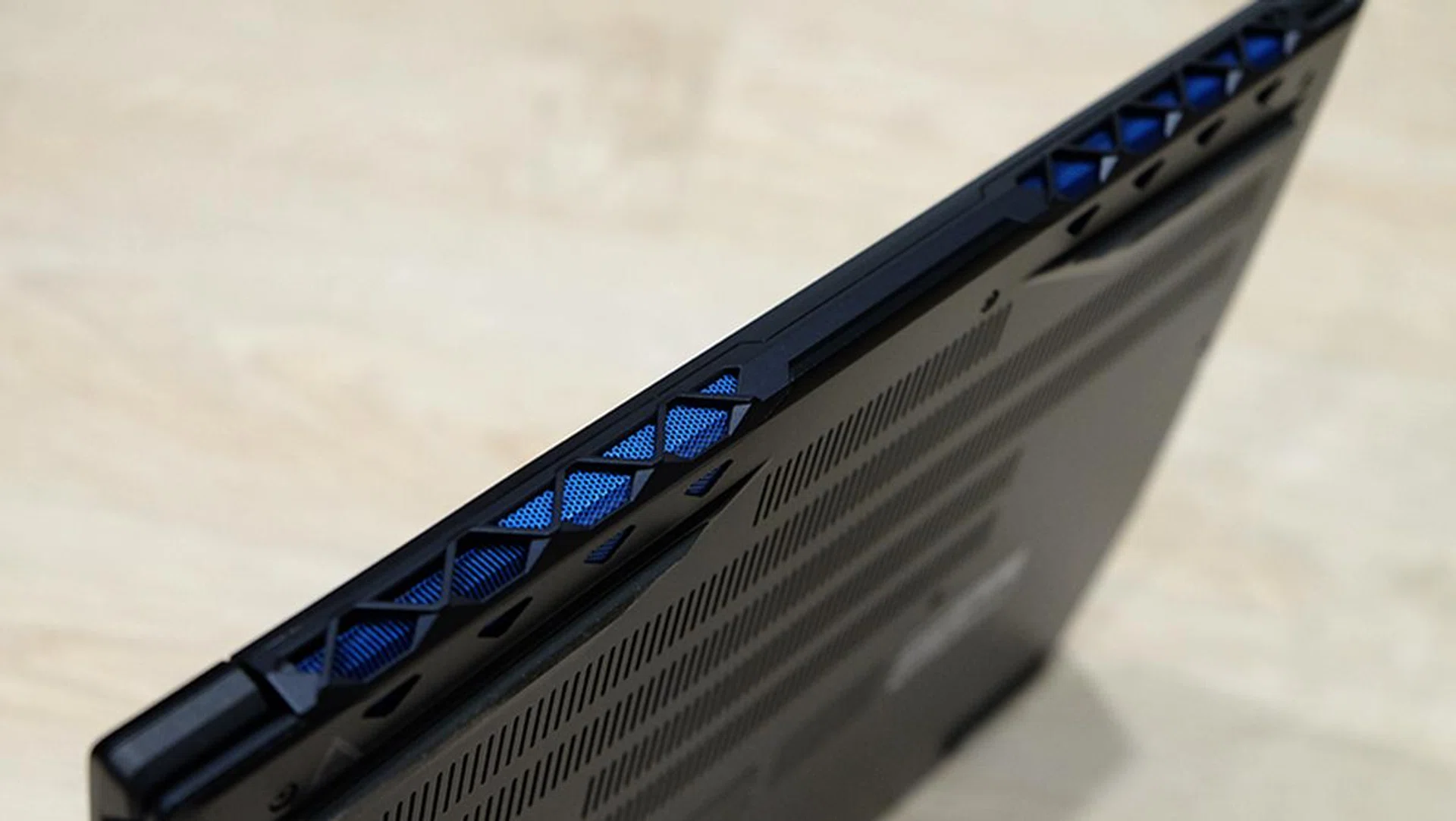
The exhaust vents and heat sinks have been anodized quite a pretty blue.
The PredatorSense software makes it easy to ramp up or customize the fan speeds, but there is also a dedicated Turbo button that instantly sets both the GPU overclock and fans to maximum for a one-click performance boost. The fans do get quite loud even in auto mode, and you'll definitely want to use headphones to block them out. However, I actually find their pitch less jarring than on some other notebooks.
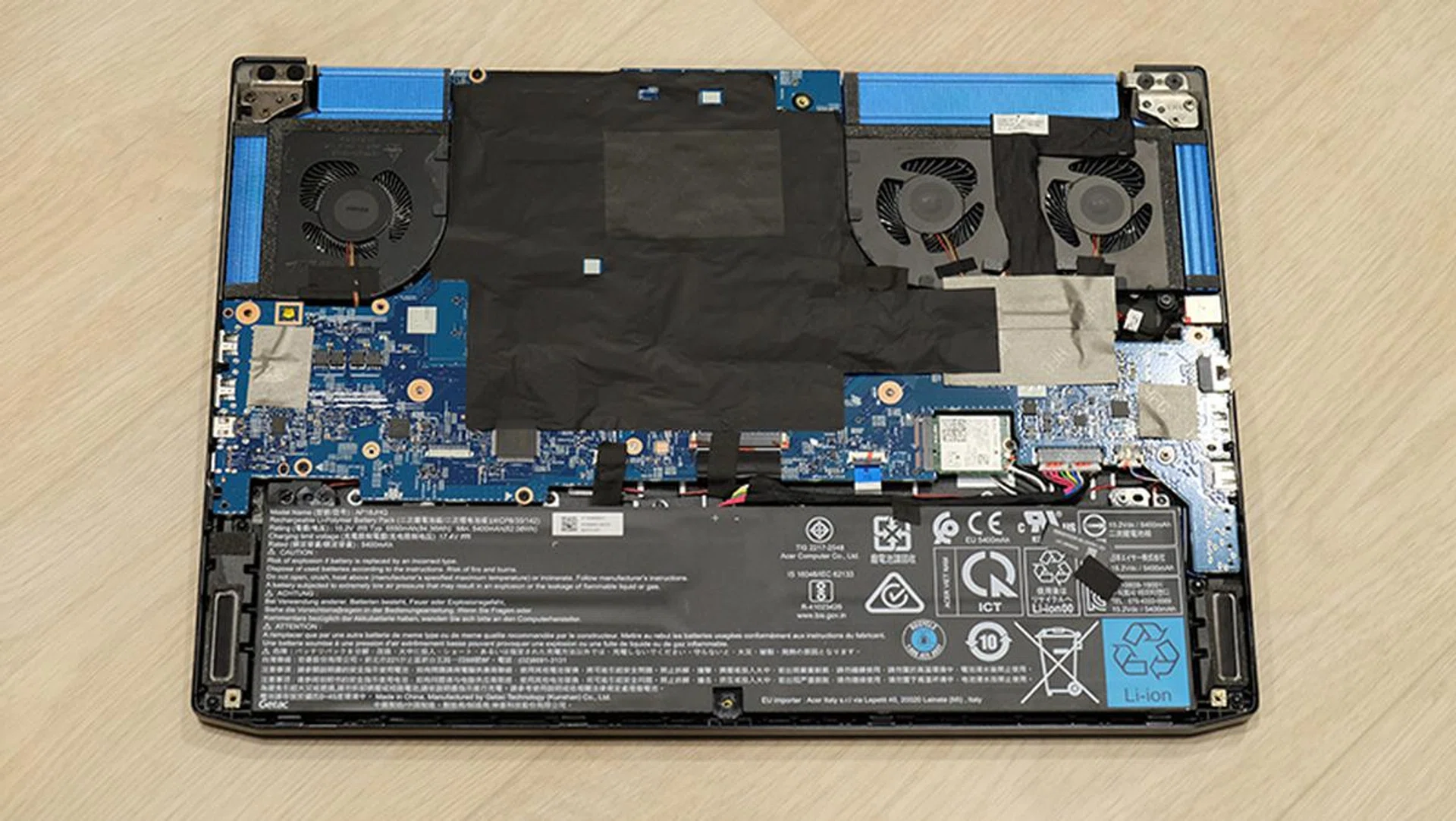
You're greeted by plenty of black tape once you open up the notebook.
The bottom panel is held in place by Torx screws, which you'll need a T6 screwdriver to remove. Sadly, the Triton 500 doesn't rank high in terms of upgradeability, as all you see after removing the bottom panel are the battery, three fans, and the Killer Wireless-AC 1550i network adapter. Things like the DIMM and M.2 slots are located on the other side of the motherboard, which means you'll have to remove the entire thing from the chassis, an unenviable task.
Test setup and performance
Here's a full list of the notebooks we're looking at:
- Acer Predator Triton 500
- Aftershock Forge 15 Pro
- ASUS ROG Zephyrus S GX531GW
- Razer Blade 15 (2019)
I've included the Aftershock Forge 15 Pro to show how the Triton 500 stacks up against a laptop with the same 9th-generation Intel processor and a GeForce RTX 2060. Separately, the ASUS ROG Zephyrus S and Razer Blade will provide comparison figures to illustrate how much of an improvement, if any, the new Core i7-9750H chip provides over similarly configured notebooks with previous generation chips.
[hwzcompare]
[products=667965,667554,660213,661877]
[width=200]
[caption=Test notebooks compared]
[showprices=1]
[/hwzcompare]
I ran the notebooks through the following benchmarks:
- PCMark 10
- PCMark8
- 3DMark
- Deus Ex: Mankind Divided
- Far Cry 5
- Shadow of the Tomb Raider
How good is it for work?
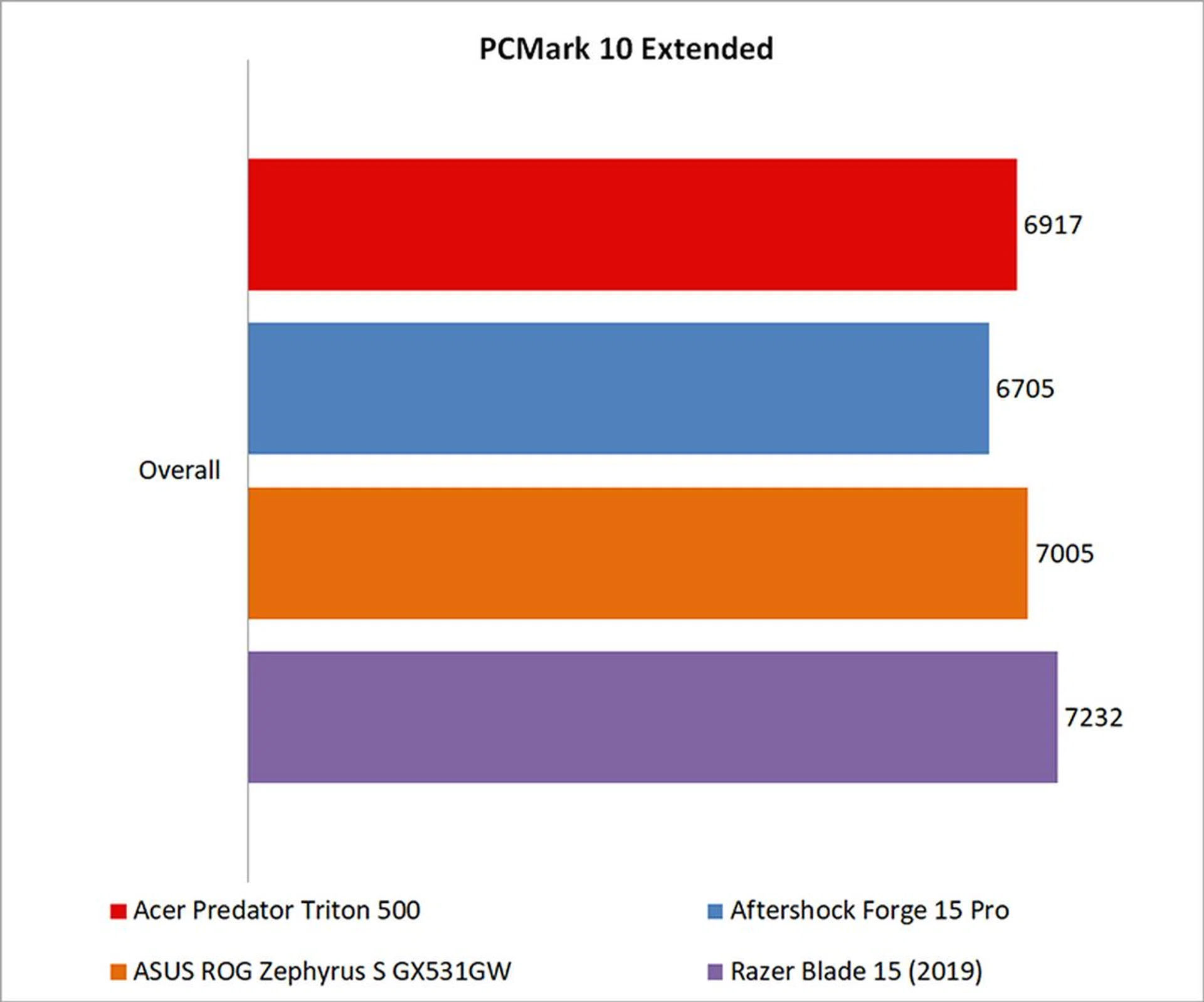
It actually seems like the new Intel Core i7-9750H processor doesn't do much for productivity workloads, despite having a more aggressive 2.6GHz base clock and 4.5GHz boost clock. In PCMark 10 Extended, the Acer Predator Triton 500 still fell slightly behind the ASUS ROG Zephyrus S, even though it had the older Core i7-8750H chip.
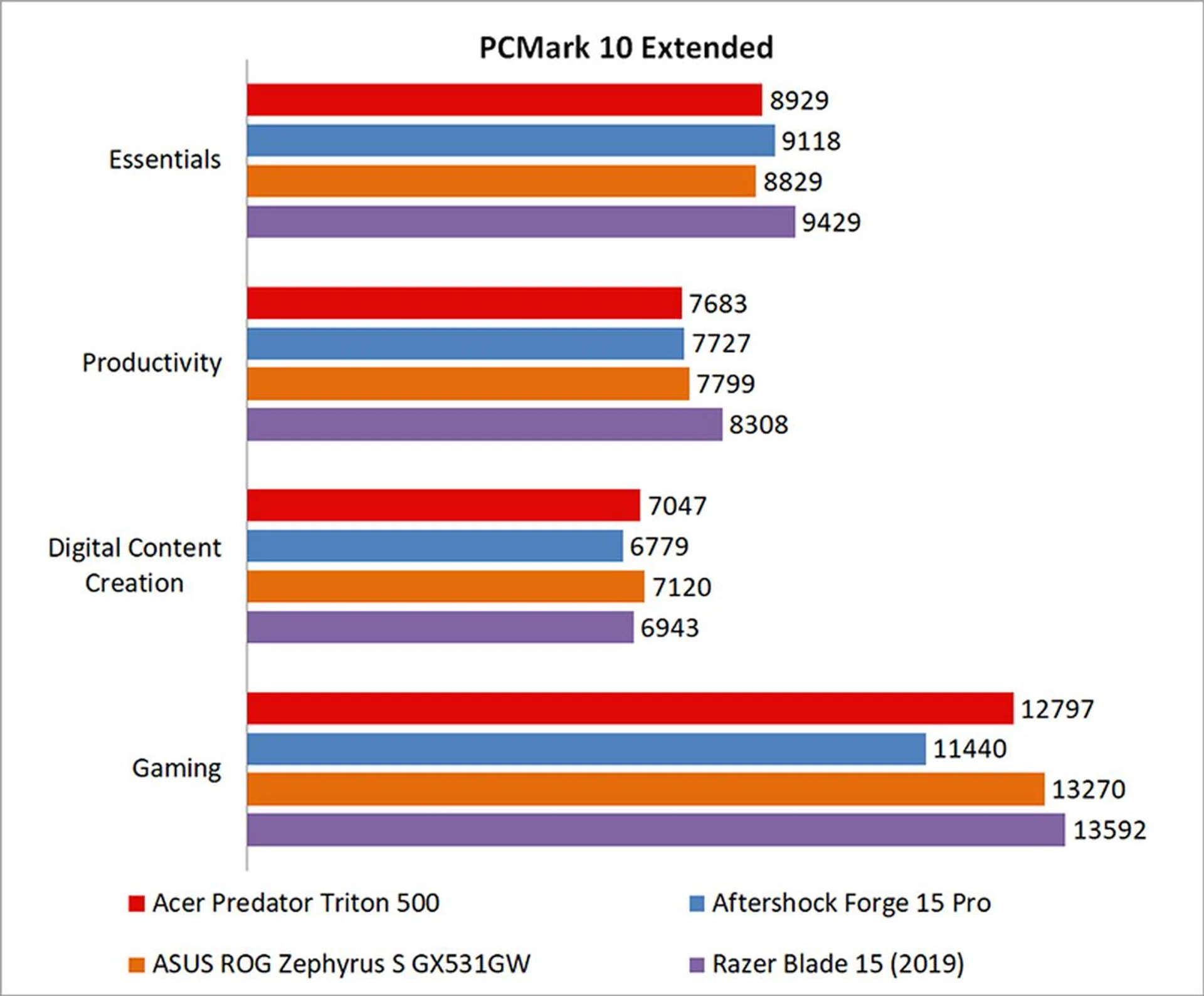
A look at the workload breakdown doesn't reveal any significant differences either, and the Predator Triton 500 didn't manage carve out any kind of lead for itself. That said, all the notebooks here are more than fast enough for work and productivity applications, and it's unlikely that you'll notice differences between them.
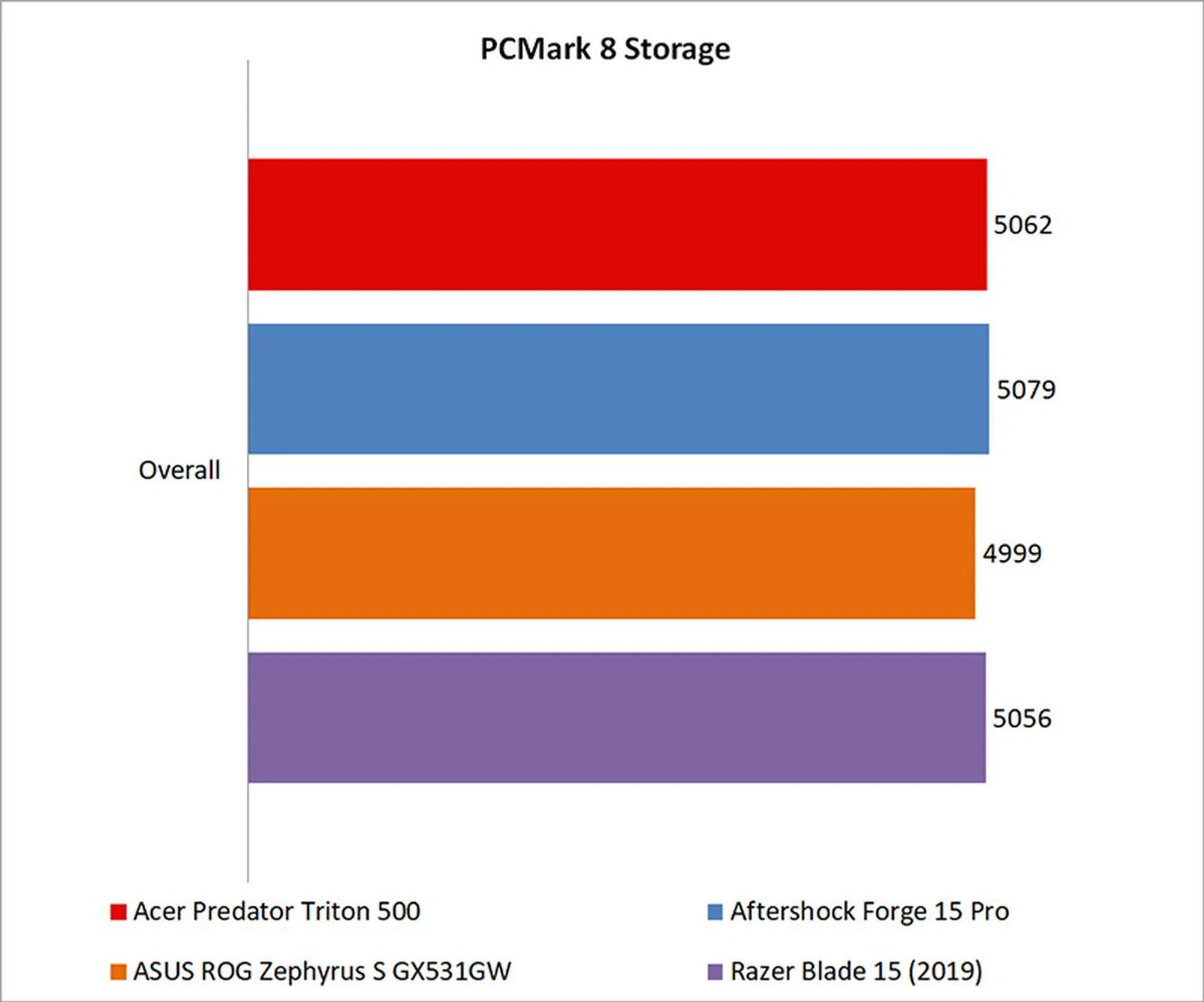
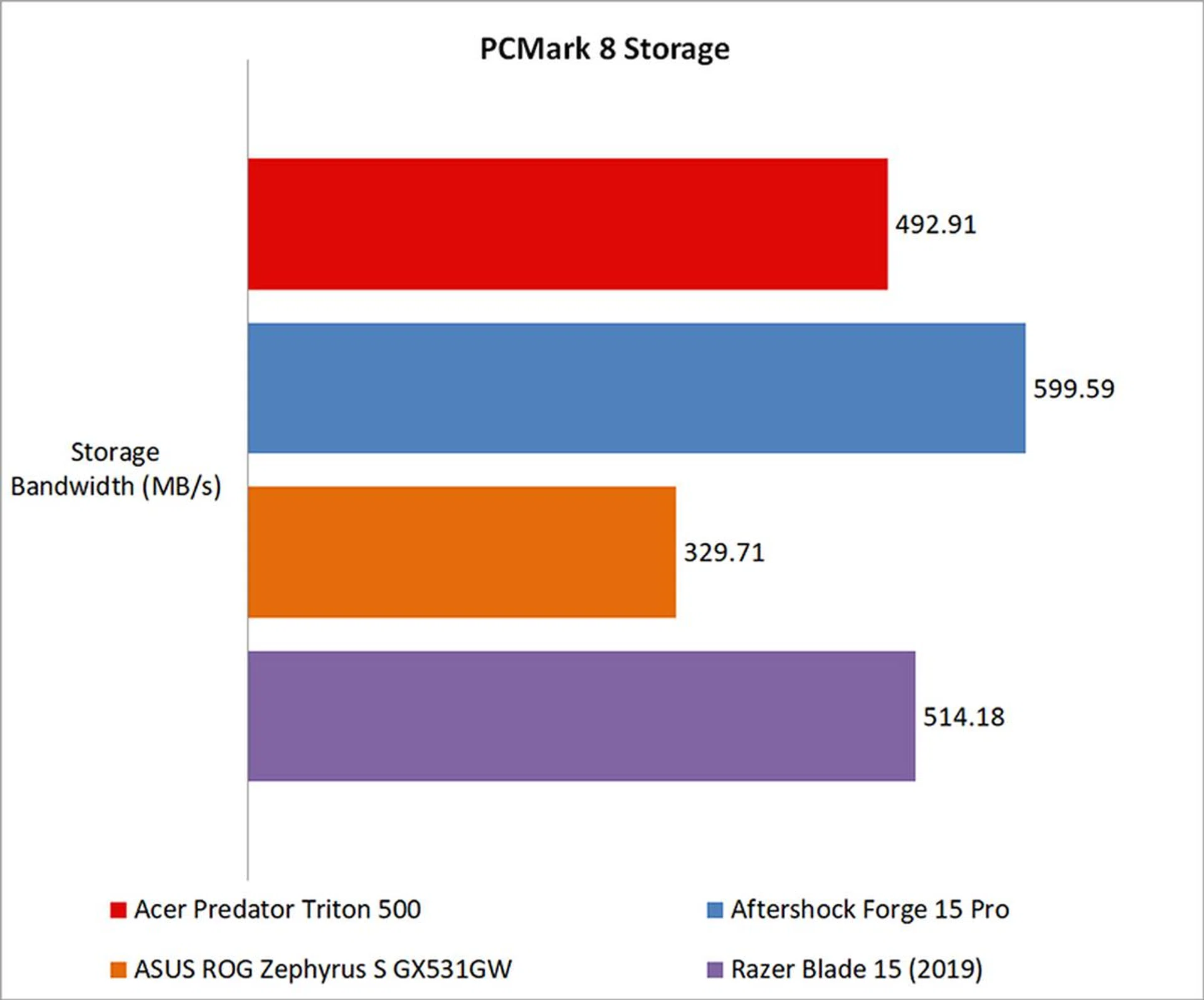
For storage performance, the Western Digital PC SN720 NVMe SSD on the Acer laptop fell somewhere in the middle of the pack. It handily beat the QLC NAND drive on the ASUS ROG Zephyrus S, but it was still slower than the SSDs on the Aftershock and Razer laptops.
How fast is it in games?
The Predator Triton 500 comes with a built-in GPU overclocking feature, which means you'll be able to increase the base and boost clocks right from the PredatorSense software. There are three modes to pick from, including Normal, Fast, and Extreme. I've listed their respective clock speeds in the table below for easier reference:
Base | Boost | Memory | |
Normal | 885MHz | 1,185MHz | 1,500MHz |
Fast | 960MHz | 1,260MHz | 1,550MHz |
Extreme | 985MHz | 1,285MHz | 1,568MHz |
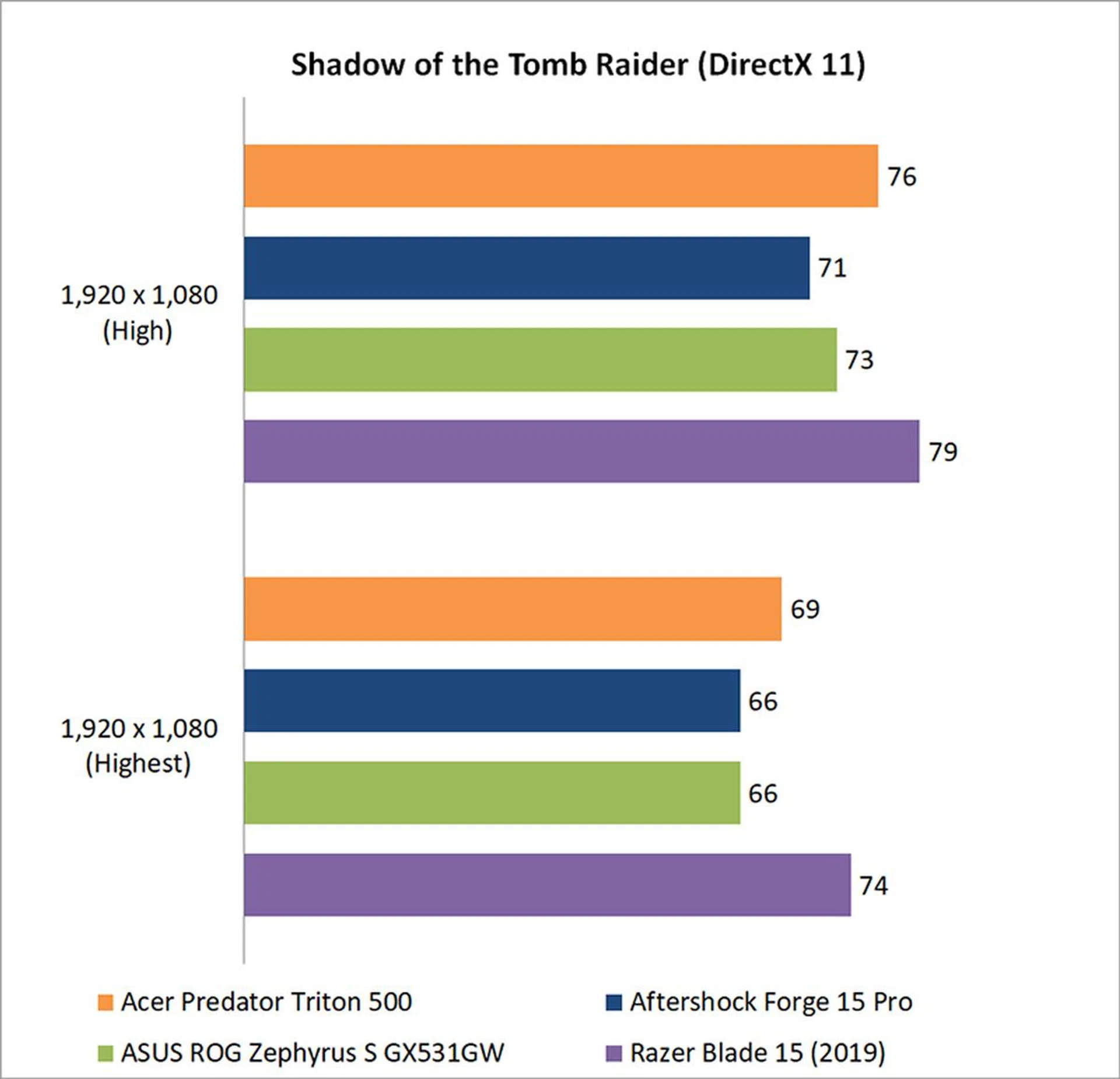
The clock speeds at Normal mode are basically what everyone else is running, but Extreme mode takes you up an entire 100MHz on the base clock, with a memory overclock to boot. I ran our benchmarks in Normal mode to provide a fairer comparison with the other laptops, but boosting to Extreme mode does net you a small performance boost of roughly 3 to 4 per cent. For example, Shadow of the Tomb Raider saw a boost to 79FPS at High settings. The easy overclocking experience is pretty neat, especially with the one-click Turbo button, and I like that Acer has provided an easy way to squeeze out more frames from the GPU.
However, the extra performance doesn't add up to much, and I don't think it amounts to a game-changer if you're deciding between the Acer notebook and something else.
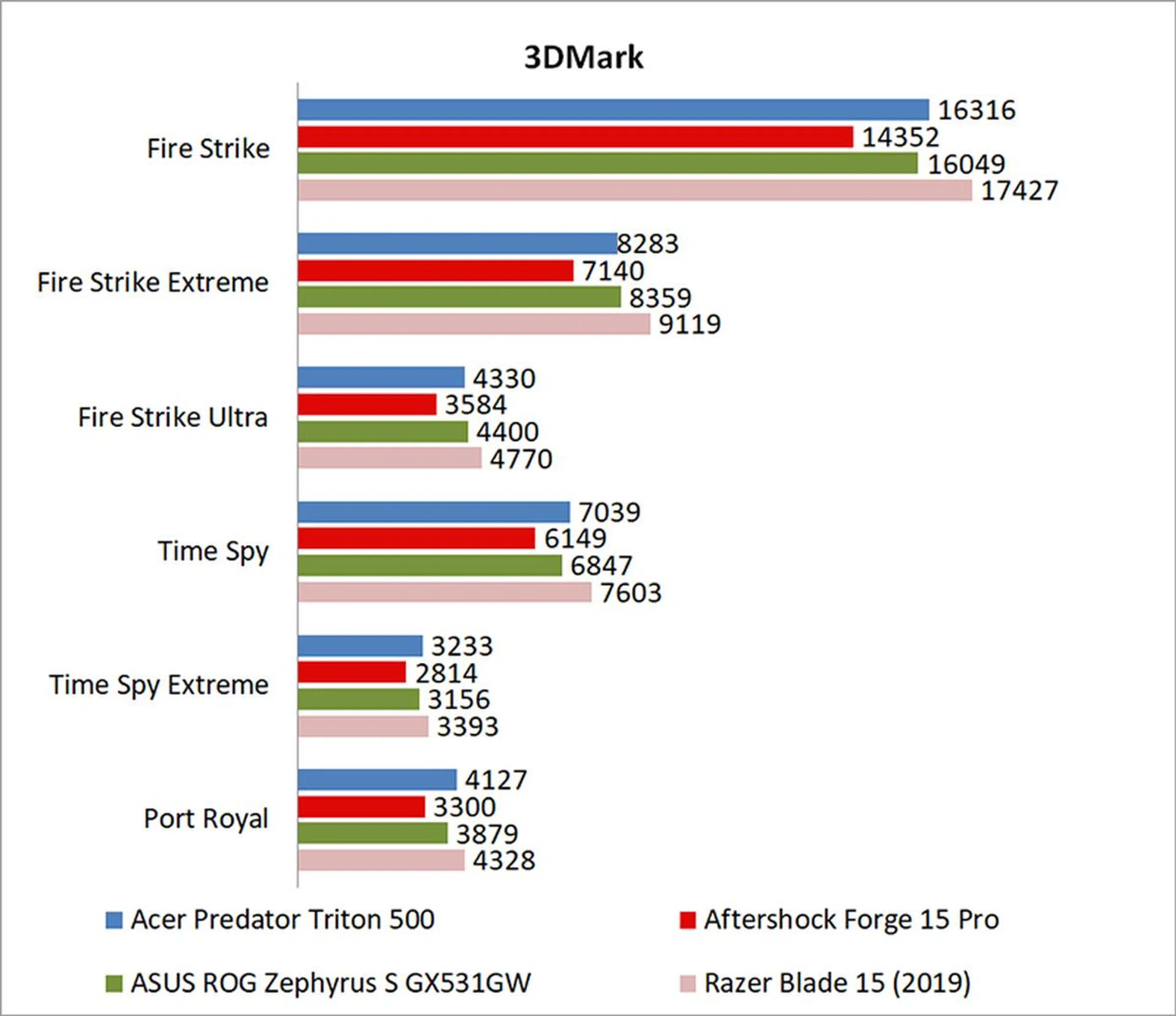
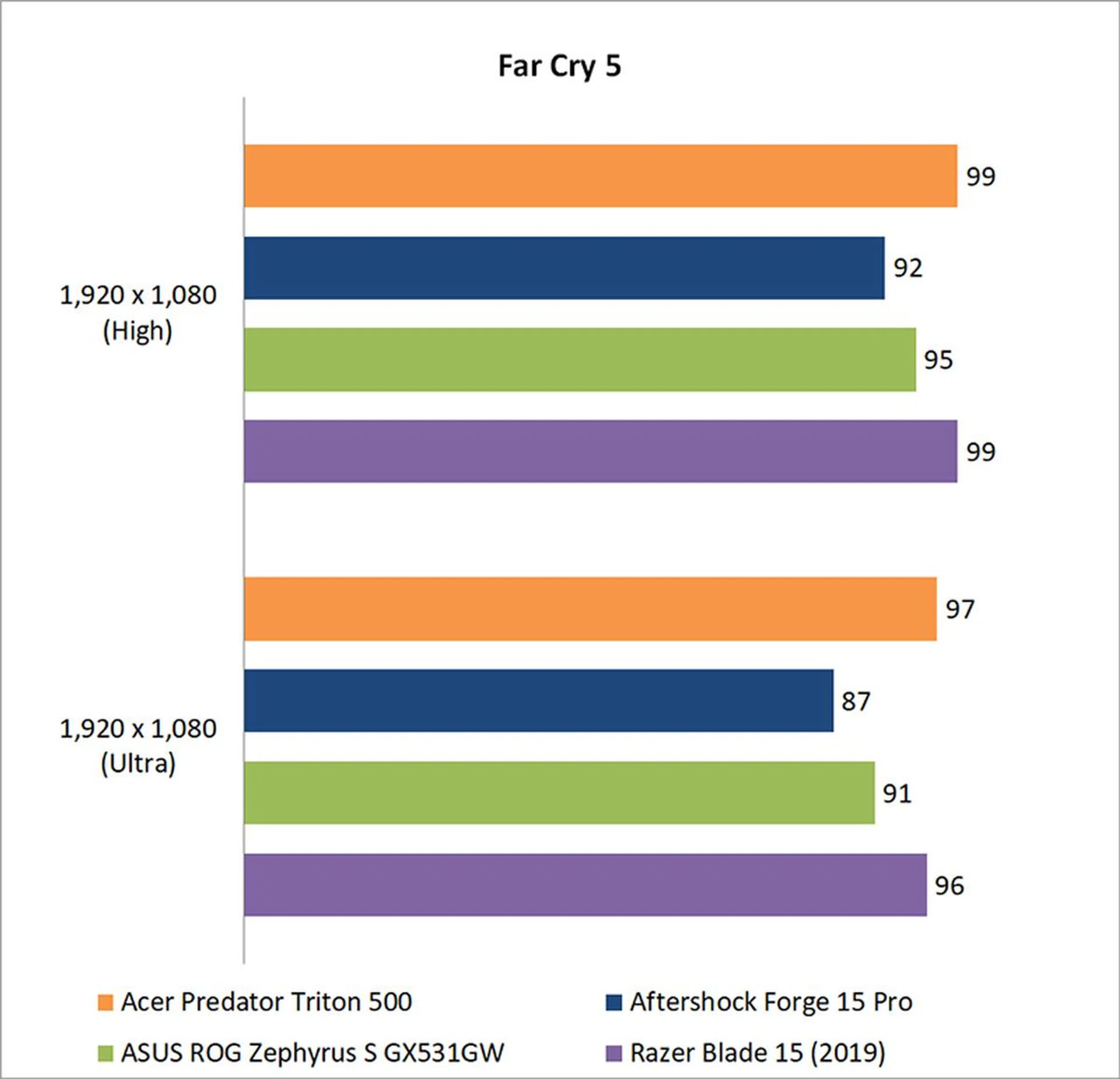
That aside, the Predator Triton 500 held its own in the gaming benchmarks, even without overclocking the GPU. However, performance was really similar to what the ASUS ROG Zephyrus S was able to achieve with its Core i7-8750H and GeForce RTX 2070 Max-Q. In 3DMark Fire Strike, the Predator Triton 500 was 12 per cent faster than the Aftershock Forge 15 Pro, but only a mere 1.6 per cent ahead of the Zephyrus S.
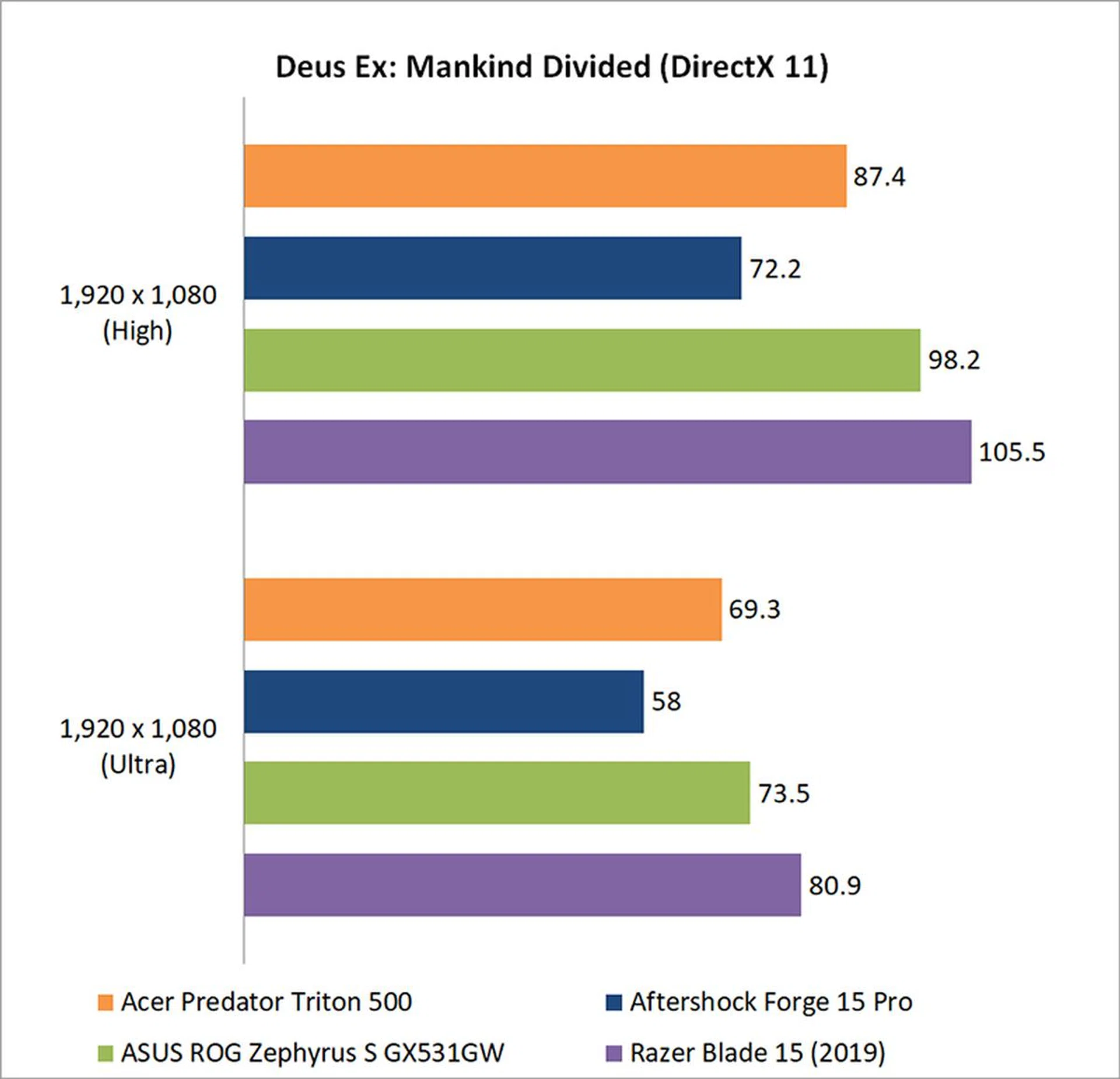
In fact, the Acer laptop was oddly slow in Deus Ex: Mankind Divided, lagging behind the ASUS notebook by 11 per cent. Fortunately, things picked up in the other games. It managed to edge out the Razer Blade 15 and its GeForce RTX 2080 Max-Q in Far Cry 5 (probably because that game seems to be limited by the CPU on laptops), and was behind only the Razer laptop in Shadow of the Tomb Raider.
How good is the battery life?
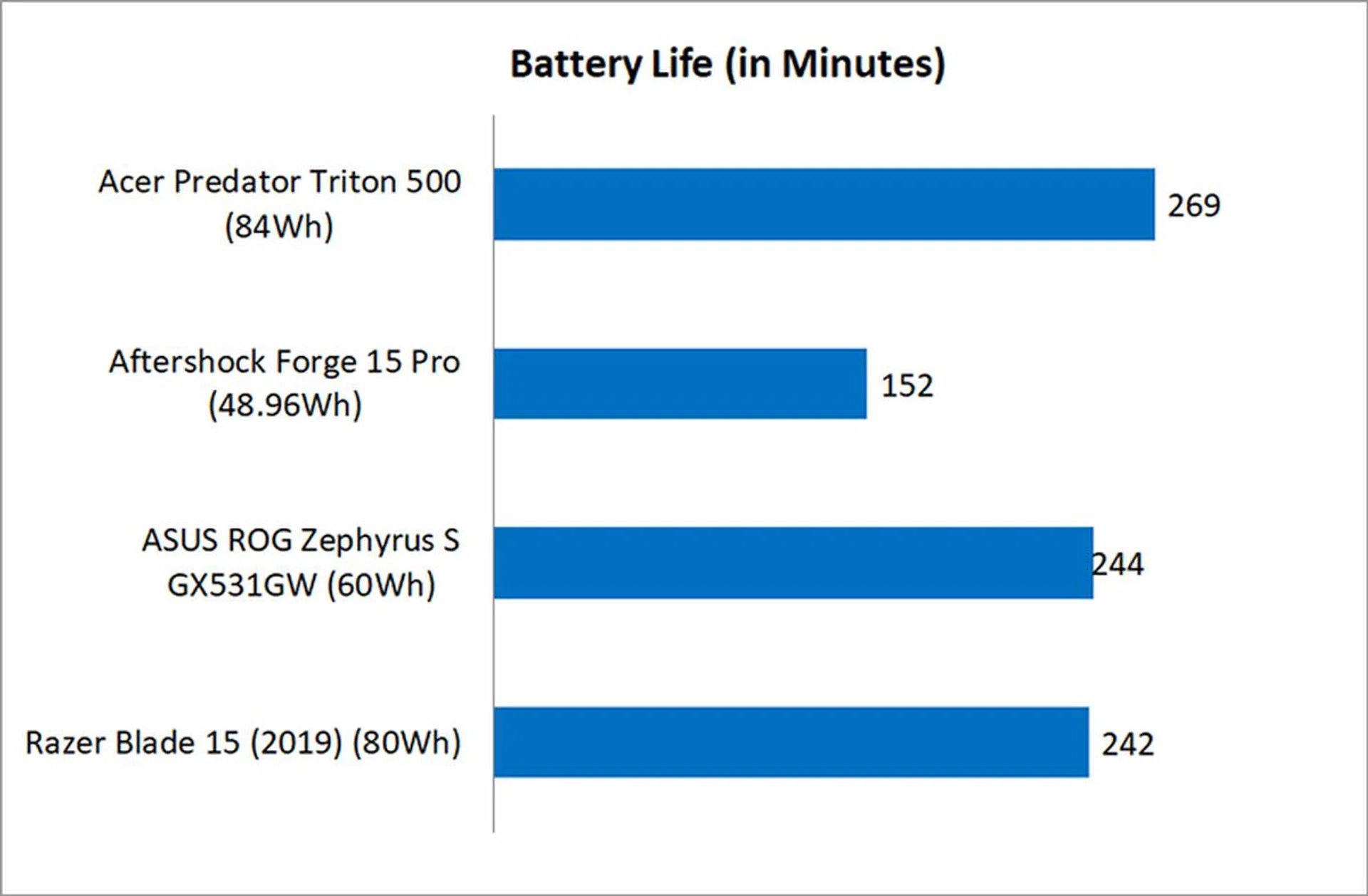
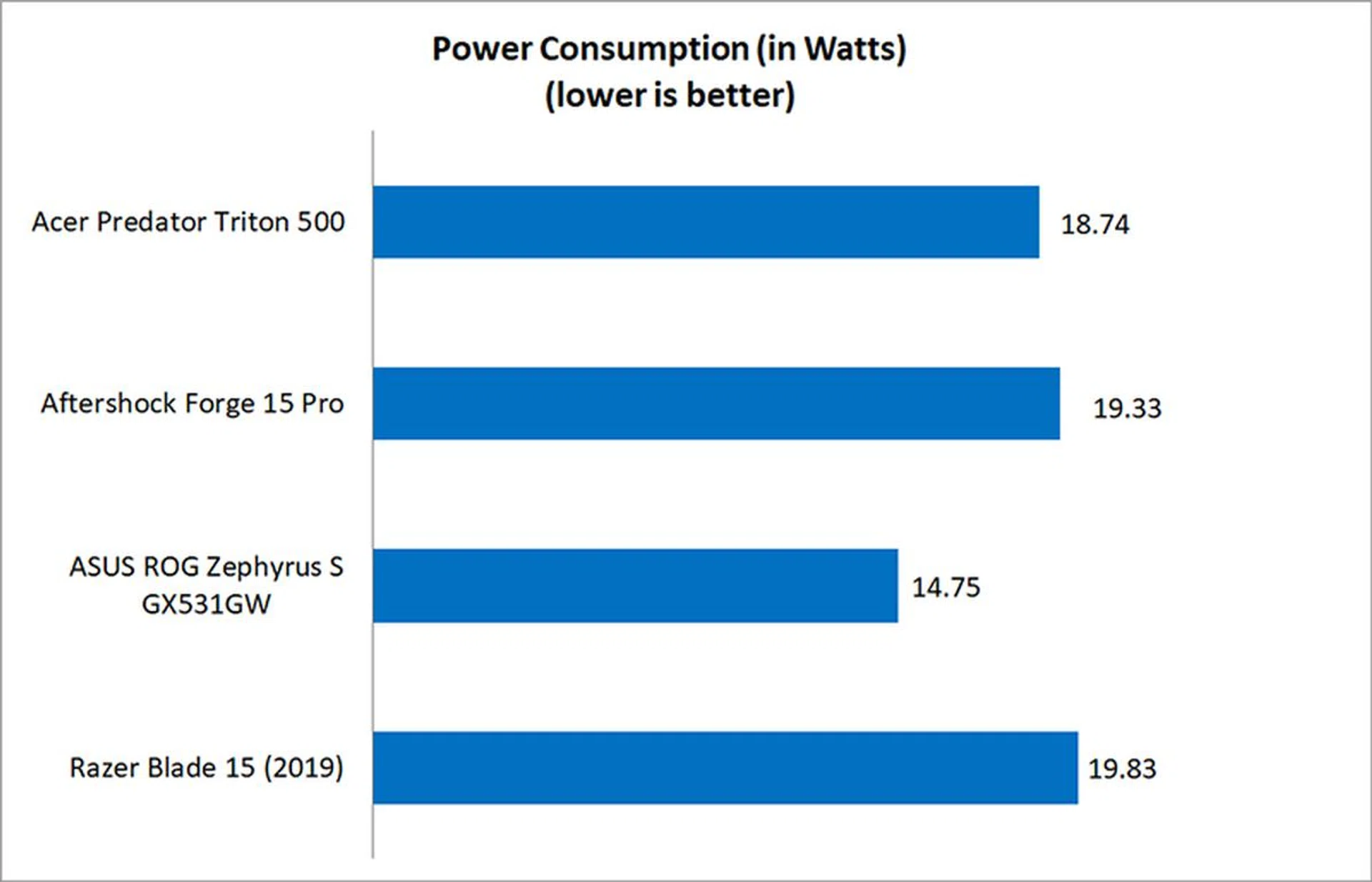
Acer managed to cram a decent-sized 84Wh battery into the Predator Triton 500, so battery life is actually pretty competitive. It took the lead in our PCMark 8 Home battery life test, lasting for over four hours. Granted, that's not a super stellar result if you want to use the laptop for work, but it's pretty good as far as gaming laptops go.
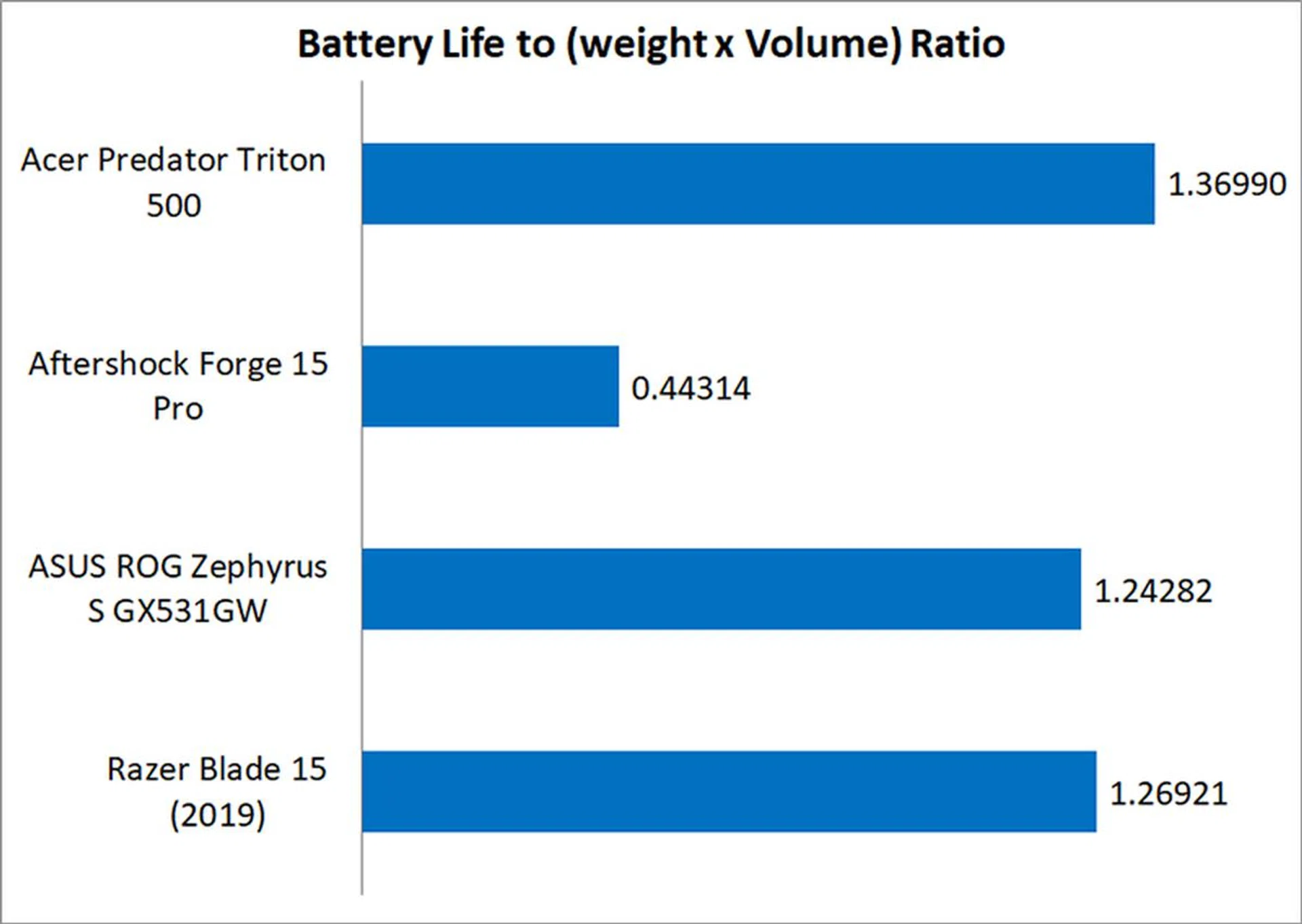
Its long battery life, slim dimensions, and relatively light weight also helped it in our portability index, which is intended as an objective measure of how portable a laptop is after taking into account factors like weight, battery life, and dimensions.
Does it run hot?
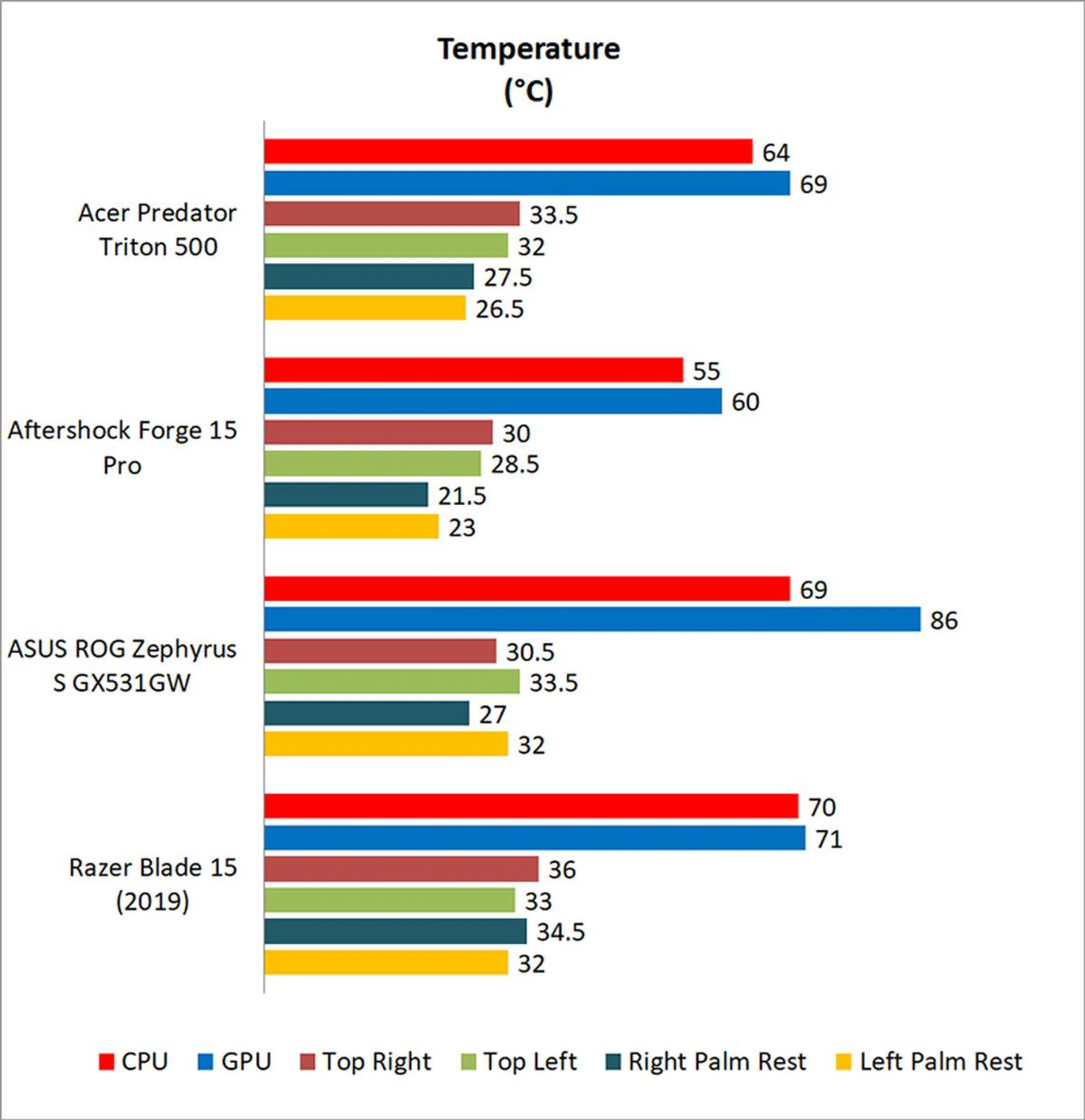
Finally, I'm pretty pleased with the thermal performance as well. That said, we carry out all our temperature testing in an air-conditioned room, so the numbers will probably be higher if you're running the laptop without the AC turned on. Either way, after 40 loops of 3DMark Fire Strike Extreme's stress test, the Predator Triton 500 posted cooler peak CPU and GPU temperatures than both the ASUS ROG Zephyrus S and Razer Blade 15. Surface temperatures were pretty low too, and the palm rests almost never got uncomfortably warm.
Good performance and stealthy design
The Predator Triton 500 is definitely one of Acer's better laptops.
All things considered, I'd say Acer has done a pretty good job with the Predator Triton 500. It's by no means perfect, and it's plagued by noisy fans, lacks per-key RGB backlighting, and isn't the best in terms of upgradeability. However, these are small nuisances that are easy to overlook when you consider how good the rest of the package is.
You get fast gaming performance, a slim and light metal chassis, and pretty decent battery life for a gaming laptop. Then there's the Turbo button, which provides hassle-free GPU overclocking with a single button press. Cooling is good as well, and that's topped off by a wide selection of I/O ports, including Thunderbolt 3, HDMI, and Mini DisplayPort outputs. Of course, I'd say these things are more or less what people expect from a high-end gaming laptop in 2019, so even if the Predator Triton 500 doesn't particularly impress in any one area, it still manages to check off most of the right boxes, which is pretty good in my books.
At S$3,198, it is competitively priced for its specifications, so it's got things nailed down on the pricing front as well. If you're in the market for a portable gaming laptop, you wouldn't be remiss to give the Predator Triton 500 a look.
Our articles may contain affiliate links. If you buy through these links, we may earn a small commission.