
Zotac ZBOX nano ID65 - Leading the Mini-PC Charge?
The Zotac ZBOX Nano ID65 takes Intel’s NUC concept to the next level by packaging a more powerful processor and offering more connectivity options. We find out if this is the mini-PC that we can actually recommend people to buy.

Righting Wrongs
Early this year, we reviewed Intel’s NUC mini-PC. NUC stands for Next Unit of Computing and refers to a ultra small form factor PC with a motherboard that measures a scant four by four inches. This means that in terms of area, it occupies less than half the real estate of a mini-ITX board.
While Intel’s NUC Mini-PC is really compact and small, it has several limitations. To begin, it’s a barebones kit, requiring users to source for their own mSATA SSD and Mini PCIe wireless card. While the mSATA SSDs are becoming more commonplace these days, Mini PCIe wireless cards are still hard to source. In addition, Intel’s NUC Mini-PC did not have audio jacks, which makes it hard to pair with standard speakers and headphones. And then there’s the price of the kit and all the necessary components you would need to get it up and working.
Zotac aims to solve that problem with their ZBOX mini-PC, the ZBOX nano ID65. This mini-PC packs a more powerful Core i7 processor and offers loads more in terms of connectivity such as a whopping 6 USB ports, HDMI and DisplayPort video outputs. Is this the mini-PC to rule all others? We find out.
The Hardware
The Zotac ZBOX nano ID65 is powered by a dual-core Intel Core i7-3537U processor, which is slightly more powerful than the Core i3-3217U found on Intel’s NUC kits. The Core i7-3537U runs at a higher frequency - 2GHz vs. 1.8GHz - and benefits from a larger L3 cache - 4MB vs. 3MB. However, the integrated Intel HD Graphics 4000 GPU found in the two processors are completely identical.
Like Intel’s NUC kit, the ZBOX nano ID65 also comes as a barebones kit, which means users would need to source for their own memory and storage. Fortunately, the wireless card is provided. In addition, the Zotac Nano ID65 is able to to accept full-size 2.5-inch SATA drives, which means you are not limited to mSATA SSDs and can use regular notebook drives or SSDs. While that is good news, the Nano ID65 strangely offers only a single SO-DIMM slot for memory. Although this is unlikely to have a huge impact on performance, it does make shopping for memory a bit of a hassle since notebook memory are often sold in sticks of two.
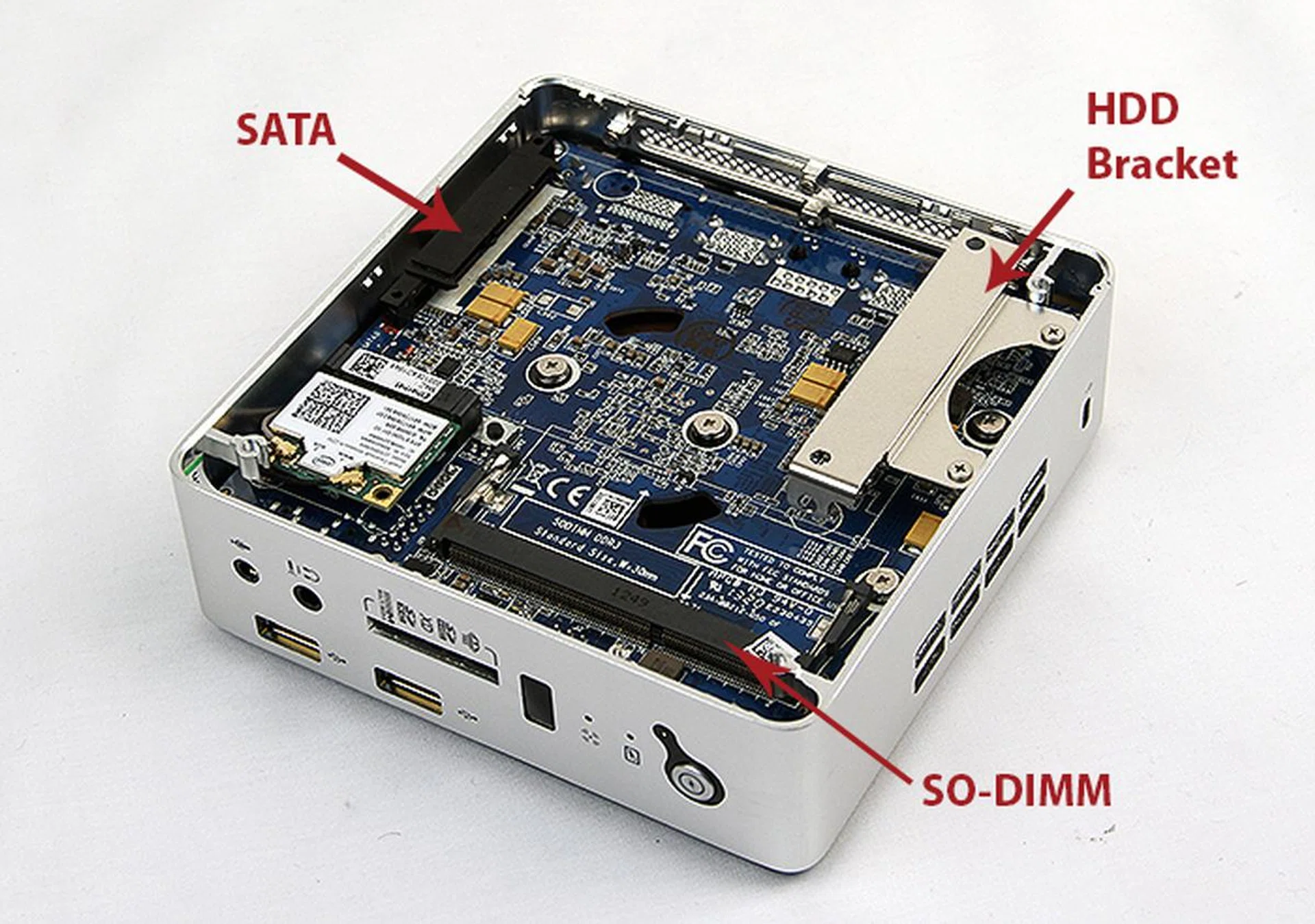
Installation was easy. Even users who have not dabbled in DIY should be able to install the hard drive and memory with no issues.
Installation was a fairly straightforward process, although installing the hard drive is a little tedious. The bottom panel can be removed by undoing the rubber feet, which double up as screws. Once done, you find that the SO-DIMM slot and SATA slot for the hard drive are both easily accessible. Installing the hard drive requires users to first undo the hard drive bracket, attach the bracket to the drive, install the drive itself and the securing the bracket to the the chassis. This is not the most elegant of implementation, though, admittedly, we understand that the lack of space within the system means that a tool-free means of installing the hard drive is nearly impossible.
Cooling duties are handled by a single blower-style cooler on the flip side of the motherboard. For the most part, the ZBOX nano ID65 operates quietly, and only got noticeably loud when we were running our graphics benchmarks.
Design & Features
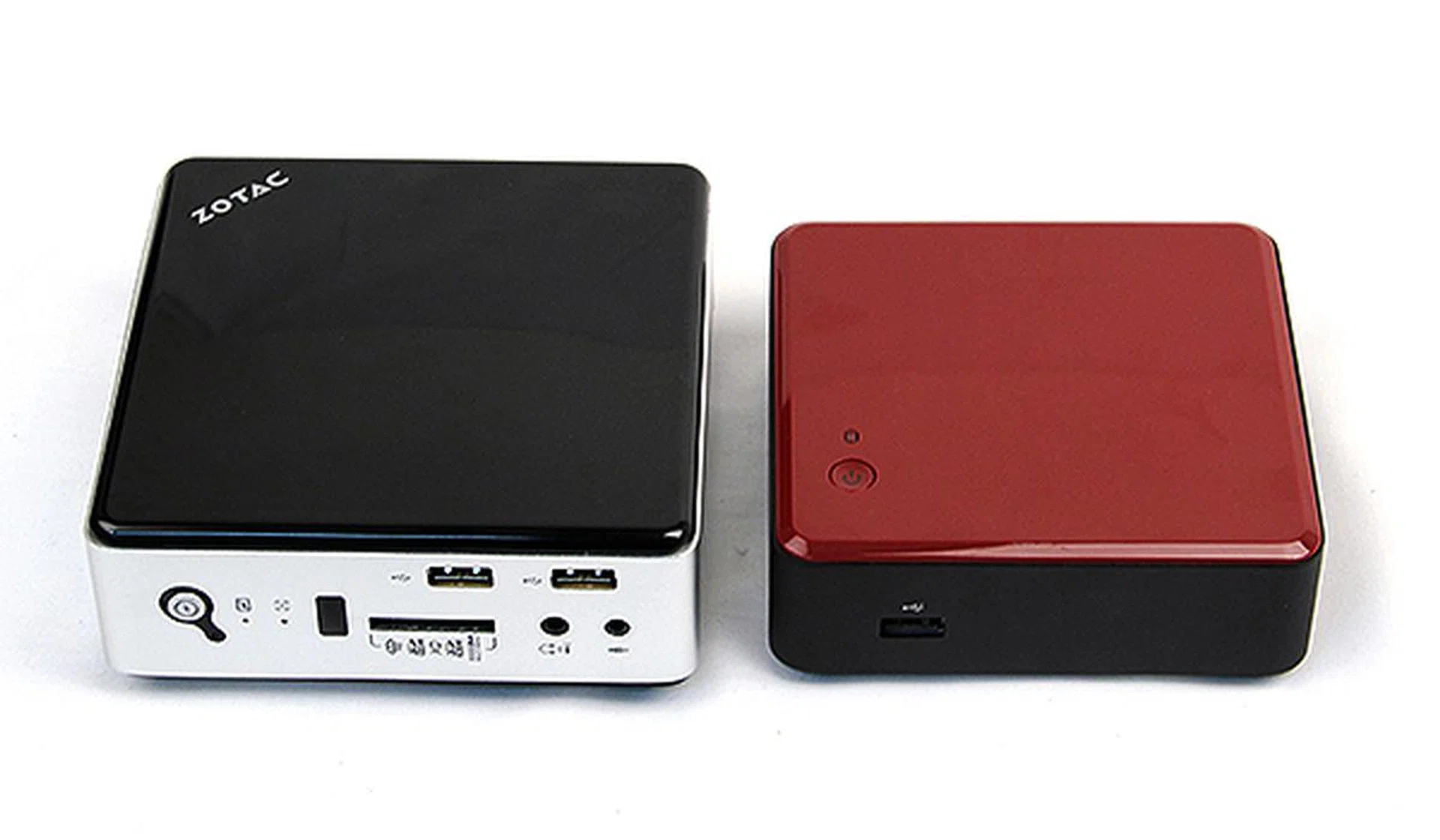
The Zotac ZBOX nano ID65 is noticeably larger, but still remains small and compact enough to be mounted behind displays and carried in bags.
The Zotac ZBOX nano ID65 is simply designed with a glossy black plastic top and bottom covers and a brushed aluminum chassis. And although it is noticeably larger than the Intel NUC mini-PC and would not quite fit nicely in the palm of your hands, it is still very small and compact. The ZBOX Nano ID65 is small enough to be mounted behind displays using the supplied VESA mount. And with a weight of just 572g, slipping it into bags and carrying it around would also not be no problem.
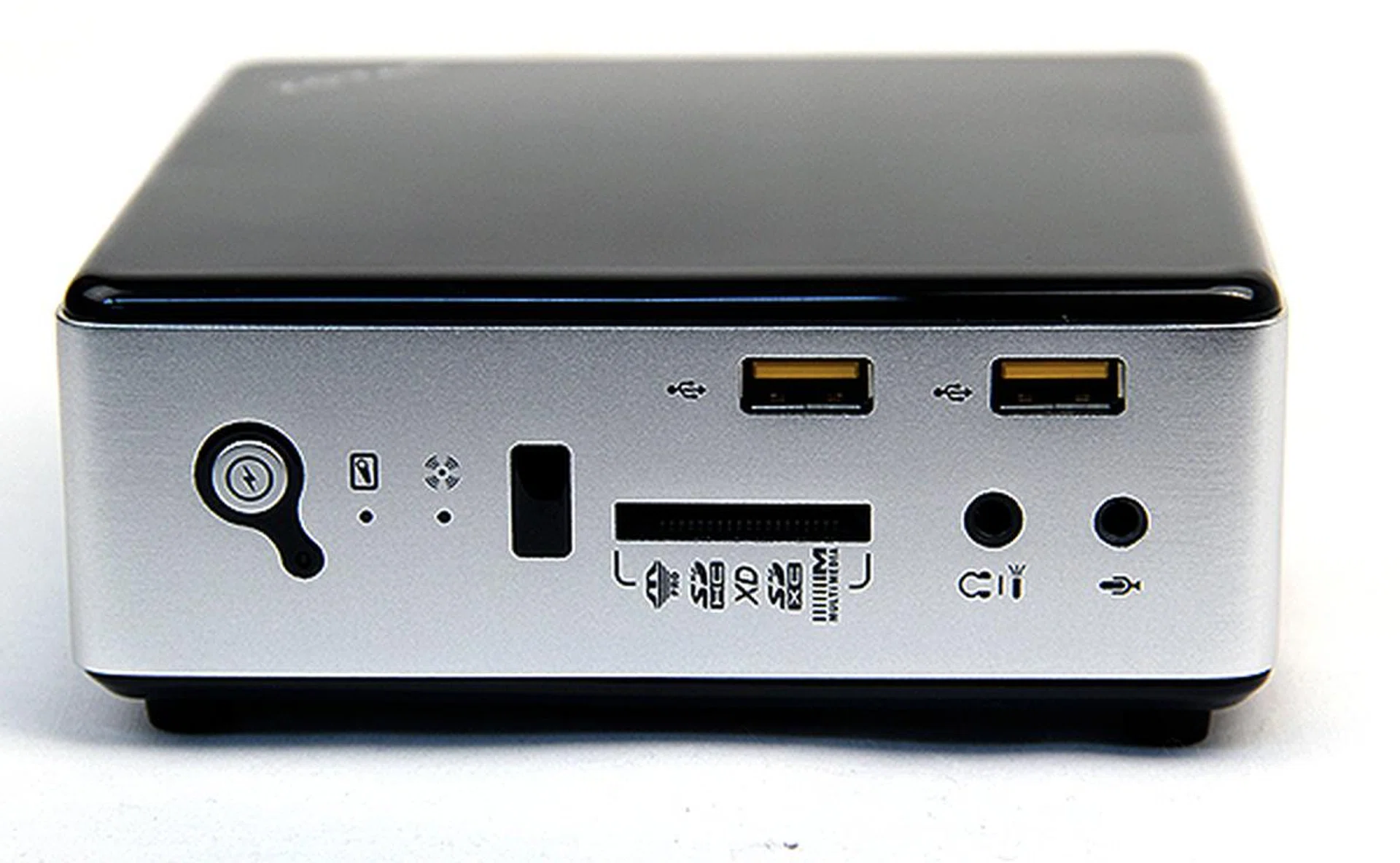
Up front, there two USB 2.0 ports, a multi-format memory card reader, headphones and microphone jacks, and an IR sensor for universal remote controls.
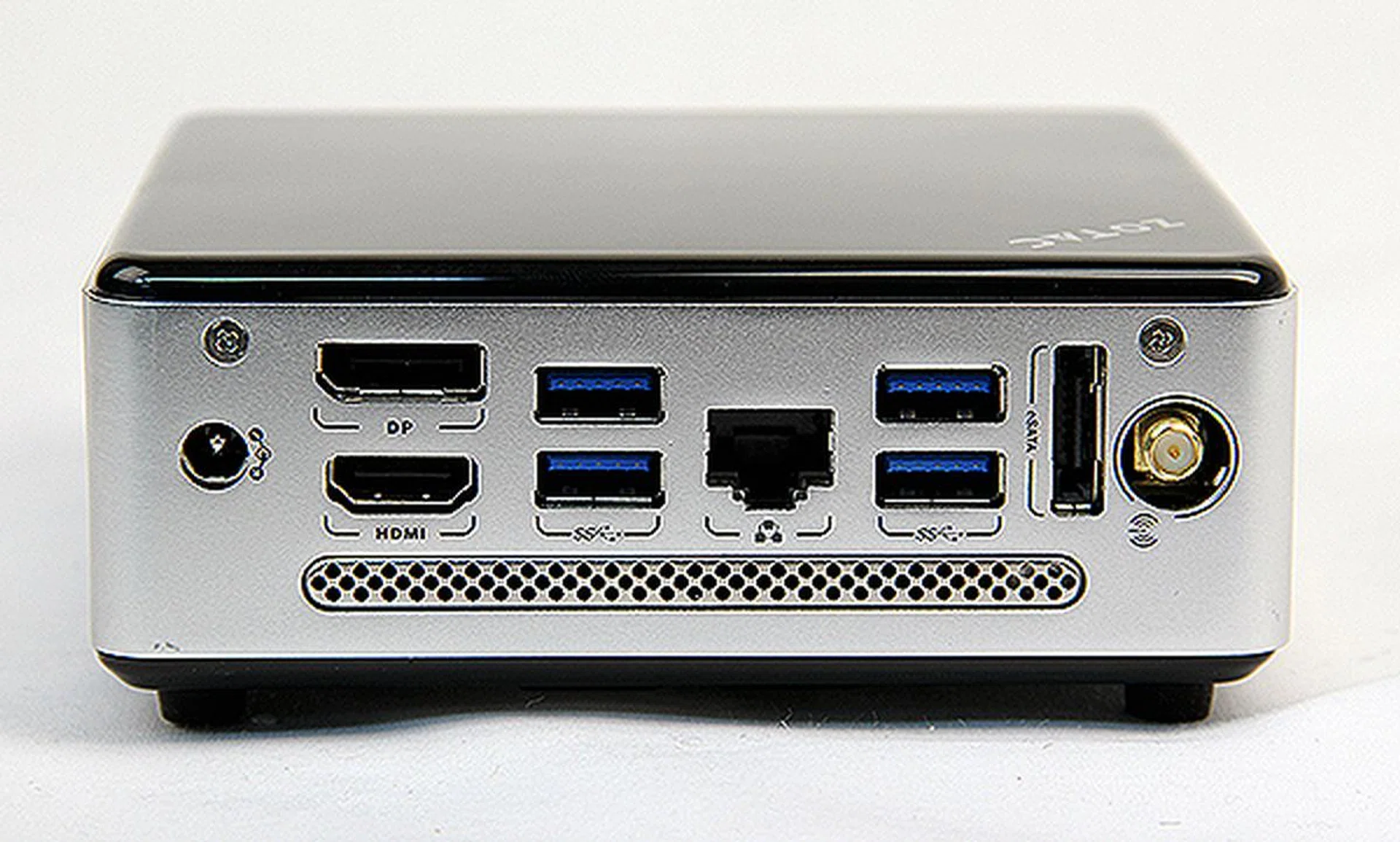
Round the back are four USB 3.0 ports, a DisplayPort, HDMI port, eSATA port, an Ethernet jack and an antennae mount for Wi-Fi.
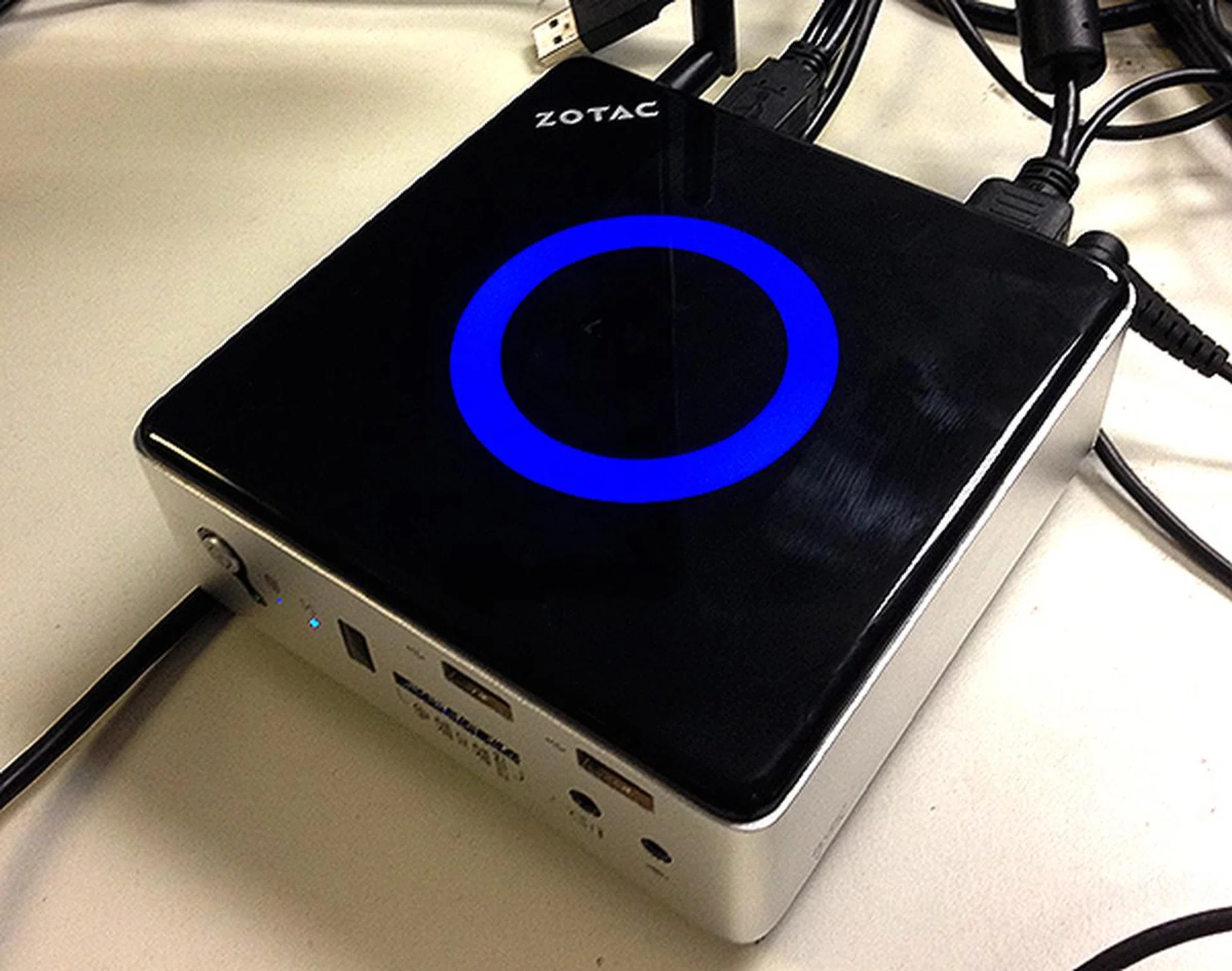
When in operation, a blue ring of light appears on the top panel. It reminds me of Tony Stark's Arc Reactor.
The ZBOX nano ID65 is not larger than the Intel NUC mini-PC without reason, apart from the slightly faster processor, it also offers a greater variety of I/O connectivity options. To begin, while the Intel NUC mini-PC only offered three USB ports (and 2.0 ports at that), the Zotac ups the ante with no less than six USB ports, four USB 3.0 ones and two regular USB 2.0 ports. It may not have a Thunderbolt port, but it gets by with an eSATA one. On top of that, the ZBOX nano ID65 also offers Gigabit Ethernet, a HDMI port and a DisplayPort. Finally, it tops it off with headphones and microphone jacks. The inclusion of these ports augments the key weaknesses of Intel’s NUC offerings and greatly increases the usability of the ZBOX nano ID65.
However, we feel that Zotac should have swapped the front two USB 2.0 ports for the newer 3.0 standard. This would make it easier for users to plug in their USB 3.0 compatible external storage devices, but this is a very minor nitpick with relevance to the unit's size and overall usability.
Performance Benchmarking
Test Setup
Here’s the test configuration of Zotac ZBOX nano ID65:-
- Intel Core i3-3537U (2.0GHz)
- GeIL 4GB DDR SO-DIMM (single channel)
- 128GB Samsung SSD 840 Pro
- Windows 7 Ultimate 64-bit / Windows 8 Pro
To evaluate the Zotac ZBOX nano ID65, we will be comparing it closely with the Intel NUC mini-PC as well as the recently reviewed Sapphire Edge VS8. While the ZBOX nano ID65 easily trumps the Intel NUC mini-PC in terms of usability and features, how will it fare in terms of performance given that it only operates in a single-channel memory mode will be of interest to us.Therefore, the list of benchmarks used are as follows:
- FutureMark PCMark 7
- 3DMark 11
- Far Cry 2
- Battlefield: Bad Company 2
PCMark 7
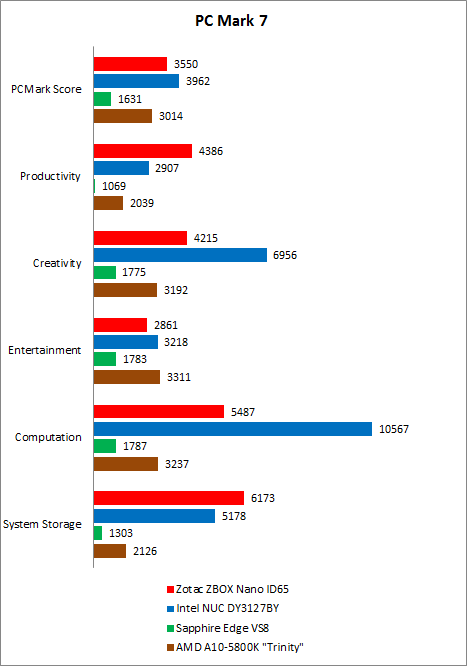
Overall, the Zotac ZBOX nano ID65 scored about 11% less than the Intel NUC mini-PC. However, the breakdown of the scores paints an interesting picture. On the “Productivity” workload, the ZBOX nano ID65 had the clear upper-hand, but conceded to the Intel NUC mini-PC when it came to the “Creativity”, “Entertainment” and “Computation” workloads, regaining the upper-hand only when it came to “System Storage”. The ZBOX nano ID65 was miles ahead of the Sapphire Edge VS8 and held a convincing lead over the AMD A10-5800K APU.
3DMark 11
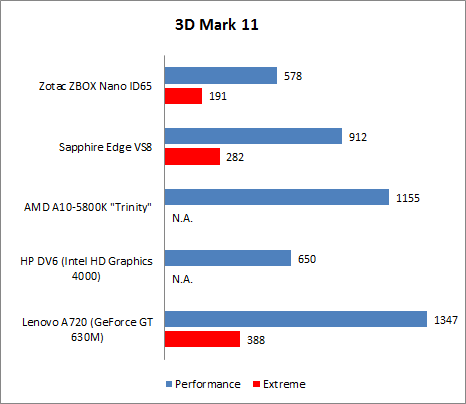
As we can see from 3DMark 11, the Intel HD Graphics 4000 integrated GPU is clearly no match for AMD’s integrated GPU solutions. Comparing the ZBOX nano ID65 against the HP DV6, both of which have similar Intel integrated GPUs, we noticed a 12% difference in performance in favor of the HP DV6. We did not have results from the Intel NUC mini-PC because it failed to complete this benchmark.
Far Cry 2
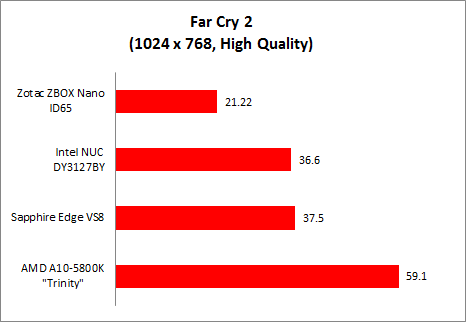
Moving on to real-world gaming benchmarks, on Far Cry 2 we noticed that the ZBOX nano ID65 offered 40% poorer performance as compared to the Intel NUC mini-PC. The difference in performance is pretty drastic and this can be attributed to its single-channel memory implementation because the graphics memory bandwidth is directly dependent on the system's memory subsystem configuration. The ZBOX nano ID65's drawback is also obvious in some of the sub-tests from PC Mark as seen above;
Battlefield: Bad Company 2
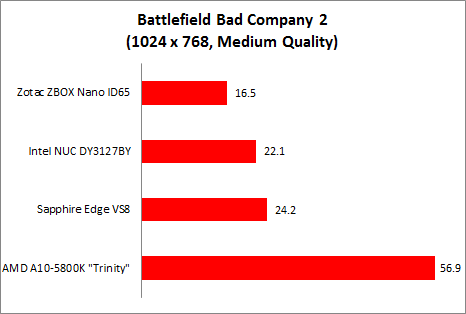
On Battlefield Bad Company 2, we saw that the ZBOX nano ID65 once again posted much lower frame rates than the Intel NUC mini-PC, despite the two having the same Intel HD Graphics 4000 integrated GPU. The difference in performance is about 35% and can be attributed again to the ZBOX’s single-channel memory implementation.
Improved, But is it Better?
The Intel NUC mini-PC is an interesting product and concept. Performance is not one of its strong suits, but in terms of actual user experience, the NUC mini-PC was actually pretty pleasant. Obviously, both of this had to do with the fact that it had a speedy mSATA SSD, which made things brisk and responsive.
Unfortunately, the Intel NUC mini-PC was let down by its poor connectivity options, which made the device difficult to use. The fact that it only had three USB ports and no audio output jack meant that users would need to think of workarounds to make it work. And finally, there was the price and the extra effort required to source for components such as the wireless card and mSATA SSD.
The Zotac ZBOX nano ID65 sought to right these wrongs and it is successful for the most part. We especially appreciate its generous offerings of ports and connectivity options. The numerous USB ports and inclusion of standard audio jacks make it a much more user-friendly device.
Installation was simple and the ability to accommodate standard 2.5-inch drives and the inclusion of the Wi-Fi card also makes it easy for users to source for parts. And when you consider that the Zotac achieves all this without being drastically larger than the Intel NUC mini-PC makes it all the more impressive.
In terms of performance, the Zotac ZBOX nano ID65 clearly suffers from its single-memory channel implementation. The discrepancy was not obvious on PCMark 7 and certainly wasn’t obvious in normal usage scenarios such as web browsing and word processing. However, we noticed that the Zotac performed significantly poorer on our gaming benchmarks. For those who do intend to do some light gaming, its disappointing gaming performance is something you should take note of.
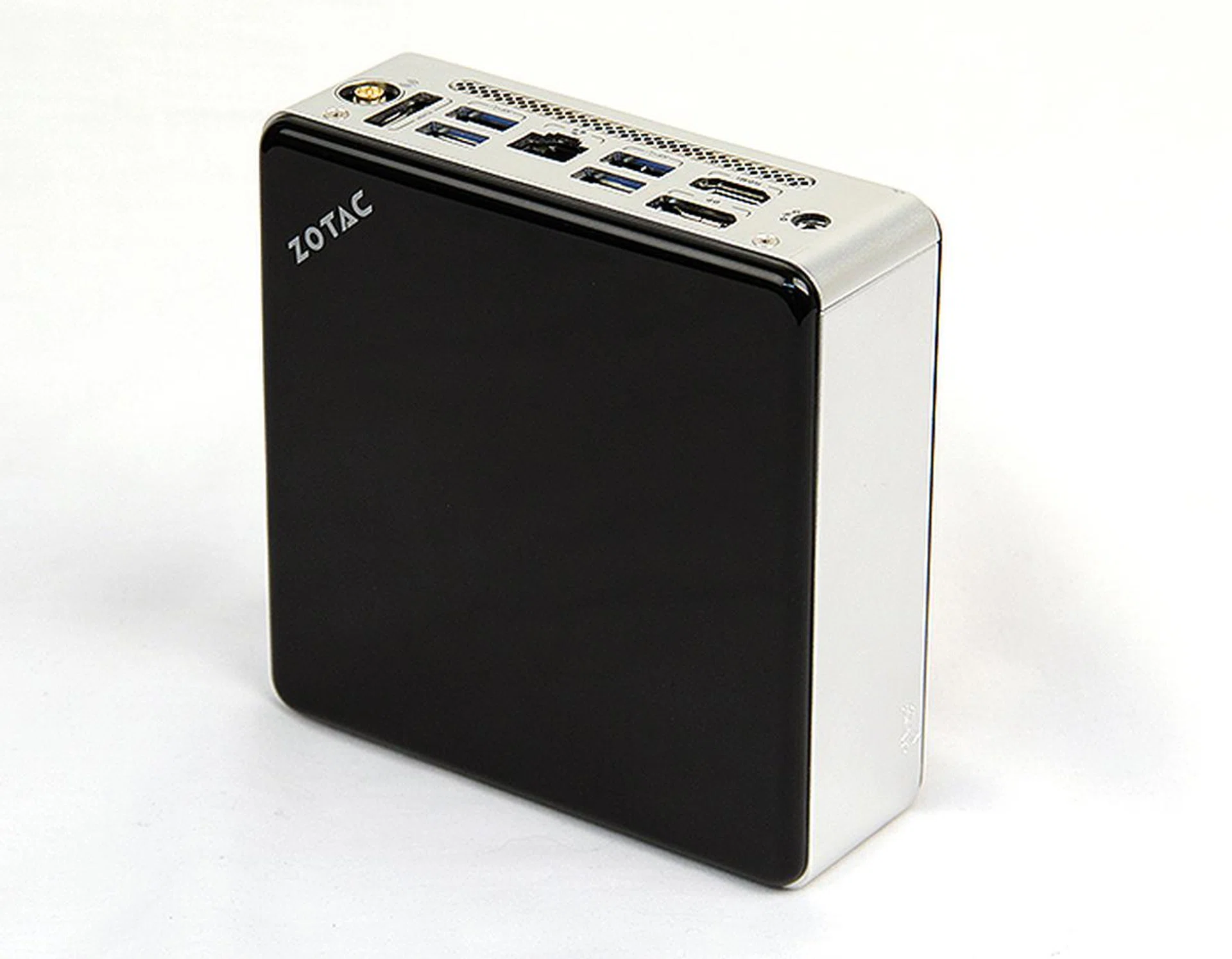
The Zotac ZBOX nano ID65 seems promising at first but its let down by poor graphics performance and a high price tag.
Price-wise, the Zotac ZBOX nano ID65 comes in at S$744. However, you must remember that this is a barebones kit. Depending on your choice of OS and components, you could easily end up with a final price in excess of S$1000. A copy of Windows 8 costs around S$130, while a decent 128GB SSD costs upwards of $150. You could opt for a cheaper mechanical hard disk drive, but that would greatly reduce performance.
For S$1000, there are more powerful and affordable alternatives out there. And even if you are dead set on getting a mini-PC, Apple’s Mac Mini is simply too attractive an option not to be considered. It might be considerably larger in foot print, but he entry-level Mac Mini retails for just S$788, and it comes fully equipped and is ready to run out of the box.
All in all, the Zotac ZBOX nano ID65 mostly improves on the shortcomings of the Intel NUC mini-PC, but fortunately, it also has its shortcomings. Its single-channel memory implementation greatly impedes graphics performance. In addition, it also falls into the same price trap as the Intel NUC mini-PC. This makes it still a niche product that will only appeal to a specific group of users with their own specific needs.
Our articles may contain affiliate links. If you buy through these links, we may earn a small commission.