
Sapphire Edge VS8 (SSD) - Upgraded and Revisited
We upgraded the earlier reviewed Sapphire Edge VS8 with a high-end SSD to investigate how much it can improve the system's performance or if the platform is still underpowered. Find out in our follow-up review of the this mini system and if it's worthwhile to do so.

A Flash Boost
Earlier in our review of the Sapphire Edge VS8, we noted that while the Sapphire Edge VS8 was compact, provided a wealth of connectivity options and would make a good HTPC, but it was woefully lacking in performance.
Obviously its AMD A8-4555M Trinity APU was never going to win any performance stakes, but its weak processor wasn’t helped by its lackadaisical 5400rpm mechanical hard disk. This made the Edge VS8 felt sluggish and slow, even if it could run general and HTPC computing tasks such as web browsing and watching full HD videos without a hitch.
Out of curiosity, we decided to upgrade the Sapphire Edge VS8 with a new SSD to see how the Edge VS8 will perform, both in terms of benchmarks and also practical usage. But first, we would need to remove the existing mechanical hard disk in the Edge VS8 and replace it with an SSD and here’s how you do it.
Installation
Upgrading the Sapphire Edge VS8’s hard disk was a straightforward but cumbersome affair. We say that because while it is apparent what needs to be done is to swap the storage drive, actual execution proved to be tricky because of some design quirks of the Edge VS8, as we will soon see.
To access the internals, one needs to remove four screws on the rear I/O panel of the system. Thereafter, simply remove the cover. A point to note is that a fair bit of force is required to pry open the cover. Once the cover is off, proceed to remove the old mechanical hard disk and replace it with an SSD. This part is cumbersome, and here’s why:
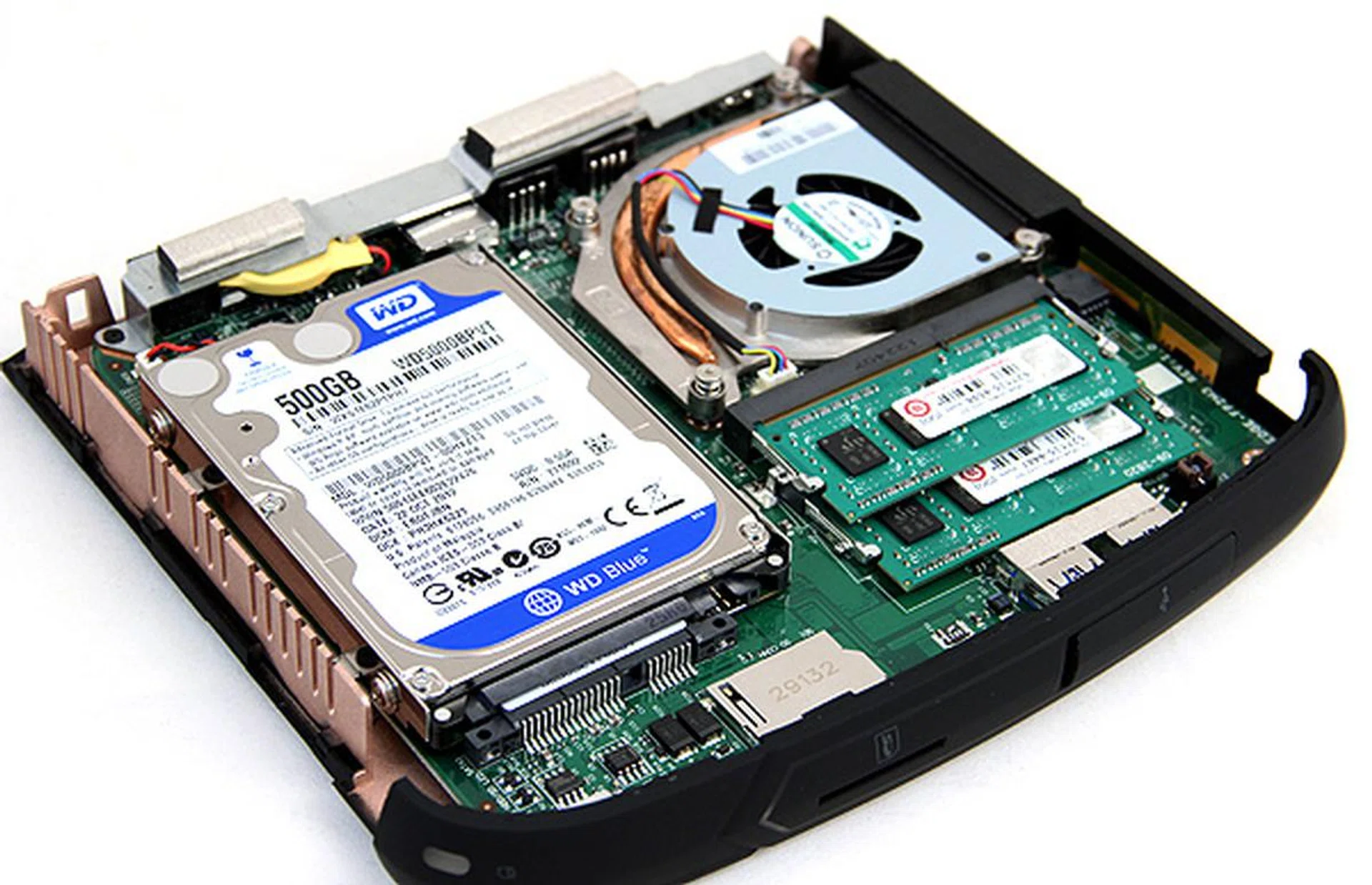
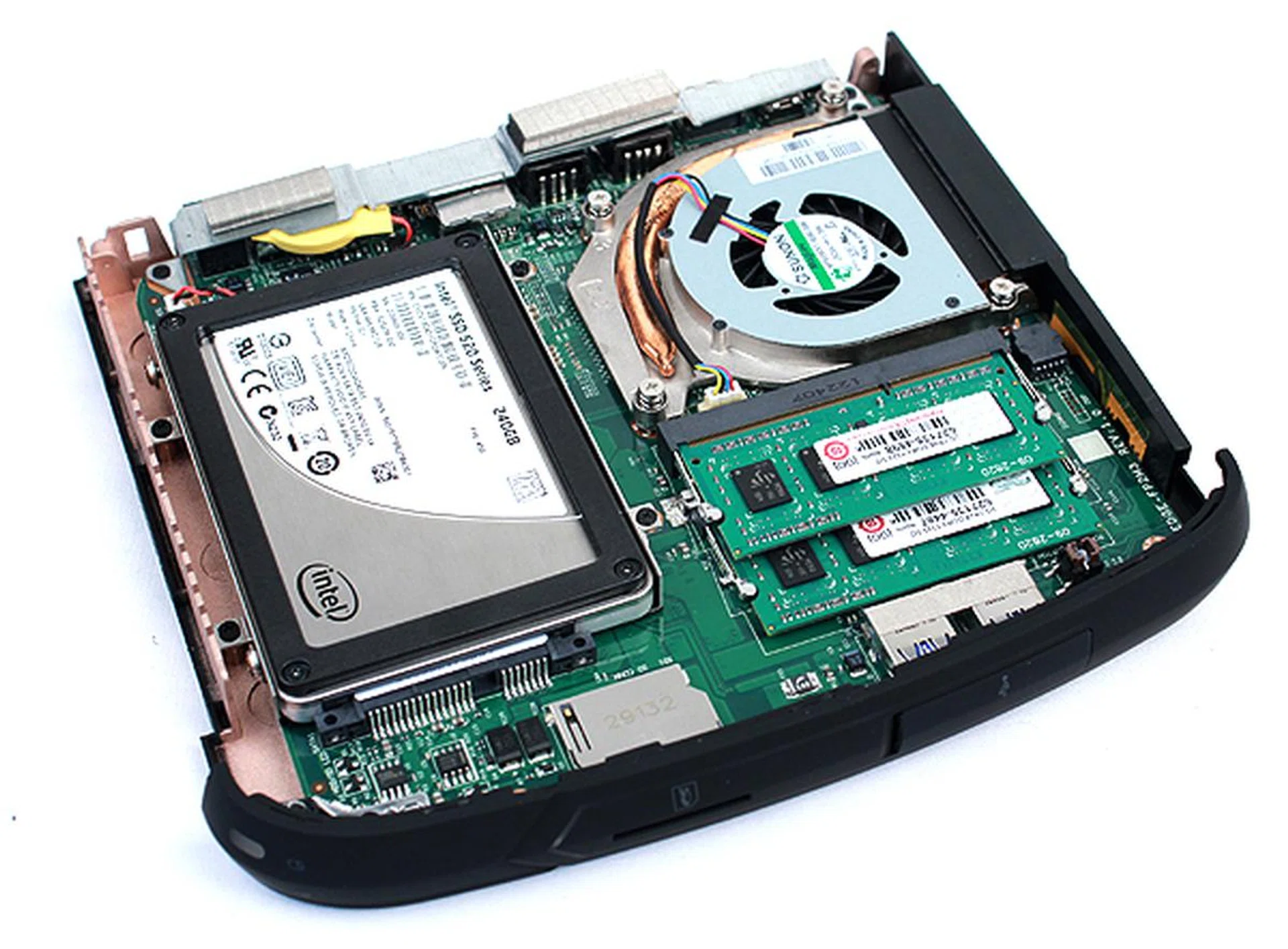
As you can see, the hard disk takes up bulk of the space. The processor is top-right under the blower-style cooler. Just south of the processor is the memory. If you buy the barebones edition of the system, you'll have to install your own storage and memory - none will be supplied.
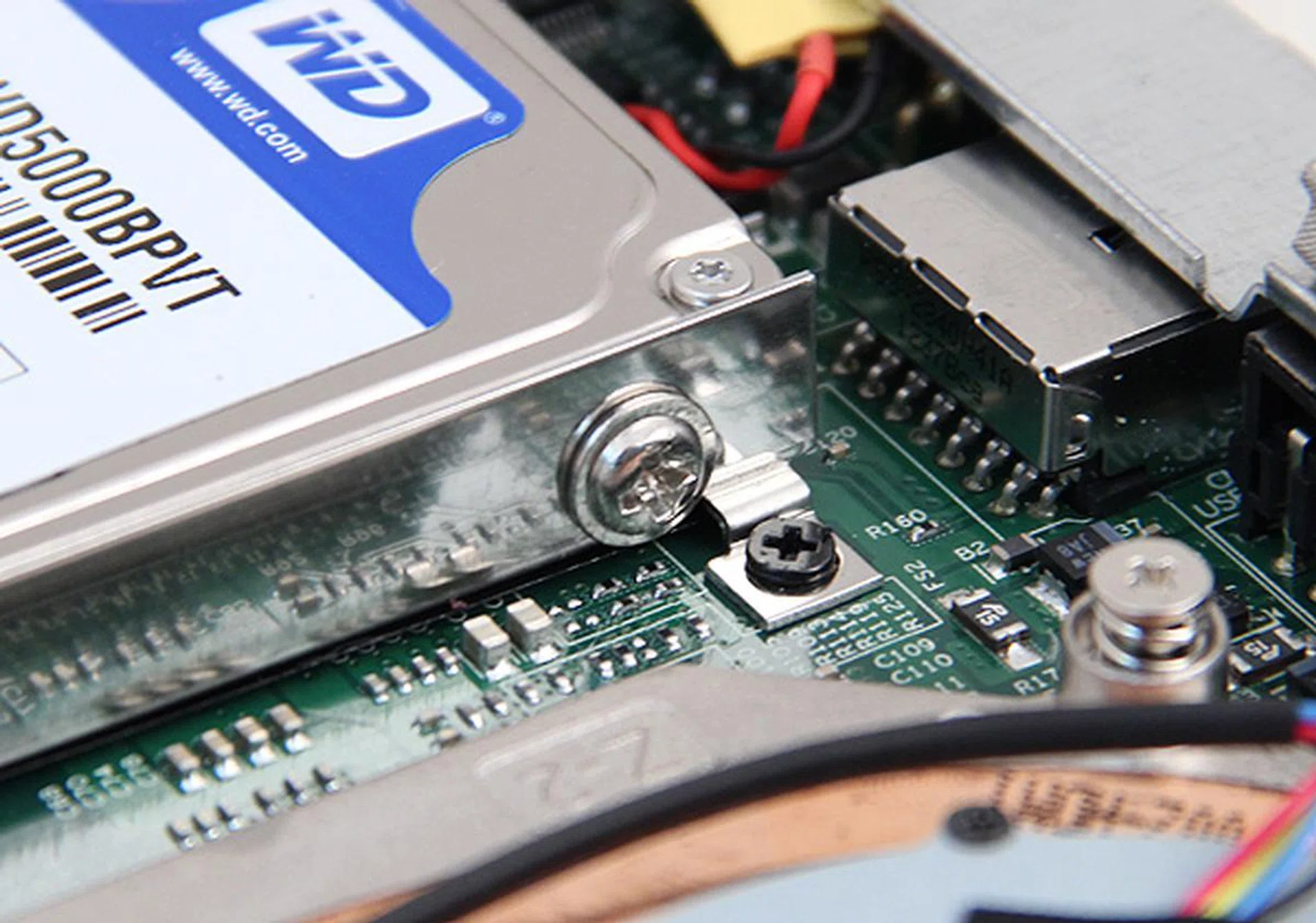
Removing the hard disk proved to be quite troublesome since you cannot just unscrew the drive from the cage (silver screw), you need to remove the entire hard disk cage (black screw).
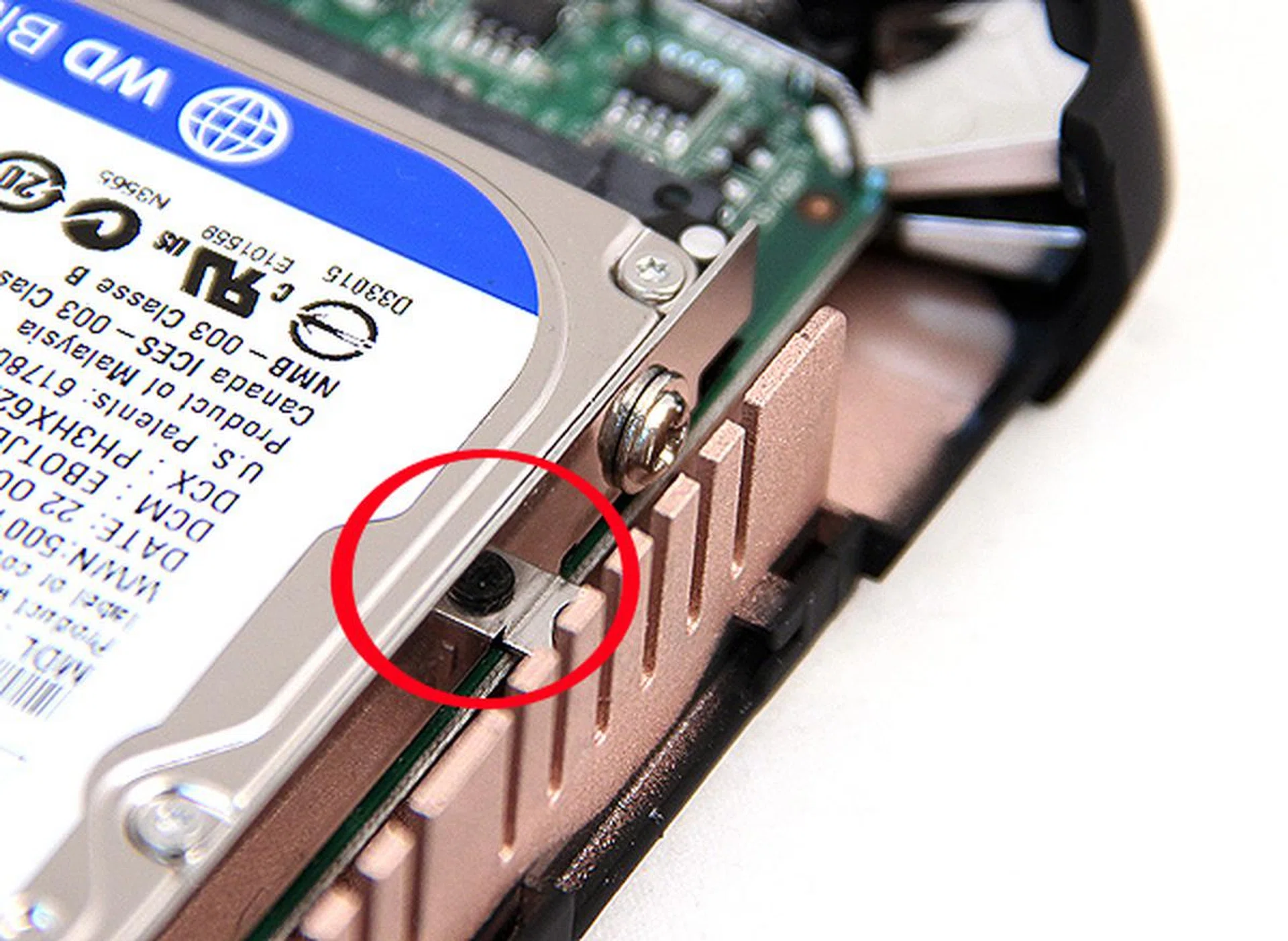
This is because on the opposite side, the screw securing the drive to the cage is inaccessible because of the heatsink. Therefore, one needs to remove the entire cage by removing the highlighted black screws before the drive can be freed. As you can see, the silver screw securing the drive to the hard disk cage is unreachable. Incidentally, because of the position of the heatsink, re-securing the drive cage proved to be challenging too. We highly recommend the use of magnetic screwdrivers in this endeavor.
Once you have removed the old hard disk, simply replace it with your new SSD and retrace the steps. To add, the hard drive cage accommodates both 7mm and 9mm SSDs. We highly recommend using a magnetic screwdriver for this job because the heatsink really gets the in the way of things.
Performance
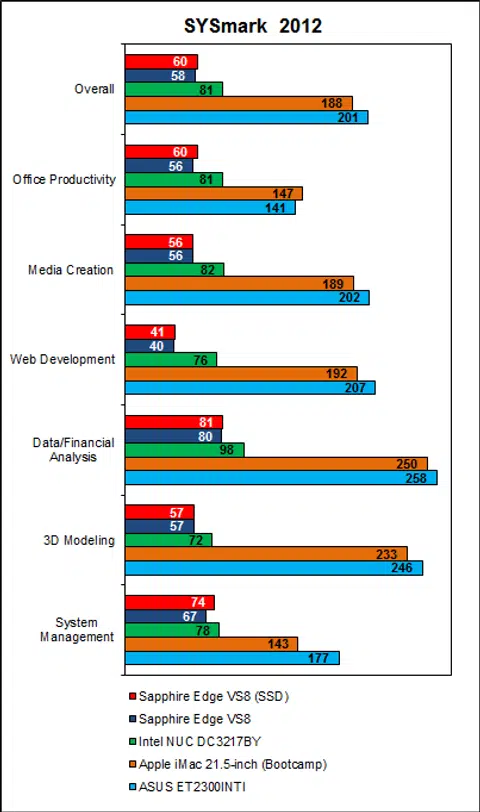
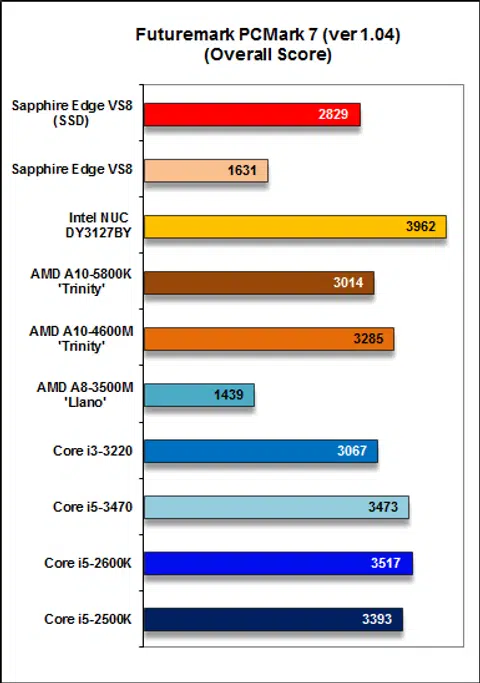
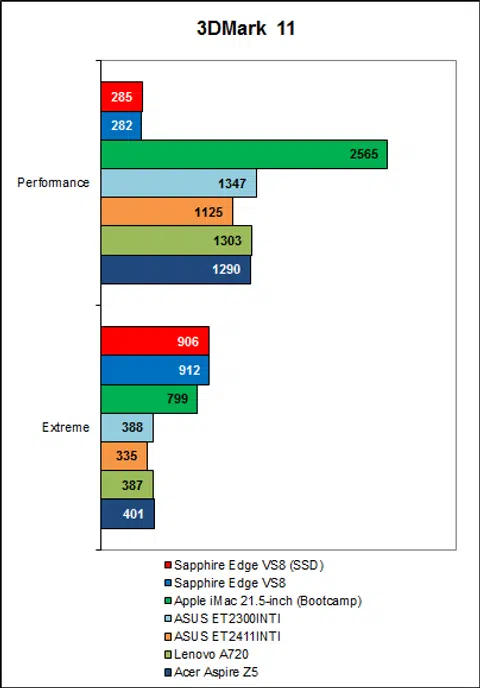
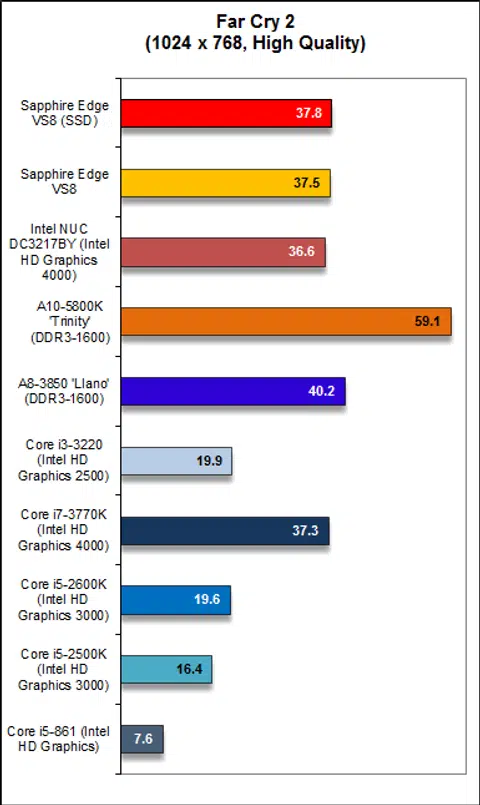
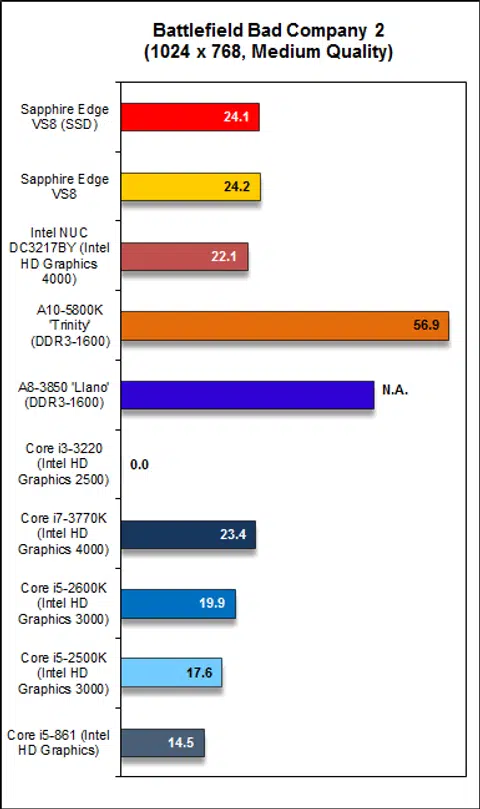
We ran the same benchmarks and comparisons. Apart from PCMark 7, there’s was hardly any difference in performance between the old Edge VS8 and our new SSD-equipped Edge VS8 (using an Intel SSD 520 to be exact). This was disappointing because we had expected better scores on SYSmark 2012 as well.
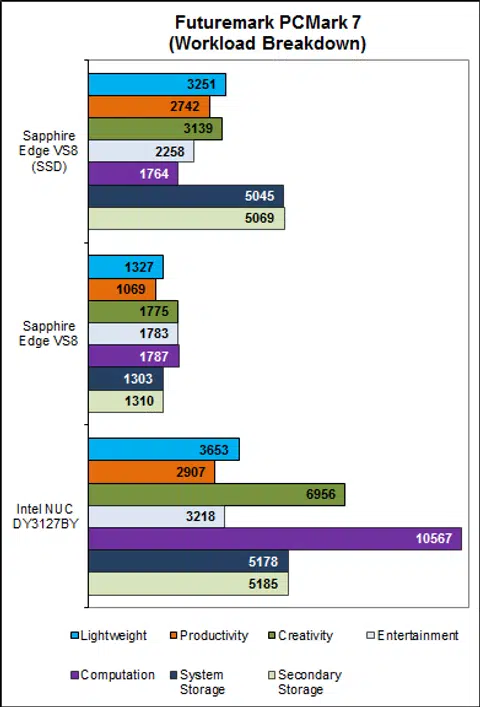
Looking at the overall and breakdown of scores on PCMark 7, we can see that the Edge VS8 scored about 70% better and this was due to its significantly better score on the "System Storage" workload. Previously, the Edge VS8 managed just 1303 PCMarks on "System Storage", but with the SSD, it now scored 5045 PCMarks, just about on a par with the Intel NUC Mini-PC. Additionally, we can infer from the results here that the AMD A8-4555M APU is seriously handicapped and down on overall performance as compared to the Intel Core i3-3217U processor in the Intel NUC Mini-PC.
Conclusion
Based on our experiences with the newer crop of Mini-PCs, it seems that having an SSD is absolutely crucial. The combination of a low-power processor and slow mechanical hard disk (such as the originally configured Sapphire Edge VS8) makes a for a sluggish computing experience.
Unfortunately, replacing the mechanical hard disk with an SSD did not translate to much of a performance increase in terms of benchmarks results (save for PCMark 7). In terms of practical usage, the Edge VS8 did feel more responsive, but it's still evident that you are using a low powered system. Nevertheless, judging from our experience with the Edge VS8, we would definitely say that for a low-power Mini-PC system, an SSD is absolutely crucial in providing a pleasant user experience.
On the flip side, and as we have mentioned previously in the conclusion of our original review article, having an SSD raises the cost of the system substantially. A modest 128GB SSD would cost upwards from S$160, and assuming you got the barebones version of the Edge VS8 at S$579 and factoring the cost of both memory and OS, you are looking at a grand total in excess of S$900. All things considered, this is very pricey for a computer offering this level of performance. Among the tested mini systems from our experience, the only advantage the Sapphire Edge VS8 offers over the Intel NUC Mini-PC is that is has better connectivity options and is easier to source for components because it has an integrated wireless module and you don't need to hunt for mSATA storage. For overall usage experience and all-round performance of the completed system, our vote still goes to the Intel NUC Mini-PC.
Our articles may contain affiliate links. If you buy through these links, we may earn a small commission.