
Toshiba Portege Z830 (Core i7) - A Business User's Best Friend
The world's smallest and lightest Ultrabook, the Core i7 Toshiba Portege Z830 is not only very portable, but it's also fit for the corporate world. It comes with essential security features, a full suite of connectivity options, and something extra up its sleeve. Read on to find out more about it.

Business User's Best Friend
We've reviewed a number of Toshiba notebooks, from their gaming and multimedia versions to business machines. Now with the Portege Z830, we can add "Ultrabook" to the growing list. We first showcased this thin and light machine at a launch event last month.
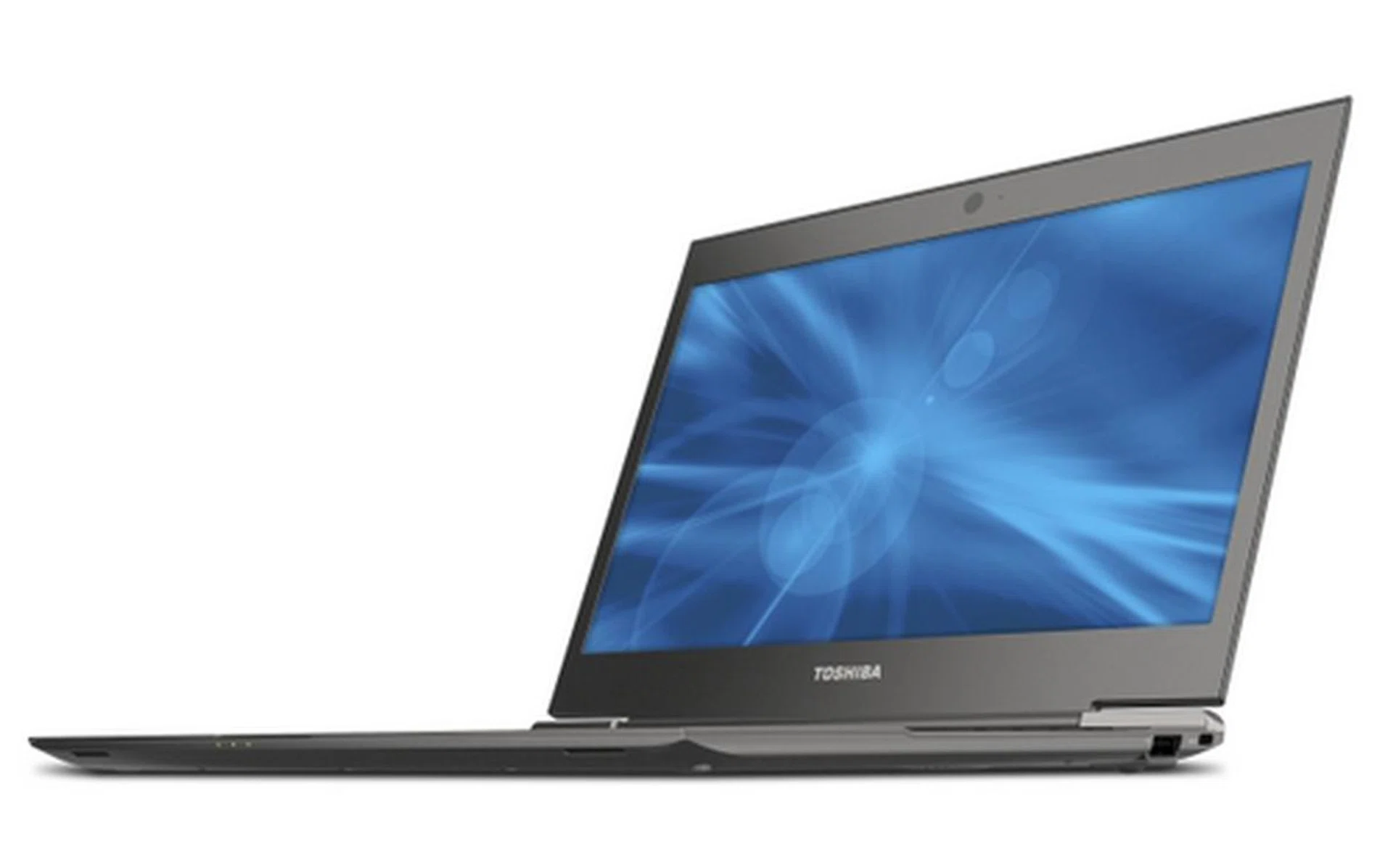
Toshiba claims that the new Portege Z830 is the thinnest and lightest Ultrabook in the world right now, but how long it can hold on to that title is anyone's guess.
While Toshiba's pricing strategy generally hasn't been very attractive, there is one thing we’re sure every manufacturer should learn from Toshiba’s R series of products (and now the Z) -- long notebook battery life. Sure, the battery life for the Toshiba Qosmio X770 was abysmal, but that’s because it isn’t meant to be portable. Business machines made to be portable like the Toshiba Portege R830, and a few Porteges before that, have amazing battery life. On top of that, the Portege R830 is incredibly light-weight and as a result, boasted incredibly good portability score.
So in case you hadn’t guess what we want from our Ultrabooks, here it is: amazing battery life without the bulk. Every other feature on Ultrabooks such as the processor, RAM, screen, SSD and so on, have little variation. Even so, how a notebook vendor optimizes the battery life of all of these components from the hardware and software level is still an important aspect to get as much mileage out of them.
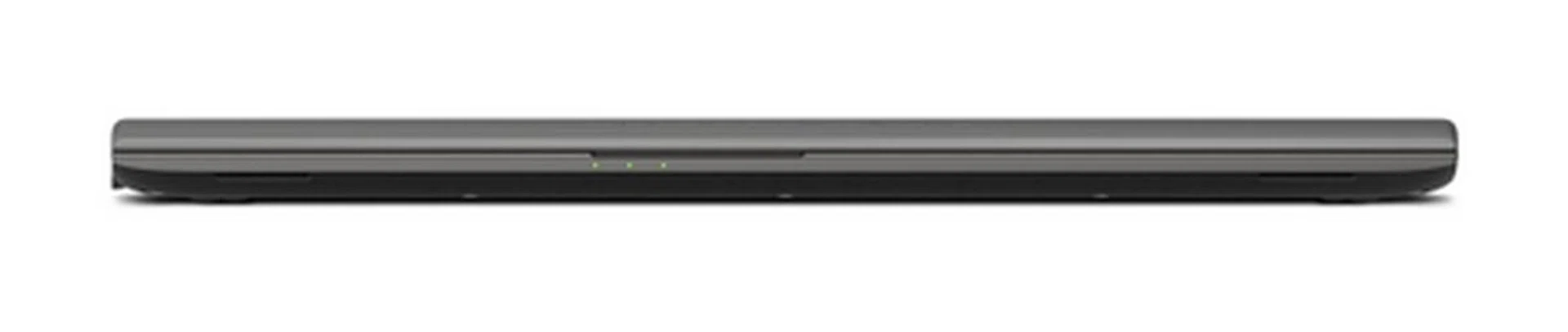
The machine itself is very light, and weighs approximately 1.12kg, and measures a very svelte 16mm at its thickest point.
It also depends on the kind of battery that has been paired with the notebook. All of these factors come together to become the machine you need to depend on when on the road. So will the 13-inch Z830 continue the proud Portege tradition of long battery life? We’ll find out in the battery performance section of this review. For now, we check out the build quality and exterior elements of the Z830.
The Core i7 processor based Toshiba Portege Z830 is one of the rare Ultrabooks that offers all kinds of ports you’d expect to see in a business machine. We’ve got the conventional VGA (for folks who do powerpoint presentations with old business projectors), USB 2.0 ports, a full-sized HDMI port, the usual audio jacks, SD card-reader, RJ45 LAN port, and even the newer USB 3.0 port. Select business models of the Z830 even offer the Trusted Platform Module (TPM) chip, and a fingerprint reader. Just these last two features alone would make your IT department shout out “yes!” to your pleas for a Toshiba Ultrabook - hopefully.
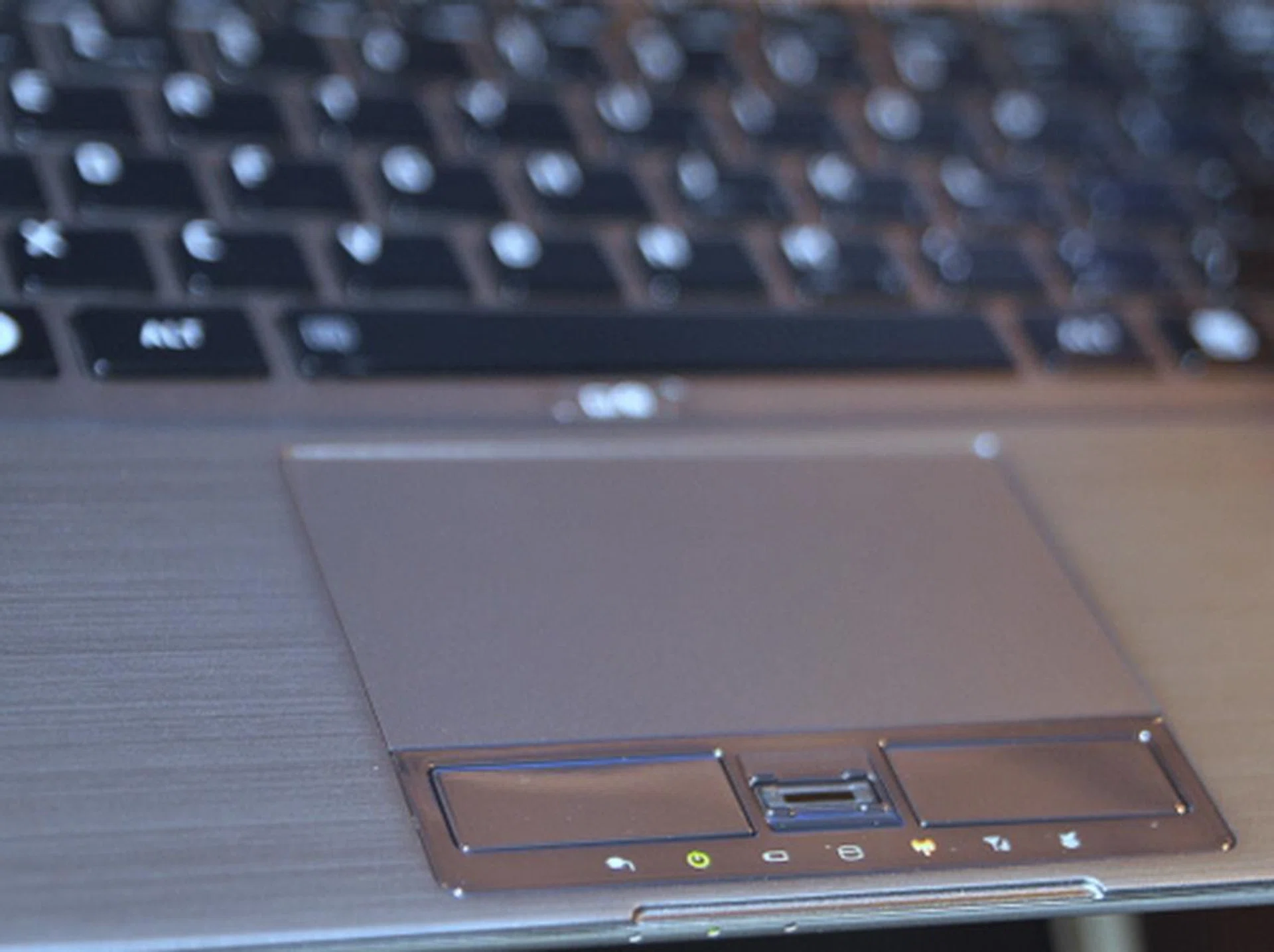
The most obvious security feature on the Toshiba Portege Z830 would be the fingerprint reader. This feature however only comes with business models of the Z830.
Looks-wise, the Z830 isn’t outstanding. In fact it doesn’t even count as the top three most handsome Ultrabooks we’ve seen. Its appearances are strictly utilitarian, which in itself presents a kind of charm through simplicity. The next most obvious aspect that would grab your attention is its very thin form factor. In fact, thinnest (15.9mm) in the world, for now. It’s also very light, so light that Toshiba claims it’s the lightest (1.12kg) Ultrabook in the world (again, for now).
The lid is covered in brushed magnesium alloy, the material of choice for some manufacturers now. Magnesium alloy here doesn’t feel as hard as aluminium alloy, so the lid itself may feel somewhat flimsy. We’re not sure if having a flimsy lid is such a good idea on a machine that is already so thin and light, but during our time with the machine, the lid didn’t present any problems whatsoever.
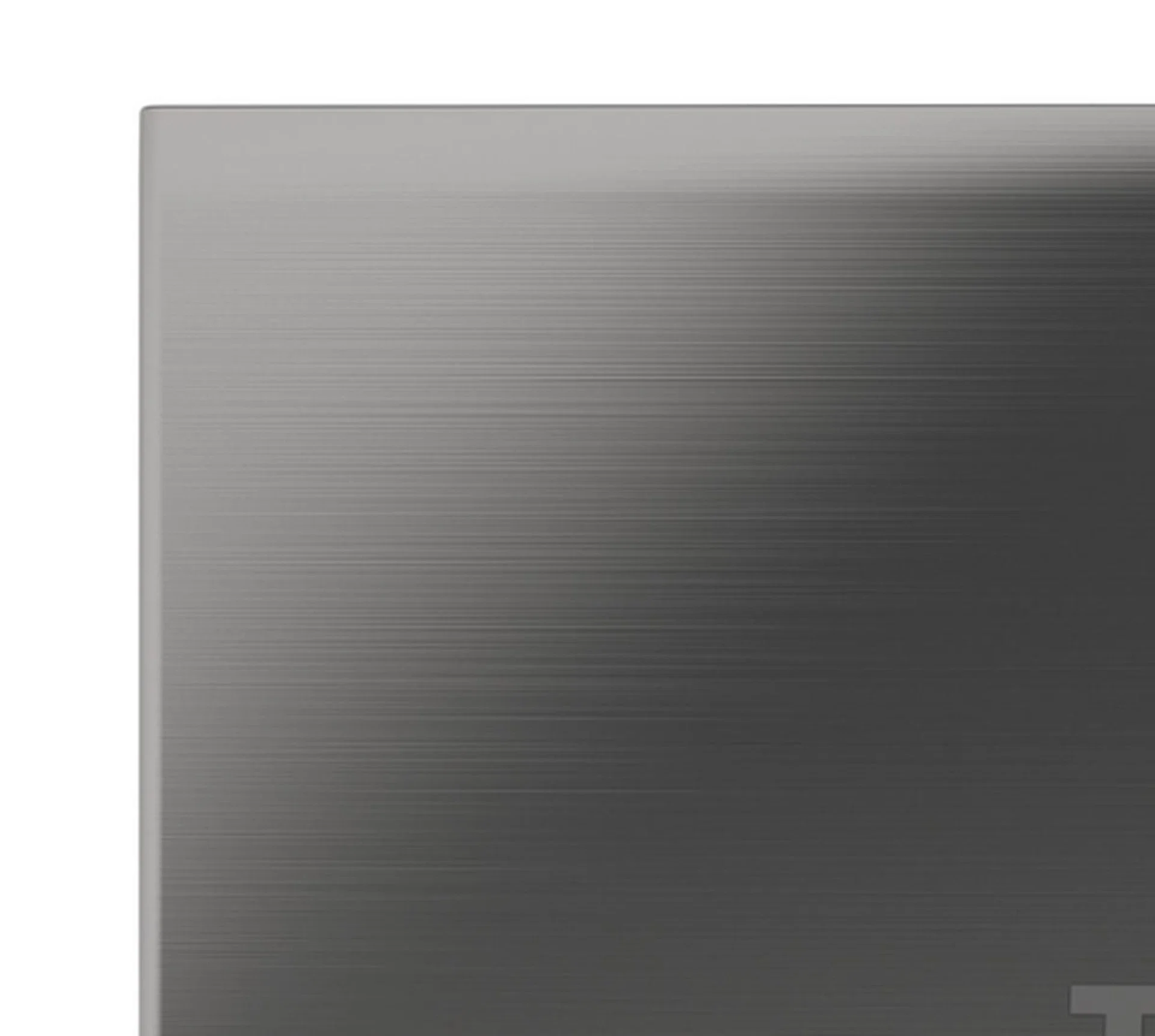
Brushed metal is a sure way to capture attention with that premium look. Unfortunately, magnesium alloy isn't as hard as aluminium alloy.
Handling the very thin laptop was also relatively trouble-free, with no ungainly weight distribution issues noticed. Holding it in your hands just feels like you’re carrying a women’s magazine (because they're usually on the heavier side). There is some flex present throughout the machine, but it’s not much of an issue, and you can easily wield the thin little machine around like if it were a (thick) folder filled with paper.
Unlike other Ultrabooks we’e seen so far, the Toshiba Portege Z830 seems to be the only manufacturer (so far) to have an Ultrabook that has a cluttered looking bottom, with lots of screws and even a cool looking heat vent. However there could be a reason to Toshiba’s design choice, when all other manufacturers have little to no features on the bottom of the machine.
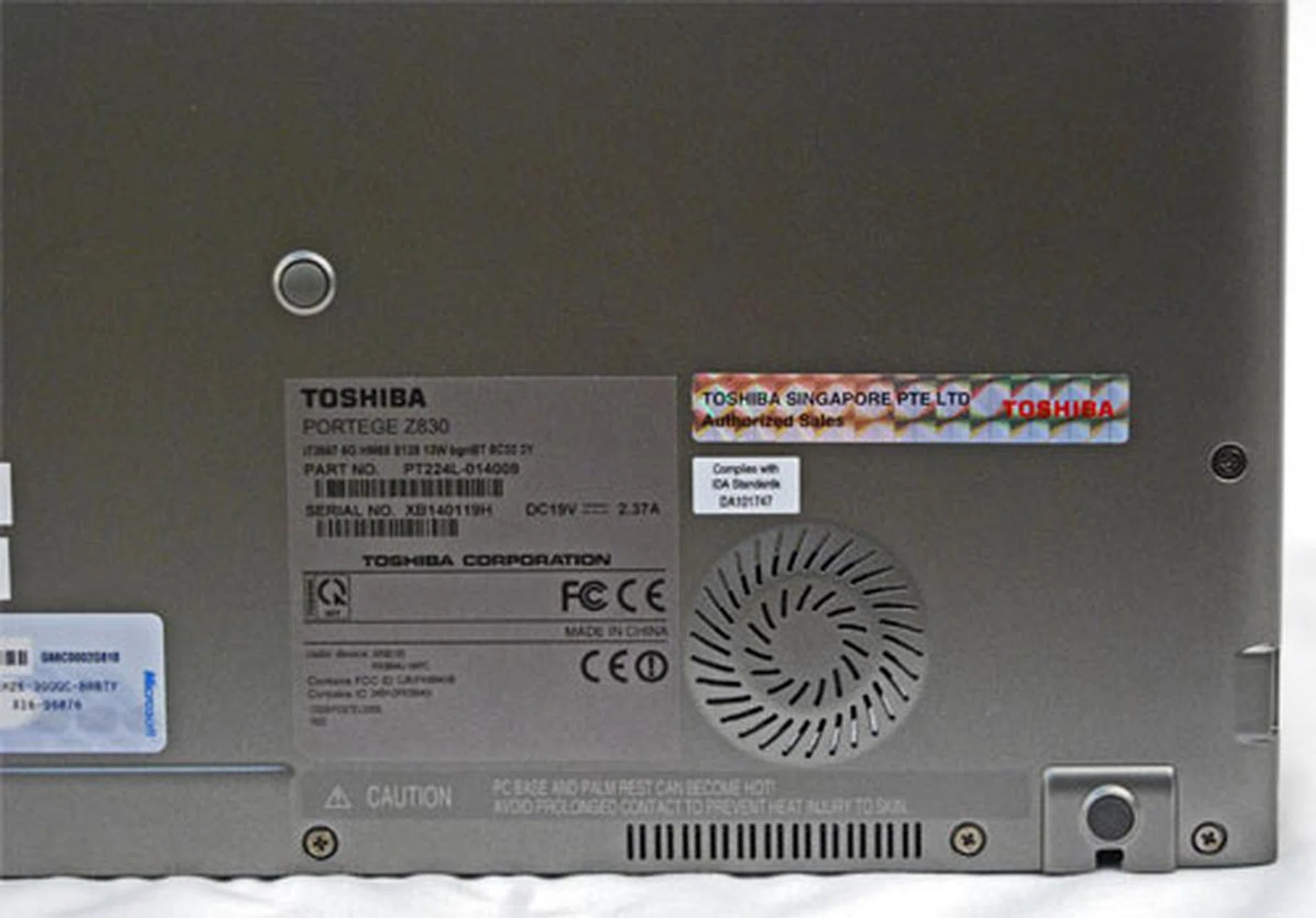
The Z830 has a very visible fan, necessary to keep the machine cool because the machine itself is so thin. It's also littered with screws to enable easy access to its guts for easy repair or upgrade.
Having screws scattered around the underbelly simply means that your friendly IT guy can easily open it up and fix any hardware issues you have with the machine (and the same goes for Toshiba's support staff for easy servicing). Or you could just send it back to Toshiba, but if your IT guy was any good, you’d be up and running by the time you pick up the phone to call for a courier personnel from Toshiba. That said, upgrading internal components would be relatively pain-free as well, as long as you have the technical know-how.
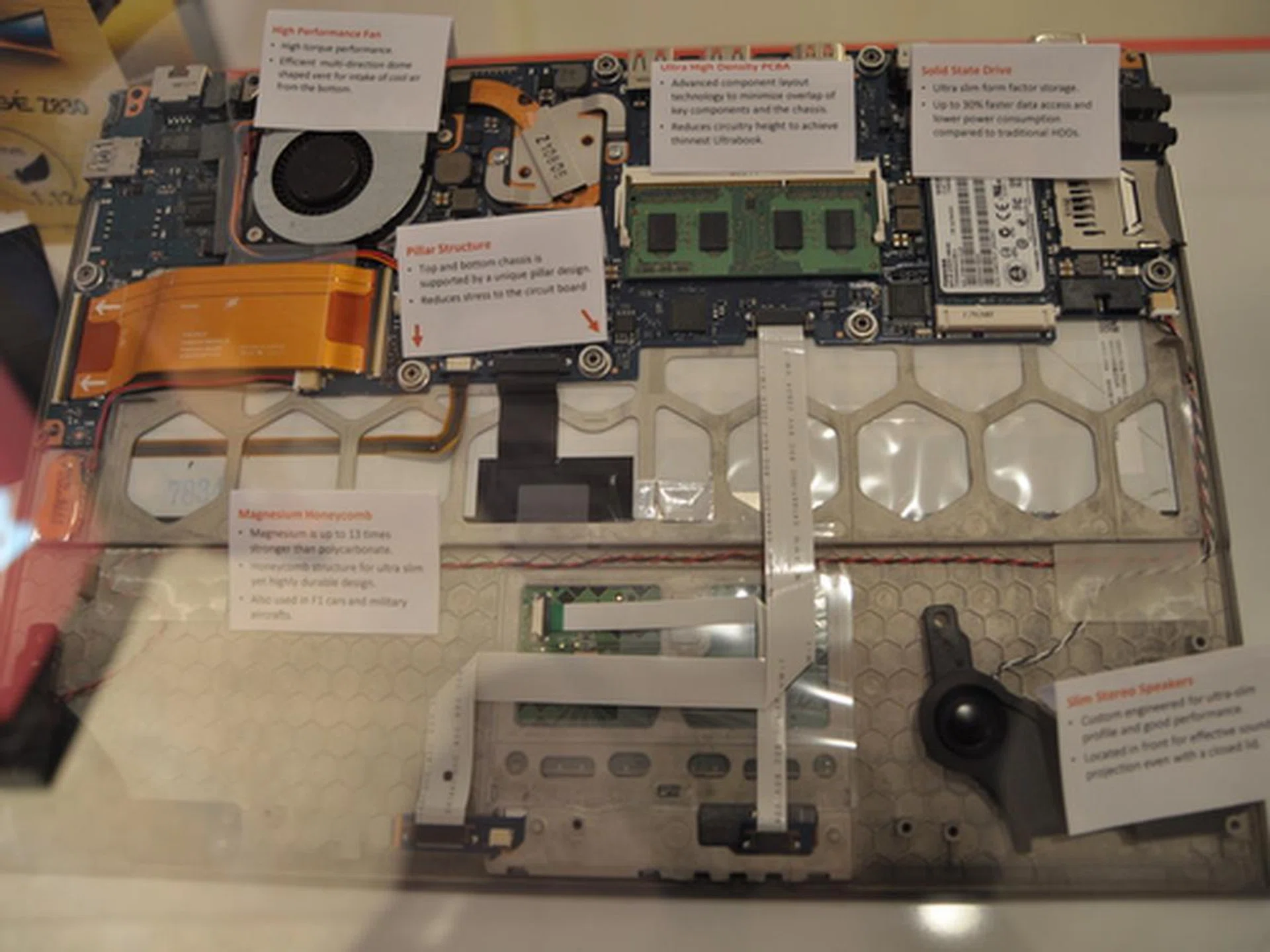
If you do open up the unit, this is what you will see. One of the more interesting features here would be the honeycomb shaped metal structure that reinforces the rigidity of the chassis, because most of the machine is covered in more flexible magnesium alloy.
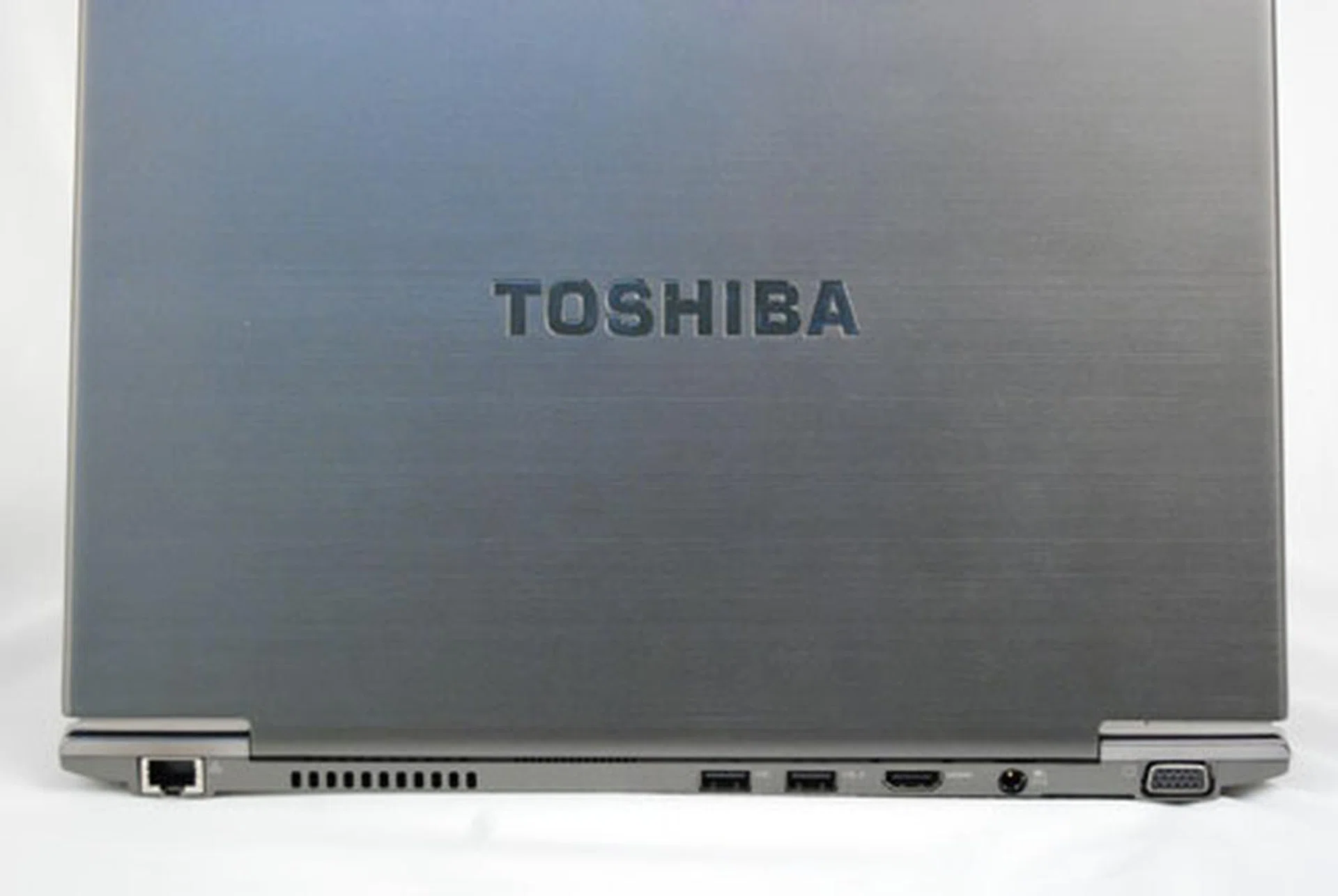
Some of the most important ports can be found at the back of the machine, unlike most modern notebooks that limit ports to the left and right flanks which are most handy. This is because the notebook is so thin, there is limited side space to accommodate most of its ports and it spills over to the rear.
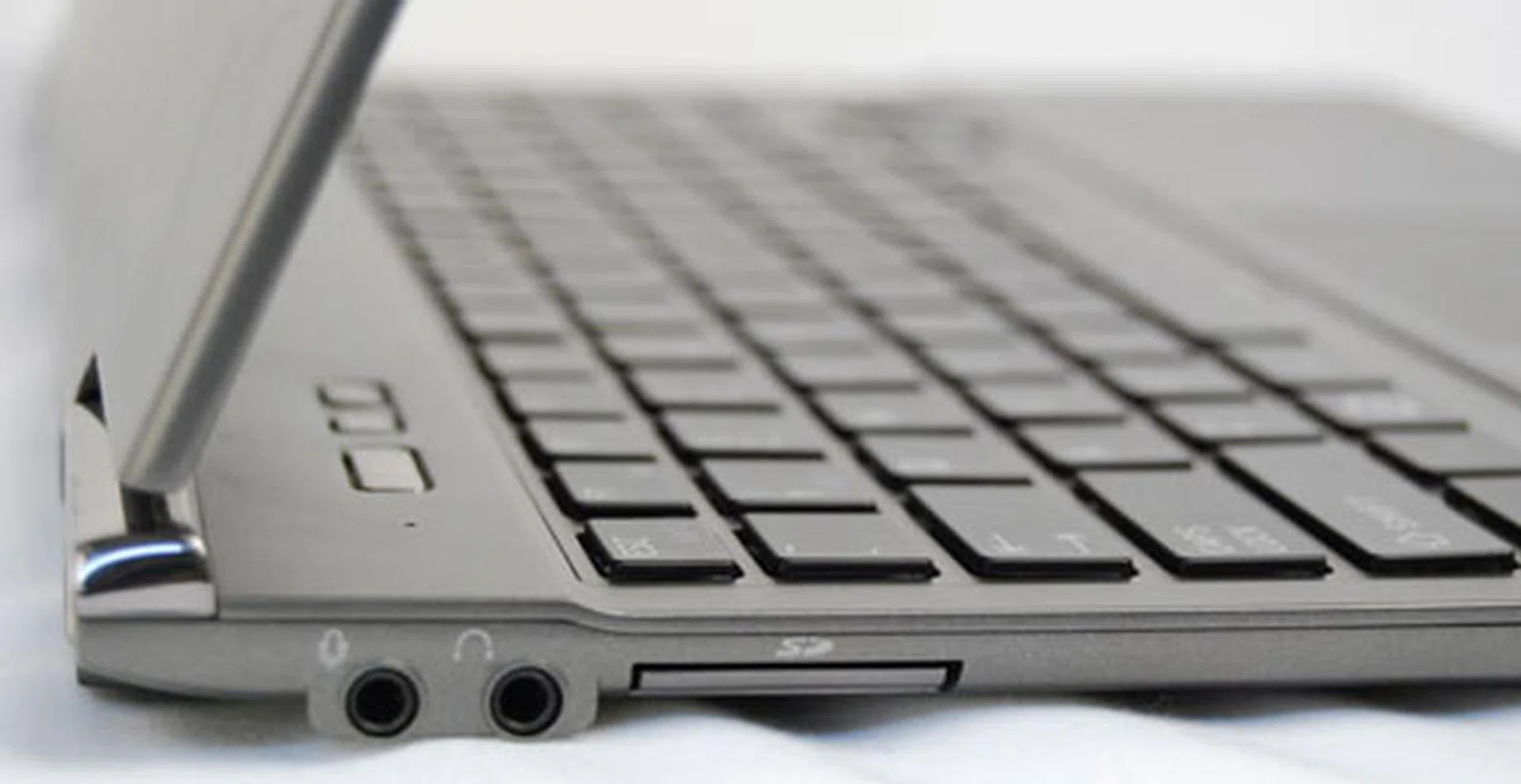
On the left side of the unit, you can find the audio and microphone jacks as well as the SD card reader.
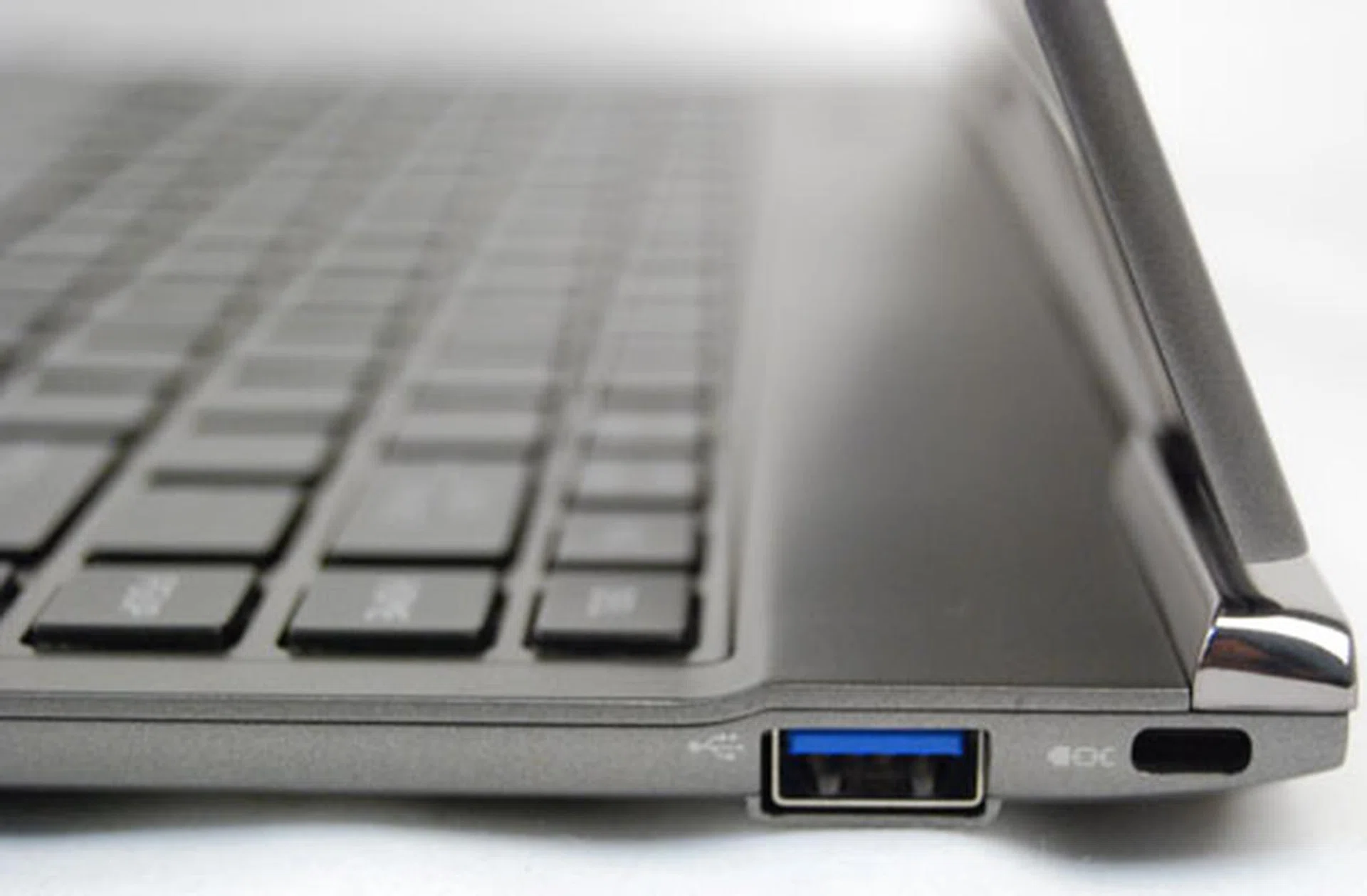
Whilst on the right of the machine you can find a single USB 3.0 port as well as the security slot for you to chain the machine to you, or your desk.
Thin and Light Means Compromise
Opening the notebook’s lid is a one-handed affair. Just the way we like it, yet hardly ever seen on such a thin notebook. This means the hinges aren’t so tight that the bottom of the notebook follows the lid when you try to open it, leaving your other hand free to hold a baby, a bagel, a tablet or a phone. Whether or not this would present any problems a couple of years down the road, it’s impossible to tell now.
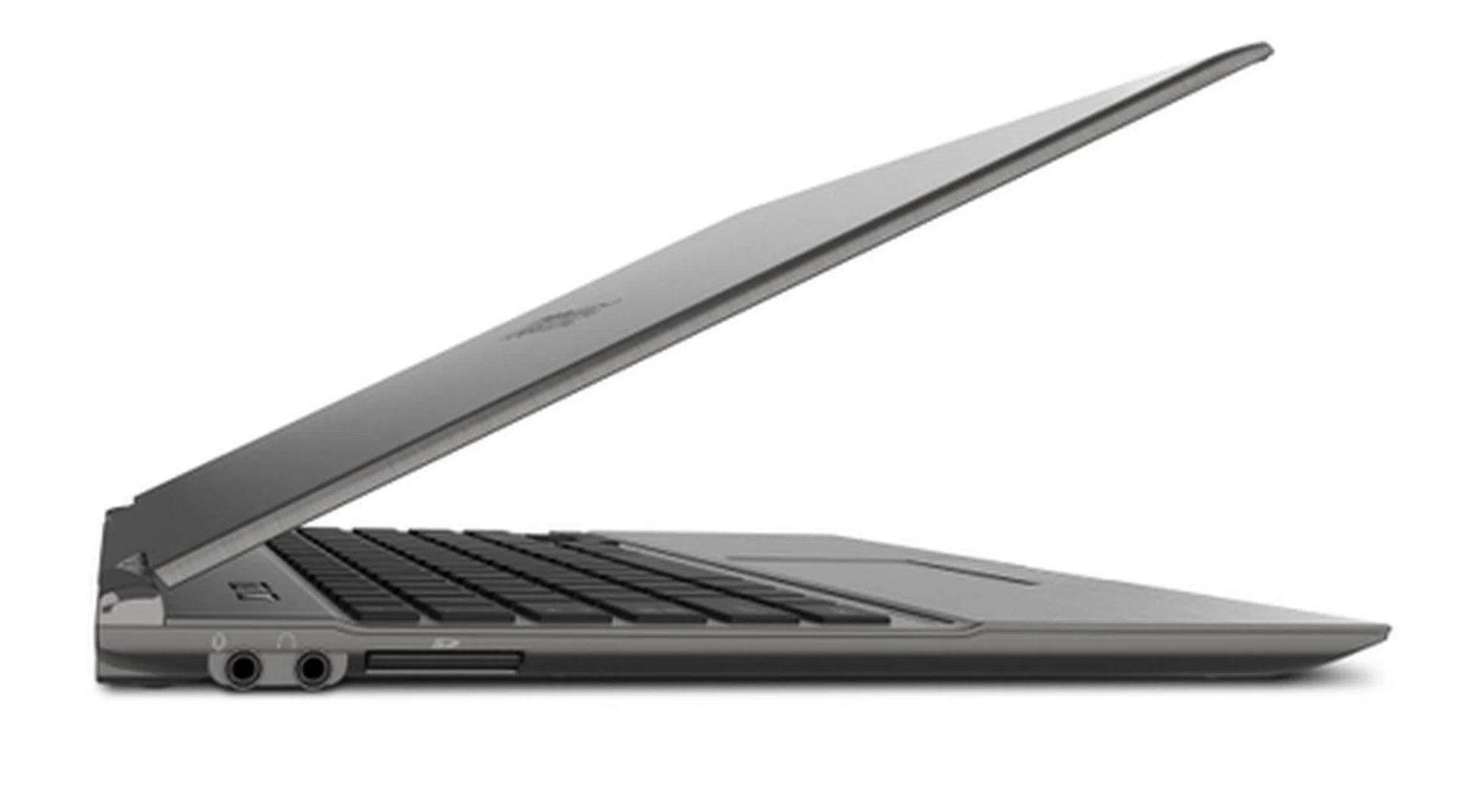
The hinges on the Toshiba Portege Z830 aren't so tight that you have to open the notebook with two hands, but are tight enough to accommodate a variety of tilt angles.
The interior layout seems to be quite similar to the Toshiba Portege R830 as well. It’s got the usual eco, screen and power buttons on the top left corner, chiclet keyboard, fingerprint reader and a dedicated button to turn the trackpad off. The screen is also a very average 1366 x 768 pixels resolution, so nothing outstanding here.
The implementation of the chiclet keyboard is practical but not so desirable in our opinion. In order to keep the unit so thin, some compromises must be made. Compromises like the key travel of the keys. They are so shallow, that typing on it feels as though you’re typing on a soft keyboard. Whether or not this is a bad thing depends on which angle you look at it: the typist’s angle, or the non-typist’s angle.
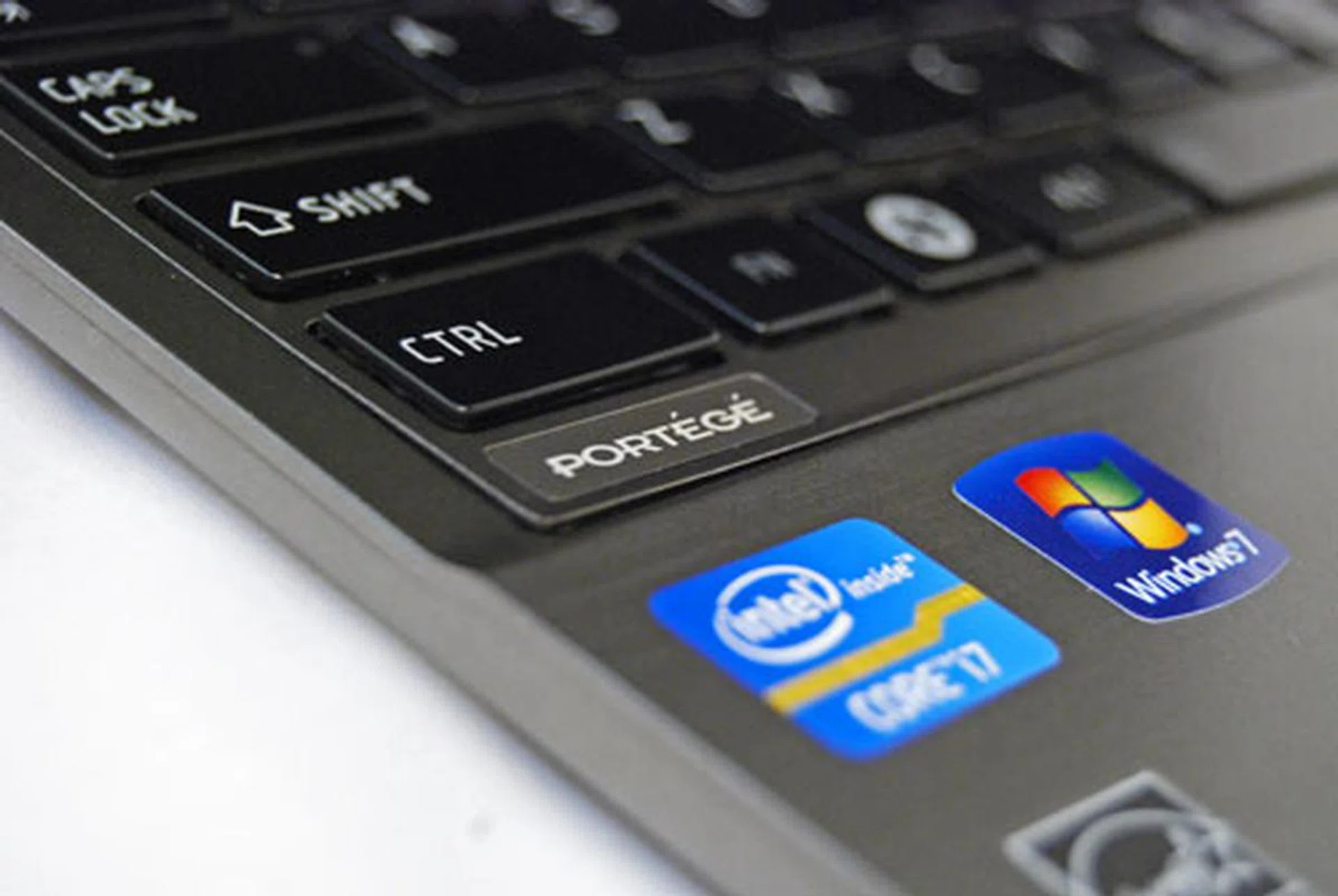
The keys here are very shallow, which is natural given how thin the unit is. Thankfully the keys themselves have very rigid resistance that still gives that tactile feedback that typists crave.
At the very least, there isn’t much flex on the keyboard, probably because it’s so thin there’s no space to flex. Credit of course has to be given to the very tough magnesium alloy housing the keyboard sits on. The keys themselves have fairly good resistance, so there is some tactile feedback to be had to please the typist somewhat. Overall, we wouldn’t worry too much about the shallow keys, because it doesn’t negatively affect the overall usability of the machine very much. However, if you're very particular of the keyboard build and feel, we suggest that you give it a good trial at your favorite notebook retailer. It won't match up to Fujitsu's Lifebook SH771 perfect keyboard, but then again it wasn't designed in the same requirements as the Portege Z830.
One glaring issue that we’re still trying to get used to, is the lack of a giant trackpad that is also clickable (clickpad) on the Z830. Having used this feature on other Ultrabooks we’ve seen so far, it’s just a small 'touch' that we’d like to see more often in manufacturer designs. The trackpad found on the Portege Z830 here is considerably smaller than those found on other Ultrabooks.
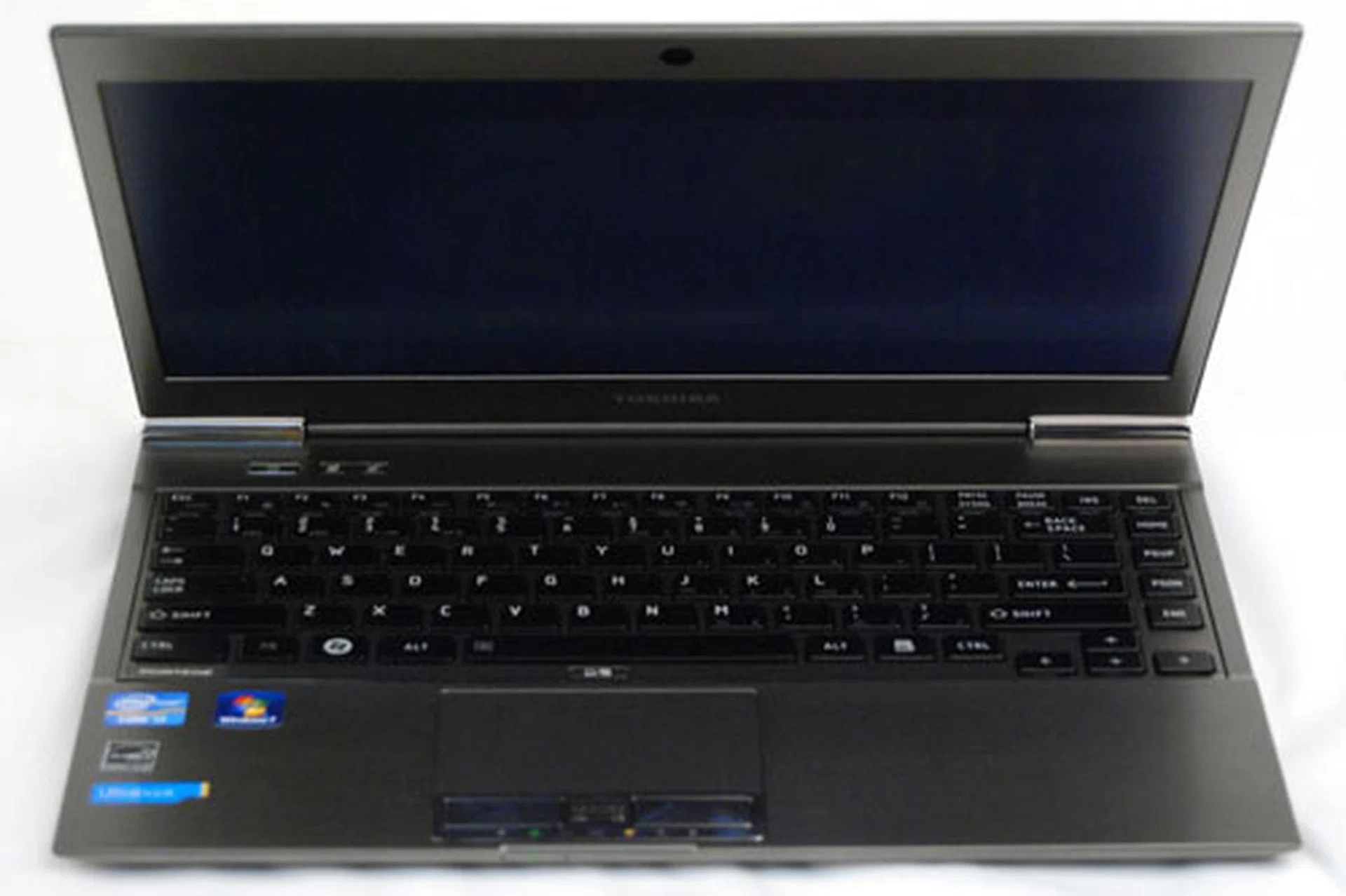
The trackpad isn't really that small, but when compared to other Ultrabooks, it's the smallest - possibly because Toshiba needed to put two physical buttons to please the authoritarian IT departments and the more conventional notebook users. Just along the bottom edge of the trackpad, it also has visible status LEDs of the notebook which we know some of you out there would appreciate.
Opting for the model without fingerprint reader also doesn’t help, because the left and right mouse buttons are not going anywhere in this year’s Portege Z series line-up. That said, the trackpad is sensitive enough, and the left and right buttons are tight and do their job well. So consumers used to the conventional kind of trackpads, and haven’t been near a big clickpad (like the Macbook Air) will feel right at home. You can always just double-tap on the trackpad anyway.
Lastly, we comment on its built-in speakers, the one feature that usually captures much of the multimedia aspect of a machine. They are good. Not great, not lousy, just good. That in itself, we feel is the biggest compliment we can give, because when you consider how slim the machine is, it’s simply amazing how Toshiba (and of course other Ultrabook manufacturers) can fit speakers that sound good. But of course, we wouldn’t recommend that you use it for anything other than personal needs. Using it in a boardroom would be a terrible idea, unless your boardroom is 3 x 3 meters in size.
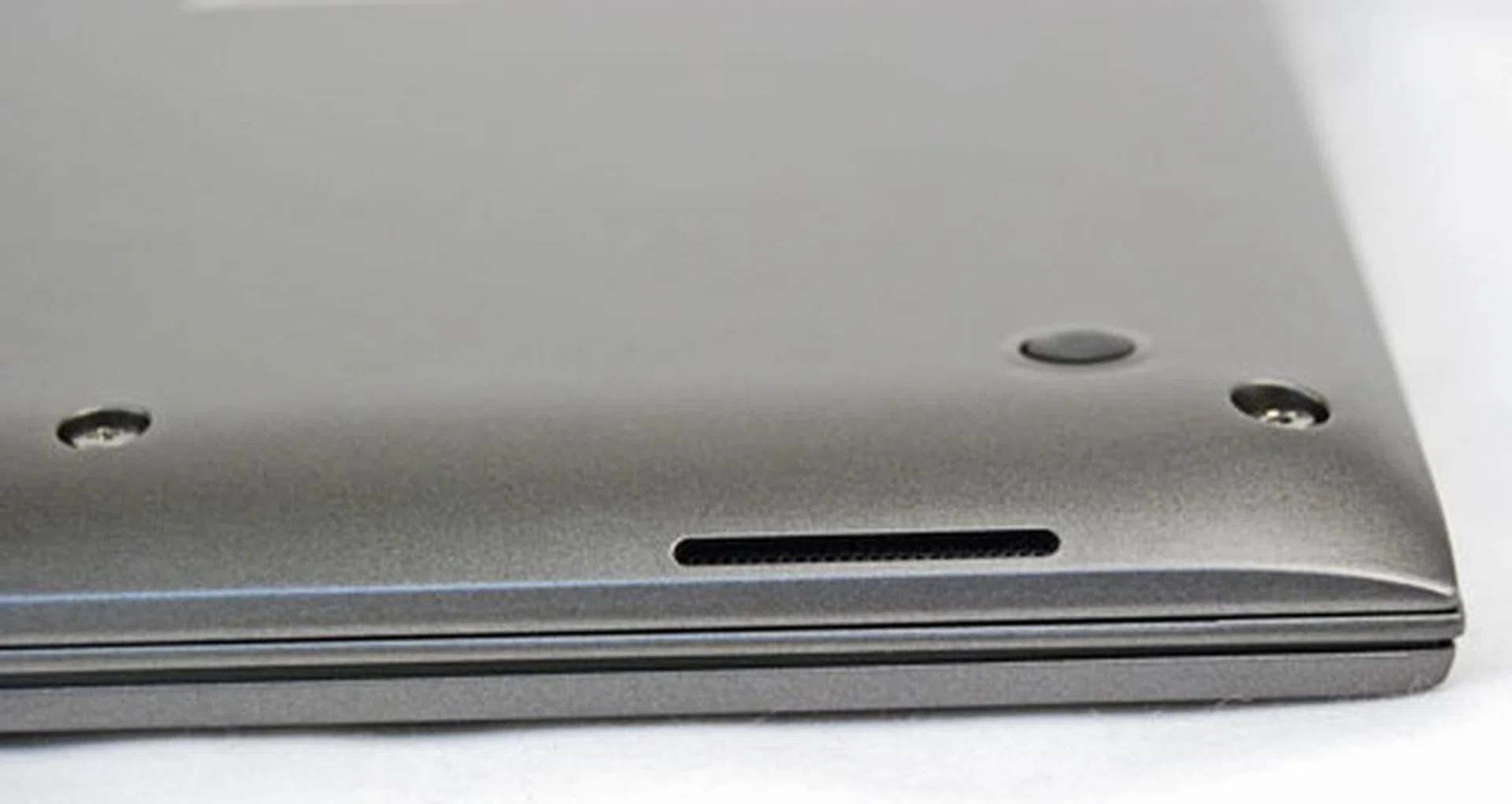
The speakers are located at the bottom of the machine, but aren't smothered when the machine is placed on the table. A slight curve at the bottom allows the speakers to breathe, bounce the audio off the table and be sufficiently audible.
Performance and Benchmarking
The Toshiba Portege Z830 is the latest product to enter the very fine Portege line-up. In terms of specs, it’s somewhat similar to another top battery life performer, the Portege R830, also from Toshiba. So to help you choose between the two machines, we decided to pit two siblings, the Z830, and the R830 against each other to see whose performance you prefer. Also for comparison’s sake, we added another Ultrabook into the mix, the ASUS Zenbook UX31.
Processor-wise, the Toshiba Portege R830 runs on a regular mobile Core i7 CPU, while the Ultrabooks are running on ultra-low-voltage ones (also Core i7) that help conserve power, by of course lowering power consumption. It’s also important to note that the Ultrabooks are running solid-state-drives (SSD), so don’t wet yourself when you see some incredible hard disk scores. The Toshiba Portege Z830 also has an advantageous 6GB of RAM over the 4GB found on the other two machines.
Specifications/Notebook | Toshiba Portege Z830 | ASUSZenbook UX31 | Toshiba Portege R830 |
Processor | Intel Core i7-2677M (1.8GHz) | Intel Core i7 2677M (1.8GHz) | Intel Core i7-2620M Processor (2.7GHz) |
Chipset | Intel QM67 | Intel QS67 | Intel HM65 |
Memory | 6GB DDR3 | 4GB DDR3 | 4GB DDR3 |
HDD | 128GB SSD | 256GB SSD | 500GB HDD (7200RPM) |
Video | Intel HD 3000 | Intel HD 3000 | Intel HD 3000 |
Futuremark PC Mark Vantage
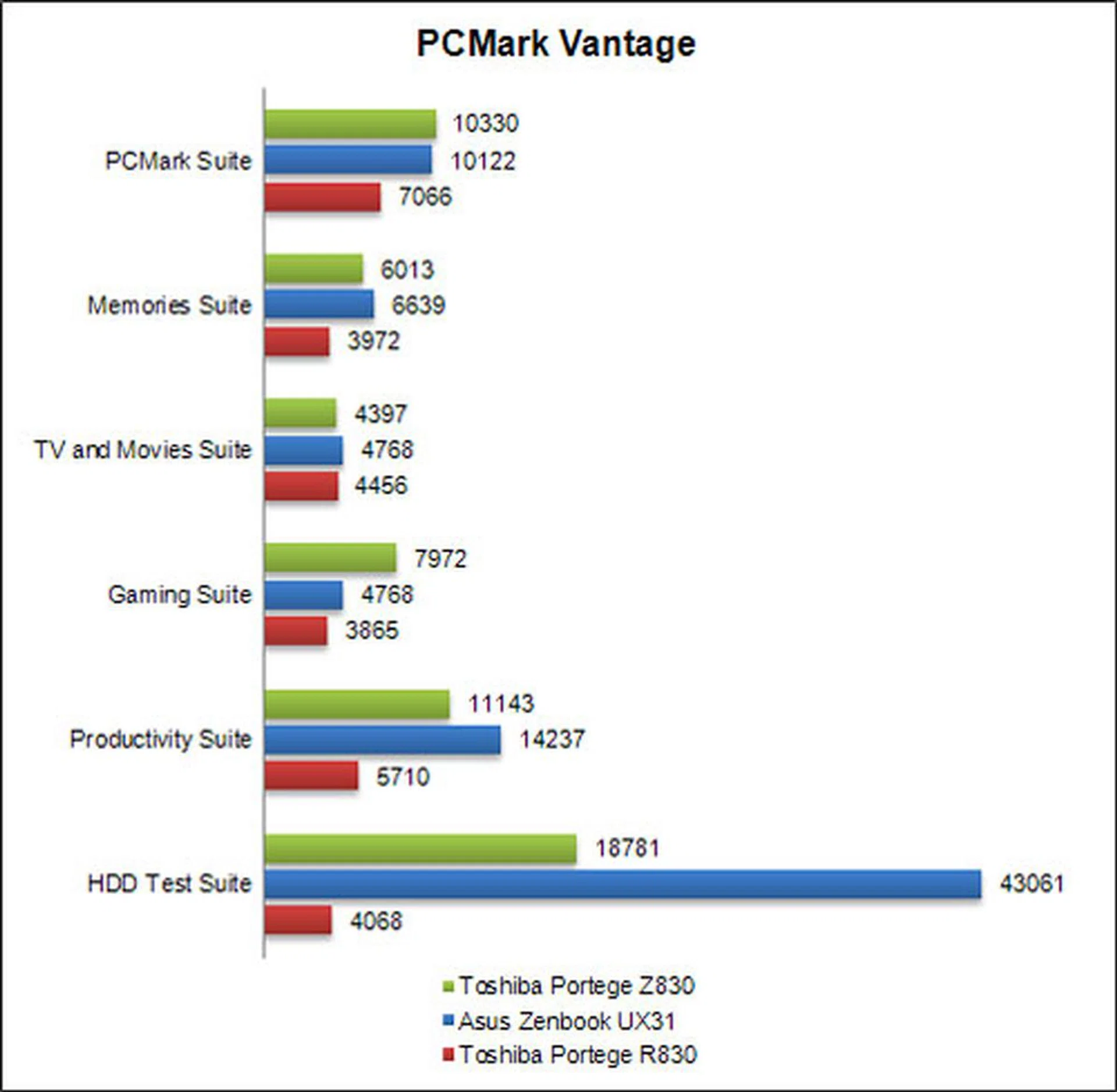
To test the machine’s all-round prowess, we have the trusty PC Mark Vantage from Futuremark to give the machine a good run through. The software tests almost every subsystem from storage, to Wi-Fi and processing capabilities in various common functions. The Toshiba Portege Z830 didn’t do too badly here, with its scores in a tie with the ASUS Zenbook UX31. As you can see from the inflated HDD scores, it’s definitely due to the SSDs that both Ultrabooks sport, hence their overall scores would be very much boosted as well.
So all this means is that if you want your machine to perform to the maximum of its abilities, an expensive SSD would definitely be the component to look at. Good thing that most Ultrabooks sport with them out of the box. In fact they contribute to more than just performance scores. Start-up, resume and shutdown times are a snap, thanks to SSD drives.
Futuremark 3DMark06
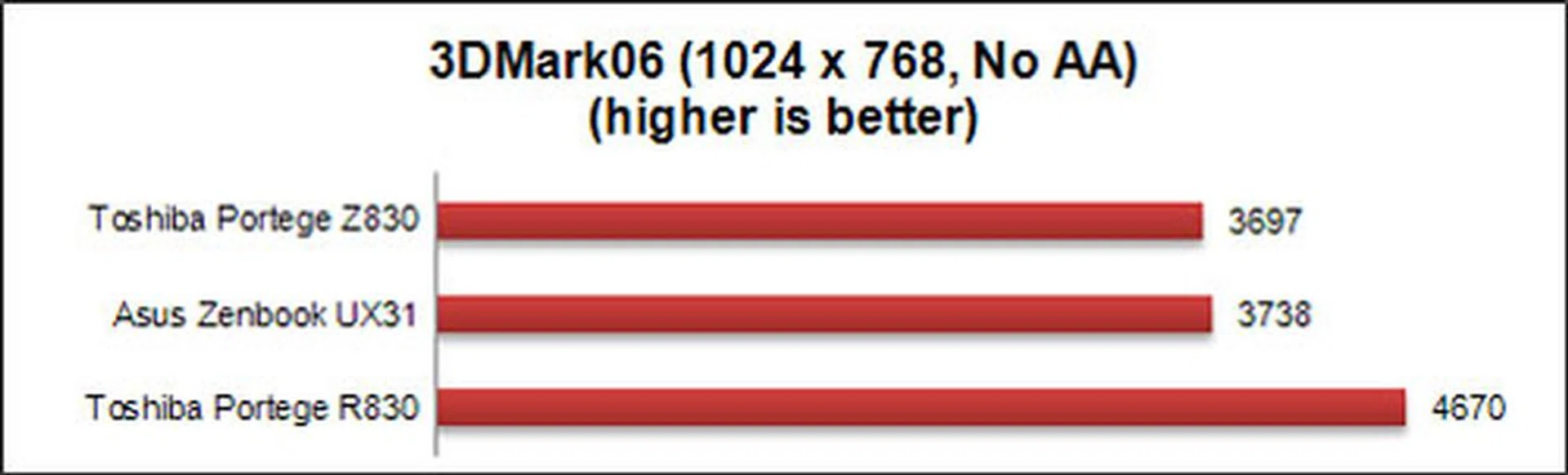
We wouldn’t encourage any graphics intensive gaming with any Ultrabook, until perhaps when they come with Ivy Bridge processors and/or discrete graphics processing capability. Having said that, the score of the Toshiba Portege Z830 seems to rank reasonably to expectations for integrated graphics along with the Asus Zenbook UX31. The Portege R830 is running on a more powerful, Core i7 (2.7GHz) processor and 3DMark06 scales with the overall processing power to show higher benchmark numbers.
Far Cry 2
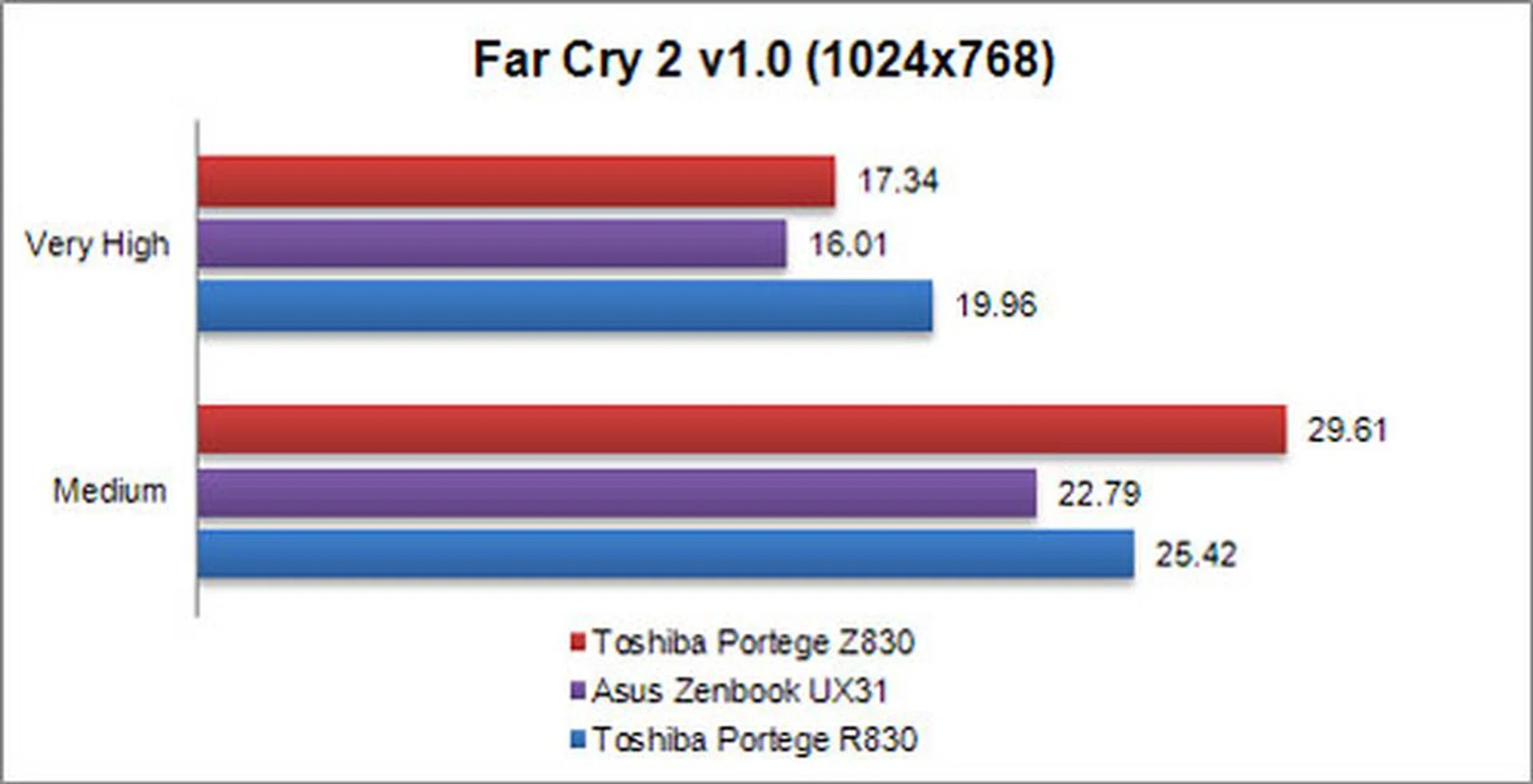
There isn’t a better way to gauge a machine’s gaming capabilities than testing it with a real game. In this case, we used Far Cry 2 to see how the Z830’s integrated graphics, the -- Intel HD 3000 -- fares when handling the rendering workload. And as you can guess, the results aren’t that different from each other, and any differences here are negligible since all of the machines are running Intel HD 3000 graphics.
While the results echo our previous remark that we wouldn't recommend Ultrabooks for gaming, you can see that it can cope with gaming needs from a basic level. Internet and Flash based games are a whole different measure and don't rely on the graphics crunching horsepower - so you can still enjoy casual games like those on Facebook and many others.
Just know what you're buying in to and set your expectations right and you wouldn't mind the Z830's very basic gaming qualities.
Battery Life and Portability Index
As machines touted to be ultra portable, we deem battery life to be extremely crucial. That’s because a machine that is thin-and-light, won’t be much use to you when the battery runs flat soon after it's brought out. Ultrabooks are also supposed to help the PC industry compete against the tablet onslaught, where the devices can be used for hours on end without recharge.
Also, there’s not much of a point in a thin-and-light device if you also have to lug a power brick around everywhere you go, right? To help gauge the Z830’s battery performance, we enlisted the help of the Z830’s older sibling, the Toshiba Portege R830, which also performed admirably well in its battery test. We also got the help of another new Ultrabook, the ASUS Zenbook UX31, whose full review will be coming shortly.
Specifications/Notebook | Toshiba Portege Z830 | Asus Zenbook UX31 | Toshiba Portege R830 |
Processor | Intel Core i7-2677M (1.8GHz) | Intel Core i7-2677M (1.8GHz) | Intel Core i7-2620M Processor (2.7GHz) |
Chipset | Intel QM67 | Intel QS67 | Intel HM65 |
Memory | 6GB DDR3 | 4GB DDR3 | 4GB DDR3 |
HDD | 128GB SSD | 256GB SSD | 500GB HDD (7200RPM) |
Video | Intel HD3000 | Intel HD 3000 | Intel HD 3000 |
Battery | 47Whr | 50Whr | 66Whr |
Dimensions | 325 x 227 x 8 - 16mm | 325 x 223 x 3 - 17mm | 316 x 227 x 18.3 - 26.6mm |
Weight | 1.12kg | 1.3kg | 1.4kg |
Battery Life
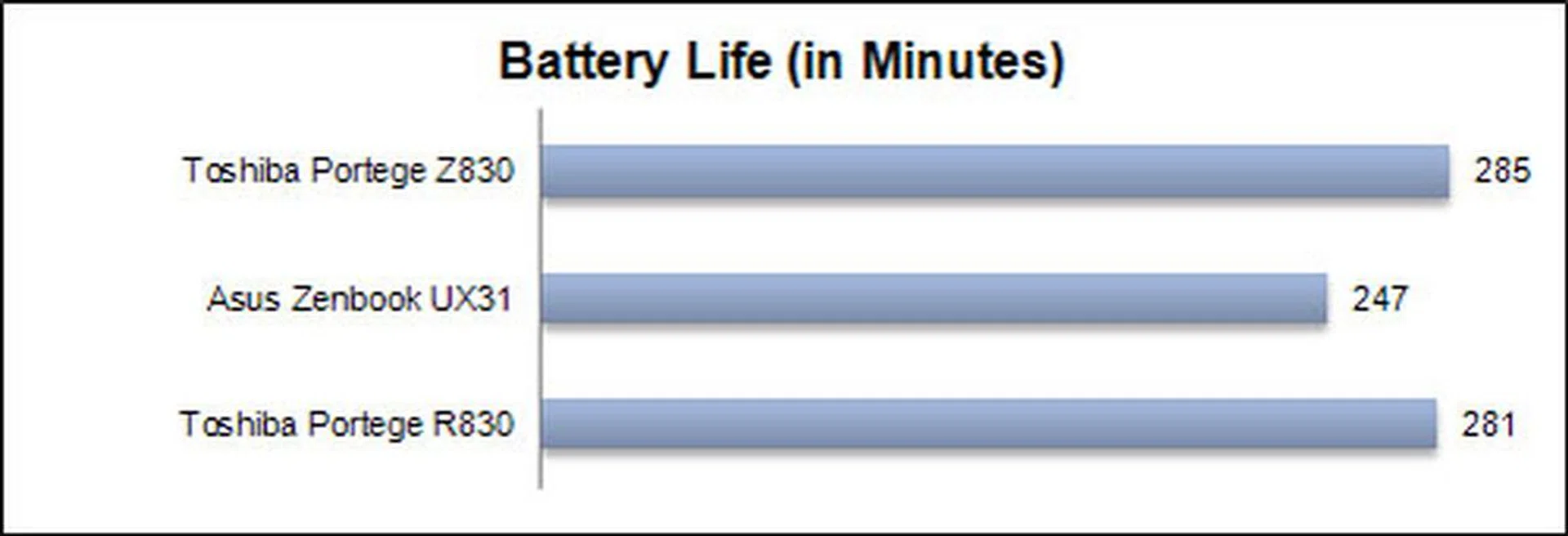
When it comes to battery life, we’re very pleased to announce that the Z830 carries on with the Portege tradition of very long battery life. Our test involves playing a HD video in loop until the battery goes flat. The Portege Z830 managed to survive for a very impressive 285 minutes away from the wall socket - that’s nearly five hours and , which also translates to several movies.
If you were doing something less intensive, you could possibly stretch that a couple more hours. In short, the battery life is great, thanks to excellent internal optimization of hardware and software. Ultimately, it means that you could bring your Z830 out for an external meeting, and just chuck the charger at the office without worries. For those curious how the Lenovo U300s Ultrabook fared, it ranked on par with the Z830.
Power Consumption
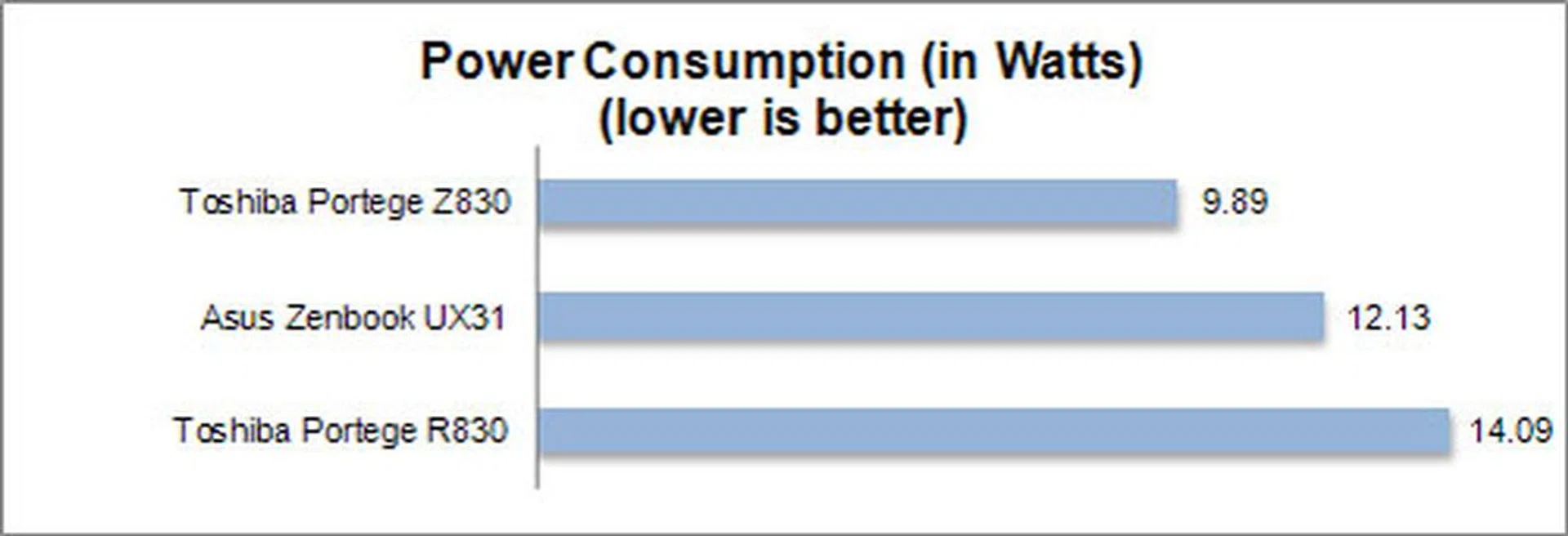
If you’ve been keeping up with Ultrabook news, you’d know that these new notebooks generally run on an Intel mobile processor that requires much less power than conventional mobile processors. However the downside is that you may have to relinquish some processing power, but what you get in return is smaller batteries, which in turn means thinner profile and a lighter body.
The power consumption of the Z830 may be much less than the R830, but it runs for the same amount of time as the R830, even when its battery capacity is greater than that found on the Z830. In fact, it's the best we've seen so far from an Ultrabook. You can compare the Lenovo U300s and the Acer Aspire S3 on this page for further affirmation. As for the Asus Zenbook UX31, even though it's running on similar specs, differences in hardware and software optimization means that it can’t keep up in terms of power consumption, and hence battery life as well.
Portability Index
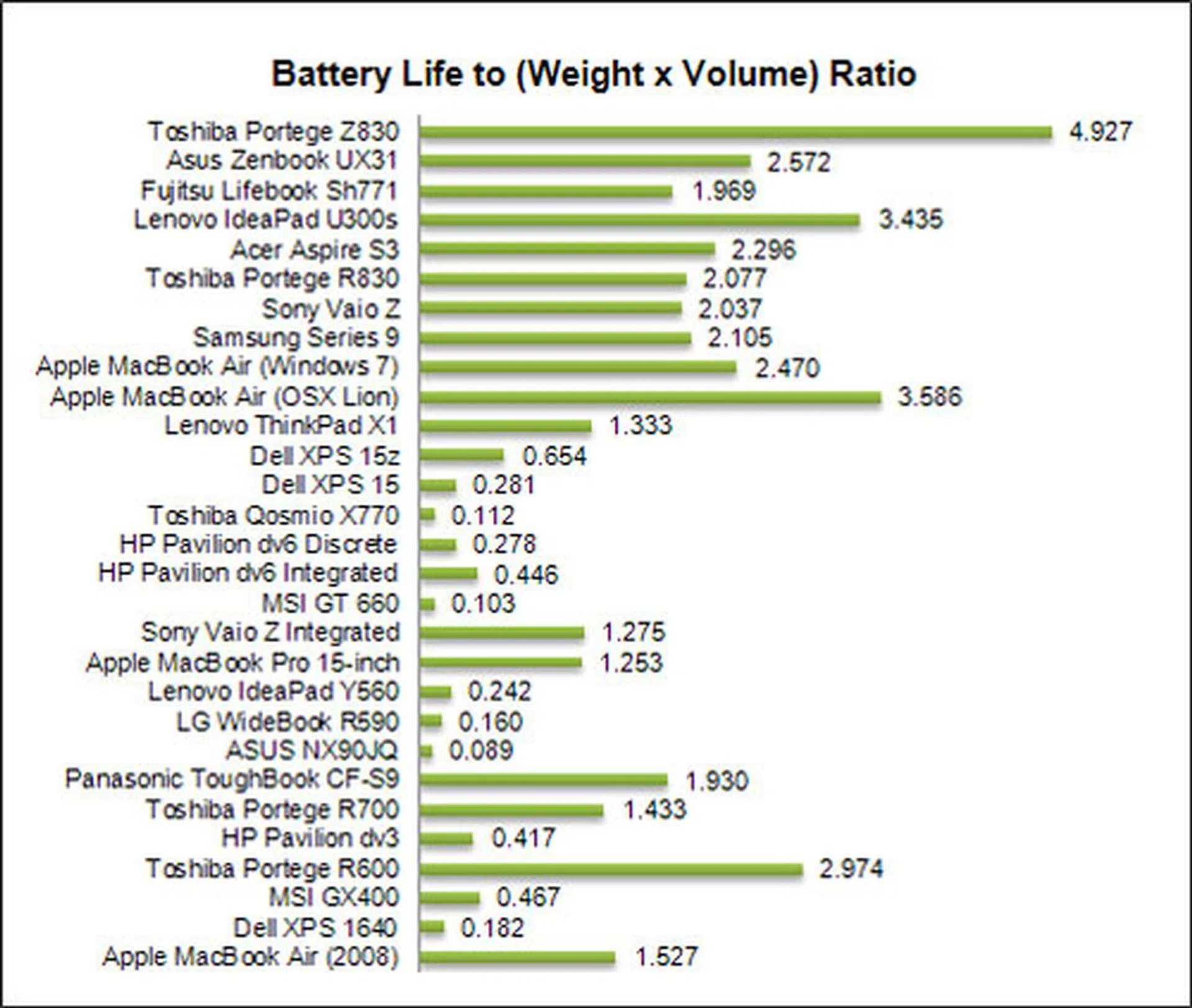
The HardwareZone Portability Index is unique to our website, and is a mathematical formula that simply figures out if it’s worth your time to lug your machine around. The lower the scores, the more it should just stay at home, and on your desk where it belongs. Out of all the machines we tested, the trend is that machines with discrete graphics and those that are heavy (more than three kilograms) have no business being out and about, especially with a power brick in tow.
Here, the world’s lightest Ultrabook, the Z830 managed to score extremely well here. In fact judging from the chart, recent history may have just been re-written with its phenomenal 4.9 portability ratio. Factors that led to this are the Z830’s incredibly light weight of 1.12kg, and of course its very good battery life. With scores like these, we can safely recommend that you get one of these machines today and start working at your local cafe without any worries about the machine dying on you prematurely.
For the record, the real all-time high chart topper for our Portability Index is the Sony Vaio X netbook at just 780 grams. For a full fledged notebook, the Toshiba Z830 comes really close to bumping off the Samsung Q30 Centrino notebook.
Business User’s Best Friend
Our impressions of the Portege line-up of products have always been very good. Notebooks like the R500, R600, R700 and R830 have proven themselves to have good battery life, are lightweight and very portable. For business machines to actually be useful out of the office, not much else really matters besides these traits. Like the Portege models before it, the Z830 has a very long lasting battery from our tests, managing almost five hours before giving up. We arrived at this figure from playing a HD video in a continuous loop, which pretty much stresses the screen, audio and the processing subsystem continuously. However, chances are you won’t be playing videos at length when taking the notebook out in a meeting or preparing the next presentation out of office. As such, you probably won't be taxing the machine as much and the machine would last up to a couple of hours longer. What if you need it to double up as your entertainment companion on a long flight? Well, at least it has nearly five hours of stamina to keep you company through a couple of long films.
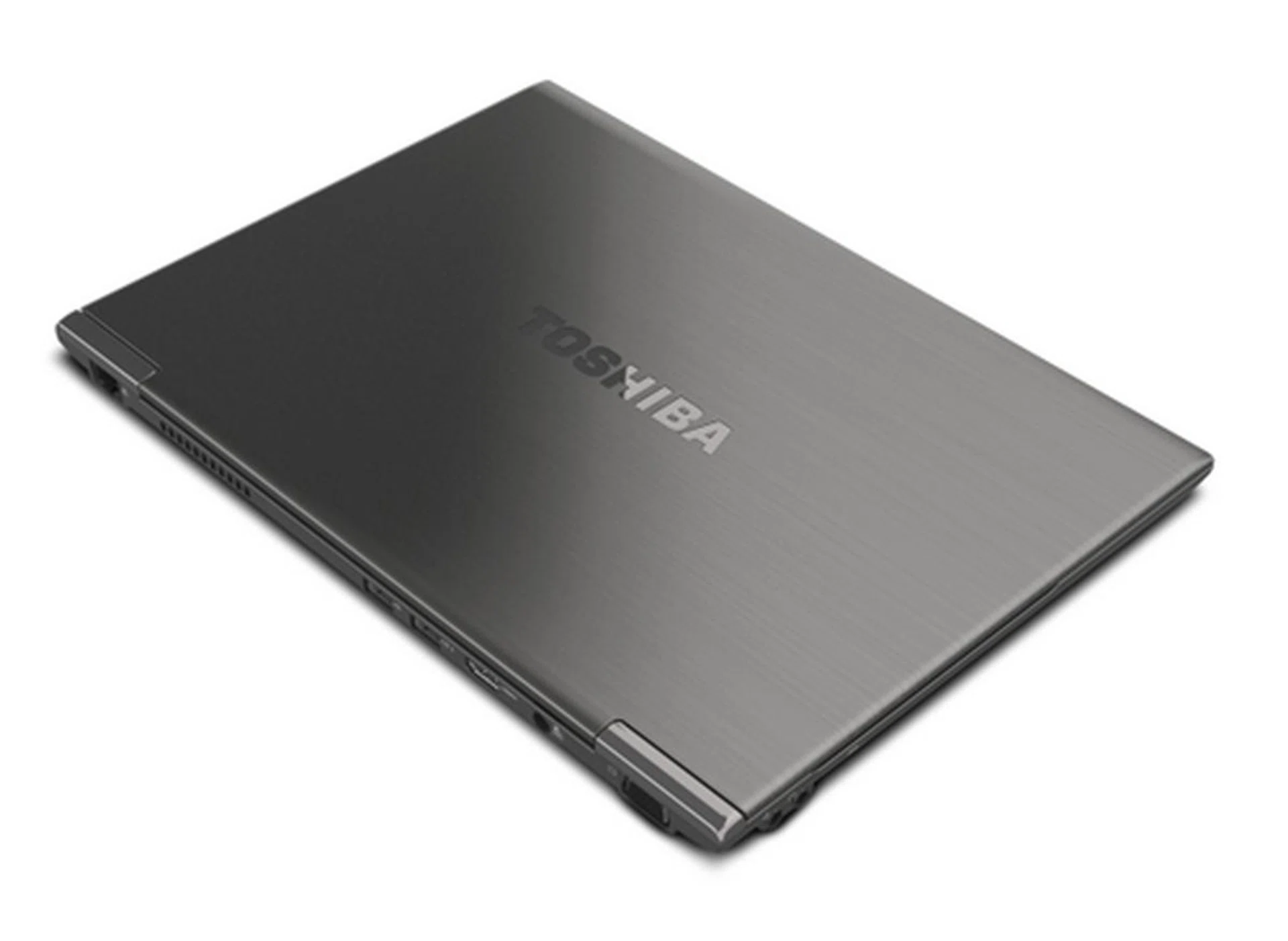
The Toshiba Portege Z830 might not appeal to all consumers out there, but it definitely fits very well into any corporate environment you can think of thanks to its very impressive battery life and security feature options.
The next most impressive aspect of the machine is the fact that it boasts a wide variety of connectivity options. Most of the Ultrabooks we’ve seen so far seem to have opted for simplicity when it comes to ports, and only offer the most necessary. Some of the missing ports from those other machines are USB 3.0 ports, SD card readers, Ethernet or VGA ports, while the Z830 features everything. Well, everything except for a DVI or a Thunderbolt port, but that’s just nit-picking on our part since the need for them is relatively low at this juncture.
On top of all the necessary ports, select models are also decked with security features (TPM + fingerprint scanner) that are apt for enterprise use and deployment. What this means is that Toshiba has come up with a machine that is both suitable for the average student, and also the busy executive who is always on the road. Of course, it's not all rosy for the Z830; like any other machine in the market, it has a few flaws which didn’t sit too well with us.
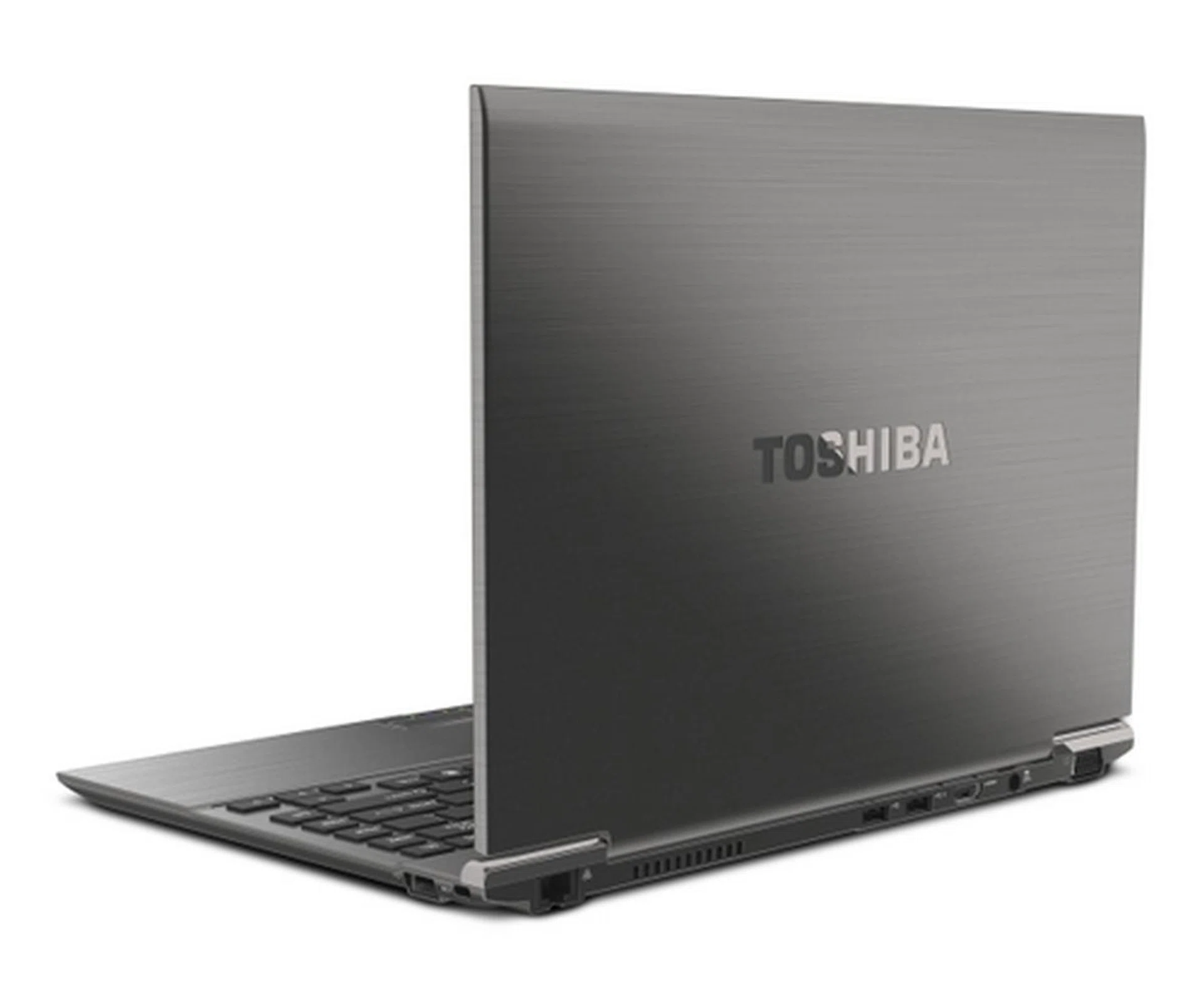
With utilitarian looks like this, and an incredibly thin form-factor, the Z830 can even pass off as a folder of documents, and it even weighs like one.
The first downside which we’d like to point out isn’t actually a flaw through neglect or oversight, but rather a byproduct of the brushed magnesium alloy body. It’s the preferred material when you want to make something durable, while keeping it really light, and is used liberally throughout the Z830. The lid, palmrest, bottom, and even the housing on which the chiclet keys pop out from are made of this material.
It’s a good way to project a premium image because it looks the part, but when used on the lid, it flexes somewhat. It's very different from the rigidity we’re used to with the Portege R830. However, it’s easy to look past this slight flaw that we pointed out simply because it makes the unit extremely thin and light. Toshiba even claims that the Z830 has undergone extensive drop tests, spill tests, and even pressure tests, of which it passed of course (they wouldn’t announce it otherwise).
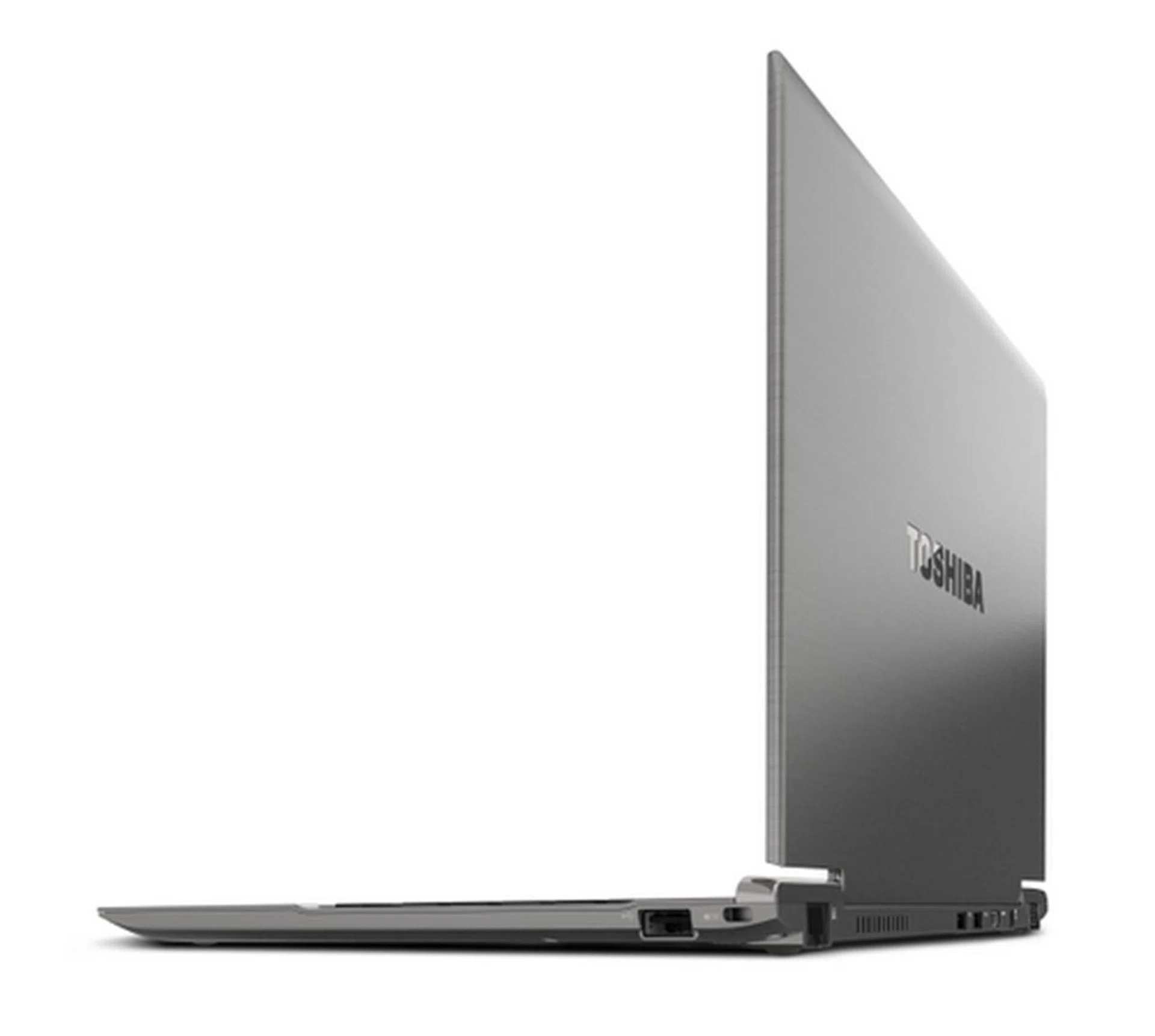
One of the most disappointing aspects about the Z830 is its lack of rigidity on the lid for being too thin. That said, it most likely wouldn't present itself as a problem during daily use.
The next thing that grates on us slightly is the fact that there is simply no large trackpad that clicks (clickpad). Why does it annoy us so, when many notebook in the market sport the same regular trackpad with two buttons? Well you can thank all the other new Ultrabooks for that, because they've moved on to better version of the trackpad, which has now evolved into a large clickpad. It's sort of a premium feature that isn’t officially a trait of an Ultrabook, but it's still very much desired.
Our theory here is the easiest way to fit a finger print scanner in the machine (without messing about with other parts of the machine) is by putting it in between the trackpad buttons. That way, they don’t have to produce two different types of chassis for the consumer and enterprise markets. It’s exactly what we would’ve done, because we feel that the more tight-bottomed I.T departments out there wouldn’t be very pleased if they were asked to pay for something that doesn’t look like a conventional business machine either. Of course like we mentioned earlier, if you can live with simply tapping and double tapping, the sensitive trackpad won’t let you down.
Another minor annoyance we have with the machine is with the plastic chiclet keys. Granted the housing on which the keys sit on is tough enough, and doesn’t introduce much flex. However the keys themselves are very thin and shallow. Again this is a compromise that Toshiba had to make in order to keep the machine extremely thin. In fact you have to admire how Toshiba actually even managed to get the keys moving at all, given how thin the machine is.
There are other Ultrabooks in the market that are thicker and heavier, yet have keys that are just as shallow. Of course the saving grace here -- and we’re thankful that Toshiba added it in -- is that the keys have a good amount of resistance behind them, meaning you will still get that important tactile feedback without having the keys travel much. That alone will make up for any negative points you may find with the keyboard.
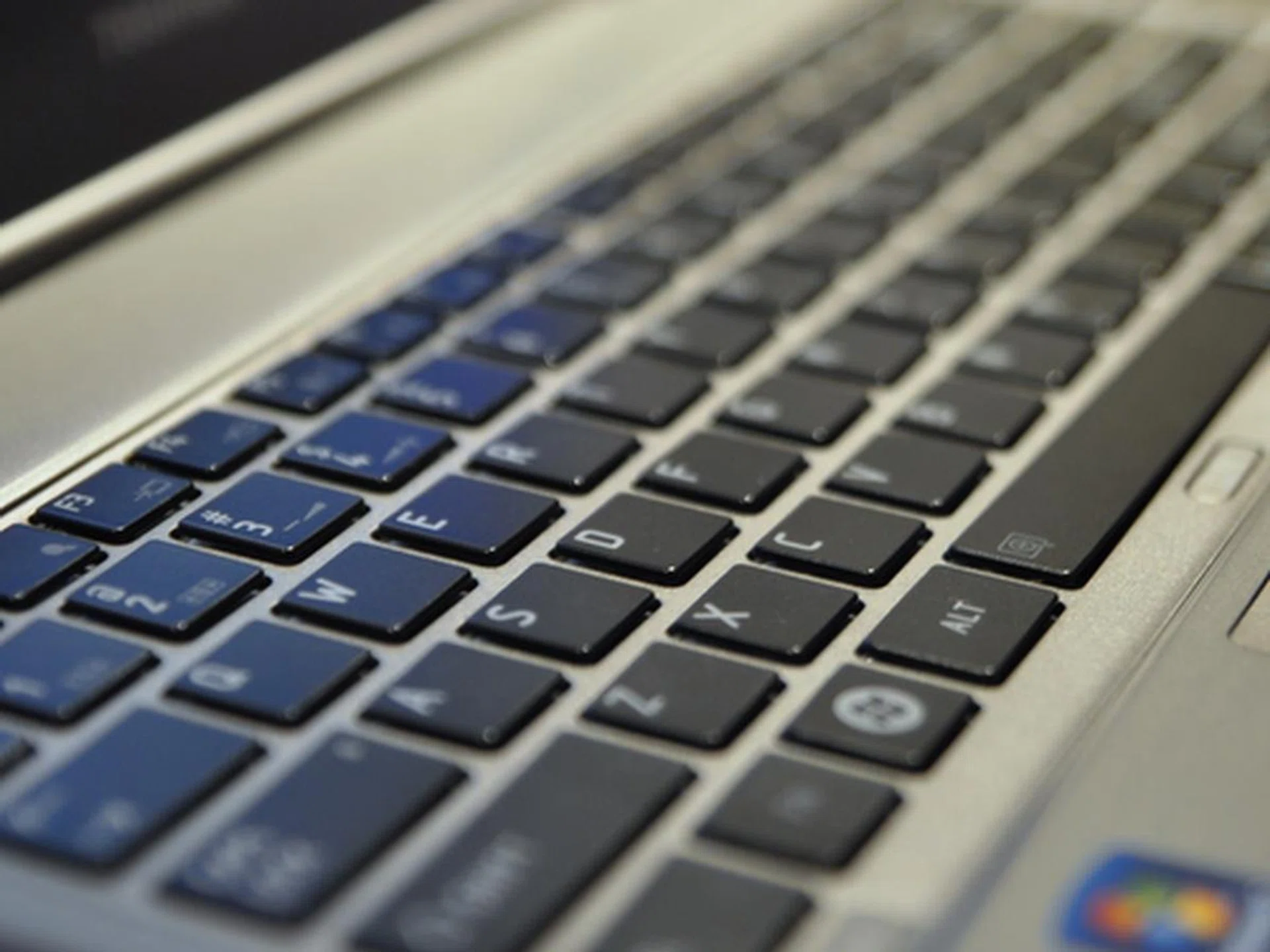
Another byproduct of the ultra thin Z830 is its shallow keys, but in practice, you won't really notice it because of the good resistance the keys provide for that tactile feel.
The most major issue with the Z830 is course, the price. While you might think it's due to the usual "made in Japan" argument, except unfortunately in this case, the Portege Z830s are made in China. So why are they still expensive? Of course, something has to give way for the Z830's sleek build, super lightweight, good features, portability and corporate appeal and that's exactly why it commands a premium.
Ultimately, if you are shopping for an Ultrabook, there are definitely others in the market that will do mostly what you need it to do, for much lower prices than the S$1999 and S$2599 Toshiba is asking for. Unfortunately, the only difference between the two prices is the processor - Core i5 or Core i7. However, there's more to just price. Sometimes it's about personality of the products and other times, it's about whether the notebook will meet up to all your specific requirements.
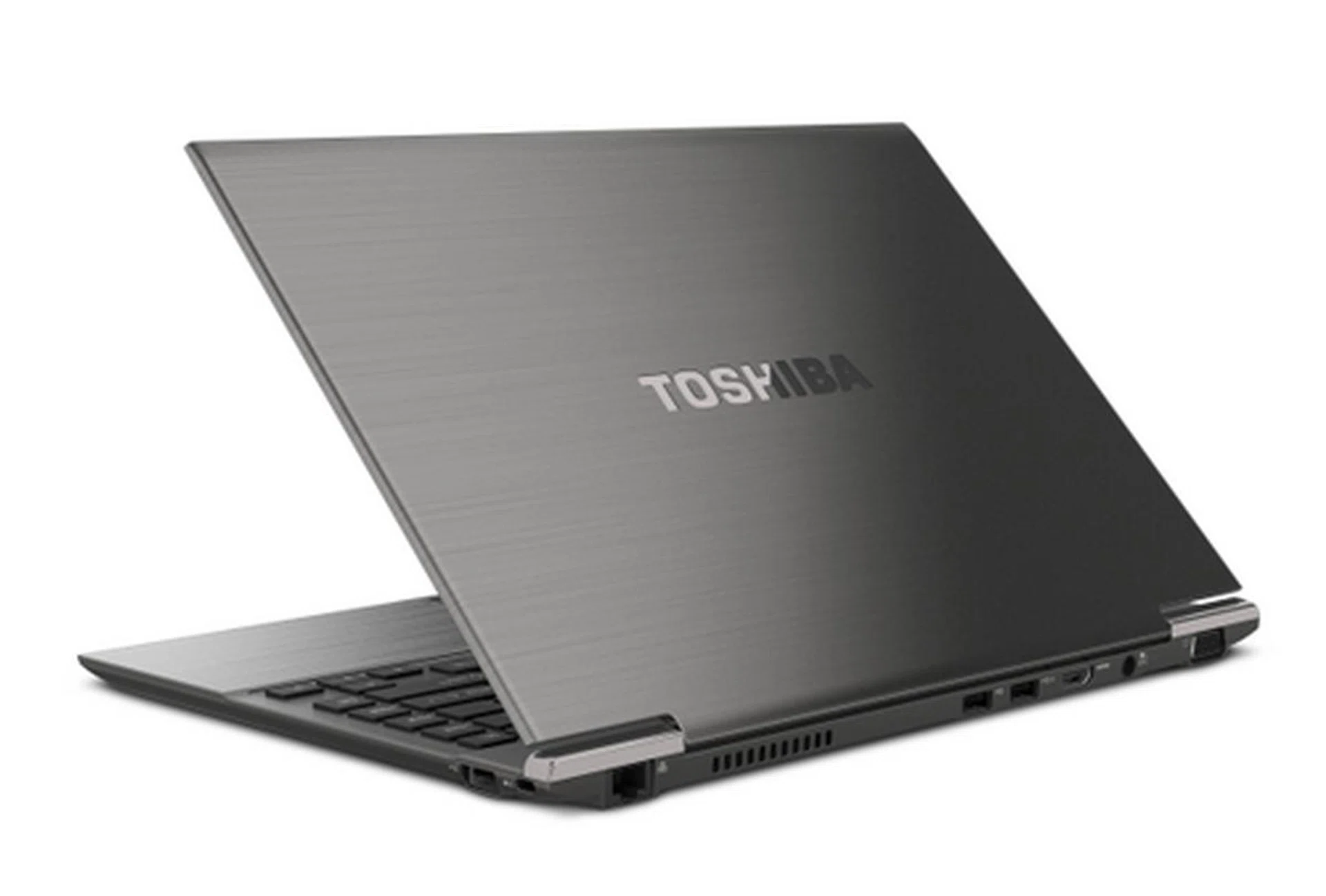
We'd definitely recommend the Z830 to business users who need to shed some weight off their luggage and like all the plus points of an Ultrabook.
If you are a corporate suit, looking to get a full featured Ultrabook for use in the enterprise environment, your only choice is the Toshiba Portege Z830 for now. But besides being the only enterprise ready Ultrabook in the market now, it’s also one that we’d highly recommend for business use. Its battery life is fantastic, coupled with its light weight and small size, and you’ve got a machine with record setting portability scores.
Add to that the fact that it is currently (as of writing this article) the only Ultrabook we have come across that has everything you need for the enterprise environment: full connectivity and security features. These features alone will (hopefully) be more than enough to convince your IT department to start purchasing Ultrabooks. And if you ask us, we think it’s about time these super svelte machines start making their way into the corporate world.
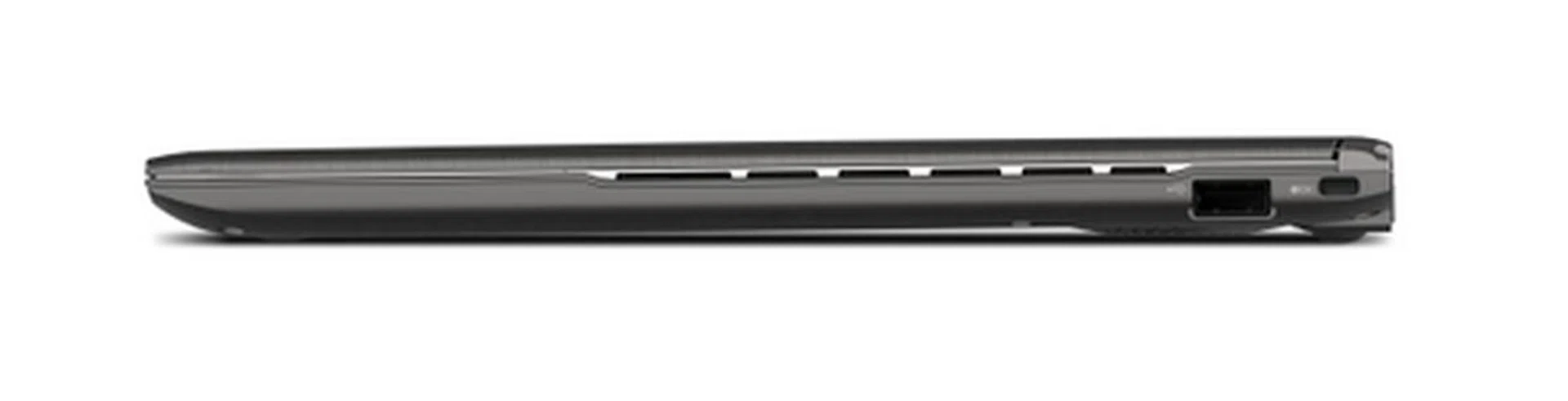
The Toshiba measures 16mm at the thickest point, and it's this number that makes it the thinnest Ultrabook in the world right now, and the only one that matters when you want to compare thickness. Will you be the first one to be flaunting this Ultrabook in your next meeting? We hope so.
Our articles may contain affiliate links. If you buy through these links, we may earn a small commission.