

An actually portable gaming laptop
Many gaming laptops want to lay claim to being portable gaming machines. Some of them fall woefully short, while others have managed to cram powerful graphics cards into reasonably thin and light frames. Laptops like the Aftershock Vapor 15 Pro and Razer Blade 15 are great examples of what you would consider a portable gaming laptop today, and they're some of the best notebooks you can buy right now. However, they're still relatively large 15.6-inch systems that weigh around 2kg, and are still a far cry from your average 13.3-inch ultrabook.
But what if you put a gaming-grade graphics card into the body of an ultrabook? That's exactly what Razer has done with its new Blade Stealth 13, and to my knowledge, it is the only company to have done so.
Here's an overview of its specifications:
- 13.3-inch 1,920 x 1,080-pixel IPS 60Hz display
- Intel Core i7-1065G7 processor (1.30GHz, 8MB L3 cache)
- 16GB LPDDR4-3733 dual-channel memory
- NVIDIA GeForce GTX 1650 Max-Q
- 512GB PCIe M.2 SSD
- 53.1Wh battery
- 304.6 x 210 x 15.3mm
- 1.42kg
It's done that without adding too much weight or bulk to the laptop. When picking it up, you'd never think that there was a GeForce GTX 1650 Max-Q in there, which is pretty impressive.
Other notable features to take note of are the aggressive memory speeds and support for Wi-Fi 6. Memory frequency has been bumped up from 2,133MHz to 3,733MHz, a really nice jump. The laptop also supports the latest Wi-Fi 6 standard, which means it can take advantage of the newer Wi-Fi 6 routers.
This feels like a really forward-facing and versatile machine, but there are obvious concerns. One of these is the price – at S$2,899, the Blade Stealth 13 is pretty expensive, especially considering that it doesn't offer top-notch gaming hardware. This is compounded by the fact that it has a 15W Ice Lake processor, which looks like it could potentially limit the GeForce GTX 1650 Max-Q in games.
Read on for a closer look at the laptop and how it really performs.
Power in a tiny package
When Razer first came out with the Blade Stealth in 2016, I had many people ask me if it was in fact a gaming notebook. No, it actually isn't, I had to say, even though it's made by a gaming company. But while I couldn't quite call that Blade Stealth a gaming laptop, that isn't a problem this year. The new Blade Stealth 13 is truly a gaming notebook for gamers on the go, packing an NVIDIA GeForce GTX 1650 Max-Q into a svelte 13.3-inch body.
The Blade Stealth has gone through many changes over the years, most notably when it shed its rounded edges for a sleeker and more angular look just like the Blade 15. But this year's upgrade is probably the most exciting, since it's bringing a new level of gaming prowess to an ultra-portable form factor. The Blade Stealth 13 is the only 13.3-inch laptop I know of to feature a GeForce GTX 1650 Max-Q, and it opens up a whole new range of possibilities for frequent travellers who can't bear to be away from their games.
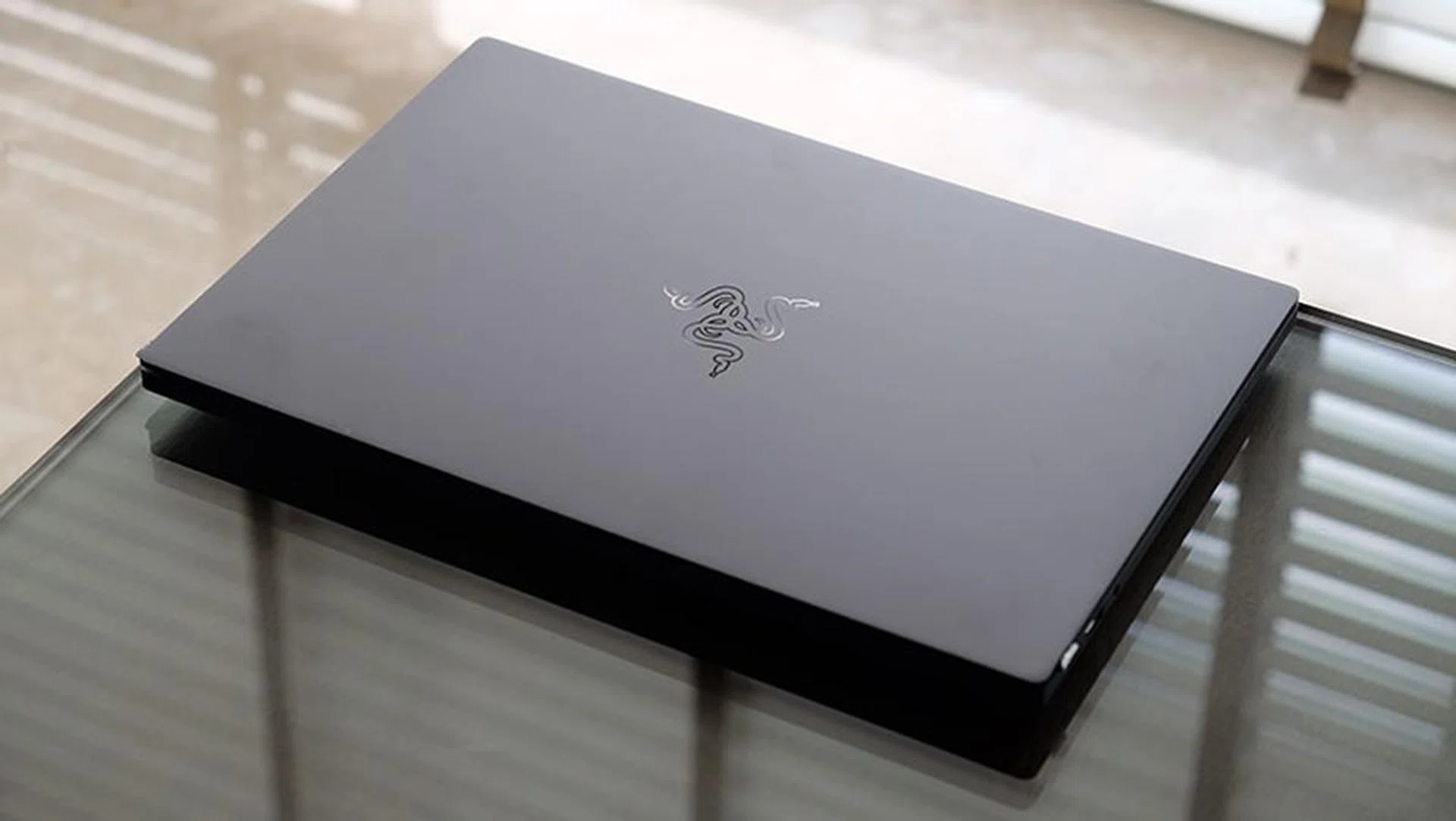
The blocky, angular design hasn't changed, even if the innards have.
Outwardly, nothing much has changed, and you get the same blocky design and black, unibody aluminum chassis. Small adjustments have been made to accommodate the more powerful GPU, and the Blade Stealth 13 is slightly thicker than its predecessor, although not by much. It measures 15.3mm to the older model's 14.8mm, but it's also heavier at 1.42kg, compared to 1.28kg from before.
The difference in weight is noticeable, but it's nothing to be alarmed at either, and I think it's a small price to pay for the extra graphics processing heft.
Build quality is excellent, just as I've come to expect from Razer's laptops. The aluminum chassis is really solid, with no discernible flexing anywhere. It all feels very premium, down to the smooth, fluid motion of the hinge. It can also be opened easily with just one hand, so the amount of resistance is just right. The hinge can't be pushed too far back though, so this isn't one of those notebooks where you can lay the screen completely flat.
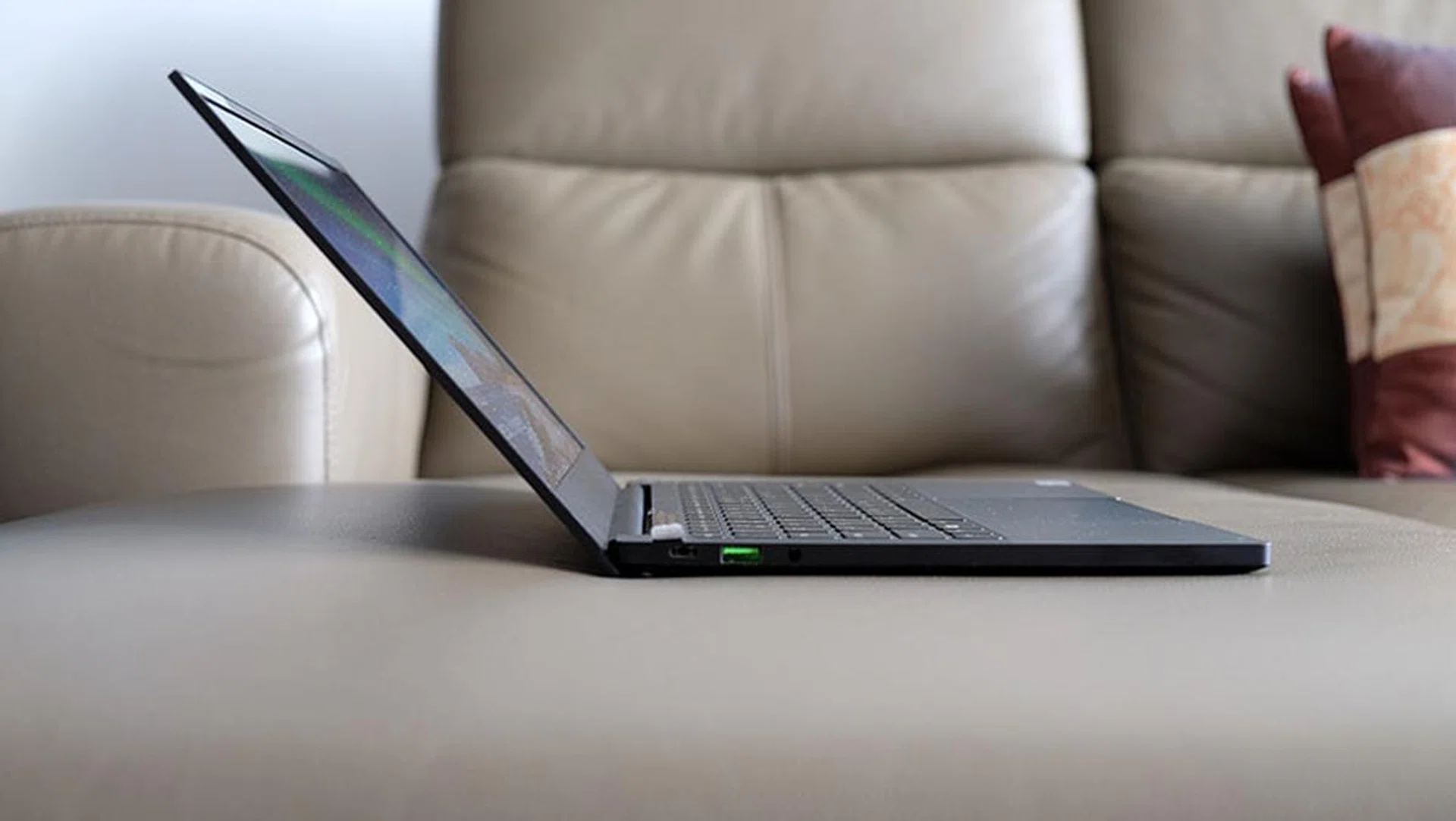
This is as far back as the display will go.
However, the matte finish does attract oil and fingerprints quite easily, so you might want to have a microfibre cloth handy to wipe the laptop down.
All things considered, I find this to be a very good-looking laptop. The design elements are simple and well thought out, and you don't get big empty spaces where you wonder if it could have been better utilised. For instance, the keyboard is framed on both sides by speakers, and the symmetry and decision to occupy the space on either side of the keyboard just makes for a more attractive product.
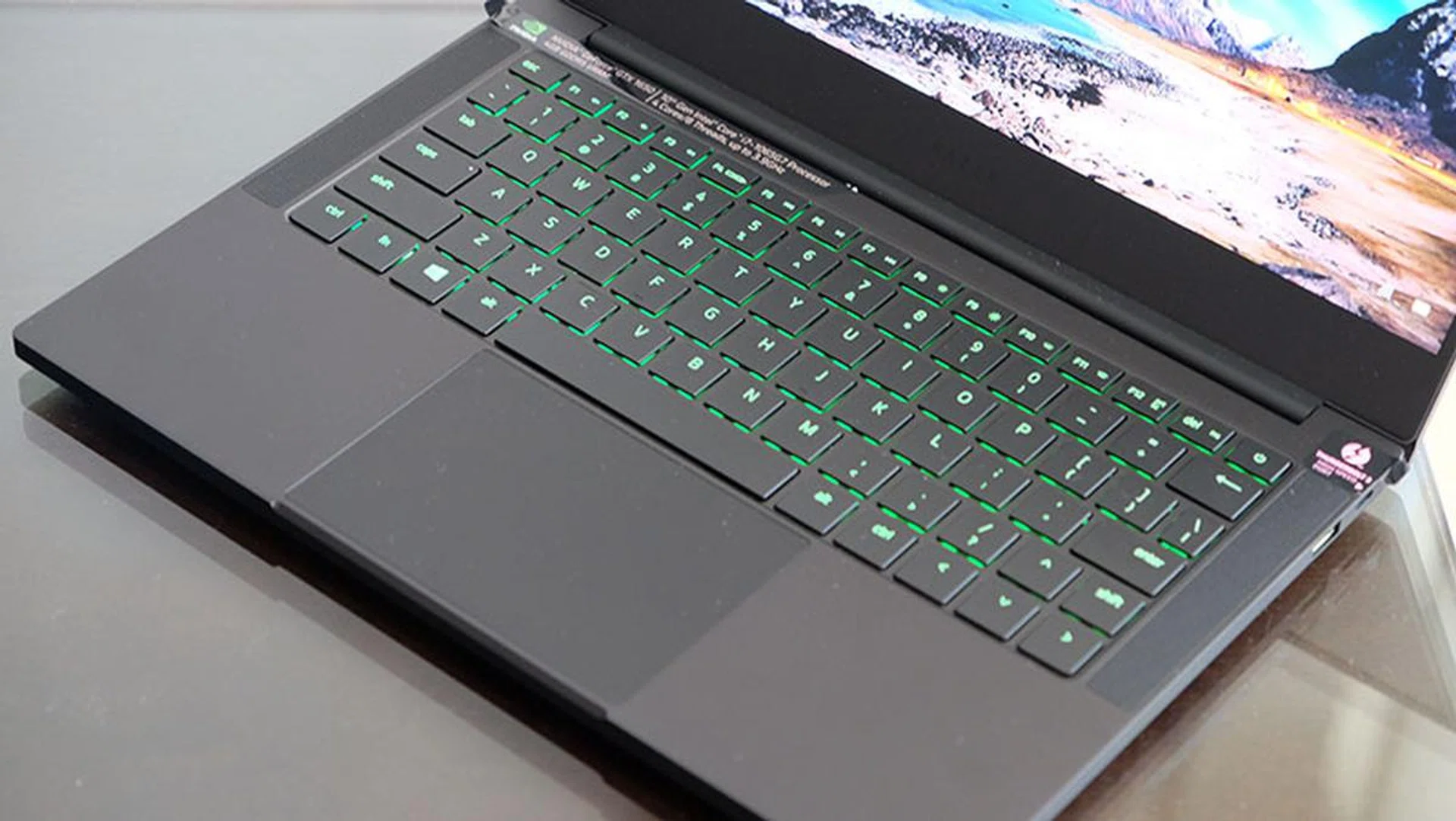
The speakers sit on either side of the keyboard.
In terms of upgradability, the M.2 socket is easily accessible once you remove the bottom panel and the Torx screws holding it in place. However, the two sticks of RAM are soldered onto the other side of the motherboard, so it seems like you won't be able to add more memory if you want to.
Display, speakers, and keyboard
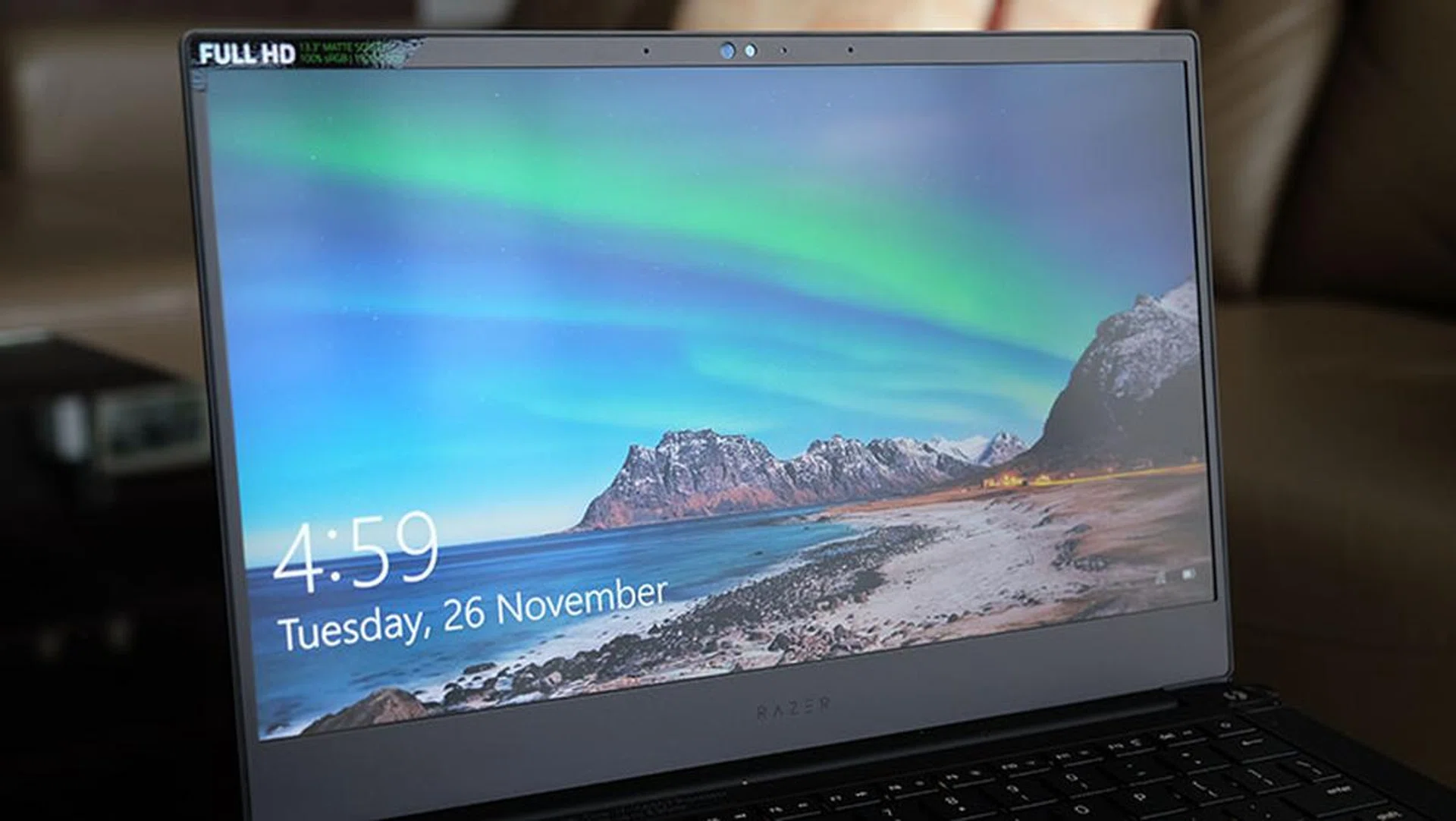
The display is framed by super slim bezels on three sides.
The display is easily one of the best parts of the laptop. I only have the 1,920 x 1,080-pixel IPS model, but it's bright and boasts 100 per cent coverage of the sRGB colour space. The screen also has a matte coating to help with reflections, but that fortunately hasn't really gotten in the way of how vibrant colours appear. The panel is framed by slim 4.9mm bezels on three sides, and the thin bezels help create an edge-to-edge look that feels more modern and immersive. Razer says the screens are also individually calibrated at the factory, which should help with colour accuracy and reproduction.
I like the display a lot, and it's plenty bright for me, at least under regular indoor lighting. In addition, the 720p Windows Hello infrared camera is located in the top bezel, so you can sign in without needing a password. There's no need to deal with awkward camera angles from a bottom bezel-mounted webcam either.
The stereo speakers are located on the left and right side of the keyboard. They're pretty good for such a small laptop, and I can't really complain. They are also surprisingly loud and clear, putting out enough volume to fill a bedroom.
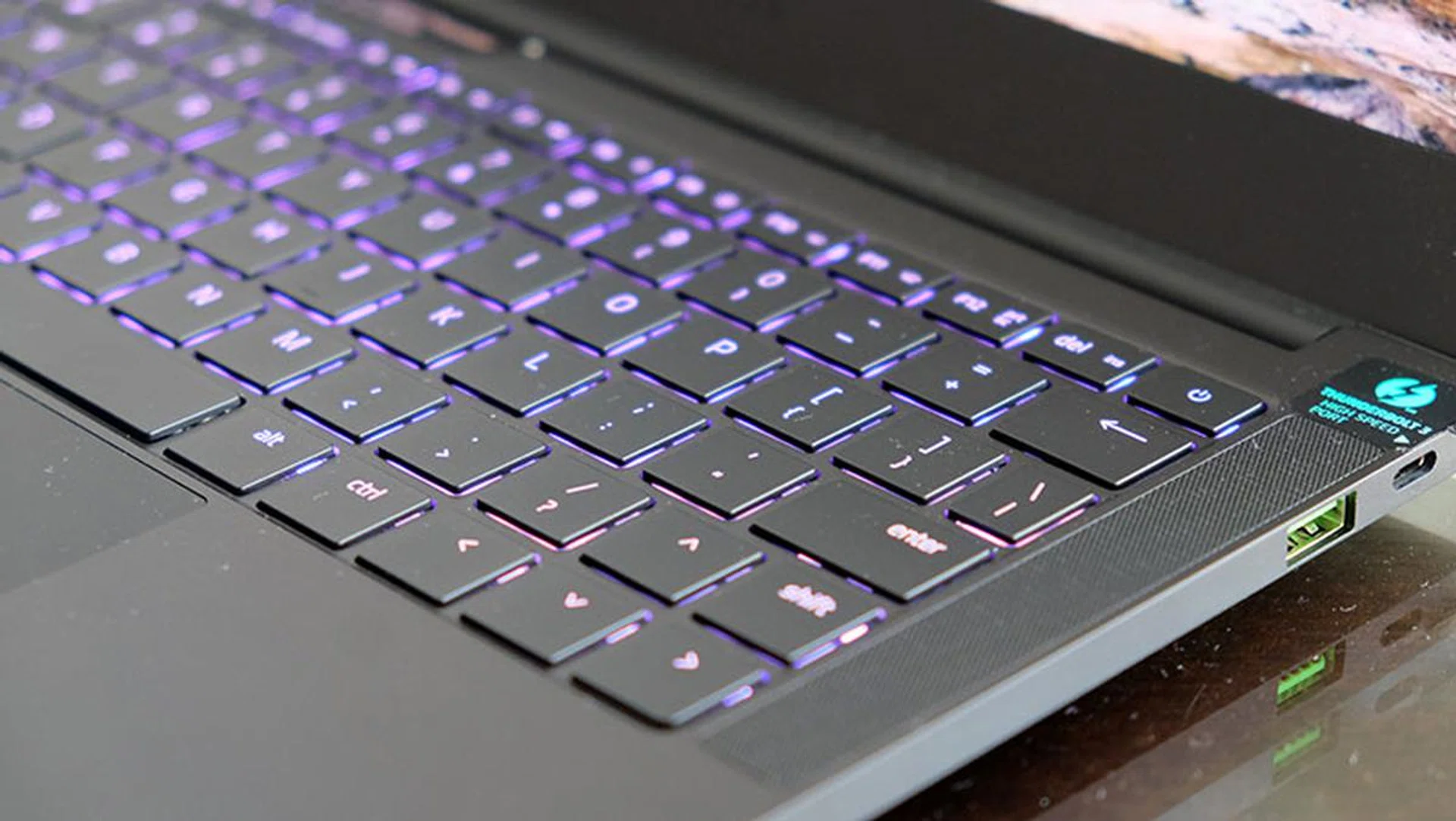
The non-standard right Shift key might need some getting used to.
The keyboard itself is unremarkable – key travel distance is pretty shallow, but that's to be expected from a notebook of this class. However, it has a non-standard layout, featuring a tiny, 1U right Shift key that's separated from the '/' key by a similarly sized Up arrow key. If you're in the habit of using the right Shift to get a question mark out, this will take some getting used to. It's also compounded by the fact that all the arrow keys are the same size as the right Shift key, instead of being half-height, so there's no tactile feedback as to where the right Shift key is. You'll have to simply learn the position of the right Shift key and train yourself to use it.
This quirk was present on the previous Blade Stealth as well, and it's one of the biggest gripes I have with the notebook. It's possible that Razer went with this approach because having uniform key sizes just looks better, but I'm not sure if that was worth throwing a curve ball at users.
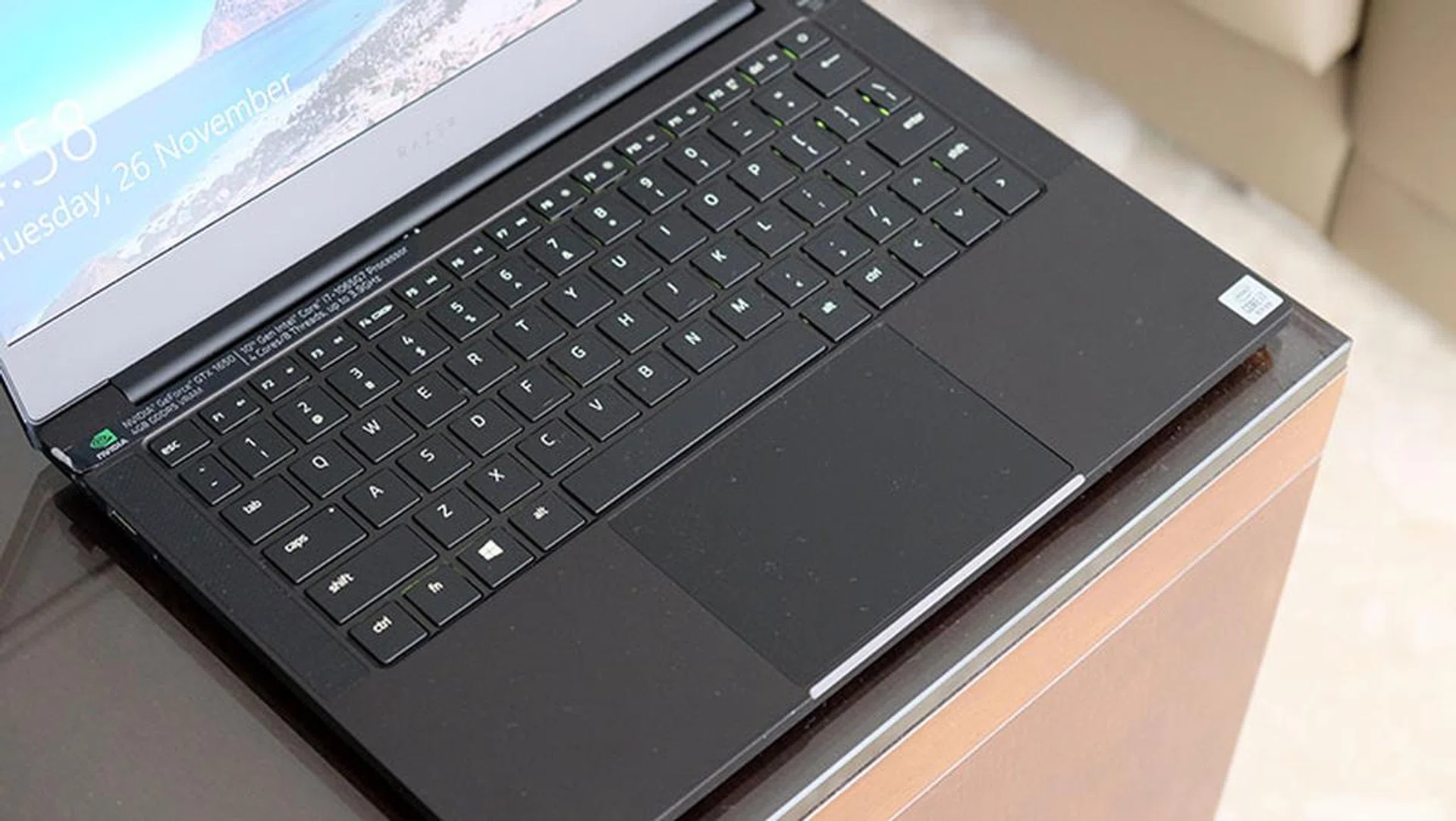
The large trackpad is really comfortable to use.
That aside, the large Windows Precision trackpad is great, and it's even bigger than the trackpads you get on some 15.6-inch laptops. It doesn't feel cramped at all, and while my palm does rest on it while typing, the palm rejection seems to be working and I didn't experience any unwanted input.
However, one feature that's missing is per-key RGB backlighting. The keyboard supports only single-zone customisations, so it's a little limited in this area. I do think that the Blade Stealth 13 with the GeForce GTX 1650 Max-Q should have come with per-key customisations at the very least, even if Razer chose not to offer it on the Mercury White integrated graphics model.
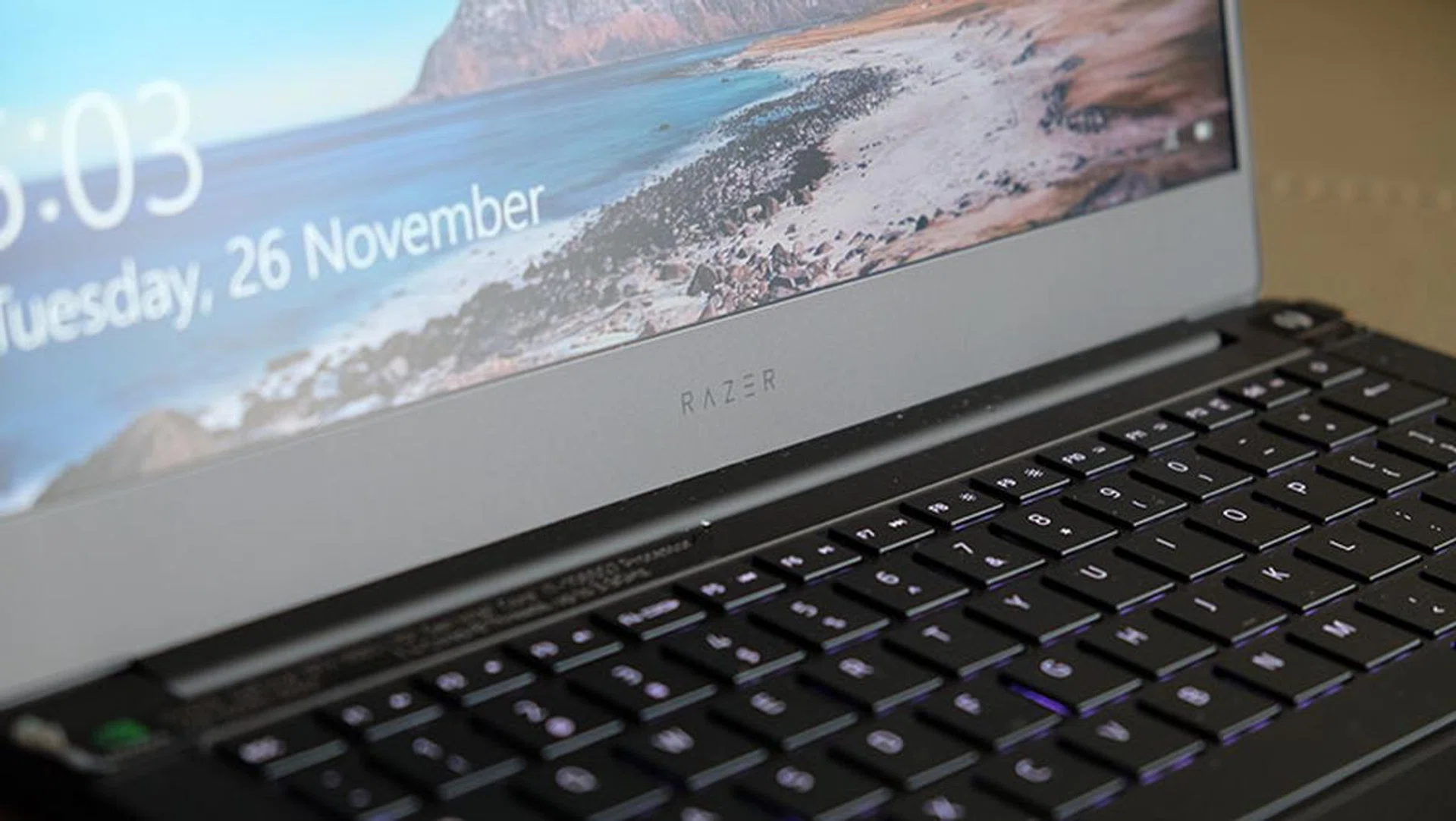
The Razer logo is stamped simply on the bottom bezel.
You can change the lighting effects in Razer's Synapse 3 software, where you'll also find options to control things like fan speeds and performance modes. The laptop lets you pick from three different modes – Battery Saver, Balanced, and Gaming Performance – so you can choose whichever best suits the way you intend to use the laptop.
What ports and connectors does it have?
The Blade Stealth 13 comes with a decent selection of ports for such a small notebook. You get both USB-C and USB-A ports, so it's a step above other ultrabooks, such as the 13-inch MacBook Pro, that dictate that you buy some sort of USB-C hub for more Type-A connectors. The Razer laptop features two USB 3.1 (Gen 1) Type-A, one USB 3.1 (Gen 2) Type-C, and one Thunderbolt 3 port. That's mostly enough for me, since I can connect the laptop to a Thunderbolt 3 dock, plug a mouse in, and still have one Type-A and Type-C port left for an SD card reader or some other device.
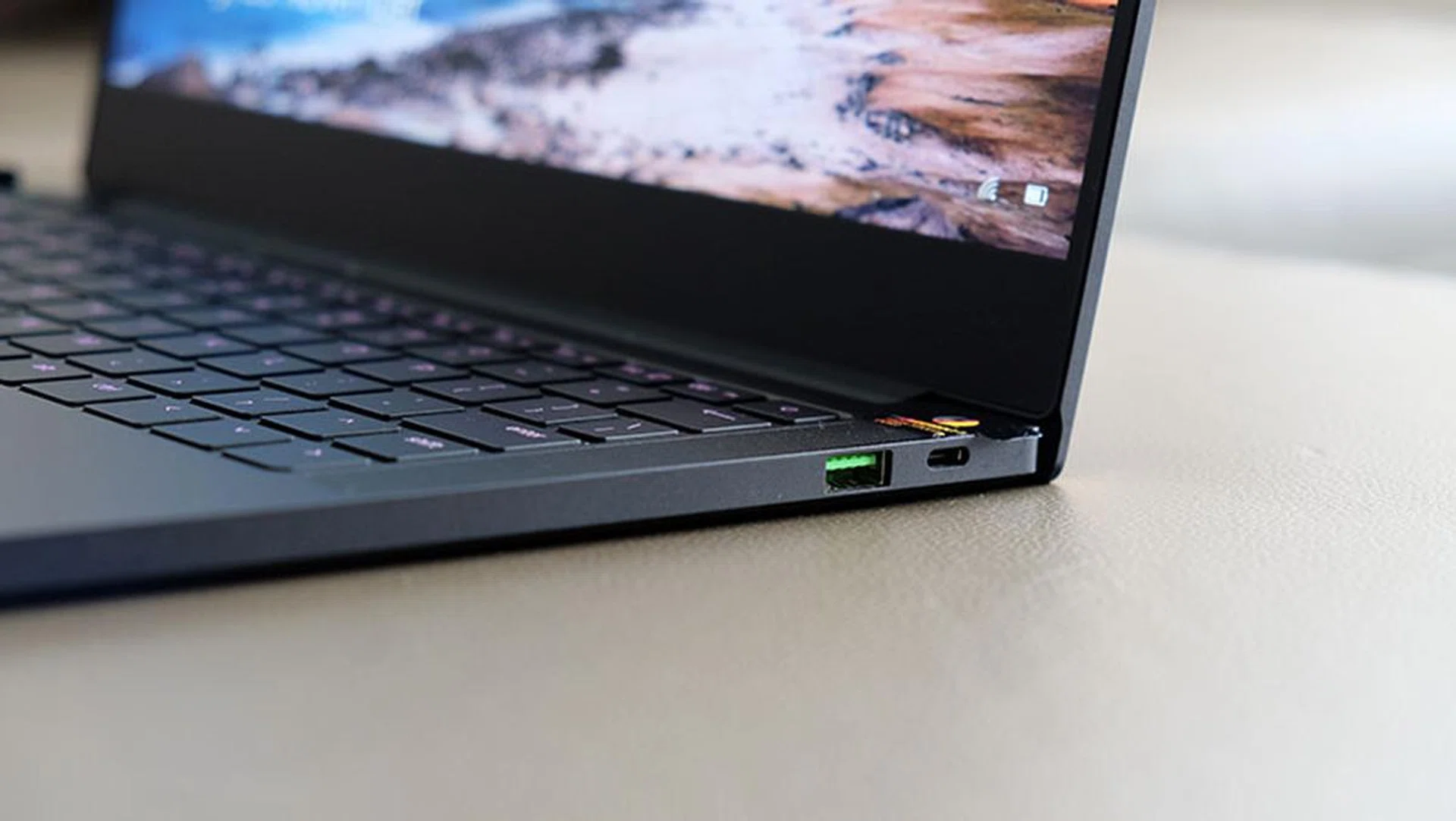
The Thunderbolt 3 sits on the right.
You can use both USB-C ports for charging, and since there's one on each side of the laptop, that provides more flexibility to better fit the layout of your desk.

The USB-C port on the left doesn't support Thunderbolt 3, but it can be used for charging too.
I also like that Razer has coloured the Type-A ports its signature green, and it adds a really nice pop of colour to the otherwise stealthy chassis.
Test setup and performance
Here's a full list of the notebooks we're looking at:
- Razer Blade Stealth 13 (GTX FHD Model)
- Aftershock Forge 15
- Aftershock Forge 15 Pro
- Razer Blade 15
The Blade Stealth 13 will mainly be compared against the Aftershock Forge 15, which has an Intel Core i7-9750H processor and GeForce GTX 1650. It should give you an idea of the performance trade-offs if you opt for the smaller Razer laptop and its 15W Ice Lake CPU, as opposed to picking a more powerful processor and a GeForce GTX 1650 Max-P. The other two laptops are equipped with a GeForce RTX 2060 and GeForce RTX 2070 Max-Q, so you get an idea of how the Blade Stealth 13 stacks up against two of the more popular mobile GPU options on the market.
[hwzcompare]
[products=677382,677710,667554,673300]
[width=200]
[caption=Test notebooks compared]
[showprices=1]
[/hwzcompare]
I ran the notebooks through the following benchmarks:
- PCMark 10
- AS SSD
- 3DMark
- Deus Ex: Mankind Divided
- Far Cry 5
- Metro Exodus
- Shadow of the Tomb Raider
- Tom Clancy's The Division 2
How good is it for work?
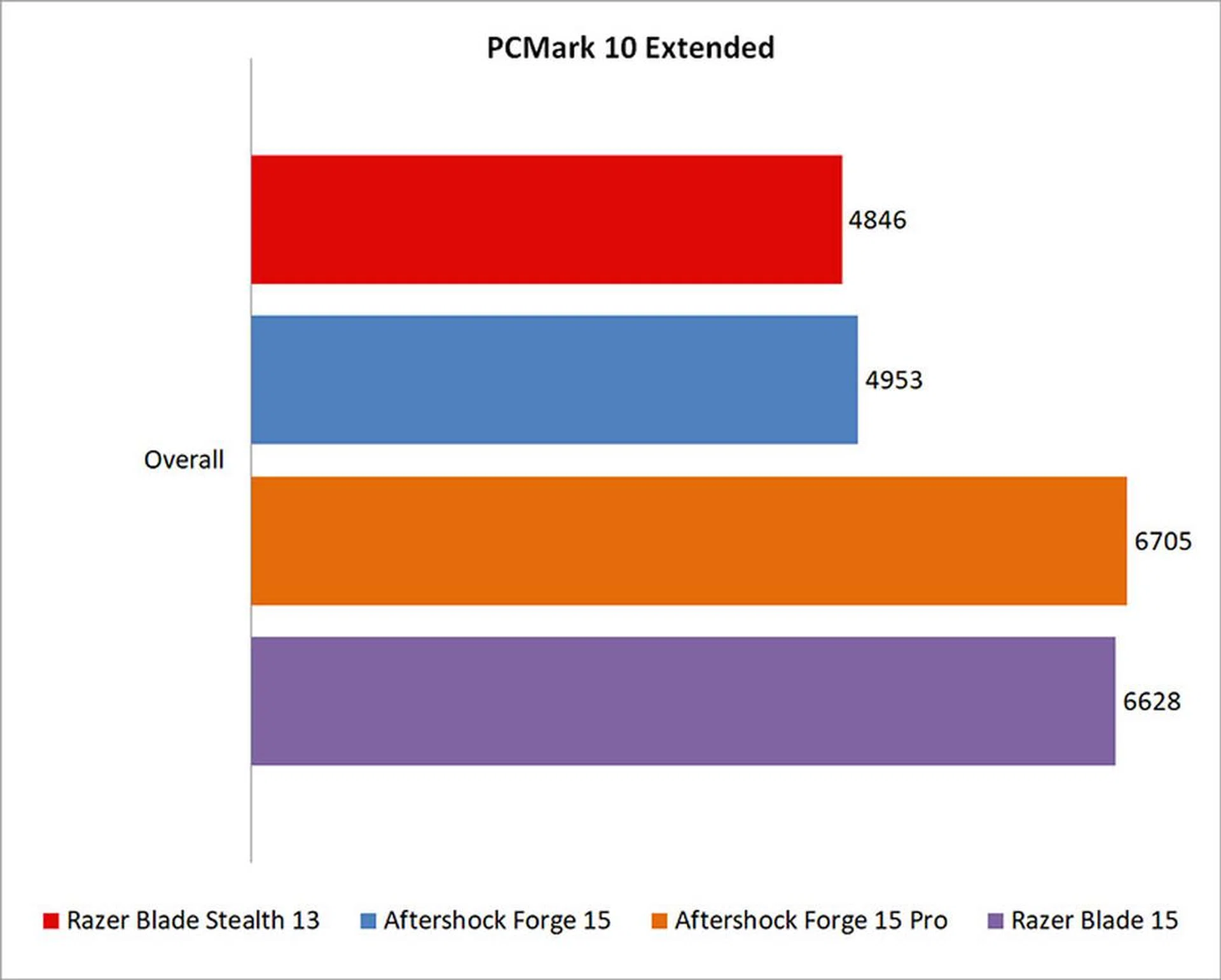
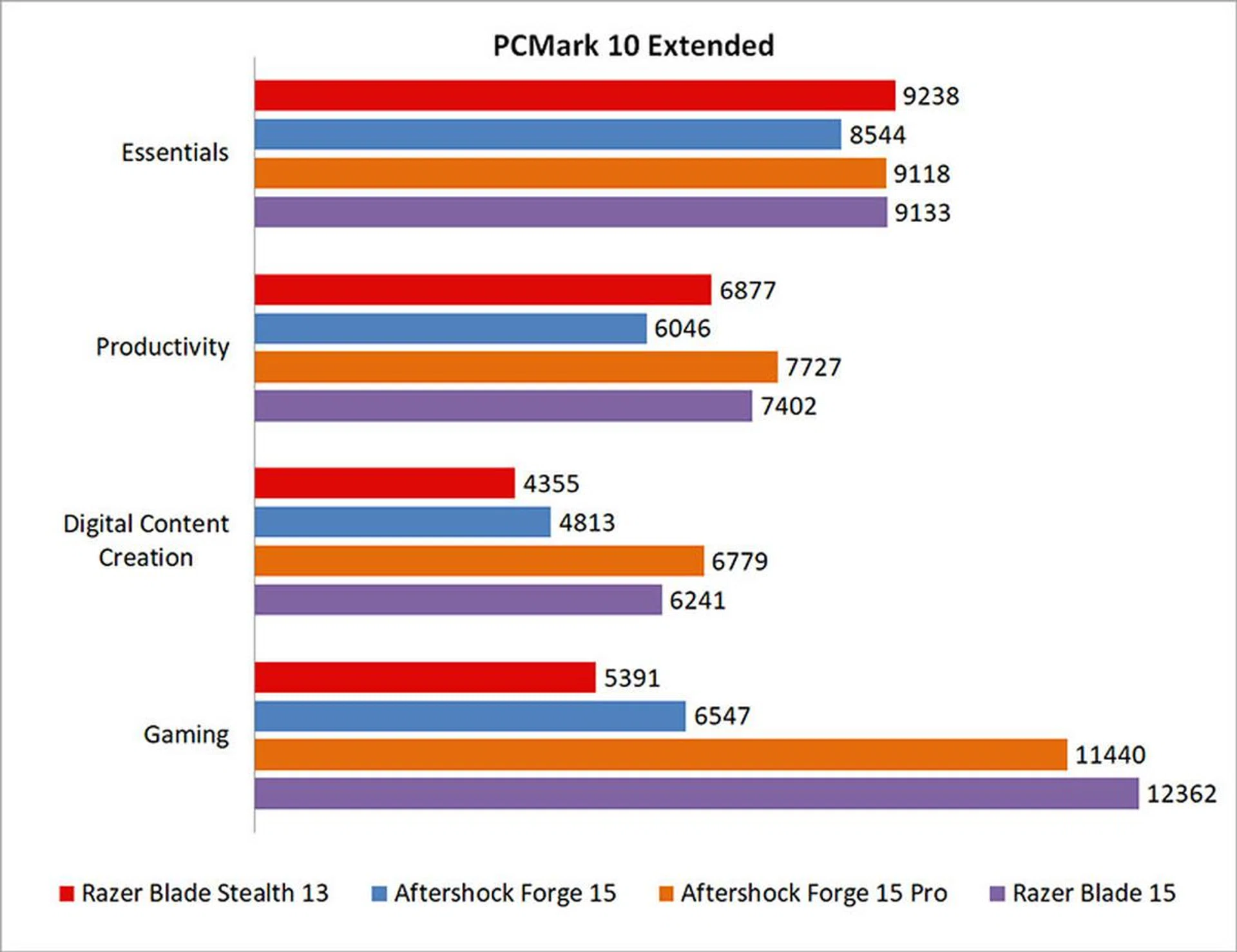
PCMark 10 Extended evaluates systems based on workloads that can be categorized into four distinct groups, comprising Essentials, Productivity, Digital Content Creation, and Gaming. This includes tests such as app start-up times, web browsing, word processing and spreadsheets, photo and video editing, and rendering and visualization tasks. Finally, gaming performance is evaluated using the Fire Strike benchmark.
Unsurprisingly, the Blade Stealth 13 can't really go up against the laptops with more powerful graphics cards, especially since PCMark 10 Extended includes a gaming benchmark. A look at the score breakdown shows the Blade Stealth 13 pulling level in the Essentials benchmark, but it starts to lag in the more demanding test segments. However, it holds its own against the Aftershock Forge 15, so the weaker Ice Lake chip doesn't seem to affect it too much in day-to-day tasks.
Overall, the Blade Stealth 13 was around 31 per cent slower than the bigger Blade 15.
What's the storage performance like?
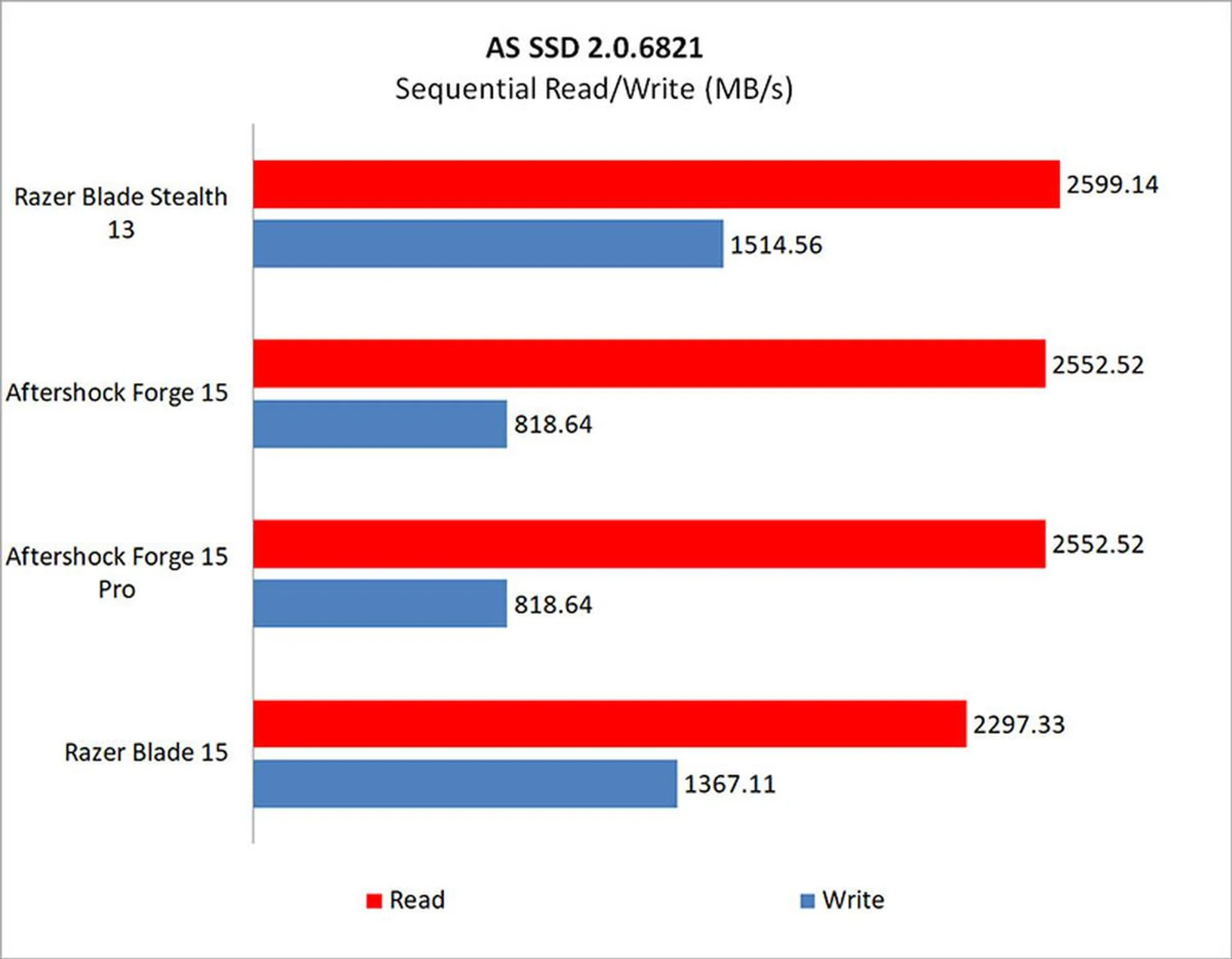
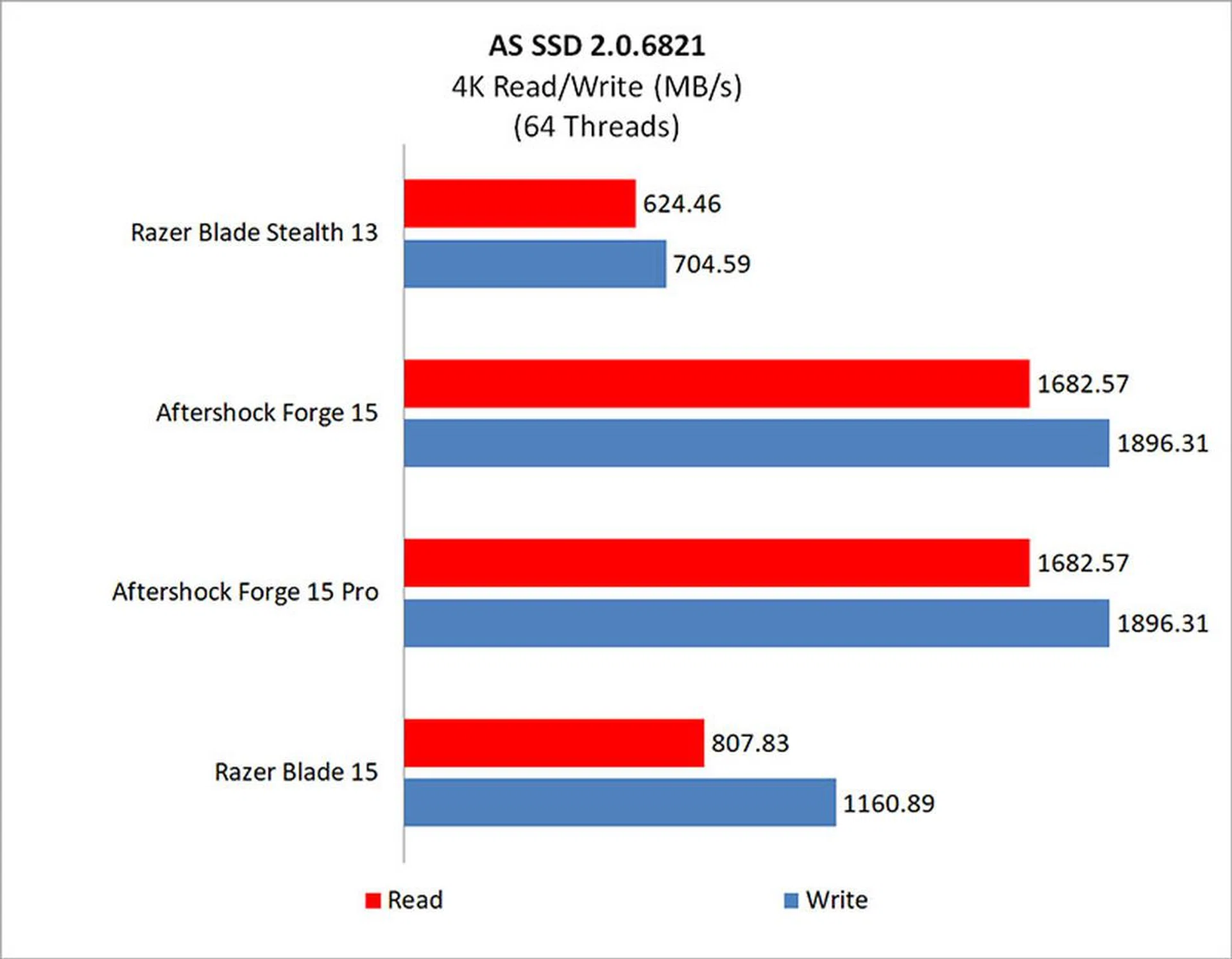
The Blade Stealth 13 uses a Lite-On 512GB PCIe NVMe SSD. It puts up a pretty good showing overall, with the exception of the higher queue depth workloads.

How fast is it in games?
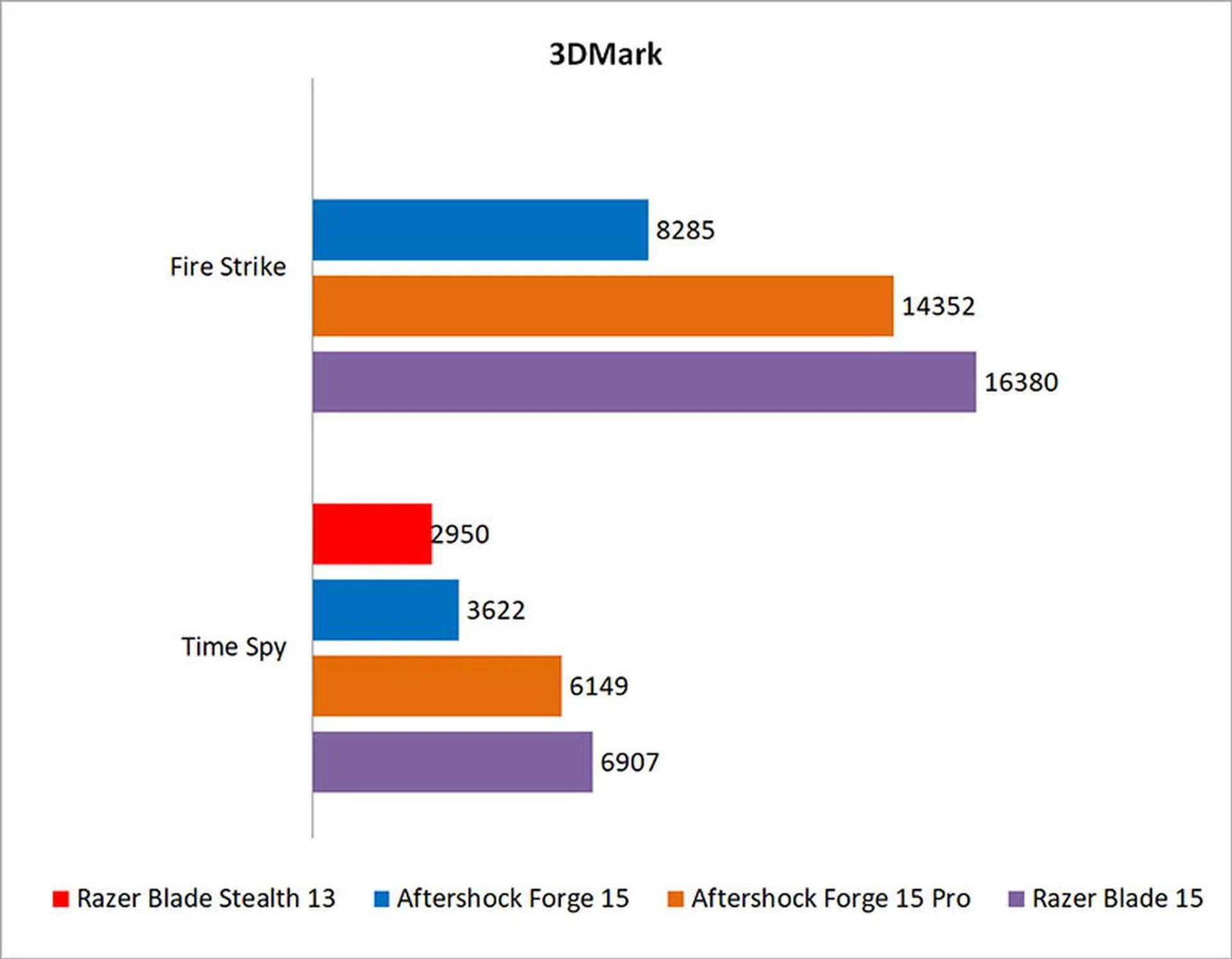
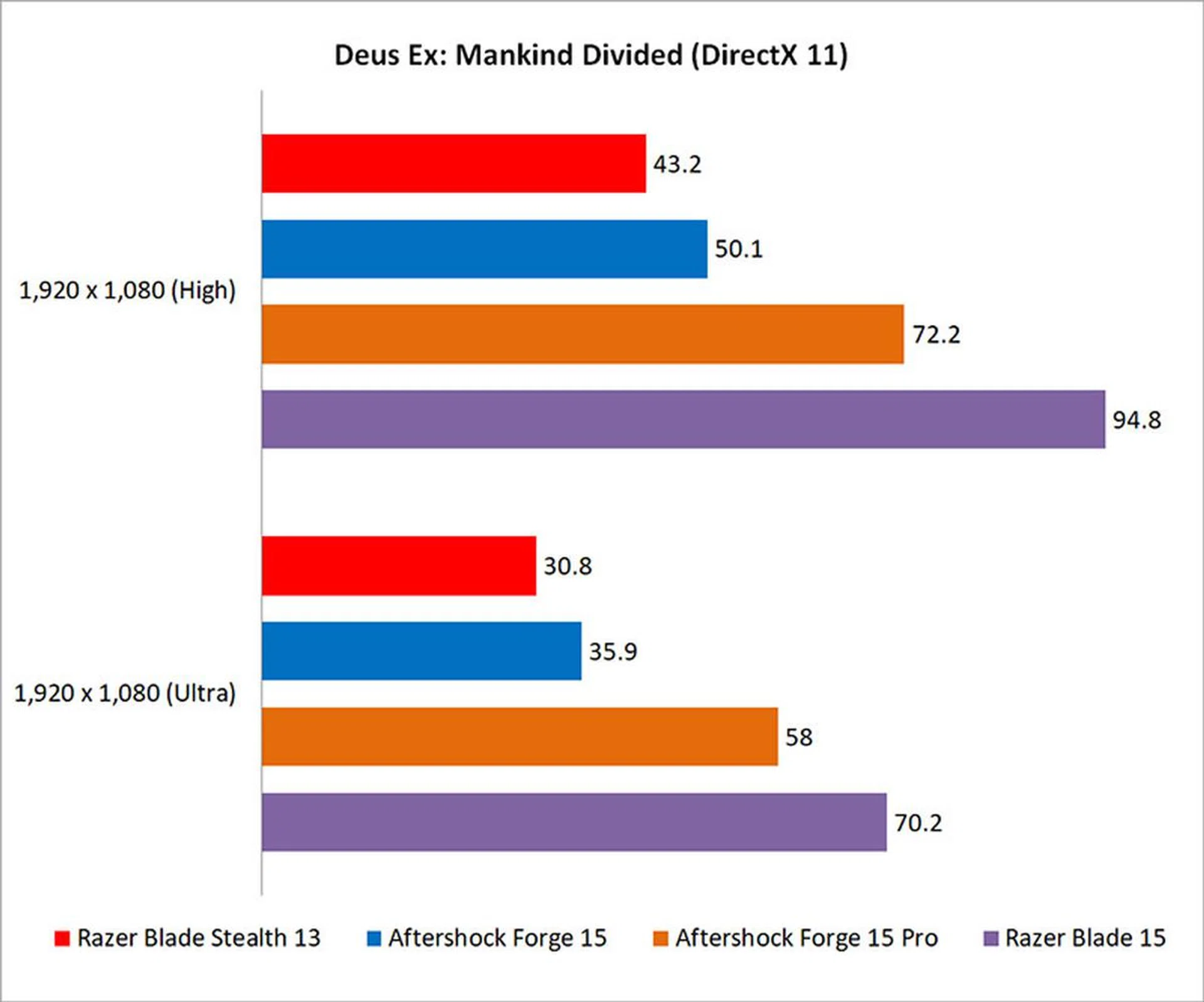
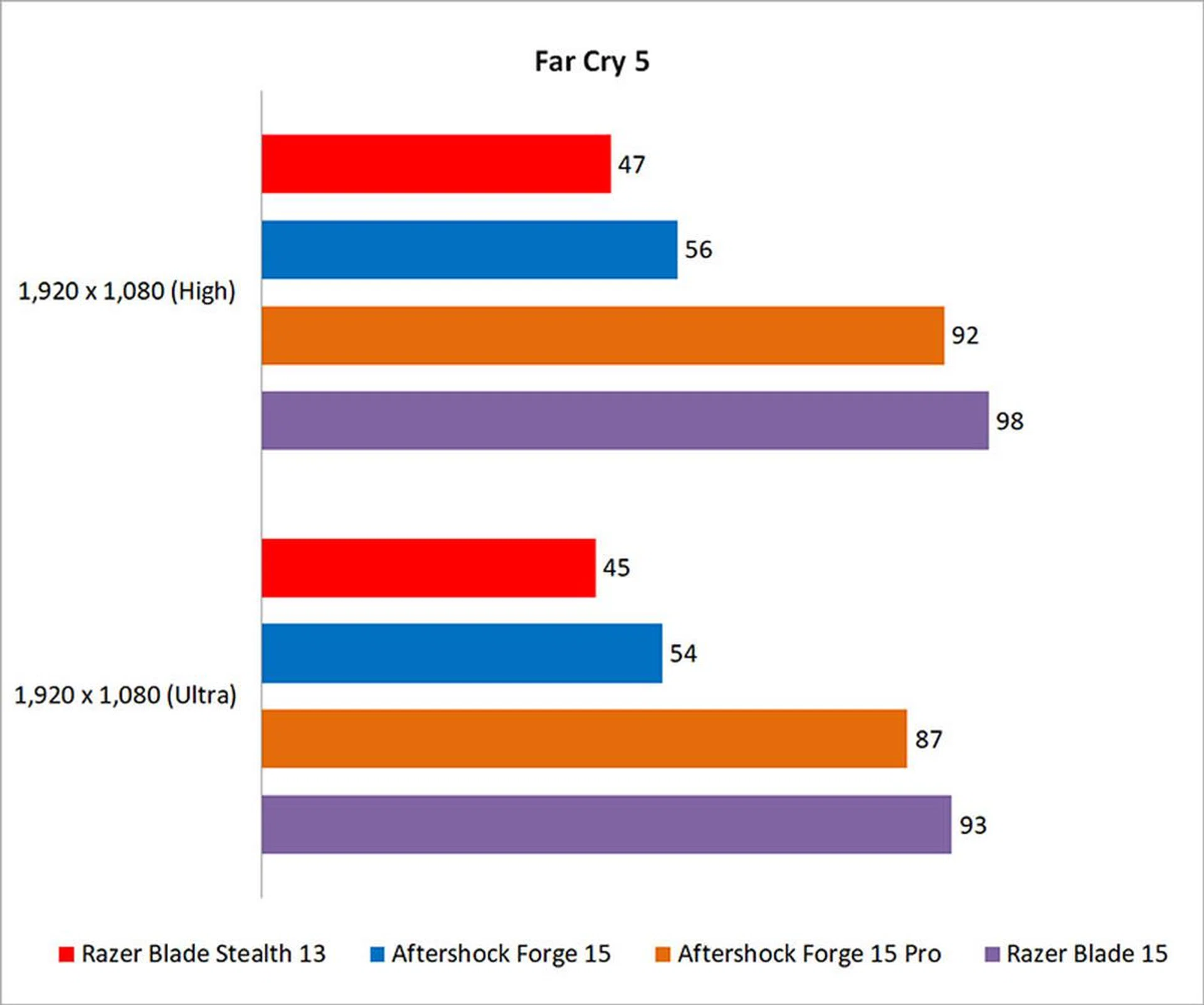
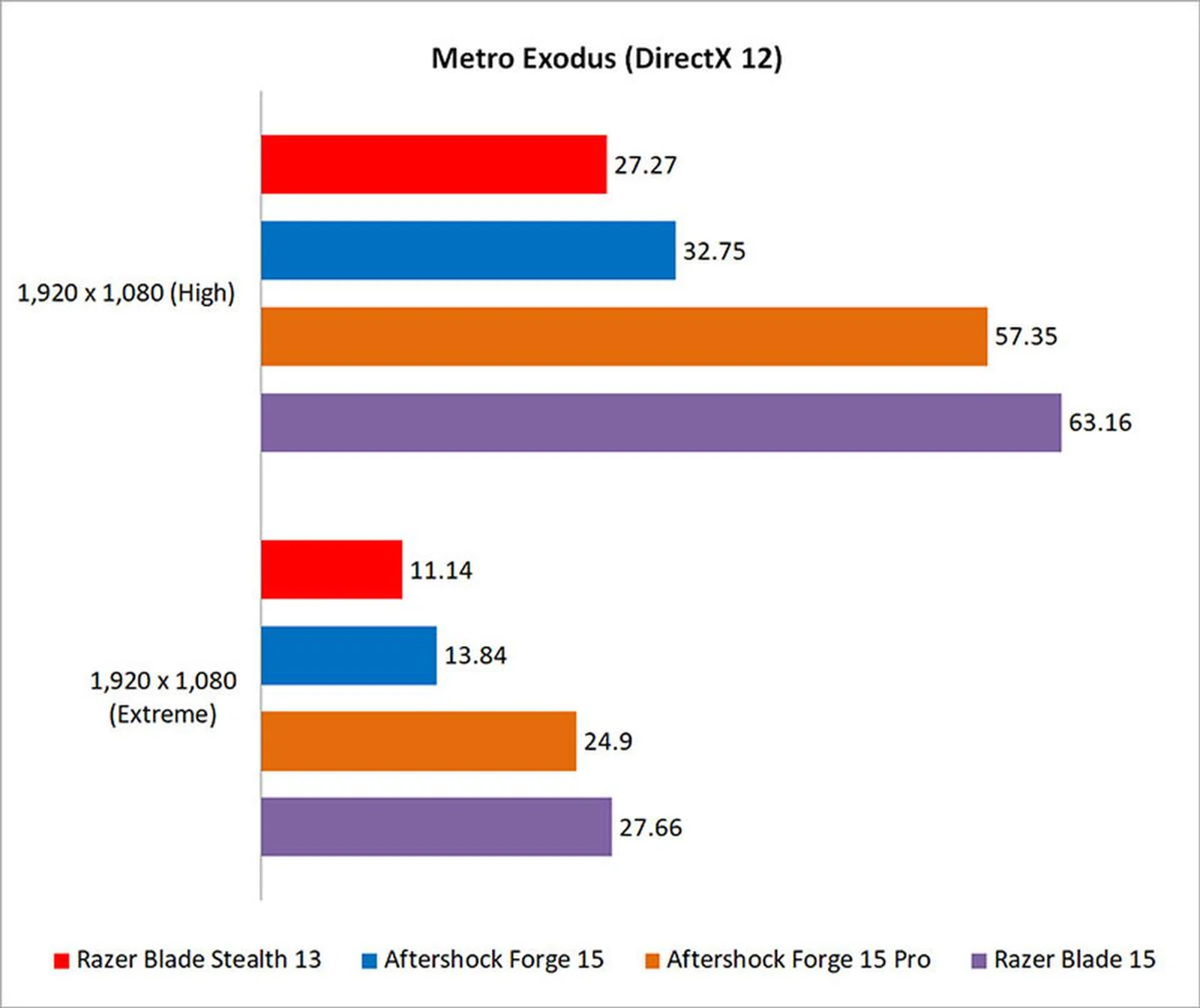
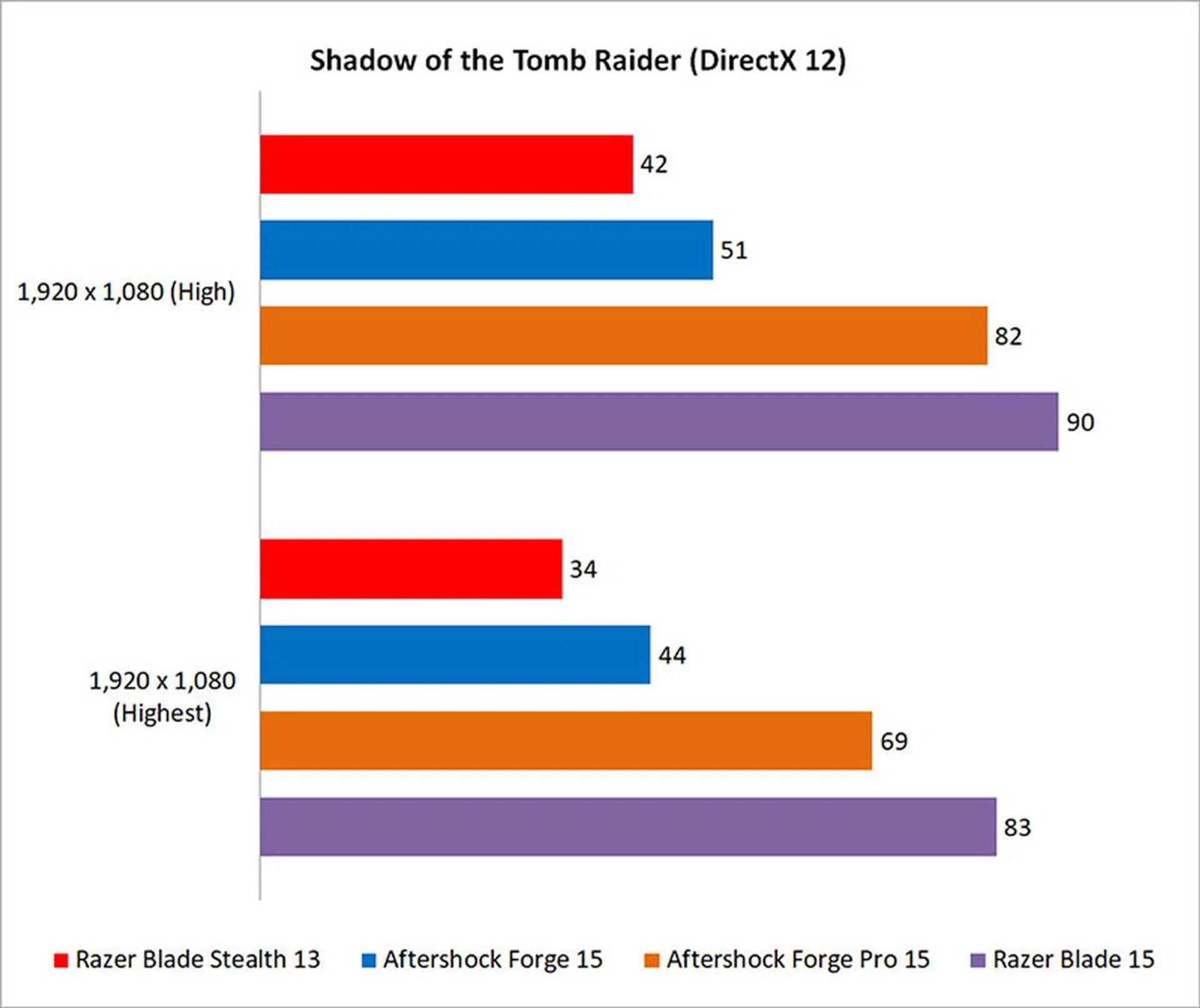
Razer's gaming ultrabook actually pushes out frame rates in the playable range in select games at High settings, and I think it's a decent result that could probably be vastly improved by dropping the graphics presets even further. And if you intend to play less demanding esports titles like CS:GO or Overwatch, the laptop should provide a pretty decent experience.
I wasn't able to get the laptop to run 3DMark Fire Strike however, so the numbers for that are missing in the graph. That aside, the Aftershock Forge 15 with the Core i7-9750H and GeForce GTX 1650 was around 10 to 20 per cent faster on average.
That's not an insignificant difference, but it's still not large enough to make opting for the larger and heavier laptop an obvious choice. I think the Blade Stealth 13 offers passable gaming performance for its size and form factor, and it could be quite an interesting choice for someone who wants a super portable gaming machine.

How good is the battery life?
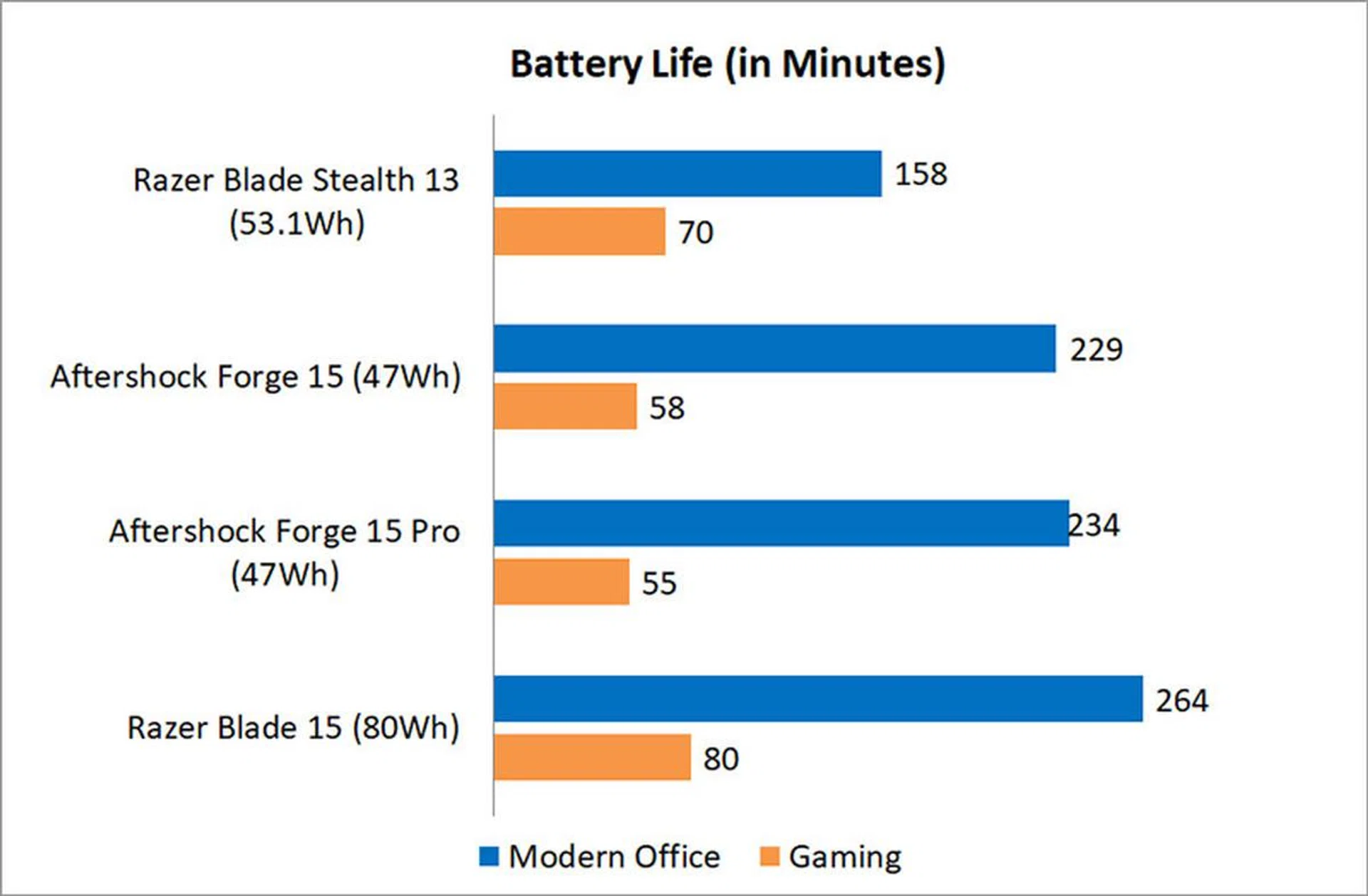
I tested the battery life using PCMark 10's new Modern Office and Gaming battery life benchmarks. All the notebooks were set to 100 per cent display brightness and had Wi-Fi enabled. The keyboard backlight was disabled.
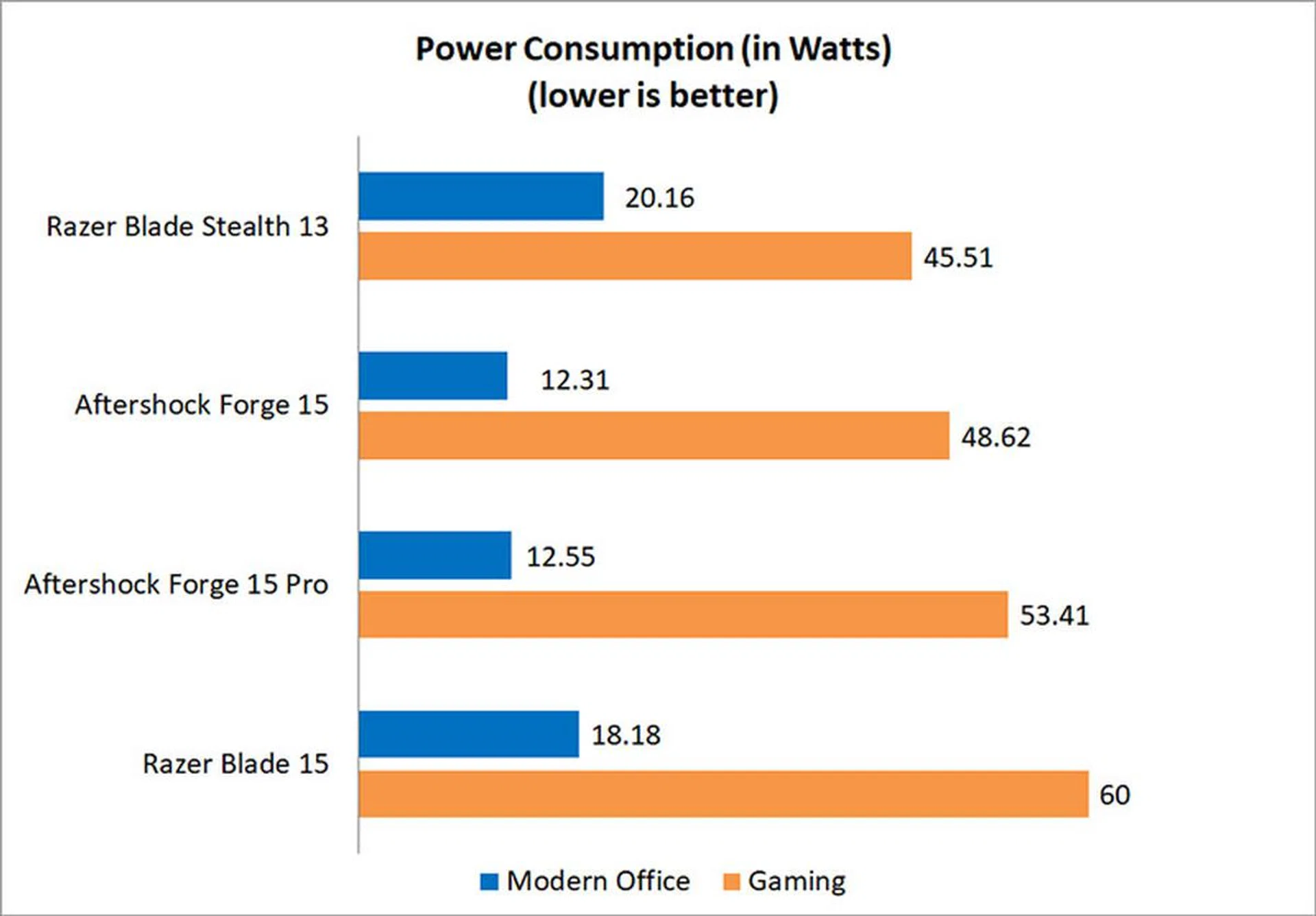
Battery life on the Blade Stealth 13 is mediocre at best, and it still wasn't able to best either Aftershock laptop in the Modern Office benchmark, despite the fact that they have more powerful chips and slightly smaller batteries. The display on the Blade Stealth 13 is a lot brighter however, so it's possible that it was a contributing factor in bringing the battery life down.
However, it fared slightly better in the Gaming benchmark, where the more aggressive clock speeds of the Core i7-9750H probably allowed the Blade Stealth 13 to pull ahead slightly with its more efficient chip.
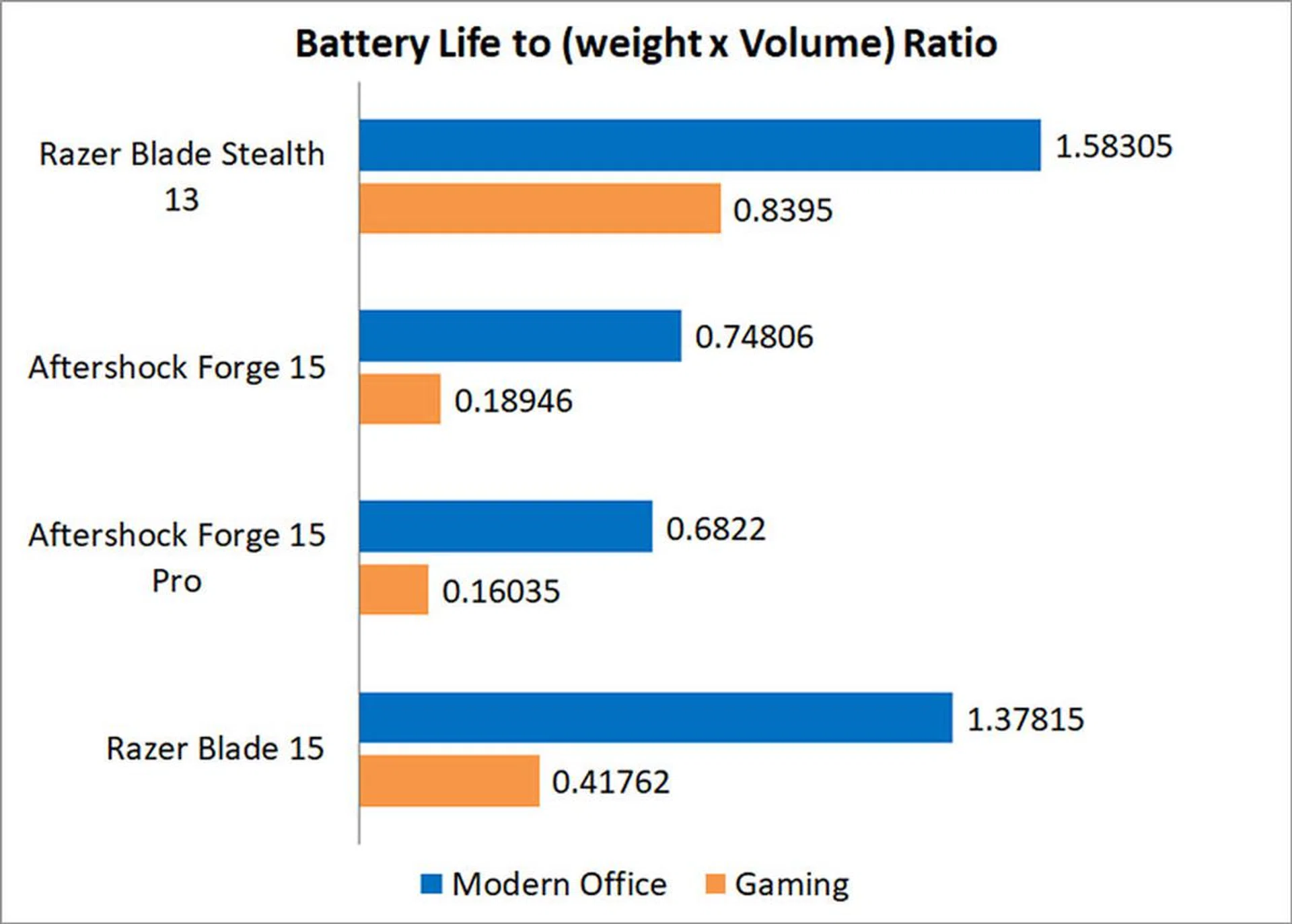
That said, the Blade Stealth 13 still sailed ahead in our portability index, which takes into account factors like size, weight, and battery life. Despite its somewhat disappointing battery life, the Razer ultrabook is still so light and compact that it's really hard for any 15.6-inch laptop to top it. Nevertheless, it's clear that boosting the Blade Stealth 13's gaming chops has caused it to suffer in areas where ultrabooks traditionally excel, such as battery life.
Is the cooling performance good?
I tested the thermal performance by running 40 loops of 3DMark's Fire Strike Extreme stress test.
Cooling is an obvious concern when you stuff a discrete GPU into a laptop that's this small and thin, but the Blade Stealth 13 does pretty okay in this area. The numbers you see here were obtained with fan speeds set to automatic in Synapse 3, but setting it to maximum pushes the CPU and GPU temperatures down to just 64°C and 67°C respectively, a rather significant decrease. And even at max speed, the twin cooling fans are surprisingly quiet. They are still audible, but they're among the quietest fans I've encountered on a gaming laptop.
The palm rests get warm but never excessively hot, and most of the heat appears to be concentrated in the area above the keyboard.
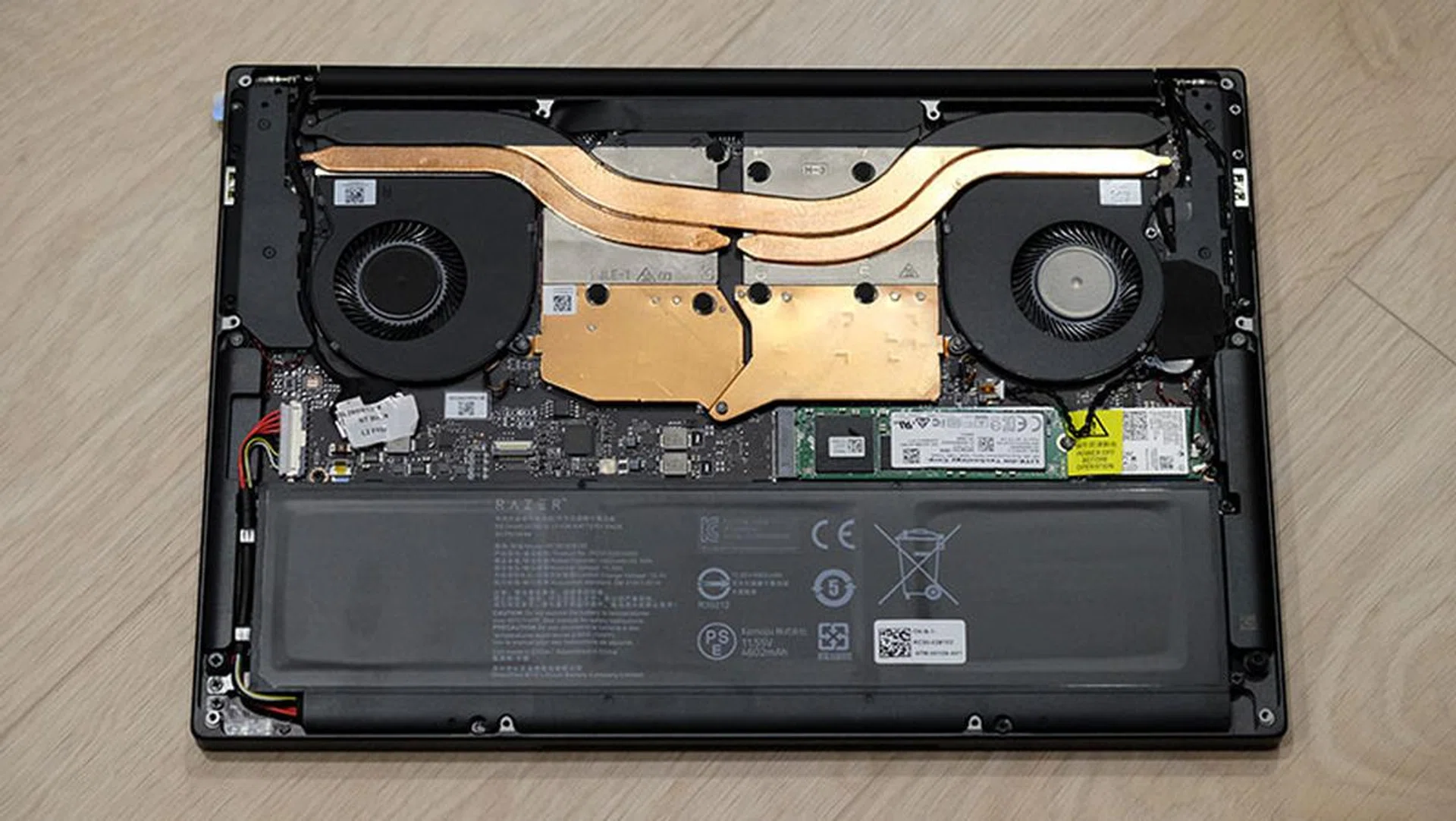
The laptop is cooled by three heat pipes.
The Blade Stealth 13 is cooled by three heat pipes, including a dedicated heat pipe each for the CPU and GPU. The third heat pipe is shared between both processor and graphics chip.

You can game on it, but it has its limitations
The Razer Blade Stealth 13 is perhaps the only ultrabook today to offer what I'd consider decent gaming performance. If you travel a lot, but can't bear to be away from your games, the Blade Stealth 13 may just be what you need. However, Razer isn't quite the first to attempt to make an ultraportable gaming machine. For one, there was the old Alienware m11x, a puny 11.6-inch laptop with a GeForce GT 540M. It turned out pretty good gaming numbers as well, for its time that is, but it was also a rather thick and heavy system.
Fast-forward to today, and the Blade Stealth 13 has improved on the m11x in every way. Its svelte chassis holds a GeForce GTX 1650 Max-Q, but you wouldn't know it without looking at the specs sheet. It weighs just 1.42kg and measures 15.3mm thick, but while it's hardly the lightest or thinnest ultrabook around, you could place it next to some of the sleekest ultrabooks today without it looking out of place. And once you power it on and try to run some games, it's going to leave the others behind in the dust.
Granted, there's still no way the Blade Stealth 13 can compete against larger gaming laptops with a GeForce RTX 2060 or better. If you're hoping to run AAA games at High settings, gaming performance is still very limited. These games are still playable, but you'll probably have to run them at Low or Medium settings for a smoother experience. However, the Razer laptop should handle less demanding esports titles really nicely, and I can't exactly turn my nose up at a tiny notebook that will let me play Overwatch in my hotel room.

This is one versatile notebook.
It does still have a 60Hz screen however, and I think it would have been really neat if Razer had opted for a 144Hz display on such a compact machine. I also feel like the Intel Core i7-10510U would have been a better choice for the processor, given that it has more aggressive clock speeds than the Core i7-1065G7, which is pretty important for games.
That aside, the Blade Stealth 13 offers rather good gaming performance for its size. There are plenty of arguments to be made about its limitations, but its 13.3-inch chassis and light weight serve as a powerful counterpoint. Razer's gaming ultrabook serves a very specific niche, and you can hardly disregard something when it's practically the only option available, and a pretty good one at that. The Blade Stealth 13 is for the gamer on the go, someone who places mobility above all else but would still like something more portable than your average 15.6-inch system.
However, battery life has taken a hit from the discrete GPU, and the Blade Stealth 13 doesn't put out anywhere close to the usual numbers you'd expect from a laptop in this class.
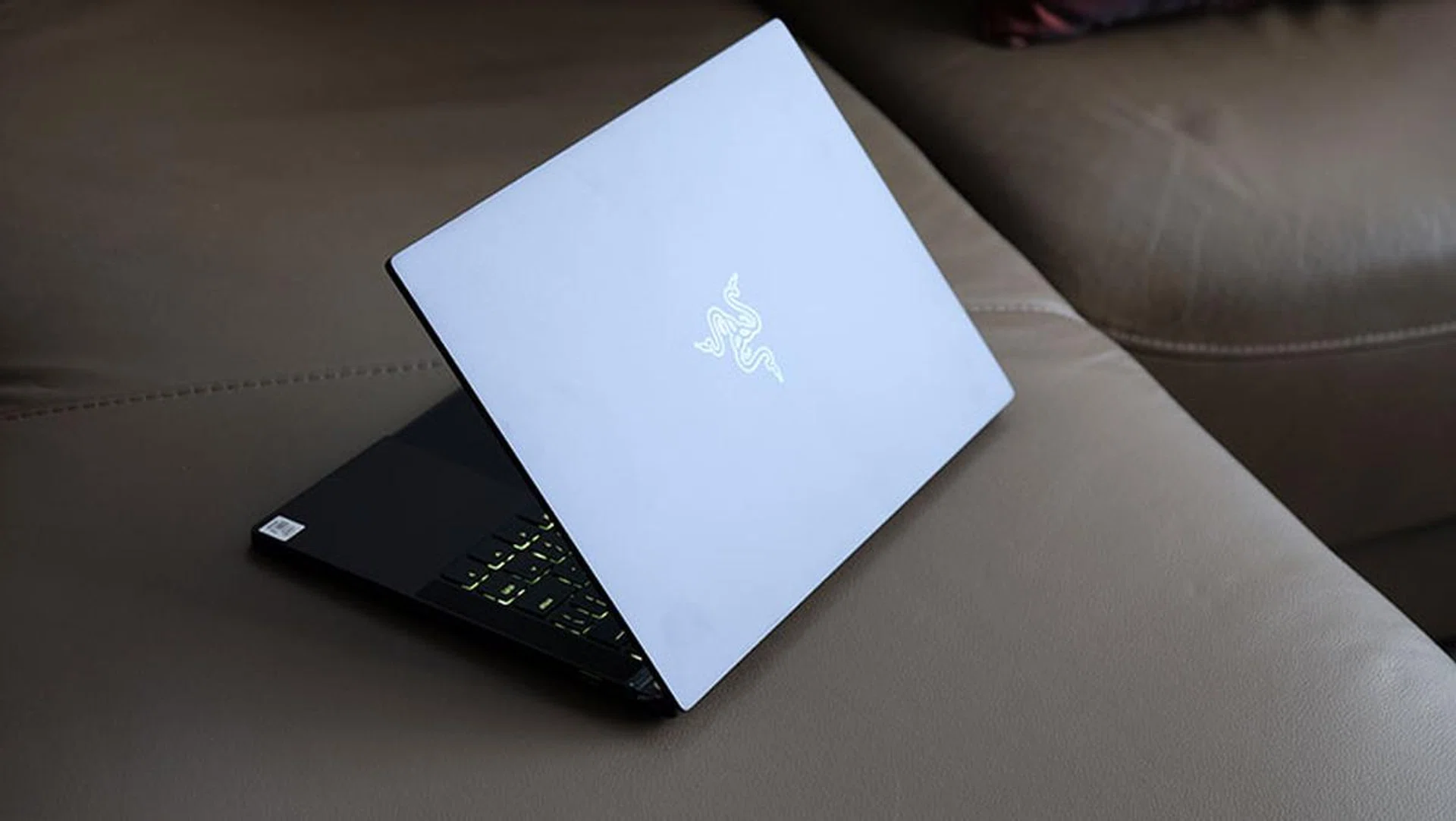
Battery life has taken a hit as a result of the discrete GPU.
At S$2,899, the laptop has a big price tag attached to it. However, I don't think it is an unreasonable asking price, especially considering that the Dell XPS 13 with a FHD display costs S$2,799. The price may seem steep when you think about the somewhat limited gaming performance you're getting vis-à-vis more conventional gaming laptops, but then you'd be missing the point. The Blade Stealth 13's performance is better viewed in conjunction with how small and portable it is – arguably, this is the main selling point of the laptop.
Along with support for Wi-Fi 6 and Thunderbolt 3 and its excellent display, the Blade Stealth 13 is truly a versatile and portable gaming machine. There's nothing else like it at the moment, and credit goes to Razer for what may be the start of a new category of 13.3-inch gaming laptops. I hope it doesn't remain alone for long though, and I'm looking forward to seeing similar attempts from other brands.
Our articles may contain affiliate links. If you buy through these links, we may earn a small commission.