
MSI GeForce RTX 4090 Suprim X 24G review: Flagship performance
Doesn't get much faster than this.

A class of its own
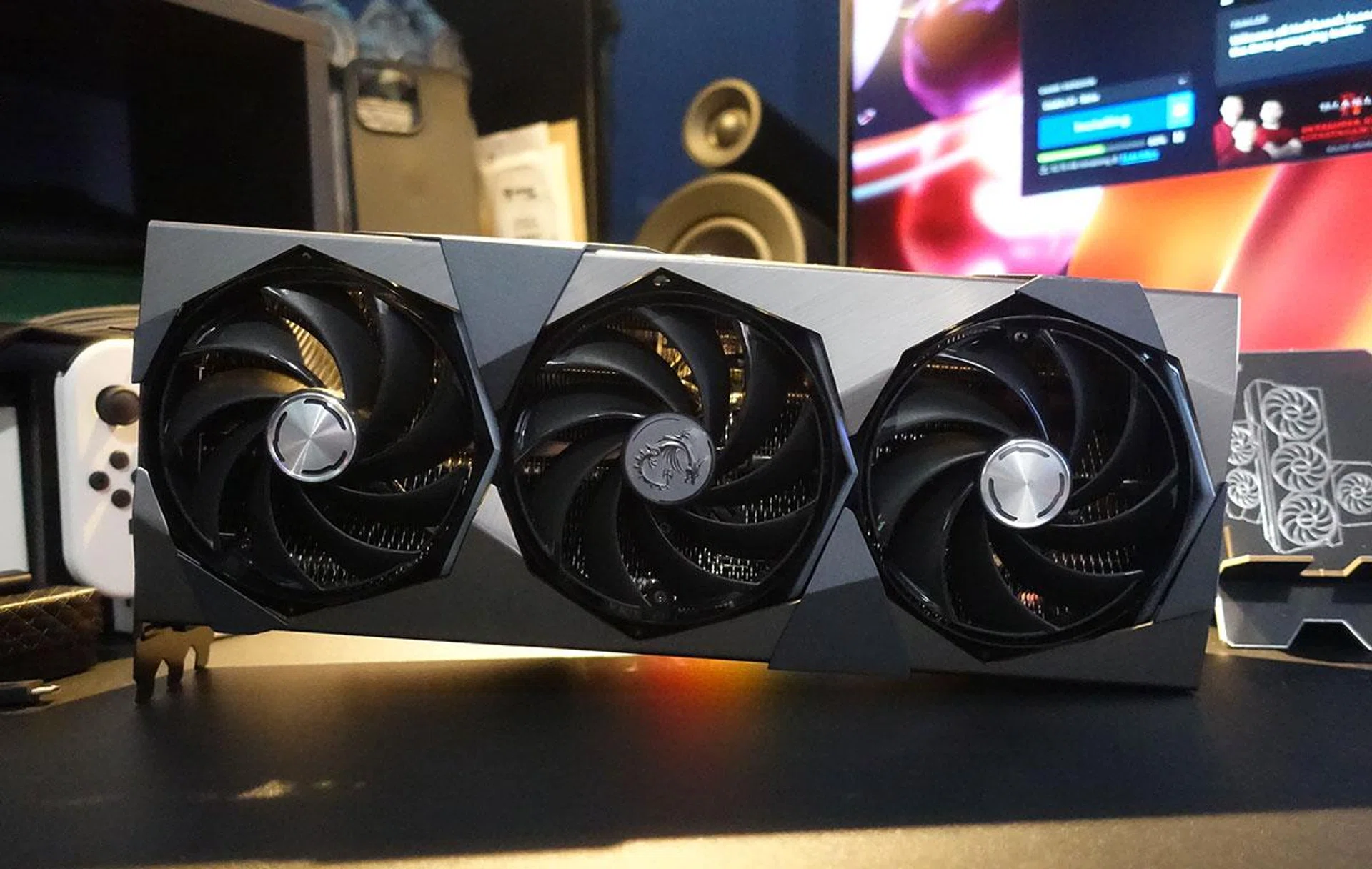
MSI's GeForce RTX 4090 Suprim X builds on the impressive legacy of its Tri-Frozr cooler. The Suprim X series replaces the Lightning cards at the top of the company's lineup, featuring all the bells and whistles you'd expect from a card of this calibre.
The Suprim X's signature silver brushed metal shroud features prominently, along with modern, angular lines on the cooling shroud. Each fan sits in an octagon cutout and is flanked by an RGB LED strip on just one side, making for a distinctly tasteful look that still manages to capture your eye.
MSI says the Suprim design and its logo concept are inspired by diamond crystals and geometry, as seen by its deliberate use of points, lines, and planes. The series is purposefully crafted to evoke a certain sense of prestige, and the card certainly feels that way with its solid heft and metallic look.
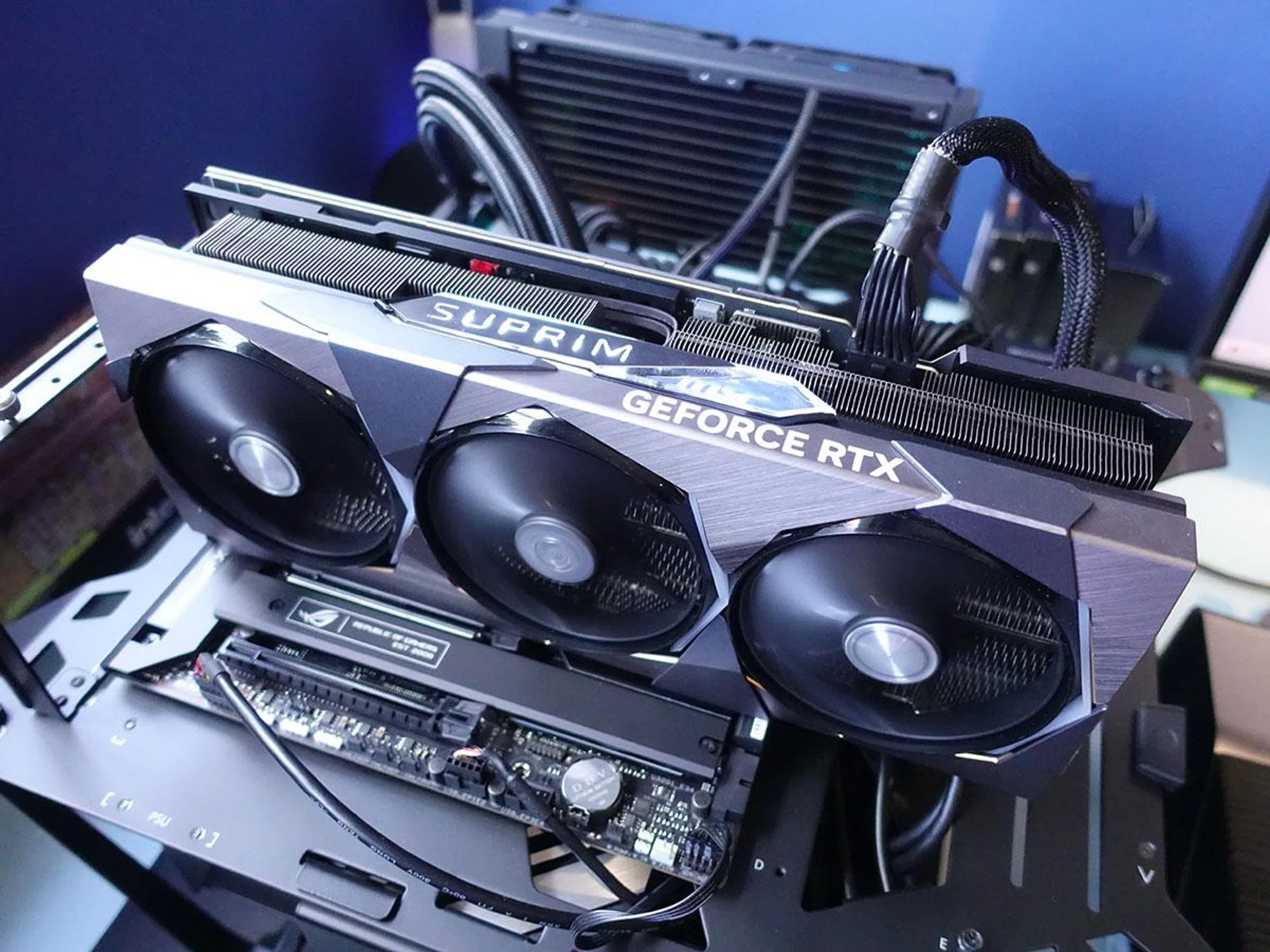
There are small details to take note of as well, such as the bevelled edges that have been polished multiple times over with a diamond-tipped cutter to achieve a mirror-like finish.
To keep the GeForce RTX 4090 GPU cool, MSI has gone with a Tri-Frozr 3S cooler, an upgraded version of its signature cooling solution from the previous generation. This means improved fans and airflow control, among other things, including Torx 5.0 fans that supposedly boost airflow by a whopping 23% compared to regular axial fans. However, for maximum noise reduction, the fans will stop spinning when the GPU is under low load.
Ring arcs link sets of three fan blades (the previous version linked two fan blades) that focus airflow into the heatsink. Each fan blade is also tilted by 22 degrees to maintain high-pressure airflow even at slower rotational speeds. On top of that, the trailing end of each ring arc folds inward to reduce turbulence and drag, says MSI.
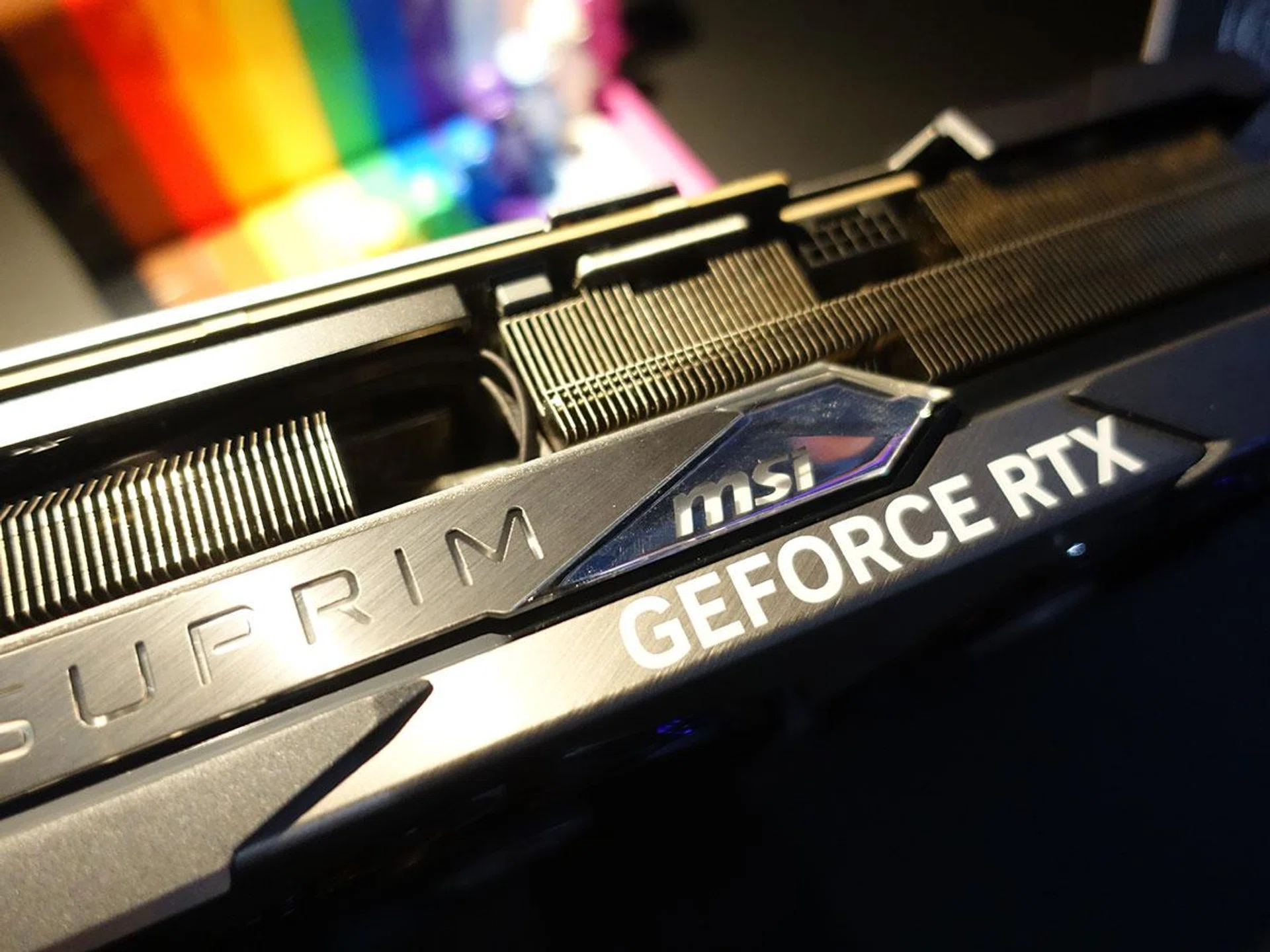
To further improve airflow stability, a fan cowl extends beyond the fan enclosure to lengthen the air passageway. Bulging notches under the cowl then help to reduce recirculation and focus airflow. Finally, a vapor chamber covers the GPU and VRAM, transferring heat to the heat pipes.
These pipes have been precision-crafted to make maximum use of the available space. This means a squared-off section to make full contact with the vapor chamber to spread heat along the full length of the heatsink more efficiently.
The heatsink itself employs various fin designs to disrupt unwanted airflow harmonics and reduce noise. The filled fins allow more space for additional heatsink fins, while what MSI calls wave-curved 3.0 fins increase efficiency by adjusting the size of the wave edges under the fan motor and other areas where there is less airflow. Air antegrade fins feature a V-shaped cutout, located at the airflow passthrough to improve flow efficiency. It does this by optimising the inclination angle and increasing the wave notch to shape air resistance toward the centre, pushing out warm air more quickly in a fashion similar to a nozzle.
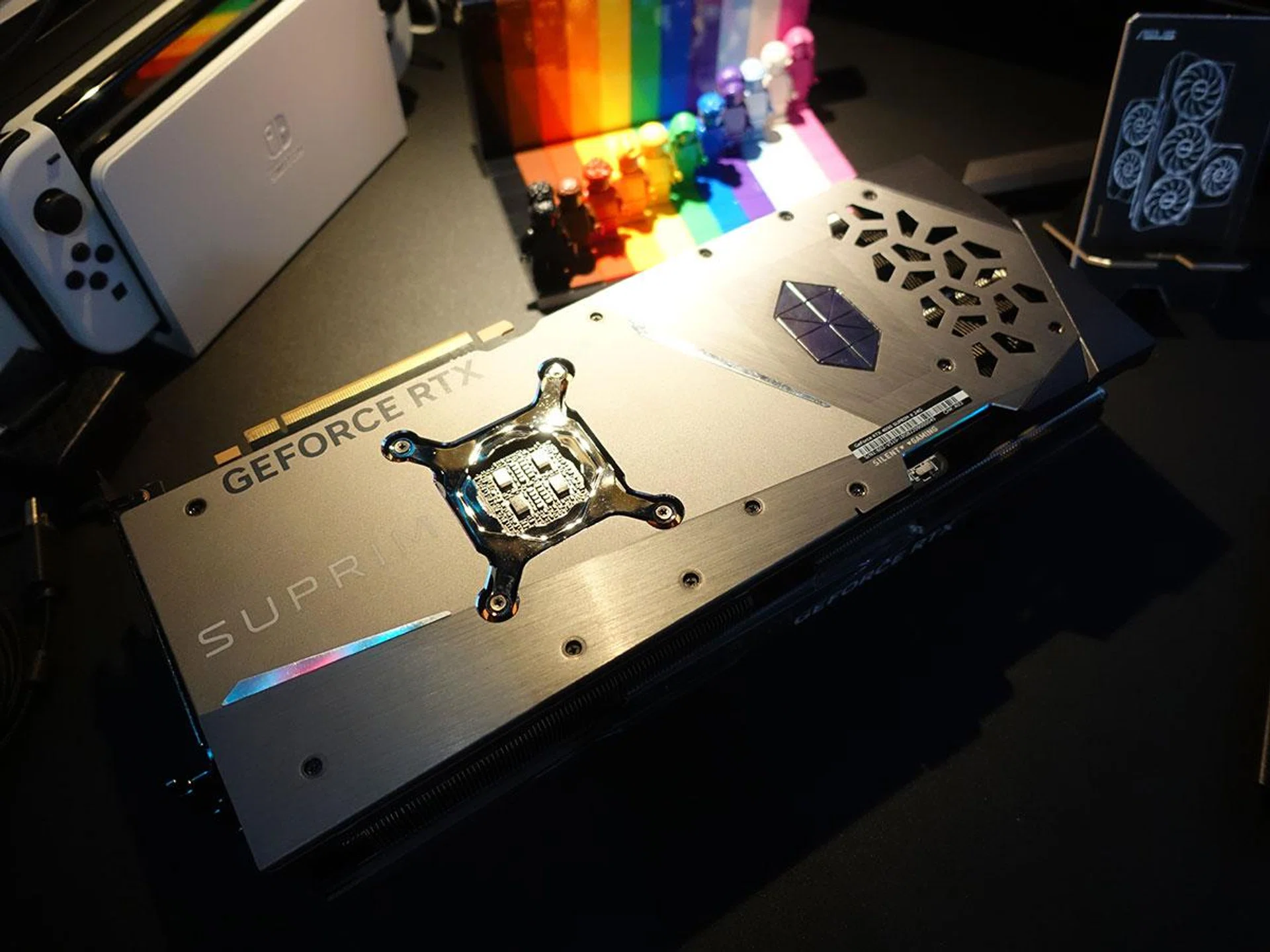
There is passive cooling at work too in the form of a sturdy metal backplate. Thermal pads sit beneath the backplate for improved heat transfer, while ventilation cutouts reduce trapped heat.
The PCB employs custom components as well, including high-efficiency carbonyl inductors. Their one-piece molding process supposedly allows this design to operate with less choke noise and better electric filtering. What MSI calls smart power stages, or SPS, also allow for more accurate current regulation with lower resistance. This means less power loss and less heat produced.
A dual BIOS switch also lets you quickly switch between full performance in Gaming mode, or low noise in Silent mode. If you download MSI Center, you can also engage even more aggressive boost clocks of up to 2,640MHz, up from 2,625MHz in Gaming and Silent mode.
Test setup
Here are the specifications of our test rig:
- Intel 12th Gen Core i9-12900K CPU
- ROG Maximus Z690 Hero
- Samsung 980 Pro 1TB SSD
- Kingston Fury 32GB DDR5
- Windows 11 Home 64-bit
- ASUS ROG Swift PG43UQ 4K Gaming Monitor
We'll be comparing the MSI GeForce RTX 4090 Suprim X against the ASUS ROG Strix GeForce RTX 4090 and the NVIDIA Founders Edition model, looking mainly at factors like power draw and thermal performance.
The following synthetic benchmarks and games were run, with the games chosen from a wide range of genres to give a better indication of performance across different segments:
- Shadow of the Tomb Raider
- Metro: Exodus
- Horizon Zero Dawn
- Guardians of the Galaxy
- Cyberpunk 2077
- F1 22
3DMark
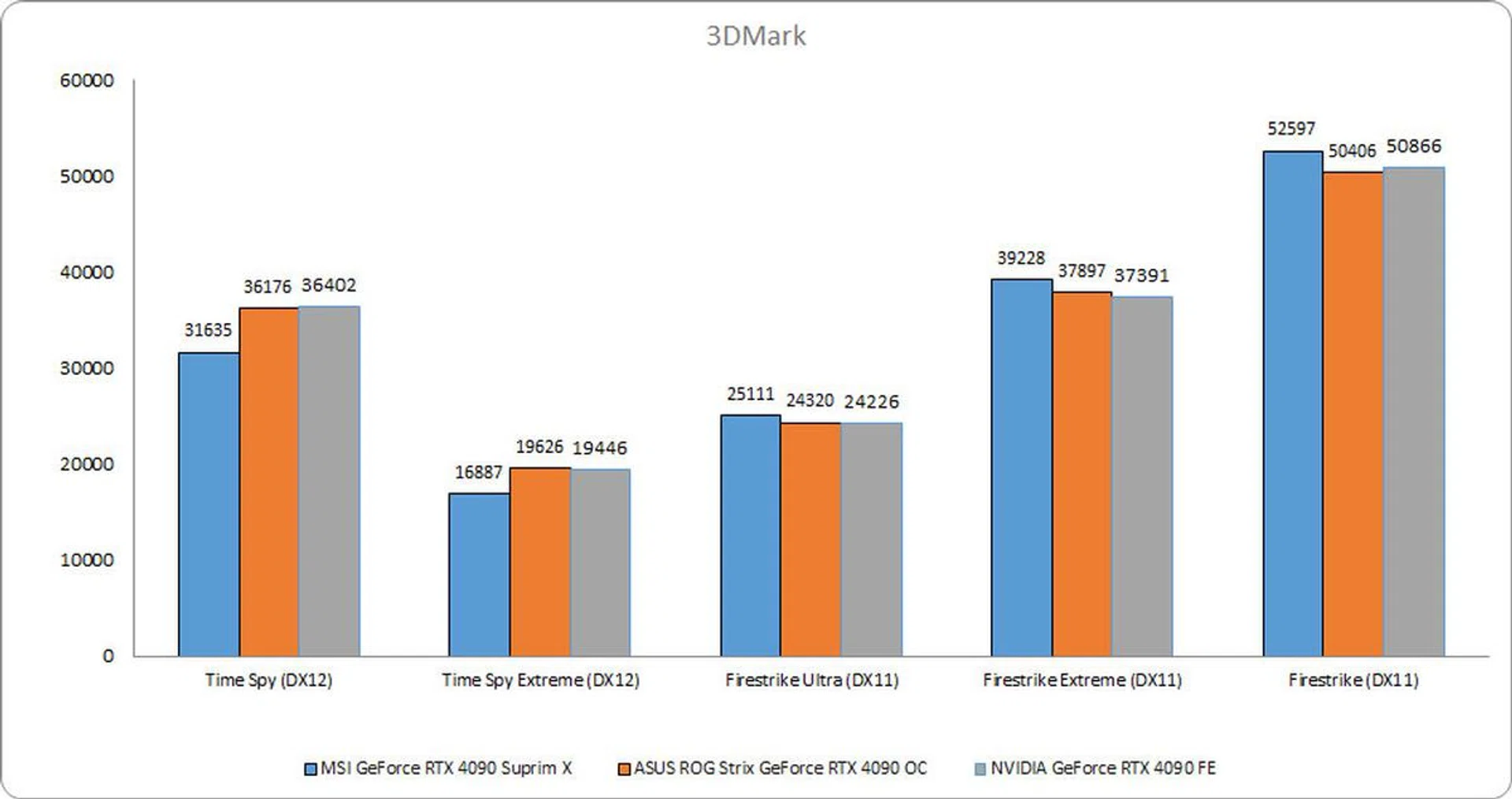
3DMark is a synthetic benchmark that tests graphics and computational performance at different resolutions, starting at 1080p and going all the way up to 4K. A series of two graphics test, one physics test, and then a combined test stresses your hardware in turn to assess its performance.
3DMark was something of a mixed bag for the MSI card. While it fell behind in Time Spy and Time Spy Extreme, it took the lead in all the Firestrike tests, edging ahead by roughly 3% in Firestrike Ultra.
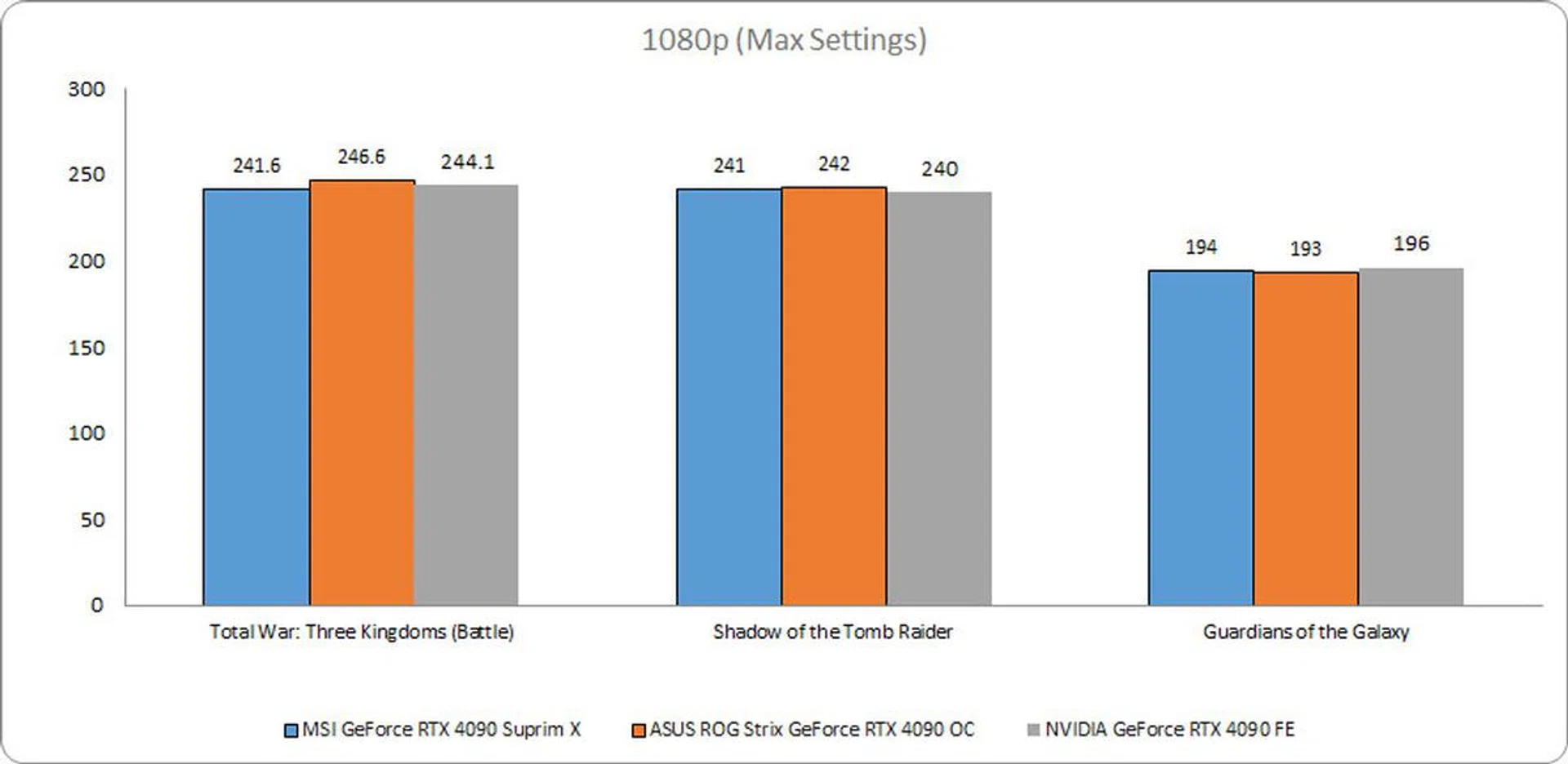
1080p Benchmarks (Max Settings)
In real-world games, all three cards were unsurprisingly neck-and-neck, with barely any significant difference between them.
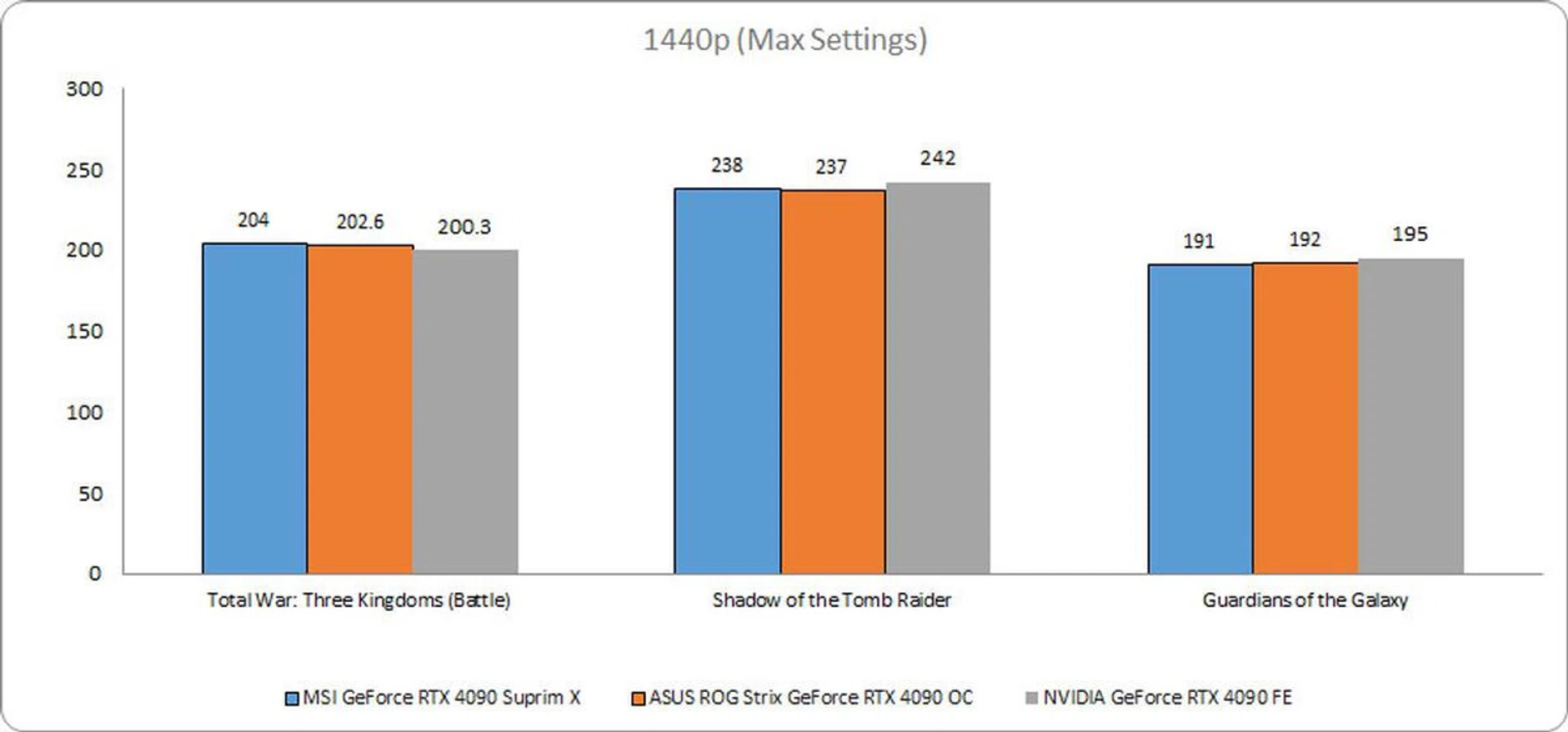
1440p Benchmarks (Max Settings)
The same was observed at 1440p, with only a frame or two to separate the MSI card from its ASUS rival. The Founders Edition card even bagged its own win in Guardians of the Galaxy, despite its lower clock speeds.
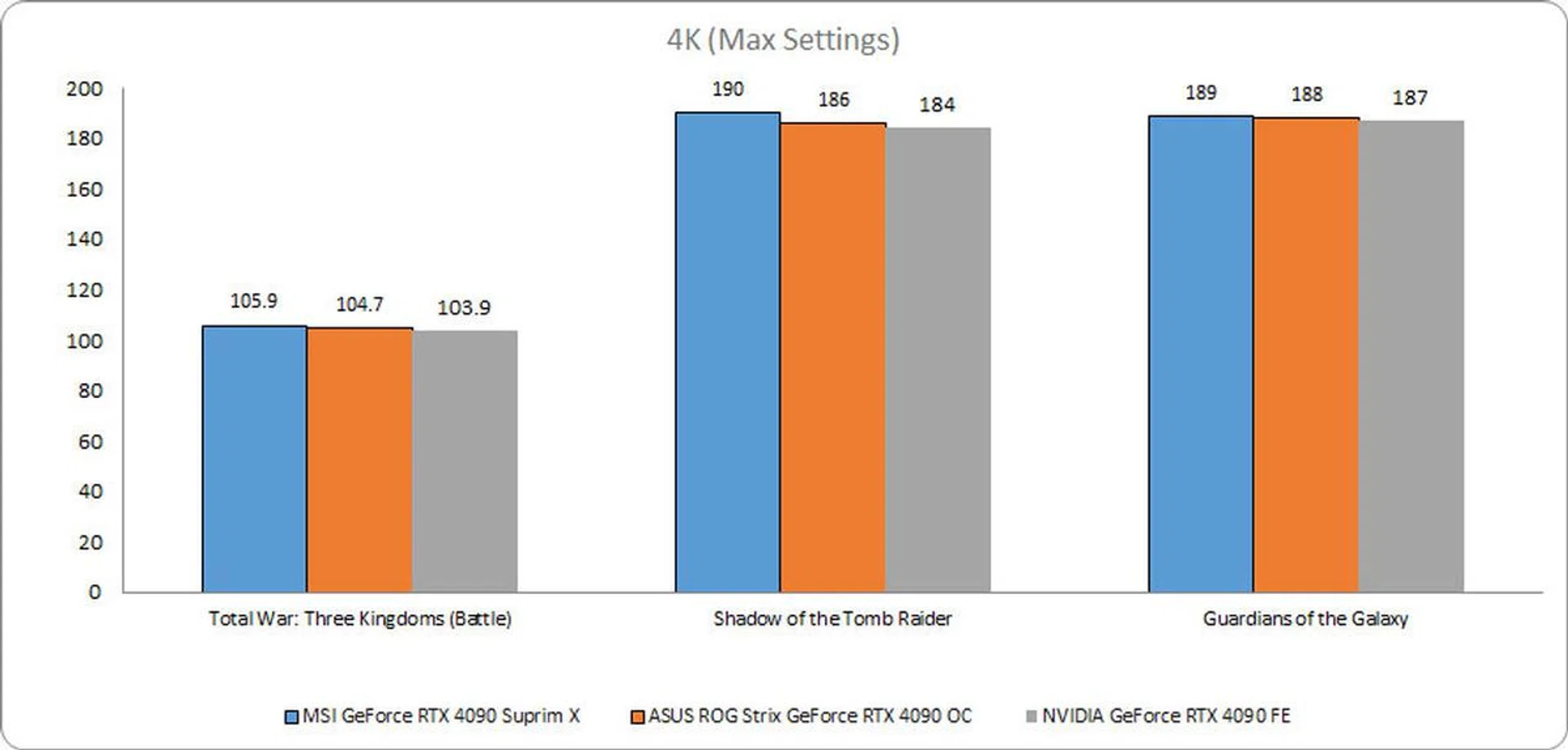
4K Benchmarks (Max Settings)
There were no significant differences at 4K either, and all three cards turned in nearly identical performances.
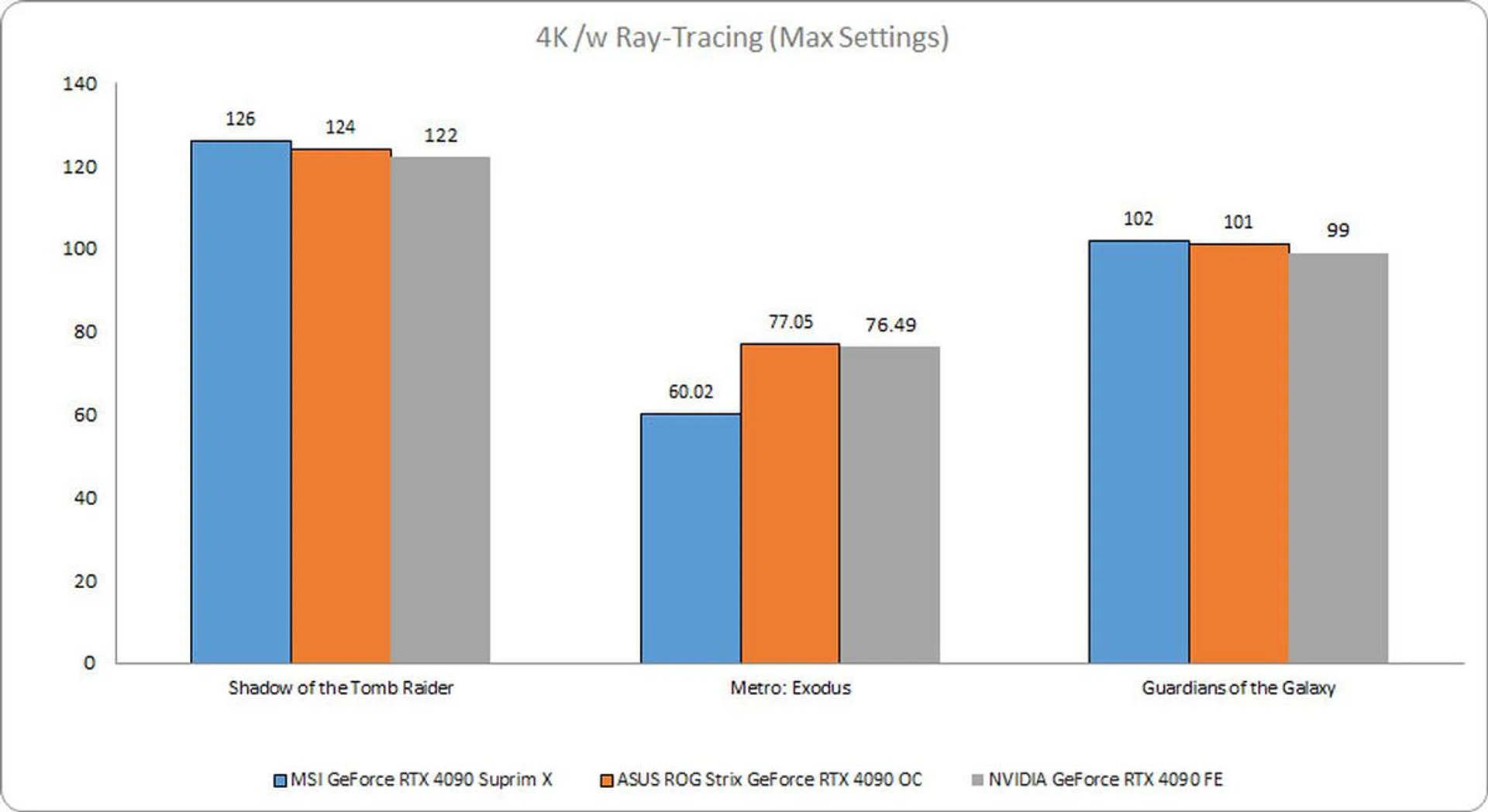
4K @ Max Settings (Ray Tracing)
Performance took a hit as expected with ray tracing turned on. But oddly enough, the MSI card was quite a bit slower in Metro: Exodus, coming in a good 24% behind the ASUS model.
Temperature and Power
Cooling performance is what really matters when it comes to a comparison between two cards with such similar performance.
The MSI GeForce RTX 4090 Suprim X was marginally hotter than the ASUS card, although it was still much cooler than the Founders Edition model. And with a peak board power draw of 450W, you'll need to ensure your PSU has sufficient wattage.
MSI GeForce RTX 4090 Suprim X | ASUS ROG Strix GeForce RTX 4090 OC | NVIDIA GeForce RTX 4090 FE | |
Temperature (Peak) | 67°C | 65.9°C | 72°C |
Board power draw (Peak) | 450W | 448W | 426W |
Conclusion
At it suggested price of S$2,988, the MSI GeForce RTX 4090 Suprim X is one of the most expensive cards money can buy. That said, it is still a few hundred dollars cheaper than the S$3,429 ASUS ROG Strix GeForce RTX 4090 OC, which almost seems like a good discount considering how similarly they perform. Sleek, quiet, and fast, this is the card you get when frame rates are all that matters.
Its modern, geometric aesthetic is appealing, making for a striking look that doesn't feel over-the-top. That said, this is a very big and power-hungry card, and you'll have to check whether your case is big enough and your PSU powerful enough.
The MSI GeForce RTX 4090 Suprim X is now available to buy on Lazada.
Our articles may contain affiliate links. If you buy through these links, we may earn a small commission.