
Sony Tablet P (3G) - Clamshell Tablet
Sony's second tablet offering is no different from its first - both are designed to turn heads and stand out from the competition. The Sony Tablet P sports a clamshell design with dual 5.5-inch TFT screens for maximum portability and entertainment on the go. Is there space for a niche product like the Sony Tablet P? We find out.

Are Two Screens Better than One?
Sony's second tablet offering, the Tablet P is no different from its earlier counterpart, the Tablet S - both are designed to stand out from the crowd. While the Tablet S catches attention with its unique folding design and 9.4-inch display, the Tablet P adopts a clamshell factor which sees two 5.5-inch screens squeezed into a single device. While being different does have its benefits in a market where Android tablets increasingly look similar to one another, is Sony pushing it too far with the Tablet P? Read on to find out.
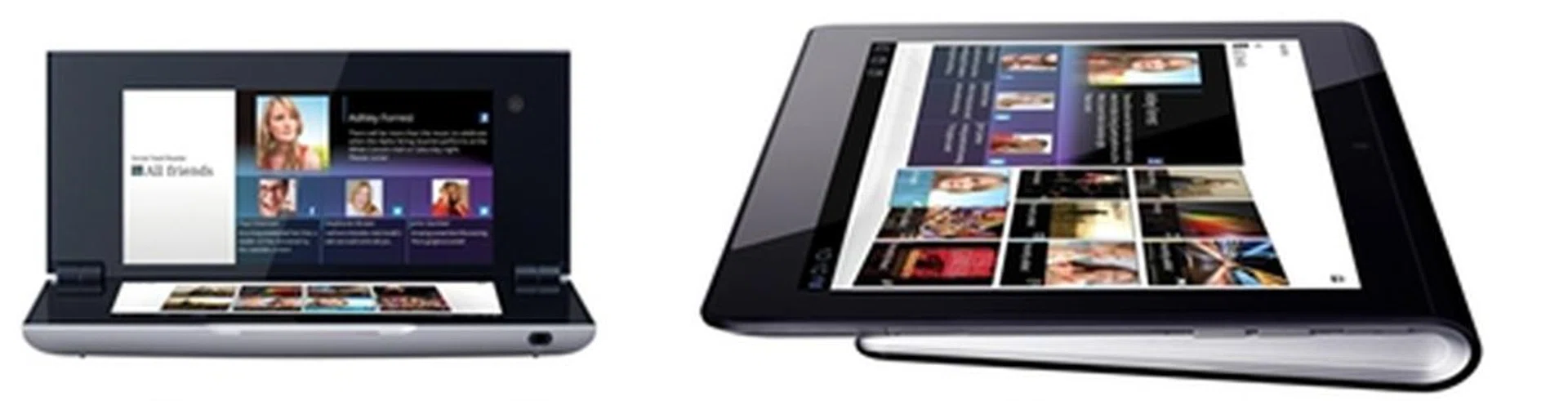
The Sony Tablet P (left) and Tablet S (right) have unconventional designs which make them stand out from the rest.
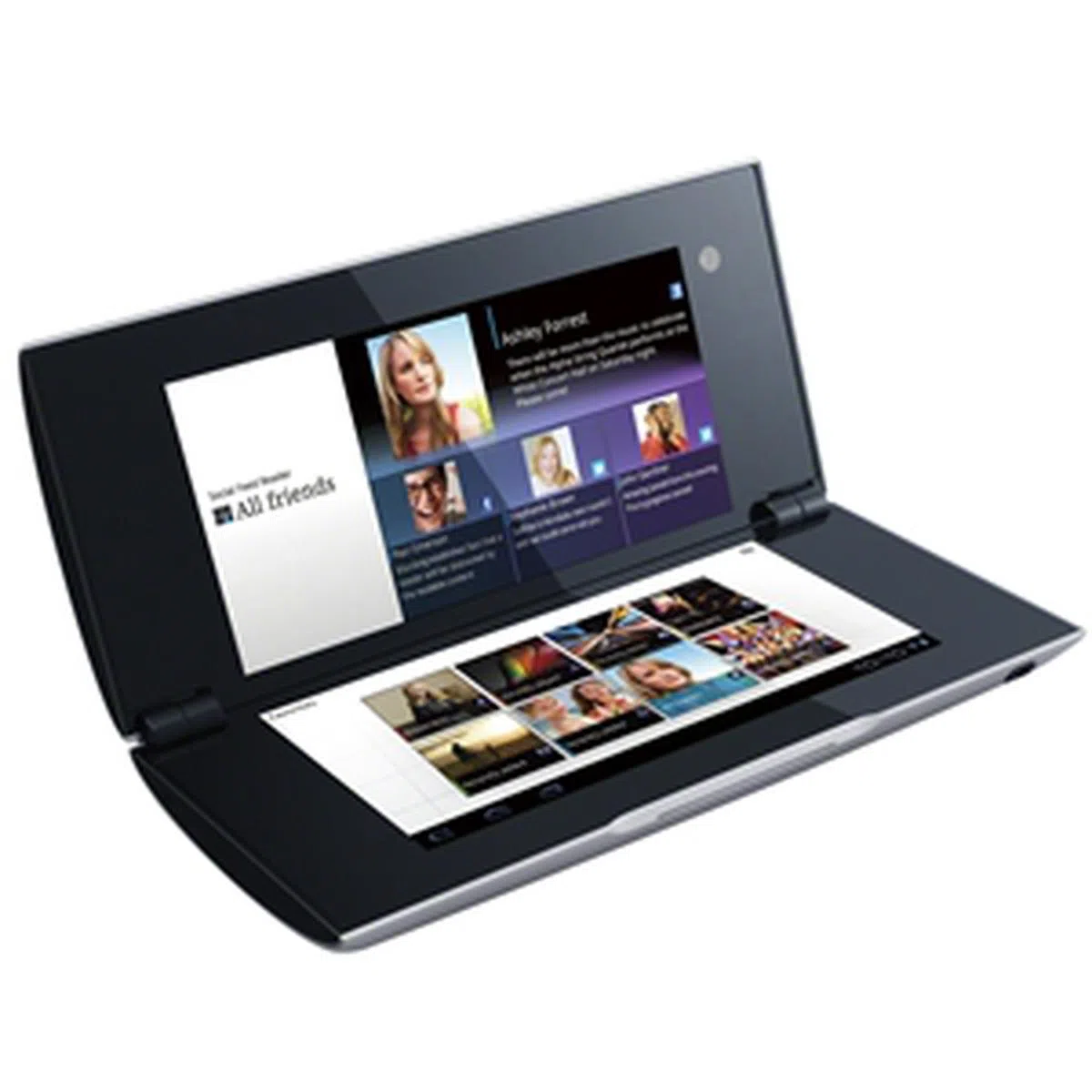 | Key highlights of the Sony Tablet P(3G)
|
Design
The clamshell form factor is a first for a tablet and Sony is certainly in the same league with ASUS when it comes to churning out unconventional designs. In fact, it's understandable if someone mistook the Tablet P for other similar looking gadget such as the Nintendo 3DS.
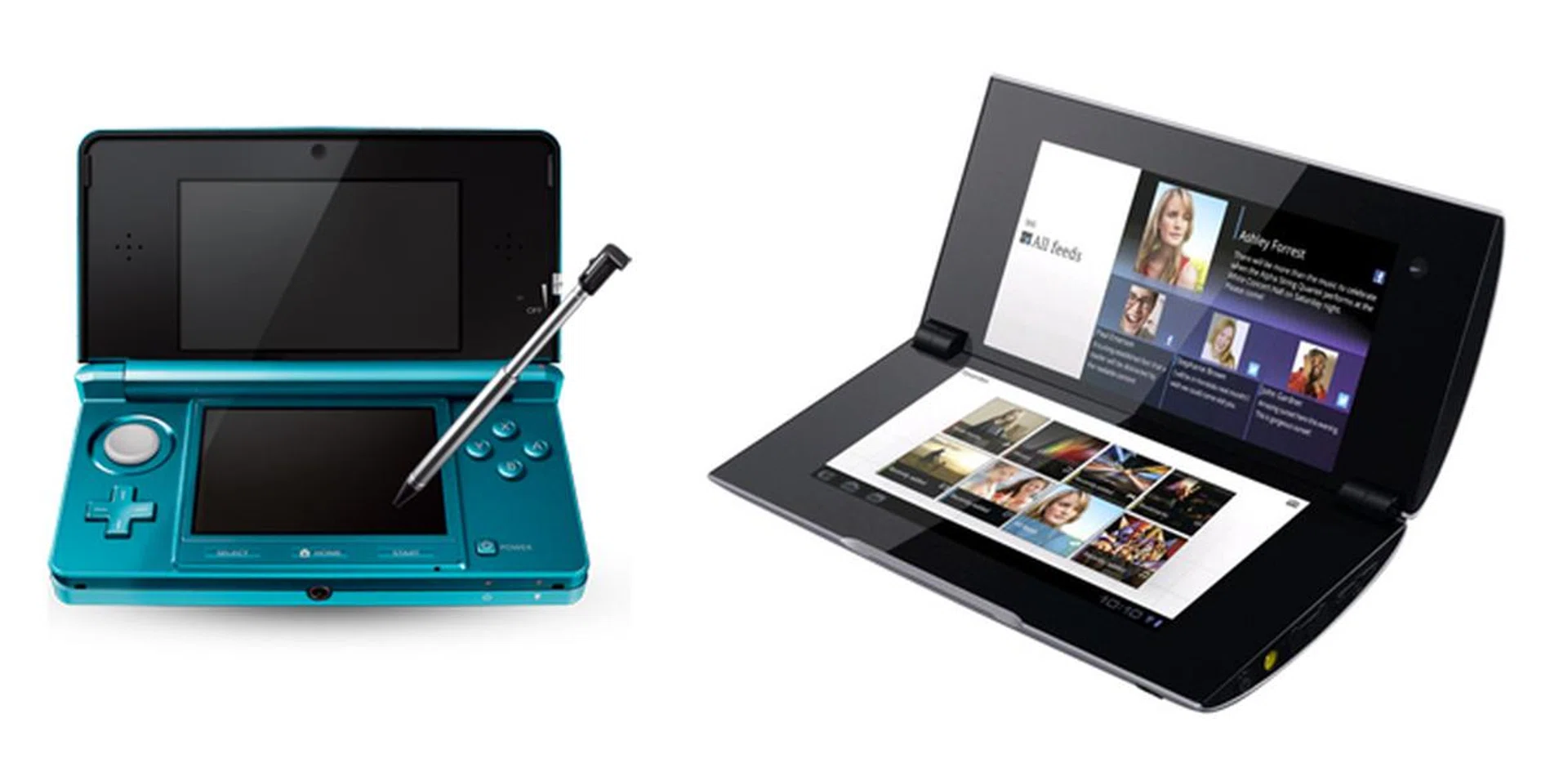
Both the Nintendo 3DS (left) and Sony Tablet P (right) adopt a similar clamshell form factor.
It's a pity that the design of the Tablet P looks great but upon handling it, you realize that the material used for its chassis is mainly plastic. Perhaps we were spoilt by the excellent build quality of the ASUS Eee Pad Transformer Prime which sets the benchmark for Android tablets. We had expected Sony to use more premium materials for the Tablet P.
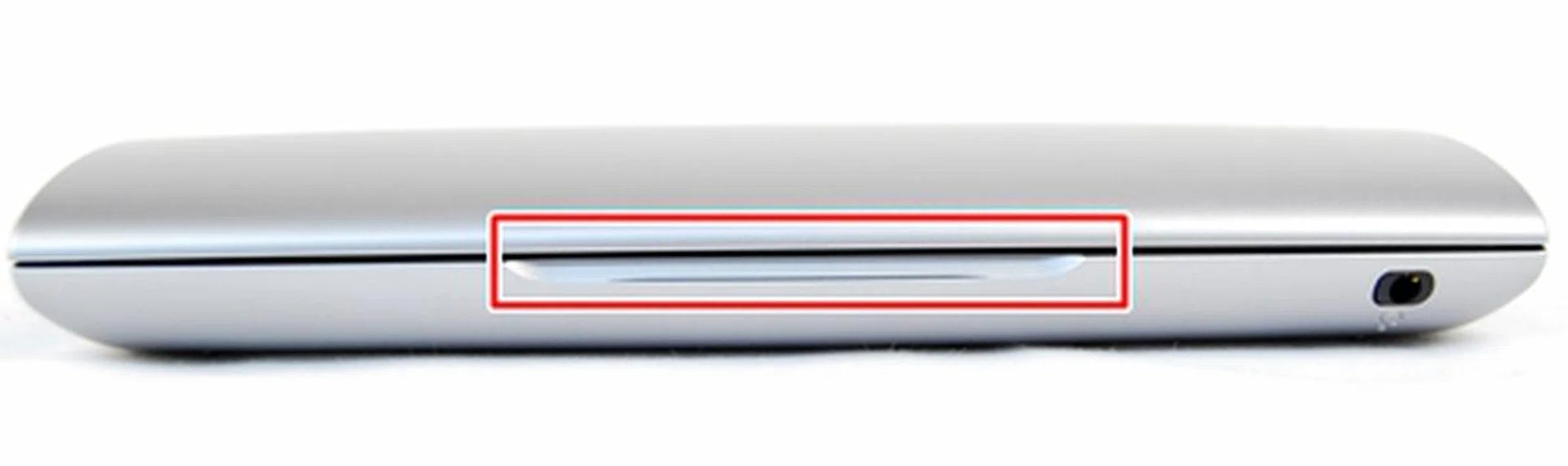
Sony provides a nice cut out for you to open the clamshell design of the Tablet P. There is also a very thin strip of LED located at the cut out which flashes in green whenever notifications come in. This will come in handy especially when you leave the Tablet P in your bag.

Flipping open the clamshell design reveals two 5.5-inch LCDs. As you can see, the black bezel around the displays are rather thick, making it a tad tougher for people with smaller hands to interact with the middle section of the screens.
Handling-wise, the closed clamshell form factor and the tapered surface make the Tablet P easy to handle and carry around. The problem only arises when you pry open the Tablet P and the pointed corners at the bottom make it very uncomfortable to hold after a few minutes of use. The handling could have been better if the corners are rounded.
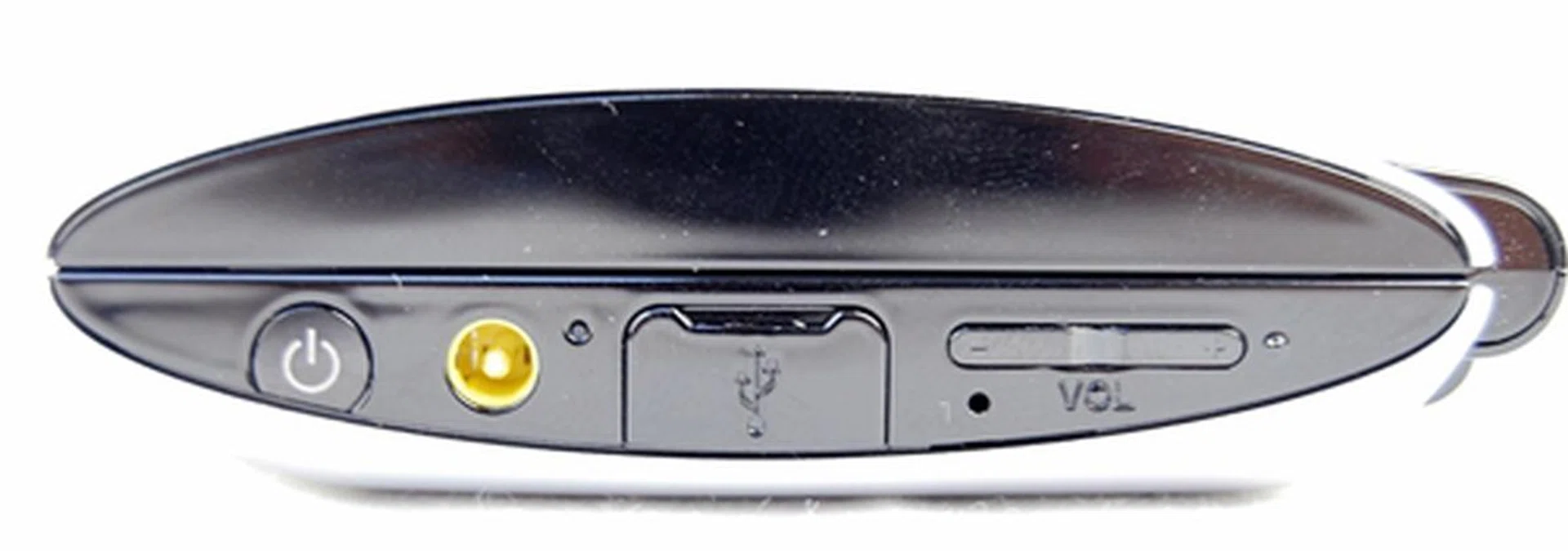
You will find the Power button, AC adaptor port, a microUSB port and volume controls on the right side of the Sony Tablet P. This is a good design call as all the buttons and ports are located on one side, hence avoiding the need to search around for them.
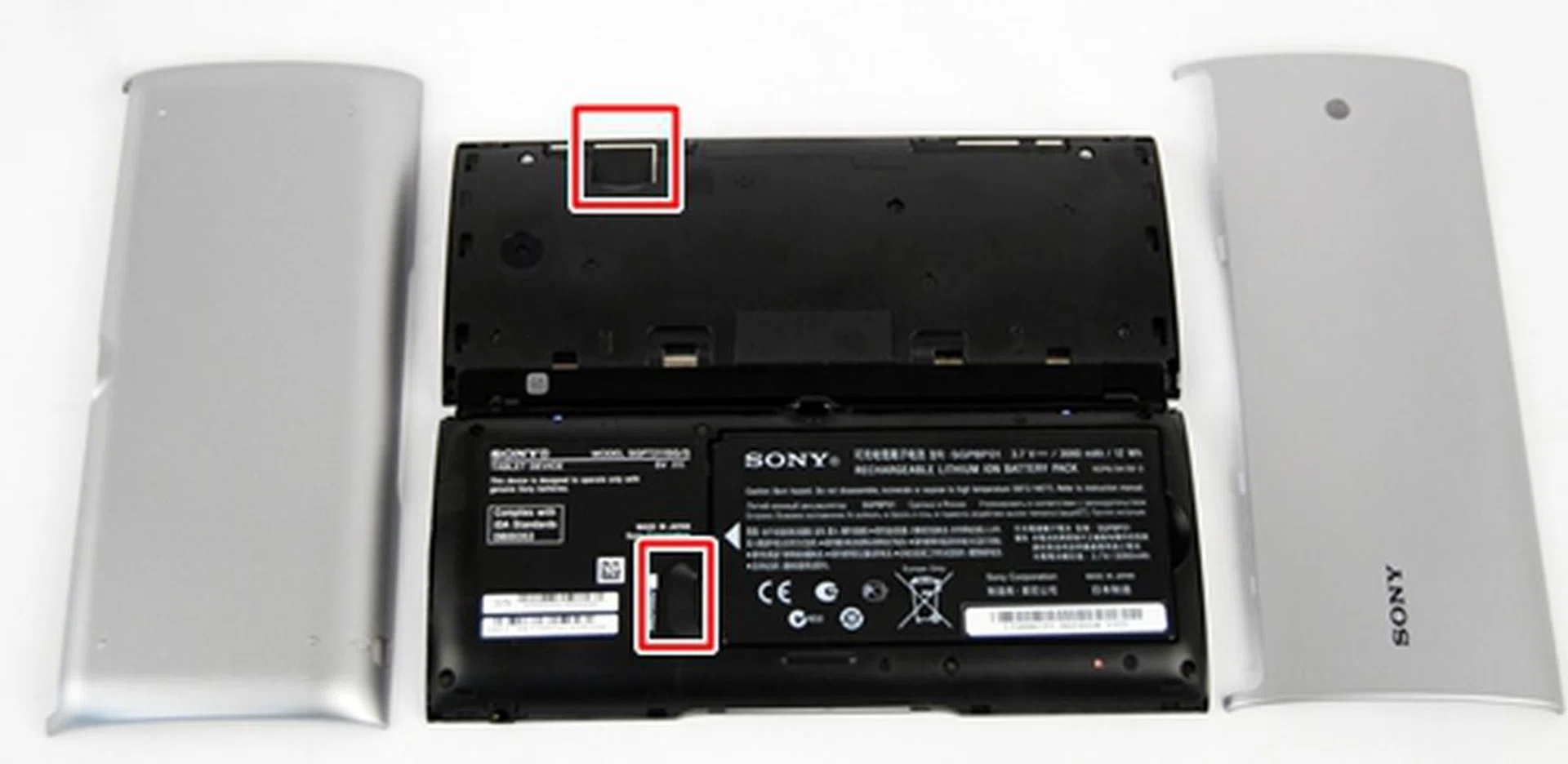
The Sony Tablet P comes with a microSD memory card slot (bottom) and a SIM card slot (top). To access these slots, you have to remove the silver covers. An extra step to remove the battery is needed for the microSD memory card slot.
Features
For now, you have to contend with Android 3.2.1 Honeycomb on the Sony Tablet P as the Android 4.0 update will only arrive sometime in Spring (between end March and June 2012). We have seen how Android 4.0 performed on the ASUS Transformer Pad Prime tablet and we are certainly looking forward to seeing it in action on the Tablet P.
While Sony has left the bulk of the Android user interface (UI) untouched on the Tablet S, the company made some major UI tweaks to fit the unique form factor of dual screens. Amongst the familiar Sony tweaks are the four shortcut icons on the top left corner of the screen, Favorites tab on the top right hand corner and the aesthetically appealing App list.
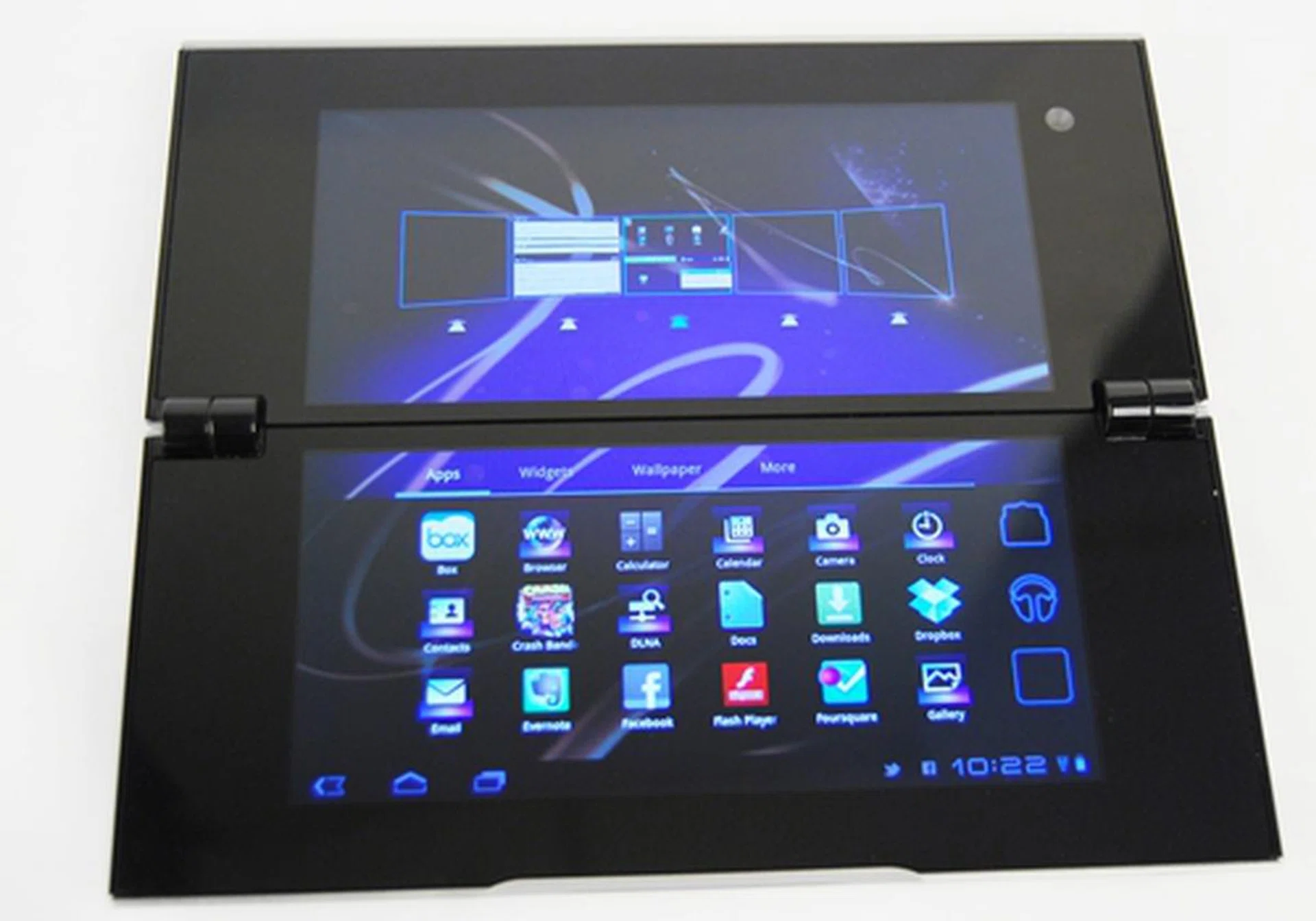
Some of the native apps are redesigned to fit the dual screen concept of the Sony Tablet P although you have to get used to moving apps or shortcuts across two screens. Having say that, actions like these flow smoothly between the two screens.
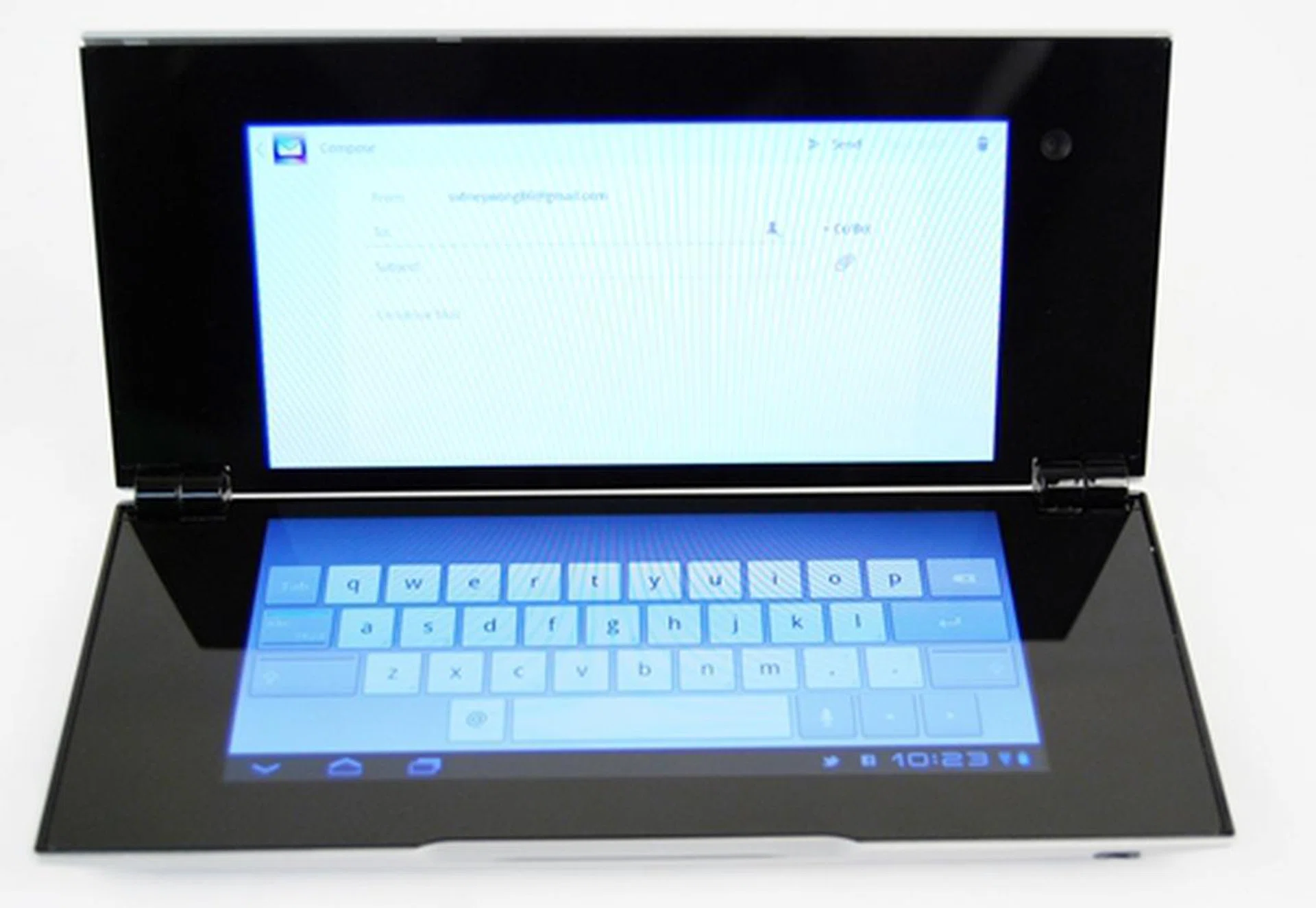
Email, one of the most commonly used apps on tablets, is also optimized for use on the Sony Tablet P. The virtual keyboard occupies the screen at the bottom while the main body of the email stays at the top. The experience is akin to typing on a laptop although 5.5-inch screens are too uncomfortable for long periods of typing.
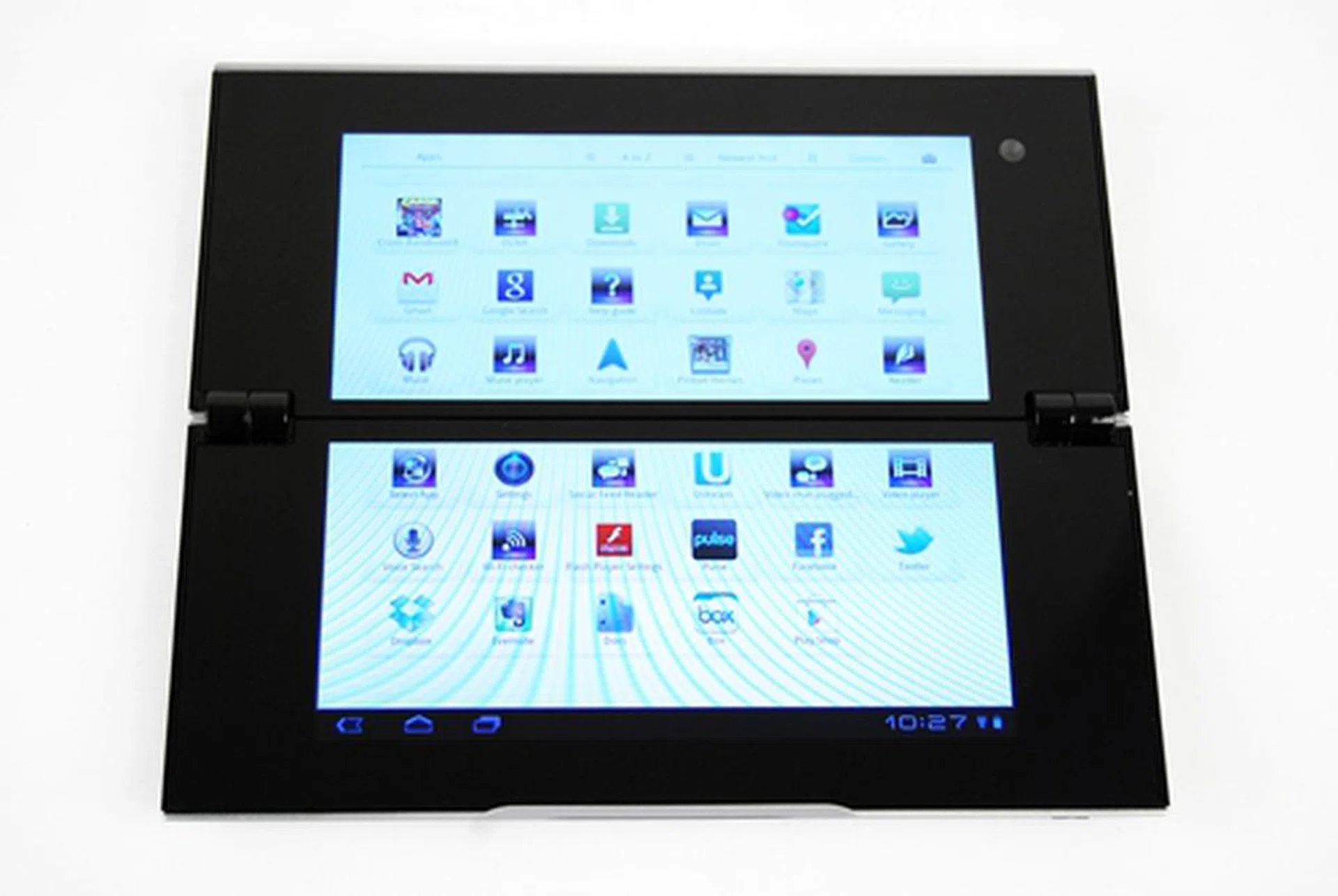
Other than the seamless flow of apps across two screens, the aesthetics of the user interface is uniform between the Sony Tablet S anad Tablet P.
Despite Sony's optimization of some core apps to work properly on its dual-screen Tablet P, there are still hundreds if not thousands of apps which have yet to be tweaked for use on the device. That will remain one of the key challenges Sony will face. Developers may not want to create or modify apps just to be used on the Tablet P, hence users may end up with only a handful of apps that work on their devices.
At the moment, you are able to find several dual-screen optimized apps such as Reader and tweethunt on SelectApp site, which complements the Google Play Store (formerly known as Android Market).
Performance
The Sony Tablet P runs on the same hardware components as the Tablet S - NVIDIA Tegra 2 dual-core 1GHz processor and 1GB RAM. Theoretically, we should expect similar performance from both devices. As per usual, we compare the Tablet P with two other tablets, the Motorola Xoom 2 (3G) and Apple iPad 2 in the following benchmarks: -
- Quadrant evaluates the CPU, memory, I/O and 3D graphics performance. This is an Android OS based test.
- Smartbench 2011 is a multi-core friendly benchmark application that includes both the Productivity and Games indices for a more complete gauge of the overall performance of Android tablets.
- SunSpider Javascript benchmark measures the browsing performance of the tablet.
Device | Sony Tablet P(3G) | Sony Tablet S | Motorola Xoom 2 (3G) | Apple iPad 2 |
CPU | NVIDIA Tegra 2 dual-core 1GHz | NVIDIA Tegra 2 dual-core 1GHz | TIOMAP4 dual-core 1.2GHz | Apple A5 dual-core 1GHz |
GPU | ULP GeForce | ULPGeForce | PowerVR SGX540 | PowerVR SGX 543MP2 |
RAM | 1GB | 1GB | 1GB | 512MB |
OS | Google Android 3.2 | Google Android 3.2 | Google Android 3.2 | Apple iOS 4.3 |
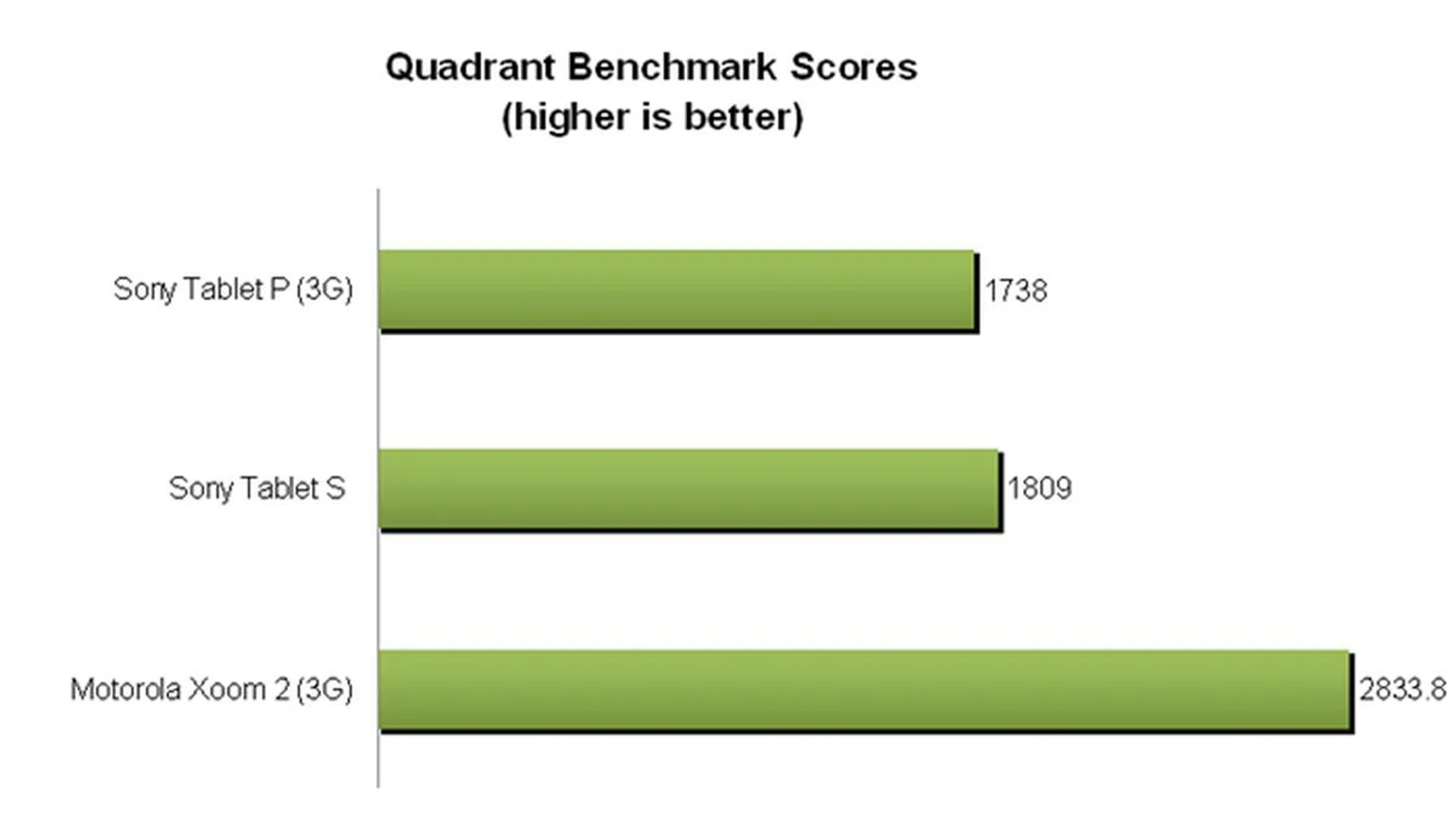

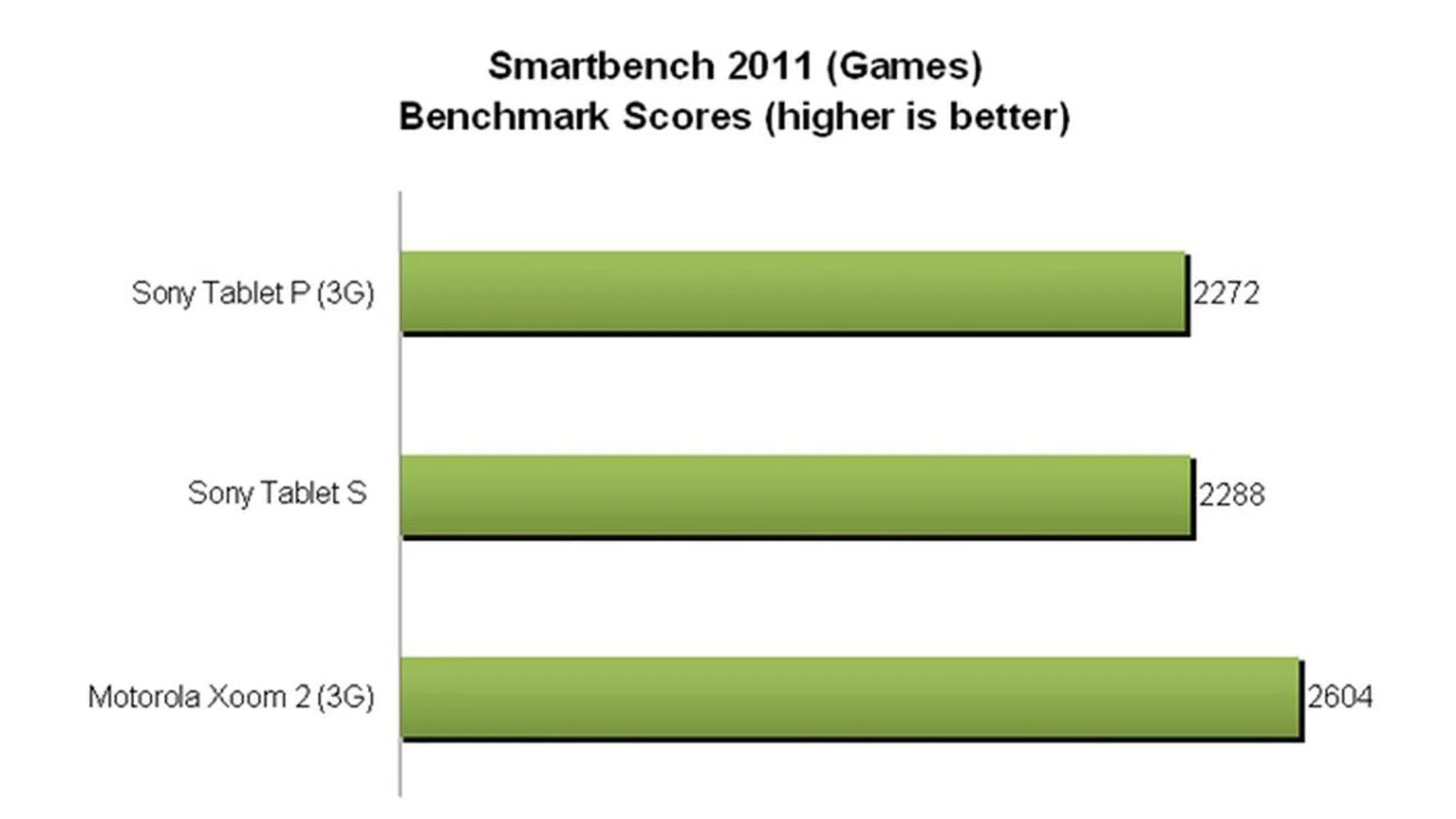
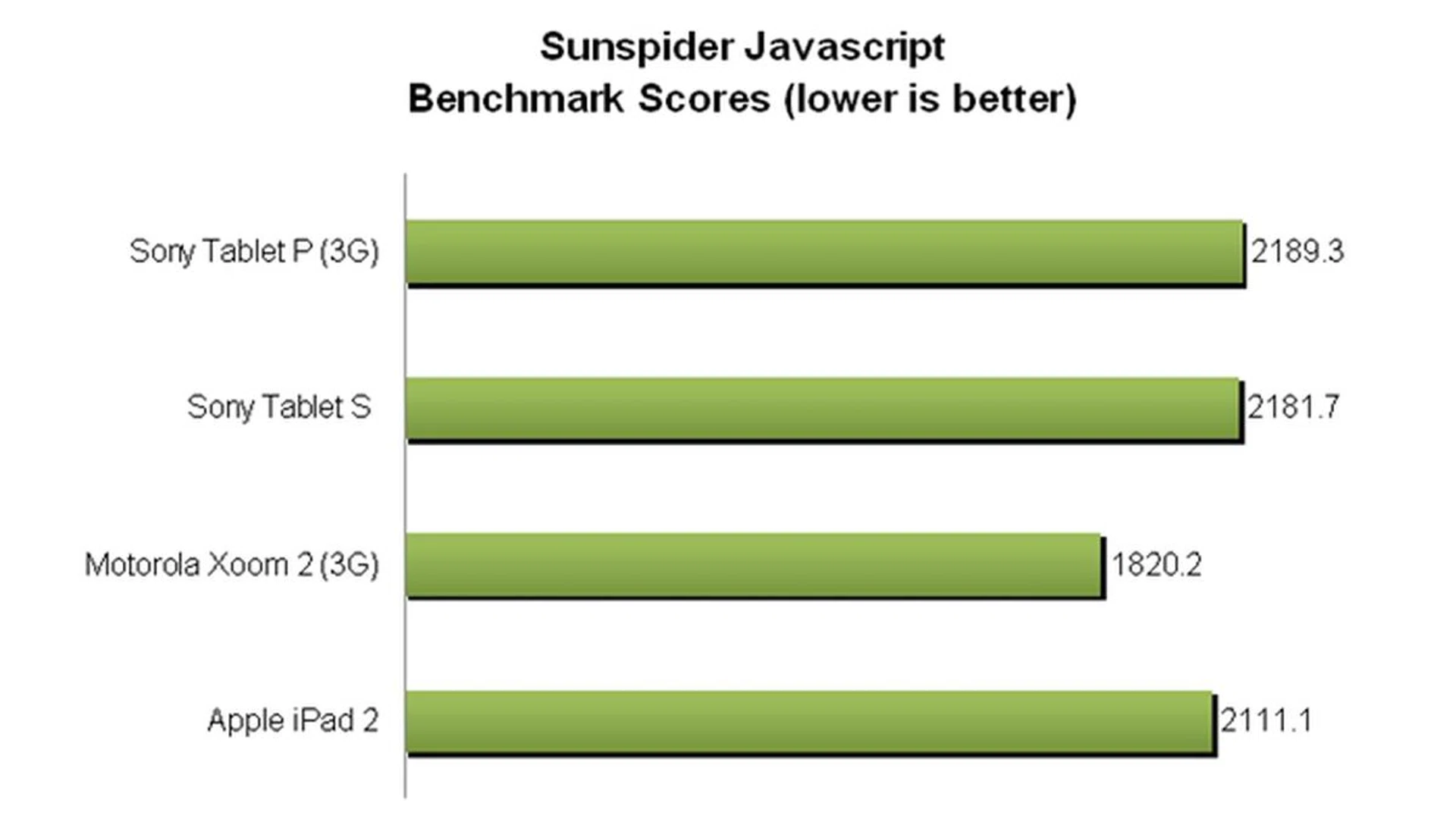
As expected, the disparity in performance between the two Sony tablets is minimal or negligible. However, when taking into account the Motorola Xoom 2 (3G), the difference is quite big. As stated previously in the review of the Motorola tablet, the TI OMAP 4430 dual-core 1.2GHz processor was able to outperform NVIDIA Tegra 2 easily hence we were not surprised by the results of the benchmarks.
Statistics aside, the Sony Tablet P is not in anyway inferior to other Android Honeycomb tablets in terms of user interface navigation and daily usage. Screen transitions, opening of apps and web browsing were fairly fast although none could be compared to the smoother experience on the Android 4.0-touting ASUS Transformer Pad Prime.
Imaging
The Sony Tablet P sports a 5-megapixel rear HD camera powered by Exmor for mobile and a 0.3-megapixel front camera for video capture. The "Exmor for mobile" branding promises to deliver better image quality especially under low light conditions. As the Sony Tablet S performed fine in our camera test, we are expecting similar results for the Tablet P.
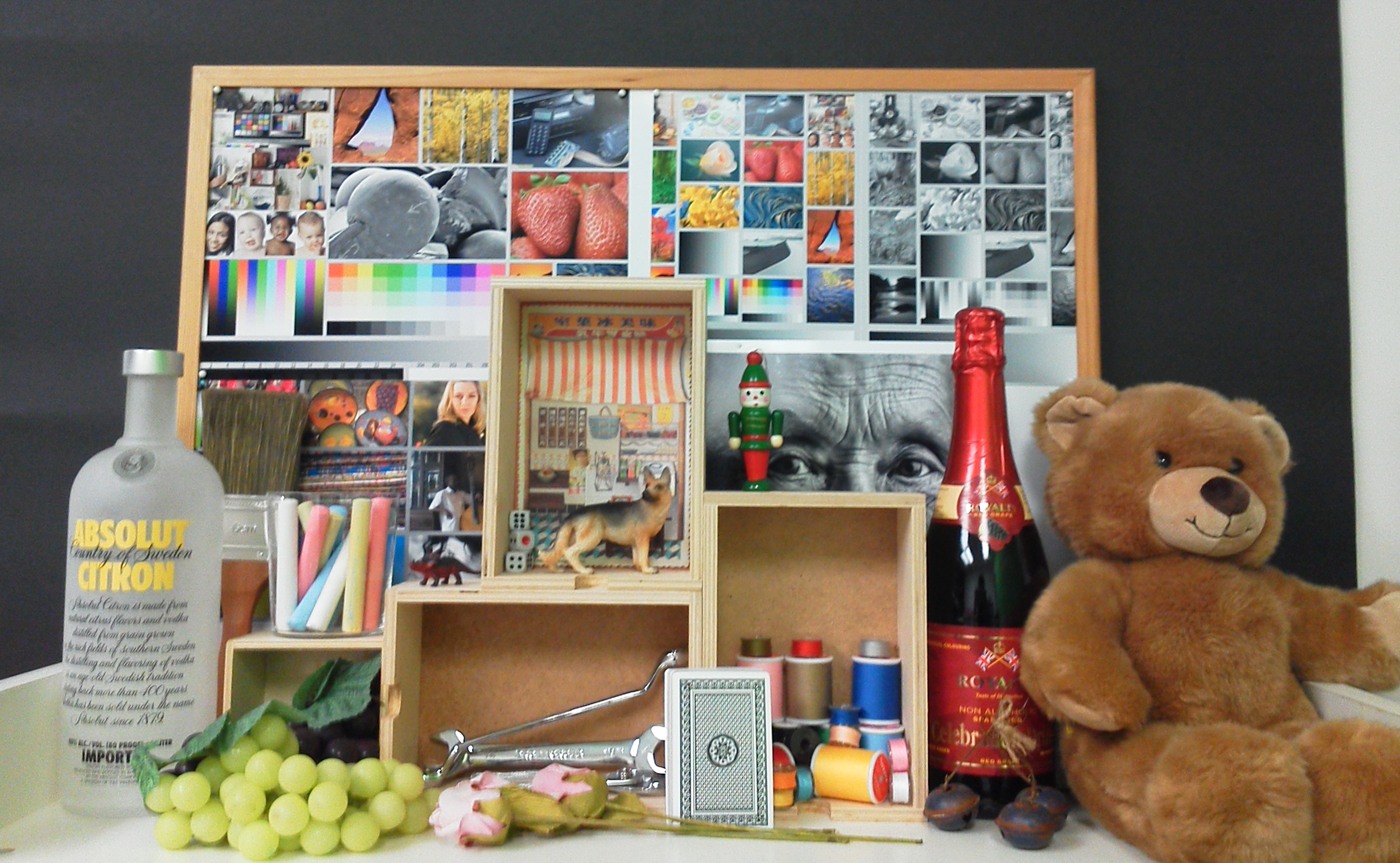
The Sony Tablet P takes images of a lower quality despite having the same camera module as the Tablet S. Noise levels are evidently higher although a decent amount of details are captured.
 |  |
Battery Mileage
Our standard battery test includes the following parameters:
- Looping a 720p video with screen brightness and volume at 100%
- Wi-Fi and Bluetooth connectivity turned on
- Constant data streaming through email and Twitter.
Specifications/Device | Sony Tablet P (3G) | Sony Tablet S | Motorola Xoom 2 (3G) | Apple iPad 2 |
Processor |
|
|
|
|
Display Size |
|
|
|
|
Display Type |
|
|
|
|
Display Resolution |
|
|
|
|
Dimensions |
|
|
|
|
Weight |
|
|
|
|
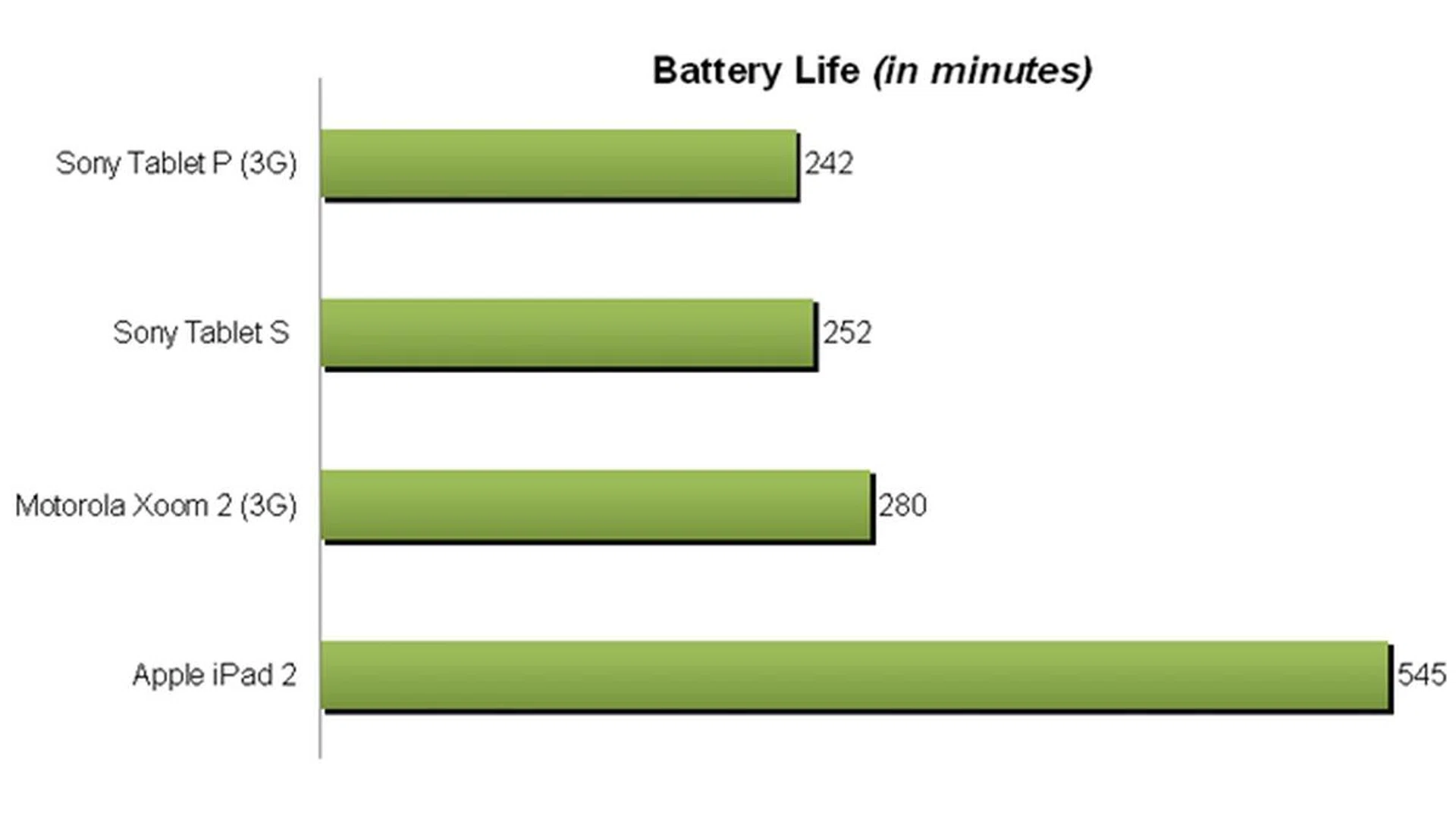
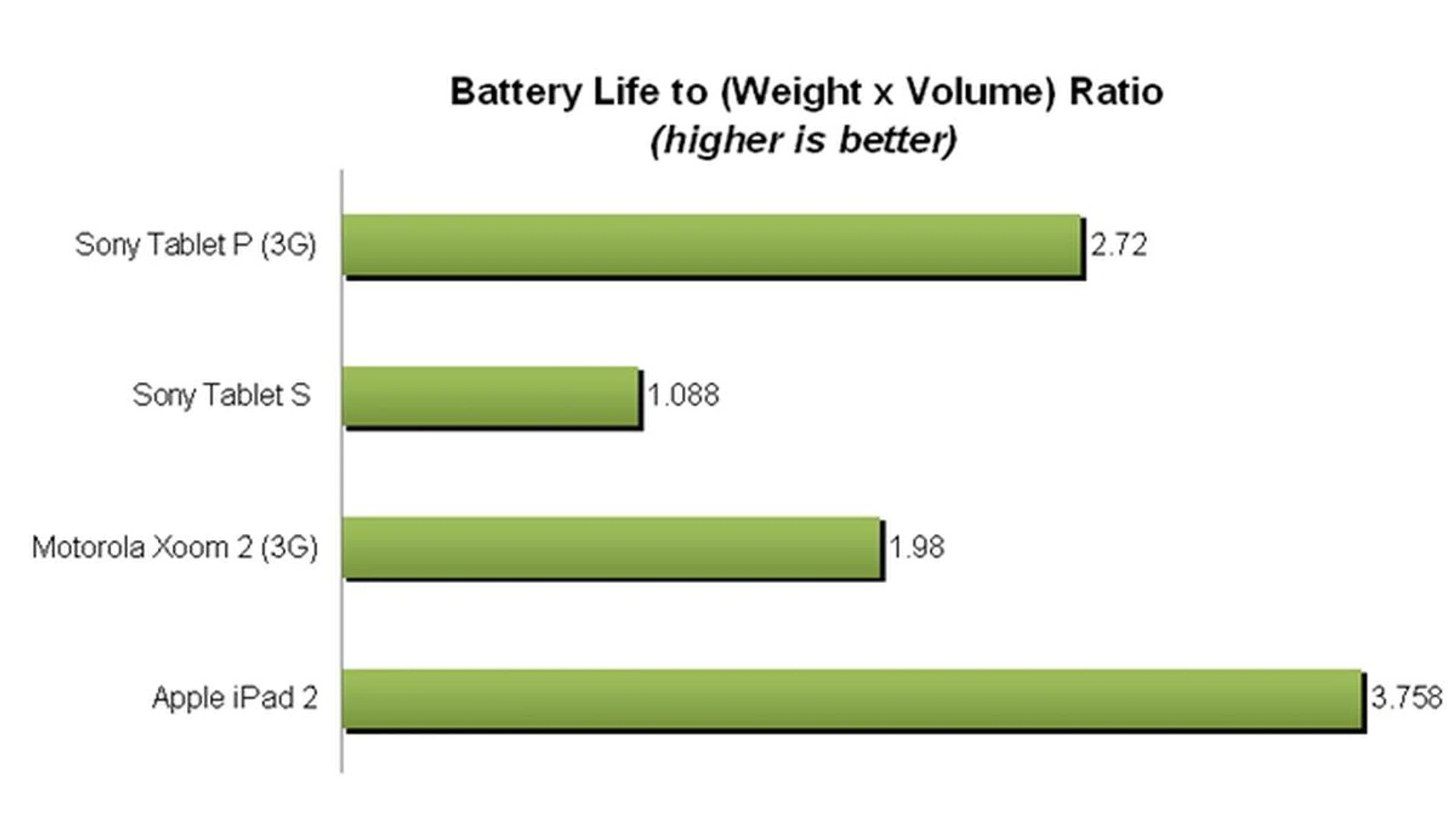
Battery mileage seems to be the weakest aspect of the Sony Tablet P as it registered the lowest among the four tablets. Although the video was only playing on one screen with the other screen hosting the playback controls, the Tablet P only lasted about four hours. This is attributed to its smaller battery capacity of 3080mAh whereas the Sony Tablet S and Motorola Xoom 2 (3G) have battery capacities of 5000mAh and 7000mAh respectively. However, it managed to secure some honor by doing well in the Portability Index due to its lightweight form factor of 372g.
Under normal usage conditions, the Sony Tablet P was able to last through a day with occasional web surfing, playing of games, email and social networking. As our battery test simulates fairly stressful usage conditions, we feel that you can expect a longer battery mileage out of the Tablet P. After all, actual battery mileage will vary under different usage conditions.
Conclusion
Sony has done a great job in pushing out refreshing tablet concepts into a market flooded with similar looking devices. Besides the asymmetrical design of the Tablet S, Sony can now add the clamshell form factor of the Tablet P to its list of unconventional designs. The build quality and handling of the device feels great although it could have been better if more premium materials are used. The dual-screen concept is a new dimension in user interface interactivity although it takes time to get used to it. It is also good to see Sony taking the efforts to modify the stock Android user interface to make it more usable on the unique form factor of the Tablet P.
Though it was announced in 2011, the Sony Tablet P took too long to hit the market. As such, it falls short of the competition in the aspects of hardware, software and performance. In its open form factor, the sharp edges may cause discomfort after holding the Tablet P for a while. As more brands move to equip their devices with quad-core processors, a dual-core processor may soon be outdated.
Granted that the operating system and apps are not yet optimized for use with multi-core processors, Sony can increase the appeal of the Tablet P by future proofing it with a better processor (higher clock speed or more cores). While the Android 4.0 is expected to arrive in the coming months, the key issue hindering the success of the Tablet P lies with apps development. If developers aren't coding their apps to fit the dual-screen form factor, the user experience will be affected drastically.
The Sony Tablet P (3G) is available now at a recommended retail price of $848. The price point and form factor might be possible deal breakers. There are other tablets with similar price points which offer better overall performance. For example, consumers can fork out an additional $50 to get the best performing Android tablet, the ASUS Transformer Pad Prime at $899 (with keyboard docking station). Sony's own Tablet S is also a better deal at $798 as it offers similar performance in a more practical form factor. The price reduction of the iPad 2 (3G) 16GB to $698 may entice first time tablet buyers over to the Apple's camp too.
While a unique design helps Sony tablets stand out from the competition, does it help to garner sales for the company? As of now, we are inclined to believe that the Sony Tablet P will cater to a very niche market segment of consumers where design precedes functionality. Coupled with the possibility that there might be a lack of developers' interest in creating apps for this form factor, the Sony Tablet P may just be another product with looks but limited functionality.
Our articles may contain affiliate links. If you buy through these links, we may earn a small commission.