
Samsung Galaxy Tab 7.0 Plus - Keeping Up with The Competition
The original Galaxy Tab was a hit due to its portability and top notch functionality. Samsung ups the ante this time with the Galaxy Tab 7.0 Plus, which sports a speedy 1.2GHz dual-core processor and Android Honeycomb 3.2. How does it fare against the stiffening competition? Let's find out.

Samsung Taking Charge
The South Korean company celebrated the end of 2011 with a record breaking global sales of over 300 million handset sales. This is largely due to the success of its Galaxy portfolio of phones. The momentum is set to swing over to the tablet scene as Samsung increases its presence in the market with new devices covering new screen sizes, such as an 8.9-inch tablet. It also refreshed its original Galaxy Tab slate by launching the Galaxy Tab 7.0 Plus last week. Does the Galaxy Tab 7.0 Plus have what it takes to keep up with the competition? Read on to find out.
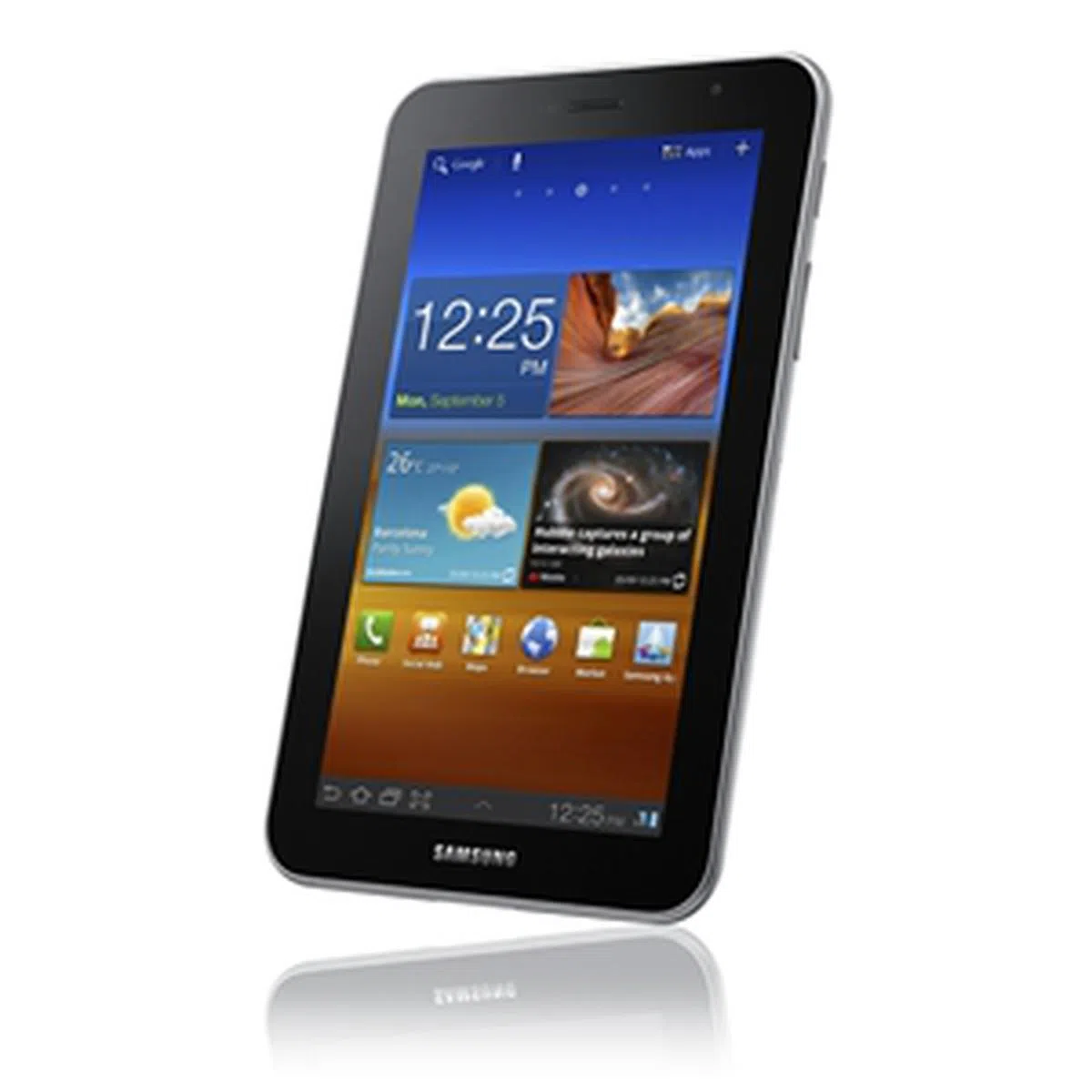 | Key highlights of the Samsung Galaxy Tab 7.0 Plus
|
Design Aspects
The Galaxy Tab 7.0 Plus is like a smaller sibling to the Galaxy Tab 10.1 in terms of physical attributes. The obvious difference, comes from its screen size. While some consumers may be able to live with the plastic build for a lighter Galaxy Tab 7.0 Plus at 345g, we prefer a more sturdy device such as the ASUS Eee Pad Transformer Prime.
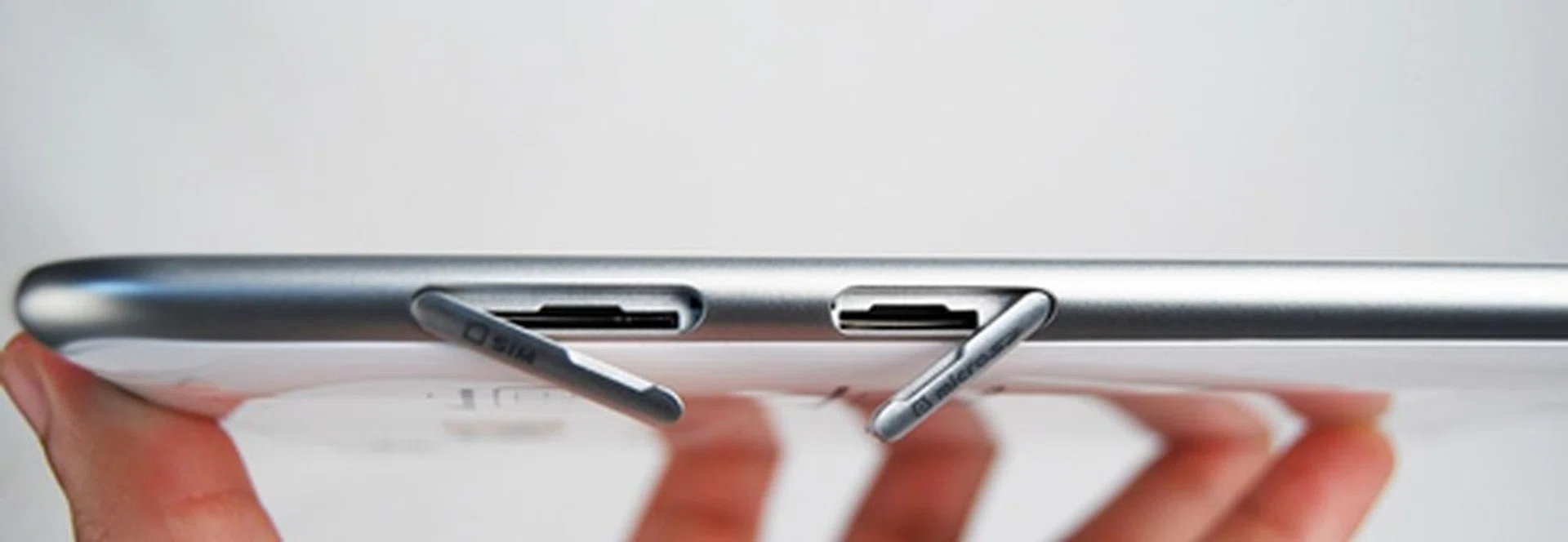
You can find the SIM and microSD card slots on the left side of the Samsung Galaxy Tab 7.0 Plus. Having said that, you can make and receive voice calls on the tablet, a functionality yet to be found on most tablets.
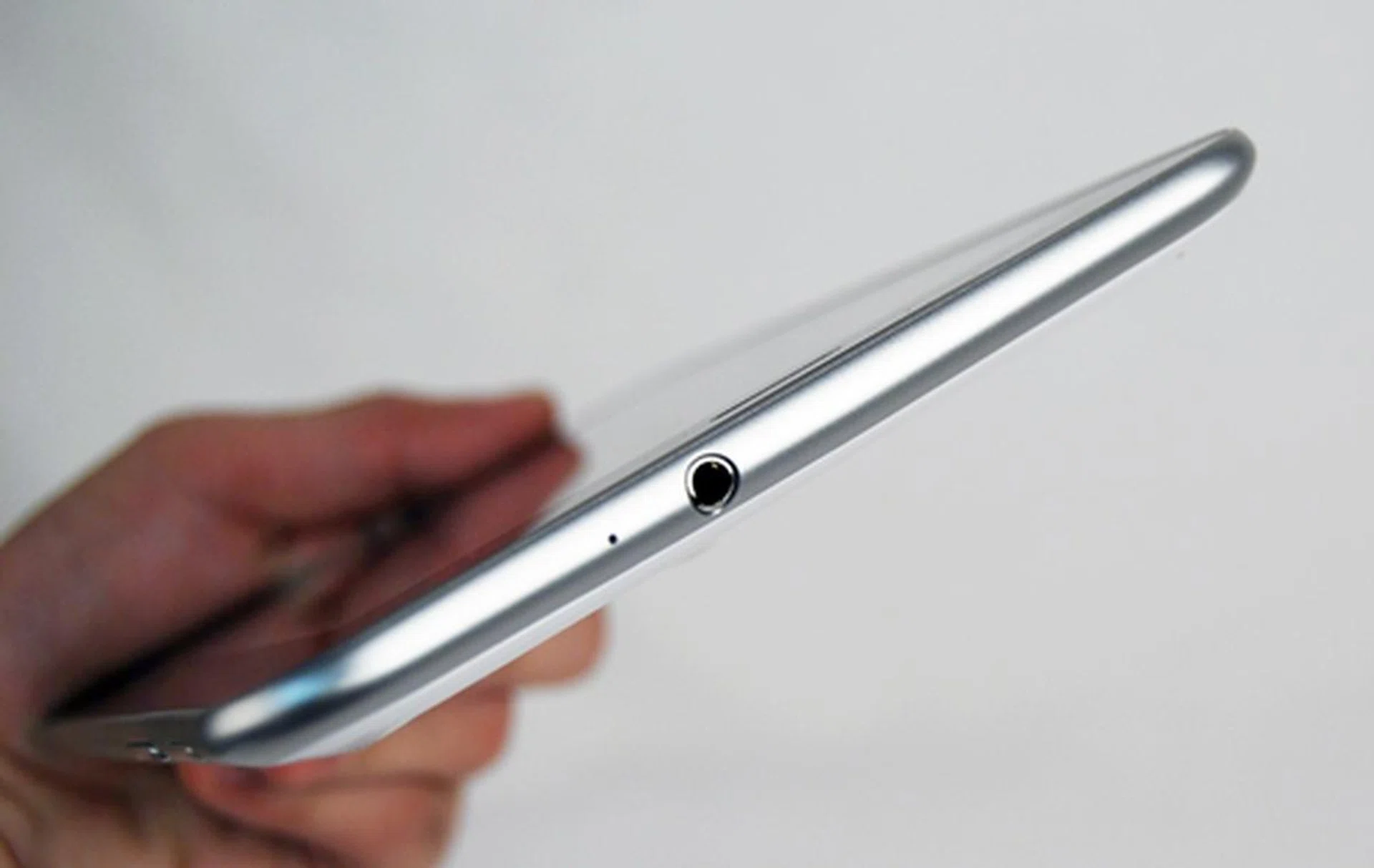
A 3.5mm audio output jack sits on top of the Samsung Galaxy Tab 7.0 Plus.
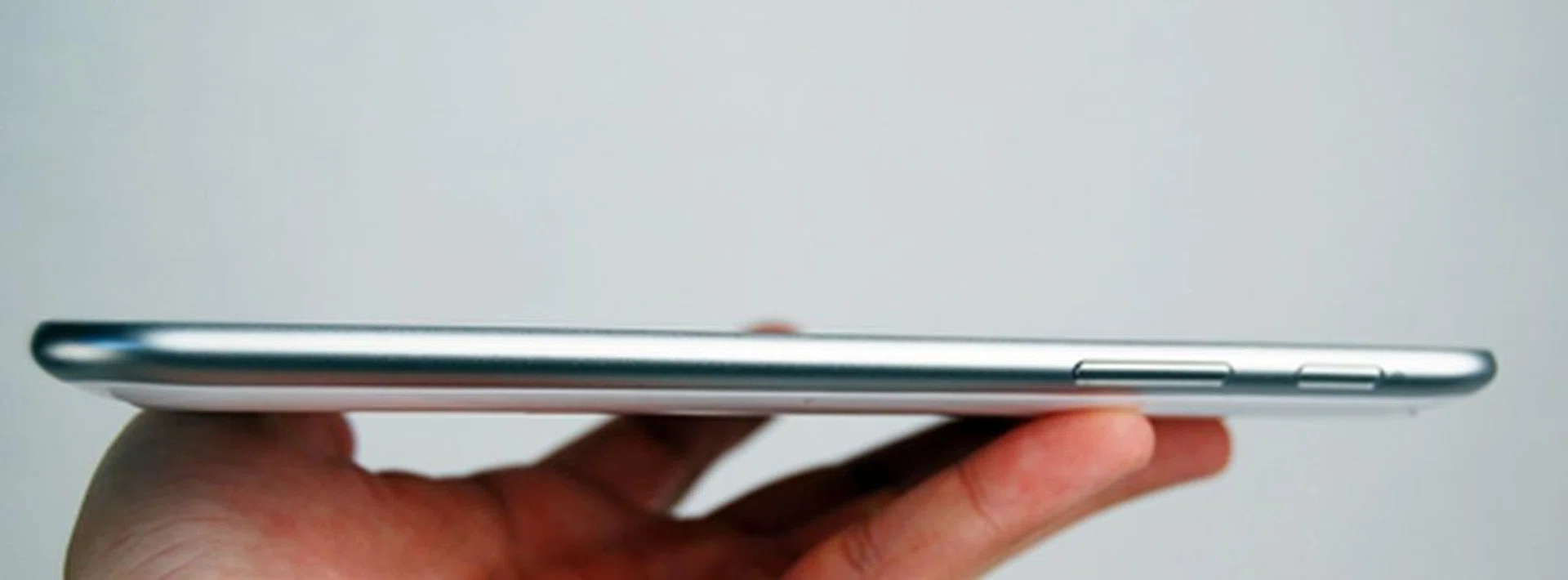
The Power button and volume controls are found on the right side of the Samsung Galaxy Tab 7.0 Plus. We had no problems using them as they are sufficiently raised and not flushed with the body of the device.
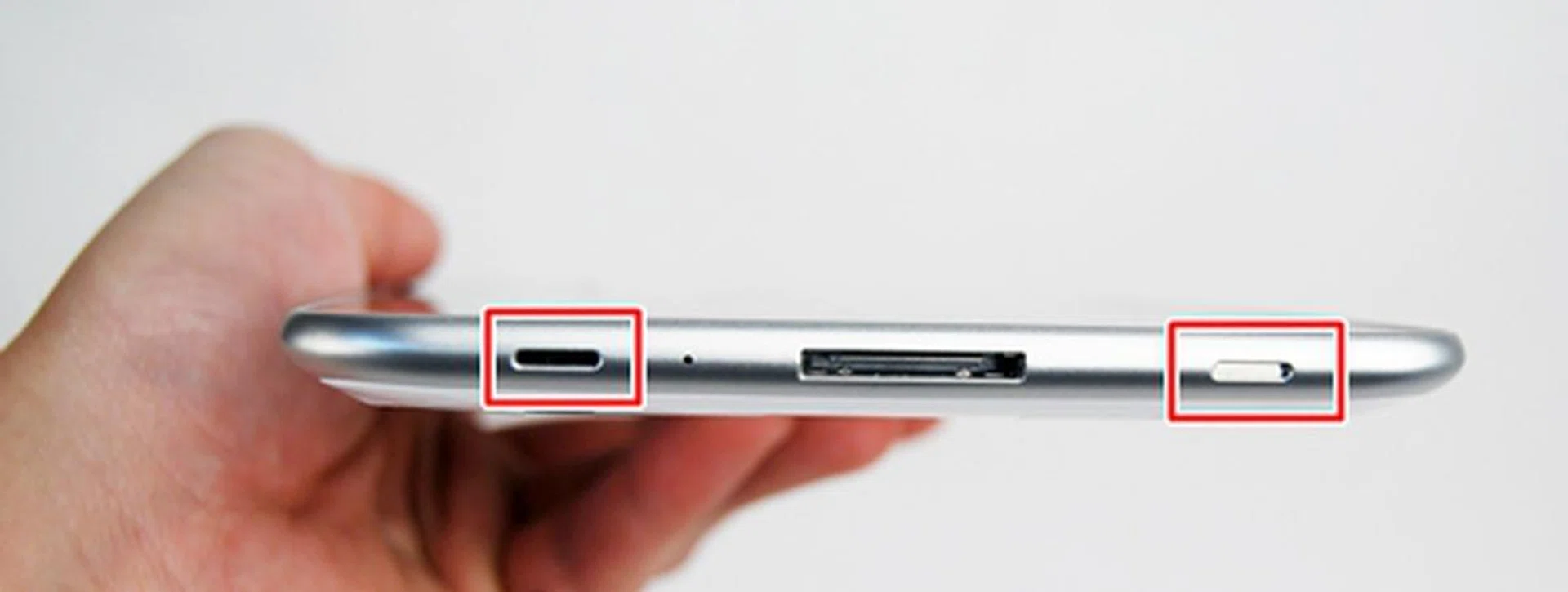
A pair of stereo speakers flanks the proprietary connector at the bottom of the Samsung Galaxy Tab 7.0 Plus. We missed the convenience of file transfers and charging via a microUSB port, which is absent on Samsung tablets.
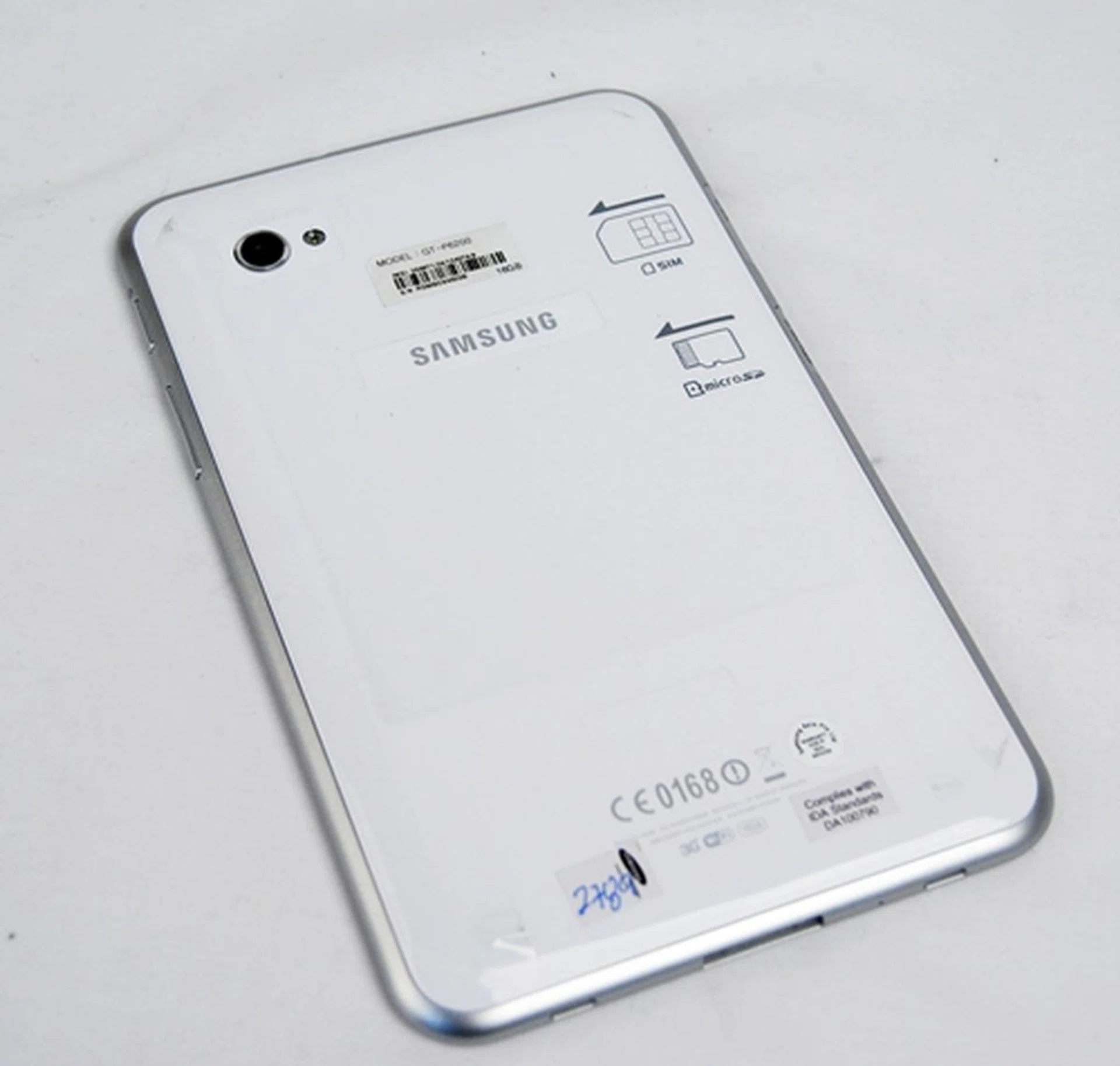
There is nothing much on the back of the Samsung Galaxy Tab 7.0 Plus except for the 3-megapixel rear autofocus camera with LED flash.
While we had no major problems with the design and handling of the Samsung Galaxy Tab 7.0 Plus, the plastic feel that we got out of the Samsung tablet didn't give us much confidence in handling it. Though one should take extra care in handling their devices, we were more worried about scratching the tablet and leaving a trail of damage on its exterior. Light as it may be, it doesn't have the solid and durable build that we are accustomed to on many other 7-inch tablets, such as the Huawei MediaPad.
Not Ready for Android 4.0 Yet
Despite the fact that Google has made the source code of its latest Android 4.0 platform available, we were disappointed to find the Samsung Galaxy Tab 7.0 Plus running on the one-year old Android Honeycomb operating system. The delay could be due to the fact that Samsung has to spend extra time to adapt its customized user interface for Ice Cream Sandwich. Fortunately, the Galaxy Tab 7.0 Plus is among the few Samsung devices that are getting the Android 4.0 update. However, the company hasn't given a specific time frame on when this update will commence.
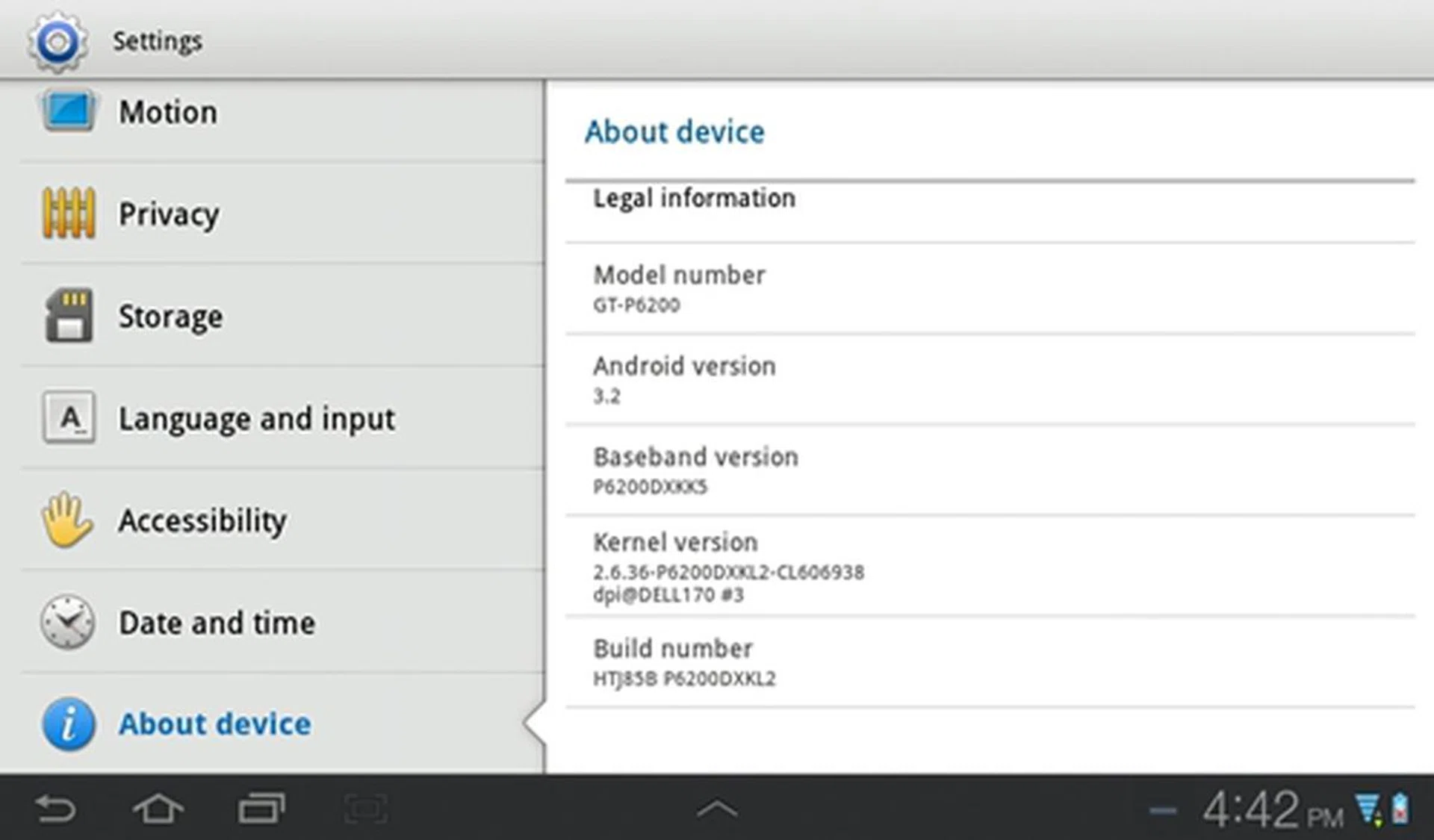
For now, you have to stick with Android Honeycomb 3.2 OS on the Samsung Galaxy Tab 7.0 Plus. Android 4.0 update will be delivered to the tablet once it's available sometime this year.
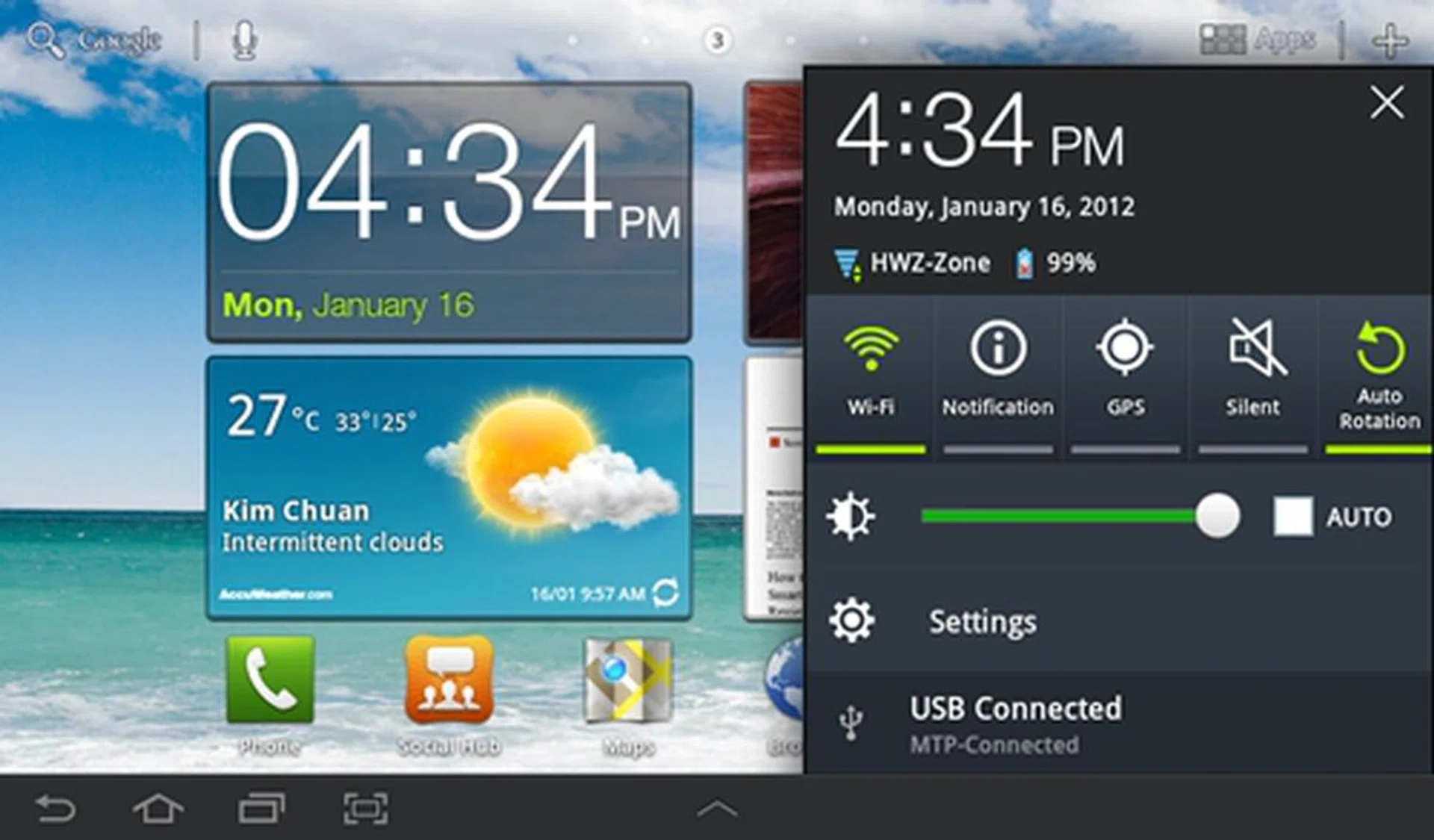
We are big fans of Samsung's implementation of the Notification menu in the Galaxy Tab 7.0 Plus. It presents some of the most frequently used functions such as Wi-Fi and screen rotation in an easy-to-use layout.
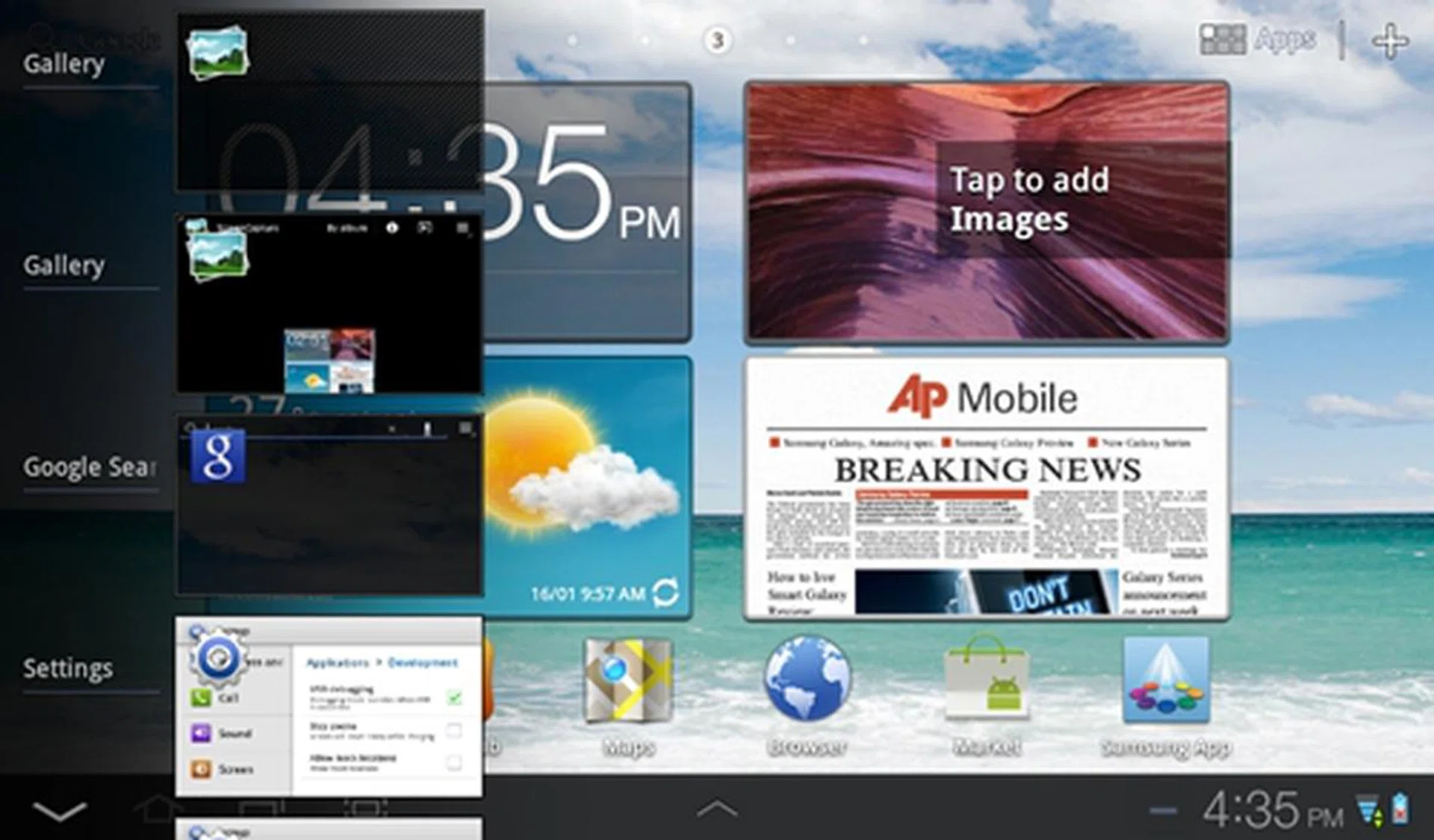
You are still unable to close or quit apps from the multitasking menu on the Samsung Galaxy Tab 7.0 Plus. However, you can do that using the Program monitor widget or the Task Manager app.
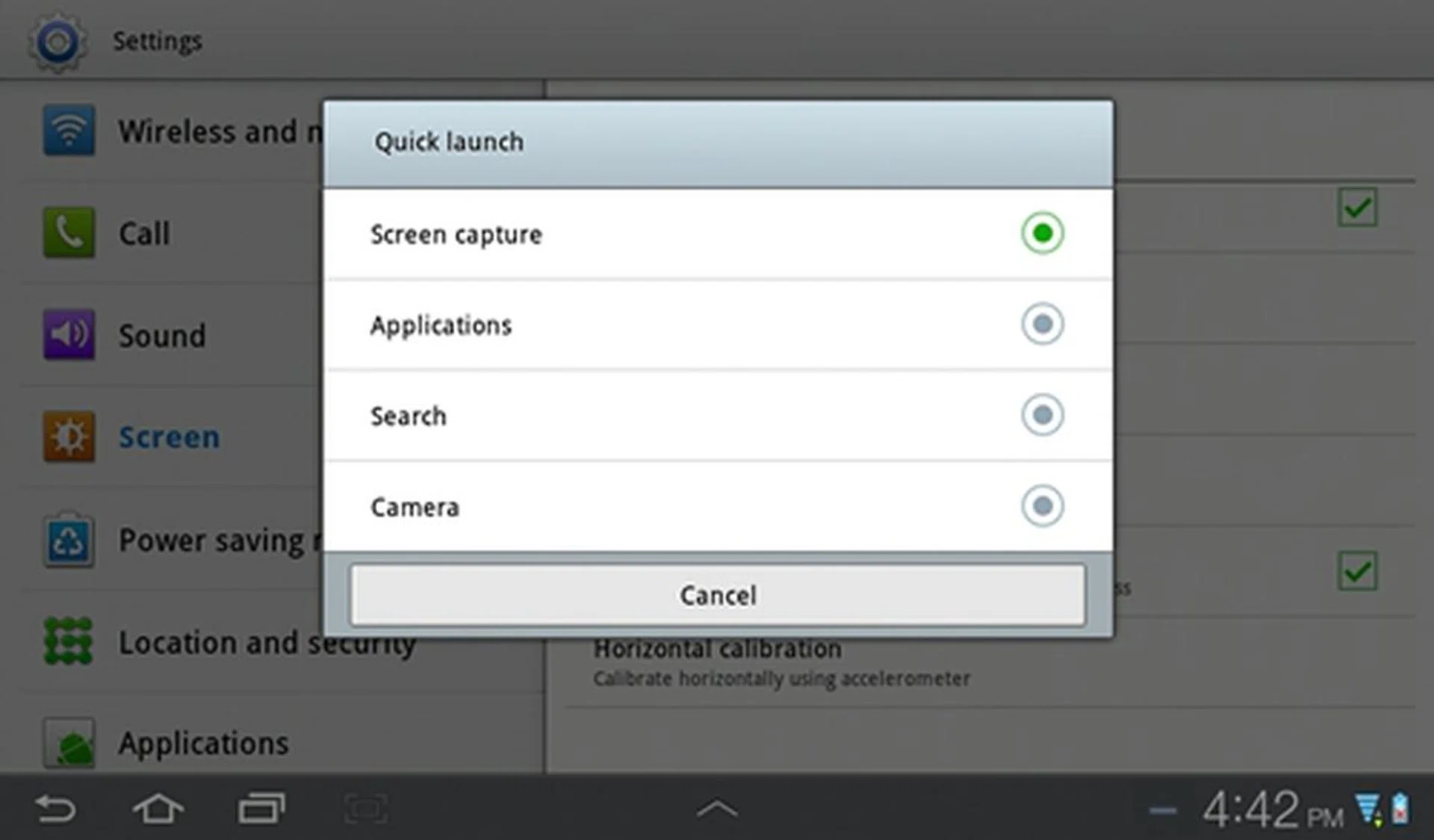
Fortunately, the screenshot function is still available on the Samsung Galaxy Tab 7.0 Plus. You can customize the Quick Launch button (located beside the usual three buttons Back, Home and Multitask) to act as a shortcut for Applications, Search and Camera function.
Matching Up to the Competition
With the quad-core processor era dawning upon us, it is strange to see Samsung equipping the Galaxy Tab 7.0 Plus with a 1.2GHz dual-core processor and 1GB of RAM. This puts it on par with many of its competitors in the market and likely to be outgunned by more powerful quad-core tablets expected to be released later in the year.
Anyhow, to have an idea of its performance, we compared the Samsung Galaxy Tab 7.0 Plus with the Huawei MediaPad and Acer Iconia Tab A100. As per every performance benchmark, the Apple iPad 2 is included as a standard benchmark to match for all tablets.
The following benchmarks are used for raw performance evaluation: -
- Quadrant evaluates the CPU, memory, I/O and 3D graphics performance. This is an Android OS based test.
- Smartbench 2011 is a multi-core friendly benchmark application that includes both the Productivity and Games Indices for a more complete gauge of the overall performance of Android tablets.
- SunSpider Javascript benchmark measures the browsing performance of the tablet.
Device | Samsung Galaxy Tab 7.0 Plus | Huawei MediaPad | Acer Iconia Tab A100 | Apple iPad 2 |
CPU | ARM Cortex-A9Exynos dual-core 1.2GHz | Qualcomm Snapdragon dual-core 1.2GHz | NVIDIA Tegra 2 dual-core 1GHz | Apple A5 dual-core 1GHz |
GPU | Mali-400MP | Adreno 220 | ULP GeForce | PowerVR SGX 543MP2 |
RAM | 1GB | 1GB | 1GB | 512MB |
OS | Google Android 3.2 | Google Android 3.2 | Google Android 3.2 | Apple iOS 4.3 |
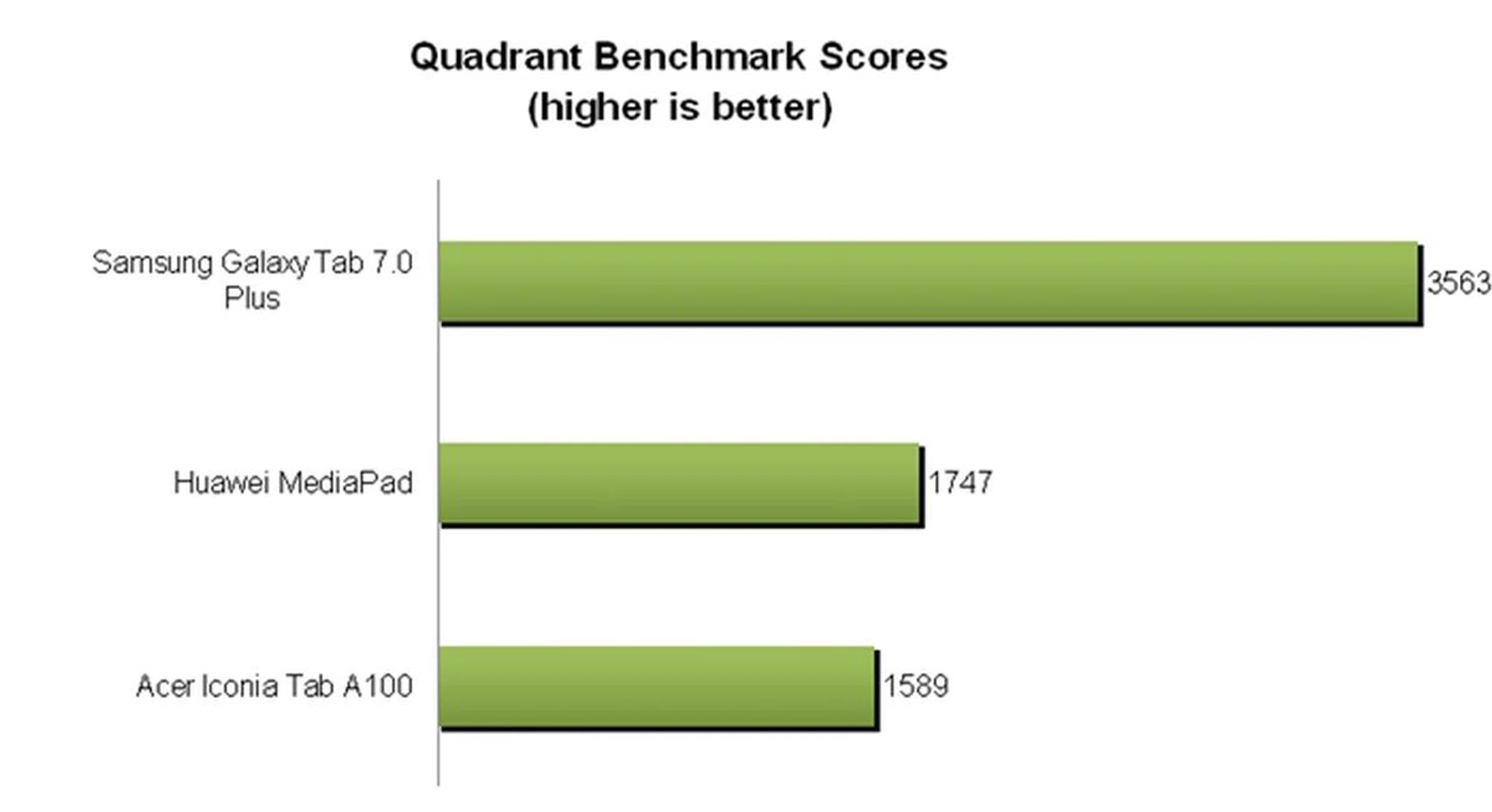
Running on the same Exynos chipset as the Samsung Galaxy S II, the Samsung Galaxy Tab 7.0 Plus blew the competition out of the water with its superior performance in the Quadrant benchmark. The Samsung slate easily took the crown this round with a score of 3563, which is more than double its rivals' scores.
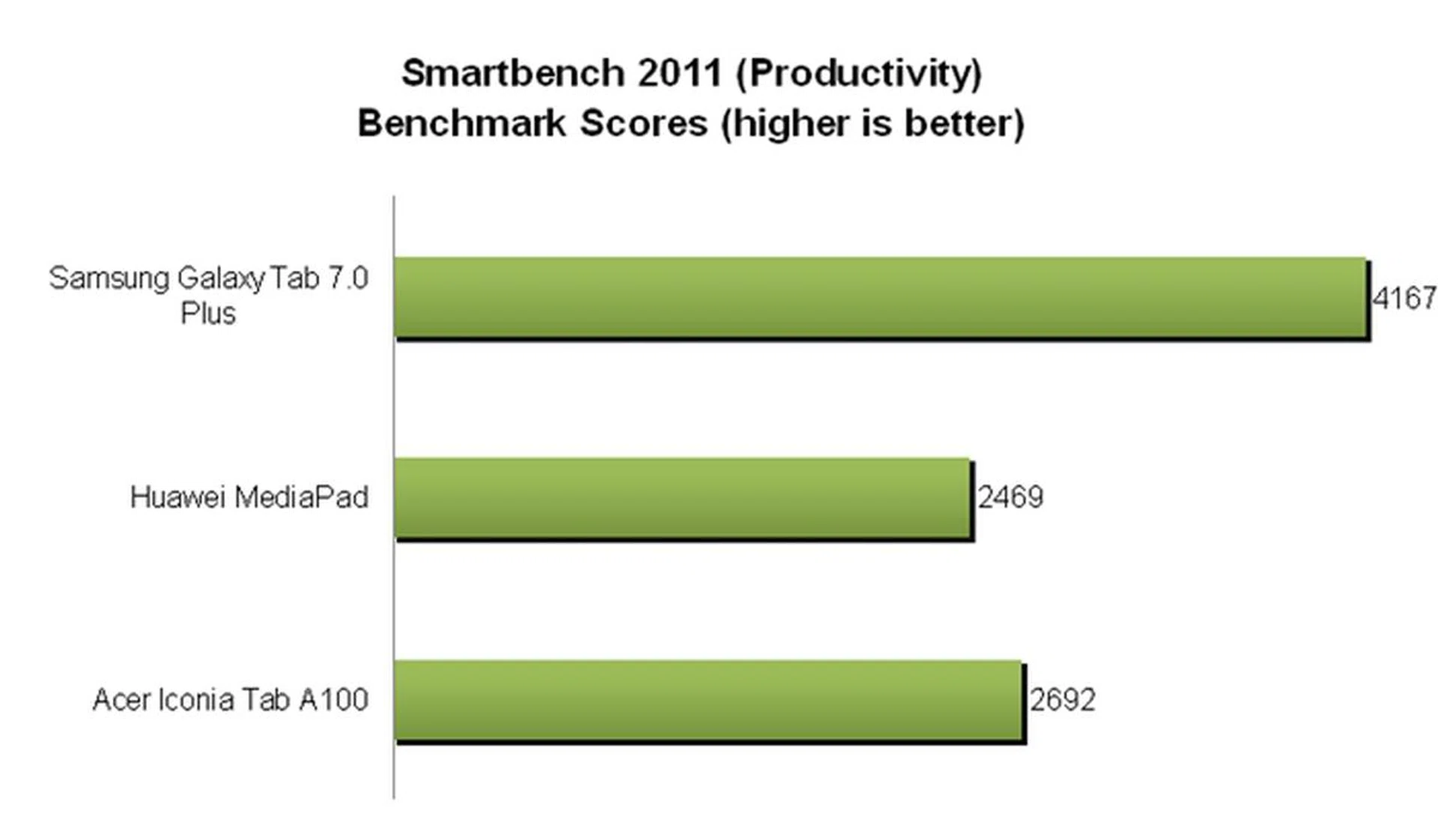
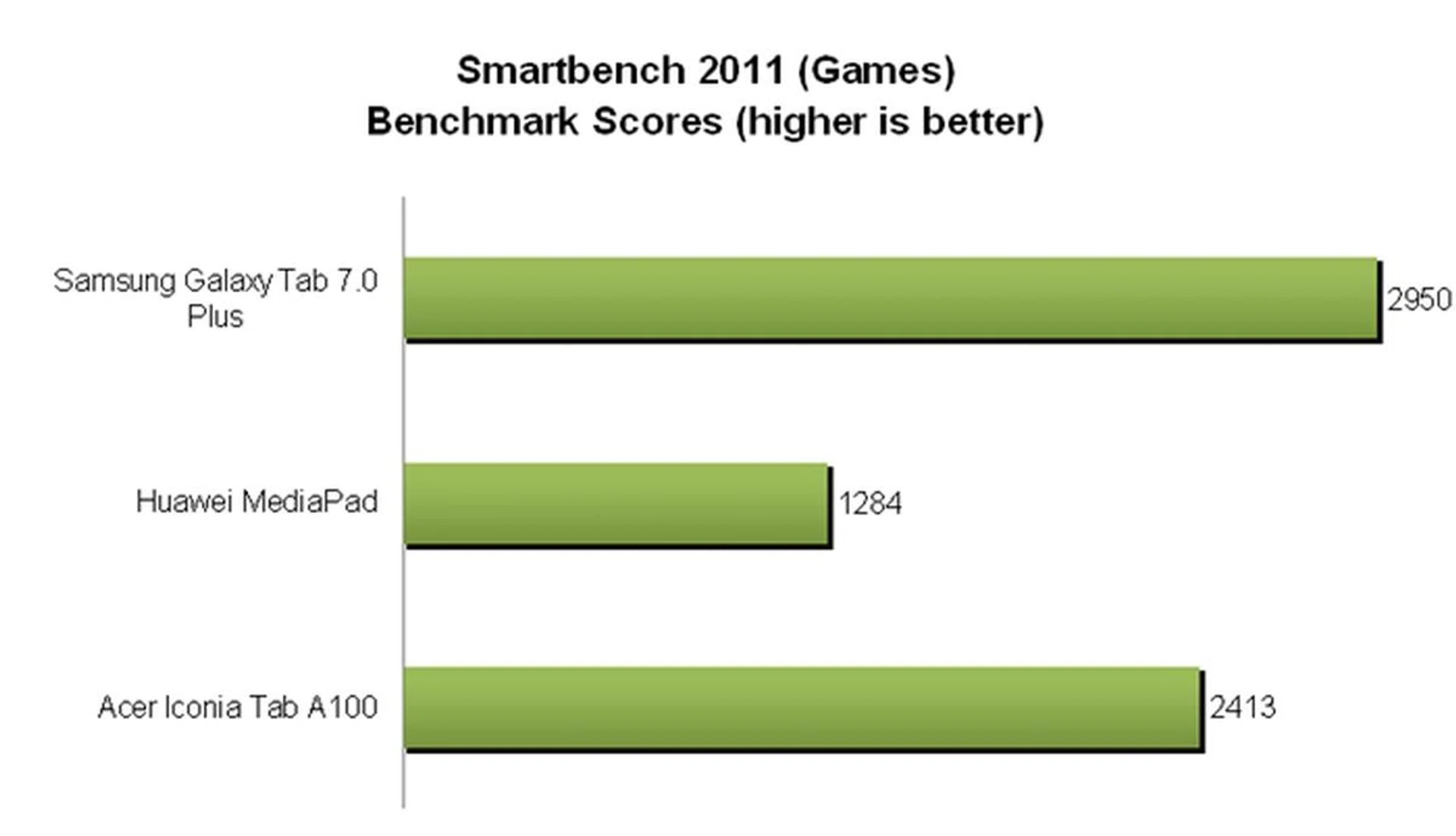
The Samsung Galaxy Tab 7.0 Plus proved its worth yet again in the Smartbench 2011 benchmark by clocking scores that are miles ahead of its competitors. It appears that the Exynos chipset does have an edge against Qualcomm and NVIDIA Tegra 2 dual-core processors.
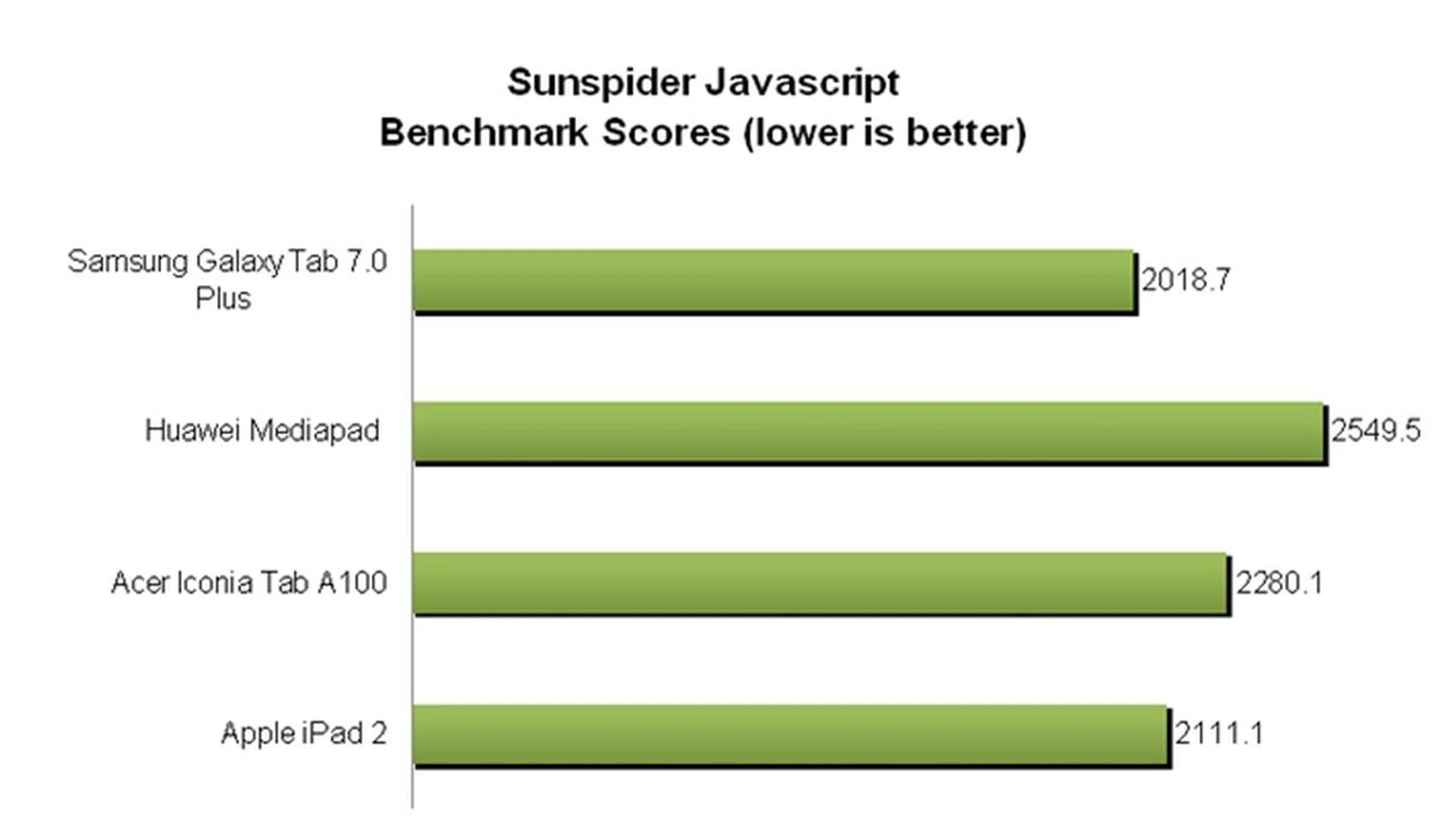
Being an OS independent benchmark, the SunSpider JavaScript benchmark will provide you with an idea of the browsing capabilities of the different tablets. The Samsung Galaxy Tab 7.0 Plus once again reigned supreme here by clocking the fastest time taken to crunch the scripts, slightly edging out the Apple iPad 2. Despite the results, during our time with the Samsung slate, we did not find the web surfing experience to be noticeably better than its peers.
As you should know by now, benchmark statistics are just one part of the user experience. We found the performance of Samsung Galaxy Tab 7.0 Plus to be generally positive although we could not ignore the occasional lags we encountered when navigating the user interface. It took more than one touch gesture at times for the interface to register our touch input, which can be quite frustrating. As this is something we have encountered before on the Galaxy Tab 10.1, we are inclined to believe that the Samsung TouchWiz is to be responsible for the slight sluggish performance of the Galaxy Tab 7.0 Plus.
Do note that the above benchmarks are conducted with stock firmwares, and hence do not reflect the day-to-day usage conditions of the tablet that could have more software and services running.
Entertainment DNA
As a mass consumer tablet, the Samsung Galaxy Tab 7.0 Plus comes with a suite of multimedia features to satisfy the entertainment needs of mainstream consumers although power users would have wished for some aspects to be better.
First, the Galaxy Tab 7.0 Plus comes with a comfortable screen size of 7-inches with a resolution of 1024 x 600 pixels. While this is typical of 7-inch tablets, we had hoped for a higher screen resolution on the Samsung slate as Huawei has proven that it is possible with its MediaPad (1280 x 800 pixel resolution). The Galaxy Tab 7.0 Plus utilizes a Plane-to-Line Switching (PLS) LCD technology on its display, which claims to provide improved viewing angles and 10% better brightness compared to In-Plane-Switching (IPS) LCD technology deployed on the Apple iPads and ASUS tablets. While PLS LCD does have its merits, it could have been better if Samsung flexed some of its Super AMOLED muscles on the Galaxy Tab 7.0 Plus the same way it did with the upcoming Galaxy Tab 7.7.
Second, Samsung throws in a microSD memory card slot that supports up to 32GB capacity. While the Galaxy Tab 7.0 Plus comes in 16GB and 32GB variants, the presence of a microSD memory card slot bumps up the storage capacity of the device so that you can have a library of videos and music files to accompany you on long road trips or journeys.
Third, the Galaxy Tab 7.0 Plus comes with dual cameras - a 3.0-megapixel autofocus rear camera with LED flash and a 2.0-megapixel front facing camera. As usual, we will put the rear camera through our camera quality test to assess its imaging capabilities: -

The 3.0-megapixel rear camera of the Samsung Galaxy Tab 7.0 Plus produced average image quality. Evident in the test image are the loss of some details and noise levels. Below, we've close-up shots for comparison.
 |  |
In the past, the camera performance of tablets wasn't an area of interest to consumers (because of their sub-par quality), but this perception is set to change with the introduction of the ASUS Eee Pad Transformer Prime. Although it is too far-fetched to compare the Samsung Galaxy Tab 7.0 Plus with the ASUS Eee Pad Transformer Prime, we felt that Samsung could have done a better job in this aspect. With ASUS setting the bar high with the Transformer Prime, we are eager to see how the competition, especially Samsung, responds.
Battery and Portability Performance
Last but not least, we have the battery performance test for the Samsung Galaxy Tab 7.0 Plus. The BlackBerry PlayBook currently holds the title for having the longest battery life among the seven-inch tablets and we are interested to see if Samsung is able to give Research in Motion (RIM) a run for its money with the Galaxy Tab 7.0 Plus. For the battery performance section, we compare the Samsung Galaxy Tab 7.0 Plus with the Huawei MediaPad, Acer Iconia Tab A100 and BlackBerry PlayBook. Our standard battery test includes the following control parameters:
- Looping a 720p video with screen brightness and volume at 100%
- Wi-Fi and Bluetooth connectivity turned on
- Constant data streaming through email and Twitter
Specifications/Device | Samsung Galaxy Tab 7.0 Plus | Huawei MediaPad | Acer Iconia Tab A100 | BlackBerry PlayBook |
Processor |
|
|
|
|
Display Size |
|
|
|
|
Display Type |
|
|
|
|
Display Resolution |
|
|
|
|
Dimensions |
|
|
|
|
Weight |
|
|
|
|
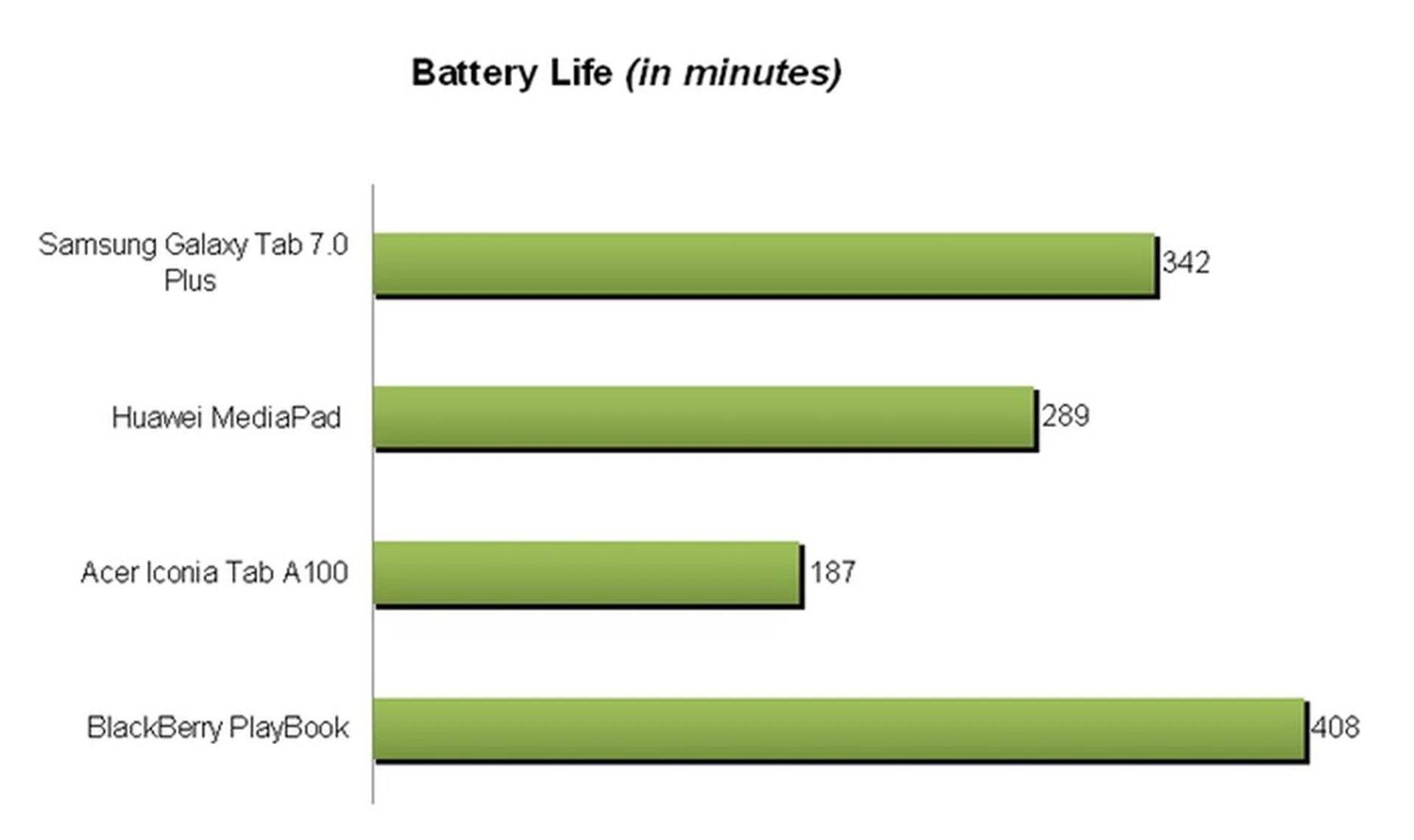
The Samsung Galaxy Tab 7.0 Plus managed to clock a very respectable timing of 342 minutes (close to six hours of uptime), putting it far ahead of its competitors except for the BlackBerry PlayBook. If you take into consideration the different battery capacities of the BlackBerry PlayBook (5300mAh) and Samsung Galaxy Tab 7.0 Plus (4000mAh), that may explain why the former gains the upper hand.
The overall portability of the device is affected by not just the battery life, but also its dimensions and weight. Generally, a higher battery life coupled with a lower weight and volume, will make a device more portable. In the Portability Index, we will assess each device on how well they balance battery life with their physical sizes.
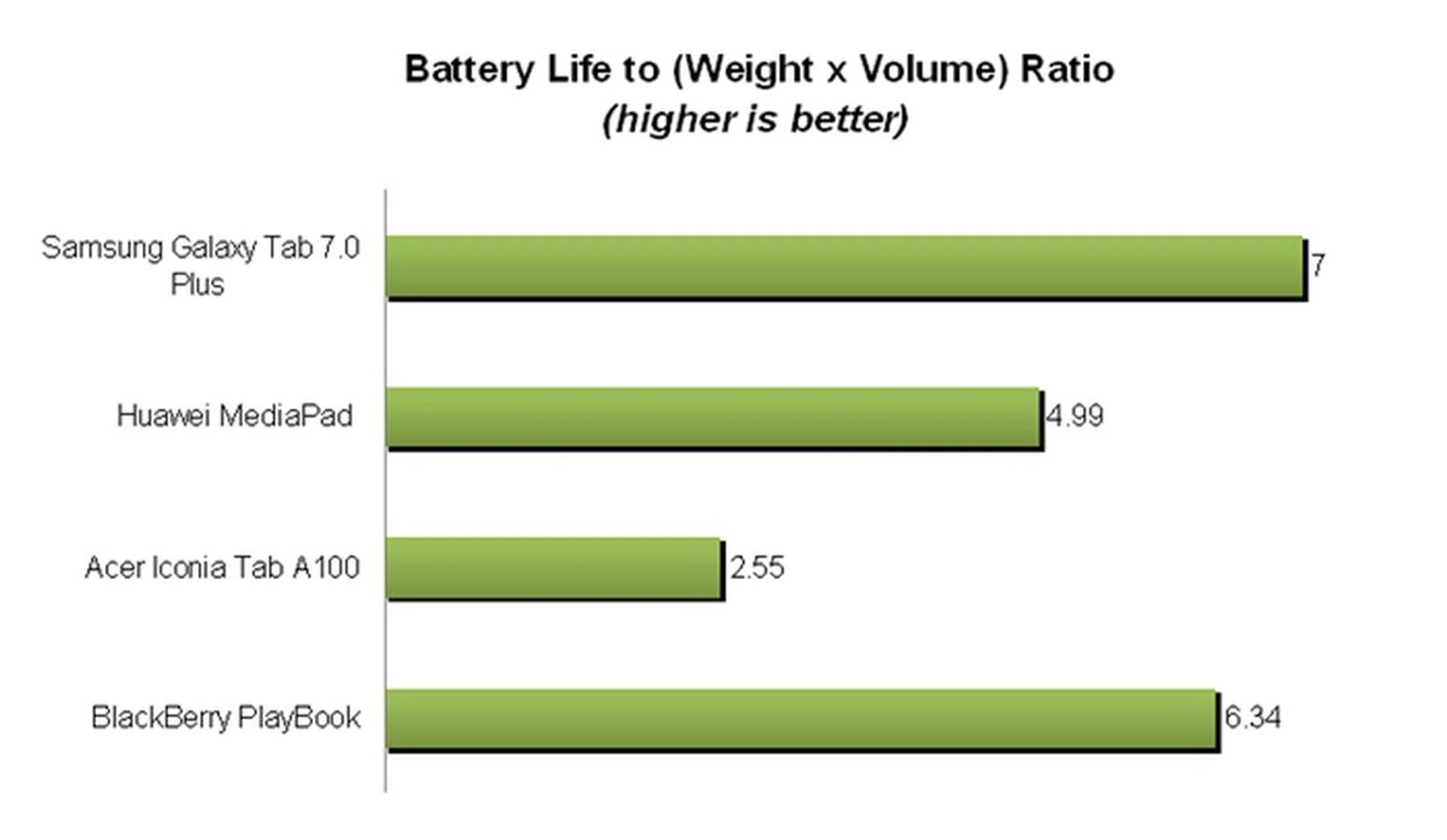
Being the slimmest (9.96mm) and lightest (345g) seven-inch tablet with a good battery life, the Samsung Galaxy Tab 7.0 Plus easily nosed out the other tablets in the Portability Index.
Casual Usage Scenario
The battery test above simulates fairly intensive usage conditions on the device, therefore you can expect better battery performance on the Samsung Galaxy Tab 7.0 Plus under normal usage conditions. If you are using the tablet for occasional web surfing, reading and engage in some multimedia streaming, you can expect about a day of usage from the Galaxy Tab 7.0 Plus.
Do note that actual battery life varies according to different usage patterns, so your mileage will vary.
Probably The Best 7-Inch Tablet Around
Although the late Steve Jobs once commented that seven-inch tablets are dead on arrival, it seems that they are surviving pretty well. While some seven-inch tablets failed to make an impact, Samsung Galaxy Tabs on the other hand appear to be very well-received and doing well. Having said that, the Samsung Galaxy Tab 7.0 Plus picked up from where the original Galaxy Tab left off and improved quite a lot to take on the ever-increasing competition in the market.
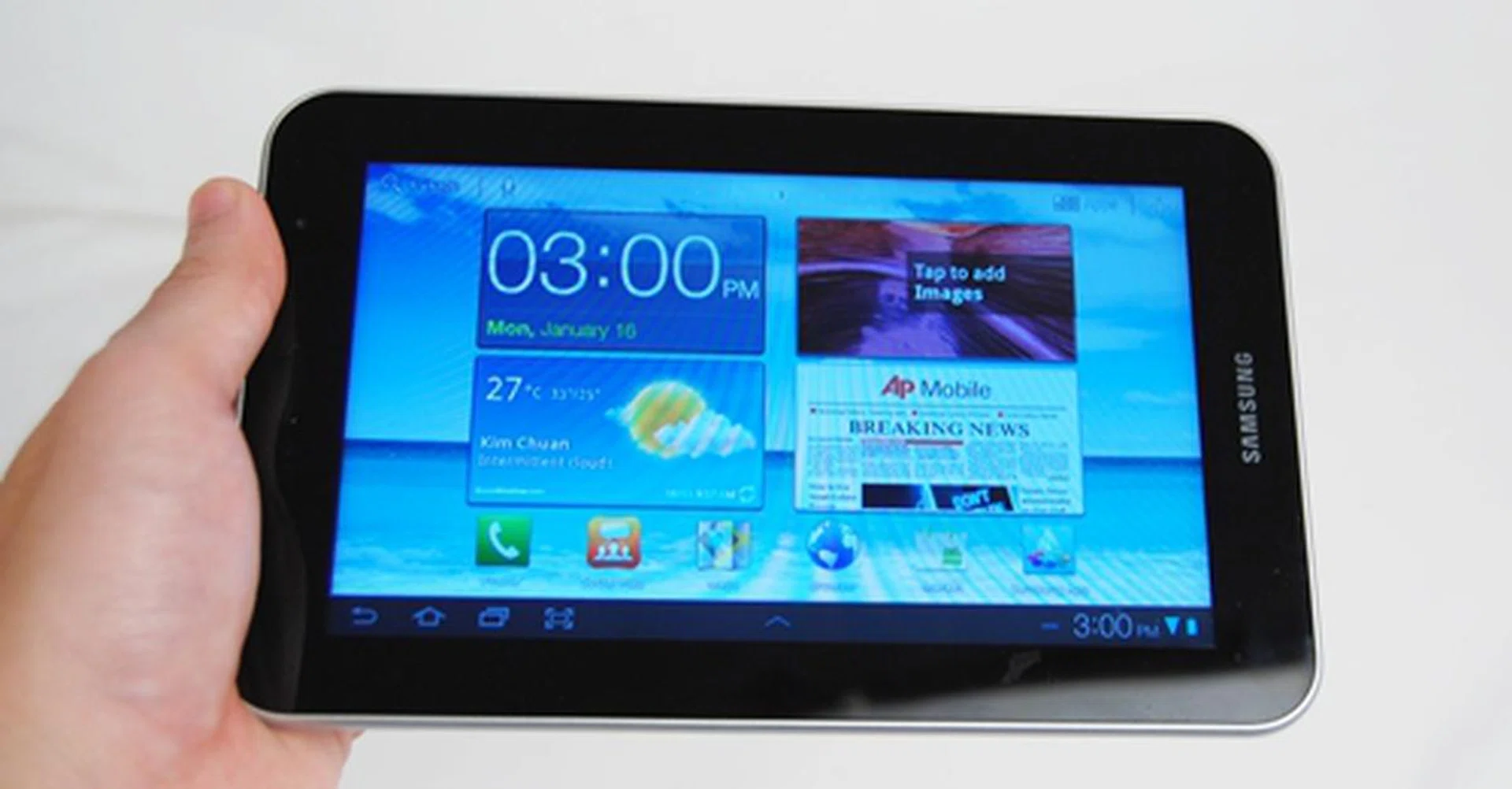
The Samsung Galaxy Tab 7.0 Plus is a worthy upgrade from its predecessor with its 1.2 GHz dual-core processor and tablet-optimized Honeycomb user interface. However, there are areas that could have been done better such as the build quality and fluidity of the user interface.
Pros
The Samsung Galaxy Tab 7.0 Plus won us over with its slim and lightweight form factor, an important consideration for consumers facing more options to choose from. While Android Honeycomb is not what we would have expected on the Galaxy Tab 7.0 Plus, it still delivers a satisfactory user experience and is definitely a better option than Gingerbread on the HTC Flyer. Performance wise, the Galaxy Tab 7.0 Plus is a very capable multimedia device with a rather good battery life. The Exynos dual-core processor is one of the best processors available on mobile devices today as it blazed the competition in the various performance benchmarks.
Cons
In its bid to keep the Galaxy Tab 7.0 Plus as portable as possible, Samsung took a hit with the build quality of the Galaxy Tab 7.0 Plus. Ironically, the company has shown that it is possible to build a more solid device such as its upcoming Galaxy Tab 7.7. The Galaxy Tab 7.7 comes encased with a metallic back, which is miles ahead in terms of aesthetics and feel. It is also a pity that Samsung missed out a chance to showcase its Super AMOLED Plus screen technology, which might be better than the PLS LCD technology deployed on the Galaxy Tab 7.0 Plus.
The occasional sluggish performance on the Galaxy Tab 7.0 Plus irked us a little although we have expected it from our experience with the Galaxy Tab 10.1. A possible explanation could originate from Samsung's TouchWiz interface hogging unnecessary system resources, causing the lags we experienced during our time with the Galaxy Tab 7.0 Plus.
Pricing and Availability
The Samsung Galaxy Tab 7.0 Plus is available now at S$768 (inclusive of GST) without line contract. When compared to other seven-inch tablets, the Samsung Galaxy Tab7.0 Plus is an attractive purchase. It trumps the $598 Huawei MediaPad and $449 Acer Iconia Tab A100 with a longer lasting battery and better overall performance. The $668 BlackBerry PlayBook cannot compete in terms of apps availability and needs a BlackBerry smartphone to access basic functions such as email and calendar. The $899 HTC Flyer runs on a single-core processor and Gingerbread operating system, which can be considered dated in these times.
More importantly, the Samsung Galaxy Tab 7.0 Plus functions as a phone as well, allowing you to make and receive calls on the device. This unique proposition cannot be found on any other competing tablets in the market. For its price, the overall package is hard to beat except for the upcoming Galaxy Tab 7.7.
Our articles may contain affiliate links. If you buy through these links, we may earn a small commission.