

Overview

The first generation Nexus 7 was a massive hit for Google and ASUS; global sales of the tablet hit one million units per month. The tablet was very attractive to consumers because of its superb performance and affordable price tag.
As Google I/O 2013 approached, rumors and speculations suggested that the next generation tablet would make an appearance at the event. More importantly, DigiTimes claimed in a report that the next Nexus 7 will run on a Qualcomm chipset. Weeks later, Reuters reported that the device would only be launched in July, and reiterated that there would be a change to Qualcomm processors.
In the following months, more leaks appeared pointing to a Qualcomm-powered tablet with 4G LTE connectivity and a higher resolution display. The first credible leak came in July when images and a video of the Nexus 7 leaked. Subsequently, Google officially announced the Nexus 7 (2013). Here's a quick look at its specifications and how it compares with its predecessor: -
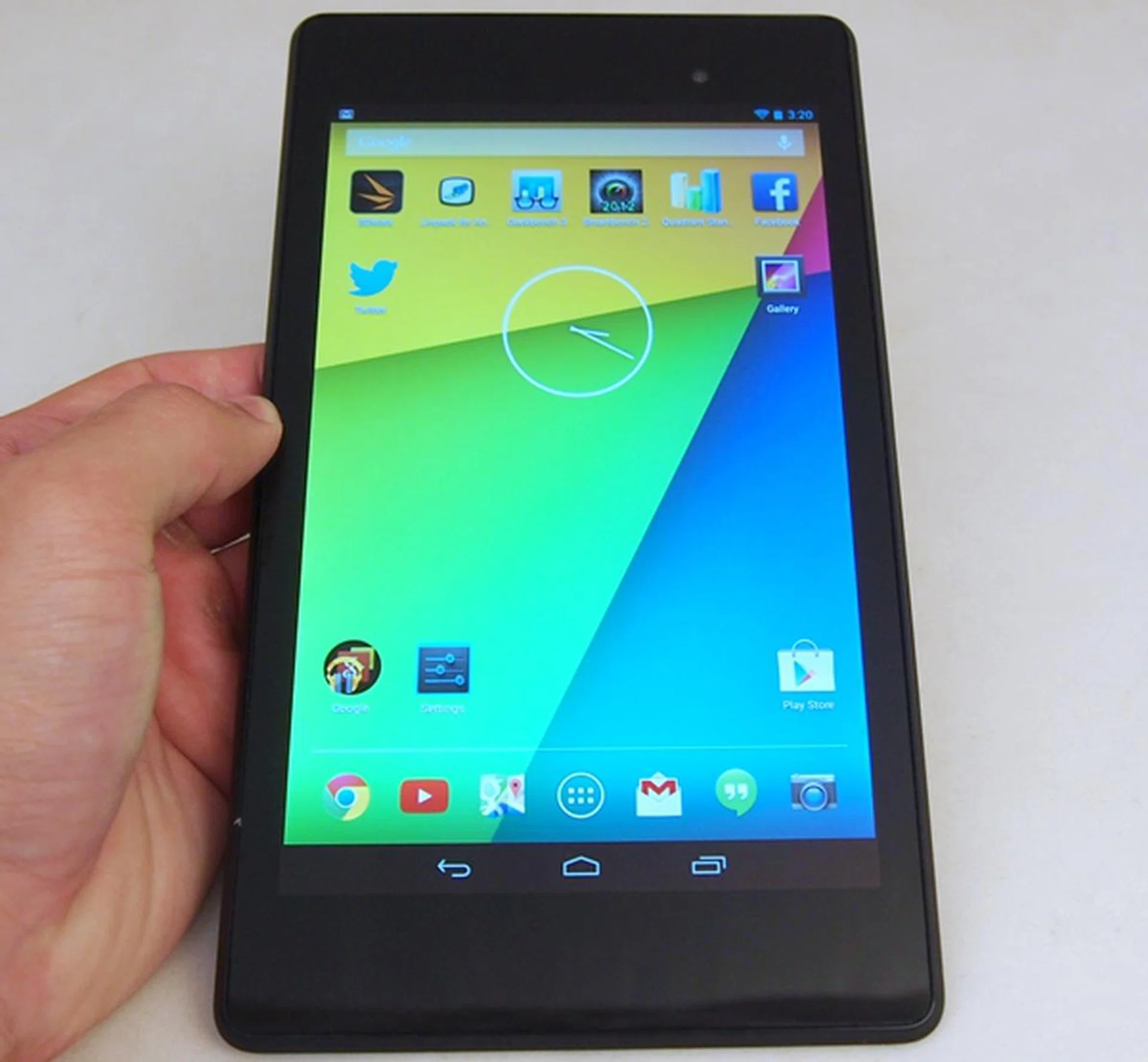
Can the Google Nexus 7 (2013) take over the reins from its predecessor? Let's find out in this review.
Design and Handling
If the design and build quality of the first-gen Nexus 7 is good, the second-gen Nexus 7 is even better. Google and ASUS brought the feel up a notch with a complete redesign of the chassis. Gone are the rubberized back, thick side profile and thick bezels.
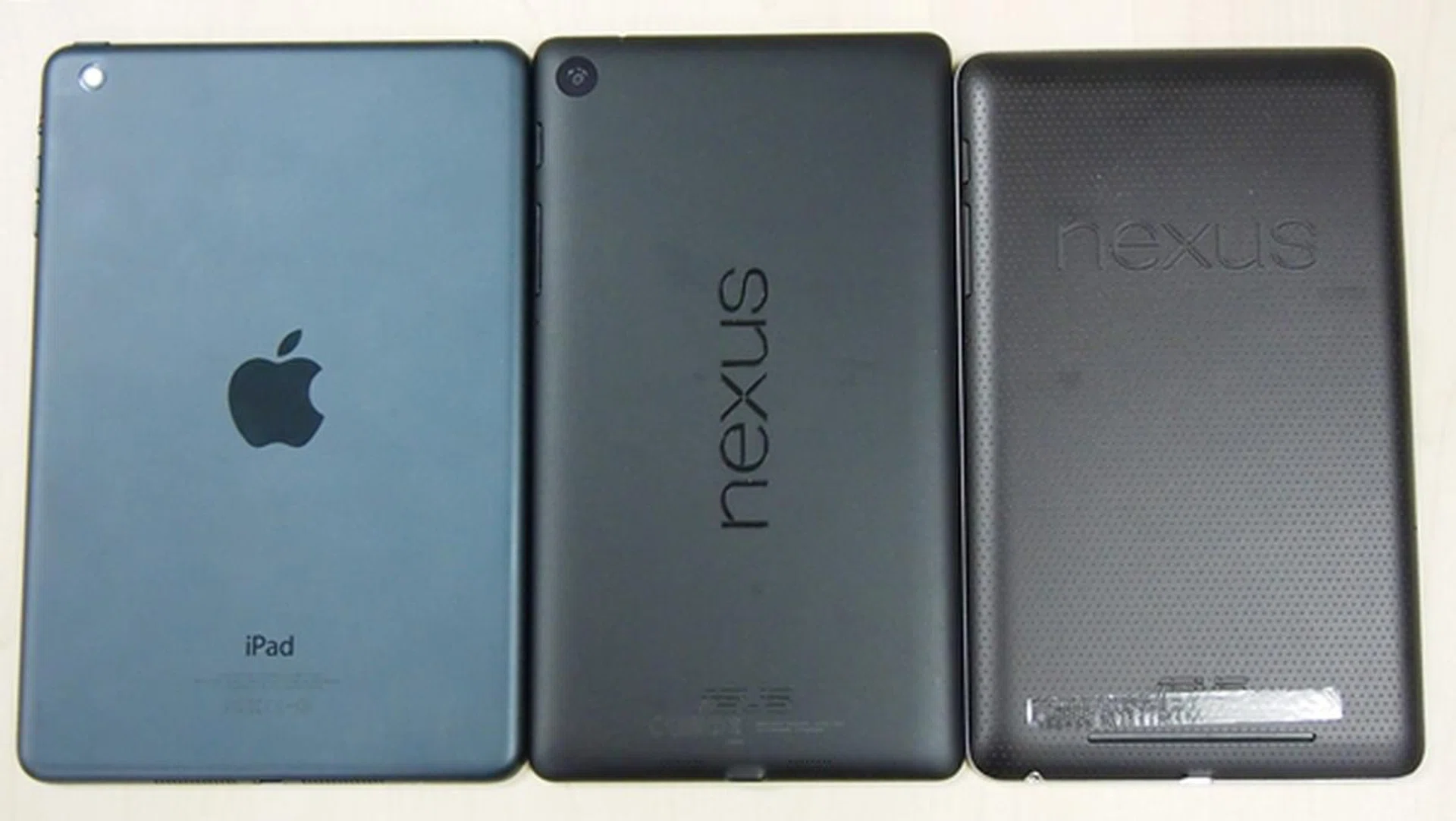
The Nexus 7 (2013) looks more premium and sleeker than its predecessor (right). The Apple iPad mini is still the champ when it comes to build quality and looks.
The back of the Nexus 7 is made of sturdy polycarbonate and they've given it a matte finishing which makes it less of a fingerprint magnet than a glossy surface. Moreover, there is a NEXUS brand splashed in a landscape fashion across its back. Compared to its predecessor, we much prefer the updated look as it's sleeker and more classy.
With the recent trend of tablets becoming thinner and lighter, the Nexus 7 also shed some weight; the Nexus 7 is 50g lighter than its predecessor, and sees its side profile slimmed down from 10.45mm to 8.65mm. While it is a hairline thicker than the 7.9-inch Apple iPad mini, the Nexus 7 is close to 20g lighter than its counterpart. It also competes favorably against the current crop of 7-inch Android tablets: -
- Nexus 7 (2013) Wi-Fi: 200 x 114 x 8.65mm, 290g
- ASUS MeMO Pad HD 7: 196.8 x 120.6 x 10.8mm, 302g
- HP Slate 7: 197 x 116 x 10.7mm, 370g
- Samsung Galaxy Tab 3 (7.0): 111.1 x 188 x 9.9mm, 315g
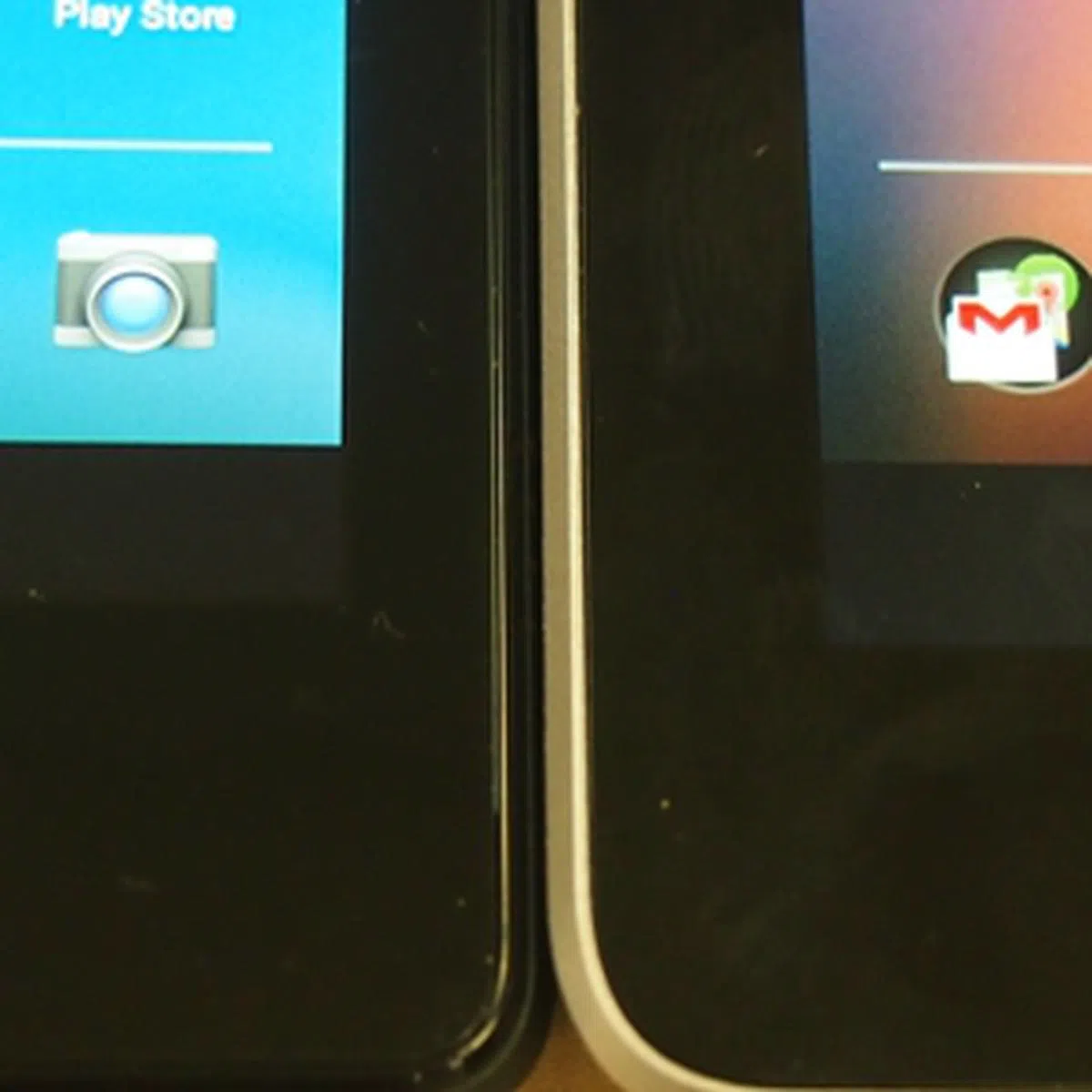
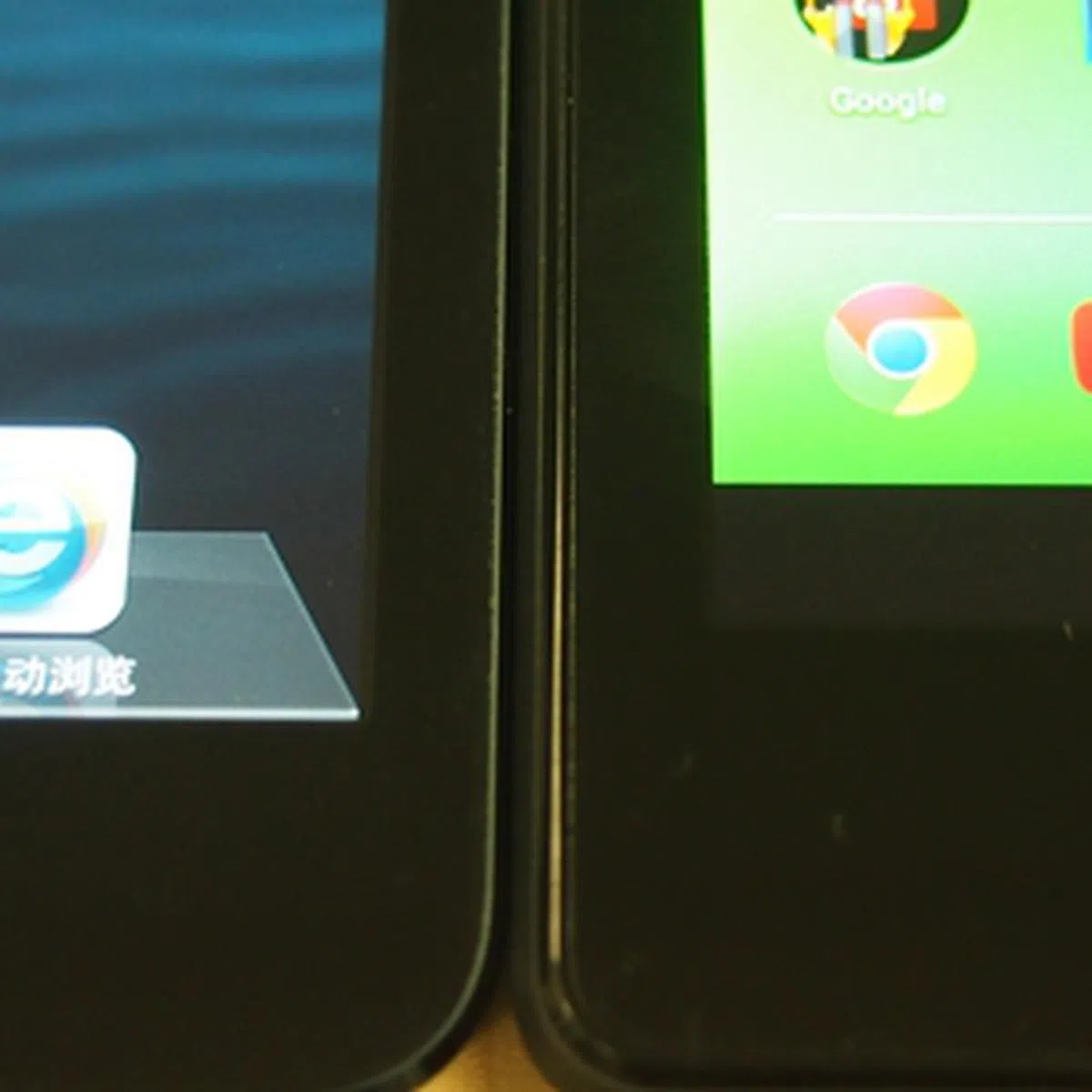
The Nexus 7 also sports thinner bezels on both sides of the display, and based on initial observations, they are only slightly thicker than those of the Apple iPad mini. Users with large hands (and fingers) need not worry about accidentally touching the screen and invoking unintended actions as there's still sufficient room for your fingers to hold and grasp the device.
 |  |
Like its predecessor, the Nexus 7 (2013) lacks a memory card slot. This is a sore point for consumers who hope that the Nexus 7 would become their main device for multimedia consumption. With less than 16 GB of storage space available out-of-the-box, the Nexus 7 can hardly hold more than a day's worth of video and music files.
Display
With high resolution displays becoming more of a norm these days in mobile phones, Google and ASUS upped the ante on the Nexus 7's display; it now comes with a resolution of 1,920 x 1,200 pixels, which is currently "the sharpest 7-inch tablet screen ever" at 323ppi. To put it simply, the Nexus 7 sweeps the existing competition away : -
- ASUS MeMO Pad HD 7: 1,280 x 800 pixels (216ppi)
- Apple iPad mini: 1,024 x 768 pixels (163ppi)
- Google Nexus 7 (2012): 1,280 x 800 pixels (216ppi)
- HP Slate 7: 1,024 x 600 pixels (170ppi)
- Samsung Galaxy Tab 3 (7.0): 1,024 x 600 pixels (170ppi)
As expected of IPS panels, the Nexus 7 delivered great color reproduction, good contrast and excellent viewing angles. In addition, the display is brighter and more vivid, making it a feast for the eyes. However, the improvement in the viewing experience does comes at a price. We will elaborate on this in the battery test section.
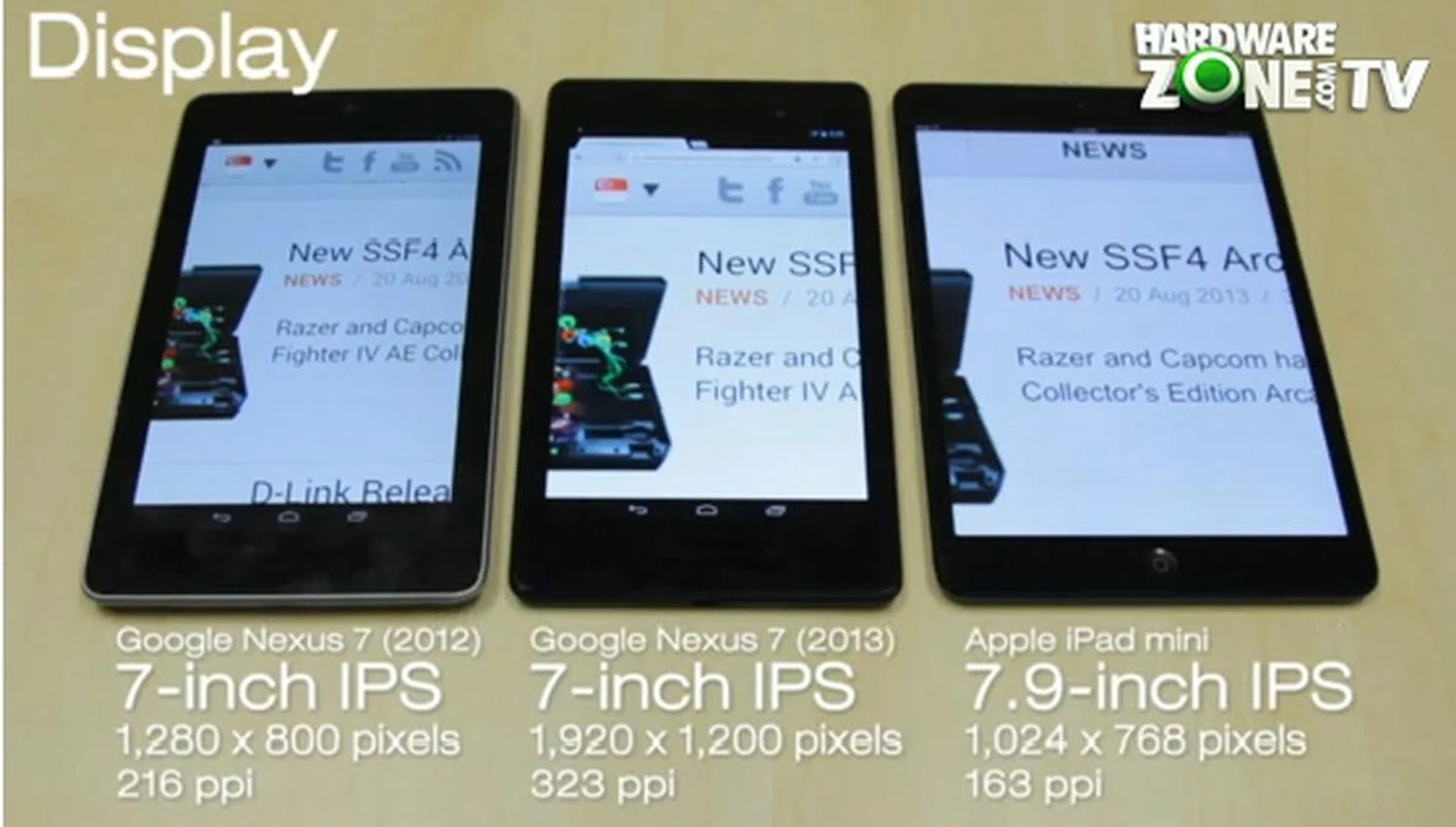
Notice the differences in brightness level and the color saturation. All three screens are tuned to 100% brightness and maximum zoom of the webpage.
Android 4.3 Jelly Bean
Each release of a Nexus device usually bears the latest version of the Android OS. For the Nexus 7 (2013), it is the flagship bearer for Android 4.3 Jelly Bean. The upcoming Android version 4.4 (KitKat) is likely to be shipped with the Nexus 5 smartphone.
Android 4.3 Jelly Bean is just an incremental update over Android 4.2. In the context of the Nexus 7 and Android tablets, there are three main features that you should take note of:
1. Bluetooth Smart Support
Bluetooth Smart Support, also known as Bluetooth Low-Energy (LE) allows devices to use Bluetooth Smart technology, which reduces energy usage (less battery usage) while transmitting data to and from Bluetooth smart sensors.
While this feature has little application at the moment, its introduction paves the way for Google to introduce hardware that can take advantage of this technology in the near future. There are reports that Google is planning to introduce Android hardware like game consoles and smartwatches. The search giant also recently confirmed that it has acquired the smartwatch manufacturer WIMM Labs; clearing the way for more wearables.
2. Restricted Profiles
Restricted profiles allows users to manage access to apps and content. This enables users to set up parental controls on their devices, use devices as kiosks that show product information, or simply share the tablet with other people.
Besides being used as a "kids-mode", restricted profiles allow you to easily turn the Nexus 7 into a guest device at a moment's notice. You can select the apps that can be accessed on the "guest profile" (or whatever profile name you want to give it). Even if someone deletes an app on the "guest profile", the app is still present when you login to your profile.
3. OpenGL ES 3.0
OpenGL ES 3.0 is the latest industry standard for accelerated 3D graphics on mobile devices. It brings photorealism, enhanced detail and sophisticated effects like shadows that will enhance the 3D gaming experience on Android devices.
If this feature sounds familiar, it is because Apple's recently announced A7 processor also supports this industry standard. As cool as it sounds, there aren't many game apps that support OpenGL ES 3.0 at the moment. While it takes time for game developers to create apps to take advantage of the newer OpenGL ES 3.0 standard supported by the hardware and OS, we feel it is a step in the right direction in the name of progress and of course to better compete with Apple. And yes, the Qualcomm SnapDragon S4 Pro used on this new tablet does lend support to this new graphics standard, hence making this device a perfect showcase of this graphics API standard.
A Rear Camera Comes to the Nexus 7
Fortunately, the Nexus 7 (2013) comes with a 5-megapixel rear autofocus camera and a 1.2-megapixel fixed focus front-facing camera. If you recall, the previous generation Nexus 7 lacks a rear camera due to the price factor. Since the rear cameras of tablets are merely secondary or auxiliary in nature, we didn't place high expectations of the Nexus 7's imaging capability. As seen below, the performance was about where we expected it to be:-

Noise levels are significant and the image seems to lack punchy colors and contrast.
 |  |
Benchmarking Performance
Google and ASUS decided to drop NVIDIA Tegra processors and opted for Qualcomm Snapdragon chipsets. Reports suggest that the decision was based on Qualcomm's superiority in a processor's communication process and power efficiency. Well, judging by the Tegra 4 based Toshiba Excite Write that we reviewed, those reports might be right after all.
As part of its overall strategy to keep costs low, the Nexus 7 is powered by a Qualcomm Snapdragon S4 Pro quad-core 1.5GHz processor and 2GB RAM. This configuration is found in many of the flagship mobile devices launched last year such as the Nexus 4. For this article, we will be pitting the Nexus 7 (2013) up against the Nexus 7 (2012), ASUS MeMO Pad HD 7 and HP Slate 7.
Quadrant Results
Quadrant evaluates a device's CPU, memory, I/O and 3D graphics performance.
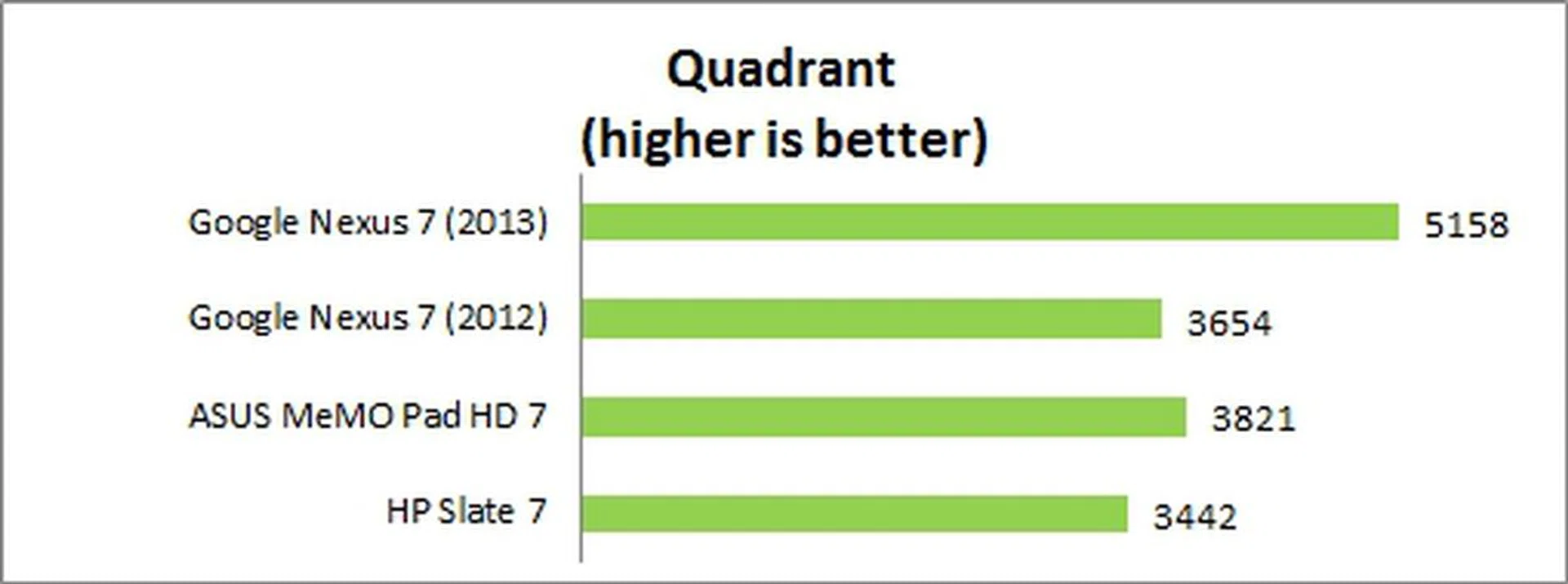
Google and ASUS made a wise choice by equipping the Nexus 7 (2013) with a Qualcomm Snapdragon S4 processor; it ran circles around the competition with its chart topping score of 5,158. As a point of comparison, the Qualcomm Snapdragon S4-powered Sony Xperia Tablet Z scored 7,745. The higher score registered by the Sony tablet is most probably due to the additional 1GB RAM.
3DMark Results
Originally developed as a PC benchmarking tool, 3DMark is now expanded to support multiple platforms including Android OS. The Ice Storm benchmark is designed for smartphones, mobile devices and ARM architecture computers.
For an in-depth understanding of 3DMark for Android, do head over to our article, "3DMark - Android Device GPU Performance Review." In a nutshell, 3DMark consists of two test sections:
3DMark Ice Storm Extreme raises the off-screen rendering resolution to 1080p and uses higher quality textures and post-processing effects to create a more demanding load for the latest smartphones and tablets.
3DMark Ice Storm Unlimited is used to make chip-to-chip comparisons of different chipsets, CPUs and GPUs without vertical sync, display resolution scaling and other operating system factors affecting the result.
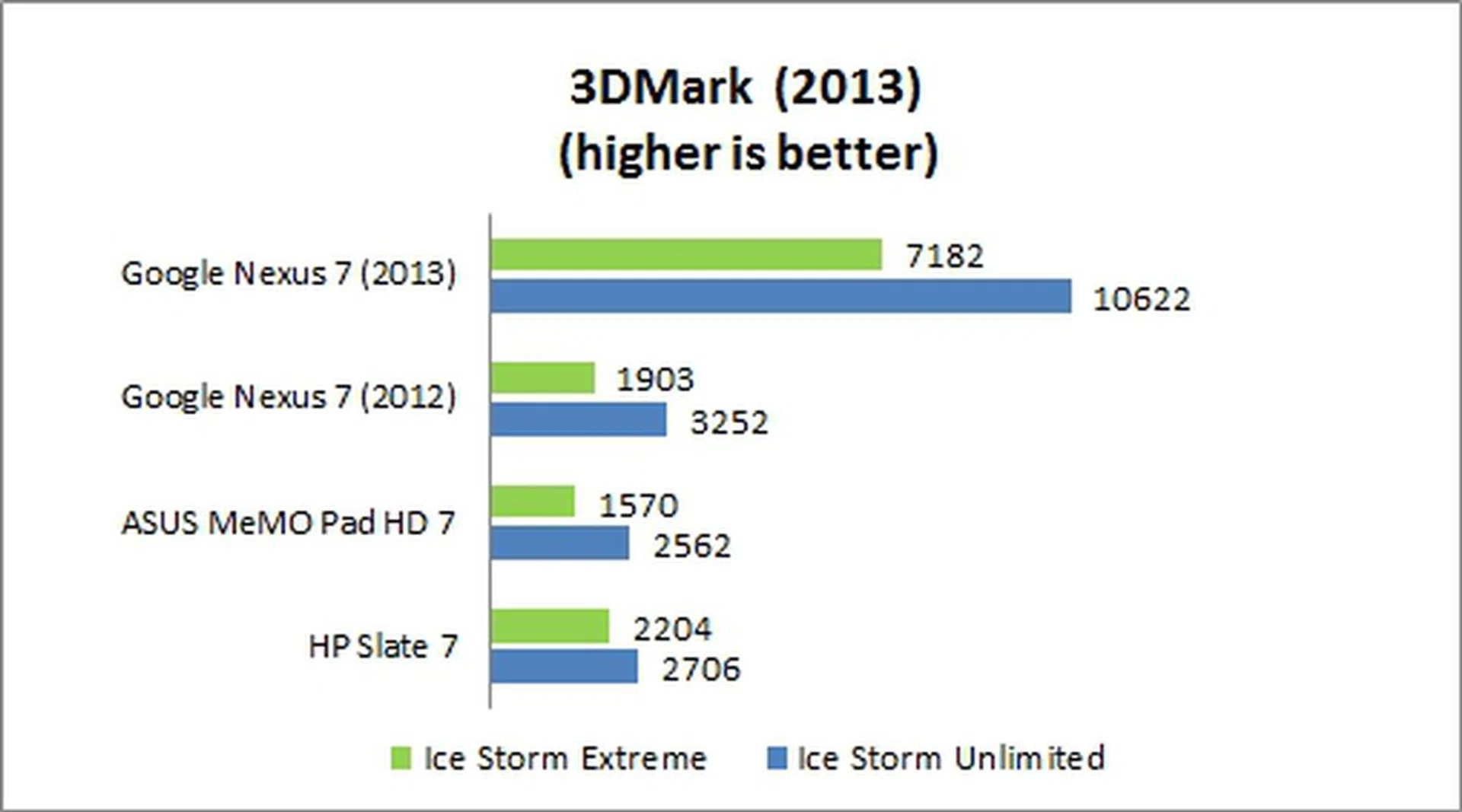
Once again, the Nexus 7 (2013) blew the competition out of the water with its performance in the 3DMark benchmarks; its Ice Storm Extreme's score is at least three times better than its rivals. In terms of chip-to-chip performance, the Snapdragon S4 Pro processor has no equal in this comparison.
SunSpider Javascript Results
SunSpider Javascript measures the browsing performance of a device. It not only takes into consideration the underlying hardware performance, but also assesses how optimized a particular platform is at delivering a high-speed web browsing experience.
Having conquered the earlier benchmarks, the Nexus 7 (2013) appeared to be unable to extend its victory in the SunSpider Javascript benchmark. Although it scored the best, the winning margin is rather marginal. The HP Slate 7 unexpectedly came in very close at second position.
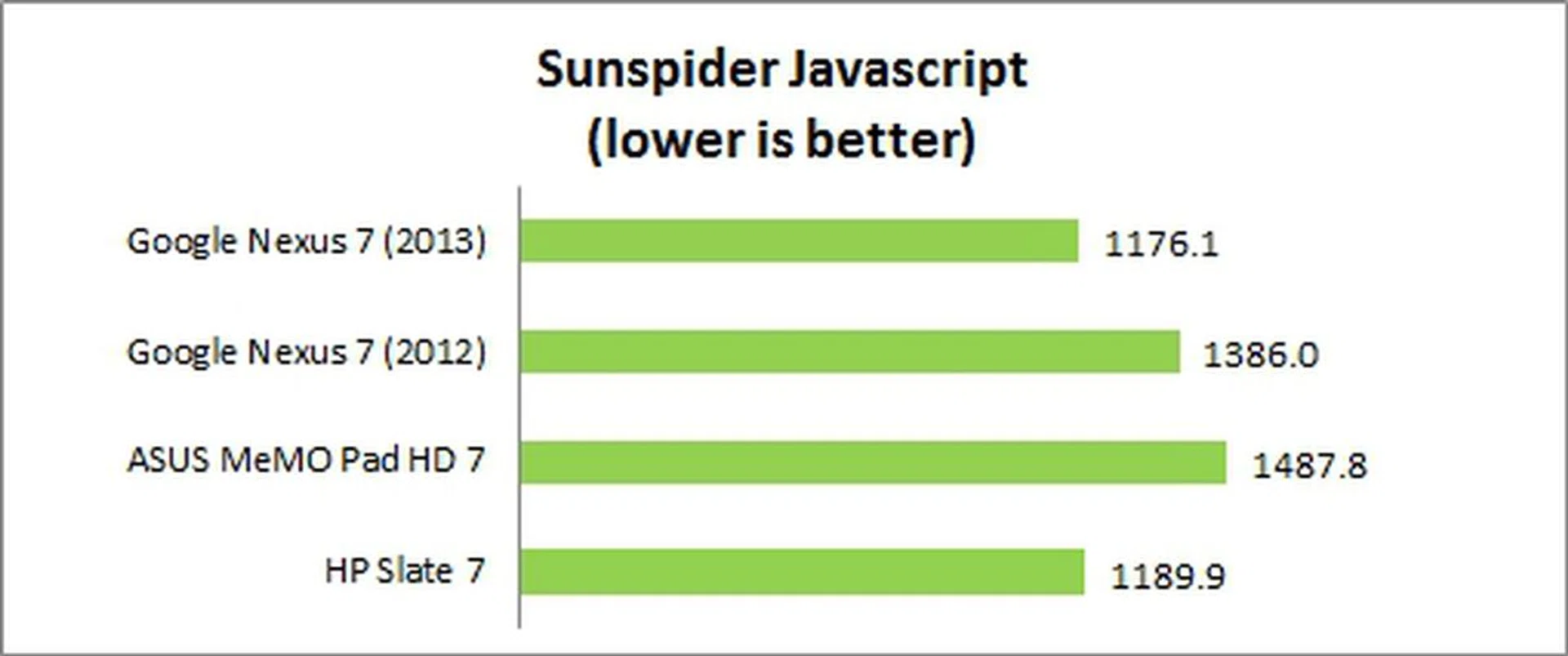
Benchmark numbers are just one part of the equation. Putting the benchmark results aside, the Nexus 7 (2013) sped through everything we threw at it. Interface navigation was a breeze and web browsing was smooth. Coupled with the fact that it runs on stock Android, the Nexus 7 has the smoothest tablet user experience we've seen thus far.
Battery Performance
Our standard battery test for mobile phones includes the following parameters:
• Looping a 720p video with screen brightness and volume at 100%
• Wi-Fi and Bluetooth connectivity turned on
• Constant data streaming through email and Twitter
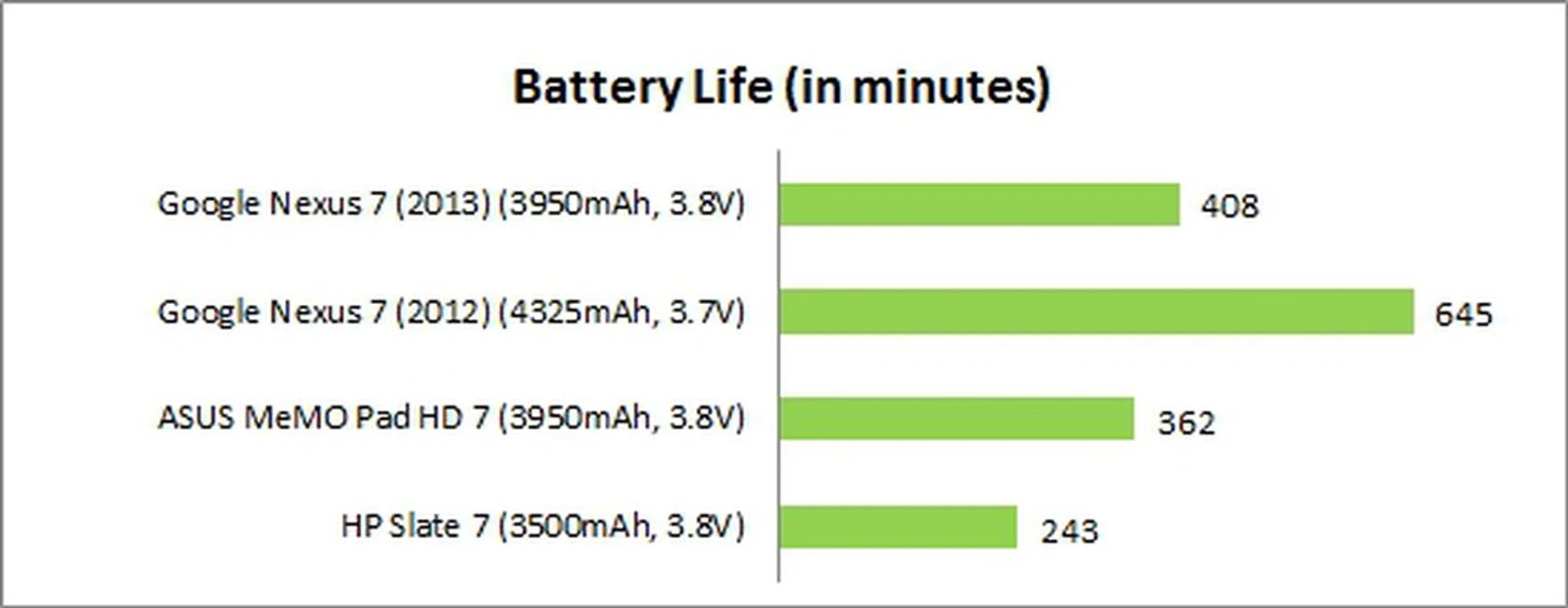
With the battery capacity shrinking from 4,325mAh to 3,950mAh and having to power more pixels, we were not optimistic that the Nexus 7 (2013) could match up to its predecessor. To recap, our battery life test of the previous generation Nexus 7 (2012) lasted an impressive 10 hours and 45 minutes.
So it was not really a surprise when the Nexus 7 (2013) struggled to even hit the seven-hour mark; it managed a mere 6 hours and 48 minutes of battery uptime. Compared to the Nexus 7 (2012), the battery mileage may seem like a huge disappointment. As mentioned earlier, we have to take into account the higher resolution display (there's more than twice the number of pixels on the screen) and smaller battery capacity. Moreover, as noted earlier in the review, the Nexus 7 (2013) has a brighter display which could result to an increased drain on the battery.
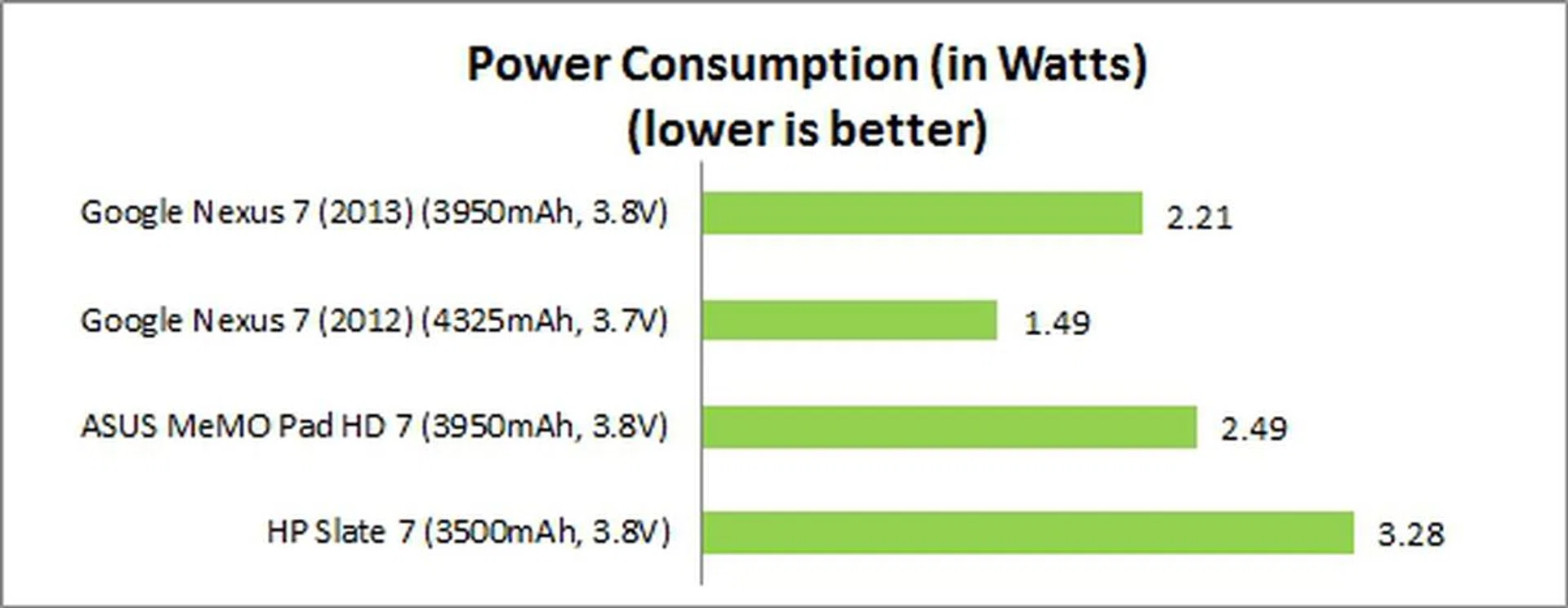
However, if you take the Nexus 7 (2012) out of the picture, the new Nexus 7 (2013) is still a fairly capable tablet when it comes to battery mileage. The ASUS MeMO Pad HD 7 lasted about 46 minutes shorter while the HP Slate 7 lasted close to three hours shorter. Just for comparison's sake, the 7.9-inch Apple iPad mini had a mileage of 7 hours with its larger 4,440mAh battery. And all of these competitors run at much lower resolutions than the new Nexus 7. So in fact, the newcomer actually fares rather well for its specifications and capabilities. As seen in the power consumption chart below that further solidifies the standings of the Nexus 7 (2013), its brighter and higher resolution display naturally registered a higher power draw than its predecessor, but it still fared much better than the MeMO Pad HD 7 and Slate 7.
Portability
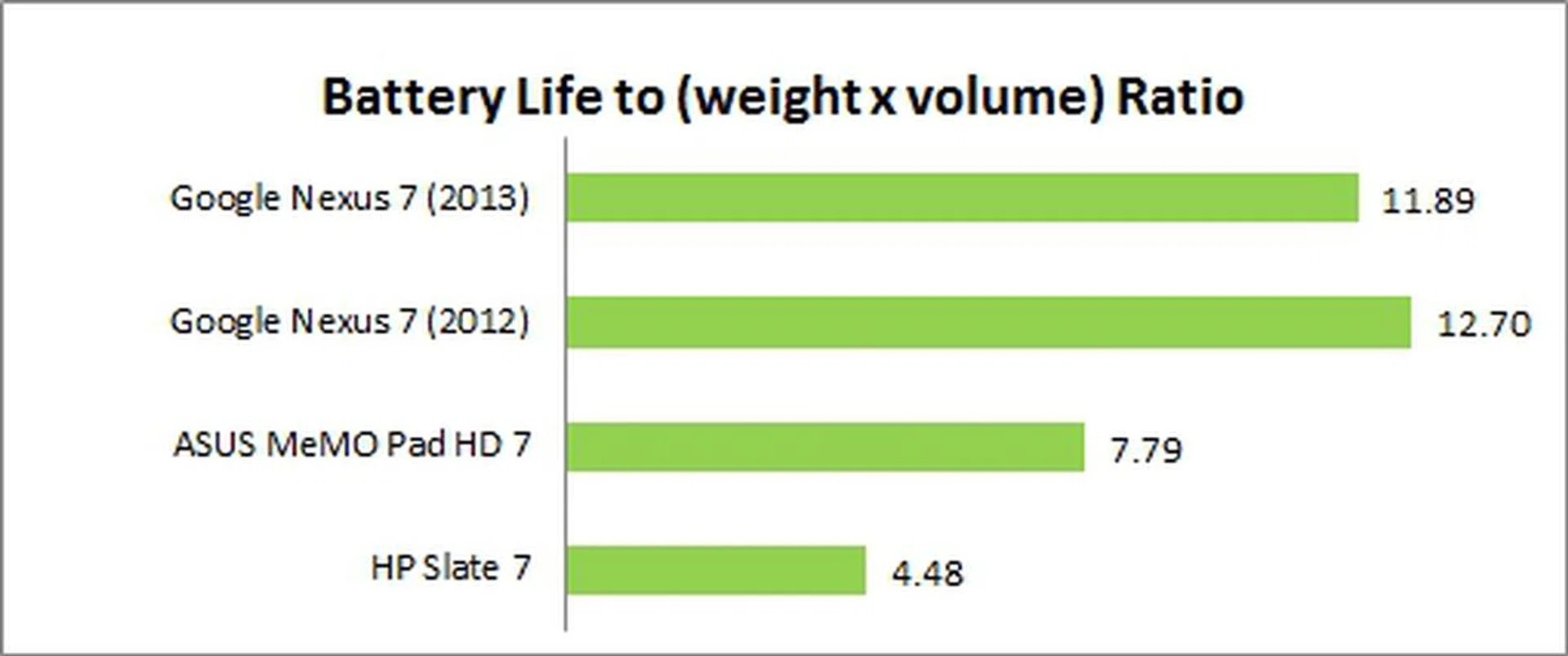
In the Portability Index where each device is assessed on its ability to balance battery mileage against its size and mass, the Nexus 7 (2013) ranked a far second from its predecessor despite having a slimmer and lighter form factor. The difference in battery mileage (four hours) outweighs the benefits of its more portable form factor. However, similar to how we stress that we should compare products within the same class of devices, given what we found from dissecting its battery life, you can easily tell that the new Nexus 7 (2013) is in a class of its own, even within the 7-inch space. As such, portability ratios for such highly specced products might tend to rank where the Nexus 7 (2013) sits and it becomes a new norm.
Conclusion
Priced at $379 (16GB, Wi-Fi), the Nexus 7 (2013) costs $30 more than its predecessor. For the measly extra you are paying, you get a better processor, a higher resolution display and a much more portable form factor. Oh and a rear-facing camera if you must use it.
However, the high resolution screen comes at a price - battery performance. It is not as long-lasting as its predecessor, but the Nexus 7 (2013) still fares better than most of its 7-inch rivals. We are also annoyed by the absence of a memory card slot, which severely limits the user to the limited onboard storage capacity.
Nonetheless, the attractive price point and solid overall performance still won us over although we feel the Nexus 7 (2013) doesn't break any new ground or record like its predecessor. The playing field has no doubt become more competitive this year, with ASUS themselves offering a cheaper albeit slightly inferior alternative - the $249 ASUS MeMO Pad HD 7.
It is likely to beat the next Apple iPad mini in price and match it in terms of display resolution, but Apple still holds the trump card when it comes to apps, build quality, design and user experience. Until the official announcement of the next generation iPad mini, we are hard pressed to find any worthy rivals in the market at the moment - that is if you can live with just 16GB internal storage.
Our articles may contain affiliate links. If you buy through these links, we may earn a small commission.