
The ASUS Transformer Pad TF103C is a surprisingly snappy tablet
ASUS recently released the Transformer Pad TF103C, a 10.1-inch Android tablet that's able to transform into a notebook with the help of its bundled keyboard dock. And the best part is that the whole package costs just S$399. Do we recommend it? We tell you after the jump.

Entry-level Transformer Pad
ASUS is very well known for its convertible, hybrid devices, ever since its first foray into the Android ecosystem with the original Eee Pad Transformer in 2011. Ever since then, the company has been releasing a multitude of hybrids, ranging from phablets in the PadFone series, to even Android/Windows-capable devices in the Transformer Book series. Recently at Computex, ASUS also brought out the Transformer Pad TF103C, a 10.1-inch hybrid device that is aimed at serving the budget segment of the market, all for just S$399.
Design
Like many of ASUS' other hybrids, the TF103C comes in two parts: the tablet itself, and a keyboard dock. Upon unboxing, the TF103C reveals itself in the "notebook" form, that is, the tablet and keyboard dock combined together. The case is made of plastic, with a good black texture reminiscent to that of the Nexus 7 or the Kindle Paperwhite.
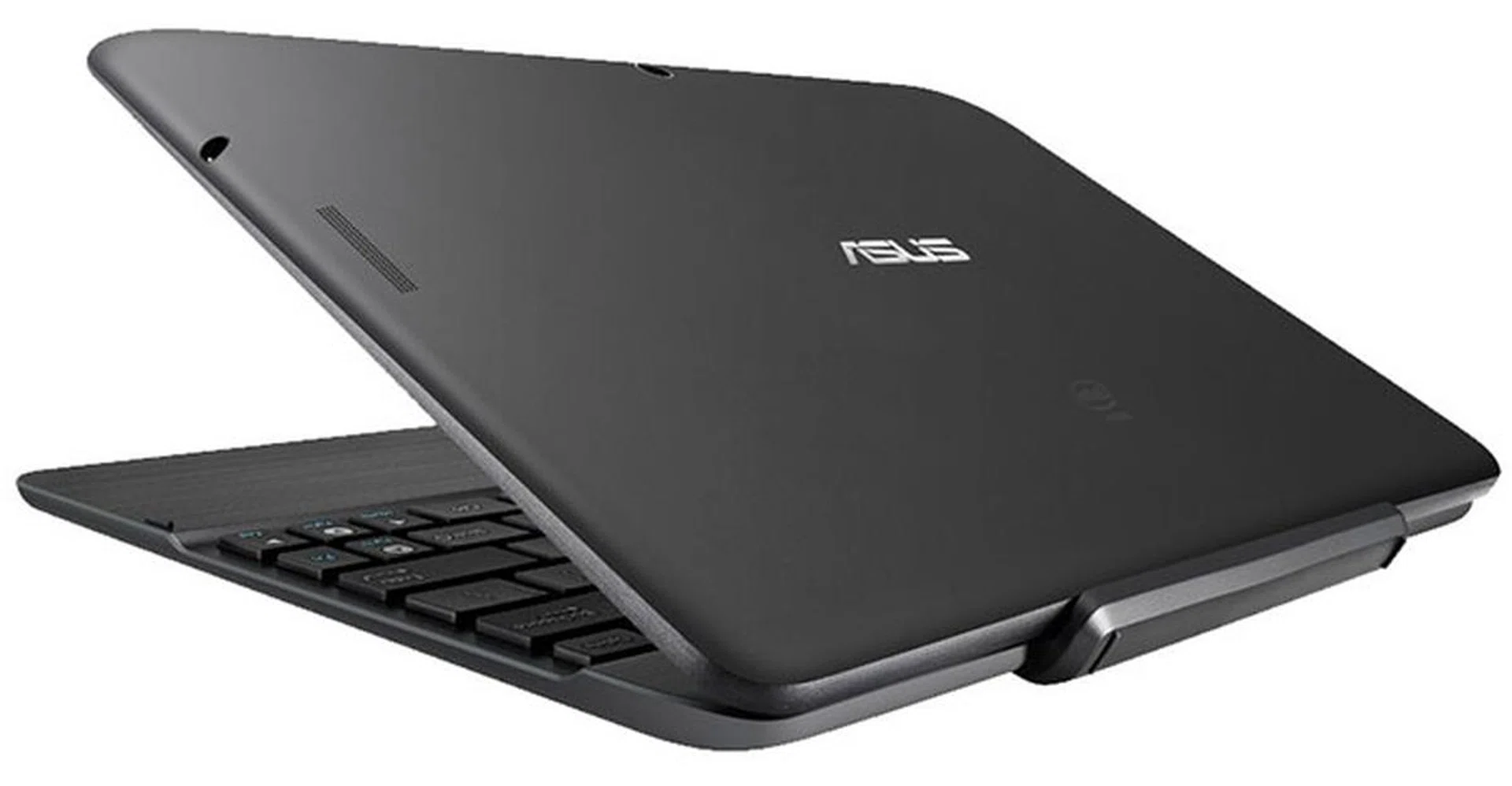
The tablet with dock combined TF103C weights 1.1kg.
The TF103C weighs at 1.1kg with the dock, which is comparable to the weight of an 11-inch MacBook Air. Probably due to its smaller size (vs. the MacBook Air), the TF103C feels denser and chunkier. In addition, when closed, the hybrid resembles that more of a slim netbook than an Ultrabook. At 1.98cm thick when docked, it is thicker than the MacBook Air and devices in ASUS' own Zenbook series.
On the tablet portion of the hybrid, the micro-USB port and microSD slot are located along the left side. The power button is located conveniently on the top left side, with the earphone jack on the right side of the screen. The speakers are situated the back left and right side respectively. On the keyboard dock, there is a USB 2.0 port for users to plug in their mouse or mount a USB storage device. In essence, much like how Samsung pitches its high-end Galaxy Note Pro Android tablets, ASUS thinks that its budget hybrid can be just as productive.

The dock is about as thick as the tablet itself.
The TF103C has a rather huge docking mechanism. Due to its thickness, the whole hybrid is unable to fully lie on a flat surface. Thus, without the full grip on the surface, the TF103C feels like it is floating even when laid on surface. It is however easier to dock and undock than previous Transformer models.
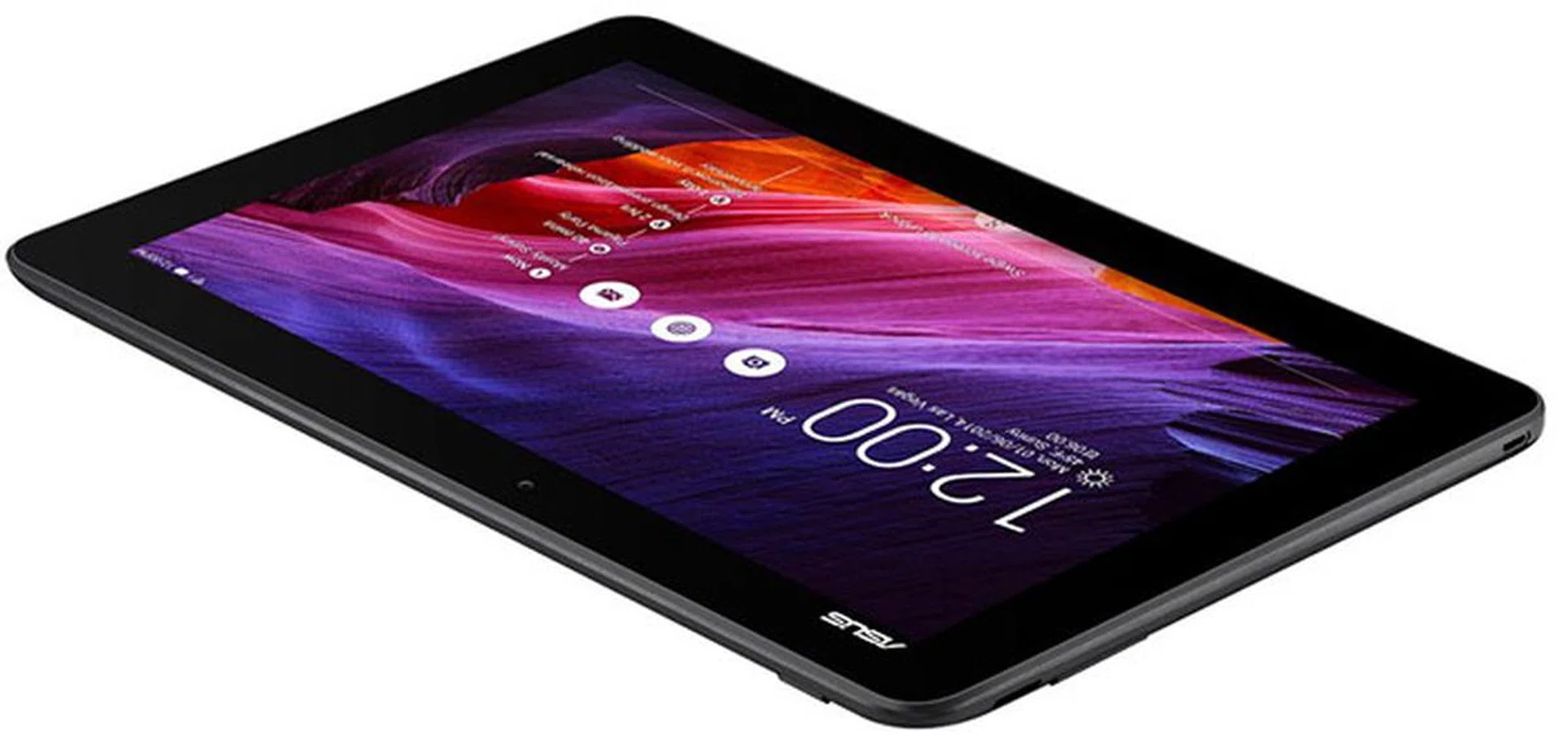
When undocked, the TF103C looks like just any other tablet, with inch-thick bezels surrounding the 10.1-inch screen. Weighing at 550g in tablet form, the tablet feels heavy in the hand. Its 9.9mm thickness is also rather thick.
Speaking of the screen, the TF103C sports a 10.1-inch IPS LCD screen, with a 1,280 x 800-pixel screen resolution, yielding a pixel density of 149ppi. The low resolution means that pixelation is rather obvious when you're using it as a tablet (because you'll be holding it much closer to you). However, it becomes less of an issue when using it as a notebook, since your eyes will be looking at the screen at a further distance.
Keyboard
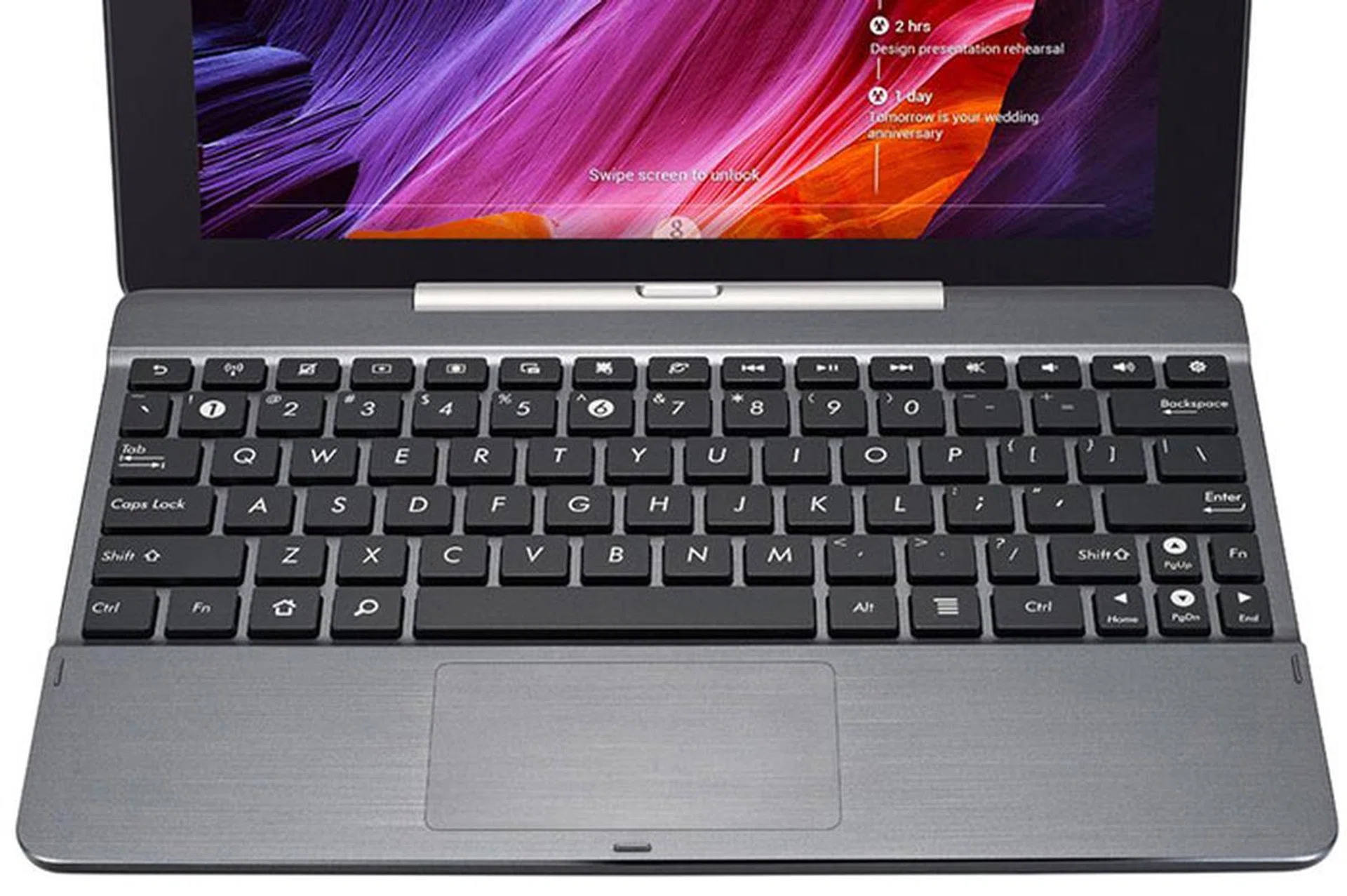
The keyboard dock looks really nice with its brushed metal finish.
The keyboard dock sports a brushed metal finish. The layout is that of the typical Android keyboard layout, and it also sports a touchpad. Keys on the keyboard feel slightly soft and small though, but are still quite comfortable to type on. One major difference that sets the TF103C's keyboard apart from previous ASUS hybrids is the lack of an external battery in the keyboard dock, which means it draws power from the tablet instead. The pro is that the whole contraption is lighter, but the con is that you don't get additional battery life with the dock.
Software
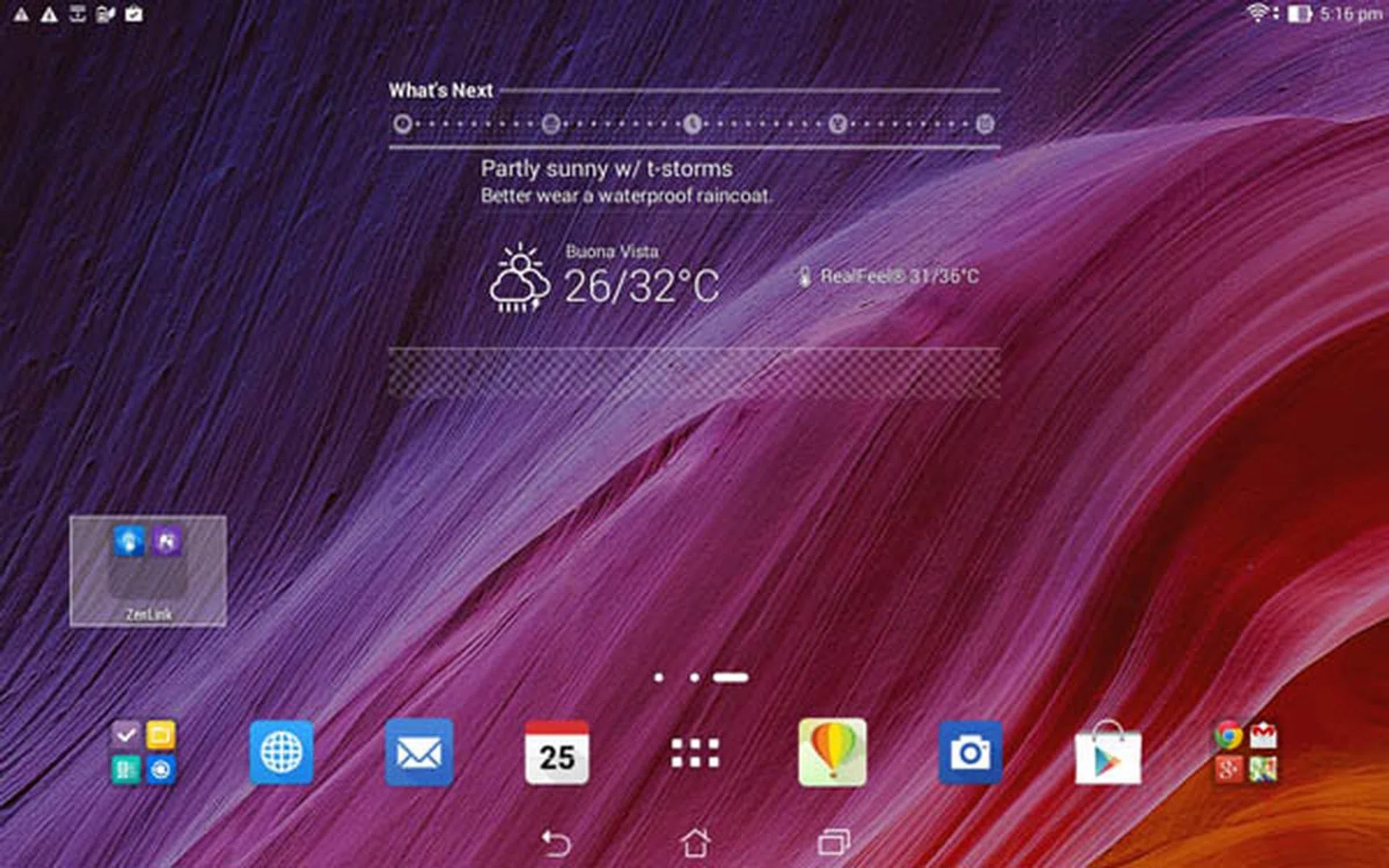
The ASUS ZenUI feels snappy. We also like the uncluttered look.
The ASUS Transformer Pad TF103C comes with Android 4.4.2, with ASUS' ZenUI as its UI overlay. Many of the ZenUI features here are the same as what we saw in the ZenFone 5 (without the phone portion, naturally). You can also check out this dedicated article where we detailed the .
Here's a short clip from ASUS demoing the ZenUI:

Last but not least, the TF103C comes with 16GB of in-built eMMC storage. However, 5.14GB is taken up by system files, thus leaving 10.86GB of usable space. As mentioned earlier, one side of the tablet has a microSD card slot (supports up to 64GB) if you need to expand the storage.
Performance
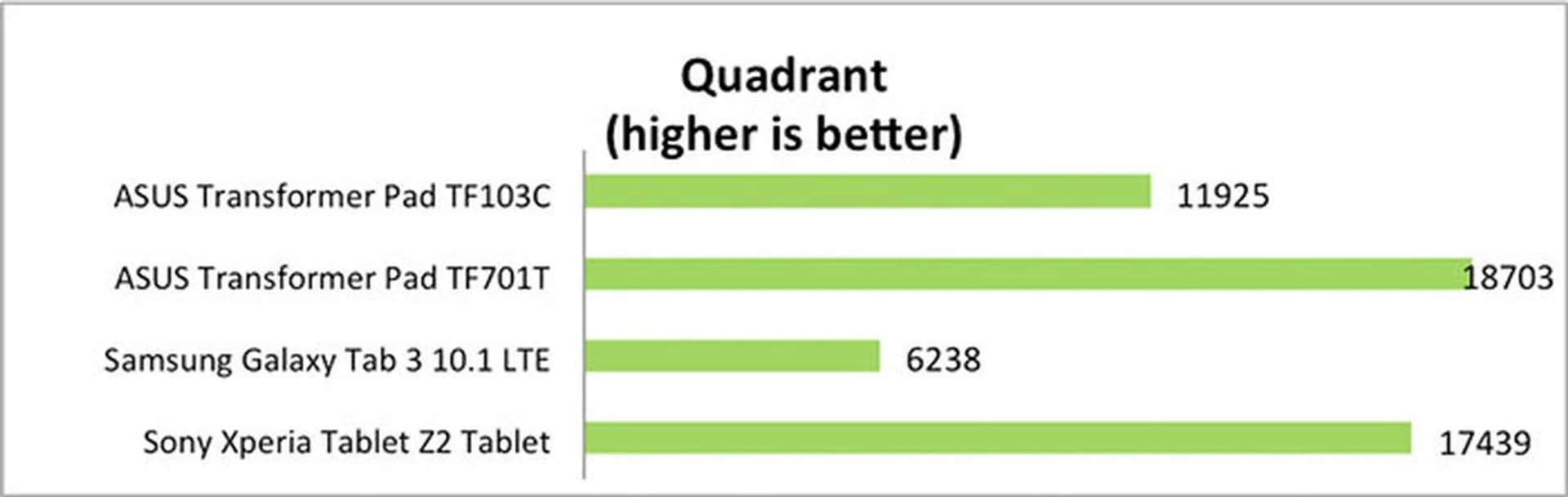
The Transformer Pad TF103C is powered by an Intel Atom Z3745 quad-core 1.33GHz SoC (up to 1.86GHz burst frequency) with 1GB RAM. Would adopting Intel's architecture instead of ARM's put the TF103C ahead of its ARM-based competitors in terms of performance? Or is it the other way round? For this review, we pitted the TF301C against the ASUS' TF701T, Samsung's Galaxy Tab 3, and Sony's Xperia Z2 Tablet to get an understanding of how it measures up against both budget and premium tablets in the Android space.
Quadrant
Quadrant evaluates a device's CPU, memory, I/O and 3D graphics performances. Notice that despite being a budget tablet, the TF301C's Quadrant performance is no slouch, and it easily outperforms the Tab 3 10.1.
SunSpider
SunSpider measures the browsing performance of a device when processing JavaScript. It not only takes into consideration the underlying hardware performance, but also assesses how optimized a particular platform is at delivering a high-speed web browsing experience.
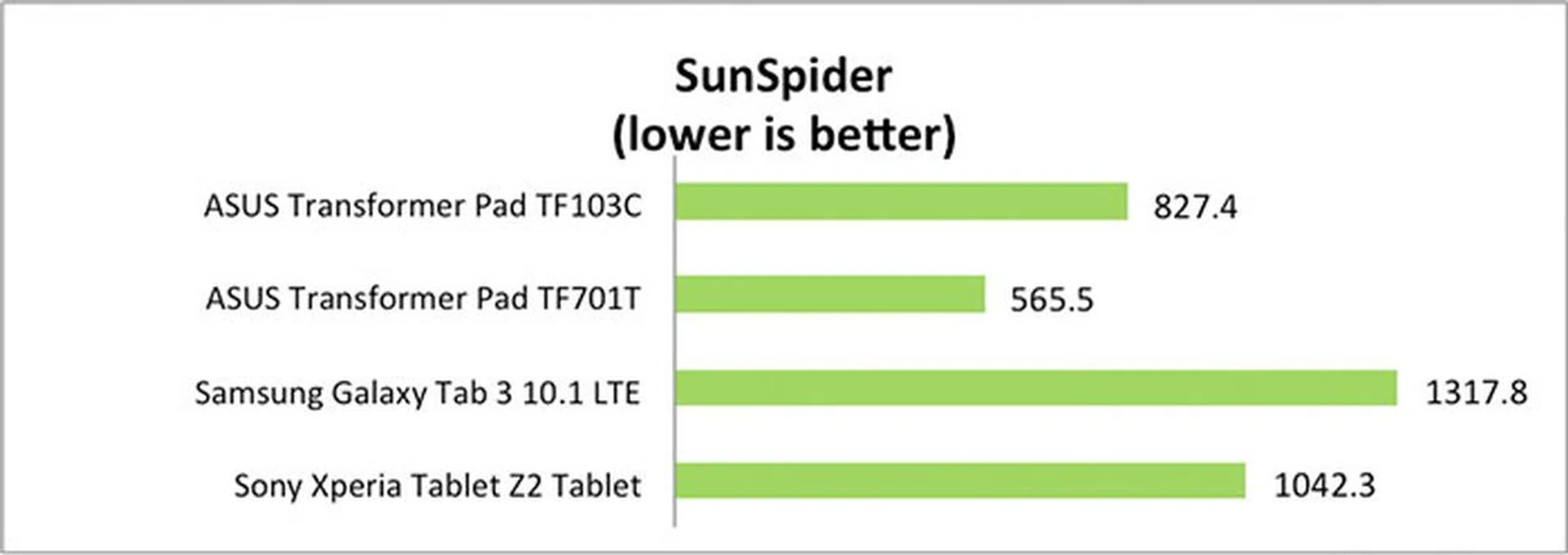
The TF103C's SunSpider 1.0.2 score is decent, and is well below the 1,000ms mark. This is again remarkable, given the budget positioning of the tablet. It is even more intriguing that it beats the Xperia Z2 Tablet, which is a high-end (read: more expensive) device.
Real world performance
Despite the TF103C being a budget device, the tablet performs decently under many circumstances. Launching and switching apps are fast, partly due to its relatively low screen resolution, as well as its ZenUI being modeled close to stock Android. In fact, it feels snappier than some high-end tablets we've tested in the past. One should also take note that due to its limited 1GB memory, some apps may be killed when not in use, and thus one may encounter a relaunch of the app when switching back.
For gaming, our tests showed that the TF103C clearly has enough horsepower to run 3D-intensive games like Real Racing 3. In fact, it should do 1080p just fine; we could only posit that ASUS didn't go this route due to battery life and cost concerns.
Battery life
The battery life of the TF103C was tested by looping a 720p video with the following settings:
- Wi-Fi and Bluetooth connectivity turned on
- Constant data streaming through email and Twitter
- Screen brightness and volume at 100%
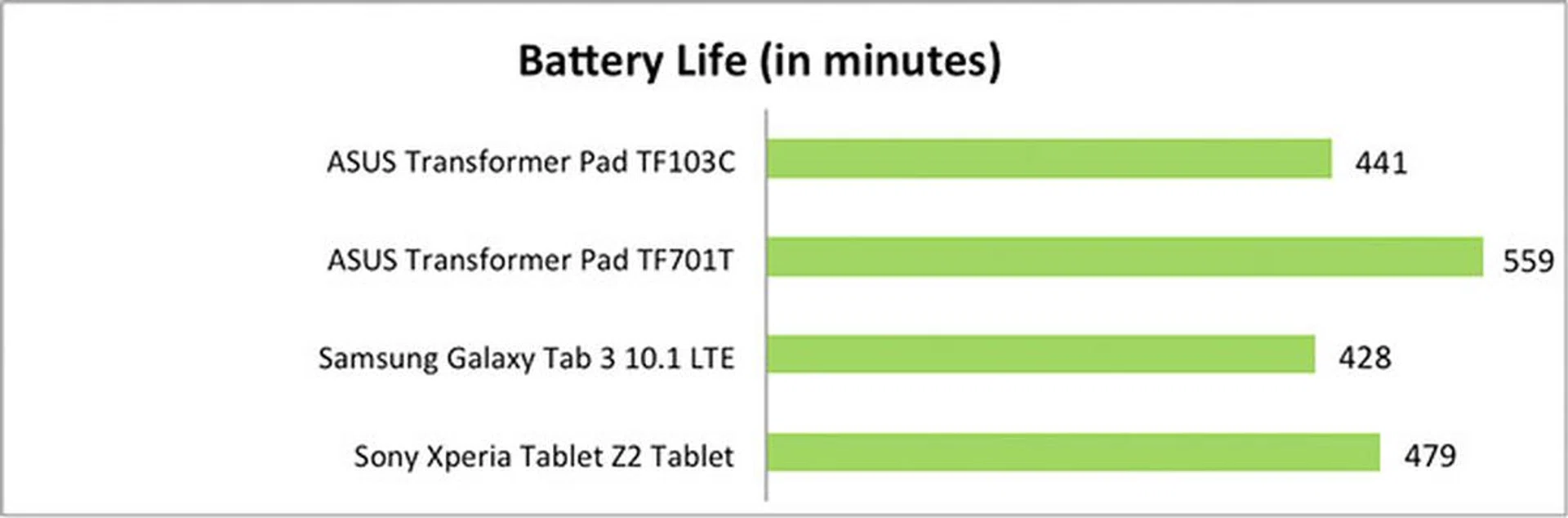
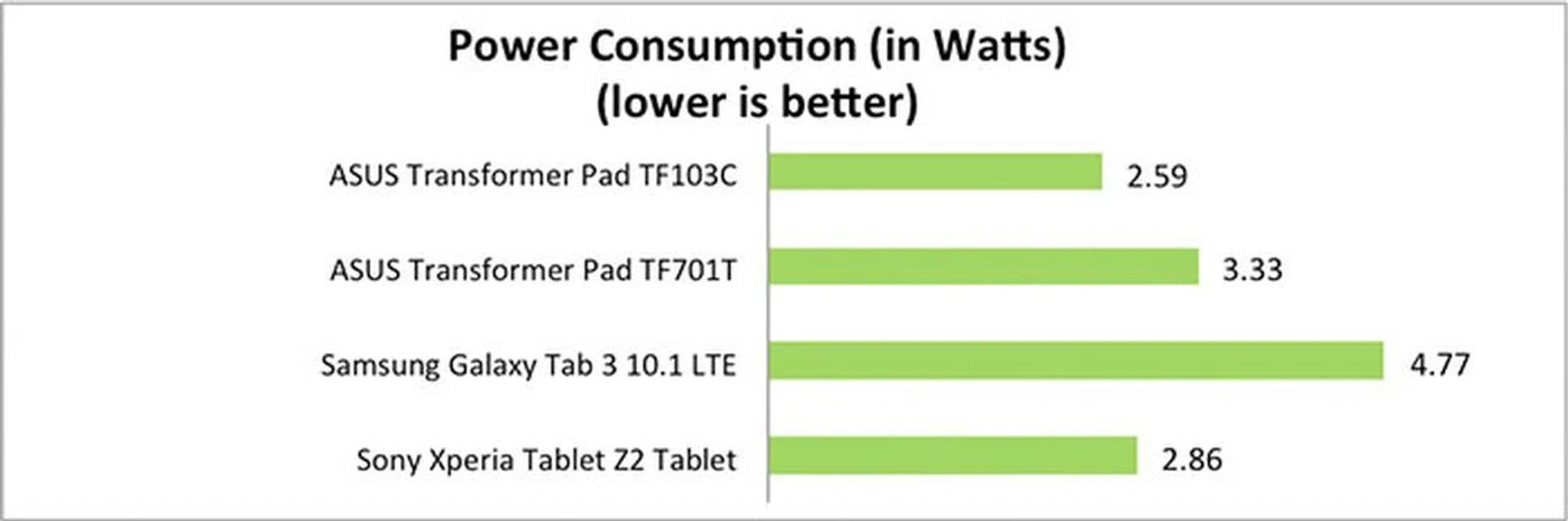
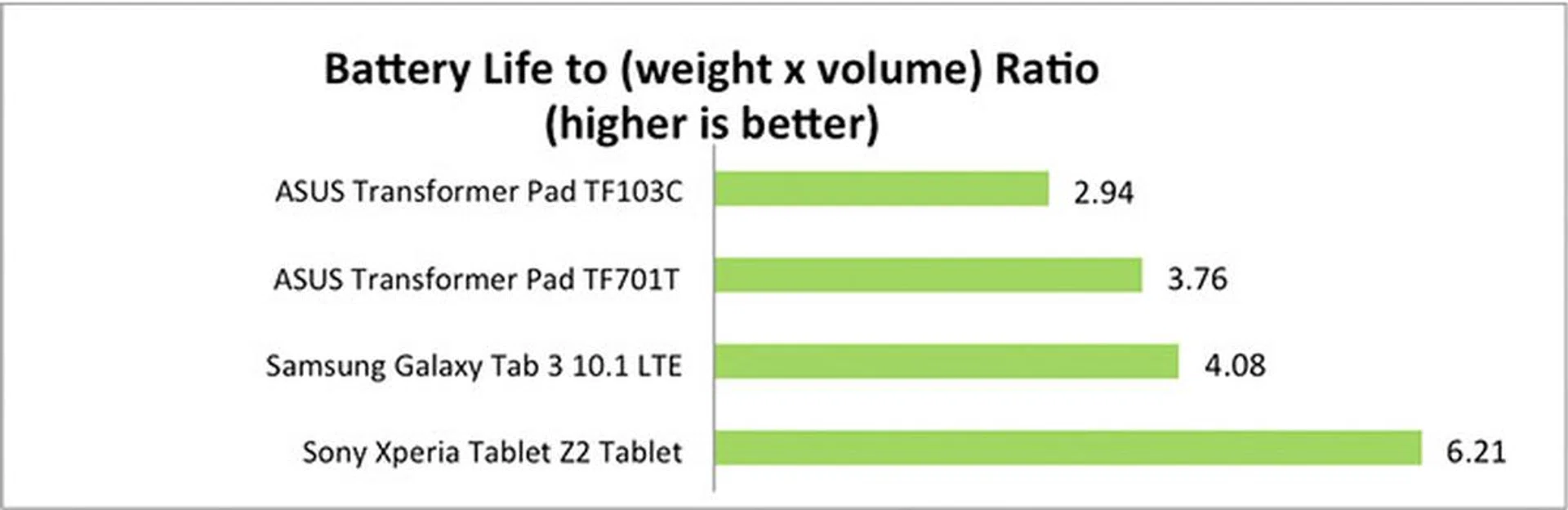
Despite ASUS saying that the TF103C's fairly small 19Wh battery is able to last 9.5 hours, the device lasted about 7.5 hours in our continuous video playback test. While not excellent, versus other budget tablets, this is still in the expected ballpark. And as mentioned earlier, the keyboard dock can't act as an extra battery pack because it doesn't have its own battery cell in the first place. And it's this so-so battery life that pulls its score down in our Portability Index, which is a quick way of seeing how worthwhile it's to lug a device out and about.
Camera
The Transformer Pad TF103C has a 2-megapixel rear camera and a 0.3-megapixel front camera, which again, are decent for the price but nothing to shout about. Not surprisingly, the imaging performance isn't very good, even with good lighting.

The quality of the photo is only about average even in normal lighting.

Noise and detail loss are apparent in low-light shots. Our advice? Don't use it for important shots.
Conclusion
While it's true that the ASUS Transformer Pad TF103C is marketed as a budget tablet, and it does lack cutting edge hardware (e.g., low-res screen, low-quality cameras, USB 2.0 instead of USB 3.0), it actually doesn't perform too badly, thanks to a decent hardware and software match. The Intel Atom Z3745 performs admirably fast, and is further aided by a lean ZenUI that doesn't try to do too many things to bog down the system. We seldom see such UI fluidity on a budget tablet, but we see it here on the TF103C. The 1,280 x 800-pixel screen is a pragmatic choice as it helps in the battery life department; and the bundling of the keyboard dock is a great marketing move. If there's one thing we could change, it would be the amount of RAM because 1GB really hampers the multi-tasking experience.
Ultimately, with the Transformer Pad TF103C, you get what you pay for. And the debate we've when we reviewed the Samsung Galaxy Note Pro also applies to this end of the spectrum. And that is, if there are Windows apps that you must have and they have no Android equivalents, then perhaps it's better to be resist the lure of this low-priced Android tablet/laptop hybrid, and spend a bit more on a budget (but proper) Windows notebook, or splurge on one of those X-in-1 Android/Windows hybrid devices that ASUS also has to offer.
Our articles may contain affiliate links. If you buy through these links, we may earn a small commission.