

Note: This article was first published on 10 June 2025.
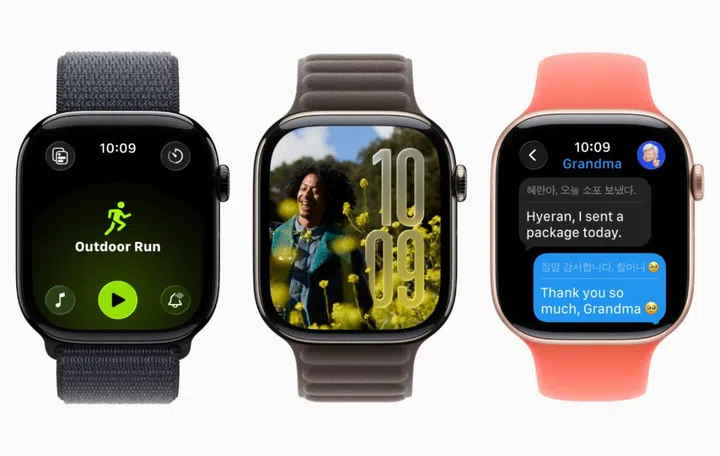
Not every Apple Watch will get the updates. Photo: Apple.
The updates to watchOS 26 that were announced during WWDC 2025 adds a new display and some interesting new features.
Liquid Glass display
Like other updates talked about during WWDC 2205, watchOS 26 is getting Liquid Glass and, like the rest, adds revamped icons and translucent elements to all of Apple’s devices to deliver a more unified look and feel to Apple's software platforms. Smart Stack widgets, Smart Stack hints, notifications, Control Centre, and in-app controls and navigation will adopt the new design, as will the Photos watch face so you can see even more of your photo.
Workout buddy

Photo: Apple.
Get motivated to work out as your fitness history is combined with Apple Intelligence to generate personalised insights, based on data like heart rate, pace, distance, Activity rings, personal fitness milestones, and more to create Workout Buddy.
Text-to-speech (using a voice recorded from a fitness trainer) will be used to motivate you to get moving or to put in that final push to close an activity ring. Workout Buddy will be available on Apple Watch with Bluetooth headphones and requires an Apple Intelligence-supported iPhone nearby. It will be available starting in English, across some of the most popular workout types: Outdoor and Indoor Run, Outdoor and Indoor Walk, Outdoor Cycle, HIIT, and Functional and Traditional Strength Training.
Smarter Smart Stacks

Photo: Apple.
This year, Smart Stacks combines on-device data with user information to deliver more contextual and relevant information that is immediately useful to you. For example, a hint for Backtrack may appear when a user is in a remote location with no connectivity, or a hint for a Pilates workout may show up when a user arrives at a studio location at their usual time.
Enhanced Notifications

Photo: Apple.
Apple Watch can also now automatically adjust the speaker volume based on the ambient noise in your surroundings for notifications, timers, alarms, incoming calls, and Siri, so you don’t disturb anyone sitting next to you in a library, for example. Wrist Flick is something new where a turn of the wrist will dismiss notifications and show your usual Watch face. You can also use it to mute incoming calls, silence timers and alarms, and close the Smart Stack. It is available on the Apple Watch Series 9, Apple Watch Series 10, and Apple Watch Ultra 2.
Better Messages
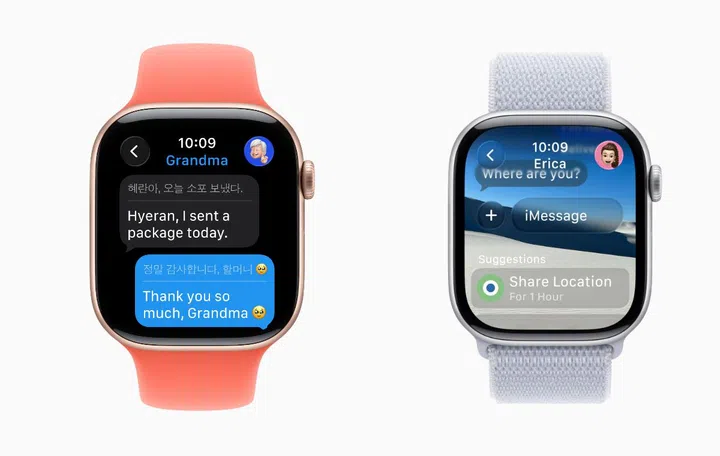
Messages now have live translation and contextual awareness. Photo: Apple.
You can now get Live Translation in Messages with Apple Intelligence, allowing incoming texts to be automatically translated into your preferred language, right on your Apple Watch. Your replies get translated into the other language for the person you’re having a conversation with Apple Intelligence using contextual knowledge to provide suggestions for relevant actions. Live Translation will be available on Apple Watch Series 9, Apple Watch Series 10, and Apple Watch Ultra 2, with an Apple Intelligence-supported iPhone.
Additional updates
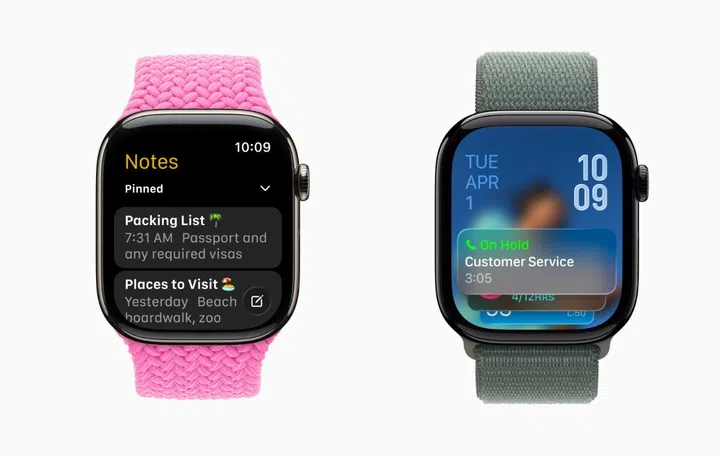
The new Notes app and Hold Assist at work. Photo: Apple.
New to Apple Watch is Notes. This app allows you to access notes, pin and unlock notes, complete checklist items, and create new notes with Siri, dictation, and the keyboard right on your wrist.
If your iPhone is near your Apple Watch, you can now do Hold Assist and Call Screening. When a user is waiting for a live agent, Hold Assist recognises when a live agent comes online and notifies you to return to the call. Call Screening helps you manage incoming phone calls from unknown numbers more efficiently by collecting a name and reason for the call before your phone rings, so you can make an informed decision on whether to pick up, decline the call, or ask for more information.
Read more:
- The biggest updates to macOS Tahoe 26 are a dramatic redesign and a more powerful Spotlight
- Apple iPadOS 26 gets Mac-like productivity with the latest updates
- All the key updates for Apple iOS 26, as seen at WWDC 2025
- tvOS 26 brings Liquid Glass, karaoke, speaker support, user profiles, and a new look to your TV
Our articles may contain affiliate links. If you buy through these links, we may earn a small commission.