
Samsung Galaxy Note10 and Note10+ review: Substance meets Style
Should you get the new Samsung Galaxy Note10 and if so which version? We put Samsung's Galaxy Note10 and Note10+ through our paces to see how they compare and which should option should you splurge for.
Note: This article was first published on 24 August 2019.
Welcome to the Galaxy Note10 and Note10+

Say Samsung Galaxy Note series and you’ll think bigger display, long battery life, high-end hardware and of course, the S Pen stylus. Things didn’t change this year, but Samsung’s approach has, as there are now two versions of the Galaxy Note – the Note10 and the Note10+. You have probably read our hands-on from the launch event and here's the full review of these new flagship-class phones.
Measuring 151.0 x 71.8 x 7.9 mm, the 6.3-inch Galaxy Note10 is smaller and handier, while the larger 6.8-inch Galaxy Note10+ measures 162.3 x 77.2 x 7.9 mm, gives you a lot more screen real estate. Samsung has made sure that both have Dynamic AMOLED Infinity-O displays, and essentially the same processor setup, so the experience doesn’t differ too much regardless of the size of display you choose.

Which is which? Without the benefit of scale it's certainly hard to tell the difference.
Both phones are powered by Samsung’s Exynos 9825 processor, a new 7nm 64-bit octa-core processor with the following core configuration: 2x 2.73GHz Mongoose M4 / 2x 2.4GHz Cortex-A75 / 4x 1.9GHz Cortex-A55.
The Note10 and Note10+ are the first Samsung phones to adopt the speedier UFS 3.0 storage spec for internal storage. The Note10 comes with 8GB of RAM and 256GB internal storage, while the Note10+ comes with 12GB of memory and either 256GB or 512GB of internal storage.
If storage expansion is important to you, note that only the Galaxy Note10+ comes with a microSD slot and storage can be expanded by up to 1TB via a microSD memory card.
Of course, the iconic S Pen gains some new tricks too, which we’ll cover later. In the meantime, here’s a table that lists out all the key specifications of both phones.
If you’re wondering how the Note10 series phones differ from the previous Note9, check out this video:
Design
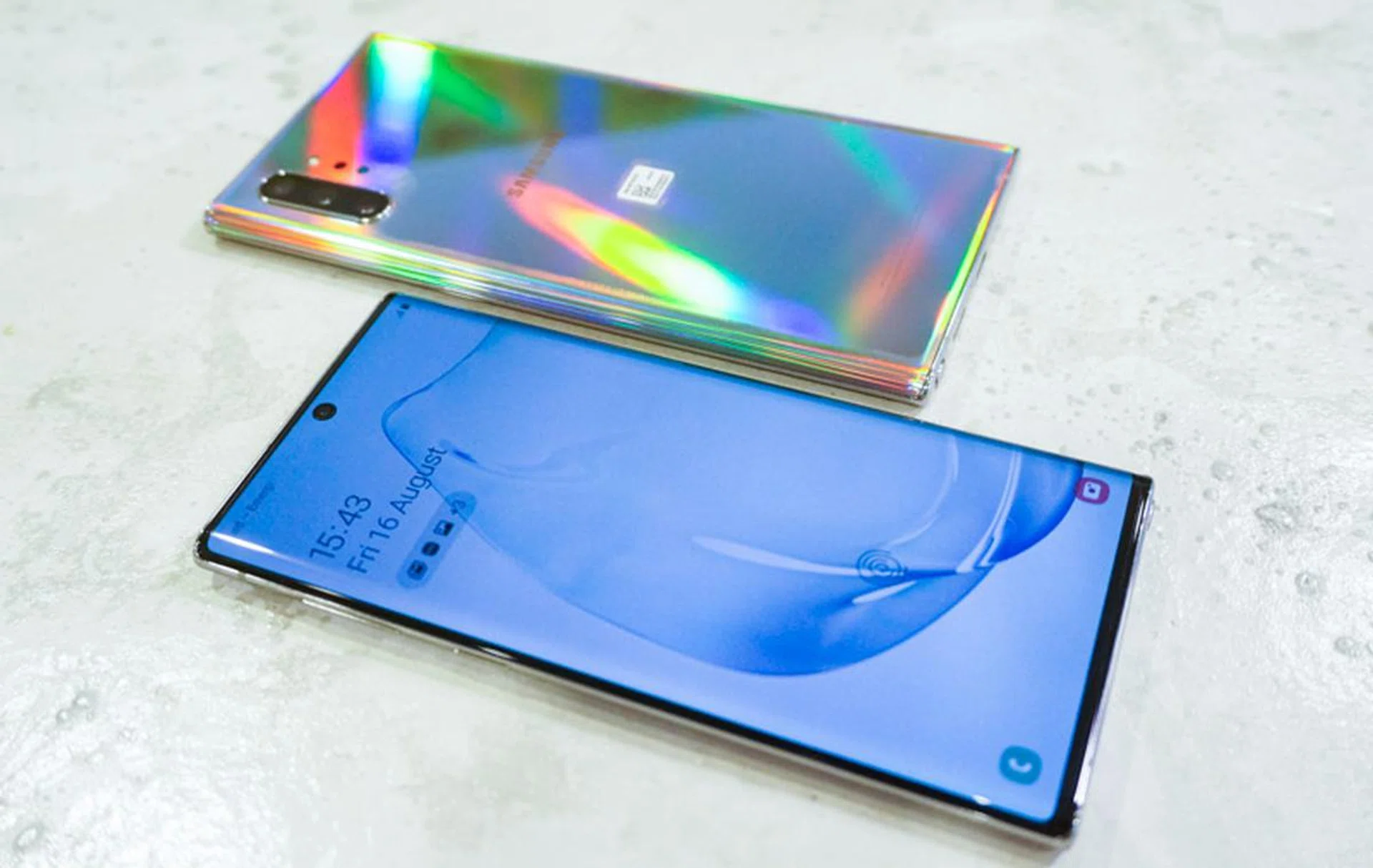
The new prismatic design really plays with light well.
The Galaxy Note10 phones now come in what Samsung calls “Prismatic Colour Perspective design”. The entire body is fairly glossy, so light reflects off the back of the phone nicely. That’s especially obvious with the Aura Glow colour you see here, as that seems to give a rainbow effect depending on how the light hits it.
The edges are also more rounded now, so the phone is now completely symmetrical. With a screen-to-body ratio that’s greater than 94% (Samsung isn’t releasing actual figures), you’re getting a lot more screen than most phones. In fact, we’d say the larger Note10+ has more screen than the vast majority of the phone models in the market now.
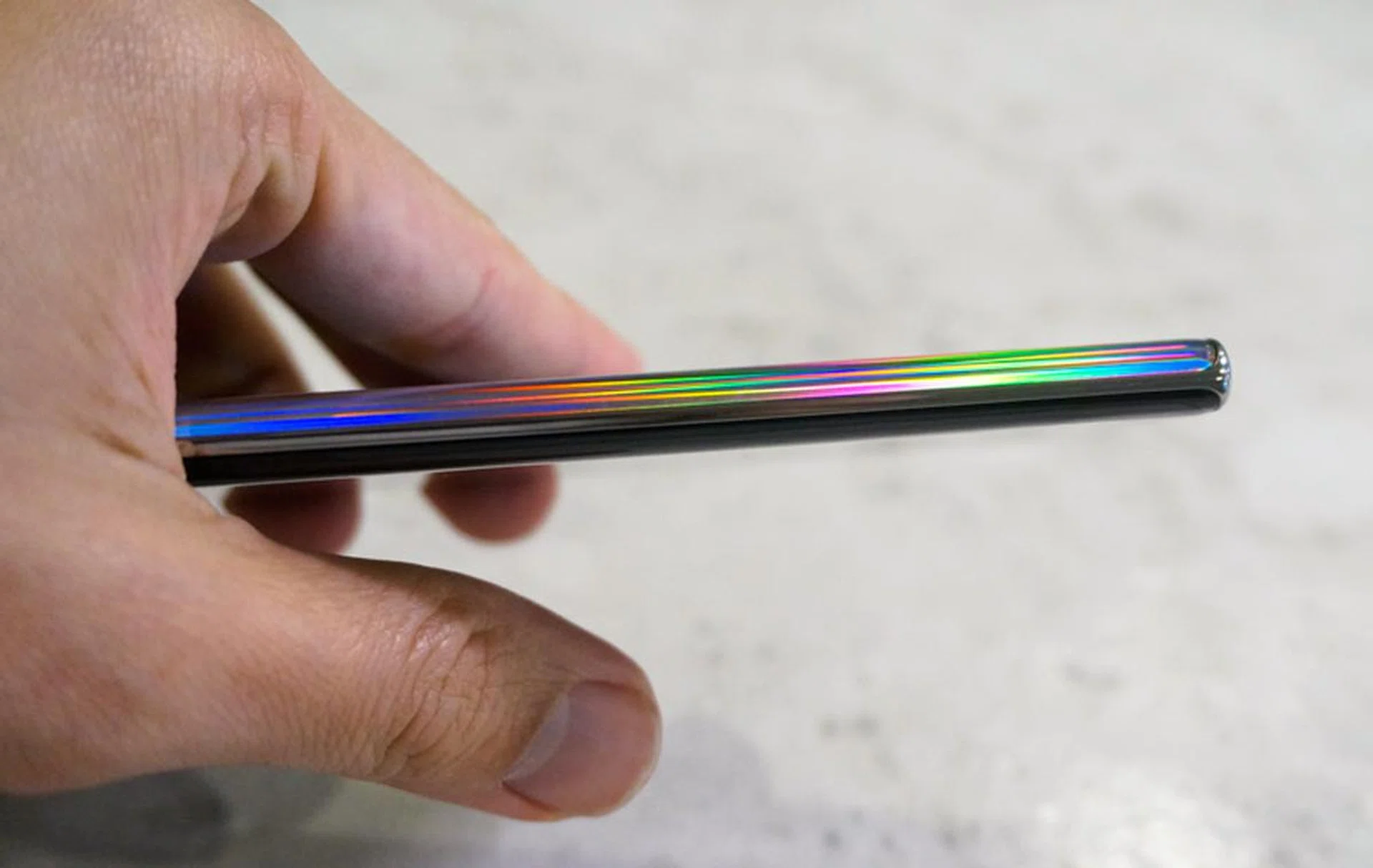
With a thinness of just 7.9mm, the Note10 phones really fit nicely in your hand.
In terms of size, the Note10 has a 6.3-inch Dynamic AMOLED Infinity-O display with an FHD+ resolution of 2,280 x 1,080 pixels (401ppi). It measures 151.0 x 71.8 x 7.9mm and weighs just 168g, making it a lot more portable.
The Note10+ is larger but it isn't overwhelming unless you have really petite hands. It measures 162.3 x 77.2 x 7.9 mm and weighs 196g, so you’re only taking on 30g more in terms of weight. The trade-off is that you’ll get a larger 6.8-inch Dynamic AMOLED Infinity-O display with a QHD+ resolution of 3,040 × 1,440 pixels (498ppi). It looks gorgeous but more on the displays' performance later.
Both screens are HDR10+ certified and UI verified. The thickness of this phone or rather, the lack of thickness for a phone with such a large screen is impressive, and we feel the new design makes the phone fit more comfortably in your hand despite the size.
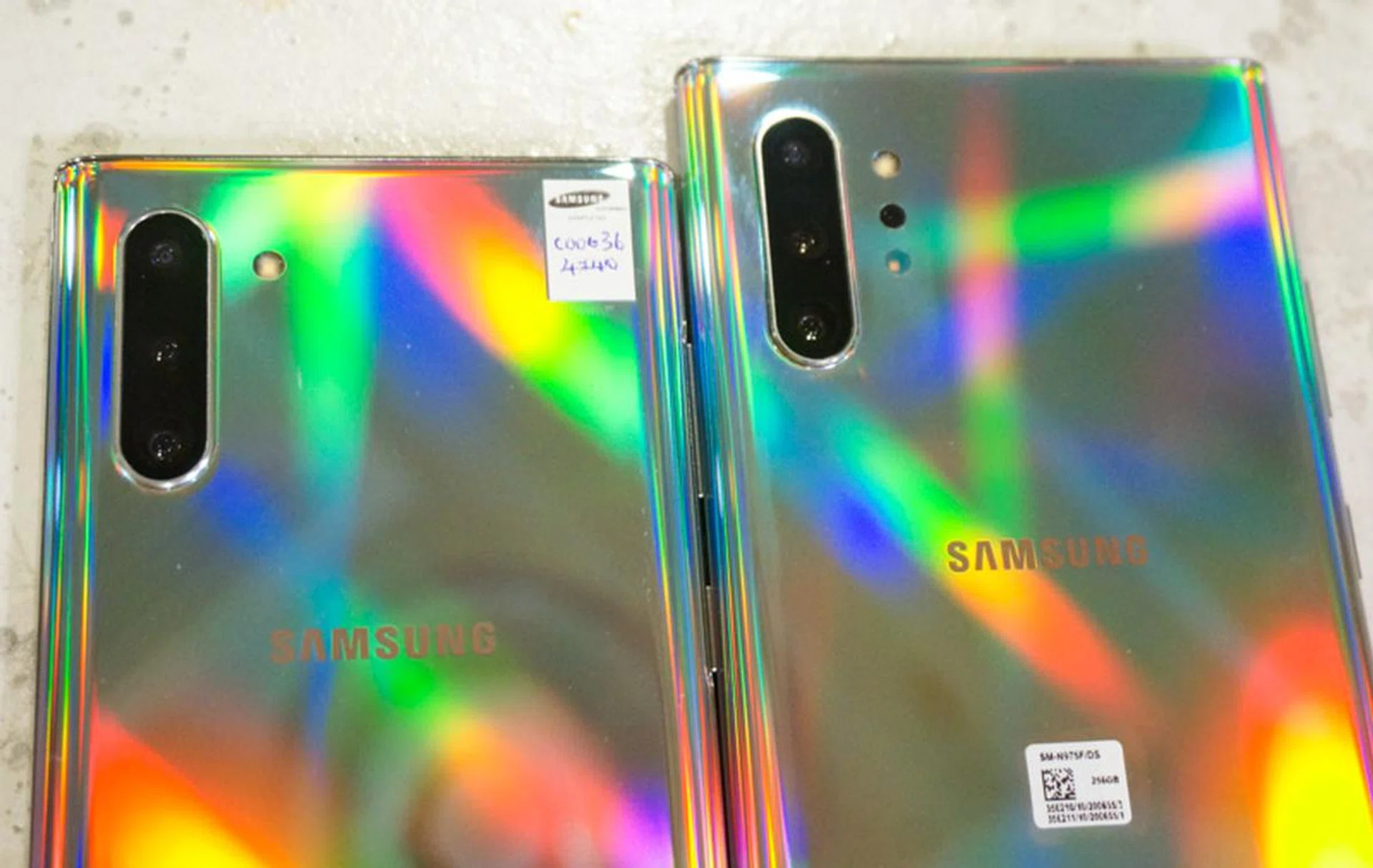
The only difference in camera systems is the Note10+ gets an extra depth sensor.
In terms of cameras, both phones get a triple camera configuration on the back. This goes back to the vertical orientation, with what looks to be very similar setup to what was found on the earlier Galaxy S10 series:
- Ultra Wide 16MP F2.2 (123°) camera
- Wide-angle 12MP 2PD AF F1.5/F2.4 OIS (77°) camera
- Telephoto 12MP F2.1 OIS (45°) camera,
Additionally, the Galaxy Note10+ gets an extra VGA DepthVision Camera for AR and 3D applications.
At the bottom of the phone, there's the slot for the S Pen, a USB-C port, and a downward-firing speaker, but no headphone jack. The Note10 again features stereo speakers custom-tuned by AKG with the earpiece doubling up as the second speaker. Like the S10, the Note10 offers Dolby Atmos surround sound, both with headphones plugged in and through the phone's own speakers.
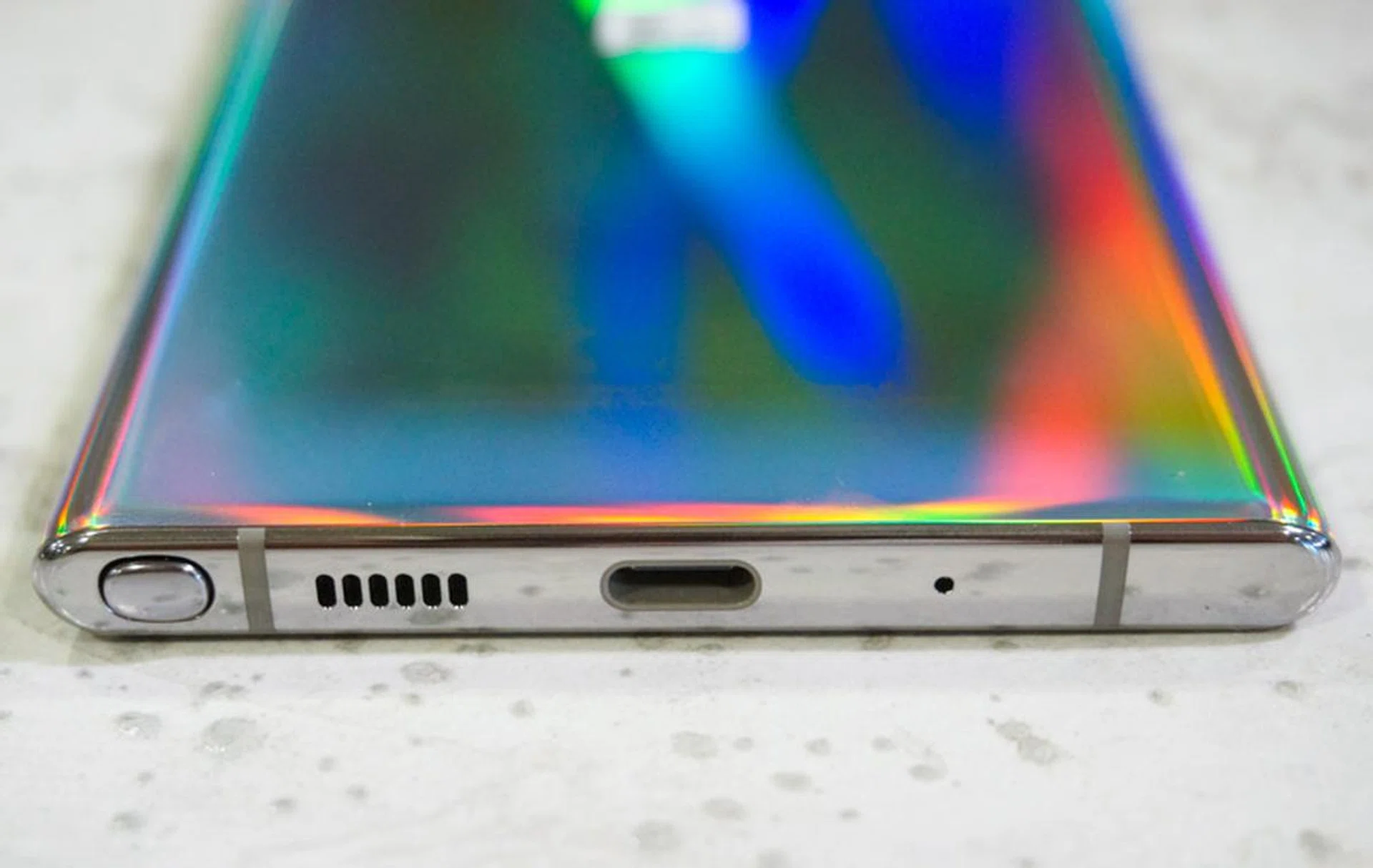
There's no longer a headphone jack on the Note10 phones.
The power button can be found on the right side, while the volume rocker is once again on the left. But now there’s no longer a Bixby button. The improvement in voice recognition means you can activate Bixby or Google Assistant just by voice.
Both the phone and the S Pen are IP68 rated, so you needn't worry about a little dust and water. It's worth noting also that the colours of the S Pens will match the colours of the phone, with the exception of the Aura Glow, which gets a blue S Pen. That also means a more subdued S Pen instead of a striking yellow-gold colour scheme found with the Ocean Blue Note9.
Display
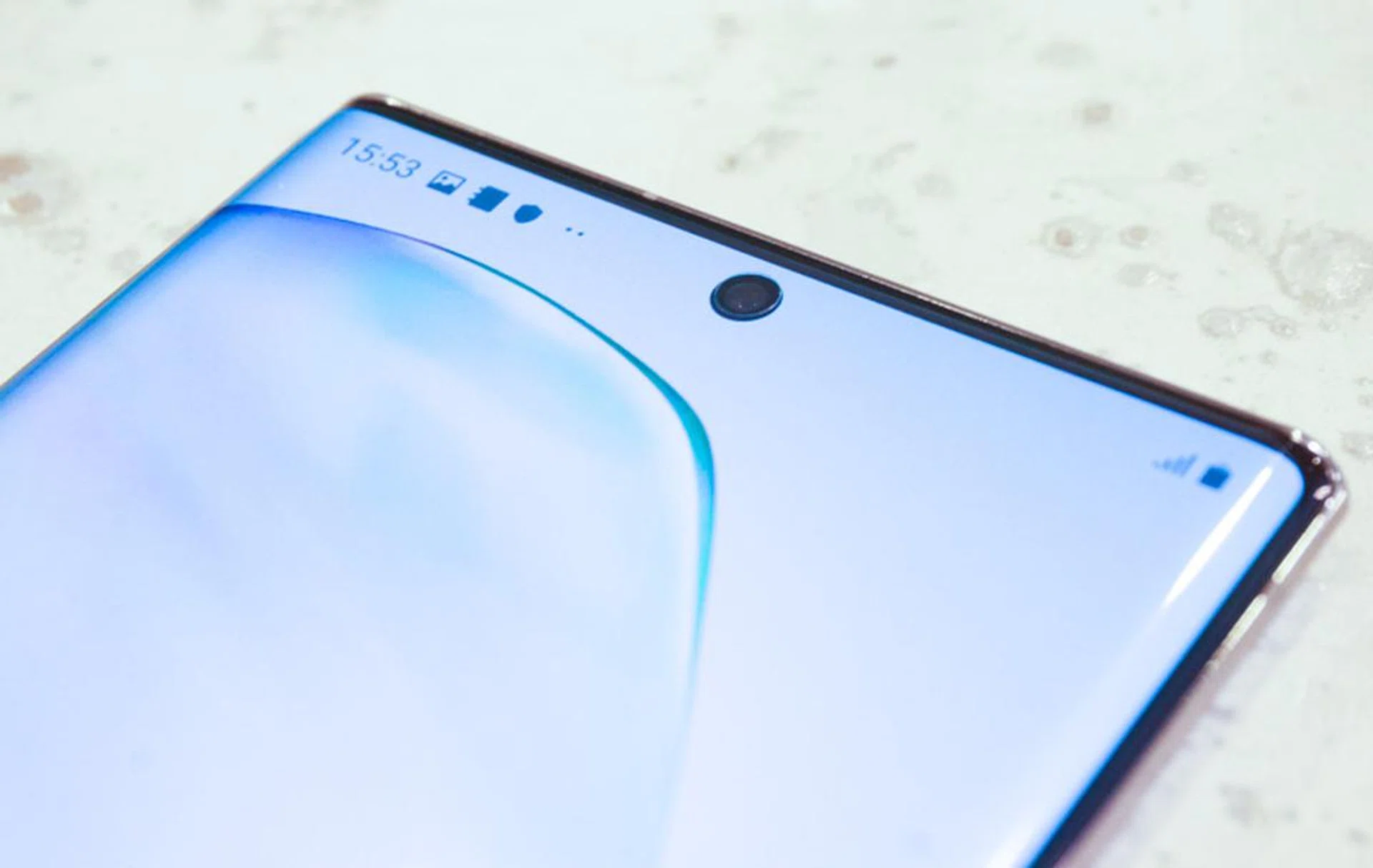
The small front camera means you get a display that covers almost the entire phone.
The Galaxy Note10s' Cinematic Infinity Display has just a small camera cut-out right at top, so you really get as much screen as possible without a notch or pop-up camera. As with the S10 and S10+, these are Dynamic AMOLED displays that support HDR+ and go up to 1,200 nits, with a Display contrast ratio of 2,000,000:1. According to Samsung, outdoor visibility goes up to 800 nits, and the display is certified by TUV Rheinland to reduce blue light for better Eye Comfort.
It’s worth noting that only the Note10+ goes up to WQHD+ (3,040x1,440) resolution though. You can choose between that, FHD+ (2,280 x 1,080), and HD+ (1,520 x 720) in the settings, but the Note10’s resolution is fixed at 2,280 x 1,080.
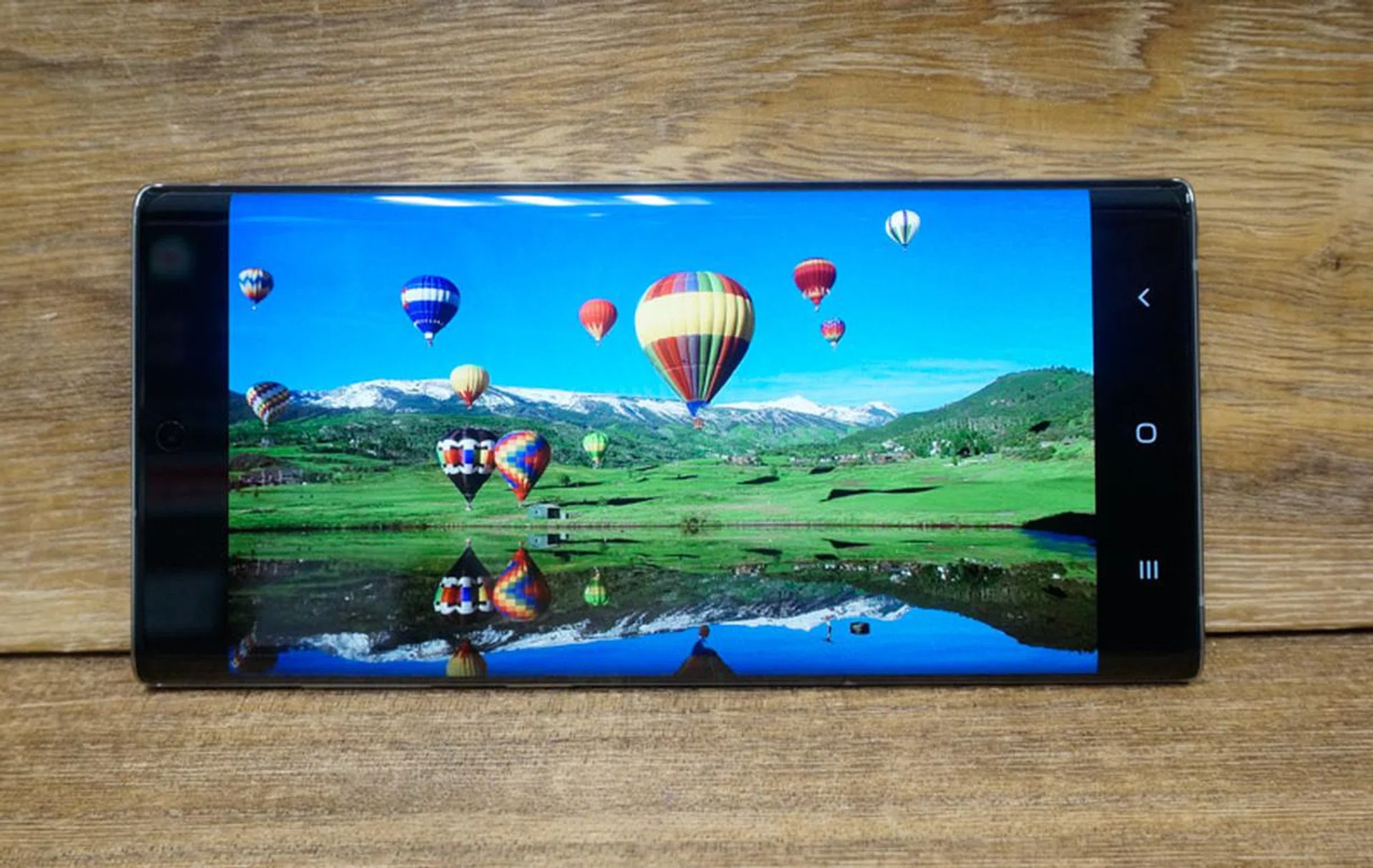
Here's the Note10 screen.
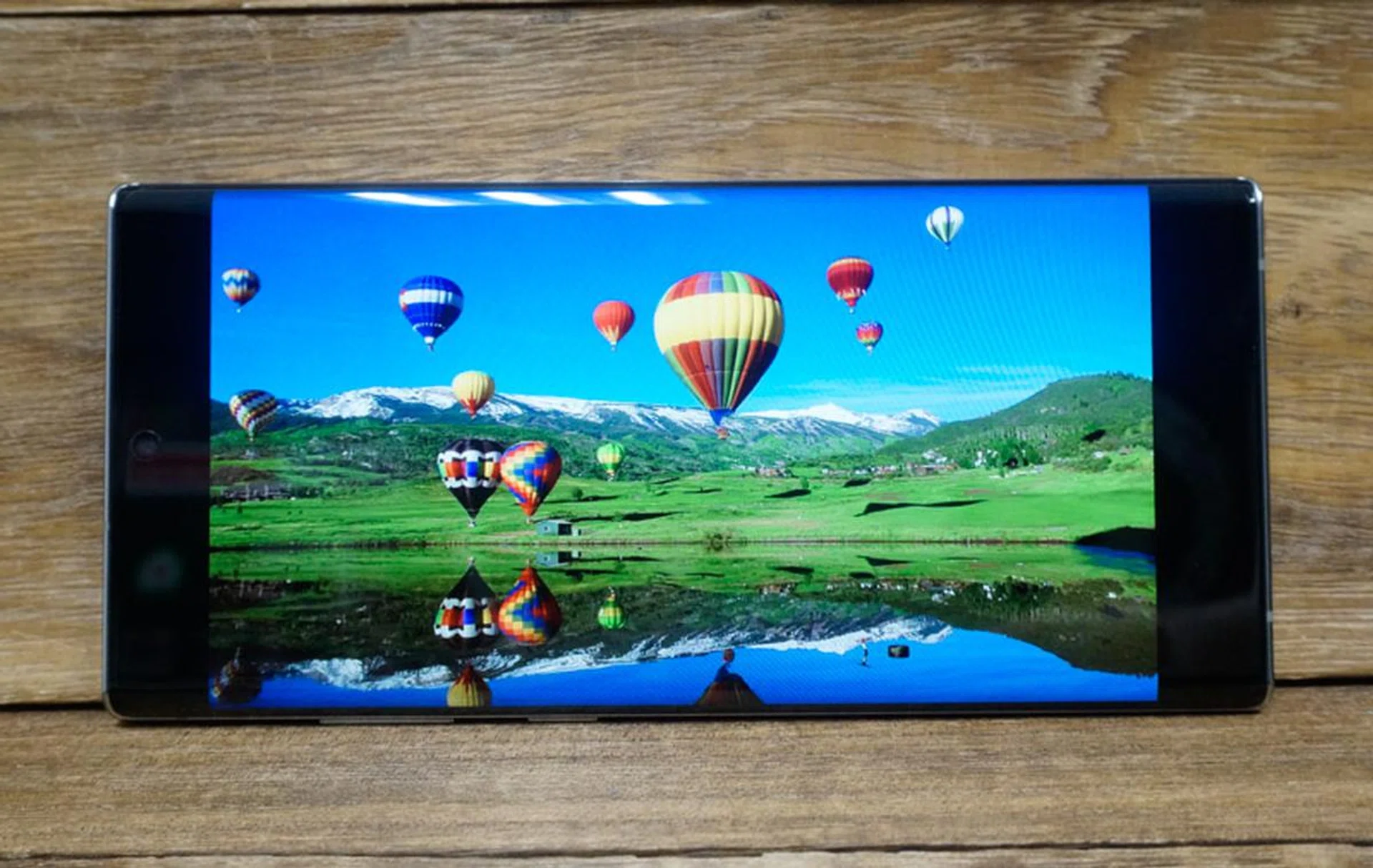
And here's the Note10+ screen. Almost identical, other than the size.
As with the S10 and S10+, both displays are sharp with good contrast, and nice natural colours. We had no issues reading the screens in bright sunlight, and we certainly didn’t notice any difference between panels when both phones were set to FHD+ (2,280 x 1,080). As with the S10s, the Note10s are set to the Natural option by default, but you can always push this to the Vivid mode if you prefer your images slightly warmer and with more contrast.
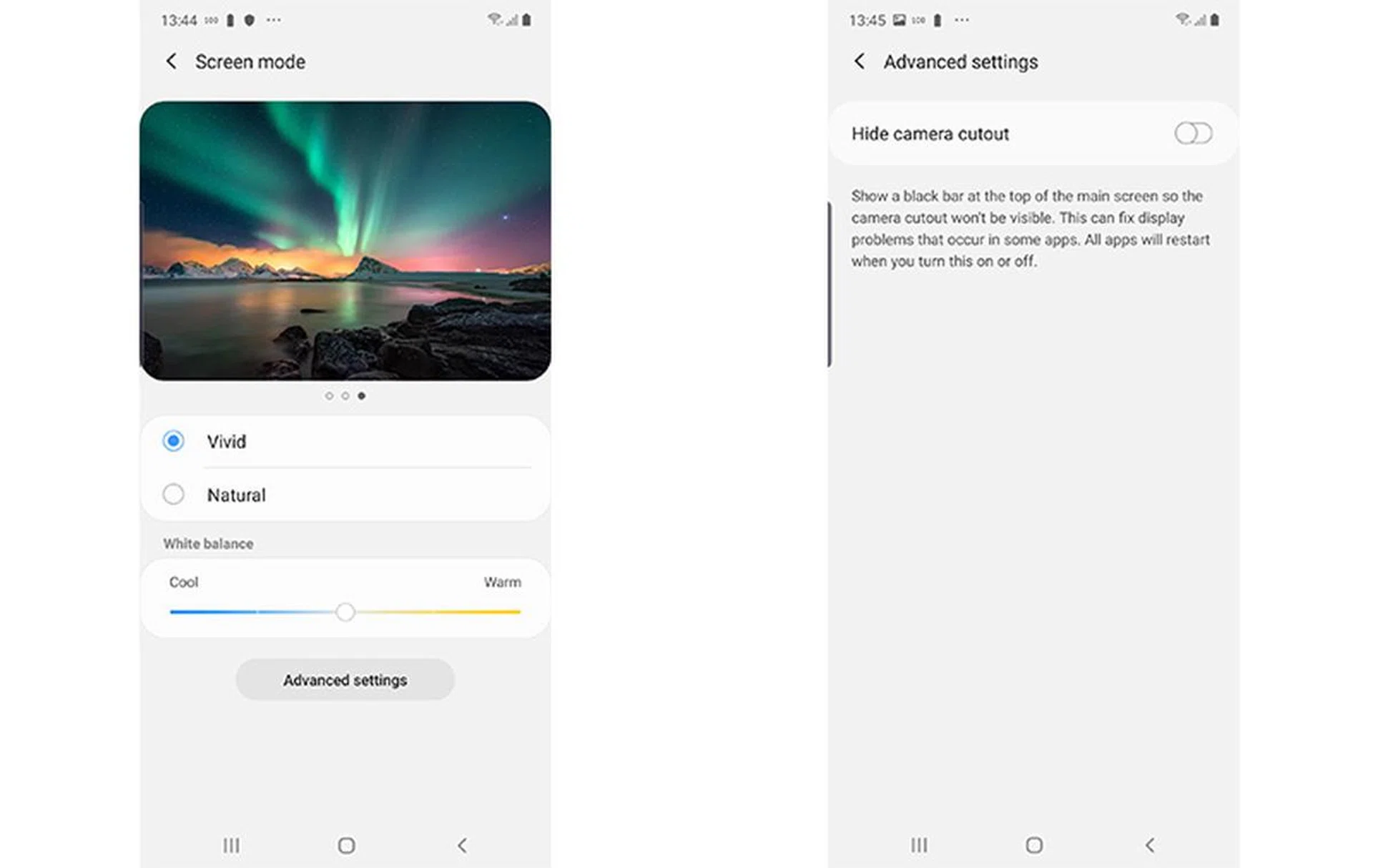
The screen options let you easily adjust colours and hide the camera notch.
By default, videos will play with a black bar over the front camera, but you can always enable full-screen viewing if you don’t mind having a small hole to the left. We didn’t mind that for still images, but found it a bit distracting for videos, so it’s good to be able to toggle between both options at a tap.
Like the S10 and S10+, the Note10 and Note10+ offer in-display Ultrasonic fingerprint sensors and Face recognition and we found both to work quickly and reliably, even in low light. Again, iris scanning isn’t an option now, so we’d recommend sticking to fingerprint scanning if security is a concern.
Audio
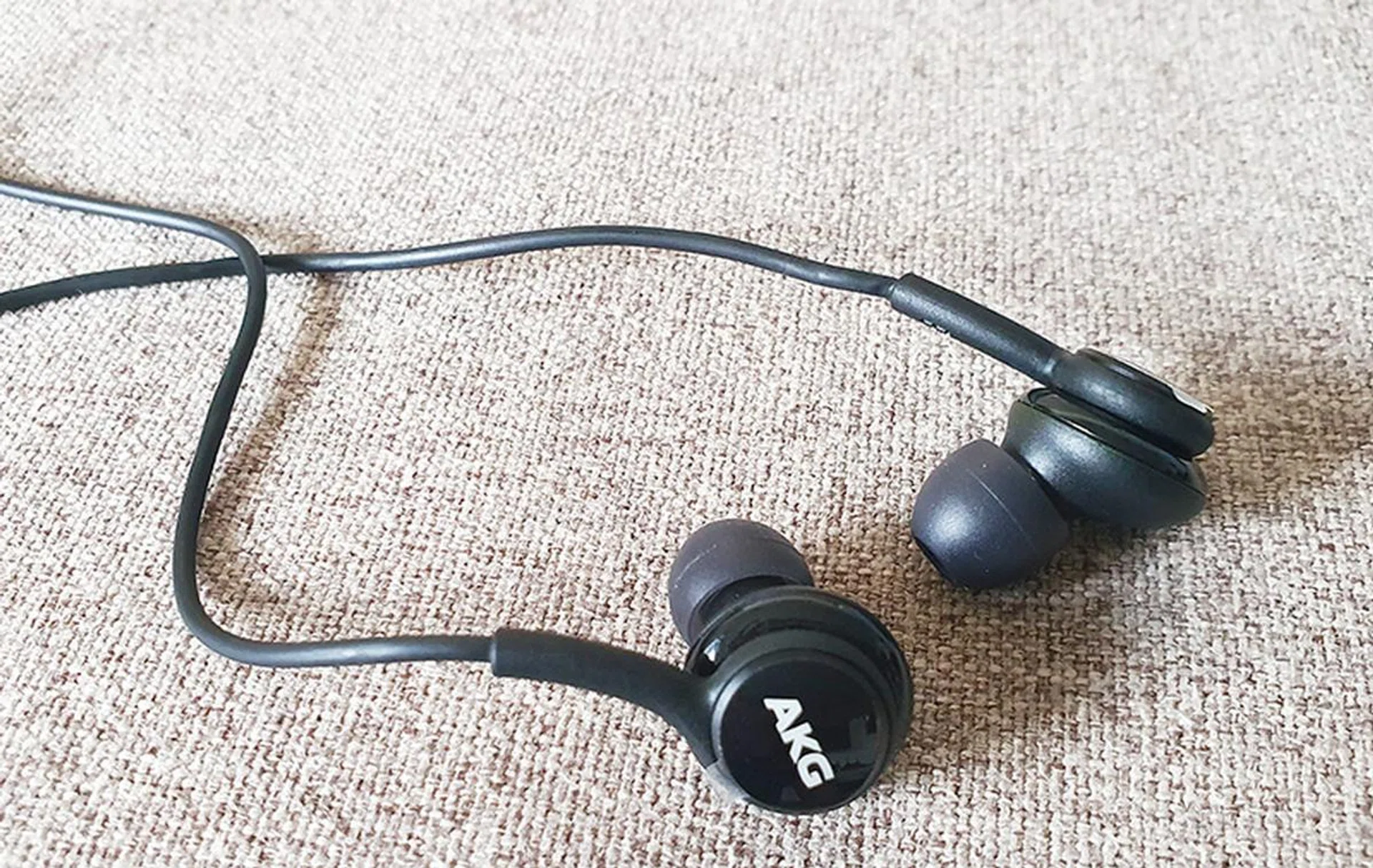
The supplied AKG headphones are better than most of the free headphones you get with your phones these days.
As mentioned earlier, both phones are certified for Dolby Atmos, though the option is off by default. And yes, the headphone jack is gone, so you’ll have to move to wireless or USB-C options.
Both phones seem to come with the same bundled in-ear headphones from AKG, so it’s no surprise that they perform similarly. Nice highs, decent mids, and somewhat dry lows would be the summary. They do offer pretty good imaging though. With a recording of Alicia Keys’ Girl on Fire, the headphones do a good job of keeping Keys’ vocals distinct from the backing vocals and instruments.
Activating Atmos with the headphones gives you a bit more of a robust sound, with better surround and a slightly wider soundstage. Imaging does improve in that every instrument gets more directional emphasis, so you really get a better sense of where things are going.
Given the difference in physical sizes of both phones, we expected the speaker performance to vary too, but were pleasantly surprised to found that this wasn’t the case. Both phones have stereo speakers, and the smaller Note10 plays just as loud as the Note10+, and the speakers on both phones hold up well even at maximum volume.
Activating Atmos seems to bring better resolution and imaging, so it is much recommended, even if you won’t get the full effect. It seems the phone tries to bounce sound off your hand to get a bit of a height channel, but you’d need to be in a pretty quiet area to appreciate the difference. Still, sound effects are rendered with good naturalness, so these are definitely phones that can provide a good movie viewing experience (and more so with their large screens).
Software
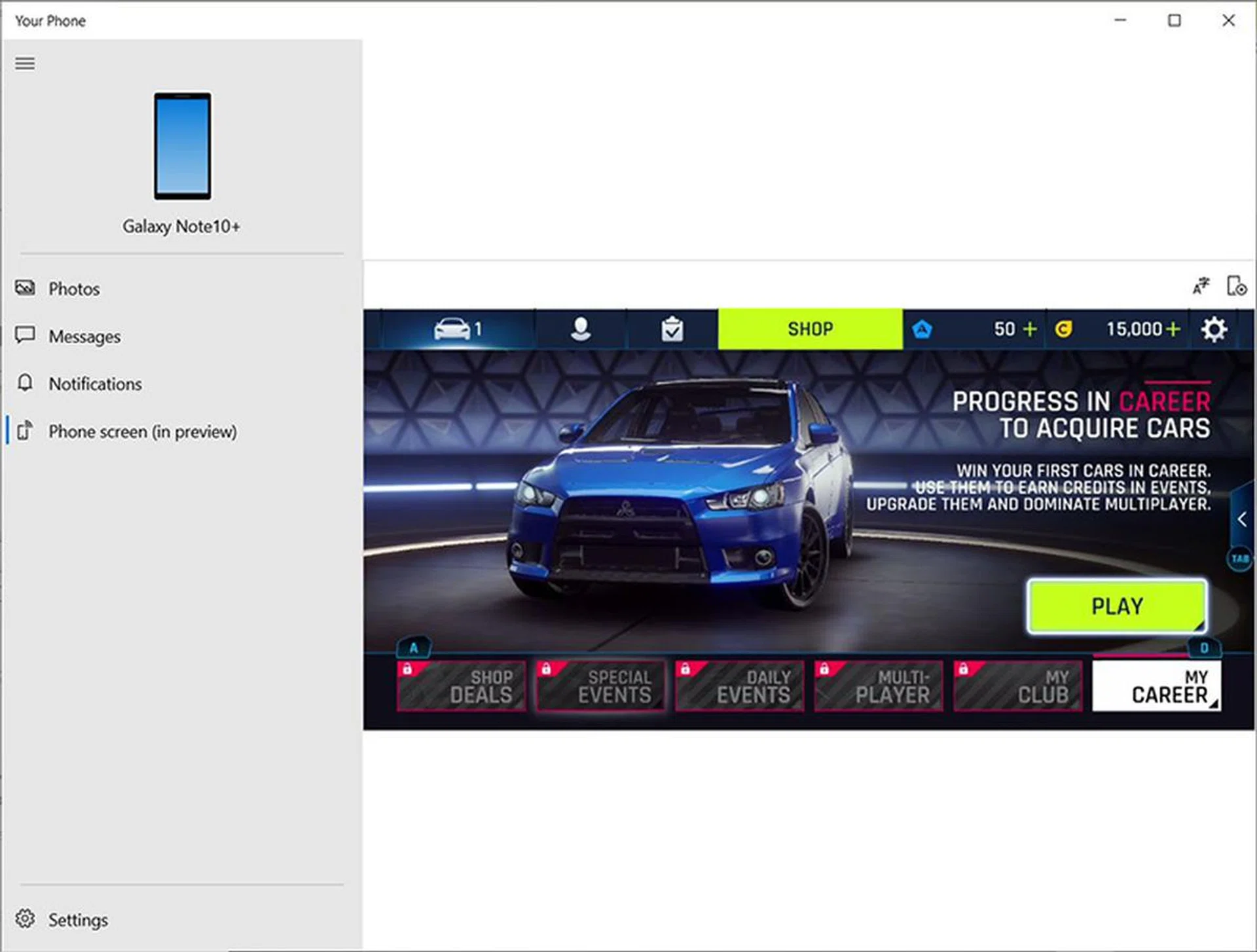
The Your Phone app lets you view your Note10 phone's contents on your computer.
Like the S10 and S10+, the Note10 and Note10+ run on Android 9.0 Pie with Samsung's new One UI, which means you get a brighter, more colourful interface with rounded menus and buttons that are focused on one-handed usage. Given the additional length of the Note10+, that’s certainly a good thing.
With the new Note10 series phones though, the focus is very much on productivity, so Samsung has given you new ways to work with both phone and computer. The most direct method is Link to Windows and this works by placing a virtual phone on your desktop that reflects whatever’s on your phone screen.
Simply have both phone and computer on the same Wi-Fi network, sign in to your Outlook account and run the Your Phone app on Windows 10. Once connected, you’ll be able to get and reply to messages sent to your phone right from your keyboard, while getting all your app notifications. This is also able to mirror your phone's screen, but that option doesn't appear till you connect your phone via USB.
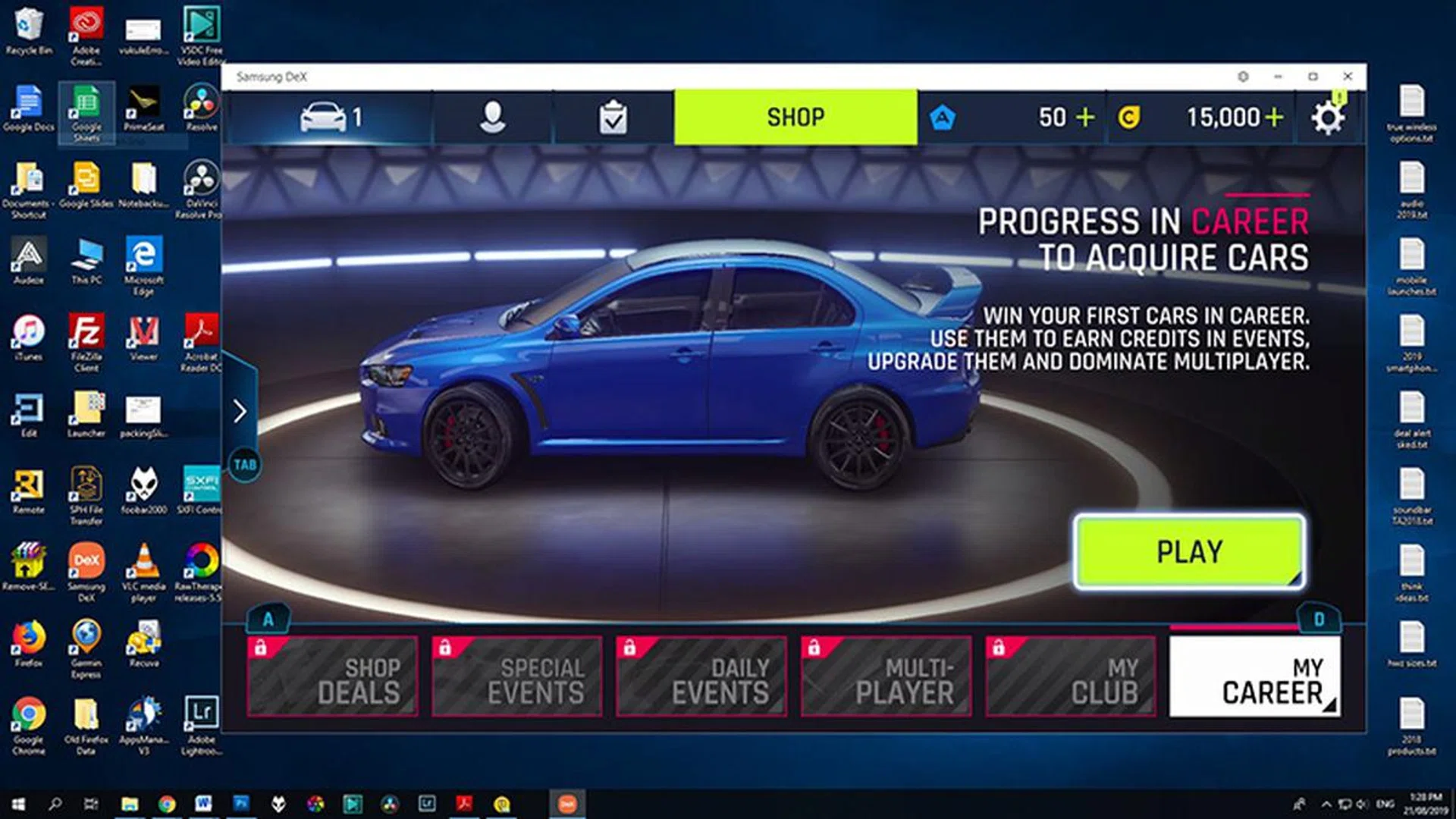
You can have a much larger screen for gaming using DeX.
The other is Samsung DeX, and while it requires you to install a separate piece of software on your computer, this creates a separate window that represents your phone. Unlike the Your Phone app, you can resize this as you wish, and run both games and apps straight from your phone. When playing games, commands will be mapped to your keyboard and mouse. Audio will be piped out from your computer system so you get a full desktop gaming experience.
DeX also allows you to drag and drop files between your phone and computer without having to go through your computer’s file management system. With DeX, you can simply drag a picture from your hard disk and put it directly into the gallery without having to go through the processing of choosing to enable USB file transfer each time you connect your phone. You can check out some of these functions as we've demoed them in the video on the first page (4:30 mark onwards), or you can also view it here.
The key difference between the two is that DeX requires a cabled connection, whereas Link to Windows gives you the option for this to be wireless. While we do like the improved implementation of DeX, having to reboot an application every time we shift from using it on the computer to the phone (or vice-versa) really spoils the experience, so hopefully that can be improved in future updates.
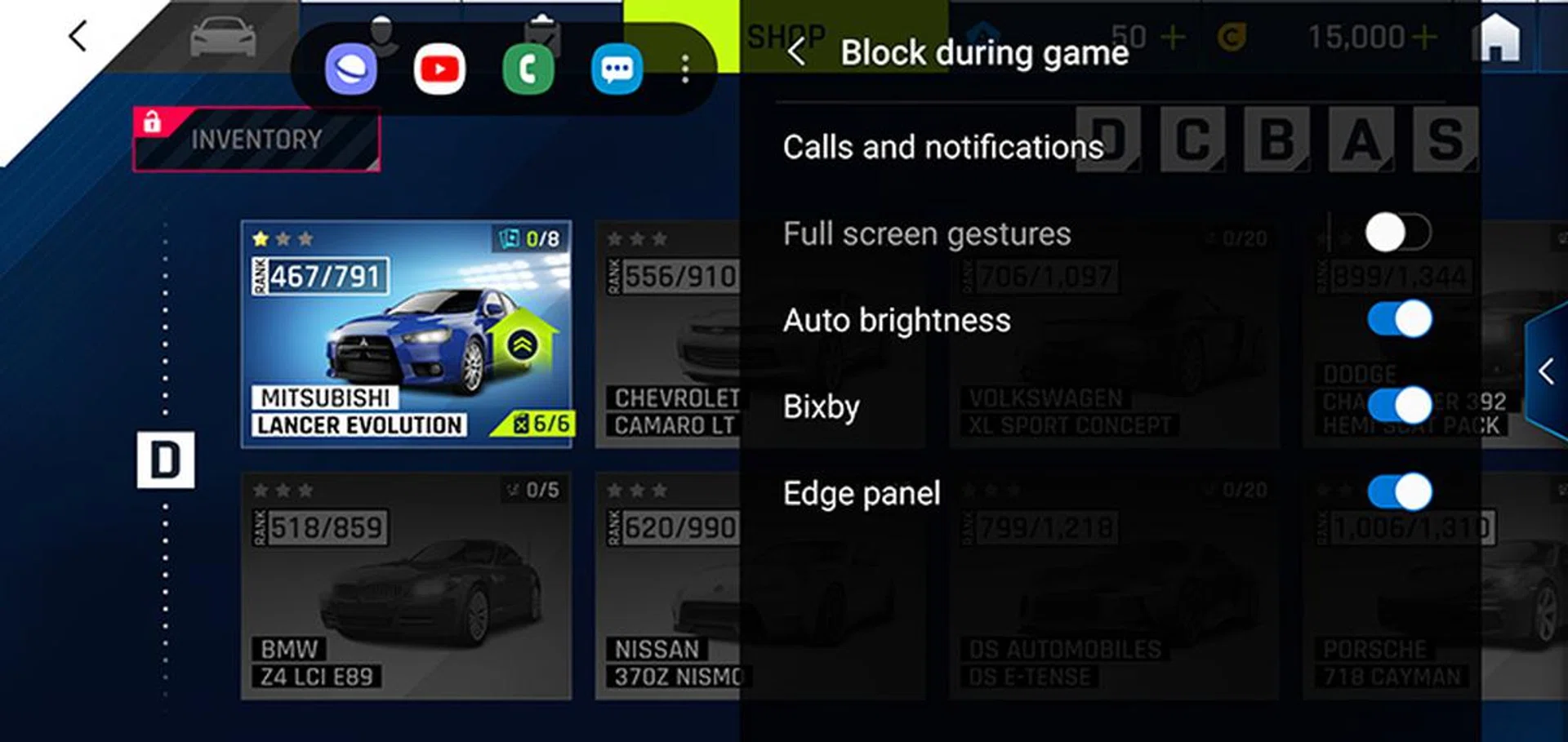
Game Booster settings can be called up at any point while you're gaming.
Speaking of games, the new Note10 series phones come with Samsung’s latest AI-based Game Booster. This is like their old Game Tools enhanced, so you can block calls, notifications, halt auto-brightness, and even disable the Edge panel if desired.
Also, Game Booster now uses a separate processor to understand and track your gaming performance and power consumption. We’re told this data will be compiled with data from the game publisher so the phones will be able to automatically optimize performance and battery management.
There’s also a new Boot Up Booster, and this basically keeps track of your app usage patterns for the week to identify your most frequently used apps. Because the Note10+ has 12GB RAM, the 12 most frequently used applications will be stored. The Note10 however, will store four with its 8GB RAM.
Photos
Not much was been said of the camera system on the new Note10 series phones at launch, and some might be unimpressed by the numbers given that most of the recent phones are running with Sony’s 48-megapixel sensor. However, great images aren’t determined just by resolution alone, so let’s take a look at some pictures!
In case you weren't paying attention earlier, here's the camera system found on the Note10 and Note10+:
- Ultra Wide 16MP F2.2 (123°) camera
- Wide-angle 12MP 2PD AF F1.5/F2.4 OIS (77°) camera
- Telephoto 12MP F2.1 OIS (45°) camera,
The Galaxy Note10+ gets an extra VGA DepthVision Camera for AR and 3D applications.
It would appear the only difference in camera systems between the Note10 and the Note10+ is the depth camera, which is used mainly for Augmented Reality (AR) applications. Comparing the images side-by-side, it’s almost impossible to tell which came from which camera.
Looking at the studio shot, both cameras delivered good corner-to-corner sharpness, and you can see there’s a good amount of detail in the shot. There’s still a good amount of skin texture captured in the old man’s face, which is impressive indeed.

Galaxy Note10 studio capture (Click for full resolution image)

Galaxy Note10+ studio capture (Click for full resolution image)
Taking a look of this next set of images gives an idea of the amount of detail the camera can capture. There isn’t enough resolution to properly render the individual leaves on the trees, but you can clearly make out the moon and stars on several of the Singapore flags in the image.

Galaxy Note10 Daylight wide-angle capture. (Click for full resolution image)

Galaxy Note10+ Daylight wide-angle capture. (Click for full resolution image)
Now, let’s look at the telephoto end. The Note10 camera's default zoom only gives you 2x telephoto but you can drag this all the way to 10x, just like many of the other phones out there. We don't recommend this though, as that's a full digital zoom. Instead, 5.0x hybrid zoom seems to be a good compromise between reach and quality. At this point, you still get a decently clean image without too many artefacts.

Galaxy Note10 2.0x telezoom capture. (Click for full resolution image)

Galaxy Note10 5.0x hybrid zoom capture. (Click for full resolution image)

Galaxy Note10+ 2.0x telezoom capture. (Click for full resolution image)

Galaxy Note10+ 5.0x hybrid zoom capture. (Click for full resolution image)
Now, let's finish off with some night shots. The Galaxy Note10 phones also have a dedicated Night Mode, but this doesn't exactly give you an indication as to when the camera is capturing, so you'll just have to hold still until you see a yellow line complete its run around the shutter button. Still, the results are much better than what you get with the regular photo mode. You won't get more meaningful detail back, but the overall exposure is tweaked to get a more pleasing image - at least from the perspective of sharing photos on social media.

Galaxy Note10 night capture in regular photo mode. (Click for full resolution image)

Galaxy Note10 night capture in night mode. (Click for full resolution image)

Galaxy Note10+ night capture in regular photo mode. (Click for full resolution image)

Galaxy Note10+ night capture in night mode. (Click for full resolution image)
Finally, let's take a look at the selfie camera. We tested this both indoors and out, and were quite impressed by how the Note10s were able to intelligently balance exposure with a backlit situation. There's pretty good detail with the indoor shot, though it seems a base level of software retouching is applied even if you set it to zero.

Galaxy Note10 indoor selfie capture.
(Click for full resolution image)

Galaxy Note10+ indoor selfie capture. (Click for full resolution image)

Galaxy Note10 backlit selfie capture. (Click for full resolution image)

Galaxy Note10+ backlit selfie capture. (Click for full resolution image)
All in, we'd say the camera system is good, and is perfectly capable for most needs. It may not dethrone Google's Pixel or the Huawei P30 Pro, but as seen from our assessment, it doesn't necessarily have to as the Samsung Galaxy Note10 series offers much more than just imaging prowess.
Video
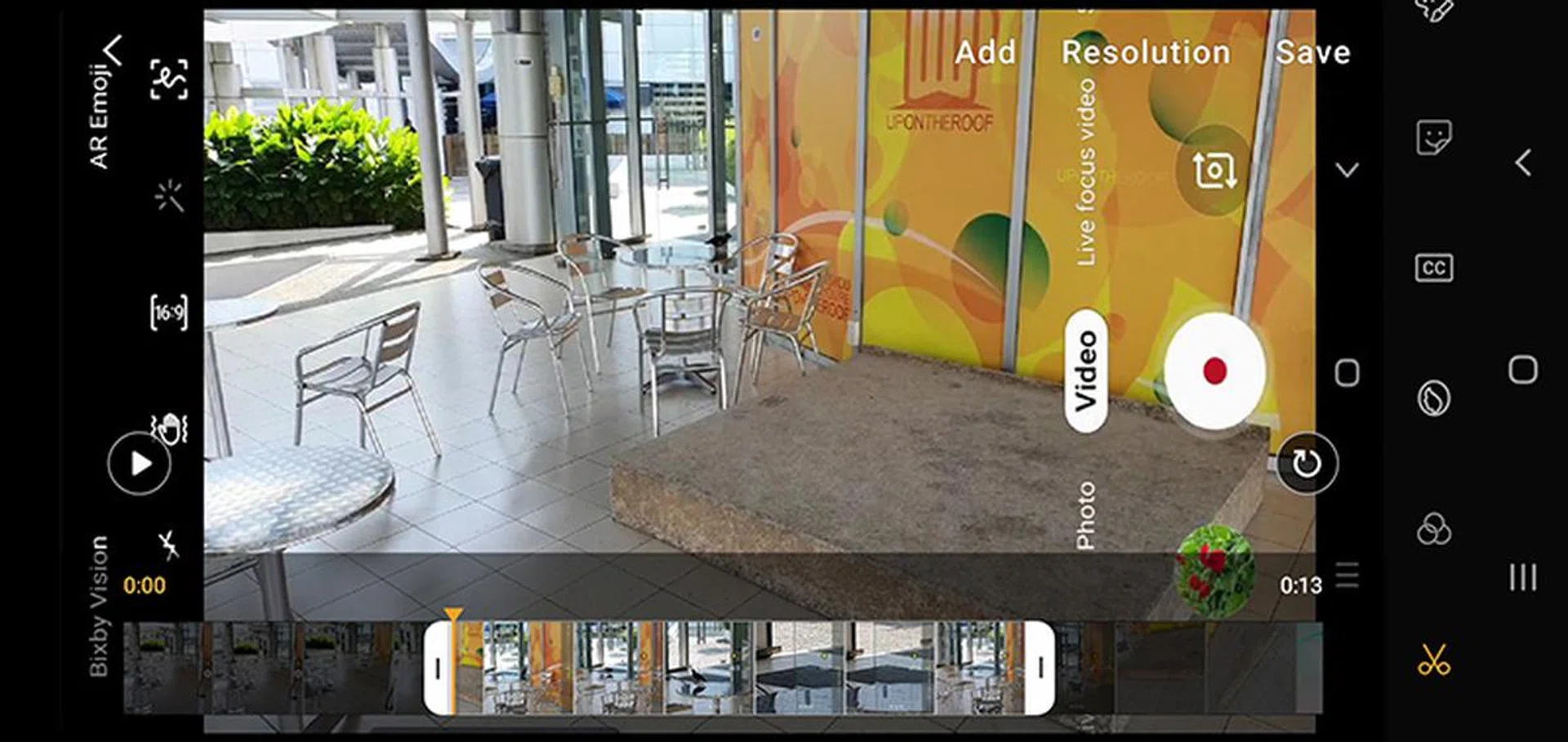
Being able to do basic edits right from your phone will certainly help when taking videos.
Video capture gains quite an upgrade with the Galaxy Note10 series, with a slew of features that many will find helpful. For starters, you can now do simple edits of your video recordings right from your phone, like cuts to video and add transitions. The S Pen can also be used here, so it’s easier for you to find just the right moment you want to trim.
The way it works, is you adjust start and end sliders to make a cut, then save that portion as a new clip to import later. There‘s a selection of video filters you can add, as well as the option to type text, draw, adjust play speed, and add a soundtrack from an online library. Those songs are designated as free for non-commercial use only, which is perfectly fine for personal projects.


During capture, Live focus video adds simulated bokeh to your videos you can adjust via slider, making it easier for you keep focus on your main subject. And as you can see in the video above, the Zoom-In Mic amplifies the audio in the frame while diminishing the background noise.
In our tests, we found that you should ideally be at most five metres from your subject for this feature to be useful. And while the audio in frame was definitely amplified, wind noise entering the phone was amplified too. The other problem is that the audio zoom can’t happen independently from camera zoom, so you’ll have to find a balance between better audio and too tight a crop.
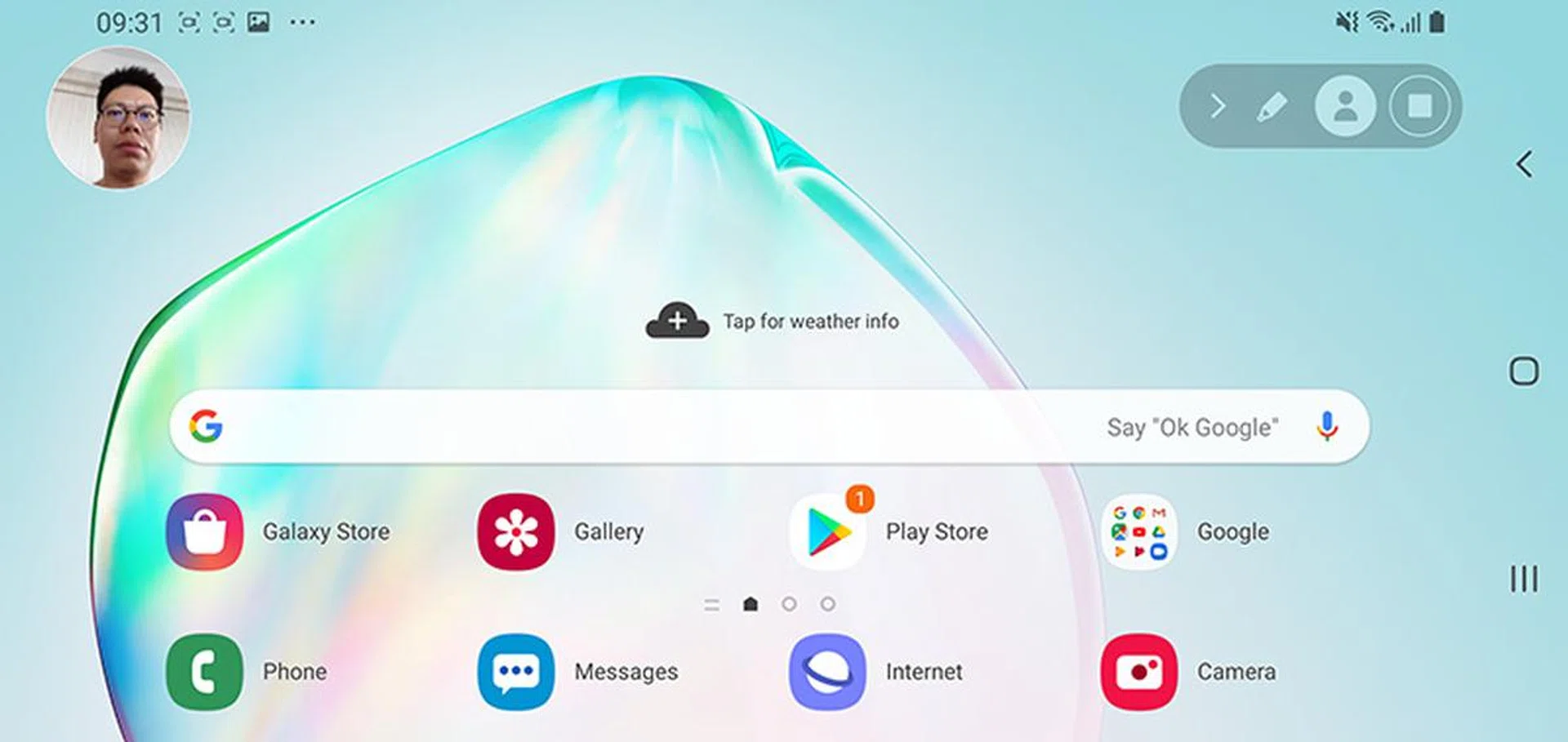
You can easily add commentary to your video recordings with the picture-in-picture mode.
Even screen recordings get an upgrade. With Screen Recorder, you can now add picture-in-picture video of yourself using the front camera, so you can literally talk your audience through what you’re doing in real-time. Just tap on the icon with the person in the circle to toggle the picture-in-picture on and off.
Samsung says there’s also a partnership with Adobe so that you can get Adobe Rush from the Samsung store on the Note10 at a discounted price. Which means you’re basically set for quick video edits directly from your Note10 or Note10+.
Benchmark Performance
As with the S10 and S10+, there are two processor variants for the Note10 and Note10+ depending on your region. In the US/China both phones are using Qualcomm's Snapdragon 855 processor, while the rest of the world gets Samsung's Exynos 9825 processor.
This is a new 7nm 64-bit octa-core processor that has two Mongoose M4 cores running at 2.73GHz, two Cortex-A75 cores at 2.4GHz, and another four power-efficient Cortex-A55 cores running at 1.95 GHz for less demanding applications. There’s also a Neural Processing Unit for machine learning tasks, and the Mali-G76 MP12 GPU for graphics found in the Exynos 9820 (first used on the Galaxy S10 series).
Note: As mentioned, the Note10+ is available in two versions, with 256GB and 512G internal storage options, but both versions have the same 12GB of RAM. Our review unit had 256GB of internal storage. The Note10 has just one configuration with 8GB of RAM and 256GB of internal storage.
JetStream 2
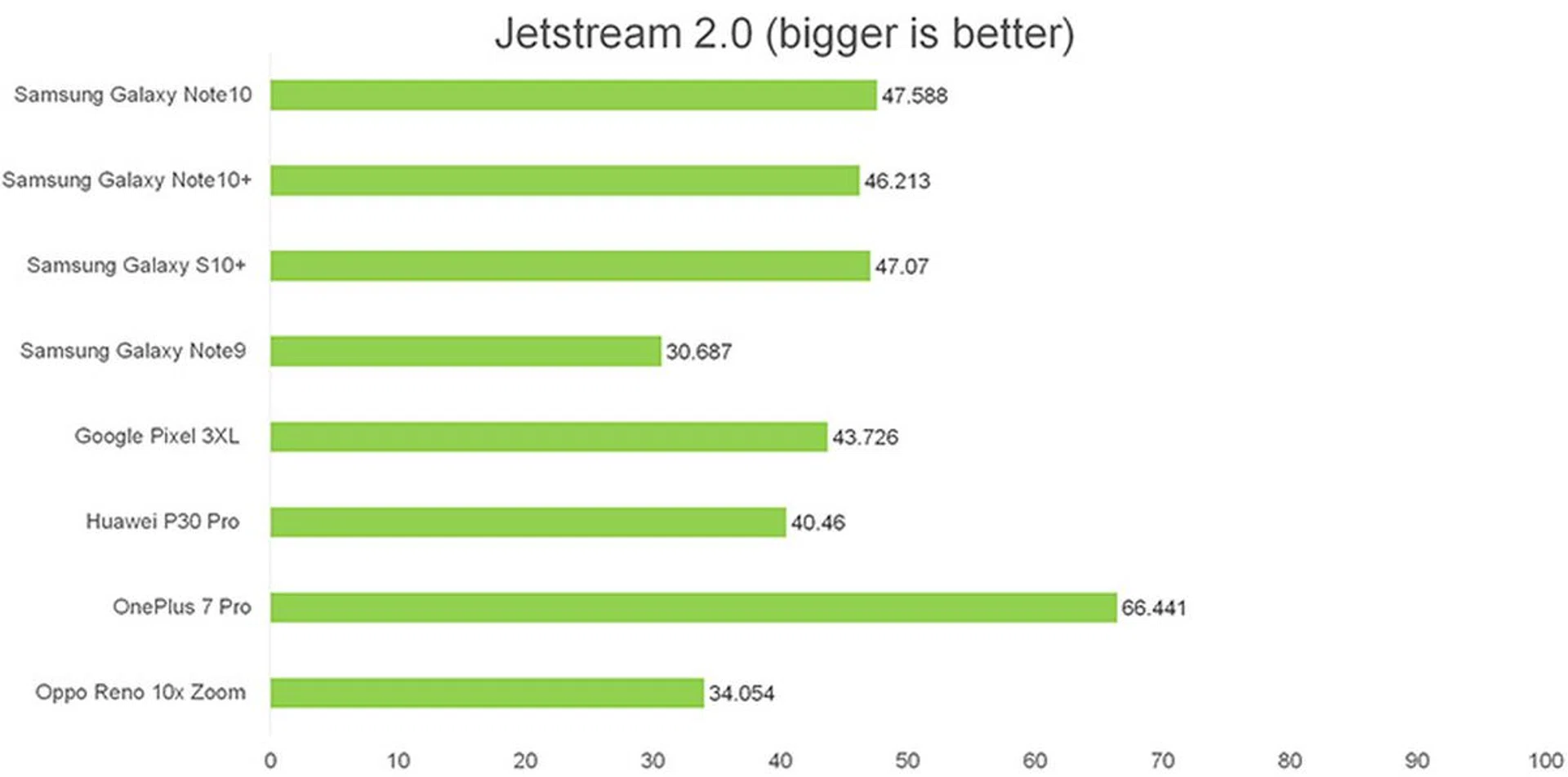
JetStream 2 measures the browsing performance of a device when processing JavaScript. It not only takes into consideration the underlying hardware performance, but rewards browsers that start quickly, execute code well, and run smoothly. It runs a total of 64 subtests for multiple iterations, with each benchmark weighed equally, taking the geometric mean to compute the overall score.
This is a somewhat new benchmark for us, so we’re still building up our database of scores. Based on the phones we’ve tested here though, we’d say the new Note10s performed above the average, slightly beating phones like Google’s Pixel 3XL and the Oppo Reno 10x Zoom.
Antutu v.7.2.2
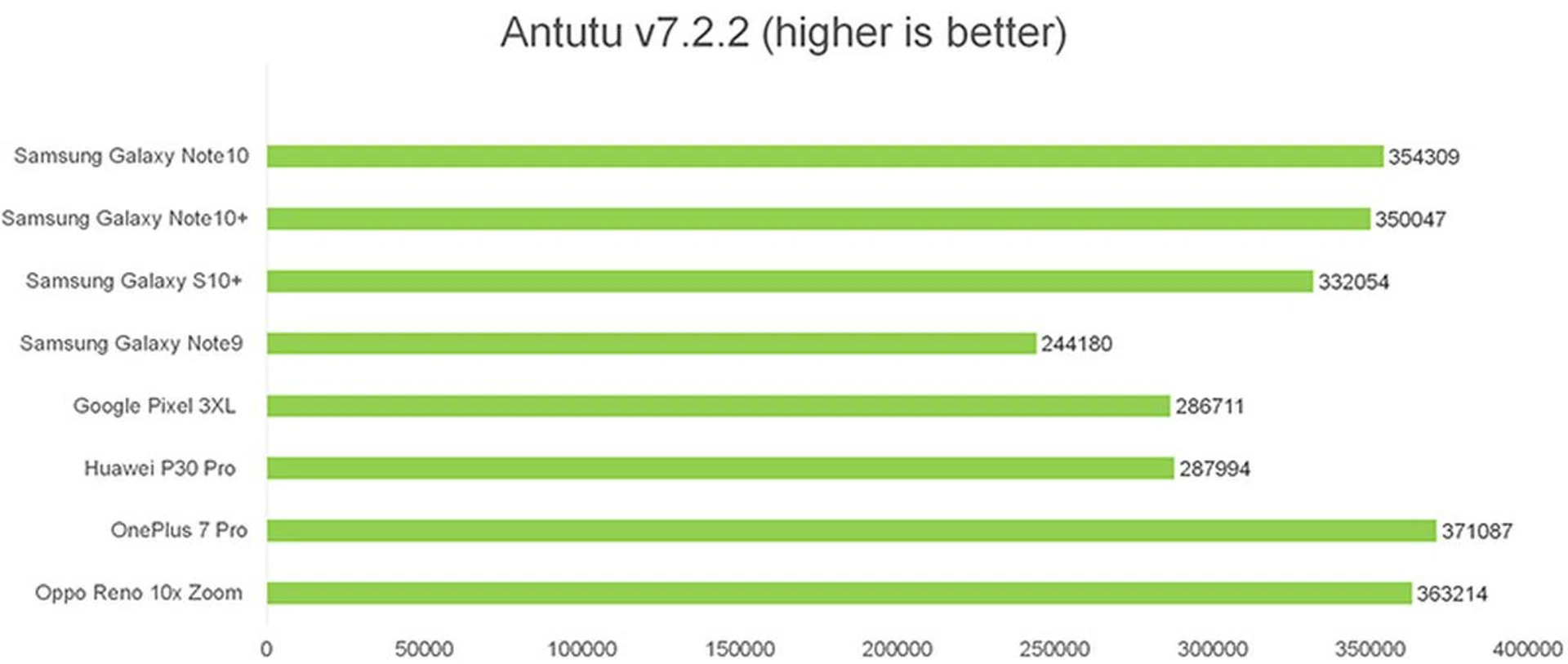
AnTuTu is an all-in-one benchmark that tests CPU, GPU, memory, and storage. The CPU benchmark evaluates both integer and floating-point performance, while the GPU tests assess 2D and 3D performance, the memory test measures available memory bandwidth and latency, and the storage tests gauge the read and write speeds of a device's flash memory.
Given that the Note10s’ Exynos 9825 only differs from the S10’s Exynos 9820 in terms of the manufacturing process (the 9825 uses a 7nm manufacturing process compared to 8nm on the Exynos 9820), it’s no surprise the phones perform similarly on this. The Note10 phones were about 5% faster than the S10+.
The Note10 series phones were at least 16,000 points or 4% behind the OnePlus 7 Pro, which also runs with UFS 3.0 storage. Chalk it down to software optimisation perhaps. Either way, the Note10 and Note10+ are just keeping up with the competition.
3DMark Sling Shot Extreme
3DMark Sling Shot is an advanced 3D graphics benchmark that tests the full range of OpenGL ES 3.1 and ES 3.0 API features including multiple render targets, instanced rendering, uniform buffers and transform feedback. The test also includes impressive volumetric lighting and post-processing effects.
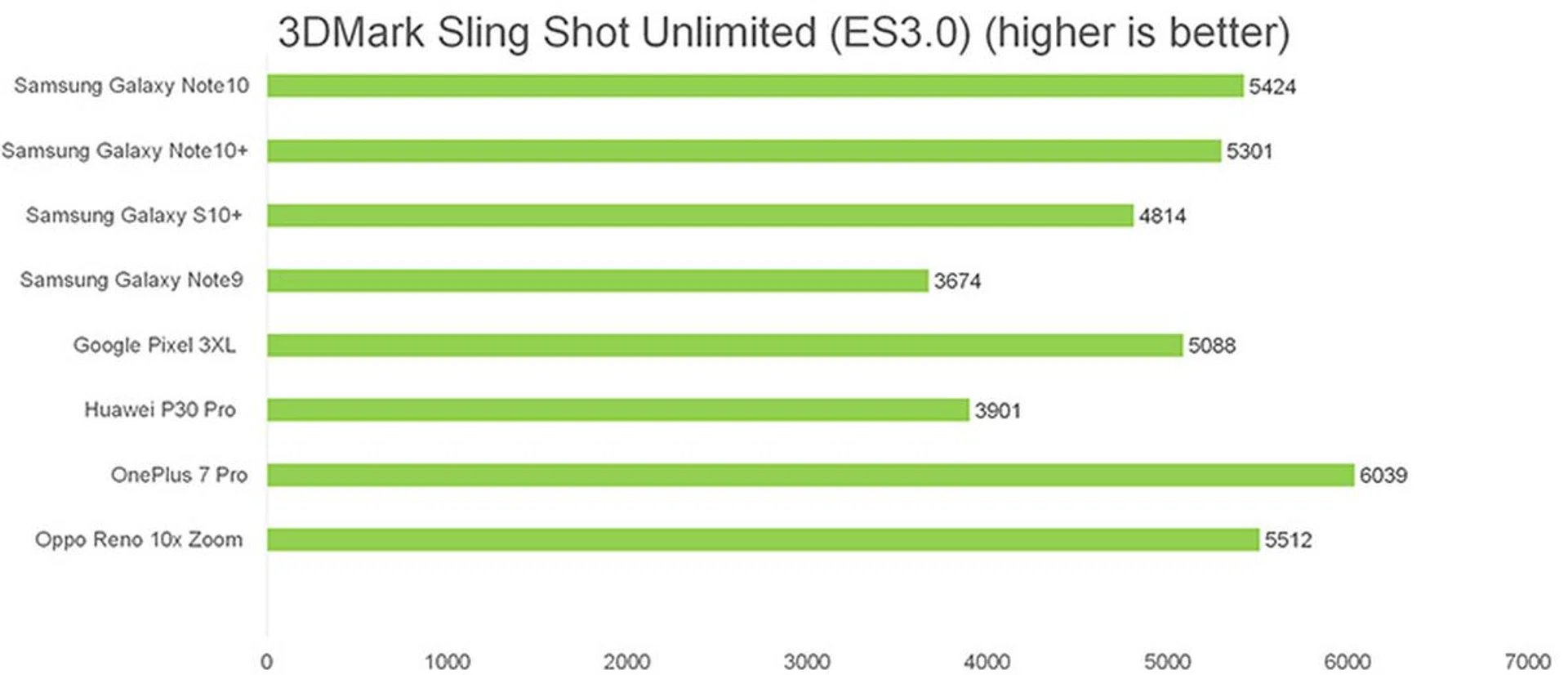
This is one benchmark where the Exynos 9825 really separated itself from the older Exynos 9820. The Note10 and Note10+ produced scores of 5,424 and 5,301 which is closer to what the Oppo Reno 10x Zoom scored with its Snapdragon 855 processor (5,512). There’s still a large gap to the OnePlus 7 Pro though, as that scored 6,039 to lead the pack. But as far as catching up with the Snapdragon processor-based rival is concerned, the new Exynos 9825 in the Galaxy Note10 series seem adept.
Geekbench CPU
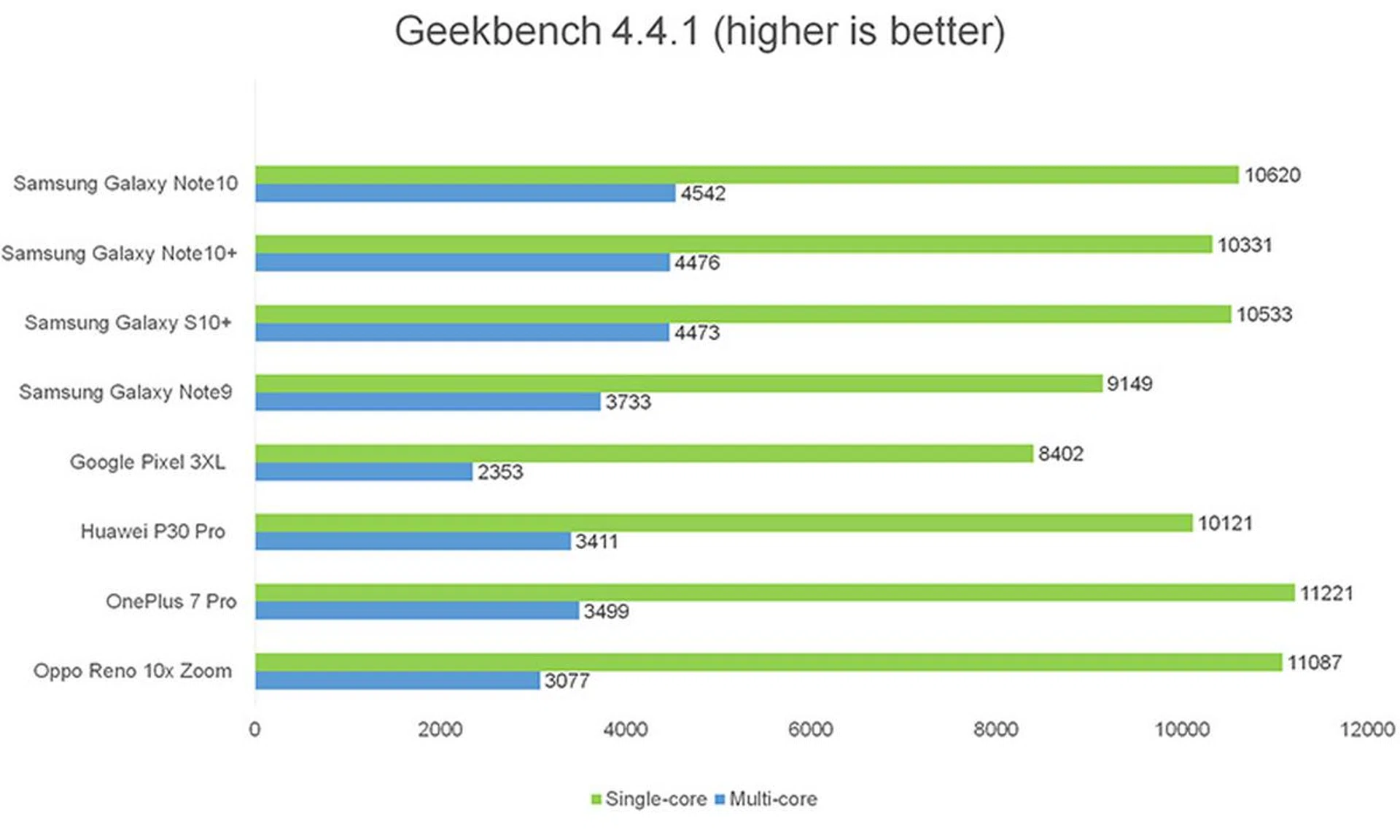
Geekbench CPU is a cross-platform processor benchmark that tests both single-core and multi-core performance with workloads that simulate real-world usage. Geekbench 4 scores are calibrated against a baseline score of 4,000 (which is the score of an Intel Core i7-6600U CPU processor).
Here the smaller Note10 pulls ahead of the Note10+ slightly. It also outperformed the S10+ with scores of 10,620 (multi-core) and 4,542 (single-core) compared to 10,533 (multi-core) and 4,473 (single-core). However, it would seem the Exynos 9825 is still playing a bit of catch-up with the Snapdragon 855, even though they’re both 7nm octa-core processors as both the OnePlus 7 Pro and the Oppo Reno 10x Zoom led by a small margin of around 500 points, which is about 5%.
Battery Life
The Galaxy Note10 has a 3,500mAh battery while the Galaxy Note10+ has a larger 4,300 mAh one. Both support Fast Wireless Charging 2.0 as well as Super Fast Charging for faster charging wired (compatible with QC2.0, AFC, and PD3.0.)
You will also be able to wirelessly charge Qi-enabled devices like the Galaxy Watch and Galaxy Buds by placing them on the Galaxy Note10 through reverse wireless charging. Something that may be handy if you have only one power bank and really need to charge another device perhaps?
Because it supports up to 45W wired charging (only the Note10+), Samsung says just 30 minutes of charging will have the Galaxy Note10+ sufficiently powered for a full day’s use. However, the 45W charger isn’t included in the box and is a separate purchase. Our battery tests were done with the standard 25W charger included in the box.
Our standard battery test for mobile phones has the following parameters:
- Looping a 720p video with screen brightness and volume at 100%
- Wi-Fi and Bluetooth connectivity turned on
- Constant data streaming through email and Twitter
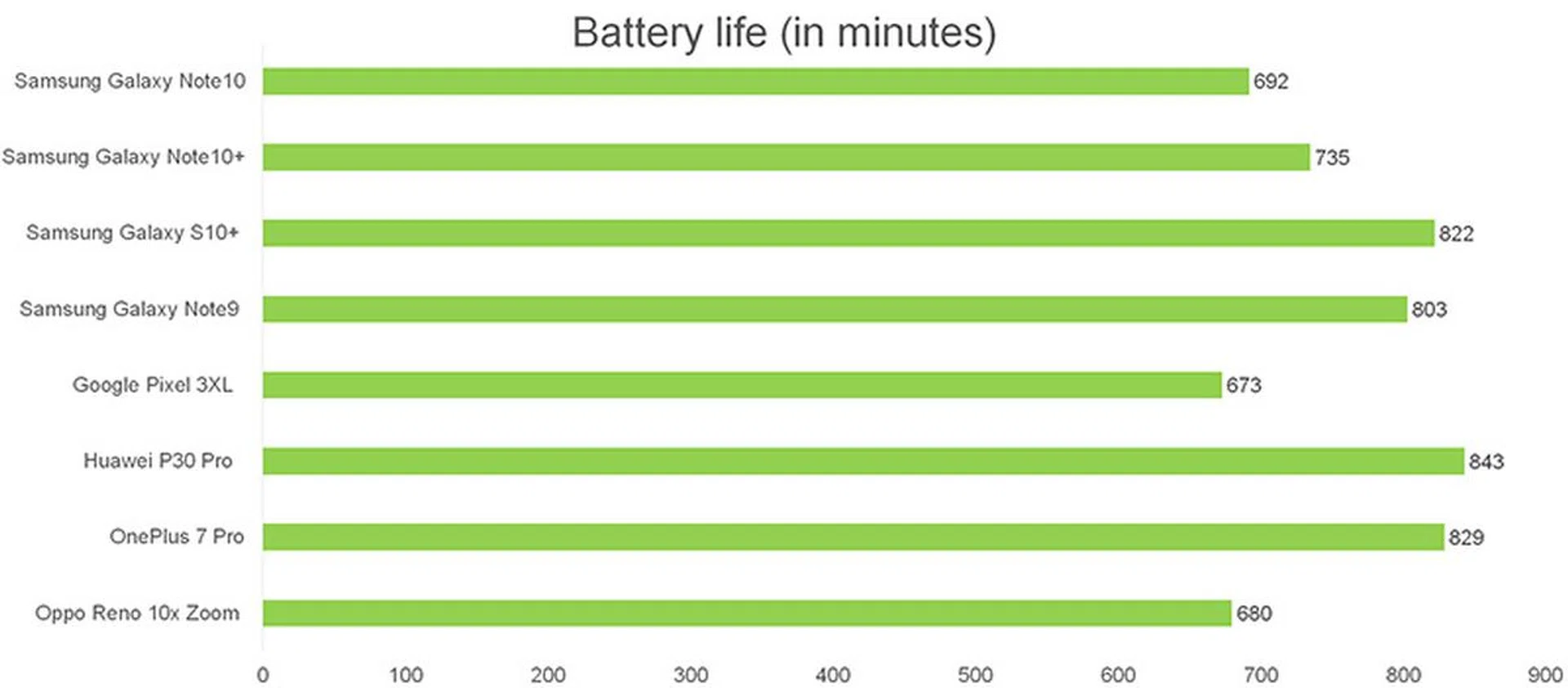
We expected to see better results from the Note10 devices on this test, given the use of the new 7nm Exynos 9825, but it appears the larger, brighter screen negates the advantage of the more efficient processors. The Note10 lasted a good 11 hours and 32 minutes, while the Note10+ lasted 12 hours and 15 minutes. That’s quite a bit behind the S10+ and the Note9, so it is a little disappointing. Would the efficiency improve over future firmware updates? We can only hope, but for now, this is what you should expect. It's not bad, but we expected better.
Charging the phones was much faster though. With the standard 25W charger the Note10+ got back up to 65% in just 30 minutes, and reached a full charge in an hour and seven minutes. The Note10 on the other hand, went back up to 50% in 30 minutes, and took an hour and twenty-nine minutes to reach full charge.
That said, we never had any issues with battery life in our real-world usage of the phones. The speed of USB-C charging seemed to ensure that the phones were always getting a quick top-up every time we plugged in to do a quick photo dump or to test DeX out.
Conclusion
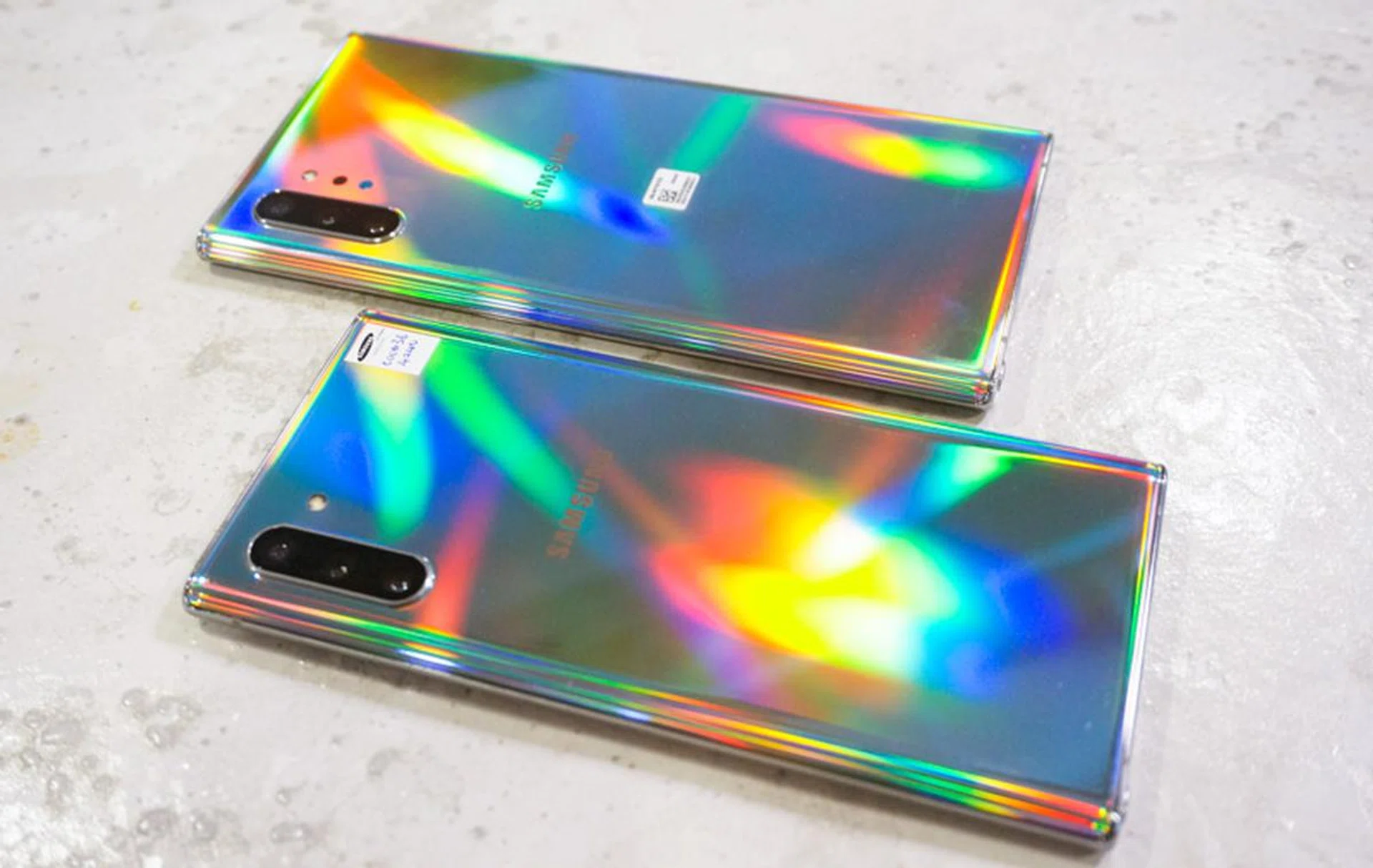
If you want the best Samsung has to offer, the Note10 and Note10+ are compelling options.
The Galaxy Note10 and Galaxy Note10+ are undoubtedly among the nicest looking phones we’ve seen released so far this year. The slim body design also helps to negate the sheer size of these phones, so that they seem to actually fit better in your pocket than something smaller like the Oppo Reno 10x Zoom.
In terms of multimedia, the Dynamic AMOLED Infinity-O displays are certainly very eye-catching, and they’re paired with a good set of speakers that deliver a satisfying viewing or gaming experience right out of the box. While the battery performance seemed a little underwhelming in our benchmark tests, that never seemed to be an issue in our day-to-day use of the phone.
Samsung has been pushing these phones heavily as productivity tools rather than to focus on processing power. This certainly shows in the usability improvements to DeX as well as the added handwriting-to-text conversion capabilities of the S Pen among others.
Being able to edit videos straight from your phone is certainly a welcome addition given how much we’re all turning to video now. And we must say the augmented reality features are an interesting touch that go a step beyond your usual animated emojis. While there are several third-party video editing apps (free and paid) that can meet your variety of needs, the point Samsung is trying to make is to give you adequate tools and functionality out-of-the-box without having to rely too much on third-party apps - something that majority of consumers can readily appreciate.
So, the feature set is certainly there. We just wish they were matched with processing power and/or longer battery up-time to blow the competition away to better justify the higher price points. If you’re looking at getting a new Samsung phone though, we’d say the Note10 and Note10+ (256GB) are certainly worth considering over the S10 and S10+ (128GB) as you’re only paying S$100 and S$200 more respectively for a better processor, a larger screen, and of course, the added S Pen capabilities. Also, Samsung has actually kept the Note10 pricing on par with the Note9, but yet doubled the storage capacity and made it a better Note than ever before.
Models | Price | Colours |
S$1,398 | Aura Glow, Aura Black | |
S$1,598 | Aura Glow, Aura White, Aura Black | |
S$1,898 | Aura Glow, Aura White, Aura Black |
Personally, I’d go for the Galaxy Note10+ (256GB) version as you’re not paying that much more compared to the Note10 (S$200). That 6.8-inch screen really doesn’t feel so over-sized when it’s that slim, so paying an additional S$200 for the larger display, more RAM (12GB vs 8GB), more battery capacity, and the extra depth camera for future AR applications seems well worth it. Not to mention, the Galaxy Note10+ allows you to expand the storage via microSD cards, but the more compact Note10 does not.
Should you go all out to get the 512GB edition? It's a bit difficult to recommend at its S$300 premium considering cheap expandable storage is a readily available option. However, if maximum speedy storage is a necessity - especially if you plan to shoot, edit and store a lot of videos on-the-move, only then the premium would seem more worthwhile.
Having said that, if you've always been avoiding the Samsung Galaxy Note series because it's too large to pocket, you can totally be sure that the smaller Galaxy Note10 is the most compact and handy Galaxy Note ever made. And that's exactly what Samsung was trying to achieve with its latest phone: to make the Galaxy Note10 series appeal to more consumers than ever before.
All ready to grab a Note10 or Note10+? Head here to see which telco to go with if you're looking to get your phone at a discounted rate. Thinking of getting the phone without a contract using SIM-only plans? We've got you covered here.
Design | Features | User-friendliness | Performance | Value | Overall | |
Galaxy Note10 (256GB) | 9.0 | 9.0 | 8.5 | 8.0 | 8.0 |  |
Galaxy Note10+ (256GB) | 9.0 | 9.5 | 8.5 | 8.0 | 8.0 |  |
Galaxy Note10+ (512GB) | 9.0 | 9.5 | 8.5 | 8.0 | 7.5 | |