
5 things you need to know before you buy your office’s next printer
Looking for the best printer for your business? Here are key tips to help you decide.


Looking for the best printer for your business? Here are five key points to help you decide.
1. Speed: While laser printers need more time than inkjet printers to warm up, they can usually print at faster speeds than inkjets. The HP Color LaserJet Pro M281 series, for example, can print up to 22 pages per minute.
2. Versatility: Inkjet printers, like the HP OfficeJet Pro 8000 series, can print on a wider variety of papers, including photo papers. If you need to print a myriad of materials, like both office documents as well as glossy brochures, then an inkjet might be for you.
3. Volume: Laser printers are usually built for higher workloads, the HP Color LaserJet Pro M281 Multifunction Printers have a duty cycle of up to 40,000 pages.
4. Color: Both laser and inkjet printers can print in color, which helps your documents stand out from the black and white crowd. Inkjet printers are great at printing documents with lots of color images, and they can also print high-quality photographs — great for decorating the office walls.
5. Cost: The HP OfficeJet Pro 8000 series spend up to 50% less per page when compared to laser printers, and costs for color laser printers have also come down significantly in recent years.
Laser printers are great for printing at high volumes, while inkjet printers are great at printing a variety of materials
To recap, if your office prints a lot and needs printouts fast, then a laser printer would be more suitable. Laser prints usually have more space to hold larger volumes of blank paper, so you won’t have to worry about running out in the middle of a print job.
On the other hand, if your company needs to print on a wide variety of materials, then an inkjet printer would be more suitable. An inkjet can also get its first page out faster than a laser printer.
Whether it’s a laser or an inkjet for you and your office, HP has the ideal printer to suit your business.
Introducing the new HP Color LaserJet Pro M281 series
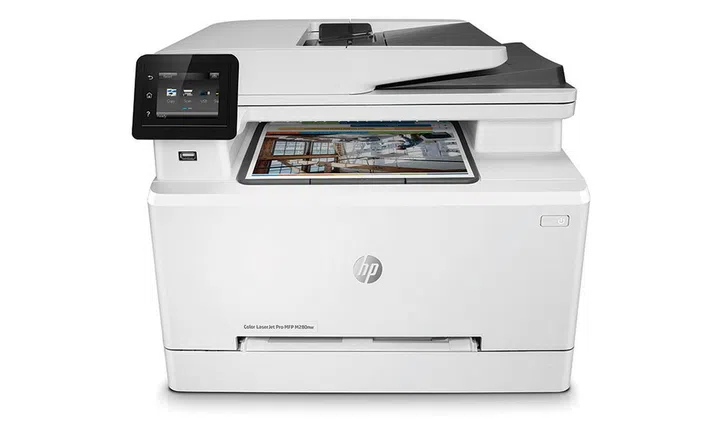
The HP Color LaserJet Pro M281 series are designed from the ground up to enable businesses, with a lot of features we’d look for in a printer for the home office or small to medium business.
The M281 series printers are easy to operate, and are versatile, too. The printers can print, scan, copy, and fax, and can be operated intuitively using touchscreen controls. You can print wirelessly thanks to the printer’s built-in Wi-Fi, and you can also print and scan directly from a mobile device.
Documents don’t even need to be downloaded to your mobile device first, as the M281 series support printing from the cloud. They also support scanning to the cloud or through email, so you can work from mobile and save a lot of time.
The M281 series printers also help to save costs. In addition to the benefits of running a laser printer that we mentioned above, the M281 series come with fast two-side printing to save on paper costs. HP Auto-On/Auto-Off technology only turns the printer on when it needs to do a job, helping your business save energy costs.
To find out more about the HP Color LaserJet Pro printers, go to http://www8.hp.com/sg/en/printers/laserjet-pro-2.html
The new HP OfficeJet Pro 8000 series will upgrade your company
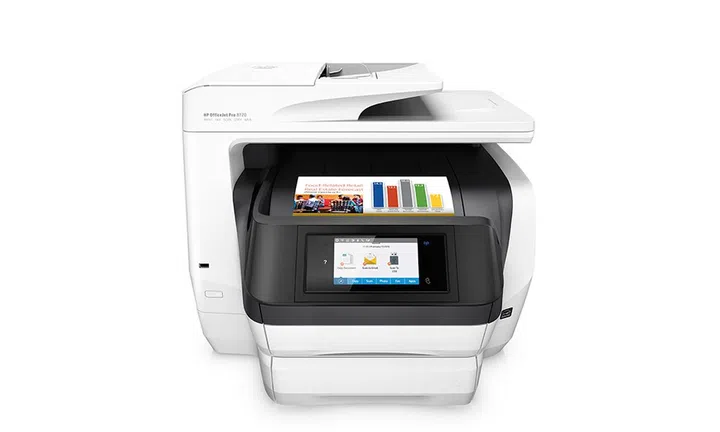
The HP OfficeJet Pro 8000 series print professional-quality color prints that are ready for business. Because it can print on a variety of papers, including photo papers, you can even print the company’s annual get-togethers.
The HP OfficeJet Pro 8000 series spend up to 50% less per page when compared to laser printers. That’s good news for small and medium businesses that are looking to save on costs.
The HP OfficeJet Pro 8000 series ship with modern technologies to reduce friction and increase productivity; they are built to match the way we work.
A large and intuitive touchscreen gives you easy control over the printers, and you can print from anywhere using your smartphone or tablet with the free HP Smart app, and even without a network using Wireless Direct printing — great for printing on the move or for clients to use. It’s a big leap forward from when printers could only print from cable-connected PCs.
The printers also feature advanced paper handling for businesses, with fast and automatic two-sided prints. The HP OfficeJet Pro 8000 series printers are all-in-one printers that do everything well, from printing to copying to scanning. It’s the printer you need to upgrade your productivity, especially if you’ve been making do with a single-function printer or a black and white laser printer.
If you have a home office or operate a small to medium business, the HP OfficeJet Pro 8000 series deserve your attention. Not only will they serve the needs of your team, they’ll also do so while saving costs and increasing productivity.
To find out more about the HP OfficeJet Pro printers, go to http://www8.hp.com/sg/en/printers/officejet-pro-printers.html
Our articles may contain affiliate links. If you buy through these links, we may earn a small commission.