
Small Wonder - Zotac GeForce 9300-ITX WiFi
Need the perfect compact motherboard for your HTPC setup? Then the Zotac GeForce 9300-ITX WiFi could just be the ideal board for you. Small, but feature-packed and powerful, we take a closer look at this tiny dynamo and see if it has what it takes to seize centre stage in your living room.

Pocket Rocket
For a long time, integrated graphics processors (IGP) have had a bad reputation amongst computer users. Anyone who has an inkling of knowledge of graphics chipsets will avoid IGPs in the same way Count Dracula avoids the sun. Truly, most, if not all IGPs, have long been considered as nasty things due to their incompetent graphics performance that is suited to nothing more than standard office editing applications.
AMD was probably the first to shake things up in the IGP platforms market with their AMD 690G platform and has raised the bar yet again with the AMD 780G platform boasting the Radeon HD 3200 graphics core. You can actually have a decent gaming platform out of these and have silky smooth Full HD video playback of Blu-ray content - all of which says quite a bit of its power under the hood against past IGP implementations. But all this graphics goodness has so far been on the AMD processor based platform.
Fortunately, NVIDIA has come around last year to inject a much needed boost to the IGP scene involving Intel processor platforms with their GeForce 9300/9400 motherboard GPU (mGPU). Its success can simply be expressed by the fact that Apple's entire new product lineup from desktops to Macbooks are all equipped with this system chipset. In our first experience with it, we were impressed at how much more powerful it was than anything that came before it, including Intel's then new GMA X4500HD graphics engine on the G45 chipset. Undeniably it is the current king of the hill of IGP chipsets for both the Intel platform and in certain aspects, even the AMD platform with their equivalent 8300 series.
With that in mind, we turn our attention to the Zotac GeForce 9300-ITX WiFi (hence forth known as the Zotac 9300-ITX). As its name hints, the Zotac 9300-ITX comes in a mini-ITX form factor, measuring only 17 by 17cm, which is surprisingly small (compared to your standard fare of other boards). Coupled with the highly capable GeForce 9300 mGPU, this makes it the ideal platform for HTPC setups.
Now, here's a quick look at how small a mini-ITX board is, and then what the package comes with along with the board's technical specifications:
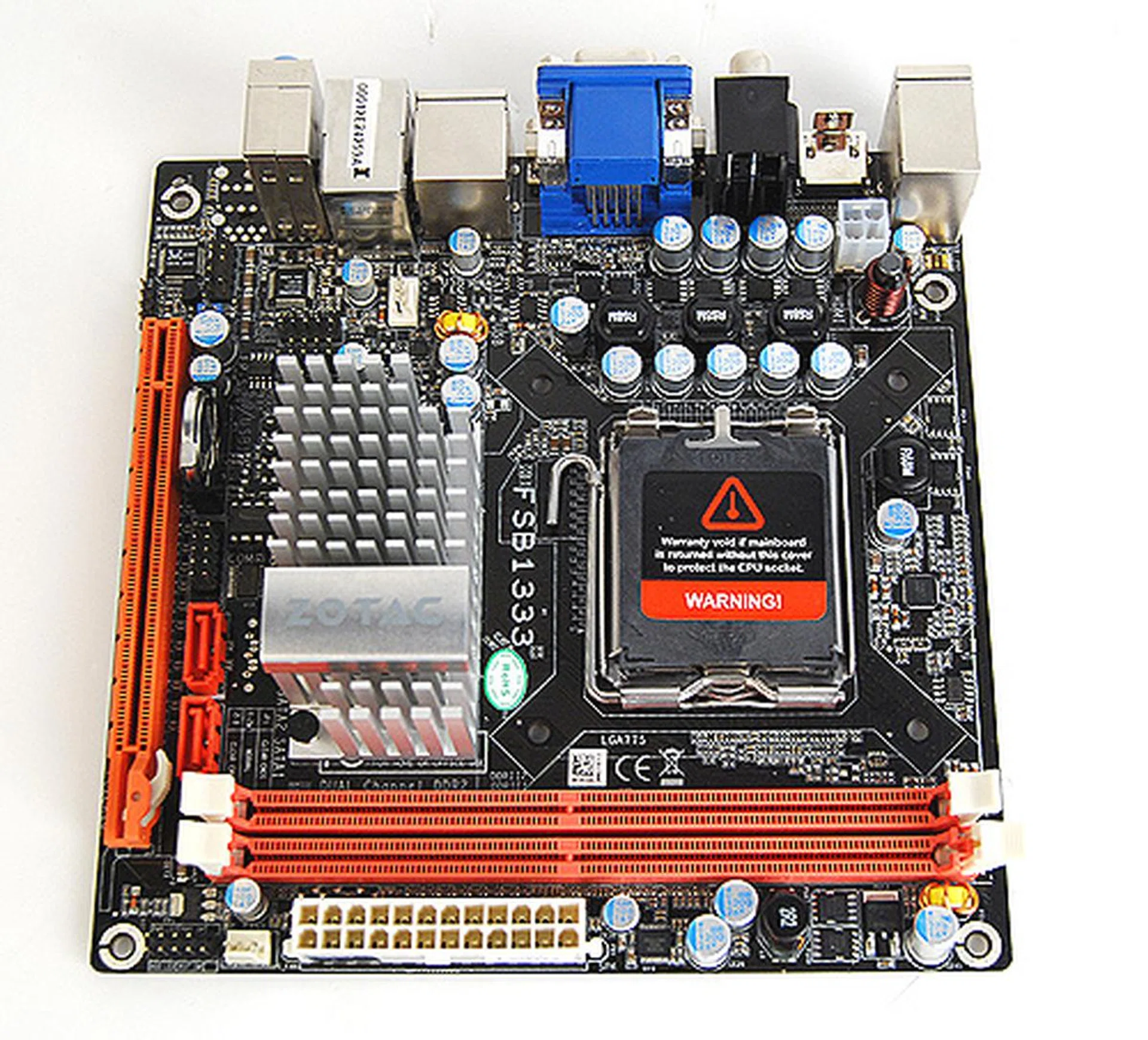
Here's the Zotac GeForce 9300-ITX WiFi motherboard again as we scrutinize its features and layout.
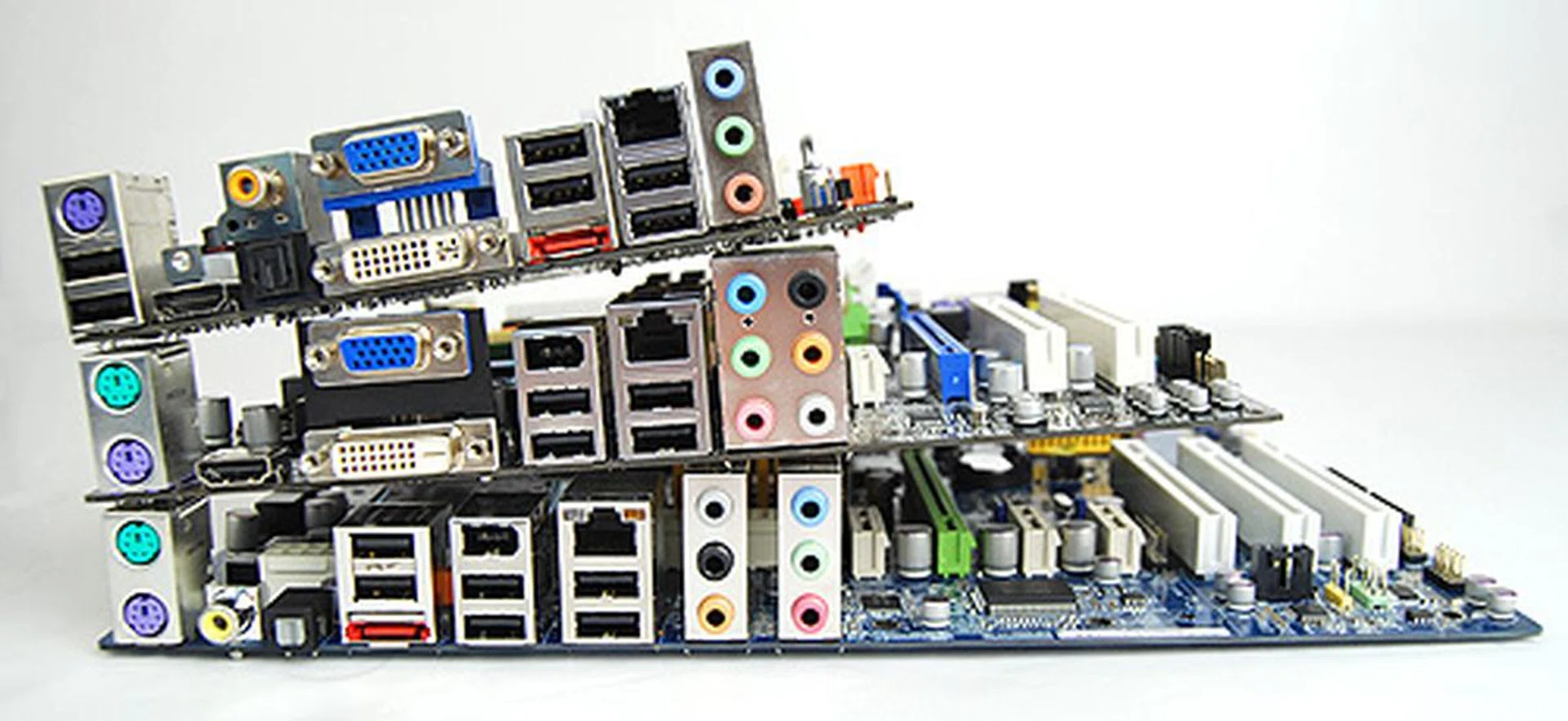
Just look at how much smaller the Mini-ITX Zotac GeForce 9300-ITX WiFi (topmost board) is compared to a microATX and normal ATX size board.
Motherboard package accessories:
- Driver CDs
- Installation Guide
- User manuals
- I/O Shield
- 2 x SATA data cables
- 1 x Molex to SATA power cable
Wi-Fi accessories:
- 1 x Zotac GeForce 9300-ITX WiFi module
- 1 x Antennae
The Zotac GeForce 9300-ITX WiFi
As we've mentioned earlier, the Zotac 9300-ITX comes in mini-ITX form and as such is really small, but that doesn't mean you have to sacrifice on usability as the board comes with a decent amount of options (as the technical specifications of the board would attest). It has six USB ports on the rear I/O bracket, and an additional six more can be enabled through onboard USB headers. If there's anything we could use more of, it's definitely SATA ports. The Zotac 9300-ITX only has two, and with one most likely already reserved by your, presumably, Blu-ray drive, that means you only have another for your hard drive. Clearly, an additional SATA port would have been very useful.
However, the Zotac 9300-ITX does redeem itself somewhat when we took a look at its generous video output options. With VGA, DVI and HDMI outputs, the board does seem to have all bases covered, and users should find it a breeze to hook it up to their existing living room systems.
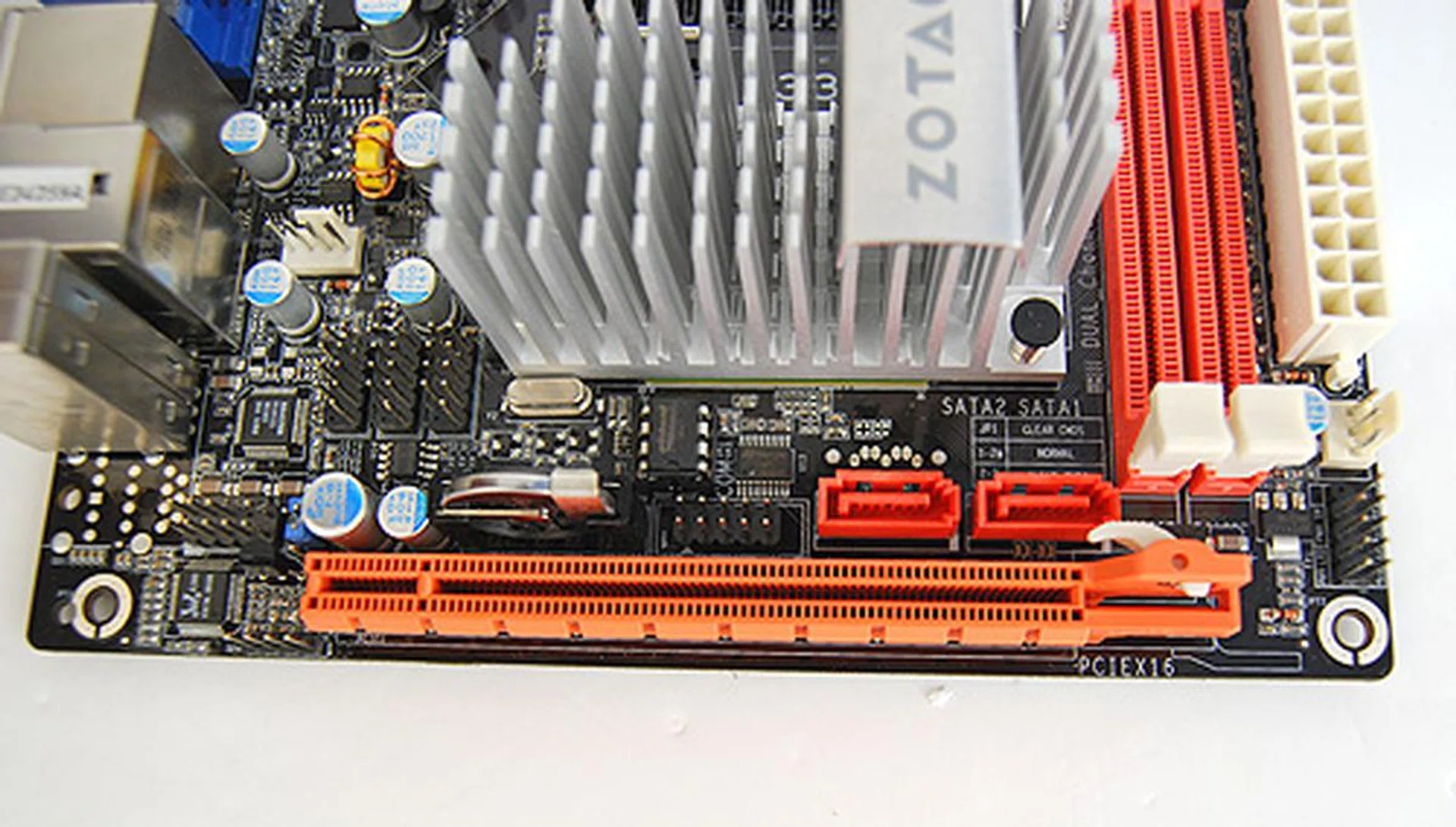
You can't have your cake and eat it, so the super small Zotac GeForce 9300-ITX WiFi gets only a single PCIe x16 slot and two SATA ports.
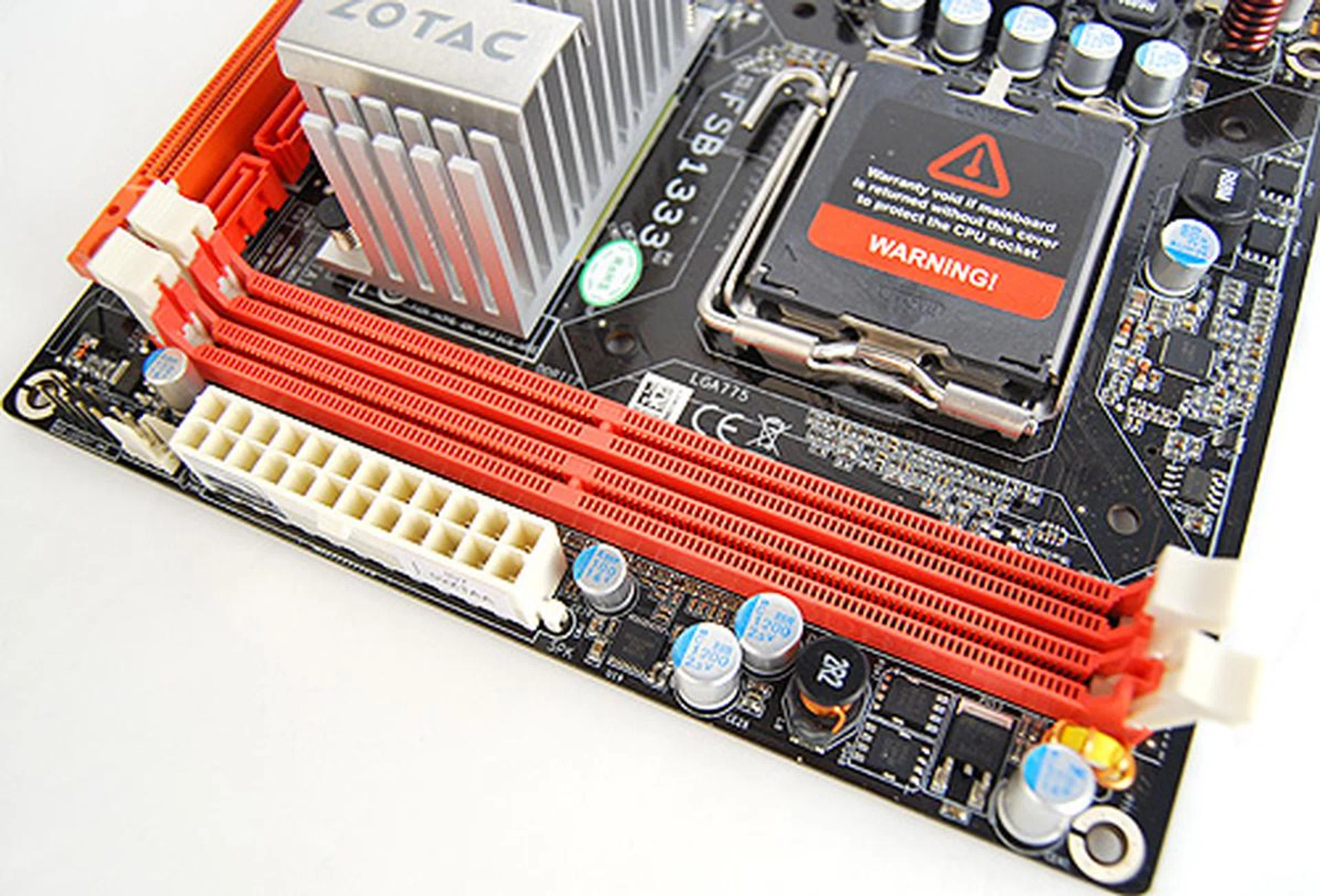
Again, because of space constraints, this board gets only two DIMM slots, but thankfully, it'll support up to 8GB of DDR2 memory.
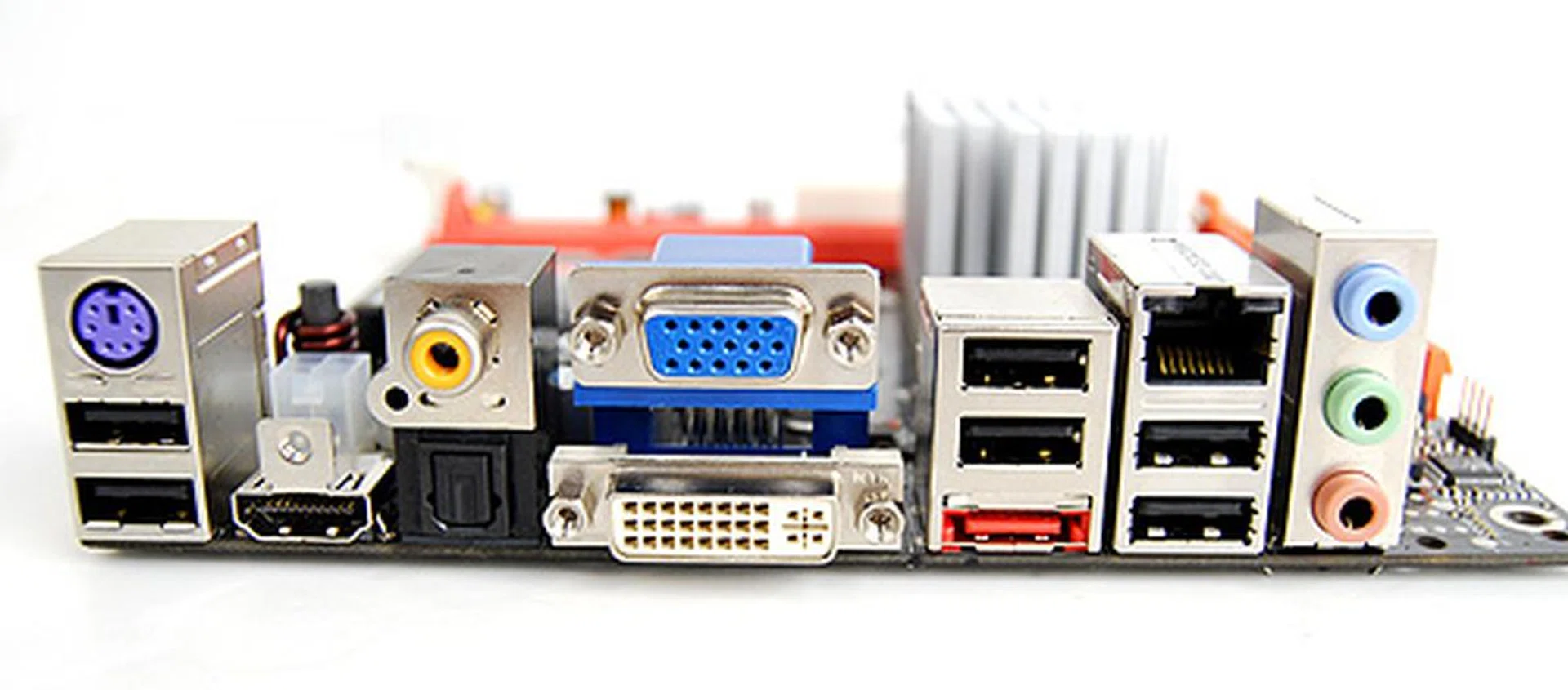
Despite its small size, the Zotac GeForce 9300-ITX WiFi manages to pack almost all the possible ports you need. No FireWire, however, but you do get six USB 2.0 ports, a PS/2 port for keyboards, a RJ-45 Gigabit LAN port, an all-important eSATA port and various video ports: DVI, HDMI and VGA.
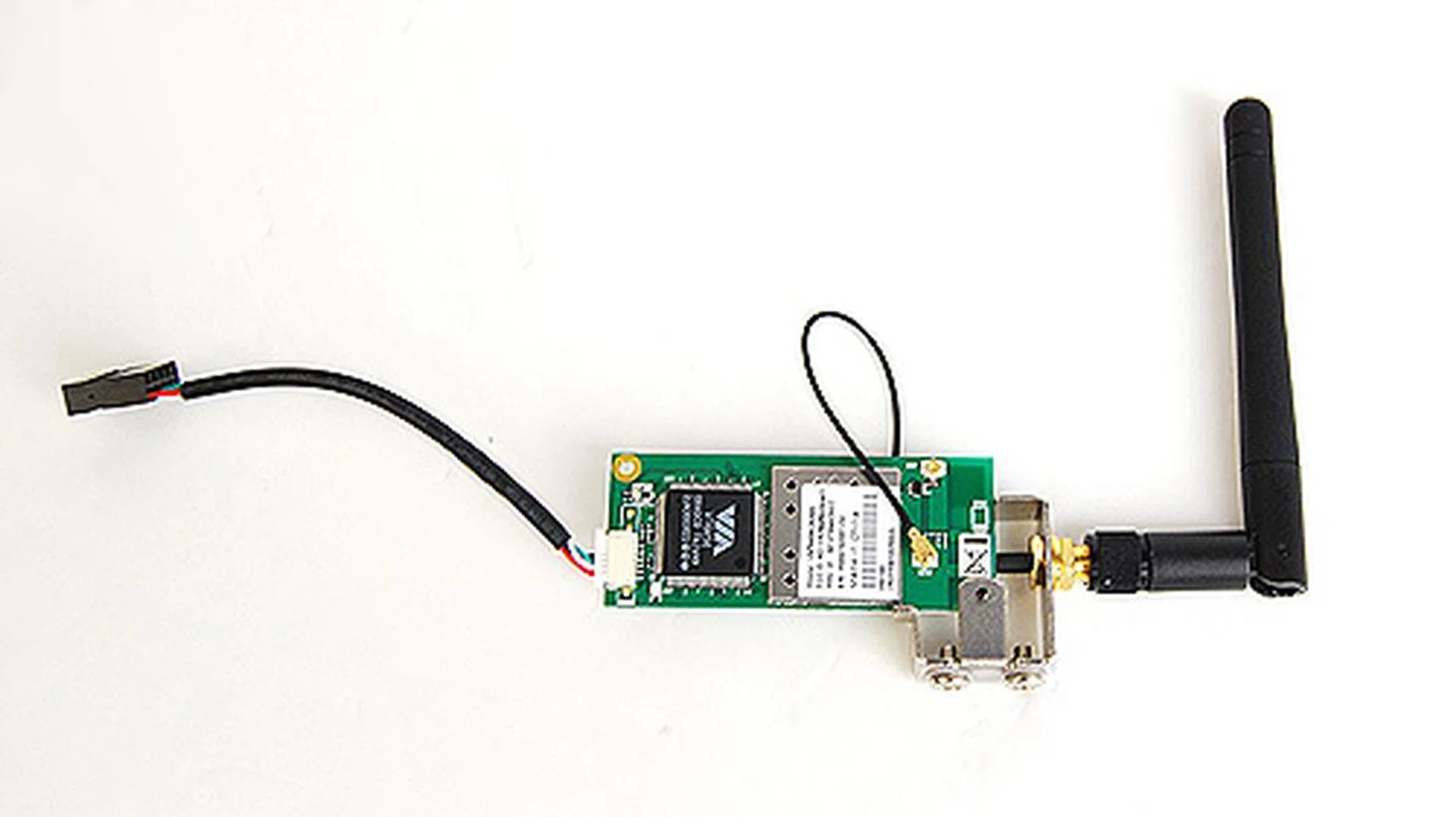
As its name suggest, the board comes with an optional wireless module, enabling WiFi connection and is made possible by a single VIA VT6656 Wireless LAN controller chip.
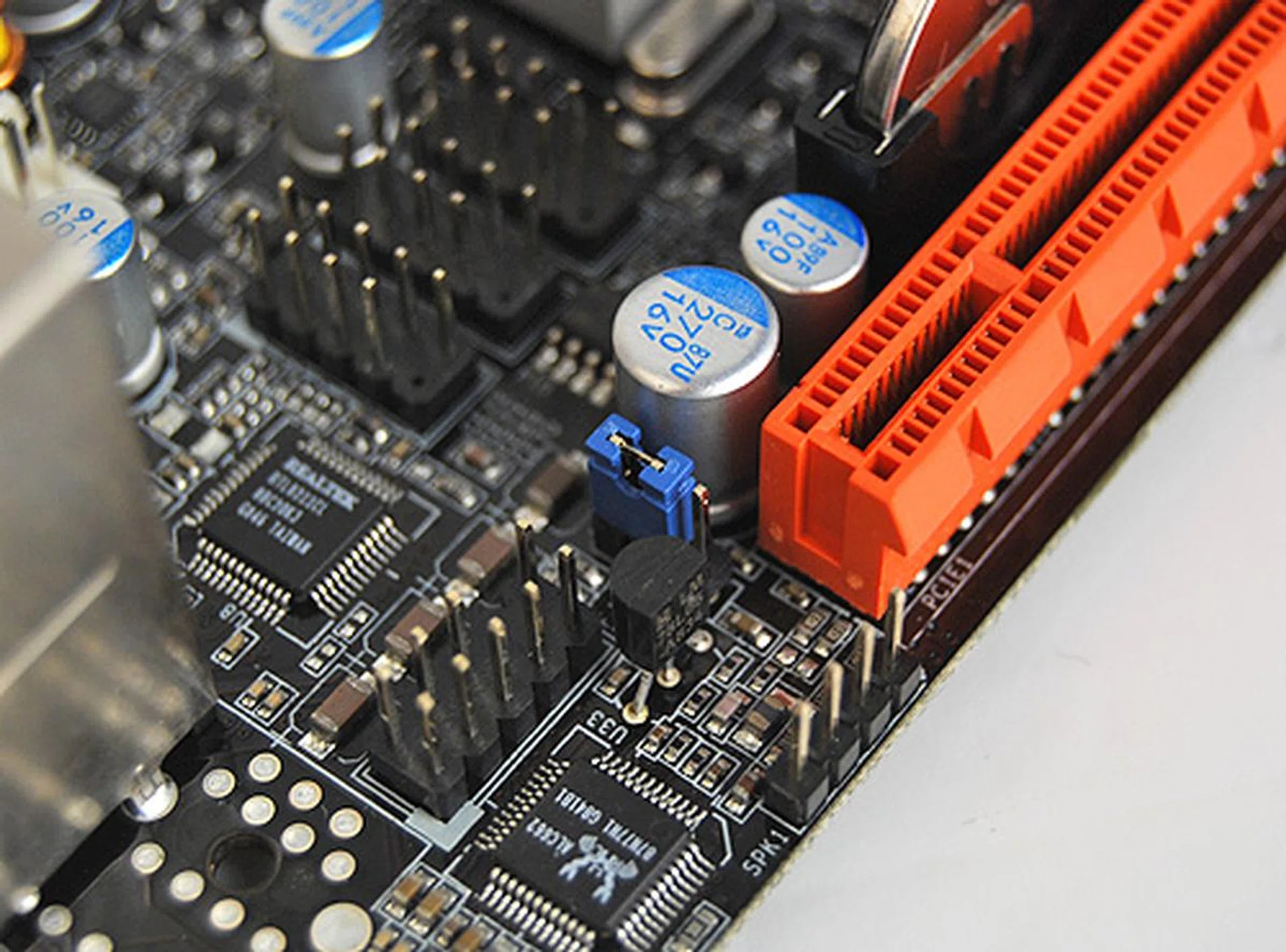
To clear the CMOS, short the jumper as seen here.
Overclocking
Mini-ITX boards are not exactly the type of boards overclocking enthusiasts will go for and the Zotac 9300-ITX shows this by having extremely limited overclocking options. In fact, the other thing that its BIOS allows you to tweak is its FSB clock. There were no options for changing the CPU ratio. Truth be told, this BIOS offers very little for you to play around with, which is not entirely unexpected.
- FSB Clock: 400 - 2500MHz
- CPU Ratio: Not adjustable
- CPU Voltage: in 0.02V steps up to +0.30V
- Memory Voltage: 1.90 - 2.10V (in 0.1V steps)
- NB Voltage: 1.10 - 1.25V (in 0.05V steps)
Test Setup
To determine the worth of this Zotac 9300-ITX, we'll be comparing it closely with the MSI P7NGM-Digital (hence forth known as MSI Digital), which is also based on the GeForce 9300 mGPU chipset. As such, we'll be using the exact same test setup for the Zotac 9300-ITX as that of the MSI P7NGM-Digital.
However, we encountered some problems while setting up the test system. For one, couldn't install the AHCI drivers for the hard disk. Whenever we tried to do so, for some reason, Windows won't install. Secondly, we noted that the memory could only run when command per clock settings were set to 2T. That is to say the memory controller can only issue instructions every other clock cycle, which in turn could lead to latency issues and less than optimal performance. The test setup used is as follows:-
- Intel Core 2 Duo E8500 (3.16GHz)
- 2 x 1GB Kingston HyperX DDR2-800 @ 5-5-5-16 (MSI P7NGM-Digital @ 5-5-5-15)
- Seagate Barracuda 7200.7 SATA 80GB HDD
- Microsoft Windows XP Professional with Service Pack 2 and DirectX 9.0c
We've also thrown in the Intel DG45ID (Intel G45) and ASUS P5N7A-VM (ASUS P5) into the mix for better comparison. The IGPs were all manually allocated 256MB of frame buffer and were all driven by ForceWare 178.24 drivers, whereas the chipset drivers used were 20.08. As for the Intel G45 board, the drivers used were 14.36.3.4990 for the graphics and INF 9.1.0.1007 for the chipset.
To find out if increasing the IGP frame buffer does help in performance, we ran the Zotac 9300-ITX with 256MB of frame buffer for one run, and 512MB for another.
Finally, the benchmarks used to test the motherboards are as follows:
- BAPco SYSmark 2007 (ver 1.04)
- Futuremark PCMark05 (ver 120)
- SPECviewperf 9.0
- AquaMark3
- 3DMark06 (ver 110)
Results - SYSmark 2007 Preview
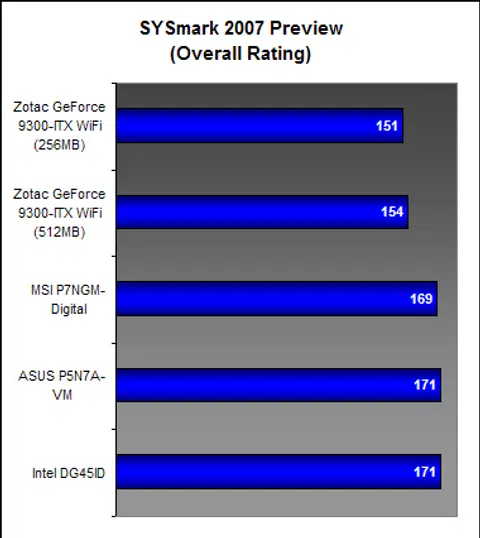
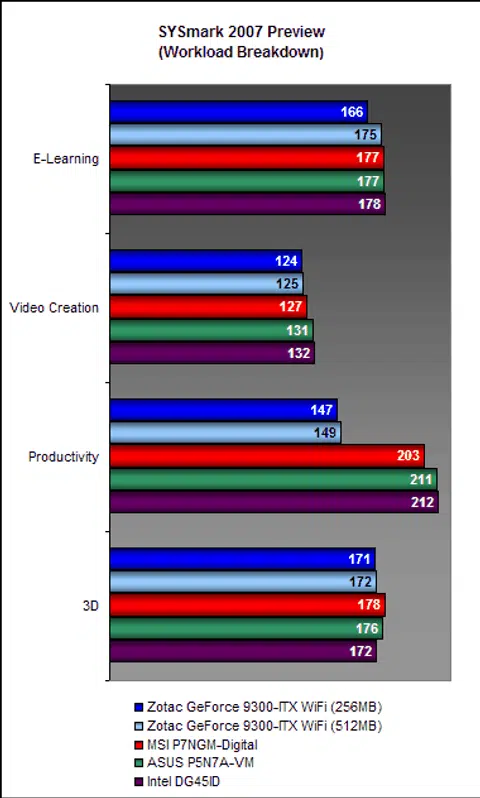
We begin our report with SYSmark 2007 Preview, a general system benchmark that tests a wide range of different applications and tasks, allowing us to get a rough feel of how the board performs.
Examining the breakdown of results closely, we can see that although its scores are generally lower than the other boards, it is its productivity scores that really pulled down its overall scores. Despite trying the benchmark numerous times, we continued to get dismally poor scores on productivity. This could be due to a culmination of the fact that the AHCI drivers weren't installed and the memory wasn't running at optimal speed.
Results - Futuremark PCMark05 Pro
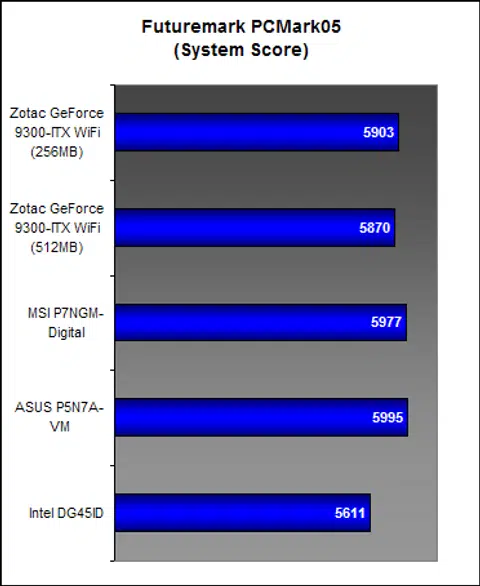
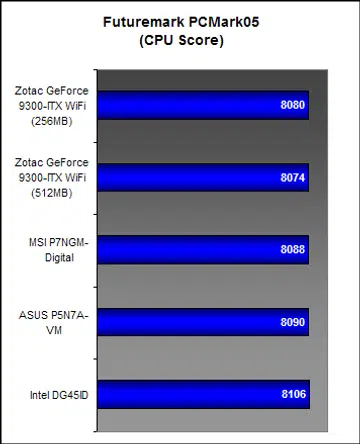
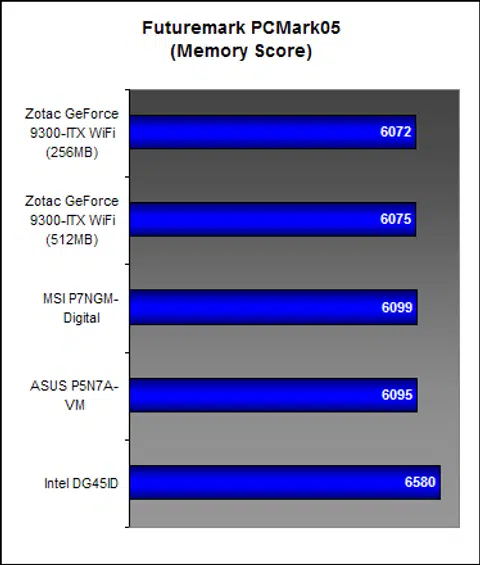
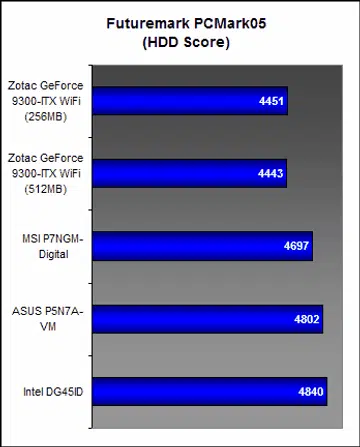
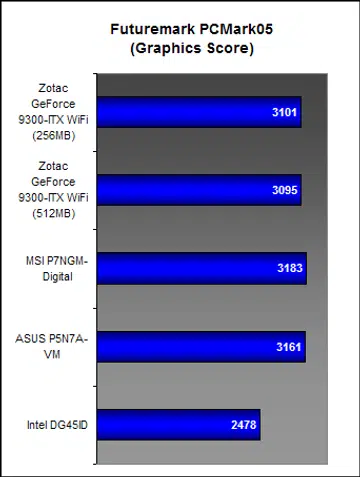
Coming to PCMark05 Pro, things started looking up for the Zotac 9300-ITX. Here, its overall score was comparable to the MSI Digital, and superior to the Intel G45. Areas of interest here are the graphics and HDD scores. In graphics, we can see that the Intel G45, featuring Intel's GMA X4500HD is the weakest mGPU. Also, it seems that doubling the frame buffer offers no significant improvement to performance. Looking at the HDD scores, it seems that the lack of AHCI drivers put quite a significant dent on the Zotac's performance.
Results - SPECviewperf 9.0
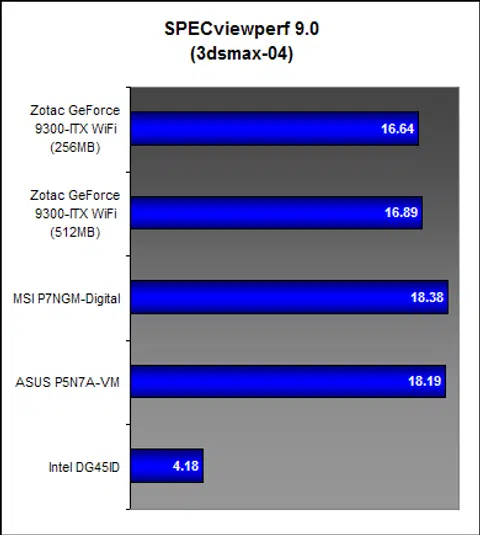
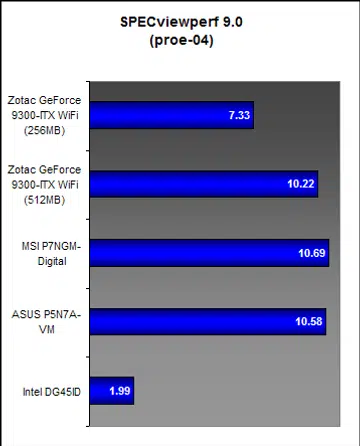
SPECviewperf 9.0, a benchmark that reveals disparity in graphics performance, once again demonstrated the superiority of the NVIDIA GeForce 9300 mGPU. Worryingly, however, it also clearly showed that the Zotac 9300-ITX was a little underwhelmed compared to the other boards of its brethren. And because of the limited functions and reporting of its BIOS, we were unable to determine with precision the cause of this, but in all likelihood, we are speculating that this mini-ITX board is not as well optimized as its microATX cousins.
Results - AquaMark3 & 3DMark06
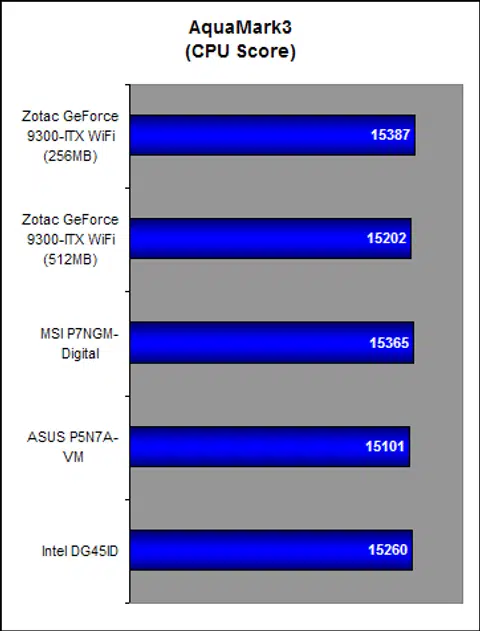
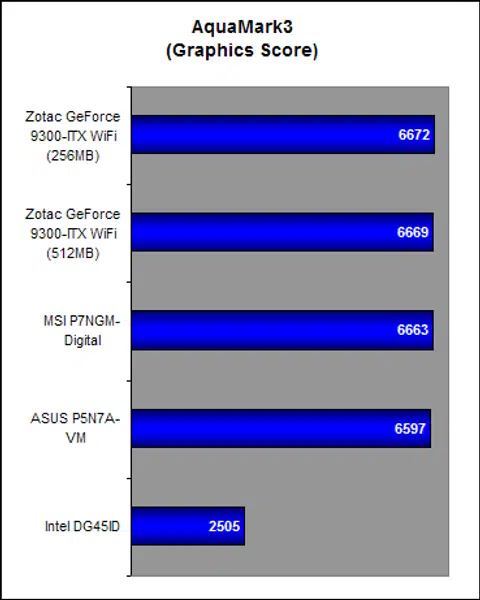
AquaMark 3 might be old, but it is still widely used as a quick gauge of a board's performance, in terms of graphics prowess, especially. In this respect, the Zotac 9300-ITX didn't disappoint, managing very respectable scores. Again, we can see the apparent superiority of the NVIDIA GeForce 9300 mGPU over the Intel GMA X4500HD. We can also see that doubling the frame buffer did us no good whatsoever.
Temperature
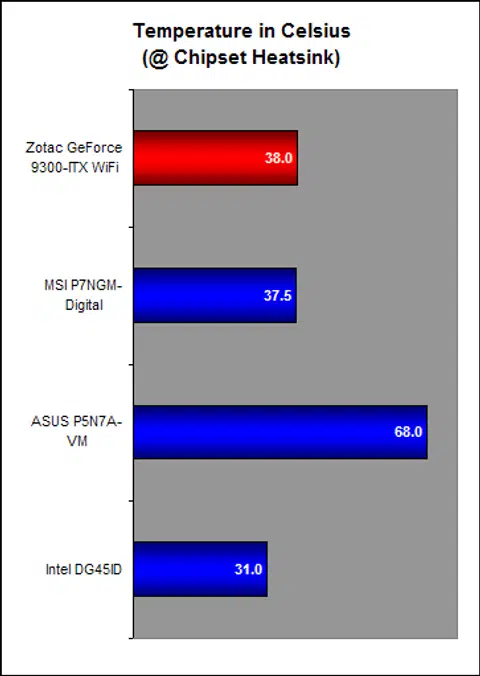
Temperature performance is important in a HTPC setup and we're pleased to say that the Zotac 9300-ITX aced this test. 38 degrees Celsius is only half a Centigrade greater than that of the MSI Digital, and when placed in a well-designed casing, the Zotac could probably go even lower still.
Power Consumption
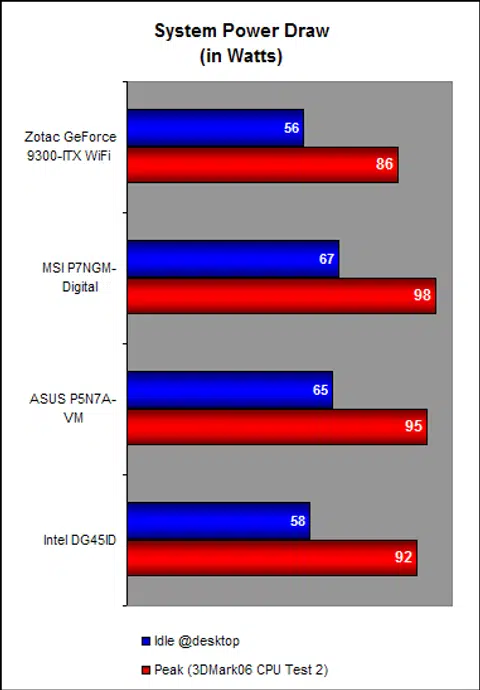
Of the four boards here, the Zotac 9300-ITX recorded the lowest power draw, which was not surprising given its petite size. This makes up, slightly, for its lackluster performance.
Almost There...
Zotac, a relatively new player in the PC components market, have thus far consistently offered solidly engineered products. Unfortunately, the Zotac 9300-ITX needs some work. Its small form factor may make it great for HTPC setups, but not without sacrificing some usability and performance. But of the two, we are more concerned about performance because the Zotac 9300-ITX was a little erratic and in some of our tests, performed significantly poorer than its larger (physically), but still comparable rivals. Given Zotac's great run since its inception, we are confident they'll iron out the issues noted via better BIOS updates in due time.
Remember also that the Zotac 9300-ITX supports WiFi connectivity out of the box, and comes with an easy to install WiFi module. This can be especially handy. What's more, it can save you a few dollars and the hassle of getting and looking for a WiFi adapter as well.
Elsewhere, another important finding about not just the board, but the NVIDIA GeForce 9300 mGPU, is that increasing the frame buffer size from 256MB to 512MB had no noticeable impact on performance for majority of the tests. In fact, this extra memory could probably be better used doing something else.
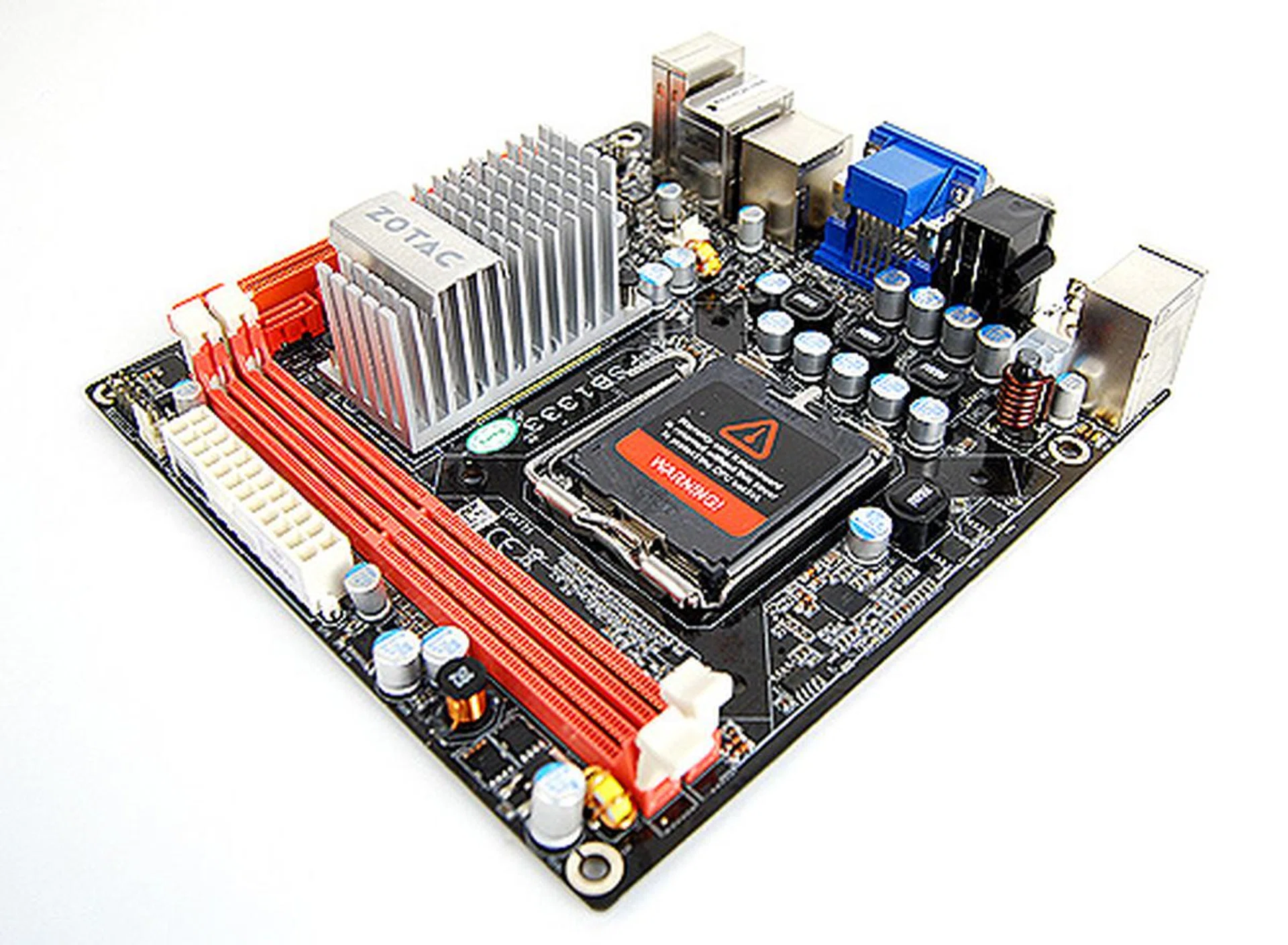
The Zotac GeForce 9300-ITX WiFi is wonderfully small, but you do have to make a few sacrifices to justify getting this board.
All in all, the Zotac 9300-ITX is an oddball. We really liked how small it is, but can't help but be a bit put off by its less than stellar productivity performance. It's a good thing that the performance difference is just relegated to benchmarking and not something directly related to actual usage where it felt no different from the rest of the reviewed boards. Elsewhere on graphics performance, where the chipset's strength lies and also the real reason for considering this board in the first place, we're glad to note that it kept our expectations. However, at a recommended retail price of around US$140, it is a considerable US$35 more than the MSI P7NGM-Digital , which, apart from its larger size, offers much more than the Zotac 9300-ITX. Thankfully at that price, the board is bundled with the WiFi 802.11a/b/g module and that actually evens out the board's value proposition.
In the end, really, you have to weigh the costs of sacrificing some functionality and performance, for size. If by chance you require the smallest possible DIY HTPC, this is perhaps one of the rare few gems around to cater to this niche need.
Our articles may contain affiliate links. If you buy through these links, we may earn a small commission.