
PowerColor PCS+ HD 4870 1GB GDDR5 - Faster Yet Cooler?
ATI's latest Radeon HD 4870 was released a little more than two months ago, and now, we are beginning to see overclocked versions of the card entering the market. This here is PowerColor's PCS+ HD 4870 1GB GDDR5, which promises to not only run faster, but also cooler. Too good to be true? Read on to find out.

Too Fast and Cool to be True?
Since time immemorial, man has had an insatiable appetite for power and speed. This can be easily appreciated when you look at modern day transport. From horse carriages of the days of yore, to cars, to maglev trains, to airplanes, the only limits that stand in man's way are the laws of physics. This lust for power and speed can be seen in computing as well, giving birth to faster processors, faster memory and of course faster graphics cards. As we've seen in our earlier review, the standard Radeon HD 4870 is already a very capable performer, providing more than enough graphics processing power for your average or even hardcore gamer. But when was man ever satisfied? Hence overclocking.
However, the inescapable fact is that with more power comes more heat. Therefore, graphics cards require well-designed coolers to ensure that the GPU doesn't become a campfire sitting on your motherboard. This relentless lust for power and speed has now led prominent ATI graphics card manufacturer, PowerColor, to give us this - the PowerColor PCS+ HD 4870 1GB GDDR5.
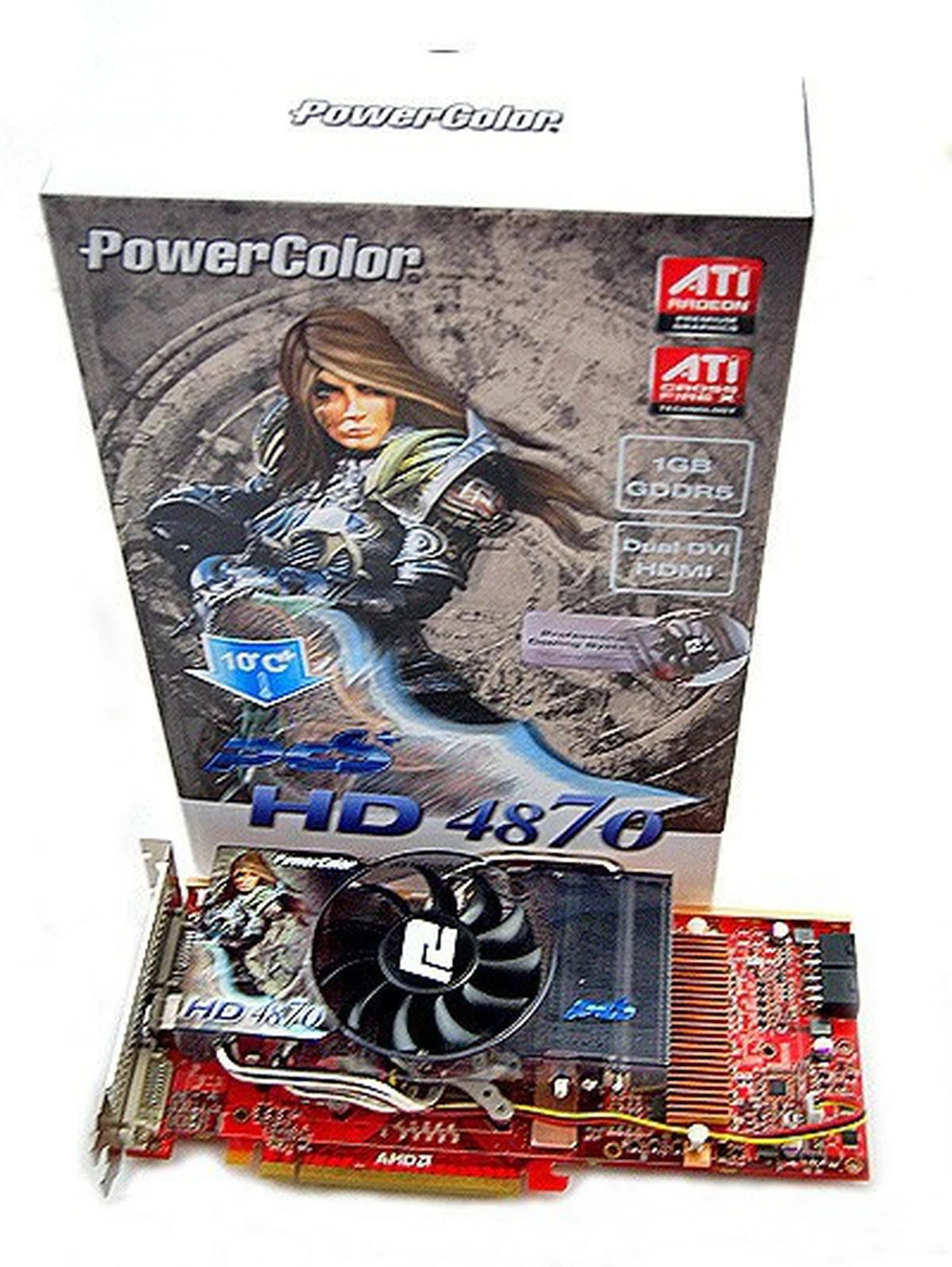
The PowerColor PCS+ HD 4870 is one of the earliest overclocked versions of the HD 4870 made available to gamers, and is packed in a compact box, which we find tasteful.
The PowerColor PCS+ HD 4870 is an overclocked variant of the standard Radeon HD 4870 which PowerColor claims to be not only faster than the reference, but also cooler. But before we delve into the details of the card, let us first take a look at how the card stacks up against the competition.
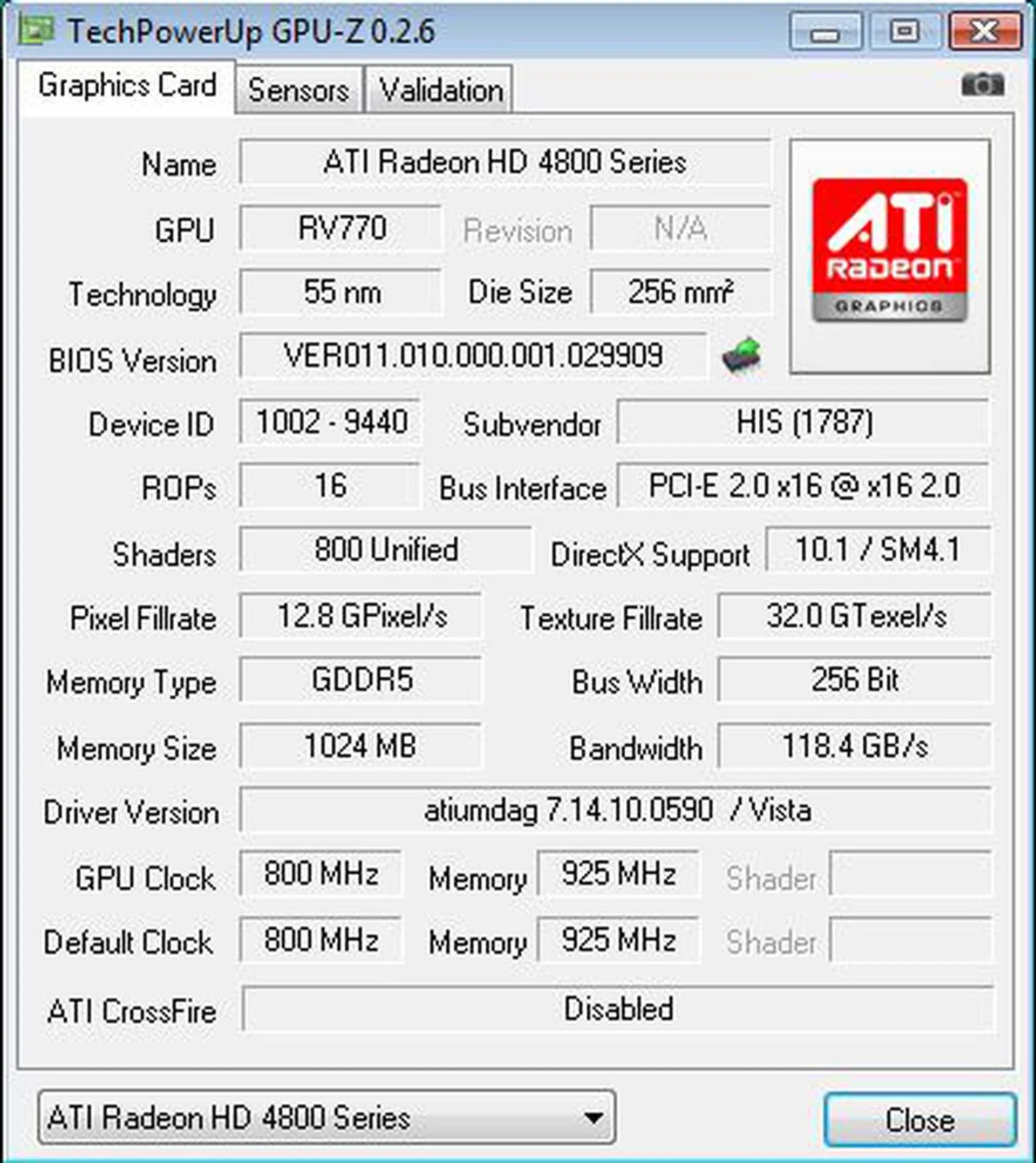
The PowerColor PCS+ Radeon HD 4870 1GB GDDR5
Like we've said, this card is essentially an overclocked version of the standard Radeon HD 4870 that was released about a month ago. While the reference HD 4870 was clocked at 750MHz for the core and 3600MHz for the memory, this offering from PowerColor ups both the core and memory clock speeds by 50MHz and 100MHz respectively. So the eventual clock is 800MHz and 3700MHz. Also, the frame buffer in this card has been doubled from 512MB to 1GB, which should give us better performance when running demanding games such as Crysis on higher resolutions.
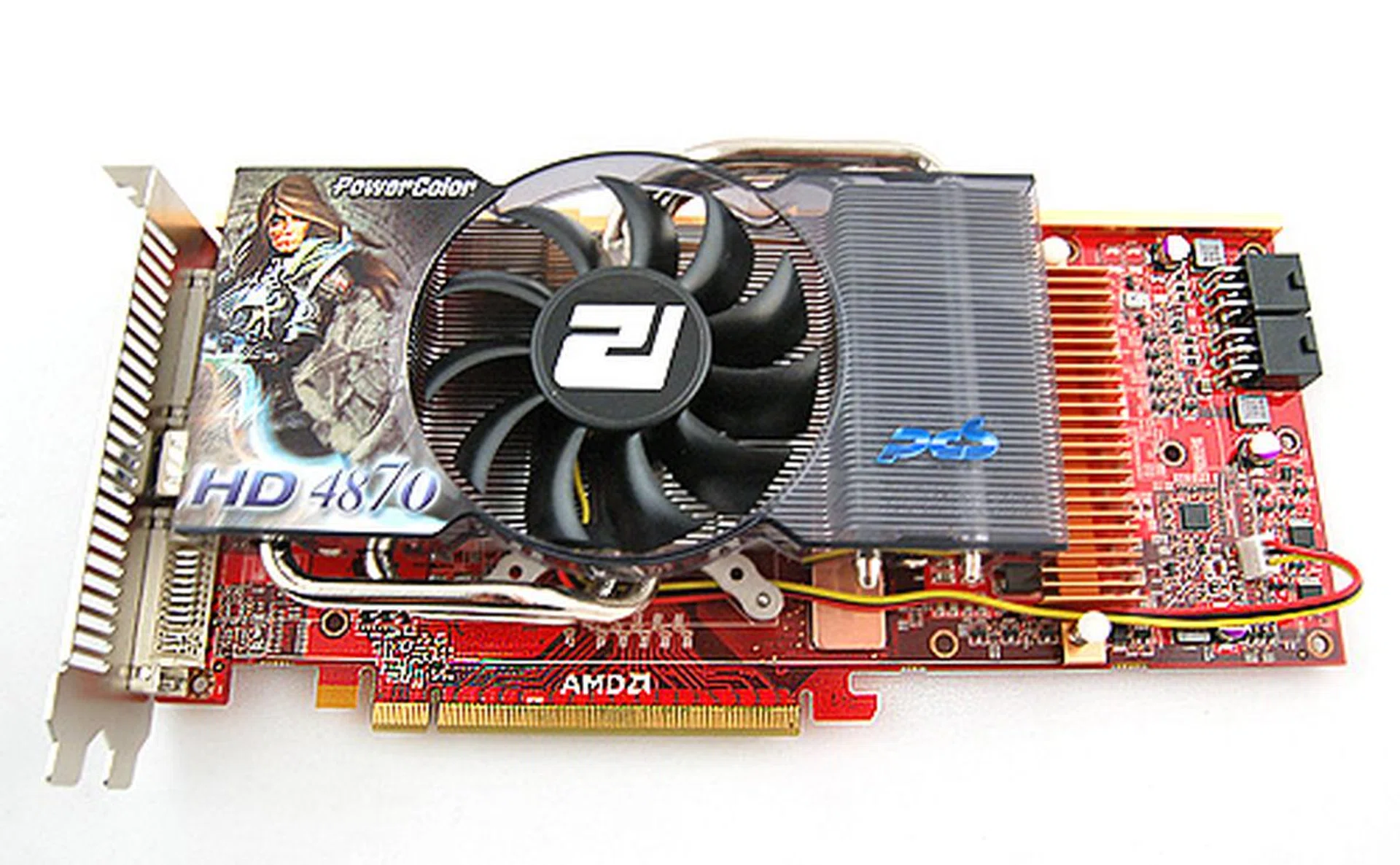
The Professional Cooling System might not look like much, but it certainly does the job (as you will find out later).
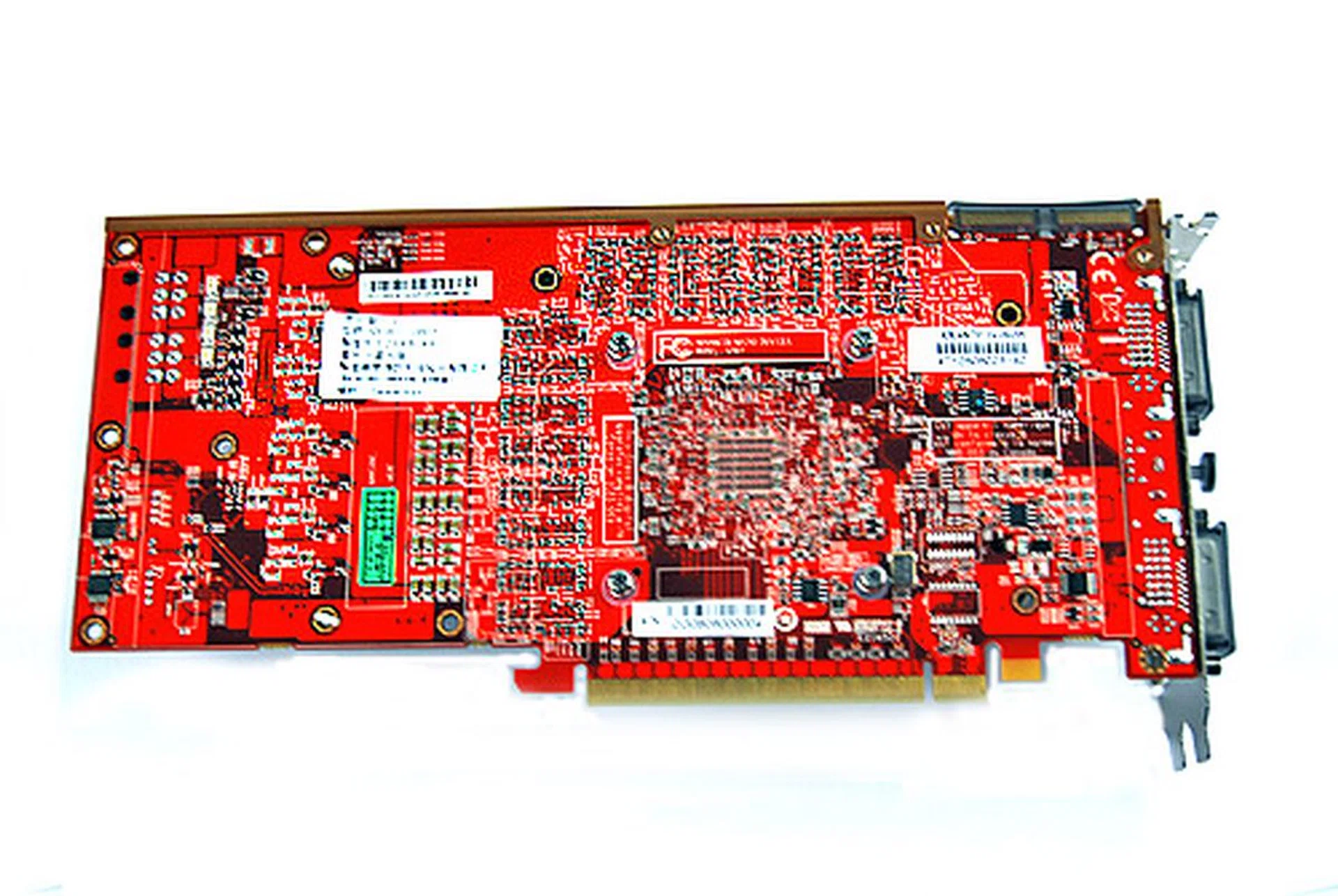
The shot of the back of the card. There's nothing special to report here, so move along.
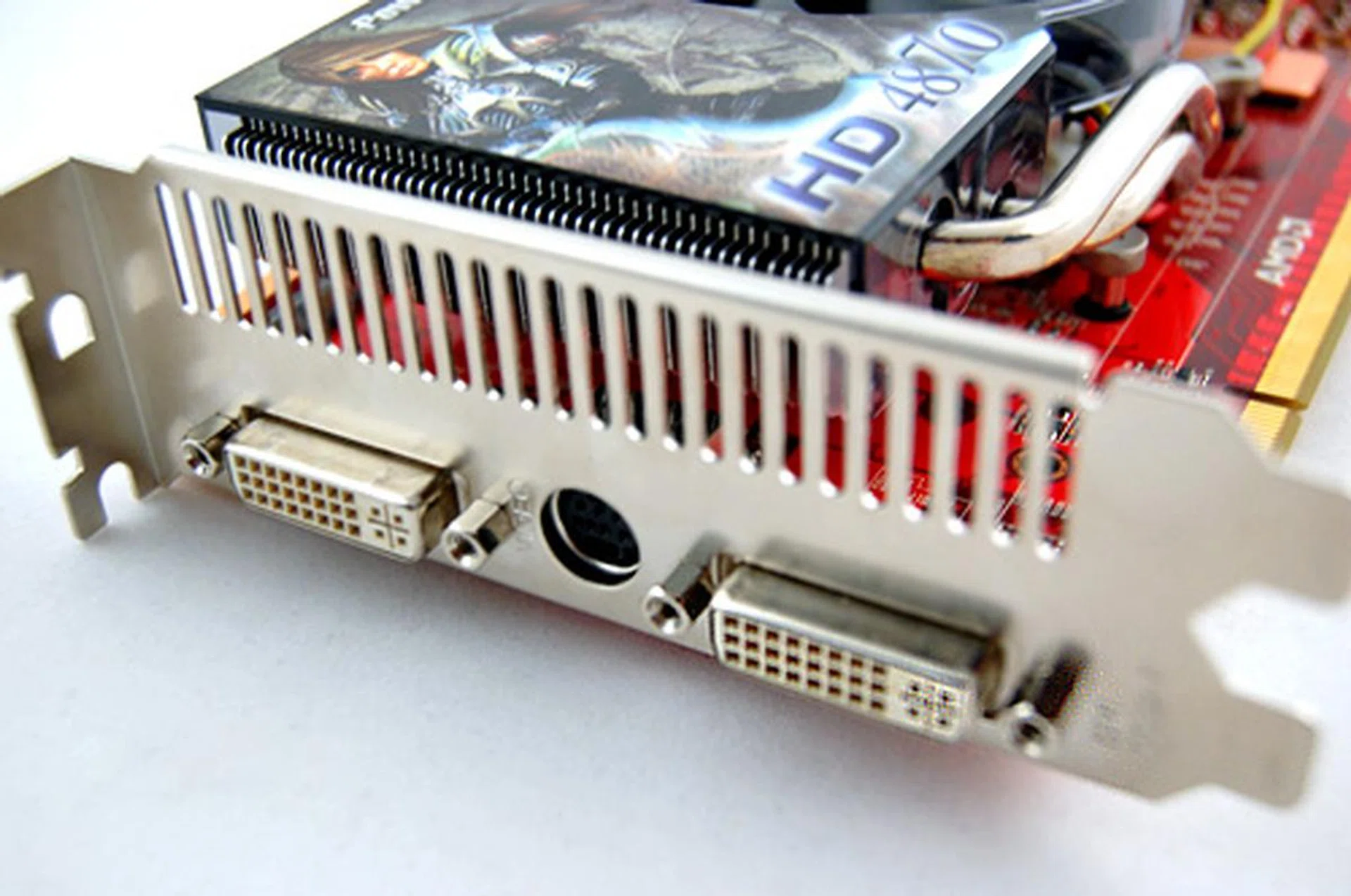
There's nothing special about the rear I/O ports either. The PowerColor PCS+ HD 4870 has a pair of HDCP compliant DVI ports and a mini-DIN ports, like most other cards do.
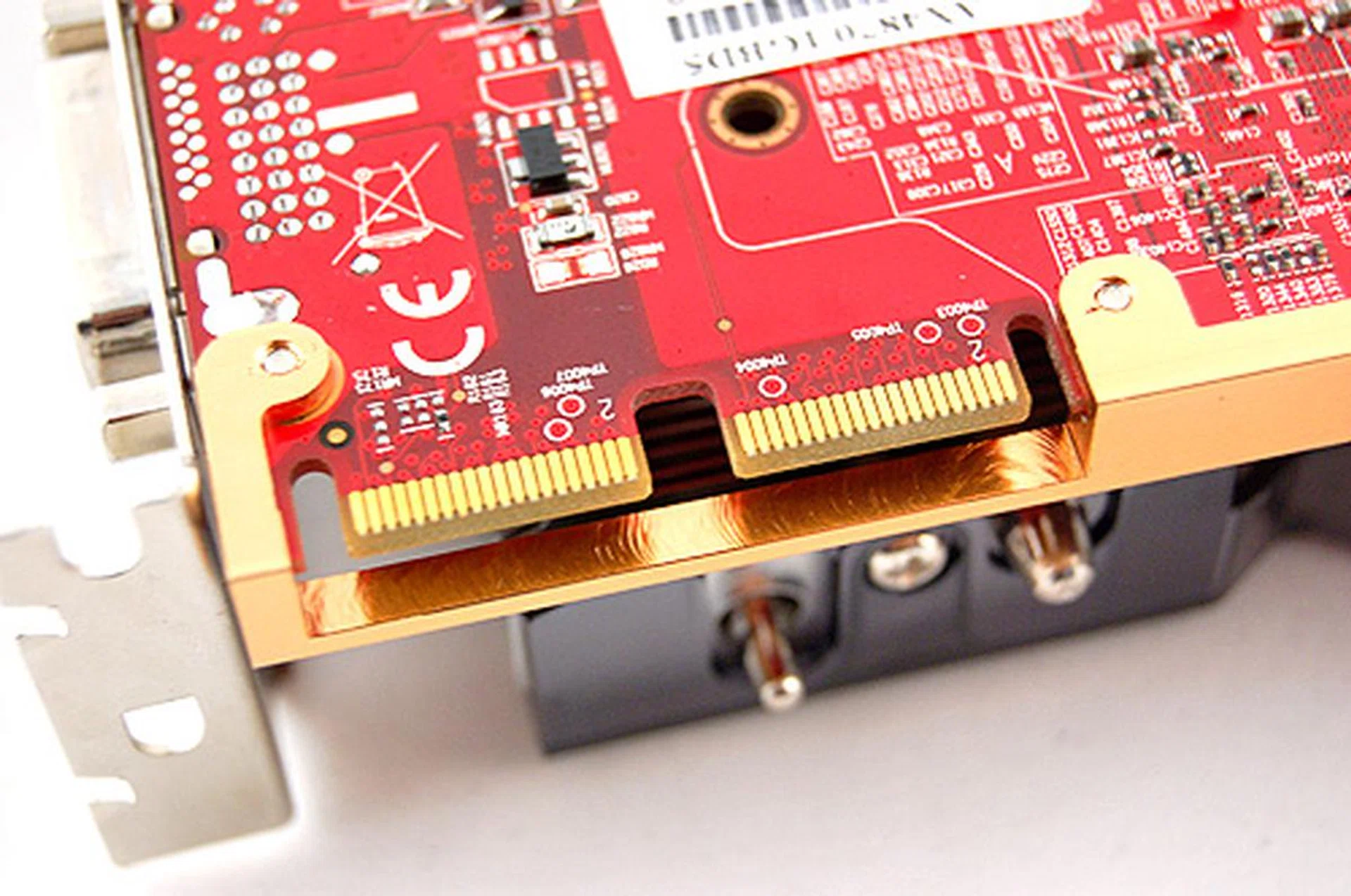
The PowerColor PCS+ HD 4870 comes with two CrossFire connectors, which means up to four 4870 cards can be linked, but only if your motherboard is capable of such a configuration.
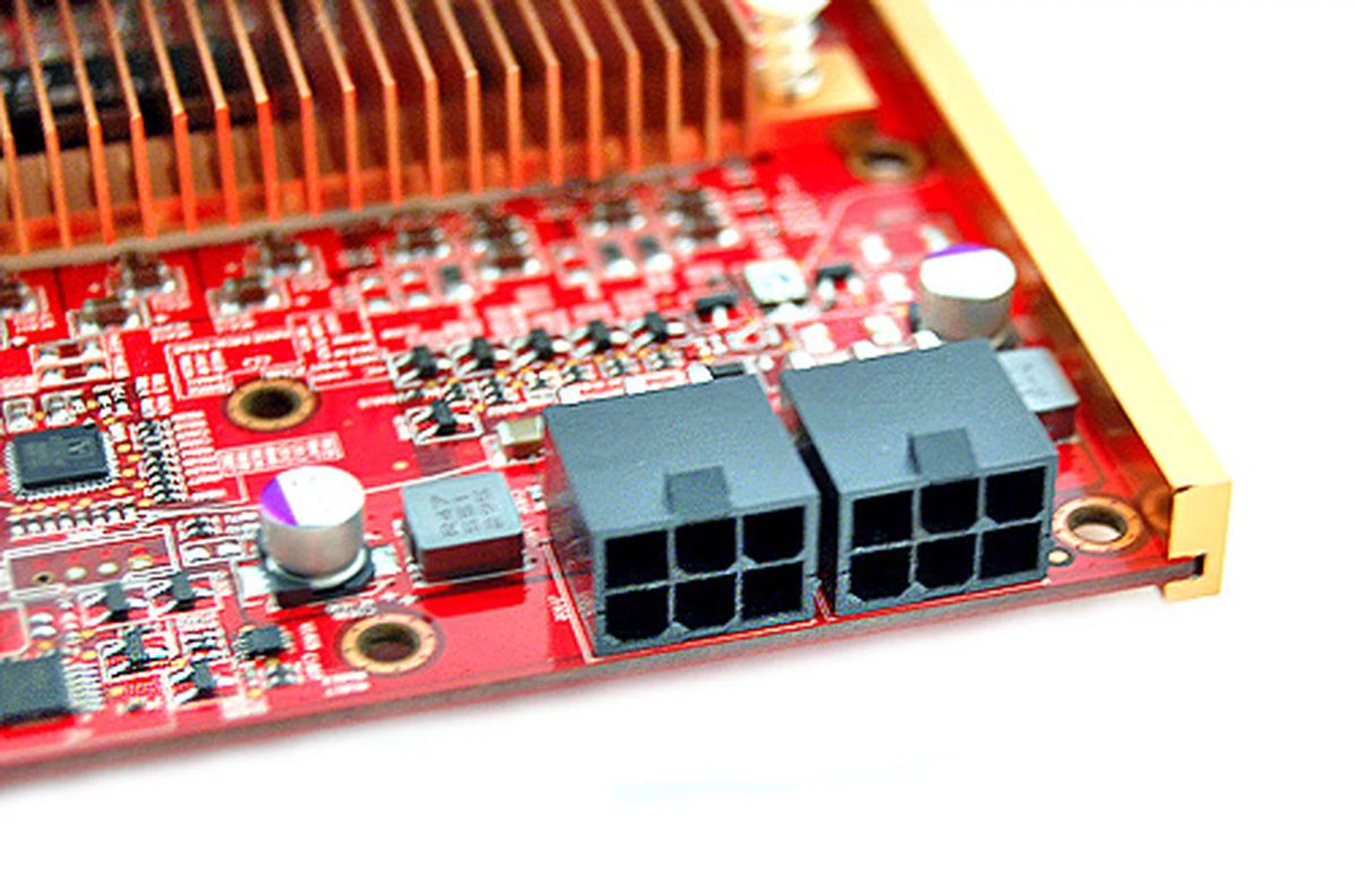
Like most high-end cards, the PowerColor PCS+ HD 4870 requires two 6-pin connectors and a PSU rating of at least 500W.
While we were excited at the prospects of a tweaked HD 4870, we had our reservations nonetheless. Chiefly, we were concerned about its operating temperature. From our earlier review of the Radeon HD 4870, we learnt that despite being manufactured using a 55nm process, the 4870 ran much warmer than its competitors and we were worried that overclocking the card would worsen the problem.
PowerColor obviously anticipated this and implemented on this card, a third party heatsink, the rather unimaginatively named "Professional Cooling System" by ZEROtherm. The PCS+, simply put, consists of a large fan sitting on top of a huge heatsink with thick heat pipes. Looking at it, we can't help but point out that it closely resembles MSI's Hybrid Freezer. PowerColor claims that this cooler on the PCS+ HD 4870 can reduce temperatures by as much as 10 degrees Celsius, but count us as skeptics until we test it ourselves and we've got them covered later in the review.
The contents of the PowerColor PCS+ HD 4870 are as follows:
- Driver CD
- Quick installation guide
- DVI-to-VGA adapter
- DVI-to-HDMI adapter
- S-Video to RCA cable
- 6-pin PCIe power connector
- CrossFire connector
Test Setup
We'll be putting the PowerColor PCS+ HD 4870 through its paces using the same Windows XP and Vista setups we've been using for our last few reviews, and they are as follows:
Windows XP SP2 Test System
- Intel Core 2 Duo E6700 (2.66GHz)
- Intel D975XBX 'Bad Axe' motherboard
- 2 x 1GB DDR2-800 Kingston HyperX memory in dual channel mode
- Seagate 7200.7 80GB SATA hard drive
- Windows XP Professional with Service Pack 2 and DirectX 9.0c
Windows Vista SP1 Test System
- Intel Core 2 Extreme QX6850 (3.00GHz)
- Gigabyte X38T-DQ6 motherboard
- 2 x 1GB DDR3-1333 Aeneon memory in dual channel mode
- Seagate 7200.10 200GB SATA hard drive
- Windows Vista Ultimate with SP1
We'll be paying close attention to see how much performance gain the higher clock speeds and extra memory will give the PowerColor over a standard HD 4870, and also how it'll stack up against the latest GTX 200 cards from NVIDIA. Here's the complete list of cards and the drivers used for both test setups:
- ATI Radeon HD 4870 512MB (Catalyst 8.6)
- ATI Radeon HD 4850 512MB (Catalyst 8.6)
- ATI Radeon HD 4850 512MB (CrossFireX) (Catalyst 8.6)
- NVIDIA GeForce GTX 280 1GB (ForceWare 177.34)
- NVIDIA GeForce GTX 260 896MB (ForceWare 177.34)
The following benchmarks were tested using their built-in time demo or benchmarking tools:
For Windows XP:
- Futuremark 3DMark06 (ver 110)
- Company of Heroes (ver 1.3)
- F.E.A.R (ver 1.0)
- Crysis (ver 1.1)
- Unreal Tournament 3 (ver 1.1)
For Windows Vista:
- Futuremark 3DMark Vantage (ver 101)
- Crysis (ver 1.21)
Win XP Results - 3DMark06 Pro (ver 110)
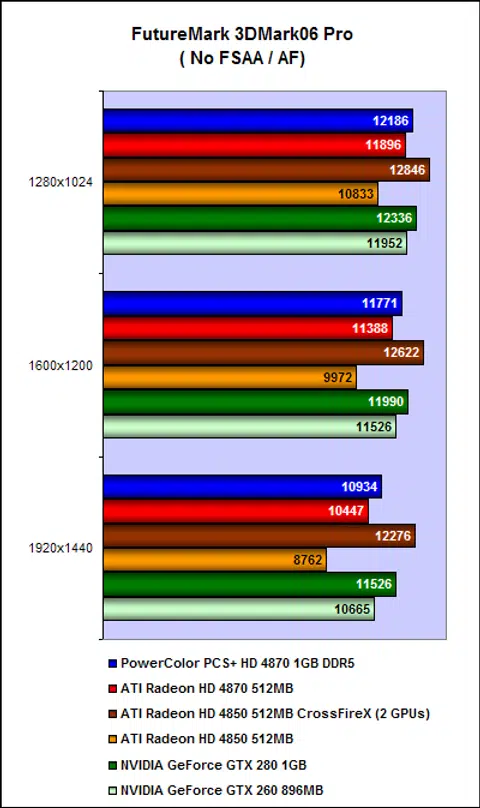
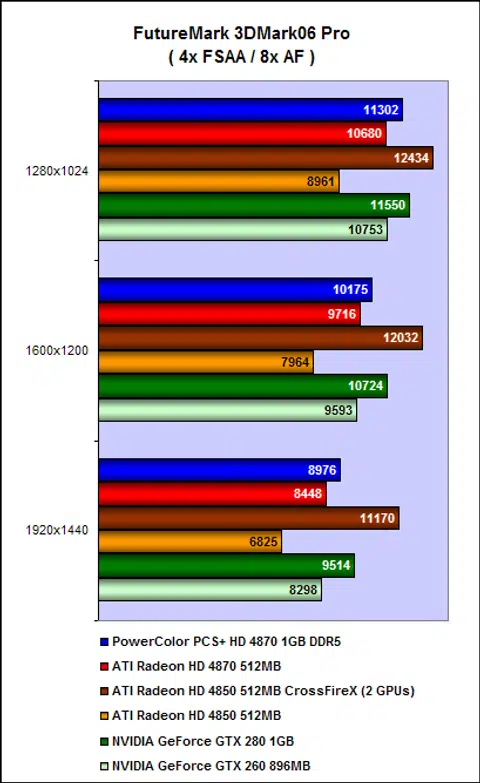
Our report of the benchmarking tests begins, as we usually do, with 3DMark06 Pro. Here, we can see clearly that the increased clock speeds did in fact give the PowerColor PCS+ HD 4870 a boost in performance over the standard HD 4870, albeit a very slight one. It outperformed the GTX 260 but still lost out when compared to the GTX 280.
Win XP Results - Company of Heroes & F.E.A.R.
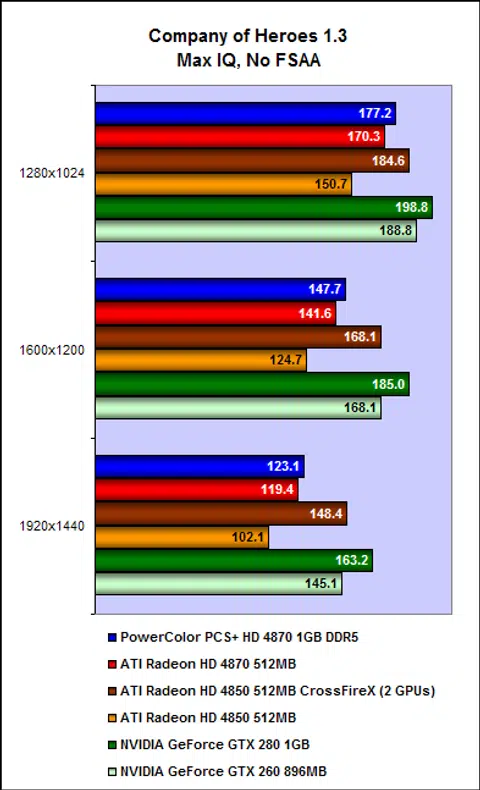
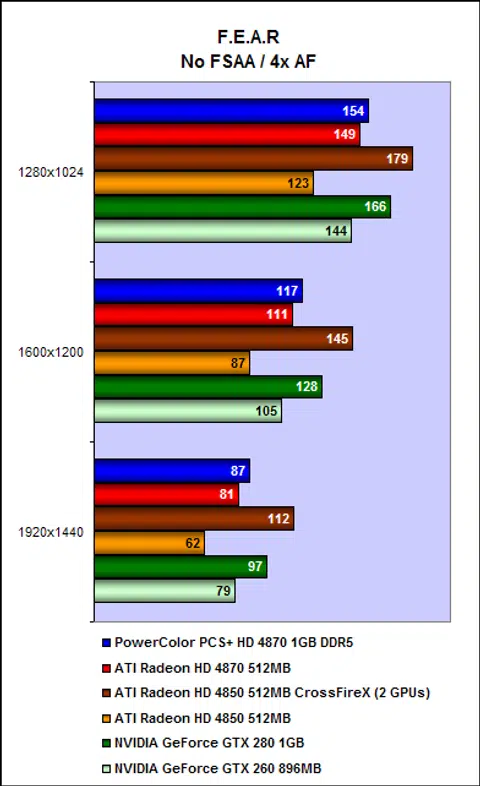
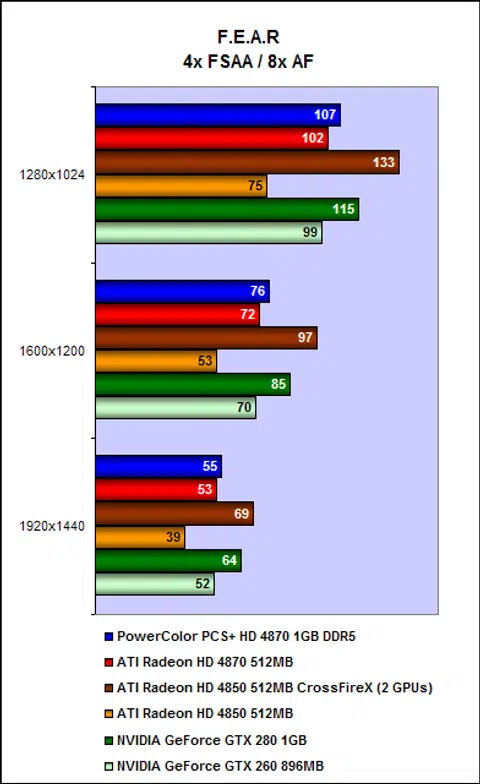
Now we move on to real-world game benchmarking with Company of Heroes & F.E.A.R.
ATI cards have so far looked slightly weaker than comparable NVIDIA ones in Company of Heroes and this trend continued here. Looking at the graphs, we can see that although the turbo-charged PowerColor PCS+ HD 4870 performed a fair bit better than the standard HD 4870, it was still behind the GTX 200 cards from NVIDIA.
In F.E.A.R, the situation improved for ATI, as the PowerColor was slightly faster against the GTX 260. The GTX 280, on the other hand, powered ahead, especially on higher resolutions.
Win XP Results - Crysis & Unreal Tournament 3
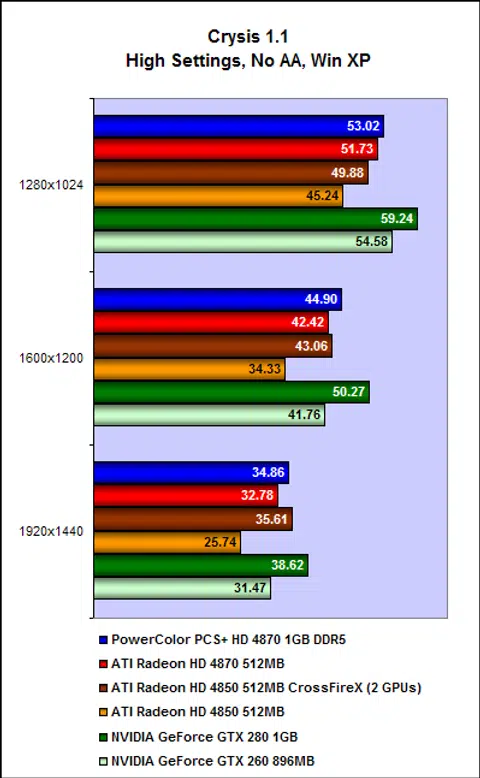
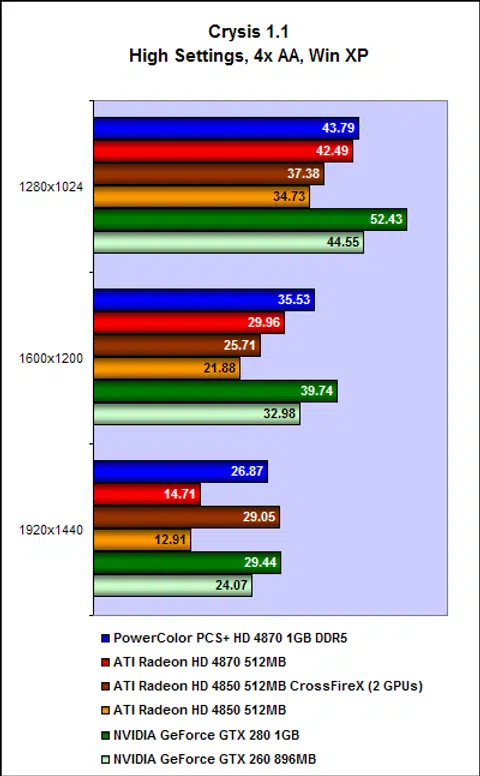
In Crysis, we saw once again that the difference between the higher clocked PowerColor PCS+ HD 4870 and the standard HD 4870 was very slight, with only a few frames separating them. However, the PowerColor PCS+ HD 4870 did better than the standard HD 4870 with 4x AA on and at the highest resolution. This was no doubt due to the extra 512MB of GDDR5 memory. When compared to NVIDIA's offerings, it continues to offer performance that is somewhere between a GTX 280 and GTX 260.
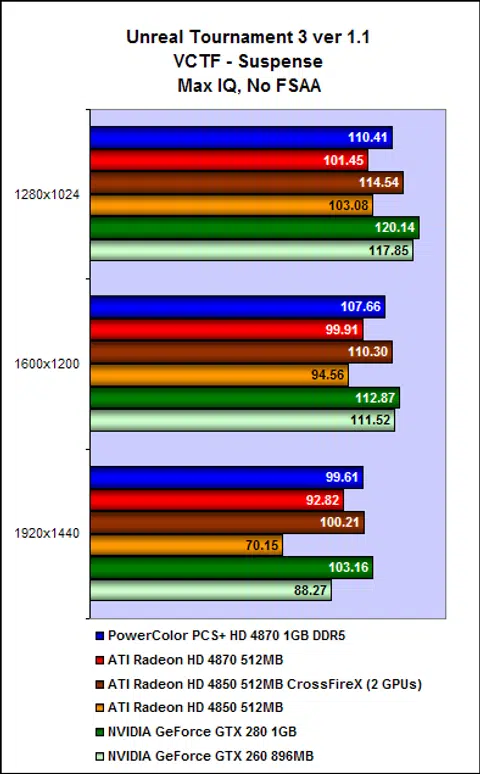
In Unreal Tournament 3, the pattern continues with the PowerColor PCS+ HD 4870 performing a little better than the standard, but still finding itself lodged between the two GTX 200 cards from NVIDIA.
Win Vista Results - 3DMark Vantage (ver 101)
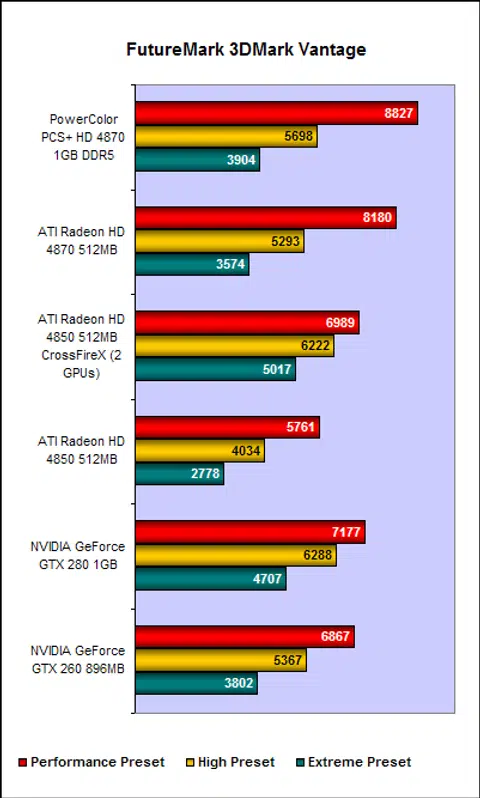
On the Vista system, we begin with 3DMark Vantage and as expected, the PowerColor PCS+ HD 4870 was ahead of the standard HD 4870. And as we had seen before, the GTX 200 cards did not perform well by comparison here.
Win Vista Results - Crysis (ver 1.21)
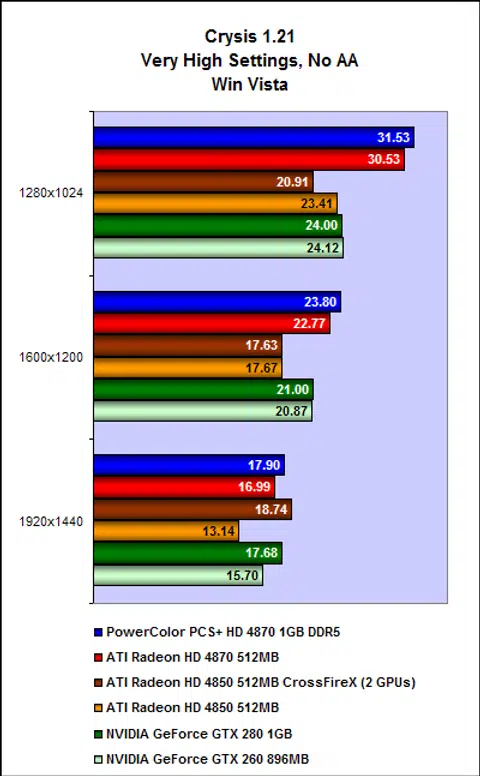
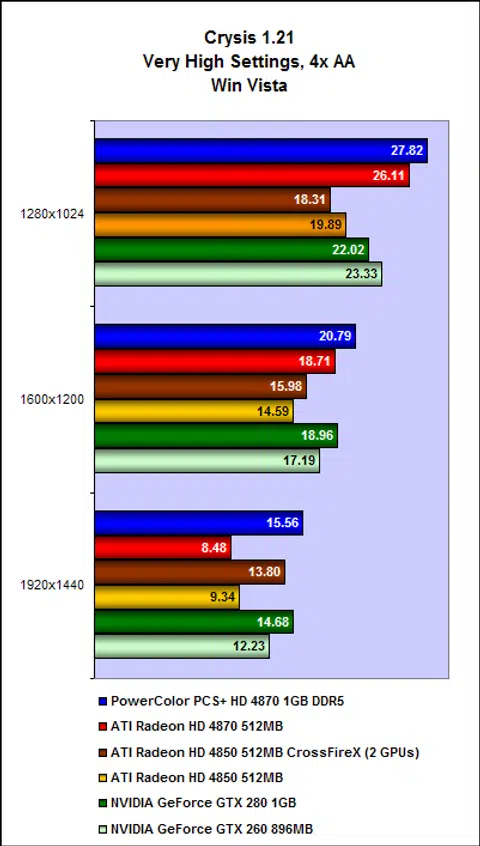
Here, the PowerColor PCS+ HD 4870 was simply outstanding. For a card that costs much less, it was actually able to hold its ground and go toe-to-toe with NVIDIA's fearsome GTX 280 on even the highest resolution and with anti-aliasing turned on. It also convincingly trounced a pair of HD 4850s in CrossFire mode. Also, it was here at the highest resolution with anti-aliasing turned on, that we can fully appreciate that extra 512MB of RAM.
Overclocking
Despite being already overclocked, we were curious to see how much further the PowerColor PCS+ HD 4870 could go and how much extra performance that would yield. After carefully manipulating both the core and memory clockspeeds, we reached its threshold of 830MHz at the core and 3720MHz at the memory. It did improve performance somewhat, but it wasn't much.

Temperature
Before we start, we'll like to highlight some problems other reviewers have faced, and that involved inconsistent fan speeds. This constantly changing fan speed made the card more noisy and prominent than it would have been. Reviewers have pinpointed this to be caused by the card's BIOS. Our card fortunately faced no such problems and performed smoothly and consistently on all tests.
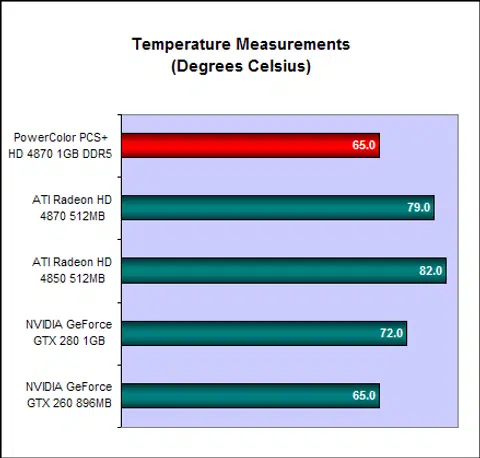
PowerColor boldly claims on the box that its card would run 10 degrees Celsius cooler and we were eager to see if that was true. Amazingly, the card ran at a relatively cool 65 degrees Celsius, which was a good 14 degrees cooler than a typical 4870 with its reference cooler. Clearly then, ZEROtherm's Professional Cooling System is not just a fancy heatsink. It actually works like advertised. However, there is a trade-off and that is the noise. The fan was really noisy, sounding almost like a turbine at time, and as such, can be insufferable.
Power Consumption
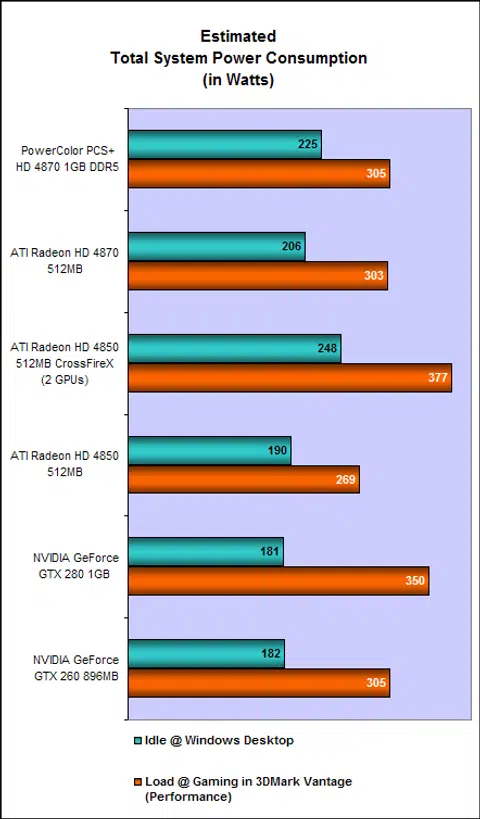
The standard HD 4870 is a power hungry card and the PowerColor PCS+ HD 4870 is no different. The power consumption was almost identical to that of the standard card.
Flawed Beauty
By being one of the first to release an overclocked Radeon HD 4870, PowerColor has set the benchmark pretty high for other vendors. Though it is generally a capable performer, there are however, some problems with it - the main issue being its suggested retail price of S$487.
Yes, it does perform better than a comparably priced GTX 260, and yes, it does run really cool. But for S$399, you could get yourself a standard Radeon HD 4870, and while it might have half the memory, you'll be hard pressed to find any noticeable difference in performance unless you insist on running Crysis on the highest settings at 1920 x 1440 or greater.
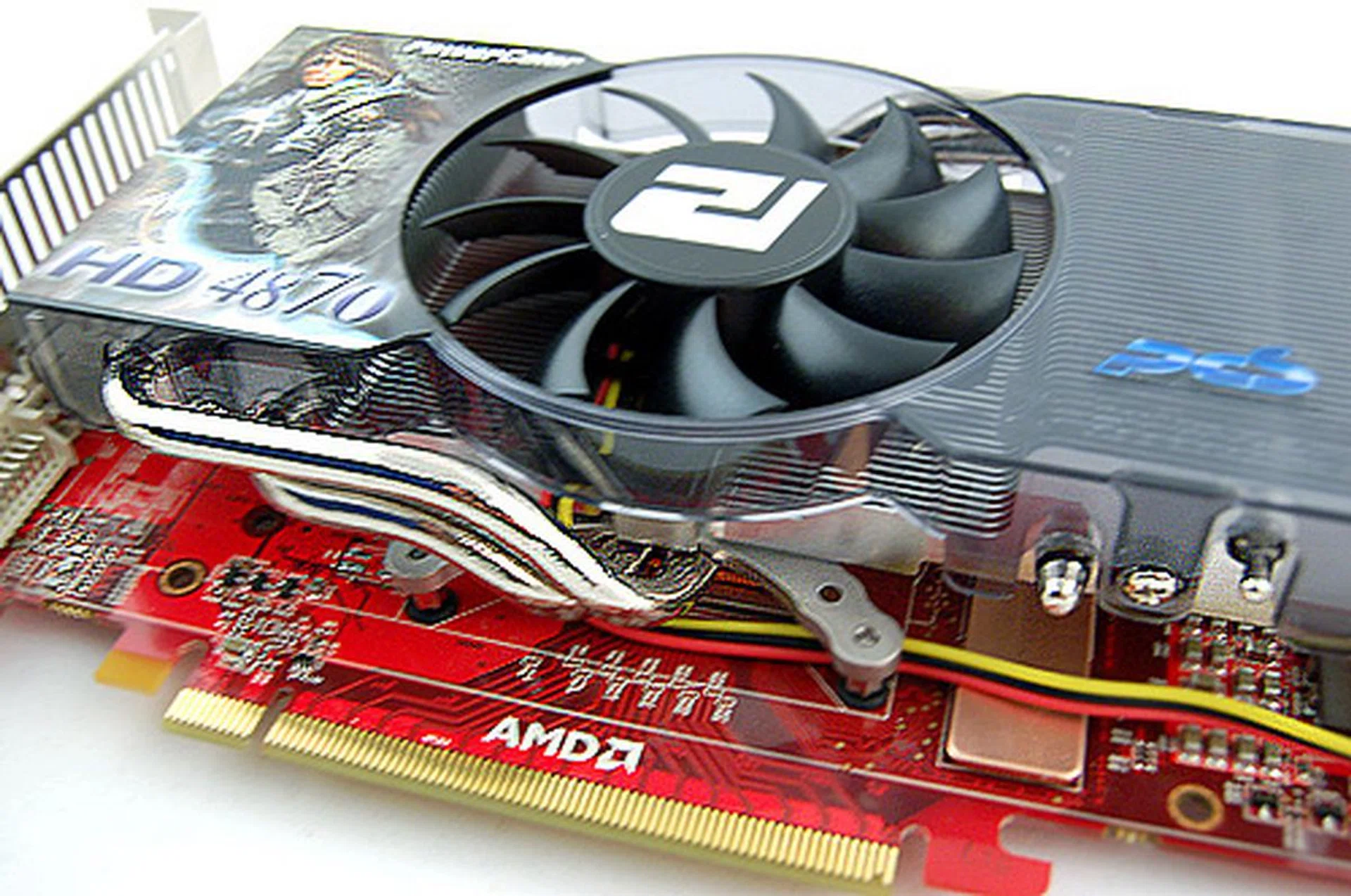
The Professional Cooling System certainly does the job then, and it'll be interesting to see if rival vendors can go one up on what the PCS has achieved here.
However, if you have your hearts set on an overclocked Radeon HD 4870, you should know that there are more overclocked versions of the Radeon HD 4870 upcoming from other vendors. So a wait-and-see attitude may be the wiser choice. In the meantime, the PowerColor PCS+ HD 4870 is just about the best performing Radeon HD 4870 card out there at the moment. That is if you can justify spending that extra S$90 and can tolerate that obscenely loud fan.
Our articles may contain affiliate links. If you buy through these links, we may earn a small commission.