
The Overclocking DNA - ASUS Rampage II Gene (Intel X58)
A high-end enthusiast class chipset like the Intel X58 Express in a microATX form factor? That has been done. But what about a microATX board bearing ASUS' overclocking oriented Republic of Gamers logo? We check out the small but lean Rampage II Gene.

Rise of the Micro X58s
It seems that being small is in vogue among motherboard vendors now. In this case, it means motherboards of the microATX form factor. While we can't pinpoint any seminal products that could have sparked this trend, a glance at upcoming or recent releases left us no doubt that the big brands like ASUS, DFI and MSI are going small in a big way.
And lest you think that we are merely referring to the entry level models with integrated graphics that are usually the domain of the microATX, let us reveal that all of these new microATX boards are based on Intel's latest high-end chipset, the X58 Express that underpins the Core i7 processor.
Perhaps it's DFI and its microATX P45 motherboards, which we here. After all, DFI was also one of the first to bring this concept to the X58 segment with its JR X58-T3H6 board. It's joined by a host of new competitors however, the first of which is the ASUS Rampage II Gene, which brings along the overclocking tilt from its bigger brother, the Rampage II Extreme that is part of ASUS' Republic of Gamers series.
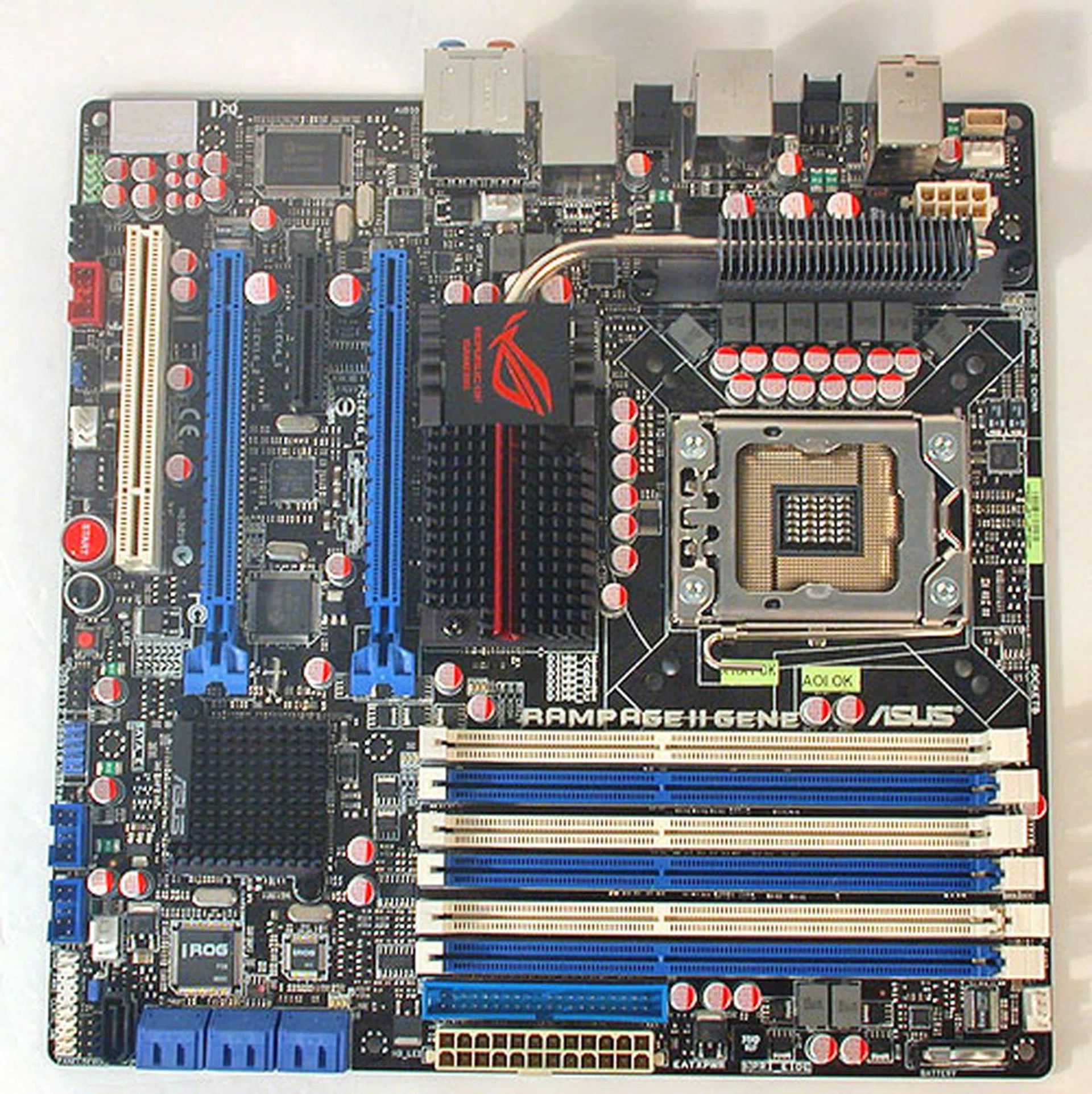
It's quite remarkable that ASUS manages to fit all the ROG overclocking features onto this microATX form factor.
We snagged this square motherboard from ASUS recently and took it out for a spin. In its compact red package, we found the following:-
- 1 x SLI bridge
- 1 x IDE cable
- 2 x SATA cables
- LCD Poster
- ASUS Q-Connector kit
- I/O shield
- Utilities and Drivers DVD
- User manual
A Lean Mean Board
If you have seen the ASUS Rampage II Extreme, you have seen the Rampage II Gene. With the exception of a few small but thoughtful touches that recognizes the limitations of a microATX board, the design and appearance of the Gene very much takes after its ATX compatriot.
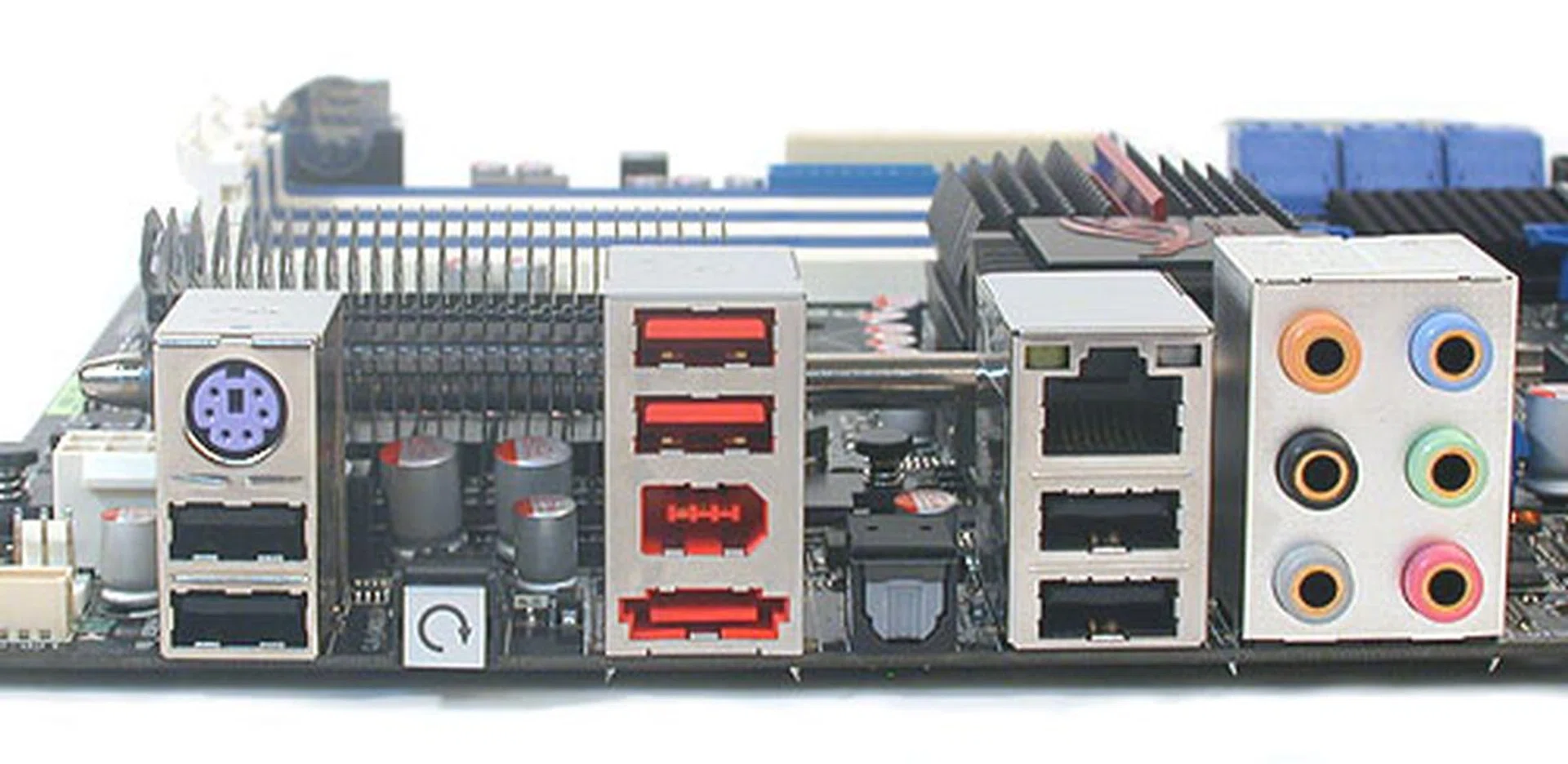
The Gene may not have as many ports and connectors at the rear panel as larger motherboards but we have no complaints about the mix of ports chosen, with eSATA, USB 2.0, FireWire and even a Clear CMOS button included.
The color scheme and labels for instance look to be wholly transplanted from the Extreme. And when we glanced through the manual, most of the ROG overclocking features are intact. Some of the more extravagant features on the Extreme of course did not make the cut, like the TweakIT panel which allowed users to change their overclocked settings on the fly, without exiting an application or even going into the BIOS. This feature took up too much valuable PCB space.
The LCD Poster module, the LED display that shows important board settings remain, along with the ROG integrated chip that manages all these overclocking features. The other overclocking features are not as obvious, being BIOS related settings or utilities that are launched in Windows. There is a new feature though, MemOK!, which ASUS claims to help reduce memory compatibility issues by checking current settings and making sure that they work.
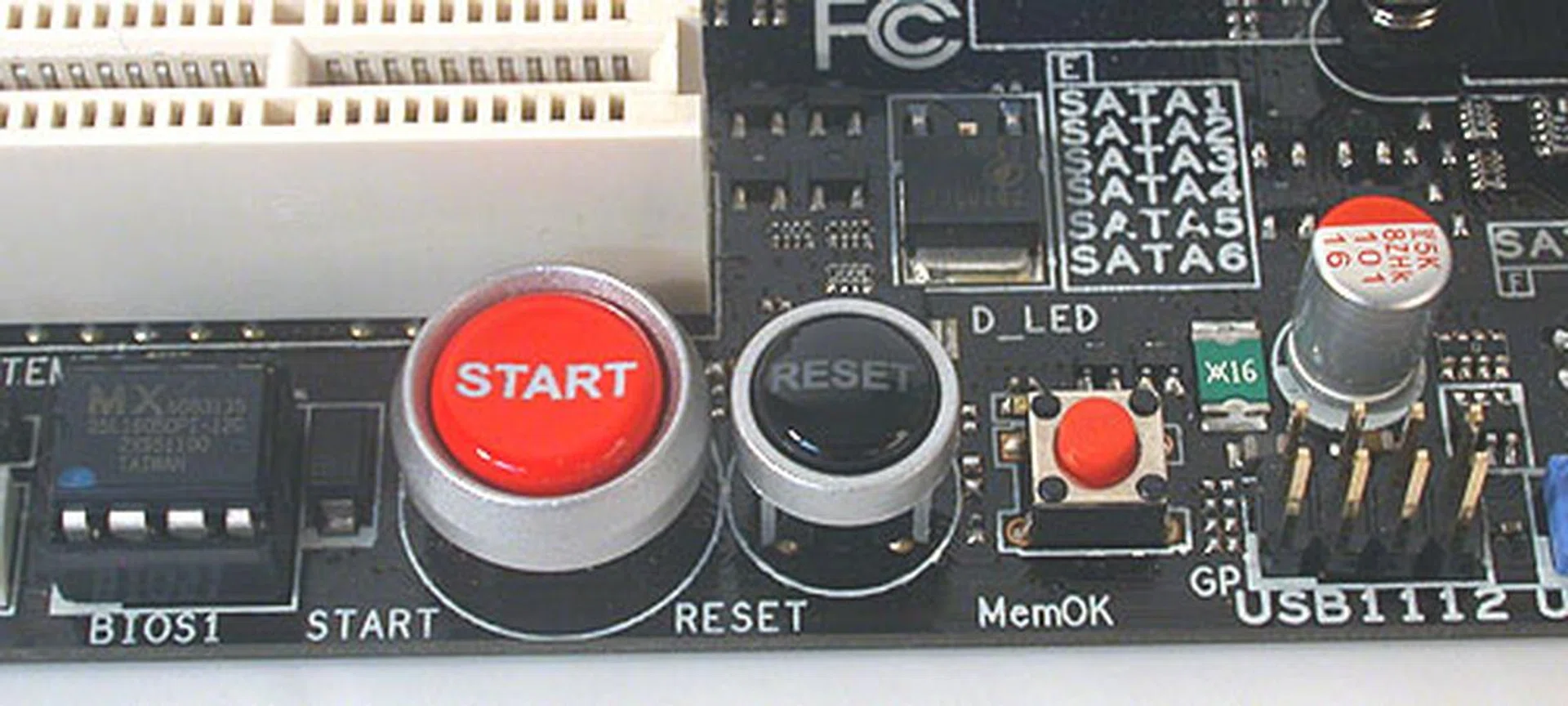
Besides the Power and Reset buttons, the new feature on the Gene is the small red circular button that is the MemOK! switch, a memory rescue tool from ASUS that claims to patch memory issues by ensuring that the memory settings are correct.
Features are reduced accordingly from the Extreme. The microATX Gene has only a pair of PCIe 2.0 x16 graphics slots, down from the three on the Extreme, though they support both CrossFire and SLI in a full, dual x16 configuration. ASUS has fortunately decided not to reduce the number of DIMM slots, though extraneous features like the floppy drive has been removed. The expansion slots too take a cut, with only one PCIe x4 and a PCI slot to complement the dual x16 slots.
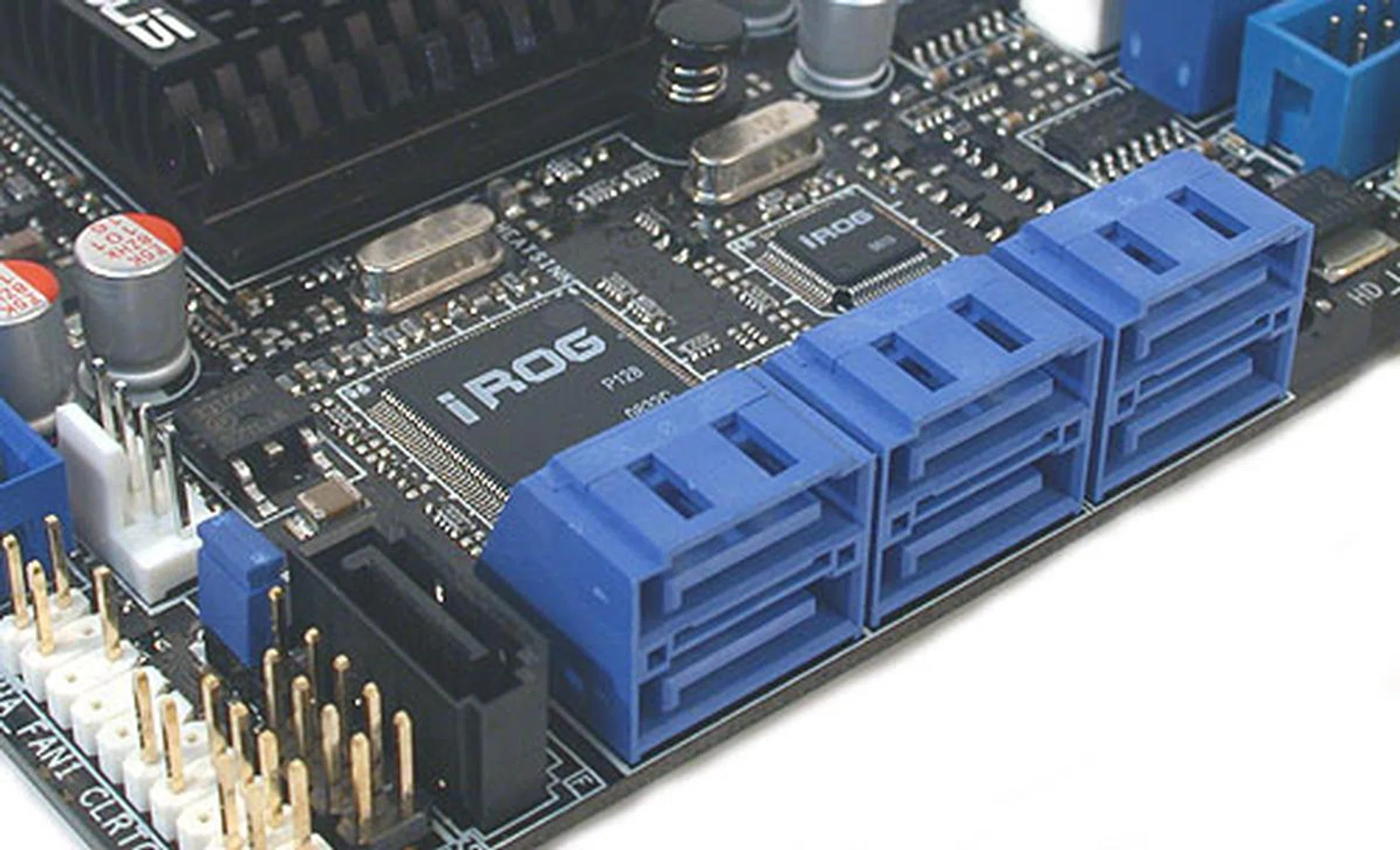
The six blue SATA ports come from the ICH10R hub with the sole black SATA port from the JMB363 controller. You can also get a glimpse of the ASUS iROG chip here that enables the overclocking features on this board.
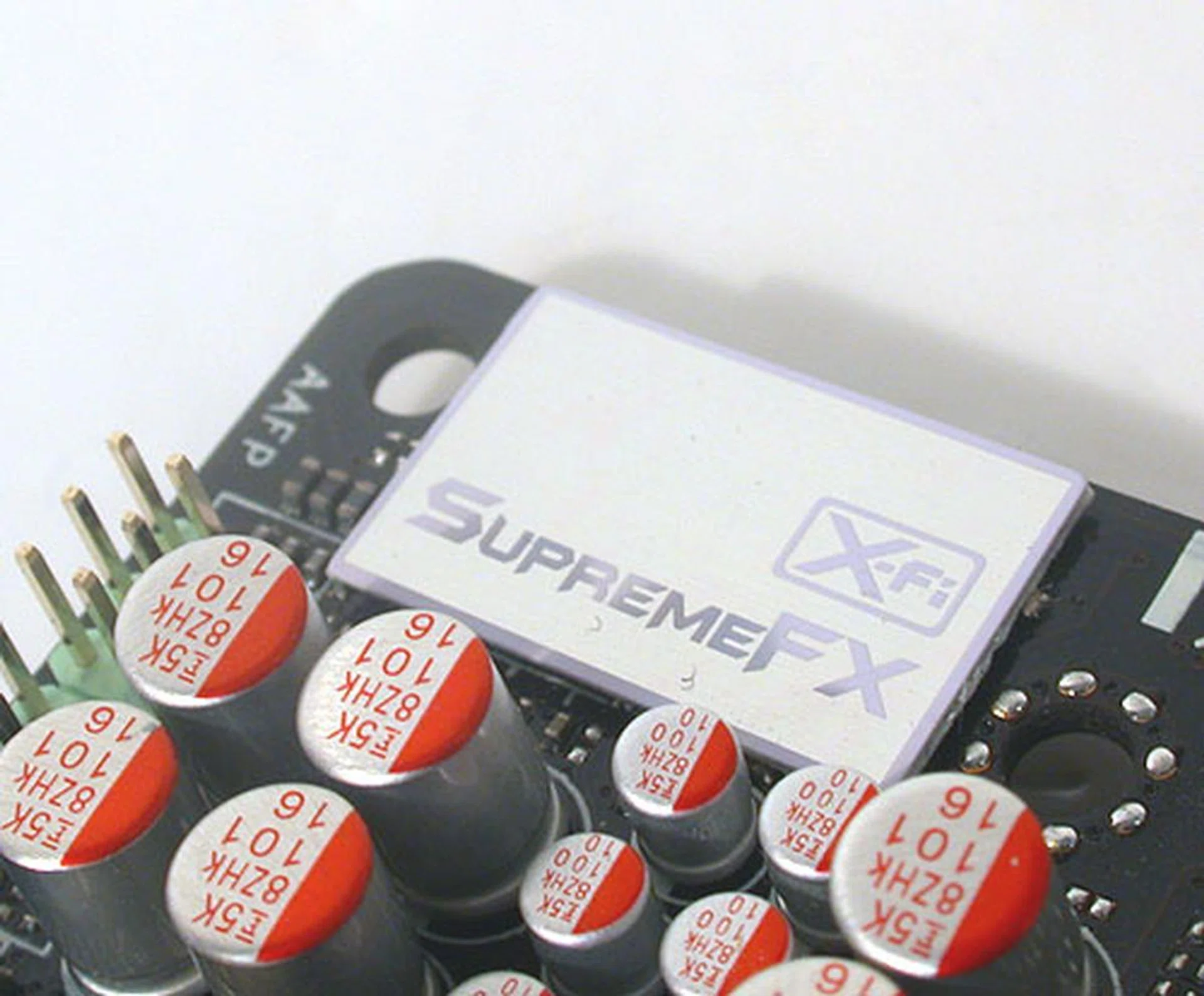
It may bear all the Creative trademark technologies but despite its EAX 4.0 support, this is not a Creative product at heart. What's on the Gene is actually Analog Devices' AD200B audio CODEC. We have seen it as an add-on card on the Rampage II Extreme but ASUS has apparently put it onboard for the Gene.
The Gigabit LAN controller too has been reduced from a pair to a single while the separate SupremeFX audio riser card is now integrated onboard. Optical S/PDIF and the usual audio jacks are present in case you're worried. Even the extra two BIOS chip on the Extreme are halved to just one.
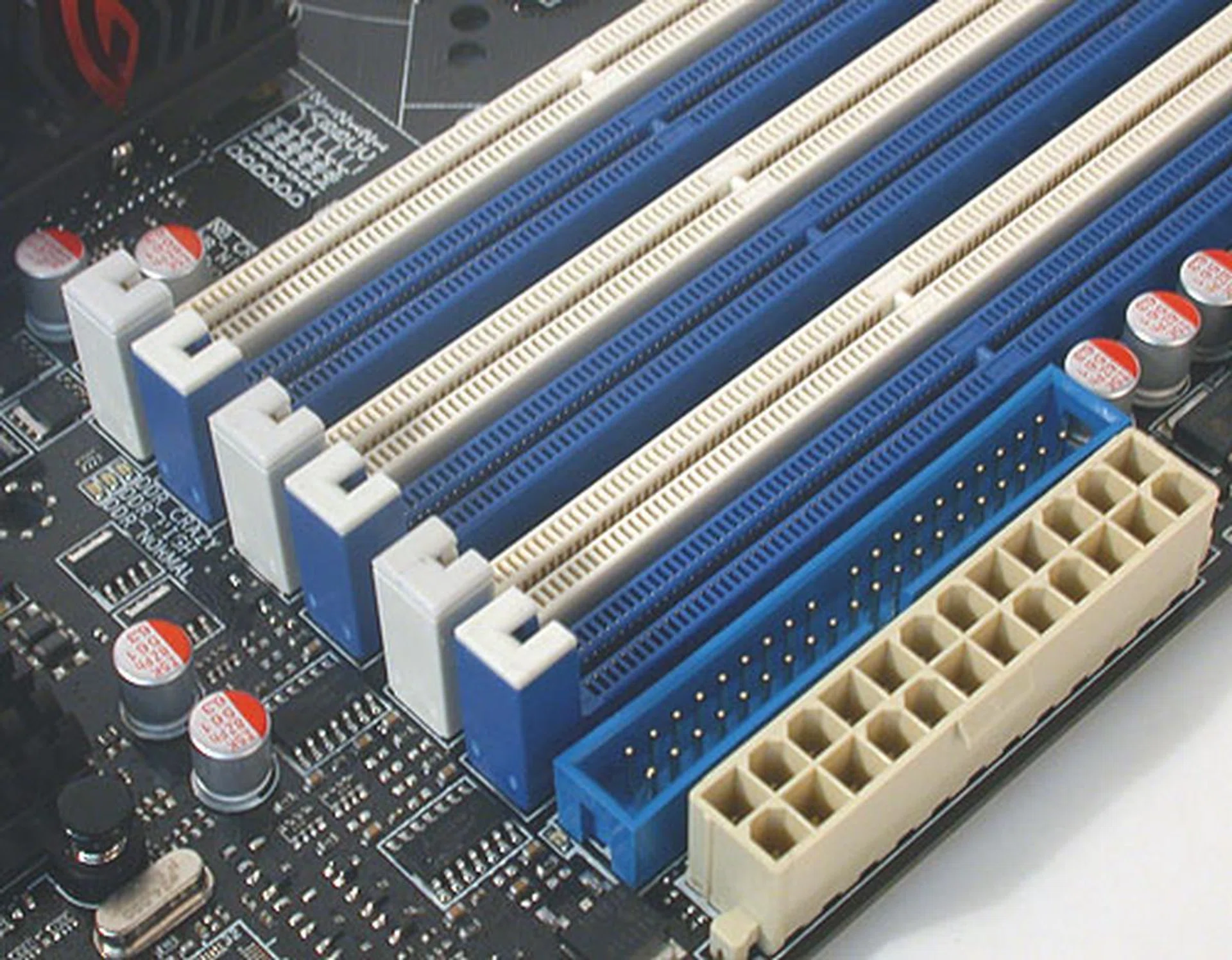
The DIMM slots on the Gene only have the usual latches on one end. The other end, shown here has no latches, making it easier to remove in a space constrained environment like a microATX board. Notice too how close the IDE and power connectors are placed.
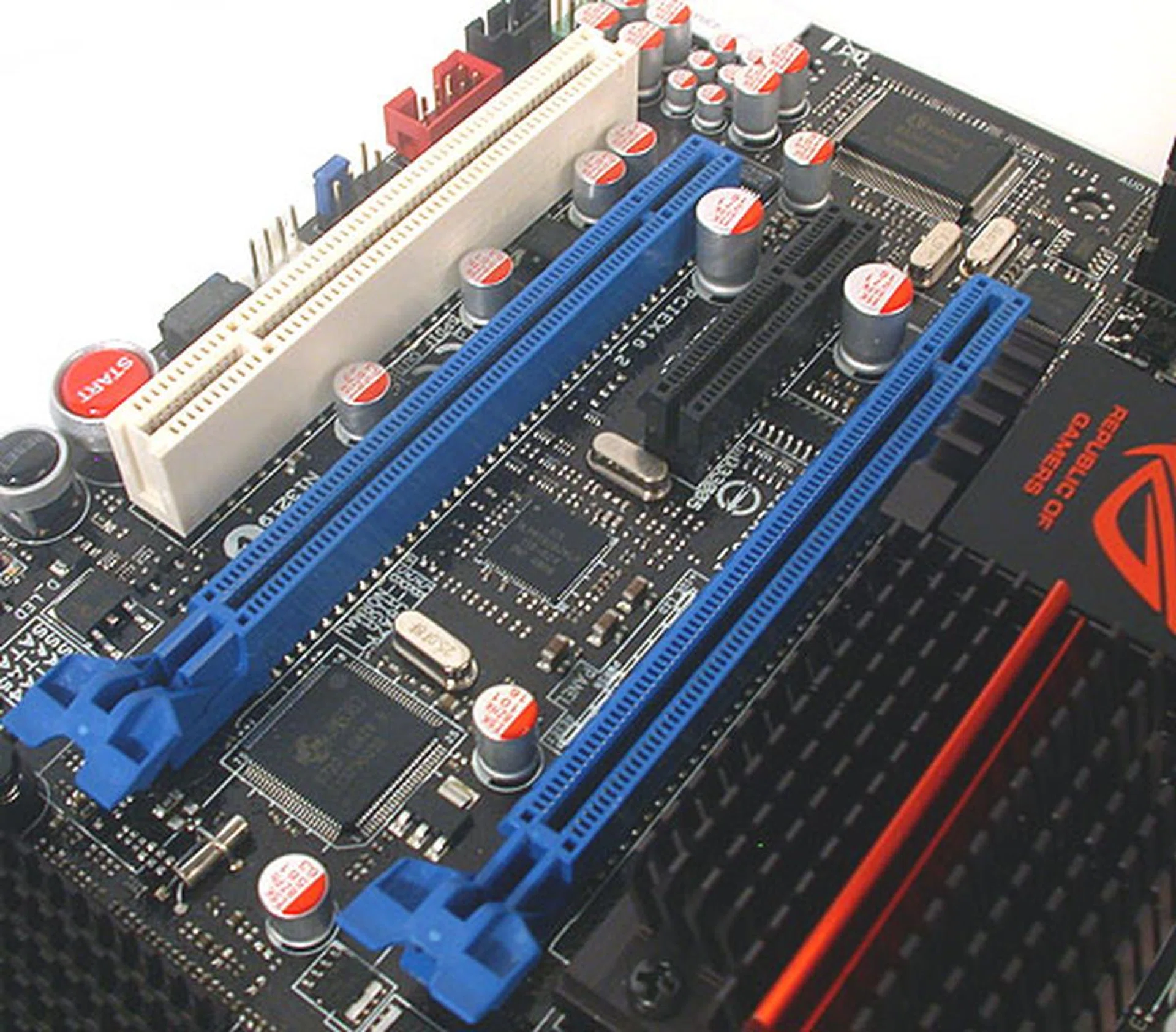
Another concession to the lack of space on a microATX board is the design of the PCIe x16 slots on the Gene. These slots have latches that make the add-on cards easy to remove, unlike those that require one to press a button or push a lever, which may be difficult in a confined area.
As we mentioned earlier, ASUS has added in small touches to alleviate the expected limited confines of a microATX form factor. This has resulted in an unusual design of DIMM and PCIe x16 slots that make the memory modules and expansion cards easier to install and remove. It's a good move, as the DIMM slots are indeed much too close to the leftmost PCIe 2.0 x16 slot and this ensures that there are no issues when swapping these components.
Other design considerations include the outwardly aligned SATA ports and the location of the onboard battery right at the edge of the board for easy removal. Except for a fan header that's in the middle of the board, ASUS has pushed all its connectors and ports onboard to the edges for easy access.
Board layout and design is paramount for a smaller form factor and ASUS seems to have this aspect well and truly covered. All in all, ASUS has managed to keep a healthy selection of features, with FireWire and eSATA retained while cutting out the flab.
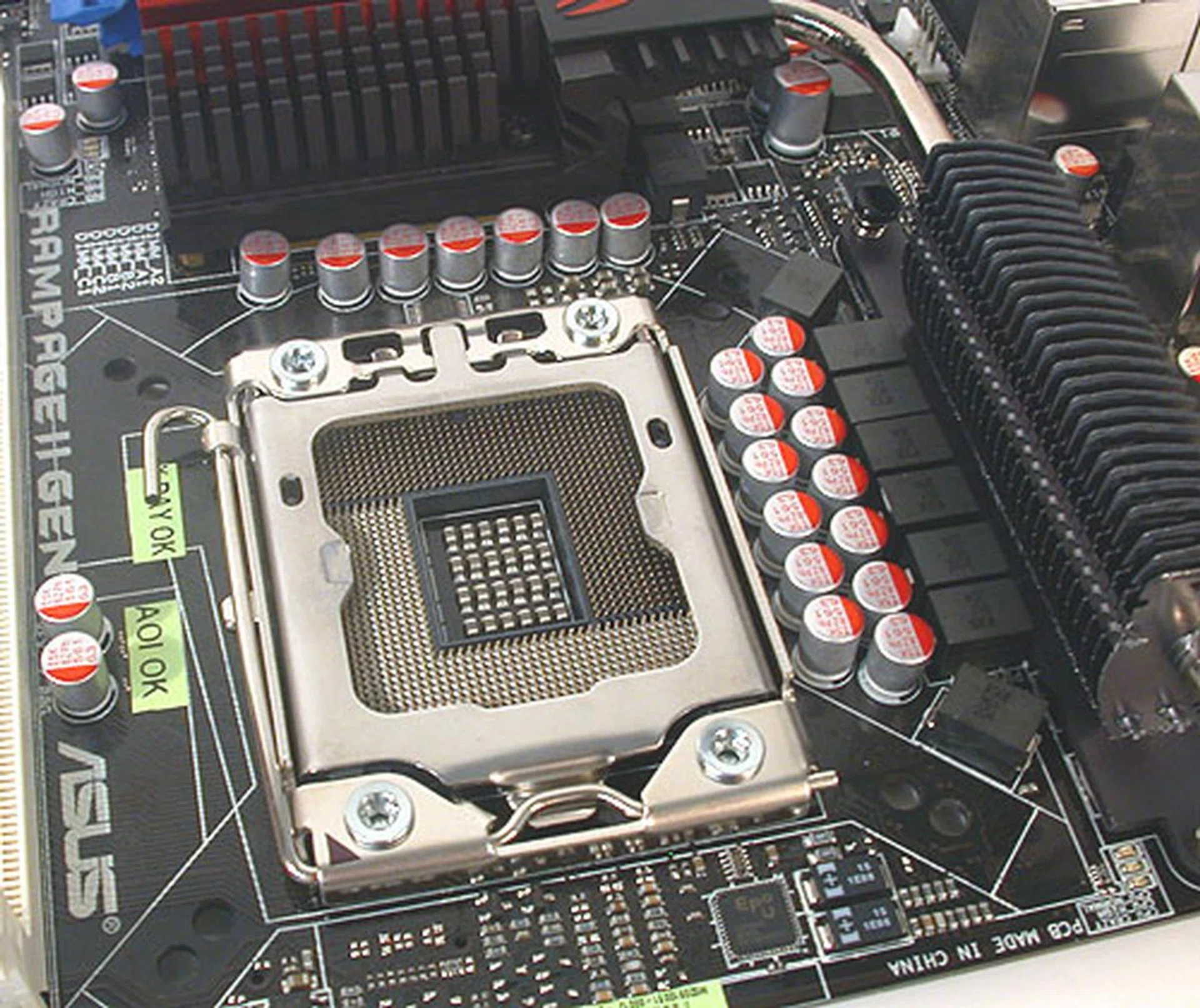
ASUS has implemented an 8-phase CPU power design on the Rampage II Gene, with additional (not shown here) 2-phase power for the QPI/DRAM, NB and memory.
Overclocking
The main selling point of the ROG series of motherboards is about overclocking and that's something the ASUSRampage II Gene has in abundance. Almost all of these features are direct 'ports' from the ASUS Rampage II Extreme (and even older ROG boards) and they span the range from assisting the veteran overclocker to user friendly tools that guide the novice through the process or enable the overclocking automatically.
The BIOS appears slightly messy and chaotic to the novice and while nothing has changed significantly from the Rampage II Extreme, it could do with some housekeeping. We recommend that users update to the latest 0705 BIOS at least, since we found that the benchmark scores for older BIOS were significantly lower compared to the newer version.
The settings themselves are identical to that on the Extreme and we have listed some of the more important ones:-
- Base Frequency (aka FSB) Settings: 100 to 500MHz
- PCIe Frequency: 100 to 200MHz
- DRAM Frequency: Auto, 800, 1066, 1333, 1600, 1866, 2133MHz
- CPU Core Multiplier: 12 to 64
- UCLK Frequency: Auto, 2666 to 5600MHz (in 133MHz steps)
- QPI Frequency: Auto, 4800, 5866, 6400MT/s
- CPU Voltage Settings: 0.85 to 2.50V (in 0.00625V steps)
- Memory Voltage Settings: 1.51106 to 2.50481V (0.01325V steps)
- IOH Core Voltage Settings: 1.11341V to 2.19991V (in 0.01325V steps)
- ICH Voltage Settings: 1.11341V to 2.00116V (in 0.01325V steps)
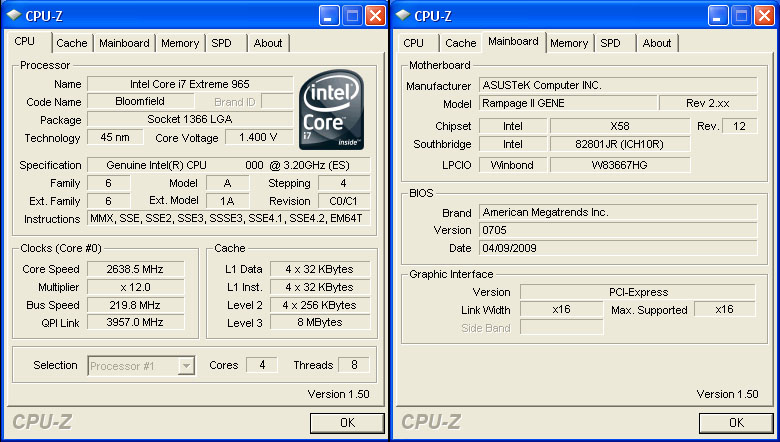
The maximum overclock we got was 220MHz for the base clock, which is more than sufficient for any overclocking attempt. Click for larger image.
The overclocking margin on the Gene was similar to what we saw on the normal sized Rampage II Extreme and other X58 boards that we have tested in the past months. Since overclocking the Core i7 usually involves adjusting a few other multipliers and clocks rather than focusing solely on the base clock, such a clock limit is more than adequate for users.
We also quickly tested the built-in automatic overclocking profiles, the CPU and Memory Level Up. Both features worked without any hassle, making them simple, one-click overclocking tools for the novice or even experienced users who may not have the time to tweak.
Test Setup
When testing the Core i7 or X58 motherboard, both Intel Turbo Boost and HyperThreading were enabled at all times. Recent motherboards that we tested were used to compare the Rampage II Gene's performance. The rest of our typical configuration:-
- Intel Core i7-965 XE (3.20GHz, Intel Turbo Boost, HyperThreading enabled)
- 3 x 1GB Kingston HyperX DDR3-1333 @ 7-7-20 CAS 7.0 (7-7-22 for Gigabyte GA-EX58-EXTREME)
- Seagate Barracuda 7200.10 200GB SATA hard disk drive (one single NTFS partition)
- ASUS GeForce 9800 GTX 512MB - with ForceWare 178.24 drivers
- Intel INF 9.1.0.1007 and Intel Matrix Storage manager 8.6.0.1007 driver set
- Microsoft Windows XP Professional with Service Pack 2 (and DirectX 9.0c)
The following benchmarks were used to assess the performance of the motherboards compared in the review:-
- BAPco SYSmark 2007 (with Patch 4)
- Futuremark PCMark05 (ver 120)
- SPECviewperf 9.0
- AquaMark3
Results - SYSmark 2007 Preview
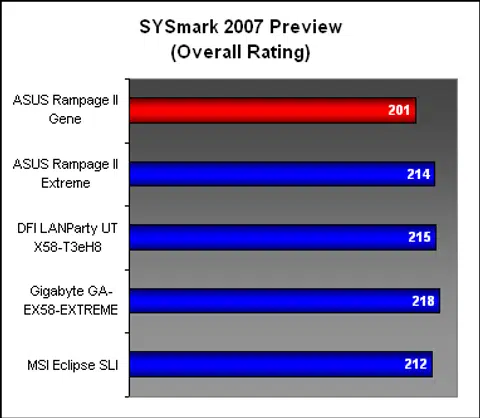
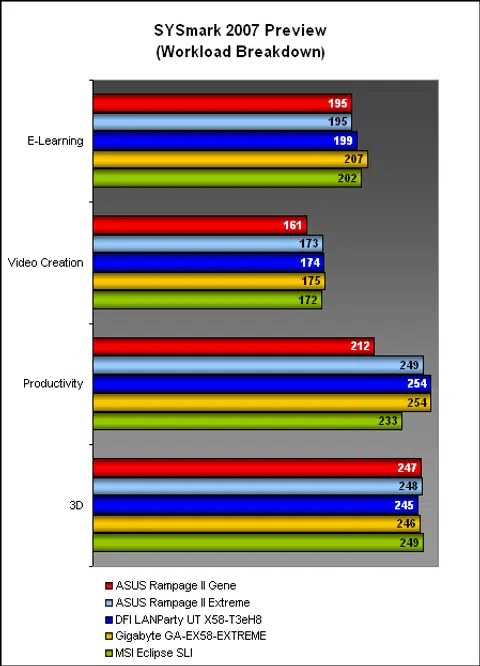
Emerging slightly off the pace, the ASUS Rampage II Gene did not get a good start in our first benchmark, the complete system suite, SYSmark 2007. Its overall score was up to 8% slower than the best performer here, affected by its lower scores in the Video Creation and Productivity segments.
Results - Futuremark PCMark05 Pro
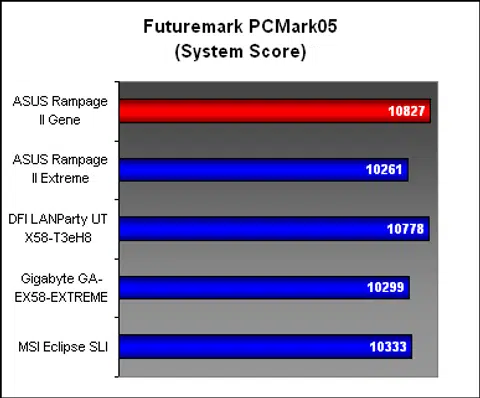
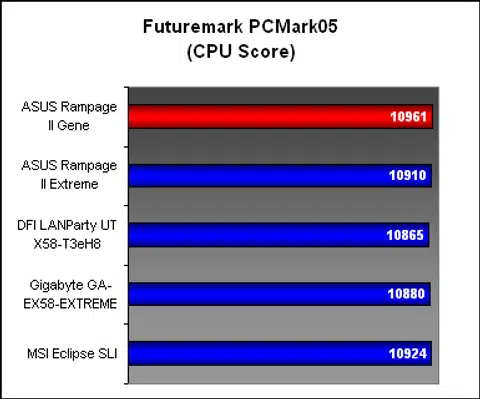
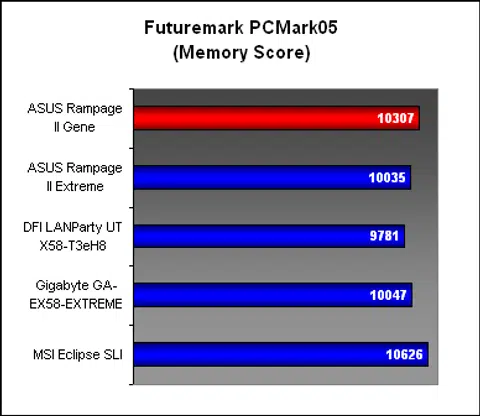
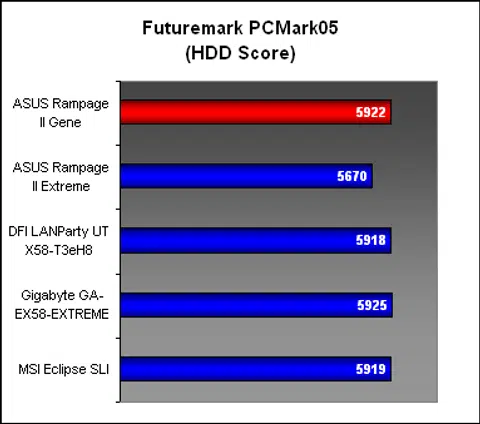
Despite the lower scores observed in SYSmark 2007, PCMark05 could not confirm the lowered performance as the Gene turned in very competitive scores for all the segments here.
Results - SPECviewperf 9.0
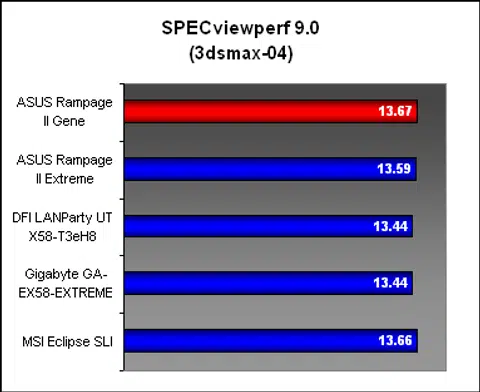
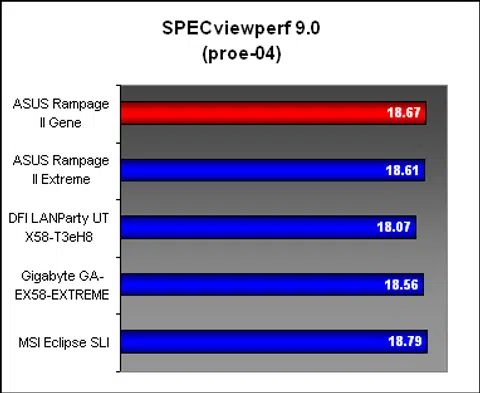
SPECviewperf 9.0 was another benchmark that found the ASUS Rampage II Gene to be right up there in the performance stakes with its bigger X58 peers. Based on these scores, the graphics and memory components on the Gene appeared to be in fine shape.
Results - AquaMark3
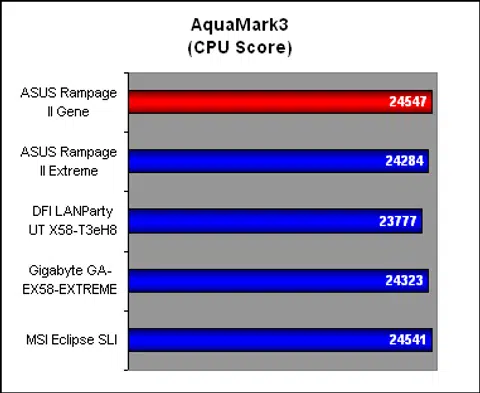
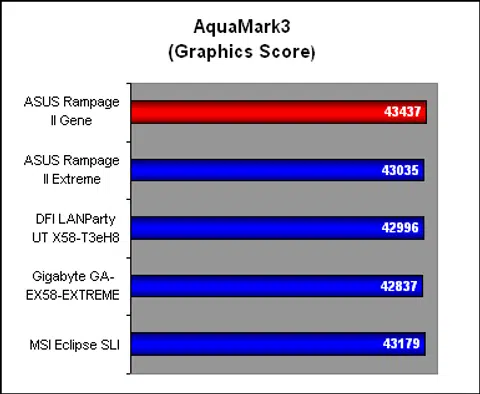
All seemed well too in AquaMark3, with both the CPU and graphics scores on par with the other boards compared.
Temperature
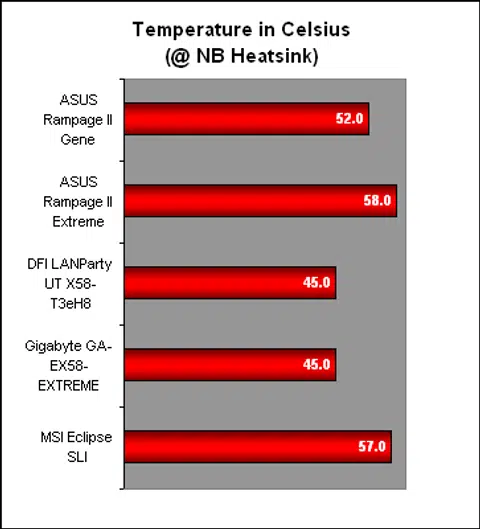
With a rather modest cooling system including relatively low-profile passive heatsinks and a small heatsink for the ICH10R hub that's not even linked to the other heatsinks via heat pipes as is often done, it's not too surprising that the Gene was rather warm at its main 'Northbridge' heatsink. The temperature was no doubt lower than the Extreme, but by only a few degrees.
Power Consumption
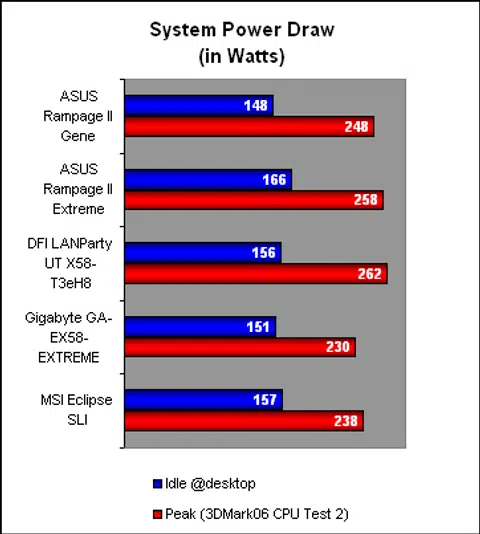
Despite the presence of ASUS' EPU 6-Engine (set to Auto), the power draw of the ASUS Rampage II Gene at peak was slightly higher than some of its competitors. It however did fare better than the Rampage II Extreme. At idle however, this microATX board consumed less power than all the others, no doubt thanks to its form factor (and hence the lower number of features).
Conclusion
Someone must have unleashed a whole new wave of high-end enthusiast oriented microATX boards onto the market. While we can't say for sure the origins of this trend (though we have our suspicions), it's obvious that vendors are treating this segment seriously.
ASUS for instance, has the Rampage II Gene available and its next such product, the similarly micro Maximus II Gene, is based on Intel's P45 chipset and is another ROG board. Meanwhile, MSI too has a X58 based motherboard ready to launch. Add in DFI's current microATX offerings and the next battleground appears to be in the microATX segment. Only Gigabyte appears to be silent in this segment.
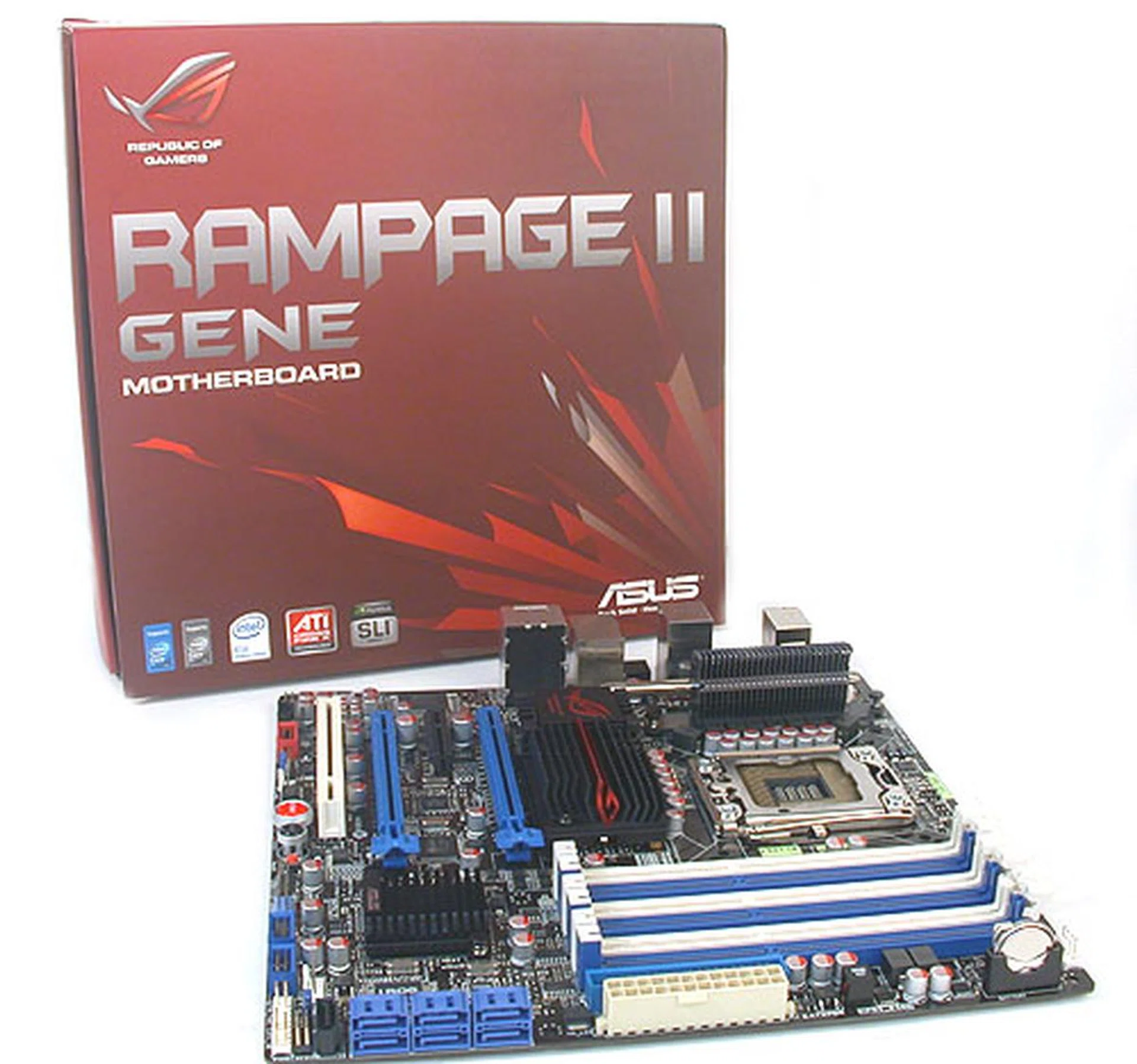
You know it's never going to be cheap with a high-end microATX board but the ASUS Rampage II Gene is at least priced reasonably at US$250. While you can get a less expensive proper ATX motherboard from ASUS, one will not get the full range of overclocking features.
Based on what we have seen of the ASUS Rampage II Gene, we are eagerly awaiting these upcoming microATX boards. Perhaps it's our shrinking wallets that are making us look at smaller motherboards. But the Gene has certainly showed us that small doesn't mean less. In its case, it's lean, without some of the motherboard bloat that the majority of users would not use.
After all, we are more than happy with just a pair of x16 graphics slots for CrossFire or SLI, a reasonable number of SATA ports with eSATA and FireWire as a nice bonus, a single Gigabit LAN port and a reduced footprint that means a smaller, more handy chassis. LAN gaming enthusiasts no doubt are a vocal minority that will greet this trend with much delight.
Even the typical non-overclocking enthusiast will find much to like about the lean and well-built Rampage II Gene. Obviously the automatic overclocking features are easy and convenient, though the extra utilities and tools are just gravy. The idle power draw is lower due to the fewer features and smaller board. Compared to the Extreme, the temperatures and peak power draw are improved too.
Best of all, the price has been reduced, with the Rampage II Gene going for US$250. It's still not cheap by any measure and one can get a less premium and less expensive X58 model from ASUS, not to mention other brands. Yet, for those who desire the overclocking of the Rampage II Extreme, here's a chance to get the smaller version at a US$100 discount. For the rest of us not into the extreme features, the Gene is still a trifle too much for less, even if we find its lean features refreshing.
Our articles may contain affiliate links. If you buy through these links, we may earn a small commission.