
Nokia N97 - A Means to an N
It's been said that good things come to those who wait. We did wait for six whole months after the Nokia N97 was announced during Nokia World in December 2008. Thankfully, the wait is now over, and today we bring you the full review of Nokia's flagship model for 2009. Find out if the N97 lives up to its hype.

The N is Here!
If the recent spate of marketing campaigns for the Nokia N97 is any indicator, Nokia has seemingly put all their eggs into one basket with its much-heralded release a few weeks ago. Undoubtedly, the N97 is Nokia's answer to the Palm Pre and the recently released Apple iPhone 3G S. However, history has shown that it's not always the N series device that steals the thunder. Looking back at 2008, the Nokia E71 was the highlight of the year and was overshadowed by the Nokia N96 which didn't bring much to the table.
In 2009, what can one expect from the Finnish mobile communications manufacturer and provider? Provider? Yes, there's also a whole lot of add-ons from Nokia with the roll out of its Nokia Music Store, Nokia Ovi Store, and having its Ovi portal coming to a full circle. Let's not be too hasty to judge them yet and so we move on to the review in proper of the much anticipated N series device for the year - the Nokia N97!
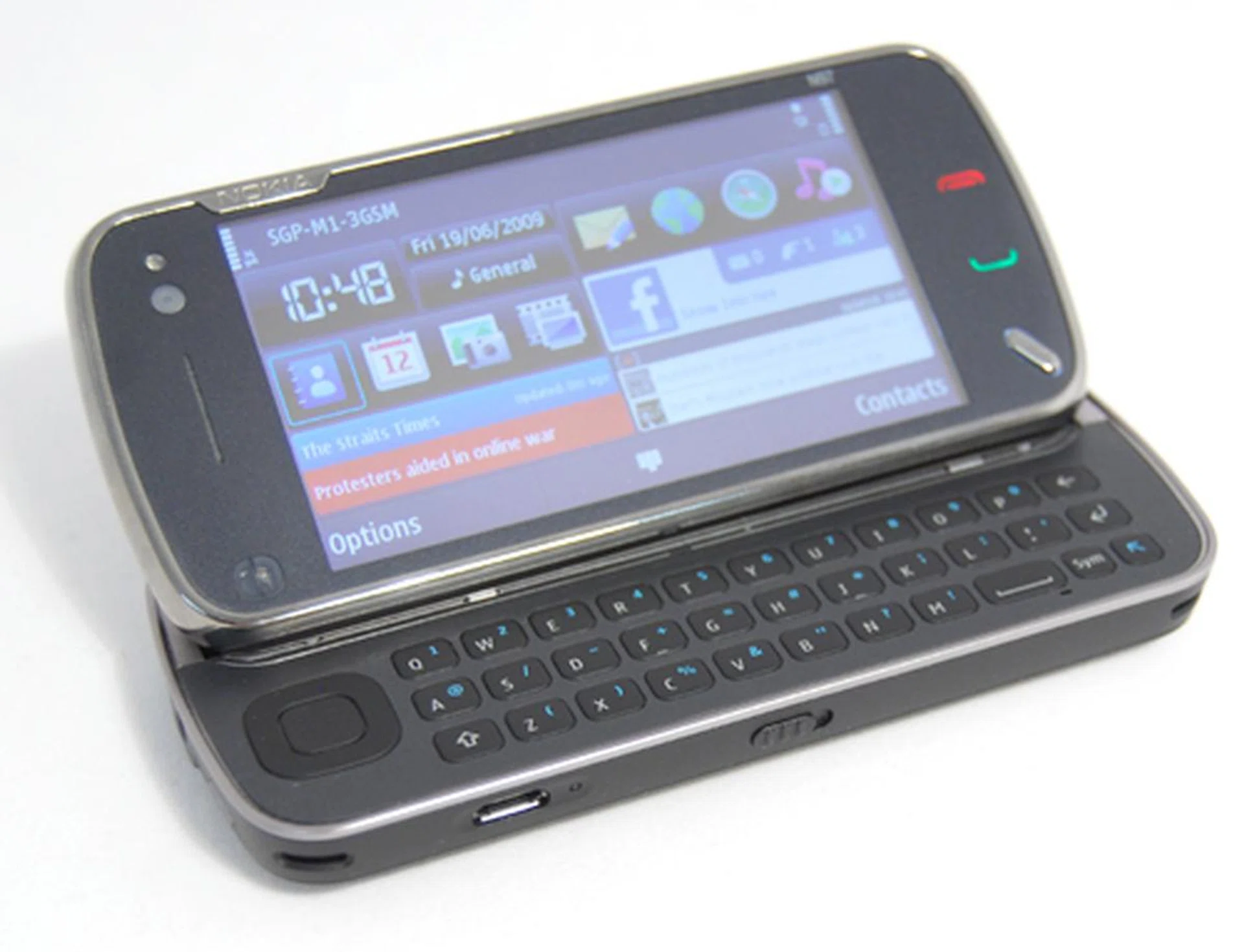
Nokia N97
Fit to an N
If the N97 was to make its way into the World Wrestling Entertainment (WWE) show, then it would assume the character of The Big Show as its mammoth presence and long list of overpowering moves would just about scare anyone in the squared circle.
With Nokia N97 billboards plastered all over buses, magazines and just about anywhere, it's hard not to stop and stare at some of them. Of course there's one point to be gathered about those advertisements - the device has been primed for the big time with its classy looks. Although some might scoff at its hefty 150g weight and long body, the N97 is pretty thin for a device that has a built-in QWERTY keyboard. In essence, the N97 didn't create the unnecessary bulge in one's pants/pockets nor add unwanted bulk if you were to chuck it into your bag, handbag or even purse.
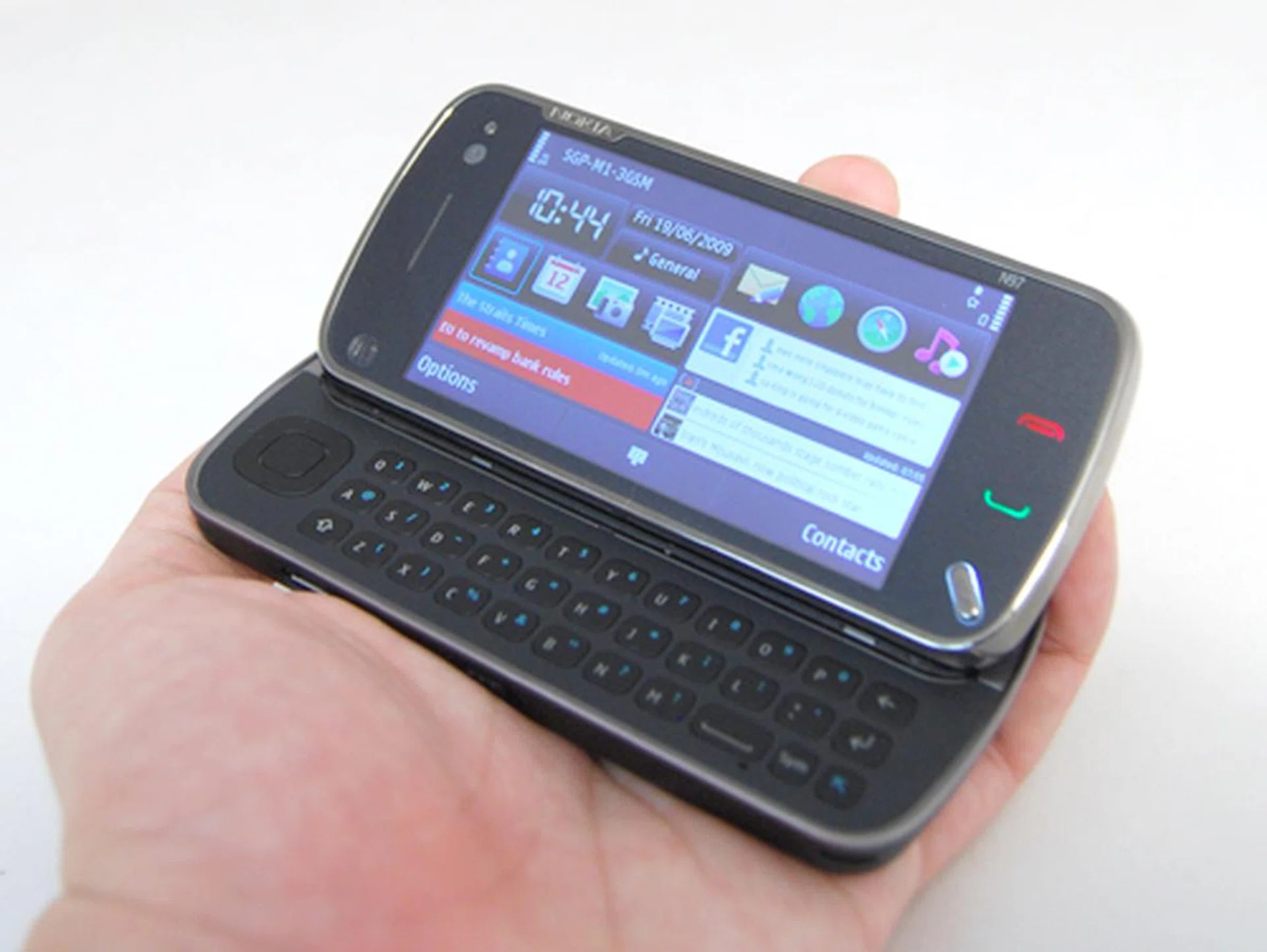
The phone's QWERTY keyboard is nicely hidden away under large touchscreen, which slid up. Unlike the recently launched HTC Touch Pro2 which allows you to either slide the screen and lay it flat or tilted to an angle, the N97's screen will slide to a fixed angle that's supposedly at an optimum range for viewing and texting. This turned out to be true given that we too left the screen tilted while watching videos and found the viewing angle to be just nice.
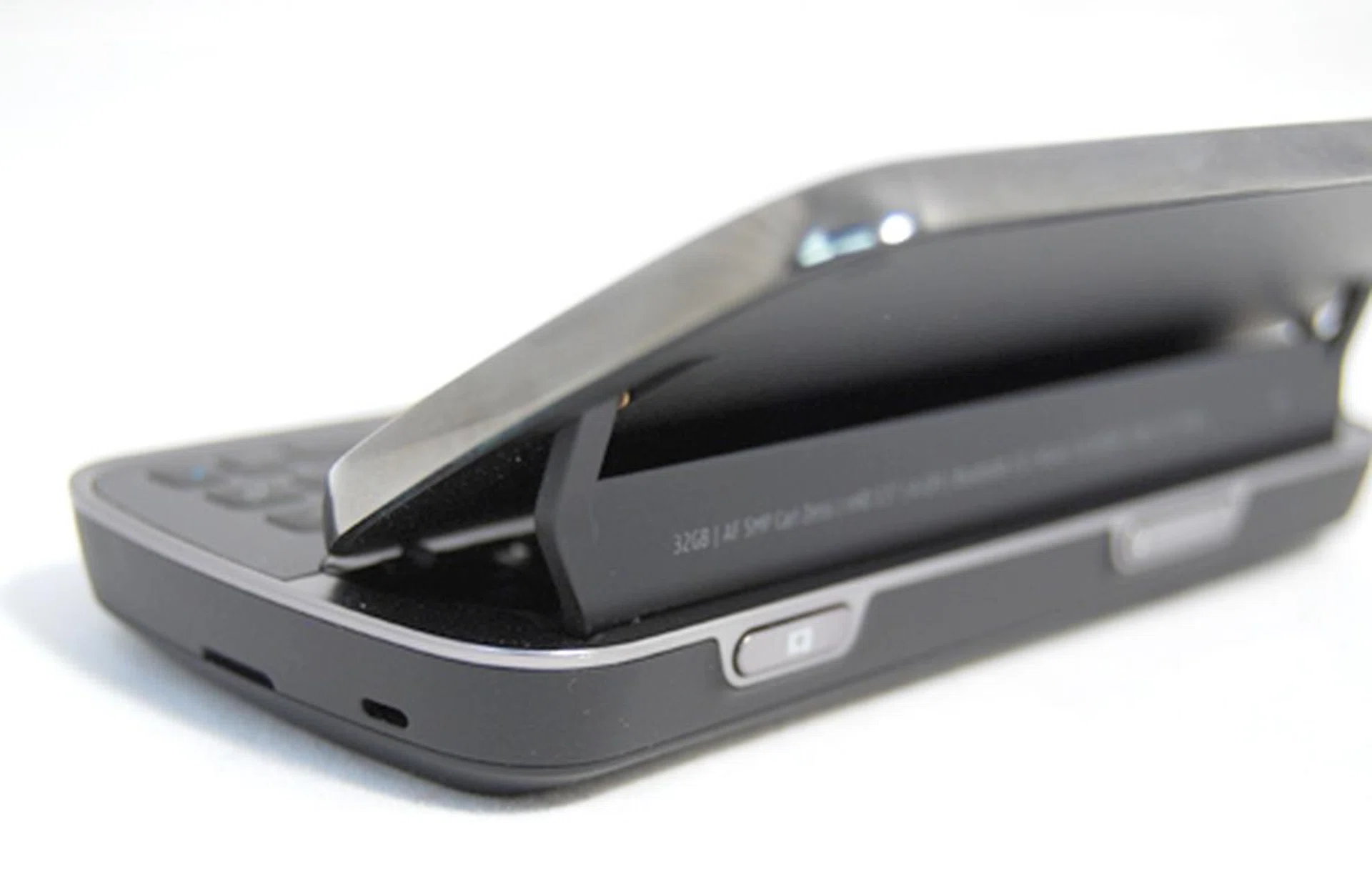
The display screen is supported by a single hinge piece, which does have a firm grip and is easy to slide too. However, be cautious, as it is still a plastic piece and it could break if you apply unnecessary force to it.
The QWERTY keyboard will definitely come in useful for folks who need to type long emails or documents on the go. As we tested the keyboard, a few revelations came to light that showed the N97's keyboard was unable to match up with its competition. Though the individual keys weren't tightly packed, they were too flushed for our fingers to press. Those with smaller fingers however might not feel the same however. Other concerns lingered as well due to a slight deviation from other similar QWERTY-centric mobile devices. For example, the space bar location was pushed to the right hand side of the keyboard was a cause of concern for us initially. As much as we didn't like this point, we had to concede that with sufficient practice, you would eventually get used to the new space bar placement. Yet another gripe is that the placement of its directional pad on the left of the keyboard. It doesn't take a rocket scientist to figure that right-handers will have issues using their left thumb to navigate with the directional pad.
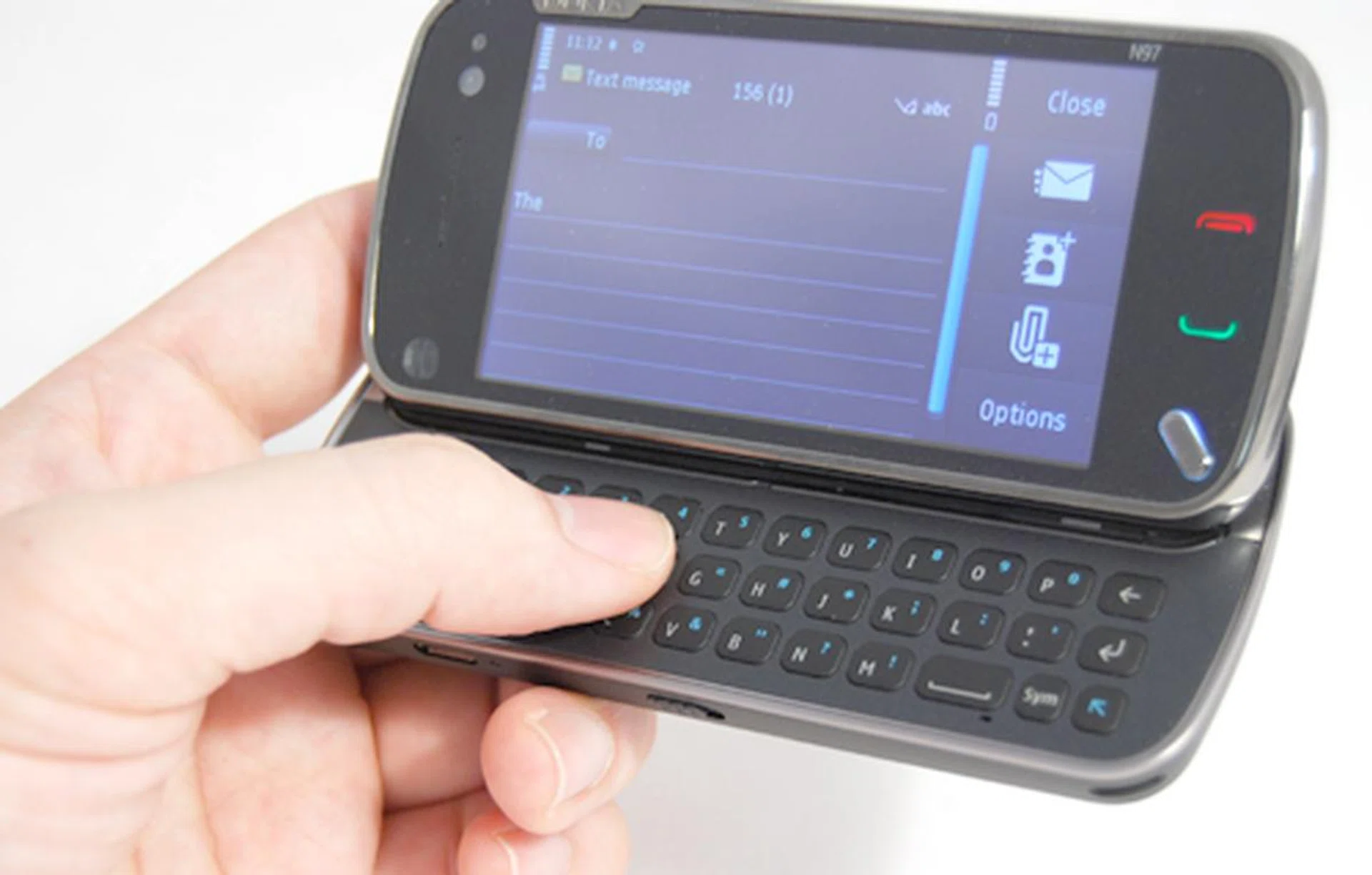
Flat keys, an oddly placed space bar, and navigation buttons located at the extreme left (hidden by the hand) corner. These are some of the things you'll need to get used to when it comes to typing on the N97. But once you do, messaging will be as easy as ABC.
USB charging has been around for some time, but for Nokia devices, the N97 will be one of the first that utilizes this concept. Situated at the left, the microUSB port will also double up as a data port, allowing you to connect to your PC and synchronize your device via the Nokia Ovi Suite. Perchance you would like to utilize your old Nokia charger, it is still possible as the N97 will be bundled with an adapter that connects your old charger to the microUSB slot. Beware though, because we sort of recoiled when we removed the adapter after a charging phase as the heat generated by the adapter was pretty unbearable.
With the advent of touchscreen capabilities on these newer devices, there's also a slider key guard included. What we did like about this is the fact that we can easily lock the device with a simple flick of our thumb. On the right, the usual volume and camera shutter buttons are sighted. Similar to its predecessors, the N97 will also sport a 3.5mm audio jack at the top profile, which isn't of any surprise given that the device is positioned as an all-in-one device, which includes multimedia delivery.
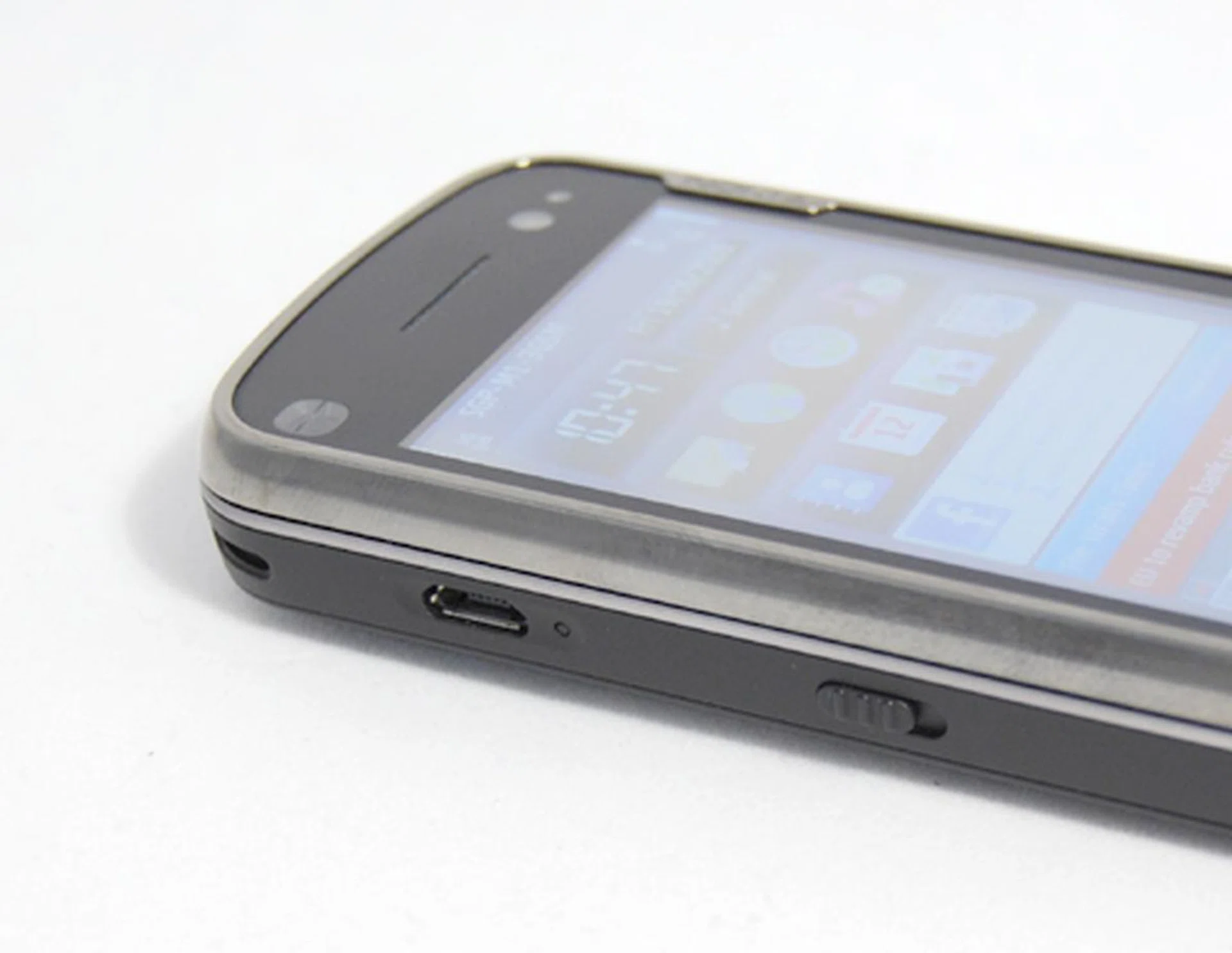
The USB charging standard has been set for mobile devices in recent months, so we won't be surprised to see more Nokia devices utilizing the microUSB port for power charging purposes.
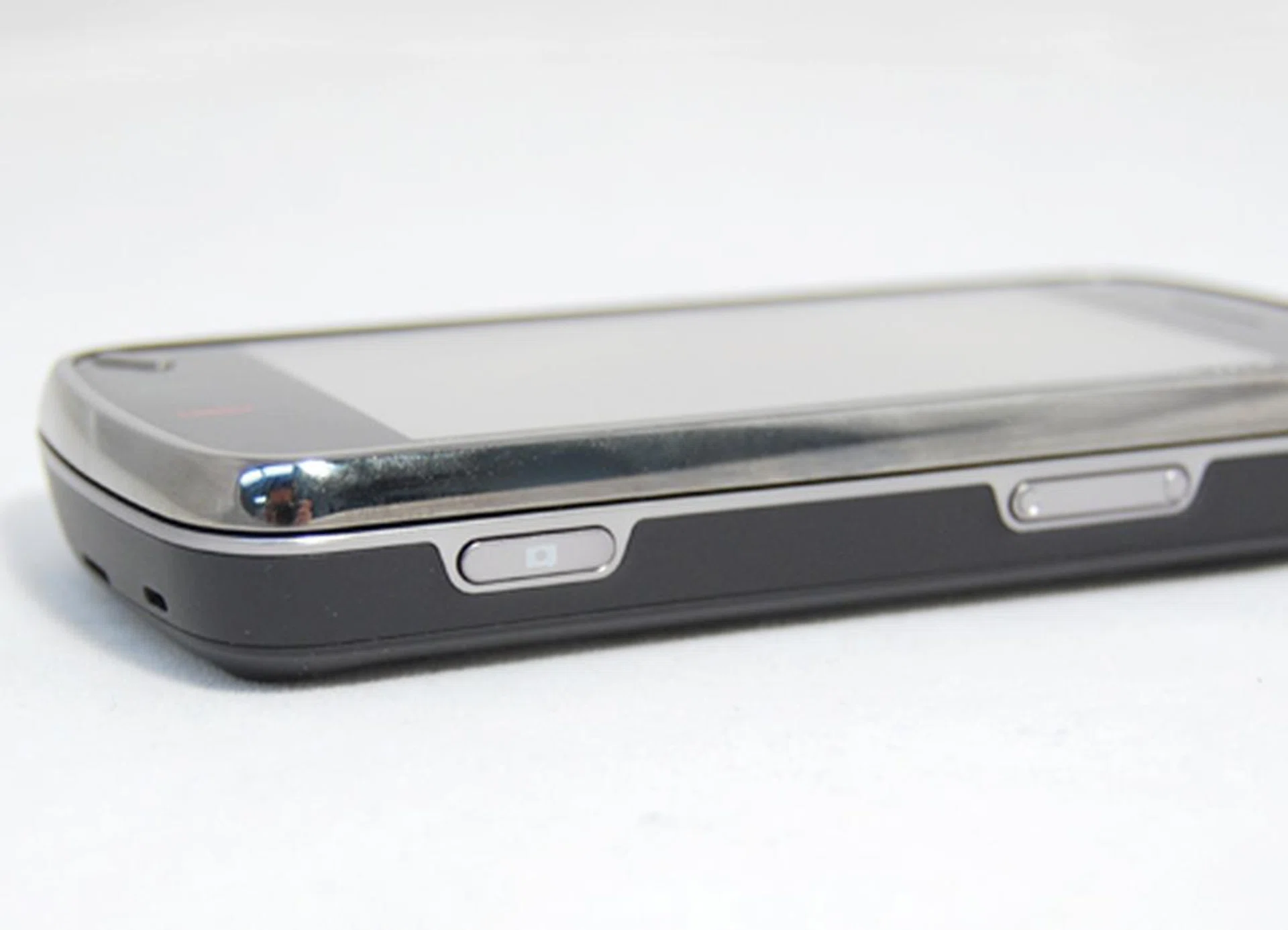
Besides the camera button as seen here, you can also tap the touchscreen during photo taking to activate the autofocus and take a shot with the 5-megapixel camera.
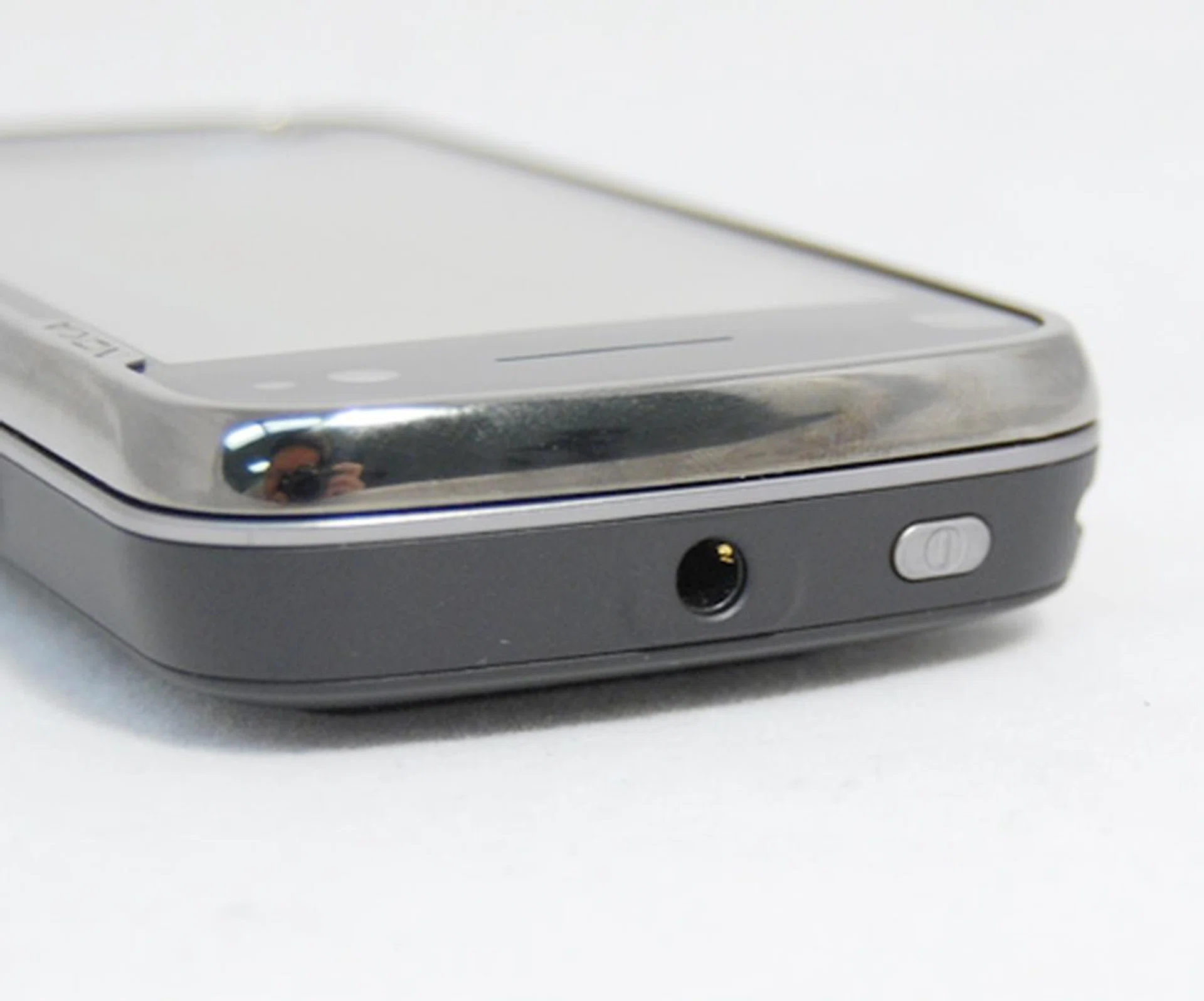
3.5mm audio jack and the power button at the crown of the device. However, we would have preferred the power button to be on the right hand side instead, for easier access.
To access the innards of the N97, a little effort is required. We notice a growing trend amongst manufacturers in using the grip and open method when it comes to accessing the device's battery. Likewise, the N97 utilizes the same concept. Fortunately, it wasn't as much of a chore as some other devices, but it could be the fact that we've finally gotten used to this method. Underneath, there's the microSD slot, but what's more interesting, is the SIM card tray underneath the battery. One might argue that you won't be switching SIM cards as often, but the fact is, having a pull out tray to insert your SIM card beats having to use a stylus to prod and push your SIM card out, as we've seen on the Nokia 5800 XpressMusic.
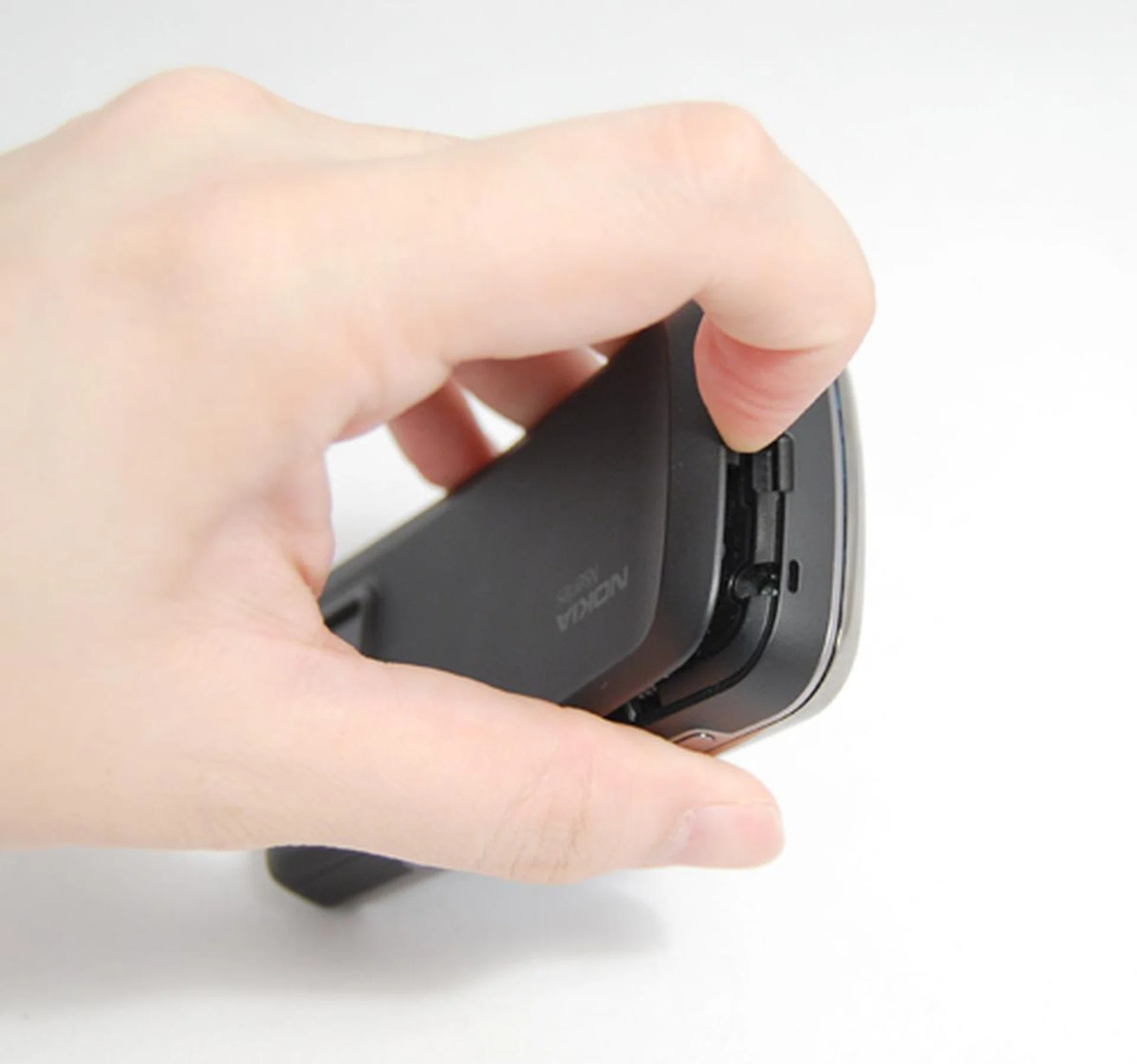
Prying open the battery casing is not as harrowing an experience as we thought it would be.
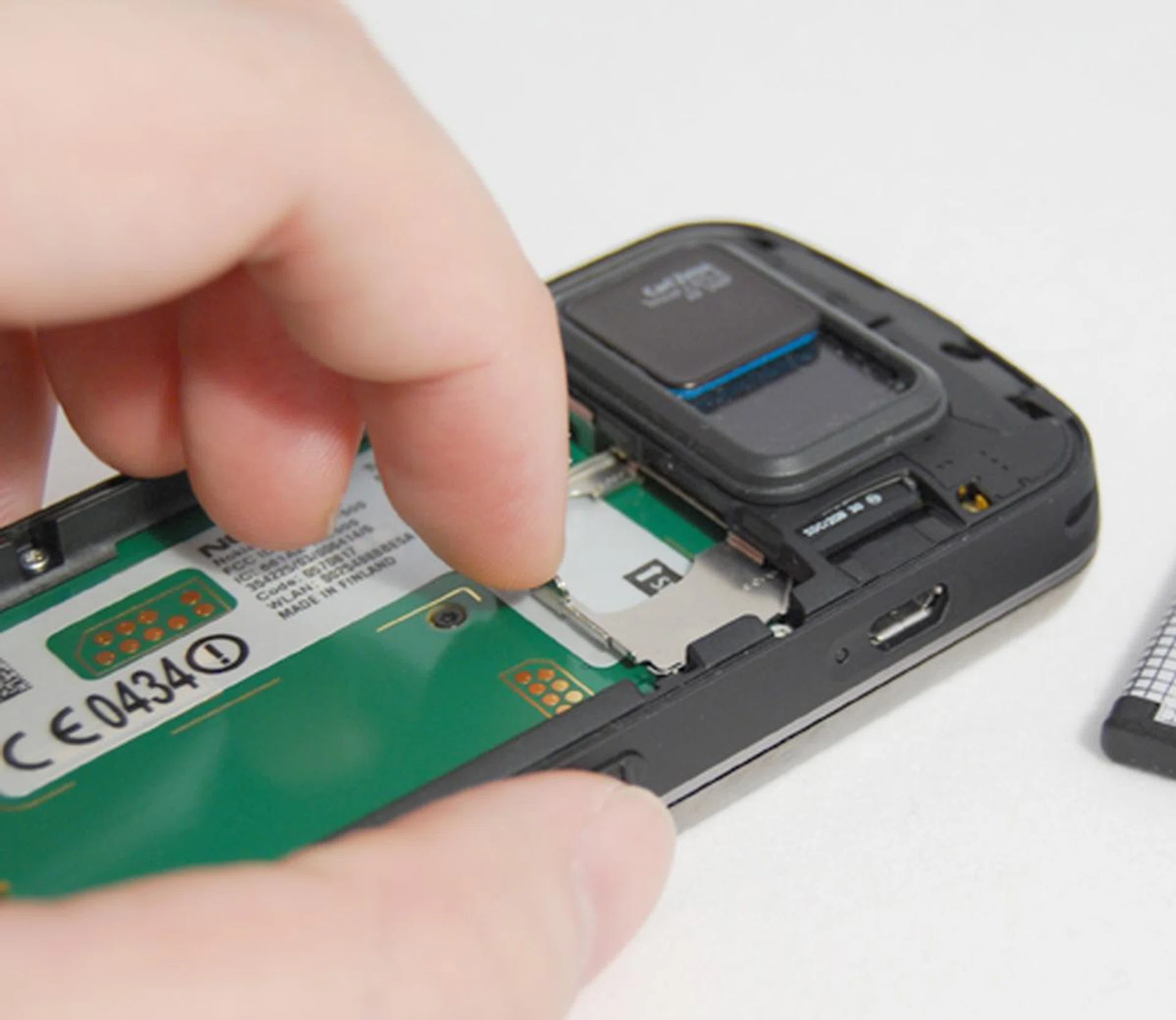
The N97's microSD slot requires one to remove the battery casing before accessing it. Interestingly, we liked how the SIM card tray makes it easier for one to insert or extract the SIM card with no hassle.
Widgets to the Power of N
The moment we switched on the N97 and it booted up, we were overwhelmed by the N97's home screen which was flooded with widgets. Depending on what sort of widgets you download, you can get Facebook updates right on your home screen as well as news headlines, your latest emails and even shortcuts where you can launch Nokia Maps quickly. This makes for very easy viewing and accessing of your favorite applications. More widgets and applications are also available for download, via the Nokia Ovi Store.
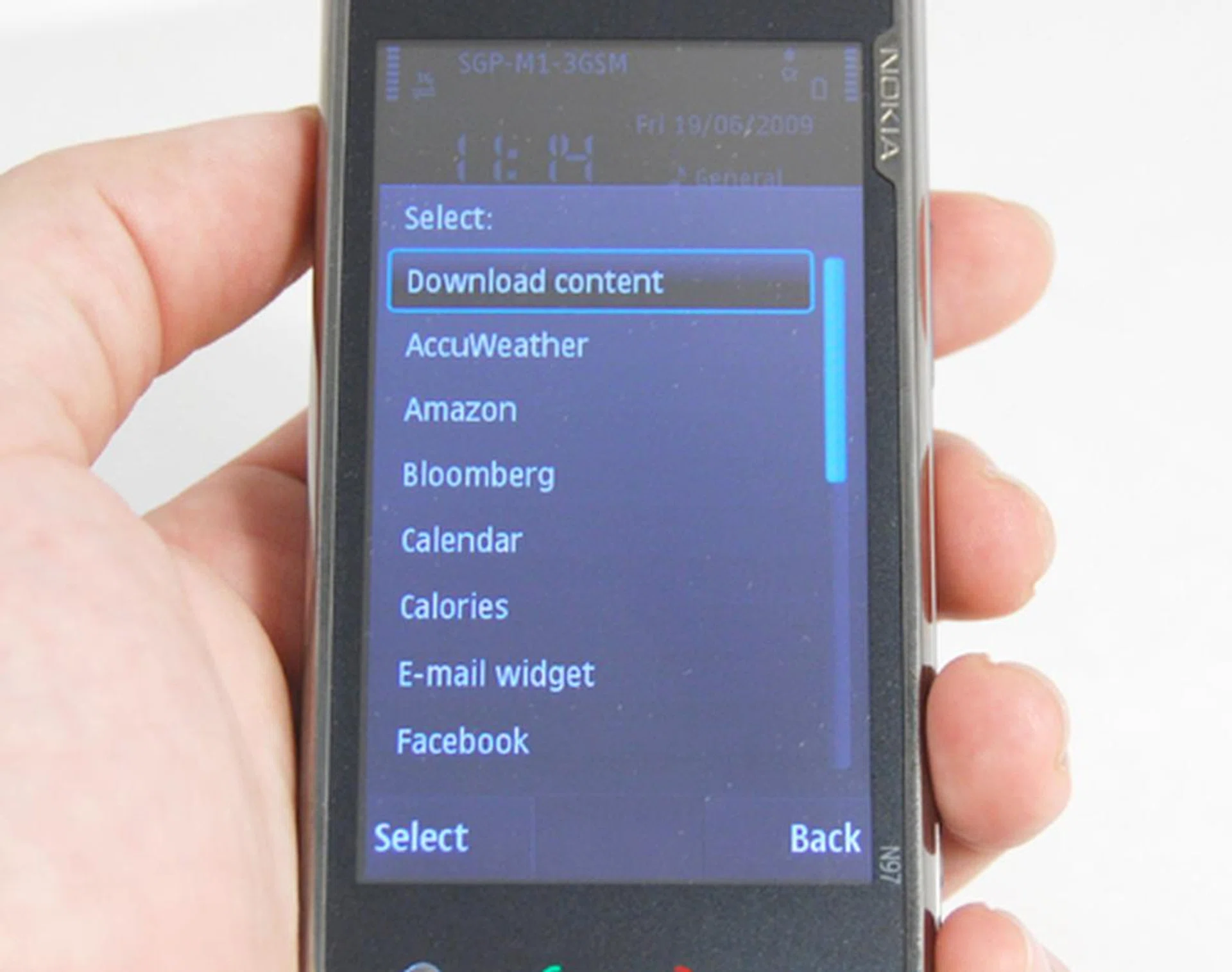
Additional widgets can be downloaded onto the N97, and this includes some offerings from the Nokia Ovi Store, though choices are still currently quite limited due to its infancy stage.
Additional widgets can be downloaded onto the N97, and this includes some offerings from the Nokia Ovi Store, though choices are still currently quite limited due to its infancy stage.
Much has been heard about Ovi Store, and with the introduction of the N97, we see the first device that's fully capable of accessing the online app store from the Finnish company. It's inevitable that comparisons will arise between Nokia's version, against the long standing Apple's iTunes Store and the recently released Google Android Market. Offerings aren't as much at the moment, but given the strong developer base for the Symbian S60 platform, it's a hotbed for application development and offers a great opportunity of growth.
A few words of caution for those who are seeing stars over the fact that you can access all the things you love with little effort. Certain widgets, such as Facebook and AP Weather, are data-dependent. While the recent news of telecom providers such as the local M1 and Starhub placing an affordable and reasonable cap to the amount you pay for overused data, this isn't true if you were on a trip, with auto-roaming data charges taken into consideration. As such, the N97 does allow you to set your widgets to offline mode, thus prevents any further unnecessary data download. Furthermore, do note that there is a limit to the widget placement on your home screen. With just a single home page, you can only place up to five widgets at one time. As compared to other advanced user interfaces such as the iPhone OS 3.0 and HTC's TouchFlo 3D, the N97's customization possibilities are not as favorable. Nonetheless, you are still able to customize your home screen according to your needs, albeit slightly limited in nature.
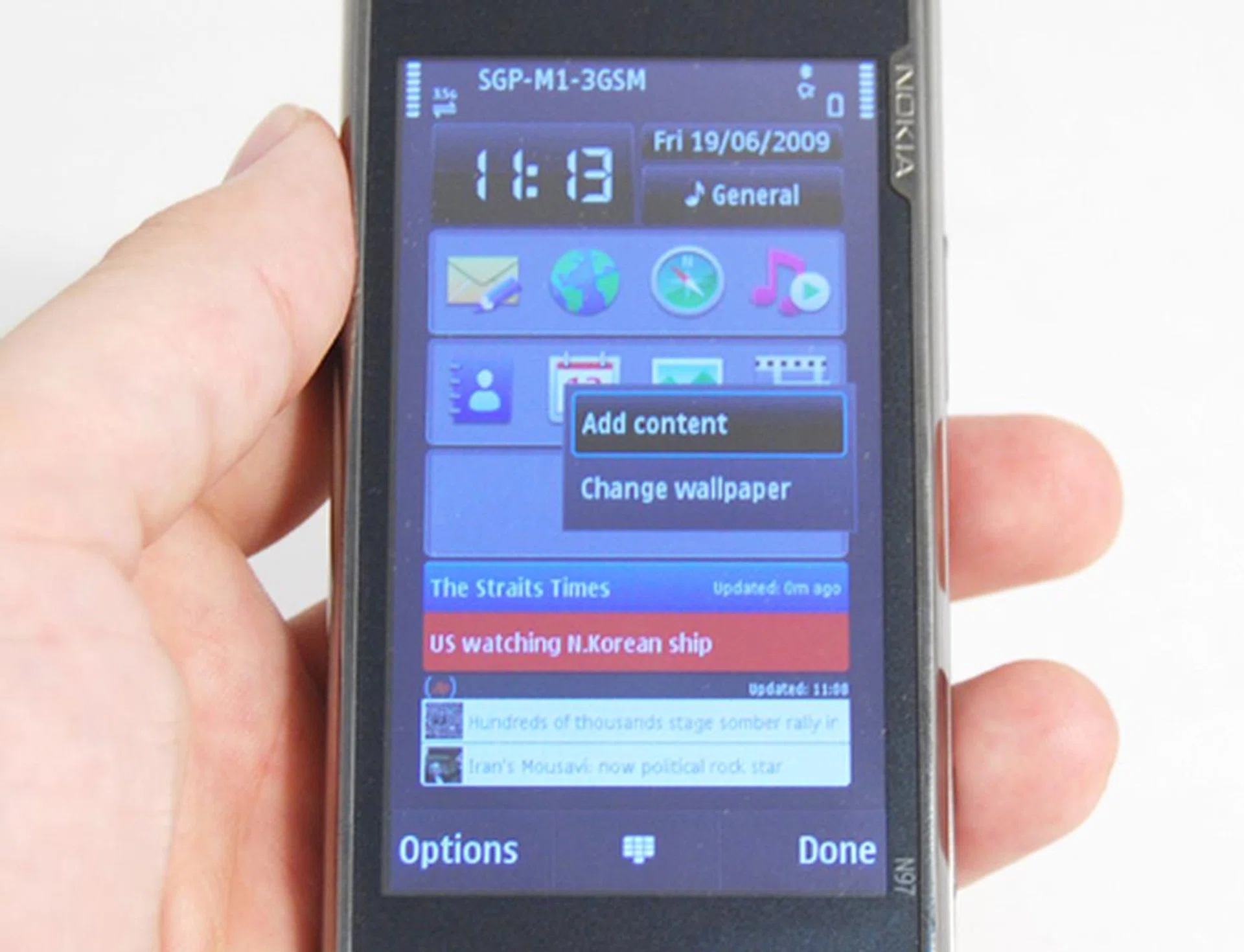
Adding or removing content on the home screen gives you the option to customize whatever you need to access fast and furious on the go. As mentioned, you'll only have one page to work with, so make your choices count when it comes to choosing your widgets.
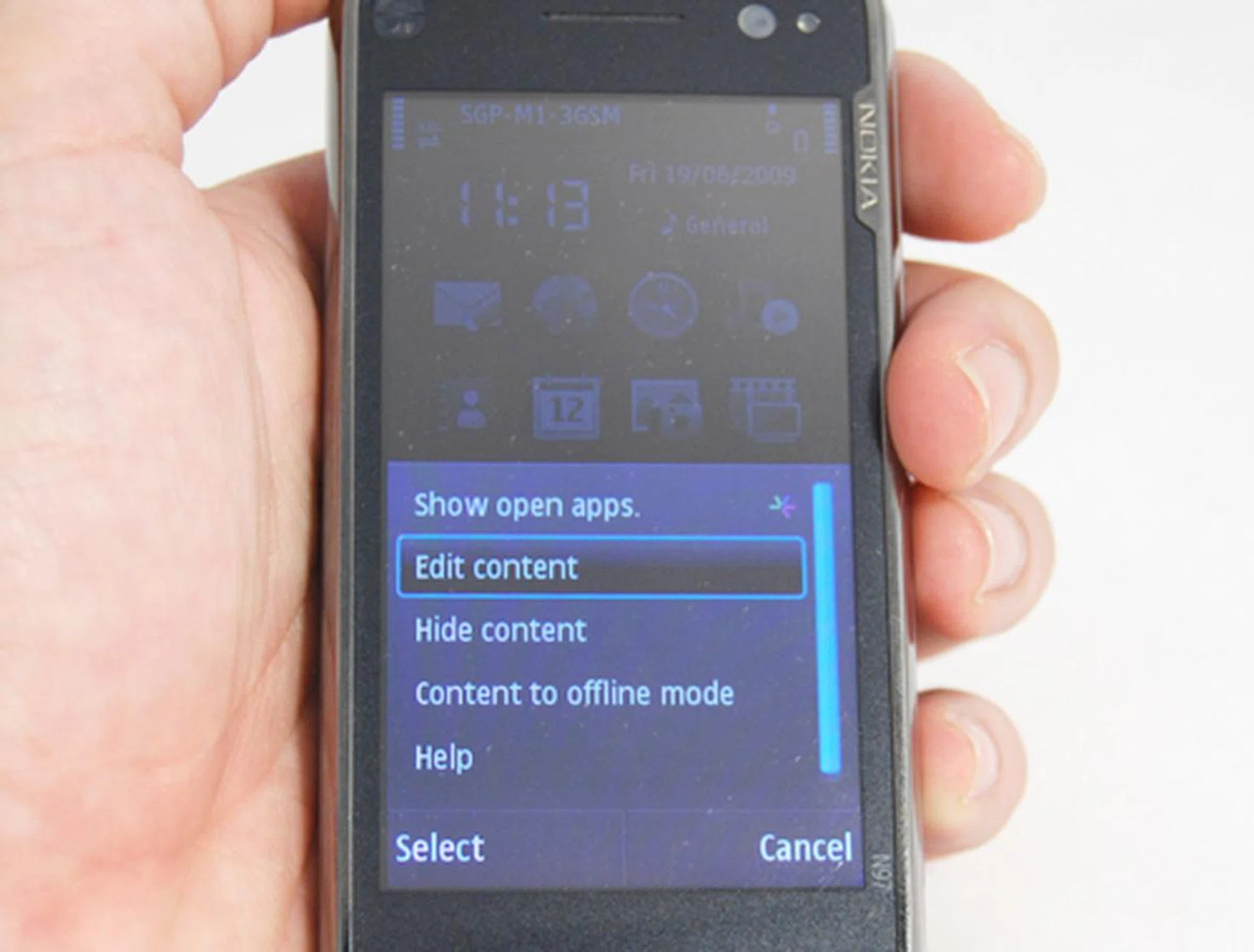
With just one page housing five different widgets, you can easily add or remove the widgets of your choice. Of course, if you want a clean interface, you can also hide the content, leaving just the clock and date on the home screen. And to prevent overusage of your data, you can even switch your widgets to offline mode, which effectively cuts off any web feeds till you reactivate it.
With just one page housing five different widgets, you can easily add or remove the widgets of your choice. Of course, if you want a clean interface, you can also hide the content, leaving just the clock and date on the home screen. And to prevent overusage of your data, you can even switch your widgets to offline mode, which effectively cuts off any web feeds till you reactivate it.
In terms of multimedia prowess, the N97 performs with aplomb. This is actually where the N97 shines, given that you can wirelessly transmit your music collection and share it with other people, be it in the vehicle or at a house visit through your host's hi-fi set. Also, the N97 features a music player and an FM transmitter. We then took a look at its video delivery. Similar to the earlier Nokia 5800 XpressMusic, the N97's 640 x 360 screen resolution translates to a 16:9 aspect ratio. While this isn't exactly anything new, what makes the N97 more suitable for movies on the go is the 3.5-inch display, plus the convenience of tilting the screen and leaving the device on the table for one to view the movie.
The Nokia N95 8GB started off the trend of having a mobile device with a generous amount of internal storage. The Nokia N96 continued this trend with its own 16GB internal storage, and introduced the concept of massive storage via an additional microSD expansion slot. The N97 is even more generous in this aspect with 32GB of on-board memory to store everything and anything. Even better - the phone comes with an additional memory card slot, if you fancy carrying up to 48GB of data in your pocket so you can say you are carrying your entire personal library should you wish to make a statement.
Taking on the N
Once again, we employ a battery of tests to showcase the N97's performance level. As usual, we take on a few core features of the device, which covers the multimedia such as the music, video and camera performance, adding on to the general speed and performance of the user interface and applications, and finally, the battery life seeing as how it is a mobile device that will be devoid of a constant power source.
There isn't really much to say about the audio delivery, given that the N97 did perform on an average level with its 3.5mm audio jack and its bundled earpiece. The speakers aren't really something to wow over, but it's sufficient to get the music out loud and clear. When it comes to videos, we've already iterated that the 3.5-inch screen is a pleasure to look at. Adding on to that point, we noticed minimal lag in frame rates, especially with fast moving scenes as seen on our 24 FPS test video running at 240 x 320 resolutions.
Photography on the N97 is as decent as we thought it to be. We were pleasantly surprised at the rich colors delivered as seen on our color charts below showing very little visible noise on the darker regions. However, we did notice that the warmer hues such as the reds might tend to be over saturated, but the cooler colors within the blue and green regions turned out slightly under saturated and weaker respectively. Details are quite pronounced on the test subject. Fur details have always been one of the hardest to capture, but we noticed that it turned out pretty sharp on the N97's 5-megapixel camera. However, discernible noise is still unavoidable, as seen in the test image.
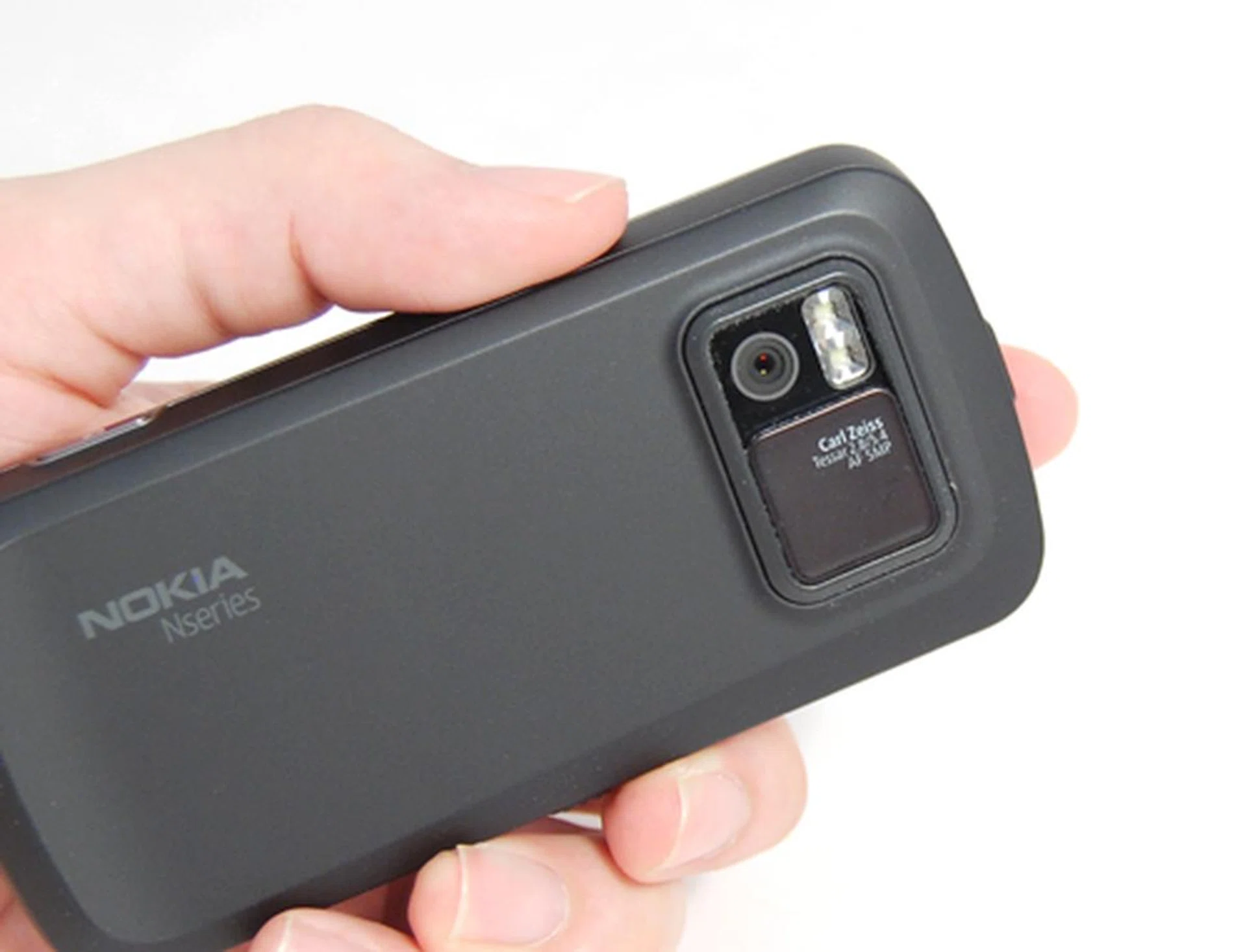
One of the things we appreciated on the N97 is a lens cover which was missing from its predecessors, the N96 and N95 (both the original and 8GB versions).

Colors were well reproduced, though we noticed slight over saturation on the warmer red colors, and the blue areas came off as a little weak.

The details of the fur on our furry little test subject proved to be quite sharp, but noise levels are still discernible which shouldn't prove too obvious if you aren't blowing up your picture.
Being one of the first few Nokia devices to sport the Symbian S60 V5.0 touch screen UI, the N97 would naturally have a few kinks to iron out. One of our previous encounters with this OS version included the 5800 XpressMusic. We had our reservations as we had to keep tapping on an icon to launch it and the system was sluggish to say the least. Lastly, since the N97 is based on a resistive screen technology, you have to rely on the stylus most of the time. For the uninitiated, resistive touch screens don't support multi-touch hence you can forget about zooming in and out of pictures just like how you might have seen your friends doing with their Apple devices.
As we move on to our final findings for the N97, we also move into our mixed reactions with regards to the device's performance level. Up till now, we've been pretty pleased with most of what we've seen and heard, but our battery test gave us a rude shock. With the same test video, we left the N97 running, and found it dry just beyond the 2 hour mark.
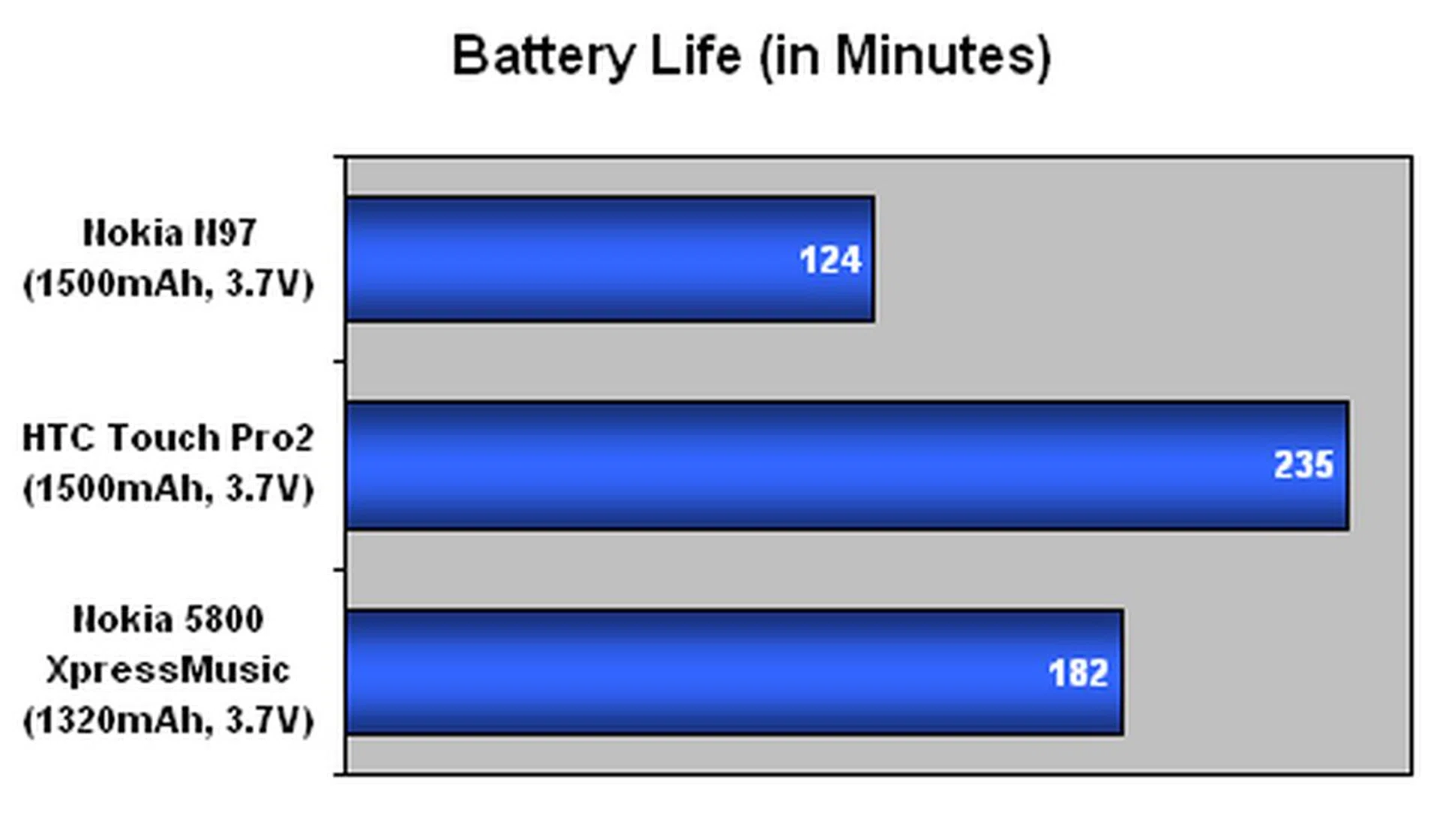
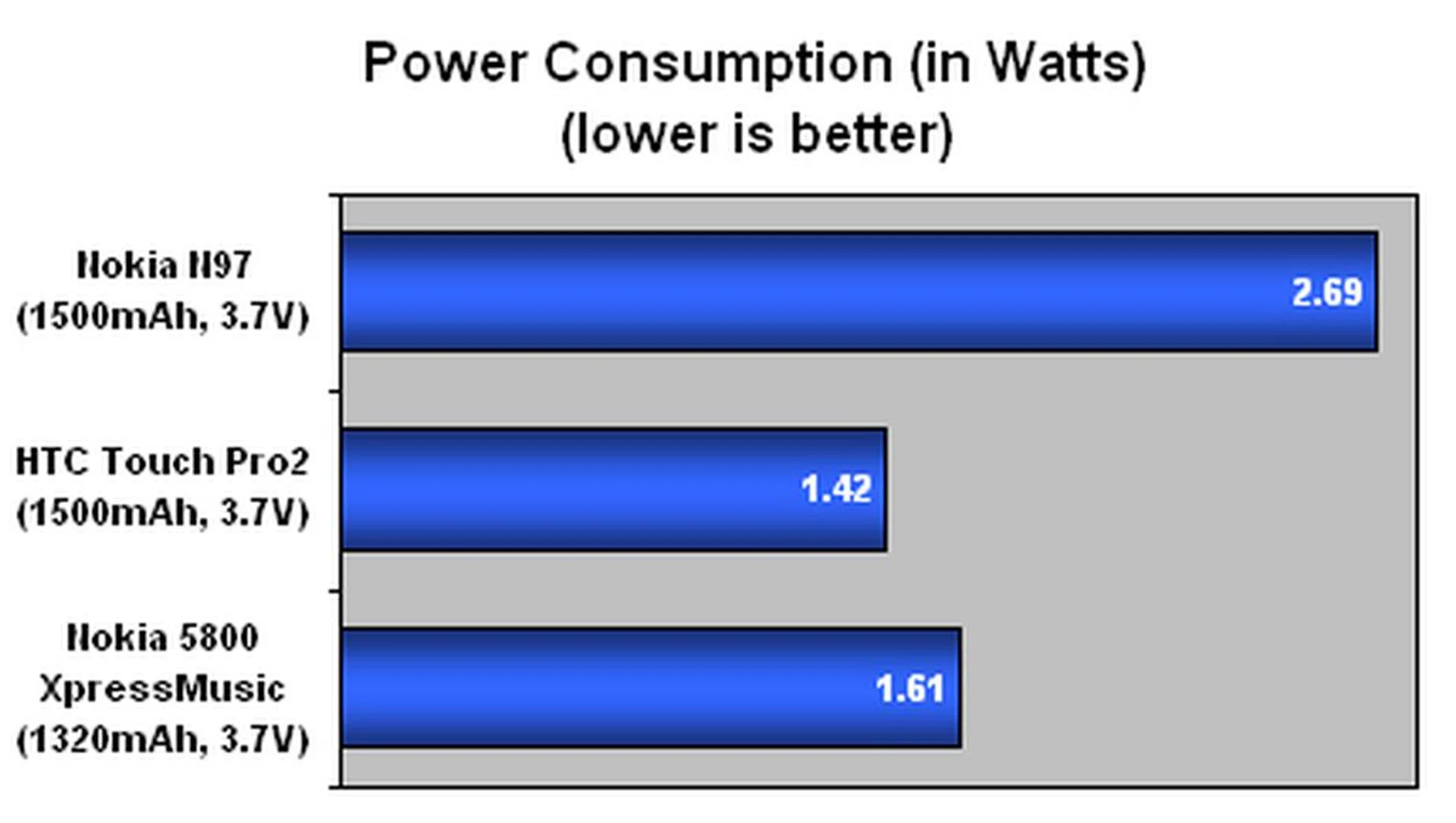
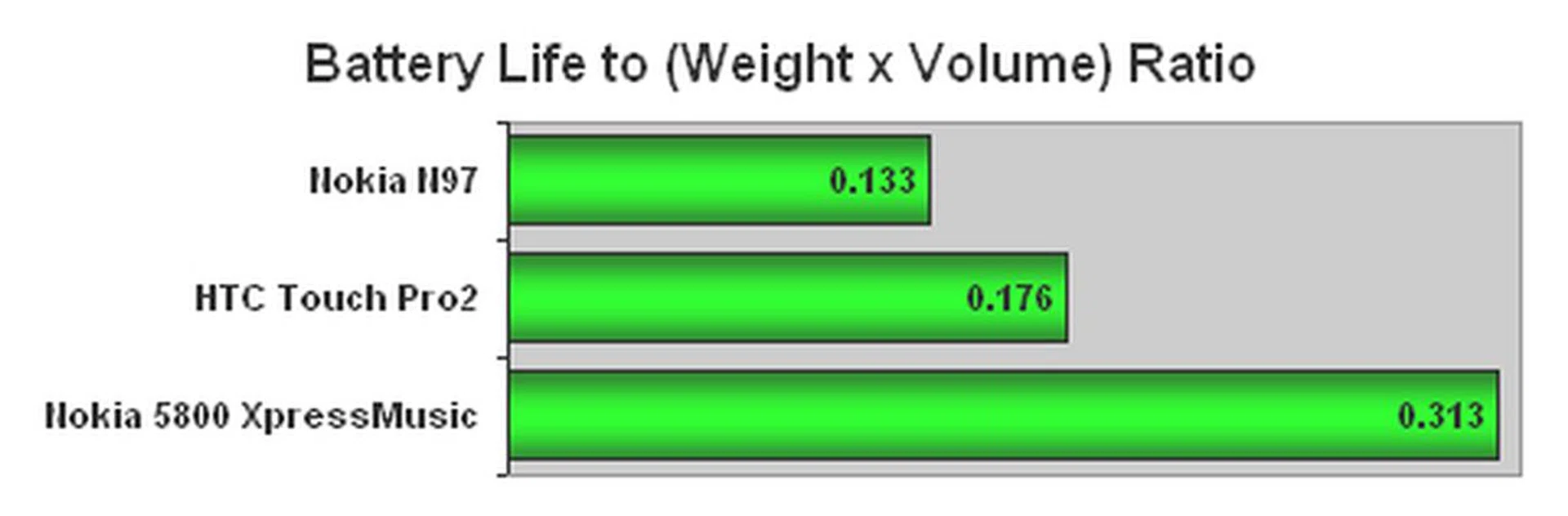
A few possibilities for the low battery uptime did cross our mind, one of which is the widgets being a power drainer. As per normal, we left wireless connections such as the device's Bluetooth and Wi-Fi radio activated, and with the constant web feed from widgets such as Facebook or Straits Times downloading small amounts of data every now and then, it could be the mitigating factor for its lower battery life. On our regular day-to-day usage basis, we did manage to get a full day's worth of usage out of the N97, but it only barely crossed the one day mark. So watch out if you're a heavy phone user or dabble plenty with the device; as seen in our benchmarks above, it does have a higher power draw leading to reduced uptime statistics.
The N
To be honest, the Nokia N97 is the device that will set the standard for its upcoming N series. As the first N series device to utilize the S60 touch UI, it isn't easy, and the Finnish company is still muddling around to edge itself further in the competition. Introducing widgets that actually display snippets of info, instead of redirecting you to the web browser is what widgets should have been, granting you quick and easy access to the information you need.
Its QWERTY keyboard is definitely a good addition to the N series portfolio, though there were mixed reactions to its layout and tactile feedback as we gathered response from our colleagues. The N97's keyboard might not have the speed and accuracy that was enjoyed on the HTC Touch Pro2, but given time and practice, we found ourselves actually typing swiftly, though typing errors are still an issue with a non-standard layout.
Having a large 3.5-inch screen supporting a 16:9 aspect ratio does bring a whole new level of mobile entertainment to the user. As we've mentioned, having a fixed tilt screen for movie playback does create a better viewing experience, and the colors we noted on the screen was rich. Such rich colors were just as prominent with the images taken from the N97's 5-megapixel camera, which also gave a substantial amount of attention to sharpness and detail levels. Excessive noise is still unavoidable with the camera due to the sensor's petite nature.
For all that's great about the N97, the mobile device didn't manage to fulfill one of its core features - true mobility. Its battery life gave us some cause for concern, seeing as how it only clocked slightly above 2 hours with our standard battery test. Taking into consideration that the N97 will be a constantly connected device, it makes one wonder if this will affect your mobile lifestyle with its low mileage. The Symbian S60 OS on the N97 is still pretty new, and while we lament its laggy nature at times, we will be placing our hopes on upcoming firmware updates which should rectify this issue. Widgets, being one of the key features of the N97, will need more content from Nokia's Ovi Store, and in this aspect, competition is stiff in the face of the successful Apple iTunes Store, and the up and coming Google Android Market.
Thankfully, the Nokia N97 did live up to our expectations in terms of features and overall performance, sans its lackluster battery mileage and the need to getting used to the new keyboard layout.
Thankfully, the Nokia N97 did live up to our expectations in terms of features and overall performance, sans its lackluster battery mileage and the need to getting used to the new keyboard layout.
The Nokia N97 will come in black and white models and will set you back S$1028. If you're a music lover, you can also consider the Comes with Music edition which will cost S$1228. So that's an additional S$200 for a year's worth of music downloads from the Nokia Music Store, with digital rights management attached to it though. With all things considered, we are surprised by the pricing as it was not too long ago that the Nokia N96 was released and that retailed at S$1258. And with the N97 having just about everything but the kitchen sink, this is one phone that you might want to consider stepping up to, at least once you have a feel of the keyboard and are comfortable with its layout.
Our articles may contain affiliate links. If you buy through these links, we may earn a small commission.