
Nokia Lumia 830: High-end looks at a mid-range price
Microsoft is calling the Nokia Lumia 830 an "affordable flagship." And with its sleek aluminum frame and curved-at-the-edges Gorilla Glass 3 screen, it certainly looks like one. But can this S$529 Windows 8.1 smartphone compete with more expensive flagship devices in other areas too? We find out.

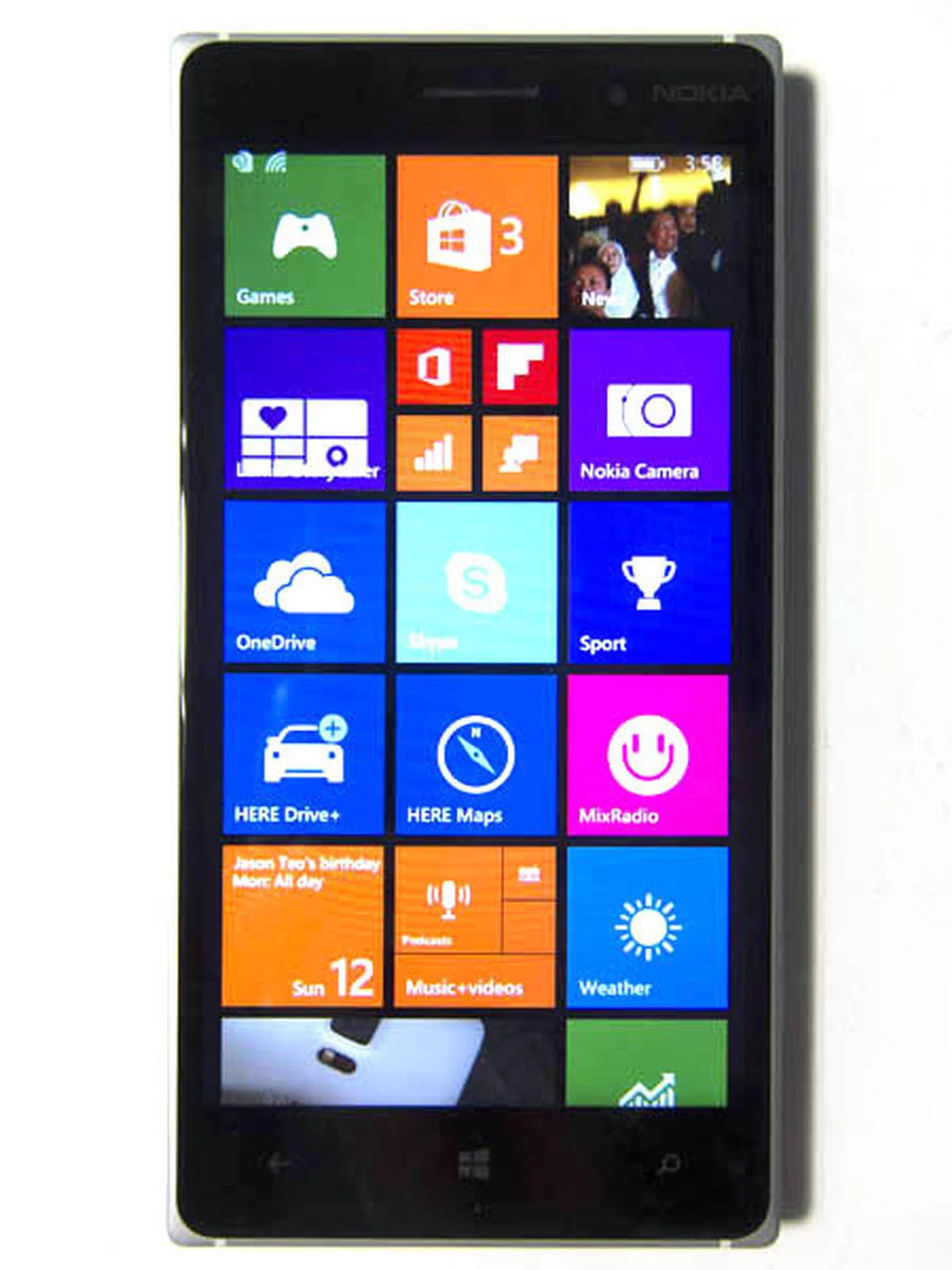
Microsoft has been struggling to gain mobile market share since 2010, starting first with Windows Phone 7, and now with Windows Phone 8. Nevertheless, its acquisition of Nokia Devices and Services division last year signaled renewed efforts to compete with iOS and Android, and the buyout now puts Microsoft in a similar situation as Apple, with complete control over both hardware and software services.
Shortly after the acquisition, the newly-minted Microsoft Mobile unveiled Lumia Denim, an update of Windows Phone 8.1. It also announced new Nokia Lumia devices that will arrive with the new Lumia Denim update: Nokia Lumia 830, 730, and 735. Of those three, only the Lumia 830 is available in Singapore.
The Nokia Lumia 830 is marketed by Microsoft as an "affordable flagship device", promising to offer a high-end experience with a mid-range price. With an suggested retail price of S$529, can it live up to Microsoft's claim? Let's find out.
Design
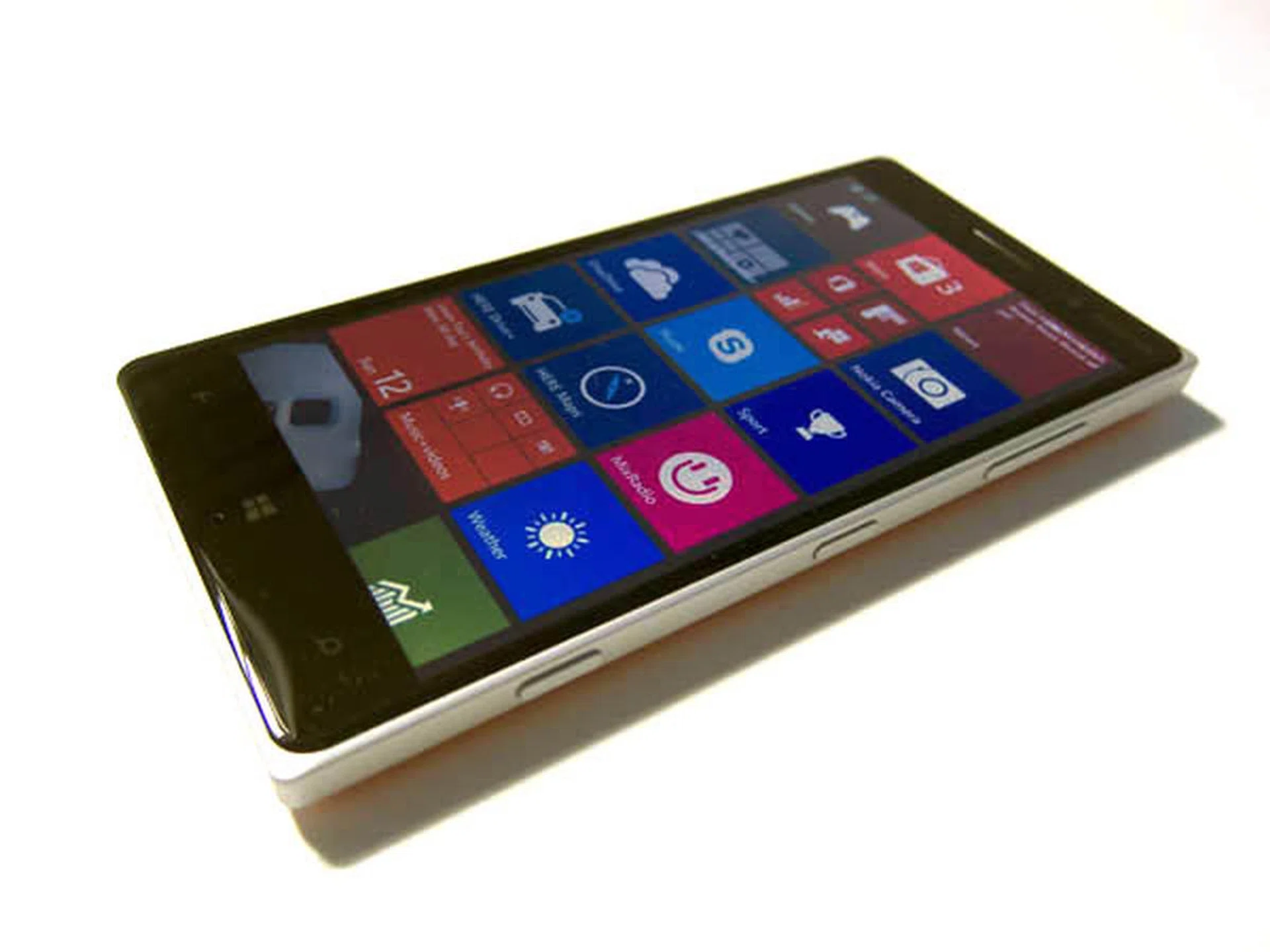
The Nokia Lumia 830 sports an aluminum frame and curved Corning Gorilla Glass 3 display.
The Lumia 830 follows the design philosophy of all 2014 Lumia devices, and in fact, looks almost indistinguishable from the more expensive Lumia 930, Microsoft's current top-end mobile device. Like the Lumia 930, the phone has a matte grey aluminum frame, and a Corning Gorilla Glass 3 screen that curves gently at the edges, resulting in a luxurious and classy look and feel. Microsoft has done a great job here, as it's rare to see such high-end design features on a phone in this price range, as these details can be quite costly to manufacture. In fact, you could even make the argument that the Lumia 830 boasts a more premium design than the Lumia 930, as it's actually thinner, coming in at 8.5mm compared to the latter's 9.8mm.
In hand, the Lumia 830 feels relatively light, and at 150g, it's actually 17g lighter than the Lumia 930. Its weight is comparable to that of other 5-inch flagships phones and, despite its relatively light weight, the phone feels solid and well built, thanks to its aluminum frame.
The power and volume keys are located on the right side of the phone - a design that is consistent with other large phones. Of interest here is the dedicated camera shutter button, which is located at the bottom right side of the phone and provides instant camera app access, even when the phone is locked.

Like the Lumia 930, the 830 sports a dedicated camera shutter button on its right side.
One area where the Lumia 830 differs from the 930 is the location of the micro-USB port. On the 930, it could be found at the bottom of the phone, but here you'll find it at the top, next to the headphone jack. The design may make the phone easier to use while charging, but its presence does mar the elegance of the aluminum frame since the top view is more often seen than the bottom. Nevertheless, this is a very minor design note.
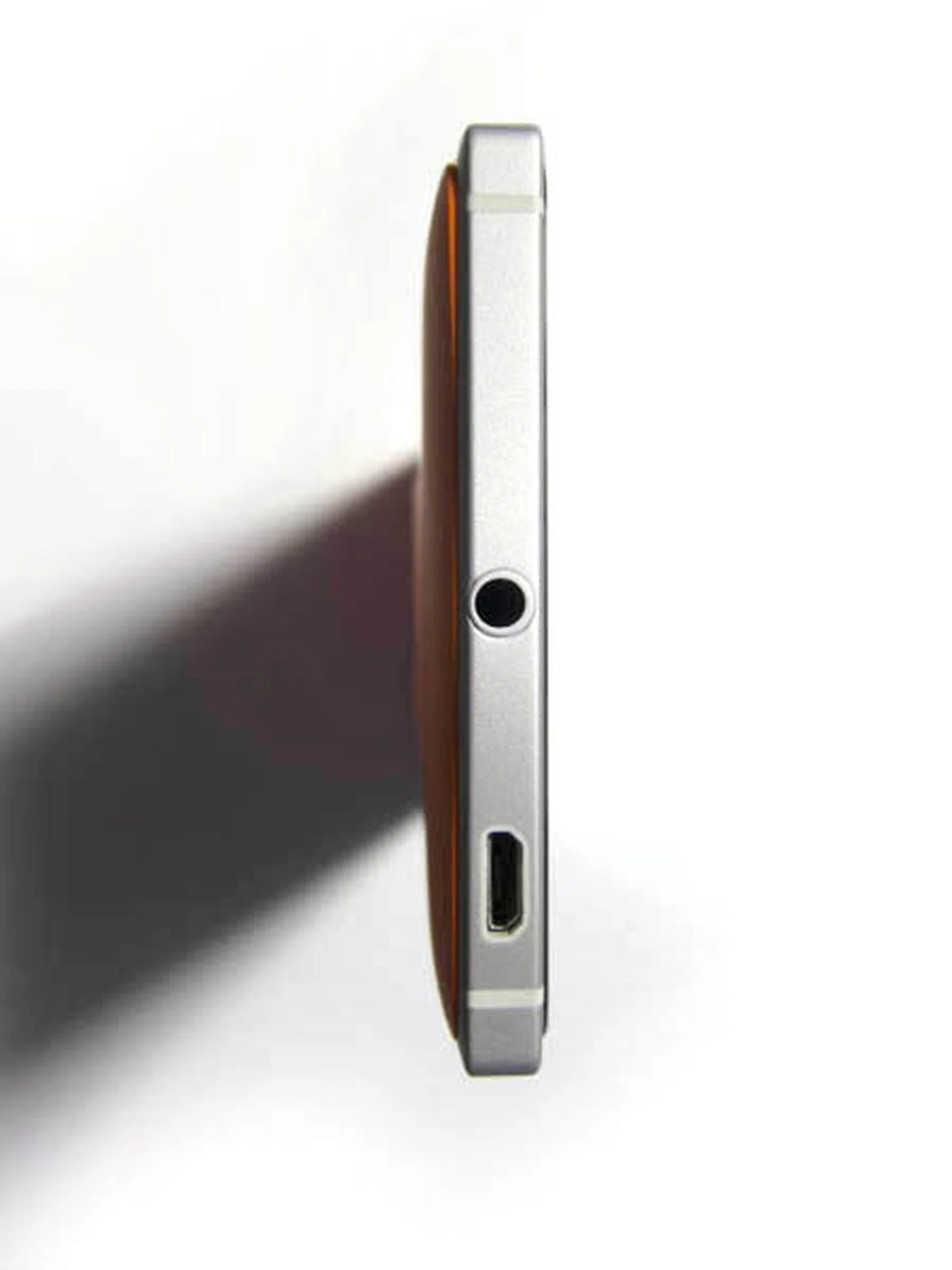
The micro-USB port can be found on the top of the phone and looks rather unsightly (although it can be argued that it's a tad more functional).
Also differing from the Lumia 930 is the Lumia 830's polycarbonate rear cover, which, unlike the 930's, is removable. Finishing-wise, like its more expensive counterpart, the Lumia 830 is available in Bright Orange and Bright Green, along with the standard black and white models too. Under the cover, you'll find a removable 2200mAh battery, as well as the nano SIM slot and microSD card slot.
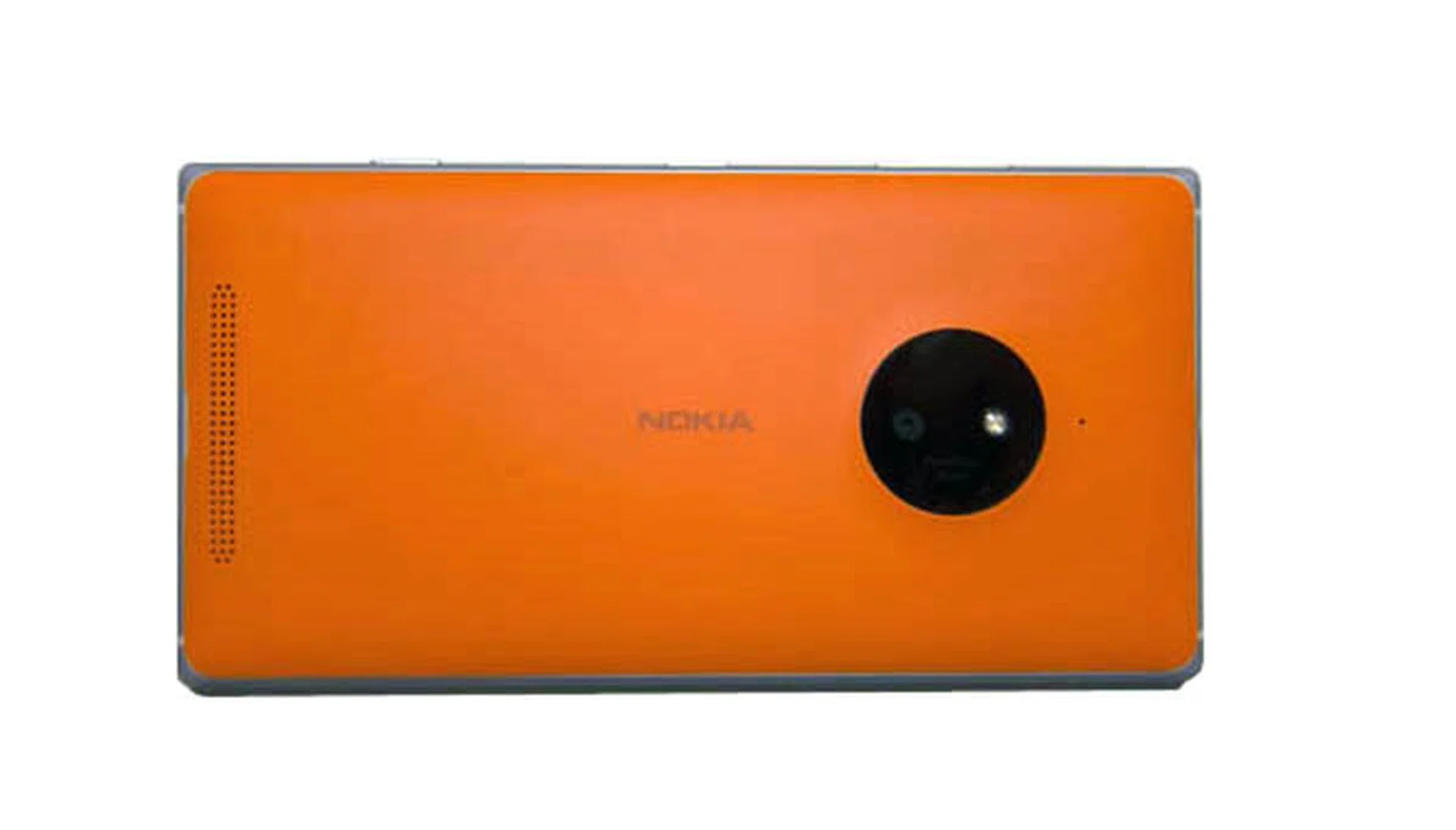
The Lumia 830 is available in Bright Orange, Bright Green, Black or White.
Display & Audio
The Lumia 830 boasts a 5-inch IPS ClearBlack LCD display, with a resolution of 1280x720 pixels (294 ppi) - standard fare for current mid-range phones, but definitely not good enough for a flagship device. Nevertheless, images and text still look crisp, but perhaps not as sharp as they would be on a true high-end 5-inch flagship - there's definitely some compromise here.
Of particular interest here is Microsoft's ClearBlack technology. Essentially, this technology uses an additional screen layer, to render deeper blacks with more contrast. Blacks aren't quite as dark as on Samsung's Super AMOLED displays, but it is very close.
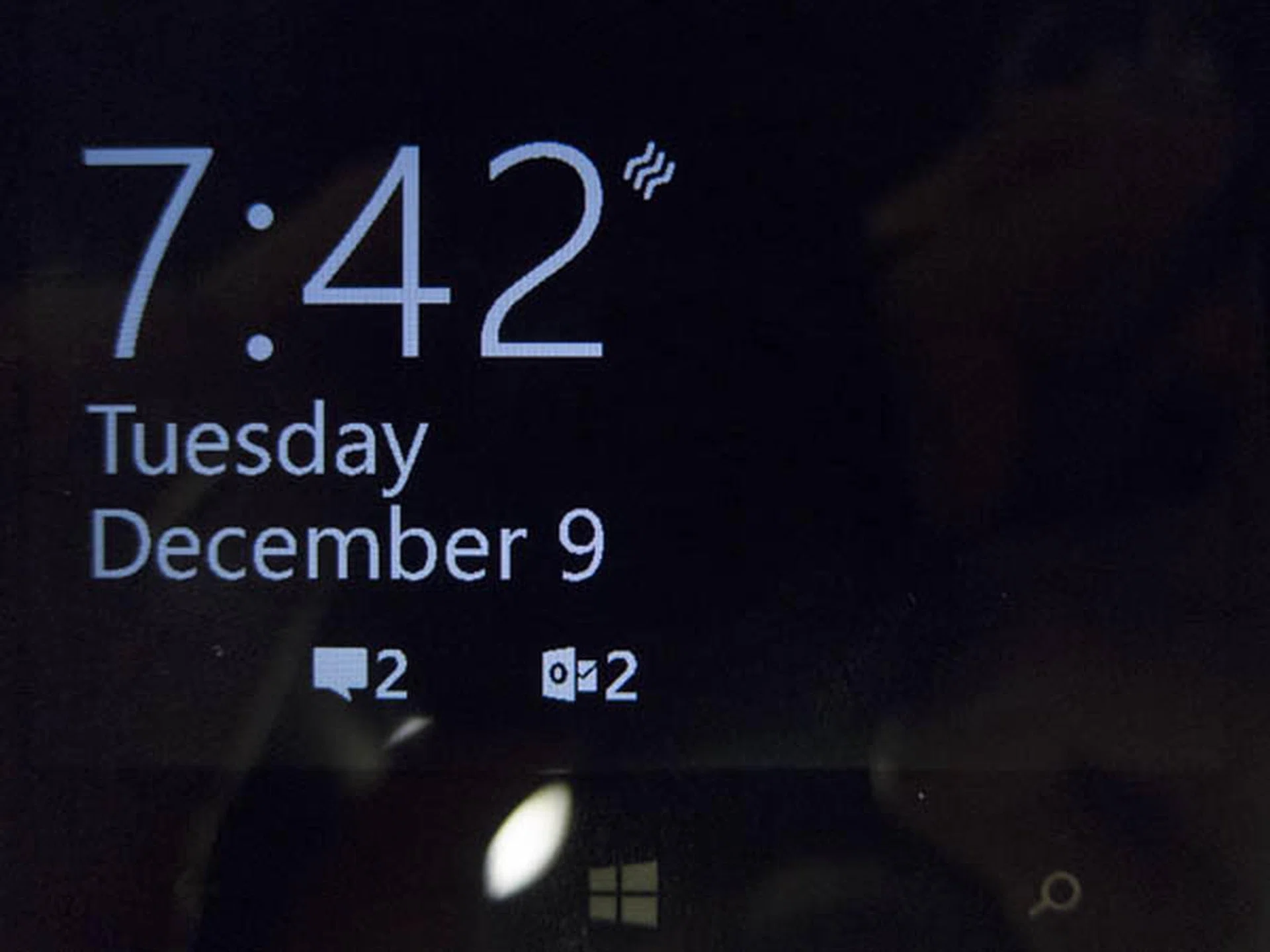
The black in the screen is so dark, it's almost indistinguishable from the bezel surrounding it.
The Lumia 830's speaker is located at the back of the phone. Audio output is rather average, which isn't helped by the fact that the speaker is facing away from you.
User Interface Features
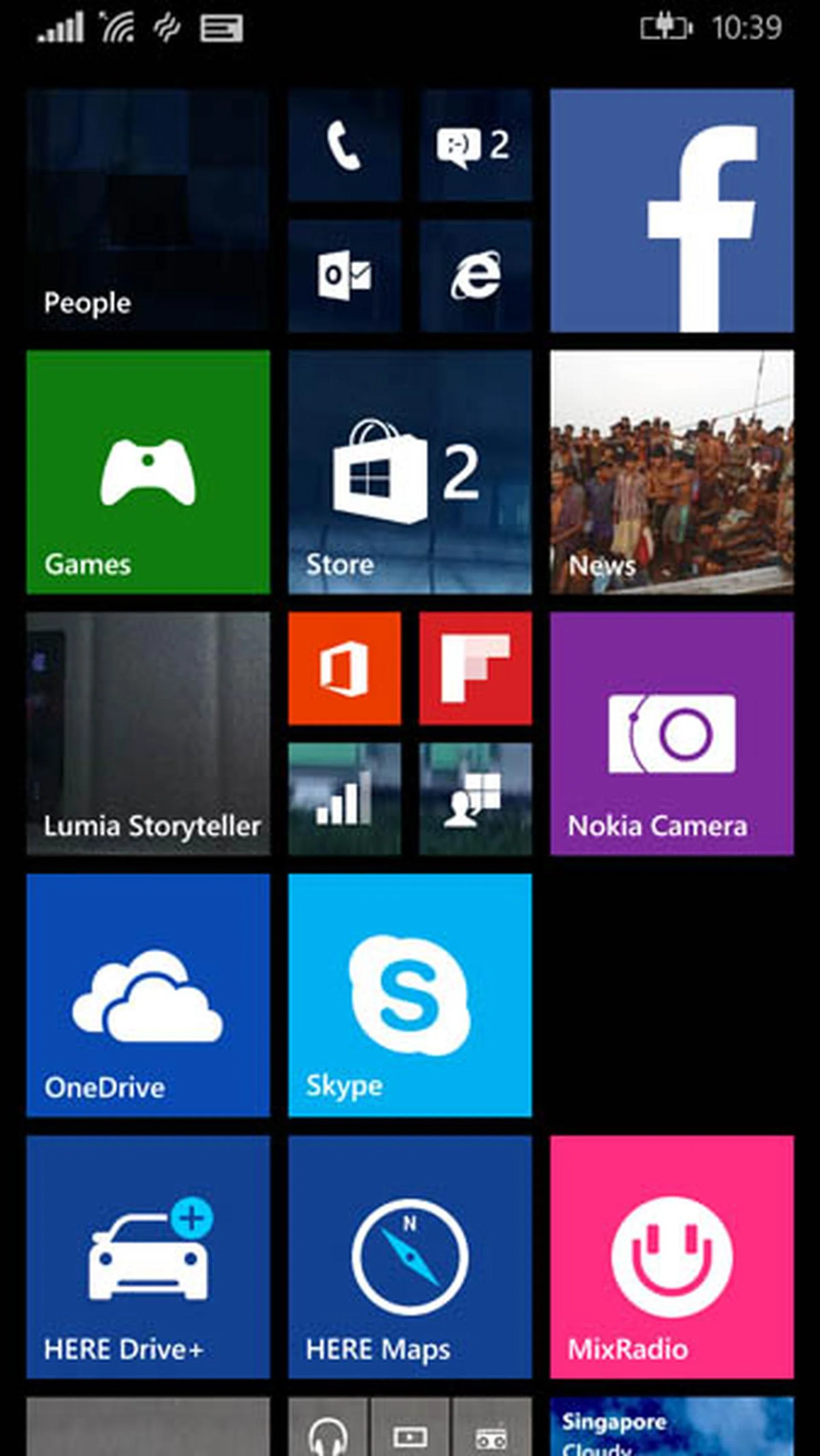
Windows Phone 8.1 Interface, with Live Folders
The Nokia Lumia 830 is one of the first Windows Phone 8.1 devices with the Lumia Denim update available right out of the box. We've detailed the existing features of Windows Phone 8.1 in a dedicated article, so this review will mainly focus on the new features offered by the Lumia Denim update, as well as certain other nifty features that the Lumia 830 has to offer.
1) Folders
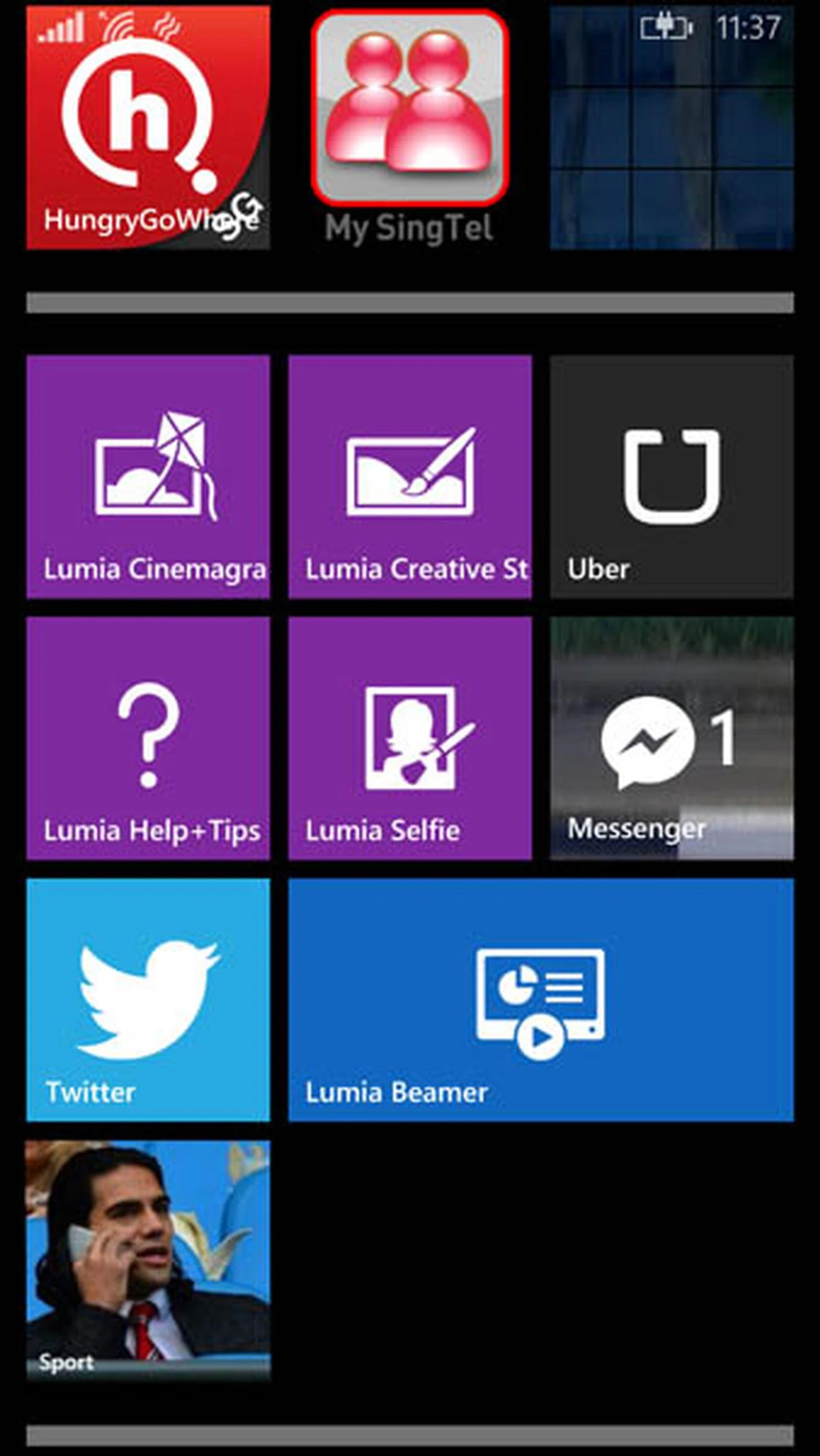
Live Folders
The core user interface in Windows Phone 8.1 is its Live Tiles. Those that are familiar with Windows Phone will know that some tiles can display information “live”, and can be resized. Starting with the Lumia Denim update, you can finally group various tiles into Live Folders. The concept is similar to the folders in iOS and Android, while also retaining its "live" function - Live Tiles will still be shown in the preview of the Live Folder, just smaller.
2) Apps Corner
Lumia Denim update introduces a feature called the Apps Corner. You can use this feature to restrict the user to only a small set of apps. This is similar to Private mode on Samsung phones, and lets you set up a restricted Start screen with access to only certain apps and files. This setting is useful if you want to lend your phone to a friend and you don't want them snooping around, or if you want to let a child use your phone and you don't want them messing up your settings.
3) Glance Screen
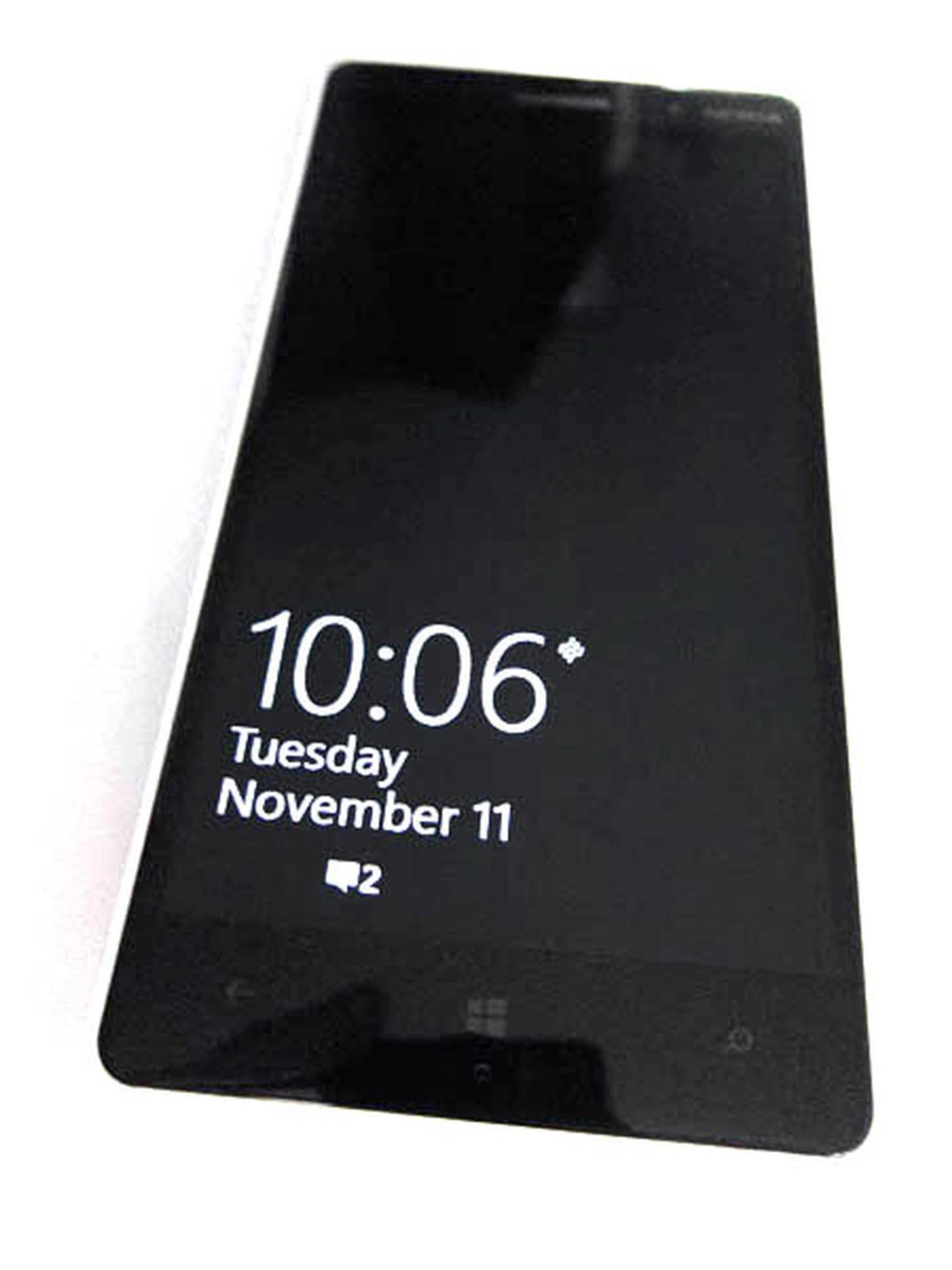
Glance important information without having to press the power button
Available only to Nokia Lumia devices, the Glance Screen displays essential information on the screen, such as the time, weather, and steps taken, without the user having to press the power button. The Glance Screen is activated by hovering your hand over the top of the phone, flipping over the phone, or when taking the phone out of your pocket. The information is displayed in black and white so as to conserve battery, by making full use of the ClearBlack technology.
This function is very useful, especially when you just want to see the time, but don't want to waste battery power by turning on the screen.
4) Cortana
Cortana is a voice assistant baked in all Windows Phone devices - think Siri and Google Now. Unfortunately, Cortana is still not available for the Singapore market. For the adventurous, to activate Cortana, you can change the phone’s region, as well as the language to English (United States). However, in this setting, a user in Singapore can only make user-specific queries and commands such as setting reminders, but not location-specific tasks such as finding a restaurant in Singapore. Having said that, if you do want to use Cortana, we were pleasantly surprised to discover that she is able to recognize Singaporean-accented English rather accurately.
There is still no estimated date for when Cortana will be available in Singapore.
5) Overall User Interface
In general, the user interface may be friendly to those who have never used a smartphone before, but may be daunting to anyone coming from either iOS or Android. The Live Tiles are a break away from the conventional icons-only interface in iOS, or a combination of widgets in Android. Each tile is a gateway to the associated app and also displaying information, like a widget, but in an elegant way.
Yet, the very implementation of Live Tiles obscures the very function that the phone is suppose to do: calling. There is no way to make the Phone tile be persistently displayed on the home screen, unlike that of iOS or Android. Specifically on the Lumia 830, out of the box, the Phone tile was placed as a 1x1 tile surrounded by many other 2x2 tiles, effectively having its visibility reduced.
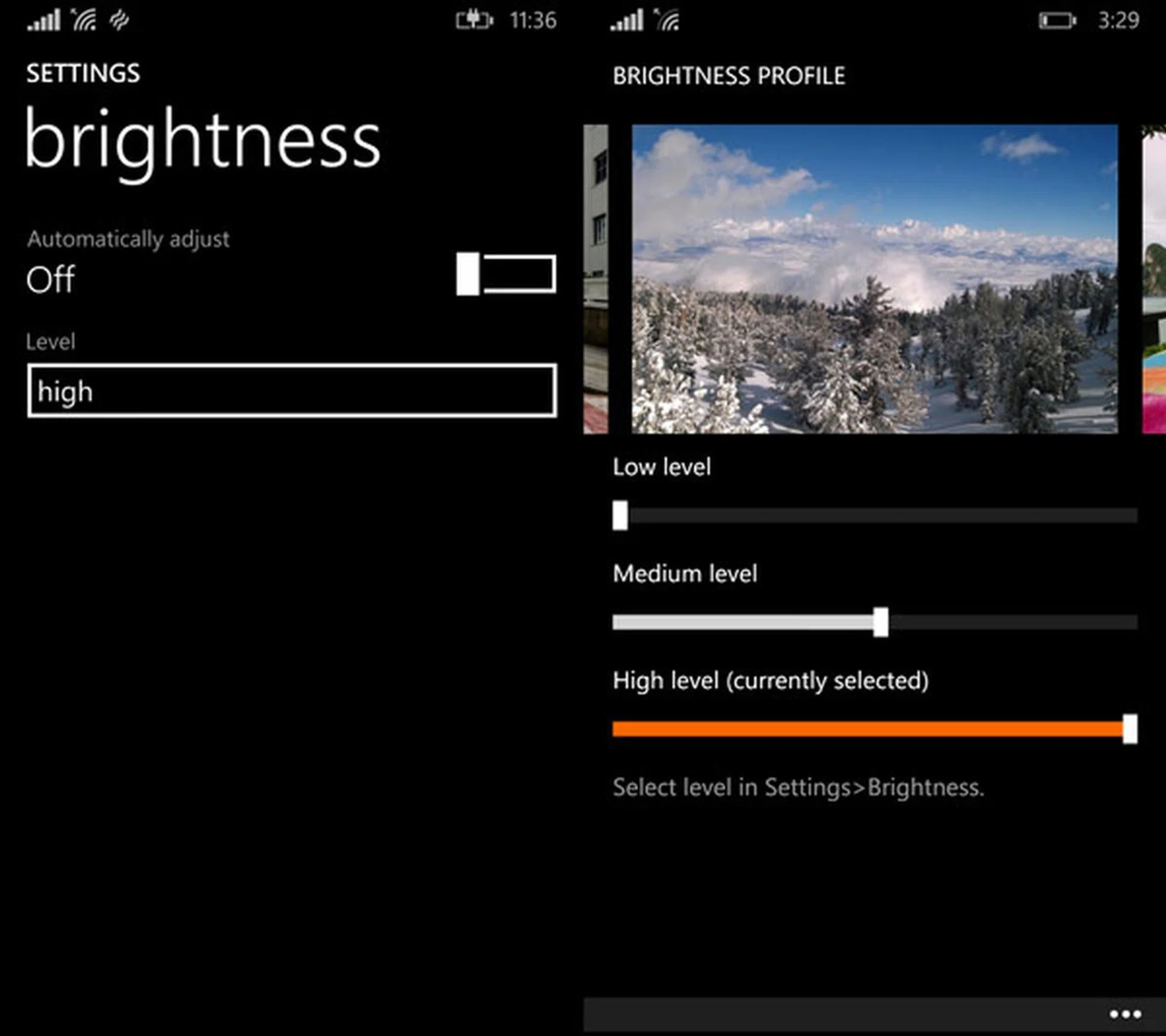
There's one brightness setting, and then there is yet another brightness setting under display setting
The Settings panel is also rather confusing, as the items are laid out in one single long list without clear categorization. Also, in Microsoft’s efforts to make Windows Phone as user-friendly as possible, they have encapsulated certain settings into many different levels of tweaking - to the point of deviating too much from convention. For instance, the “Brightness” setting only had "Low", "Medium", "High" levels, instead of a conventional slider. The author had the impression that the "high" brightness level meant the maximum level. Turns out, it is not; there is yet another setting that allows the user to define the actual brightness of each level, hidden under "Display", then "Brightness Profile". it's not exactly a bad design, but it's unconventional and many casual users wouldn't expect this.
6) App Ecosystem
The Windows Phone’s apps ecosystem has seen a modest improvement over the past four years since its inception. Several top-tier apps, such as Facebook, Twitter, and Instagram (though beta), are now available in the Windows Phone Store. Also, ever since Unity added support for creation of games on the Windows Phone 8 platform, there have been a number of popular games available on the WP8.1 platform, such as Asphalt 8 and Minion Rush.
App discovery however, still leaves much to be desired about...
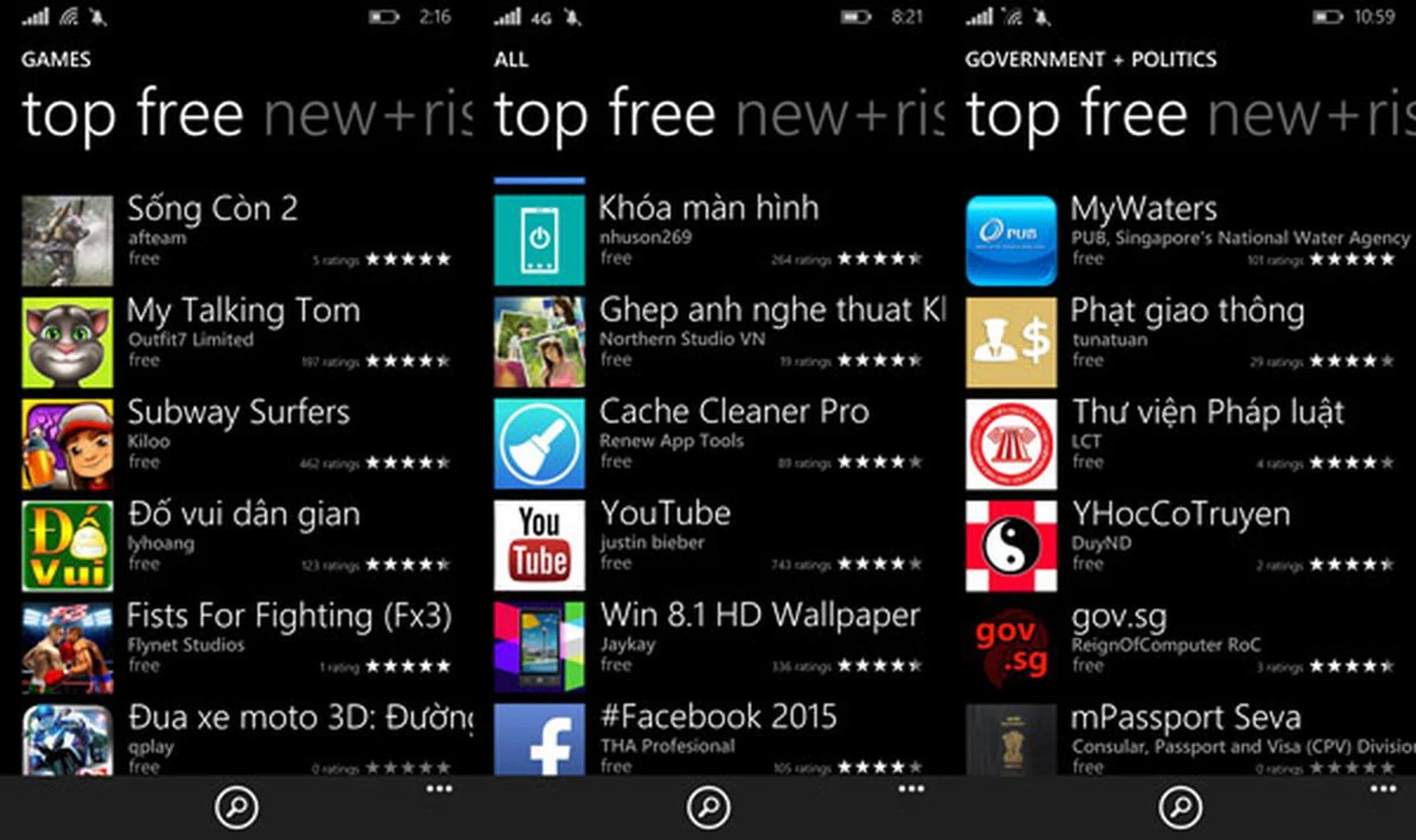
For a while, the author had to re-check his region setting. Also, is this "gov.sg" app trustworthy? The author's also intrigued that "Justin Bieber" made a Youtube app...
As you can tell from the above screen shot, discovery of apps in the Windows Phone Store is a rather precarious experience - at least in the Singapore region. At first glance, the apps recommended looked legit. However, upon delving deeper into the Store, some recommended apps appeared to be spoof apps - apps that appear to be a legit app, but are just an empty shell, usually showing just ads. Some recommended apps are not in English either, despite the region being set to Singapore. Though not as severe as in the Nokia Platform UI store, the experience is somewhat similar.
Thankfully, the Store showcases more relevant and better apps in the USA region. That involves changes your Region setting to United States, which requires a restart of the phone (which means losing the Singapore locale across the whole phone). Hopefully, the Windows Phone Store situation can be better improved with future updates.
Performance
Despite Microsoft's claims that the Lumia 830 should be considered as an affordable 'flagship' device, it is powered by a modest, mid-range Snapdragon 400 quad-core 1.2GHz processor. We'll be comparing the 830 against Microsoft's actual flagship, the Lumia 930, to see how far off 'flagship' performance it really is, and we'll also see how it fares against a few other mid-range phones with similar specs.
Sunspider
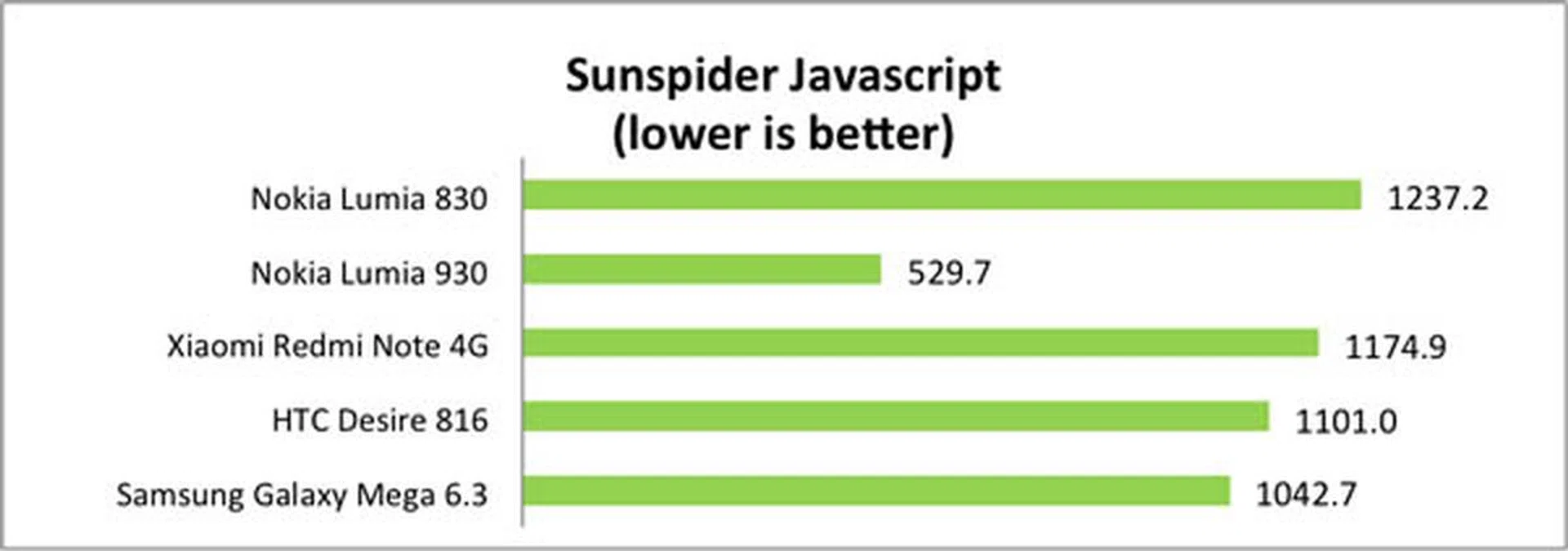
SunSpider Javascript measures the browsing performance of a device. It not only takes into consideration the underlying hardware performance, but also assesses how optimized a particular platform is at delivering a high-speed web browsing experience. The Lumia 830 has the worst Sunspider score amongst the devices tested. In our actual testing, we noticed some sluggishness when browsing on the Lumia 830’s browser, compared to the various browsers from the competition.
BaseMark OS II
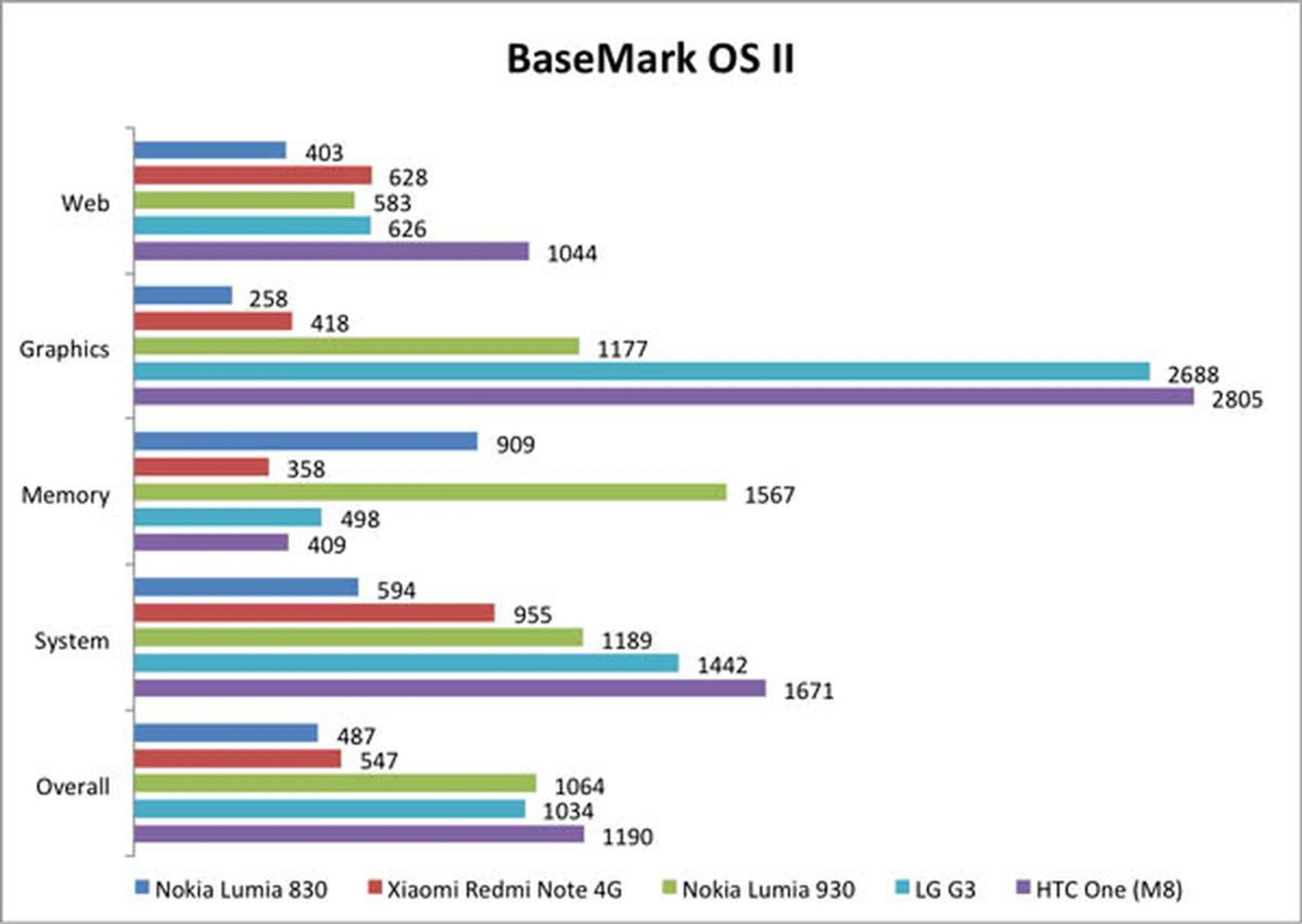
Basemark OS II is a cross-platform suite of synthetic tests designed to stress the whole platform at a variety of workloads. Other than memory test suite, the Lumia 830 did not perform as well as its counterparts, particularly the Xiaomi Redmi Note. As expected from its hardware capabilities, the 830 also performed far worse than the 930 in all categories.
Real Life Experience
Despite its relatively low end processor, the transitions in Windows Phone are reasonably fluid, with the occasional few encounters of laggy transitions. Gaming is of little issue, though this author encountered occasional lag when playing intensive games such as Asphalt 8. However, loading apps, as well as resuming apps from standby may take a while, as the Windows Phone OS aggressively "hibernates" apps that are running in the background. For instance, resuming a camera app may take one second when waking up from standby.
Camera Performance
The Lumia 830 is equipped with a 10-megapixel PureView back camera that's able to record Full-HD resolution videos at 30fps, with a 1/3.4-inch sensor and an f/2.2 lens, along with a backside illumination sensor. The 830 also lives up to its flagship billing here, as it is fitted with OIS (optical image stabilization), a feature generally only found in high-end flagship camera modules.
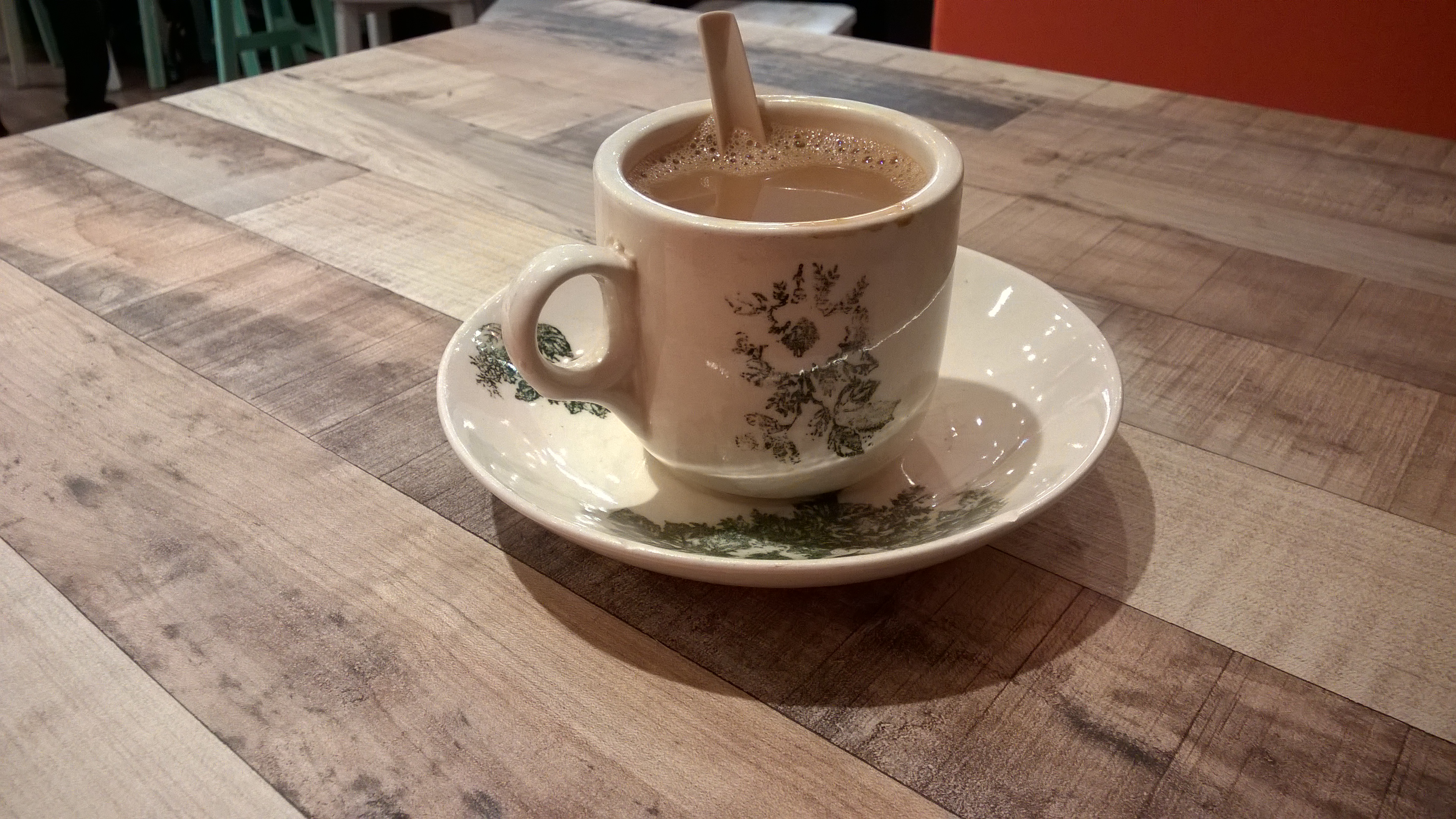
This photo is taken with trembling hands. Note that the photo doesn't have any hints of motion blur, thus showing off that its OIS hardware does work.
For indoor shots, the Lumia 830 produces sharp and crisp images, even with shaky hands as the OIS performs its job well. image quality definitely surpasses other mid-range phones such as HTC Desire 816, and even slightly surpasses some flagship devices, although it still loses, albeit marginally, to top-tier flagship phones such as the Apple iPhone 6 Plus and Samsung Galaxy Note 4. Nevertheless, for a mid-range priced phone, having a camera that works well indoors is a blessing indeed.
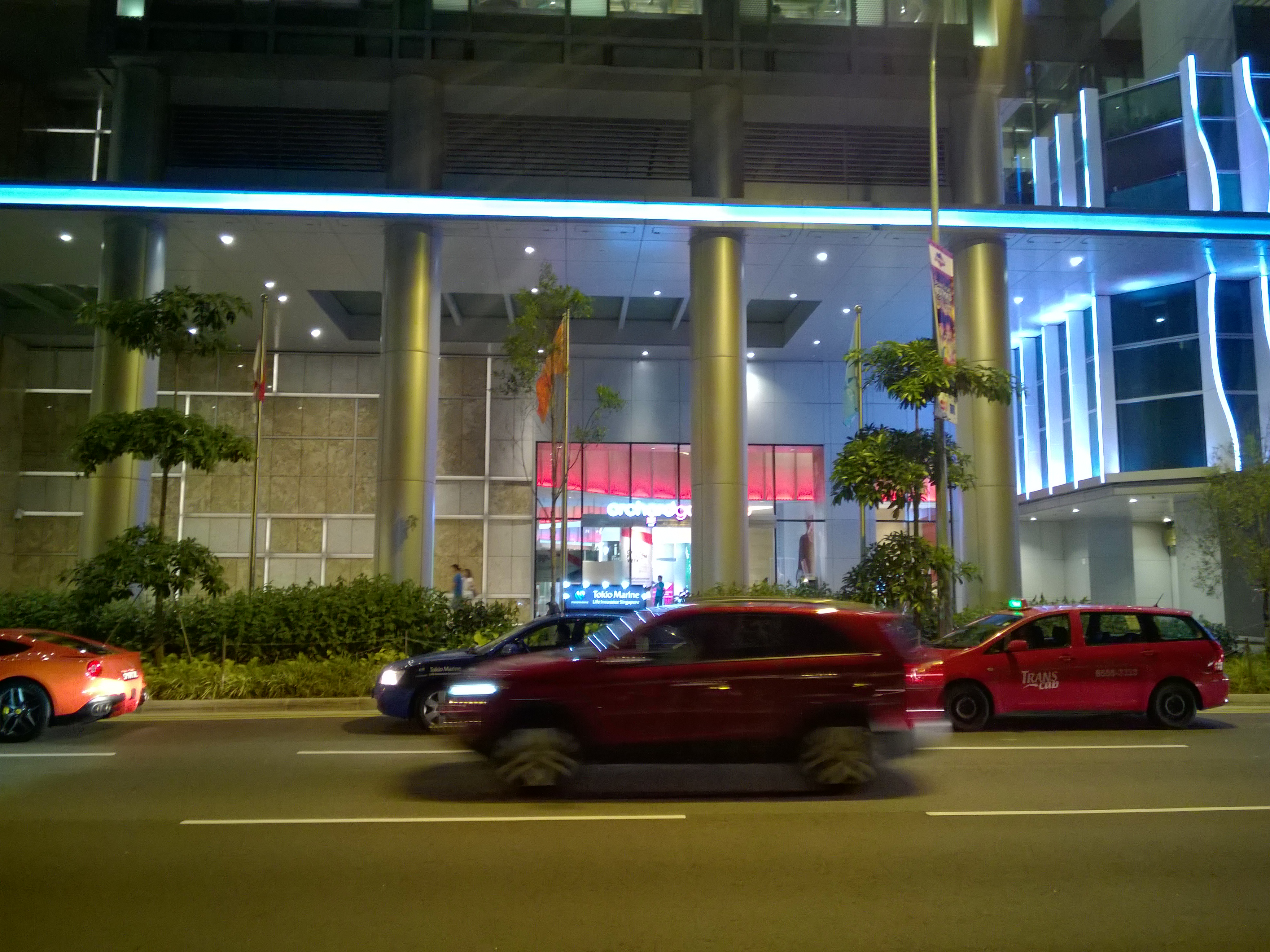
The phone nailed this night scene rather well. Click to view the full sized image.
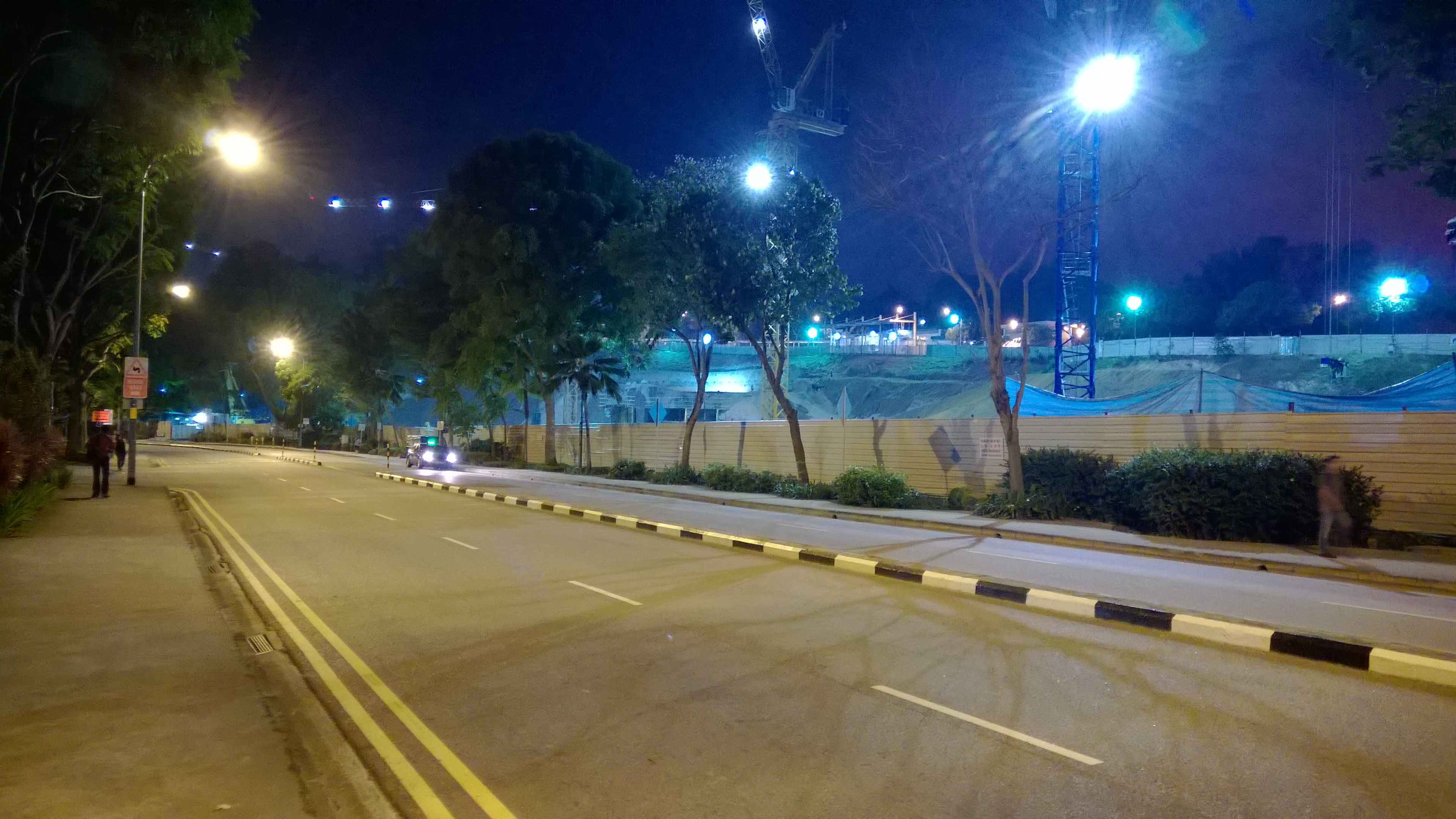
This scene felt rather overly lit; the photo seems to hint that it was shot at about 7pm, when in fact it was taken at 8pm when the sky is rather dark.
Night time camera performance is somewhat debatable though. For a really dark area, it does its best to illuminate the scene well, but at the expense of some imaging detail (top photo). Nevertheless, it was a good attempt. However, under very dim, but not very dark conditions, it still does the same thing, thus over-compensating the brightness of the area as seen in the above photo.
Camera imaging performance aside, usability of the camera app is just as important and there are powerful features that you can tap into right out of the box. Exclusive only to Nokia Lumia devices, the Lumia Camera app offers manual controls to better nail the perfect shot. Best of all, these advanced functions are presented in a very easy to use manner. Users can easily adjust the f-stop, the shutter speed, the ISO, and the white balance via various dials that are shown when swiping the camera button.
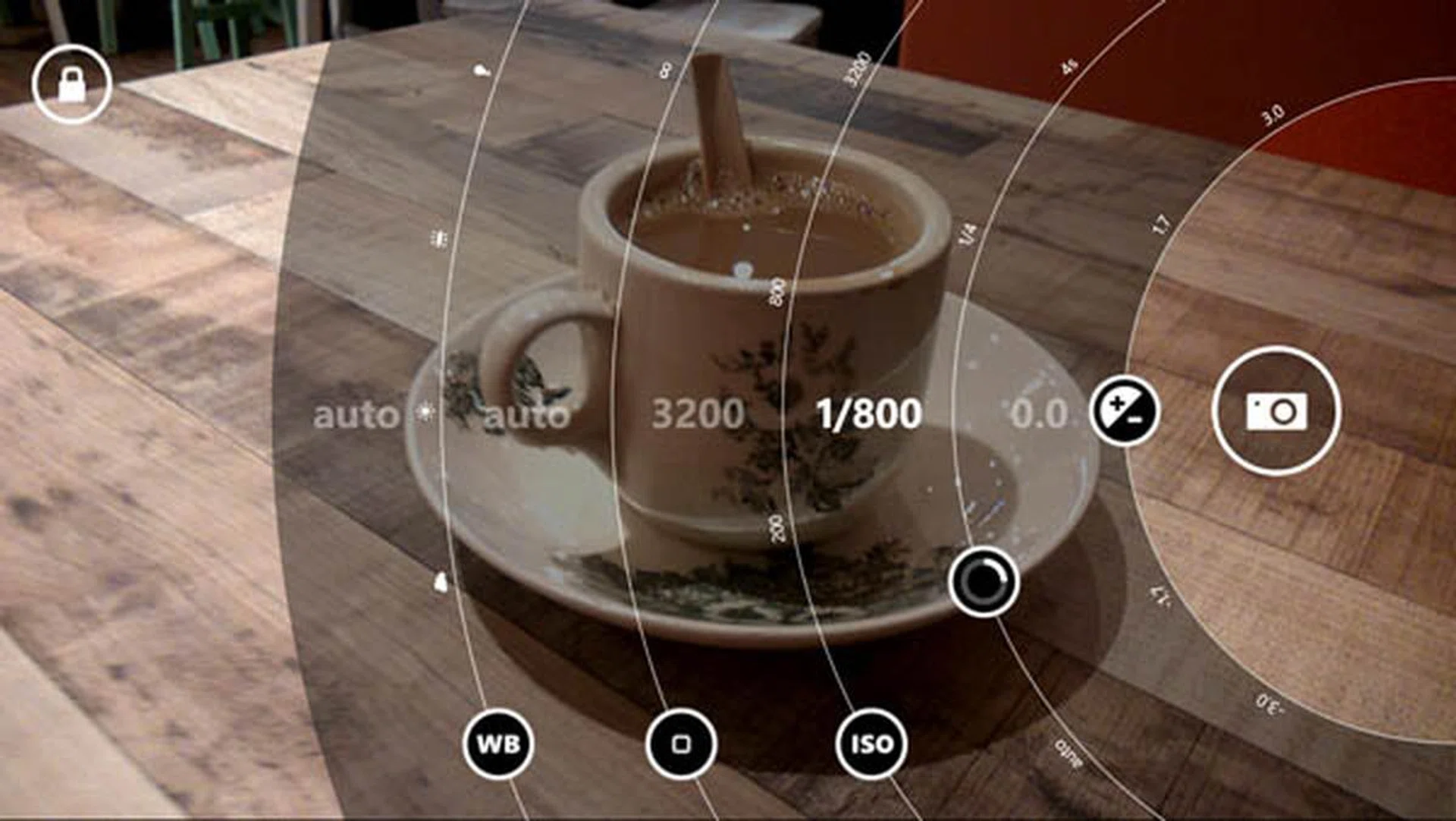
A prosumer dial-like interface helps you tinker with the most common manual controls with ease.
While the rear camera's performance is generally good enough to keep most people content, the front camera is a rather disappointing with 1-megapixel camera modeul- worse than many other budget smartphones in the market. As such, this is definitely not a phone that's suited for taking selfies, nor for video conferencing.
Battery Life
Our standard battery test for mobile phones includes the following parameters:
- Looping a 800 x 480-pixel video with screen brightness and volume at 100%
- Wi-Fi and Bluetooth connectivity turned on
- Constant data streaming through email and Twitter
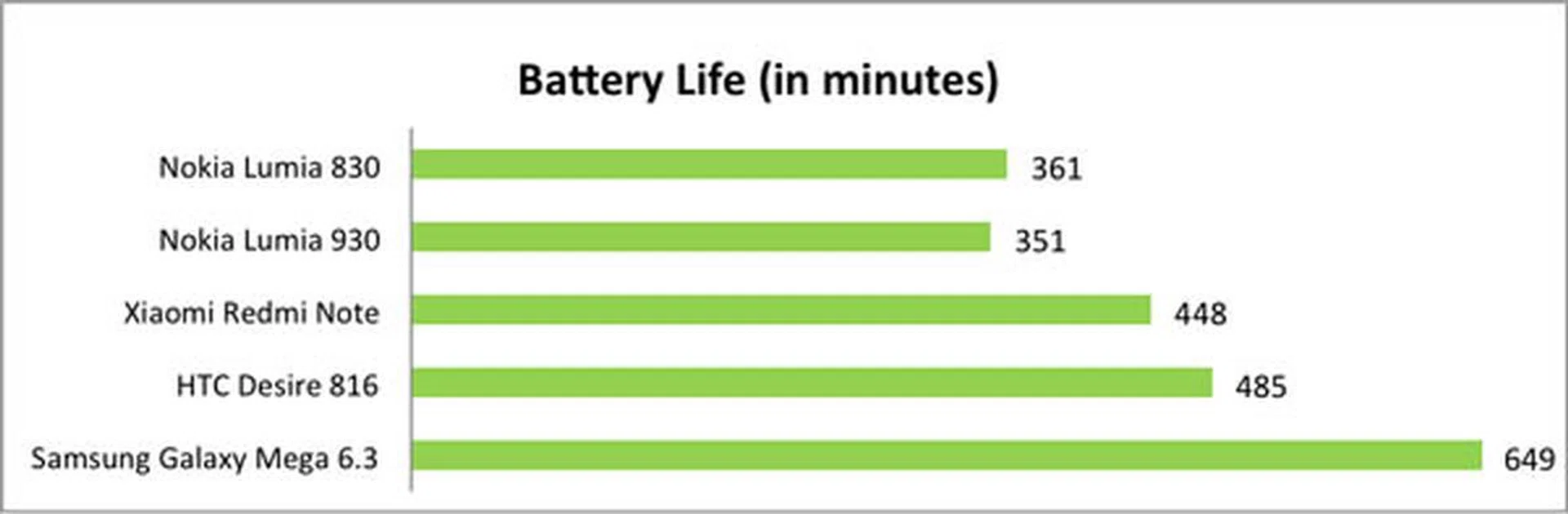
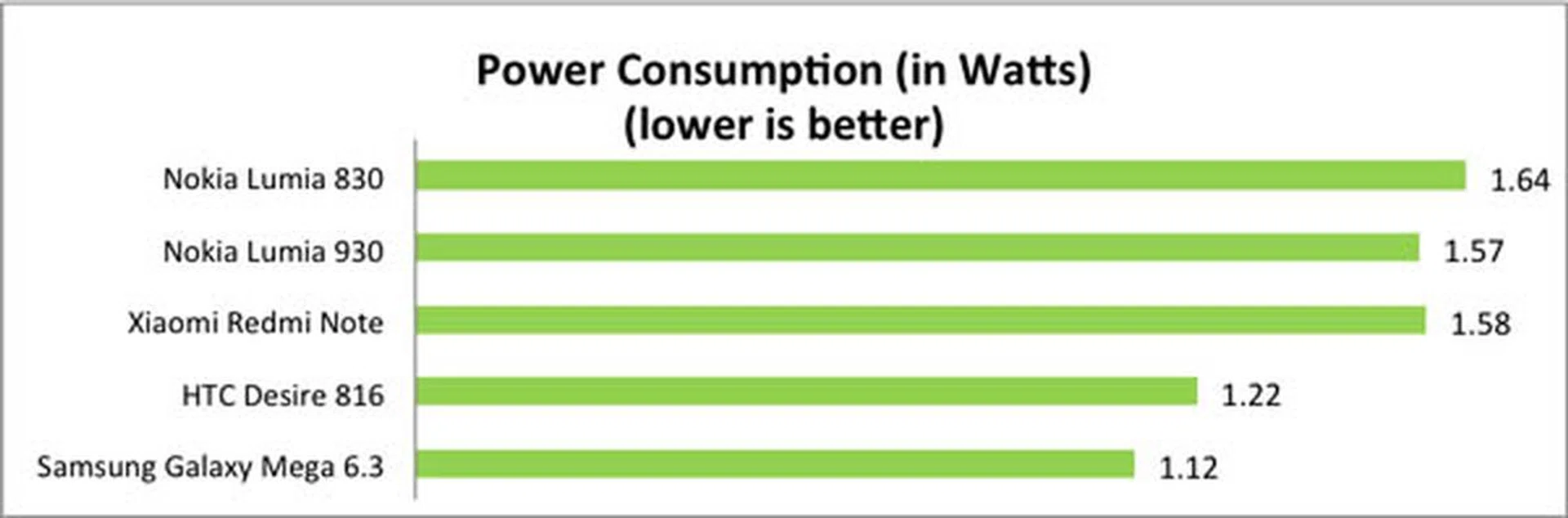
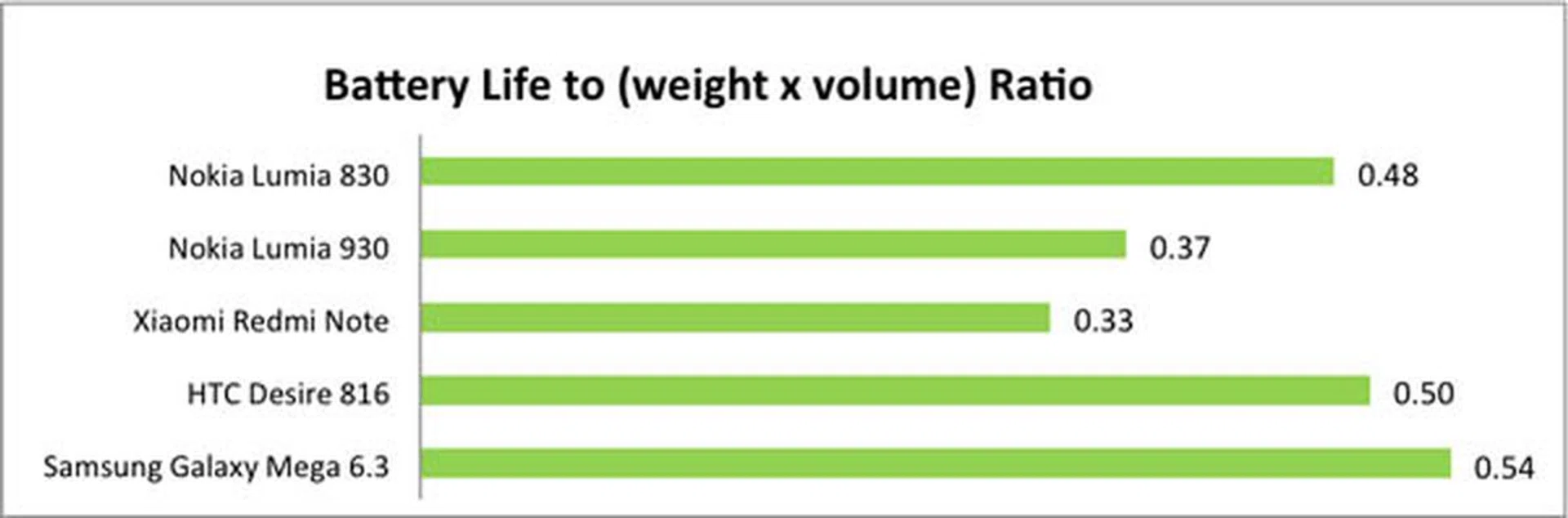
Unsurprisingly, the small 2200mAh battery did not last long, running out at around after 6 hours of continuous playback, although it lasted slightly longer than the Lumia 930. The 830 also outranked the 930 in our Portability Index, due to its thinner profile and lighter weight. It's also worth remembering that, unlike the 930, the 830's battery can be replaced.
In actual day to day usage, despite our benchmark results, we found that the phone was able to last for about a day with normal apps usage, Facebook, Twitter, a lot of web surfing, and some Asphalt 8 gaming. It usually can’t last more than a day though, so do charge at least once a day.
Conclusion
So does the Nokia Lumia 830 live up to Microsoft's claim that it is an "affordable flagship"? On the one hand, at just $529, the design and build of the 830 far surpasses that of other phones in its price range. Its aluminum frame and curved Gorilla glass screen and are both high-end flagship qualities, and a camera with true OIS functionality is practically unheard of for a phone at this price level. On the other hand, as the word "affordable" suggests, it does have its compromises, and the Lumia 830's 720p display and mid-range performance falls below the standard for any 'flagship' device.
Having said that, it's worth considering what your own individual needs are. Even with its mid-range processor, the 830 handles most simple tasks like web browsing, messaging and simple apps fairly well, and even intensive gaming apps will run without too many issues. The display is not the best around, but other than its sub-par resolution, it's actually quite good, with decent viewing angles and great contrast.
All things considered, with the Lumia 830, you're getting the looks, build and camera of a flagship smartphone but with the performance, display and price of a mid-range phone. That's not a bad thing at all if the attributes that the phone excels in are what matters to you the most.
As a final last incentive for any die-hard Nokia fans, the Lumia 830 might be the last phone available with the “Nokia” logo emblazoned on it.
Our articles may contain affiliate links. If you buy through these links, we may earn a small commission.