
MSI X58 Pro-E - A Mainstream Intel X58?
With one of the best prices that we have ever seen for a Core i7 motherboard, MSI's X58 Pro-E seems to have it all. Features, price and the quality from a reputable top tier motherboard vendor. Does it really have the performance to match? Find out in our rundown.

Searching for a Mainstream Intel X58
Not to sound like a broken record here but the high cost of Intel's high-end CPU microarchitecture, the Core i7, remains a considerable barrier to entry. Almost exactly seven months have passed since the Core i7 debuted, but the situation has only improved slightly.
Ignoring the highest SKU, the newly launched Extreme Edition Core i7-975, and taking what most enthusiasts would regard as the practical option with the Core i7-920, one still has to factor in the cost of the motherboard and realistically, a triple channel kit of DDR3 memory. While DDR3 memory is increasingly more affordable nowadays, the same can't be said of the Intel X58 motherboards however.
Even the cheaper models will easily set you back by at least US$200. Contrast that with AM3 motherboards that are generally less than US$150 and one can see a significant difference in cost for what is essentially a rather similar set of features. After all, one gets more or less the same number of ports, expansion slots and even DDR3 memory and ATI CrossFireX support on both platforms.
Hence, consumers either have to pay for these more expensive X58 motherboards, or opt for a lesser known vendor which may have competitive prices, but compensates perhaps with a slightly inferior feature set. Well, that's set to change with the MSI X58 Pro-E, which goes for around US$189 and unlike its few competitors in that price range, hails from a top tier motherboard vendor.

We can't fathom why MSI went with such an ugly brown for its PCB. Besides that, it appeared to share similar design traits with recent MSI boards, from the design of its passive cooler to the layout.
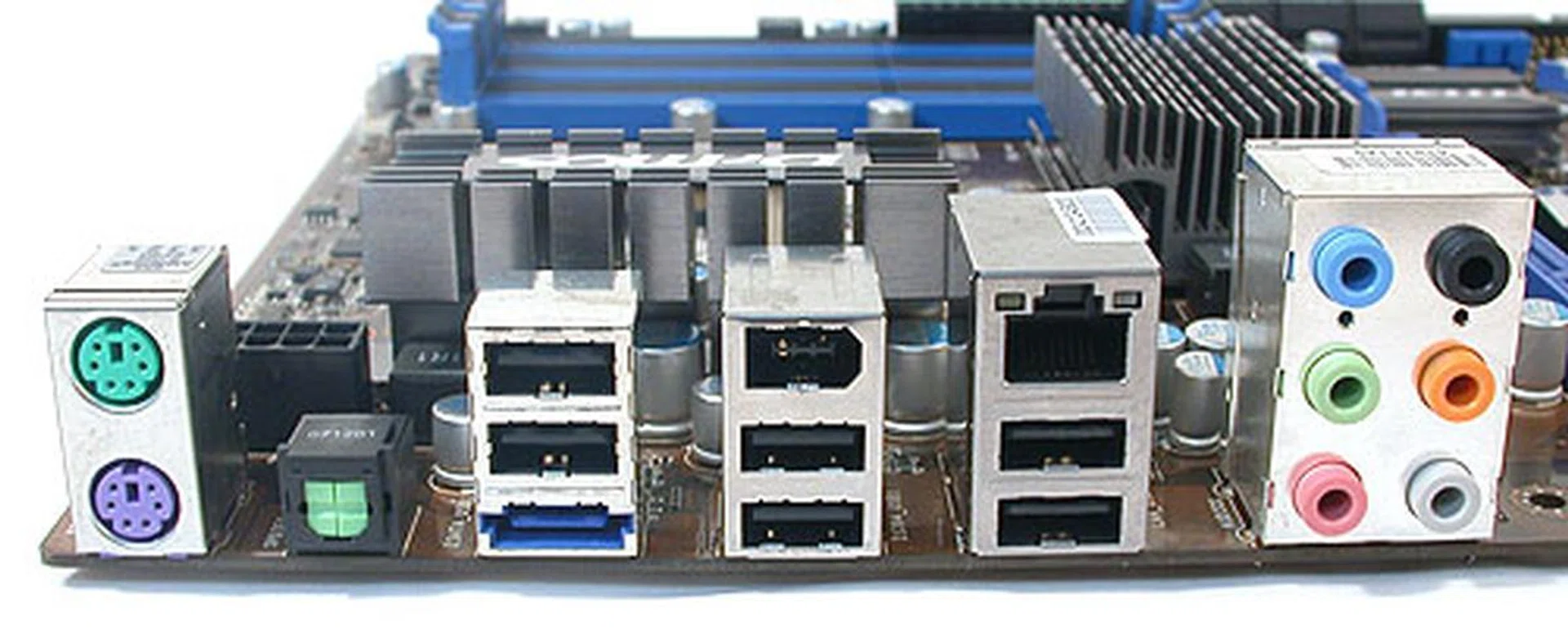
A very decent selection of ports at the rear of this motherboard, including six USB 2.0 ports, eSATA, FireWire and an optical S/PDIF output.
In our package, we found the following accessories included with the MSI X58 Pro-E:
- 2 x CrossFireX bridges
- 1 x IDE cable
- 2 x SATA data cables
- 2 x SATA power cables
- I/O shield
- Utilities and Drivers DVD
- User manual
- Quick Start guide
The MSI X58 Pro-E
Despite a pricing that's lower than many of its competitors, the MSI X58 Pro-E does not lack any essential features. In fact, while we were expecting some compromises to be made, that didn't seem to be the case, with this ATX board even supporting 3-way SLI or CrossFireX.
The number of SATA and DIMM slots is also comparable with several higher-end X58 motherboards and it even comes with a very convenient eSATA port at the rear I/O panel. The memory support for up to 24GB of DDR3-1600 is also decent, albeit not as high in terms of memory speed ratios as some enthusiast oriented boards. An extra JMicron JMB363 controller chip adds IDE/PATA functionality for up to two devices and a single SATA port in addition to those offered by the Intel ICH10R 'Southbridge' chip.
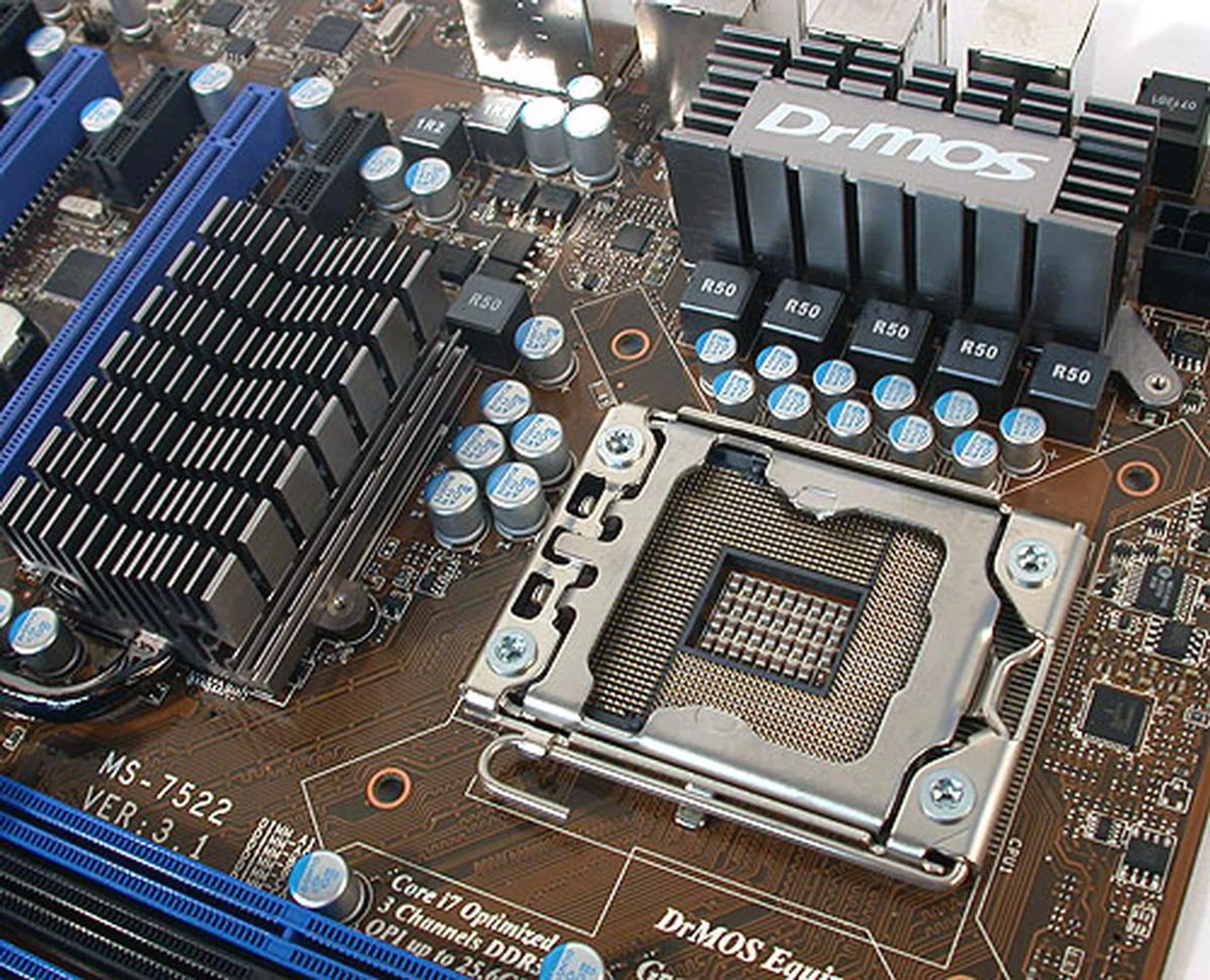
A five-phase power design for the CPU on this MSI motherboard testifies to its more modest, mainstream goal. The passive heatsinks here are also two distinct units, unlike some designs which link them via heat pipes.
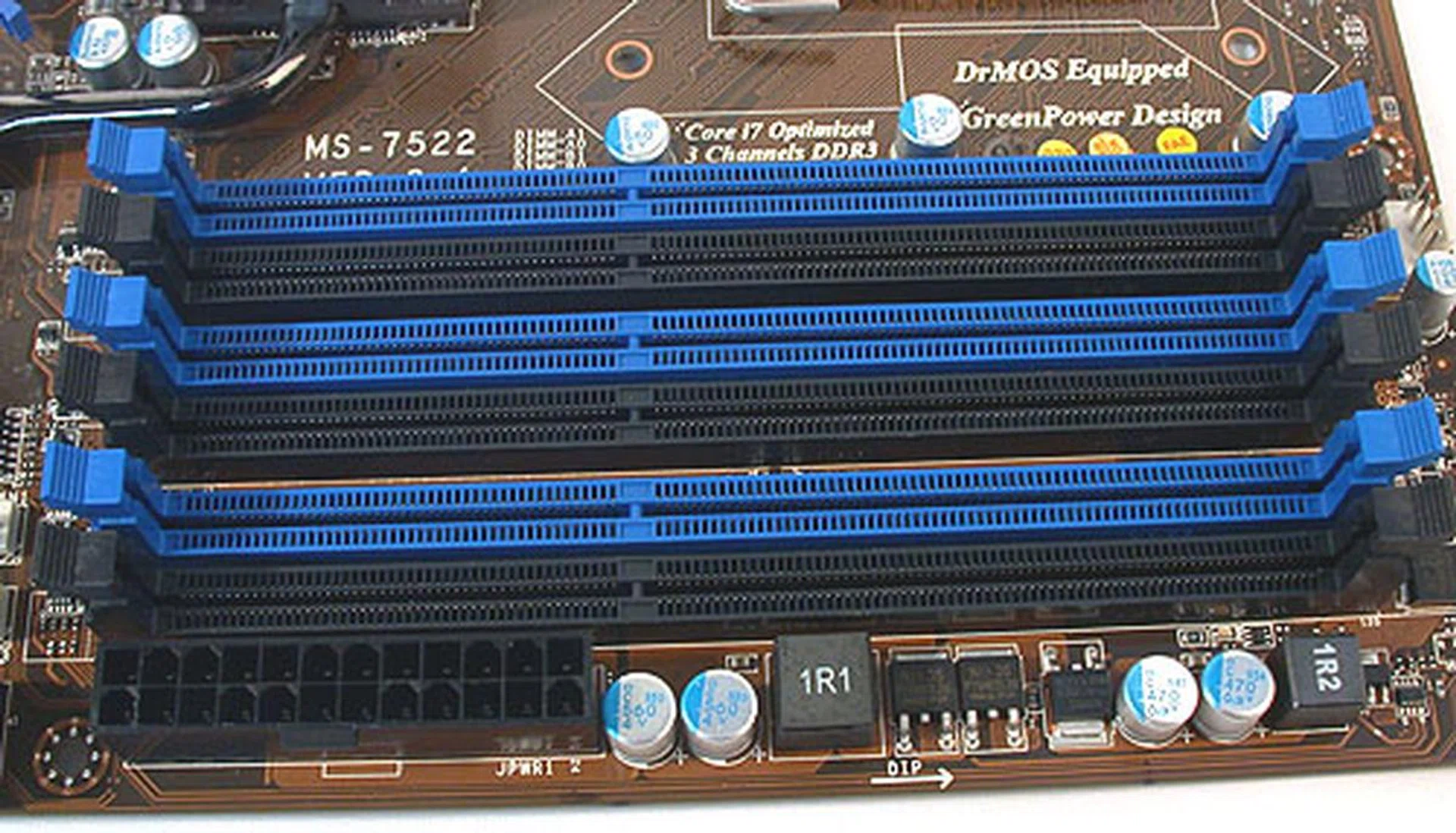
Six full rows of DIMM slots, color coordinated for triple channel memory kits. A possible grouse for those using memory modules with larger, protruding heat spreaders or coolers is the proximity of the ATX power connector to one of the DIMM slots. Other than that, we were surprised not to find MSI compromising the quantity of DIMM slots.
The only possible oversight is probably the lack of a floppy controller but we doubt most users would find that too much of an issue nowadays. This is especially so when MSI's newer motherboards including the X58 Pro-E comes with its BIOS flash utility integrated in the BIOS. Known as M-Flash, we feel that it removes the main need for a floppy for enthusiasts.
Audio support is courtesy of a Realtek ALC889 CODEC that's a common option for onboard HD audio on the better motherboards and you'll find an optical S/PDIF output at the rear panel. Obviously, it would be too much to expect dual Gigabit Ethernet controllers on motherboards of this price category and the MSI X58 Pro-E only has one, again it's from Realtek (but fortunately it uses the PCIe interface instead of the older PCI). Frankly, this is not an issue as we're usually satisfied with just one port as with most mainstream users.
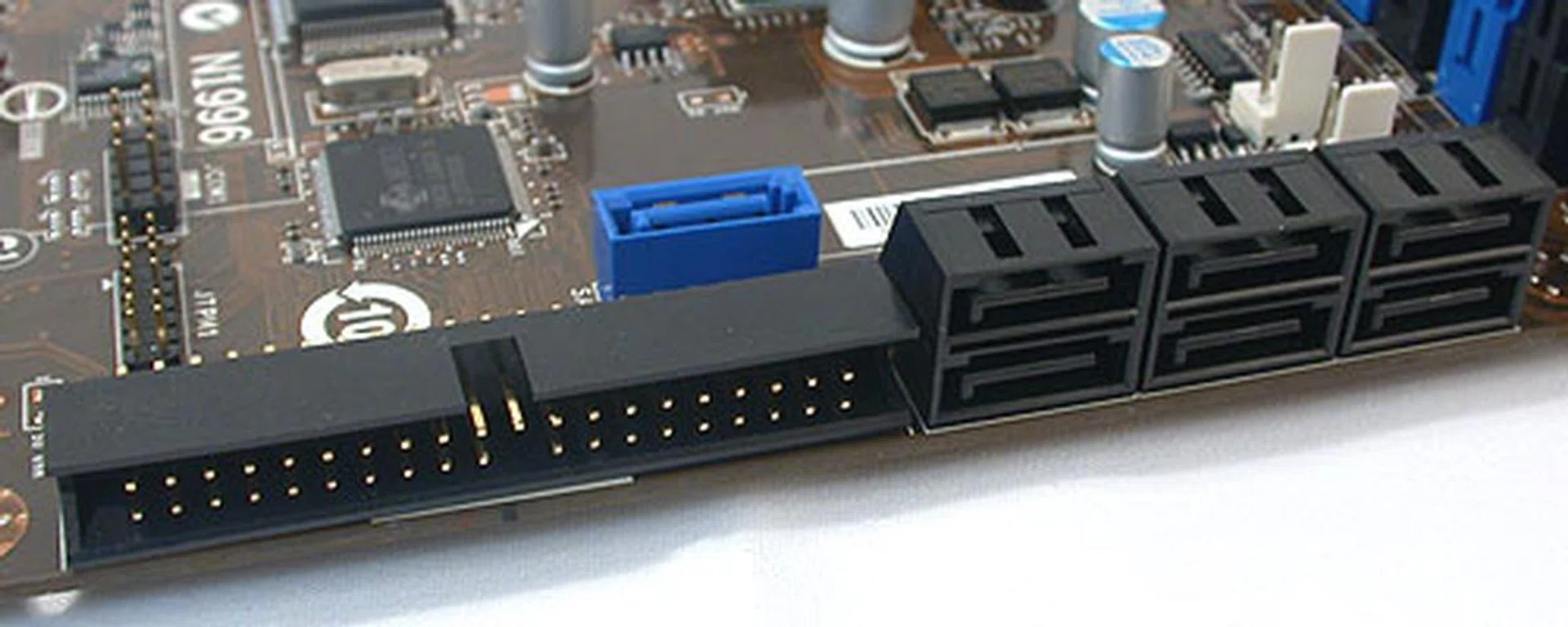
Thanks to the ICH10R chip onboard, there are six SATA 3.0Gbps ports here, aligned at right angles to the board. The seventh (blue) SATA port and the rear eSATA port are from the JMicron JMB363 controller. So too is the support for IDE/PATA devices.
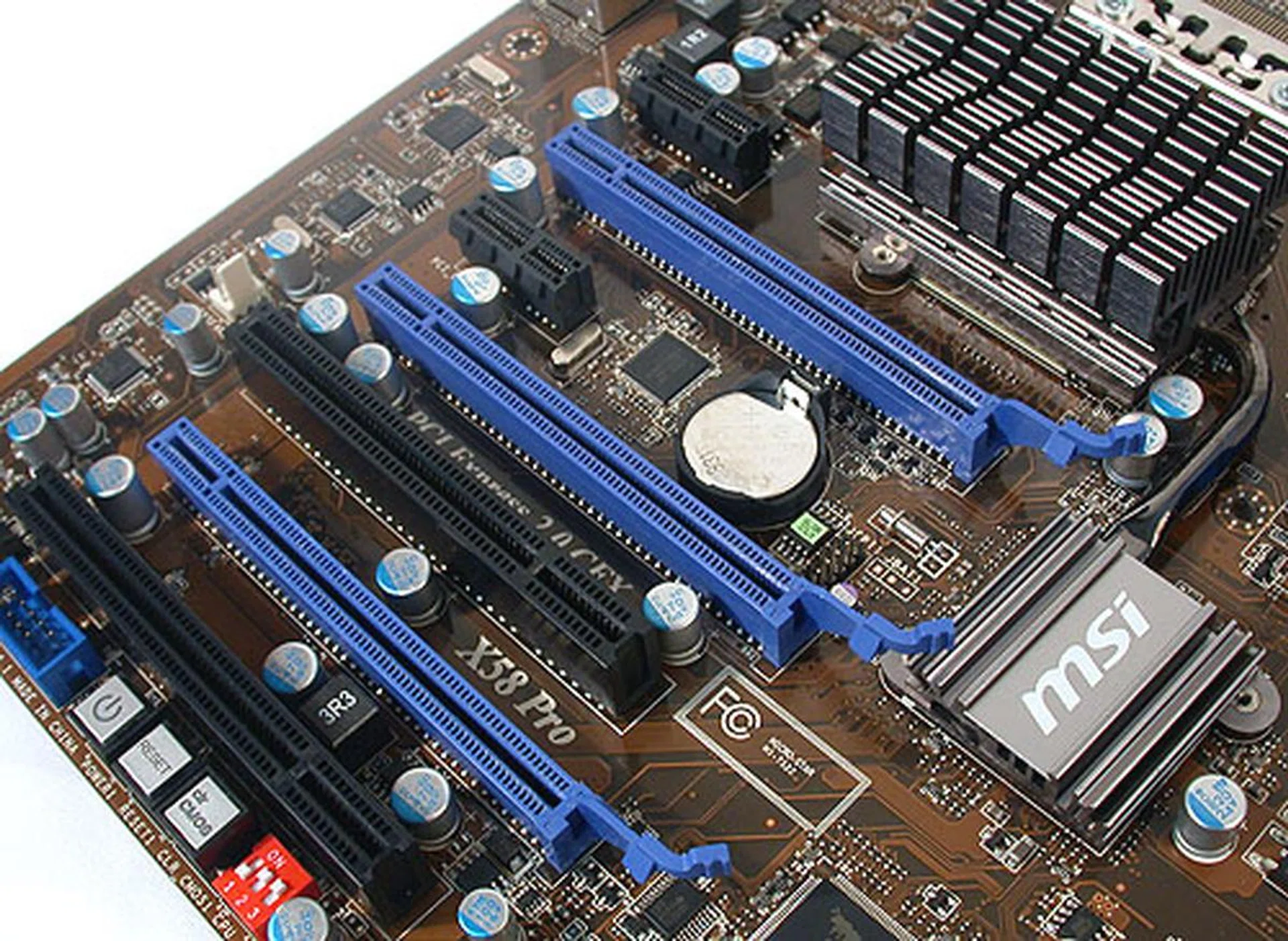
There are no lack of expansion slots on this motherboard, with three PCIe graphics slots supporting NVIDIA SLI and ATI CrossFireX. Add to that two PCIe x1 and two PCI slots and it's a crowded board.
MSI has squeezed quite the full complement of expansion slots on this board, with the result that the slots can be quite close to each other. Using dual-slot graphics cards on all the three PCIe x16 slots would effectively fill up all the available slots but that's expected.
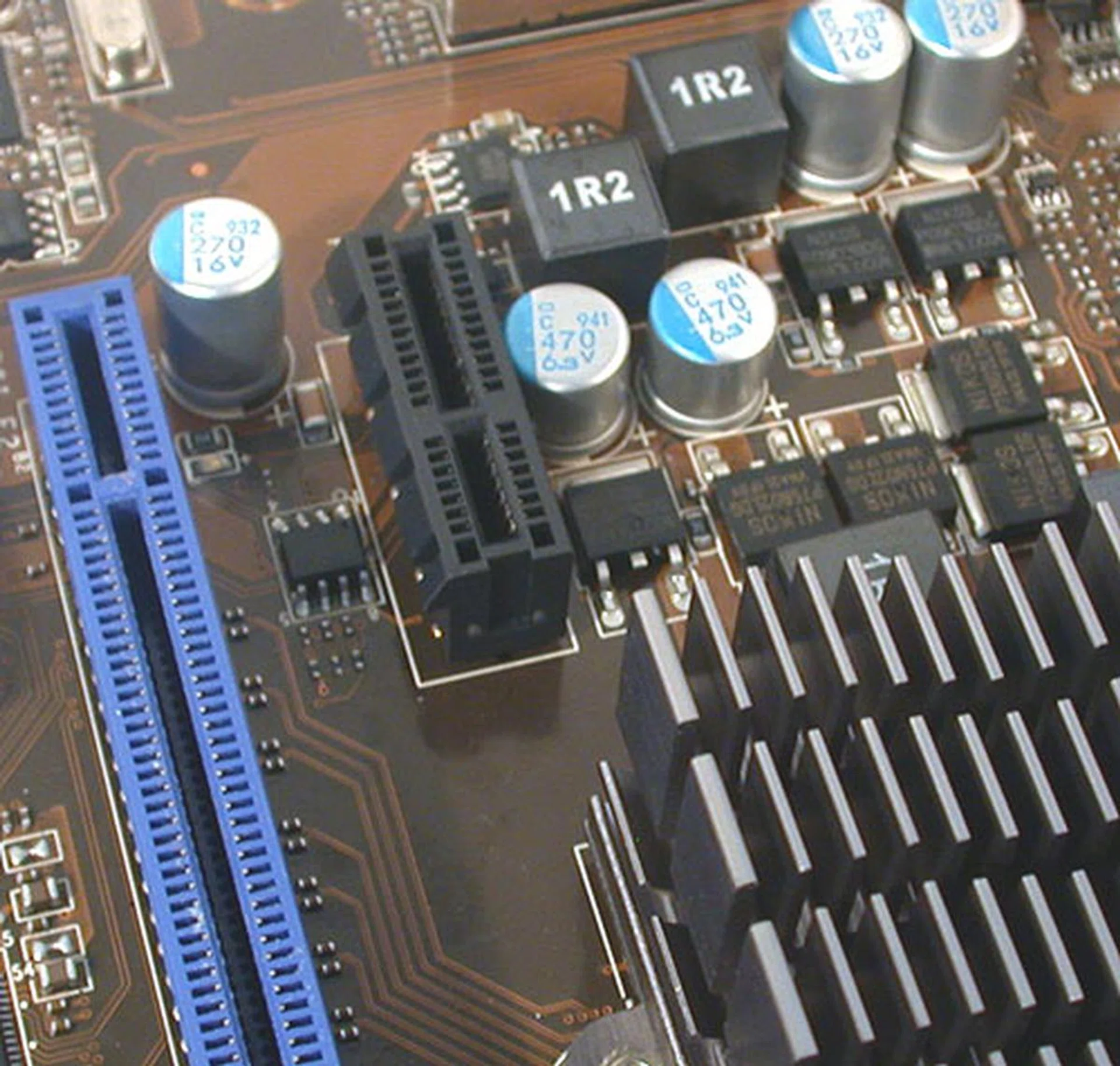
Like we said, it's a crowded board and often, we doubt if some of these slots would actually see any use. For instance, this PCIe x1 slot here is so close to the heatsink.
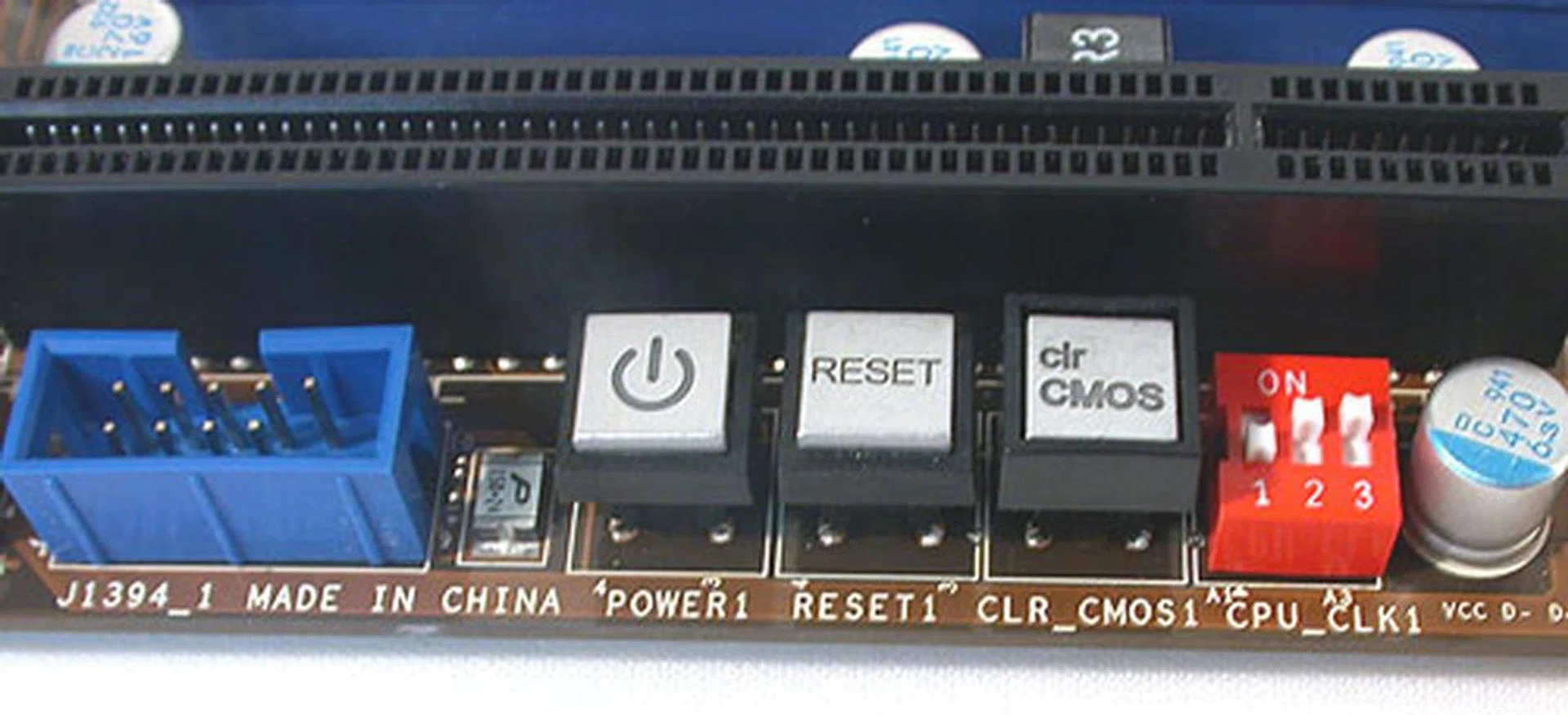
Onboard switches are sidelined to the edge of the motherboard, with MSI adding an overclocking jumper/switch to toggle a few preset base clock settings.
Finally, like we have observed from MSI's recent motherboards, the layout of its boards has been very well taken care of and the X58 Pro-E is no different. Connectors and ports are aligned facing outwards at the edge of the board and details like having onboard switches for power, reset and Clear CMOS are convenient for users.
Strangely, MSI has added a hardware switch for setting the base clock, which is actually targeted at overclockers to quickly scale up. However, since this switch can only set certain preset frequencies, we have to wonder what's the point. After all, using the BIOS to change the base clock is the common practice now and we don't quite see how going back to traditional hardware jumpers or switches would help users.
Overclocking
MSI's familiar Cell Menu in the X58 Pro-E BIOS contains all the tweaking options, from the voltages to the various clock frequency settings that's found on an Intel X58 motherboard. Some of the more relevant settings are listed below:
- Base Frequency (aka FSB) Settings: 100 to 400MHz
- PCIe Frequency: 100 to 200MHz
- DRAM Ratio: Auto, 3 to 8
- CPU Core Multiplier: 12 to 60
- Uncore Ratio: Auto, 10 to 24
- QPI Frequency: Auto, 4800, 5866, 6400MT/s
- CPU Voltage Settings: -320mV to +630mV (0.01 to 0.02V steps)
- Memory Voltage Settings: 1.20 to 2.77V (0.01V steps)
- NB Core Voltage Settings: 0.80 to 2.35V (0.01V steps)
- ICH Voltage Settings: 0.70 to 2.13V (0.01 to 0.05V steps)
As always, our overclocking attempt was based on getting the highest base clock for the motherboard and not necessarily the highest overall overclock. At 220MHz for the base clock, the MSI X58 Pro-E reached a similar maximum allowance as most of the X58 boards we had tested.
Test Setup
Both Intel Turbo Boost and HyperThreading were enabled during testing. As usual, we compared the MSI X58 Pro-E against a number of our previously tested results. The configuration below was used:
- Intel Core i7-965 XE (3.20GHz, Intel Turbo Boost, HyperThreading enabled)
- 3 x 1GB Kingston HyperX DDR3-1333 @ 7-7-20 CAS 7.0 (7-7-22 for Gigabyte GA-EX58-EXTREME)
- Seagate Barracuda 7200.10 200GB SATA hard disk drive (one single NTFS partition)
- ASUS GeForce 9800 GTX 512MB - with ForceWare 178.24 drivers
- Intel INF 9.1.0.1007 and Intel Matrix Storage manager 8.6.0.1007 driver set
- Microsoft Windows XP Professional with Service Pack 2 (and DirectX 9.0c)
The following benchmarks were used to assess the performance of the motherboards compared in the review:
- BAPco SYSmark 2007 Preview (with Patch 4)
- Futuremark PCMark05 (ver 120)
- SPECviewperf 9.0
- AquaMark3
Results - SYSmark 2007 Preview
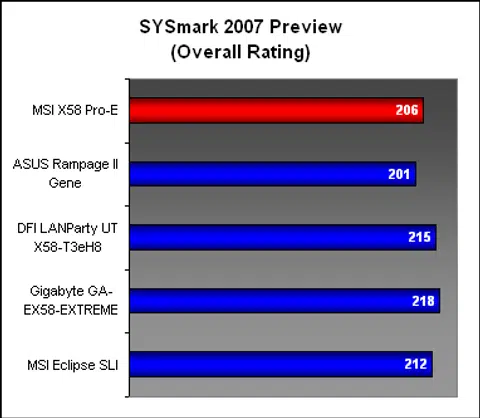
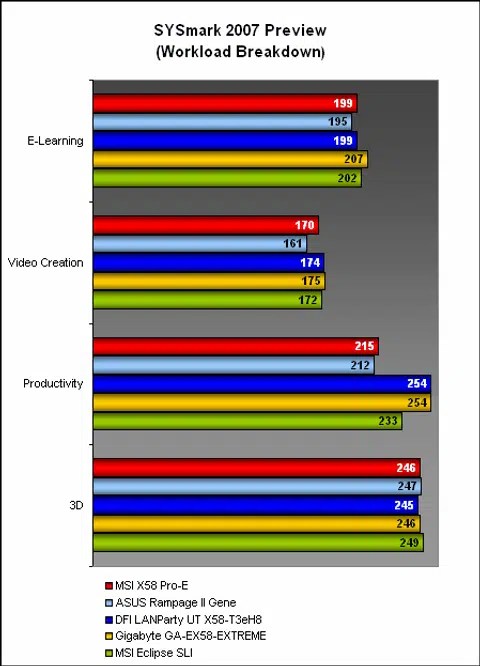
Compared to some of the higher end (read: more expensive) X58 motherboards here, the MSI X58 Pro-E had slightly lower scores. It did mange better than the ASUS Rampage II Gene, a mATX board. Breaking it down to the various segments, we noticed that the X58 Pro-E fell behind the others mostly in the Productivity segment. MSI's flagship Eclipse model also fell slightly behind its competitors in this segment. The ASUS mATX board too wasn't spared here.
Results - Futuremark PCMark05 Pro
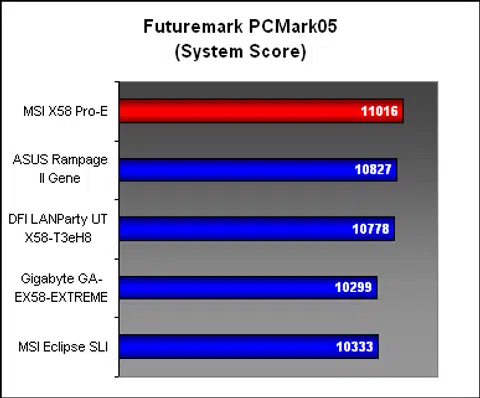
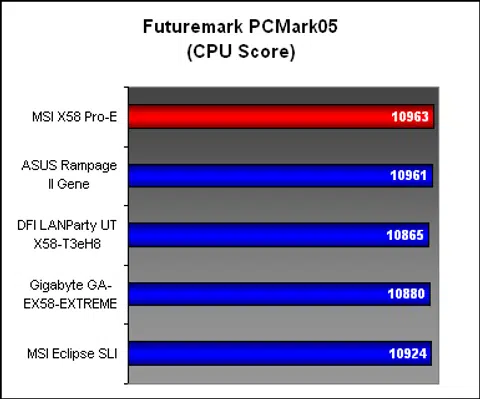
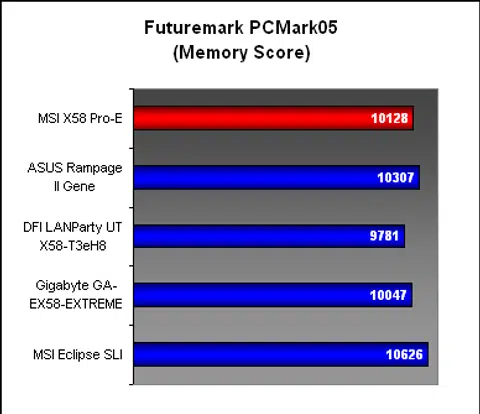
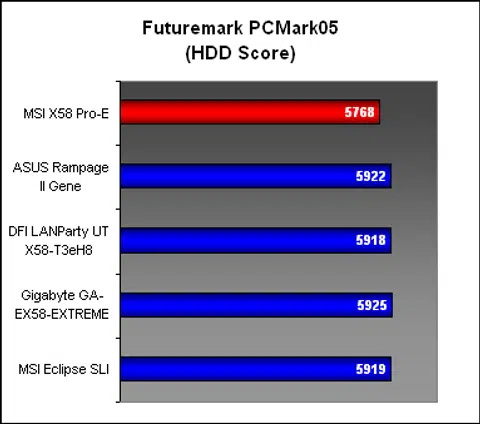
Moving onto the next system benchmark, PCMark05 Pro, we saw the MSI X58 Pro-E leading or posting results near the top of the pack for almost all the segments. The sole weakness was in the hard drive performance, which was significantly behind its competitors. This performance has added weight once we took in account the lower Productivity scores in SYSmark 2007. You can now better understand why the MSI X58 Pro-E took a small hit in its results in that segment.
Results - SPECviewperf 9.0
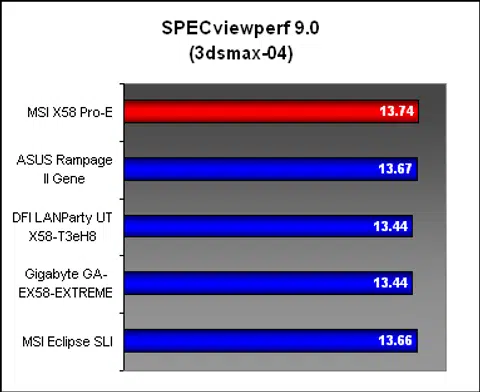
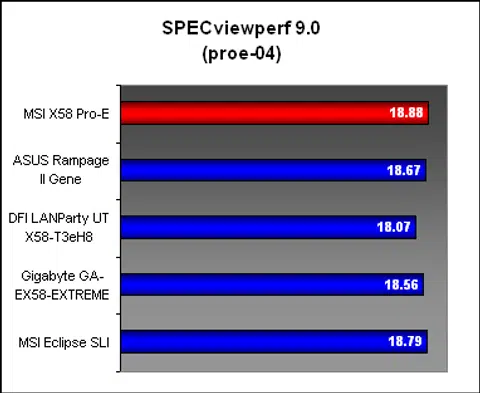
The MSI X58 Pro-E more than held its own here in SPECviewperf 9.0, where it was fractionally faster than the competition.
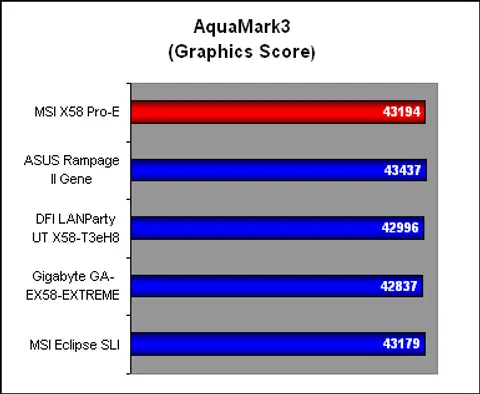
Results - AquaMark3
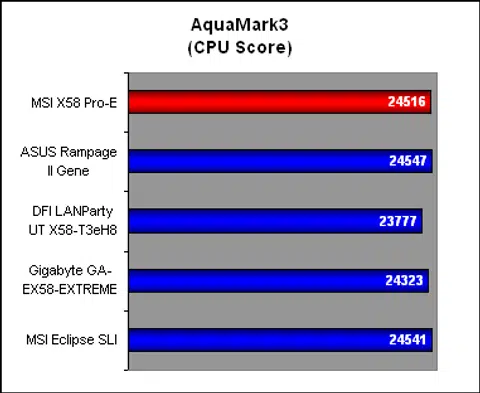
Similarly competitive here in AquaMark3, the MSI X58 Pro-E was performing up to its potential and showing some of its more expensive peers that it's just as capable.
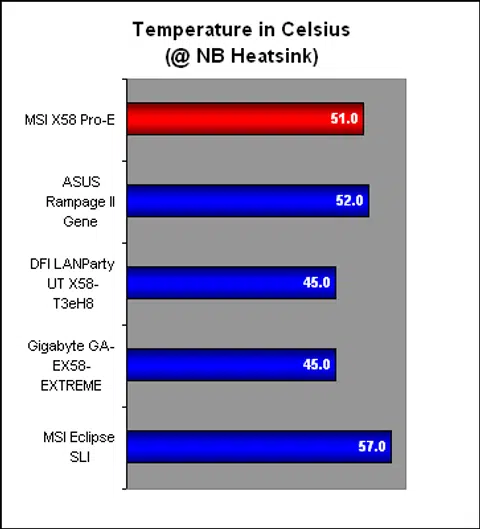
Temperature
With a temperature reading at the chipset heatsink that broke the 50 degrees Celsius mark, the MSI board was quite a bit warmer than most of its competitors. The modest looking two-piece passive heatsinks may be a reason for its mediocre performance. It was however interesting to note that the other MSI X58 motherboard compared here, the Eclipse SLI, was also on the warm side.
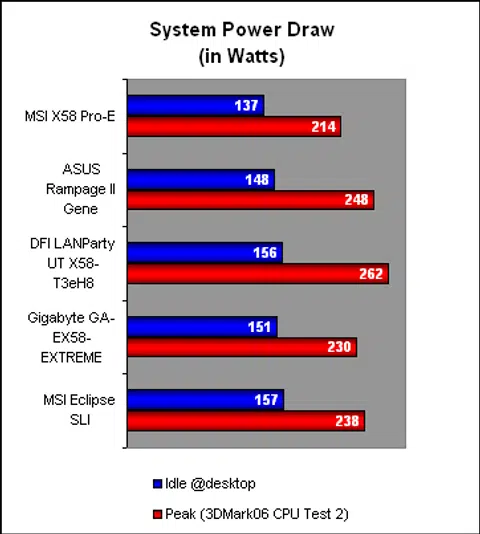
Power Consumption
We enabled MSI's Green Power feature, setting it to Auto in the BIOS before the power consumption test. At both idle and peak, this MSI X58 Pro-E performed better than its peers, with quite a significant margin over the others for the power readings. MSI's active phase switching (APS) power scheme appeared to be working well.
Conclusion
With the mainstream variants of the Core i7 microarchitecture expected during the third quarter of the year, those looking for an advanced platform at this moment (and not the technological dead end that's the Core 2 series) will have no choice but gun for the Core i7 processor and select from one of the many Intel X58 motherboards available to support it. As we have mentioned earlier, the problem with that is the substantial cost of these motherboards, which are generally above US$200 from a respectable vendor.
In fact, it wouldn't be wrong to state that some of these motherboards are more expensive than the entry-level processor itself. For instance, the Core i7-920 goes for US$280.
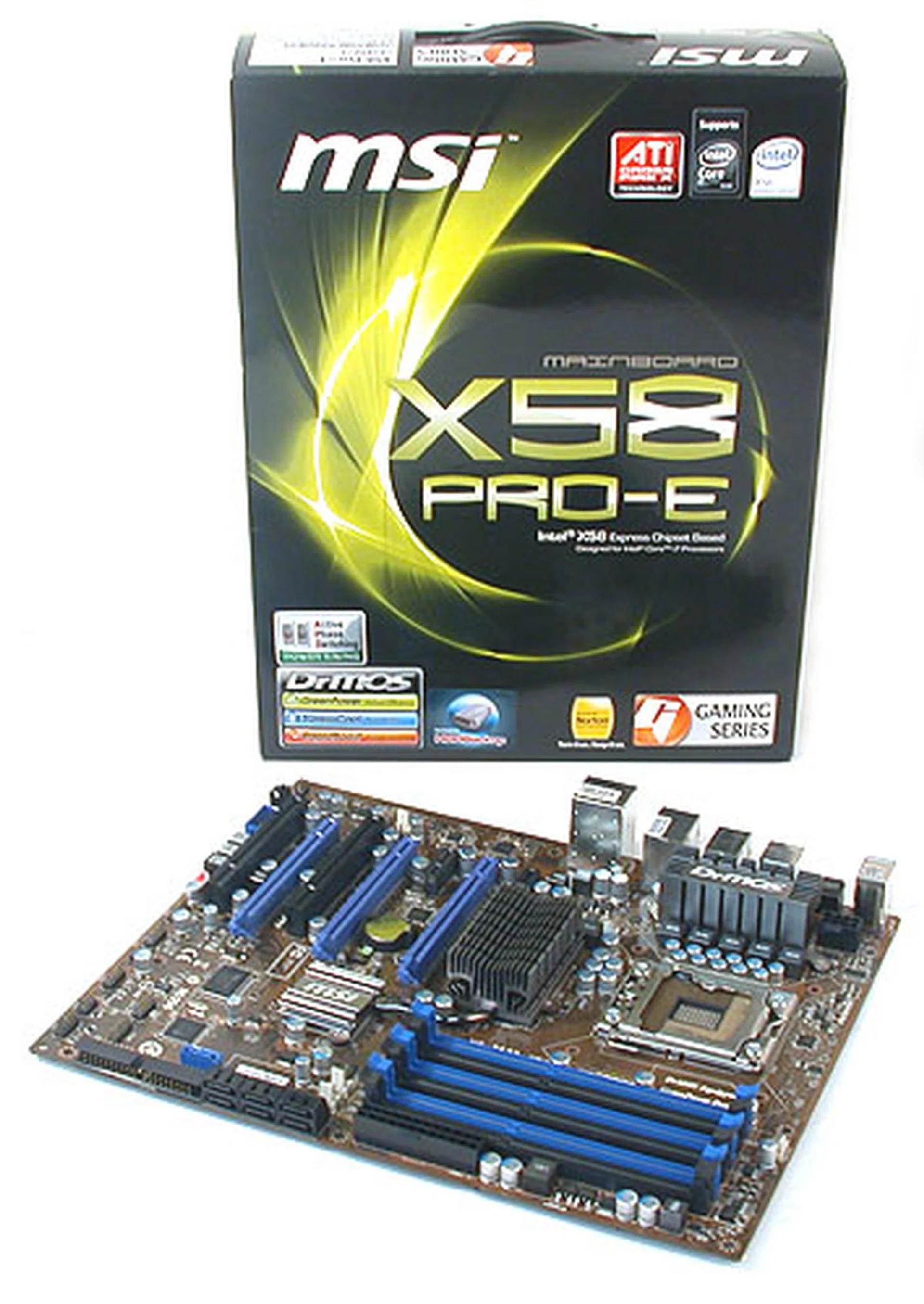
Bringing the price of an Intel X58 motherboard down below the US$200 mark, the MSI X58 Pro-E impressed with its features and layout.
Hence, it's a welcome move by MSI to change this situation with its more affordable X58 Pro-E that's going for around US$189. While we have seen other brands that offer similarly priced motherboards below the US$200 mark, only few are major top tier brands in this field. Hopefully, the MSI X58 Pro-E will be followed by the other big vendors as the Core i7 definitely needs more quality motherboard choices at close to mainstream prices to get the Core i7 steaming along with higher adoption rates.
Fortunately, the competitive price has not affected the quality of this MSI board. Our benchmarks found it to be mostly on par with even the more elite models, though it was a little off the mark for the SYSmark 2007 benchmark. Besides that, the MSI X58 Pro-E performed decently, with power consumption numbers that bettered the competition. It certainly showed that MSI's active phasing switching technology was doing its job properly but we have to temper the praise with our temperature findings, which seemed warmer than expected.
Finally, we were pleased with the board's layout and features. There are sufficient features onboard to bring it close to the top enthusiast X58 boards, while the layout was almost perfect. This was unlike some other X58 boards which could match the price after making compromises on the features. Only the inevitable limitations of the PCB meant that some of the components were placed too close to each other. And of course, that very ugly brown that MSI has chosen for the PCB. It's not the best color to look at but given its attractive price, strong features and competitive performance, we are more than willing to overlook it.
Our articles may contain affiliate links. If you buy through these links, we may earn a small commission.