
MSI X38 Diamond (Intel X38)
MSI's X38 Diamond succeeds its older P35 Diamond flagship motherboard with better overclocking and power efficiency, a more comprehensive storage solution and support for quad-GPU solutions. Other highlights such as Creative X-Fi audio and SkyTel VoIP are still there too. Check out the full review here.

Introduction
The MSI P35 Diamond, as you would recall from our , was an excellent motherboard because of its performance and great feature bundle. As a follow up, MSI created the X38 Diamond, spinning the same winning formula, but with an updated chipset (Intel X38) and some tweaks. We happened to chance upon a very early sample of the MSI X38 Diamond a couple of months ago, which we've previewed , so our readers should already have a good idea what this board is about. However, with retail boards slowly trickling into the channel, we've finally had the chance to put the X38 Diamond through its paces and see if it can live up to expectations.
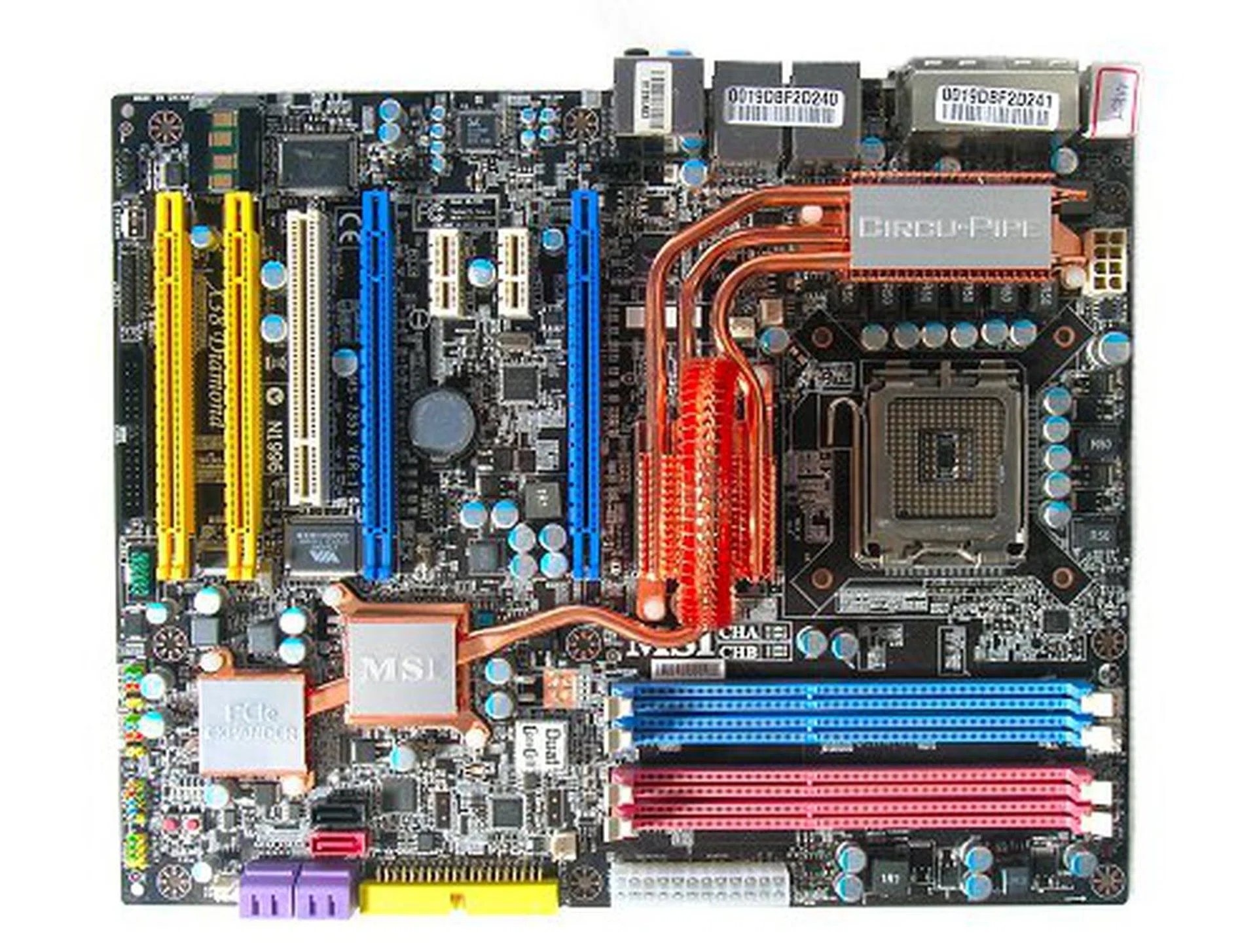
Retail version of the MSI X38 Diamond motherboard.
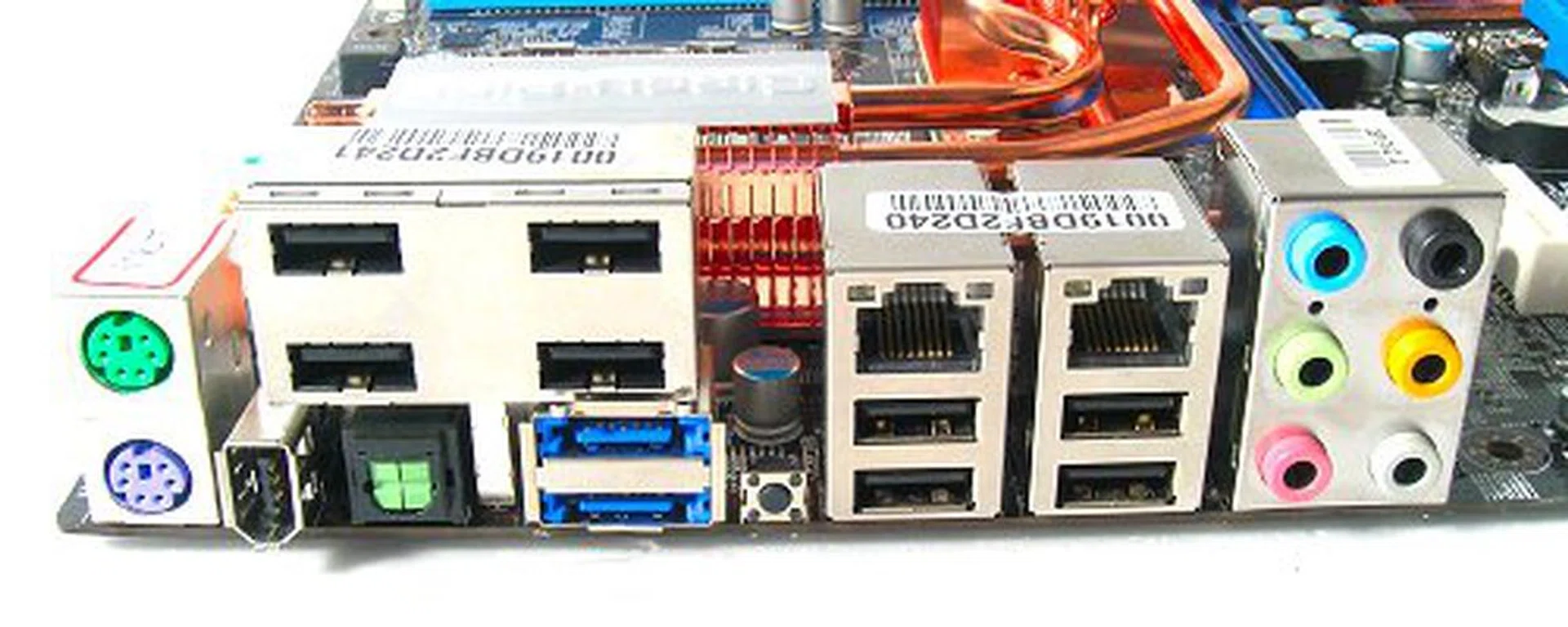
Packed rear I/O panel. From left to right: PS/2 keyboard and mouse, 4-port USB 2.0 cluster, FireWire, optical S/PDIF, 2x eSATA, CMOS reset button, 2x RJ-45, 4x USB 2.0 and surround analog audio jacks.
Features
Since we've already previewed the board before, we will only briefly go through the main features here as a quick refresher before getting on with our benchmarks. (For those that have not seen our initial preview of the MSI X38 Diamond, you can still check it out here.)
The MSI X38 Diamond is not your typical Intel X38 motherboard as MSI tries to further extend standard features and throw in a twist or two. One of the main features that most people will notice straight off the bat would be the quad-PCIe x16 slots onboard. With the X38 chipset, we know the two main slots (in blue) have support for full x16/x16 operation, so where does the other two slots draw its lanes from? MSI uses an IDT 89HPES16T 16-lane PCI Express switch to control both slots, providing each with an x4/x4 operation. MSI's approach is the same as what ASUS did with the Maximus Extreme, but the X38 Diamond boasts four slots compared to three of the Maximum Extreme.
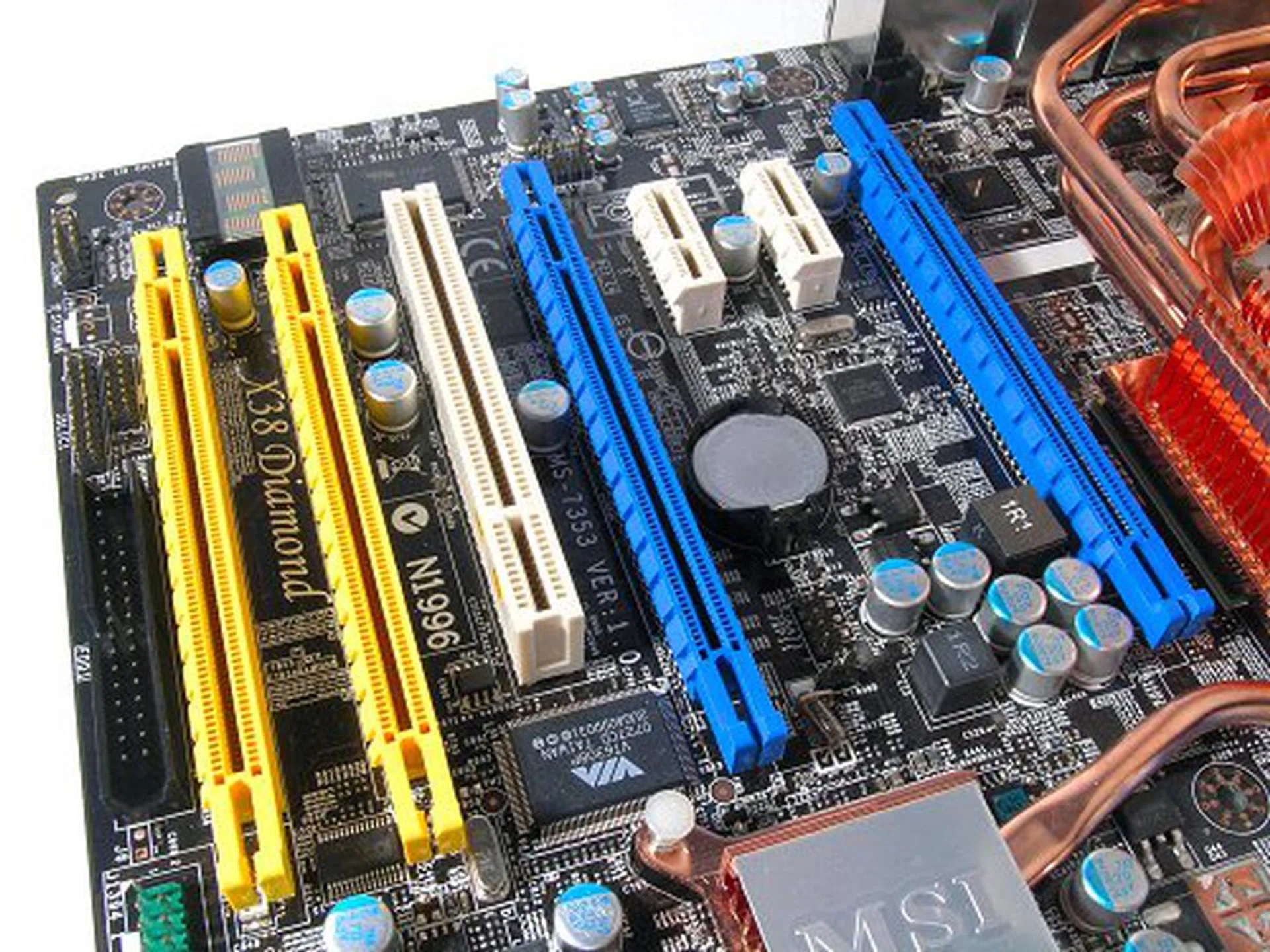
The X38 Diamond features up to four quad PCIe graphics slots. Though the yellow slots are really too close together for most ATI offerings.
Another major change on the X38 Diamond is a new PWM design concept that MSI has been touting. From the onset, it may seem that the board comes with an 8-phase PWM, which is rather commonplace in high-end boards today. However, MSI actually uses a pair of 4-phase circuitry to form what they call a dual-channel 4-phase PWM design. With this dual-channel design, MSI claims better overall efficiency with load sharing and current balancing, something that traditional single channel PWM designs cannot achieve by just adding more phases into the equation. The X38 Diamond also sports an updated 2-phase DIMM PWM (again, similar to what ASUS has done with the Blitz Formula Special Edition).

Looks like a standard 8-phase, but MSI believes dual 4-phases work better.
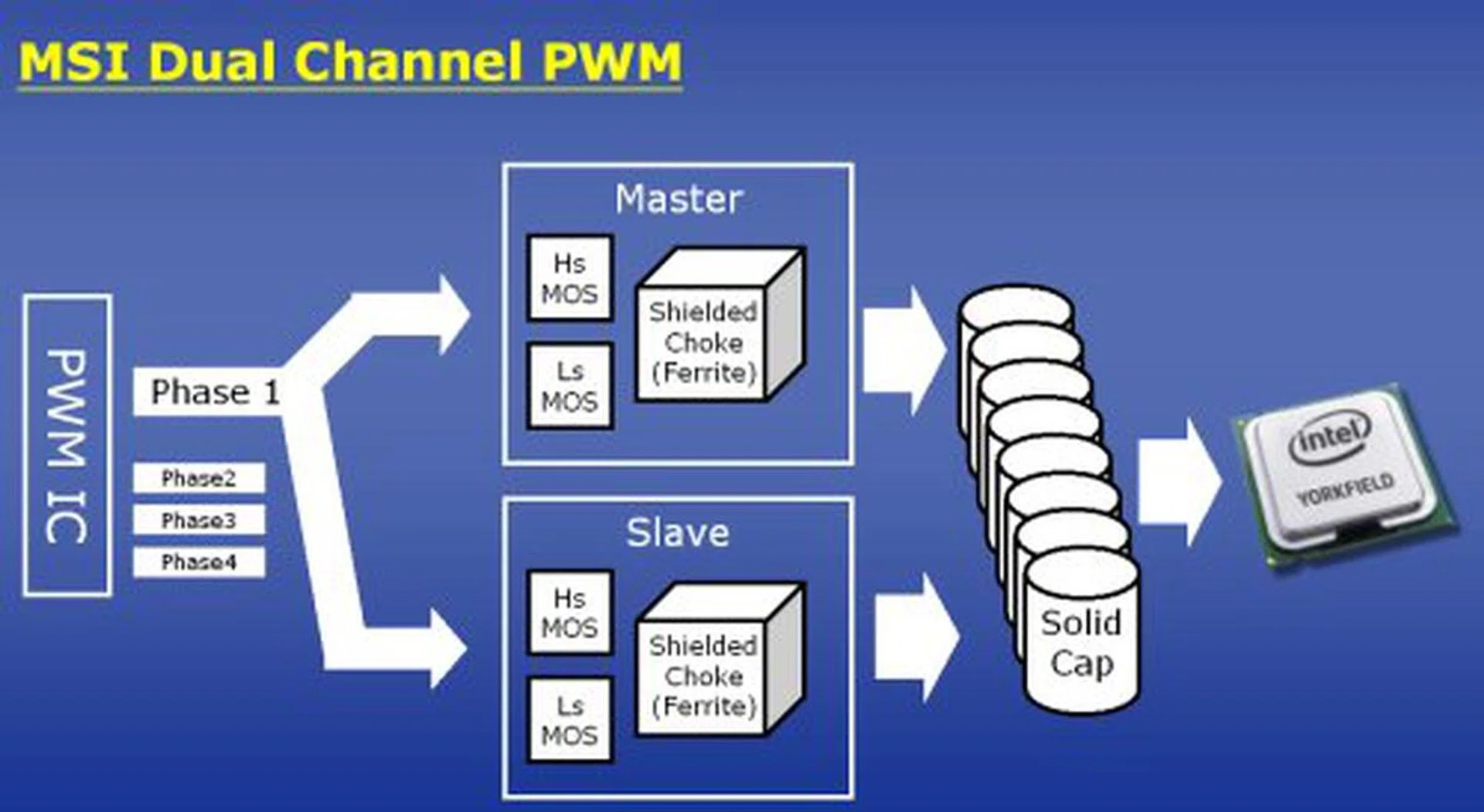
How MSI's dual-channel 4-phase PWM works.
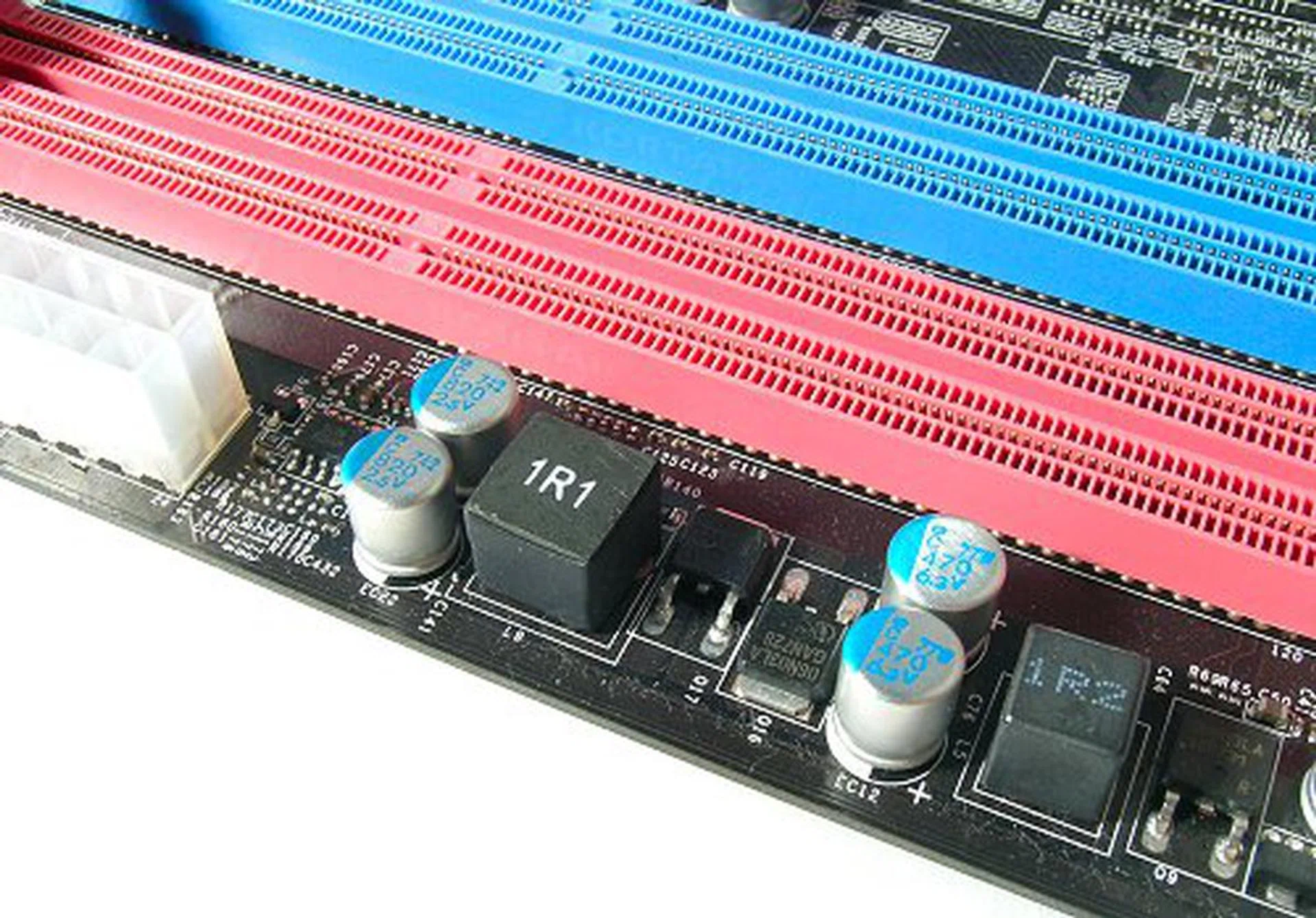
2-phase DIMM power supply on the X38 Diamond. Also note that there are only four DIMM slots on the retail model, unlike our preview engineering sample that came with six.
Design
The one feature that was not apparent in our preview is an updated Circu-Pipe design. Unlike the original one on the P35 Platinum, the X38 series carries a chunkier design on the primary cooler. Also, it no longer extends out to the DIMM slots, which is a better choice in our opinion as the CPU socket area looks less cluttered. All things considered, MSI has done a very good job with the component layout on the X38 Diamond. All connectors and headers are located on the sides of the board and there is nothing interfering with expansion slots. A decent amount of fan headers (six in total) ensures that cooling is covered as well.
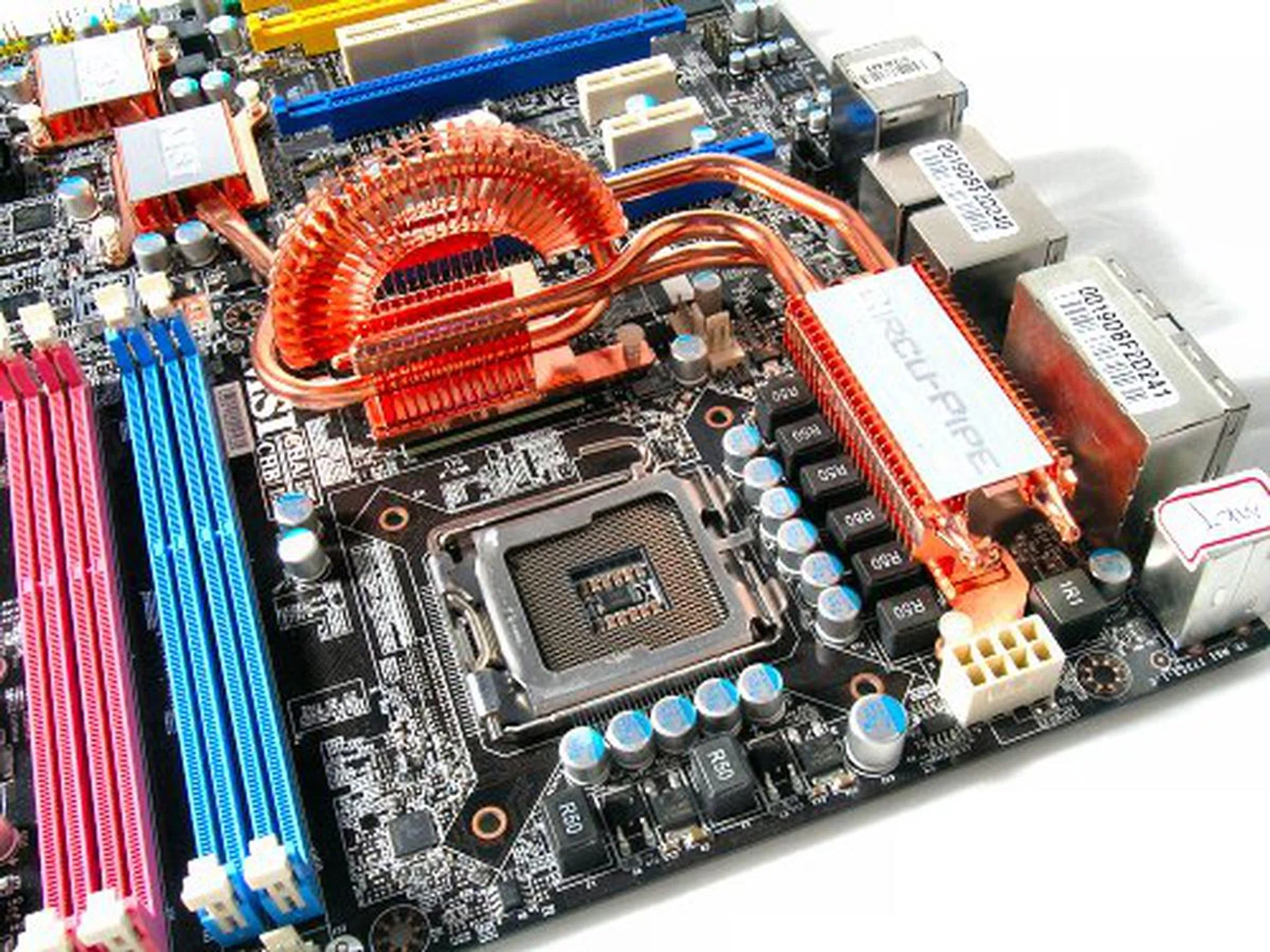
Without the botton heat-pipe to the DIMM slots, there is more room around the CPU socket on the X38 Diamond than on the P35 Diamond.
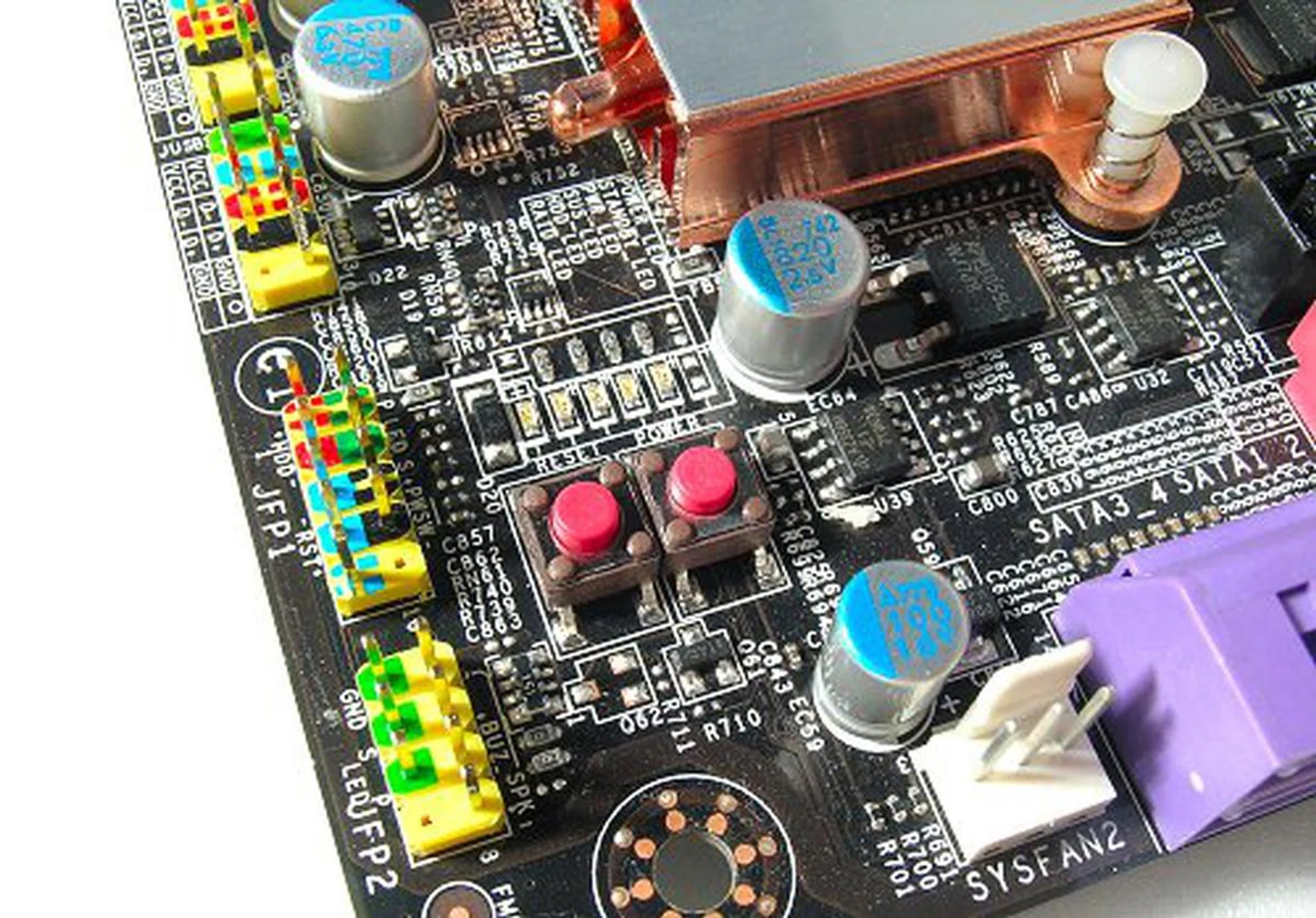
The only issue with the onboard power/reset buttons is that they are too close together.
Overclocking
- FSB Settings: 200MHz to 800MHz
- DDR3 Settings: 1:1.00, 1:1.20, 1:1.33, 1:1.50, 1:1.60, 1:1.66, 1:2.0 ratio selection
- PCIe Settings: 100MHz to 200MHz
- PCI Settings: 33.3MHz / 33.6MHz / 37.3MHz / 42MHz
- CPU Voltage Settings: CPU Min to +0.7875V (in 0.0125V steps)
- CPU Reference Voltage Settings: 0.74V to 1.07V (in 0.06V steps)
- Memory Voltage Settings: 1.50V to 2.75V (in 0.05V steps)
- Memory Reference Voltage Settings: 0.75V to 1.38V (in 0.09V steps)
- NB Voltage Settings: 1.25V to 1.83V (variable steps)
- SB Voltage Settings: 1.50V, 1.80V (variable steps)
- FSB Termination Settings: 1.20V to 1.44V (in 0.02V steps)
- Multiplier Selection: Yes (unlocked CPUs only)
Intel's X38 chipset was designed for the enthusiast and overclocking crowd and we've noticed that MSI has tried to improve on their BIOS offering on the X38 Diamond over the older P35 Diamond. There is a better range of options on the X38 Diamond and it seems that it actually does overclock better. Our outing with the P35 Diamond wasn't too successful with a maximum overclock of around 460MHz, but the X38 Diamond was able to hit a 480MHz base FSB without issues. While not the best overclocker around, 480MHz seems to be the magical number to hit if the board is to be considered to have respectable overclocking capabilities and the X38 Diamond doesn't disappoint here.
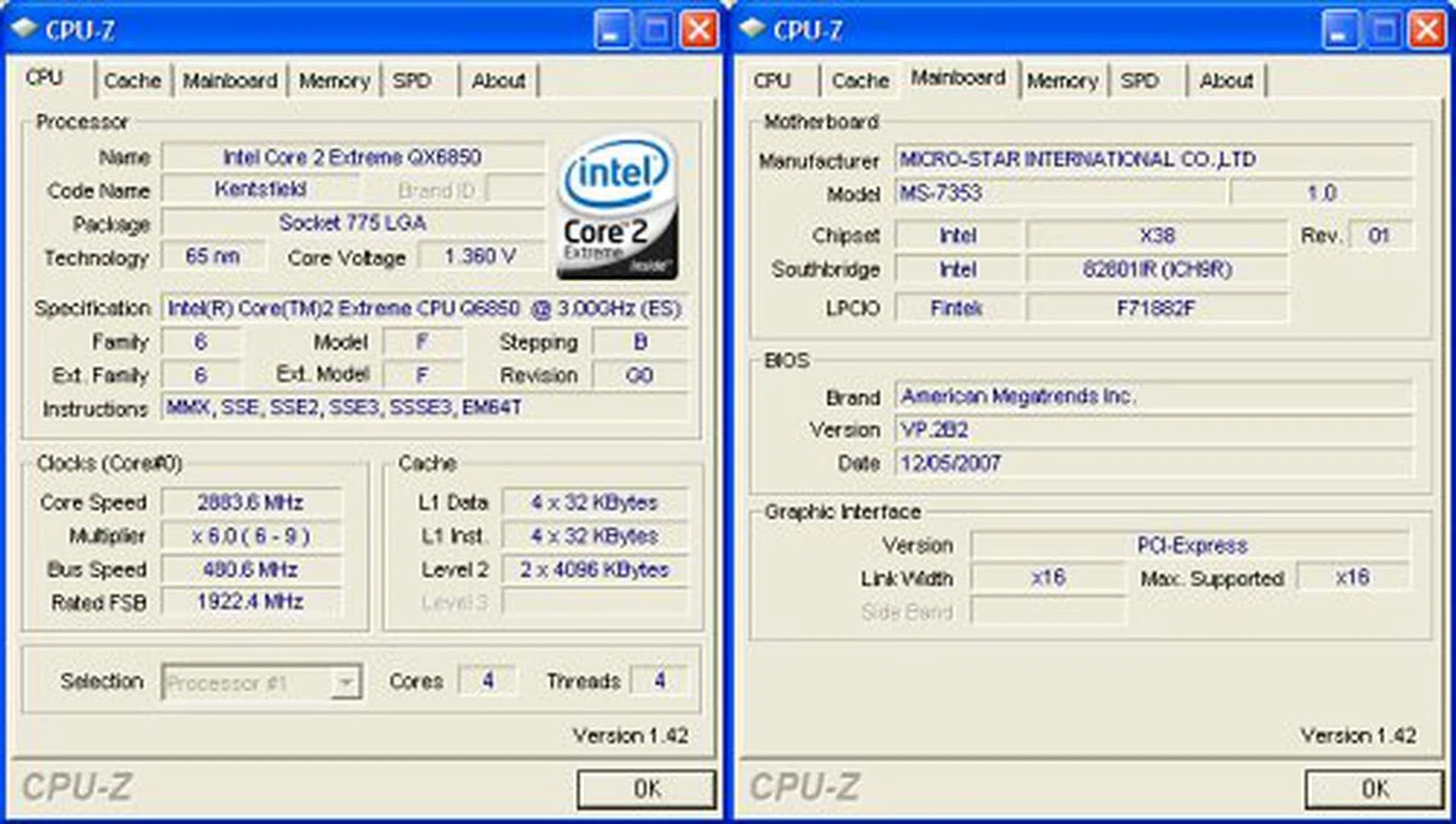
Overclocking CPU-Z screenshot. Click for full-sized image.
Test Setup
Now, let's check out some numbers. As an enthusiast offering, we will be comparing the MSI X38 Diamond with some of the few DDR3 based Intel X38 boards we've tested such as the ASUS P5E3 Deluxe, Foxconn X38A and the Gigabyte GA-X38T-DQ6. Test bed configuration and setup is listed below for all boards.
- Intel Core 2 Extreme QX6850 processor (3.00GHz)
- 2 x 1GB Kingston HyperX DDR3-1333 @ 8-8-20 CAS 8.0 (MSI X38 Diamond only)
- 2 x 1GB Kingston HyperX DDR3-1333 @ 7-7-20 CAS 7.0
- Seagate Barracuda 7200.10 200GB SATA hard disk drive (one single NTFS partition)
- MSI GeForce 8600 GTS 256MB - with ForceWare 162.18 drivers
- Intel INF 8.3.1.1013 and AHCI 7.5.0.1017 driver set
- Microsoft Windows XP Professional with Service Pack 2 (and DirectX 9.0c)
Additional Notes
- The MSI X38 Diamond will be running at slightly reduced memory timings stemming from some incompatibility of our sample motherboard. It runs just fine with 8-8-8-20, but becomes unstable if we set DDR3-1333 at 7-7-7-20. If you've looked at our overclocking segment above, this problem does not look like an overclocking issue or the fact that the board cannot handle high-speed components. Rather, it just doesn't run DDR3-1333 at anything lower then 8-8-8-20 timings. We've contacted MSI regarding this. The good news is that they're working on some beta BIOS updates to hopefully improve the memory compatibility. The bad news is that at time of writing, this is not yet fixed. Still, the show must go on.
Benchmarks
The following benchmarks will be run to determine the performance of the MSI X38 Diamond:-
BAPco SYSmark 2004
Futuremark PCMark05
SPECviewperf 9.0
AquaMark3
Results - BAPco SYSmark 2004
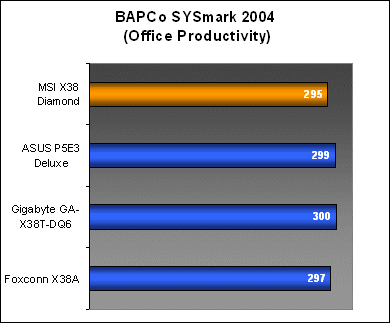
The slower memory timings had some slight impact on overall performance for SYSmark 2004, though it would seem that there wasn't too big a hit for Office Productivity at around a 1% deficit. The largest impact on memory performance came from the Internet Content Creation workloads where the X38 Diamond came in around 4% slower than the top scorer.


Results - Futuremark PCMark05
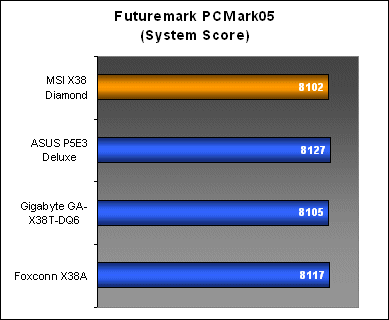
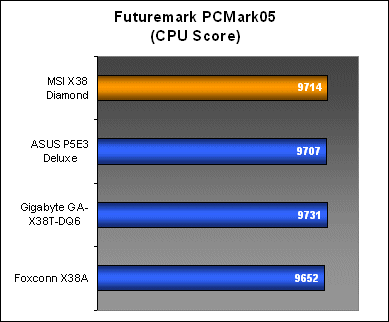
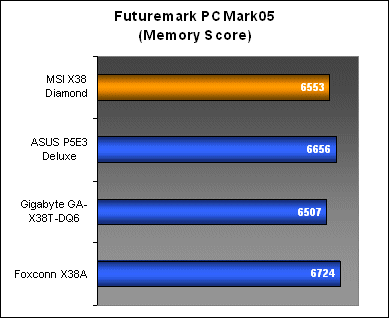
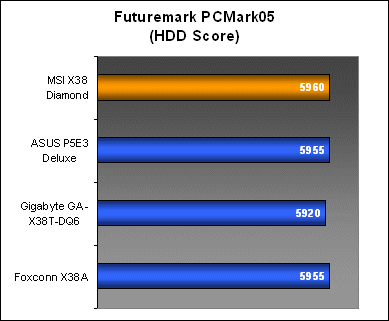
Although SYSmark 2004 scores were a little on the low side before, PCMark05 did not register any problems with performance from the X38 Diamond in comparison to the rest of the boards. It seemed to fit within a margin of error here and even displayed strong CPU and HDD subsystem performance numbers.
Results - SPECviewperf 9.0
Despite the performance drops in SYSmark 2004 which were quite possibly due to the lower memory timings, the X38 Diamond projected very healthy performance numbers in SPECvireperf 9.0, which indicates both decent graphics and memory subsystem performance in professional OpenGL workloads.


Results - AquaMark3
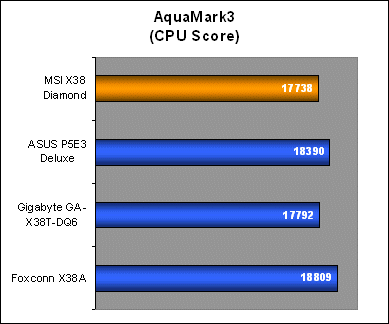
CPU performance took a hit in AquaMark3, though the X38 Diamond was really performing on the same levels as the Gigabyte GA-X38T-DQ6. Its GPU scores were also affected, shaving around 2fps off the average frame rates across the board, but the X38 Diamond remained competitive even while running on lowered timings.

Conclusion
Like most linear motherboard series updates, the MSI X38 Diamond succeeds the P35 Diamond with a better chipset, all the while maintaining the same formula that made the previous model successful in the first place. As the X38 is a chipset for enthusiasts, MSI has made several improvements which include better storage and for gamers, an option to stick in up to four PCIe graphics cards. Still, with the industry only beginning to support triple-GPU rigs, MSI's quad PCIe getup here may not find ready support unless you actually want to run multi-monitor on four discreet graphics cards.
MSI's beefed up dual-channel PWM and 2-phase DIMM PWM are also attempts to make the board more stable for enthusiast overclocking. While we do not have any solid indication that MSI's dual-channel PWM is better than the competition due to the limited testing time, it isn't any worse. From our overclocking experience, the X38 Diamond was able to meet out expectations of a high-end overclocking motherboard, hitting a solid 480MHz FSB without much problems at all.

The X38 Diamond has a lot going for it, enhancing on all its sibling's features. But, still needs a few tweaks here and there.
The only snag is the memory compatibility problem that cropped up during our benchmarking. If MSI can bring the level of compatibility and stability to the level of the P35 Diamond, the X38 Diamond would have been a great motherboard. There's no denying that lowered memory timings affected performance somewhat, but it was interesting to see the X38 Diamond performing well in certain benchmarks even with its disadvantage. And both SPECviewperf 9.0 and PCMark 05 showed healthy all-round performance from other subsystems of the board including good CPU, GPU and HDD scores. The silver lining here is that the memory issue is quite isolated, and not a board-wide issue with high-speed settings - as we've established with its overclockability.
The MSI X38 Diamond is really an ideal motherboard for the kind of users that are looking for an all-in-one solution, but do not want to be cornered with integrated components that cannot be replaced. These are the same sentiments we had about the P35 Diamond and they stay true here as well.
Our articles may contain affiliate links. If you buy through these links, we may earn a small commission.