
MSI PR200 Notebook (Intel Santa Rosa)
MSI has been strengthening its notebook portfolio recently with a variety of models to meet various price points and needs. One of them is this new 12-inch widescreen business notebook and it's the first retail-ready model to reach our labs based on the Intel Santa Rosa platform. Read on for our thoughts on it.

Introduction
Be it motherboards or graphics cards, MSI is practically a household name among the DIY and enthusiast scene but when it comes to notebooks, it is fighting an uphill battle to make inroads on a global market dominated by international brands like HP and Dell. Even fellow Taiwanese brand Acer has risen rapidly up the ranks to emerge a surprise third in the global stakes last year, while on the home front, ASUS is another dominant and familiar competitor. Though MSI is a minor player in the channel at the moment, with the bulk of its notebooks mainly the 12 to 15-inch variety, it obviously has ambitions for this segment, leading to some high profile moves recently.
One of these high profile products is its Crystal Collection, which features MSI notebooks embedded with Swarovski crystals. Looking to build on the momentum, MSI recently showcased another new design that has set tongues wagging. Debuting at Computex 2007 in both a glamorous all-white facade and a more traditional black and silver professional edition, the new PR200 builds on MSI's experience in ultra-portable 12-inch notebooks with a clean chassis design and is based on Intel's latest Santa Rosa platform. Does this reddot design award-winning notebook live up to such heightened expectations? We share our user experience right after the technical specifications:-
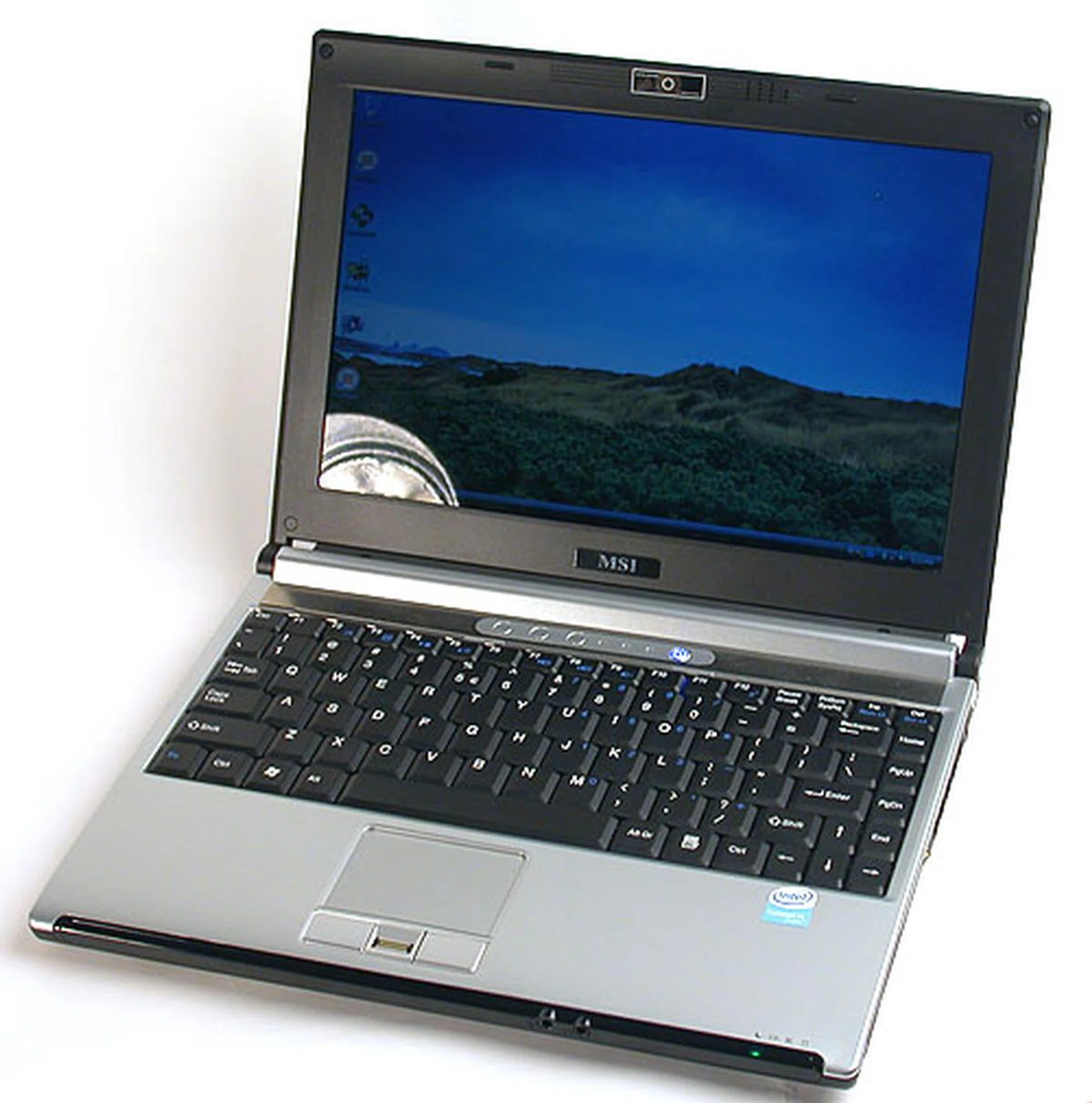
The MSI PR200 has a clean, simple design that won a reddot design award this year.
Portrait of an Award Winning Design
The MSI PR200 notebook that we received came in its professional guise of silver and black, giving it a very corporate look and feel. This is apparent too from the fingerprint sensor found at the touchpad, which is complemented by the built-in TPM 1.2 (Trusted Platform Module) chip that adds security and verification functionality demanded by most business users.
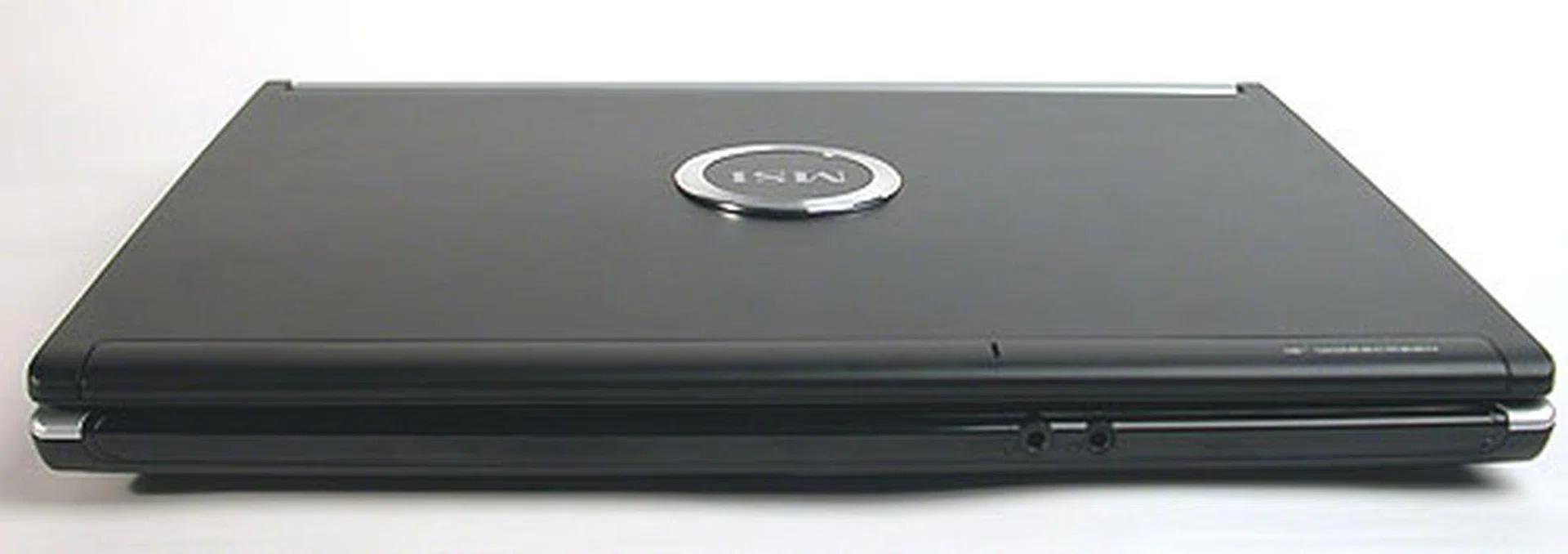
Only the microphone and headphone jacks are located at the front of the notebook, along with the status LEDs. No volume control or mute that we could find.
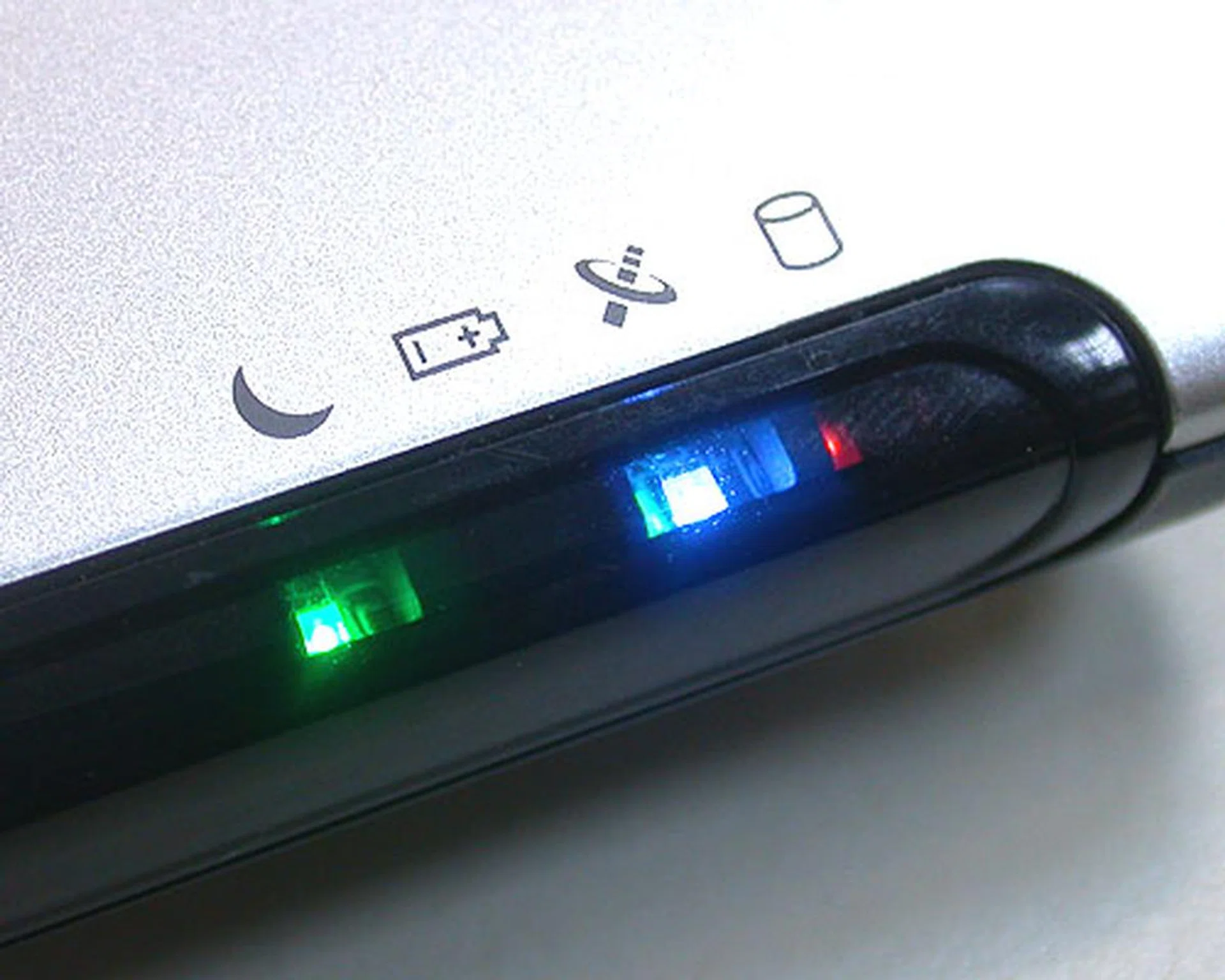
The status LEDs on the PR200 include the usual hard drive disk activity LED, the battery, wireless and notebook hibernate status indicators.
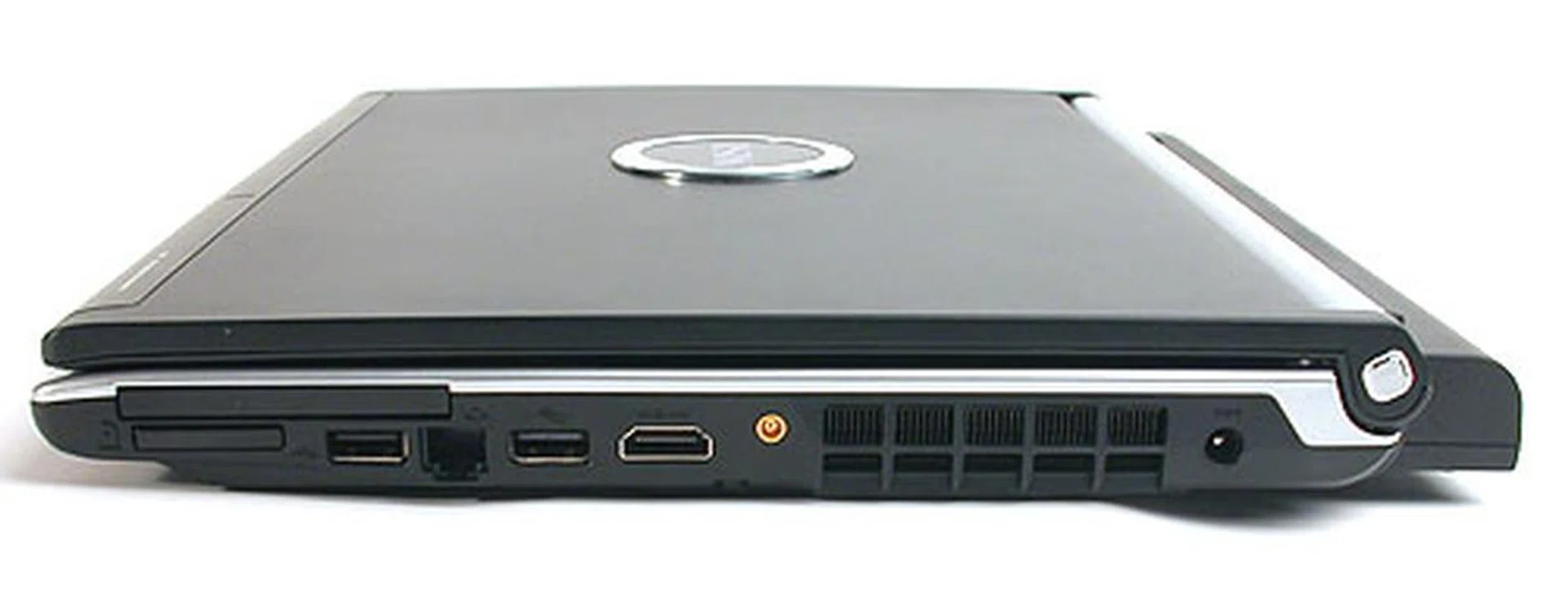
Notable ports here are the HDMI port, the mini port for a digital TV receiver (optional and not included in our package) and this side is also where the exhaust air exits the notebook. The notebook is quite cool and quiet, no doubt due to the low TDP of the CPU architecture.
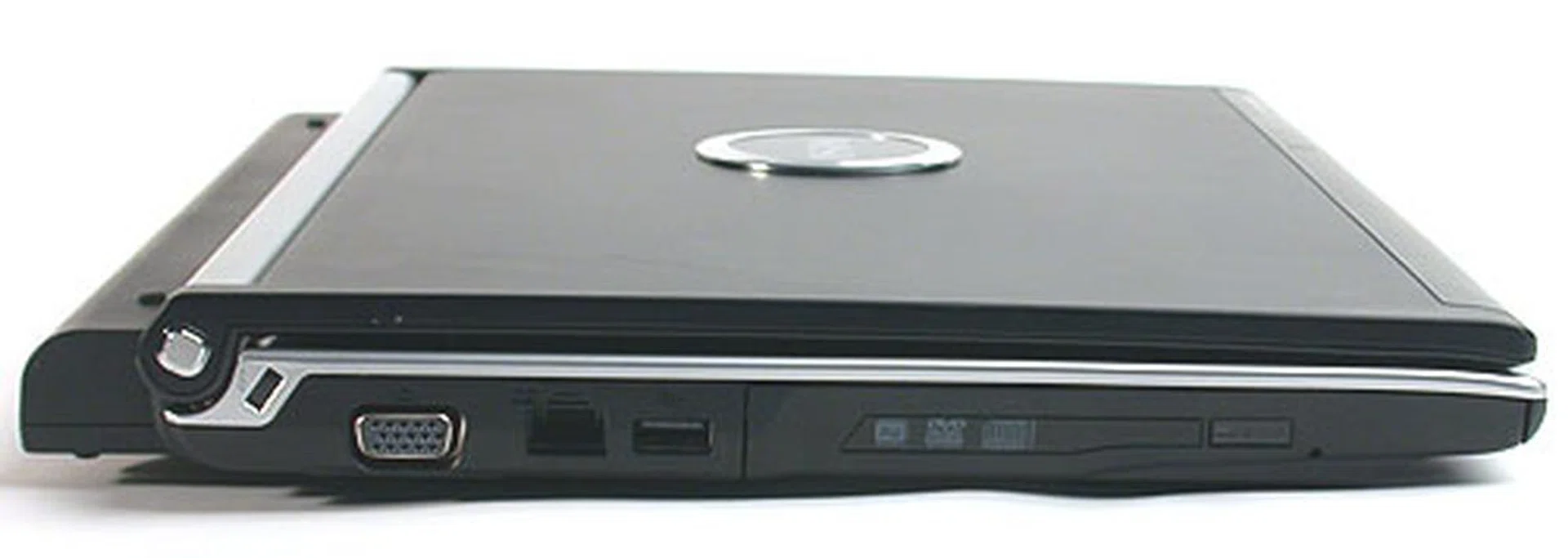
On this side, you'll find a VGA analog output, USB2.0 port and the Gigabit LAN jack. The SuperMulti DVD writer is also here.
As for connectivity options, the MSI PR200 does have a HDMI output, handy for those presentations and even for viewing videos as the new integrated Intel GMA X3100 graphics engine embedded in the Intel GM965 chipset is capable of processing high definition 1080i videos and even certain 1080p video content. There's also a mini coaxial port to interface with an external antenna for an optional digital TV receiver which can scan and pick up DVB-T signals off the air. This digital TV receiver hardware is however an optional feature and wasn't included in our review unit (thus the port is just part of the standard design to facilitate add-on functions). With these extra ports, there is no space for FireWire and there are only three USB2.0 ports on this small notebook.
Weighing around 1.8kg including the battery, this 12.1-inch notebook is sufficiently handy. MSI has gone for the trendy widescreen LCD display with some in-house enhancements which they've dubbed as Amazing Crystal Vision (ACV). However, what seems to us about this glossy LCD screen is how amazingly bad the viewing angle can be. In a strict sense, one could still discern the icons and colors onscreen at an angle but the highly reflective surface means that the reflections end up muddying the view. The brightness also suffers a severe drop when viewed at an angle and also when the default power saving feature kicks in, e.g. while the notebook is running on its battery, the brightness level takes an even bigger dive (this happened during our testing with the Windows Vista power scheme set to Balanced mode). The reflective screen also makes viewing movies and videos less than ideal, unless one is watching it in a perfectly dimmed environment.
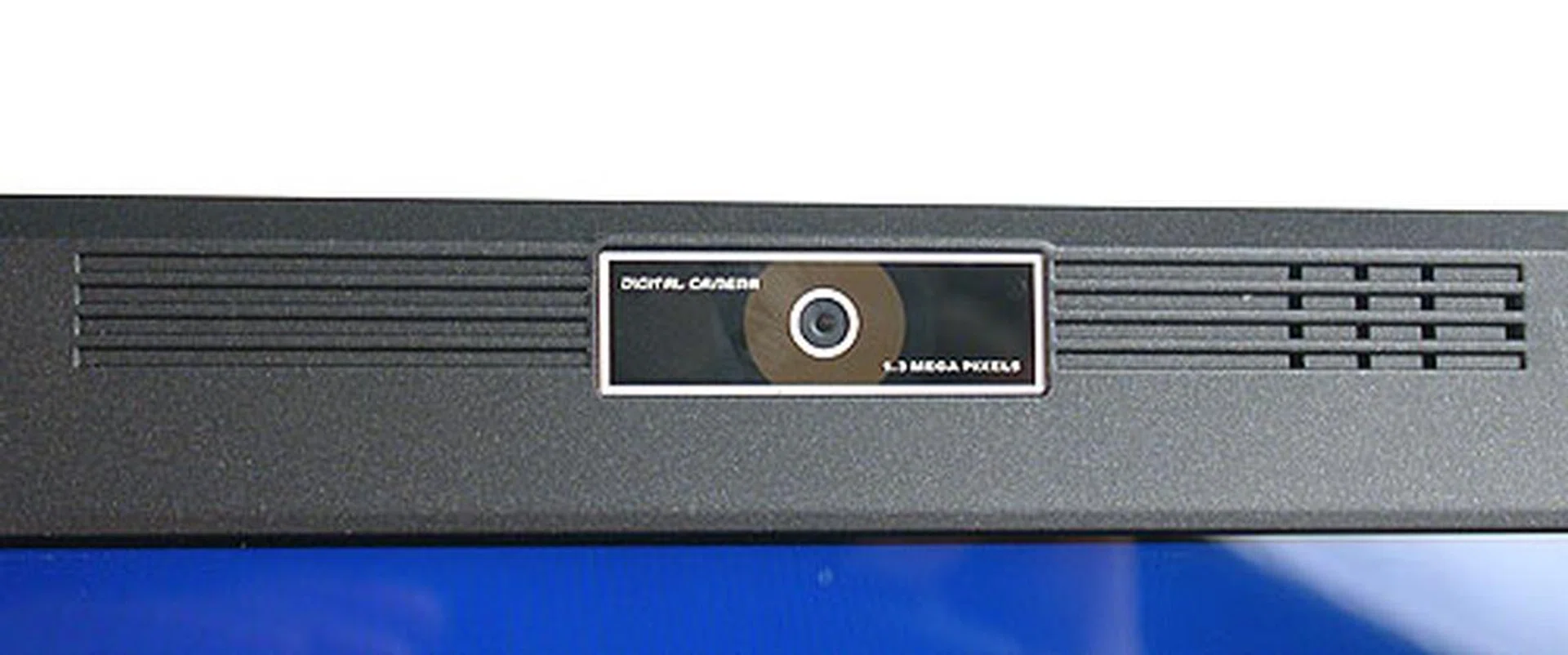
There's a decent 1.3-megapixel web camera that is unfortunately not adjustable (no tilt or height) but that is somewhat alleviated by the array microphone that offers better voice clarity and helps to reduce ambient noise.
A 1.3-megapixel web camera is mounted at its standard position just above the LCD screen. Unlike other notebooks that we have seen, the camera cannot be adjusted but it does feature the rather popular array microphones that help reduce ambient noise and boost voice clarity. The keyboard too is a fairly standard compact version, since there is no room on a 12-inch notebook to have a full keyboard. MSI also has a row of shortcut or quick launch buttons above the keyboard, bounded by two internal speakers. Instead of the usual options like volume control, mute or the email application, these shortcuts are simply named P1 and P2. As for what they do, your guess is as good as ours.
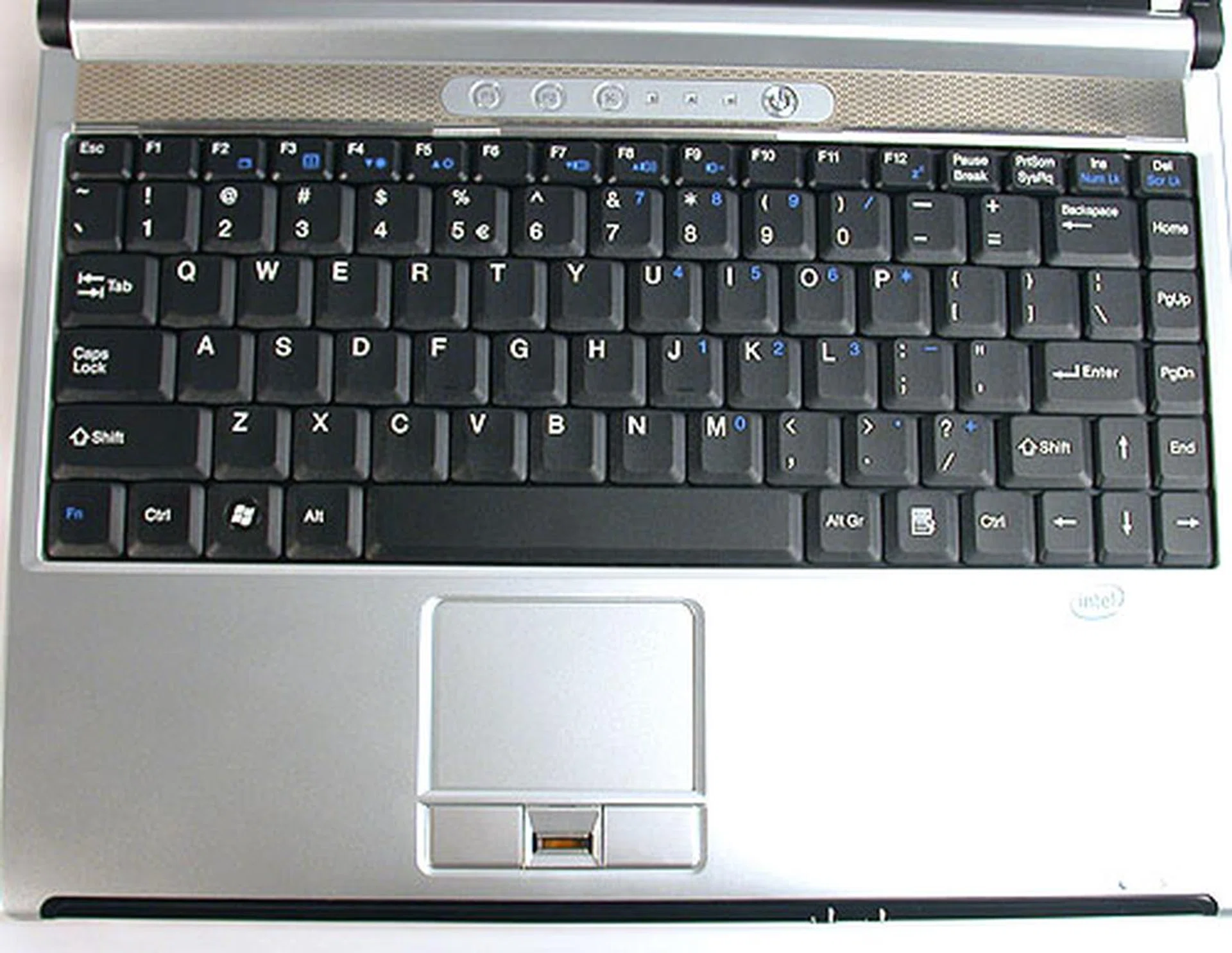
A standard compact keyboard and touchpad. The fingerprint sensor is located between the buttons, which felt a bit stiff and plastic.
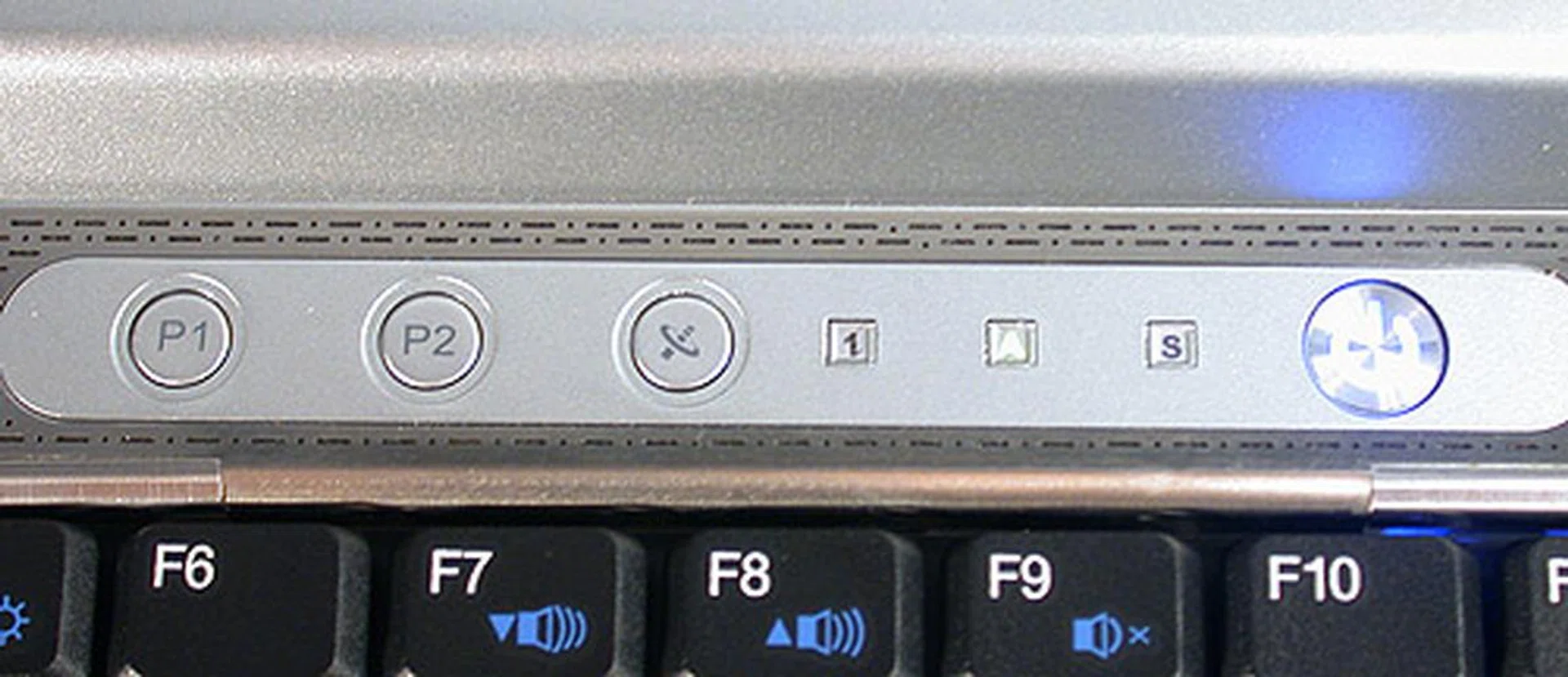
These shortcut or Quick Launch keys could have been better designed as the rather cryptic P1 and P2 labels on them are not exactly enlightening about their functions. The smaller squares besides them are indicator lights for Caps Lock, Num Lock and Scroll Lock.
\
The only way to find out is obviously to press them, or if you're the rare sort, read the user manual. Their functions are easily sorted out with a click - P1 fires up the Windows Media Player application and P2 enables the web camera function. There seems to be no way to customize these shortcuts within Windows, leading us to wonder what would happen if one uninstalls Windows Media Player. MSI notes in the manual that they work only if the proper drivers are installed and presumably included in the standard restore/backup disc bundled with the notebook.
Santa Rosa, of Course
As most of you should know by now, Intel has updated its Centrino technology offering with the new Santa Rosa platform, with improvements in quite a few key areas that we have documented previously. MSI's PR200 is not quite the complete implementation - there is no Turbo Memory feature (codenamed Robson), which would have boosted performance through the use of flash memory similar to how Windows Vista's ReadyBoost works. This is not surprising and seems to be the popular option from vendors now, as the performance gains of Turbo Memory are debatable at the moment and the drivers for it are still not quite baked. We have already seen at least one vendor, HP publicly stating that it will not include Turbo Memory in its Santa Rosa notebooks, as there is no tangible benefit to consumers.
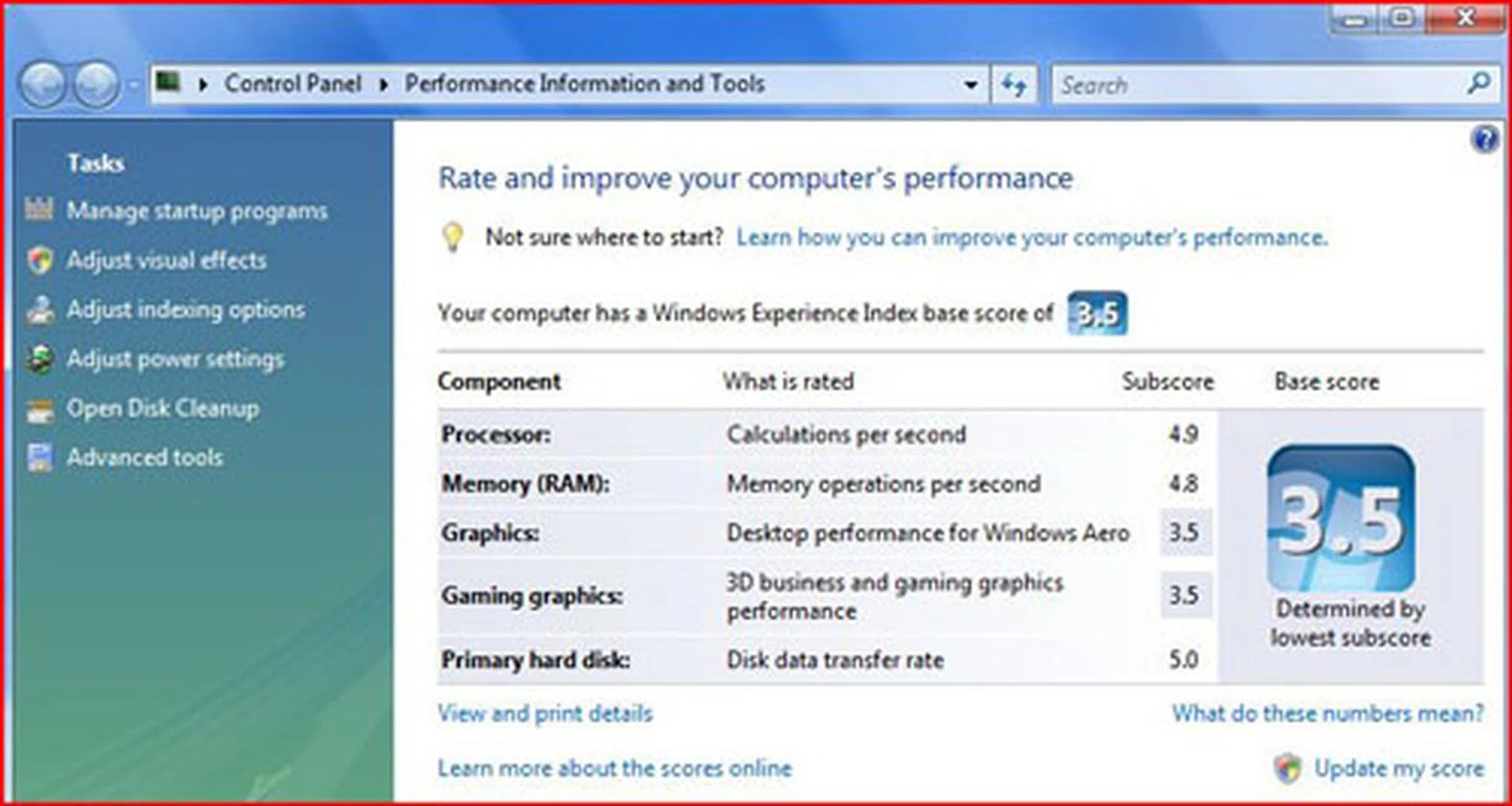
Pulled down by its onboard graphics, the MSI PR200 only scores a mediocre 3.5 on the Windows Experience Index. This was however marginally higher than the 3.4 score of the Santa Rosa prototype we received from Intel. The weakness on that machine was similarly the integrated X3100 graphics accelerator.
In terms of hardware, the MSI PR200 is not the fastest Santa Rosa notebook by any measure, but it's equipped with a decently fast 2.0GHz Core 2 Duo (T7300) processor from Intel and 2GB of DDR2-667 memory. There are only two SODIMM slots on this notebook and both are filled in our unit. Since it uses the GM965 chipset, onboard graphics is courtesy of an Intel GMA X3100 processor, which is an improvement over its predecessor, especially for high definition video playback due to its Intel Clear Video technology that should reduce CPU overheads for MPEG-2 and WMV9 (VC-1) media. Another plus point is that the graphics engine supports DirectX 10 standards, but not till the appropriate drivers are ready early in 2008! In any case, don't hold your breath since integrated graphics is always a fair bit slower than a discrete engine. For the MSI PR200, the capabilities of the GMA X3100 graphics engine are a bonus when taking into account the notebook's business usage point of view, since they would probably be used sparingly.
A SuperMulti DVD burner (Optiarc AD-7530A) with writing speeds of up to 8x for DVD-/+R media, 4x for Double layer DVD media and 24x for CD media is found in the PR200. Lastly, a 160GB SATA notebook hard drive from Western Digital completes the system, though its average 5400RPM rating will not be winning any benchmarks soon. Microsoft's Windows Vista Home Premium is the operating system used in our review unit, though MSI's website states that the Business version will be installed for the retail units by default.
Battery Life and Portability Ratio
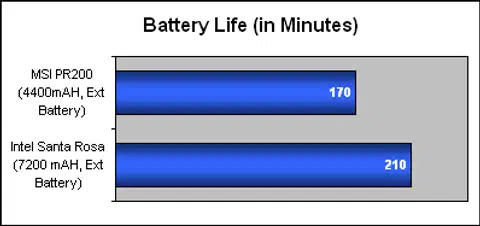
With MobileMark still incompatible with Windows Vista, we had to rely on a DVD playback test for a gauge of the battery life on this notebook instead of our usual way of running MobileMark's assessment. Before we started, we disabled the wireless LAN and checked that the power profile was set to Balanced in Windows Vista. In the subsequent test, the MSI PR200 managed to last 2 hours and 50 minutes, almost running through our DVD twice over. In contrast, an Intel Santa Rosa engineering sample with a more powerful 7200mAH battery managed three and a half hours. The MSI PR200 review unit came with an extended 8-cell Li-On battery rated at 4400mAH by default and this would be the default shipping configuration for certain countries. This is the reason why the notebook's battery pack seemed much larger than its frame can hold from our earlier photos.
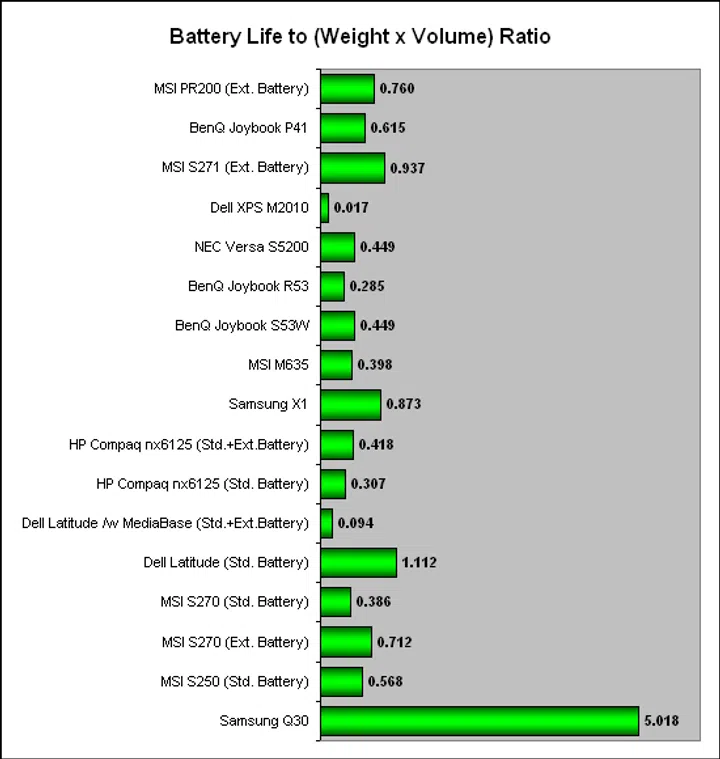
Using our DVD playback battery life result, we added in the factors of weight and volume to produce our own index of how portable this notebook is compared to others. Hence, the graph below, which showed that the MSI PR200 did reasonably well against other notebooks tested previously in terms of its battery life and portability. However this was using an extended 8-cell battery that may give the MSI notebook an unfair edge. Additionally, the other notebooks were running MobileMark while the MSI PR200 was looping a DVD though we felt that the overall result would not deviate significantly.
Performance Benchmarks
Since we are still transitioning from Windows XP to Windows Vista for our notebooks, we only have a handful of benchmark comparisons. Throw in the new Santa Rosa platform and it becomes harder to find suitable comparisons without calling in multiple notebooks from vendors in a full-fledged shootout. Hence, we had to rely on the initial engineering sample for Intel for the comparisons below. We were also restricted to PCMark05 and 3DMark06 since these were the two prominent benchmarks that worked perfectly in Windows Vista. Below are the brief and relevant specifications for the two notebooks compared:
Specifications/Notebook | MSI PR200 | Intel Santa Rosa Prototype |
Processor | Intel Core 2 Duo processor T7300 (2.0GHz, 4MB L2 cache) | Intel Core 2 Duo Processor T7700 (2.4GHz, 4MB L2 cache) |
Chipset | Intel GM965 | Intel GM965 |
FSB | 800MHz | 800MHz |
Memory | 2 x 1GB DDR2-667 | 2 x 512MB DDR2-667 |
Video | Intel GMA X3100 | Intel GMA X3100 |
Results - PCMark05
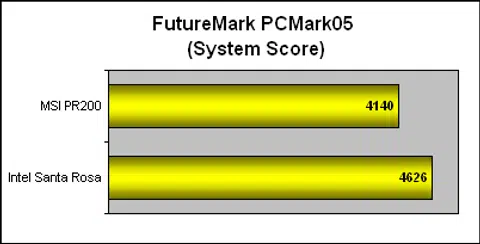
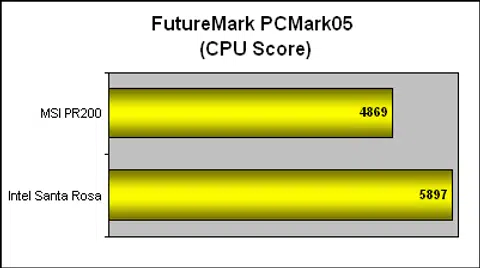
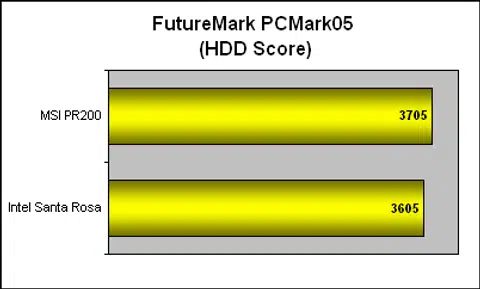
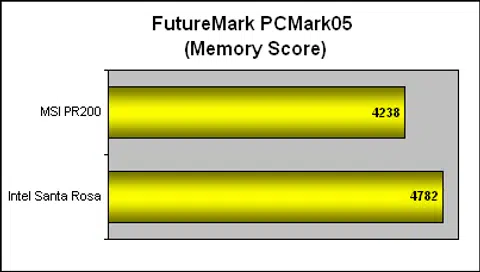
With its slower processor, it was only expected that the MSI PR200 lagged behind the Intel engineering notebook sample in the CPU score. The difference of 20% in the scores did seem acceptable given the similar disparity in clock speeds. While the MSI PR200 did marginally better in the hard drive subcategory (the Intel sample was using a solid state hybrid drive), its memory performance was about 12% lower than the Intel machine, leading to an overall result where the MSI lagged behind by 11%.
Results - 3DMark06
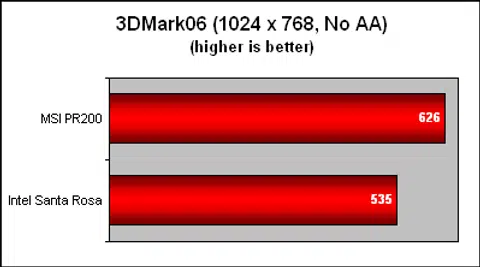
Surprisingly, despite the similar onboard graphics chipset found on both notebooks, the MSI PR200 managed to garner a significant lead of around 17%. Given that we tested the Intel Santa Rosa sample some time back, there are probably some improvements in drivers that has led to the better performance on the MSI PR200. These figures are however still woefully slow as far as real gaming is concerned on the newest games, but that's a given with the class of graphics engine found on notebooks of this range and target audience the notebook was designed to please.
Final Thoughts
So far, while the design of the MSI PR200 is suitably clean and simple, there is little to suggest that it deserves the attention it's been getting. Perhaps the pristine white edition we glimpsed online has more charms than our down-to-earth version but we doubt that the potential fingerprint magnet of such a white exterior would be sought after by the target group intended for this notebook - working professionals. With its TPM chip, fingerprint sensor and the portable 12-inch footprint, this 1.8kg silver and black notebook is a rather decent traveling companion. But outstanding it is not.
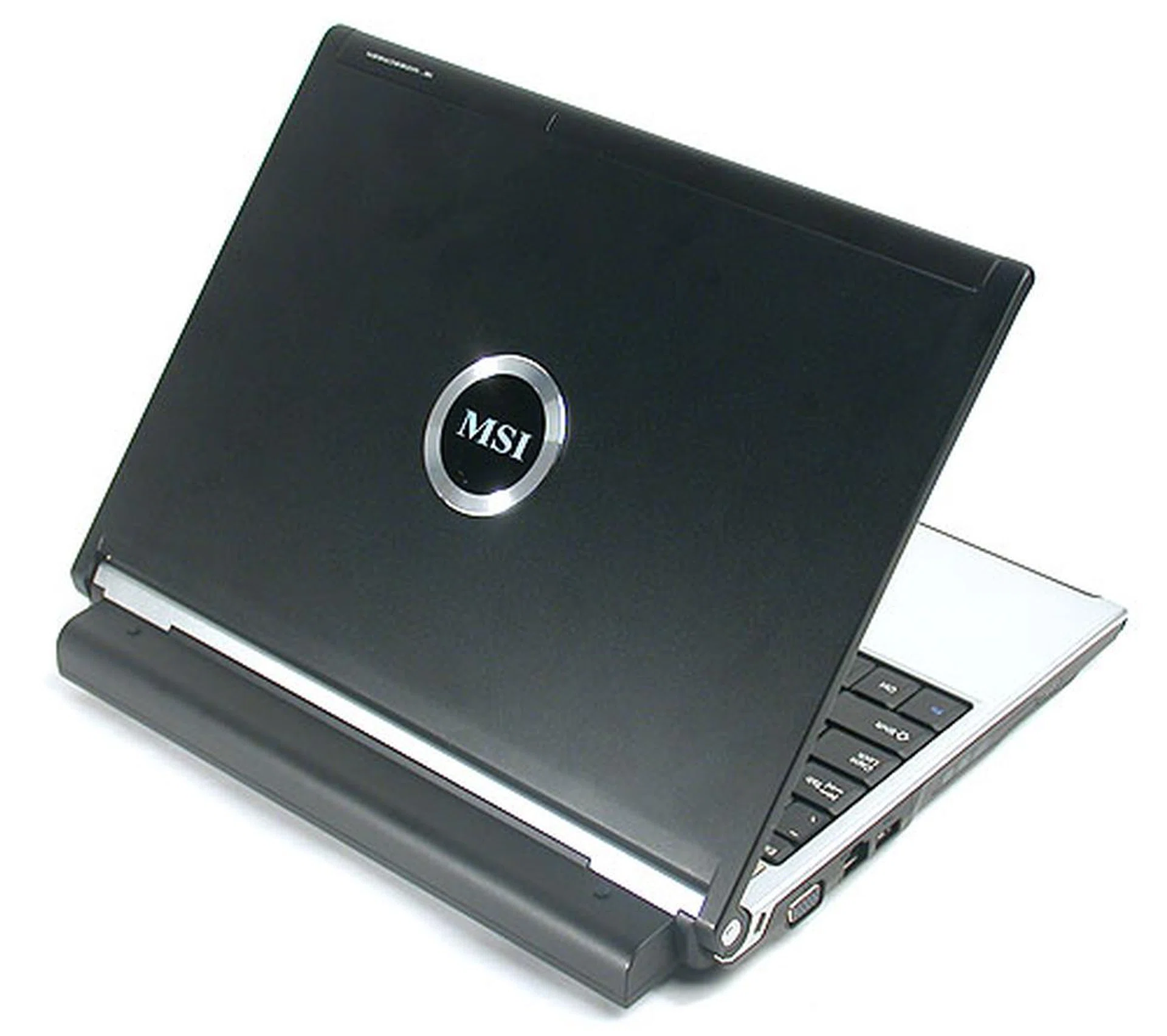
It hardly looks like a design award winner unless bland is in and we certainly didn't feel like we were handling anything more than a functional and competitively priced Santa Rosa notebook.
There are some nice additions of course; having HDMI output is still not as common as one would think, especially for a 12-inch notebook that is not really geared for multimedia entertainment. Also, we can't really judge how well the digital TV receiver would work with the PR200 since it's an optional component that was not included in the review unit. The other specifications seem typical for new notebooks and are naturally better than notebooks even a couple of months old, by virtue of embracing a newer platform. But the compromise necessary for a portable notebook means that the hard drive is not as fast as we would have liked. Overall performance is decent enough as it did not under-perform in our benchmarks and battery life was reasonable but not fantastic at almost three hours for an extended battery pack.
However, there are quite a few quirks that made it less than a pleasure to use. Chief among our concerns is the widescreen LCD display. Reflective and with limits on its viewing angle, it is definitely one of the weaker aspects of the notebook. The colors too seemed a bit washed out with a seemingly higher than necessary contrast. It naturally impeded our enjoyment of viewing videos on it, though we can understand that such a task is not its main function. In any case, many notebooks of this form factor have less than ideal screens due to physical limitation such as a single cathode tube backlight display with poor screen uniformity. As such, we can't really be too harsh on MSI on this aspect. Then the uninformative shortcut keys that are bound to specific applications with no apparent customization options. Some of the other grouses could be considered nitpicking, like the non-adjustable web camera that slips just a touch under perfection, the lack of easily accessible volume controls and a touchpad that is a tad stiff. The lack of the usual flood of bundled software applications could also be a virtue or sin depending on the consumer.
In the end, the MSI PR200 is more of a workhorse notebook. It has some nice touches for the business user but if you're looking for glamour and refinement, this doesn't match up to some of the bigger brands yet. Add to that the expected competitive pricing (our reviewed configuration would retail at about S$2109), and it should find a home among users who aren't too demanding. For an even lower price point of this 12-inch widescreen business notebook, MSI also has the PR210 model that's based on the AMD Turion 64 X2 processor and the AMD M690T chipset that has an integrated Radeon X1270 graphics engine. Identical to the PR200 in every other manner, such a configuration could easily save a couple of hundred dollars or more depending on the final configuration if you don't mind the AMD platform.
Our articles may contain affiliate links. If you buy through these links, we may earn a small commission.