
MSI GX600 Gaming Notebook (Intel Santa Rosa)
With an eye catching red and black design, MSI aims to bring the game into the notebook with the GX600, equipped with an NVIDIA GeForce 8600M graphics chipset and an unique Turbo mode that instantly bumps up your performance. Read on as we find out if it's good enough to replace our desktop.

Introduction
Not too long ago, gaming on a notebook (and we don't mean Solitaire here) was an alien concept. Only the very best and expensive models were capable of emulating their desktop counterparts for demanding 3D games; the majority were still associated with work and business use. Since then, notebooks have grown in stature and performance and are increasingly replacing desktops in roles like multimedia entertainment and gaming.
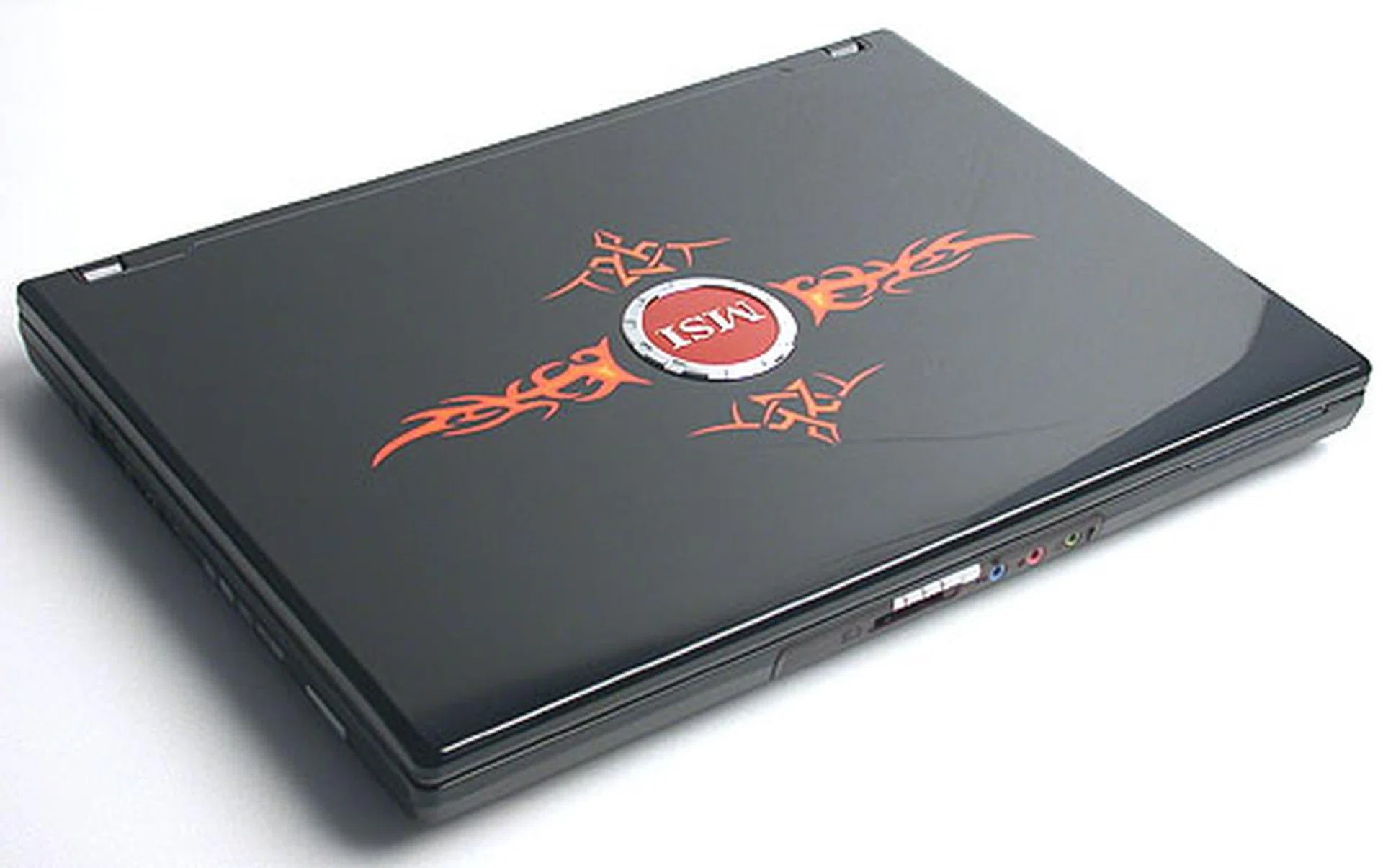
Great balls of fire! From its exterior, there's no doubting the intended purpose and demographics for the GX600.
With specifications that are potentially equal to any desktop, this new breed of notebooks is not just about portability anymore, and manufacturers have responded to the expanded usage of the notebook by issuing models that are targeted to different kinds of consumers. One such group includes those who have a passion for games and even mainstream manufacturers like Dell and HP have joined in the act. Seeing such a trend, MSI has also decided it's time to make a big splash and spearheading this initiative is the fiery red GX600 gaming notebook, featuring a unique Turbo mode to instantly boost performance even more.
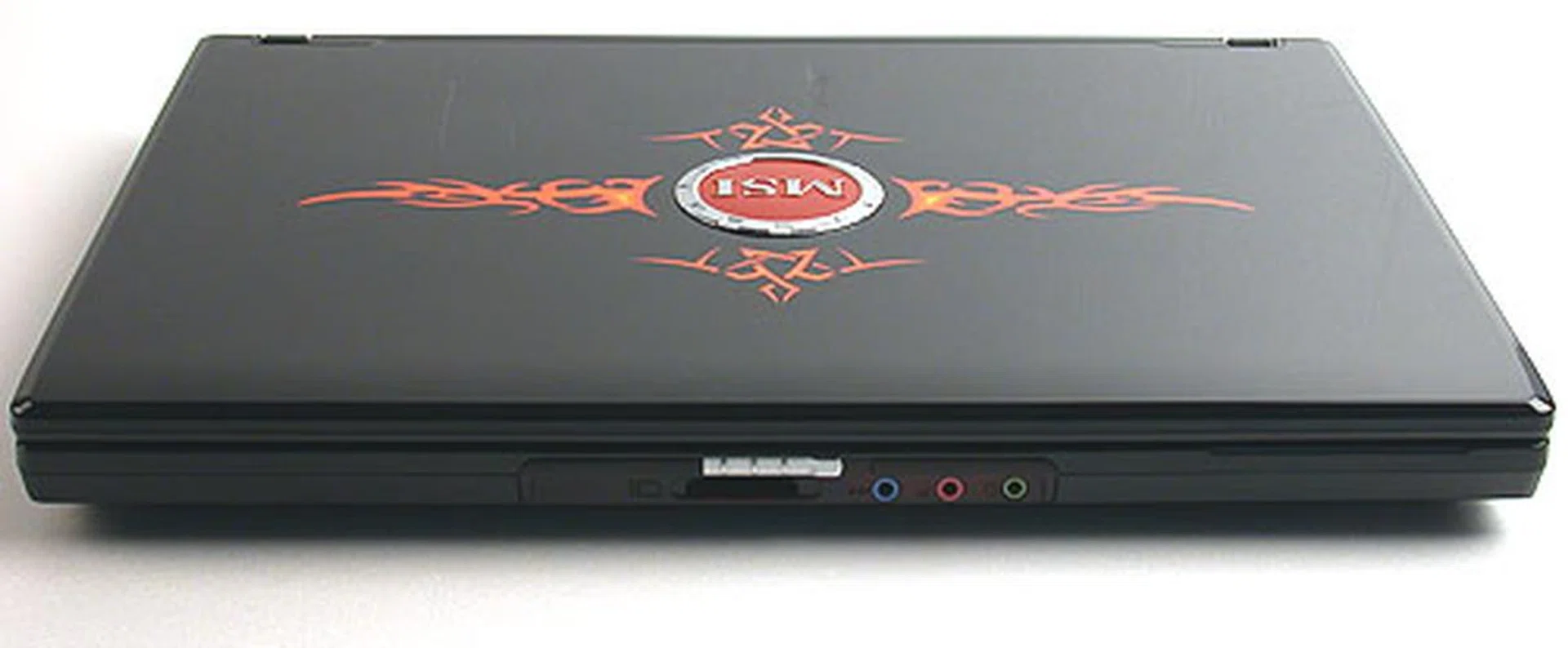
The standard headphone and microphone jacks are as usual found here for convenience's sake, along with a card reader.
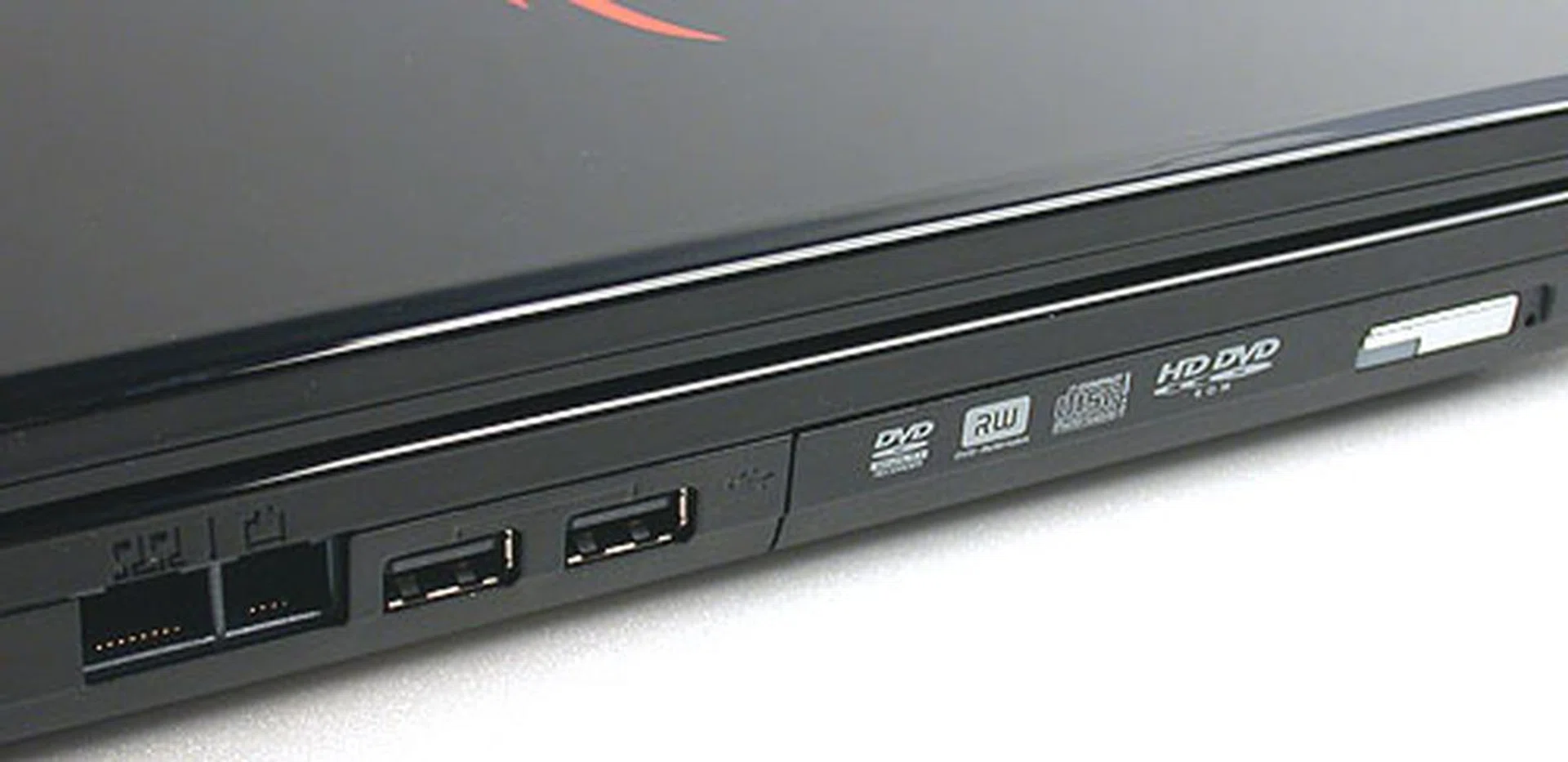
2 USB ports, LAN and modem jacks and most importantly, a HD DVD drive to keep up with the times.
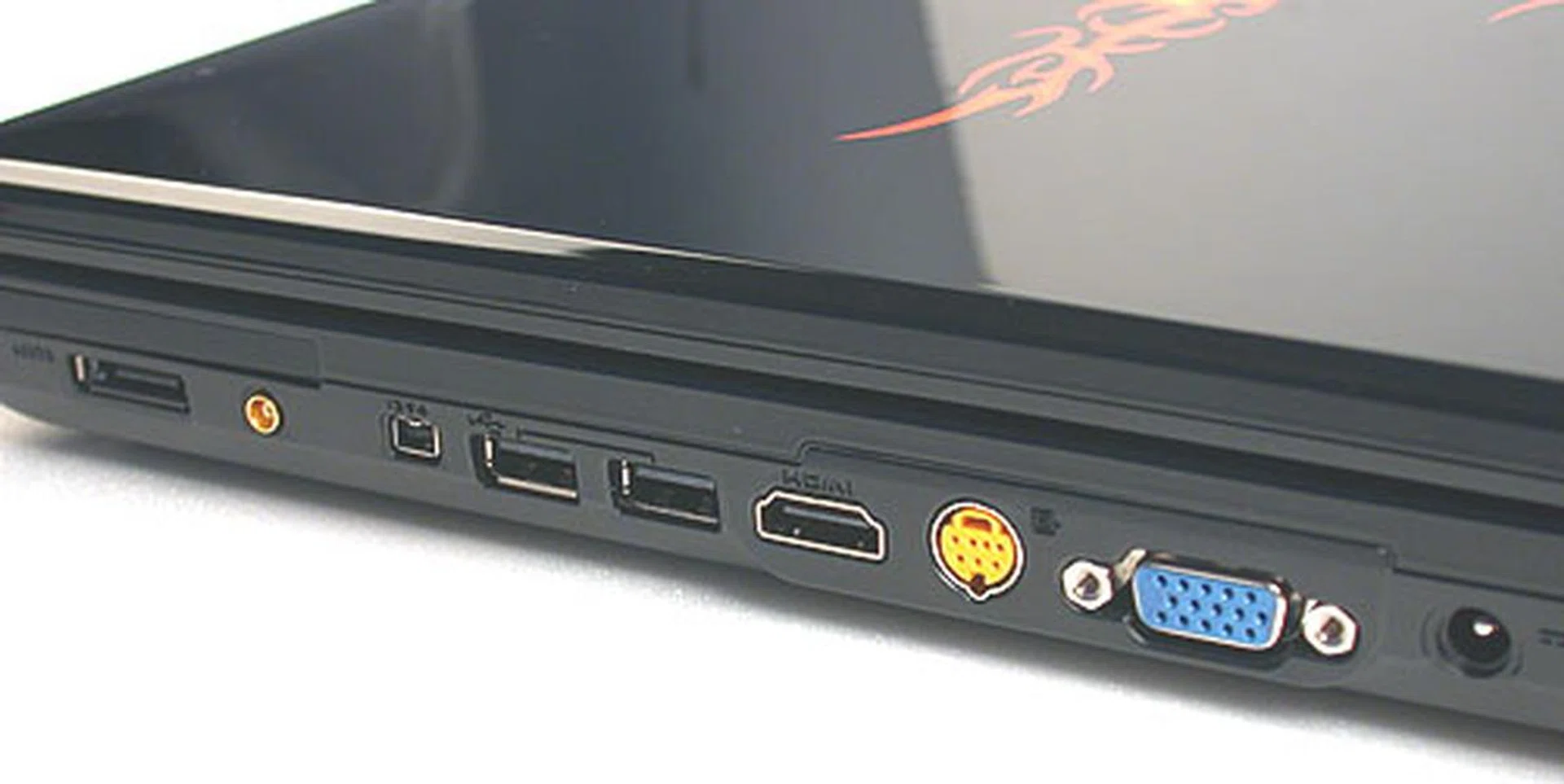
A plethora of connectors and ports here, of note are the e-SATA and HDMI ports. Optionally, you can have a TV tuner for this model and hence you can connect an antenna to it.
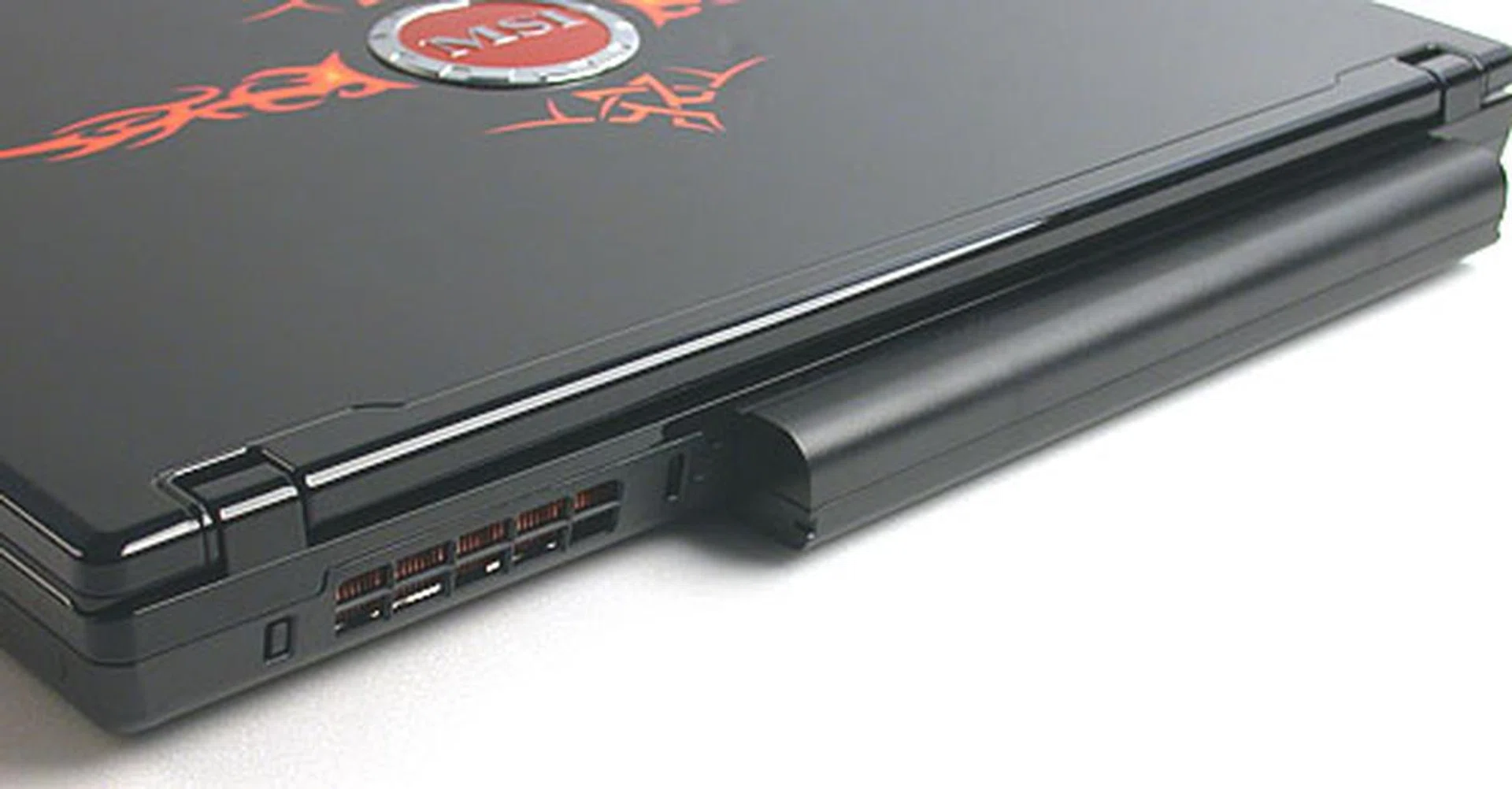
With the 9-cell Li-on battery included in our review unit, the rear of the GX600 is naturally more bulky than usual.
Made for Gamers
The MSI GX600 - made for gamers, or at least MSI's idea of what gamers are looking for in a gaming notebook. The end result is a piano black finish with fiery decals, which while not particularly creative, doesn't seem like a bad choice. However, the actual product is not as enticing as it sounds, with the rather loud and blatant 'flames' emanating from the usual circular MSI logo in all four directions. Personally, it's not our cup of tea but then there's no accounting for taste and we know of people who love the design as well. On a more practical note, the shiny black chassis is quite the fingerprint magnet, though that would describe just about any consumer electronics product nowadays.
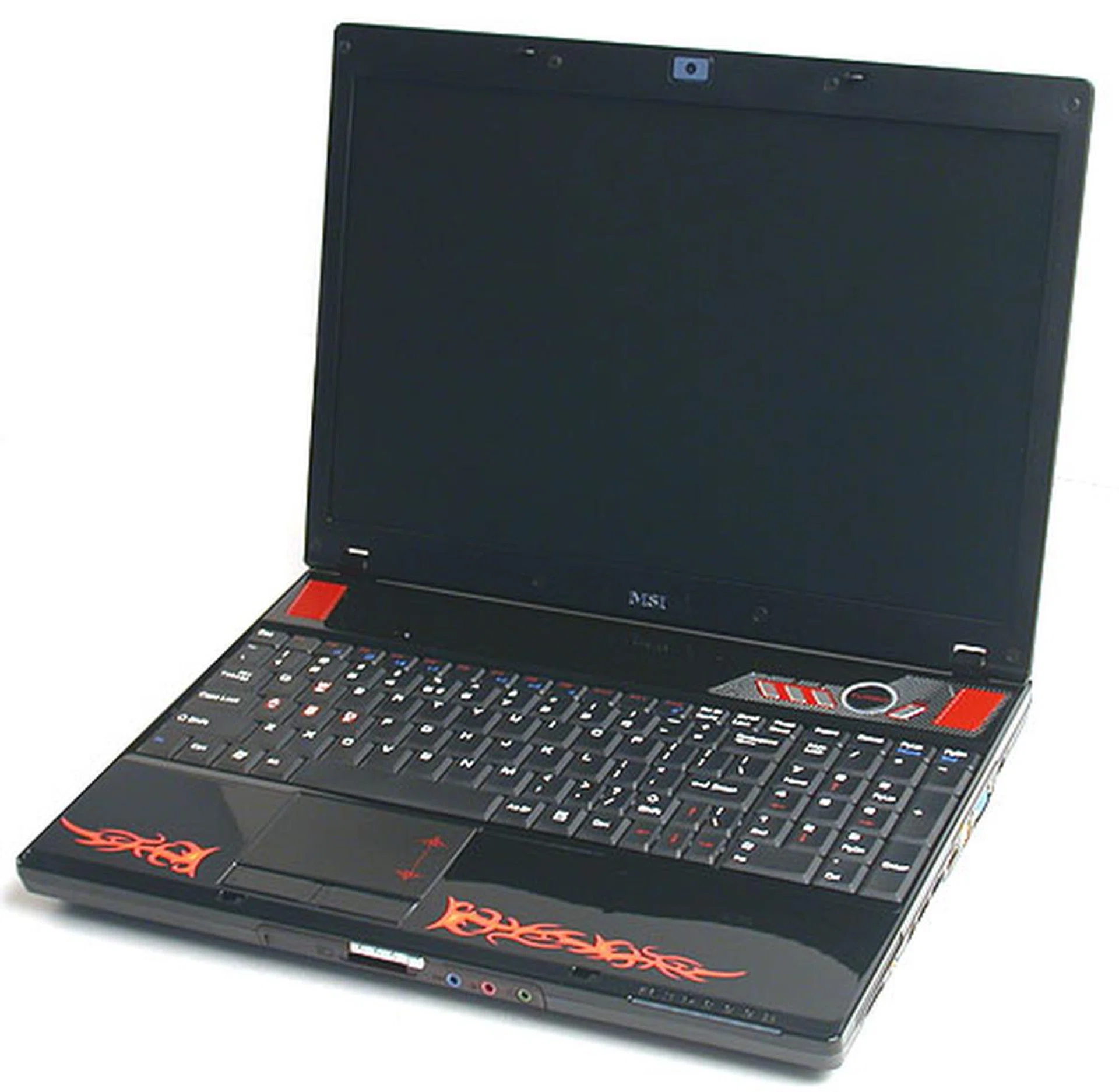
The fiery theme continues inside the notebook, with red and silver accents to match the polished black chassis.
Ignoring its exterior appearance, the GX600 does seem to have its act together when it comes to gaming. The keyboard is comfortable and with a full sized Numpad, we have no complaints about its usability, especially for gamers who need all their keys. We also liked the matte LCD display. All too often, we have seen glossy screens preferred in notebooks, which to us, only meant unwanted reflections and in some cases, poor viewing angles, especially in a lighted environment. That would definitely be bad news for a gamer. While matte displays may not be as vibrant as a glossy screen, they work in any environment. The MSI GX600 comes with a 15.4-inch WXGA (1440 x 900) panel with MSI Amazing Crystal Vision technology. While not as bright as some of the more high-end panels we've seen, the GX600 is really quite decent.
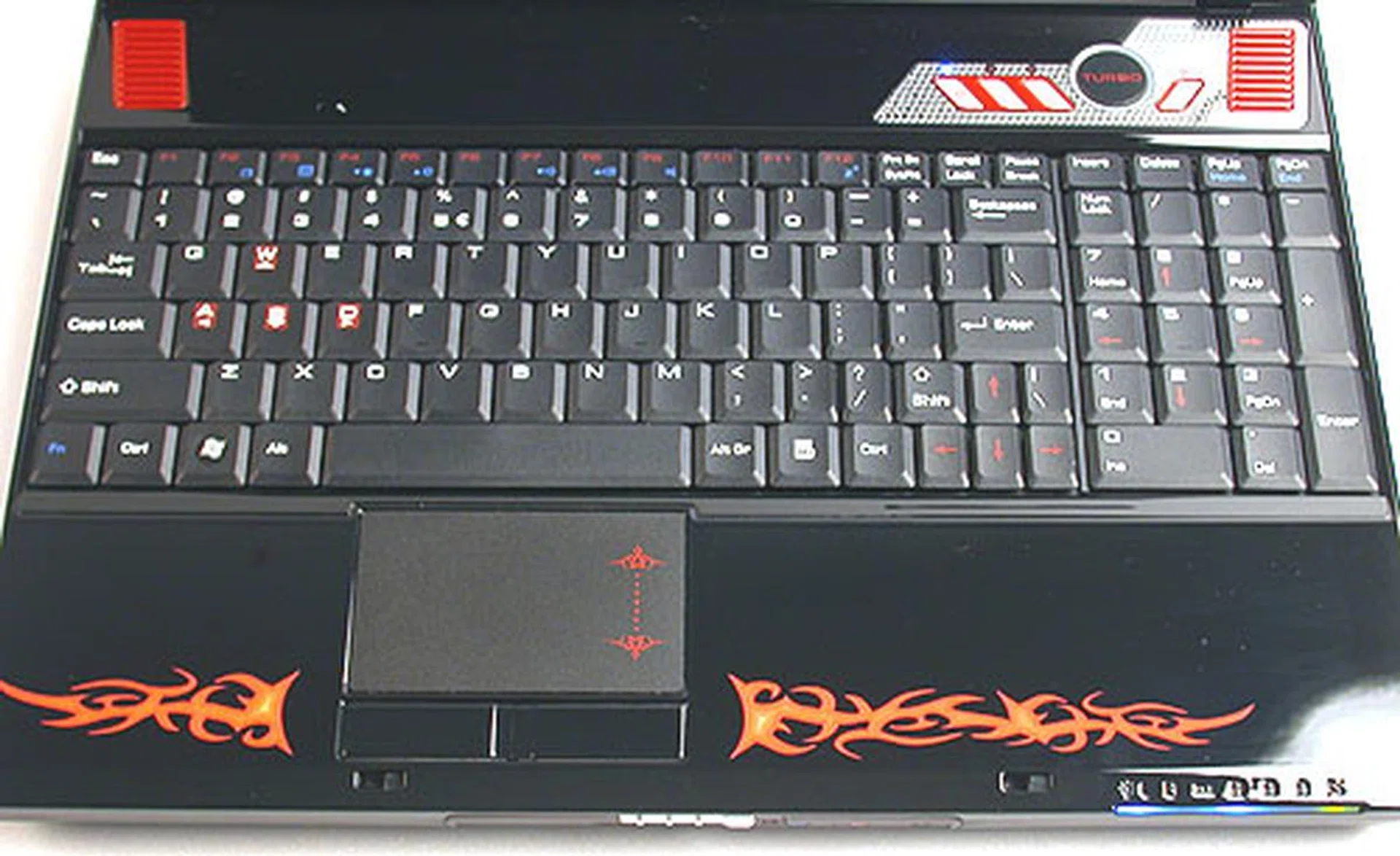
A full sized keyboard with a numpad makes the GX600 a notebook suited for gamers, since they need the full complement of keys.
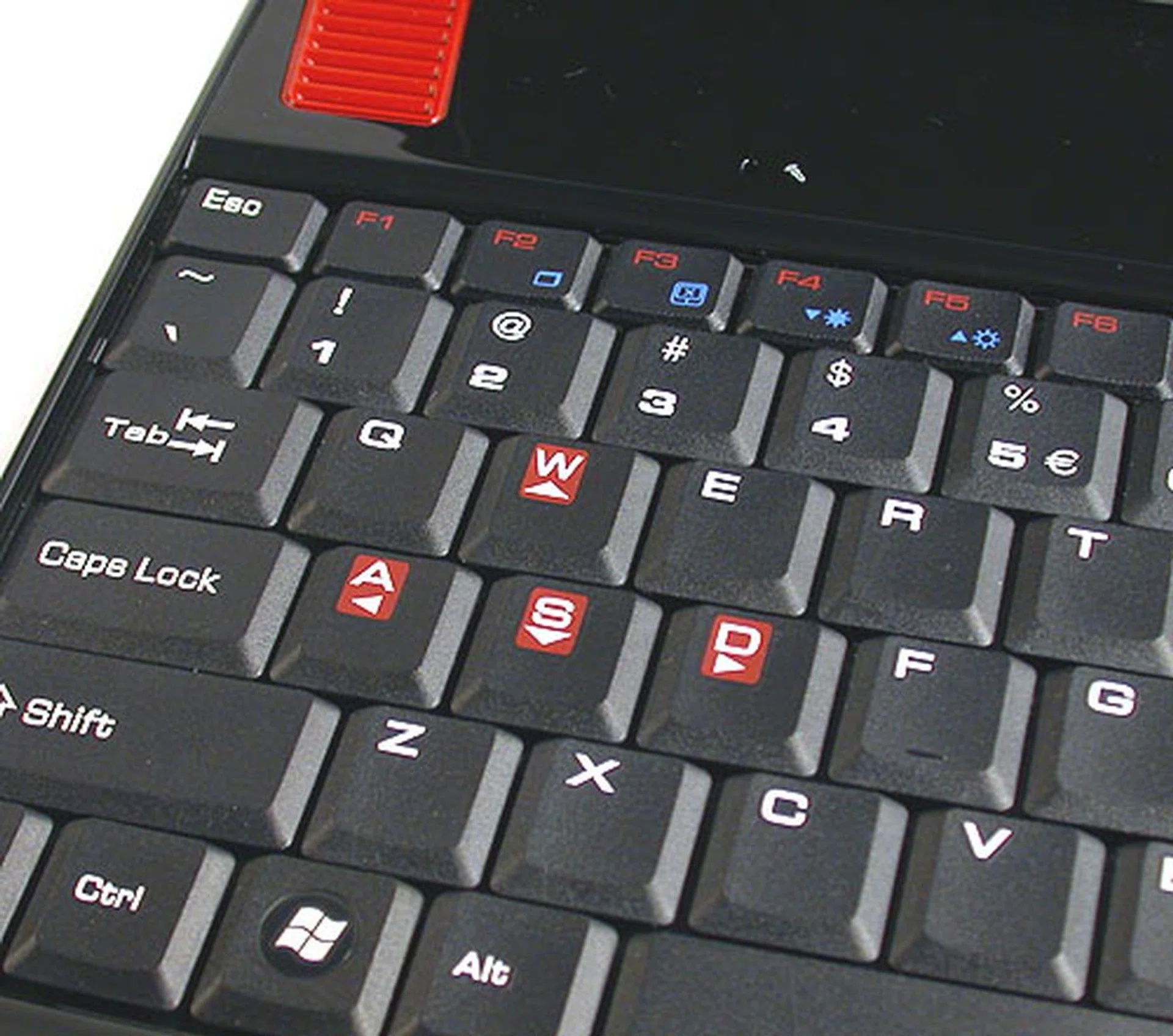
Like some other gaming notebooks we have seen, some of the keys like W, A, S and D are distinctly marked, since these are the ones used in most FPS games.
Moving on to the much touted Turbo mode on the GX600. Akin to a revived version of the Turbo buttons found on PCs of bygone days, the one on the MSI GX600 will instantly push the FSB frequency from its default 200MHz to 240MHz, effectively overclocking the system and the processor. Since it is only an FSB boost, don't expect the graphics processor to get bumped up too. A less than pleasing side effect of this Turbo mode is how the noise level produced by the notebook will also increase quite dramatically as more cooling will be required, though perhaps inevitable if you really want the power.
Sound is another feature that gamers would be looking out for but unfortunately, it's not a strength of the GX600. Unlike multimedia and entertainment notebooks, it seems that manufacturers put less emphasis on the audio aspect of a gaming notebook. The speakers on the GX600 generally do loud volumes decently but there is a lack of a pounding bass for those explosive in-game moments. In short, it's quite unremarkable.
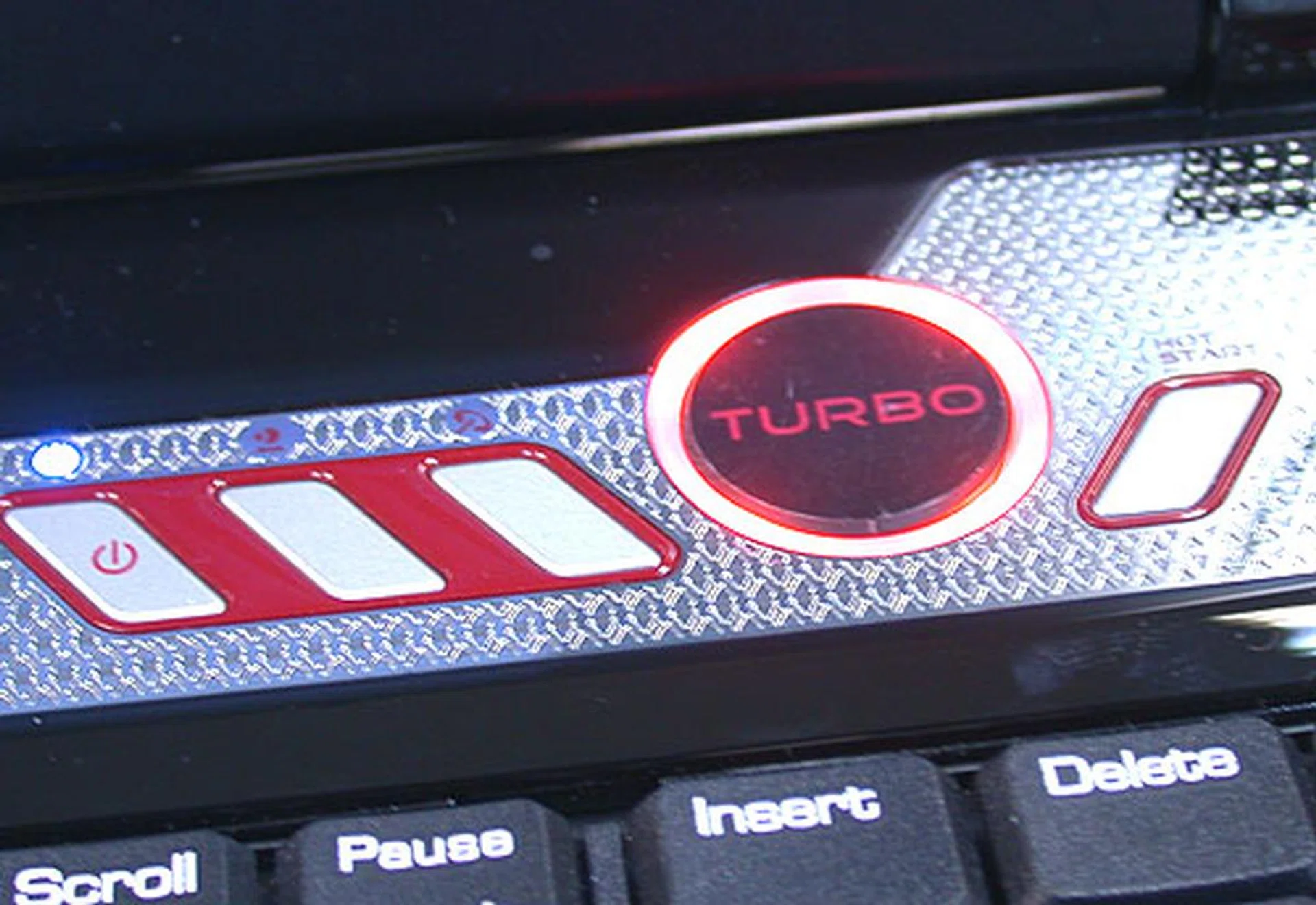
We have seen it on MSI's graphics cards before but having a Turbo mode on a notebook makes more sense historically, since there is precedence for such a move in the past. In this case, performance is boosted by pushing this button (which glows red when activated) and the FSB frequency goes up to 240MHz from the default 200MHz.
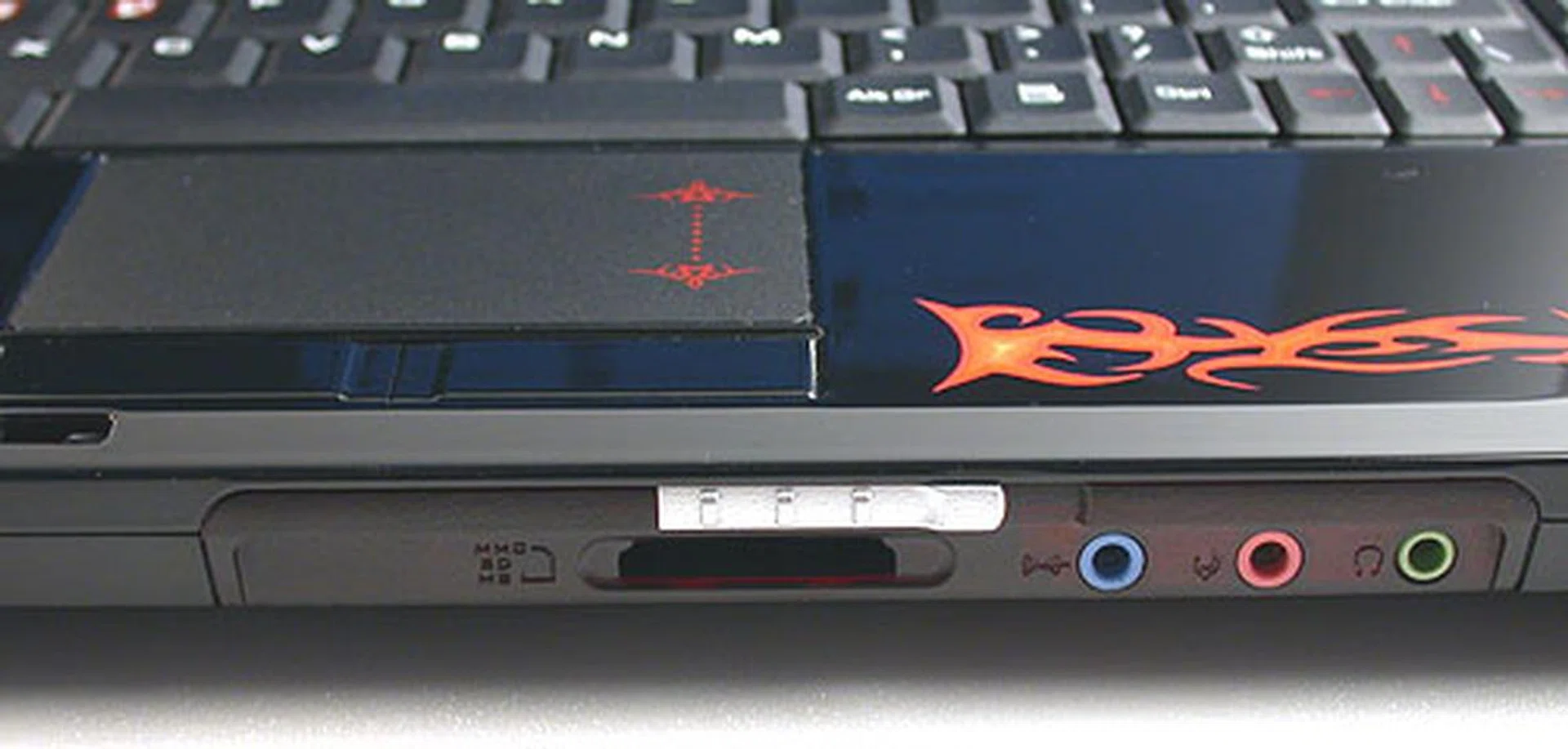
The fiery emblem is etched underneath the shiny black plastic surface so it won't suffer the indignity of wear and tear/fading.
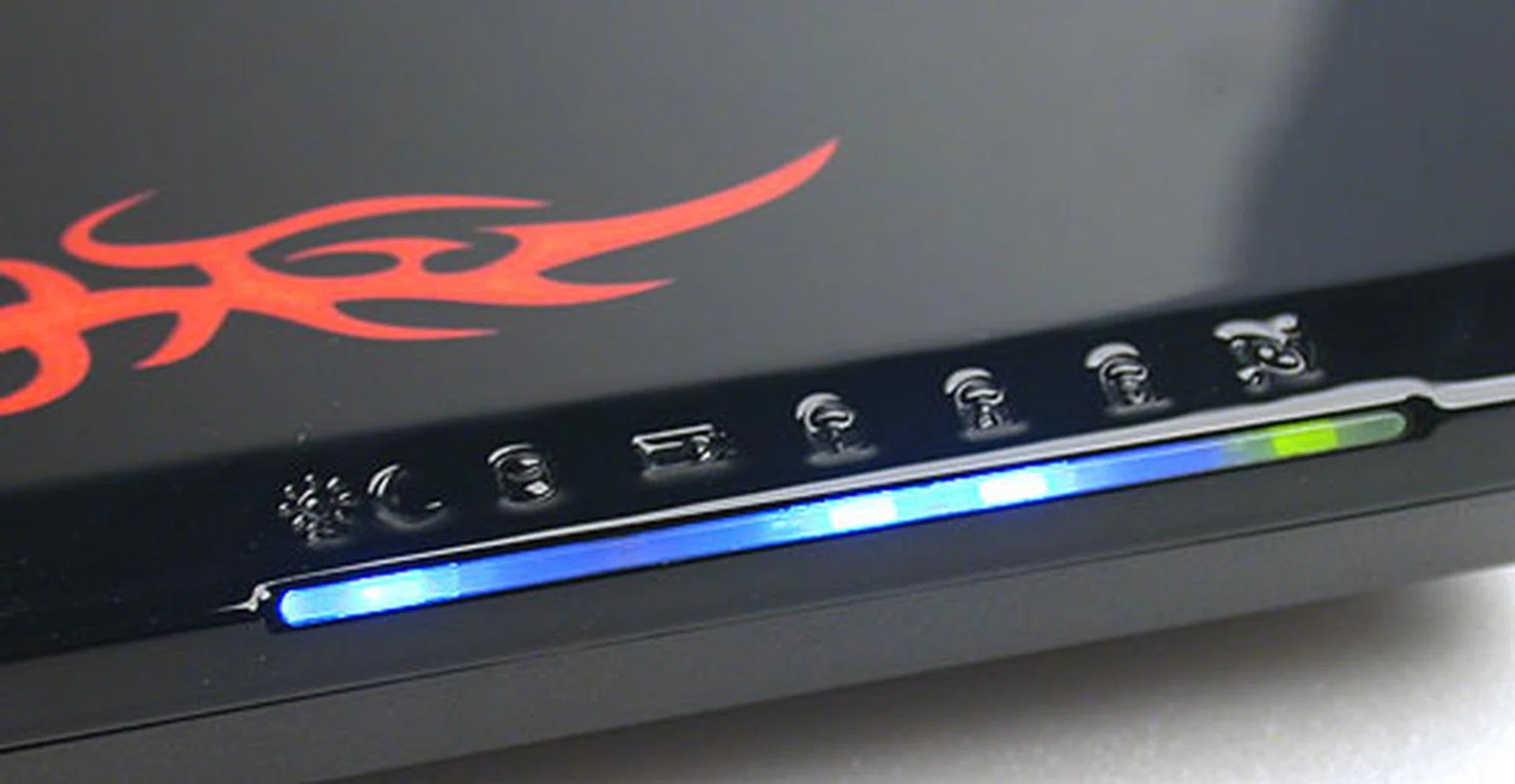
Honestly, we can only stand so many blue LEDs before they start to merge into a blur. Fortunately, the LED to indicate wireless LAN enabled is green.
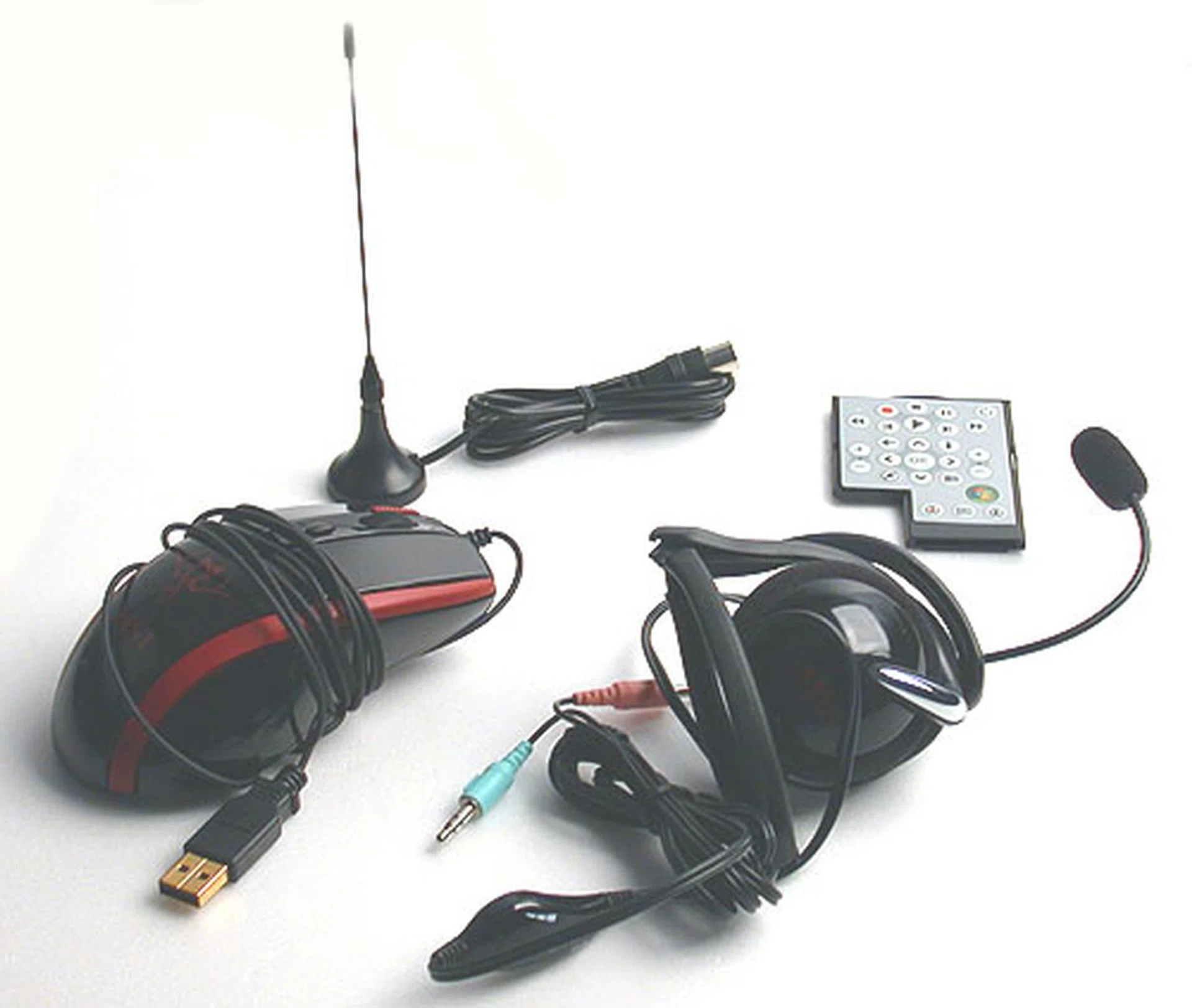
Some of the accessories that we found in our package include a mouse, remote control, antenna for the TV tuner and a pair of headphones. Apparently, there's also a backpack for the GX600 shown on MSI's website.
Inside a Gaming Notebook
So what's the criteria for a gaming notebook? First of all, it has to have the 'horsepower' for the latest games. On the notebook front, that naturally meant using Intel's latest Centrino Duo platform - Santa Rosa. The GX600 has a capable T7300 processor at 2.0GHz, not the highest end model but remember, it's effectively running at 2.4GHz once you hit Turbo. 2GB of DDR2 memory is included, which is equivalent to that of most desktop gaming systems. Most important of all for gamers is the graphics chipset and the GX600 uses one of NVIDIA's more powerful mobile graphics processors at the moment, the DirectX 10 compatible GeForce 8600M GT with 512MB of memory. You can expect decent mid-range graphics performance from this, along with the PureVideo HD features that enhance HD video playback that's only found on GeForce 8400/8500/8600 series.
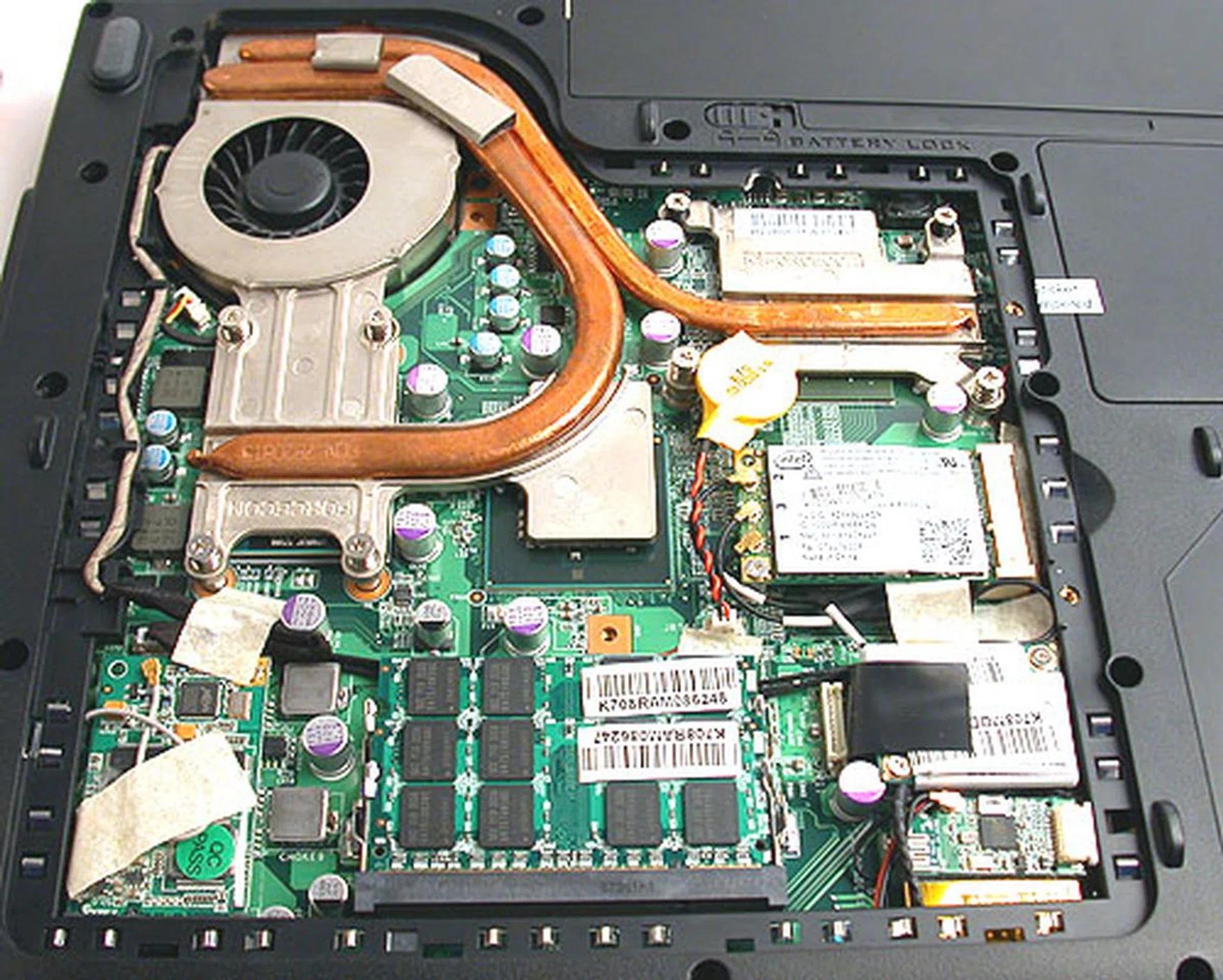
Opening up the GX600 reveals a board populated by solid capacitors and heat pipe cooling, all very contemporary.
Therefore, the GX600 certainly has the hardware to please any notebook gamer. Besides that, it also has a couple of features that increase its attractiveness as a complete multimedia solution. Key to this is the HD DVD drive that reads HD DVDs while remaining capable of writing to DVD/CD media. This is complemented by having a HDMI output and consumers wanting even more can opt for the digital TV tuner so that they can enjoy both movies and television shows on the GX600. And as if MSI was reading our minds, our GX600 comes with a large 250GB SATA hard drive that should be adequate for most consumers, though its 5400RPM rating does make it slower than we would have liked for a performance oriented model.
Surprisingly, MSI's local distributor told us that they are allowing the GX600 to be sold without an operating system pre-installed. So while one would expect Windows Vista at least, given that it is after all a gaming notebook and all the newest games require DirectX 10 available only on Vista, consumers do have the choice of installing their preferred OS, be it Windows XP or even a flavor of Linux. Now if only more PC vendors give such freedom for their products.
Battery Life & Power Consumption
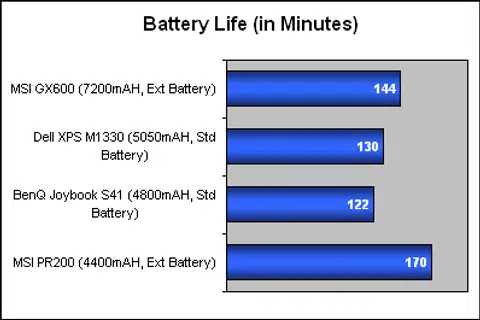
For the past few notebook reviews, we have been using a simple DVD playback test at Balanced settings, with volume and brightness turned to 50% and with all wireless devices disabled to measure battery life. For the GX600, we've finally got a copy of BAPCO's new MobileMark 2007 test suite and as it comes with its own DVD playback test (DVD 2007) for battery life, the GX600 was tested using the included DVD rather than our usual disc (though all our usual settings applied) and MobileMark returned a battery life of 144 minutes.
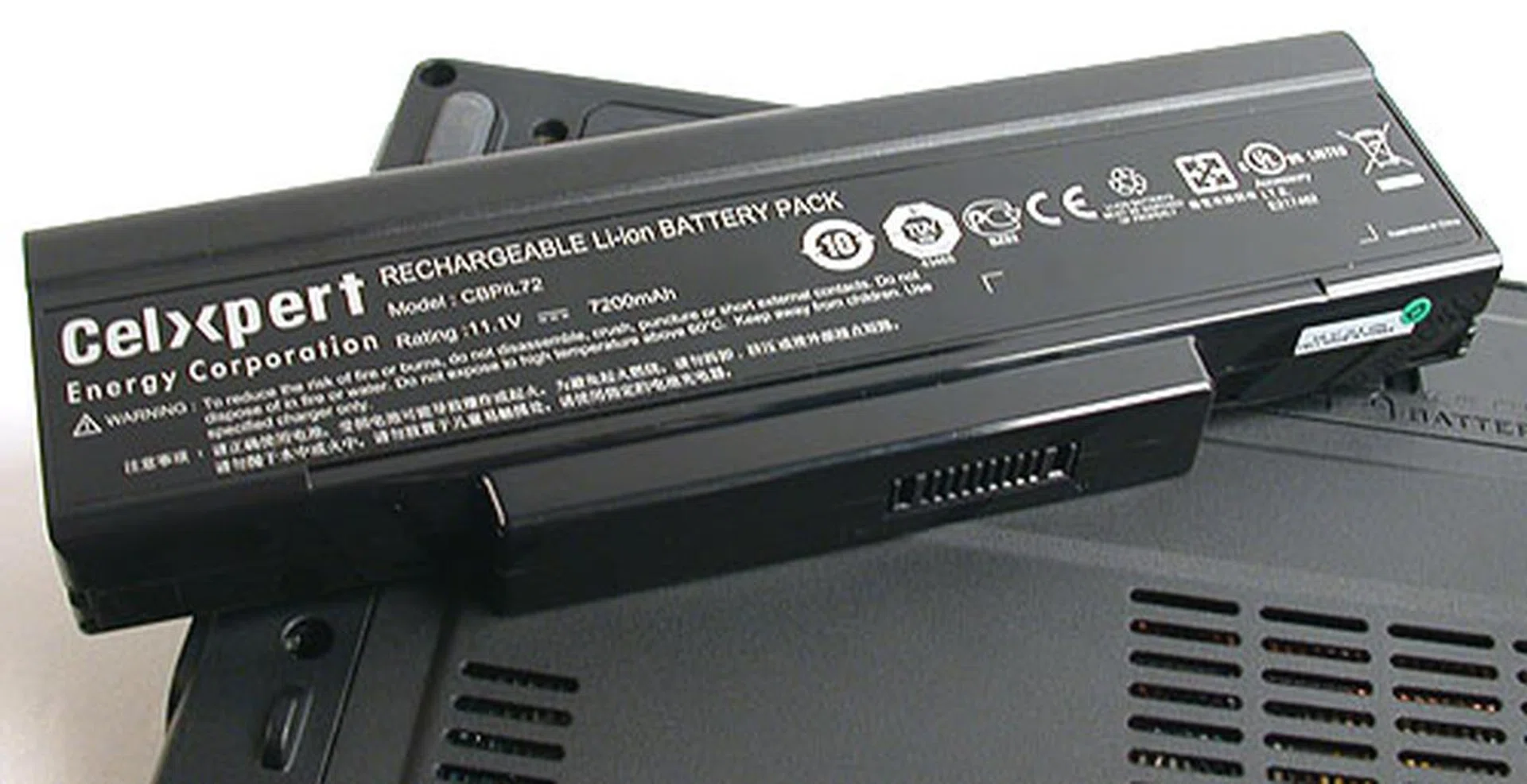
Despite a 9-cell battery, the MSI GX600 only lasted 144 minutes on MobileMark 2007's DVD playback/battery life test segment.
This placed it slightly better than similar Santa Rosa notebooks that we have tested recently, like the Dell XPS and the Benq Joybook. However, the MSI GX600 was equipped with a much more powerful 9-cell battery, and this result is hence a bit disappointing. From a user's point of view though, a battery life of slightly over two hours should be enough for most movies but we aren't sure how it'll last while games, especially when Turbo is enabled.
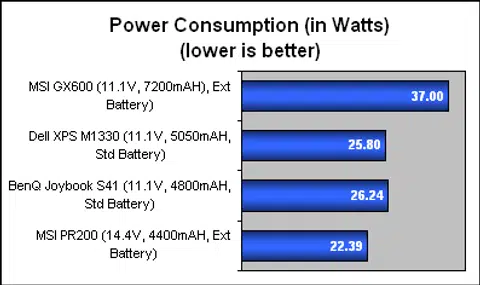
From the specs of the battery, we also managed to determine the average power consumption of the MSI GX600, which was significantly higher than its non-gaming counterparts. The bigger screen and the more powerful graphics on the GX600 probably accounted for much of its greater power consumption numbers.
Portability Index
As usual, we attempted to find out how 'portable' a notebook the GX600 is, compared to some of its peers, taking in account factors like weight, dimensions and battery life. From the graph shown, it's evident that the GX600 won't be your frequent flyer companion, since its dimensions and weight are hardly ideal for such a scenario and when translated into our index, compares unfavorably with more portable models like MSI's own PR200. This however, is pretty much a given for its intended audience and since they are likely to be young male adults, the portability of the MSI GX600 should not be too much of an issue.

Performance Benchmarks
When it comes to evaluating notebooks, we almost never get the ideal scenario where all the notebooks being compared are similarly configured. Instead, there are usually differences, more so for notebooks like the MSI GX600, which targets a specialized segment of the market. Therefore, once again, we have a few notebooks that are somewhat similar in certain aspects that we feel would be appropriate to stack the GX600 against.
Specifications/ Notebook | MSI GX600 | Dell XPS M1330 | BenQ Joybook S41 | HP Pavilion HDX |
Processor | Intel Core 2 Duo processor T7300 (2.0GHz, 4MB L2 cache) | Intel Core 2 Duo processor T7700 (2.4GHz, 4MB L2 cache) | Intel Core 2 Duo processor T7100 (1.8GHz, 2MB L2 cache) | Intel Core 2 Duo processor T7700 (2.4GHz, 4MB L2 cache) |
Chipset | Intel PM965 | Intel PM965 | Intel PM965 | Intel PM965 |
FSB | 800MHz | 800MHz | 800MHz | 800MHz |
Memory | 2 x 1GB DDR2 | 2 x 1GB DDR2 | 1 x 1GB DDR2 | 2 x 1GB DDR2 |
Hard Drive | 1 x Western Digital 250GB SATA (WD2500BEVS-22UST0) - 5400RPM / 8MB Buffer | 1 x Seagate 160GB SATA (ST9160823AS) - 7200RPM / 8MB Buffer | 1 x Hitachi 120GB SATA (HTS541612J9SA00) - 5400RPM / 8MB Buffer |
|
Video | NVIDIA GeForce 8600M GT | NVIDIA GeForce 8400M GS | NVIDIA GeForce 8600M GS | ATI Mobility Radeon HD 2600 XT |
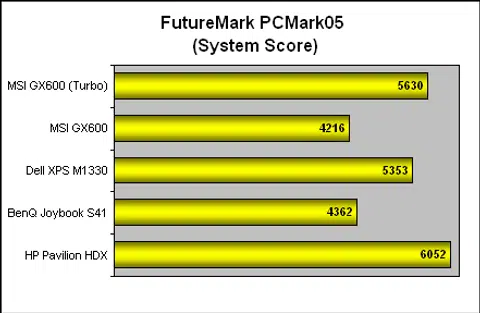
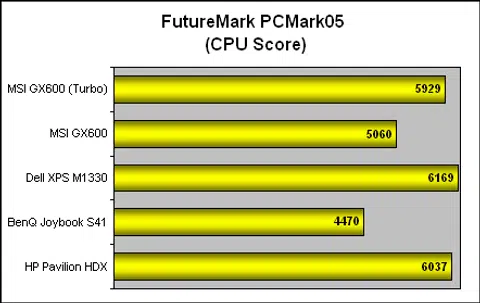
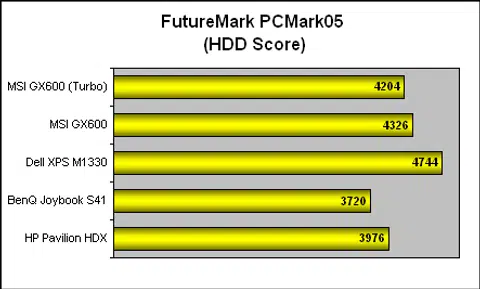
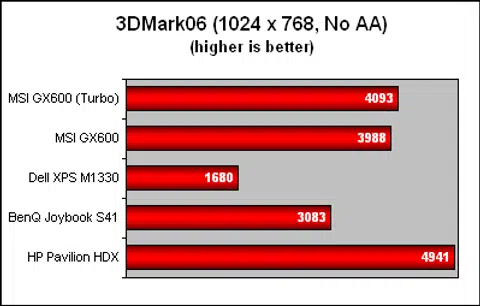
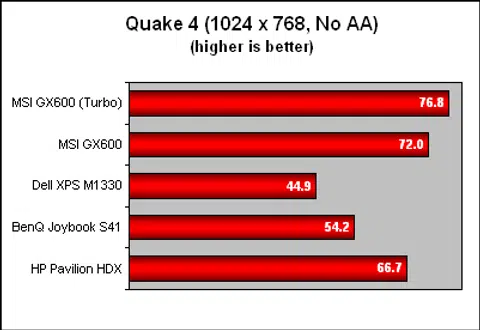
Although we'll be showing all the results for all the notebooks in the table above, from a CPU and system's perspective, the Dell XPS and the HP Pavilion HDX should pose the stiffest challenge to the GX600, as they both have superior processors unless Turbo mode is enabled. Meanwhile, the HP Pavilion HDX and the BenQ Joybook are direct competitors of the GX600 in terms of their graphics chipset, with the Joybook's GeForce 8600M GS slightly inferior to the GT version on the GX600. Finally, with the exception of the Dell notebook, all the other notebooks were using slower 5400RPM hard drives. For evaluation purposes, we installed the relevant drivers from MSI and the GX600 was running Windows Vista Ultimate.
System Benchmarks
We did try our latest copy of MobileMark 2007 on the MSI GX600 but ran into some issues during installation and had to abandon it in favor of PCMark05, which had been the only synthetic system benchmark that is supported in Vista. We first ran the GX600 in its default setting and then tried its Turbo mode. This brought along a jump in performance as these graphs illustrate. Both the Dell and HP were clearly faster than the MSI GX600 in its normal state, though all three produced very close scores once Turbo was enabled. Having a 7200RPM hard drive was also a significant boost for the Dell and more than anything suggested by these scores, it will probably have the most visible impact on user experience.
Graphics Benchmarks
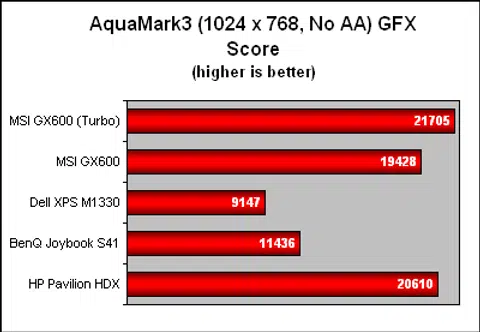
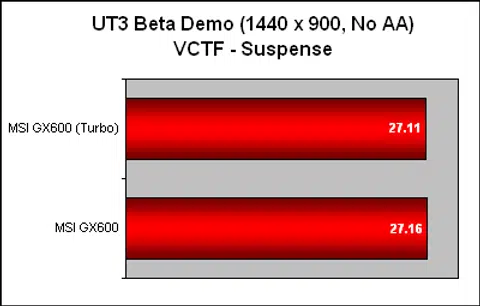
Since the GX600 is first and foremost a gaming notebook, we have included a couple of games along with the standard 3DMark benchmark. Even without Turbo, the GX600 is already among the leaders in our graphs, with the HP Pavilion HDX the closest challenger due to its mid-range Radeon HD 2600 XT GPU. As seen from the Quake 4 scores, Turbo did produce a few more frames though the newer benchmark here, the beta version of Unreal Tournament 3 showed that increasing the CPU speed may not work all the time, suggesting that new games will lean more heavily on the GPU. In a roundabout way, it does give the GX600 an edge, since it's graphics chipset is definitely one of the better ones currently.
Nevertheless, the overall gaming experience on the GX600 has been mostly positive, not only from these scores, but from actual gameplay. Complemented by its keyboard, the games we tried were smooth and lag free and we were actually able to forget it's a notebook for a while. However, long term use could be another issue, since unlike a proper keyboard, there's no gradient for the keys on the notebook and that could spell repetitive stress disorders.
Conclusion
What does it mean to be a gamer? This is a question that is probably best left to our colleagues over at GameAxis for an in-depth discussion, but an unmistakable trend is that computer and video games have gone mainstream now. The gaming audience as a whole has increased substantially, but it would seem from MSI's design that they're focusing on the younger. If you're a big fan of the Need for Speed series or Fast and Furious, the GX600 may appeal.
For most consumers, we find its design may be a little too loud and crass to be carrying around. Although MSI probably wanted to make it clear that the GX600 is really meant for gaming, in our opinion, the designers overdid it. A better option would have been to partner with laptop skins designers like Garskins to create customizable skins for the GX600 instead, something that other vendors like HP has tried.
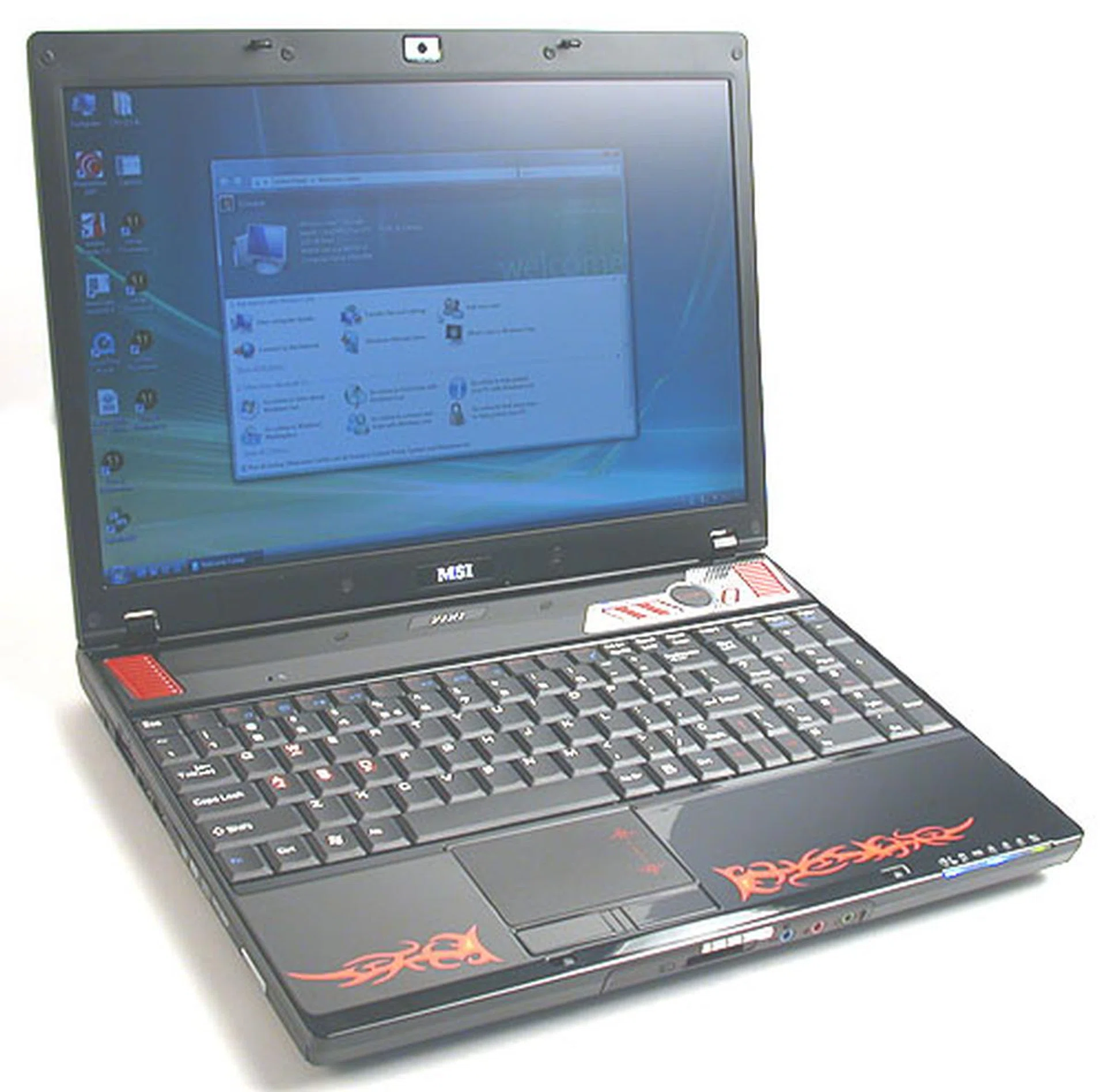
Don't judge a book by its cover. If you can get past its tacky and loud exterior, the MSI GX600 does boast the performance desired by gamers.
Barring that exterior, the MSI GX600 is actually a rather powerful gaming notebook, with above average specifications for its category. The inclusion of the Turbo mode for a quick boost in CPU performance is unique, though it won't suddenly make it the fastest gaming notebook around, what with SLI enhanced versions like Dell's XPS M1730 in the market. The GeForce 8600M GT graphics chipset can handle most games, including DirectX 10 games at reasonable resolutions. Its multimedia aspect is also not neglected with a proper HD DVD drive and HDMI output, though we would have expected a better speaker system to go with its video and graphics prowess.
And it's not merely the specifications. Actual gameplay experience has been quite positive, with the GX600 chewing up older games like Quake 4. It does require users to tone down some settings for the new Unreal Tournament 3 beta demo though, especially if you intend to play at the native resolution. Audio could be improved however, but the full sized keyboard did compensate for a better gaming experience.
Dampening the positive performance however, is its equally large appetite for power. The GX600 has one of the higher power consumption numbers for its class and while we believe performance and power goes hand in hand, it does seem a bit excessive. Battery life therefore is mediocre at slightly over 2 hours even when equipped with a 9-cell extended battery for nothing more than DVD playback. At least its weight at 2.6kg is not overly above the norm for its category, so the determined user can still game on the road.
Finally, one of the first or last factor in any purchase - price. The MSI GX600 doesn't come cheap at around S$2899 (US$1999 without OS). In fact, with notebooks becoming more affordable and powerful, the premium of the GX600 may look less attractive at first, until you realize that the price is inclusive of an HD DVD drive, which is still a rarity today. Still, it will take a certain breed of gamers to fall in love with this gaming notebook.
Our articles may contain affiliate links. If you buy through these links, we may earn a small commission.