
Motorola Milestone 2 - From One Milestone to Another
The Motorola Milestone 2 features an improved QWERTY keyboard, a faster processor and Android 2.2. Is it able to take on the competition? Let's find out.

Entering New Territory
When the was released in March 2010, it was one of the few QWERTY sliders in the market. Motorola did what few could by packaging impressive specifications into a surprisingly slim profile. The Milestone was praised for its smooth performance, seamless integration of a physical keyboard and a commendable touch screen experience.
However, the pace of development for Android picked up in the later part of 2010 with many companies jumping on the bandwagon. The year ended with the introduction of dual core processors and Android 2.3. With its single core and Android 2.1, the Milestone was feeling its age. It was about time for Motorola to renew its flagship model to take on the newer competitors.
Launched in February 2011, the Motorola Milestone 2 retains a similar form factor, though there have been significant changes under the hood. For one, the Milestone 2 is equipped with a 1GHz processor running Android 2.2, also known as Froyo. It also has a new version of its custom user interface, known as MOTOBLUR.
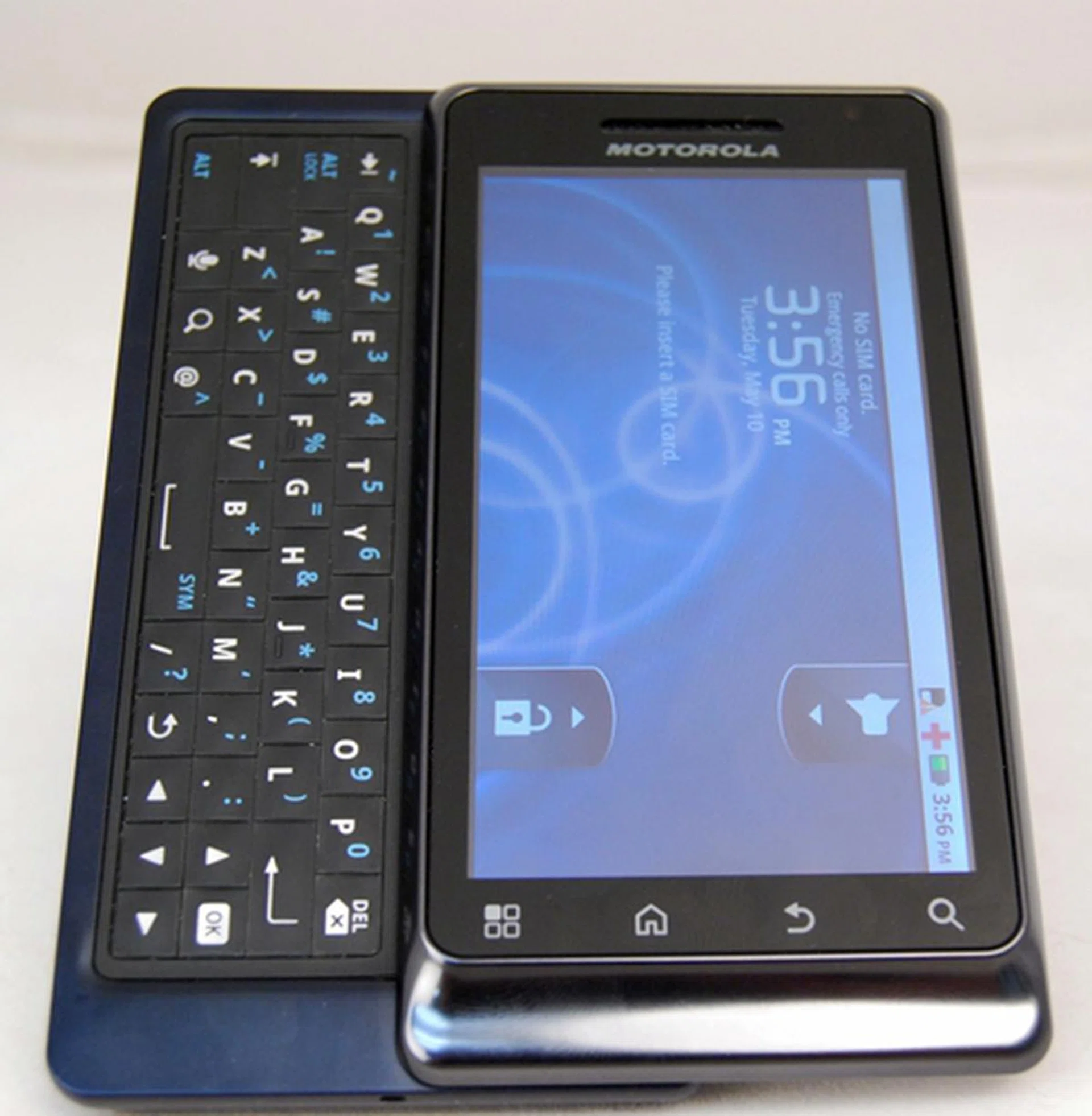
Will the Motorola Milestone 2 replicate the success of its predecessor?
When you first set sight on the Motorola Milestone 2, you will hardly notice any difference from its predecessor. Indeed, the Milestone 2 retains an almost similar chassis, with only minimal changes to its dimensions and QWERTY keyboard. The Milestone 2 weighs slightly heavier at 169g, a negligible increase of 4g. More importantly, it maintains the same excellent build quality that gives it a solid feel in your hands.

The Motorola Milestone 2 looks no different from its predecessor.
Gracing the front of the handset is a 3.7-inch TFT capacitive screen with four touch sensitive keys located at the bottom. Strangely, Motorola has changed the order of the keys. In its predecessor, the buttons are in this order - Back, Menu, Home and Search. In Milestone 2, except for the Search button, the other three buttons have exchanged positions, with an order of Menu, Home and Back. Existing Milestone owners who are used to the old layout may take some time adapting to the new one if they upgrade to the Milestone 2.
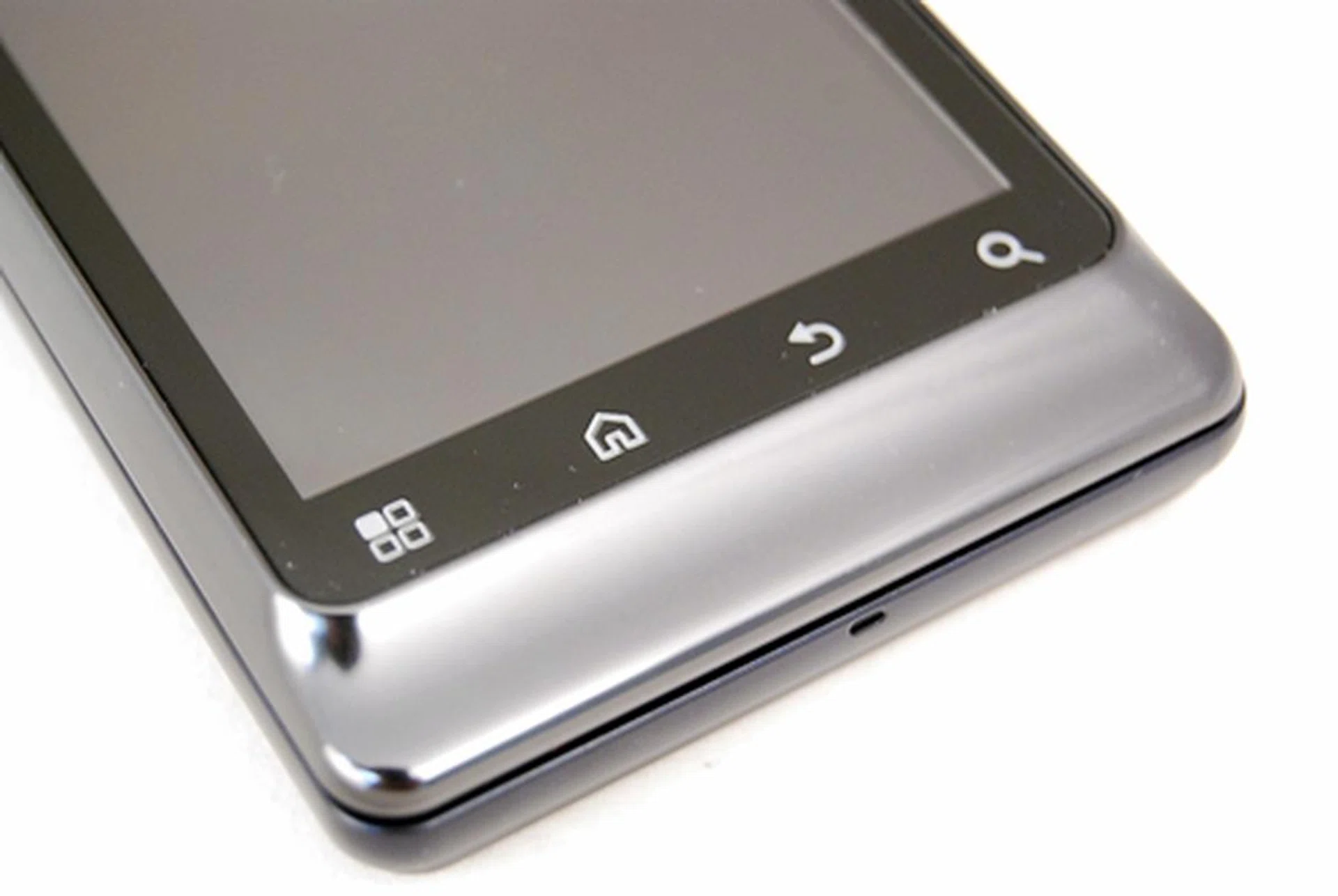
We are puzzled as to why Motorola decided to change the order of the buttons.
The physical buttons around the chassis remain largely unchanged. On the top right corner, you will find the 3.5mm audio jack and Power / Screen lock button. We definitely prefer the new Power / Screen lock button as it has a slight bump as well, compared to the previous one which was flushed with the surface. However, there is still room for improvement as there were occasions when it was hard to find the key without looking. It would have been easier if the button is made even bigger or longer.
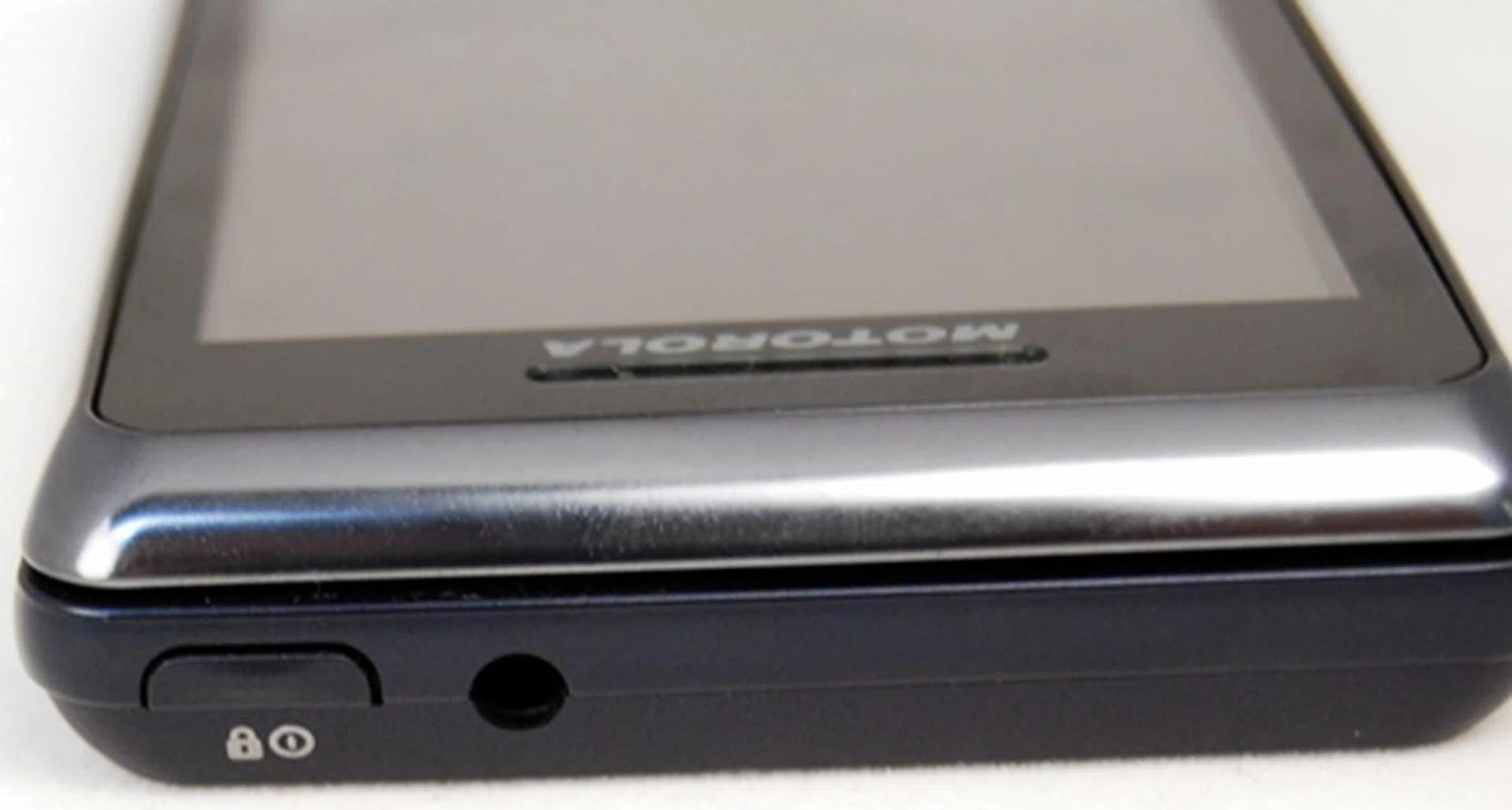
The Power / Screen lock button and 3.5mm audio jack are located on the top right hand corner of the phone.
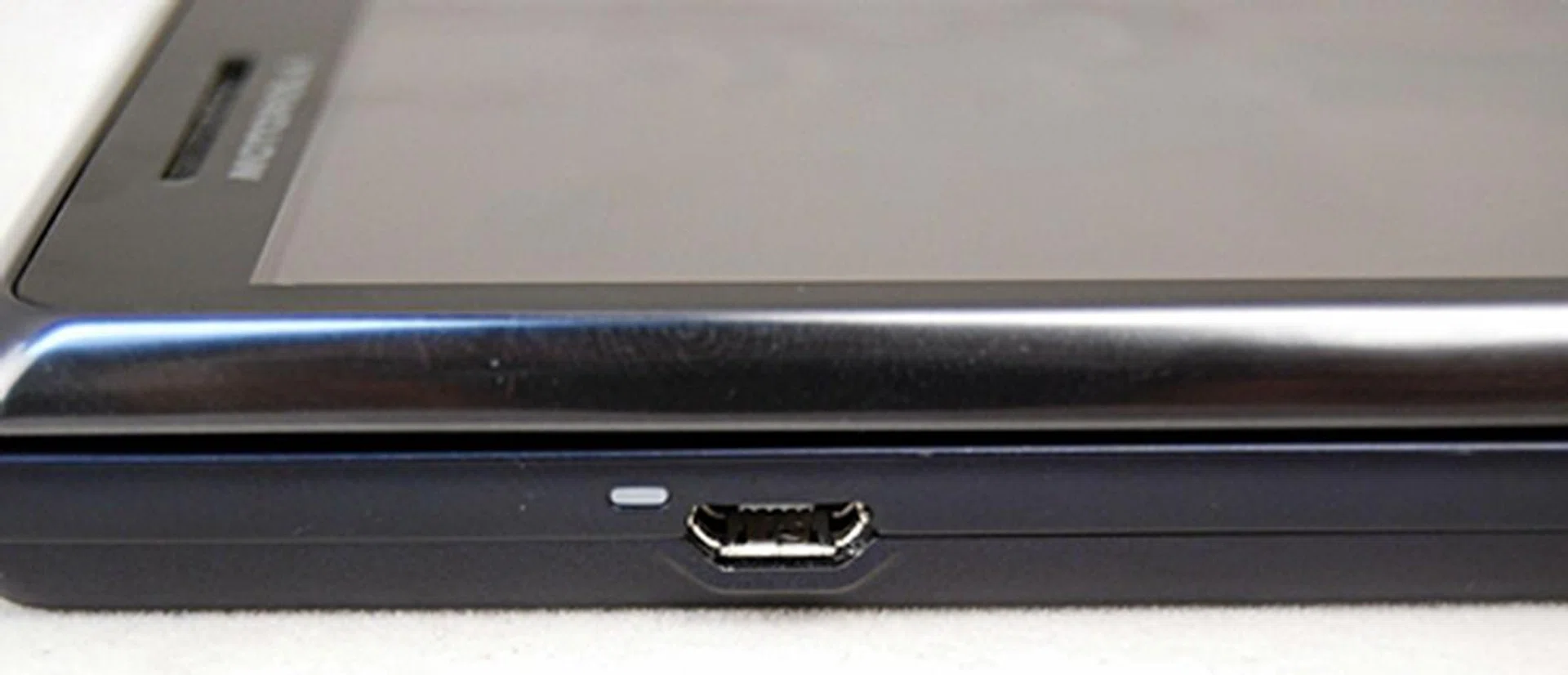
The microUSB port is used for charging and data transfer.
Slide up and you will uncover the four-row QWERTY keyboard. The slider mechanism works smoother now, compared to the original Milestone where you need to exert some force. Once fully extended, the slider locks firmly in place. The QWERTY keyboard has an improved design that will have existing Milestone owners and messaging junkies cheering. The keys are no longer flushed with the surface. They have a slight bump, which provide a better tactile feel. This allows for a faster and more accurate typing experience.
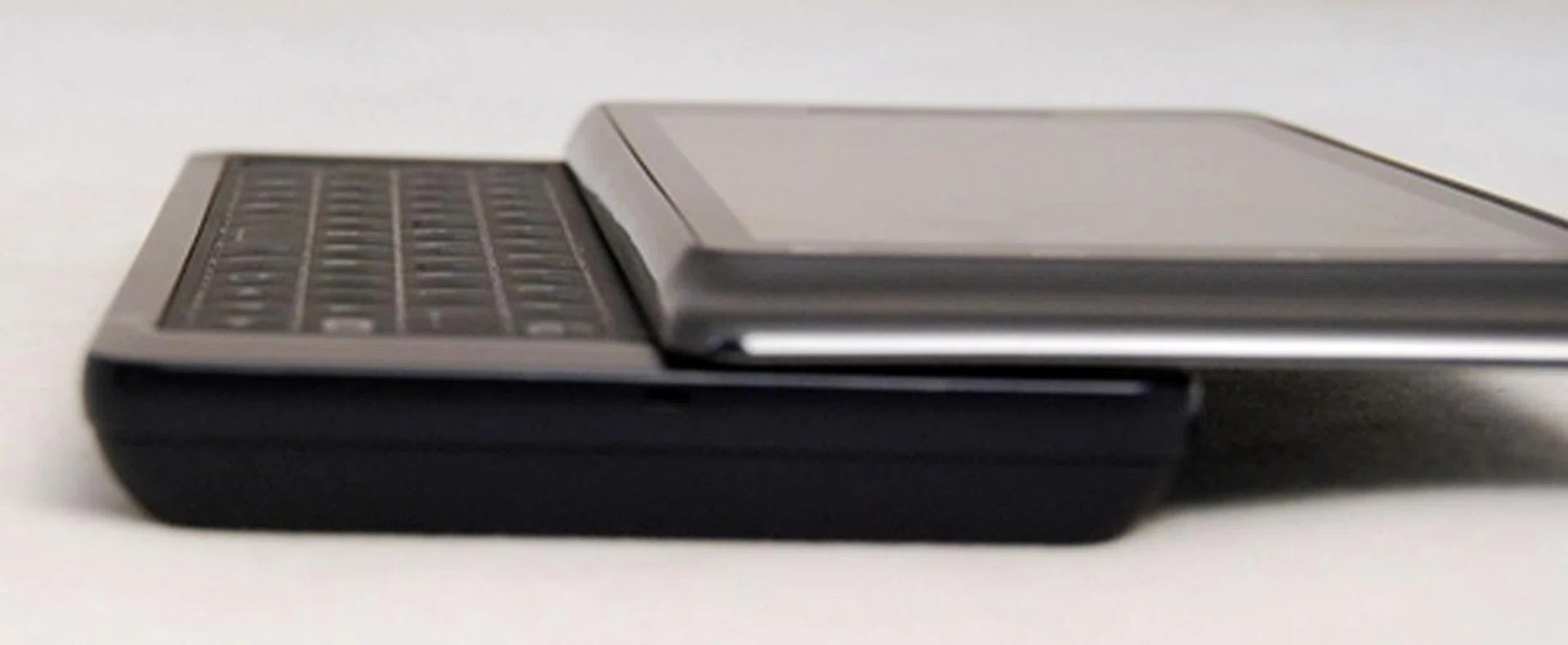
Notice the slight bump on each key.
The directional pad in the first Milestone is now replaced by a set of arrow keys, which makes space for more and larger keys. The arrow keys come in handy when you scan through large bodies of text. Commonly used keys such as Enter and Alt are larger. Moreover, three new keys are added - the voice input, OK and Alt Lock keys. The Alt Lock key is a welcome addition as you do not need to press Alt each time you want to type a digit. Now, you just have to engage the Alt Lock key once and you can bang out strings of numbers quickly.
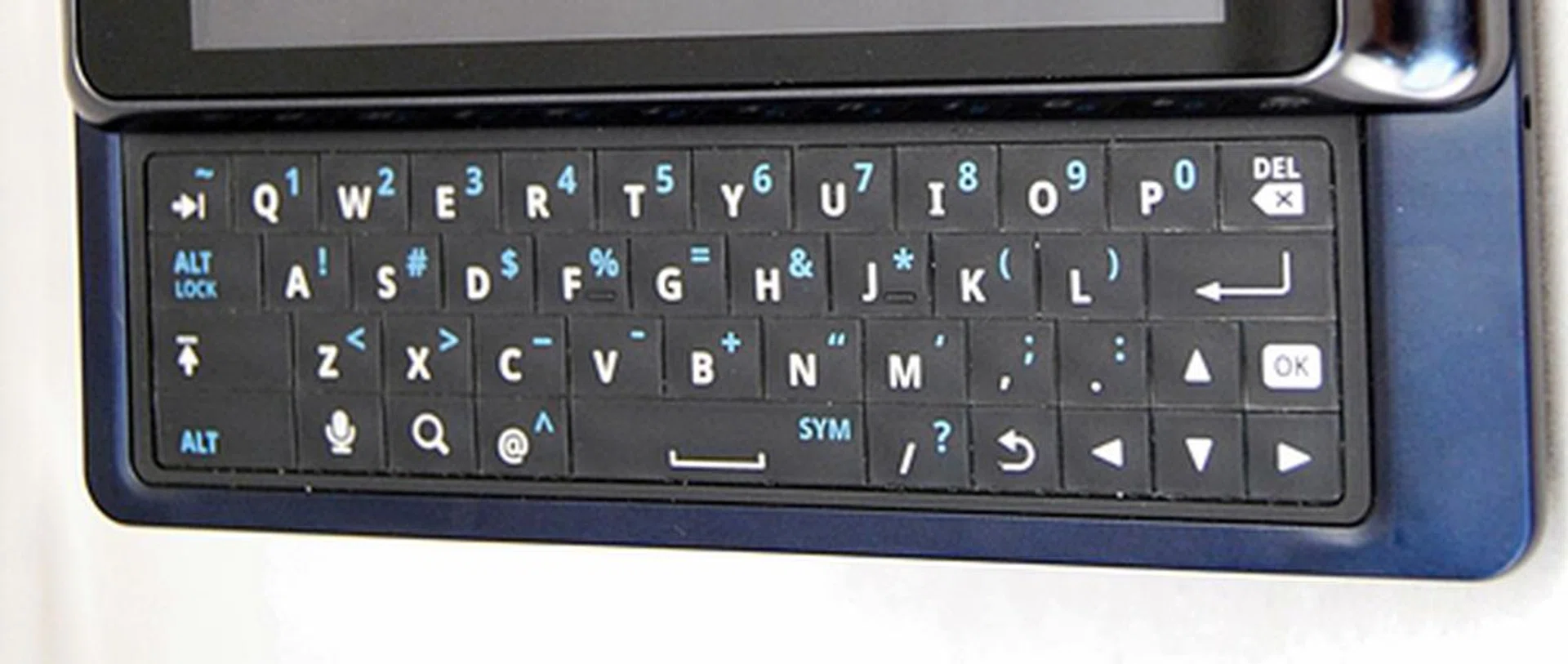
Minor yet beneficial changes to the layout of the keyboard.
At the back, you will find the 5-megapixel camera and dual-LED flash in the same position. We would have liked the inclusion of a lens cover to protect the camera from scratches as the lens is exposed.
Occupying about two-third of the back is the battery compartment which houses a 1390mAh Li-ion battery. The SIM and memory card slots are only accessible if you remove the battery, which is troublesome if you need to change cards often.
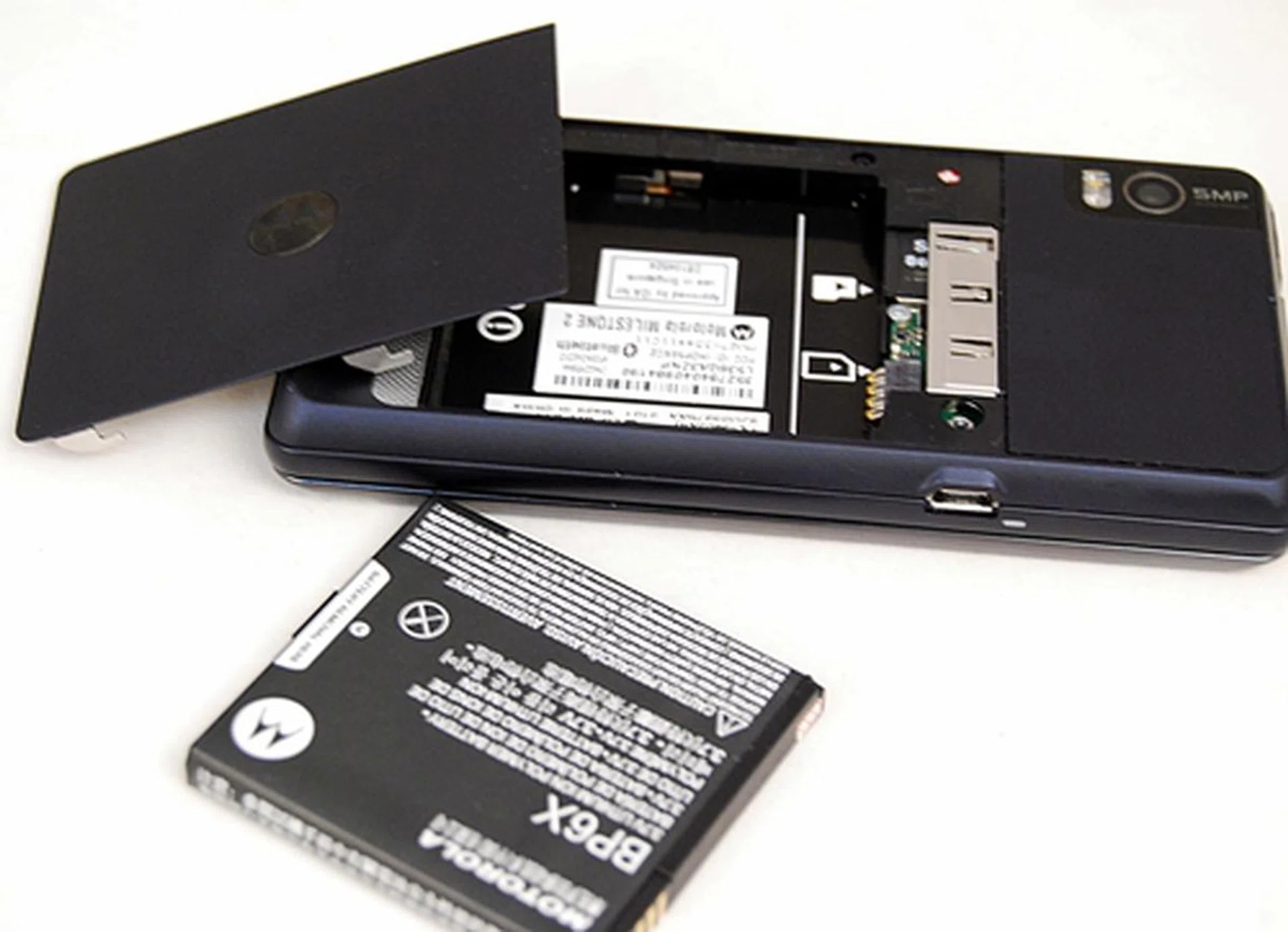
You have to remove the battery cover and the battery itself to access the memory card slot, which is inconvenient.
Froyo with a Topping of MOTOBLUR
This smartphone comes with Froyo and a new version of MOTOBLUR. Froyo brings two significant features - Adobe Flash support and mobile hotspot support.
Unlike earlier versions of the Android OS, Froyo is the first to come with full support for Adobe Flash. This means that you can now watch videos and play Flash games on the Motorola Milestone 2, giving you a full web experience that resembles that on your personal computer.
The Milestone 2 is also able to function as a wireless mobile hotspot. It can connect up to five devices simultaneously. This will be useful when you are in a location where there is no internet access or available Wi-Fi networks.
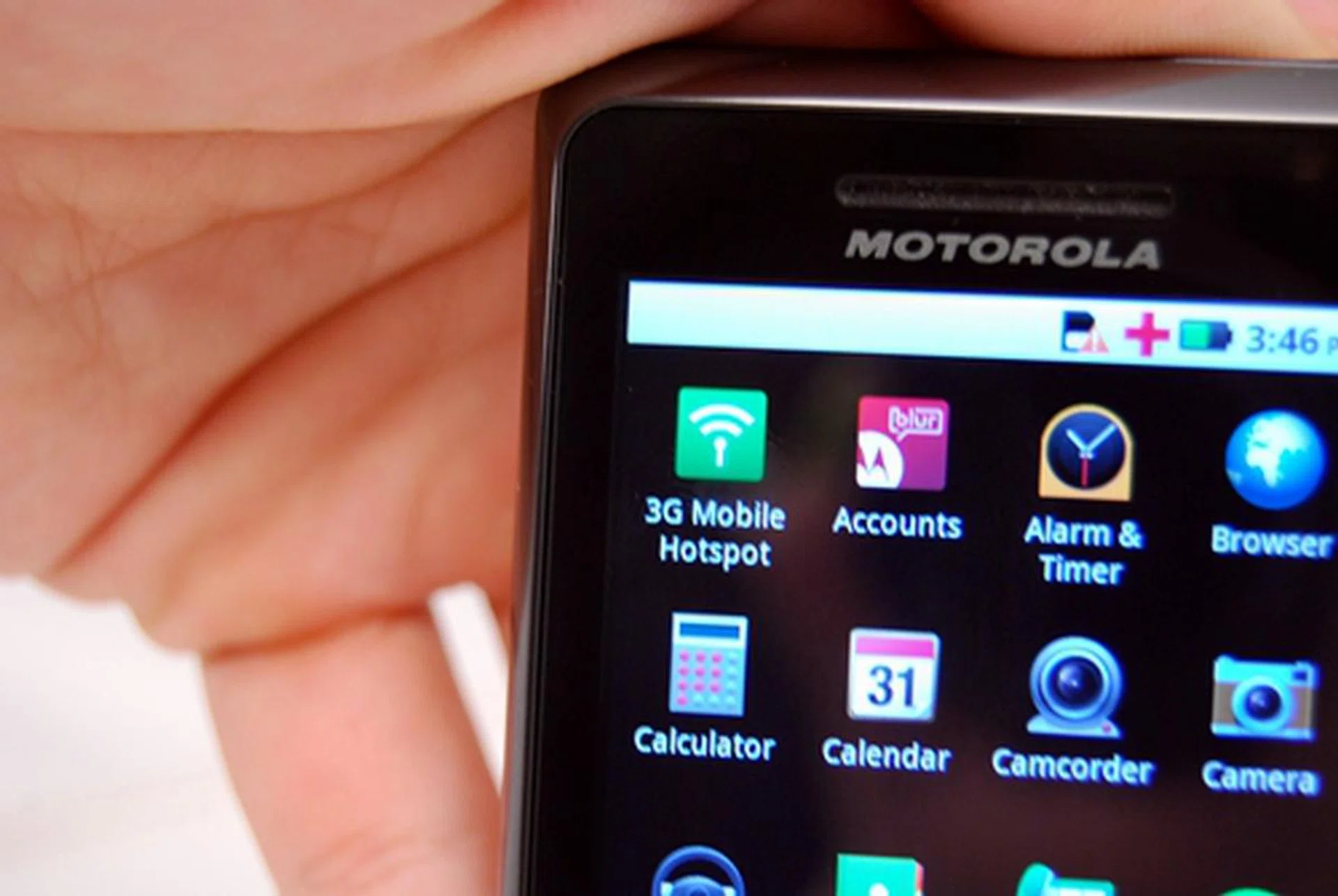
You can now share the phone's Internet connection with your friends, thanks to the wireless mobile hotspot capability.
The new MOTOBLUR overlay comes with considerable improvements that allow for more control and customization. For example, MOTOBLUR allows you to customize seven home screens, which is four and two more than the previous Milestone and the stock Android UI respectively. This gives you ample space to place your favorite applications. When browsing through the different home screen panels, a row of icons indicates which home screen panel you are on. We like the convenience of switching to any panel without going through the rest.
Moreover, you can customize the home screens with widgets from Android and Motorola. These widgets provide quick access to phone settings, messaging and social network feeds.
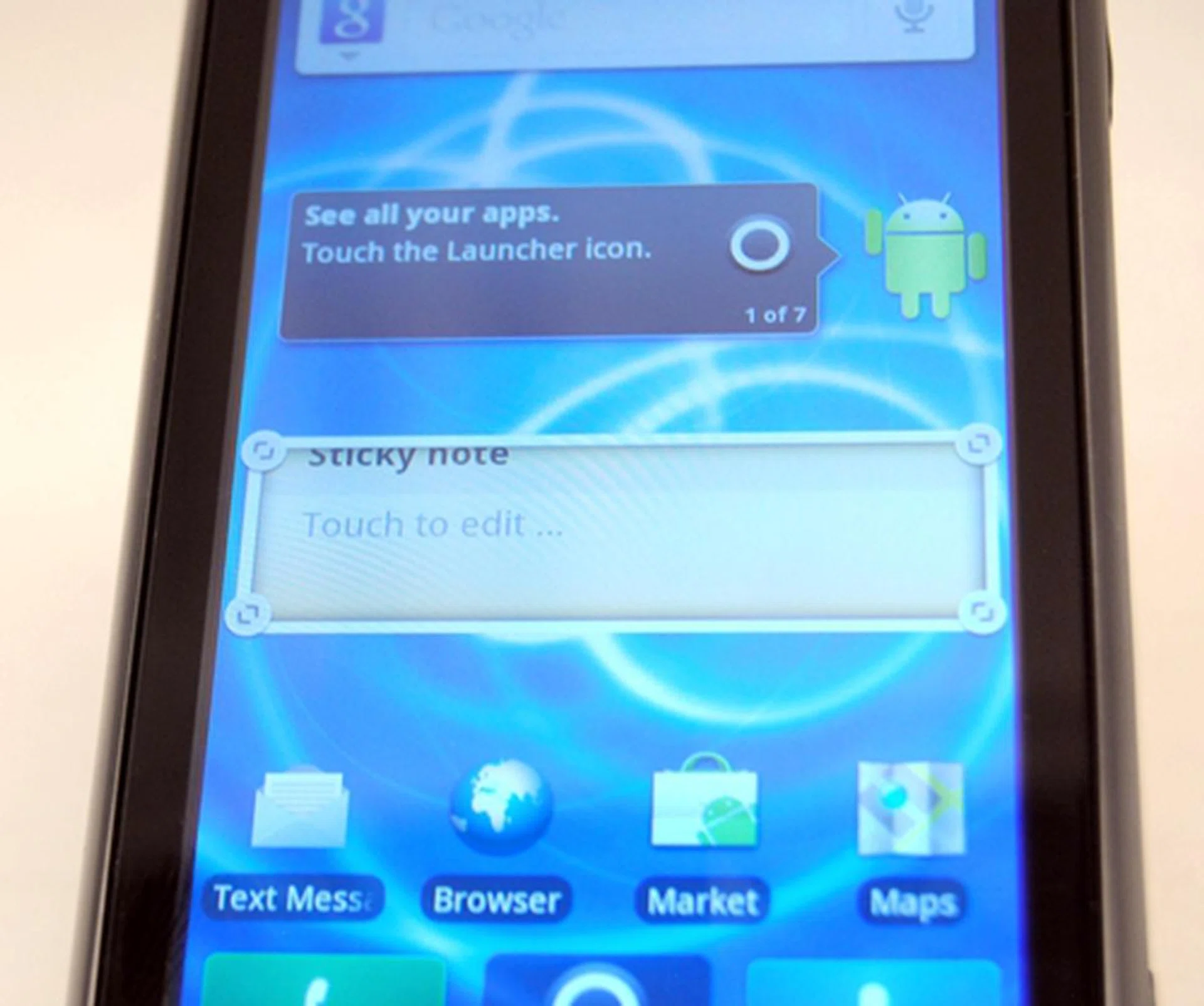
What is unique about Motorola’s widgets is that they can be resized. You click and hold one widget to move around the home screen page. A white frame with resize handles will then surround the widget.
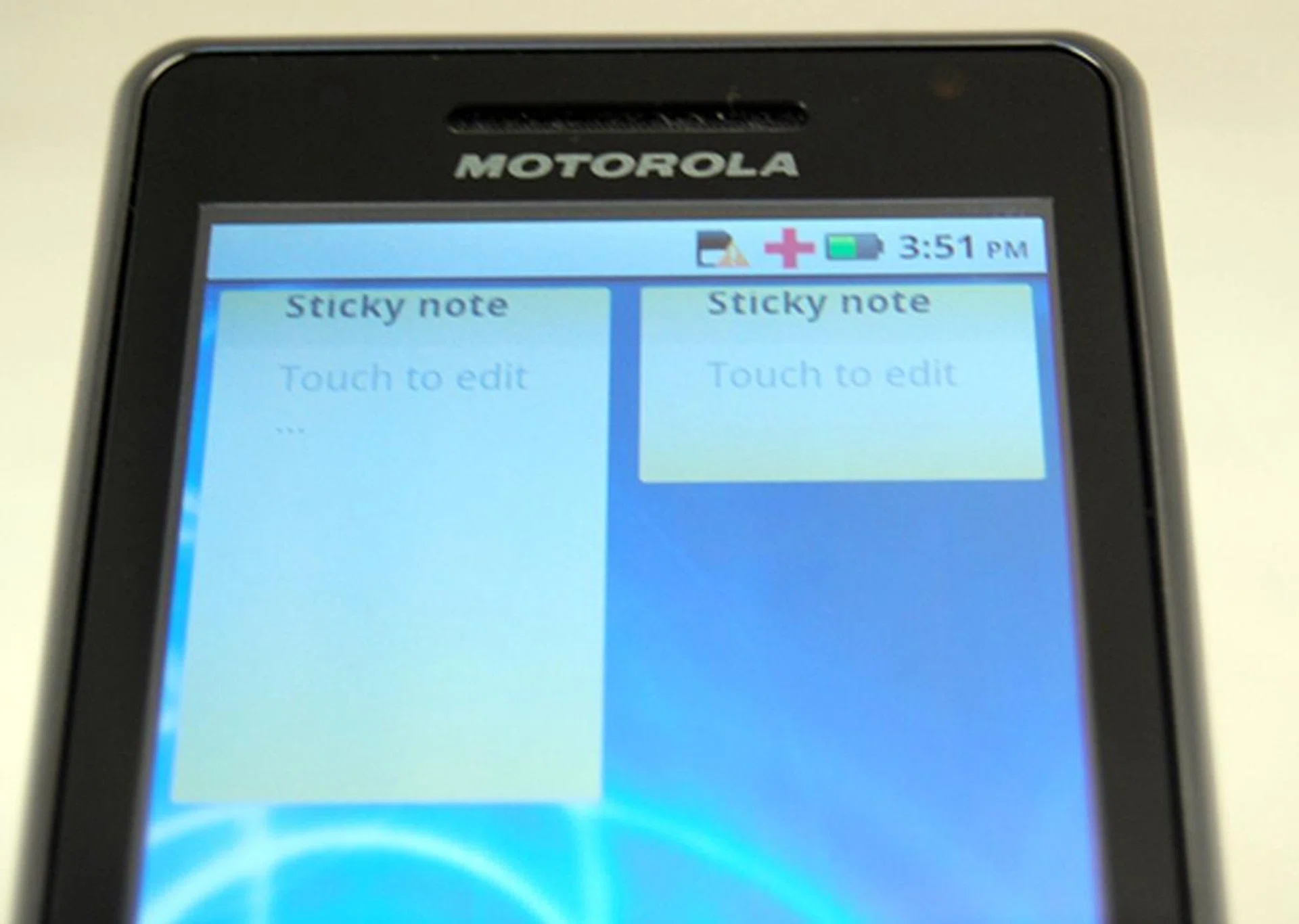
You can resize any of the Motorola widget's size to your liking.
MOTOBLUR is also developed with a focus on social messaging. One widget, known as the Messages widget, allows you to choose what to follow. You can choose to follow Facebook messages only or combine text messages together in the widget. There is also another widget, Social Status, that allows you to update your status on Facebook, Twitter or any other social networking sites simultaneously. This is very convenient especially if you want to post a quick shout out. We are looking forward to more of such widgets from Motorola in the future so that there are more ways to customize the phone.
Powering the Motorola Milestone 2 is a 1GHz processor and 512MB of RAM, a significant upgrade from the Milestone’s 550MHz processor and 256MB RAM. With such bumped up hardware, the Milestone 2 was able to manage seven applications simultaneously without getting bogged down.
Those who need to see the actual performance numbers can jump to the next section where we compare the Milestone 2 against some of its closer competitors.
System Performance
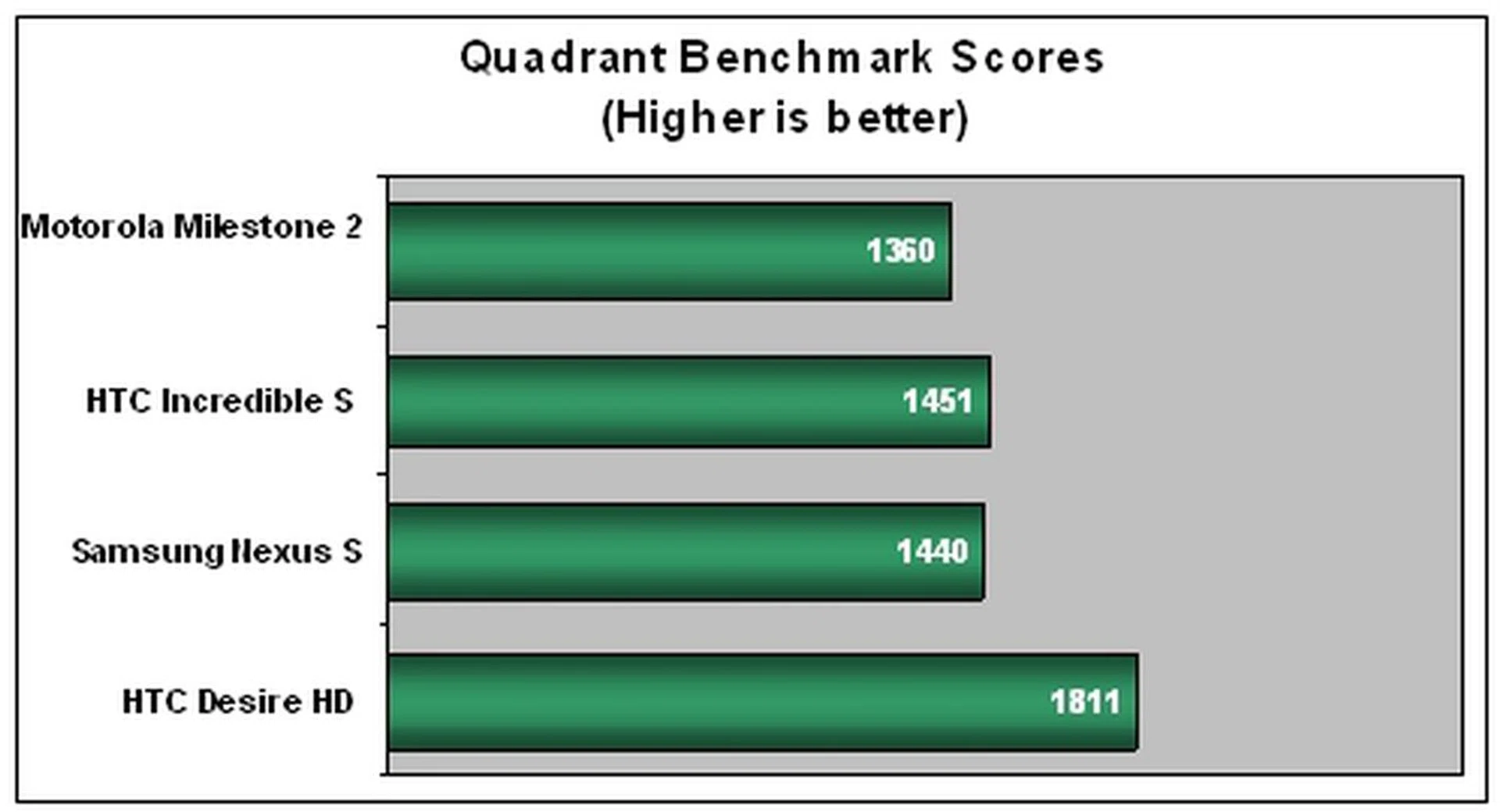
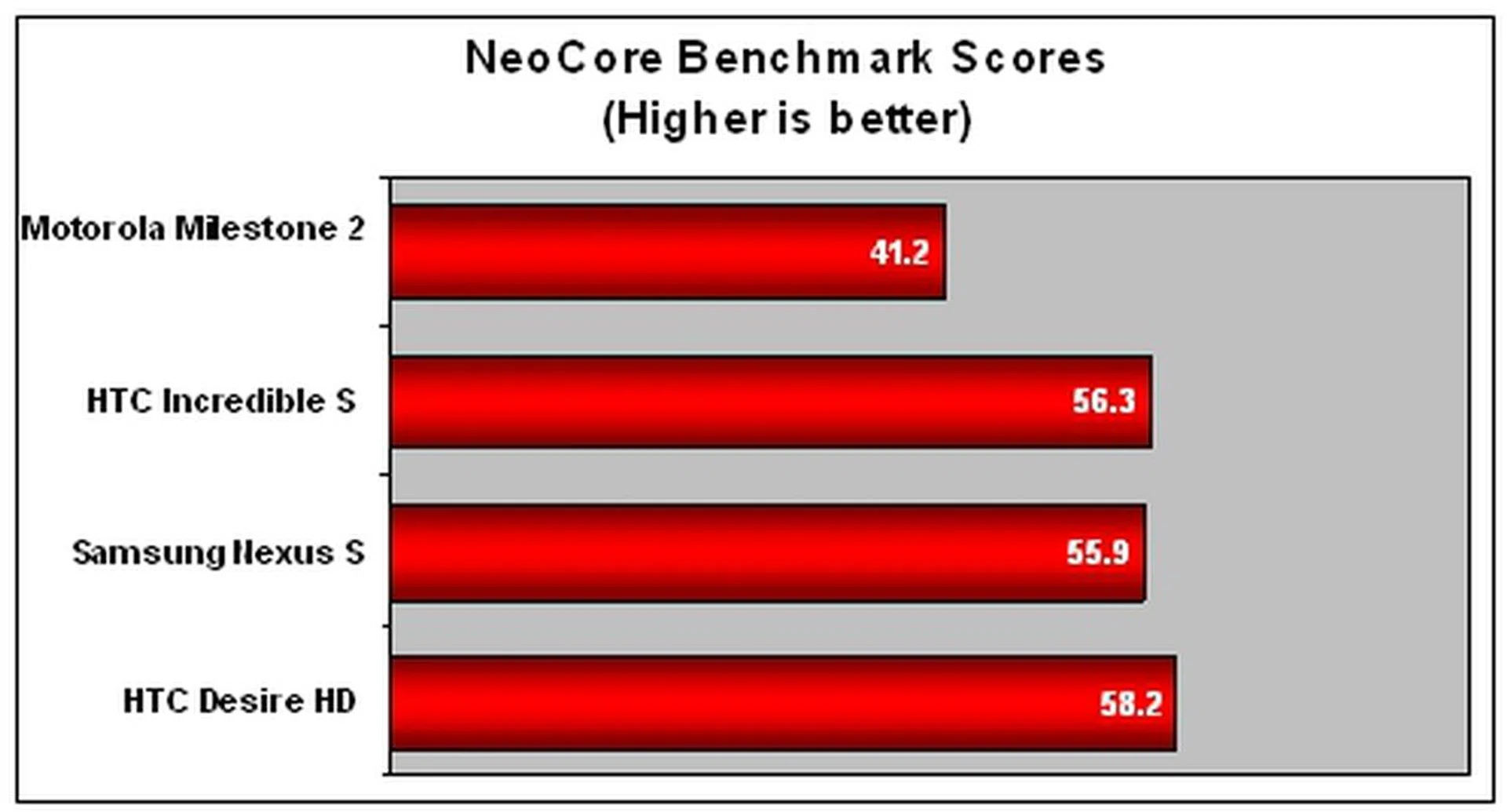
Now comes the critical section of our review - the benchmarking of the Motorola Milestone 2. If you have been following our mobile phone reviews, you will be familiar with these two benchmarks below. If not, here is a summary of the benchmarks we use:
- Quadrant: It tests the CPU, memory, I/O and 3D graphics performance of a mobile device, giving you a general idea of how the device performs.
- NeoCore: It assesses the graphics performance of a mobile device.
In other words, these benchmarks give you a clearer picture of where the Motorola Milestone 2 stands among its competitors. Do note that these benchmarks should not be the final word on the performance of these phones, though they give an appropriate estimate. They are all tested with the stock firmware.
Device | Motorola Milestone 2 | HTC Incredible S | Samsung Nexus S | HTC Desire HD |
CPU | TI OMAP 3630 1GHz | Qualcomm Snapdragon MSM8255 1GHz | Hummingbird Cortex-A8 1GHz | Qualcomm Snapdragon MSM8255 1GHz |
GPU | PowerVR SGX530 | Qualcomm Adreno 205 | PowerVR SGX540 | Qualcomm Adreno 205 |
RAM | 512MB | 768MB | 512MB | 768MB |
OS | Google Android 2.2 | Google Android 2.2 | Google Android 2.3 | Google Android 2.2 |
As seen from the results above, the Motorola Milestone 2 does not fare as well as the other Android phones. The Milestone 2 has less RAM compared to the HTC Desire HD and Incredible S, thus this might have accounted for the less stellar performance in the two benchmarks. The Samsung Nexus S manages to edge out the Milestone despite having the same amount of RAM. This might be due to the stock Android 2.3 OS (codenamed Gingerbread) which is optimized for faster speeds.
Nevertheless, the Motorola Milestone 2 felt snappy when navigating through the interface. Applications generally opened with no notable lag. The web browsing experience was pleasant as there was no sign of sluggishness.
Lacking in Camera Mojo
The Motorola Milestone 2 is equipped with a 5-megapixel autofocus camera with dual LED flash, putting it on par with most of the competition out there. The dual LED flash will come in handy in low-lit conditions. We put the Motorola Milestone 2 through the resolution and color tests to test the capabilities of the camera.
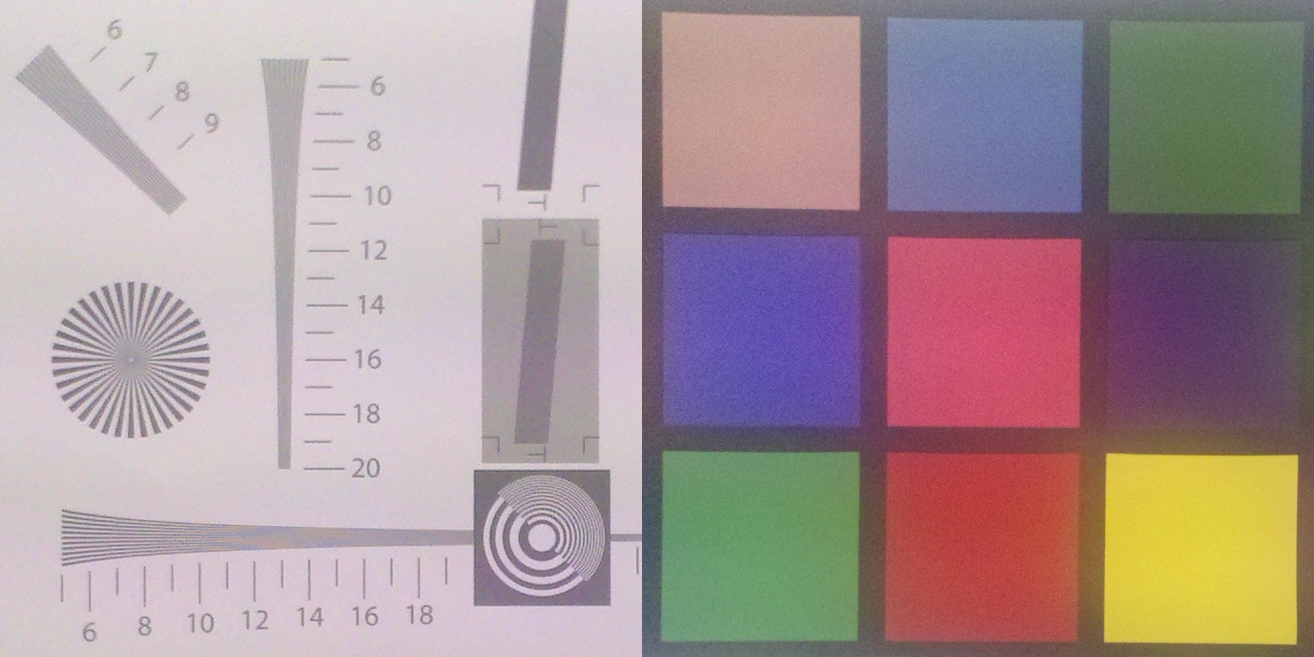
A fairly average performance in the resolution charts. Unfortunately, it also looks rather washed out.
The Motorola Milestone 2's camera performed fairly in the resolution chart, with estimated readings of 600 and 1000 on the horizontal and vertical lines respectively. The camera fares below average when it comes to the color test. Colors also appear to be washed out.

The details level are average. The text on the bottle and furring on the plush toys can be seen.
Battery Performance
The Motorola Milestone 2 is put through our standard battery test, which involves looping a 240 x 320 pixels resolution video clip at maximum volume and screen brightness, with Bluetooth and Wi-Fi turned on. Below are the battery performance results of the Motorola Milestone 2 in comparison with other phones in its class. The actual battery mileage may vary under different usage conditions.
Specifications/Device | Motorola Milestone 2 | Motorola Milestone | HTC Desire Z | Nokia E7 |
Processor |
|
|
|
|
Display Size |
|
|
|
|
Display Type |
|
|
|
|
Display Resolution |
|
|
|
|
Dimensions |
|
|
|
|
Weight |
|
|
|
|
Battery |
|
|
|
|
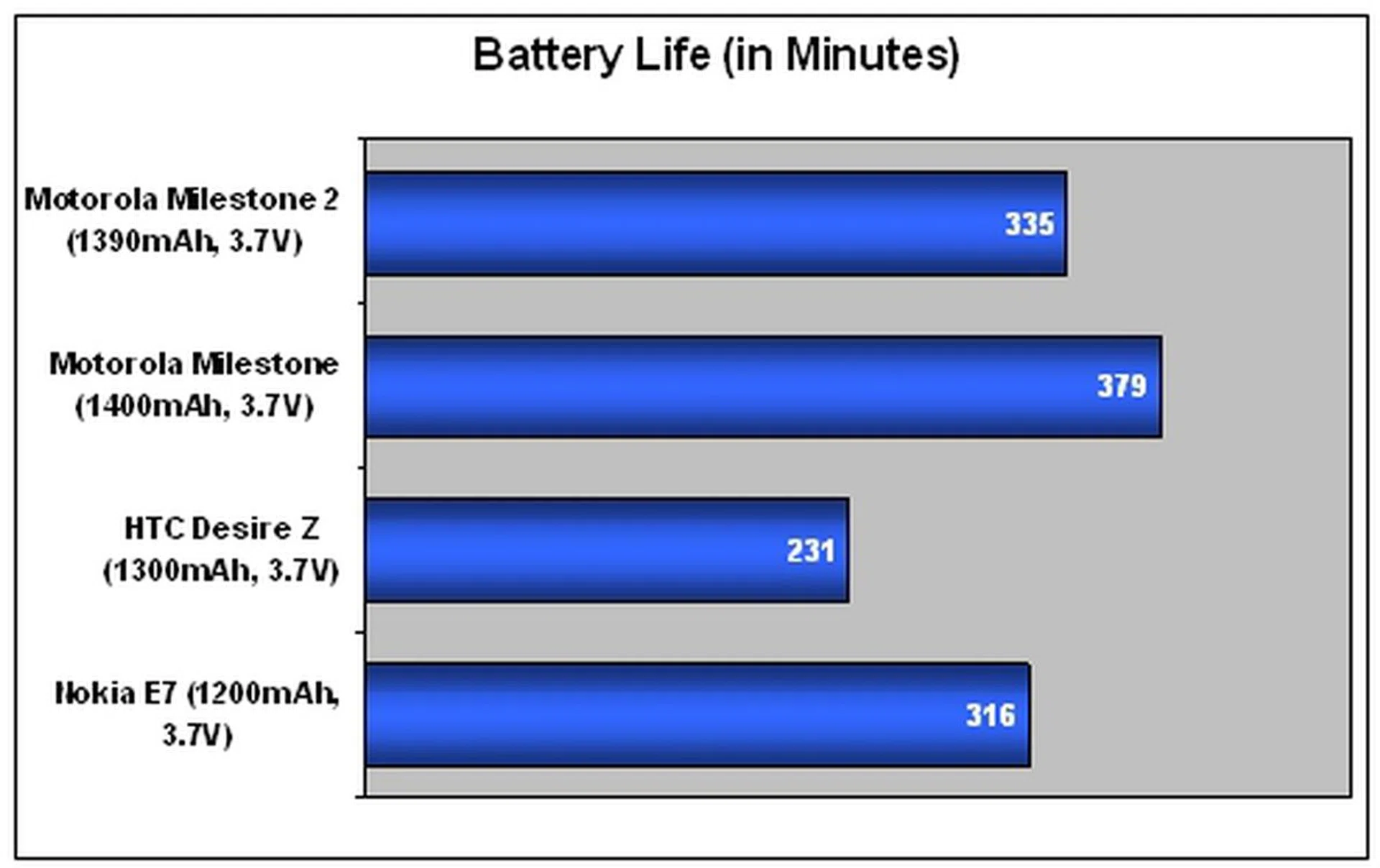
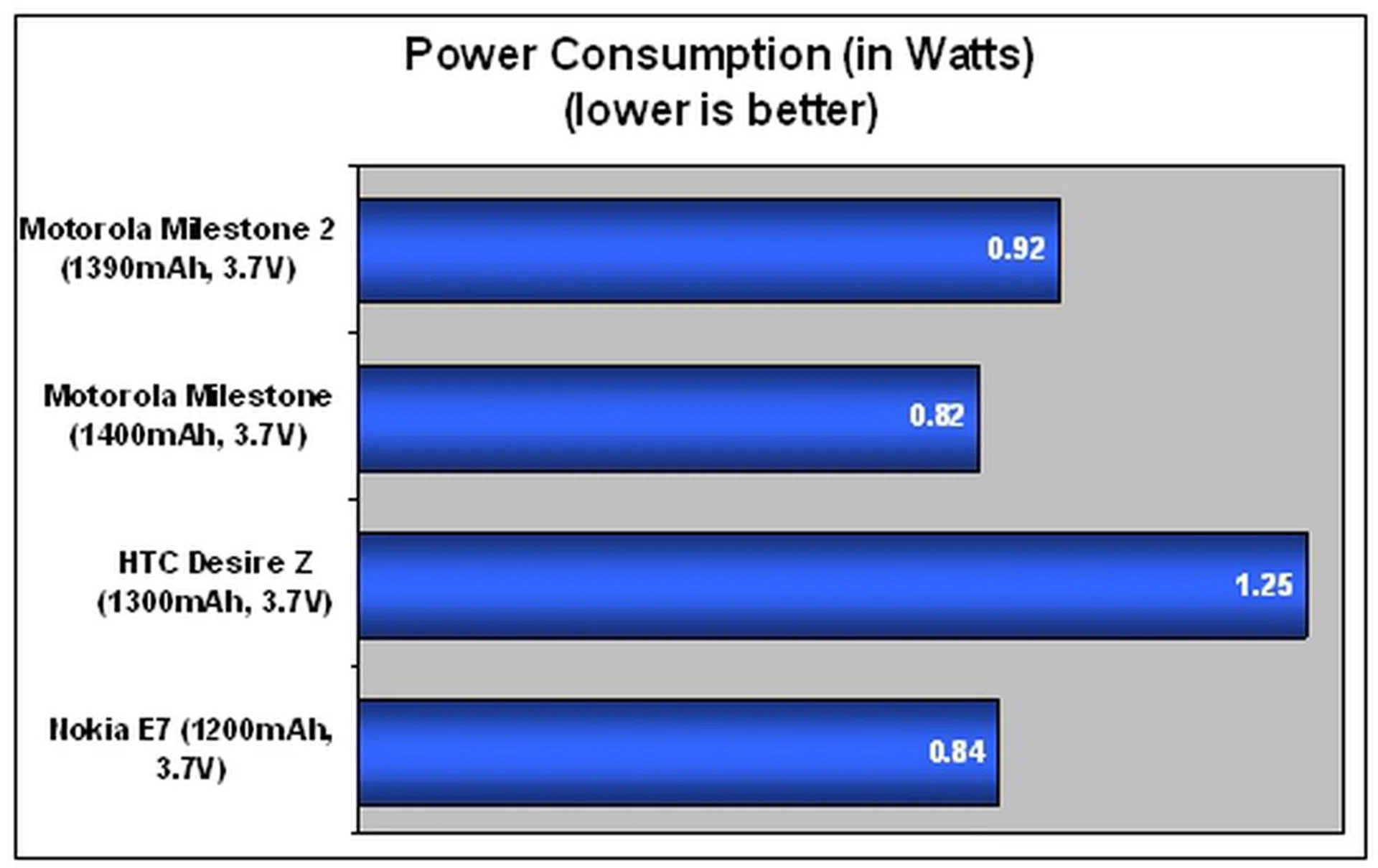
The Motorola Milestone 2 clocks a reasonably good battery mileage of 335 minutes. Despite having a more power-hungry 1GHz processor, the Milestone 2 managed to outlast its biggest rival, the HTC Desire Z, by an additional 100 minutes. If you are looking for a slider smartphone which can last through a normal day at work, the Motorola Milestone 2 should be one of your top considerations.
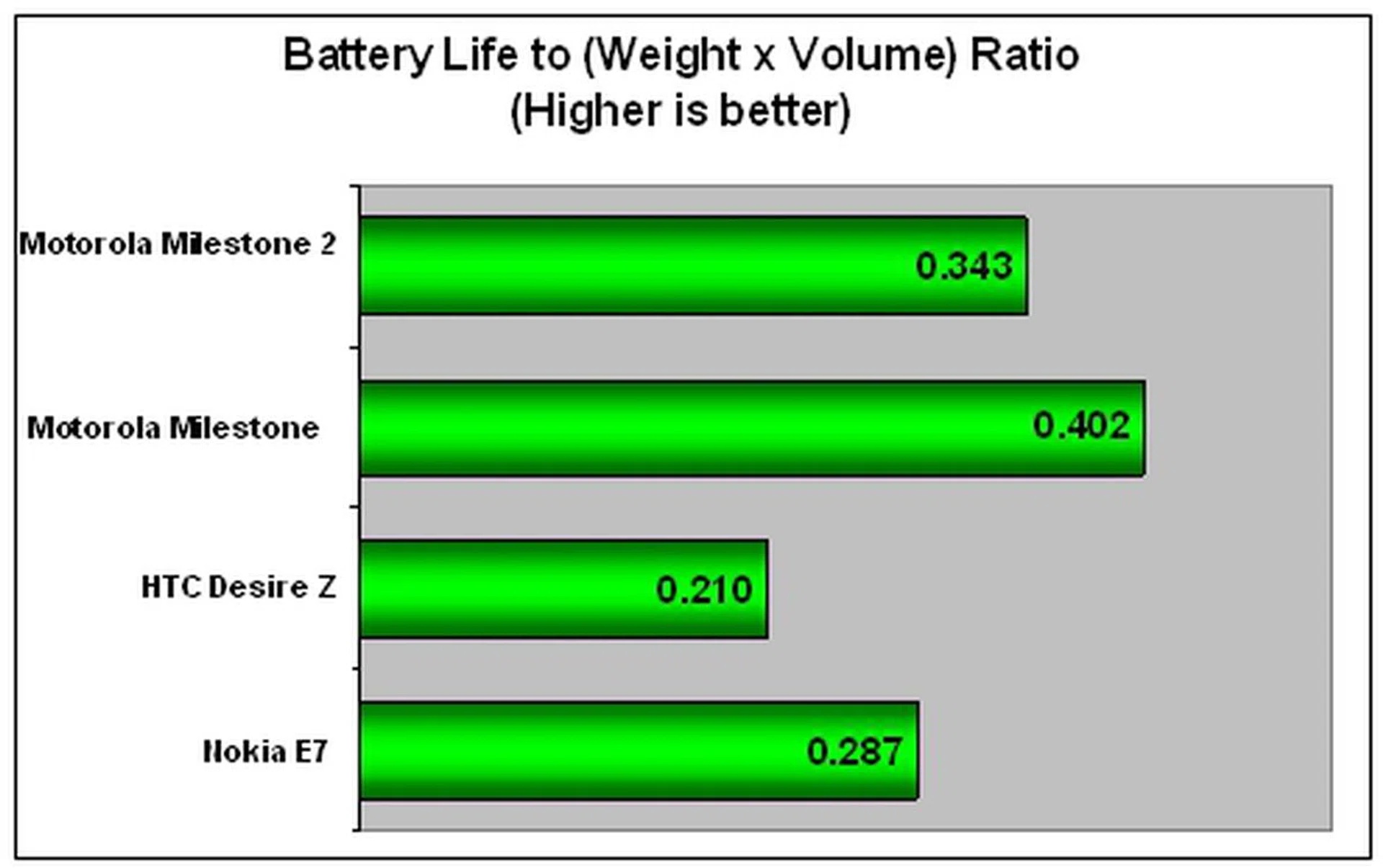
For a smartphone of the slider form factor, the Motorola Milestone 2 manages an admirable ratio in the Portability Index. This makes it a suitable choice for those who are looking for slider phones which are not too heavy yet have enough juice to last through the day.
Finding its Place

The Motorola Milestone 2 is one of the best QWERTY sliders out there.
When the Motorola Milestone 2 was launched, it was intended to succeed its predecessor and cement its place in the smartphone market. By improving on most of the shortcomings and retaining what worked, we felt that Motorola did a commendable job on the Milestone 2.
First, we find a revamped MOTOBLUR that is definitely a step in the right direction. We also appreciate the improved QWERTY keyboard for the more comfortable typing experience. More importantly, its battery life is one of the best among slider phones. However, the camera performance is less than stellar. The camera struggles with color contrast and the resolution is average. We have seen better camera phones such as Samsung Galaxy S.
We cannot help but wonder how the Motorola Milestone 2 will fare against the upcoming Android phones that are equipped with faster dual core processors and Android 2.3. There is still no word from Motorola on whether the Milestone 2 will get the Gingerbread update. Meanwhile, dual core processors promise faster speed and better multimedia performances in smartphones. To be fair, there aren't that many applications available at the moment that require the extra power from a dual core processor, so a single core processor is currently sufficient in meeting the needs of mainstream users.
If you are not chasing the latest and best smartphones in the market, the Motorola Milestone 2 is worthy of consideration, especially if you prefer typing on a physical keyboard and do not expect to use its camera heavily.
Our articles may contain affiliate links. If you buy through these links, we may earn a small commission.
Entering New Territory
When the was released in March 2010, it was one of the few QWERTY sliders in the market. Motorola did what few could by packaging impressive specifications into a surprisingly slim profile. The Milestone was praised for its smooth performance, seamless integration of a physical keyboard and a commendable touch screen experience.
However, the pace of development for Android picked up in the later part of 2010 with many companies jumping on the bandwagon. The year ended with the introduction of dual core processors and Android 2.3. With its single core and Android 2.1, the Milestone was feeling its age. It was about time for Motorola to renew its flagship model to take on the newer competitors.
Launched in February 2011, the Motorola Milestone 2 retains a similar form factor, though there have been significant changes under the hood. For one, the Milestone 2 is equipped with a 1GHz processor running Android 2.2, also known as Froyo. It also has a new version of its custom user interface, known as MOTOBLUR.
Will the Motorola Milestone 2 replicate the success of its predecessor?
When you first set sight on the Motorola Milestone 2, you will hardly notice any difference from its predecessor. Indeed, the Milestone 2 retains an almost similar chassis, with only minimal changes to its dimensions and QWERTY keyboard. The Milestone 2 weighs slightly heavier at 169g, a negligible increase of 4g. More importantly, it maintains the same excellent build quality that gives it a solid feel in your hands.
The Motorola Milestone 2 looks no different from its predecessor.
Gracing the front of the handset is a 3.7-inch TFT capacitive screen with four touch sensitive keys located at the bottom. Strangely, Motorola has changed the order of the keys. In its predecessor, the buttons are in this order - Back, Menu, Home and Search. In Milestone 2, except for the Search button, the other three buttons have exchanged positions, with an order of Menu, Home and Back. Existing Milestone owners who are used to the old layout may take some time adapting to the new one if they upgrade to the Milestone 2.
We are puzzled as to why Motorola decided to change the order of the buttons.
The physical buttons around the chassis remain largely unchanged. On the top right corner, you will find the 3.5mm audio jack and Power / Screen lock button. We definitely prefer the new Power / Screen lock button as it has a slight bump as well, compared to the previous one which was flushed with the surface. However, there is still room for improvement as there were occasions when it was hard to find the key without looking. It would have been easier if the button is made even bigger or longer.
The Power / Screen lock button and 3.5mm audio jack are located on the top right hand corner of the phone.
The microUSB port is used for charging and data transfer.
Slide up and you will uncover the four-row QWERTY keyboard. The slider mechanism works smoother now, compared to the original Milestone where you need to exert some force. Once fully extended, the slider locks firmly in place. The QWERTY keyboard has an improved design that will have existing Milestone owners and messaging junkies cheering. The keys are no longer flushed with the surface. They have a slight bump, which provide a better tactile feel. This allows for a faster and more accurate typing experience.
Notice the slight bump on each key.
The directional pad in the first Milestone is now replaced by a set of arrow keys, which makes space for more and larger keys. The arrow keys come in handy when you scan through large bodies of text. Commonly used keys such as Enter and Alt are larger. Moreover, three new keys are added - the voice input, OK and Alt Lock keys. The Alt Lock key is a welcome addition as you do not need to press Alt each time you want to type a digit. Now, you just have to engage the Alt Lock key once and you can bang out strings of numbers quickly.
Minor yet beneficial changes to the layout of the keyboard.
At the back, you will find the 5-megapixel camera and dual-LED flash in the same position. We would have liked the inclusion of a lens cover to protect the camera from scratches as the lens is exposed.
Occupying about two-third of the back is the battery compartment which houses a 1390mAh Li-ion battery. The SIM and memory card slots are only accessible if you remove the battery, which is troublesome if you need to change cards often.
You have to remove the battery cover and the battery itself to access the memory card slot, which is inconvenient.
Froyo with a Topping of MOTOBLUR
This smartphone comes with Froyo and a new version of MOTOBLUR. Froyo brings two significant features - Adobe Flash support and mobile hotspot support.
Unlike earlier versions of the Android OS, Froyo is the first to come with full support for Adobe Flash. This means that you can now watch videos and play Flash games on the Motorola Milestone 2, giving you a full web experience that resembles that on your personal computer.
The Milestone 2 is also able to function as a wireless mobile hotspot. It can connect up to five devices simultaneously. This will be useful when you are in a location where there is no internet access or available Wi-Fi networks.
The new MOTOBLUR overlay comes with considerable improvements that allow for more control and customization. For example, MOTOBLUR allows you to customize seven home screens, which is four and two more than the previous Milestone and the stock Android UI respectively. This gives you ample space to place your favorite applications. When browsing through the different home screen panels, a row of icons indicates which home screen panel you are on. We like the convenience of switching to any panel without going through the rest.
Moreover, you can customize the home screens with widgets from Android and Motorola. These widgets provide quick access to phone settings, messaging and social network feeds.
MOTOBLUR is also developed with a focus on social messaging. One widget, known as the Messages widget, allows you to choose what to follow. You can choose to follow Facebook messages only or combine text messages together in the widget. There is also another widget, Social Status, that allows you to update your status on Facebook, Twitter or any other social networking sites simultaneously. This is very convenient especially if you want to post a quick shout out. We are looking forward to more of such widgets from Motorola in the future so that there are more ways to customize the phone.
Powering the Motorola Milestone 2 is a 1GHz processor and 512MB of RAM, a significant upgrade from the Milestone’s 550MHz processor and 256MB RAM. With such bumped up hardware, the Milestone 2 was able to manage seven applications simultaneously without getting bogged down.
Those who need to see the actual performance numbers can jump to the next section where we compare the Milestone 2 against some of its closer competitors.
System Performance
Now comes the critical section of our review - the benchmarking of the Motorola Milestone 2. If you have been following our mobile phone reviews, you will be familiar with these two benchmarks below. If not, here is a summary of the benchmarks we use:
- Quadrant: It tests the CPU, memory, I/O and 3D graphics performance of a mobile device, giving you a general idea of how the device performs.
- NeoCore: It assesses the graphics performance of a mobile device.
In other words, these benchmarks give you a clearer picture of where the Motorola Milestone 2 stands among its competitors. Do note that these benchmarks should not be the final word on the performance of these phones, though they give an appropriate estimate. They are all tested with the stock firmware.
Device | Motorola Milestone 2 | HTC Incredible S | Samsung Nexus S | HTC Desire HD |
CPU | TI OMAP 3630 1GHz | Qualcomm Snapdragon MSM8255 1GHz | Hummingbird Cortex-A8 1GHz | Qualcomm Snapdragon MSM8255 1GHz |
GPU | PowerVR SGX530 | Qualcomm Adreno 205 | PowerVR SGX540 | Qualcomm Adreno 205 |
RAM | 512MB | 768MB | 512MB | 768MB |
OS | Google Android 2.2 | Google Android 2.2 | Google Android 2.3 | Google Android 2.2 |
As seen from the results above, the Motorola Milestone 2 does not fare as well as the other Android phones. The Milestone 2 has less RAM compared to the HTC Desire HD and Incredible S, thus this might have accounted for the less stellar performance in the two benchmarks. The Samsung Nexus S manages to edge out the Milestone despite having the same amount of RAM. This might be due to the stock Android 2.3 OS (codenamed Gingerbread) which is optimized for faster speeds.
Nevertheless, the Motorola Milestone 2 felt snappy when navigating through the interface. Applications generally opened with no notable lag. The web browsing experience was pleasant as there was no sign of sluggishness.
Lacking in Camera Mojo
The Motorola Milestone 2 is equipped with a 5-megapixel autofocus camera with dual LED flash, putting it on par with most of the competition out there. The dual LED flash will come in handy in low-lit conditions. We put the Motorola Milestone 2 through the resolution and color tests to test the capabilities of the camera.
The Motorola Milestone 2's camera performed fairly in the resolution chart, with estimated readings of 600 and 1000 on the horizontal and vertical lines respectively. The camera fares below average when it comes to the color test. Colors also appear to be washed out.
Battery Performance
The Motorola Milestone 2 is put through our standard battery test, which involves looping a 240 x 320 pixels resolution video clip at maximum volume and screen brightness, with Bluetooth and Wi-Fi turned on. Below are the battery performance results of the Motorola Milestone 2 in comparison with other phones in its class. The actual battery mileage may vary under different usage conditions.
Specifications/Device | Motorola Milestone 2 | Motorola Milestone | HTC Desire Z | Nokia E7 |
Processor |
|
|
|
|
Display Size |
|
|
|
|
Display Type |
|
|
|
|
Display Resolution |
|
|
|
|
Dimensions |
|
|
|
|
Weight |
|
|
|
|
Battery |
|
|
|
|
The Motorola Milestone 2 clocks a reasonably good battery mileage of 335 minutes. Despite having a more power-hungry 1GHz processor, the Milestone 2 managed to outlast its biggest rival, the HTC Desire Z, by an additional 100 minutes. If you are looking for a slider smartphone which can last through a normal day at work, the Motorola Milestone 2 should be one of your top considerations.
For a smartphone of the slider form factor, the Motorola Milestone 2 manages an admirable ratio in the Portability Index. This makes it a suitable choice for those who are looking for slider phones which are not too heavy yet have enough juice to last through the day.
Finding its Place
When the Motorola Milestone 2 was launched, it was intended to succeed its predecessor and cement its place in the smartphone market. By improving on most of the shortcomings and retaining what worked, we felt that Motorola did a commendable job on the Milestone 2.
First, we find a revamped MOTOBLUR that is definitely a step in the right direction. We also appreciate the improved QWERTY keyboard for the more comfortable typing experience. More importantly, its battery life is one of the best among slider phones. However, the camera performance is less than stellar. The camera struggles with color contrast and the resolution is average. We have seen better camera phones such as Samsung Galaxy S.
We cannot help but wonder how the Motorola Milestone 2 will fare against the upcoming Android phones that are equipped with faster dual core processors and Android 2.3. There is still no word from Motorola on whether the Milestone 2 will get the Gingerbread update. Meanwhile, dual core processors promise faster speed and better multimedia performances in smartphones. To be fair, there aren't that many applications available at the moment that require the extra power from a dual core processor, so a single core processor is currently sufficient in meeting the needs of mainstream users.
If you are not chasing the latest and best smartphones in the market, the Motorola Milestone 2 is worthy of consideration, especially if you prefer typing on a physical keyboard and do not expect to use its camera heavily.
Our articles may contain affiliate links. If you buy through these links, we may earn a small commission.