

What’s this?
Say hello to the gram 17, the newest addition to LG’s gram notebook lineup and also the lightest 17-inch notebook in the world. It was first unveiled at CES 2019 earlier this year but it is now available locally.
How light is it?
It’s an unbelievable 1.34kg heavy. To put this number into context, consider that no other 17-inch notebook is even under 2kg. Consider also that at 1.34kg, the gram 17 is only slightly heavier than most 13-inch ultraportable notebooks.
Here’s a table comparing the weight of the gram 17 against other popular 13, 15, and 17-inch notebooks. It's not exhaustive but it should give you a good idea of just how light the gram 17 with its expansive display.
Model | Weight |
LG gram 17 | 1.34kg |
17-inch notebooks | |
Aorus 7 | 2.5kg |
ASUS ROG Zephyrus S GX701 | 2.7kg |
ASUS VivoBook Pro 17 | 2.1kg |
MSI GS75 | 2.28kg |
Razer Blade Pro 17 | 2.75kg |
15-inch notebooks | |
Aorus 5 | 2.15kg |
Apple 15-inch MacBook Pro | 1.83kg |
ASUS ZenBook Pro 15 | 1.88kg |
Dell XPS 15 | 1.8kg |
LG gram 15 | 1.08kg |
MSI GS65 Stealth | 1.9kg |
Razer Blade 15 | 2.03kg |
13-inch notebooks | |
Apple 13-inch MacBook Pro | 1.37kg |
ASUS ZenBook 14 | 1.09kg |
Dell XPS 13 | 1.23kg |
LG gram 14 | 970g |
MSI Prestige PS42 | 1.19kg |
Razer Blade 13 | 1.28kg |
How did LG do it?
The gram 17 uses the same ultra-light material as its smaller siblings do. So, like the gram 13, 14, and 15, the gram 17’s chassis is made using a blend of magnesium and carbon fiber. For reference, here's our comparative review of the previous set of the LG gram 13, 14 and 15 notebooks launched late in 2018.
It's so light but how is it just as strong?

A sticker on the gram 17 proclaiming its ruggedness.
Yes, it is. Again, like the rest of the gram lineup, the gram 17 meets the U.S. MIL-STD-810G standard, meaning it’s shock, dust, temperature, and vibration resistant. Hard to believe a notebook this light, can be that durable? This demo from last year's LG gram unveiling should cast out any doubts you might have:-
I read that the gram 17 has a compact 15.6-inch body, is that true?
Not exactly. The gram 17 has super-thin bezels to reduce its overall footprint and it is compact for a 17-inch notebook. But to say that it has a 15.6-inch chassis or that it is as compact as modern 15-inch notebooks is a bit of a stretch. That said, it is just about as big as an Aftershock W15 from about four years ago, so there's some truth to its marketing. I'll let the numbers speak for themselves.
Model | Width (cm) | Depth (cm) | Footprint (in cm2) |
LG gram 17 | 38.1 | 26.6 | 1,013.46 |
Aftershock Nova 15 | 35.9 | 25.8 | 926.22 |
Aorus 5 | 35.9 | 25.3 | 908.27 |
Apple 15-inch MacBook Pro | 34.9 | 24.1 | 841.09 |
ASUS ROG Strix Scar II | 36.1 | 26.2 | 945.82 |
ASUS ROG Zephyrus S GX502 | 36.0 | 25.2 | 907.2 |
ASUS ZenBook Pro 15 | 36.5 | 24.1 | 879.65 |
Dell XPS 15 | 35.7 | 23.5 | 838.95 |
Razer Blade 15 | 35.5 | 23.5 | 834.25 |
Aftershock W15 (from 2015) | 38.6 | 26.2 | 1,011.32 |
That said, the gram 17 is compact when compared to other 17-inch notebooks. Here’s another table.
Model | Width (cm) | Depth (cm) | Footprint (in cm2) |
LG gram 17 | 38.1 | 26.6 | 1,013.46 |
Aftershock Slate 17 | 39.9 | 26.8 | 1,069.32 |
ASUS ROG Zephyrus S (GX701) | 39.9 | 27.2 | 1,085.28 |
ASUS VivoBook Pro 17 | 41.1 | 27.0 | 1,109.7 |
MSI Stealth GS75 | 39.6 | 25.9 | 1,025.64 |
Razer Blade Pro 17 | 39.5 | 26.0 | 1,027.00 |
I hear you say thin bezels, so is the webcam in the right place?
If by "right" you mean above the display, then, yes, it is in the right place. Unfortunately, it's just a plain HD camera and doesn't support Windows Hello.
Right, so how thin is it?
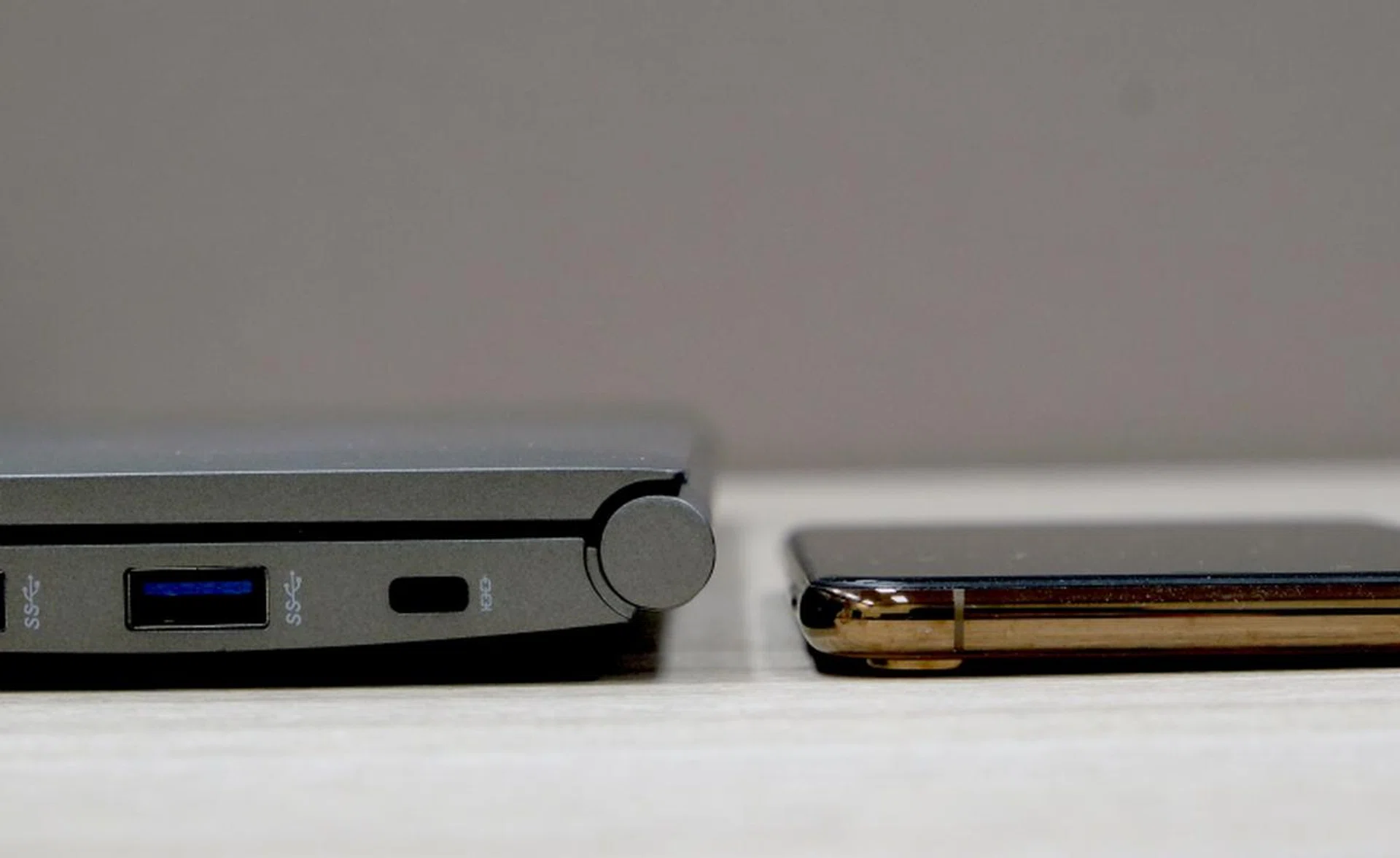
Here's the gram 17 (17.4mm) next to an iPhone XS Max (7.7mm).
It's 17.4mm thick. It's really slim for a notebook in its class and it has the benefit of being able to accommodate full-size ports, which I'll talk about more later.
So how does it feel in the hand and is it really easy to carry around?
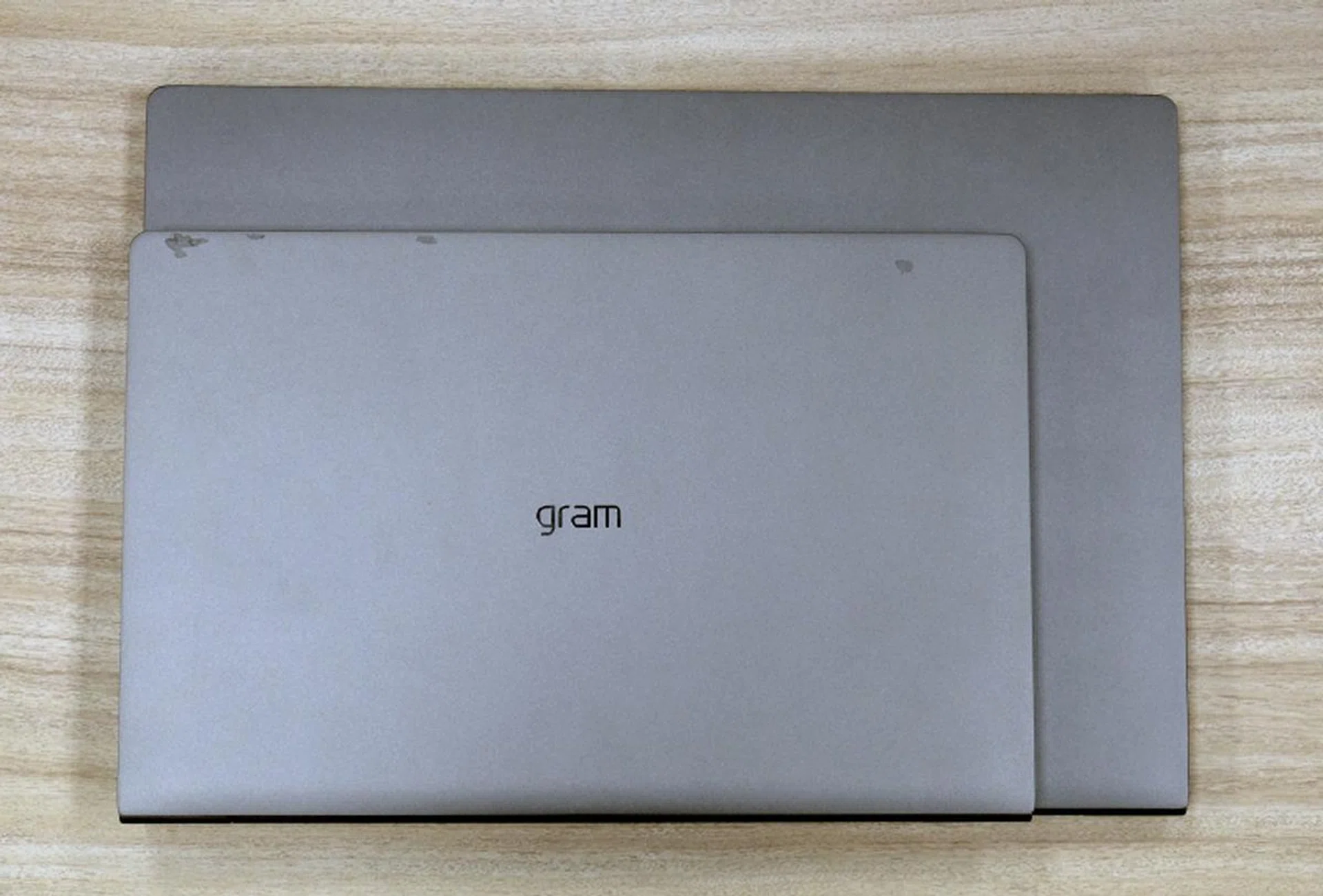
The gram 17 might be light but it is still a large notebook. Here it is below a gram 14.
It's unbelievably light. When you first pick it up, there's a moment of disconnect and then amazement. Your brain scrambles because you cannot believe how a 17-inch notebook can be this light. You begin to suspect if you are picking up a plastic dummy unit (just like how our colleagues felt amazement when they first tried the gram 15) . And then you realize it powers up and it is indeed a real unit. This slowly causes you to suspend your feelings of shock and disbelief, and you are overcome by awe and wonderment.
It's easy to pick up and carry out but its size is still a stumbling block. It may be light but you still need a big enough bag to put it in.
Ok, so what’s new with the gram 17?
There are two big changes. Fundamentally, the gram 17 is similar to its smaller siblings in terms of design and overall fit and feel. But there are some profound changes elsewhere, the first being the display.
Display — The display is not only larger, but it also has a different aspect ratio. Most notebooks have an aspect ratio of 16:9, including the gram 13, 14, and 15. The gram 17, however, will have a 16:10 aspect ratio display with a resolution of 2,560 x 1,600 pixels. It doesn’t sound like much on paper, but in practice, it means that you can see more of a website, document, spreadsheet or project work at a glance. The display itself is an IPS panel and it serves up nice colors. It’s also sufficiently vibrant and gets quite bright. However, it is incredibly glossy and prone to glare and reflection.

Size difference of a 13-inch 16:9 display and the gram's 17-inch 16:10 display.
Thunderbolt 3 — The second big change has to do with ports. The gram 17 not only gains an additional USB-A USB 3.0 port, its USB-C port also supports Thunderbolt 3 — making it the only gram notebook to support Thunderbolt 3. Those of you who follow computing developments closely will know that USB4 is coming and that it is based on the Thunderbolt 3 standard. In other words, Thunderbolt 3 will be the port of the future and I regard it as a must-have feature for anyone looking to buy a new notebook in 2019.
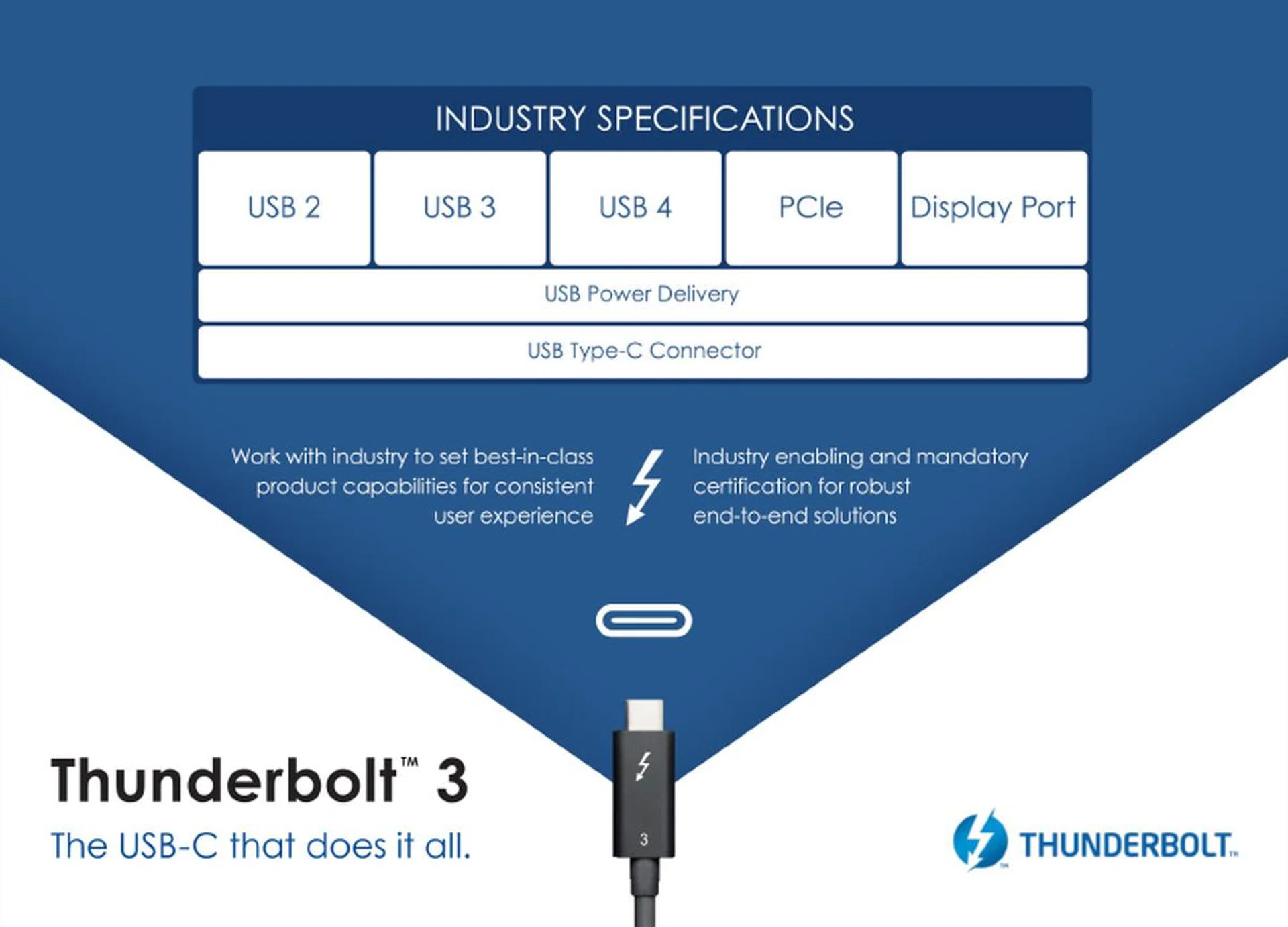
As I mentioned many times before, if you want a port that truly does everything, you will need Thunderbolt 3.
What other ports does it have?
Including the above-mentioned USB-C Thunderbolt 3 port, the gram 17 has the following ports:
- 3 x USB-A (USB 3.1 Gen 1)
- 1 x USB-C (Thunderbolt 3)
- 1 x HDMI
- 1 x microSD card reader
- 1 x headphone jack
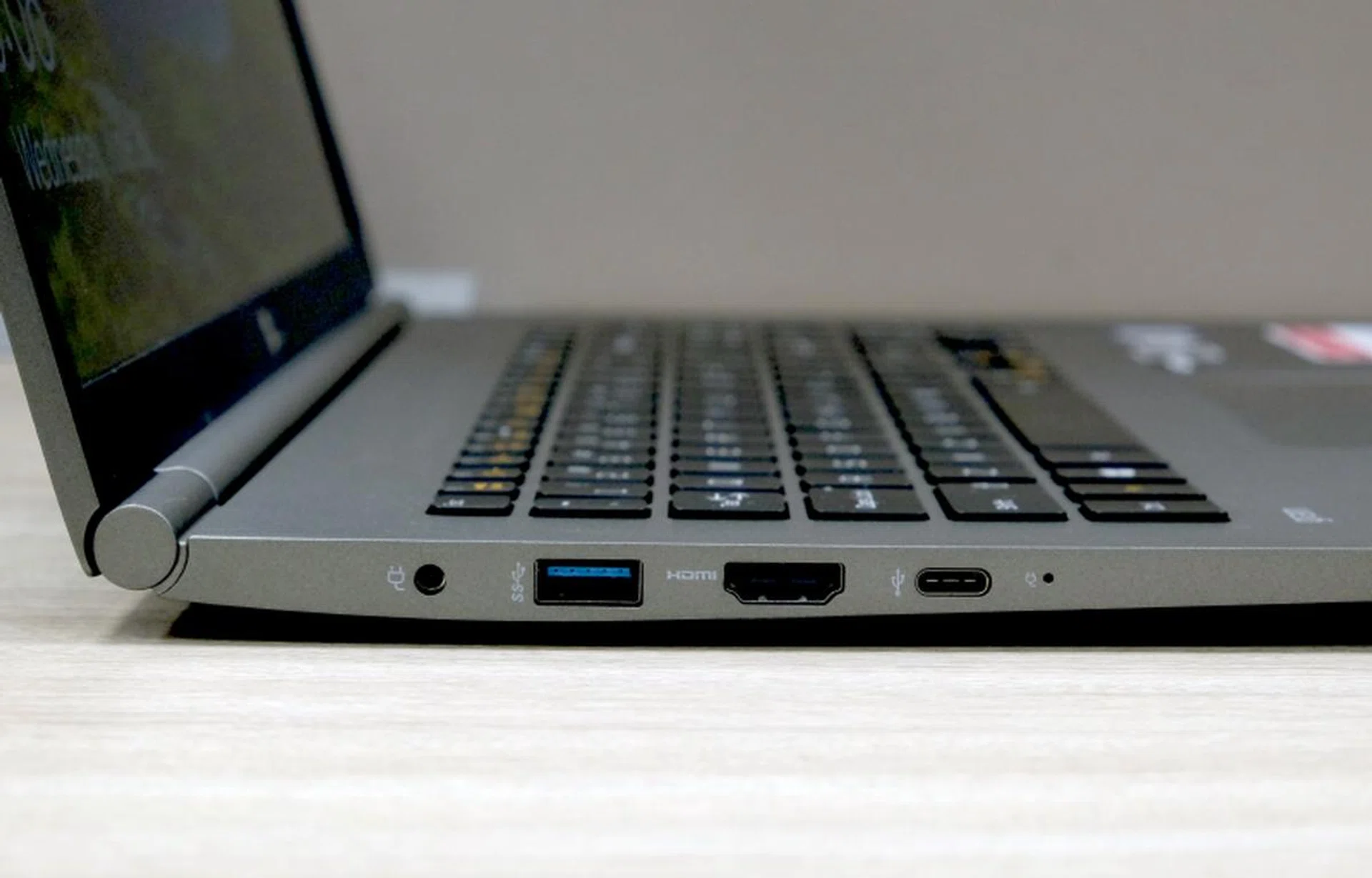
On the left is a power jack, USB-A USB 3.0 port, a full-size HDMi port, and a USB-C Thunderbolt 3 port.
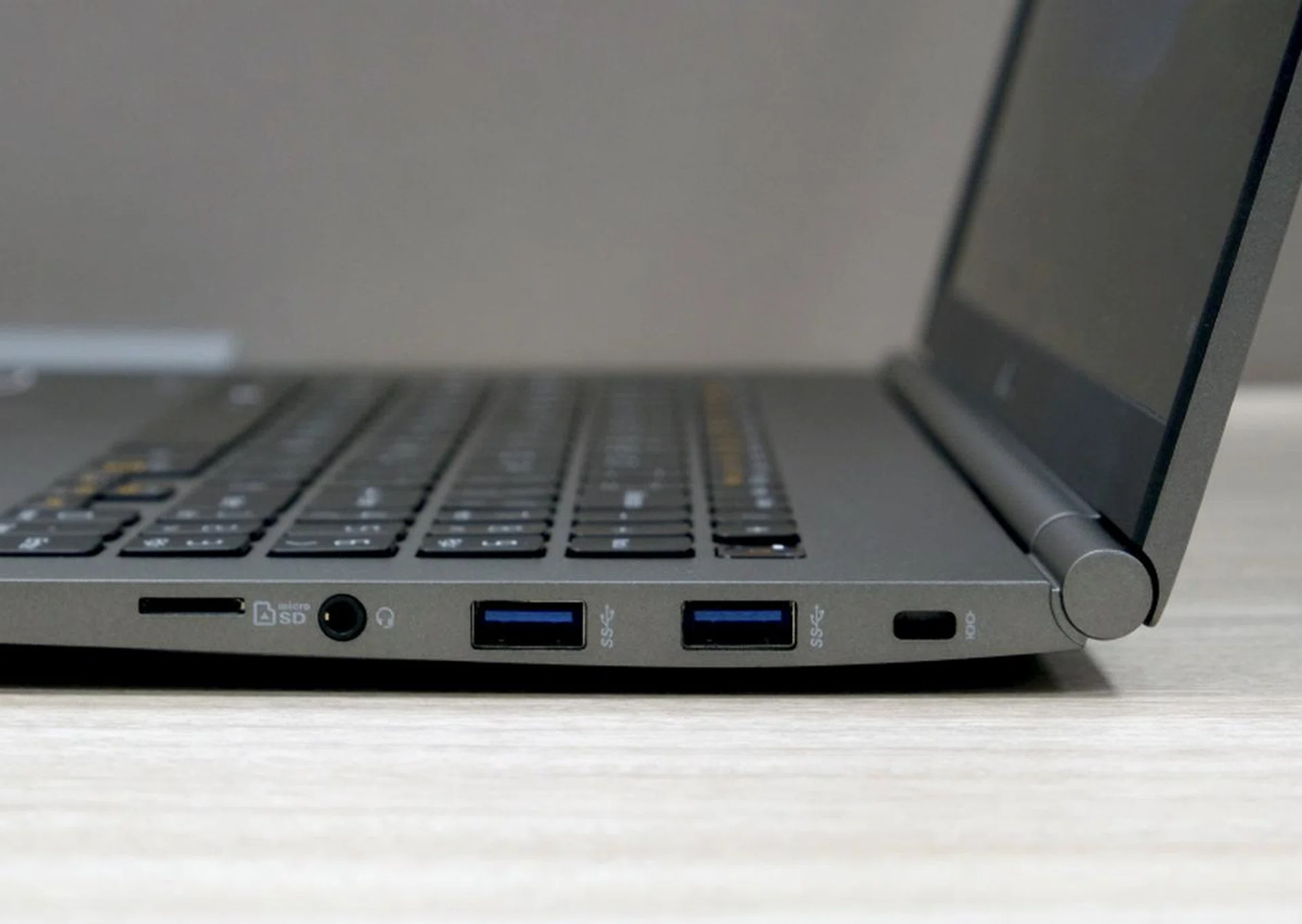
On the right, you have a microSD card reader, headphone jack, and two USB-A USB 3.0 ports.
The nice thing about the gram 17 is that it has full-sized USB ports as well as a single USB-C Thunderbolt 3 port. The full-size HDMI port is useful if you want to connect to an external display. Overall, the gram 17’s I/O connectivity options should cover users for just about any situation. But if I were to nitpick, I would obviously prefer an additional USB-C Thunderbolt 3 port and a full-size SD card reader as opposed to a microSD one.
Finally, what configurations are available?
LG is sadly only offering the gram 17 in one configuration. Here are the key specifications:
- Intel Core i7-8565U
- 8GB memory
- 512GB SSD
This configuration should serve most users adequately but I think a handful of users would want more memory and possibly more storage. Fortunately, the gram 17 can be upgraded, since it uses standard M.2 SSDs and SO-DIMM memory slots, but users would need to make a trip down to the LG service center if you do not want to void your warranty.

The gram 17 is upgradeable but you'll need to go back to LG if you do not wish to void your warranty.
Readers concerned about performance should know that gram notebooks use slower SATA-based SSDs and the memory subsystem is operating in single-channel. This will have a negative impact on performance, particularly on workloads that are graphics intensive.
However, if you are feeling adventurous, LG has informed us that the gram 17 comes with a single M.2 SSD and single stick of 8GB memory. This means there’s a second M.2 slot that is free for you to install your own SSD (make sure it is SATA-based) and a second SO-DIMM slot for your memory (which means dual-channel memory is possible).
How does it perform?
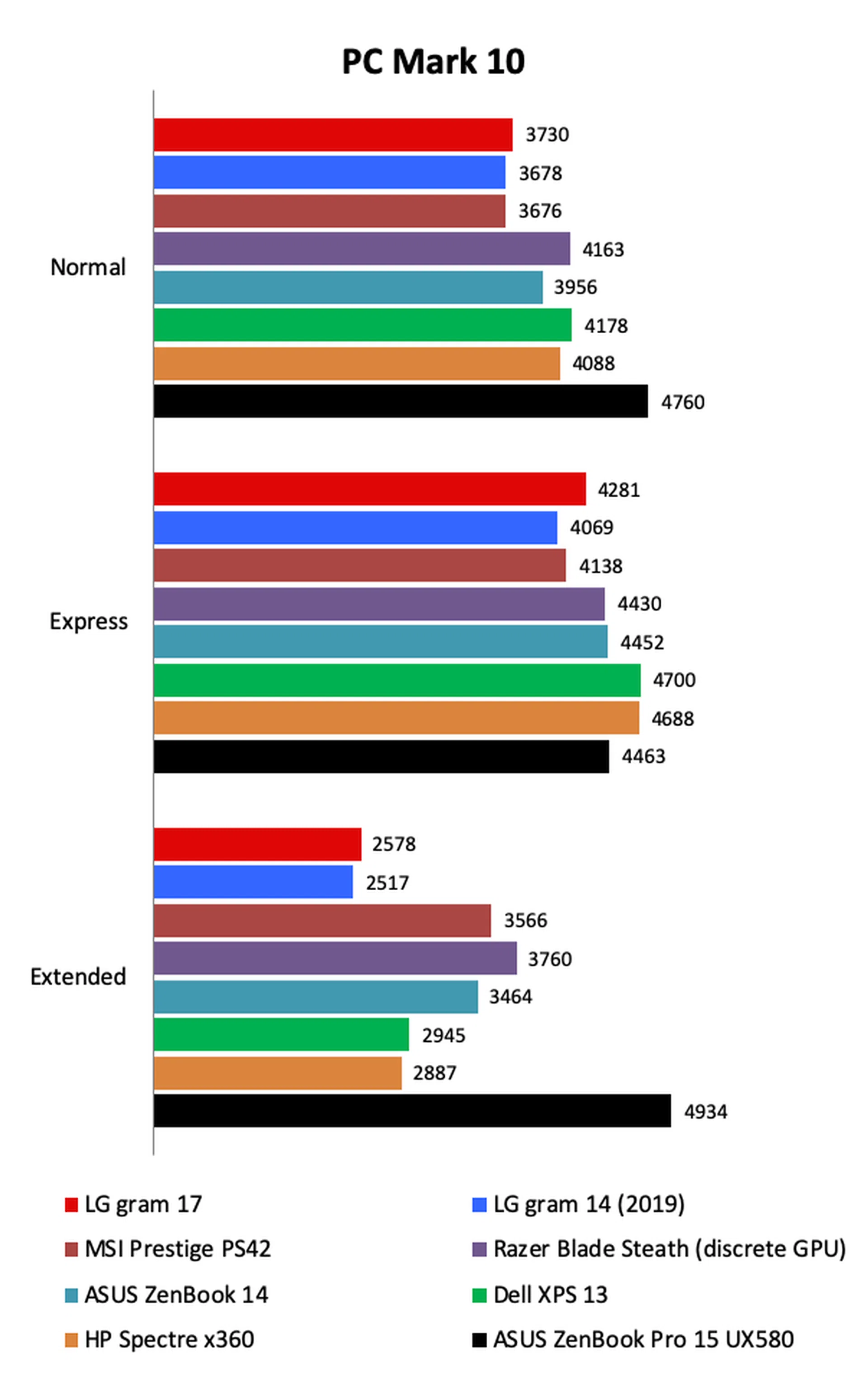
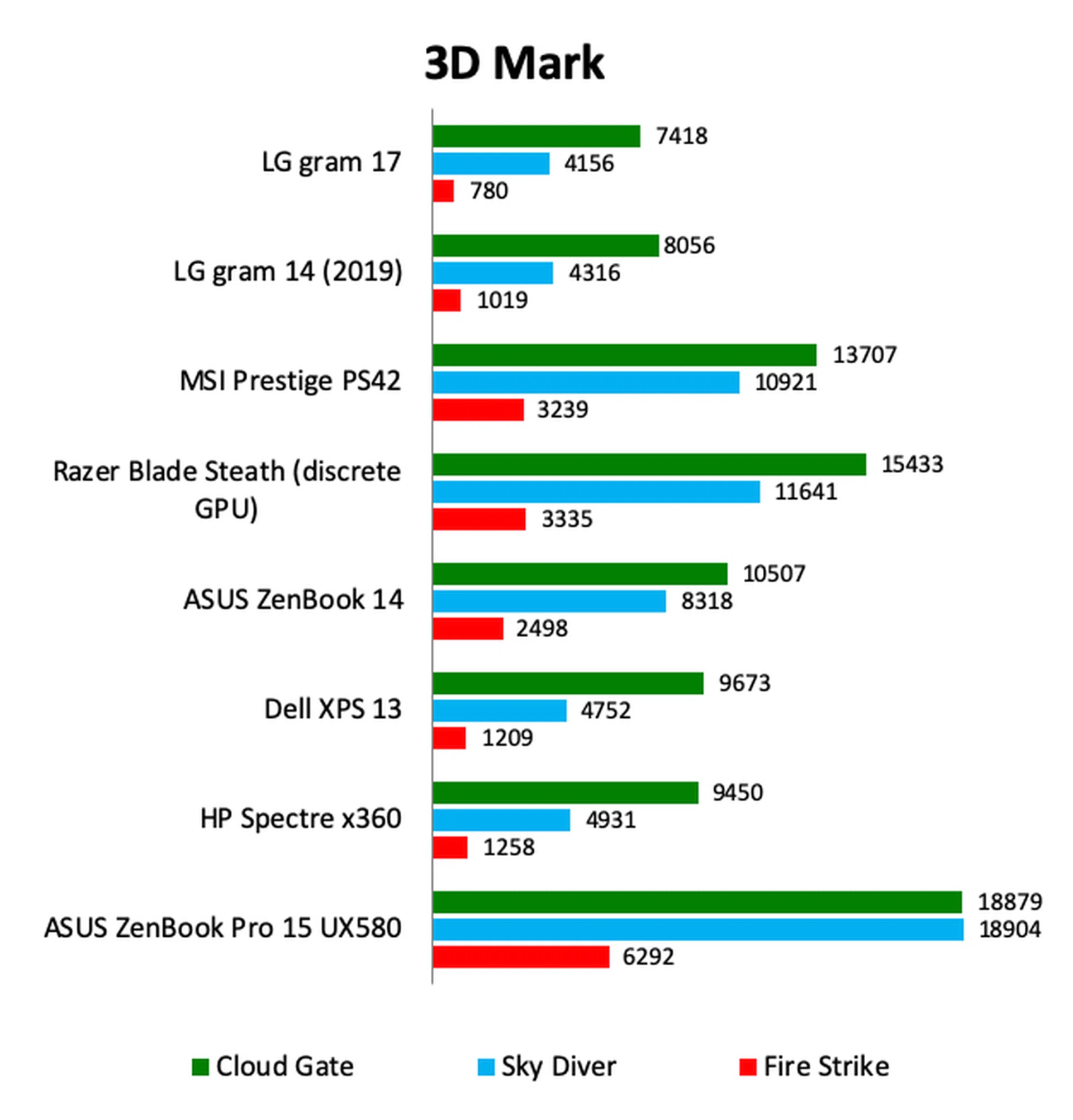
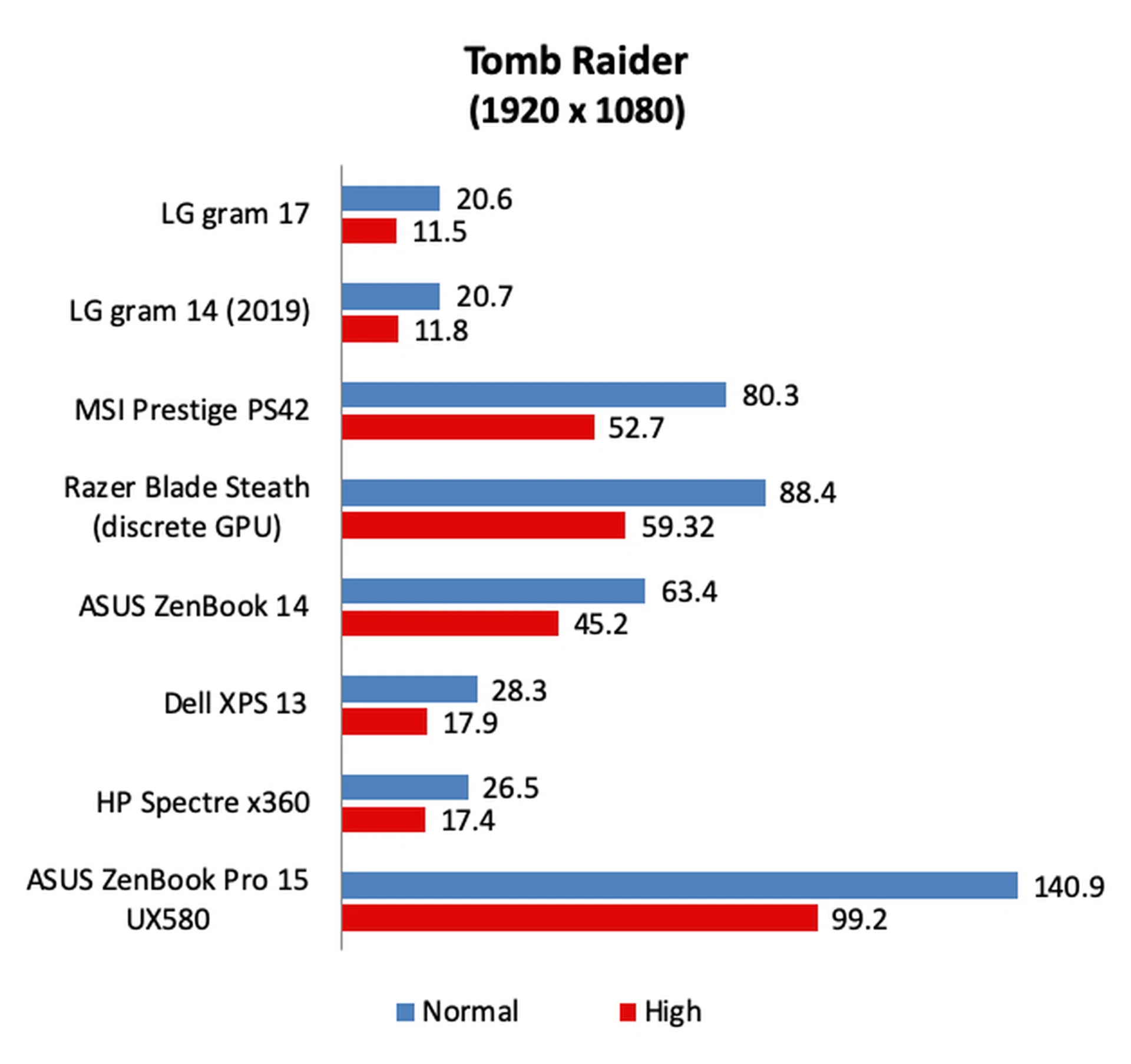
Performance has never been any of the gram notebook's strong suit and the new gram 17 continues this unfortunate tradition. But this is not at all surprising when you remember that LG’s gram notebooks typically operate using single-channel memory. Using single-channel memory has a negative impact on performance, particularly on graphics-intensive workloads as the integrated GPU has to rely on system memory for frame-buffering. Another component that’s hampering the gram 17’s performance is its slower SATA-based SSD.
I have also included performance figures of the ZenBook Pro 15, which represents a typical 15-inch notebook that comes with a more powerful 45W CPU and discrete graphics. As you can see, such notebooks offer significantly more performance but at the cost of less portability.
[hwzcompare]
[products=667528,642966,653644,656180,661947,659727,646063]
[width=200]
[caption=Test Notebooks Compared]
[showprices=1]
[/hwzcompare]
Show me the charts!
What about battery life?
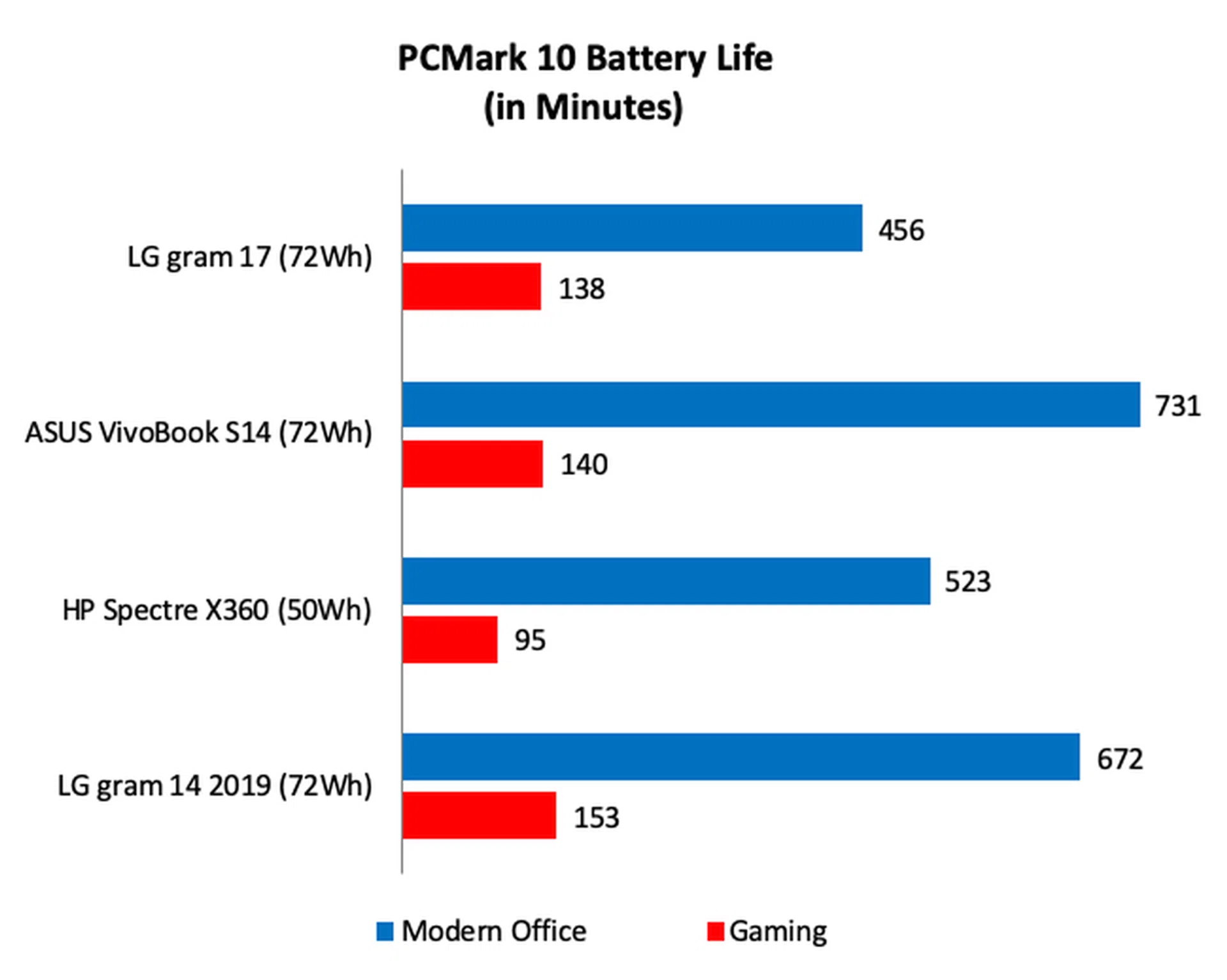
Battery life is outstanding. Running the Modern Office workload at full brightness, which consists of productivity tasks, the gram 17 lasted over 7.5 hours, which isn’t that far off from the Spectre x360. On the intensive Gaming workload, the gram 17 lasted even longer than Spectre x360 and was only 15 minutes less than the gram 14.
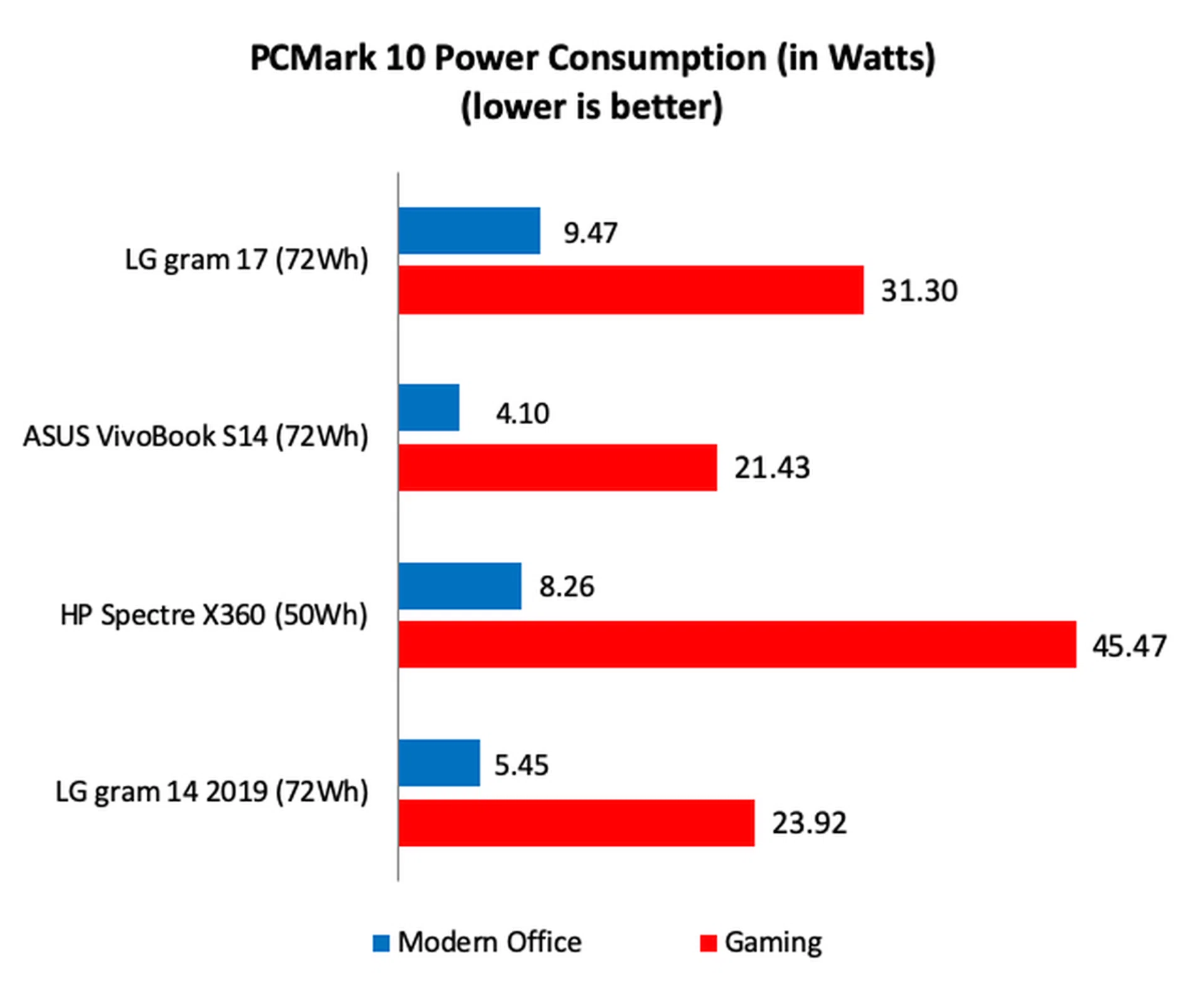
Looking at the power consumption figures, we can see that despite its large 17-inch display, the gram 17 was mostly quite efficient. Running Modern Office, its power consumption was just 9.47W, only 1.2W or 14% more than the Spectre X360. During Gaming, its power consumption increased to 31.30W — more than the VivoBook S14 and gram 14, but considerably less than the Spectre x360. Overall, for a 17-inch notebook, the gram 17 is surprisingly power efficient.

How does the gram 17 compare to its rivals?

The gram 17 may be incredibly light but there's no getting around the fact that it's quite a large notebook.
The gram 17 trades some performance for extreme portability with a large high resolution screen to boot. Other 17-inch notebooks are considerably more powerful but they are also far heavier, bulkier, and have poor battery life. Whether or not the trade-off is worth it is down to your needs. Unless you often find yourself doing really heavy workloads like video editing or 3D graphics design, you'd find the gram 17 to be sufficient for most duties. Certainly, it is just about as capable as any ultraportable so it is not as if it is going to roll over and give up the moment you run anything that is remotely intensive. Not to mention, you have the option to increase storage and memory size.
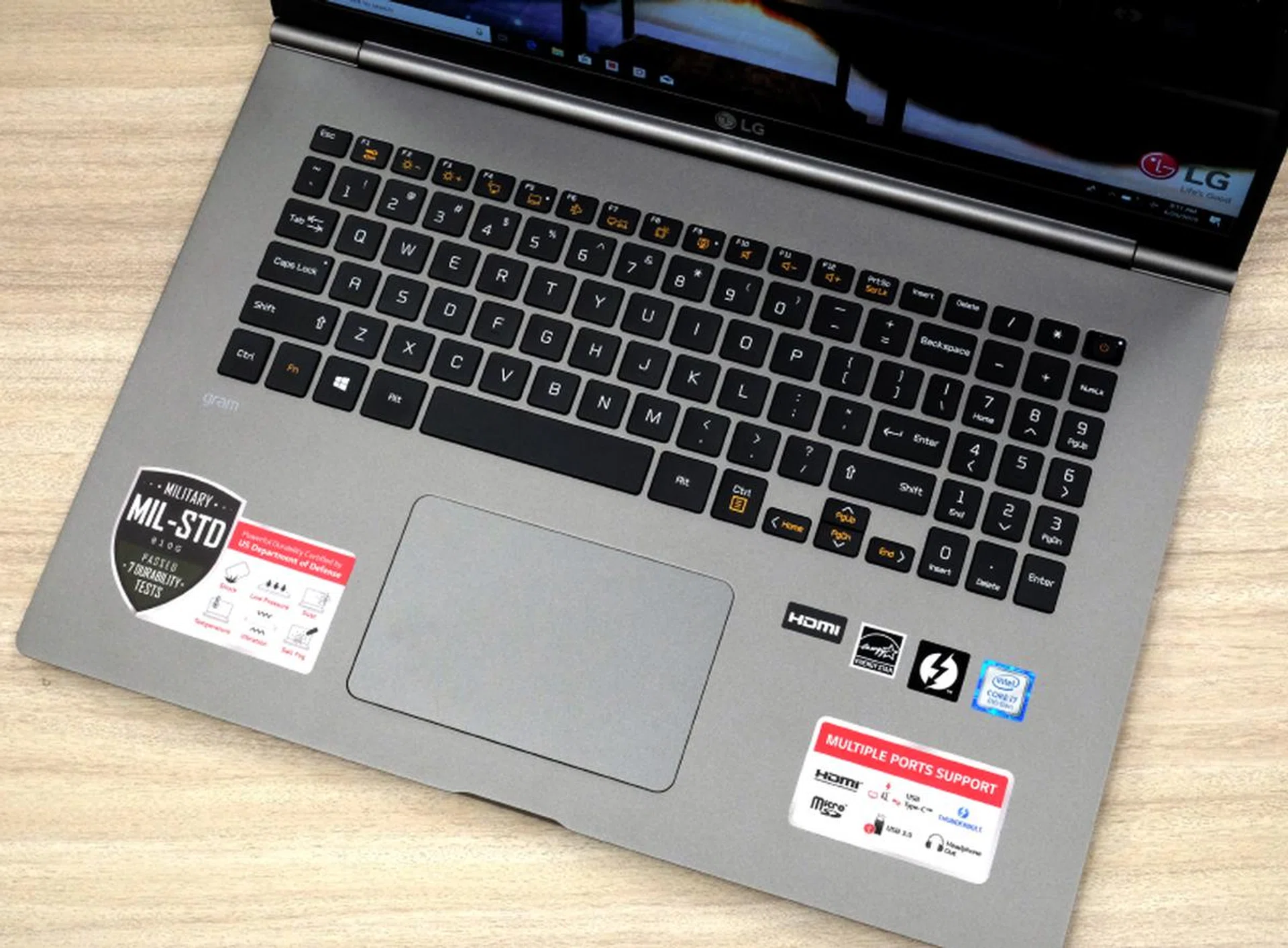
Can we not have a larger trackpad? There's so much space.
At $2,799, the gram 17 is certainly a pricey notebook especially when you can get a pretty powerful gaming one for two grand or less these days. But as I said, the gram 17’s USP is its portability, which is something no other 17-inch notebook even comes close and hence the premium. Nevertheless, the gram 17’s configuration is quite decent and my only complaints would be that it comes with 8GB of RAM instead of 16GB and it uses a slower SATA-based SSD instead of a PCIe one. At this price, even taking into account its unique lightweight construction, I feel that the gram 17 should come with 16GB as well as faster PCIe SSDs as standard.
Final Thoughts
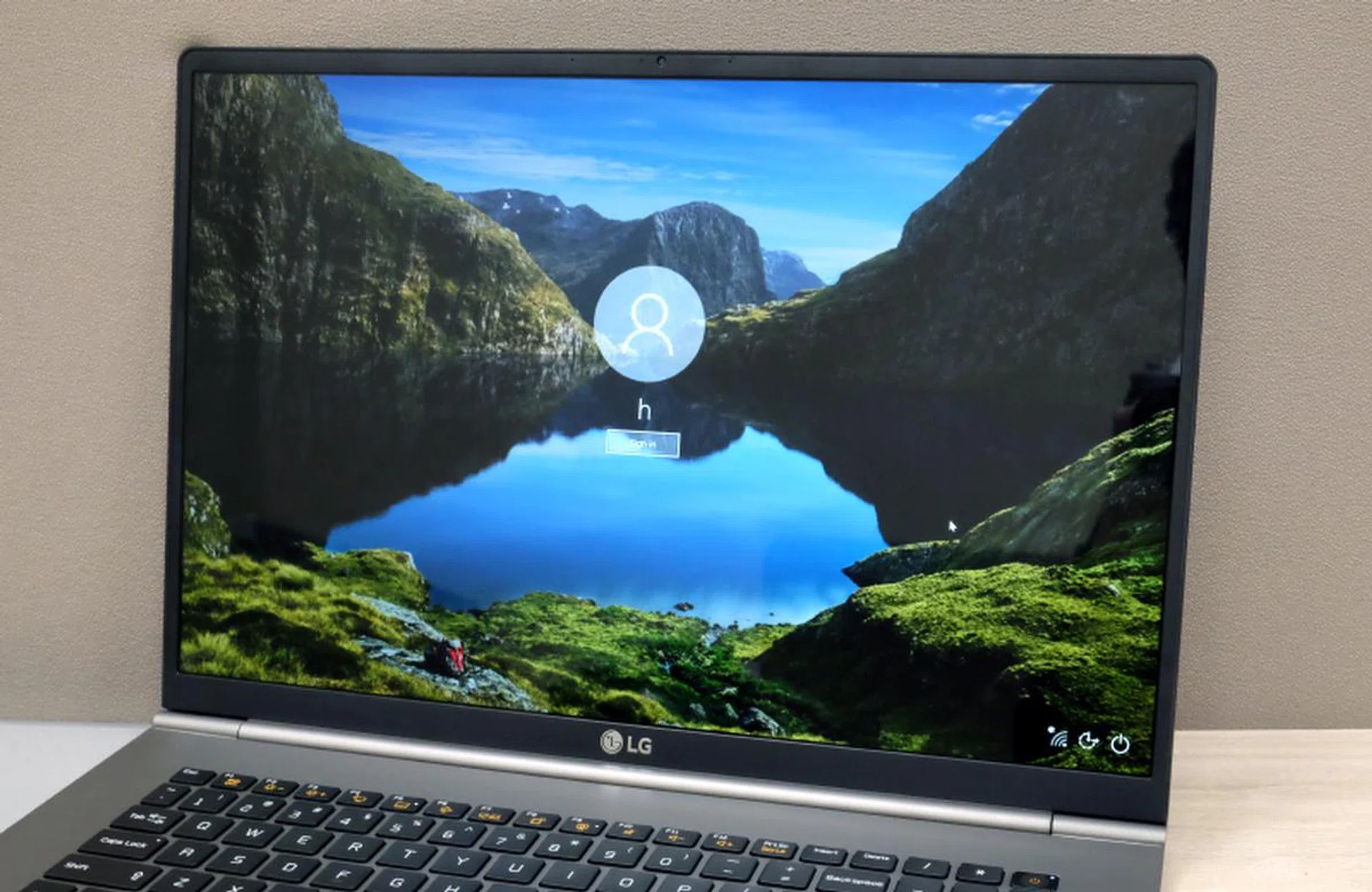
It doesn't sound like much, but the 16:10 aspect ratio makes a significant and tangible difference.
From an engineering perspective, the gram 17 is something of a marvel. Weighing just 1.34kg, it is only slightly heavier than the current crop of 13-inch ultraportable notebooks, which is an incredible achievement if you stop and really think about it. Put another way, you get four more inches of display real estate — nearly 80% more in outright screen area — with no increase in weight.
If you have always wanted a notebook with a larger display but stayed away because of the associated weight, the gram 17 is practically a godsend. That said, while it is light, it is still a large notebook to carry about, which does compromise overall portability. Furthermore, if you do wish to carry it around, you’ll probably want to get a large enough bag — something to keep in mind. If you have older 15-inch notebook folders or sleeves that cater to bulkier notebooks, they might just be able to take in the gram 17.
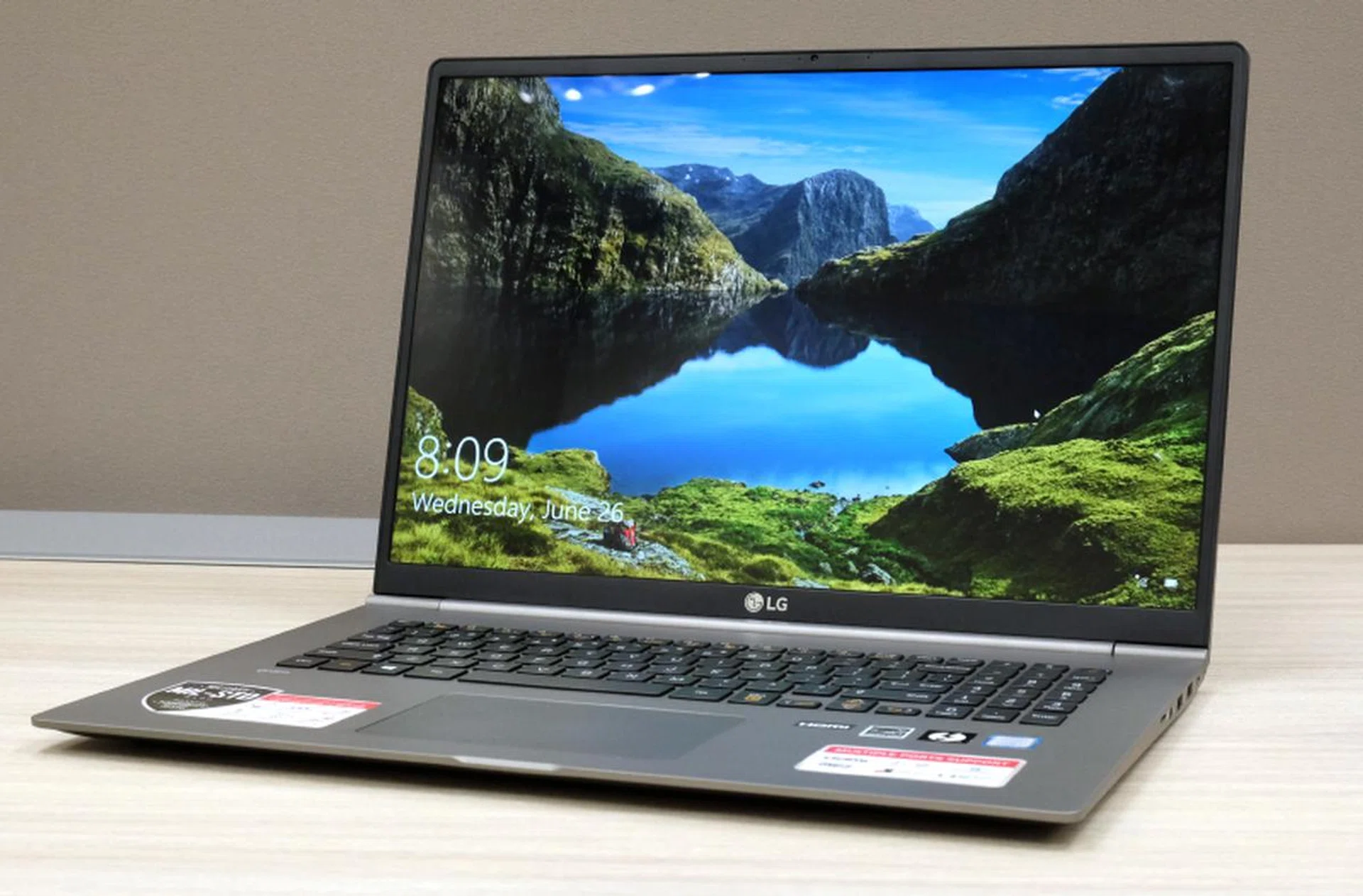
After spending weeks with the gram 17, I still can't wrap my head around the fact that it only weighs 1.34kg.
Still, the trouble is probably worth it since the 17-inch display is lovely and does make work — especially on spreadsheets — a lot more pleasant because of the additional vertical real estate. Browsing the web and watching videos is a lot more enjoyable too, though it must be said that the 16:10 aspect ratio does leave quite sizable black bars on certain content.
In the end, the only things that count against the gram 17 are its below average performance (due to the use of single-channel memory), its high price, and the fact that it is still a large notebook due to the screen size. However, its expansive and gorgeous display and its incredible lightweight are probably enough to make most users forget about its shortcomings.
Our takeaway: Try it and be wowed as there's nothing else like it in the market.
Our articles may contain affiliate links. If you buy through these links, we may earn a small commission.