
Gigabyte GA-P35-DS3R (Intel P35)
Gigabyte updates its S-Series of motherboards with the Intel P35 chipset and introduces their new Ultra Durable 2 design. The GA-P35-DS3R recaptures the old magic of the GA-965P-DS3 as a great budget board with an incredible appetite for speed. Check out the full review right here.

Introduction
With the critical success of the original GA-965P-DS3, Gigabyte is taking no chances with the P35 chipset this time around. The original GA-965P-DS3 may have come from humble beginnings, but Gigabyte has seen the so much value in the mainstream line of their S-series motherboards that they've created a whole new series within a series, just to capture a bigger slice of the market. Not that we're complaining though as this just means more goodies for the consumers.
So it comes as no surprise that their 'S3' line for the P35 is the largest of the whole S-series with a total of eight different board configurations altogether ranging from the true entry-level GA-P35-S3 to the performance oriented GA-P35-DS3P with dual PCIe x16 and CrossFire support. Like most other manufacturers, there is the hybrid DDR2/DDR3 model - GA-P35C-DS3R - as well, but what makes it different from the rest is that it comes with a total of six DIMM slots, four DDR2 slots for full flexibility of today's memory and two DDR3 slots if you plan on upgrading. But that's for review another day.
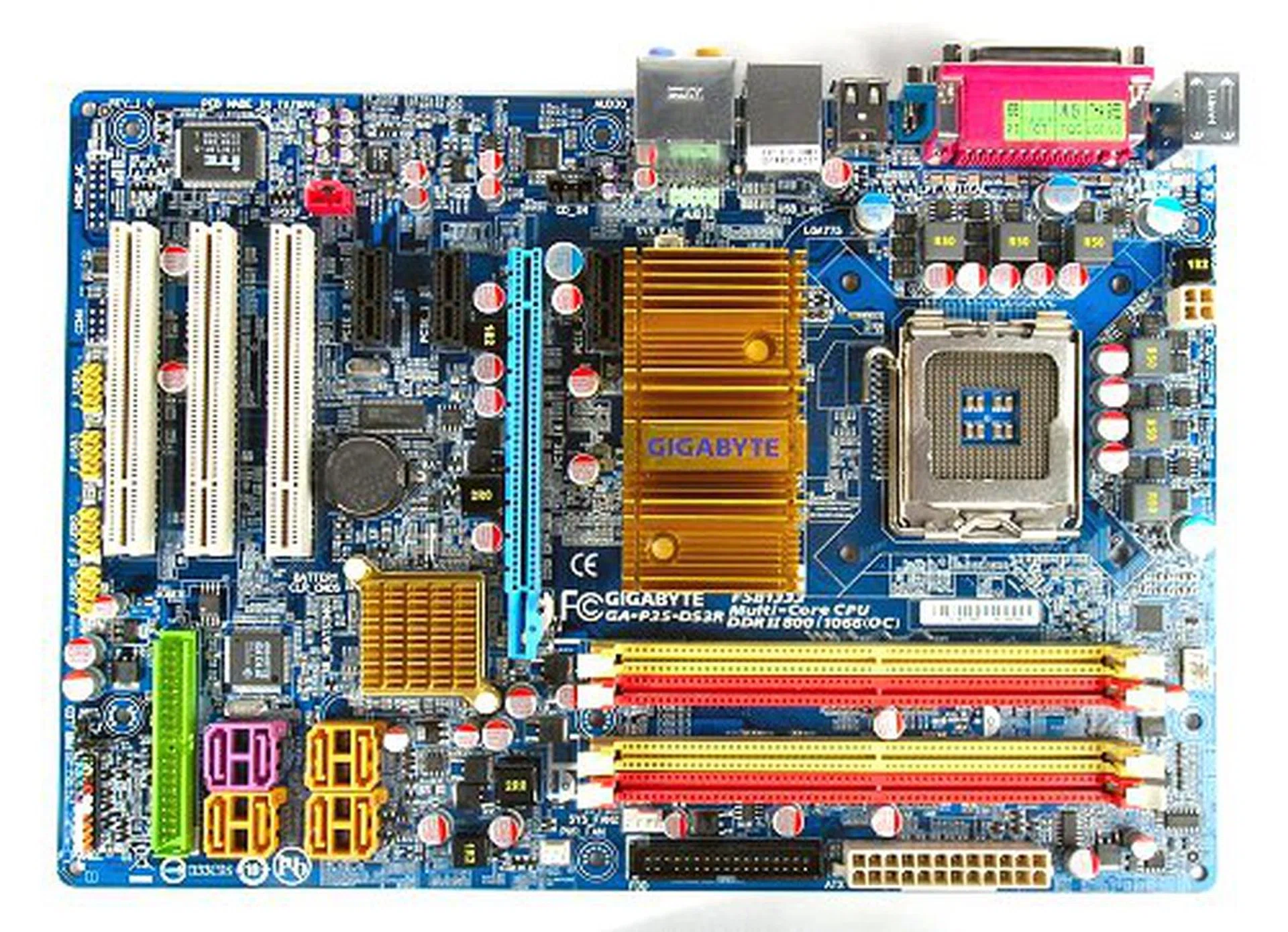
In this review, we'll be taking a look at what we think would be the more popular choice for the DS3 line up, the GA-P35-DS3R. If you're really looking for mainstream, but want something with a little punch, this single slot PCIe x16 board with RAID capabilities seems to be Gigabyte's perfect balance of price and performance. Let's have a look at the full technical specification of the board before continuing:-
- 4 x SATA data cables
- 1 x 80-conductor Ultra ATA data cable
- 1 x floppy drive data cable
- eSATA bracket (2 x eSATA ports, 1 x external power connector)
- 1 x eSATA cable
- 1 x external SATA power cable
- I/O shield
- Driver CDs
- User's guide and manual
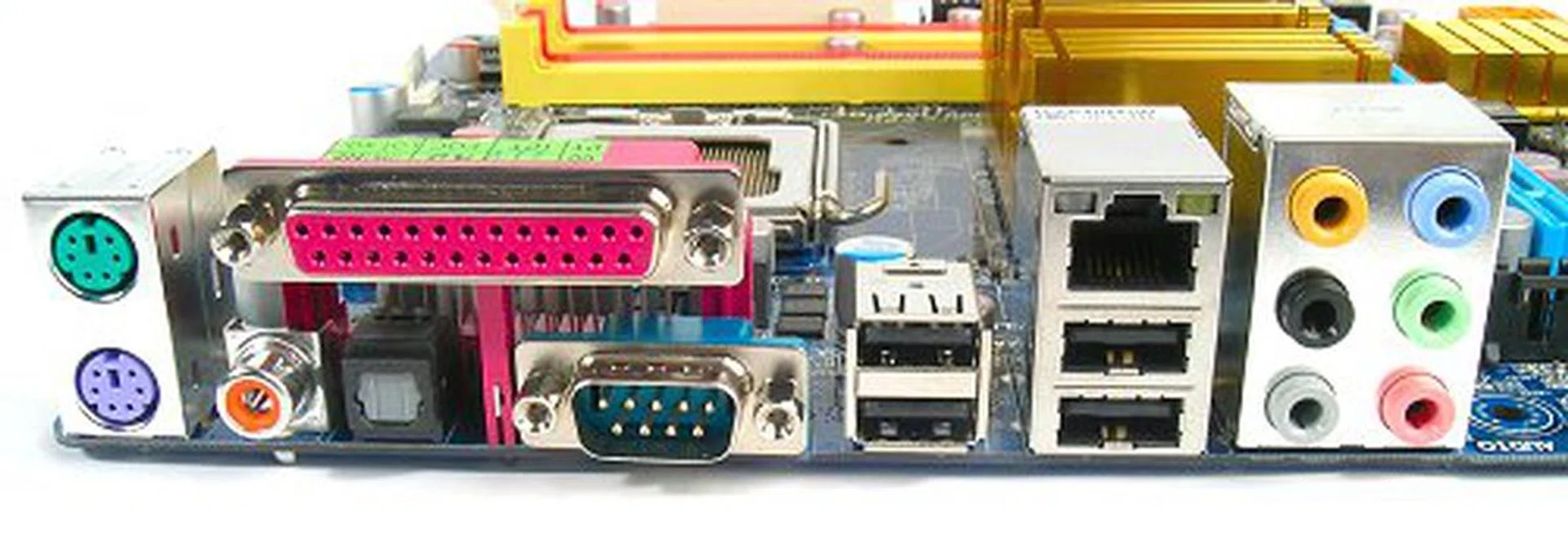
Rear I/O panel has PS/2 ports, Parallel, Serial, optical and coaxial S/PDIF output, four USB 2.0, an RJ-45 port and the standard set of analog surround audio jacks.
Features
The Gigabyte GA-P35-DS3R motherboard features the Intel P35 chipset, supports all current LGA775 processors up to the Core 2 Duo, Core 2 Quad and even the upcoming 45nm and FSB 1333MHz CPUs. The chipset was also engineered for the eventual replacement of DDR2 memory with DDR3, but the GS-P35-DS3R is a pure DDR2 motherboard. It supports four DDR2 DIMM slots up to an 8GB memory configuration and high-speed memory support up to DDR2-1066.
On the outset, the GA-P35-DS3R motherboard isn't all that different from other Intel P35 motherboards floating around the market today. The main difference between this board and our previous two mainstream P35 reviews ( and ) is its use of the ICH9R Southbridge which gives the board enhanced storage performance with AHCI and RAID support through Intel Matrix Storage Technology. The board features six internal SATA 3.0Gbps ports powered by the Southbridge and another two additional SATA 3.0Gbps ports from a secondary storage controller (Gigabyte SATA 2 controller). The main SATA ports all feature Intel Matrix Storage Technology and support RAID 0, 1, 5 and 10. The secondary SATA ports only support RAID 0 and 1. This particular model also comes with an eSATA bracket with external power connectors and cables all included in the package.
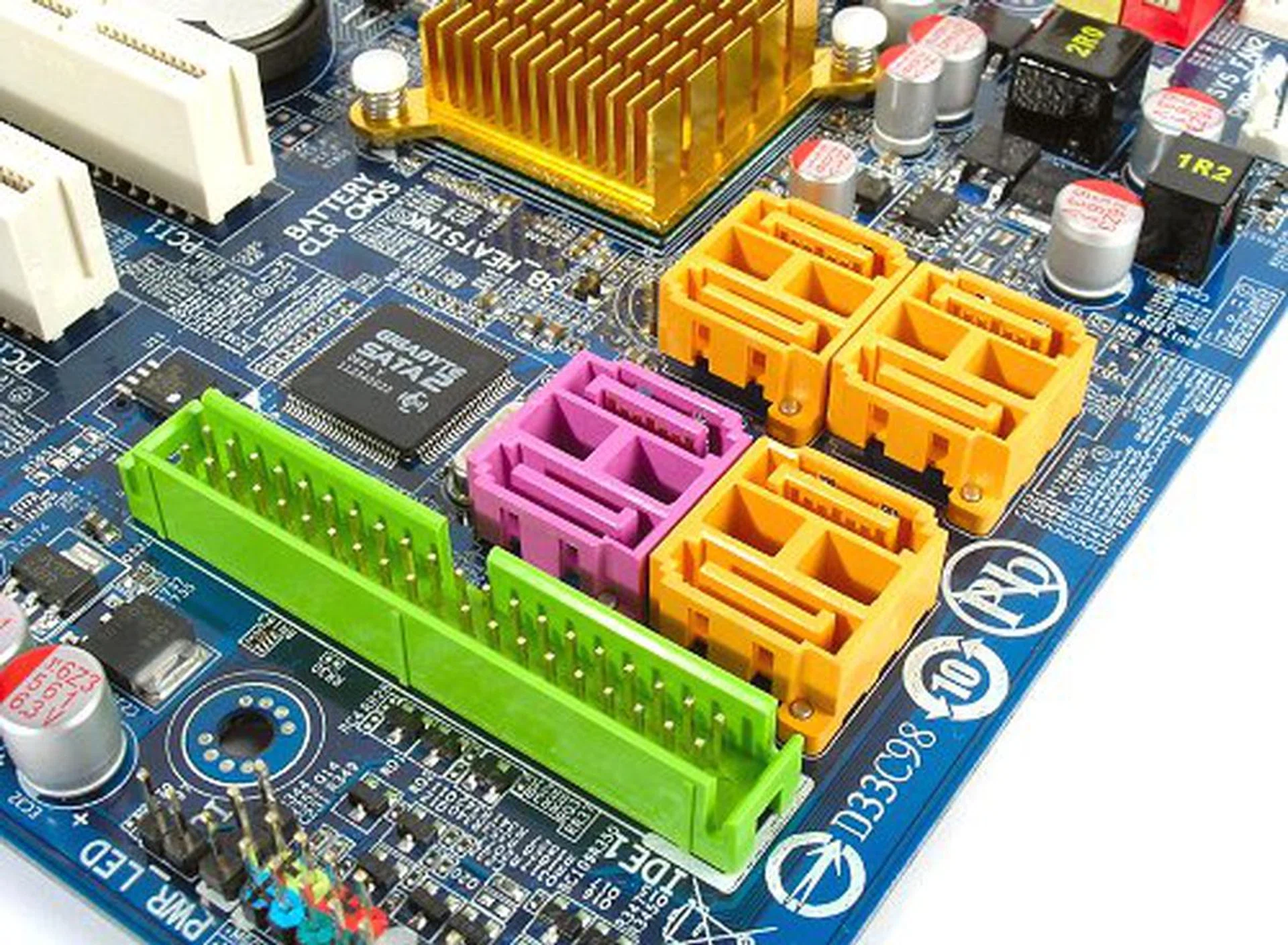
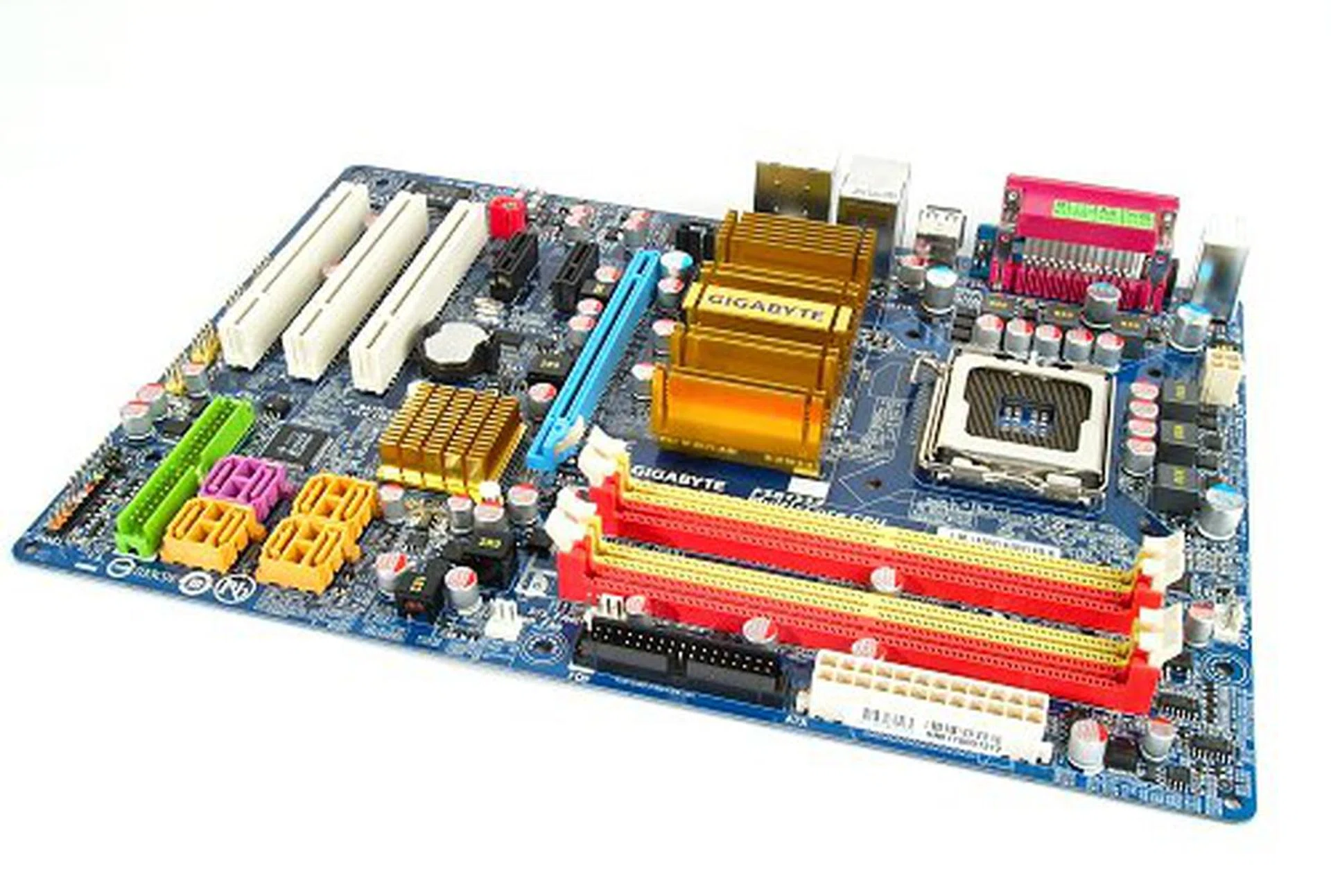
Orange SATA ports are serviced by the ICH9R chipset while the remaining two purple ports are powered by the secondary Gigabyte SATA2 controller seen on the left. This controller also provides the Ultra ATA port on the board.
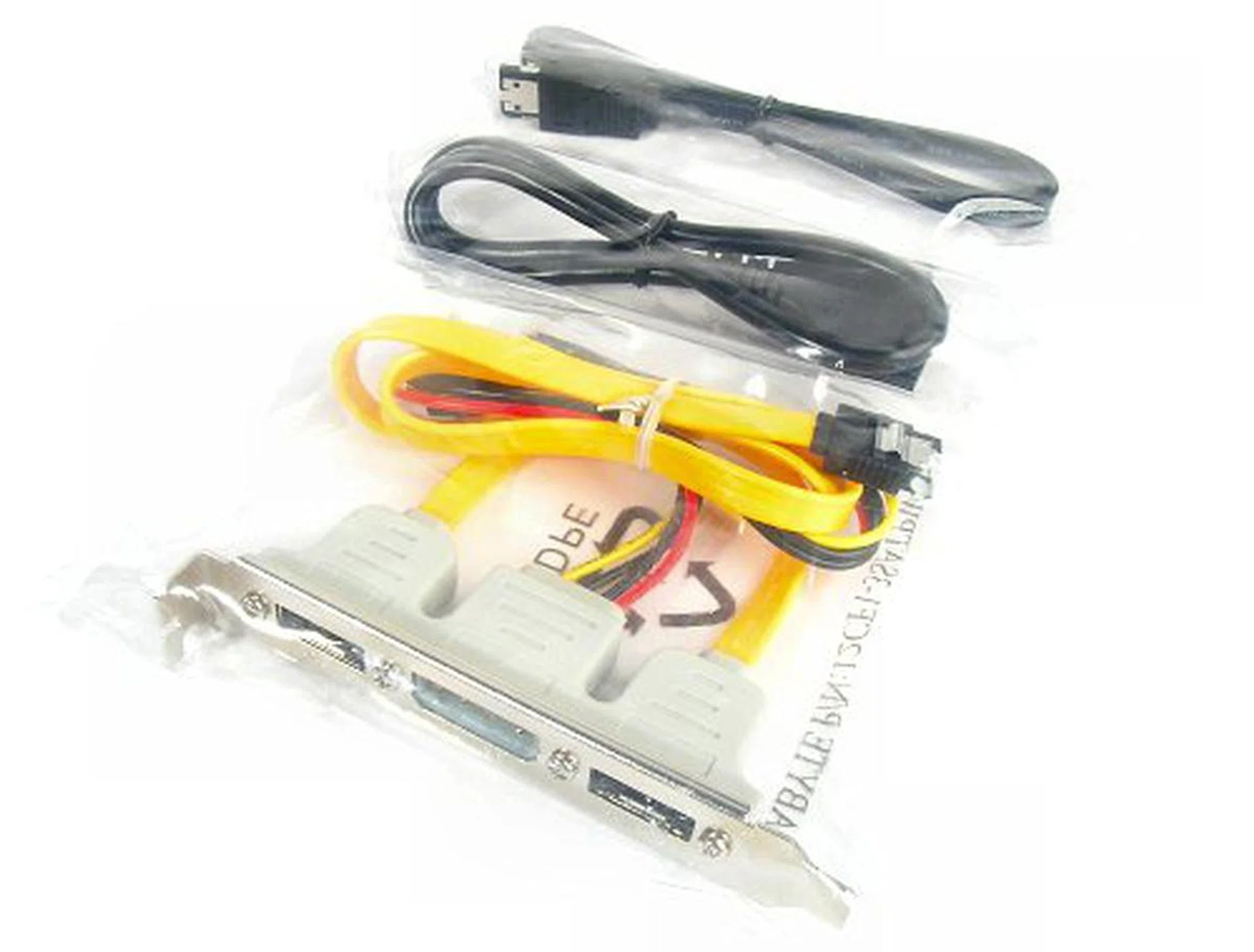
eSATA package comes with bracket and a set of external data and power cables.
Networking features are straightforward with the onboard Gigabit LAN port controlled by the popular Realtek RTL8111B PCIe chipset. The GA-P35-DS3R has four USB 2.0 ports at the rear I/O panel with the remaining eight as onboard headers. Gigabyte doesn't provide any brackets for additional USB connectivity by default, though they offer them as optional items. The board also does not feature any FireWire support at all. Perhaps the most interesting component that appears throughout Gigabyte's P35 lineup regardless of pedigree is the brand new Realtek ALC889A HD Audio CODEC. So new, you won't even find it on Realtek's own website yet. The ALC889A has a 106dB SNR playback quality and supports content protection technology. The audio encryption should comply with Microsoft's WLP 3.0 protection specification for Windows Vista, allowing full rate lossless audio playback of protected media or sources like Blu-ray or HD DVD from WLP 3.0 compliant media players such as PowerDVD or WinDVD. Without a protected encryption path, audio is designed to be down-sampled.
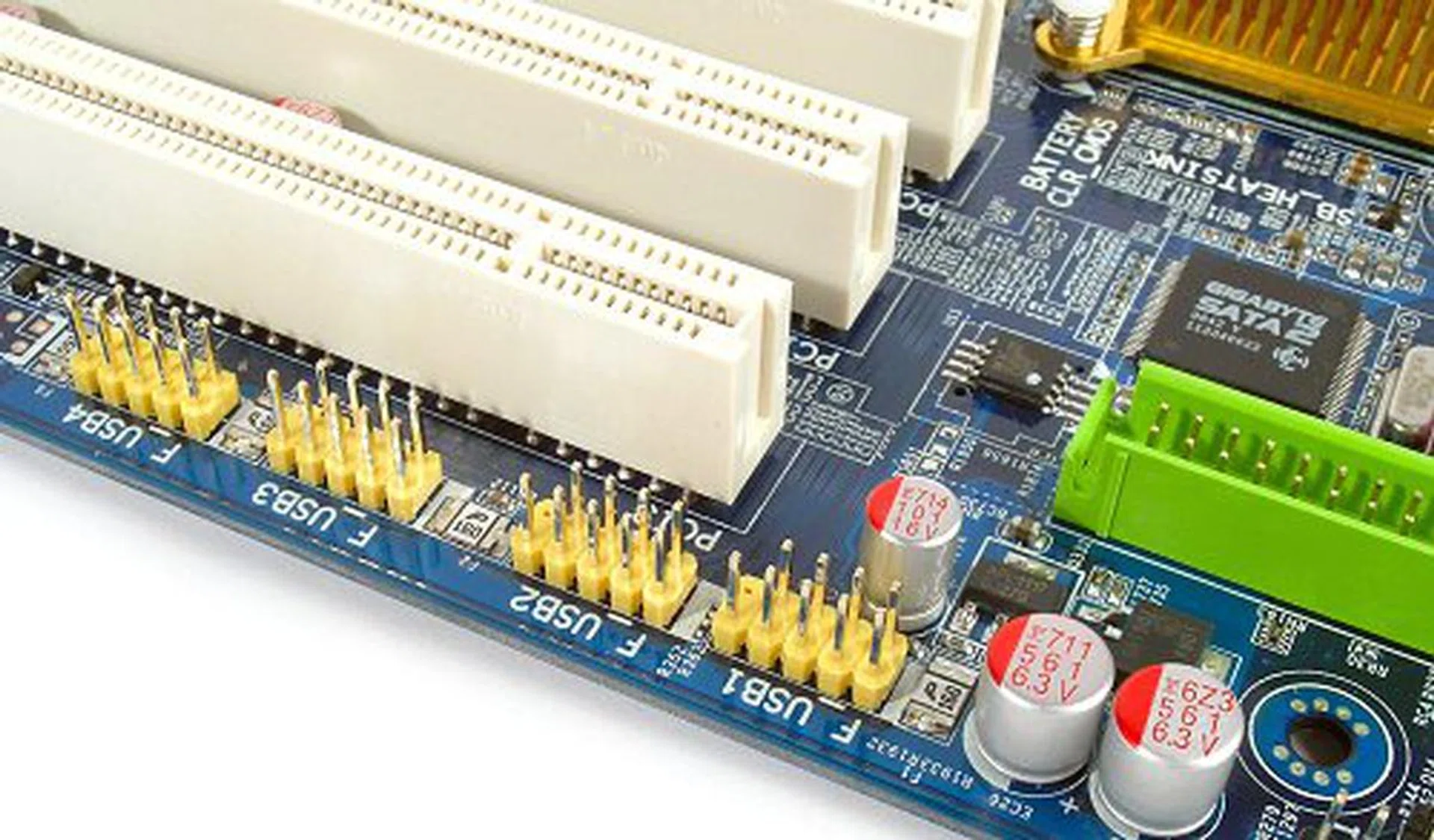
No additional USB brackets in the bundle. The board also does not support FireWire.
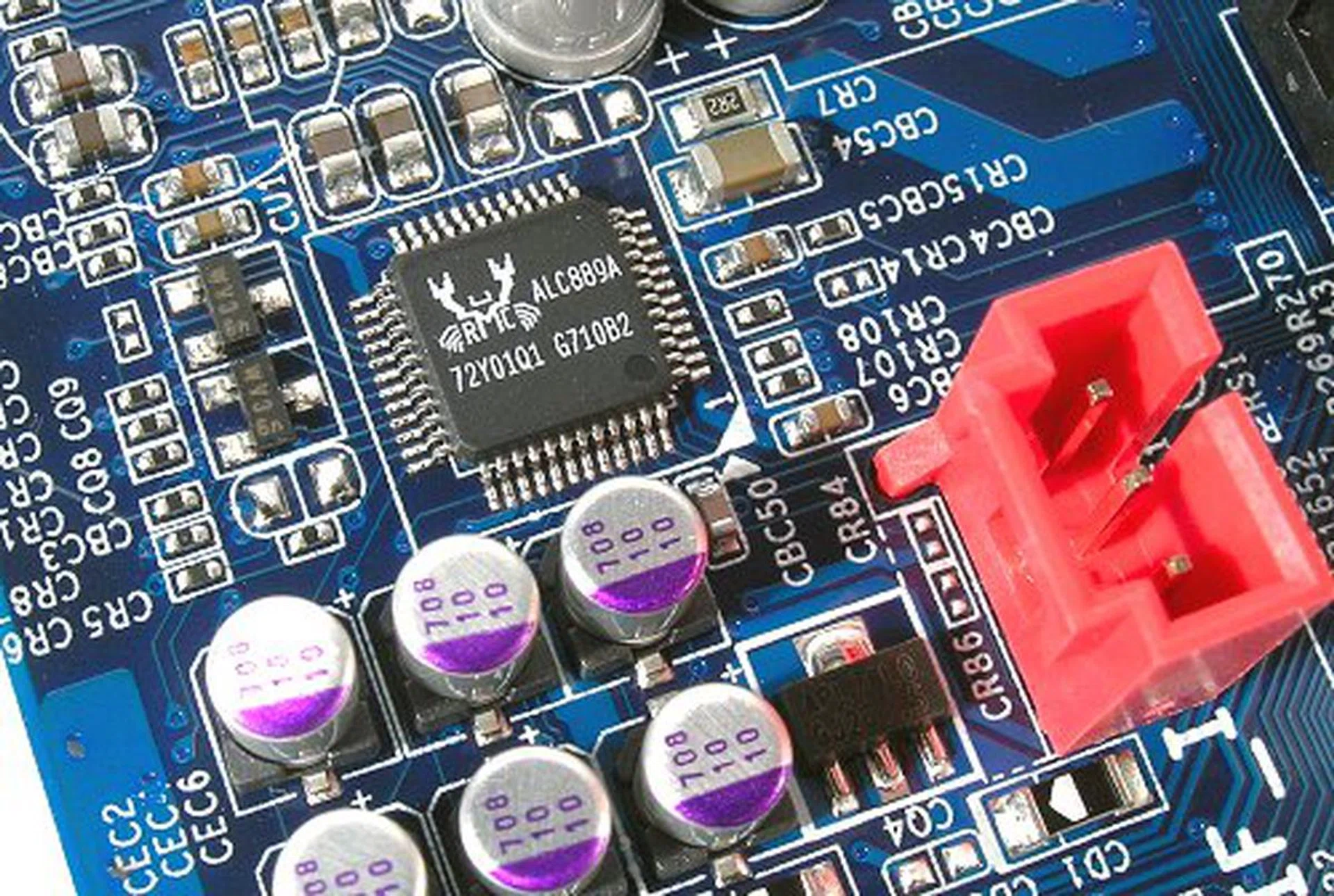
New Realtek HD Audio CODEC supports protected path content delivery.
If you've seen our Gigabyte P35 preview ( ), you'd also know that Gigabyte has updated its entire suite of Ultra Durable components, now called Ultra Durable 2. With the first batch of Ultra Durable motherboards, Gigabyte introduced the 100% solid capacitor design for motherboards to eliminate the risk of leaking capacitors altogether, improving board lifespan and stability. The GA-P35-DS3R features Ultra Durable 2, which has two new features in addition to the full solid capacitor design, Gigabyte is now using Ferrite core chokes, replacing the normal iron chokes. According the Gigabyte, the Ferrite chokes are able to hold power longer at high frequencies, thus reducing energy loss by up to 25%. Then there is also the Low RDS(on) MOSFETs that allow faster charging and discharging and lower switching resistance, which in turn is supposed to reduce overall heat generated by 16% over normal MOSFETs.
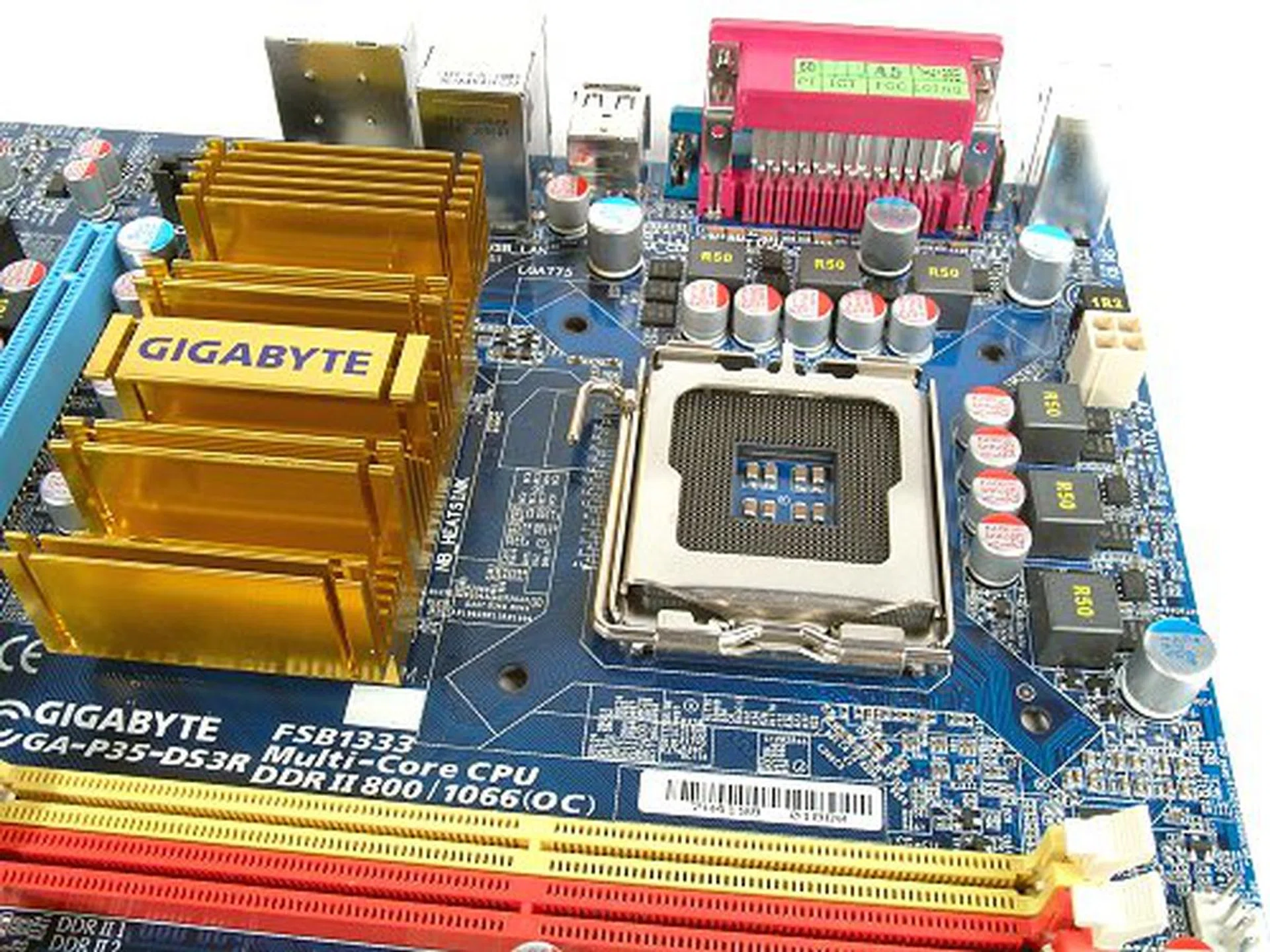
No fancy cooling system here, just a big heatsink on the chipset, but the technology surrounding the power components are quite impressive.
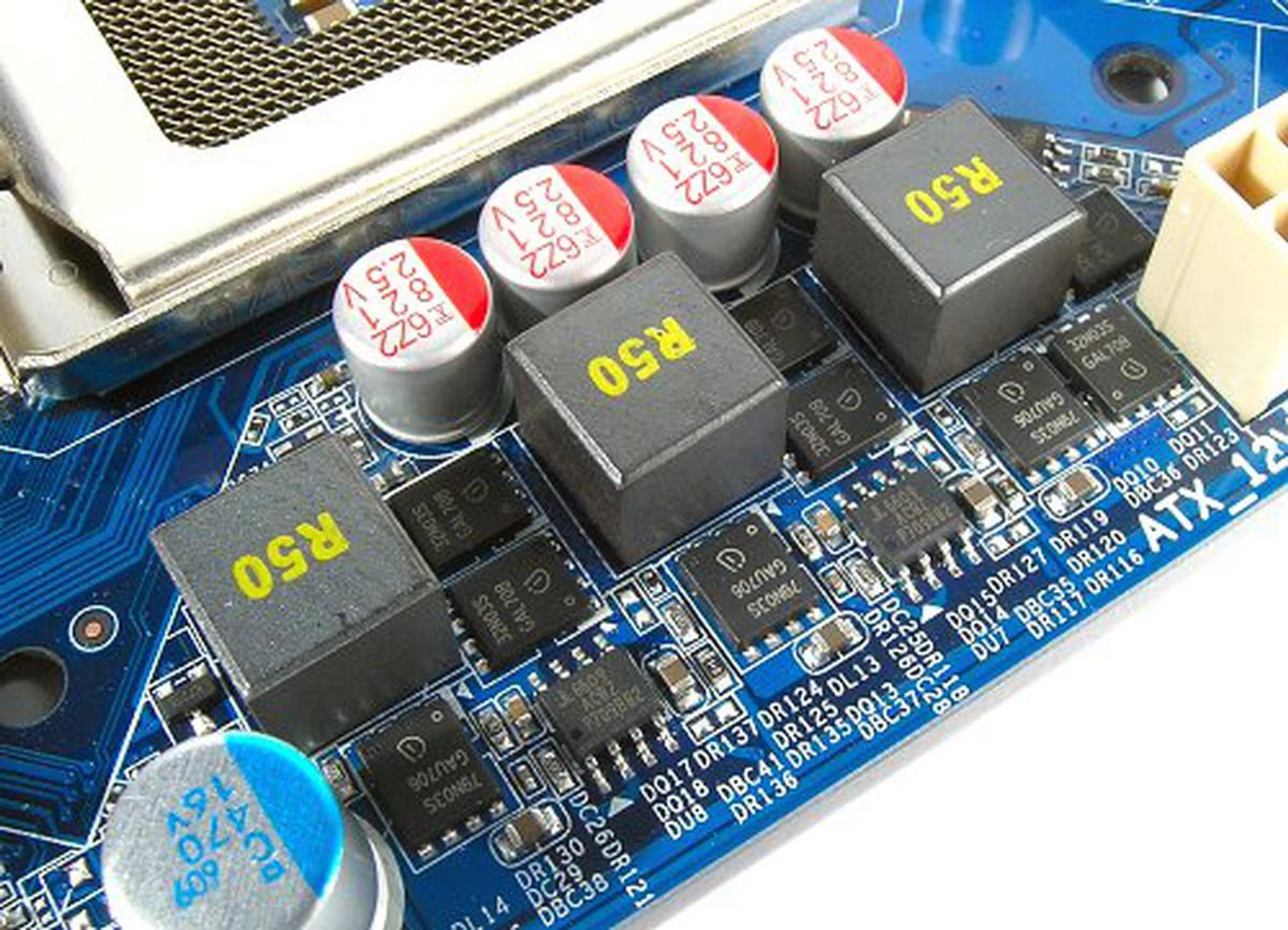
Solid capacitors, Ferrite chokes and Low RDS(on) MOSFETs are Gigabyte's answer to cooler, more efficient and longer lasting motherboards.
Layout
The GA-P35-DS3R isn't a proper full sized ATX board. It has the length, but the width has been reduced slightly from the usual 244mm to 210mm. As such, the board looks slimmer and a lot more cramped. Component spacing is well optimized for such a board. For example, there is plenty of spacing between the PCIe x16 and DIMM slots, making memory installation and removal an easy task. Component placement is also decent enough, though we would have liked it better if the IDE and Floppy connectors were switched. The last PCIe x1 slot may also be too close to the Northbridge cooler though, and Gigabyte could have done without it instead of trying to cram in a full seven-slot expansion design.
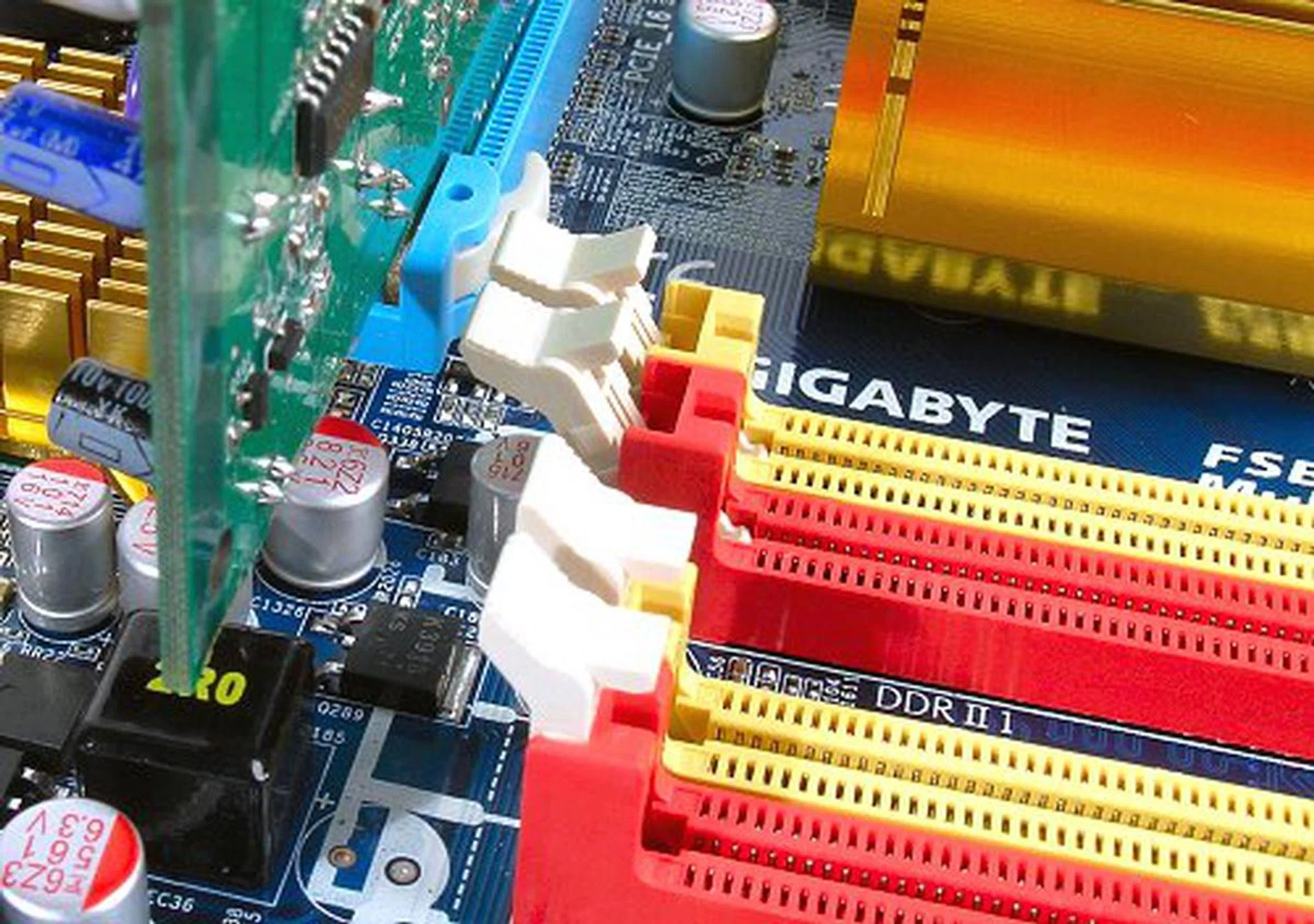
Plenty of space between DIMM slots and GPU.
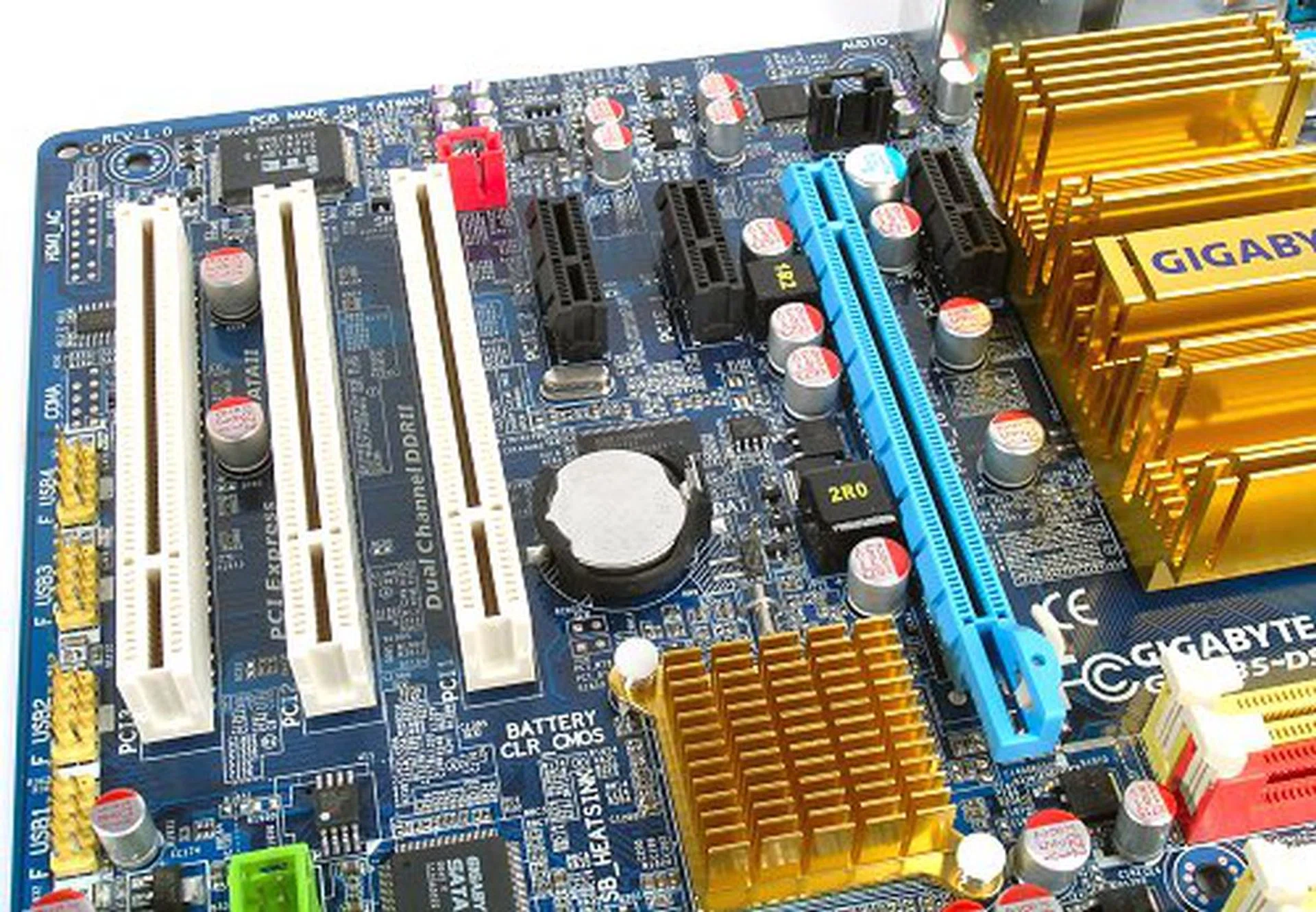
Seven expansion slots, though the uppermost PCIe x1 is in a tight spot.
Overclocking
- FSB Settings: 100MHz to 700MHz
- DDR2 Settings: Auto, 2.0, 2.5, 3.0, 2.66, 3.33, 4.0+
- PCIe Settings: 90MHz to 150MHz
- CPU Voltage Settings: 0.51250V to 1.60000V (in 0.00625V steps), 1.6V to 2.0 (in 0.1V steps)
- Memory Voltage Settings: +0.1V to +0.7V (in 0.1V steps)
- PCIe Voltage Settings: +0.1V to +0.3V (in 0.1V steps)
- MCH Voltage Settings: +0.1V to +0.3V (in 0.1V steps)
- FSB Voltage Settings: +0.1V to +0.3V (in 0.1V steps)
- Multiplier Selection: Yes (unlocked CPUs only)
Ever since the launch of their P965 series of motherboards, especially the now infamous GA-965P-DS3, Gigabyte has suddenly turned into one of the top brands to go for in terms of enthusiast tweaking and platform stability. Gigabyte was first to hype a full 100% solid capacitor design, which they dubbed as their Ultra Durable series of motherboards and you can tell that they're trying to capture the same market with the latest Ultra Durable 2 quipped GA-P35-DS3R. So how well does it actually perform? Up till now, the Intel P35 chipset remains on similar grounds with the P965 in terms of overclocking. We've managed to achieve an average FSB overclock around the 470MHz range for most of the boards we've tested, but there has been no indication that the P35 is more overclockable than the P965. A lot cooler certainly, but not more overclockable.
When we put the GA-P35-DS3R to the test, we didn't expect any different, but Gigabyte clearly has other plans for the board. BIOS-wise, the options and stepping on the GA-P35-DS3R are almost identical to the original GA-965P-DS3, which we'd consider as sufficient, but may not be the most tweakable settings. Nevertheless, the GA-P35-DS3R is an incredible overclocker. This is the very first board we've come across to match the ASUS Commando in overclocking. The maximum stable FSB achieved by the GA-P35-DS3R is a solid 516MHz on stock cooling and a +0.2V tweak to the MCH and FSB, amounting to a quad pumped 2064MHz processor side bus. The board would actually boot up to 525MHz, but was not stable under Windows. The only issue was that the MCH chip ran much hotter than all the previous P35 boards we've tested thus far while overclocking. Not to the extent of the P965's, but definitely much warmer.

CPU-Z overclocking screenshot. Click for full size image.
Another thing we noticed about the GA-P35-DS3R during overclocking was how matured Gigabyte's BIOS recovery has become. The board managed to recover on its own from every single overclocking failure without needing manual CMOS clearing. With its ease of use and intuitiveness, the trial and error of overclocking became so much less of a chore, which says a lot about the board.
Test Setup
The Gigabyte GA-P35-DS3R is one of the DDR2 only Intel P35 motherboards in the market, so our benchmarking section will only include DDR2 samples. As a mainstream motherboard, the GA-P35-DS3R will be compared against the Foxconn P35A and the recently reviewed MSI P35 Neo Combo. We will also include results from the ASUS P5K Deluxe and MSI P35 Platinum to see where the board stands in terms of performance against the high-end market. As usual, we employ our standard test setup listed below for all the motherboards used in this review:-
- Intel Core 2 Extreme X6800 processor (2.93GHz)
- 2 x 1GB Kingston HyperX DDR2-800 @ 4-4-12 CAS 4.0
- Seagate Barracuda 7200.10 200GB SATA hard disk drive (one single NTFS partition)
- MSI GeForce 8600 GTS 256MB - with ForceWare 158.22 drivers
- Intel INF 8.3.1.1013 and AHCI 7.5.0.1017 driver set
- Microsoft Windows XP Professional with Service Pack 2 (and DirectX 9.0c)
Benchmarks
The following benchmarks will be run to determine the performance of the Gigabyte GA-P35-DS3R:-
- BAPco SYSmark 2004
- Futuremark PCMark05
- SPECviewperf 9.0
- Futuremark 3DMark06
- AquaMark3
Results - Results - BAPco SYSmark 2004
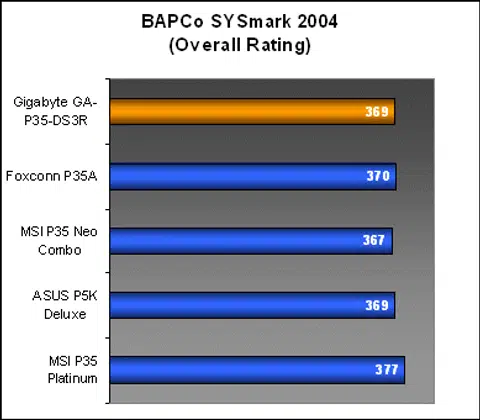
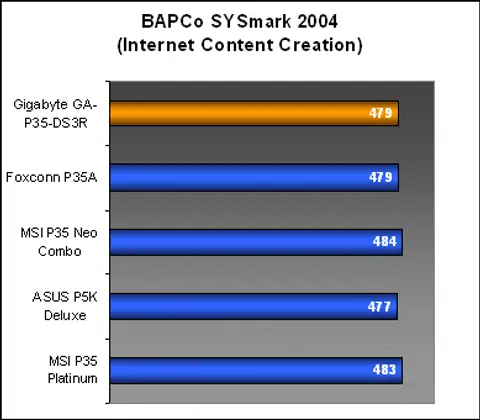
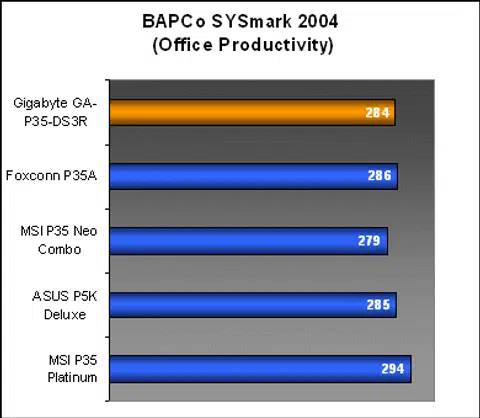
The Gigabyte GA-P35-DS3R was a decent performer in SYSmark 2004 and managed to keep up with the rest of the boards in both the Internet Content Creation and Office Productivity workloads. Among the mainstream boards, the GA-P35-DS3R compared more closely to Foxconn's P35A, outperforming the MSI P35 Neo Combo.
Results - Futuremark PCMark05
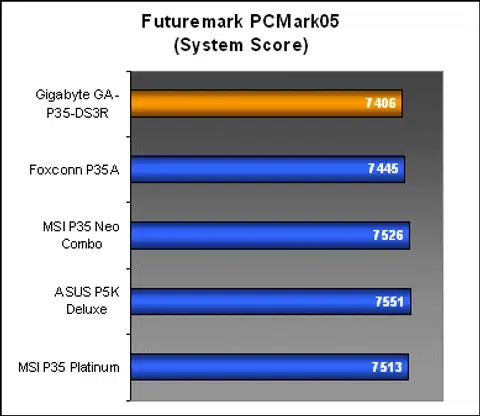
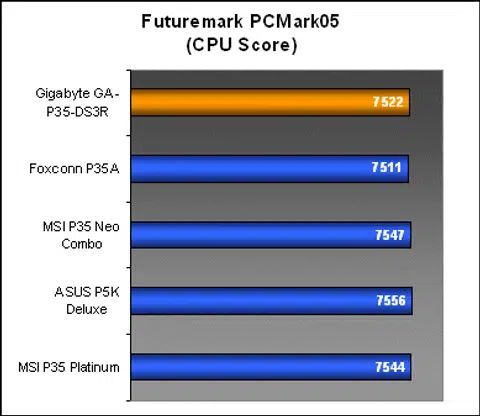
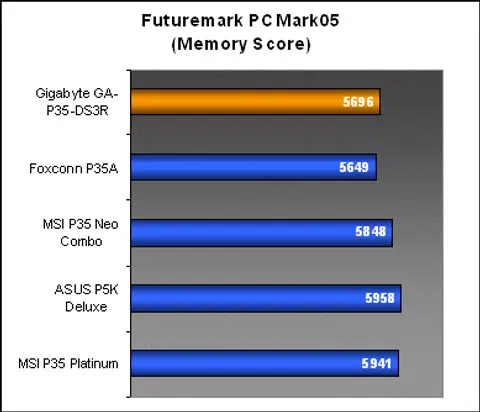
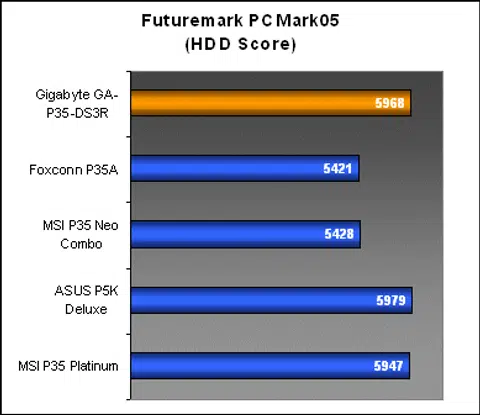
Interestingly enough, the GA-P35-DS3R's scores in PCMark05 were also closely similar to Foxconn's P35A. While its System and CPU results did not show anything out of the ordinary for the group of P35 motherboards, these were the only two boards with a consistent dip in performance under PCMark's memory workloads. Hard drive scores were fortunately on par with the premium boards thanks to the GA-P35-DS3R's more capable ICH9R Southbridge lending its hand to AHCI functionality.
Results - SPECviewperf 9.0
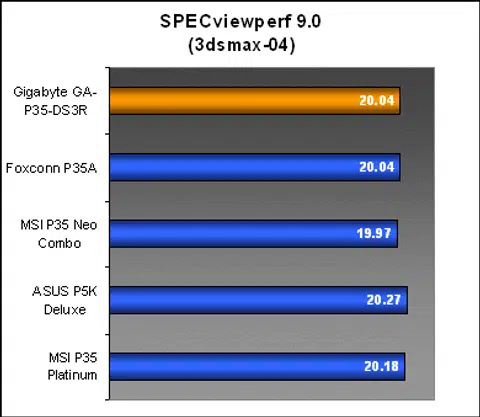
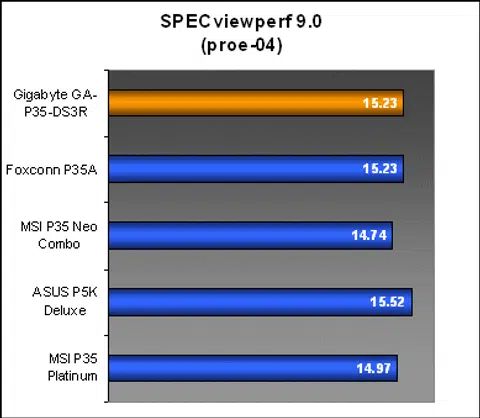
Talking about uncanny, the Gigabyte GA-P35-DS3R continued to match performance with the Foxconn P35A with identical scores for both chosen workloads below. Now, SPECviewperf is primarily a professional OpenGL benchmark tool and we specifically choose the 3dsmax and pro/ENGINEER workload results to highlight GPU and memory subsystem load performance. In contrast to PCMark05's results, the GA-P35-DS3R now has the stronger memory subsystem, while both the MSI boards seem to have trouble with the pro/ENGINEER suite.
Results - Futuremark 3DMark06
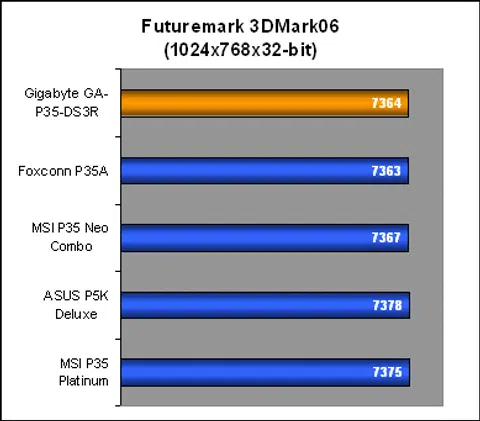
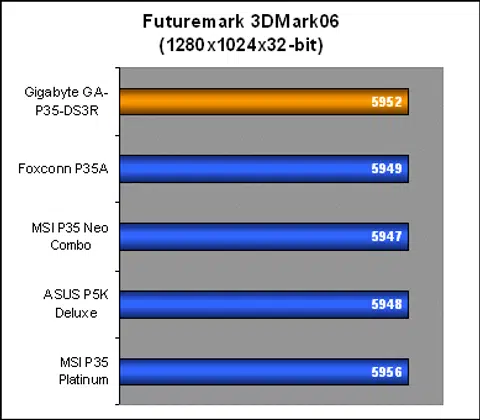
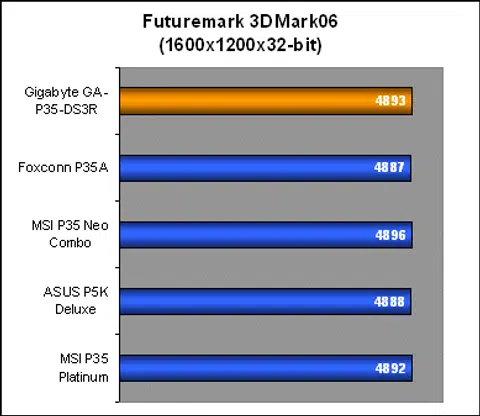
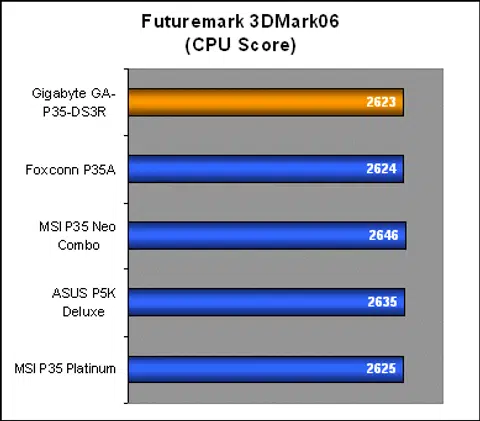
Despite the performance differences found in business and desktop productivity benchmarks, 3DMark06 remained relatively consistent among all the P35 boards that have been tested so far. The GA-P35-DS3R proves to be a solid gaming platform with no red flags raised in either CPU or GPU subsystems. That said, the scores didn't do anything to set it apart either.
Results - AquaMark3
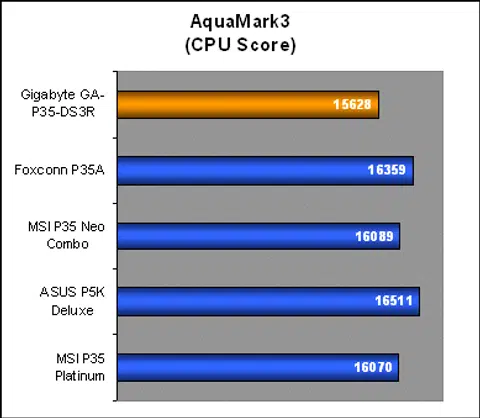
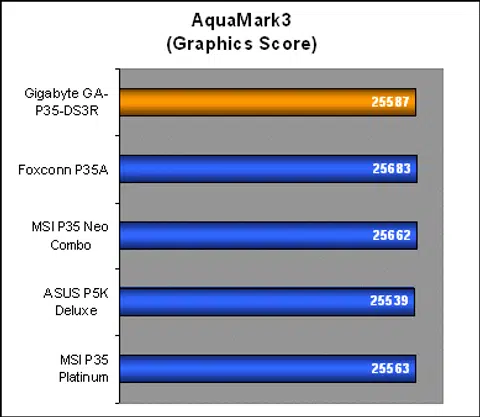
AquaMark3 is the one benchmark where the Gigabyte GA-P35-DS3R broke from its performance trend throughout our benchmarking with an uncharacteristically low CPU Score. AquaMark is a relatively simple and fast benchmark to run and we've run this many times to ensure that the results are consistent and they are. Although GPU subsystem performance was on par with the rest, its low CPU results lowered the average FPS (Frames-Per-Second), which is never good news to gamers, though 4fps is still not much on an inconvenience.
Conclusion
Gone are the days where the mainstream board is really designed for the mainstream crowd. Today, we have boards like the Gigabyte GA-P35-DS3R that can fit equally well in a nondescript OEM system as well as a souped up enthusiast rig. Motherboard features are no longer one of the most important factors of determining the value of a motherboard. With each generation of chipset, embedded features and functionality have continued to grow to the point where one can just leave a board blank and still have a pretty powerful motherboard.
The GA-P35-DS3R has just about everything anyone would need from a motherboard today, regardless of your 'creed'. Complete support for now and future processors, performance DDR2 support, multiple SATA, USB 2.0 ports, high speed networking, great expansion and good audio functionality. Of course, that particular summary is true to almost every modern motherboard released in the past year or two. What Gigabyte brings into the picture in its Ultra Durable 2 design is not just a puff of hot air (though Gigabyte is guilty of its fair share, but who isn't), but high quality components that try to address some of the issues most common in the PC world: Heat, power and reliability.
For normal usage, we'd say that 99% of consumers will probably not notice any difference in their motherboards with or without these features, and with the current lifespan of technology itself, it is more likely that a motherboard would have gone obsolete before any of its components fail. However, the long term benefits of a more efficient, cooler and reliable platform can be quantified when you're an enthusiast constantly stressing each part to squeeze out more performance. To an overclocker, the GA-P35-DS3R holds a lot of value not only for being one of the highest overclockers around, but also the stability and intelligence of great platform coding.
Looking at our own experience with the GA-P35-DS3R, there is no way to directly link the stability and overclocking performance with Gigabyte's Ultra Durable 2 design, but there is no denying that the GA-P35-DS3R is one hell of a smooth overclocker. Gigabyte plays right into this scenario, offering power users higher quality components with the Ultra Durable 2 design and universally raising the bar for motherboard components and quality.
Once again, Gigabyte delivers a powerful speed demon in the guise of an unseeming mainstream motherboard. The best part is that the GA-P35-DS3R is just one of a series.
One of those things sitting on the fence about this board is its overall performance. As you can see from our benchmarks, the GA-P35-DS3R wasn't a consistent performer across all the applications run. In certain benchmarks like SYSmark 2004 and SPECviewperf 9.0, the board displayed strong memory subsystem performance characteristics, but in other benchmarks like PCMark05 and AquaMark3, it was the opposite. One thing to take note of however, is that the numbers would increase back to being very competitive if the Performance Option in the BIOS was enabled. Running a quick PCMark05 set confirmed this. We always disable all proprietary performance enhancements when reviewing any motherboard to ensure best compatibility and stability, and this shows that Gigabyte just needs to tweak the BIOS a little bit more.
The Gigabyte GA-P35-DS3R can be found for around US$130, which is a pretty good price for a P35 board with an ICH9R Southbridge and not the weaker ICH9. If the GA-P35-DS3R speaks for the rest of the Intel P35 'S3' boards in Gigabyte's lineup, they've managed to recreate what made the original P965 version such a cult hit. Good engineering, extreme overclocking and great value.
Our articles may contain affiliate links. If you buy through these links, we may earn a small commission.