
The DIY Zotac Ion Motherboard Kit
After the recent introduction of the first retail implementation of the NVIDIA Ion platform from Acer, NVIDIA continues to push its chipset by sending us a barebones motherboard kit from Zotac with a dual-core Intel Atom processor installed. Here's a quick update with our findings.

Ion for the DIY Crowd
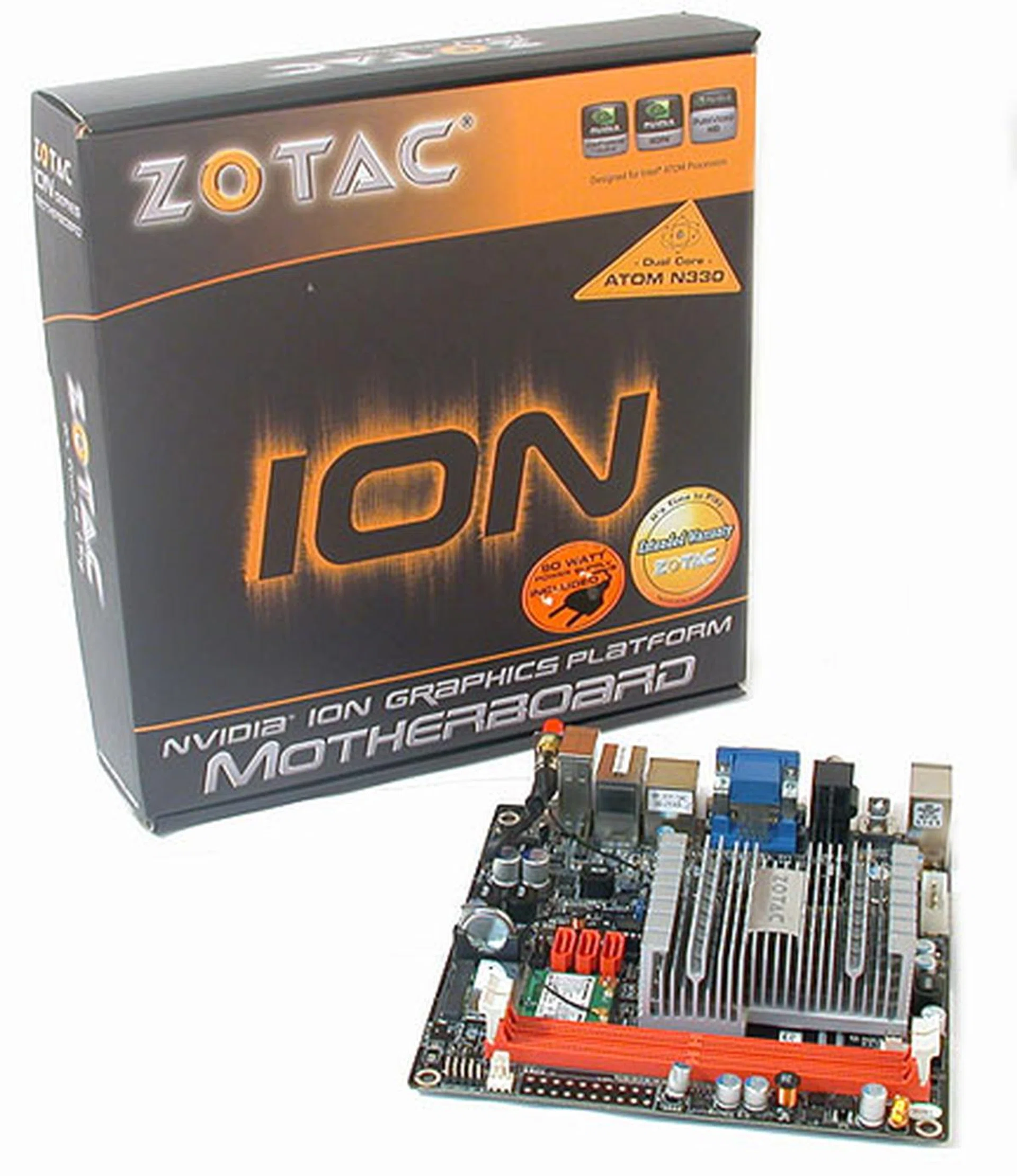
This week, NVIDIA continues its relentless media assault with yet another Ion system. This time, the platform goes DIY, featuring a barebones mini-ITX motherboard from Zotac that uses the NVIDIA Ion chipset together with a dual-core Intel Atom processor.
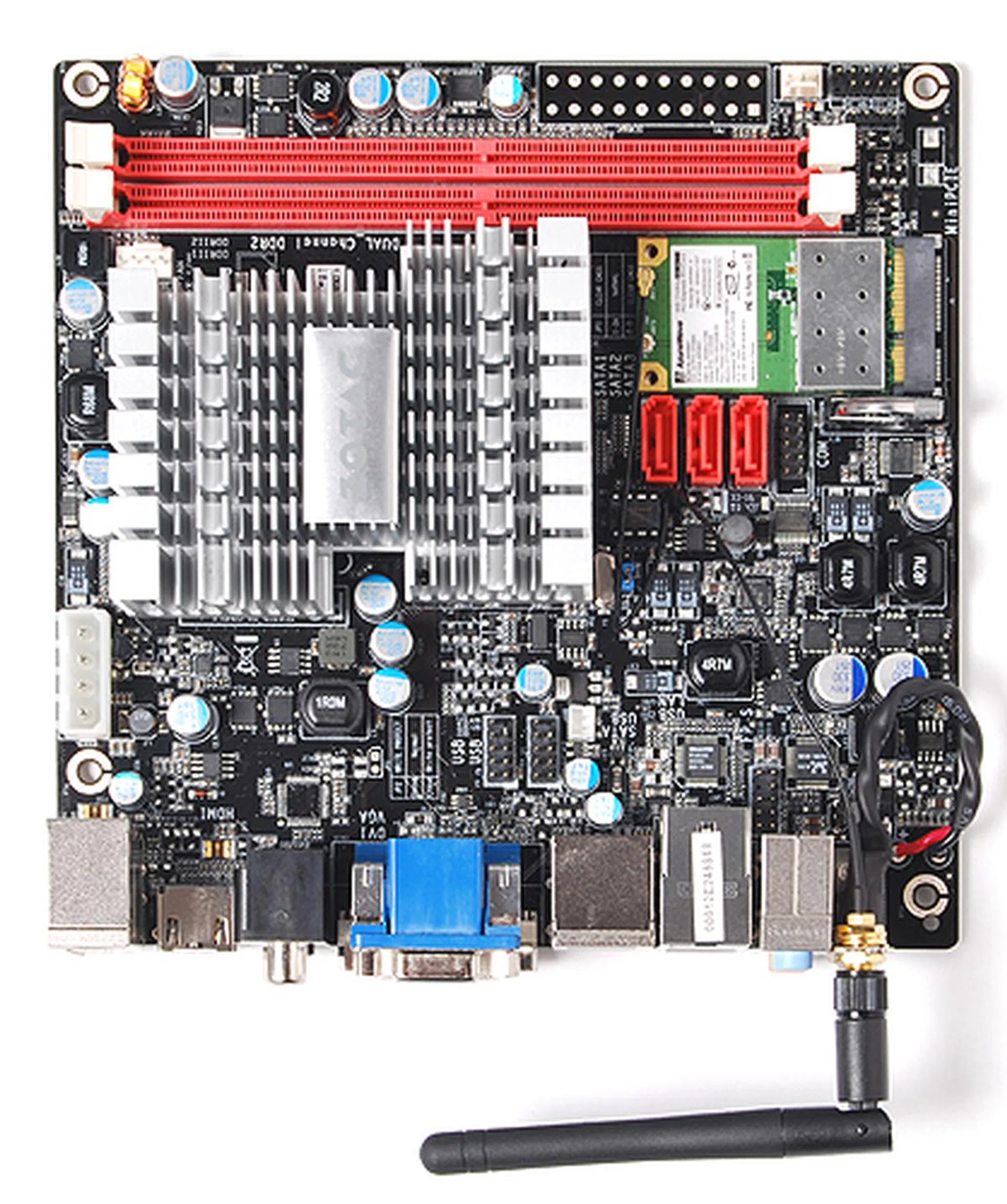
It's a mini-ITX motherboard that's slightly larger than the span of our palm. Zotac will have two versions, a passive version (this) and another version with a fansink. It also comes with either a single core or dual-core Intel Atom processor.
By now, you should have an idea of NVIDIA's Ion platform. We have covered the that wowed the crowds at CES 2009 and recently, even managed to test the first retail Ion, .
Of course, 'retail' is a bit of a fudge here since we have yet to see the Acer AspireRevo in retail channels and our attempts to get a local retail price in Singapore have not borne fruit. As for the performance of the AspireRevo, the system was predictably impressive for its Blu-ray playback.
But whether it was the bloatware installed by Acer (our benchmarks were ran after turning off unnecessary services and processes), or the choice of Windows Vista as the operating system, the user experience was mixed, with sluggish responses when opening or closing applications for example. Your mileage with the Ion's vaunted integrated graphics depends crucially on whether your applications can utilize it fully.
We had our suspicions that the single core Atom on the AspireRevo was a major impediment to its performance but could a dual-core version that's likely to be more popular in nettops really help? Well our answer has just arrived in the form of the Zotac Ion motherboard, which comes soldered with a dual-core processor and hence allowing us the freedom to configure it accordingly for benchmarking.
The Zotac Ion
Since we have covered the NVIDIA Ion and its chipset in some detail, we won't be repeating that. You can read about it in our related articles links below. The Zotac Ion motherboard is exactly like that and comes with a dual-core Intel Atom 330 processor in our case. The single core variant is naturally supported, but that's sold as another model since Atom processors aren't seated on ZIF or LGA sockets and are in fact soldered on the board.
Video outputs are as generous as the other Ion machines we have seen, from analog output to DVI to HDMI, making it highly suited for home theater PC setups, as NVIDIA has intended. The graphics memory is shared with the system and one can allocate up to 512MB of frame buffer. Again, nothing new here.
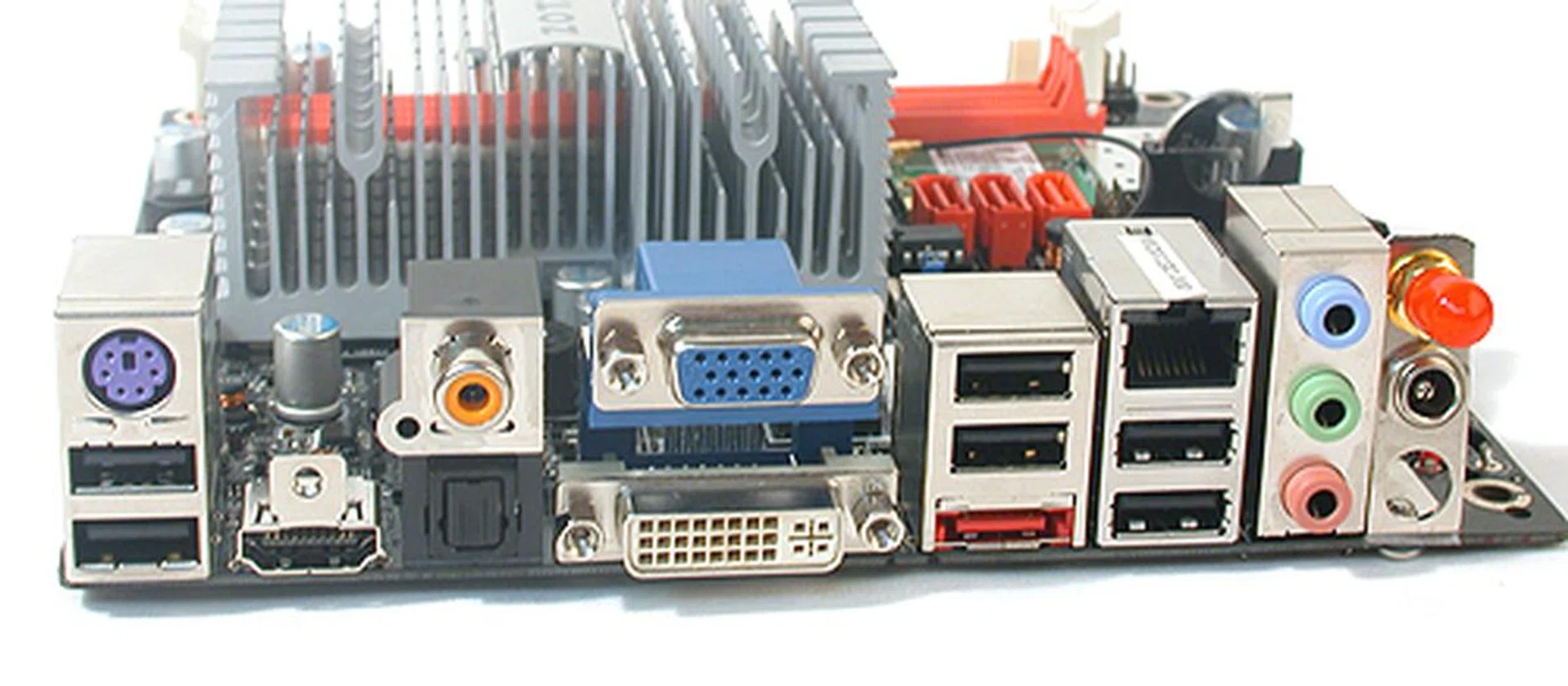
The Zotac comes with a rear I/O panel to be proud of. Optical, coaxial S/PDIF, three different video outputs, eSATA, Gigabit LAN and even a wireless antenna (the red covered bit). The only compromise is probably in the audio jacks, which is not a big deal given the digital audio options. A DC-in completes the setup.
It has two DIMM slots supporting up to DDR2-800 memory in dual channel mode, though the system FSB tops out at 533MHz due to the Atom processor. Thanks to the two slots, 4GB of memory is supported, so a 64-bit operating system is viable too.
However what's different from normal motherboard kits is that the Zotac Ion uses an external DC adaptor for power (provided in the package) and there are no ATX power connectors on board. Thus there should be no power supply installation issues even if you adopt an extremely slim chassis.
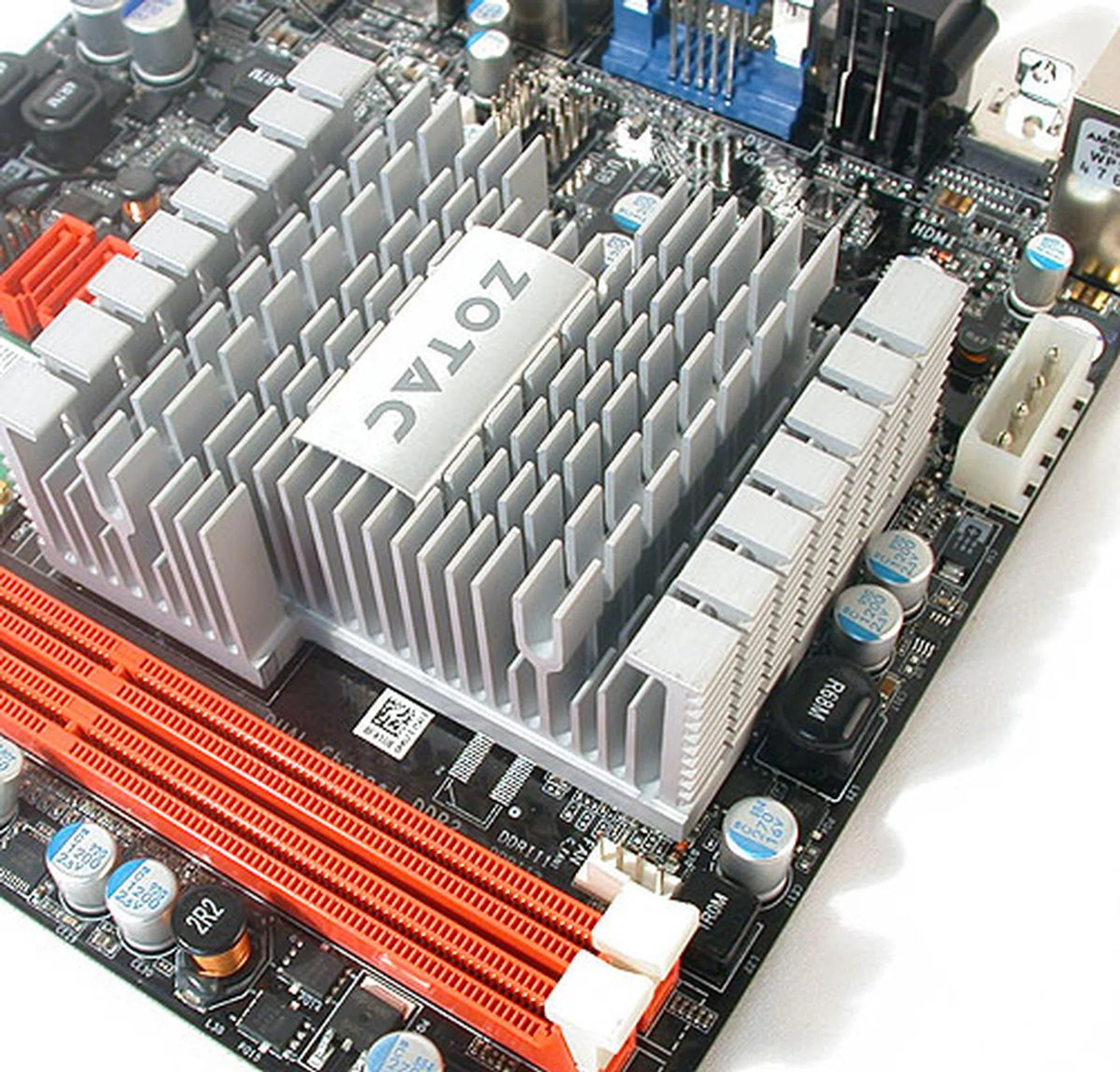
Our passive version of the Zotac Ion came with a huge one-piece heatsink that covers both the processor and the chipset. The temperature was measured at around 58 degrees Celsius at peak. The two DIMM slots also support up to 4GB of DDR2-800 memory. Meanwhile, the white DC power visible on the right is used to power the SATA devices (e.g. hard drives).
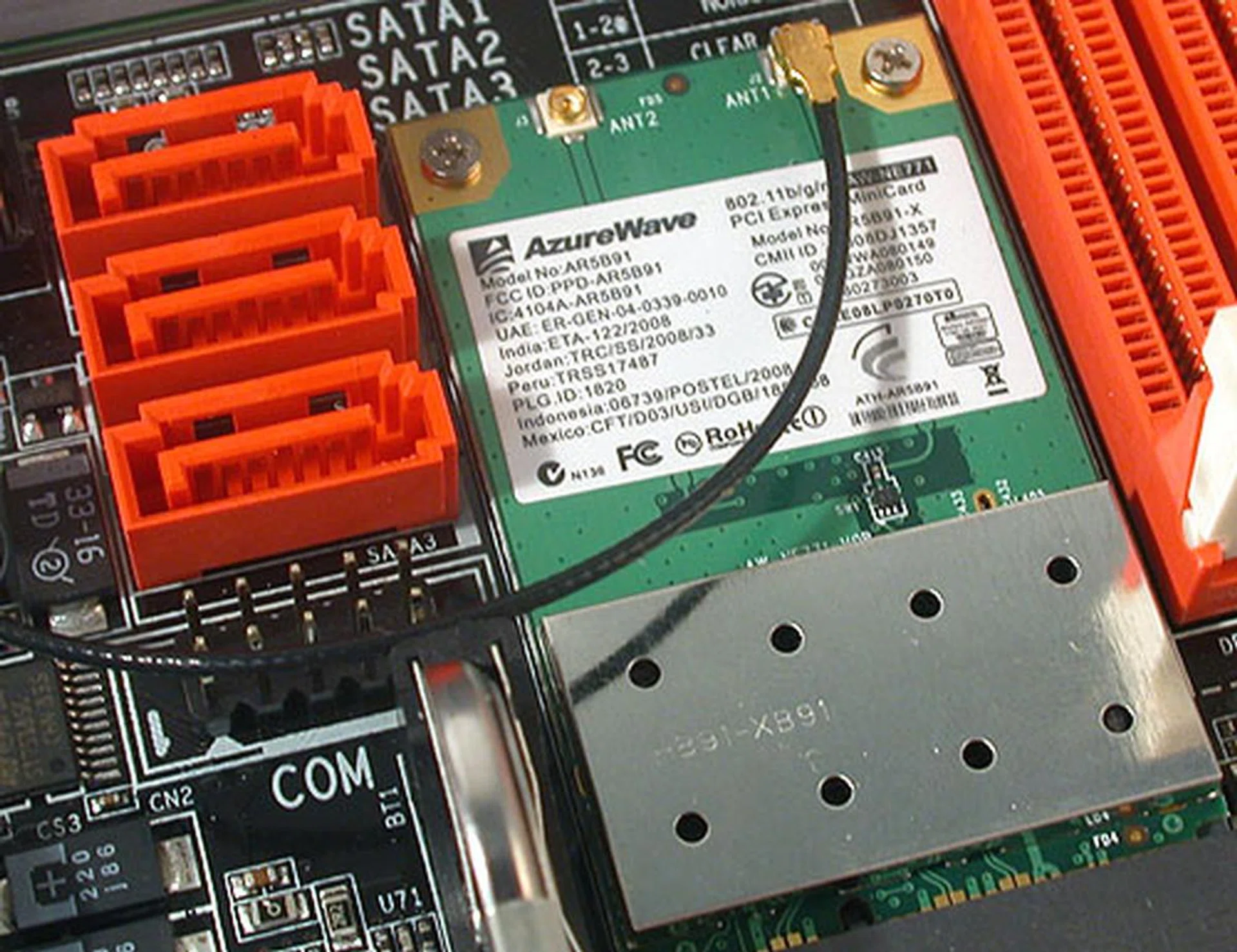
A WiFi module from AzureWave takes up the single mini PCI Express slot for wireless connectivity, a rather important requirement for this class of devices. The Zotac also supports up to three SATA 3.0Gbps ports, with an additional eSATA at the rear.
There's room for three SATA ports, not including the eSATA port at the rear I/O panel. All SATA ports are 3.0Gbps capable and since the board has no IDE capabilities, you may end up using one of the SATA ports for an optical drive. The board also has options for a Gigabit Ethernet and a wireless connection (via a WiFi module installed in the Mini PCI Express slot) and in our review unit, both options are present.
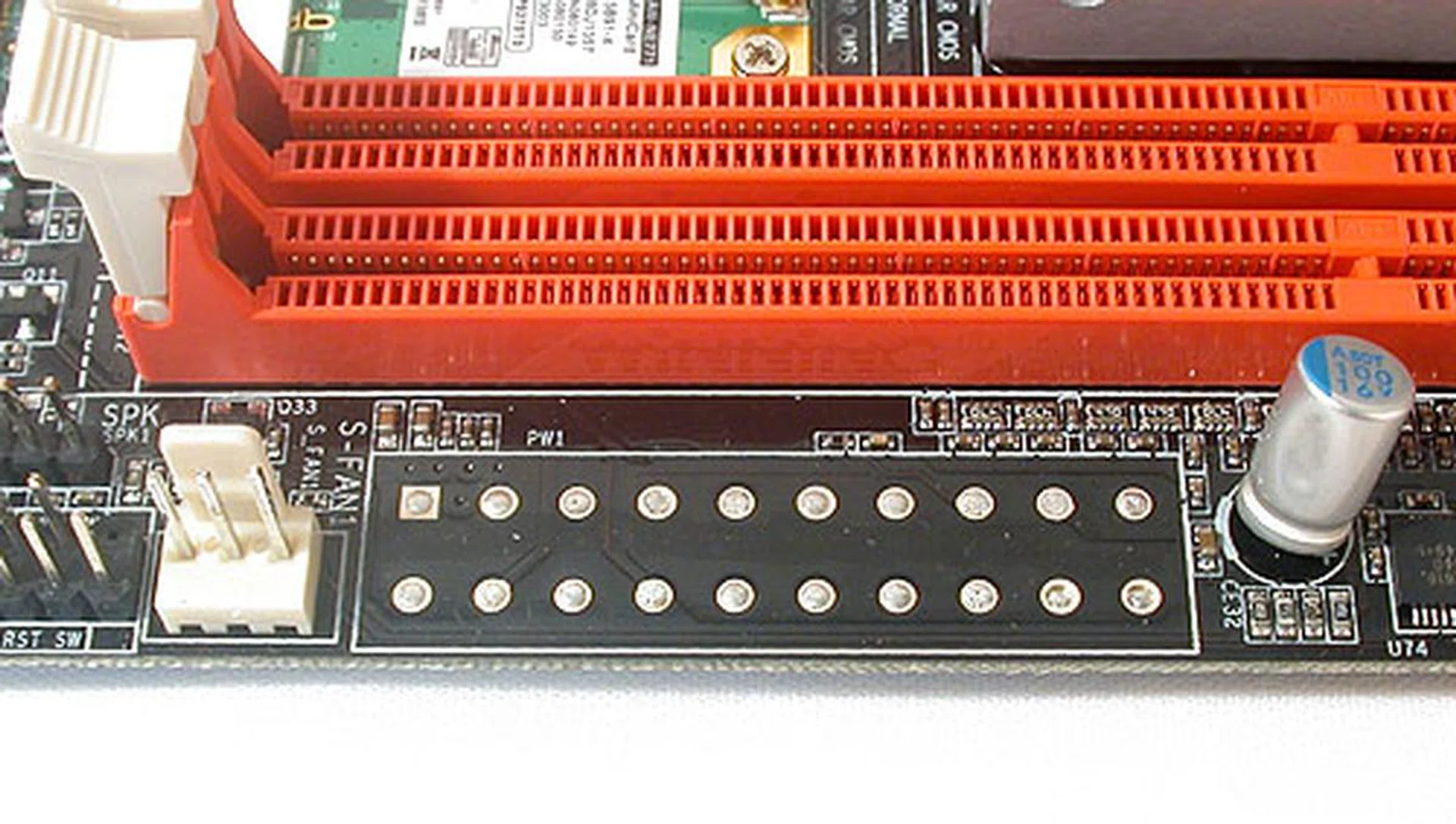
Since we didn't have a SATA optical drive at hand, we wished that there had been an IDE connector here but of course, it's just where the power connector would have been if not for the external 90W power adapter included.
As one would expect from such a small mini-ITX board, there are no expansion options besides the mini PCI Express slot and the onboard SATA ports. HD audio is covered by the usual Realtek HD audio CODEC, with NVIDIA's chipset having support for lossless HD audio streams through HDMI (LPCM audio support). If you choose that option, you'll need to install the appropriate driver found on the Zotac driver CD and configure that in the operating system's audio controls.
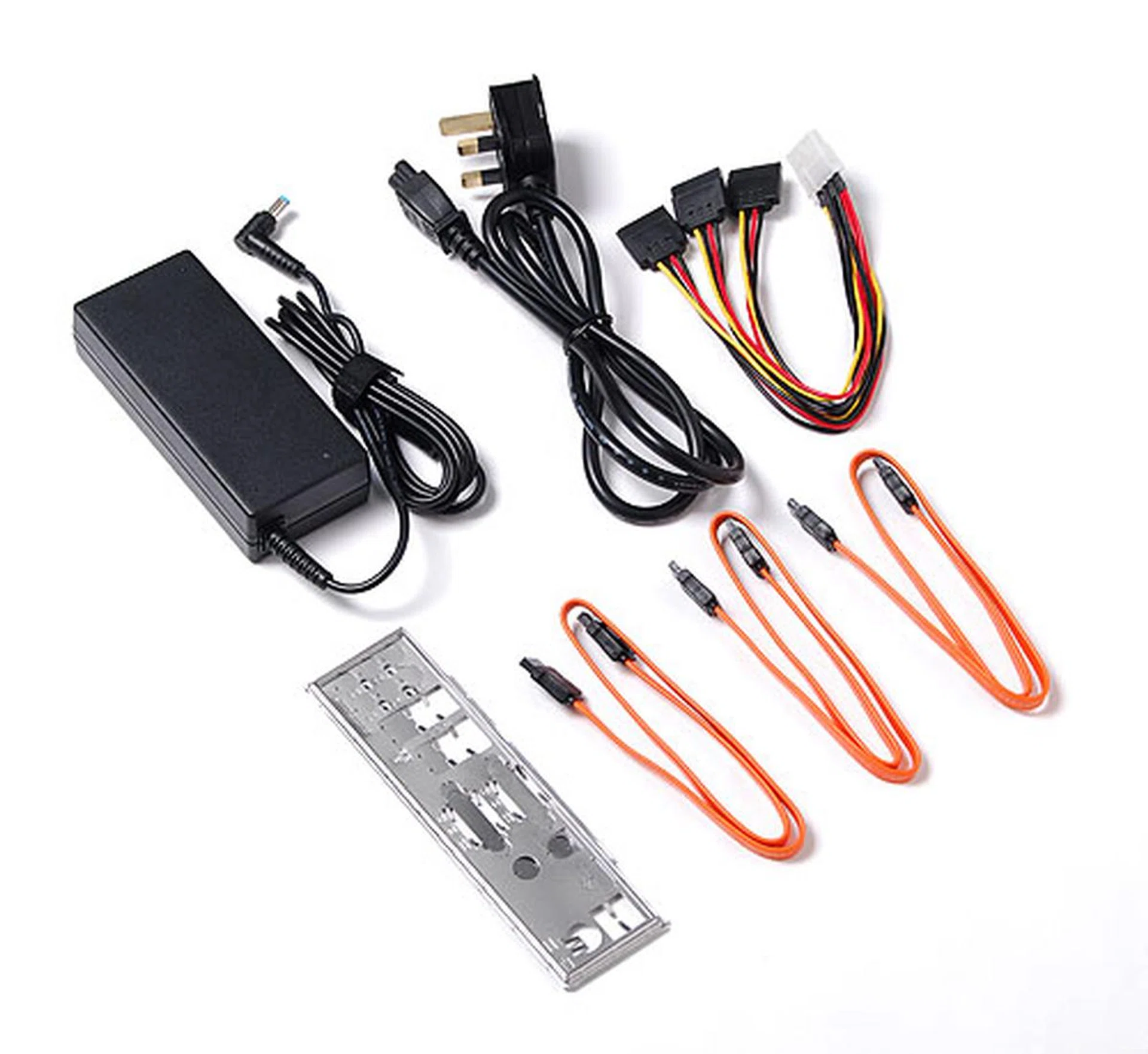
An external 90W power adapter is included (rated at 19V) so that one can fit this mini-ITX board in any fashion of slim chassis without due concern about the power supply.
Test Setup
Previously, we had also tested Intel's standard 945GC chipset with a dual-core Atom. Hence, we'll be comparing the Zotac Ion with this Intel D945GCLF2 kit (motherboard and processor), along with the other two Ion systems we had tested before, the Acer AspireRevo and NVIDIA's own engineering prototype.
Take note that due to the fact that most of these were closed systems, the system configurations differed in ways that were beyond our control. For the Zotac Ion, we finally had more freedom to configure it and hence, we have mostly replicated the configuration of the Acer AspireRevo, with the key difference being a dual-core Atom instead of the single core. Therefore, we expect the scores on the Zotac Ion to reflect this.
Specifications/ System | Zotac Ion Motherboard | Acer AspireRevo | NVIDIA Ion | Intel D945GCLF2 |
Processor | Intel Atom 330 (1.6GHz) with 1MB L2 cache | Intel Atom 230 (1.6GHz) with 512KB of L2 cache | Intel Atom 330 (1.6GHz) with 1MB L2 cache running a single core | Intel Atom 330 (1.6GHz) with 1MB L2 cache |
Chipset | NVIDIA Ion | NVIDIA Ion | NVIDIA Ion | Intel 945GC |
Memory | 2GB DDR2 | 2GB DDR2 | 2GB DDR3 | 1GB DDR2 |
Video | NVIDIA Ion (256MB) | NVIDIA Ion (256MB) | NVIDIA Ion (256MB) | Intel GMA950 (128MB) |
HDD | Seagate Barracuda 7200.10 SATA | Hitachi 5400RPM SATA | Seagate Momentus 7200.2 SATA | Seagate Barracuda 7200.10 SATA |
Benchmarks
Using Windows Vista Home Premium with Service Pack 1 across the board, we set out to test the following benchmarks. The new Zotac Ion board was tested using the latest NVIDIA ForceWare 185.55 graphics drivers, which are quite similar to those used on the Acer AspireRevo machine.
- PCMark05 (ver. 120)
- PCMark Vantage
- 3DMark06 (ver. 110)
- Unreal Tournament 3 (version 1.1)
- CyberLink PowerDVD 8.0 and 9.0 (for Blu-ray playback testing)
- Windows Media Classic Homecinema (for HD video playback)
Blu-ray Playback
For the Zotac Ion and the AspireRevo, we plugged in our own external Blu-ray drive for this test. Comparison numbers from previously tested desktop IGP platforms (an ASUS GeForce 9300 mGPU board and an Intel G45 chipset board) running on a Core 2 Duo processor were used as reference. Note also that the Acer AspireRevo was tested with CyberLink 9.0 for Blu-ray playback which came with the system. Since we only had version 8.0, we ran the Zotac Ion with this older version - which was what the earlier test setups like the ASUS and Intel reference boards used as well.
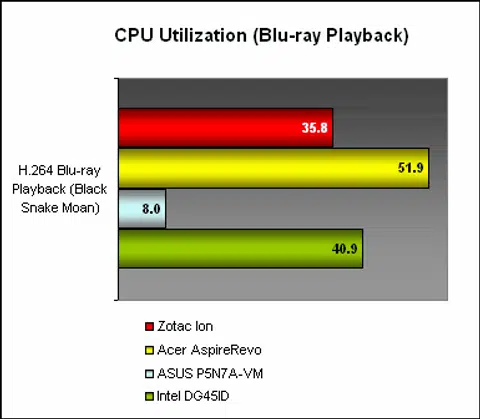
Compared to the Acer AspireRevo, the dual-core Zotac Ion performed significantly better. It was not at the level of the Core 2 Duo powered ASUS GeForce 9300 mGPU board, but in this case, it has surpassed the Intel G45 board in terms of CPU utilization rate (the lower the better of course).
Following up on our attempt to play HD video clips (1080p quality) using Windows Media Classic Homecinema during our testing of the Acer AspireRevo where we found the software unable to take full advantage of the integrated GPU in certain occasions, we conducted a similar test on the Zotac Ion. This time round, we had no issues after configuring the Windows Media Classic to use EVR Custom, which basically meant that the NVIDIA Ion was taking up the workload.
The result was smooth, flawless video playback, with CPU utilization consistently below 10%. As we had mentioned before, getting the application to work as intended is crucial for the Ion platform and in this case, it worked perfectly. For the enthusiast, this could involve tweaking the internal filters and playback options in the software, something that you can find here (warning: large image files) among various online tutorials.
Performance Benchmarks
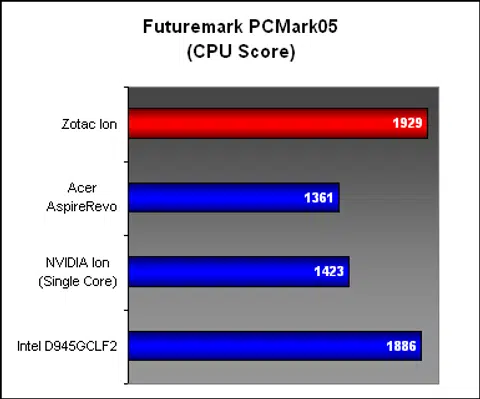
With a dual-core Intel Atom processor, we expected the CPU performance of the Zotac Ion to match our previously tested Intel D945GCLF2 kit, which also featured the same Intel Atom 330 processor. This was confirmed in the CPU score for PCMark05 where the scores between the two were almost identical. Obviously, this helped to propel the overall system score for the Zotac to the top too.
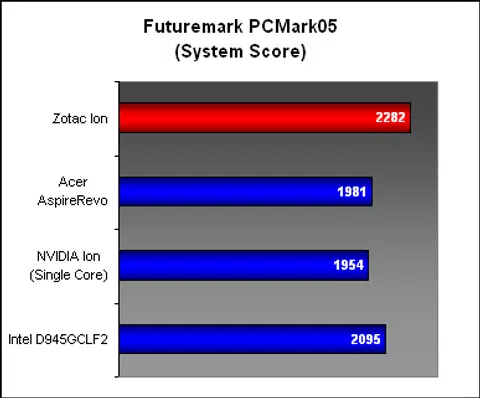
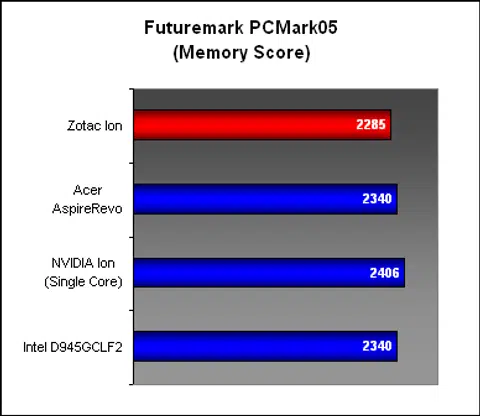
The memory score of the Zotac Ion was marginally behind the rest of the pack, despite having similar memory timings but we were told by NVIDIA after our testing that Zotac had released a new BIOS that's claimed to improve the memory performance. From what we're seeing, the scores are close enough to be a wash, but we'll be updating our scores after further testing with the new BIOS.
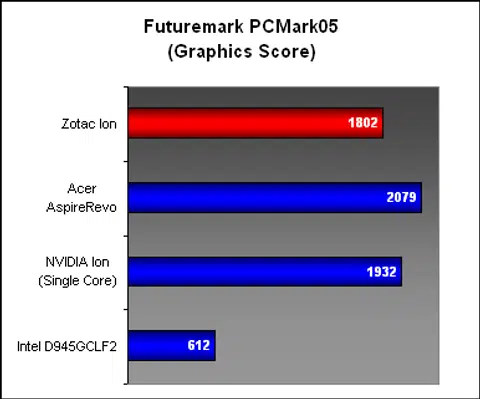
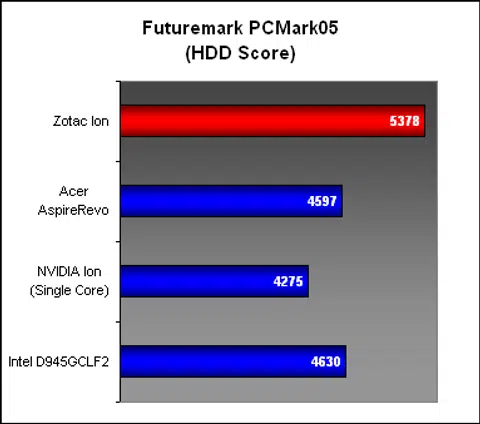
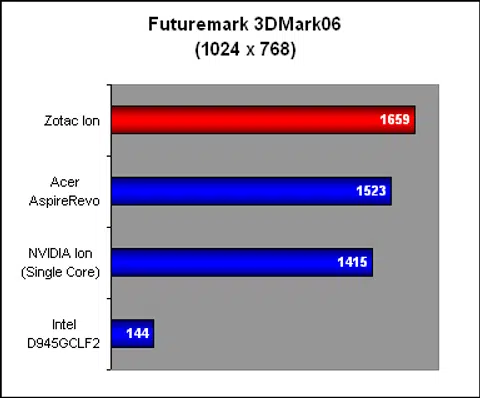
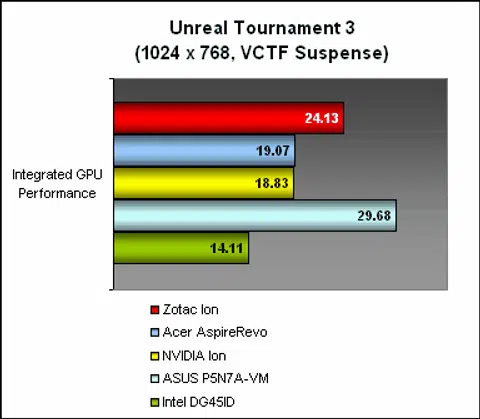
The graphics score here had the Zotac Ion at a slight disadvantage, but since our latter tests in Unreal Tournament 3 and 3DMark06 had the Zotac in the lead, it should not be an issue. The hard drive scores for PCMark05 for the Zotac was also the best among our comparisons, though the various differences in hard drives, especially for the slower 5400RPM models contributed to that.
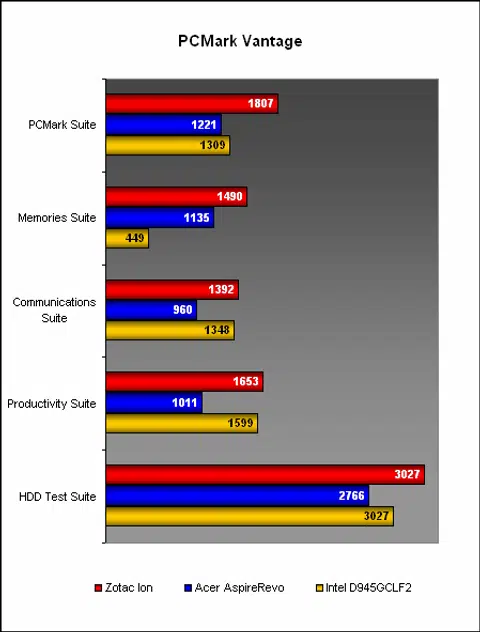
PCMark Vantage summarized our findings neatly. With a dual-core to match that on the Intel D945GCLF2, the Zotac Ion was mostly in front of its Intel counterpart and also the single-core AspireRevo.
Conclusion
The basic premise of the Ion is that while the Intel Atom is sweeping the world, especially for the ultraportable segment as a cheap, low-power processor, it's actually a step backwards performance-wise. The reason according to NVIDIA is the aging Intel 945G-based chipsets that are usually paired with the Atom. Hence, the need for a better integrated graphics solution, using NVIDIA's GeForce 9300 mGPU.
The dual-core Atom will find a very good partner in the NVIDIA Ion. Now, the question that we're asking is, "when can we buy them?"
With its prototype, the Acer AspireRevo and now the Zotac Ion, NVIDIA has shown repeatedly that it has the goods to deliver, especially when it comes to Blu-ray and HD video playback. Although the Acer AspireRevo was more sluggish than we had liked, our experience with the Zotac Ion was definitely more positive. Multi-tasking is still not the best forte of the Intel Atom but with HyperThreading turned on (hence four 'cores' in total), it was tolerable. Perhaps the fact that our Zotac Ion system with the help of the provided drivers, was tested on a clean installation with barely any software or application installed besides a browser, video playback applications and our benchmarking tools contributed to the better performance.
Trying our hand at Flash-based YouTube videos, which presumably are unable to utilize the integrated GPU also yielded decent frame rates and reasonable CPU utilization rates (it spiked up to 60% and more when full-screen was enabled for those YouTube HQ videos). As usual, we won't advocate running too many programs in the background as you're liable to get those 'Not Responding' messages from Windows Vista should you do so. Performance-wise, it seems like a must to pair the Ion with a dual-core Atom at least, especially for a nettop class of device.
The question now of course is when can we see these Ion-based machines in retail. The Acer AspireRevo appears to be a 'paper' launch so far as we can't find them in retail channels and we aren't sure of the Zotac Ion too. Hence, we don't have a fixed retail price at the moment from Zotac or NVIDIA.
As HTPC enthusiasts ourselves, the Zotac Ion holds much potential for system builders, with its external power adapter ensuring that one can probably fit it into any manner of slim form factor chassis. The variety of connectors including wireless and support for up to 4GB of memory (64-bit OS!) is enticing. Best of all, its passive cooler means that it's silent to stay in the living room without garnering undue attention.
Once again, can we buy these Ion machines in retail stores quick? Pretty please?
Our articles may contain affiliate links. If you buy through these links, we may earn a small commission.