
DFI LANParty DK P45-T2RS PLUS (Intel P45)
Making overclocking a simple one-click affair is a commendable goal and that is exactly what DFI plans with its Auto Boost System, now found on its new LANParty DK and Blood Iron motherboards. We take a look at this new feature via the DK P45-T2RS PLUS.

Introduction
After a long saga, news of abit's demise in the motherboard market has been recently confirmed. For long-time fans of overclocking, it comes not so much a surprise, as regret that a former household, acclaimed brand is now no more. While abit has not showed any signs that it could revive its glory days, it was still a loss for enthusiasts.
What it also seemed to imply is that going niche is insufficient in such a competitive market, especially if the niche segment does not have the volume. This can be seen in recent years, with big players like ASUS expanding aggressively into all segments with a broad range of products, including premium models that are meant for enthusiasts. Smaller manufacturers like DFI, which has quickly cultivated a reputation for overclocking, has hence been under threat.
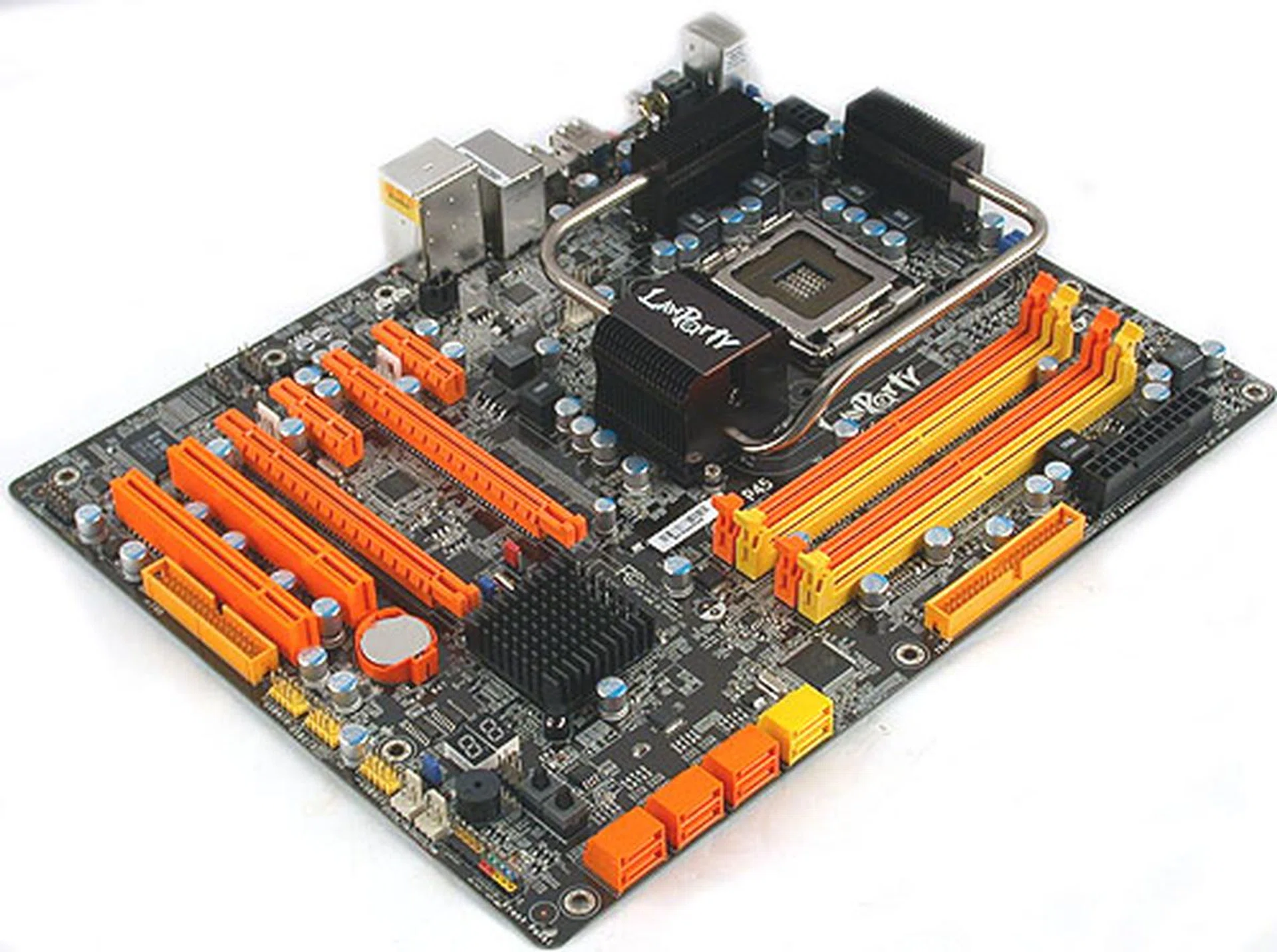
One of the company's latest attempt to distinguish its products from the competition is the LANParty DK P45-T2RS PLUS, which comes with a new Auto Boost System that could simplify overclocking for less experienced users. This new feature will be present on all new motherboards from its LANParty DK and Blood Iron series and it's telling that these are the more mainstream series. Of course, DFI's extensive BIOS options remains on these boards and here to illustrate this, here's a look at this Intel P45 board using the ICH10R Southbridge:-
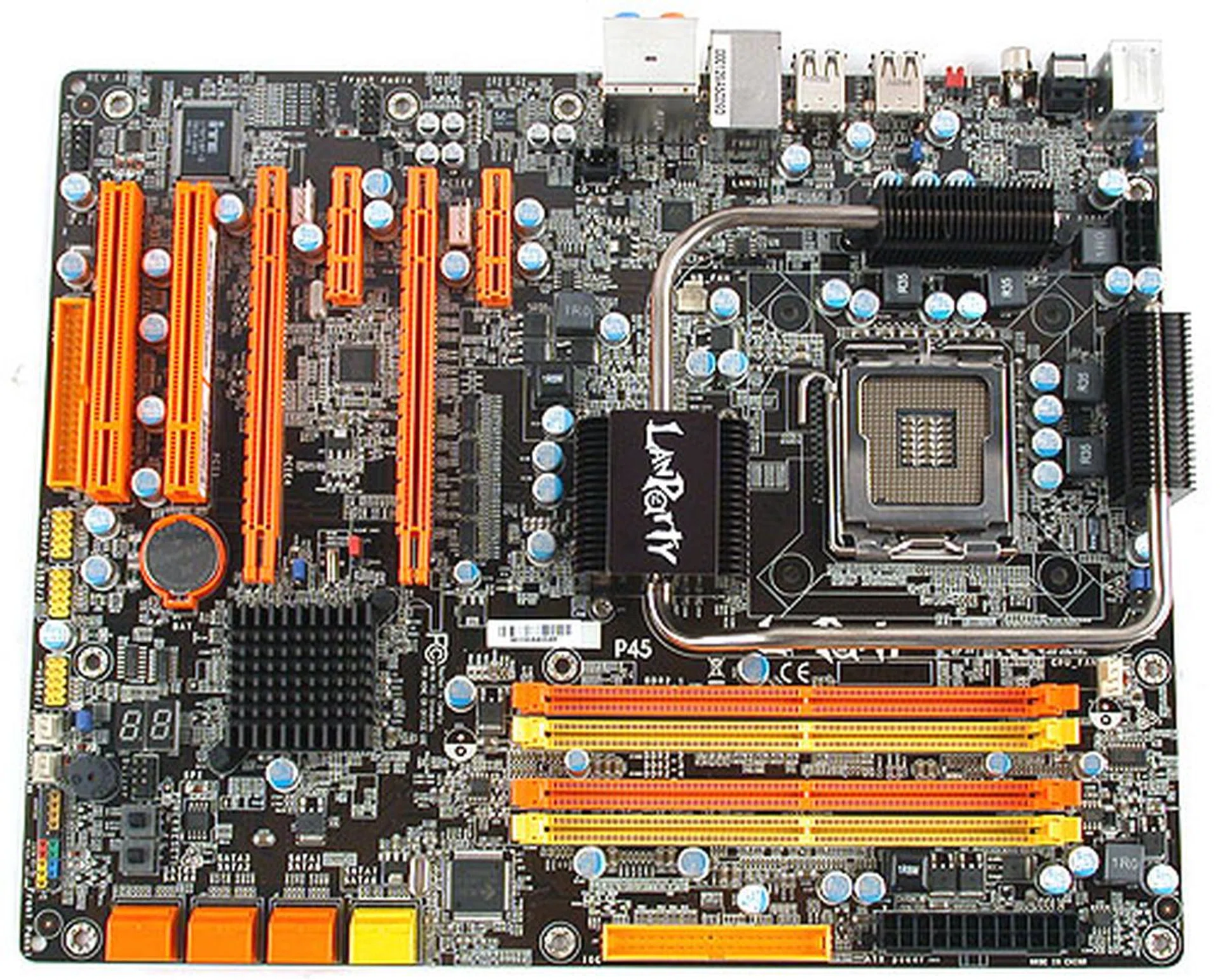
As usual, DFI's motherboards are UV reactive and paired with the included UV reactive cables, they are certainly eye-catching.
Before we explore this board any further, the contents of the retail package are quite typical and listed below, along with the technical specifications:-
- 2 x SATA data cables
- 1 x SATA power converter cable
- 1 x 80-conductor Ultra ATA data cable
- 1 x floppy drive data cable
- 1 x CrossFire bridge
- RAID driver diskette
- I/O shield
- Driver CD
- User manual
- Auto Boost System Installation Guide
Board Design and Layout
This DFI board is pretty much your modern motherboard, with all the features and perks that we have come to expect. We were also generally pleased with the board layout, with the exception of some minor grouses.
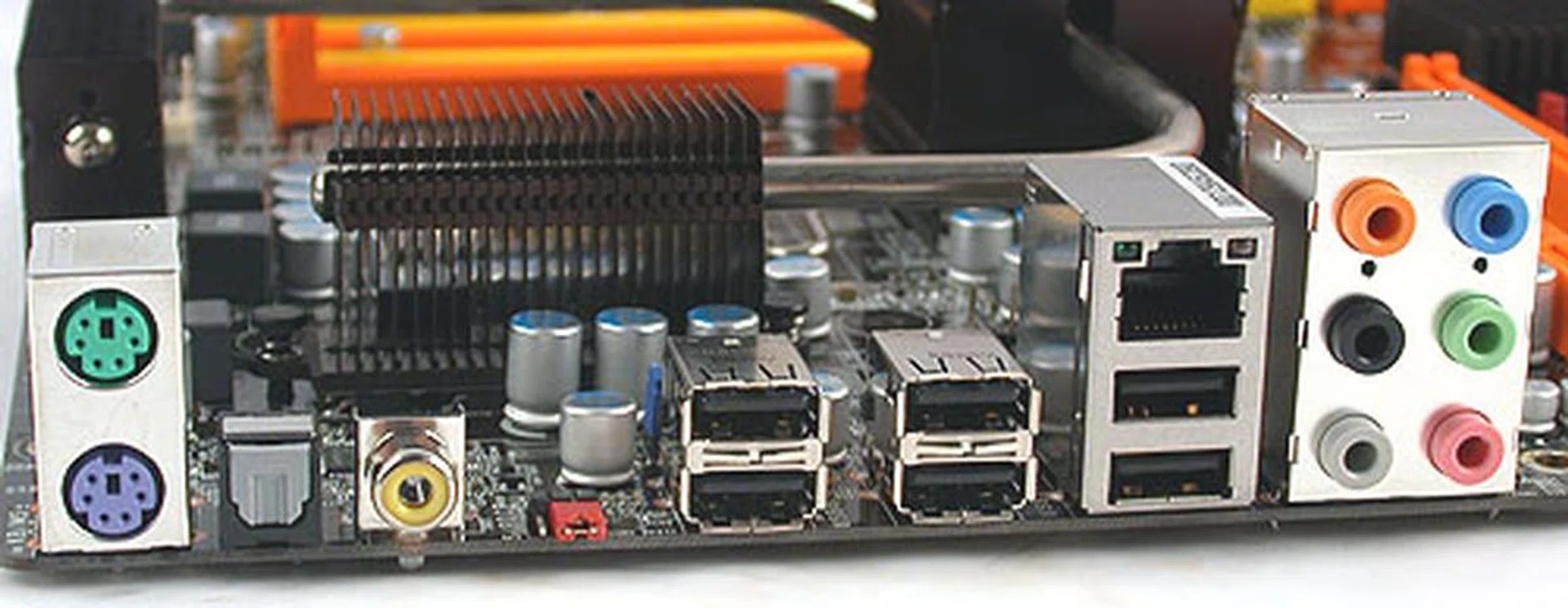
The rear ports of the DFI LANParty DK P45-T2RS PLUS are quite typical of this class of motherboards, including optical and coaxial SP/DIF outputs, Gigabit LAN, audio jacks and six USB 2.0 ports. Additionally, DFI has a clear CMOS jumper at the rear, useful for overclockers and unlike a button, no chance of users accidentally clearing the CMOS.

Like all the P45 boards we have seen so far, the DFI LANParty DK P45-T2RS PLUS supports CrossFireX via its two PCIe x16 slots. Either one of these slots have full 16 lanes if operating alone and 8 lanes if together in CrossFireX mode. One thing we didn't like was the location of the floppy connector, which meant pulling the floppy cable across the board to be plugged in and possibly messing up your attempts at cable management.

Besides the standard 6 SATA 3.0Gbps ports from the Intel ICH10R found onboard, DFI have added two more extra SATA ports (in yellow) thanks to a JMicron JMB363 controller (the black IC in the background here). This controller also enables IDE support. The extra two ports are one of the 'extras' found on the PLUS version of this board that is not on the normal P45-T2RS.
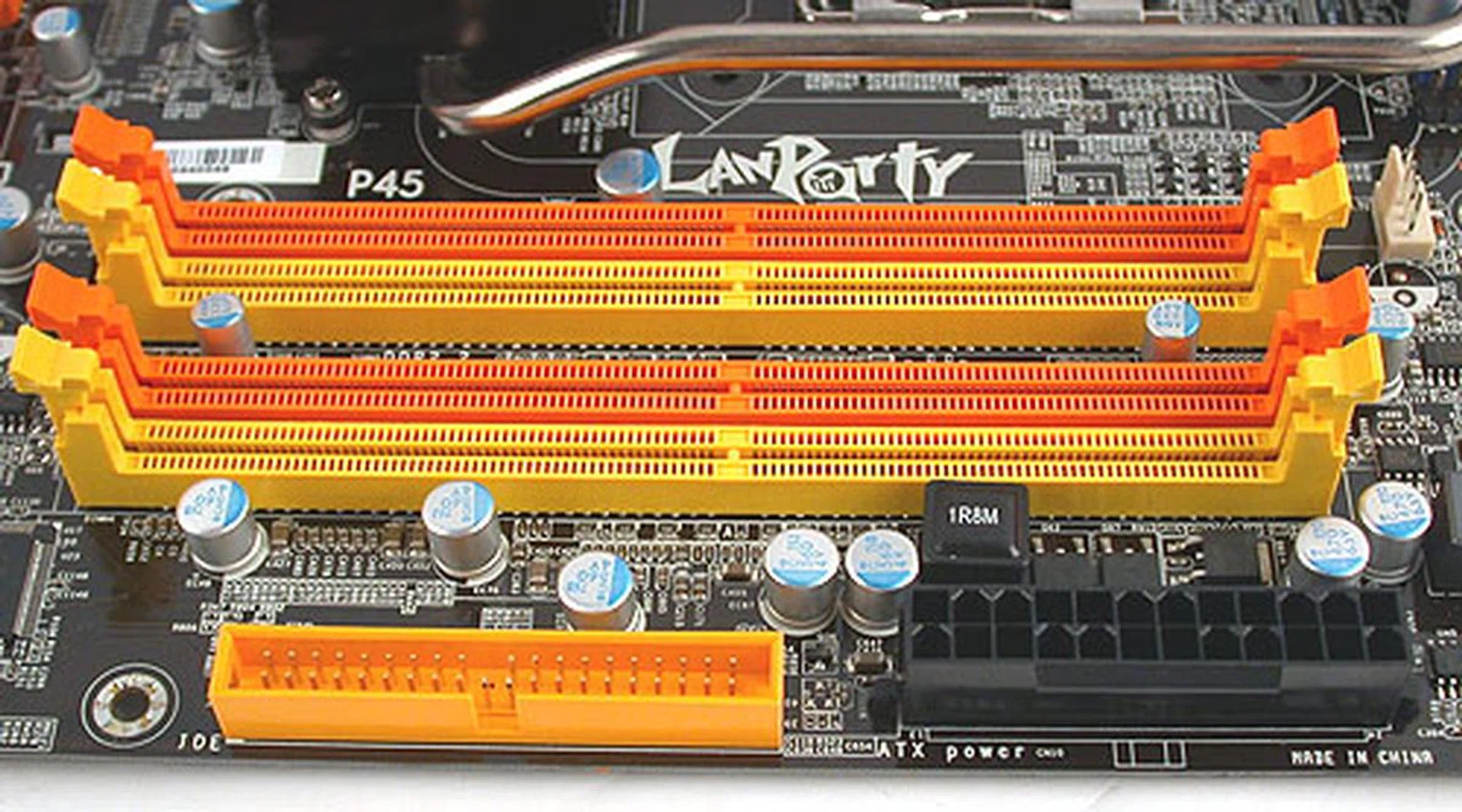
There are four DIMM slots for DDR2 memory, supporting officially up to 1066MHz and a total of 8GB. The IDE and ATX power connectors are thankfully close to the edge of the board.
Board Features
As its name suggest, this DFI board uses Intel's P45 chipset and the newer ICH10R SouthBridge. While we have reviewed a few P45 motherboards so far, this is our first look at a DDR2 version. Yes, for those who are loathe to spend more for DDR3 memory which is still relatively more expensive, this is a truly mainstream board with DDR2 memory support. Officially, memory speeds of up to 1066MHz is supported, though DFI lists 1200MHz as possible during overclocking.
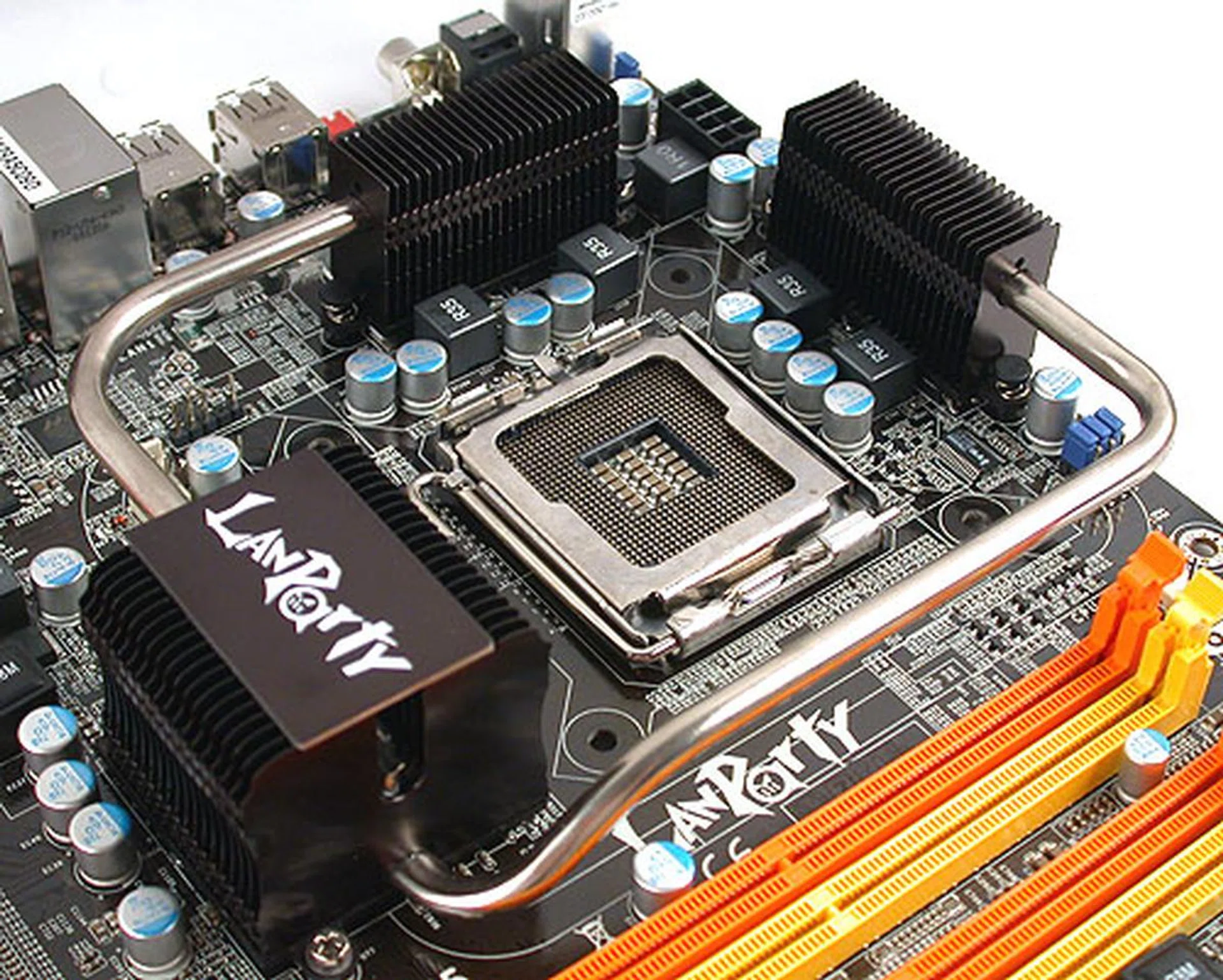
DFI uses a 4-phase digital PWM to regulate power to the processor and the MOSFETs are all buried under this black and silver, heat pipe based cooling system here. Fortunately, there is more than sufficient allowance for larger coolers at the CPU socket and as you can clearly see, DFI is another vendor who touts the virtues of solid capacitors (from Japan no less).
One feature that DFI advertises is its use of a 4-phase digital PWM as a more consistent and efficient approach compared to conventional solutions. This is bolstered with the presence of solid capacitors, a now common sight on quality motherboards. DFI also uses a passively cooled, heat-pipe based cooler that's heavy on the black and aluminum (sad to disappoint the copper 'fans'). Hence, the board was relatively light and there were no metal plates beneath the board for cooling purposes like some other brands.
The DK P45-T2RS PLUS comes with a Marvell 88E8053 PCIe Gigabit Ethernet controller, which is newer than older PCI based versions. We doubt that would matter anyway in terms of real world performance, but it's good to know that you can achieve true Gigabit LAN speeds on your internal network. HD audio is provided onboard as usual by Realtek and its ALC885 CODEC is found here, capable of 8-channel audio output, though this is a slightly older CODEC. No Karajan audio feature on this board, but there are both analog and optical/coaxial S/PDIF outputs at the rear of the motherboard however.
Given its target audience, this DFI board naturally has some features that may appeal to overclocking enthusiasts. This includes up to two reset CMOS jumpers, POST LED indicators and as we shall elaborate later, DFI's new Auto Boost System.

To cater to enthusiasts, DFI has the power and reset buttons conveniently located on the board, meaning tweaking your board is even easier. Also, the POST LED is very useful during troubleshooting, especially since DFI's manual listed the various codes in detail.
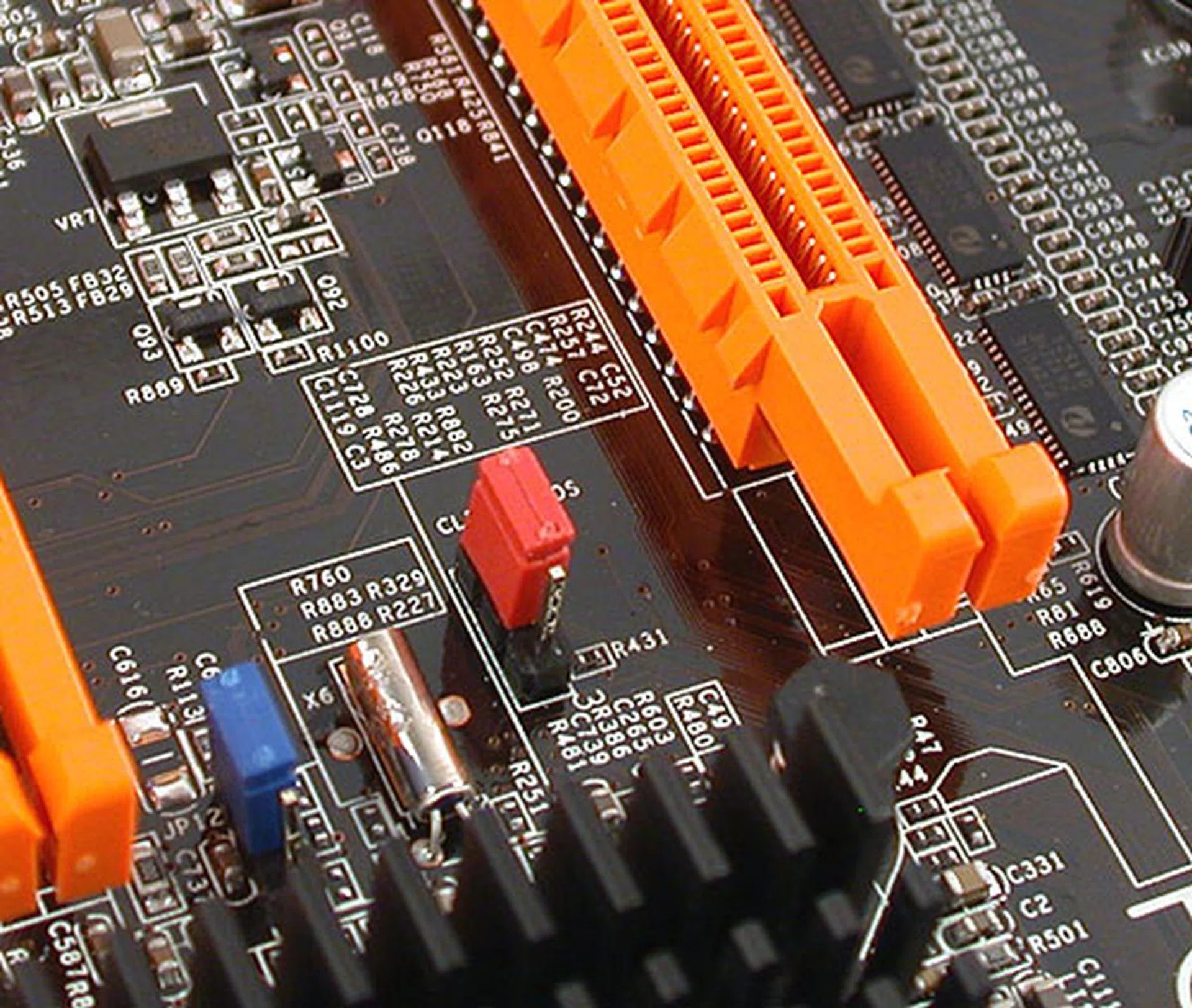
While the reset CMOS jumper at the rear I/O is for those who have installed the board nicely into their chassis, the one found onboard is right besides the PCIe slot. So if you have a large, dual-slot graphics card, it may prove to be slightly more troublesome.
Auto Boost System
So what exactly is this Auto Boost System (ABS) from DFI? The basic idea is to make overclocking more friendly to end-users, which explains why only the more mainstream boards are outfitted with this new feature. By default, DFI implements this by having an automatic FSB boost that's based on certain profiles in the BIOS. Pressing F1 while the system is booting up will trigger the profiles and cause the system to be running at the higher speeds (provided that these are feasible numbers and not wild overclocks).
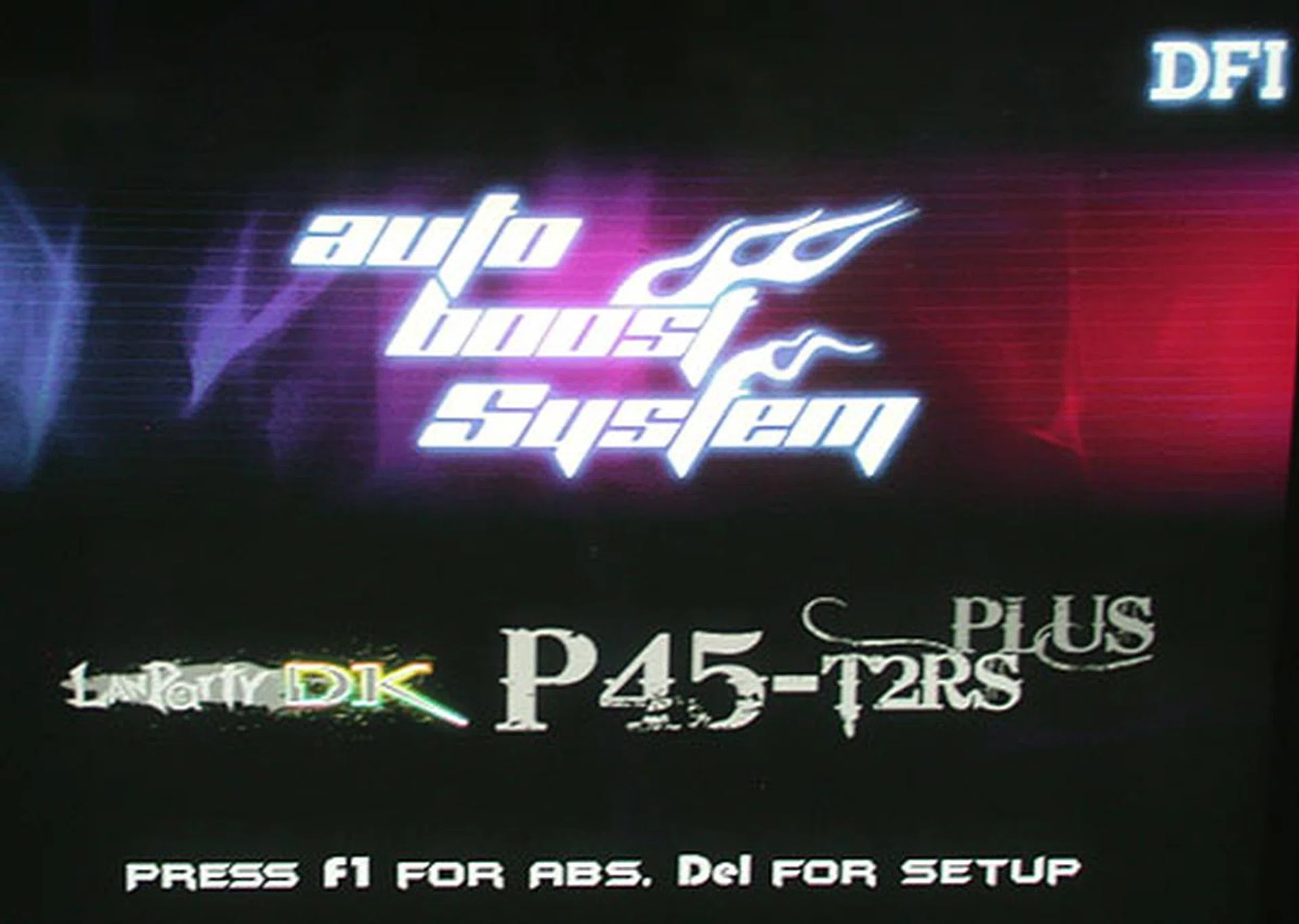
The DFI logo appears when the motherboard starts up, along with the instructions on what keys to press to enter the BIOS and to enable DFI's Auto Boost System.
Furthermore, users can install the ABS utility in Windows and customize the profiles from there. Users are able to write their own profiles and backup/load profiles from and to the hard drive. An interesting usage of this feature is to have tested and successful overclocked profiles from DFI or other enthusiast's profiles loaded into the BIOS while in Windows. In short, your overclocking can be done for you by others. It could be as simple as loading a profile and enabling it on the next reboot. At the moment, DFI has a number of 'official' overclocking profiles on its website, though the PLUS version seems to have much fewer, probably due to it having a later release date.
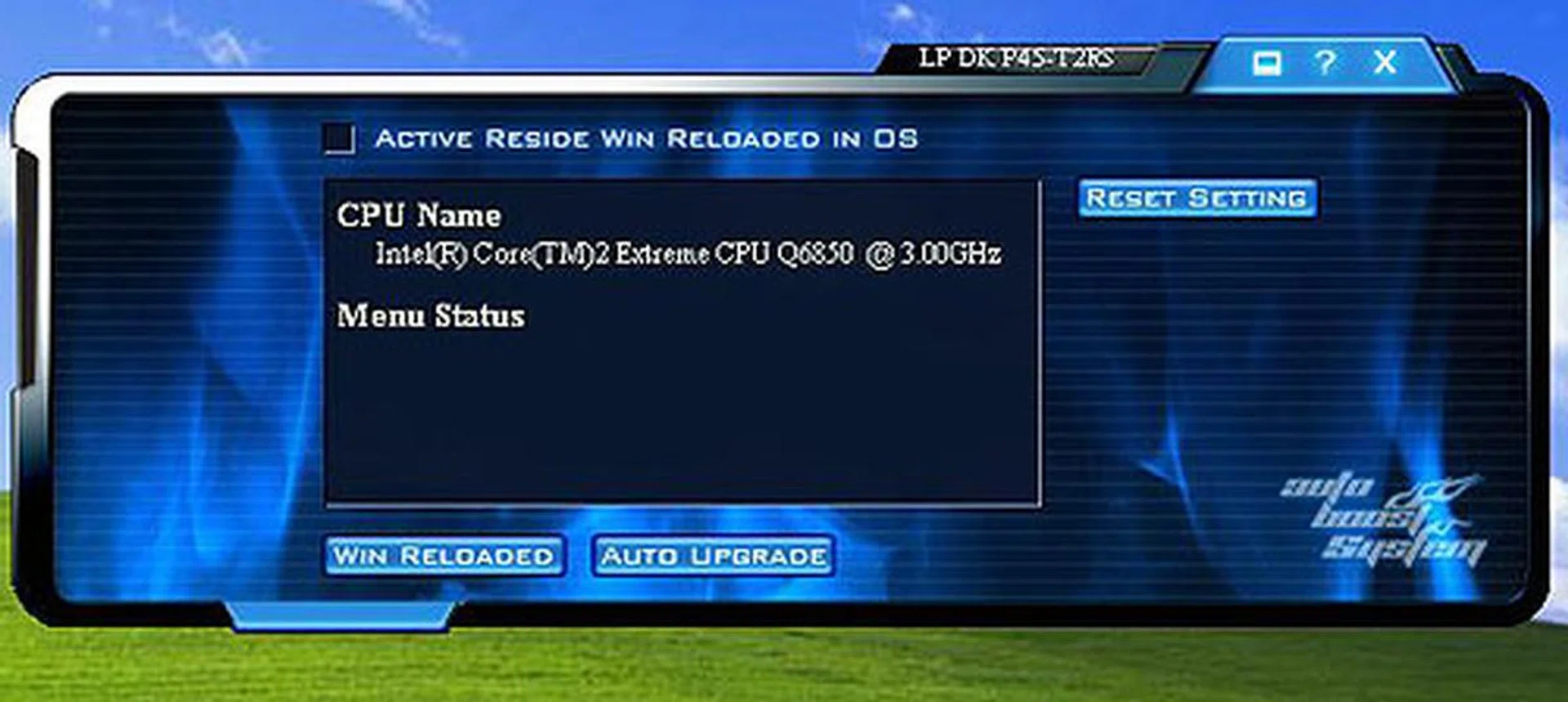
You can install the ABS application from DFI in Windows to further customize this tool. From here, you can even load overclocking profiles from DFI or another user and try that on your own board.
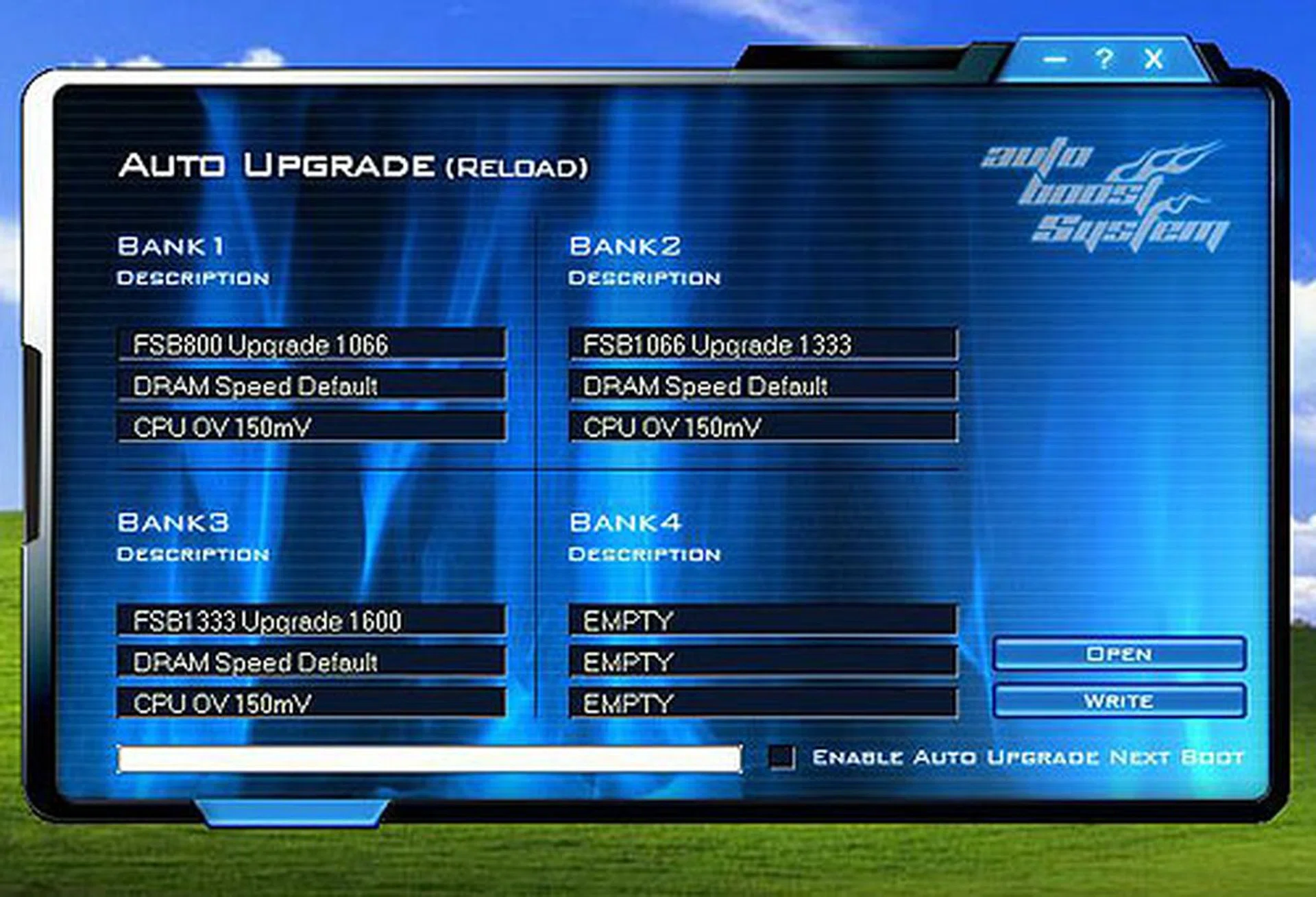
Here are the default ABS profiles on our board. Basically, pressing F1 during boot up will cause the appropriate profile to be triggered, pushing your 333MHz FSB to 400MHz for example.
Overclocking
With its target audience of overclocking enthusiasts, DFI's motherboards have usually been known for their range of BIOS options. This remains the case for the DK P45-T2RS PLUS, which at times have rather too many options in our opinion. Therefore, it can be overwhelming for less experienced users, but fortunately, DFI realizes this and has two modes for the BIOS, Easy and Advanced, with the Advanced mode showing the full set of BIOS options that only overclockers are inclined to tweak.
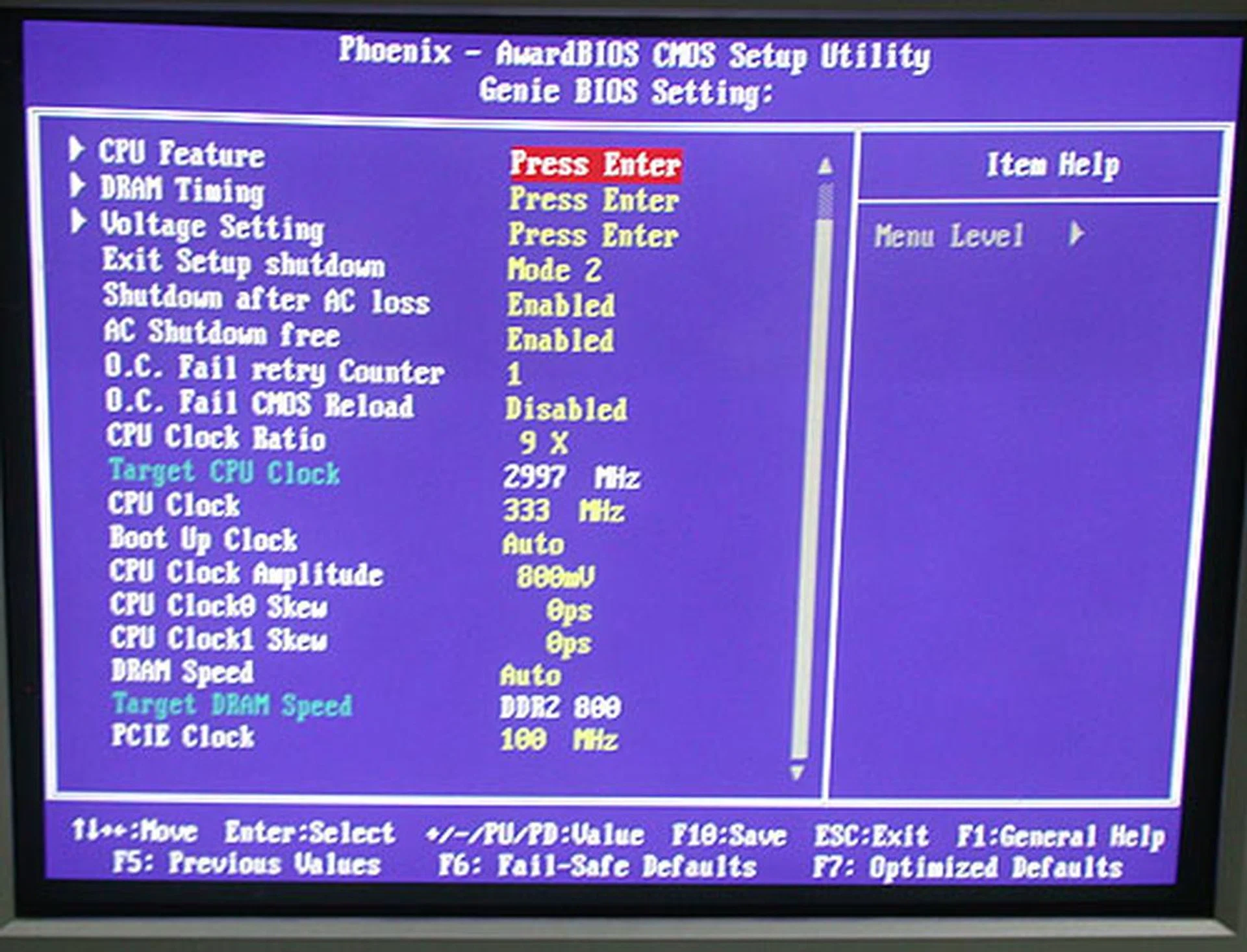
Some of the advanced options that you will see in the 'Advanced' view of the BIOS. Press F9 to enable this.
Below are some of the more common options that are found on even mainstream motherboards nowadays and are obviously also on the DFI DK P45-T2RS PLUS:
- FSB Settings: 200MHz to 999MHz
- DDR2 Settings: Auto, 200/667, 200/800, 266/667, 266/800, 333/667, 333/800, 400/800
- PCIe Settings: 100MHz to 250MHz
- CPU Voltage Settings: +12.5mV to 787.5mV (in 12.5mV steps)
- Memory Voltage Settings: 1.789V to 3.280V (in 0.23/0.24 steps)
- SB Core/CPU PLL Voltage Settings: 1.55V to 2.15V (in 0.20V steps)
- NB Core Voltage Settings: 1.1825V to 1.97V (in 0.0125V steps)
- CPU VTT Voltage Settings: 1.210V to 1.603V (in 0.011V steps)
- Multiplier Selection: Yes, 6 - 50 (CPU dependent)
We updated the BIOS on the DFI LANParty DK P45-T2RS PLUS to the latest D45D812 version and proceeded to test and overclock the board. As mentioned earlier, enthusiasts should have a field day going through the many settings available on this board and the handy POST LED and reset CMOS button were very useful. Our quad-core processor however only managed 465MHz for the FSB, which was similar to what we had managed for previous P45 boards, though this figure was quite far from the overclocks done and posted online by others who use dual-core processors. How stable those clocks are is a different question altogether, but from our testing on our quad-core processor, 465MHz was the most stable we achieved and is in-line with typical boards of this class.
Test Setup
Our previous articles on the Intel P45 chipset have involved DDR3 versions of this mainstream chipset but DFI's offering uses DDR2 memory. Hence, for our testing, we had two mostly similar test configurations, differing only in the memory. We could only get our DDR2-1066 memory to run properly at DDR2-800 (for the lack of proper memory ratios) so that was what we tested the DFI at. The following hardware configurations were used:-
- Intel Core 2 Extreme QX6850 processor (3.00GHz)
- 2 x 1GB Kingston HyperX DDR3-1333 @ 7-7-20 CAS 7.0 (for DDR3 motherboards)
- 2 x 1GB Kingston HyperX DDR2-1066@800 and @ 4-4-4-12 (for the DFI LANParty DK P45-T2RS PLUS)
- Seagate Barracuda 7200.10 200GB SATA hard disk drive (one single NTFS partition)
- MSI GeForce 8600 GTS 256MB - with ForceWare 162.18 drivers
- Intel INF 9.0.0.1007 and AHCI 8.0.0.1039 driver set
- Microsoft Windows XP Professional with Service Pack 2 (and DirectX 9.0c)
The following benchmarks will be used to determine the performance of the DFI LANParty DK P45-T2RS PLUS when compared to our previously tested Intel P45 boards:-
- BAPco SYSmark 2004 (with Patch 2)
- Futuremark PCMark05 (ver 120)
- SPECviewperf 9.0
- AquaMark3
Results - BAPco SYSmark 2004
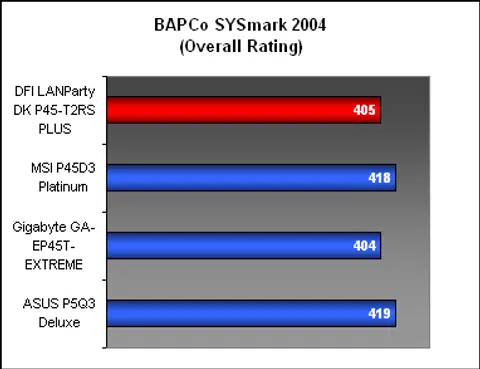
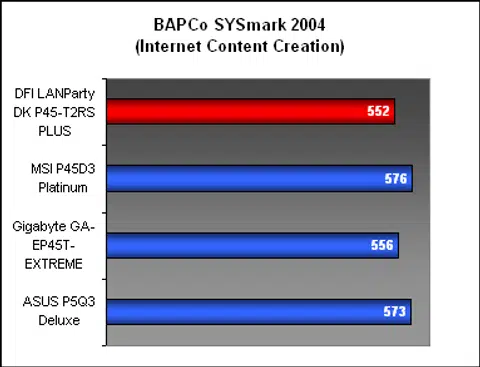
Our first benchmark was BAPco's giant suite of applications, SYSmark 2004, which attempted to simulated the workloads of popular applications spanning multimedia and productivity software arena. Against the other DDR3 boards, we didn't have high expectations for the DFI but it managed to tie the Gigabyte. The difference overall however was a couple of points and the DFI was only slightly behind the rest. The Internet Content Creation segment suffered the most from the choice of memory, which made sense since all that flash and graphics has its price in terms of memory requirements and bandwidth.

Results - Futuremark PCMark05
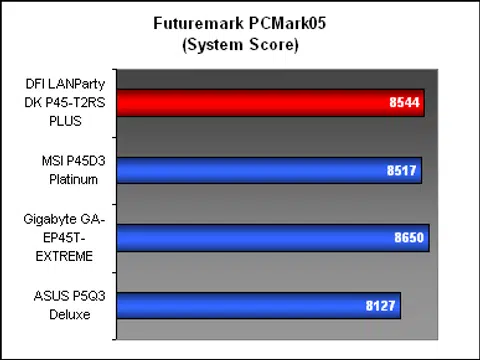
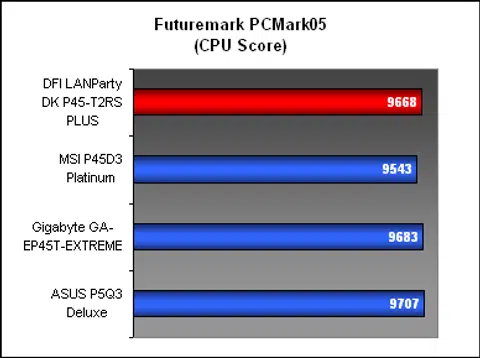
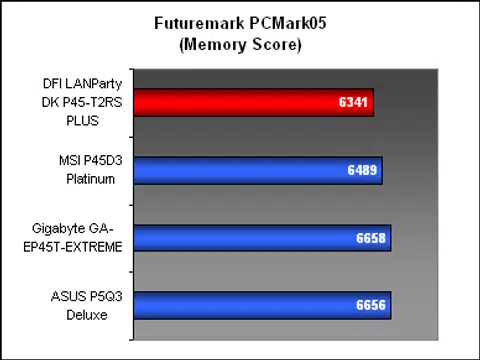
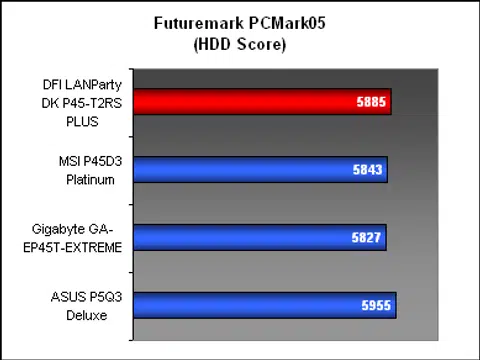
The DFI board appeared more competitive in PCMark05, with the overall system score significantly ahead of the ASUS and MSI. The breakdown was also very decent. The CPU score was on par with the rest while it performed better than expected too in the hard drive testing. Only the memory segment pulled down the overall score, but that was due to its DDR2 memory.
Results - SPECviewperf 9.0
The DFI was actually quite competitive in SPECviewperf 9.0. No doubt, it was academically the slowest of the four Intel P45 boards here but excepting the more memory intensive Pro/ENGINEER test, the 3dsmax scores were quite decent.


Results - AquaMark3
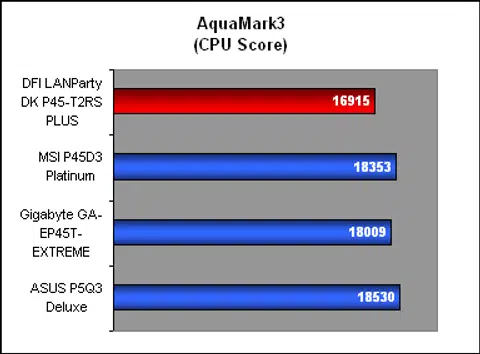
AquaMark3 also seemed more sensitive to the memory bandwidth issue with both the Graphics and CPU scores significantly lower than the others. The CPU segment in particular looked more vulnerable compared to the graphics, which was probably determined mostly by the discrete graphics card used in all cases.

Conclusion
Previously known more for its extensive and somewhat intimidating BIOS, DFI has tried to reach out to the mainstream with its new Auto Boost System feature. From our experience with the LANParty DK P45-T2RS PLUS so far, DFI has on paper an interesting idea here to make overclocking easier but the full potential has not been reached. First, the overclocking profiles available from DFI's website seem to be a positive move. But there aren't that many yet and those we saw were tied to certain hardware configurations (processor and memory speed) so it's not exactly ready for mass adoption.
Nevertheless, this is an idea with much potential and a larger installed user base in the future, especially with overclockers, should improve the quantity and quality of the profiles. In any case, the DFI BIOS we found on our board had as many options as we had seen from other DFI boards, so enthusiasts should have no worries about DFI dumbing down the BIOS in a bid to make their products more mainstream.
As a decently priced overclocking oriented motherboard, the DFI LANParty DK P45-T2RS PLUS hits the right spots. For an overclocker, it promises hours of fun tweaking and pushing this board, with 600MHz and greater FSB very feasible.
In terms of performance, the DFI LANParty DK P45-T2RS PLUS was quite competitive with the other P45 boards that we had tested, despite using DDR2 memory instead of DDR3. The decision to go with the more affordable memory will probably predispose this board favorably to users looking for a decent short term fix, though overclockers may find that a DDR3 board will give more overclocking headroom.
By following the reference chipset and enhancing it with some extra features, DFI has produced a decent P45 motherboard that is a step up from the no-frills mainstream variants. Lacking the heavy duty cooling systems (we personally found the heatsinks on the PLUS to be slightly warm to the touch but more than acceptable) adopted by major players in the market recently may affect its attractiveness to the hardcore crowd. For those wishing to try their hand at overclocking, the ABS system may offer a head start until users master the many arcane BIOS settings on this board. At S$239, it's not too pricey (especially once you factor in DDR2 prices), so if tweaking the BIOS is your pastime, then this DFI board will be a perfect companion.
Our articles may contain affiliate links. If you buy through these links, we may earn a small commission.