

Note: This review was first published on 3 January 2020.
Zen Confusion

The ZenBook 14 UX434 is powered by the latest 10th generation Intel processor and features ASUS' ScreenPad 2.0.
In 2018, ASUS announced its 2018 ZenBook series which was headlined by three new models: the ZenBook 13, 14, and 15. During the event, ASUS also said that there are plans to streamline their ZenBook lineup and make it easier to for notebook-buyers to understand. I thought that meant there was going to be just three ZenBook models. But a full year later, we know that’s not to be. The ZenBook lineup is still convoluted, confusing, and overwhelming.
So what do we have here? This is the ZenBook 14 UX434 and it can be best described as the flagship notebook in the ZenBook 14 family of ZenBook notebooks. What makes it stand out from the other ZenBook 14 notebooks are its specifications and the fact that it comes with ScreenPad 2.0 ― ASUS’ second-generation intelligent touchpad.
Also note that while the ZenBook 14 UX434 debuted in retail in the second half of 2019, it didn't sport Intel's 10th generation Core processors until the tail-end of 2019. As such, we didn't see it was worthwhile to review it back then until we obtained the refreshed UX434 with a newer processing sub-system such as the unit we've assessed today. At this point in time, the UX434 notebooks that you can find in retail only sport the newer Intel 10th Gen. Core processor configuration.
Design, display, and specifications
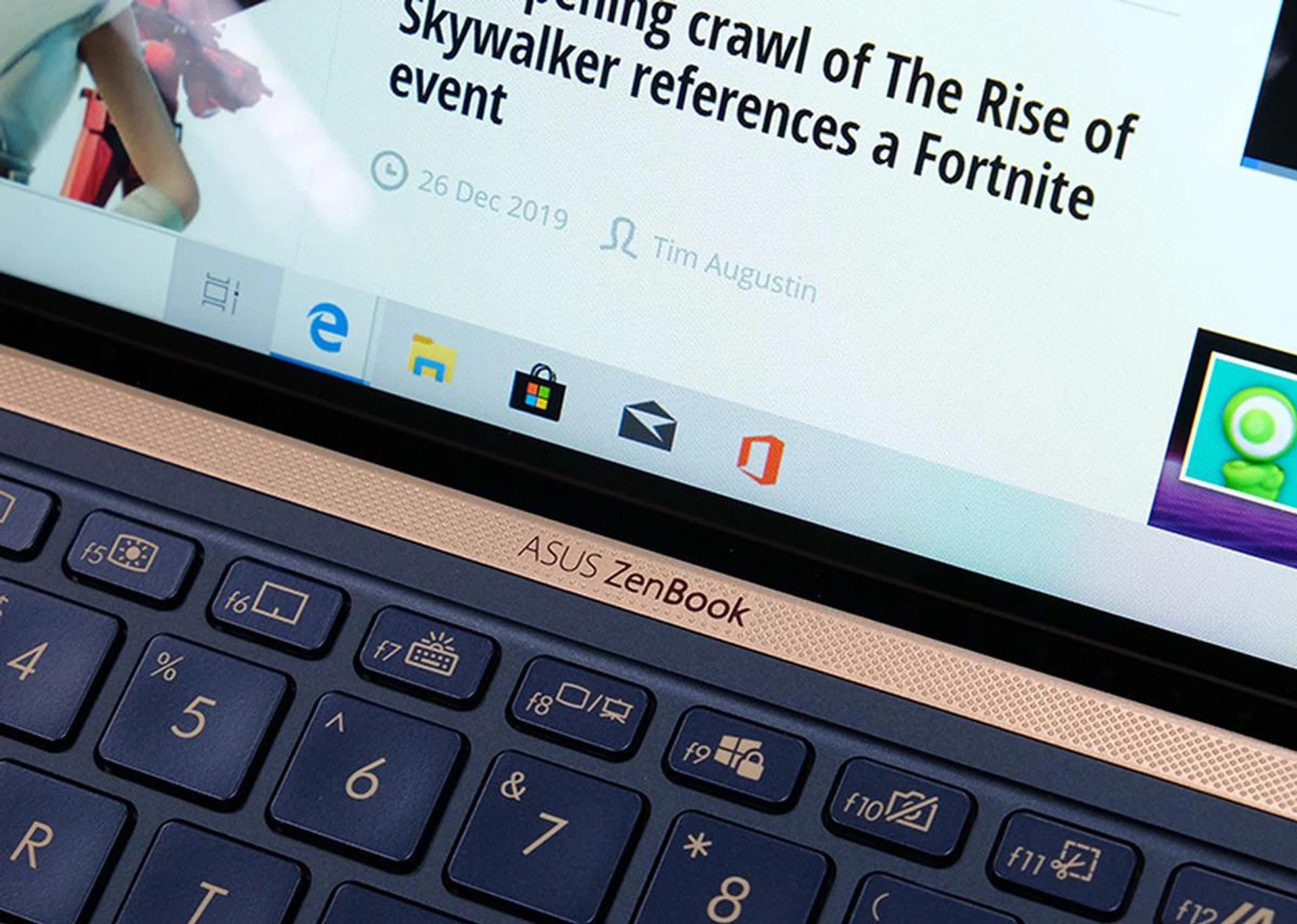
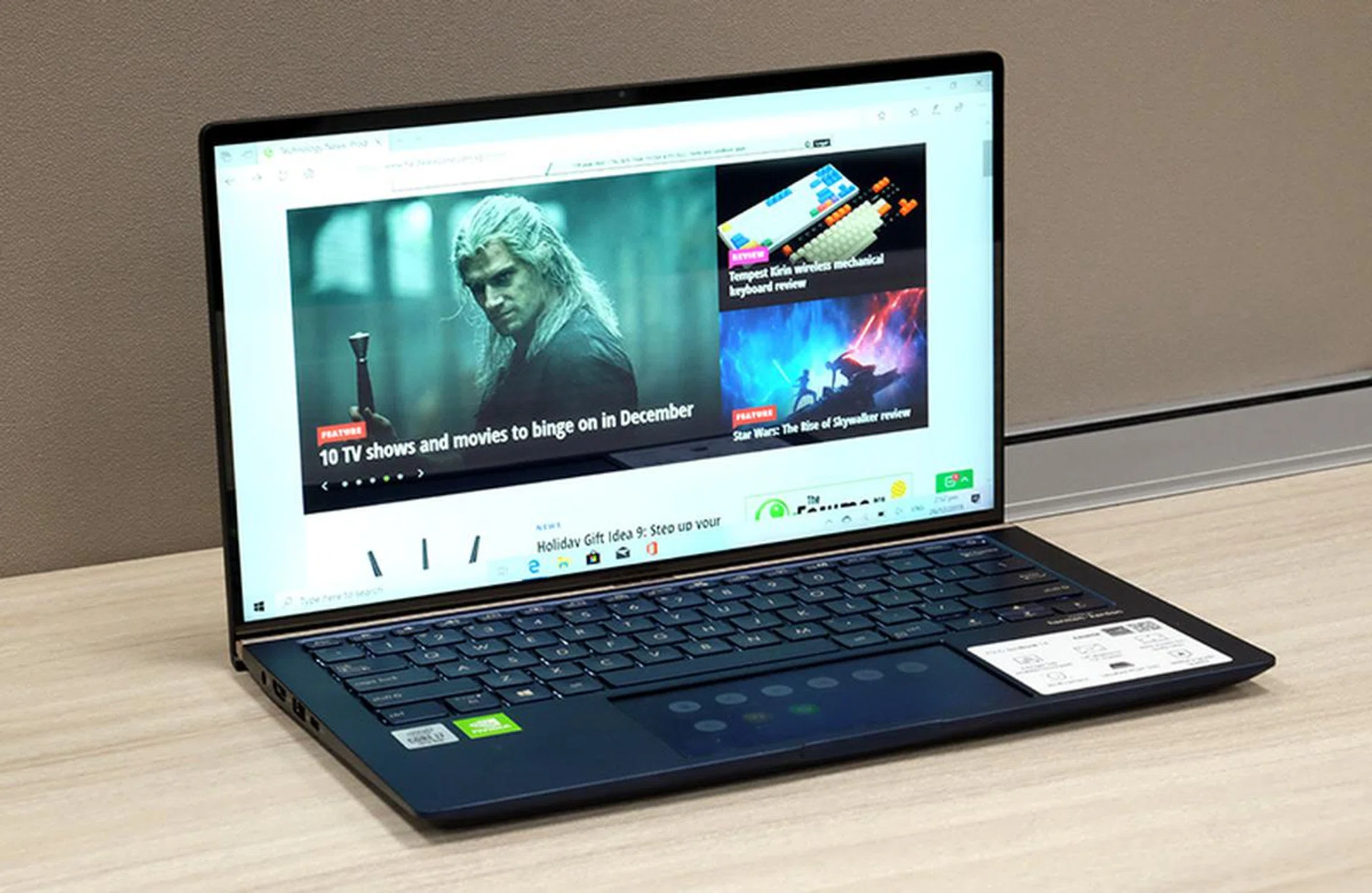
Gold accents on the chassis and keys elevate the looks of the ZenBook 14 UX434.
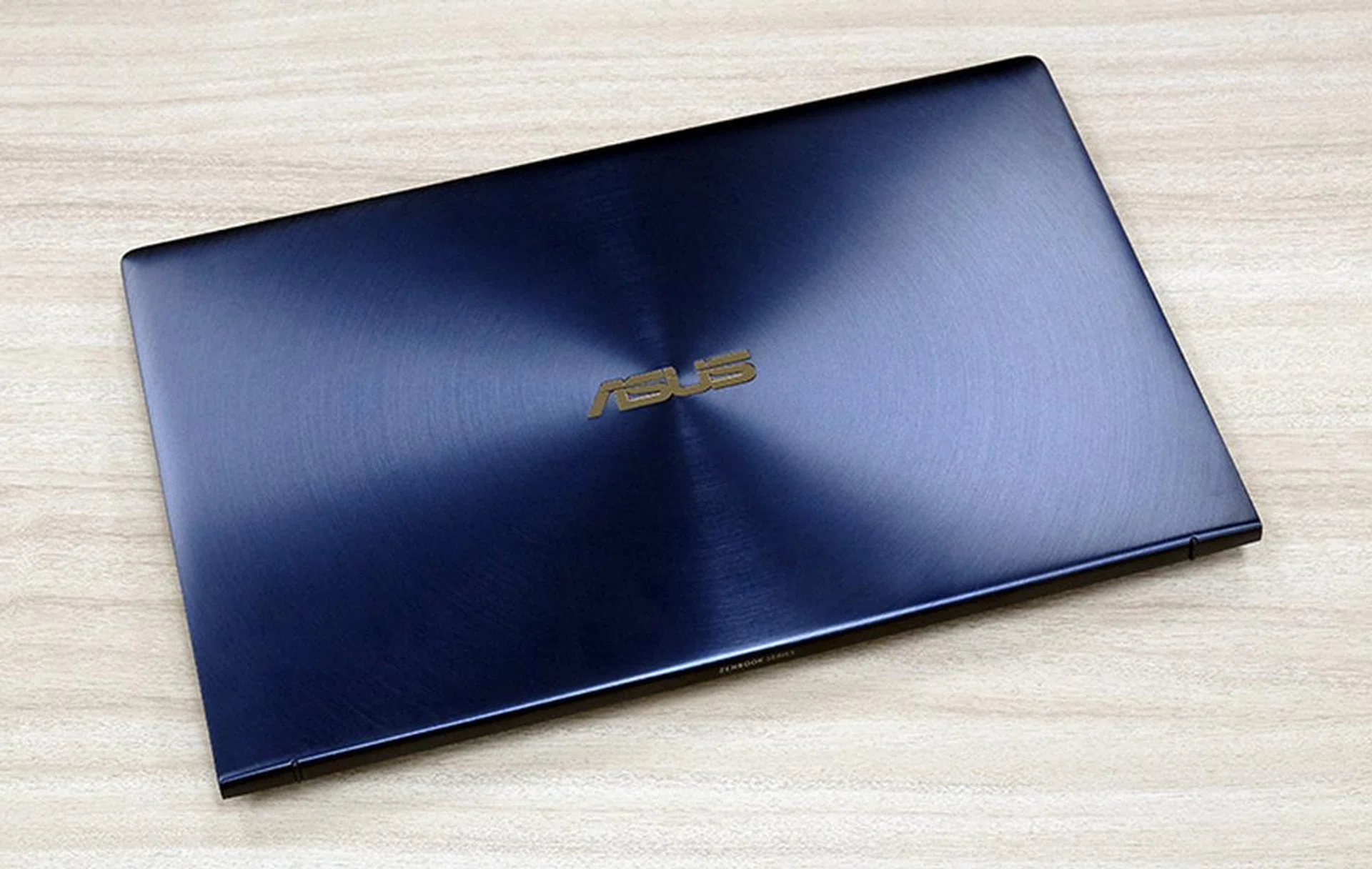
If the ZenBook 14 UX434 looks familiar to you that’s because it’s an update of last year’s ZenBook 14 UX433. It looks mostly the same ― it still comes in Royal Blue with gold accents ― but the dimensions are slightly tweaked to accommodate the improved internals, and the ports have been slightly repositioned.
At 1.35kg heavy and 16.9mm thick at its chunkiest point, the new ZenBook 14 is one of the chunkier notebooks in its class. But, as you will see later, it’s also one of the more powerful and full-featured. Despite its 14-inch display, the overall footprint is small. This is thanks to its minuscule bezels ― only 2.9mm on the sides and 3.3mm on the bottom. Overall build quality is good but lacks that final bit of refinement that ultra-premium notebooks in this class like Dell's XPS 13 and HP's Spectre x360 have.
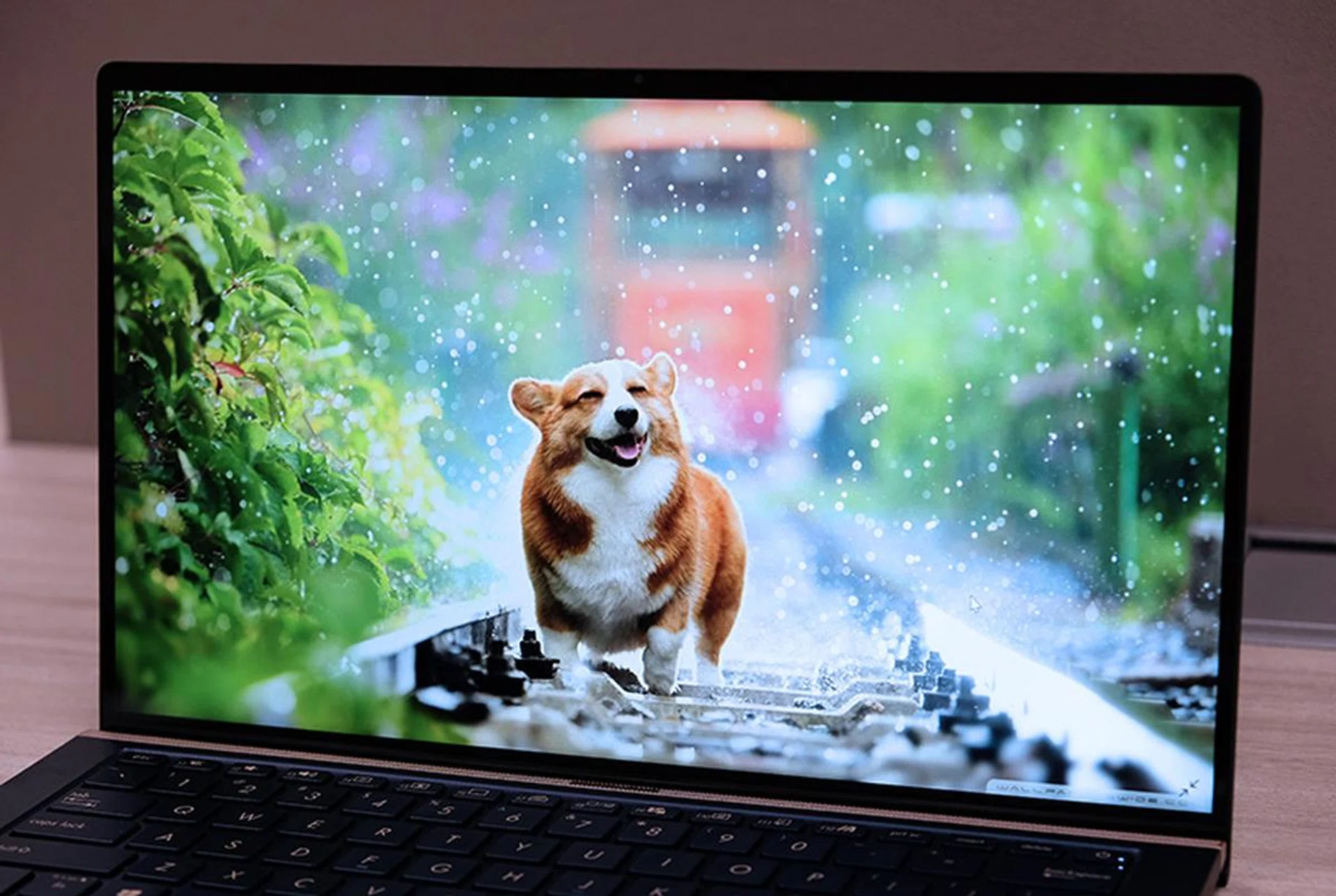
The display is good but doesn't quite have the punchiness of a true top-tier display.
The 14-inch IPS touchscreen display supports Full-HD resolution and has a glossy finish that can be distracting, especially in brightly lit environments. ASUS says it supports 100% of the Adobe sRGB colour space so it’s no wonder that colours look good on it. The display also gets pretty bright. Overall, it’s a very usable display with crisp visuals, nice vibrant colours, and good viewing angles. I have no real complaints about it.
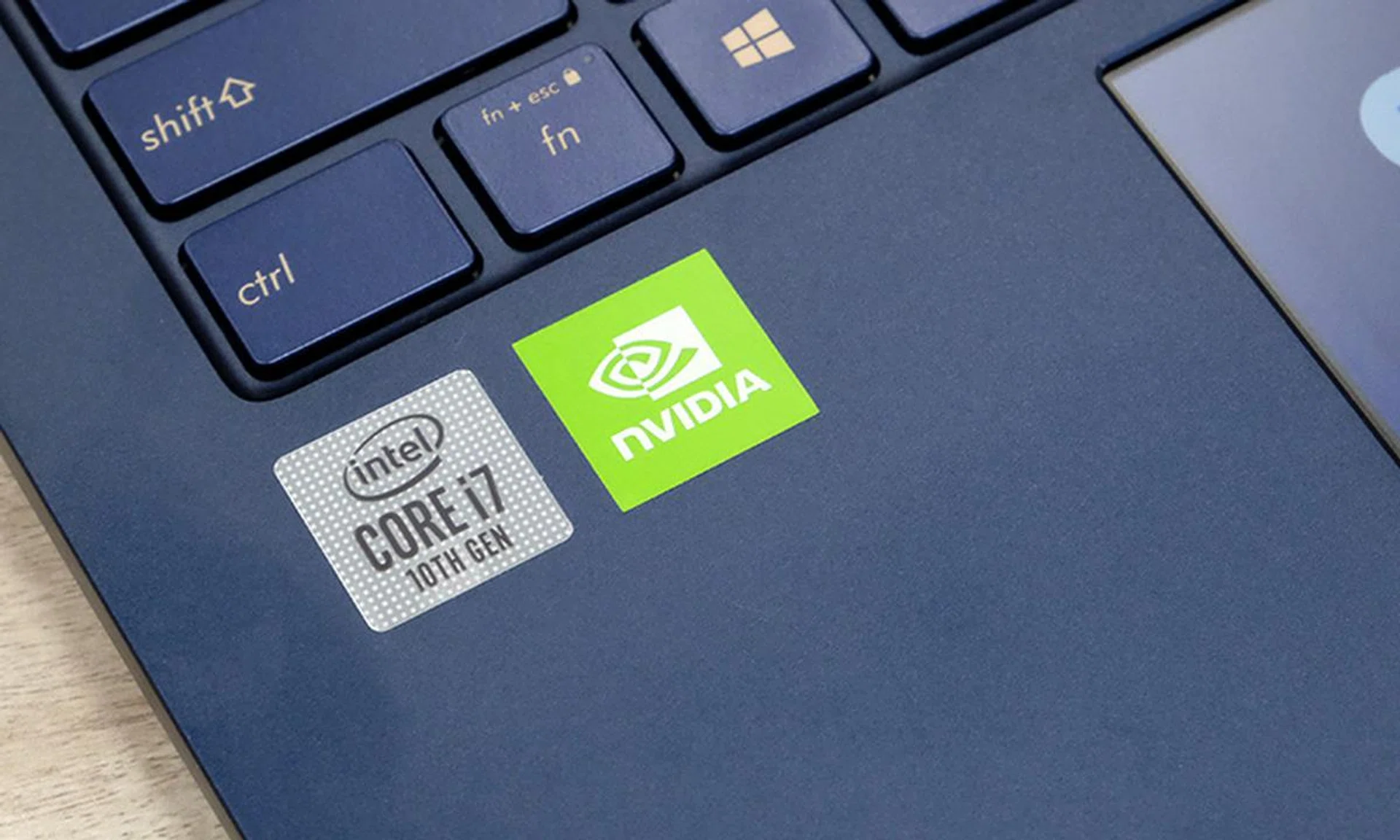
Intel CPU, NVIDIA GPU.
As for specifications, the ZenBook 14 UX434 will come in two configurations. The similarities are that both will be powered by Intel’s 10th generation Comet Lake processors and NVIDIA GeForce MX250 discrete GPU. The entry-level model comes with a Core i5 processor, 8GB of memory, and 512GB of SSD storage. The higher-end model comes with a Core i7 processor, 16GB of memory and a 1 TB SSD. Here’s a table summarising the specifications of the two models.
Processor | Intel Core i7-10510U | Intel Core i5-10210U |
Memory | 16GB | 8GB |
Storage | 1TB SSD | 512GB SSD |
Graphics | NVIDIA GeForce MX250 | NVIDIA GeForce MX250 |
Price | S$2,098 | S$1,498 |
One thing to note about the processor is that even though it’s marketed as 10th generation, it’s actually built on a 14nm process and has more in common with the older 8th generation Whiskey Lake processors. The 10th generation processors that are built on Intel's newer 10nm process are codenamed "Ice Lake" and have four-digit model numbers.
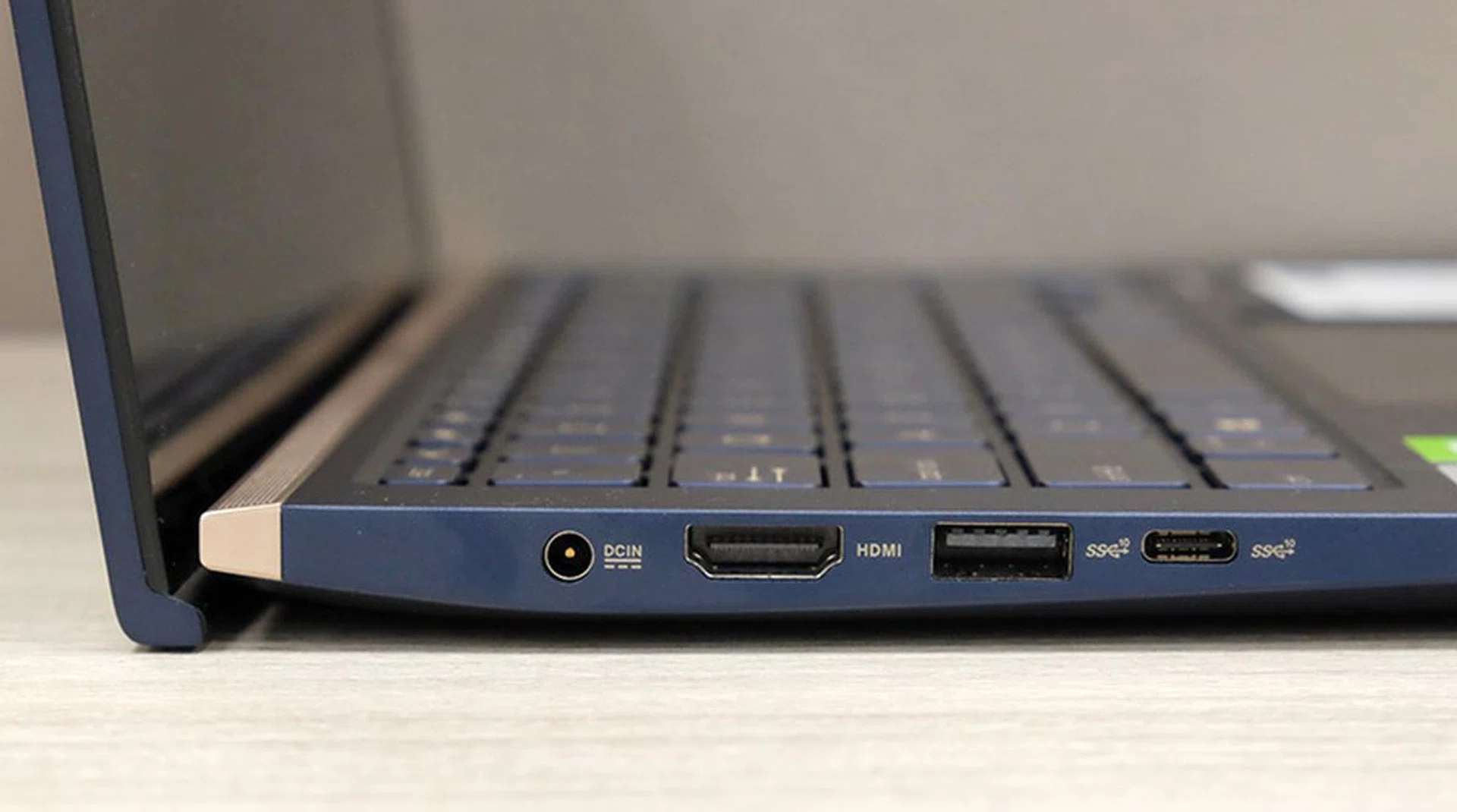
On the left is a DC-in jack for charging, a full-size HDMI port, a USB-A port, and a USB-C port. Sadly, the USB-C port cannot be used for charging nor does it support Thunderbolt 3.
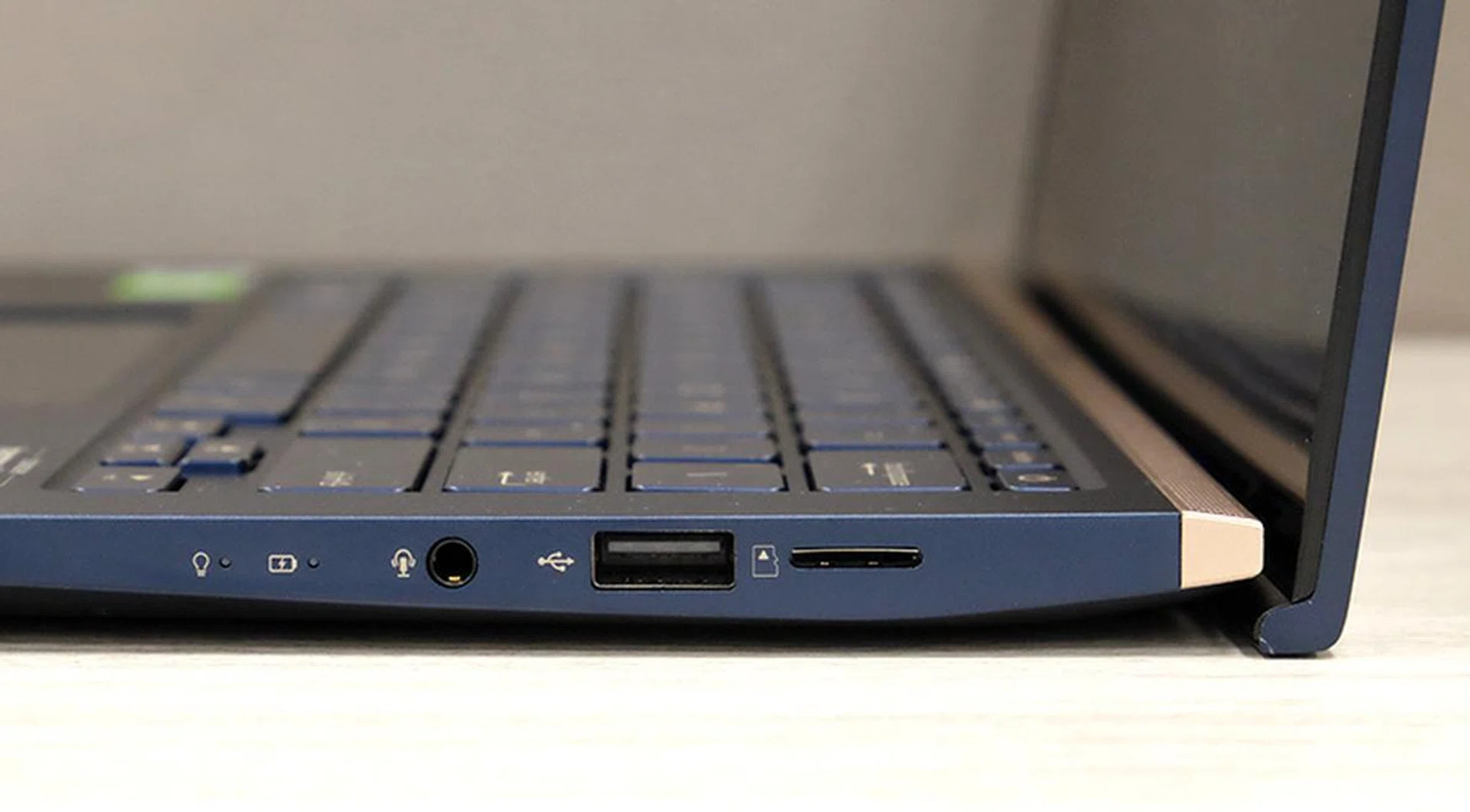
On the right is a 3.5mm audio combo jack, another USB-A port (only USB 2.0), and a microSD card reader.
The ports have been repositioned so that they are farther away from the edges but they are still the same. You still get:
- 1 x USB-C USB 3.1 Gen 2
- 1 x USB-A USB 3.1 Gen 2
- 1 x USB-A USB 2.0
- 1 x HDMI
- 1 x microSD card
- 1 x 3.5mm audio combo jack
- 1 x DC-in jack
The port selection is rather good but the lack of Thunderbolt 3 support could be a problem for some. The inclusion of a microSD card reader is welcomed but we would have preferred a full-size SD card reader. The last thing to note about the ports is that the USB-C port doesn’t support power delivery so you can't use third-party USB-C chargers to power or charge it. Charging has to be done using a traditional DC-in jack, which is a bummer especially if you are already invested into the USB-C ecosystem and have spare USB-C chargers lying around.
On the wireless front, readers will be happy to know that the ZenBook 14 UX434 supports the latest Wi-Fi 6 standard (802.11ax). However, know that to get the most out of it will require a compatible Wi-Fi 6 router.
Keyboard, trackpad, and ScreenPad 2.0
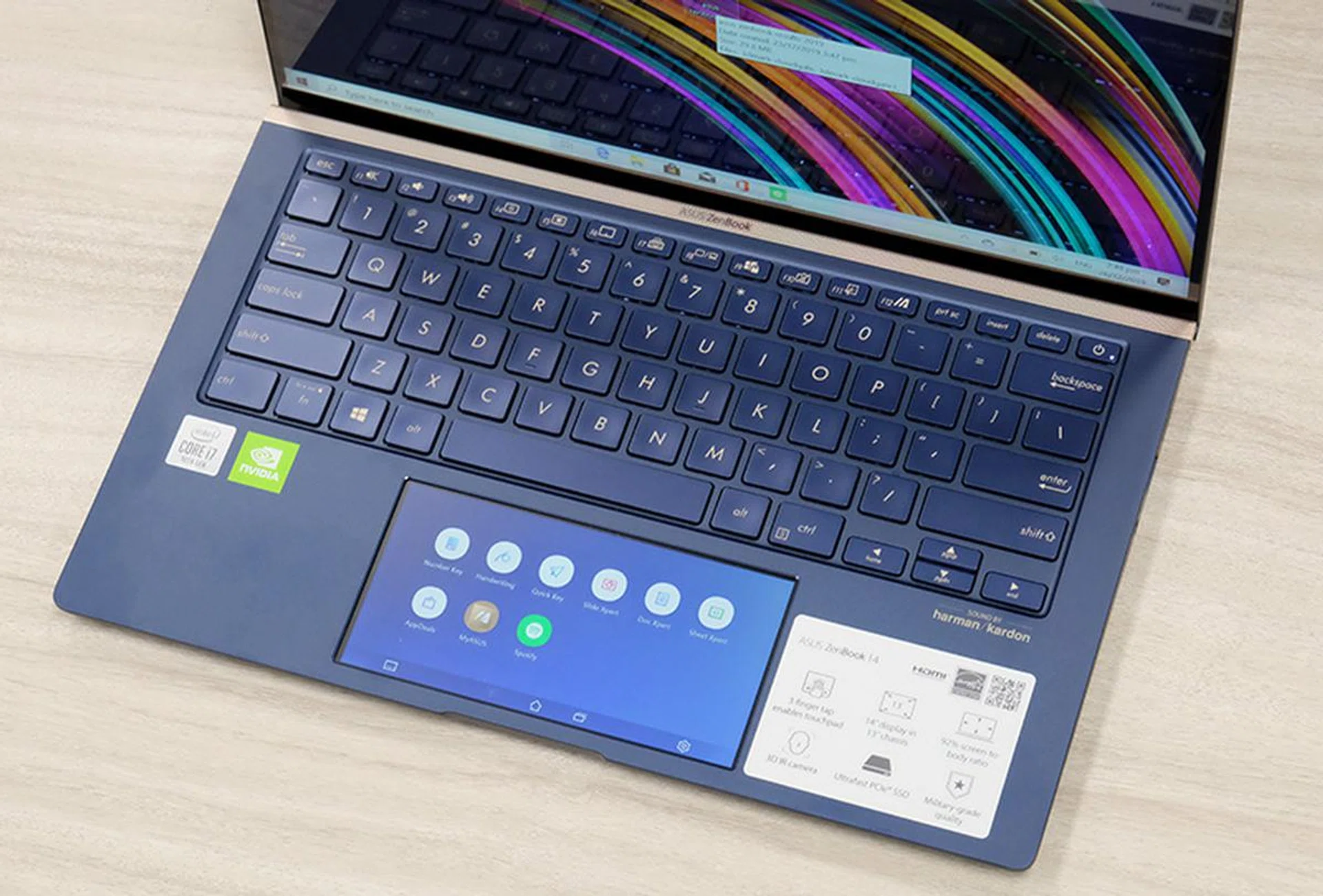
The keyboard has a sensible conventional layout and a generous amount of travel.
The keyboard is pleasant. The keys are of a good size and the layout is sensible. It also has a good amount of travel ― ASUS says travel is 1.4mm. One nice thing about the notebook is the ErgoLift. The hinge actually doubles up as a stand and lifts the notebook up at a slight angle when the screen is opened. This makes it more comfortable to type on. If I want to be fussy, then I’ll say the keys feel a bit mushy. I would like a firmer keyboard feel but that’s my personal preference.
The ZenBook 14 UX434 doesn’t just have a regular trackpad, it has what ASUS calls the ScreenPad 2.0. Essentially, it’s an intelligent trackpad that can double up as a secondary display. You can switch between the two modes by using a quick three-finger tap.
The trackpad is much larger than its predecessor. It now measures 13.1cm in width and 6.7cm in height, which is a big jump from its predecessor’s 10.5cm x 6.1cm. Diagonally, it measures 5.65 inches across, which means it’s roughly the same size as Pixel 4. It’s pretty high resolution too, boasting 1,000 x 504 pixels.
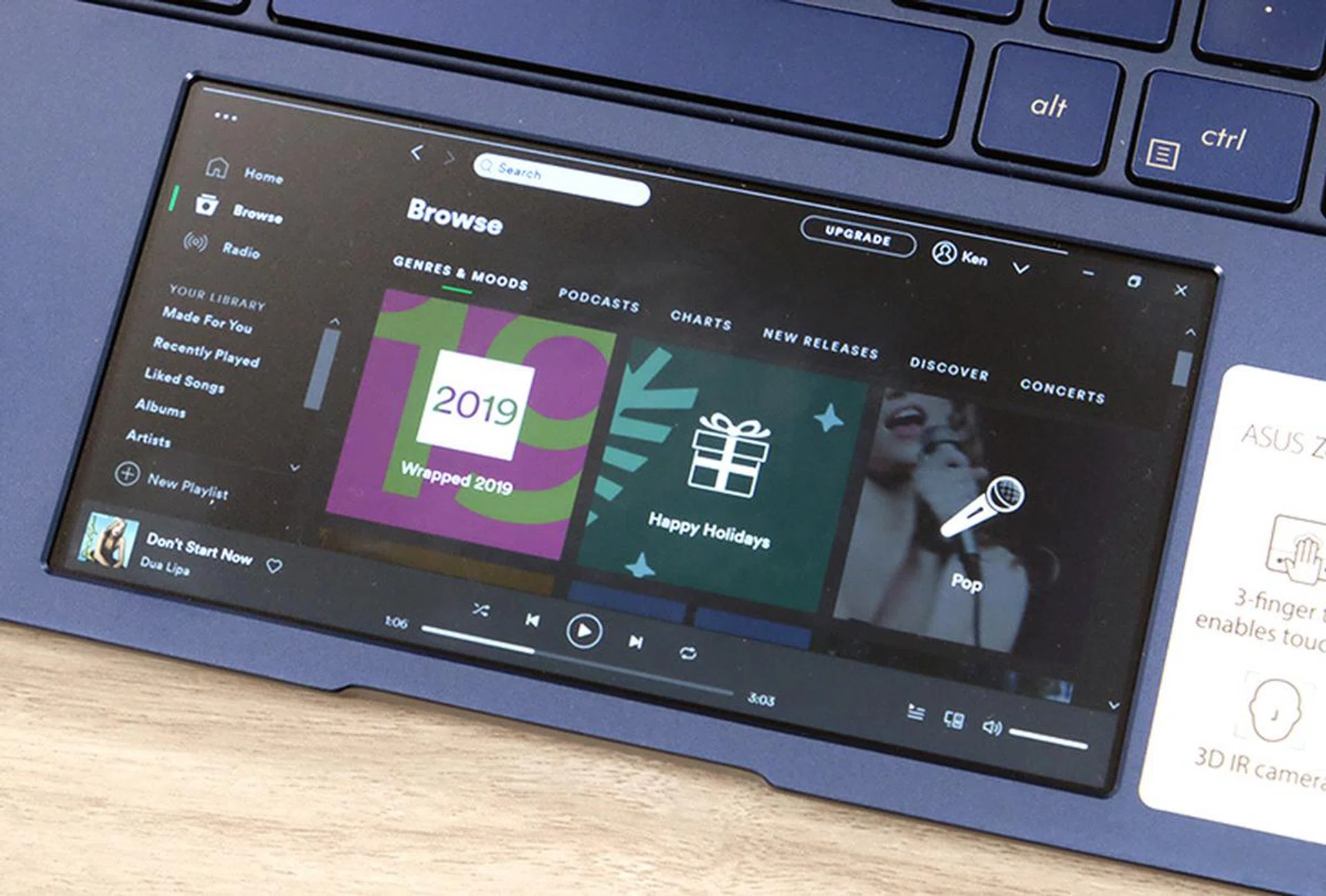
The trackpad doubles up as a secondary display. Here, it's running the specially optimised Spotify app.
While the larger trackpad does make navigating and scrolling more pleasant, its effectiveness as a secondary display is debatable. It’s often too small to be used reliably as a secondary display. The situation is a bit of a catch-22. You have to squint to read anything on it but if you enlarge it, you’ll end up seeing not much at all. Really, the only thing I found it good for is to play videos so students and workers could use it on the sly to watch Netflix or YouTube. Fortunately, it has improved over its original ScreenPad implementation a little over a year back when it was first featured exclusively on the ZenBook Pro 15. You can find out even more about the ScreenPad from our first detailed encounter.
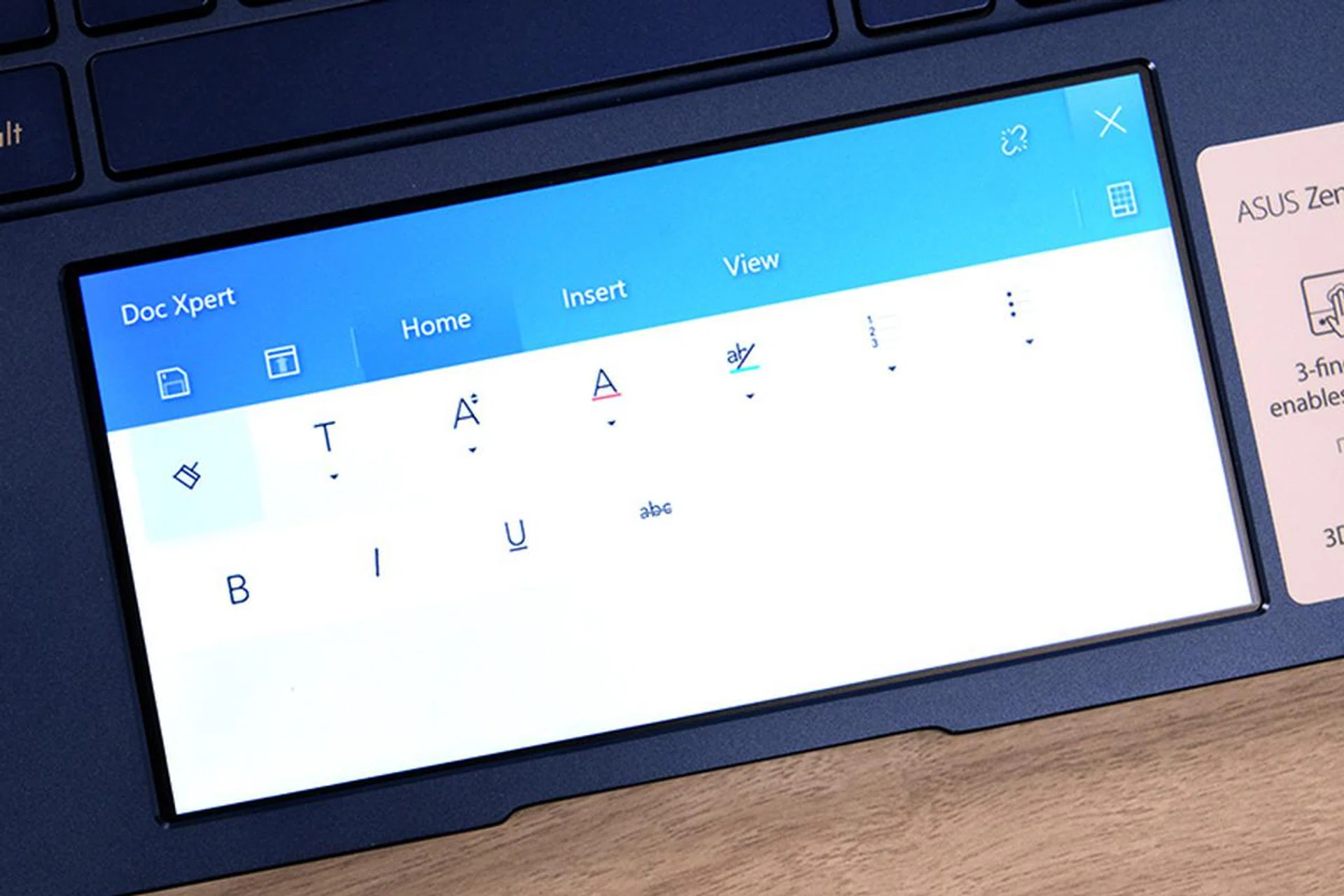
There's an app called Doc Xpert that gives you quick shortcuts in the Word app. But why won't you just use shortcuts in the app itself?
ASUS has optimised a couple of apps like Spotify, Word, Powerpoint, and Excel to be used the ScreenPad but not all of them are useful. Spotify is genuinely useful as the display is big enough to show playlists and enable playback controls. It also lets you do other things like work on your spreadsheet or email without having to switch to the Spotify app on your main display.
The rest of the apps, however, are mostly superfluous. For example, the ScreenPad Word app (called Doc Xpert) only lets you format text, add colours, and a couple of other minor edits, and I would argue it’s easier to do that on the main display. Besides, you would have your Word app opened if you want to change your font size so why not use the menubar in the main app window?
Performance analysis
To evaluate the performance of the ZenBook 14 UX434, we will be comparing it against the equally new Acer Swift 5, Dell XPS 13 2-in-1, and HP Spectre x360. Here's a quick table summarising their specifications:
Model | ASUS ZenBook 14 UX434 | Acer Swift 5 | Dell XPS 13 2-in-1 | HP Spectre x360 |
Processor | Intel Core i7-10510U | Intel Core i7-1065G7 | Intel Core i7-1065G7 | Intel Core i7-1065G7 |
Memory | 16GB | 16GB | 16GB | 16GB |
Storage | 1TB SSD | 1TB SSD | 512GB SSD | 1TB |
Graphics | NVIDIA GeForce MX250 | NVIDIA GeForce MX250 | Intel Iris Plus Graphics | Intel Iris Plus Graphics |
Price | S$2,098 | S$2,398 | S$2,898 | S$2,899 |
The Acer Swift 5 is the ZenBook’s closest rival ― their specifications and price are very similar. The Dell and HP, on the other hand, are much pricier notebooks with convertible form factors and they are powered by Ice Lake Intel processors with Intel’s new Iris Plus integrated graphics. It will be interesting to see how the GeForce MX250 discrete GPU in the ZenBook compares against Intel’s newest integrated graphics solution.
Benchmark results
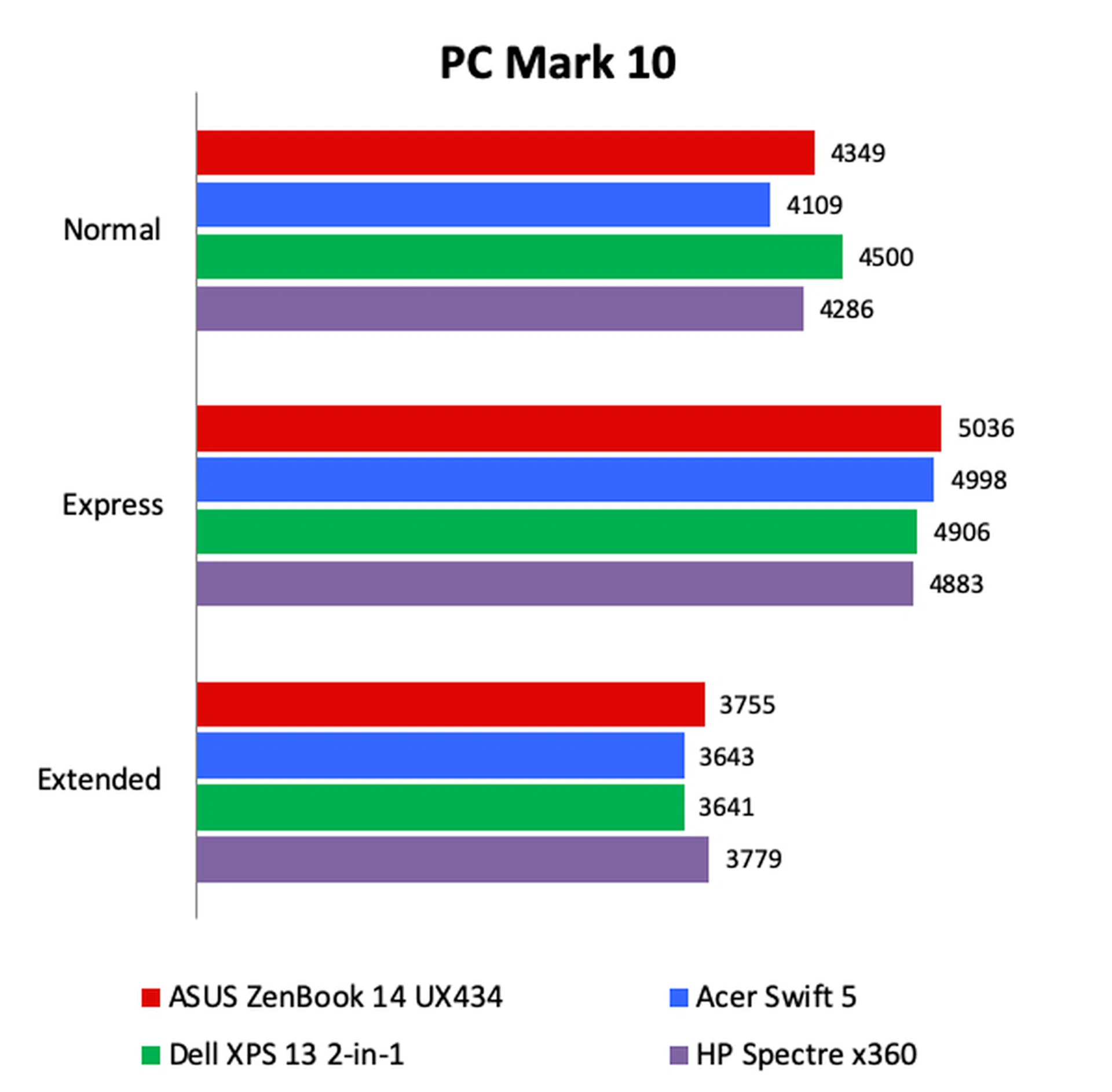
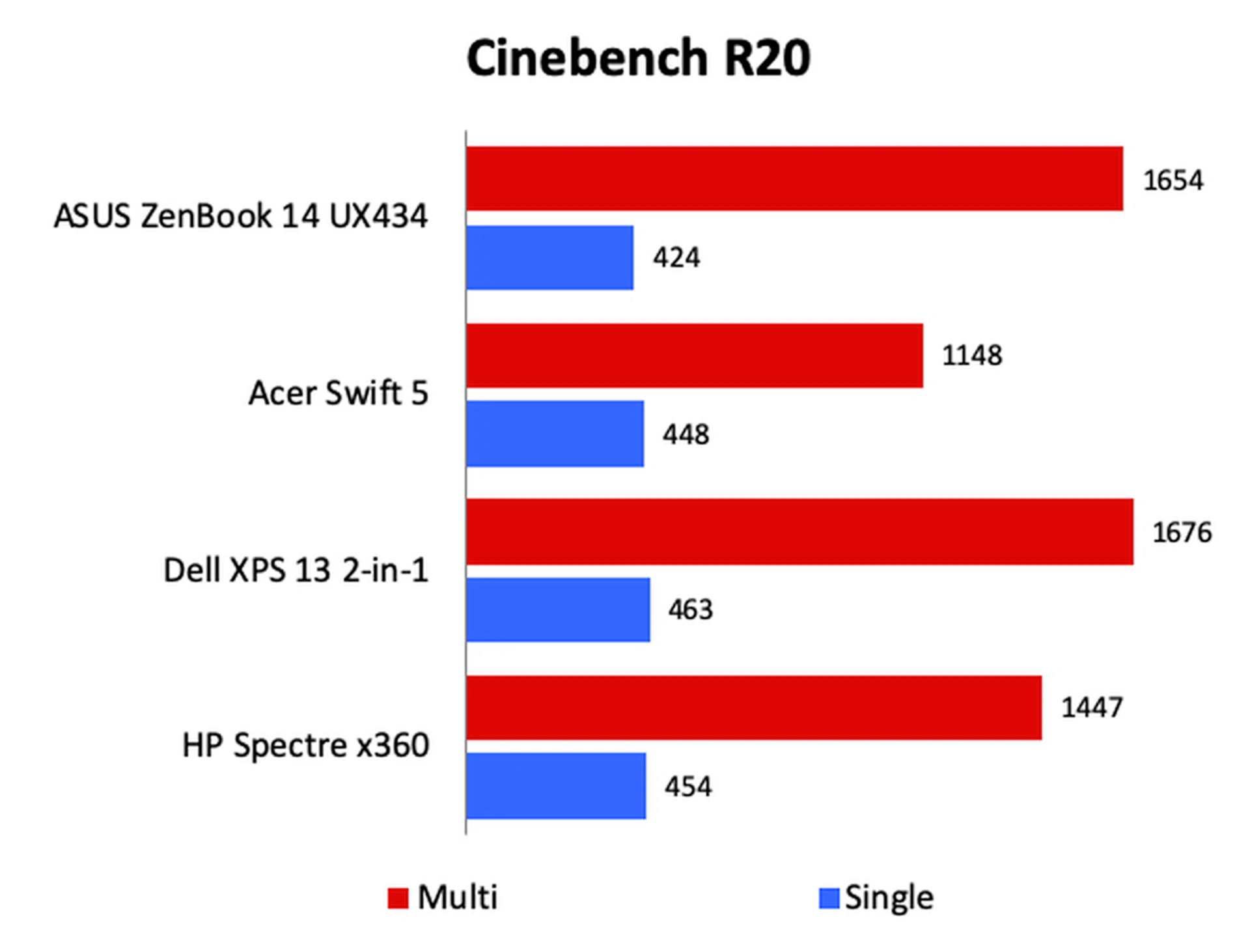
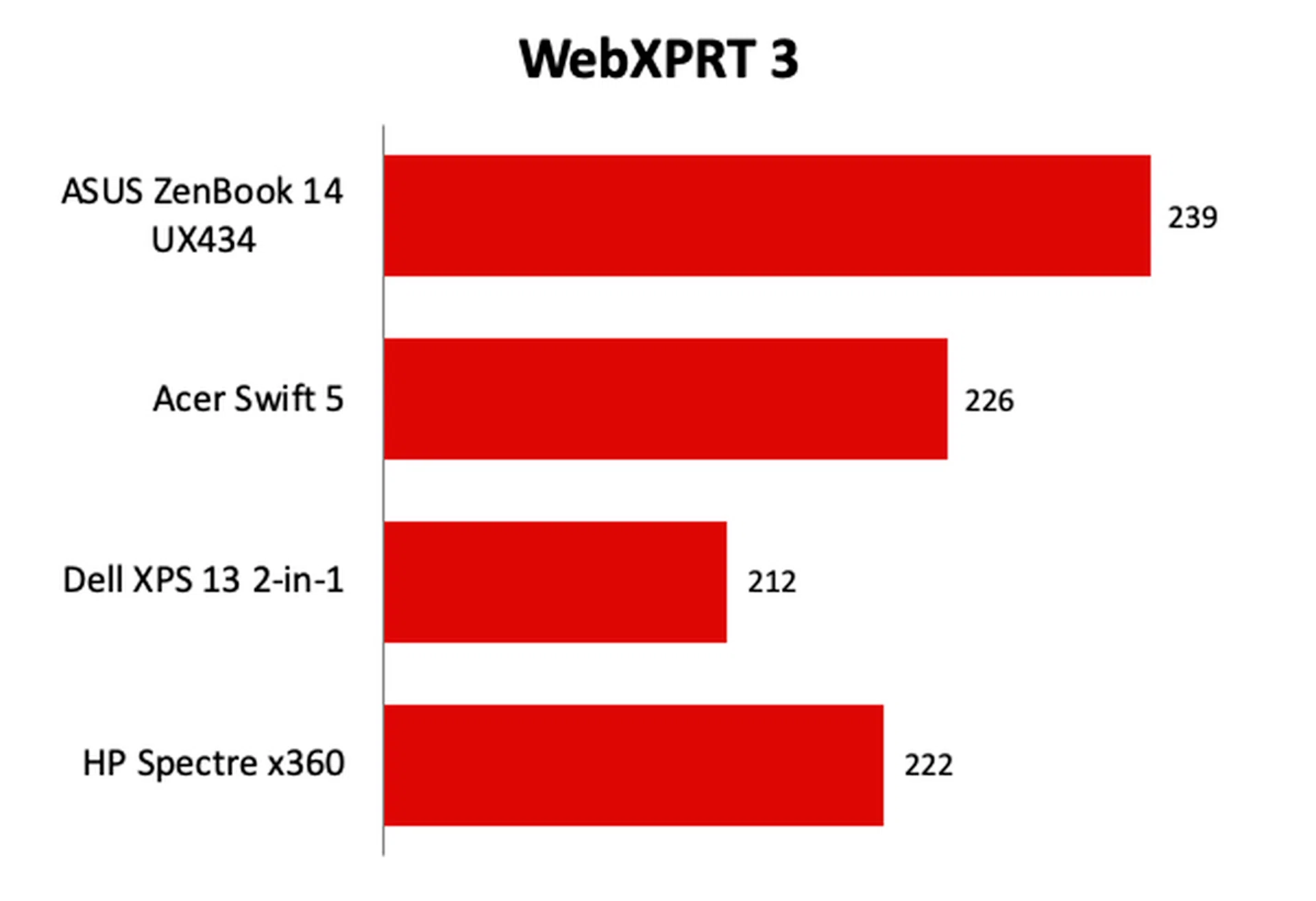
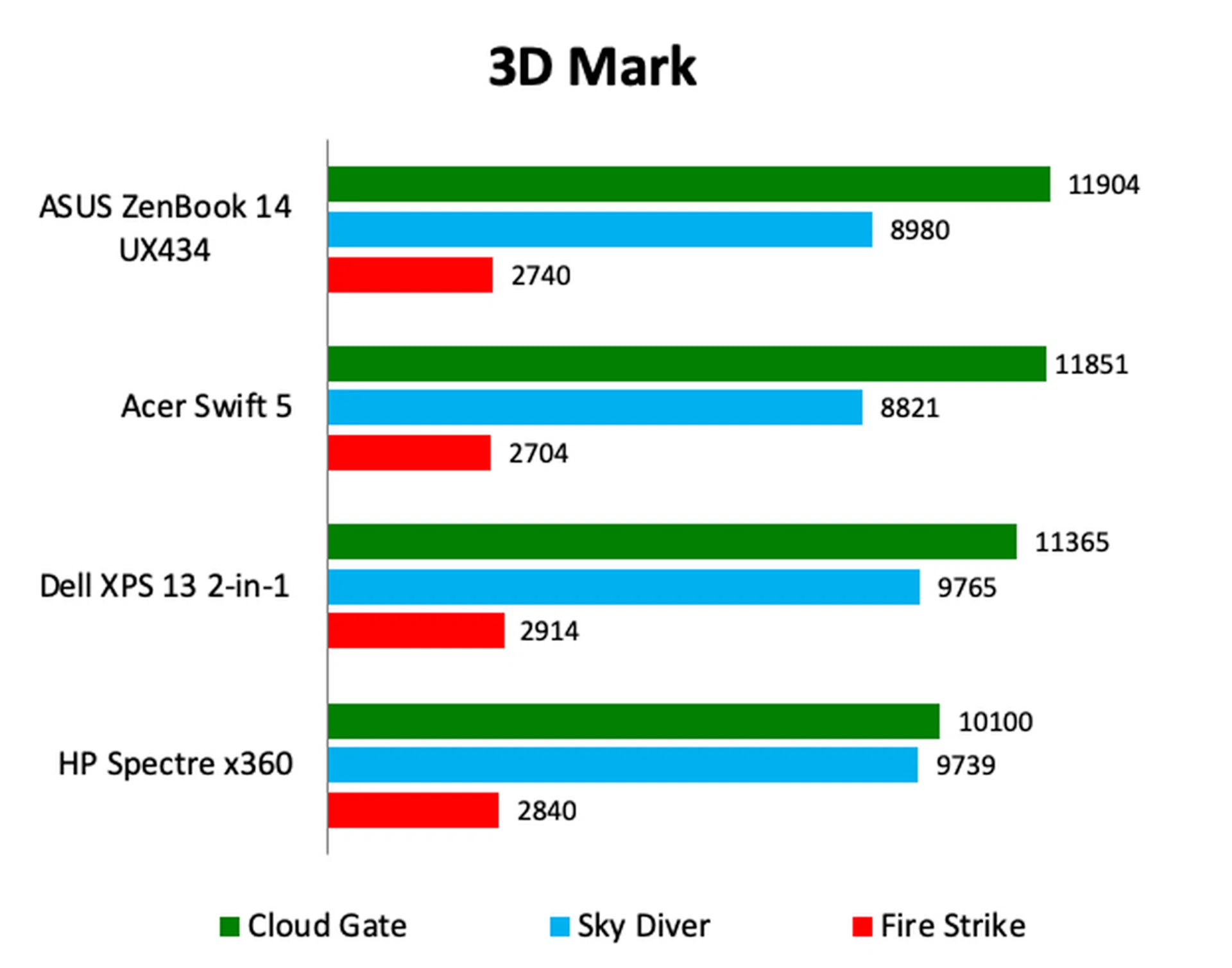
The ZenBook 14 UX434’s performance was generally good. Its scores on PCMark 10 were amongst the highest, showing that it’s good for general productivity apps. It’s a capable web browser too as it recorded the highest scores on WebXPRT. Its scores on 3DMark were good too but it’s interesting to see that even the Dell and HP were competitive in that benchmark. It used to be that Intel’s integrated GPUs were no match even for entry-level discrete GPUs.
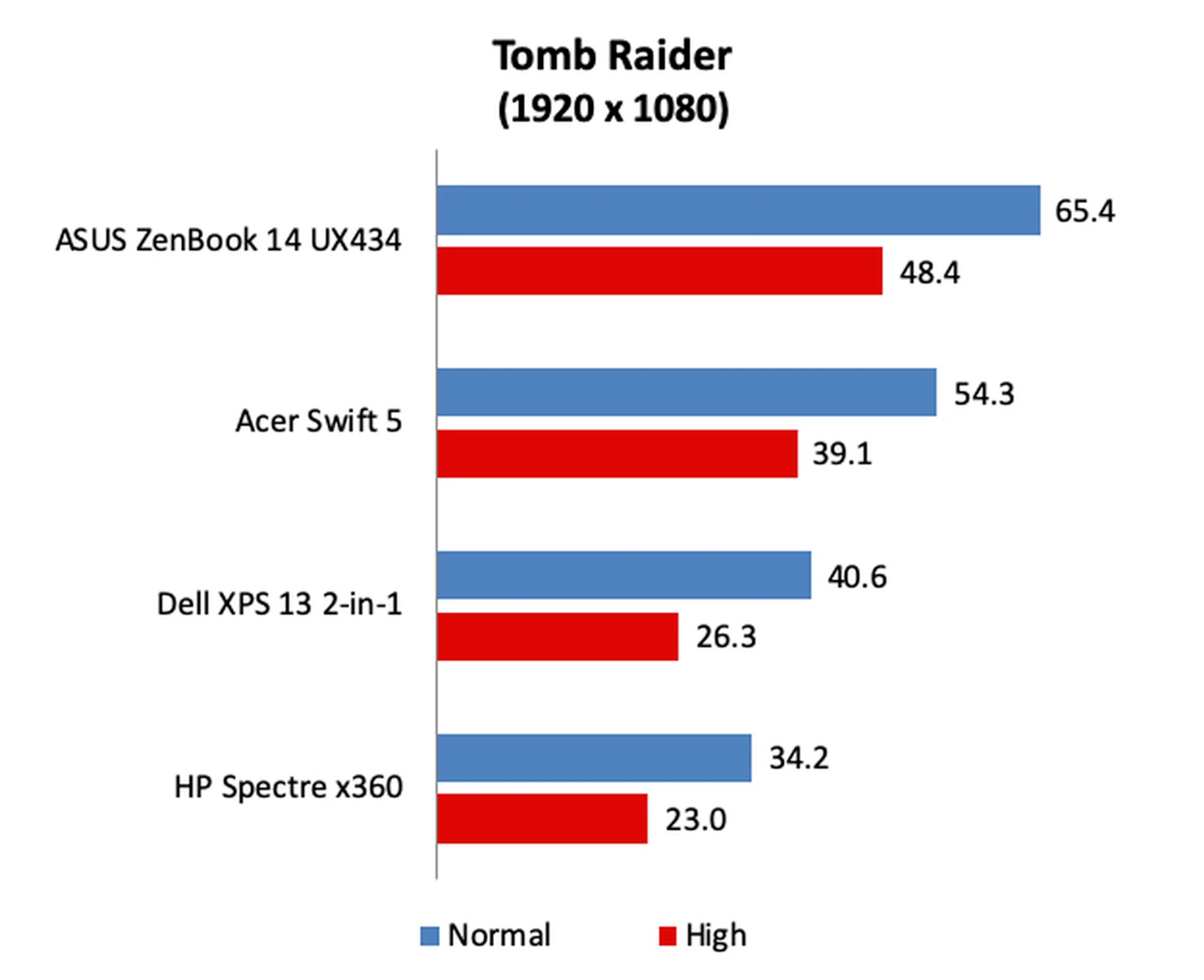
However, on Tomb Raider, the discrete GPUs showed their worth. The ASUS and Acer were at least 50% faster than the Dell and HP. Another important thing to note is that the ASUS held these frame rates consistently and showed no signs of performance throttling. The Dell and HP, however, showed significant signs of throttling on Tomb Raider. The Dell, for example, peaked at 57.9fps on Normal settings but settled to just 40.6fps after just a few consecutive runs.
Battery life
** Note: Battery tests were conducted using PCMark 10's battery benchmark with display set to 100% brightness **
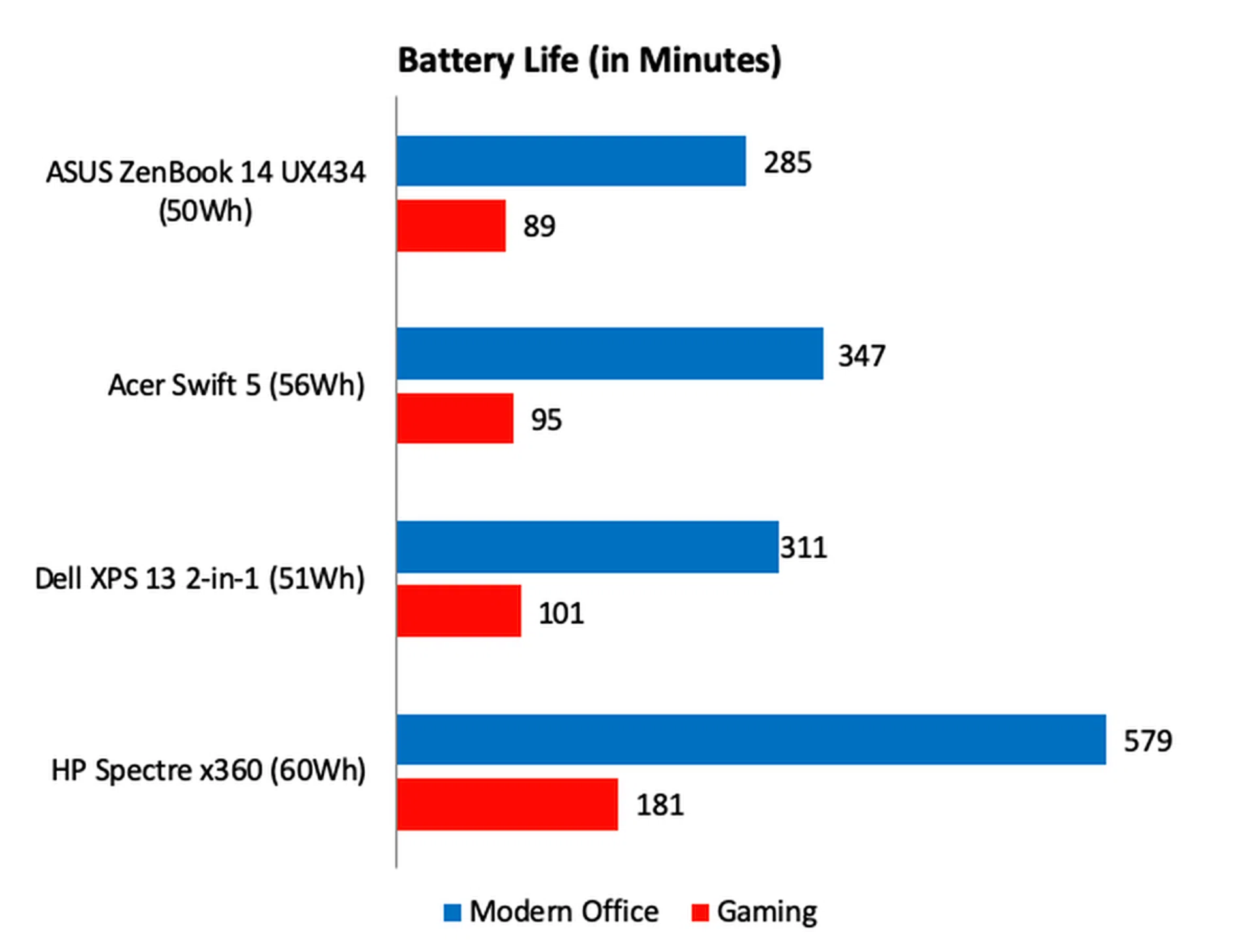
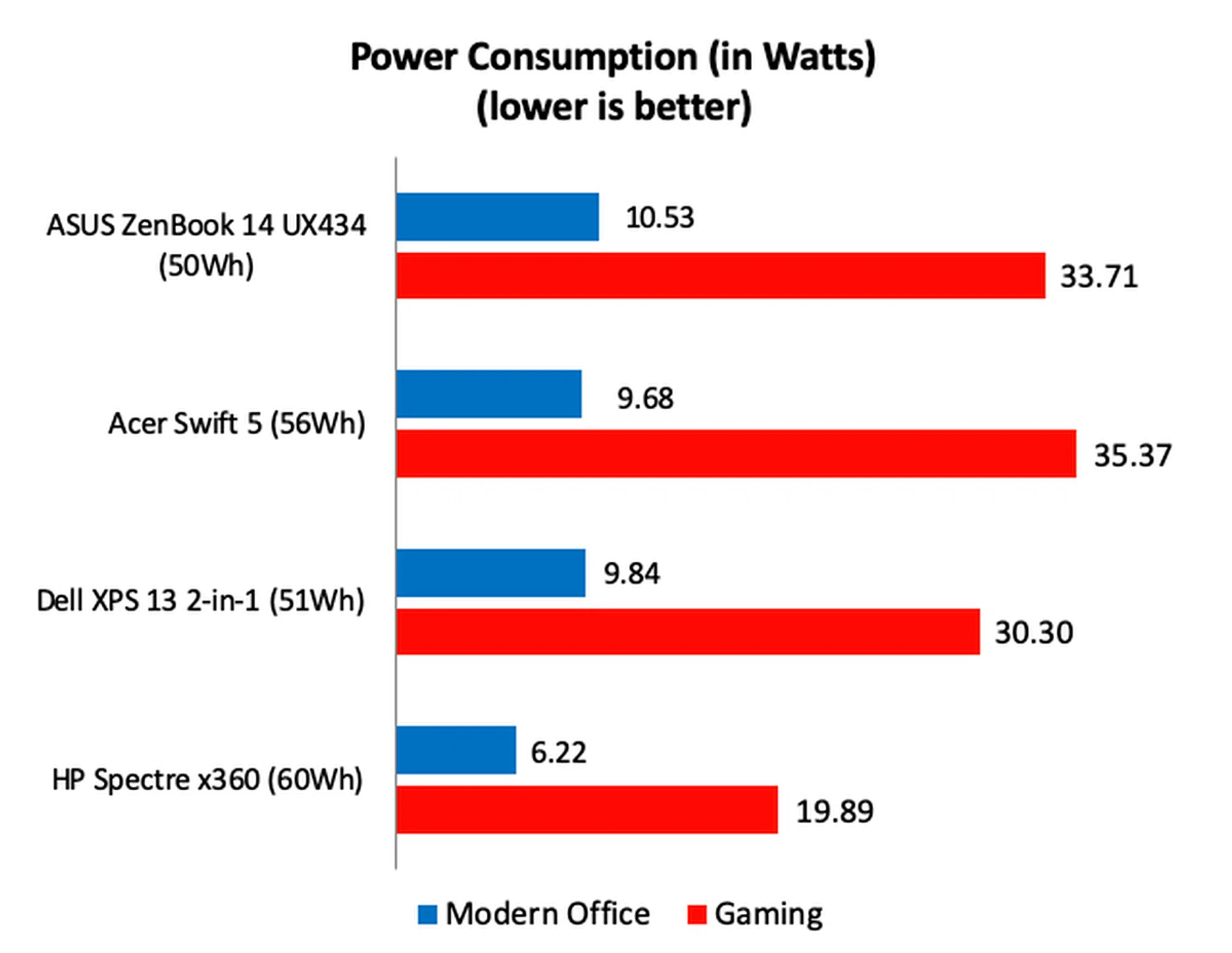
Battery life is not the ZenBook 14 UX434's strongest suit. The combination of the less efficient Comet Lake processor and discrete GPU means the ZenBook's power consumption is considerably higher than its rivals, particularly the Dell and HP. Still, when running normal day-to-day applications, the ZenBook lasted 285 minutes or 4 hours and 45 minutes. This isn't too bad if you consider that its display was set to 100% and it has the smallest battery capacity.
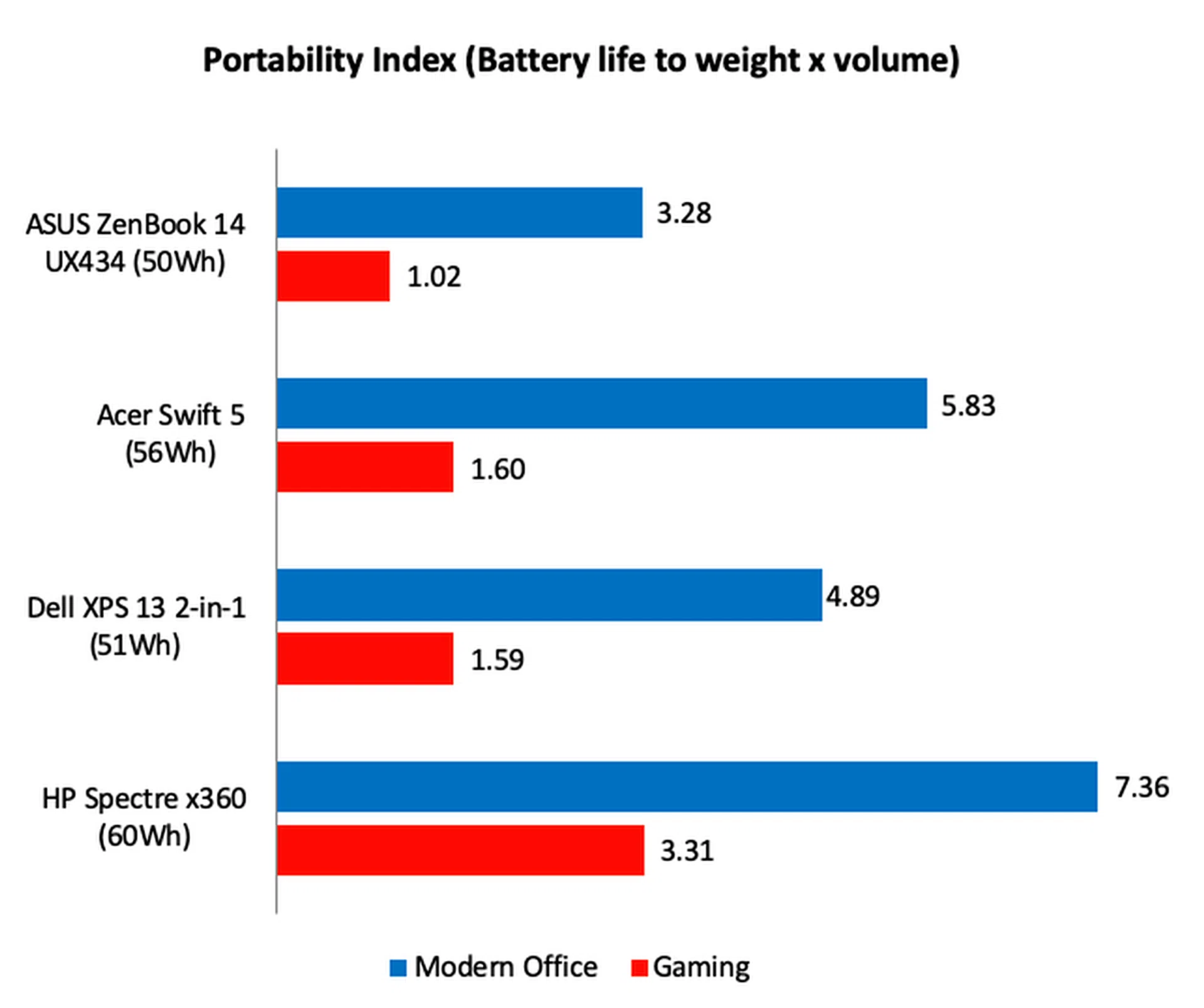
As for its portability score, it was no surprise to see that it scored the lowest given that its battery life was already on the low side and that it's easily the chunkiest and heaviest notebook among the four. That doesn't mean the ZenBook 14 UX434 is a porkchop. It's still a highly portable machine — it's just not as portable as its rivals are.
Outstanding value
The ZenBook 14 UX434 offers value that is hard to beat.
Much like its predecessor, the ZenBook 14 UX433, the ZenBook 14 UX434 offers a lot of bang for your buck.
Crucially, it gets a lot of the fundamentals right. The display is good, the keyboard and trackpad are sensible and pleasant to use, it’s compact and not too heavy, and its performance is exemplary. It offers a good selection of ports but it’s a real pity that it’s USB-C port does not support charging nor Thunderbolt 3.
Also, the effectiveness of the ScreenPad 2.0 trackpad is debatable. I found it to be small to be really useful as a secondary display and even the apps that are optimised for it aren’t all that helpful. I would rather the feature be omitted so that the price can be brought down even further.
Speaking of price, that’s perhaps the ZenBook 14 UX434 biggest attraction. The sticker price is S$2,098, which is incredible considering what’s on offer. Even if you disregard its features, the basic specifications are mighty tempting ― Core i7 processor, 16GB of memory, 1TB SSD, and discrete NVIDIA graphics. Acer’s Swift 5 comes close but it still costs nearly S$300 more.
There's an even more affordable configuration that's just S$1,498.
If you want an ultraportable notebook of this size, you’d be hard-pressed to find another that offers anywhere as much value as the ZenBook 14 UX434. In short, for most people looking to get a thin 13 to 14-inch notebook, this is the family of notebooks to start your search.
Our articles may contain affiliate links. If you buy through these links, we may earn a small commission.