

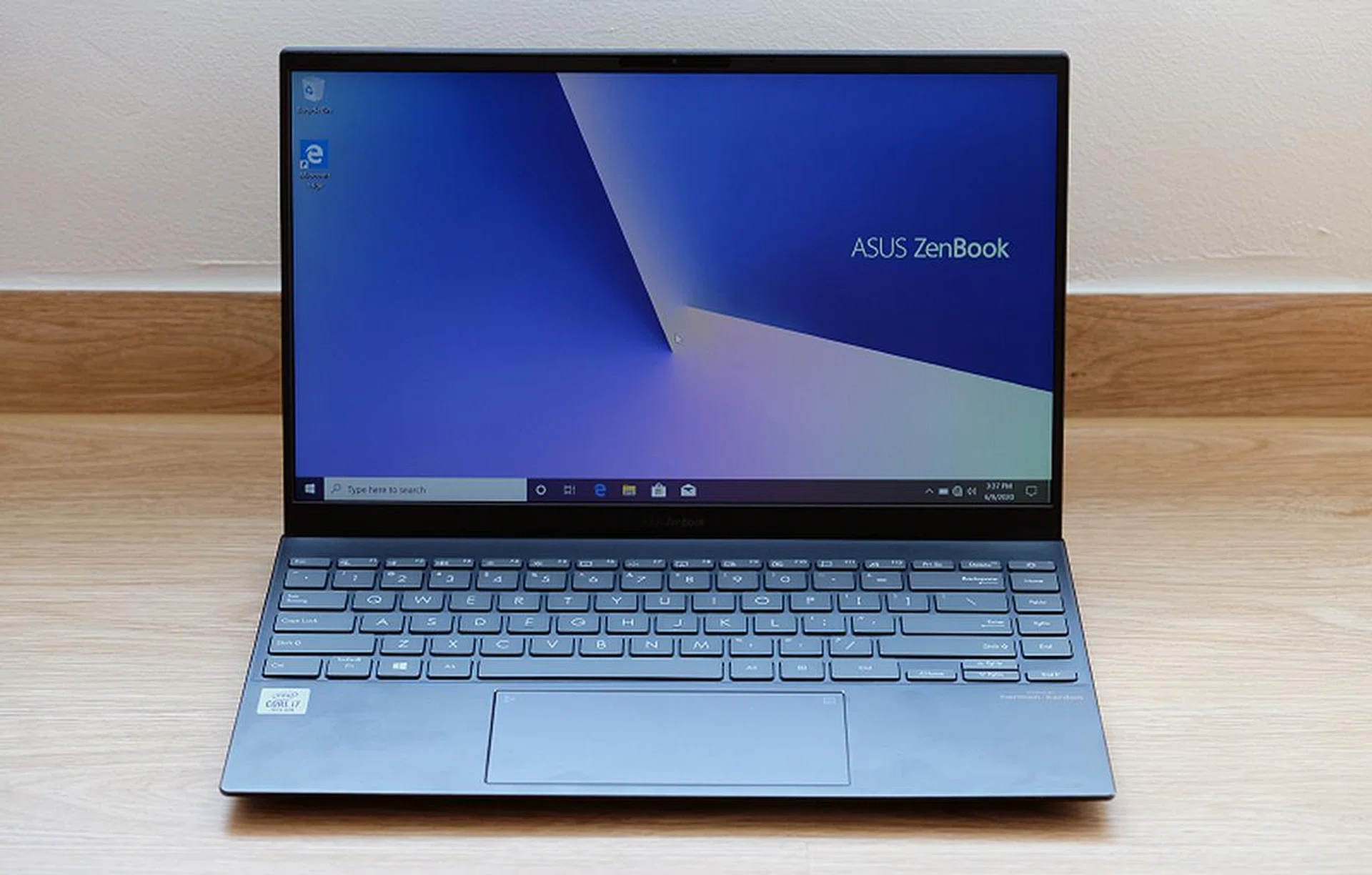
It's another 14-inch ZenBook from ASUS. (Image source: ASUS)
Another 14-inch ZenBook?
ASUS recently announced a new 14-inch ZenBook called the ZenBook 14 UX425. I know, I’m just as confused as you are, because isn’t there already a compact 14-inch ZenBook called the ZenBook 14 UX434 that I reviewed earlier this year? The two look almost identical to my eyes. Dig deeper, however, and you’ll see that there are subtle but significant differences between the two.
Philosophically different
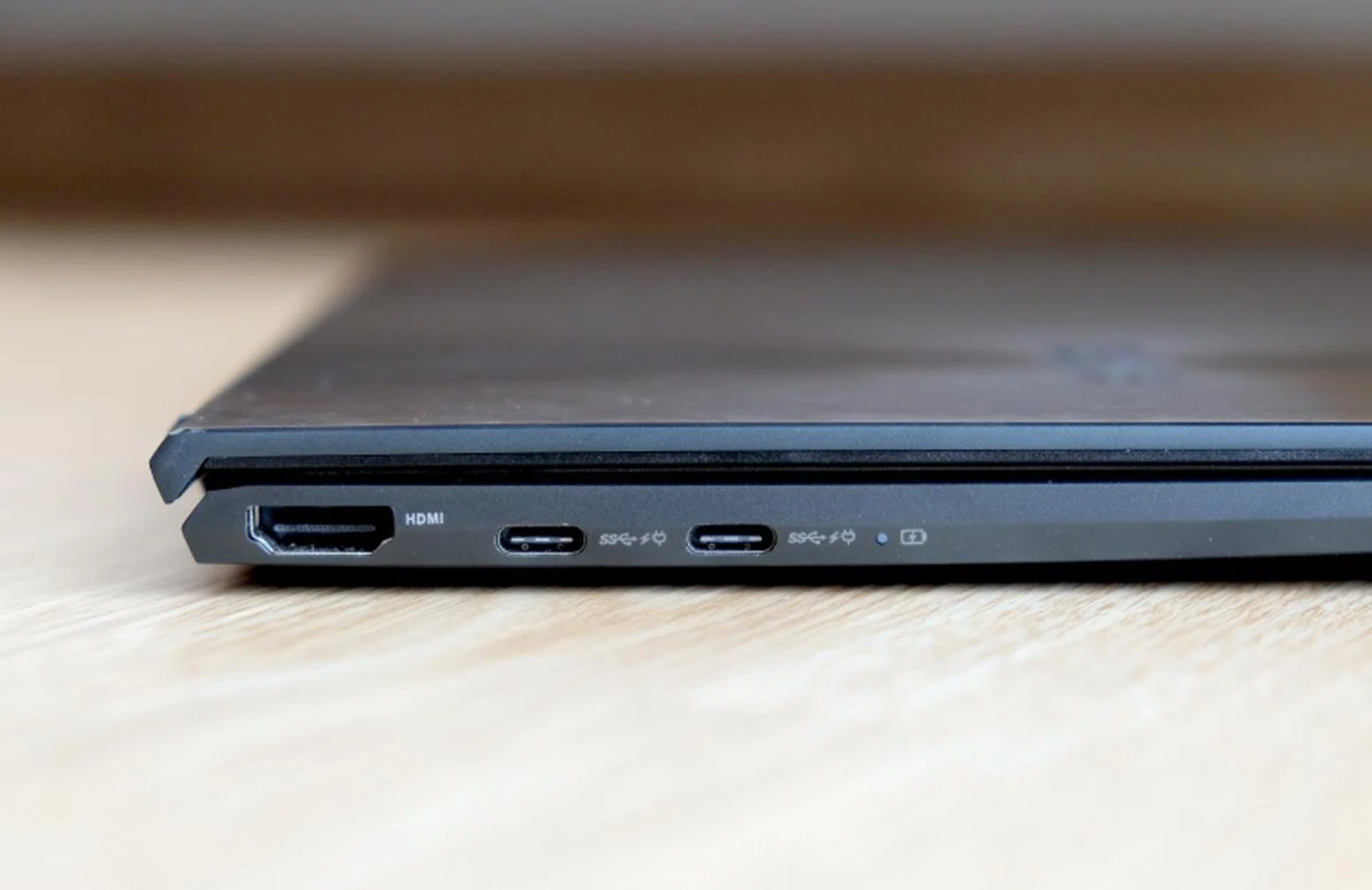
The ZenBook UX425 is just 13.9mm thickn.
Though the two notebooks are similar, they have been designed for different purposes. This new ZenBook 14 UX425 (hereby referred to the ZenBook UX425) was designed with a stronger focus on portability, whereas the older ZenBook 14 UX434 (hereby referred to the ZenBook UX434) is more of an all-round performer.
ASUS shaved millimetres and trimmed weight where they could to make it more compact and lighter than the ZenBook UX434. Here’s a table detailing the physical differences between the two.
Model | Width | Depth | Thickness | Weight | Volume |
ZenBook UX425 | 31.9cm | 20.8cm | 1.39cm | 1.17kg | 922 cm3 |
ZenBook UX434 | 31.9cm | 19.9cm | 1.69cm | 1.35kg | 1,073cm3 |
Not only is the new ZenBook UX425 more compact and lighter than the ZenBook UX434, it also boasts a larger battery and longer battery life. Battery capacity is 67Wh, which 17Wh or 34% more than the ZenBook UX434's 50Wh battery. Claimed battery life of the ZenBook UX425 is a whopping 22 hours, whereas it’s just 10.1 hours on the ZenBook UX434.
Specifications
To achieve such a long battery life, the ZenBook UX425 has drastically different specifications. Two configurations will be offered and they are as follows:
Processor | Intel Core i5-1035G1 | Intel Core i7-1065G7 |
Memory | 8GB | 8GB |
Graphics | Intel UHD Graphics | Intel Iris Plus Graphics |
Storage | 512GB | 1TB |
Price | S$1,398 | S$1,698 |
And as a recap, here are the specifications and configurations of the ZenBook 14 UX434:
Processor | Intel Core i5-10210U | Intel Core i7-10510U |
Memory | 8GB | 16GB |
Graphics | NVIDIA GeForce MX250 | NVIDIA GeForce MX250 |
Storage | 512GB | 1TB |
Price | S$1,498 | S$2,098 |
You will see that the ZenBook UX425 has Ice Lake processors rather than Comet Lake processors like the ZenBook UX434 has. There’s one big benefit to this. Unlike Comet Lake processors which are also branded as “10th generation”, Ice Lake processors are built on a 10nm process. In theory, at least, this means the chips should be more power-efficient. Power consumption is further reduced by using LPDDR4X memory. Curiously, there’s no 16GB option for the ZenBook UX425.
But most significant of all has to be the lack of discrete graphics. If graphics performance is important, the choice is clear. However, at least for the Core i7 ZenBook UX425, the integrated Intel Iris Plus GPU should provide performance that is good enough for everyday tasks and some light gaming. Let’s see in the benchmarks on the next page.
Design & features

The 14-inch display has thin bezels, good clarity, and punchy and accurate colours. However, it's not quite absolute top-tier quality.
The design of the ZenBook UX425 closely resembles that of the ZenBook UX434. It’s slightly smaller, thinner, and lighter, but I think it’s difficult to tell even if you place the two side by side. Even in the hands and based on my hazy memory of the ZenBook UX434, the ZenBook UX425 only feels a smidge lighter. That said, I do have a Huawei MateBook 13 and a 13-inch MacBook Pro with me right now and I can confirm the ZenBook UX425 feels substantially lighter than two.
The only tell-tale difference is the colour. The ZenBook UX425 comes in a shade of grey that ASUS calls Pine Grey. Depending on the light, it almost looks black. Certainly, it’s a more subdued and conservative colourway than ZenBook UX434’s Royal Blue.
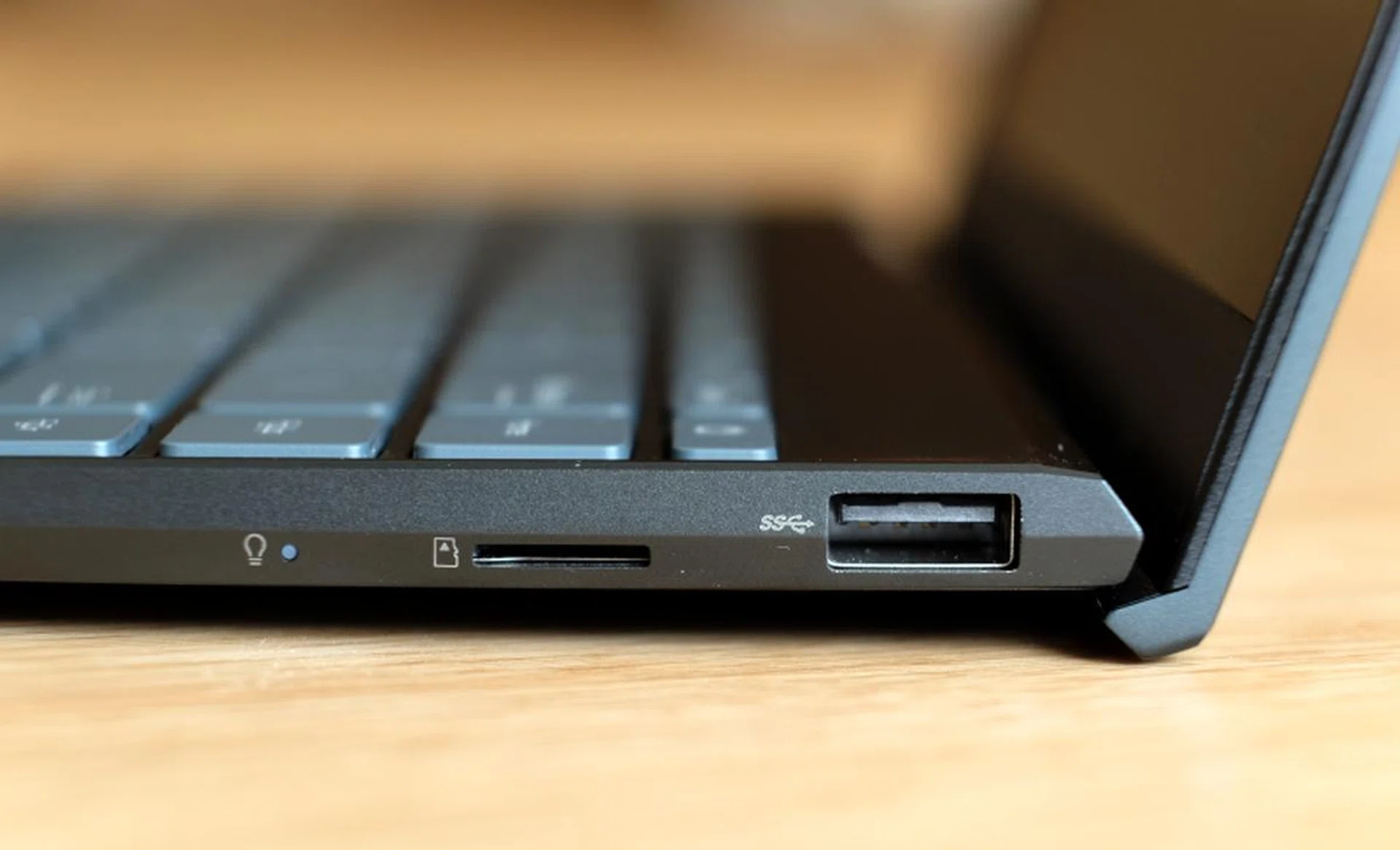
When the notebook is opened, the hinge lifts it up and slightly improves the typing position.
One nice thing about the design of the ZenBook UX425 is the ErgoLift hinge. When you open the notebook, the hinge opens up in a way that it lifts the notebook up at a slight angle. This improves the typing position and also raises the chassis for better cooling.
Features are mostly similar. The ZenBook UX425 also has a 14-inch display Full-HD IPS display with thin bezels. Claimed body-to-screen ratio is 90%. The display itself is decent but it lacks the crispness, vibrancy, and brightness of a true top-tier display. Luckily, despite the thin bezels, the webcam is still located above the screen. Even though it supports Windows Hello, the quality of the image is nothing to shout about. You’ll want a standalone webcam if image quality is important to you.
Build quality is not quite top-tier but it isn't terrible either. The chassis is made out of aluminium alloy and it feels well put together for the most part. It even meets the stringent MIL-STD-810 standards of ruggedness and durability. It’s only if you apply force to it or if you type with heavy strokes like I do that you notice some flex. Perhaps ASUS decided to do with thinner panels to shave precious grams off the notebook’s overall weight? It’s hard to say without the ZenBook UX434 with me to compare side by side, but it certainly doesn’t feel quite as sturdy as I remembered the ZenBook UX434 to be.
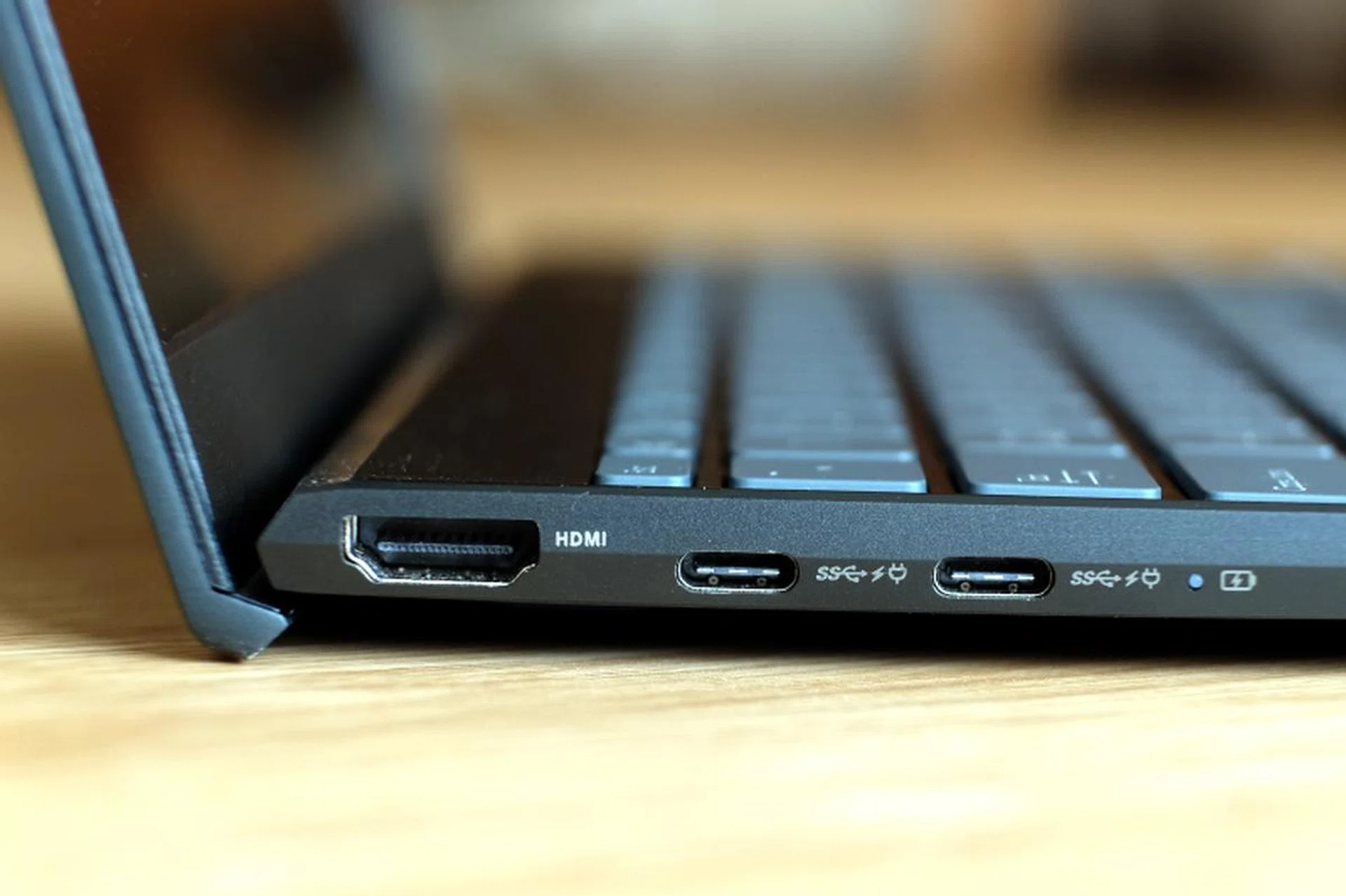
On the left are two USB-C ports that support Thunderbolt 3 and a full-size HDMI port.
Connectivity has been improved, mostly. There’s support for Wi-Fi 6 and also, finally, USB-C charging and Thunderbolt 3. Here are all the ports that is has:
- 2 x USB-C (Thunderbolt 3)
- 1 x USB-A (USB 3.2 Gen 1 – up to 5Gbps)
- 1 x HDMI 1.4
- 1 x microSD card
Considering how thin the ZenBook UX425 is, it’s remarkable that ASUS can cram so many ports including full-size HDMI and USB-A ports.The selection of ports would have been perfect but there’s no 3.5mm audio jack. ASUS says it’s because there isn’t space for one but I’m not sure I believe them. To my eyes, it looks like they could definitely fit one, especially on the right side of the notebook.
You could argue that the proliferation of wireless headphones has made 3.5mm audio jacks redundant, and certainly, a case could be made for that. Especially since many mid to flagship-class phones also don’t have audio jacks. There’s a good chance that most people already have wireless headphones that they can pair and use with the ZenBook UX425.
But it doesn’t change the fact that this discussion could have been very easily avoided if ASUS had just provided a 3.5mm jack in the first place. In fact, I can’t think of any notebook without a 3.5mm jack. Even really really thin notebooks like the Dell XPS 13 (just 11.8mm, mind you) has one. At any rate, and if it’s any consolation, ASUS provides a USB-C to 3.5mm audio jack adapter.
Keyboard and trackpad
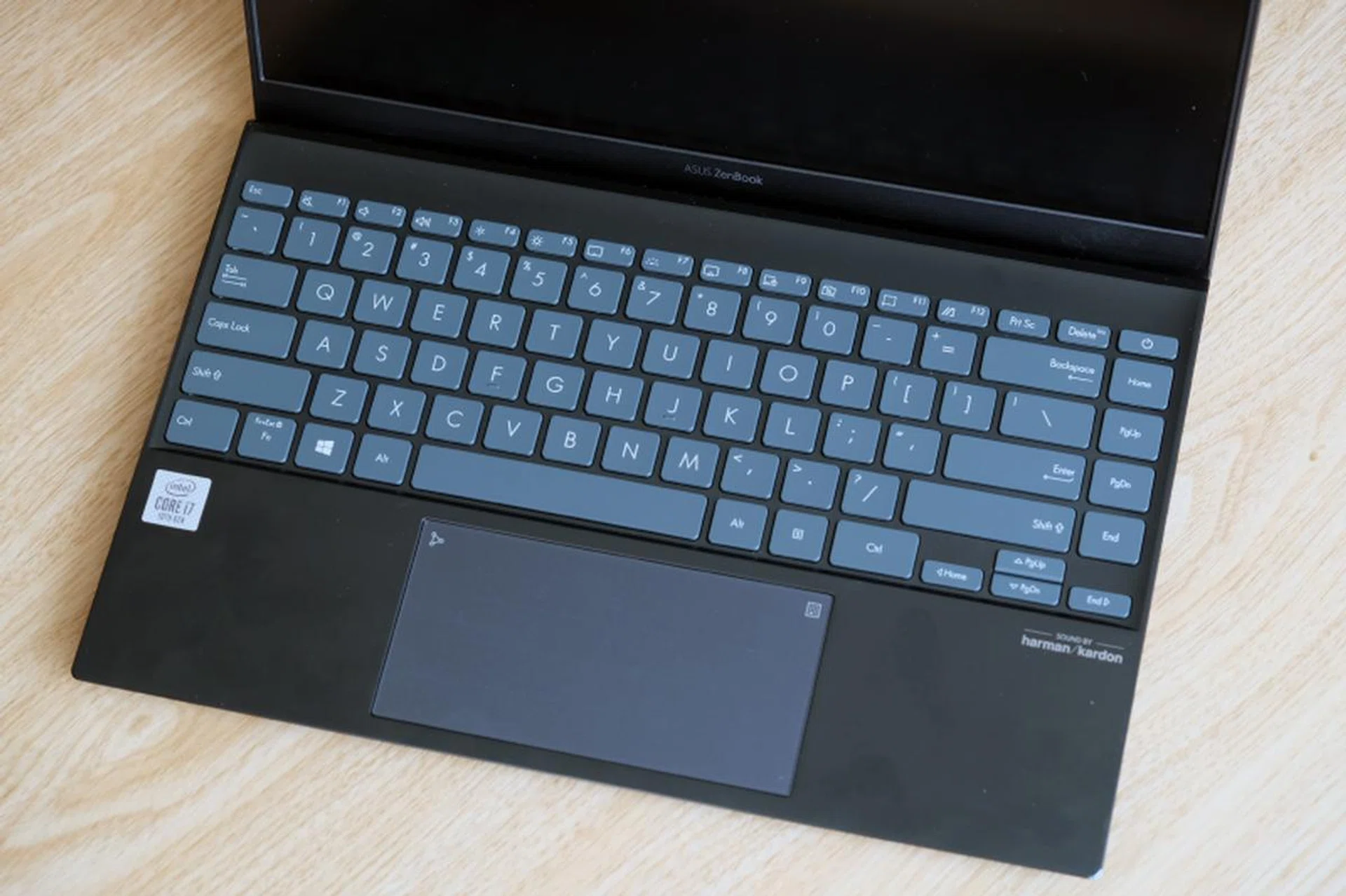
The keyboard and trackpad are two of the best aspects of the ZenBook UX425.
If you like keyboards with long key travel, you’ll like the ZenBook UX425’s keyboard. Despite being so thin, ASUS claims it has a key travel distance of 1.4mm. To my hands, the claims feel accurate. The keys feel like they have substantially more travel than most other notebook keyboards. They also feel well-weighted. It’s a tad too light for my liking but I think it has just about enough tactility for most people.
The layout is also sensible though the extra column on the right for navigational keys will take some getting used to. ASUS has also included some shortcut keys in the function row that I think are quite useful. For example, F9 instantly locks your system for privacy while F10 kills the webcam. F11 launches a screen capturing utility and F12 launches the MyASUS app that gives you an overview of the notebook.
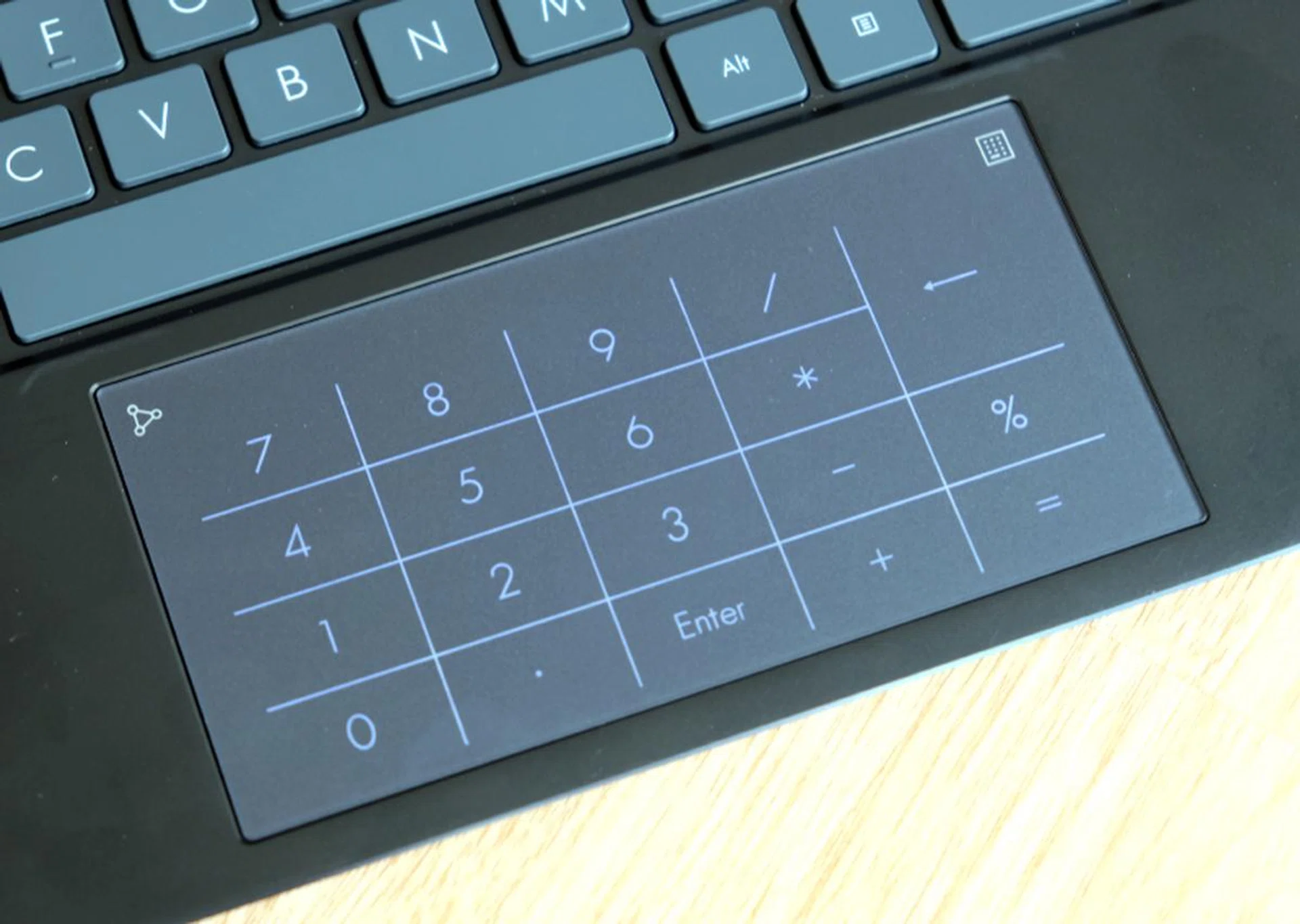
The trackpad doubles up as a virtual number pad.
The trackpad is commendable. Measuring 13cm across and 6.5cm from top to bottom, it’s as large as they could have possibly made it. And thanks to a glass top layer and Windows Precision drivers, it’s accurate, fluid, and responsive. It also features ASUS NumberPad 2.0 technology, which enables the trackpad to double up as a number pad. Tap the icon on the top right of the trackpad and a lighted number pad shows up on the trackpad. Another icon on the top left corner toggles between two brightness levels. You can also swipe in any direction from the top left icon to quickly launch the calculator app.
One nifty thing about using the number pad feature on the trackpad is that you can continue using the trackpad normally for navigating. Built-in software recognises your finger actions and is able to tell when you want to use the number pad and when you want to navigate. There were a few instances when it got my intentions mixed up but if I had to give a figure, I would say it works without a hitch about 95% of the time.
Performance analysis
We will be comparing the performance of the ASUS ZenBook UX425 closely against that of the current crop of ultraportable notebooks including ASUS ZenBook 14 UX434, Dell XPS 13 2-in-1, HP Spectre x360, and the recently reviewed . Here are the configurations of the tested notebooks and how they stack up. The ZenBook UX425 model that we are testing is the higher-end one with a Core i7 processor.
Model | ASUS ZenBook 14 UX425 | Acer Swift 5 | ASUS ZenBook 14 UX434 | Dell XPS 13 2-in-1 | Huawei MateBook 13 | HP Spectre x360 |
Display | 14-inch, Full-HD | 13-inch, Full-HD | 14-inch, Full-HD | 13-inch, Full-HD | 13-inch, 2K | 13-inch, Full-HD |
Processor | Intel Core i7-1065G7 | Intel Core i7-1065G7 | Intel Core i7-10510U | Intel Core i7-1065G7 | Intel Core i5-10210U | Intel Core i7-1065G7 |
Memory | 8GB | 16GB | 16GB | 16GB | 16GB | 16GB |
Storage | 1TB SSD | 1TB SSD | 1TB SSD | 512GB SSD | 512GB | 1TB SSD |
Graphics | Intel Iris Plus Graphics | NVIDIA GeForce MX250 | NVIDIA GeForce MX250 | Intel Iris Plus Graphics | NVIDIA GeForce MX250 | Intel Iris Plus Graphics |
Price | S$1,698 | S$2,398 | S$2,098 | S$2,898 | S$1,598 | S$2,899 |
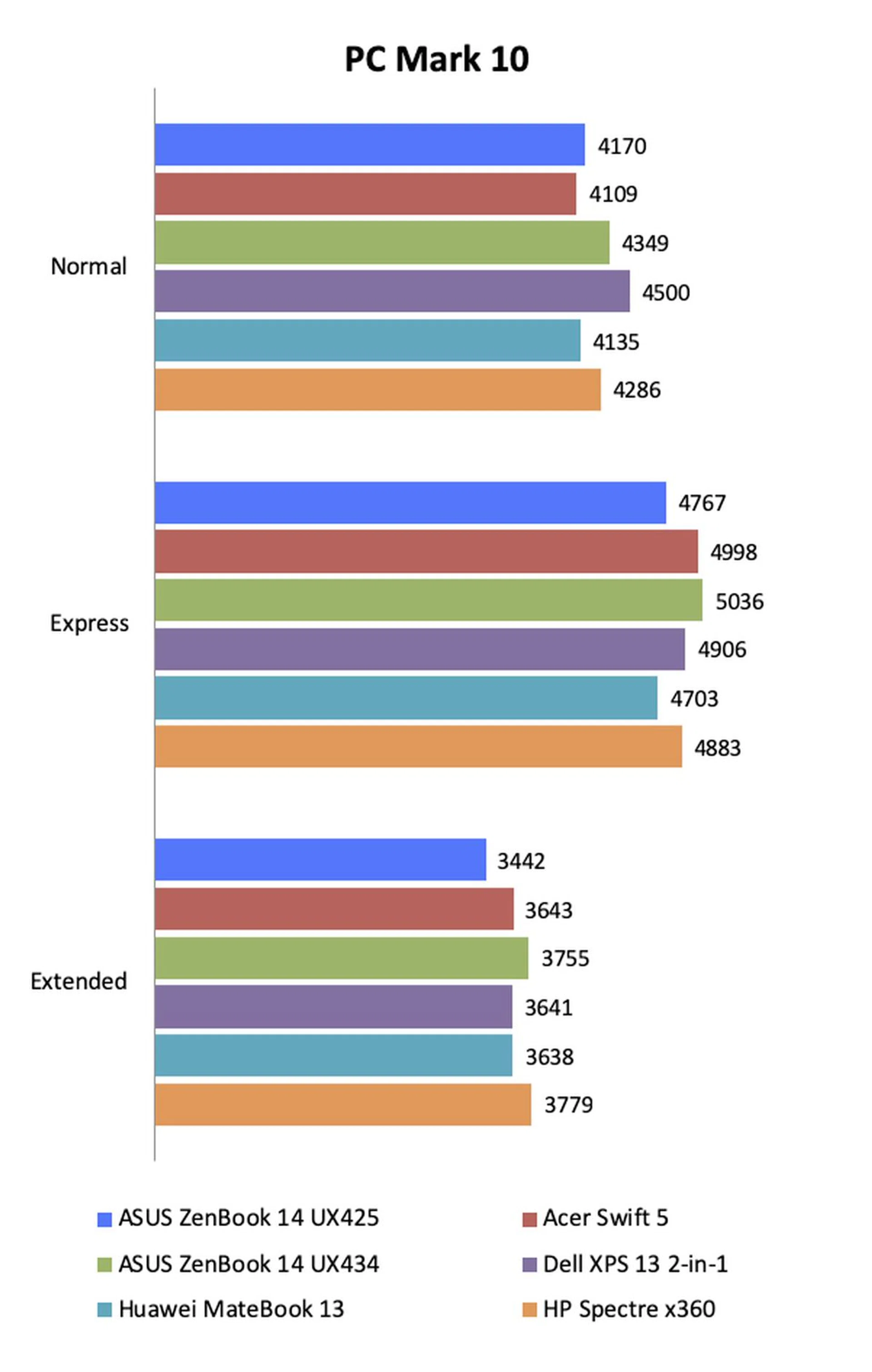
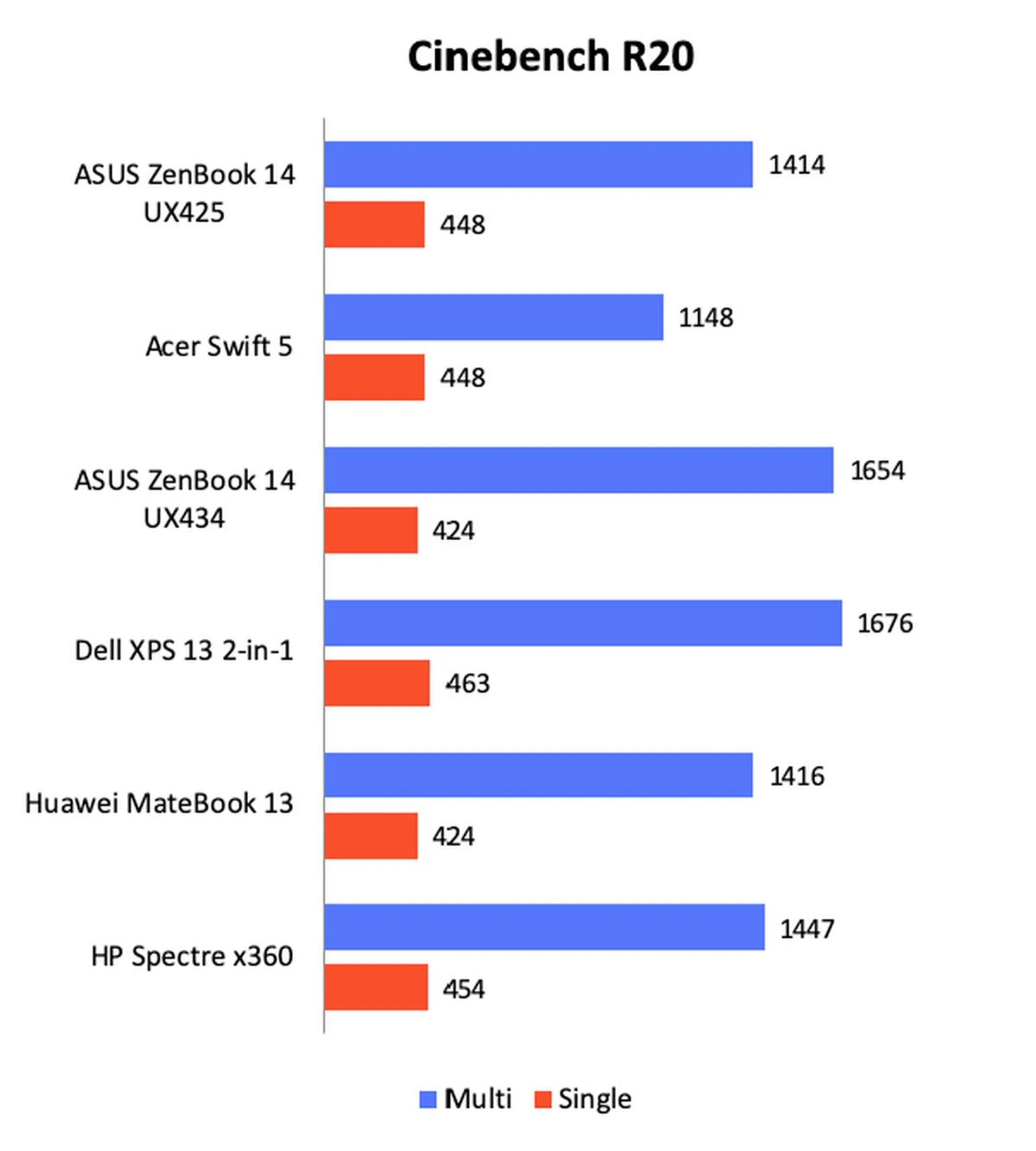
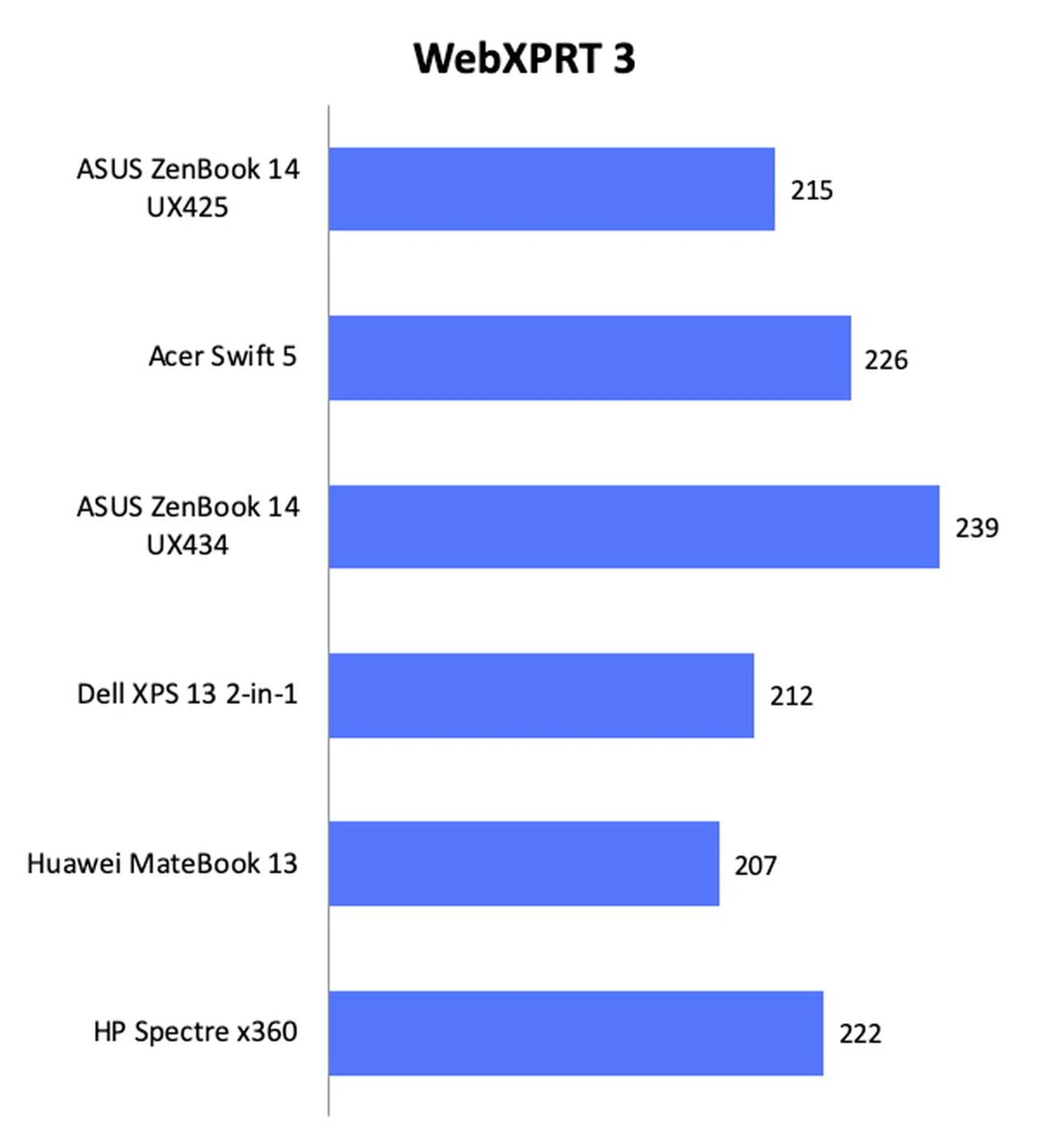
General computing performance of the ZenBook UX425 was decent and within expectations given its specifications. Interestingly, the lack of memory (the other notebooks all have 16GB of memory) didn’t seem to hamper performance too much, at least insofar as computing performance is concerned.
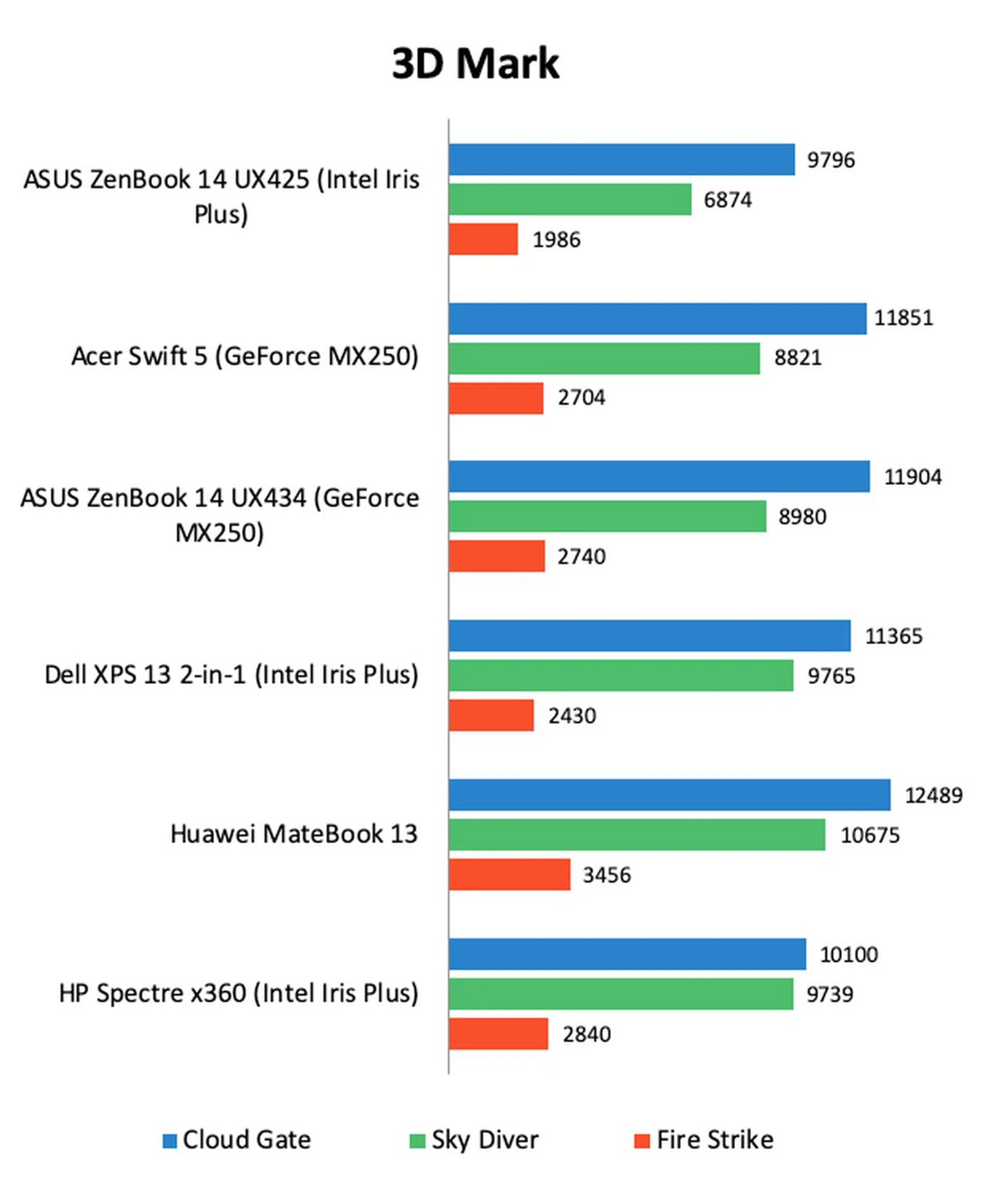
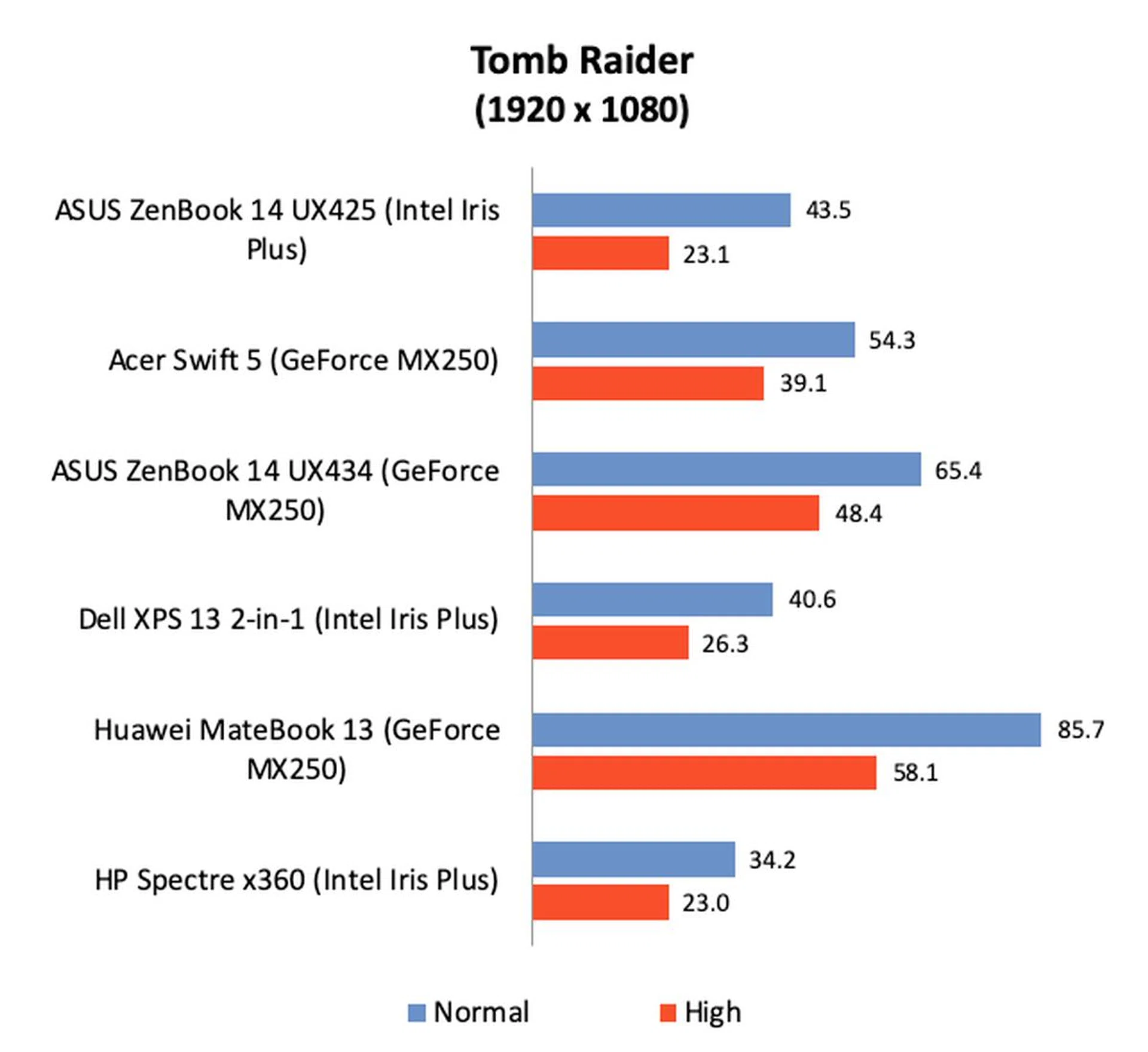
Graphics performance, however, was a bit of a mixed bag. Despite having the same Intel Iris Plus integrated GPU as the XPS 13 and Spectre x360, the ZenBook UX425 recorded the lowest scores on 3DMark. The gulf in scores could be as much as 29%. Fortunately, the ZenBook’s scores were more comparable when it came to Tomb Raider. However, if graphics performance and gaming is important to you, then it's worth noting that notebooks with discrete NVIDIA GPUs – even the humble little GeForce MX250 – have much better graphics performance.
Battery life
Note: Battery tests were conducted using PCMark 10's battery benchmark with display set to 100% brightness.
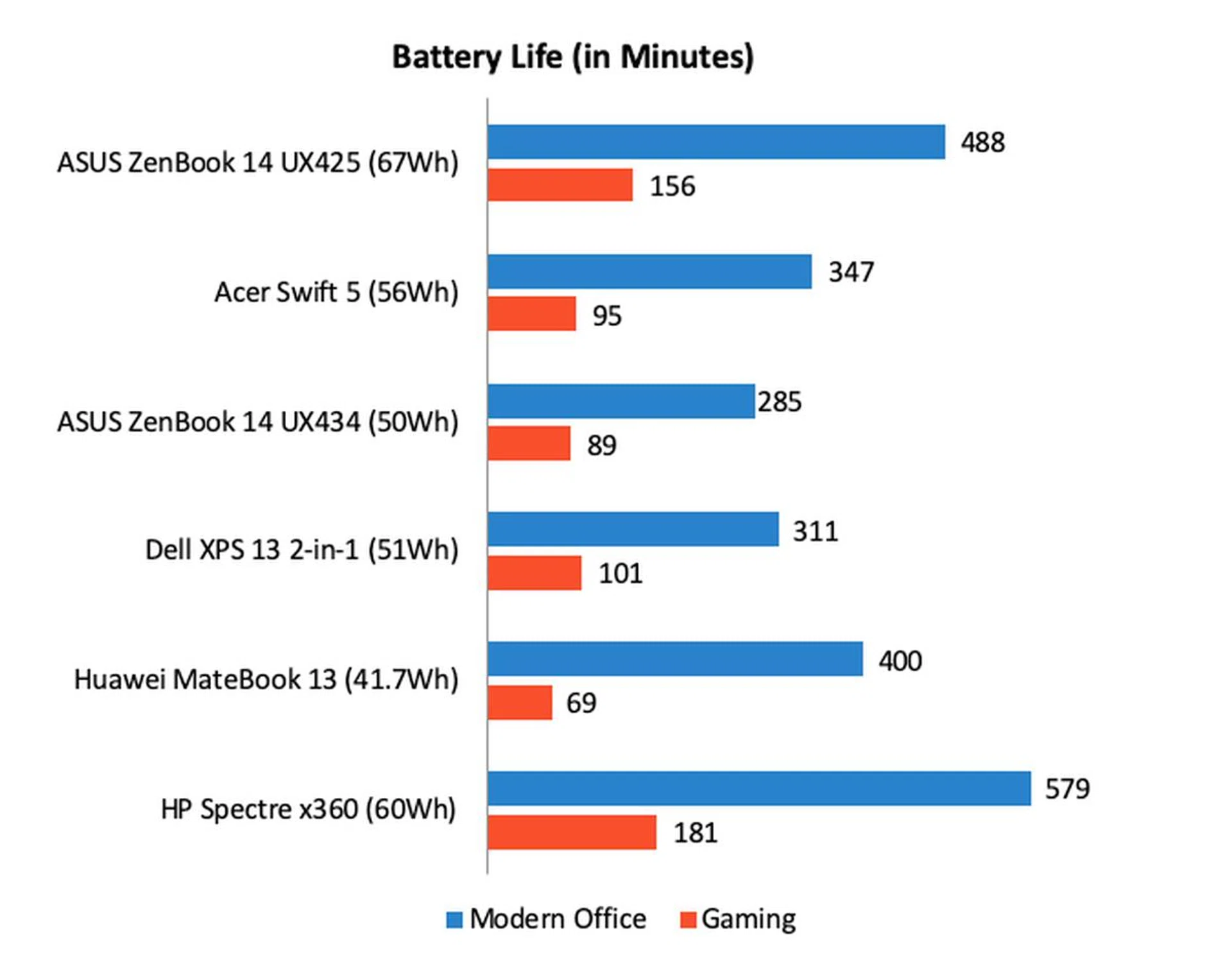
Battery life is where the ZenBook UX425 was supposed to excel and it did, mostly. Out intensive battery tests demand that screens are set to 100% brightness and even then the ZenBook UX425 managed to eke out 488 minutes or just over 8 hours on the Modern Office workload. Even on the taxing Gaming workload, the ZenBook UX425 managed over 2.5 hours.
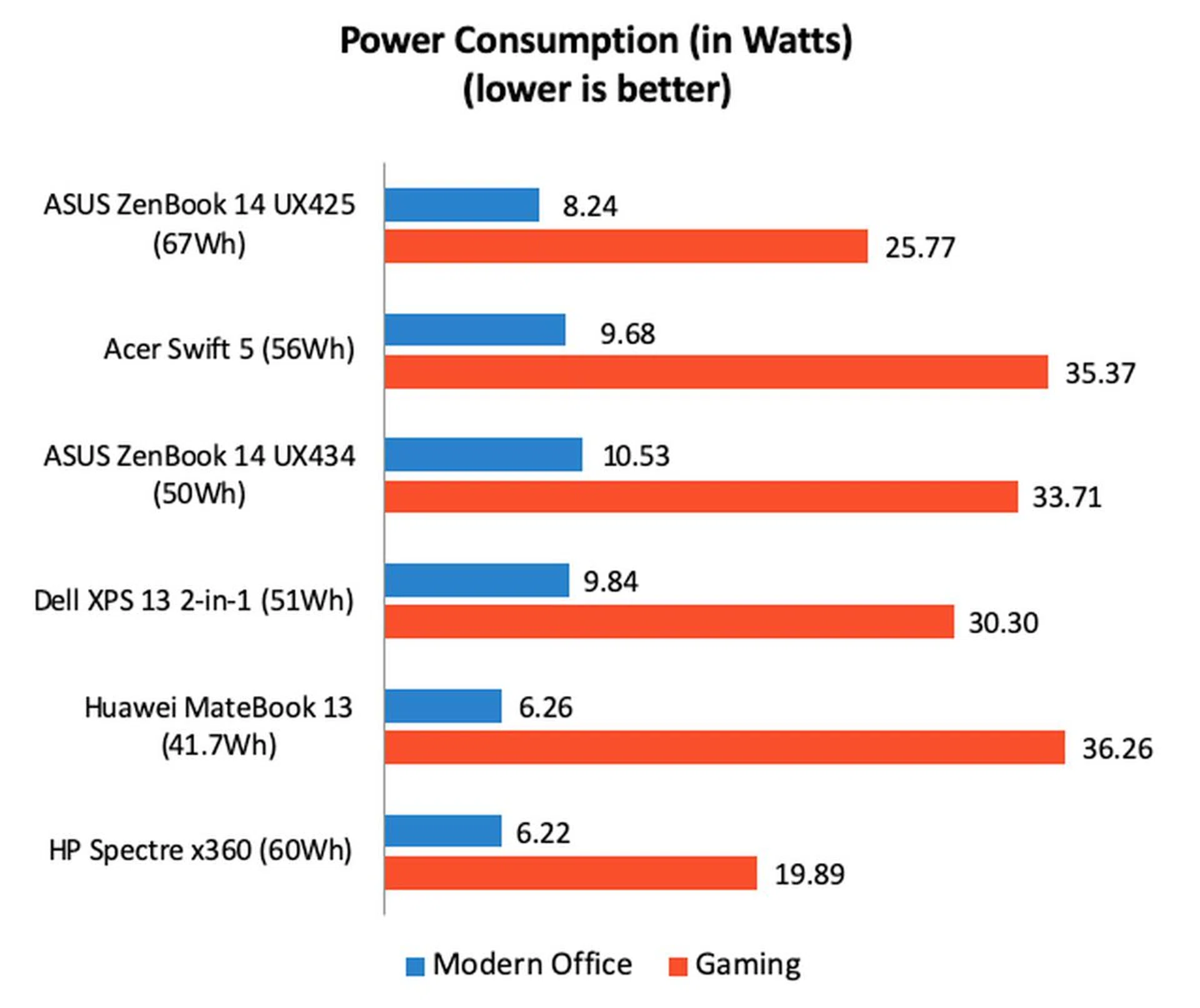
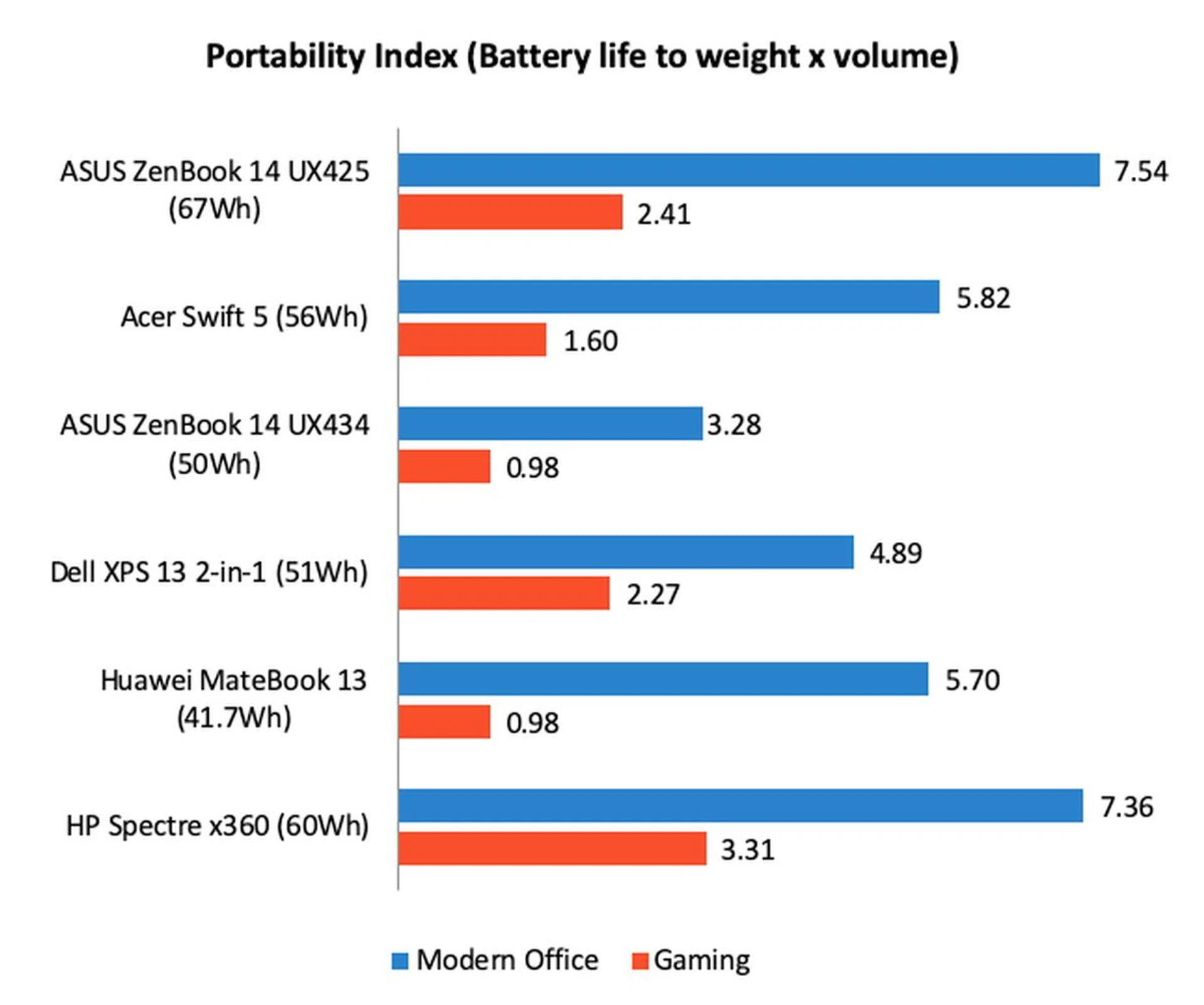
These results would have been impressive if not for the Spectre x360 which managed to last longer with a smaller battery. Looking at the power consumption figures, we can immediately see that Spectre x360 is considerably more efficient than the ZenBook UX425. But if we look at the Portability Index where we factor in dimensions and weight, then the ZenBook UX425 begins to look a little more favourable. Its slim dimensions and light weight does count for something against the heavier and chunkier Spectre x360. Furthermore, as tested, the Spectre x360 costs about S$1,200 more than the ZenBook UX425.
Almost perfect
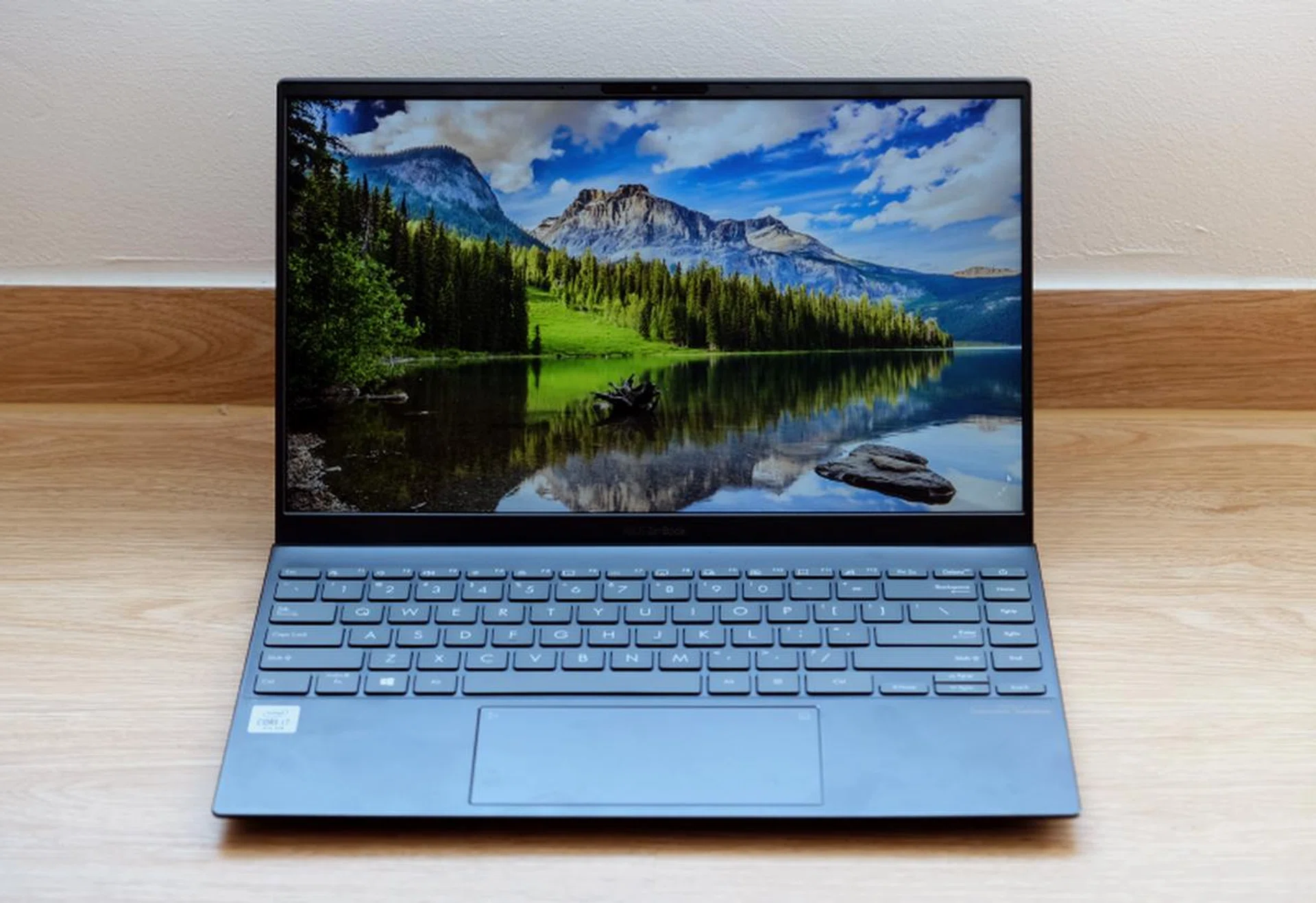
The new ZenBook UX425 stands out for its long battery life.
This new ZenBook UX425 can be best described as a thinner and lighter version of the older ZenBook UX434 with less graphics performance but a longer battery life. If the ZenBook UX434 is an all-rounder then this new ZenBook UX425 was designed for life on the road. But it’s also a notebook that elicits mixed feelings because it does a couple of things very well, but it misses the mark in some others.
For a start, I like that its slim, compact, and light. That might have come at the expense of a bit of solidity and sturdiness, but if portability is a priority, I think the tradeoff is well worth it. It’s one of the lighter 13-inch notebooks and you can definitely feel the difference in heft next to notebooks like the Huawei MateBook 13. Performance is decent and battery life is exceptional. The feature set is above average too, with support for Wi-Fi 6, Windows Hello, a nice keyboard, a sufficiently large trackpad with a virtual number pad. I also like that it finally supports USB-C charging – a feature that is sorely missed on many older ASUS notebooks.
What’s not so great about the notebook? The build quality, despite being meeting MIL-STD-810 standards, is not tip-top. But perhaps more crucially, the selection of ports would have been perfect if not for the lack of a headphone jack. We can argue all day about its usefulness, but what’s undeniable is that ASUS could have easily included one and save itself and its customers a lot of trouble. The lack of a 16GB memory option will also turn off more discerning users.

A few aspects stop it from becoming the perfect ZenBook.
Still, if you have decided that battery life is of utmost importance, the new ZenBook UX425 looks like it could be the most value for money pick. Notebooks with comparable battery life claims like the HP Spectre x360 and LG gram 14 are considerably more expensive – with prices beginning at S$2,000 and going well beyond – which makes the ZenBook UX425 seem like a bargain in comparison.
Comparisons against the older ZenBook UX434 are inevitable and the short answer is that you should pick the older ZenBook UX434 for performance and the newer ZenBook UX425 for portability. However, remember that the ZenBook UX434 doesn’t have Thunderbolt 3 ports nor does it support USB-C charging. On the other hand, the ZenBook UX425 doesn’t have a headphone jack. Each notebook has its pros and cons. Hopefully, ASUS will create the perfect ZenBook in the near future by melding the things we like about the two.
Our articles may contain affiliate links. If you buy through these links, we may earn a small commission.