

Same laptop, new GPU
The ASUS ROG Zephyrus S GX531GW is in many ways the same laptop as the Zephyrus S I reviewed recently. Things like the chassis design, cooling system, and connectivity options remain unchanged, but the key difference is that the new model now packs an NVIDIA GeForce RTX 2070 Max-Q GPU. In addition to some additional graphics horsepower, the Zephyrus S will now be able to take advantage of new NVIDIA technologies like ray-tracing acceleration and DLSS.
For a more detailed look at the laptop’s design, you can check out the previous review on the Zephyrus S.
Here’s an overview of the new specifications:
- 15.6-inch 1,920 x 1,080-pixel IPS 144Hz display
- Intel Core i7-8750H
- 16GB DDR4 RAM
- NVIDIA GeForce RTX 2070 Max-Q
- 512GB PCIe M.2 SSD
- 60Wh battery
- 360 x 268 x 15.35-16.15mm
- 2.1kg
It retails for S$3,698, which isn’t exactly cheap. However, it’s actually slightly more affordable than the ROG Zephyrus M GM501’s S$3,898 price tag, and still offers a slimmer, lighter chassis and more graphics horsepower.
So what’s new?
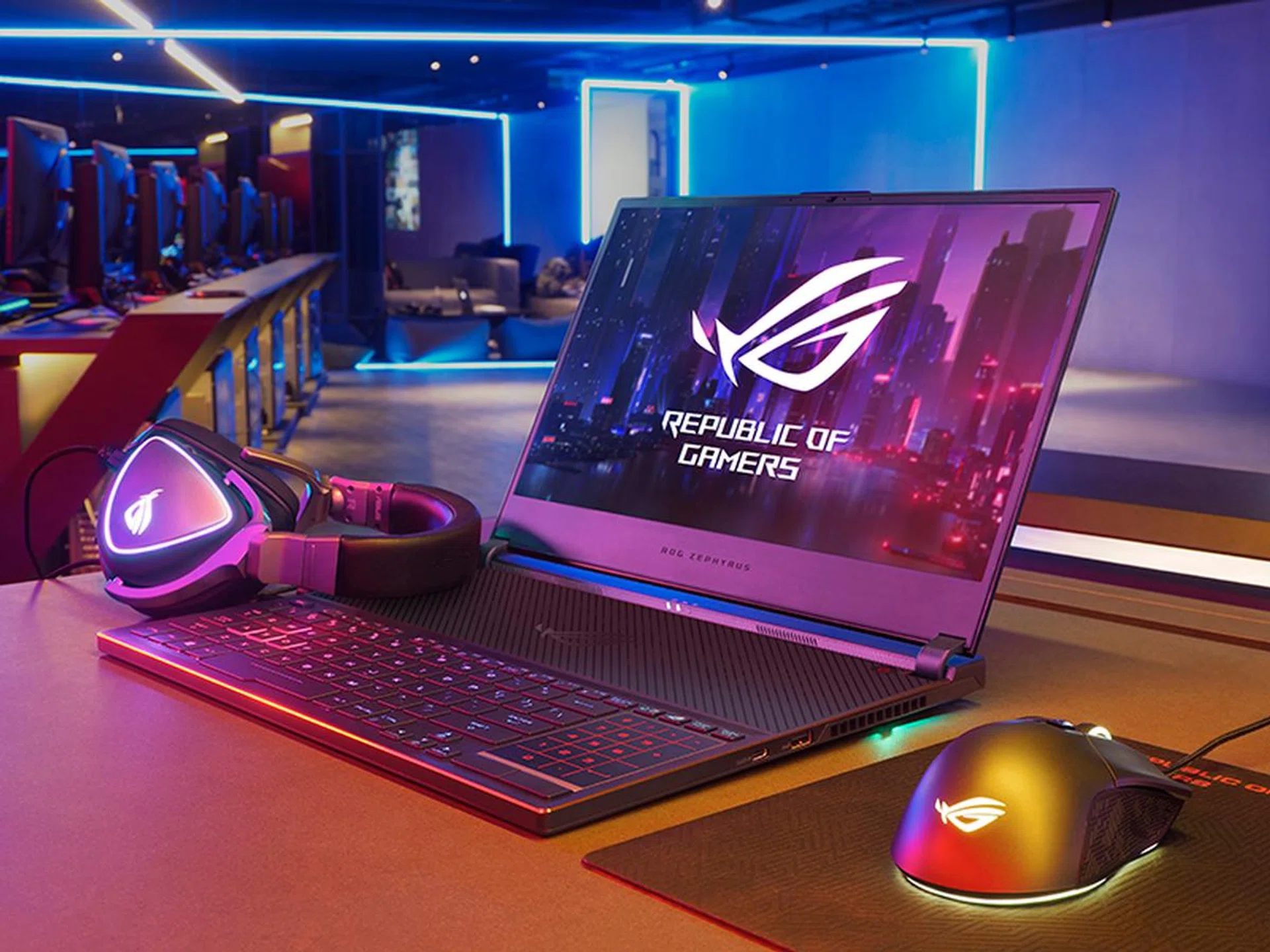
The new Zephyrus S is slightly thicker than before and features a larger battery.
Nothing much, actually. The biggest upgrade is the new GeForce RTX 2070 Max-Q graphics card, which is approximately 20 per cent quicker than the GeForce GTX 1070 Max-Q. That’s a modest improvement, but you also get things like ray-tracing acceleration and the ability to take advantage of NVIDIA’s DLSS technology in games like Metro Exodus.
The other change is the battery, and the new model now comes outfitted with a slightly larger 60Wh battery, compared to the 50Wh battery from before. However, as you’ll see in the results page, battery has actually improved significantly, beyond what a 20 per cent increase in capacity looks like it could deliver. Overall, it looks like there’s been further power optimizations, and the notebook is now a lot more power efficient. It looks like ASUS has had to make the notebook a hair thicker to accommodate the larger battery though, but it's not something you'd notice, considering that it now measures 16.15mm at its thickest point compared to 15.75mm previously.
Finally, ASUS has outfitted the Zephyrus S with a new drive. The notebook is equipped with an Intel SSD 660p 512GB SSD, an NVMe M.2 drive that uses Intel’s 64-layer QLC NAND. QLC crams four bits into each cell, so the increase in density means higher capacity drives that cost less. However, QLC NAND generally has longer access times and lower endurance than their MLC or TLC counterparts, which only store two and three bits per cell respectively. That said, Intel has attempted to mitigate the performance issues with some firmware tweaks and something called Intelligent Dynamic SLC-caching, which uses a pool of fast SLC flash to improve write speeds.
The Intel SSD 660p drive in the Zephyrus S is rated for 100TBW, which means you can write 100TB to it over its lifetime. That’s a little on the low side, and I can see it being a cause for concern for some folks. Nevertheless, if you’re just using the laptop for regular stuff like gaming and productivity applications, you shouldn’t run into any problems.
What else is special about it?
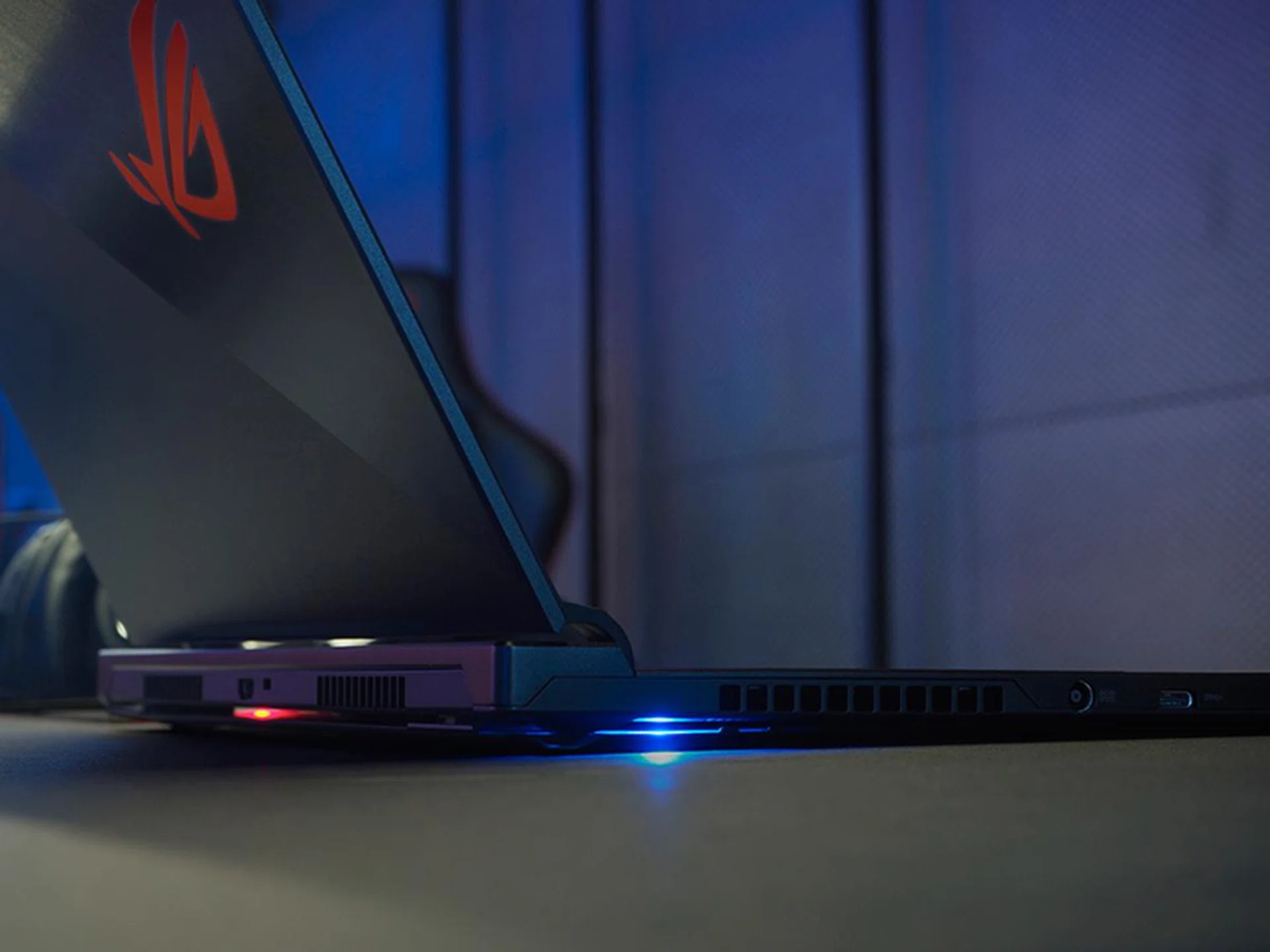
The bottom panel cracks open to improve airflow when the lid is raised.
I’ve already reviewed the Pascal version of this notebook in detail, so I won’t be rehashing all that. But to sum up, the Zephyrus S was built to be a portable powerhouse that doesn’t sacrifice too much in terms of performance and cooling.
It measures just 16.15mm at its thickest point and weighs 2.1kg, which makes it pretty sprightly for the gaming performance it offers.
The cooling system is its biggest innovation, and the laptop base opens by 5mm to create an additional intake vent for air to enter the laptop. Compared to the original Zephyrus, more heatsinks have been added as well and there’s an extra vent on the right for more efficient heat dissipation. In addition, the anti-dust tunnels from ASUS’ TUF Gaming FX504 also make an appearance here to prevent dust build-up and degradations in cooling performance. These work by leveraging centrifugal force to drive dust out of the dust tunnels, so the heatsinks remain cleaner over time.
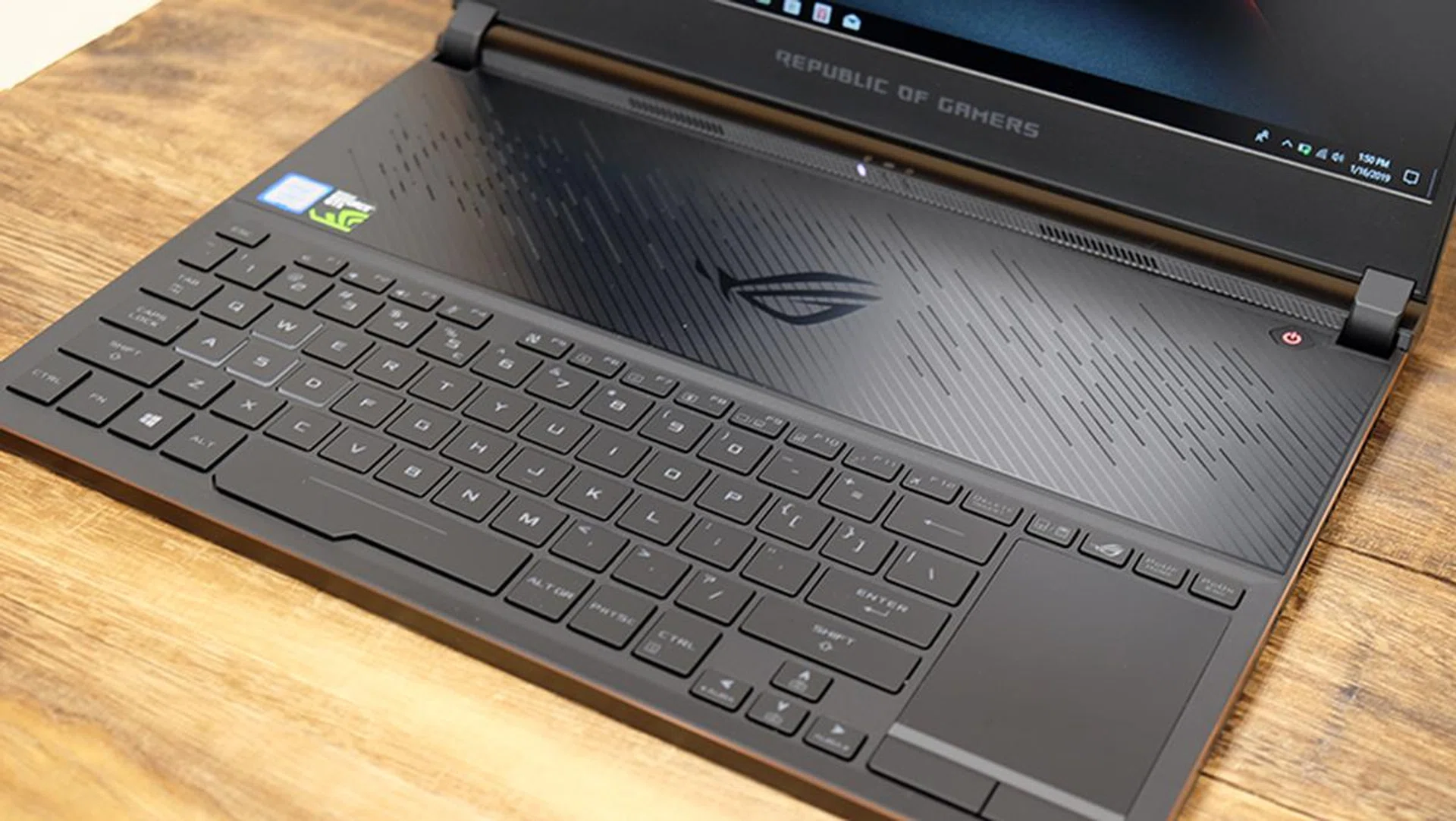
Elsewhere, the keyboard has been pushed to the edge of the laptop, while the trackpad sits to its right. The plastic trackpad is a little narrow, but it’s also a Windows Precision Touchpad, so it feels super precise and accurate. It’s good enough for basic navigation, and its unconventional positioning is surprisingly easy to get used to. The keyboard also feels cooler since it’s located away from the main heat-generating components, and you also don’t have to worry about warm palm rests.
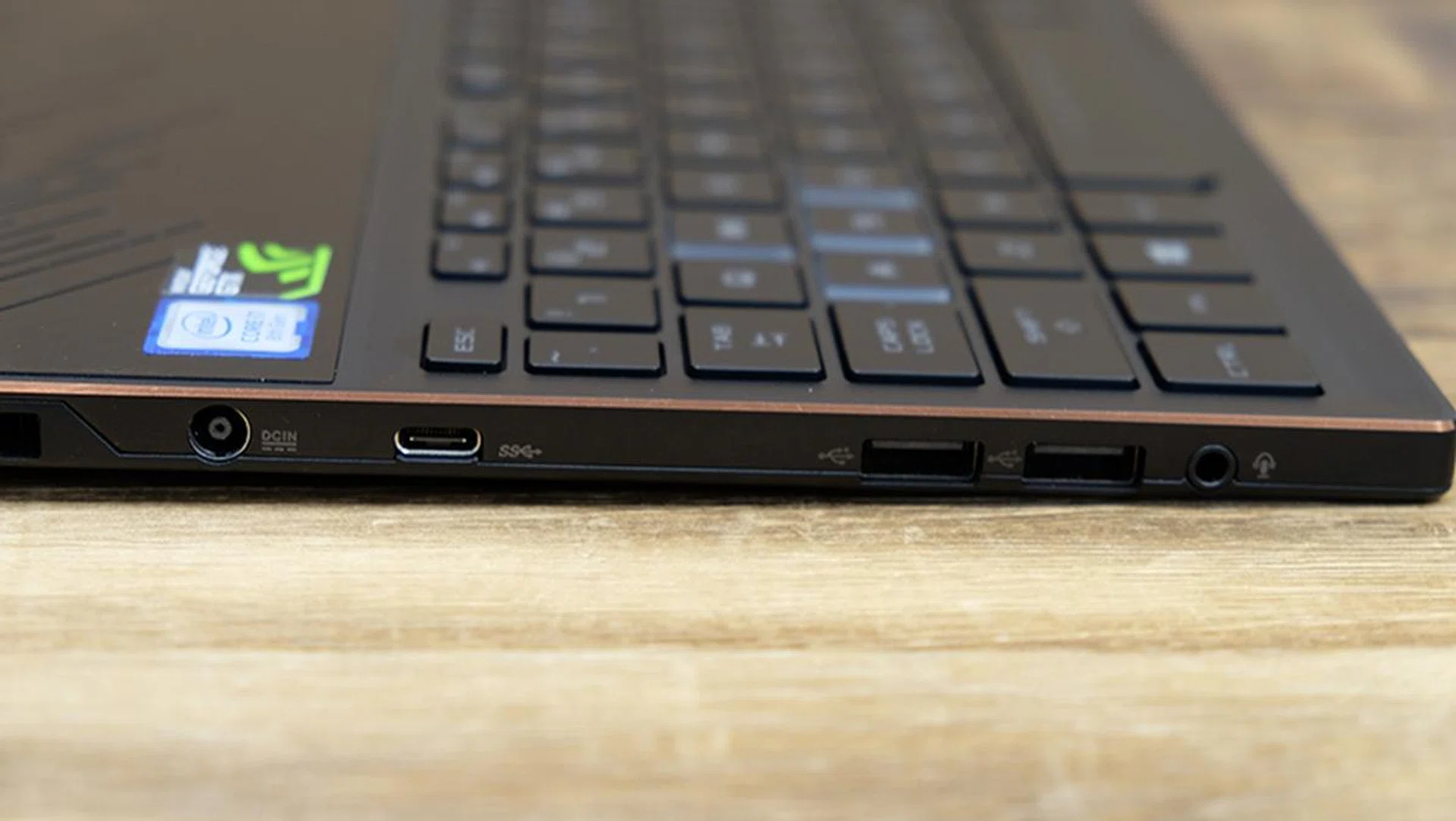
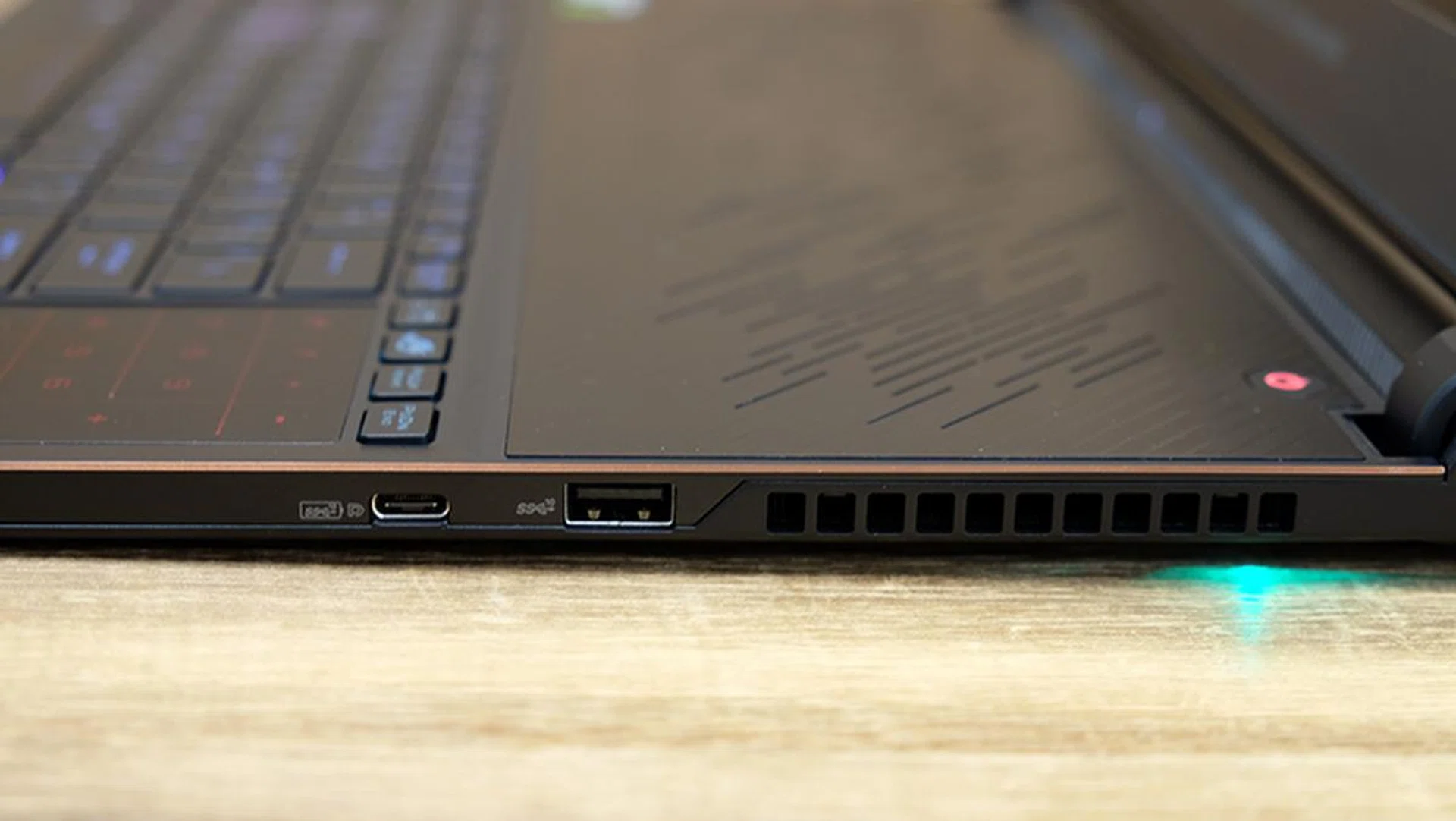
The I/O ports are distributed between the sides and back, and you’ll find one USB 3.1 (Gen 2) Type-C, one USB 3.1 (Gen 2) Type-A, one USB 3.1 (Gen 1) Type-C, and two USB 2.0 ports at the sides. Round the back, there’s one HDMI 2.0 output and a Kensington lock slot. The USB-C port on the right supports Power Delivery as well, so you can use a compatible power bank or Type-C power adapter to charge the notebook if you don’t have the regular adapter.
Is it noisy?
Unfortunately, very much so. That’s one of the biggest weaknesses of the notebook and the fans can ramp up to a high-pitched drone that is pretty annoying. Nevertheless, you can configure the fan speeds manually in ASUS’ Armoury Crate utility. Alternatively, hitting Fn + F5 lets you toggle between Turbo, Balanced, and Silent modes.
Test setup and performance
Here's a full list of the notebooks we're looking at:
- ASUS ROG Zephyrus S GX531GW
- ASUS ROG Zephyrus S GX531GM
- Razer Blade
- ASUS ROG Strix Scar II
- Gigabyte Aero 15Y v9
- ASUS ROG Zephyrus GX501
I've included a mix of notebooks equipped with both the Max-P and Max-Q versions of the GeForce GTX 1070 to see how the GeForce RTX 2070 Max-Q stacks up against its Pascal equivalent. In addition, the Gigabyte Aero 15Y v9 was thrown in to provide an idea of the performance differential between the GeForce RTX 2080 Max-Q and GeForce RTX 2070 Max-Q. Finally, the ASUS ROG Zephyrus S GX531GM was included as well to provide a measure of how the notebook has improved over its predecessor.
[hwzcompare]
[products=660213,656443,642009,644562,657507,634366]
[width=200]
[caption=Test notebooks compared]
[showprices=1]
[/hwzcompare]
I ran the notebooks through the following benchmarks:
- PCMark 10
- PCMark 8
- 3DMark
- VRMark
- Deus Ex: Mankind Divided
- Tom Clancy's The Division
How does it do in daily computing tasks?
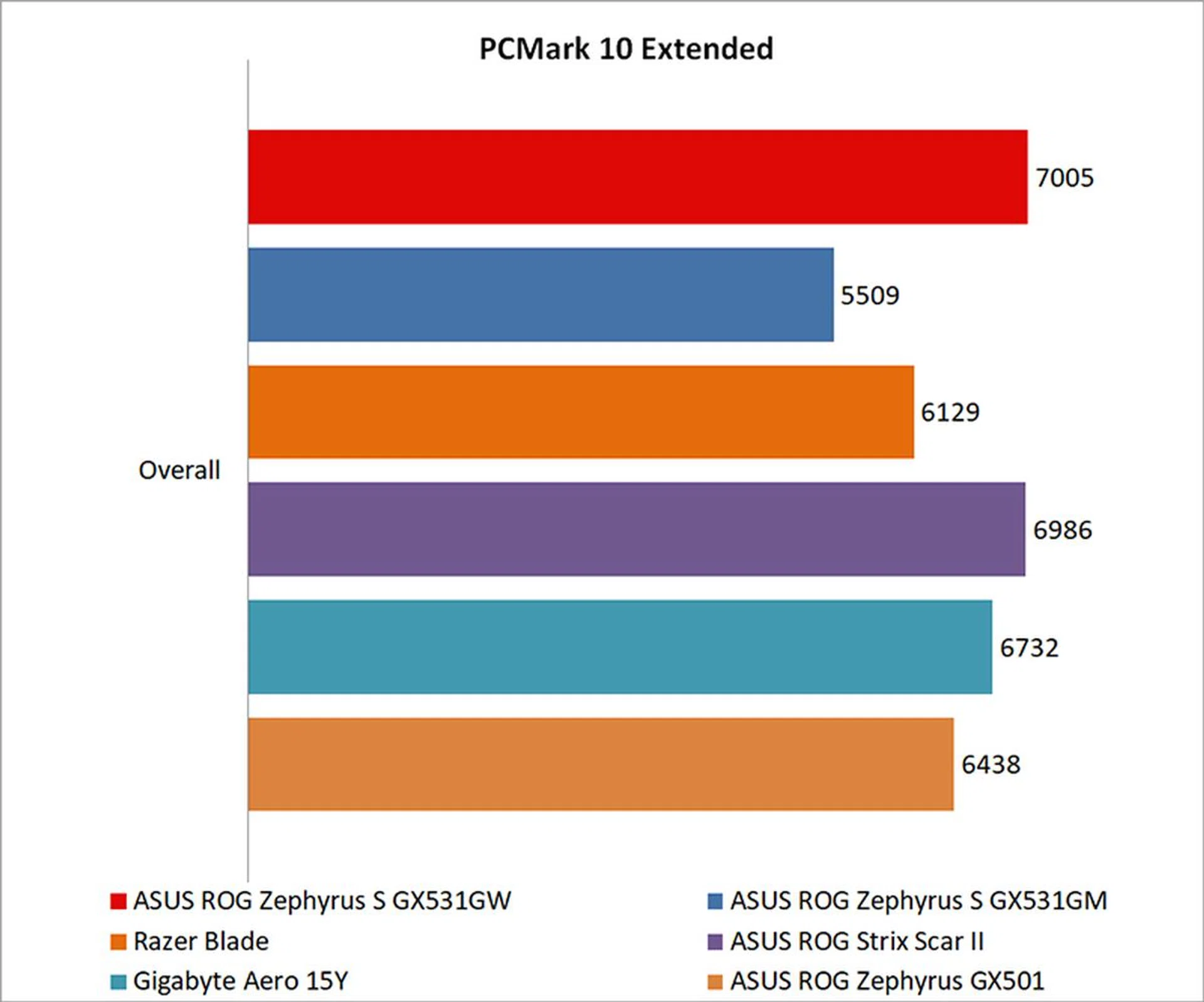
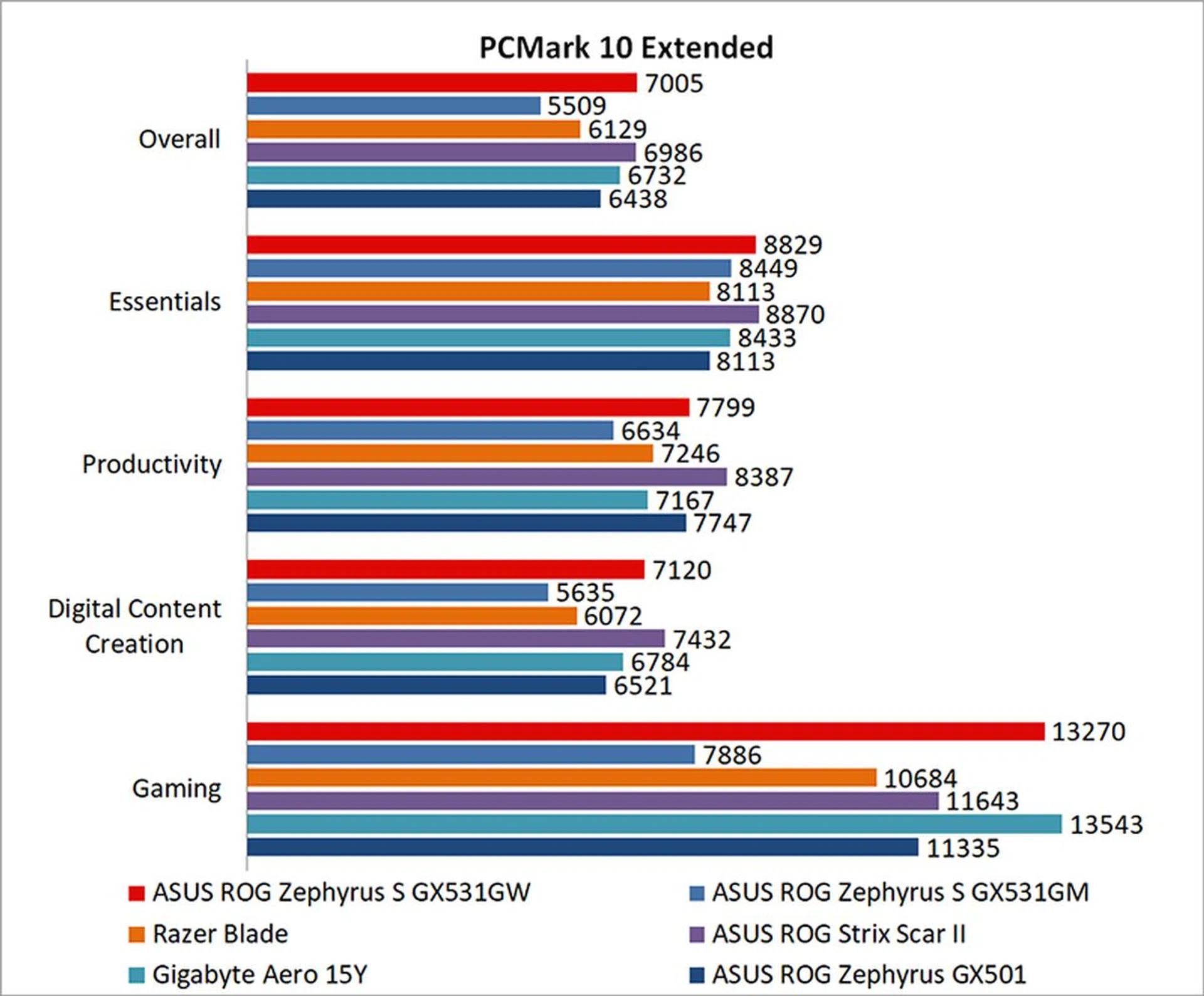
The ROG Zephyrus S GX531GW did surprisingly well in PCMark 10, topping the charts in terms of overall scores. What's impressive is that it even managed to edge out the Gigabyte Aero 15Y, which comes with a more powerful Intel Core i9-8950HK processor and a GeForce RTX 2080 Max-Q.
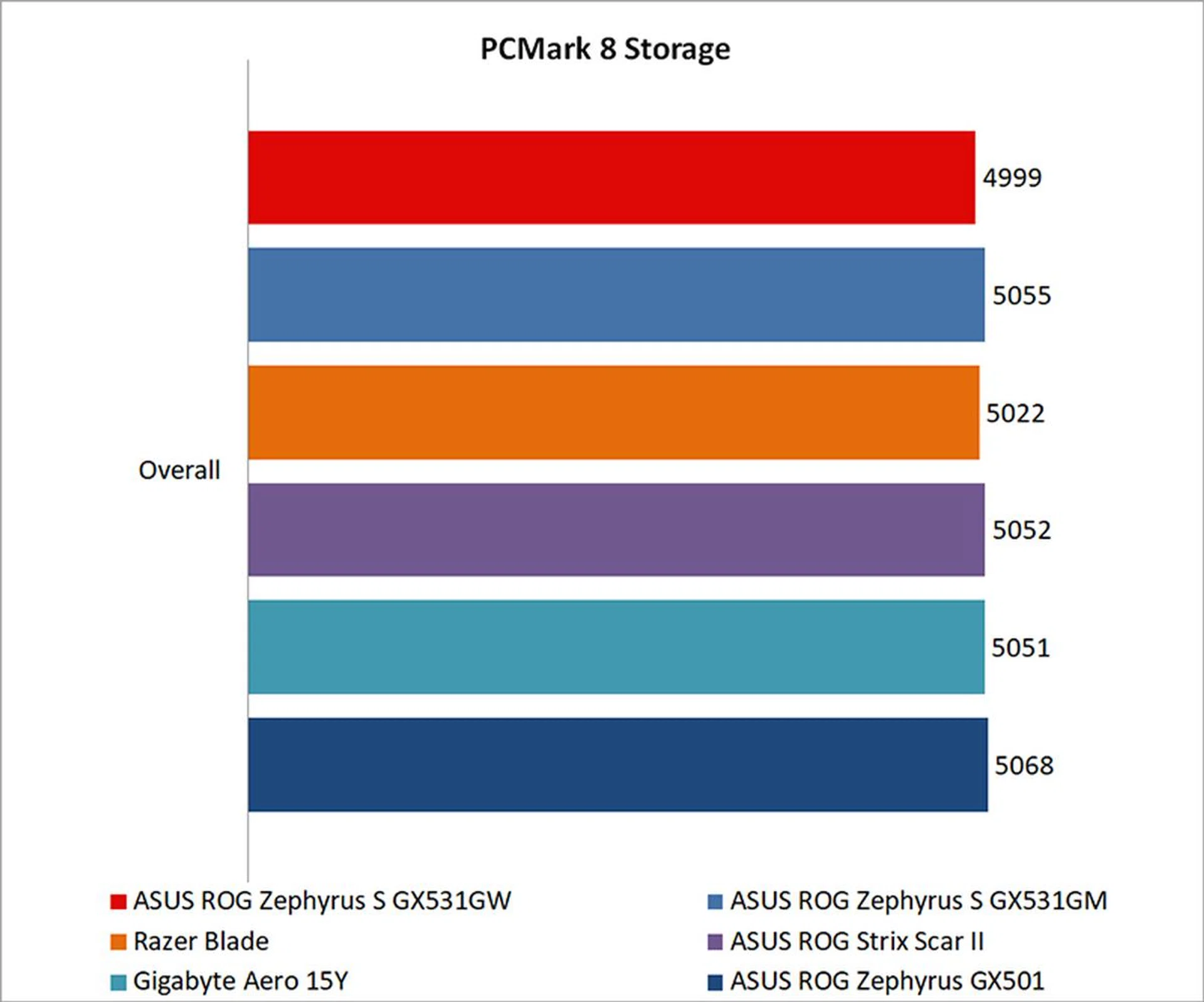
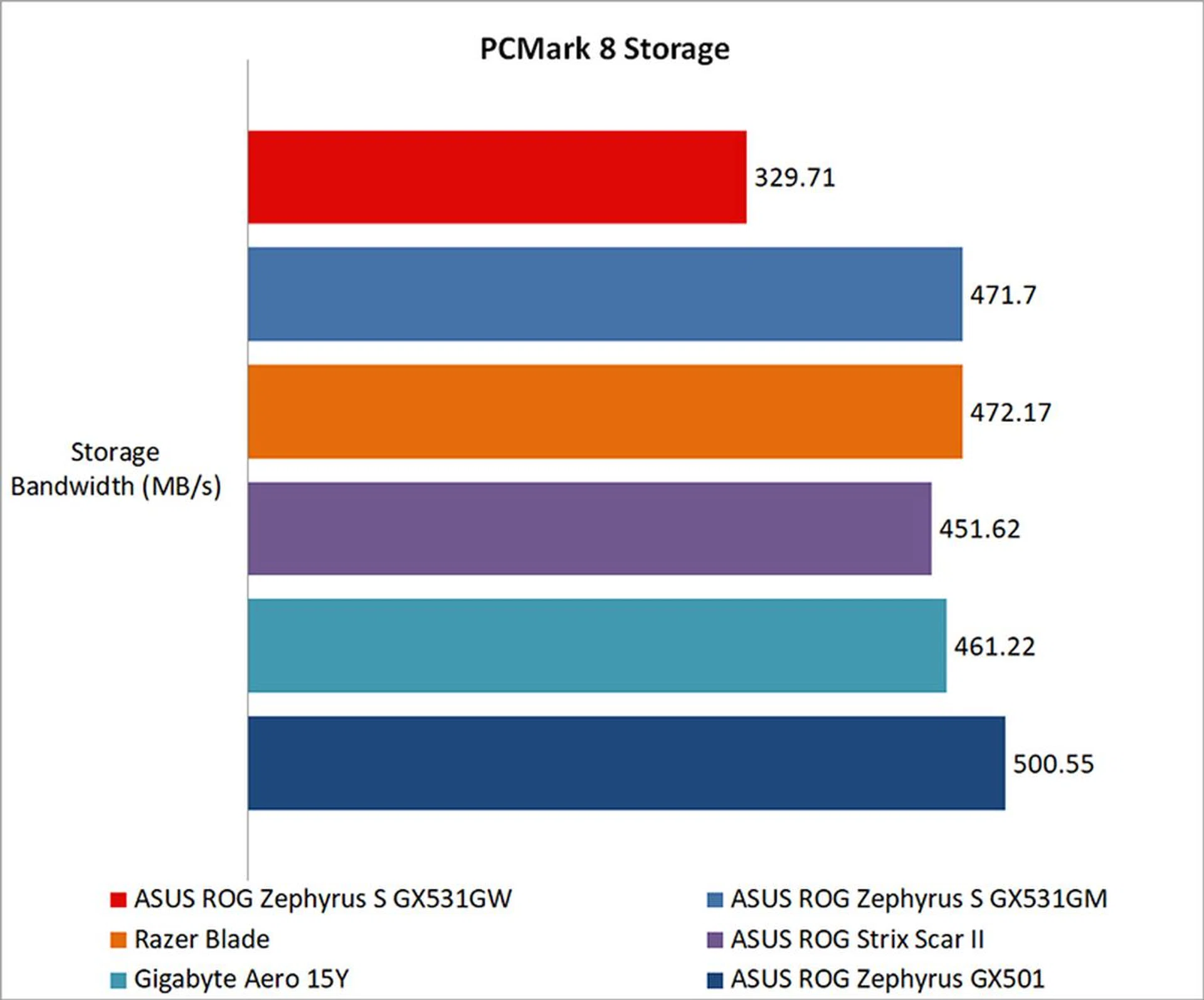
On the storage front, the new Zephyrus S managed to keep pace with the other laptops in terms of overall scores, but it fell behind when it came to storage bandwidth. As I mentioned earlier, the Zephyrus S now uses QLC NAND for its SSD, which can suffer in certain performance aspects, and that looks like its showing here. That said, this isn't necessarily something that you'll notice during daily use, although QLC NAND still does have lower endurance.
How fast is it in games?
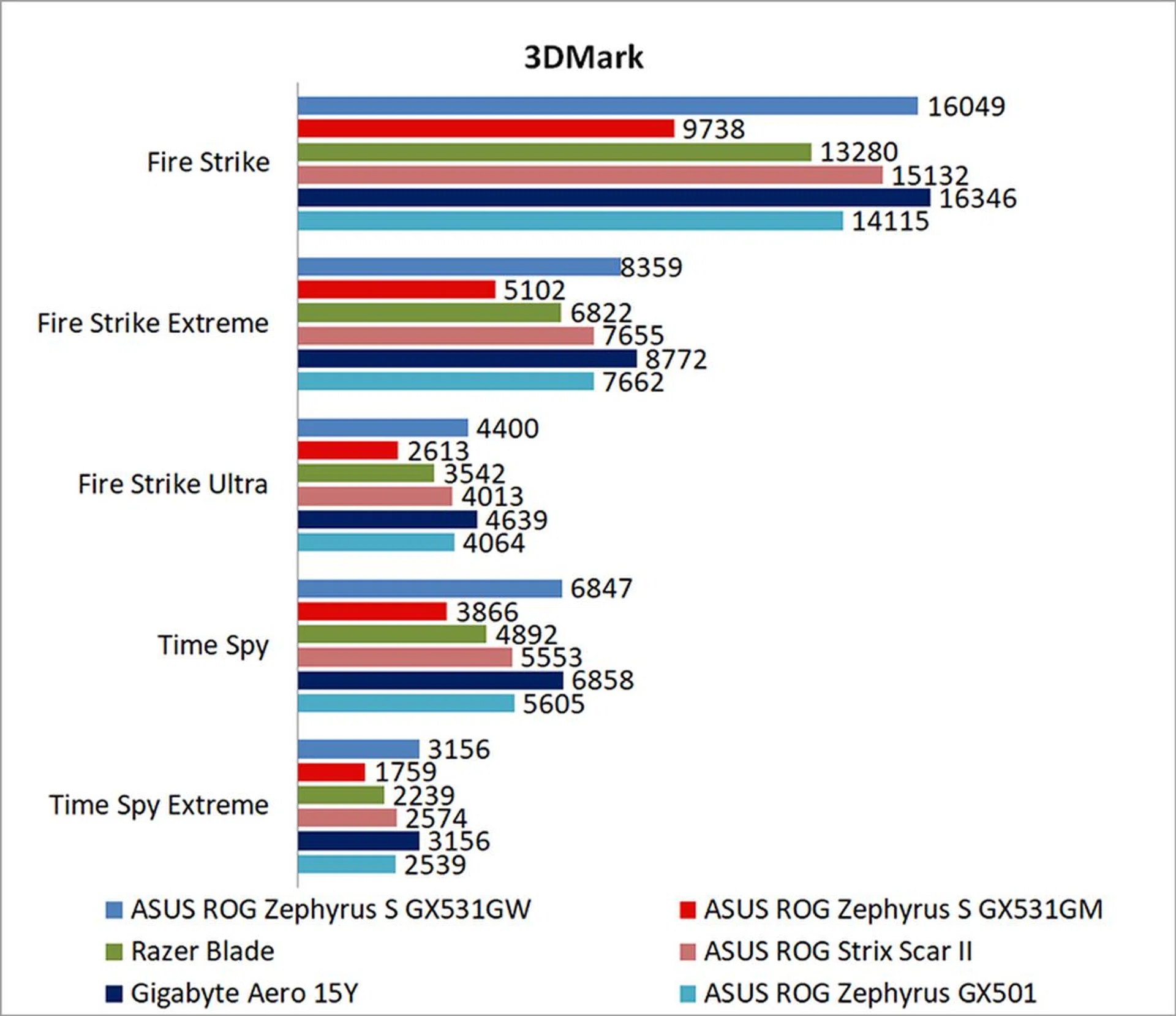
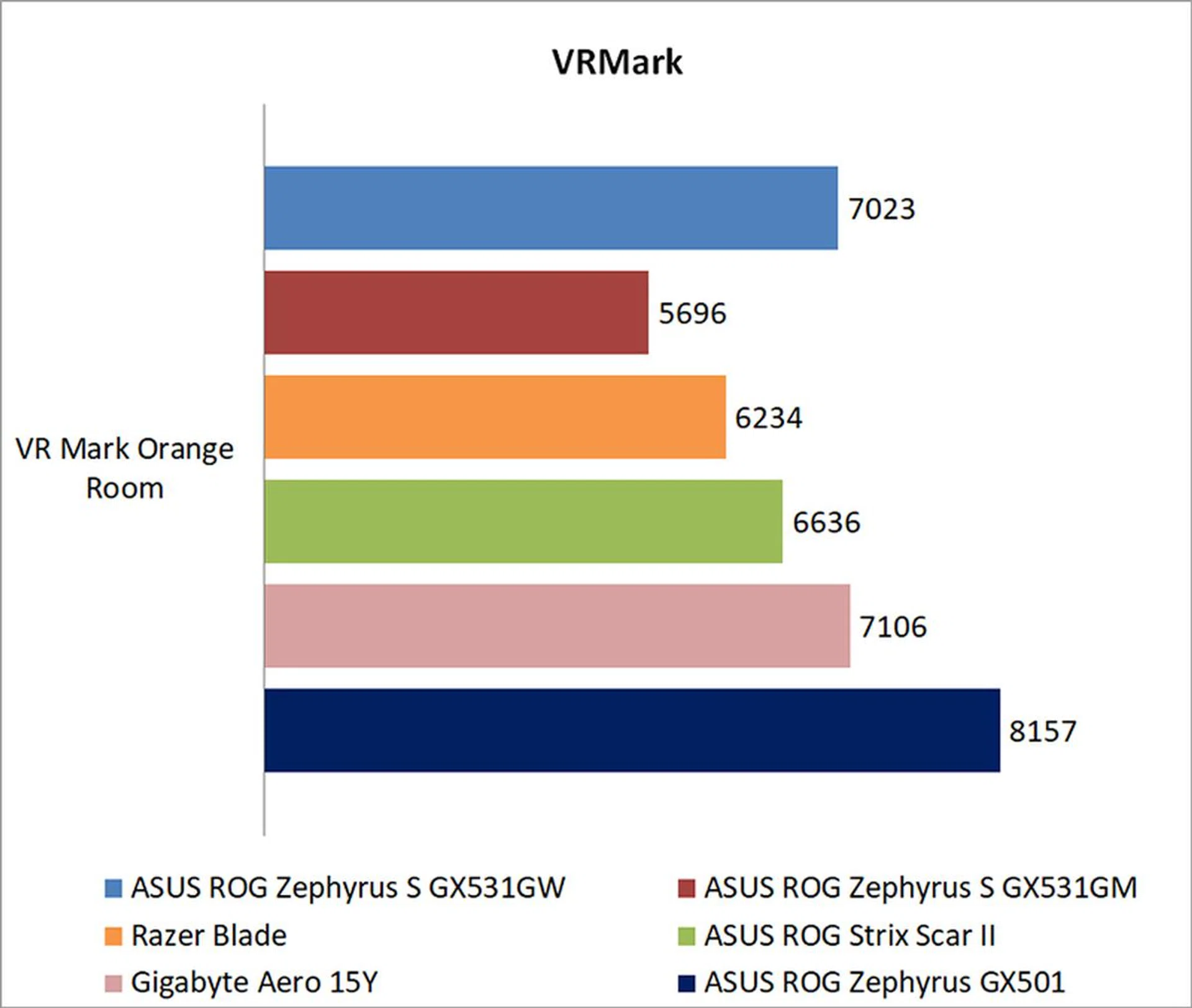
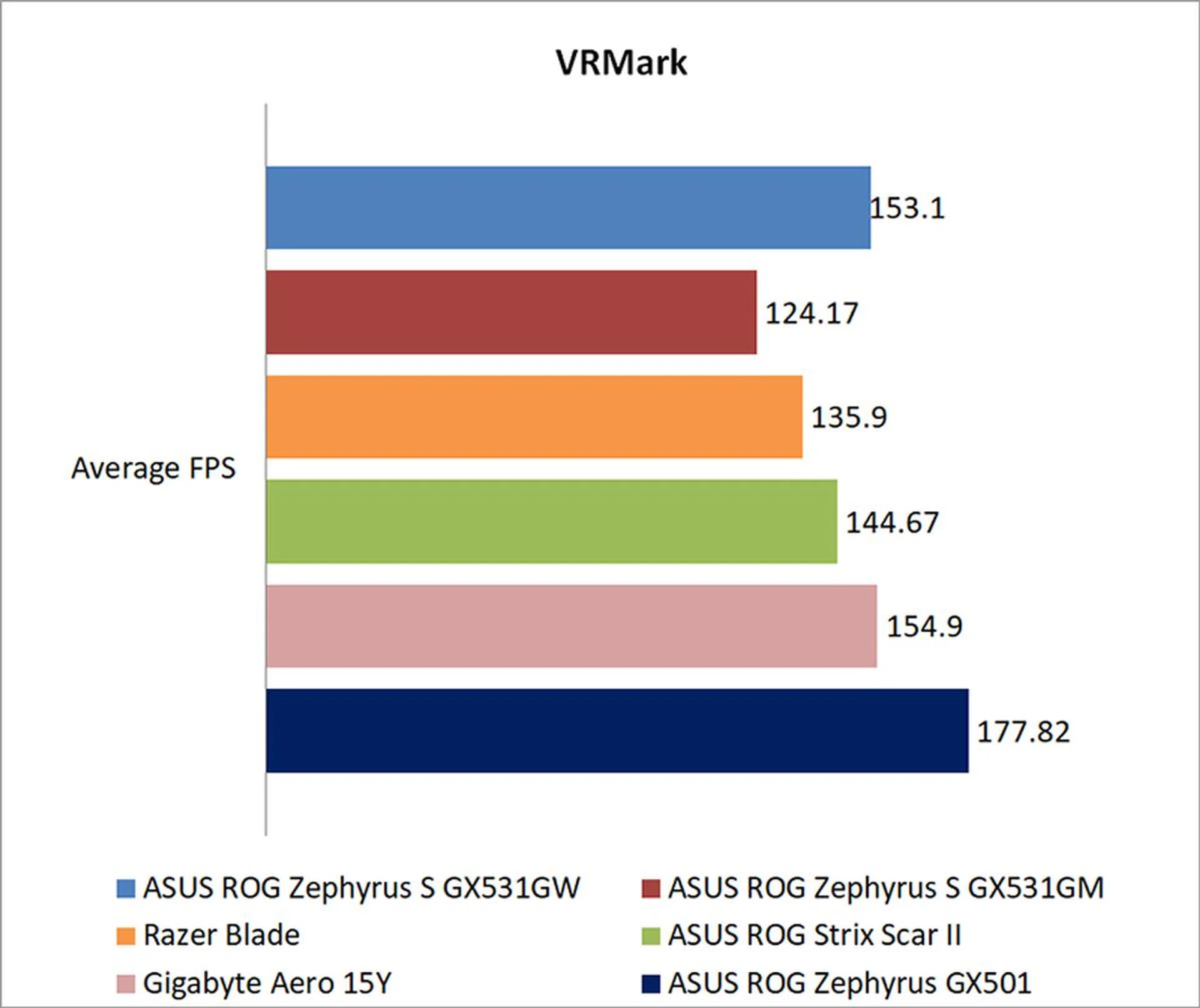
The ROG Zephyrus S GX531GW does really well in our gaming benchmarks as well, coming in only slightly behind the GeForce RTX 2080 Max-Q in the Gigabyte Aero 15Y in 3DMark . Having said that, things like thermal design play a big role in how well mobile GPUs perform, and there have been reports that other GeForce RTX 2080 Max-Q are actually faster than what the Aero 15Y was able to muster. In other words, the results here may be less about the strengths of the Zephyrus S than the flaws of the Aero 15Y.
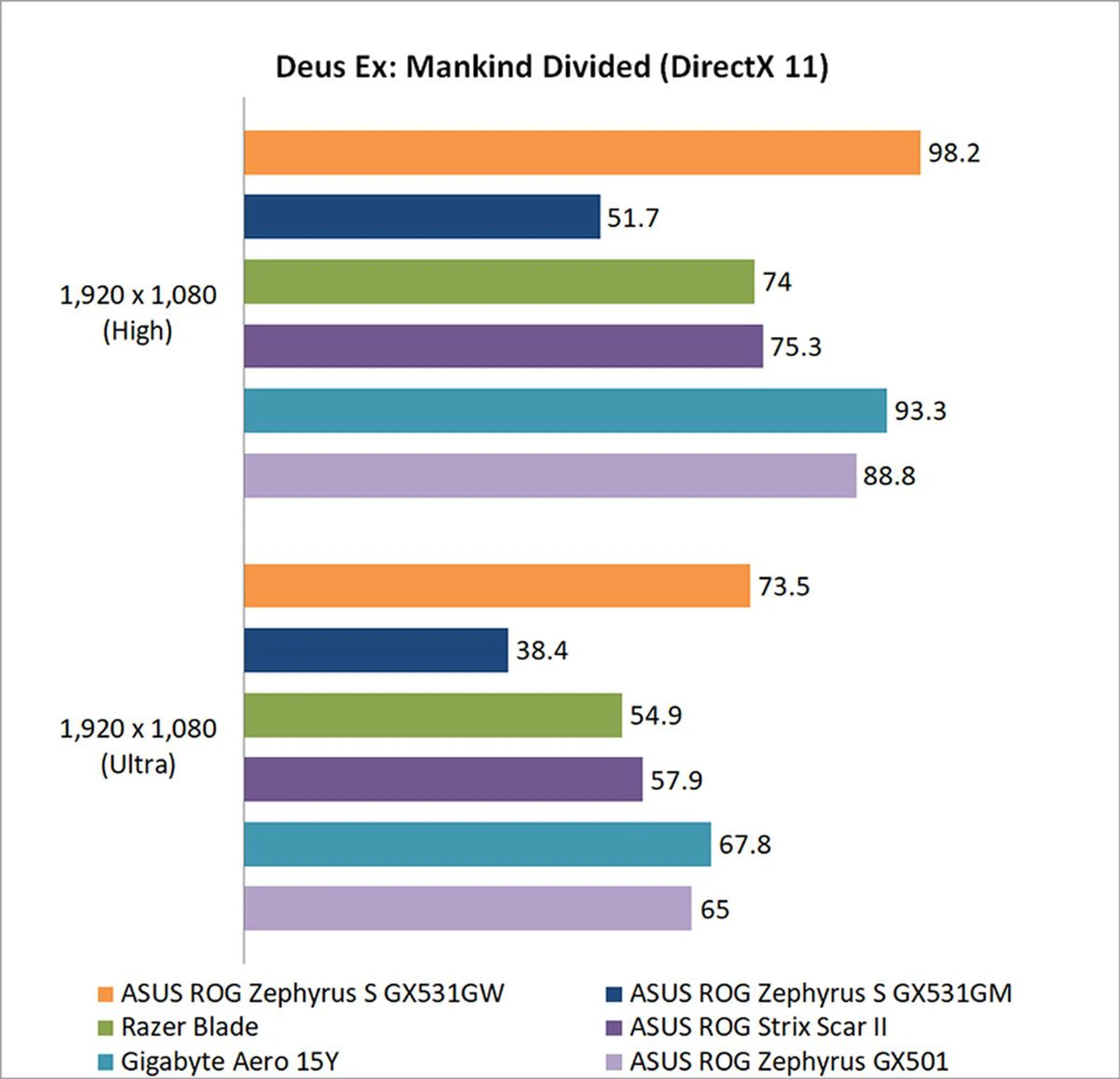
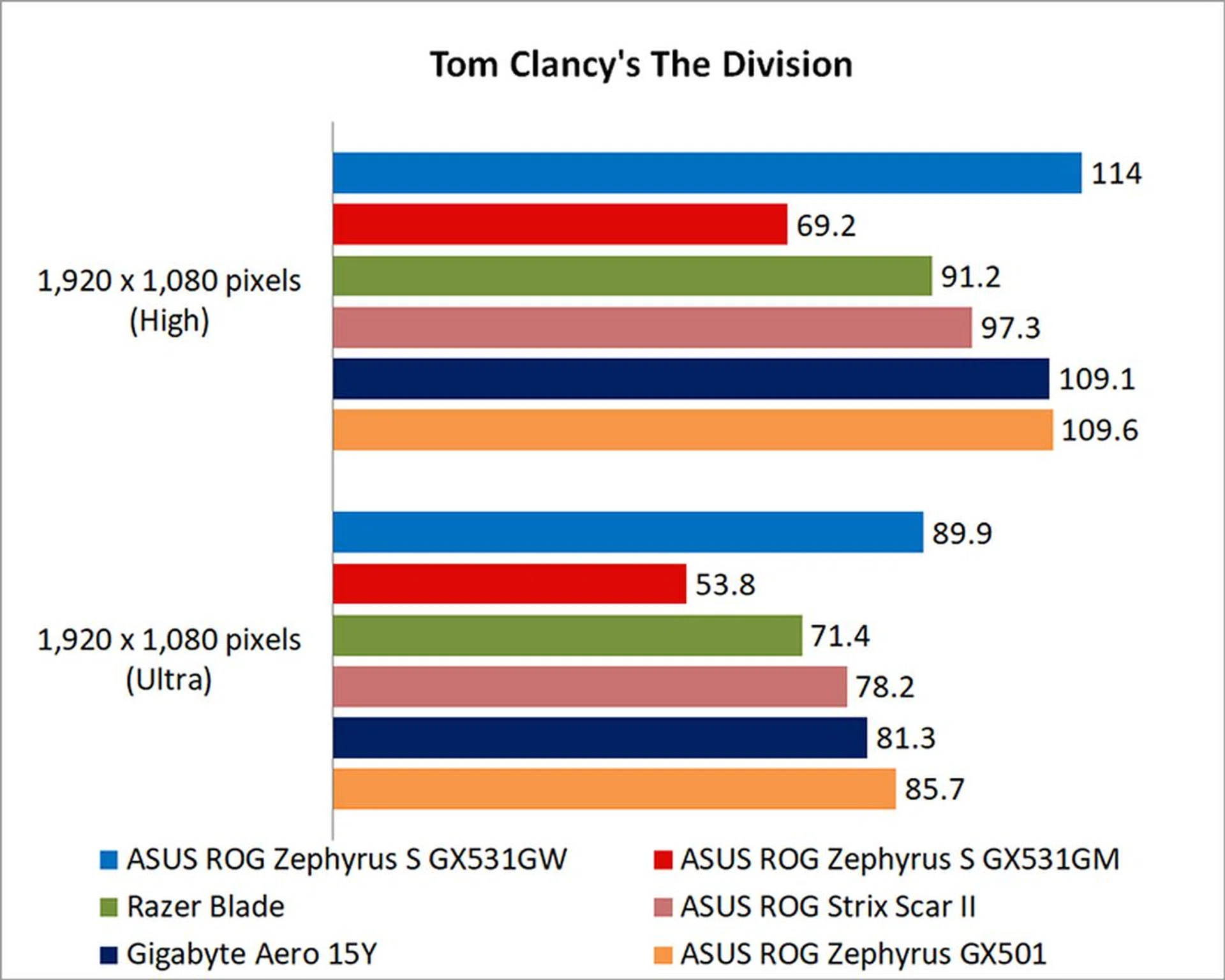
The new Zephyrus S was even quicker than the Aero 15Y in Deus Ex: Mankind Divided and Tom Clancy's The Division, which makes it seem even more likely that the GPU on the Aero 15Y is suffering from some serious thermal throttling. Either way, the Zephyrus S has acquitted itself really well, and it is even faster than the ASUS ROG Zephyrus GX501 and its GeForce GTX 1080 Max-Q, coming ahead by roughly 12 per cent in Mankind Divided. Compared to the GeForce GTX 1070 Max-Q from the previous generation, it is nearly 30 per cent faster.
How is its battery life?
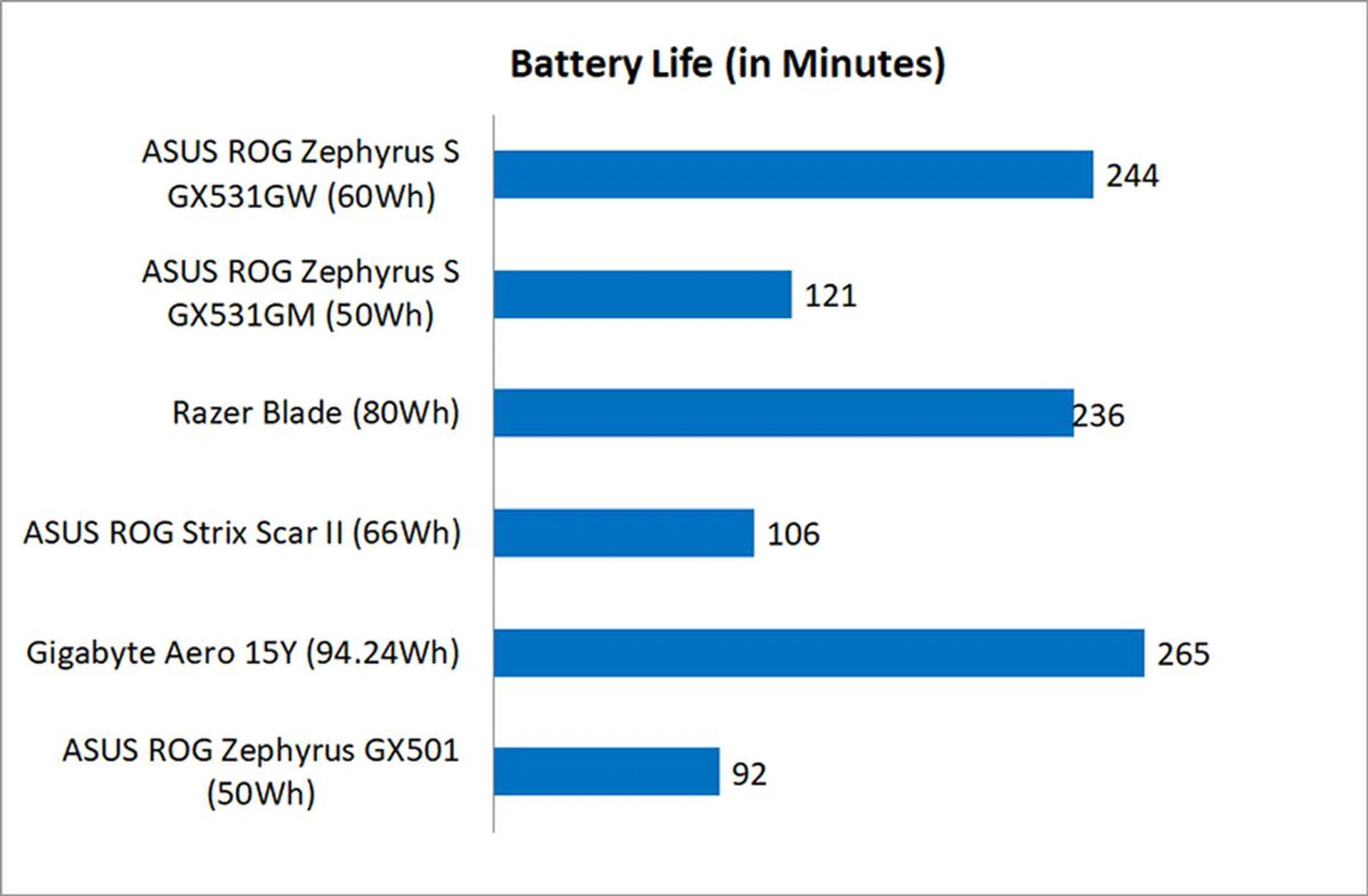
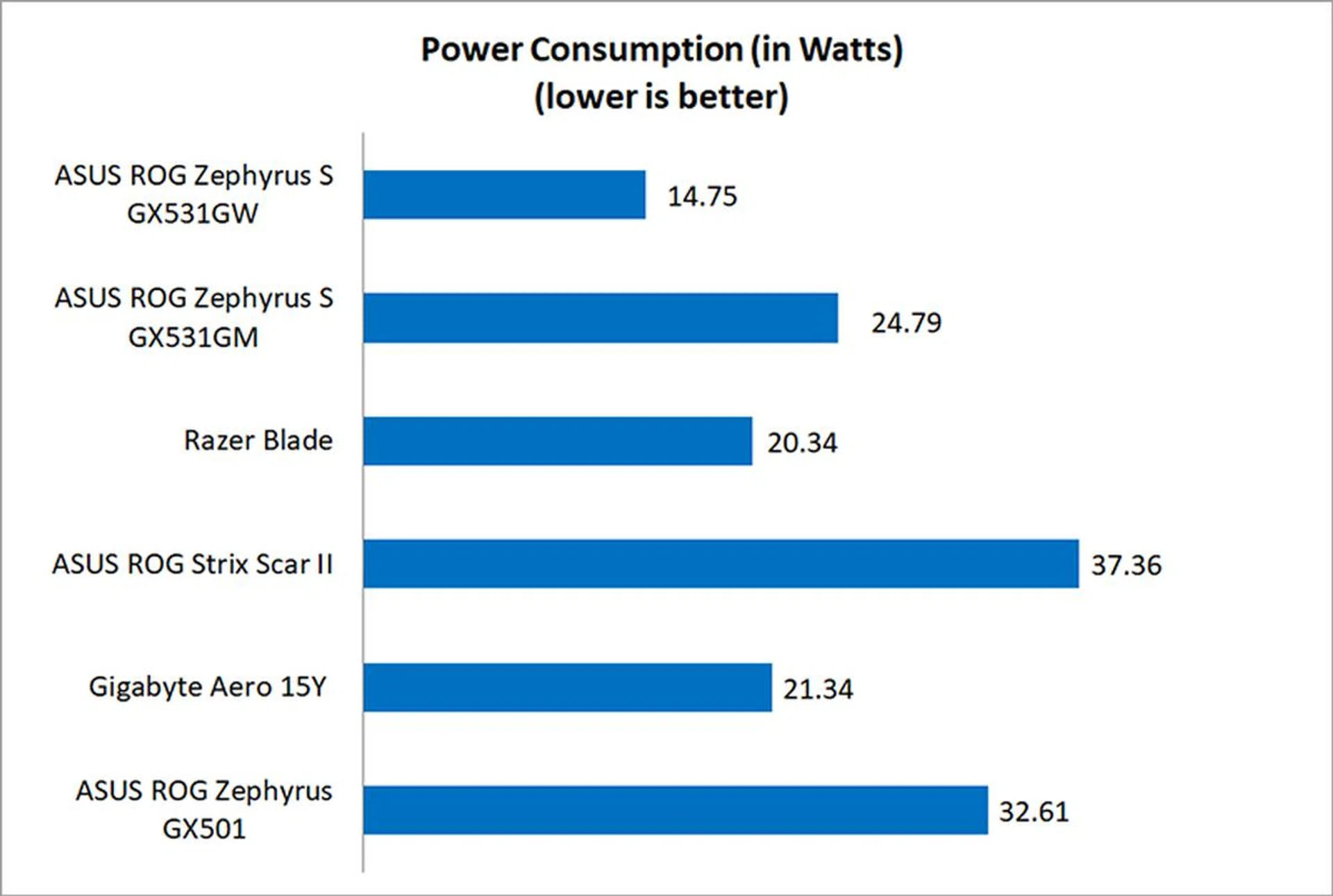
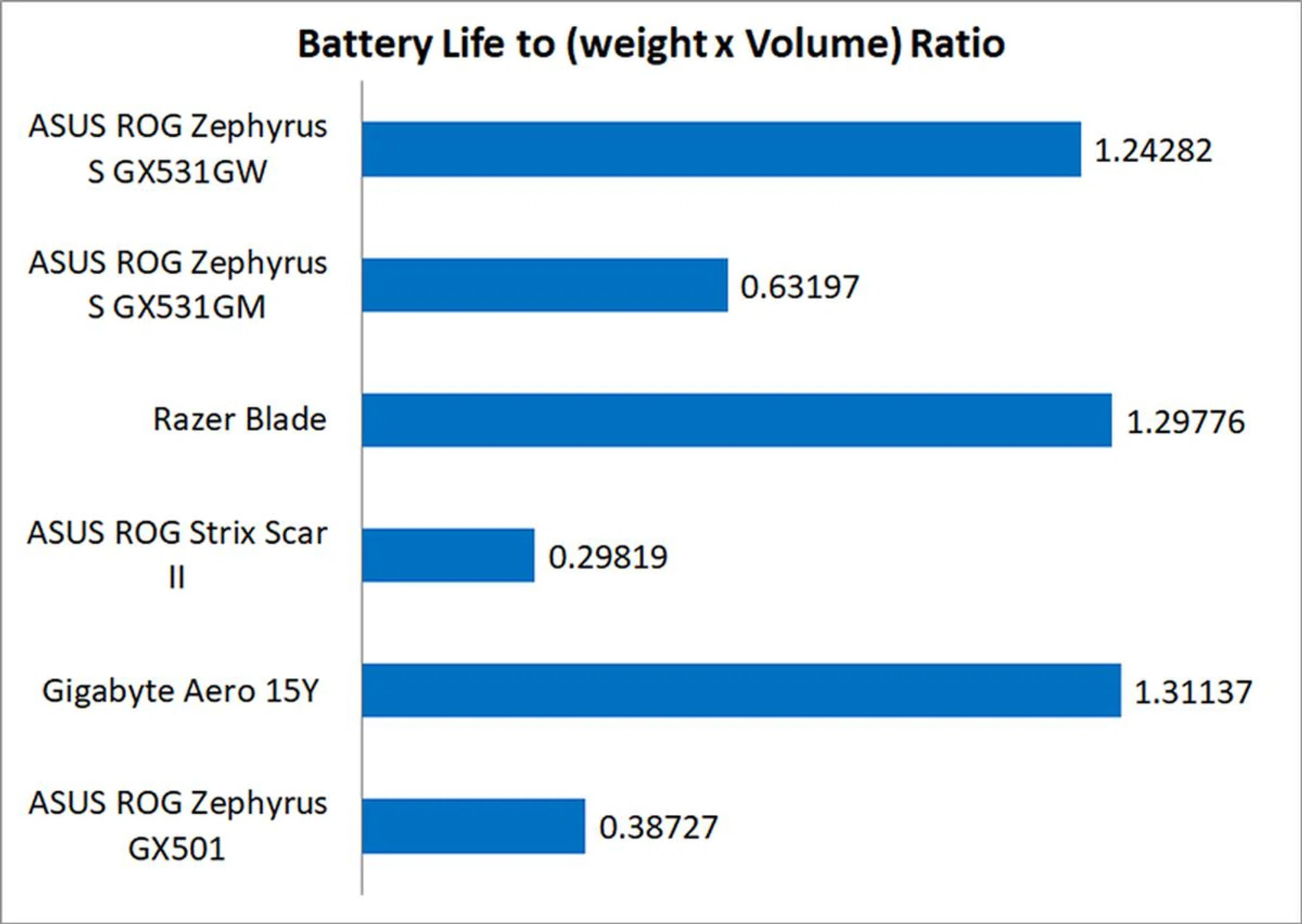
ASUS has managed to significantly improve battery life in this generation of the Zephyrus S, effectively doubling it even though battery capacity has gone up by just 18 per cent. That's reflected in the vastly improved power consumption figures, and ASUS says that's thanks to improvements made on Windows 10's end as well.
This means that the new Zephyrus S is also a lot more portable than before. Our portability index is intended to be an objective measure of how portable a notebook is, taking into account factors like size, weight, and battery life, so the Zephyrus S was able to greatly improve its score in this department.
I've found battery life to be a key weakness on previous notebooks with the Zephyrus name, but I'm happy to report that things seem much improved with this iteration of the notebook.
Does it run hot?
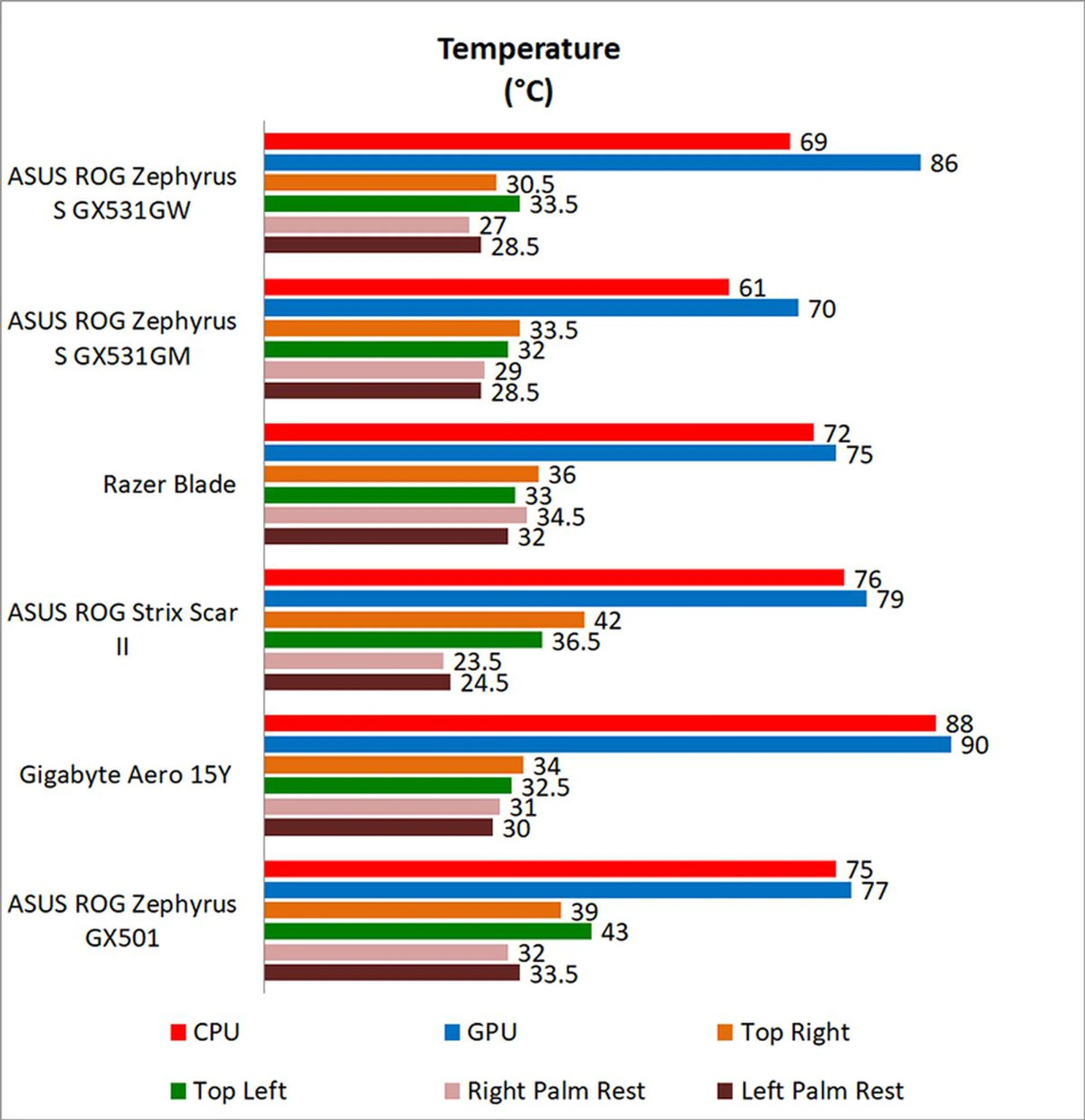
Temperature is always a concern with any slim and light gaming notebook, and it can really drag performance down, as seen with the Gigabyte Aero 15Y. Fortunately, it looks like the unconventional cooling design on the Zephyrus S has paid off here, and the notebook never became uncomfortably hot to touch. CPU and GPU temperatures are definitely higher than on the Pascal version of the notebook, but it doesn't look like performance has been affected much.
That said, its cooling performance comes at the price of a lot of noise, so you'll want to use the notebook with headphones on.
A new GPU does wonders
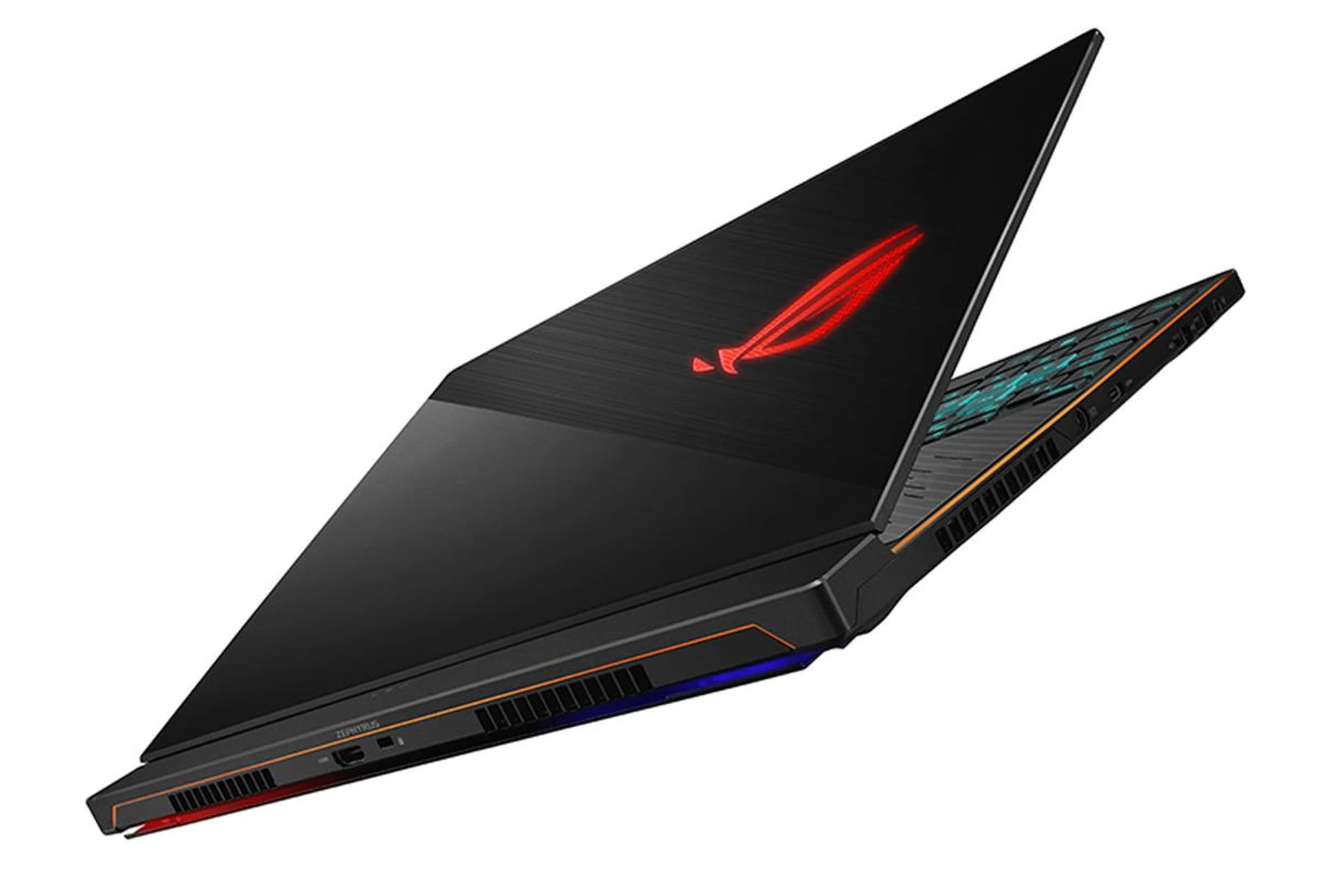
The GeForce RTX 2070 Max-Q gives the laptop a nice performance boost.
The ASUS ROG Zephyrus S GX531GW isn't particularly exciting, mostly because we've seen its design before. Compared to its predecessor, the external differences are minuscule, and it is just a hair thicker, probably to accommodate the more powerful NVIDIA GeForce RTX 2070 Max-Q and larger 60Wh battery. The larger battery and optimizations on the OS' end go a long way toward improving battery life though, and the Zephyrus S finally has decent battery life that pairs well with its svelte form factor.
The new Zephyrus S also features a bunch of under the hood changes, such as a QLC SSD and an improved display that now comes with Pantone color certification for more accurate colors. Like before, it also supports 100 per cent of the sRGB color space.
That said, other areas where I'd have liked to see changes have stayed the same. The keyboard still has the same four-zone backlighting as before, but I really think per-key customizations should be a feature on a laptop that's marketed as a premium product like this one.
Unfortunately, this is also a laptop that runs really loud, and ASUS hasn't really been able to make improvements in this area. Still, the laptop's blend of excellent performance and portability are hard to pass up, and the whirring fans are a small price to pay, especially when I'd be hard-pressed to point out an alternative that runs as fast and is significantly quieter. In terms of performance, this notebook is a beast, and it is tangibly faster than the GeForce GTX 1070 Max-Q that came before it. You'll be able to run just about any game at 1080p and max settings, although maximizing the 144Hz display is quite another matter altogether.
At S$3,698, the Zephyrus S GX531GW is a good S$500 more expensive than its predecessor, but it makes up for that with significantly better performance. Previously, you could only get the Zephyrus S with a GeForce GTX 1060 locally, but you can now get the newest model with up to a GeForce RTX 2070 Max-Q, a huge step up. There's much to like about the Zephyrus S now, and I think the more powerful specifications and better battery life have transformed it into quite a winner.
Our articles may contain affiliate links. If you buy through these links, we may earn a small commission.