

Wait, what do you need Max-Q for again?
The ASUS ROG Zephyrus S GX502GW measures just 18.9mm thick and weighs a hair under 2kg. When I first saw it, I thought it was just another Max-Q gaming laptop competing in the burgeoning market of slim and light gaming notebooks. Actually, that feels like a slightly useless qualification by now, because gaming notebooks have become so sleek that we're almost at the point where that is the expectation at the high-end now rather than the exception.
However, ASUS' new Zephyrus S laptop may be many things, but the one thing it is not is a Max-Q laptop. It comes with the full-fat Max-P version of the NVIDIA GeForce RTX 2070, and it's managed to cram that into a chassis that is as thin as many Max-Q notebooks out there.
NVIDIA's Max-Q technology was originally conceived to allow for thinner and more sprightly laptops by gunning for peak efficiency instead of maximum performance. It tries to find a balance between performance and power consumption, combining that with novel cooling solutions to enable both better battery life and more portable designs.
However, it seems like ASUS has made further progress since then. The Zephyrus S GX502 is even lighter than the original Zephyrus, which debuted in 2017 as one of the first Max-Q notebooks. It is a millimeter thicker, but that seems almost insignificant in the greater scheme of things, and it's done that without needing to sacrifice performance to any Max-Q optimisations.
Here's an overview of its specifications:
- 15.6-inch 1,920 x 1,080-pixel 144Hz IPS-type display
- Intel Core i7-9750H processor (2.60GHz, 12MB L3 cache)
- 16GB single-channel DDR4-2666 memory
- NVIDIA GeForce RTX 2070
- 1TB PCIe SSD
- 76Wh battery
- 360 x 252 x 18.9mm
- 1.99kg
It will cost you S$3,998, a steep price to be sure, and slightly more expensive than its other Max-Q competitors. Does the laptop live up to its promise? Read on to find out.
What's new in this Zephyrus?
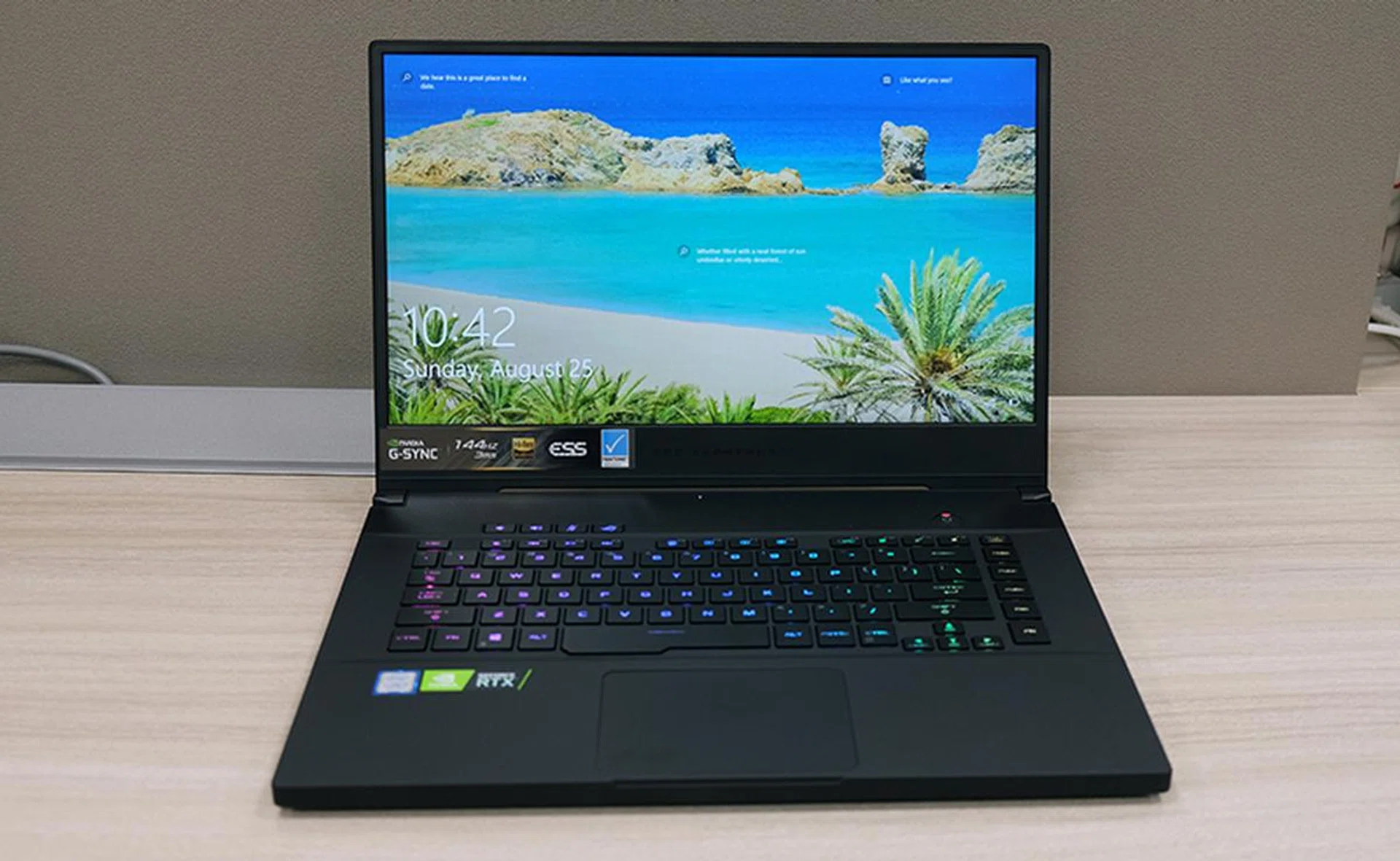
The new Zephyrus S GX502GW may be the best Zephyrus laptop from ASUS yet in terms of design.
The biggest change coming from the ROG Zephyrus S GX531 is probably the keyboard layout. It looks like ASUS has decided to ditch the former's unconventional look, where the keyboard was located all the way against the front edge, in favour of a more traditional design where there are actual palm rests.
I wasn't that enamoured with the previous design, so I'm perfectly fine with this change, and I'm guessing most folks will be too. It's not that it was bad, but it wasn't necessarily better than the conventional design either.
The new Zephyrus S now has a distinctive blocky design that kind of reminds me of the Razer Blade 15. It features a sturdy magnesium-alloy chassis that is reinforced by a honeycomb structure under the palm rests to minimise flexing, and the result is a robust-feeling notebook that seems really well put together. Build quality is top-notch, and I have no complaints about any creaking or unwanted sagging in crucial areas.
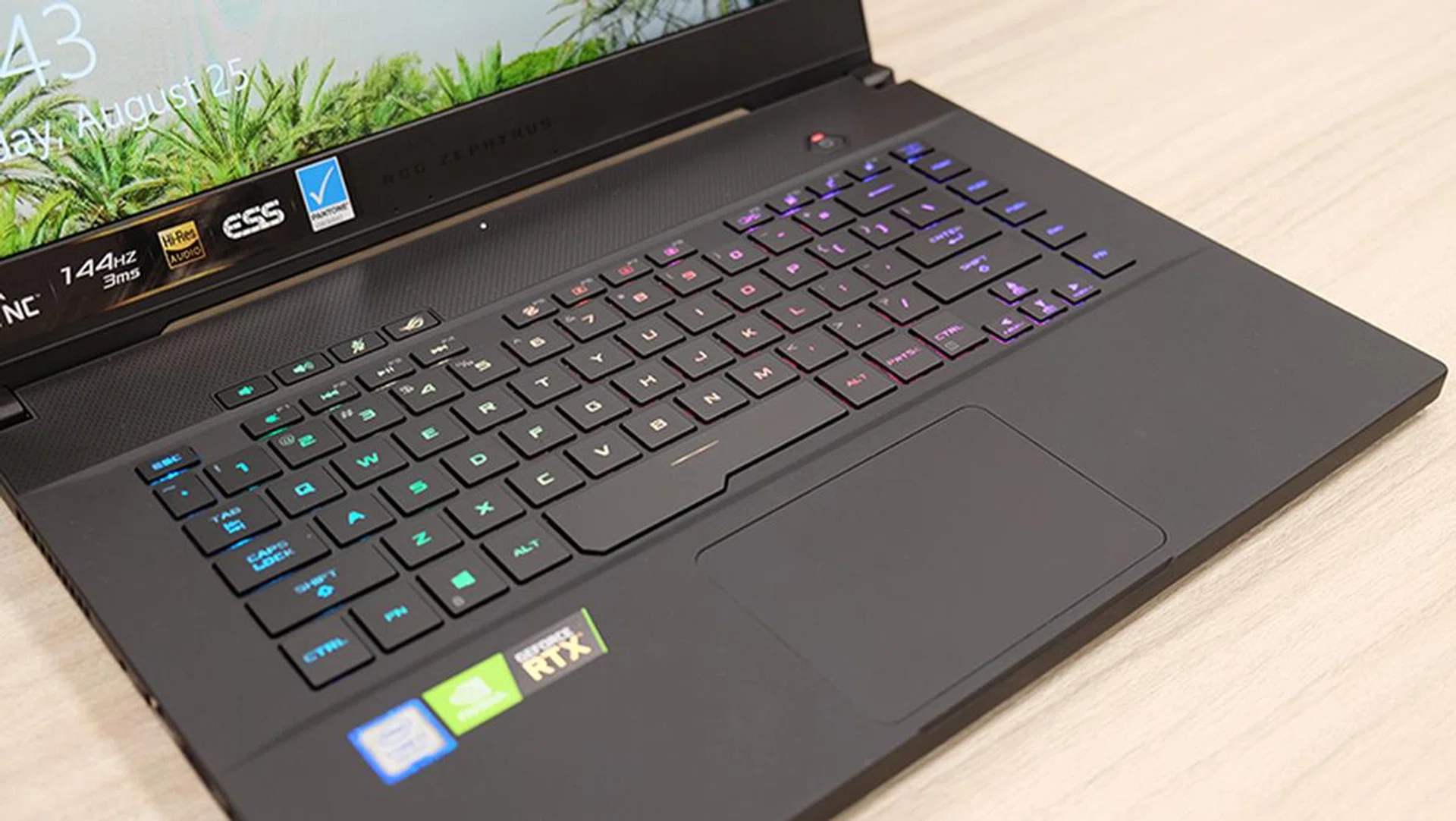
The RGB backlighting is bright and still clearly visible under overhead lighting.
The chassis is coated with a soft-touch finish that I really like, and it appears to resist fingerprints quite well. There's a subtle sparkle in the paint if you look closely, but I do think ASUS could have done away with that entirely.
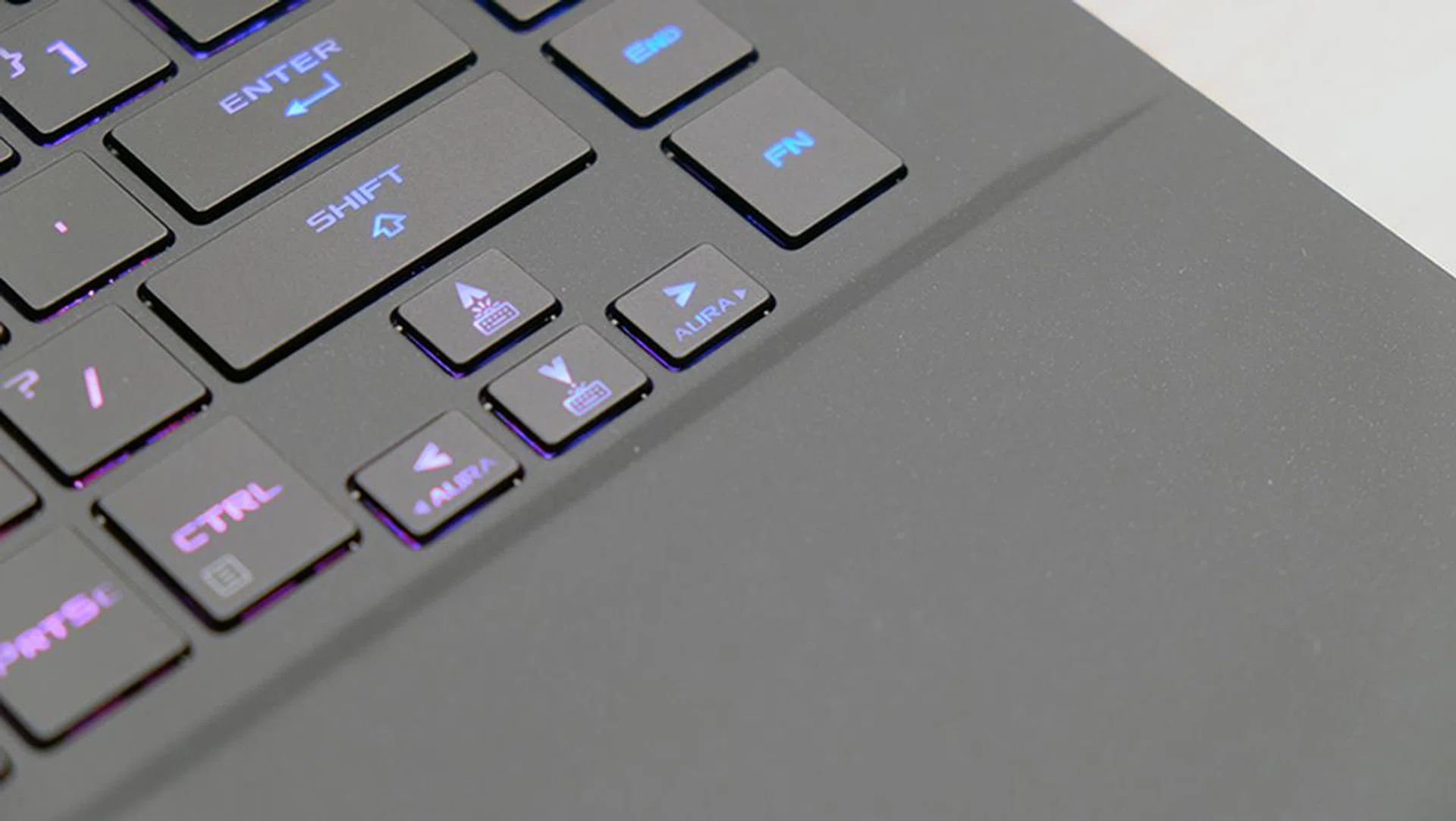
Here's a closer look at the finish on the laptop.
The lid boasts an attractive brushed metal finish that runs diagonally across its surface. It is topped off by a backlit ROG logo that glows a deep red when the laptop is powered on. Quite frankly, I think it looks great, and the design is pretty tasteful overall. When viewed from the front, it looks like it could almost pass off as a business notebook, and ASUS did say that it hopes the laptop will appeal to content creators as well and not just gamers.

The lid sports an attractive brushed metal pattern.
Is there anything special about it?
As far as I know, this is the only so-called portable gaming laptop to come with an NVIDIA GeForce RTX 2070 Max-P. That's pretty interesting if you ask me, and it possibly pushes the laptop toward GeForce RTX 2080 Max-Q territory while still remaining under S$4,000 (albeit barely). The GPU is also higher clocked than most others, boasting a 1,315MHz base clock and 1,540MHz boost clock in Turbo mode, compared to the 885MHz base clock and 1,185MHz boost clock on other Max-Q laptops.
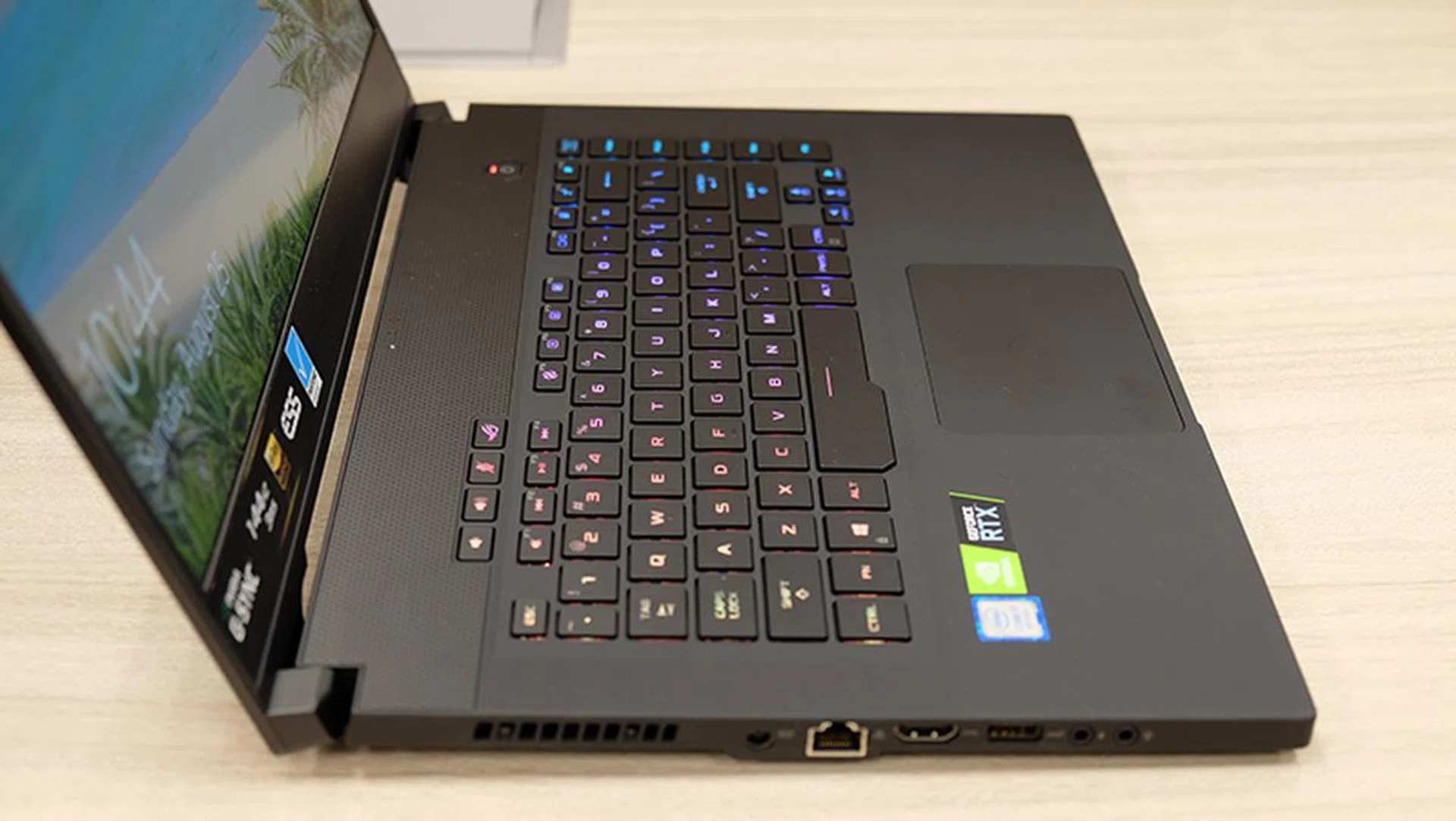
The laptop's slim chassis houses a full-fat GeForce RTX 2070 Max-P.
But what's really impressive is that ASUS has managed to cram the full-fat GeForce RTX 2070 into a chassis that is still extremely competitive with the slimmest Max-Q notebooks out there, such as the Razer Blade 15. Faster performance with perhaps a small hit on the battery front? I'll take it. ASUS has shown that you don't really need Max-Q to make a portable gaming machine, and I expect that this system will garner a fair bit of interest among those looking for a high-end gaming laptop.
That aside, the Zephyrus S still retains a few key design innovations from last year's model. First and foremost is the trapdoor-like bottom, which swings out when you open the lid. This lets the bottom fans draw in more air, and hot air is in turn exhausted through four vents at the back and sides of the laptop.
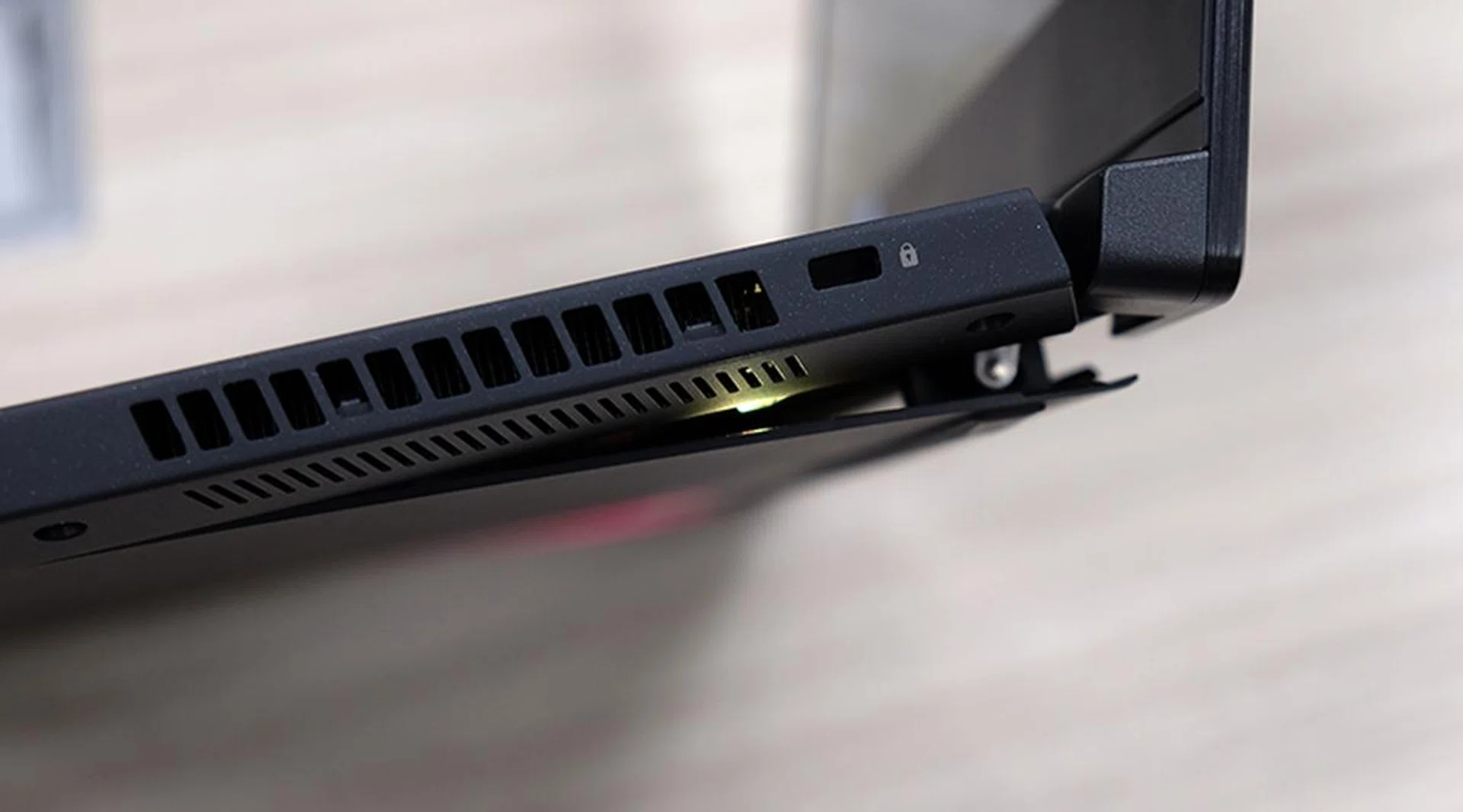
The bottom panel swings open to allow the fans to pull in more cool air.
The cooling system comprises two 83-blade 12V fans and four copper heat pipes that lead to four finned heatsinks. The fans themselves also feature the anti-dust cooling design that we've seen on many ASUS laptops of late. This system relies on centrifugal force to drive dust particles into special dust tunnels so they don't clog up the cooling fins in the long run and ensure more consistent cooling performance further down the road.
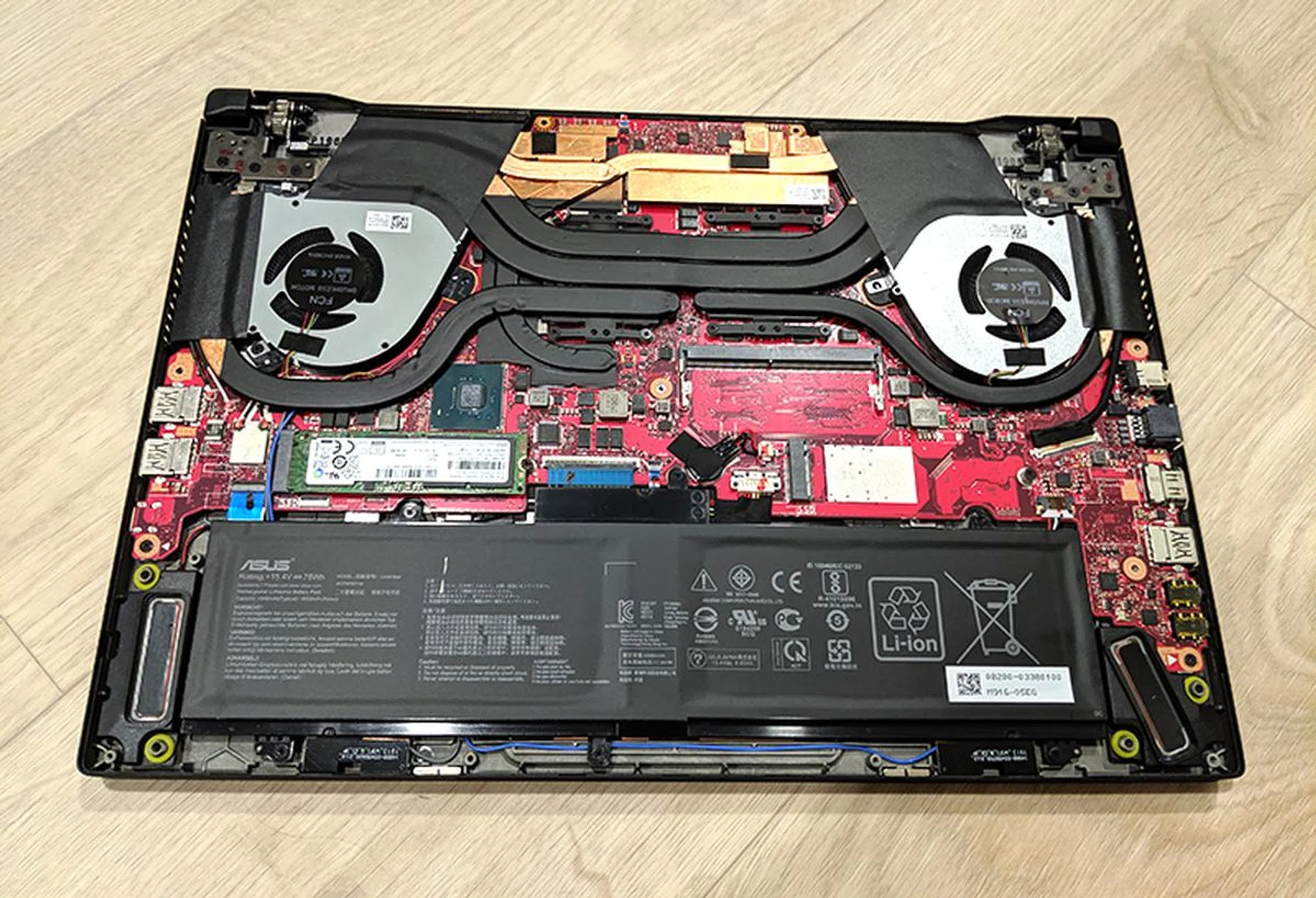
You can see here the empty SO-DIMM slot where you're supposed to plug in the second RAM slot as well.
How are the display, keyboard, and speakers?
The 1,920 x 1,080-pixel display features a speedy 144Hz refresh rate and support for NVIDIA G-Sync. It also boasts a Pantone-validated screen for supposedly more accurate colours. I didn't evaluate the screen with any objective tools, but I have to say that I'm pretty happy with it. The screen was bright enough for the most part, and colours appeared sufficiently vivid, with no particular bias toward the warmer or cooler end of the spectrum.
That said, one thing to take note of is that the laptop actually ships with G-Sync disabled. You'll need to enter the Armoury Crate software and change the GPU mode to "Discrete" in order to enable G-Sync, so don't panic if you don't see the option for it in the NVIDIA Control Panel at first. By default, the Zephyrus S runs in Optimus mode, which is supposed to intelligently deactivate the GPU to save power when needed.
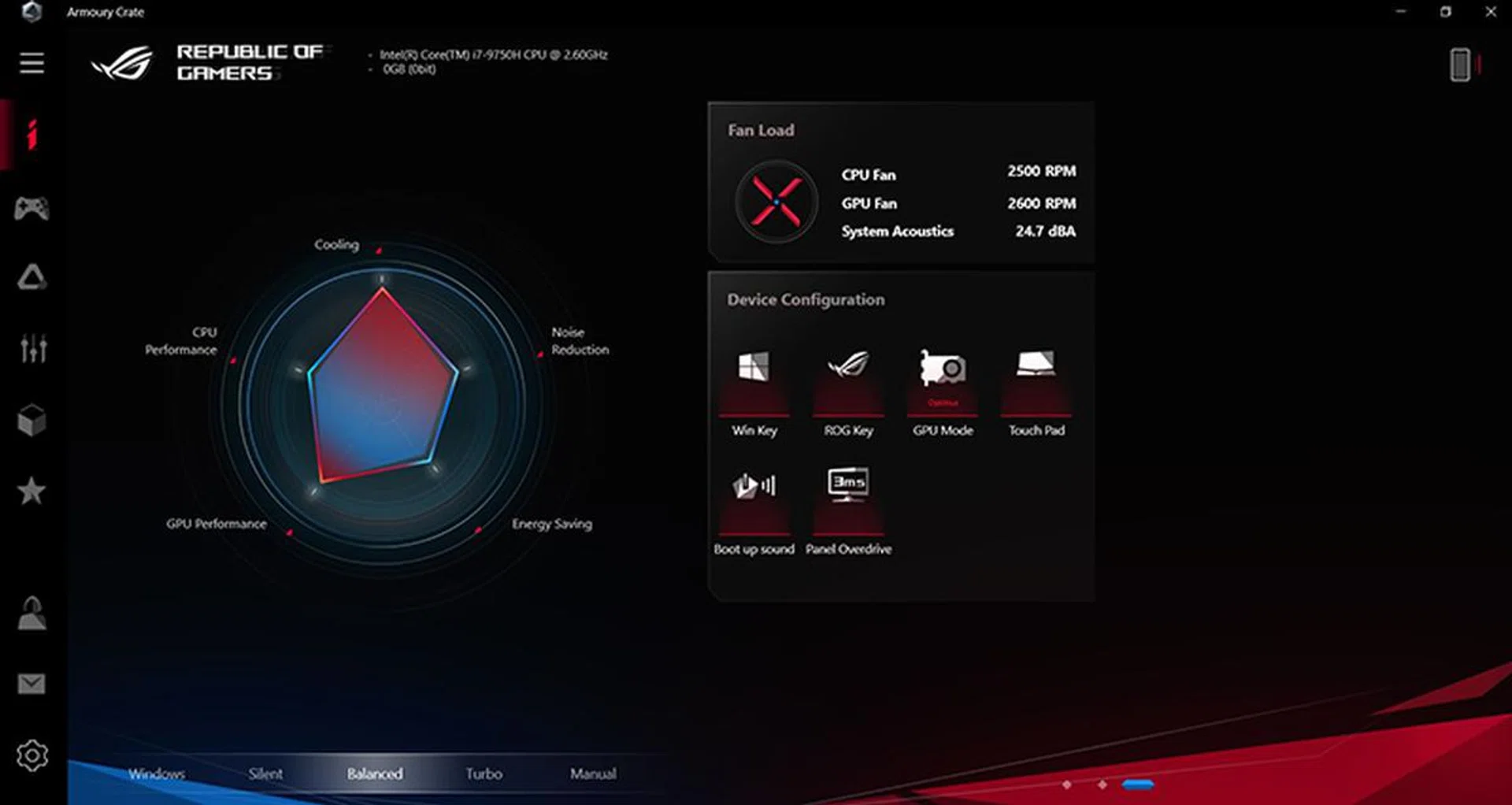
You'll have to switch the GPU Mode to Discrete if you want to enable G-Sync.
If you're not particularly concerned about battery life, you'll probably want to make the switch to Discrete mode to take advantage of G-Sync. NVIDIA's variable refresh rate technology gets rid of stuttering and tearing, and together with the 144Hz refresh rate, you should get a butter-smooth gaming experience. However, the high refresh rate alone does actually help mitigate any problems with stuttering and such, so you won't be missing out on too much if you opt to stick to Optimus mode.
The screen is framed on three sides by pretty slim bezels, which helps reduce the notebook's footprint. ASUS has also chosen to ditch the built-in webcam this time around, opting for an external GC21 webcam that is capable of 1080p60 capture. This could work out nicely if you've often wished for better camera and microphone quality on a laptop, but it does mean that one USB port will always be occupied.

The external webcam can also be mounted on top of the screen.
The keyboard has been improved compared to the Zephyrus S GX531, and it now offers decent travel and feedback. I like that the layout has been modeled after regular desktop keyboards as well, with the appropriate spacings between the blocks of function keys. Above the keyboard, you'll find dedicated volume adjustment buttons and a microphone mute key. The latter is especially handy as you never know when you might need to quickly mute your mic, and not all headsets come with an equivalent button. The fourth button launches Armoury Crate, in case you need to quickly change the performance modes or lighting settings.
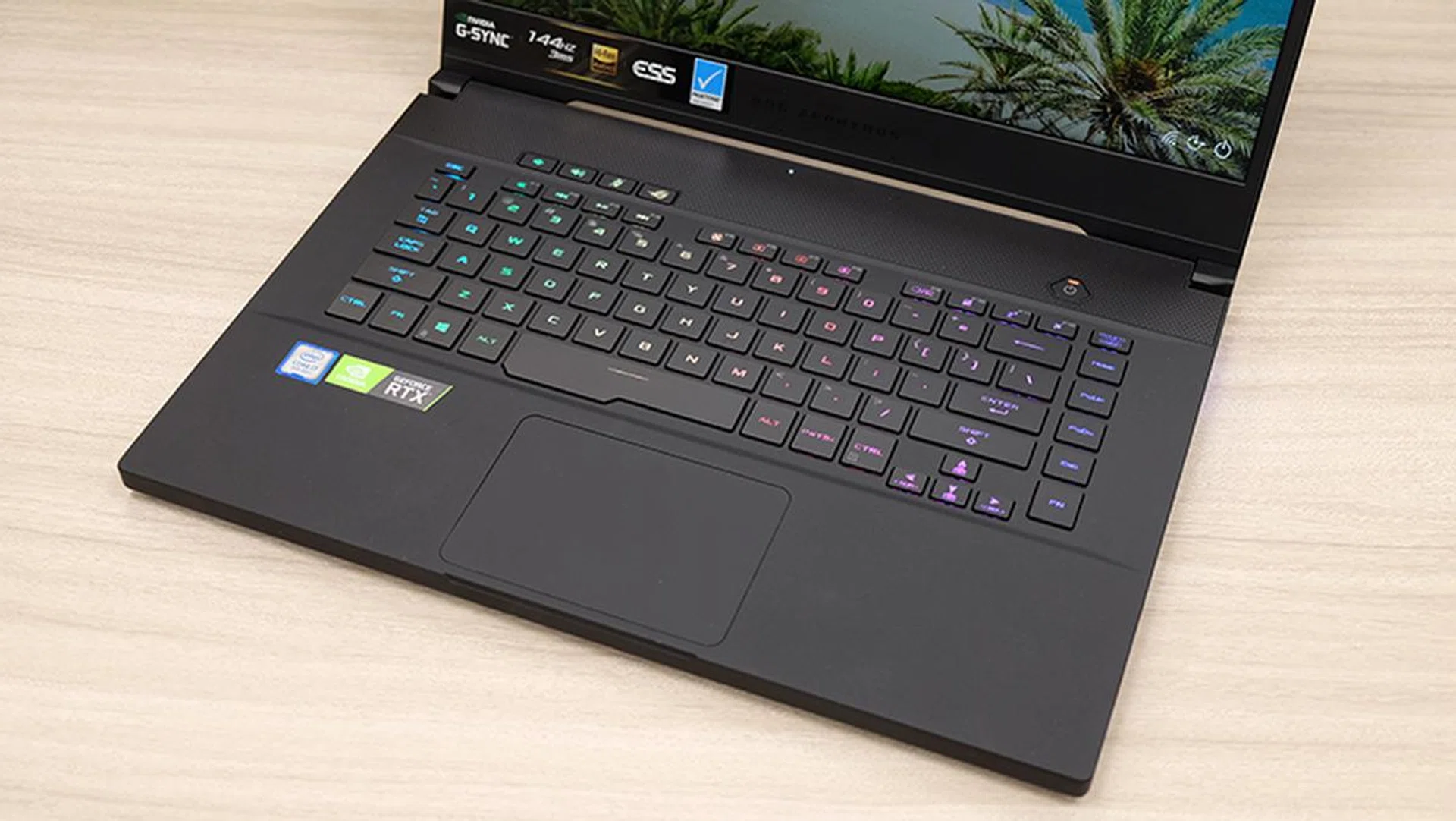
The spacebar is extra wide on the left so you can reach it more easily.
Per-key lighting customisations are supported, so you'll have plenty of freedom to create a lighting scheme that's truly yours.
The precision touchpad feels great as well, and the integrated left- and right-click buttons help create a cleaner and more modern look.
Finally, the dual 2.5W stereo speakers sit at the bottom of the laptop. They're about average for laptop speakers, and while they do get loud enough, they tend to lack definition. The low-end also sounded kind of anemic, and there's noticeable distortion at maximum volume.
What ports and connectors does it have?
The selection of ports is quite decent, and you get one USB 3.1 (Gen 2) Type-C, one USB 3.1 (Gen 2) Type-A, two USB 3.1 (Gen 1) Type-A, one HDMI 2.0b output, and a Gigabit Ethernet jack. The USB-C port supports video output over DisplayPort 1.4 as well, in addition to USB Power Delivery so you can charge the Zephyrus S using a universal Type-C charger or portable power pack (both of which are optional and isn't bundled).
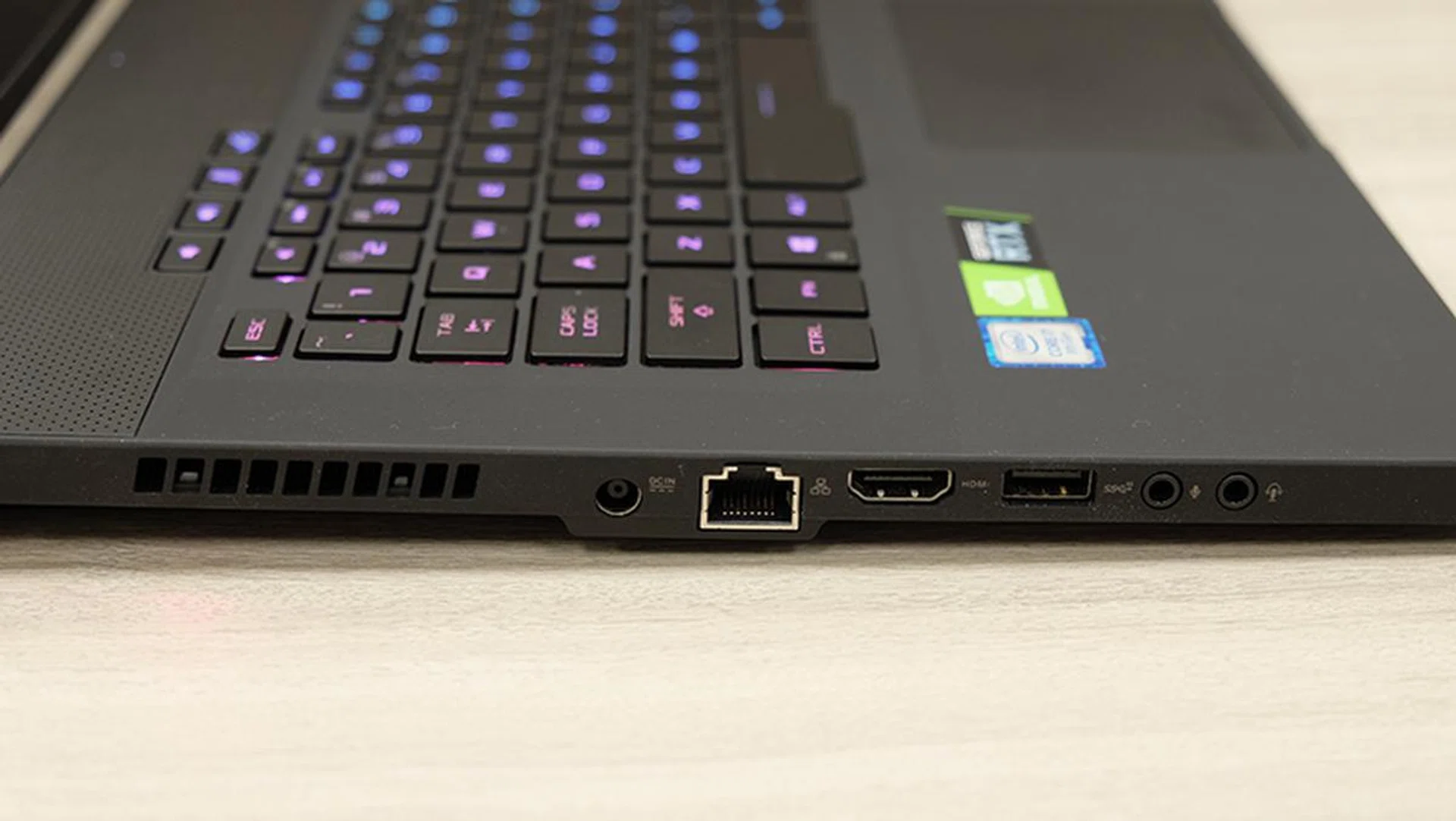
There are dedicated headphone and microphone jacks on the left as well.
Furthermore, with both HDMI 2.0b and DisplayPort 1.4 outputs, you can connect up to two 4K HDR monitors. There's no SD card slot of any kind, although that may not be too big a concern for a gaming laptop.
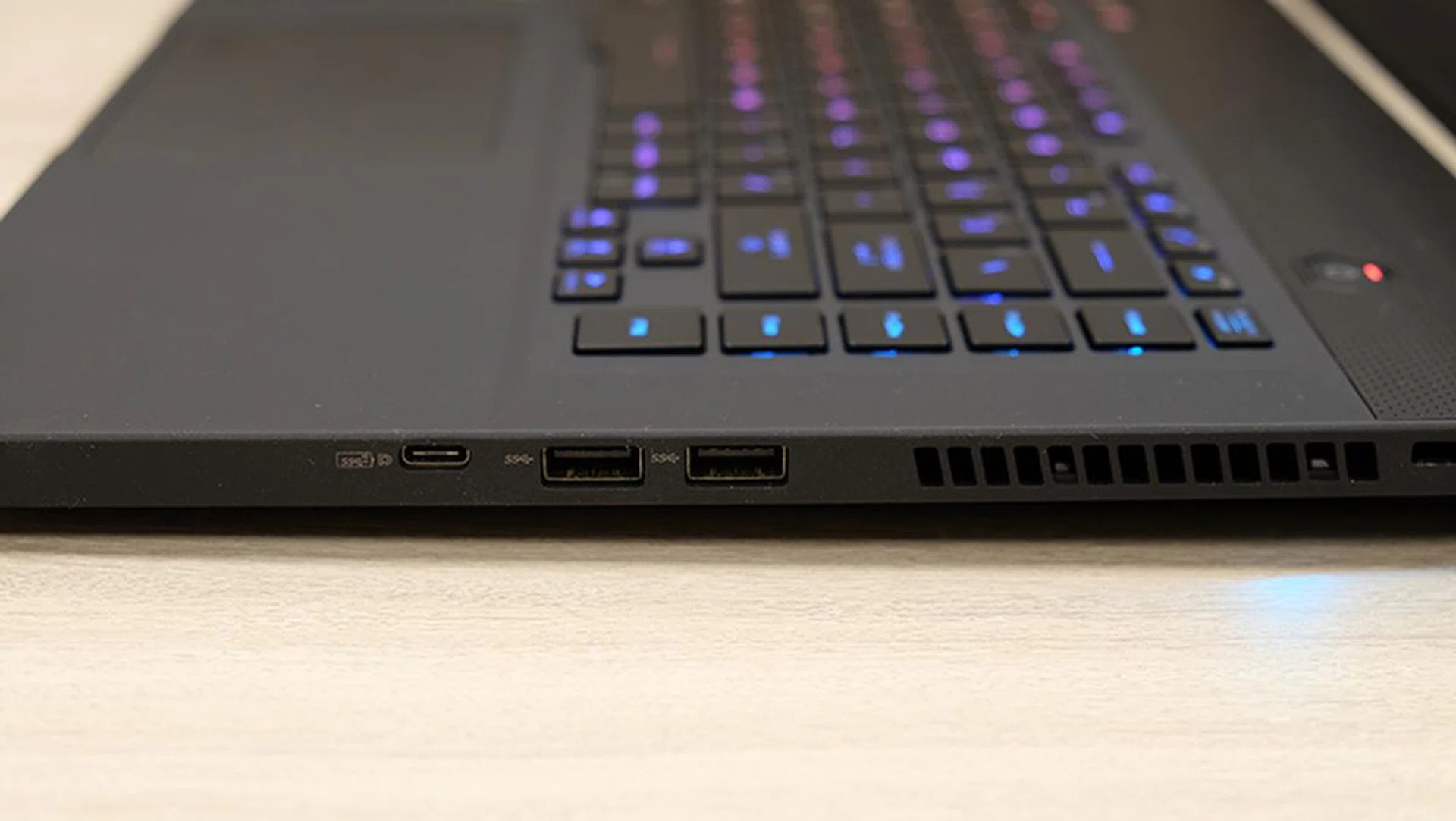
A look at the ports on the right.
For onboard Wi-Fi, you get an Intel Wireless-AC 9560 wireless module, which supports a maximum wireless throughput of up to 1.73Gbps.
Unfortunately, it still comes with single-channel memory
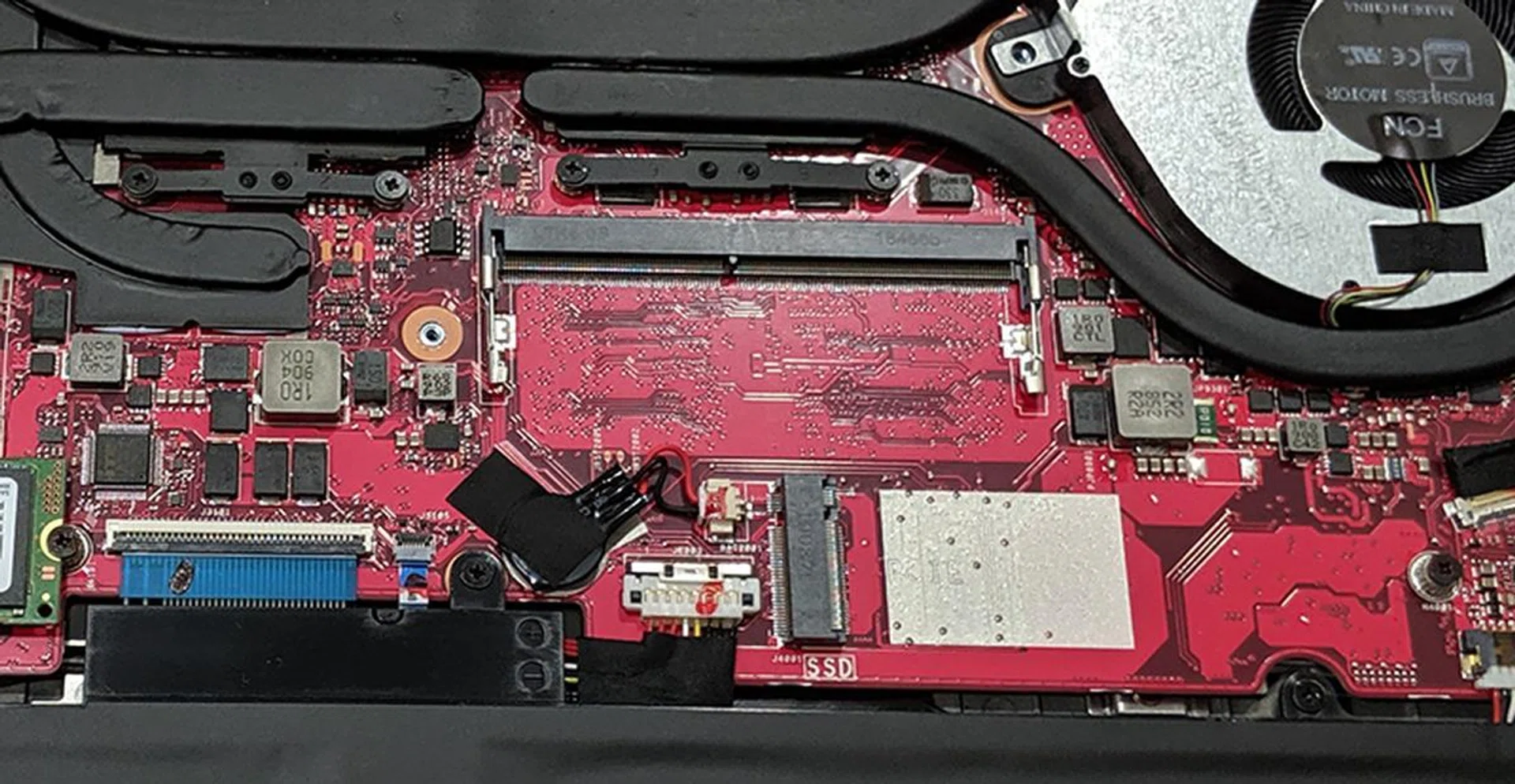
At the very least, the second RAM slot is quite easily accessible.
The Zephyrus S is a great laptop, but there's a catch. Like the ROG Strix Scar III GL531GW, it comes with just a single stick of 16GB memory. What's more, this stick is soldered onto the rear side of the motherboard, and ASUS has left free a single SO-DIMM slot for you to do your upgrades.
While I appreciate the company's intention to offer an upgrade path to expand memory when the job on hand requires it, this design choice comes with major drawbacks. Firstly, single-channel memory results in a huge performance deficit when compared to dual-channel memory, and secondly, it doesn't seem reasonable at all to expect someone to pay S$3,998 for a performance laptop and still have to fork out more for an extra stick of RAM to obtain optimal performance.
This problem is unfortunately made worse by how certain games or applications manage system memory. All GeForce RTX systems running Intel processors with single-channel memory that use MS Hybrid, which is Microsoft's implementation of NVIDIA's Optimus technology, are reportedly affected. But that said, the onus is still on ASUS to provide the best possible performance it can, and there should be no excuses at this price point. What's the actual impact of not having dual-channel memory? Find out on the next page.
Test setup and performance
Here's a full list of the notebooks we're looking at:
- ASUS ROG Zephyrus S GX502GW
- ASUS ROG Strix Scar III GL531GW
- Acer Predator Triton 500
- Gigabyte Aero 15 OLED XA
I've chosen the ROG Strix Scar III GL531GW as a reference point as it's also configured with a GeForce RTX 2070 and single-channel memory. Finally, the Acer Predator Triton 500 and Gigabyte Aero 15 OLED XA are there to provide an idea of how the Zephyrus S stacks up against competing Max-Q laptops.
[hwzcompare]
[products=671898,669939,667965,669286]
[width=200]
[caption=Test notebooks compared]
[showprices=1]
[/hwzcompare]
I ran the notebooks through the following benchmarks:
- PCMark 10
- AS SSD
- 3DMark
- Deus Ex: Mankind Divided
- Far Cry 5
- Metro Exodus
- Shadow of the Tomb Raider
- Tom Clancy's The Division 2
How good is it for work?
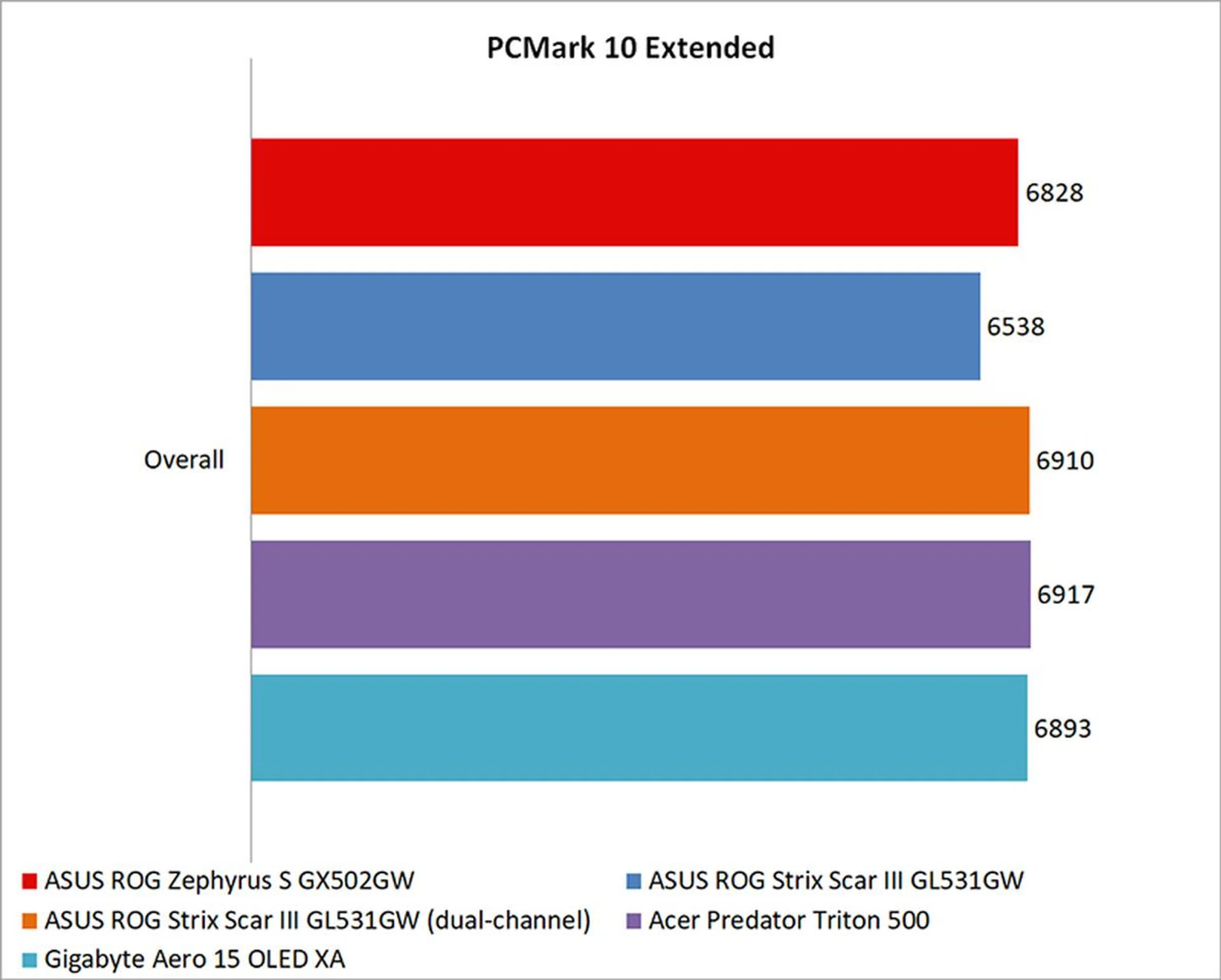
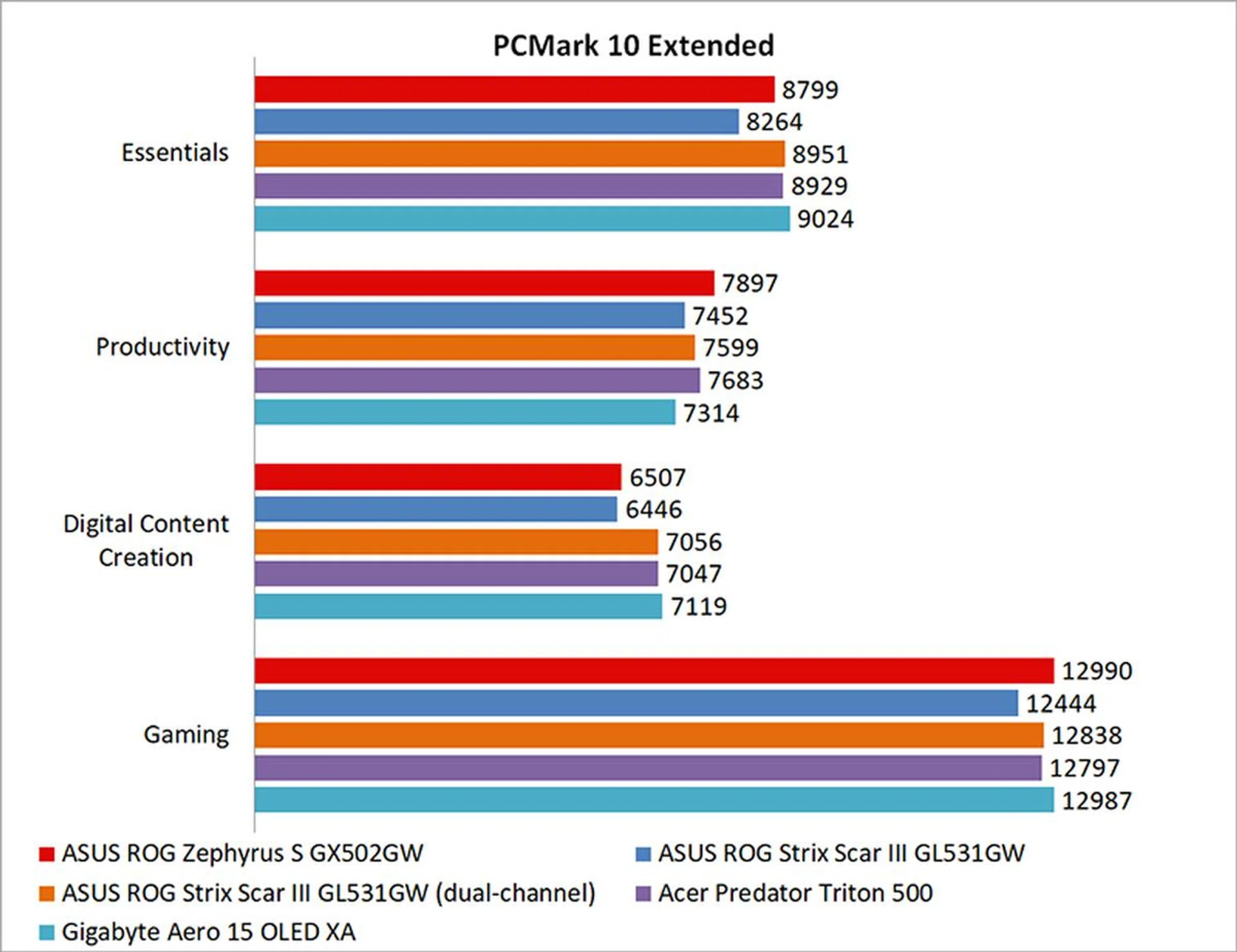
PCMark 10 Extended evaluates systems based on workloads that can be categorized into four distinct groups, comprising Essentials, Productivity, Digital Content Creation, and Gaming. This includes tests such as app start-up times, web browsing, word processing and spreadsheets, photo and video editing, and rendering and visualization tasks. Finally, gaming performance is evaluated using the Fire Strike benchmark.
Despite its single-channel memory configuration, the ROG Zephyrus S didn't suffer too much in PCMark 10, and it was more or less neck-and-neck with the other dual-channel laptops.
However, a closer look at the score breakdown shows that both the ROG Zephyrus S and the ROG Strix Scar III lagged in the Digital Content Creation workload, possibly because of the limited memory bandwidth offered by the single-channel setup.
What's the storage performance like?
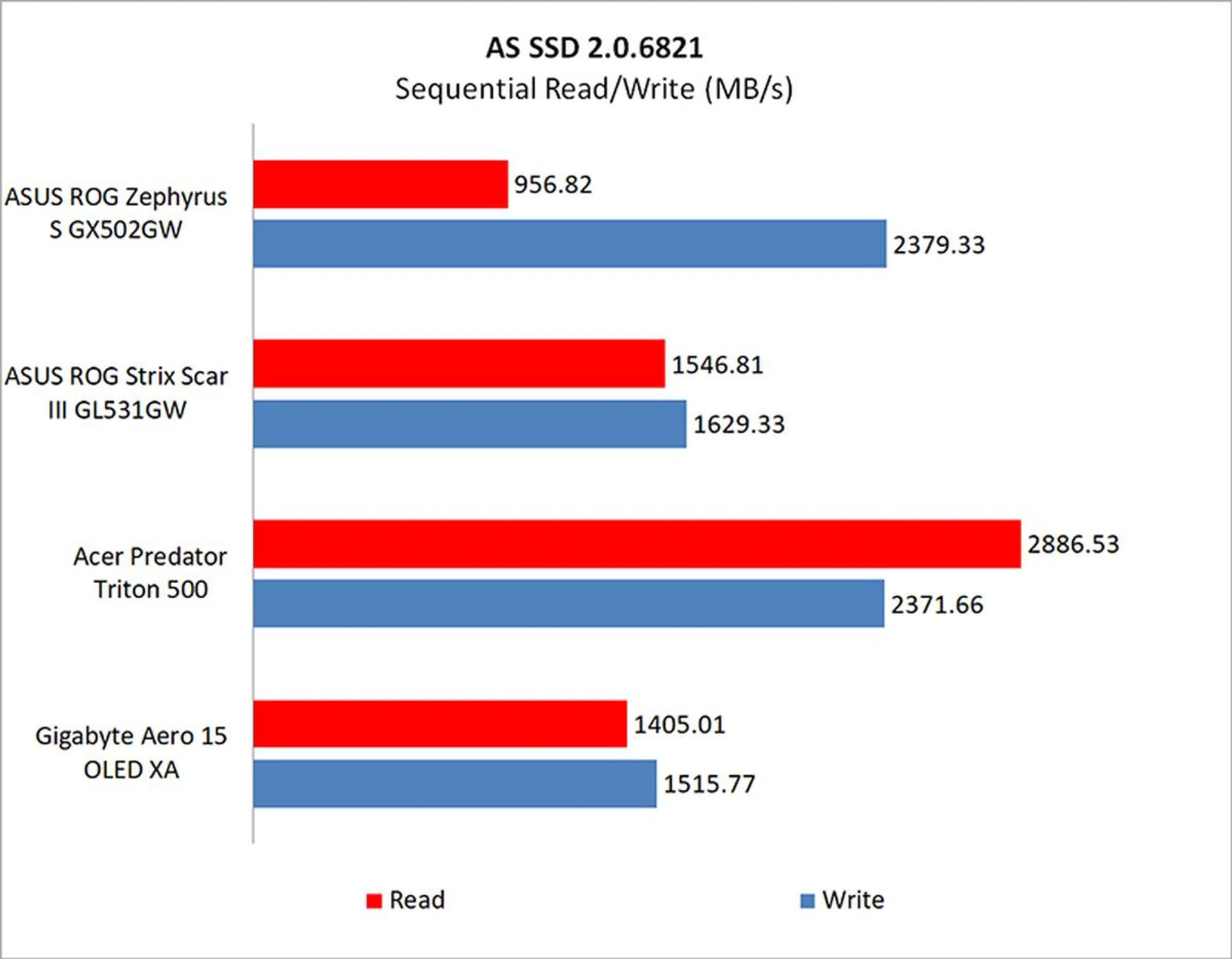
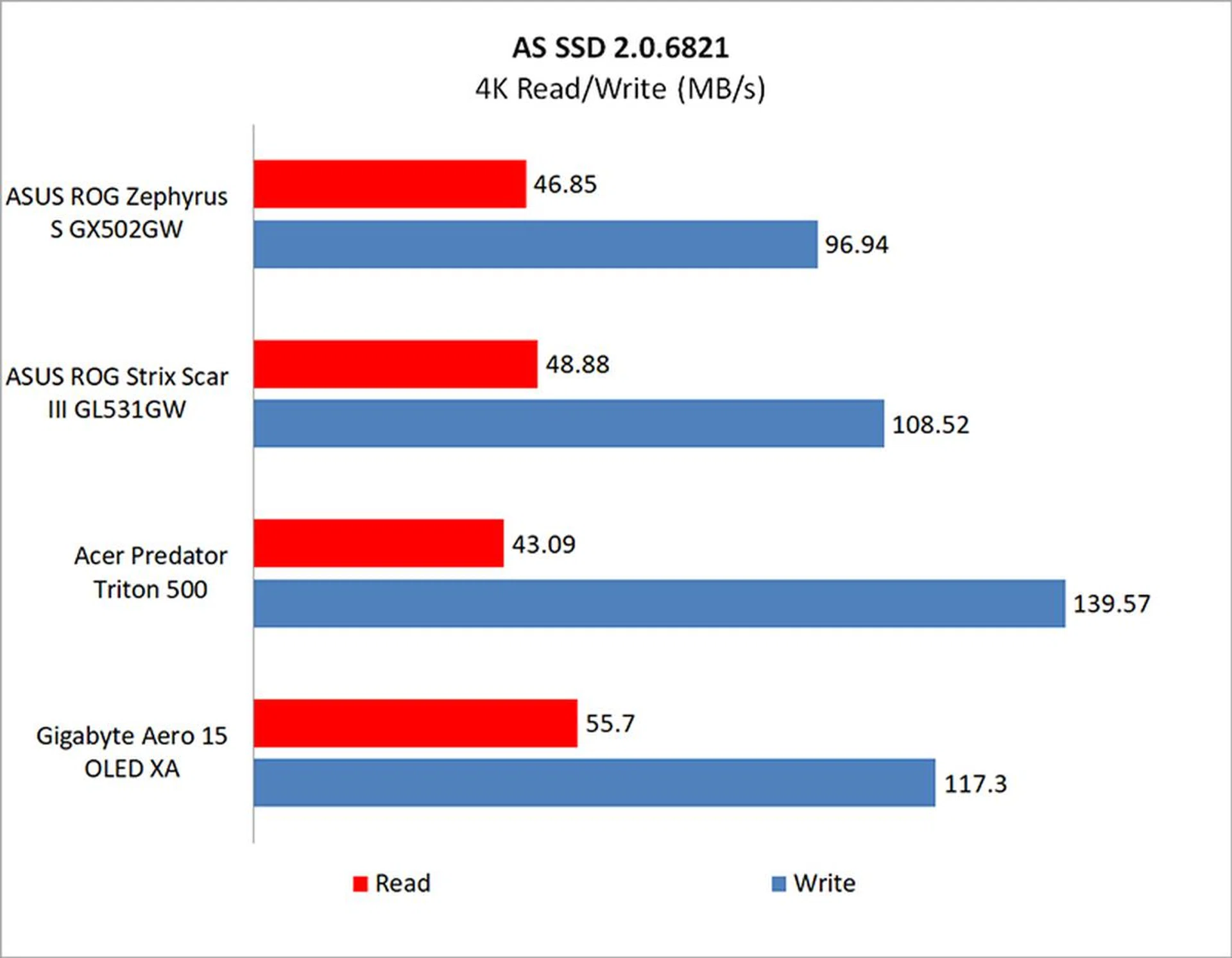
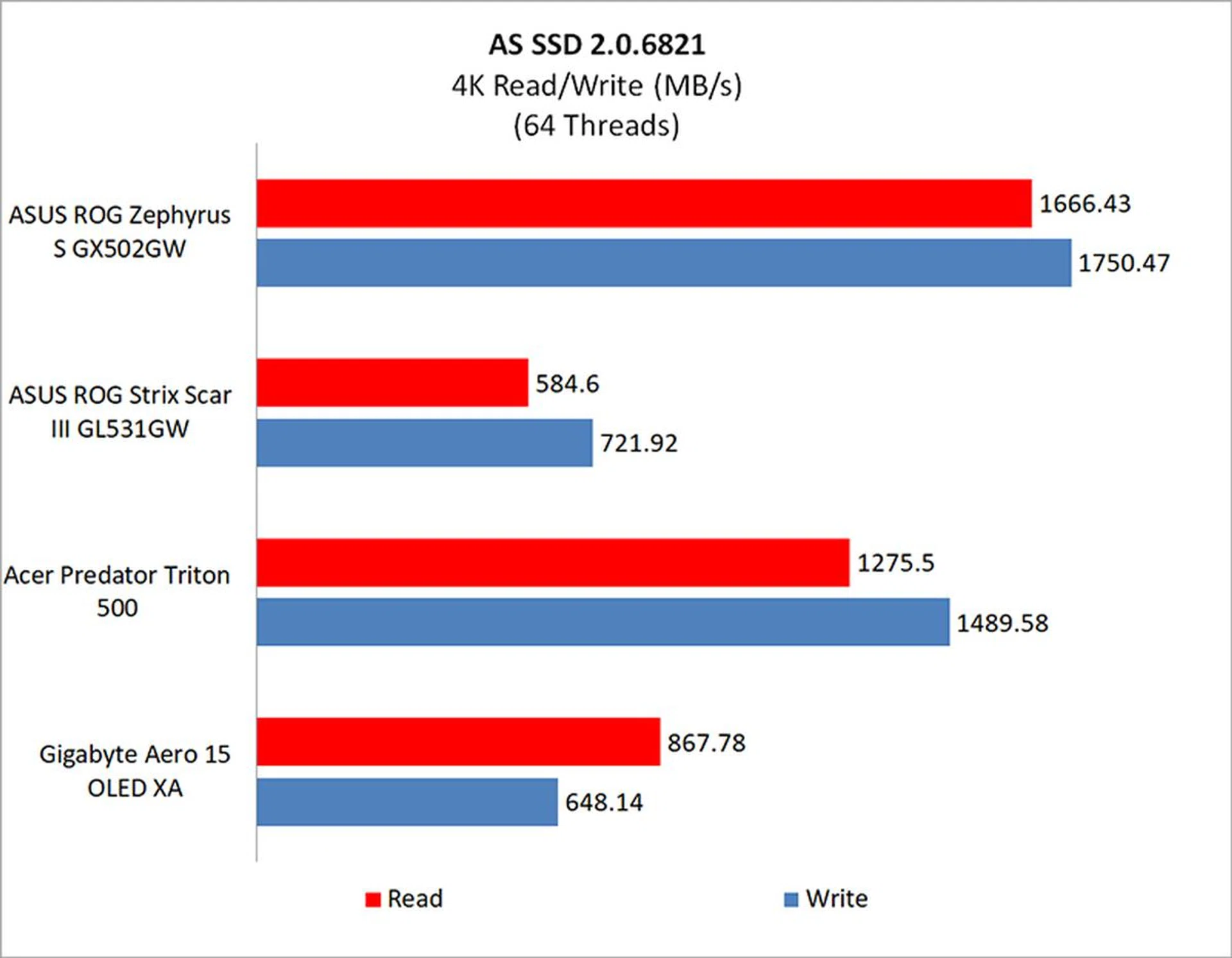
The ROG Zephyrus S is equipped with a sizeable 1TB Samsung PM981 PCIe M.2 SSD. Sequential write performance was very competitive with the other laptops, but it couldn't really keep up when it came to sequential read speeds. However, it stood out in the higher queue depth workloads, handily beating most of the other laptops by a fair margin.
How fast is it in games?
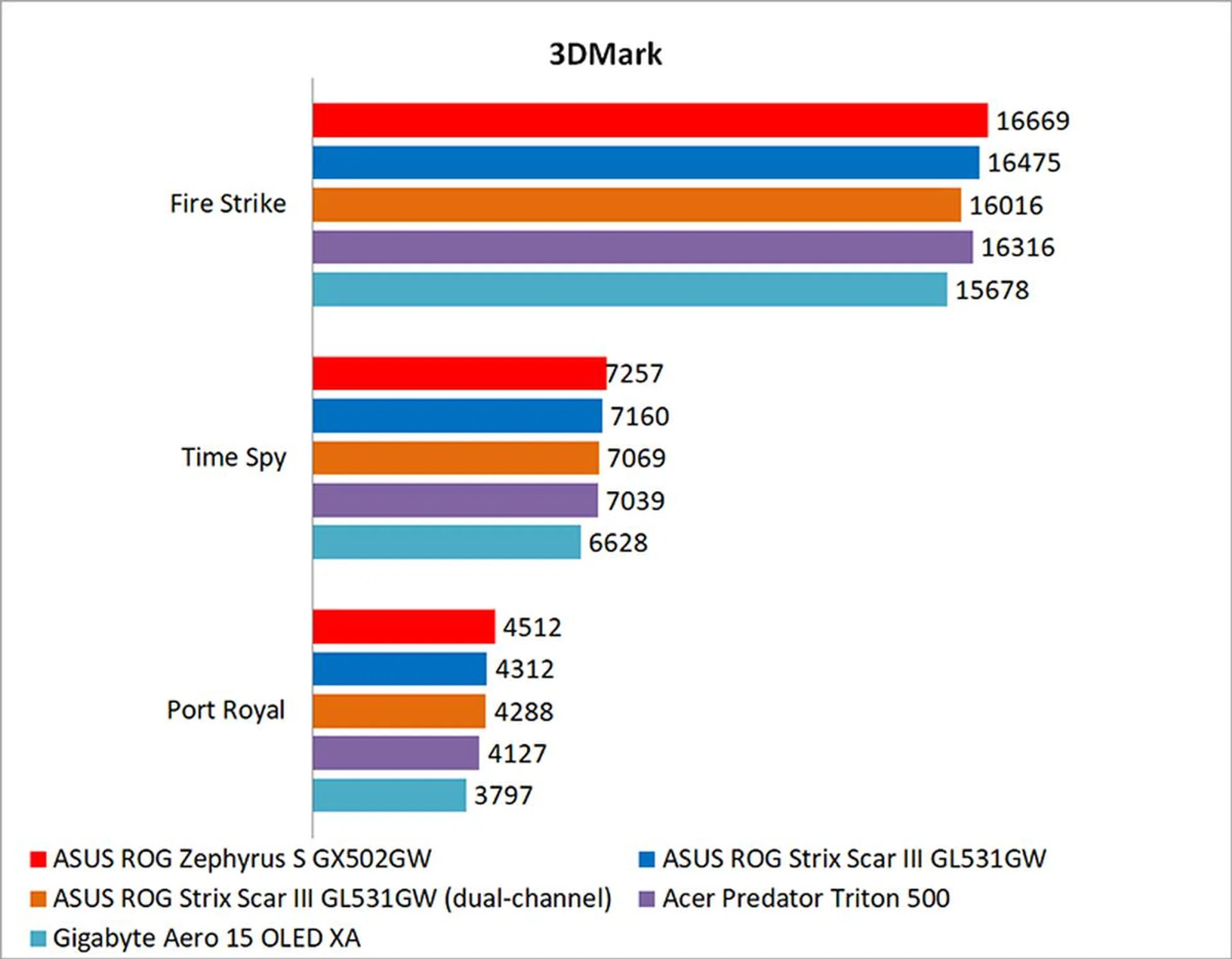
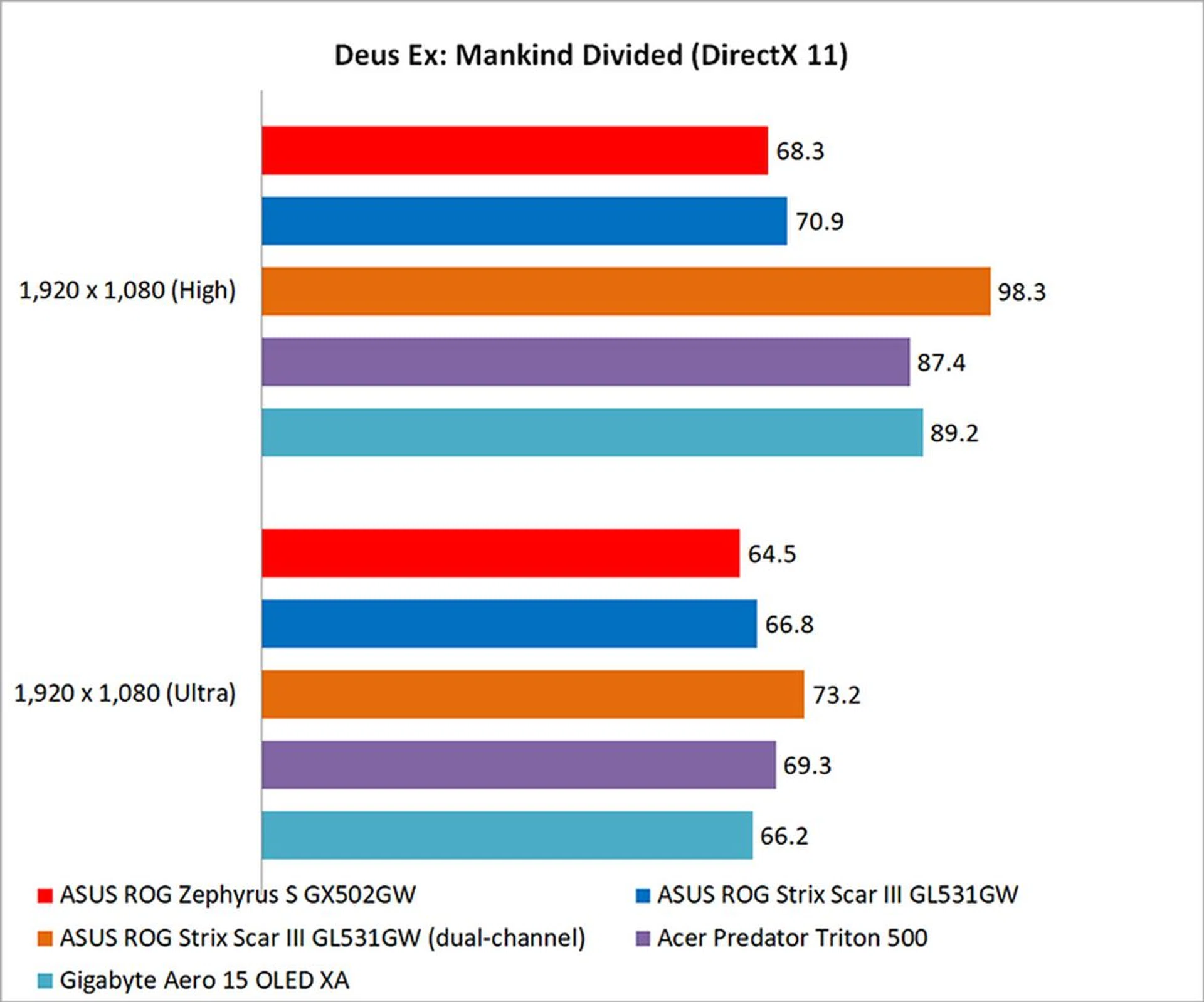
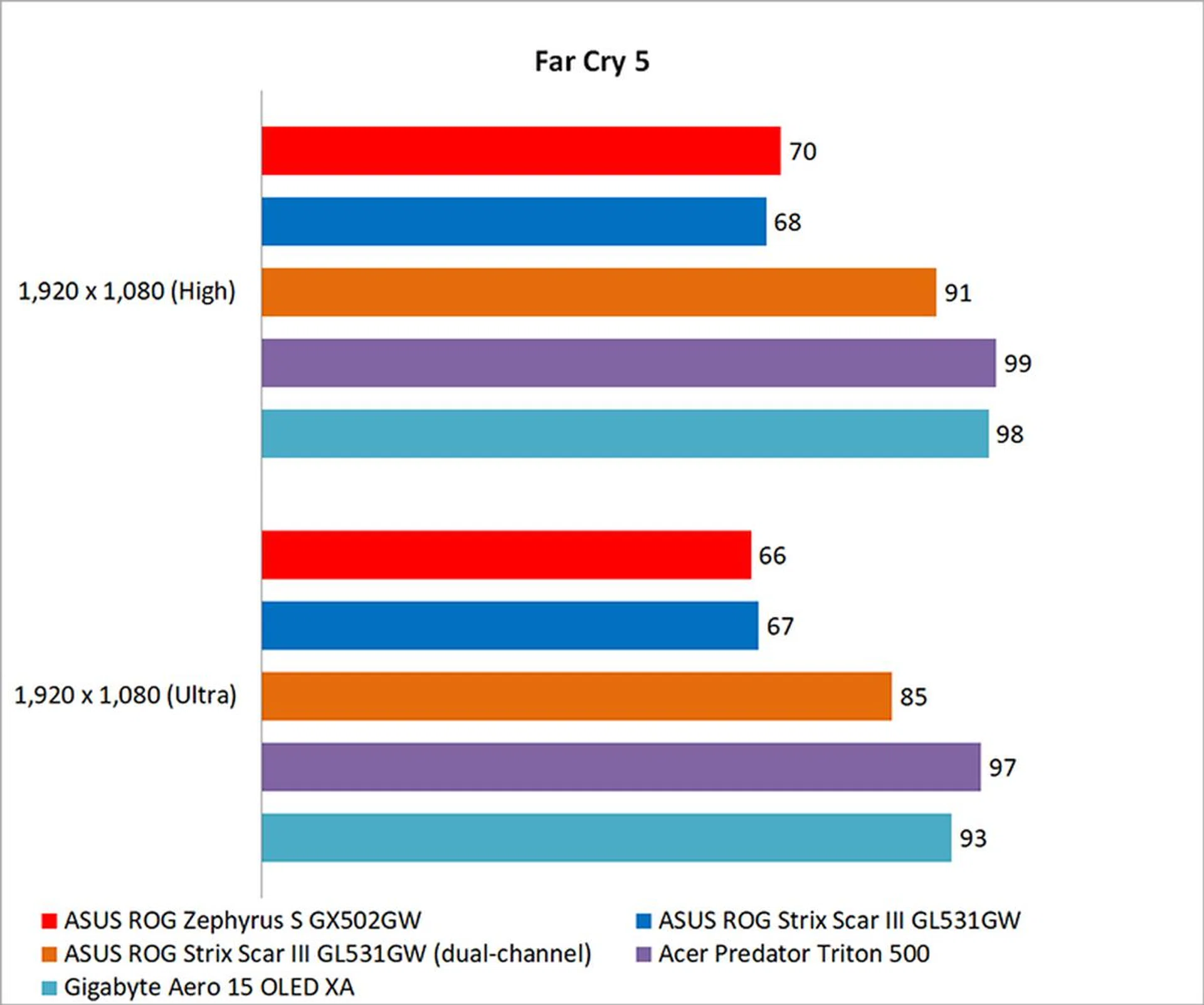
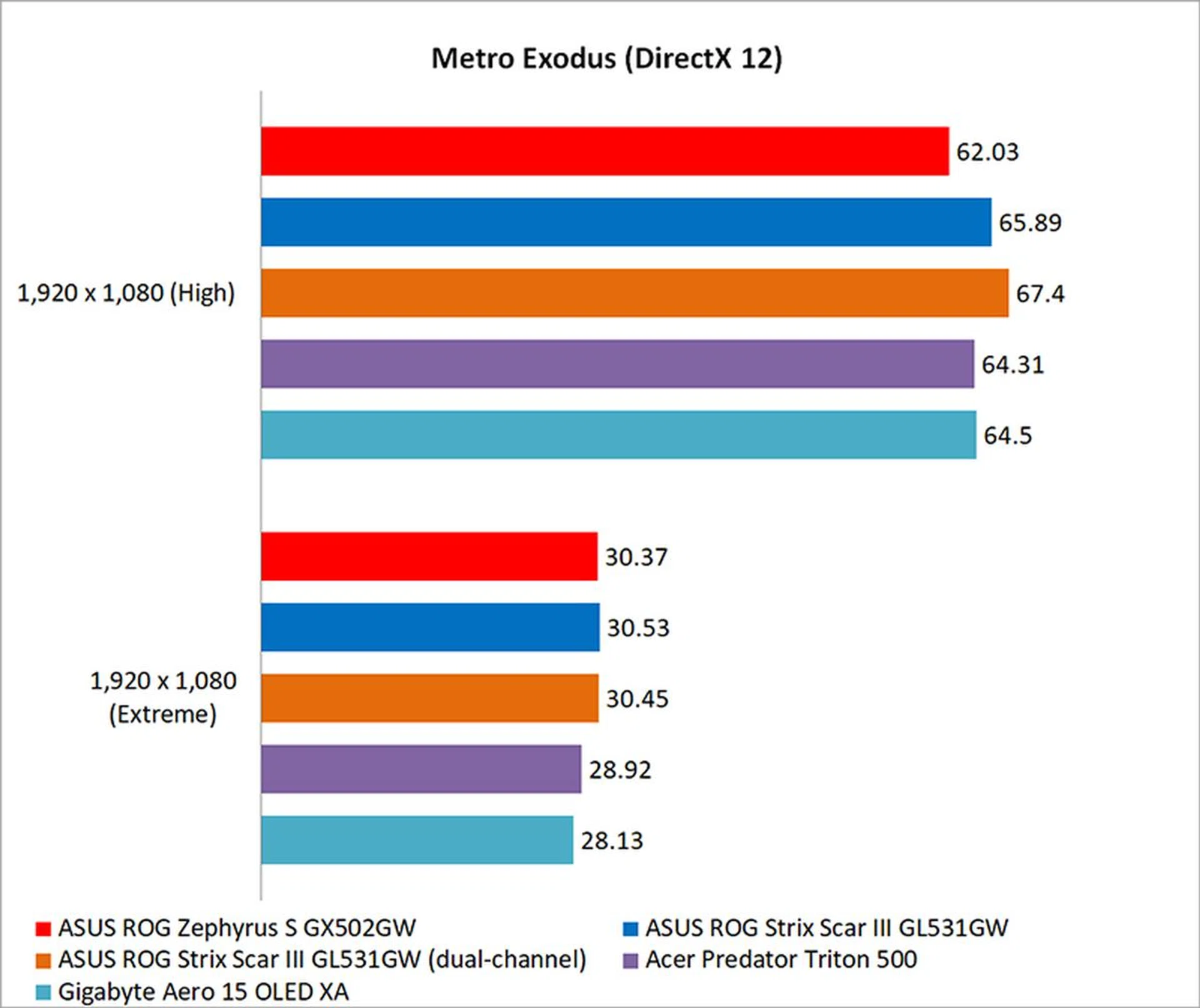
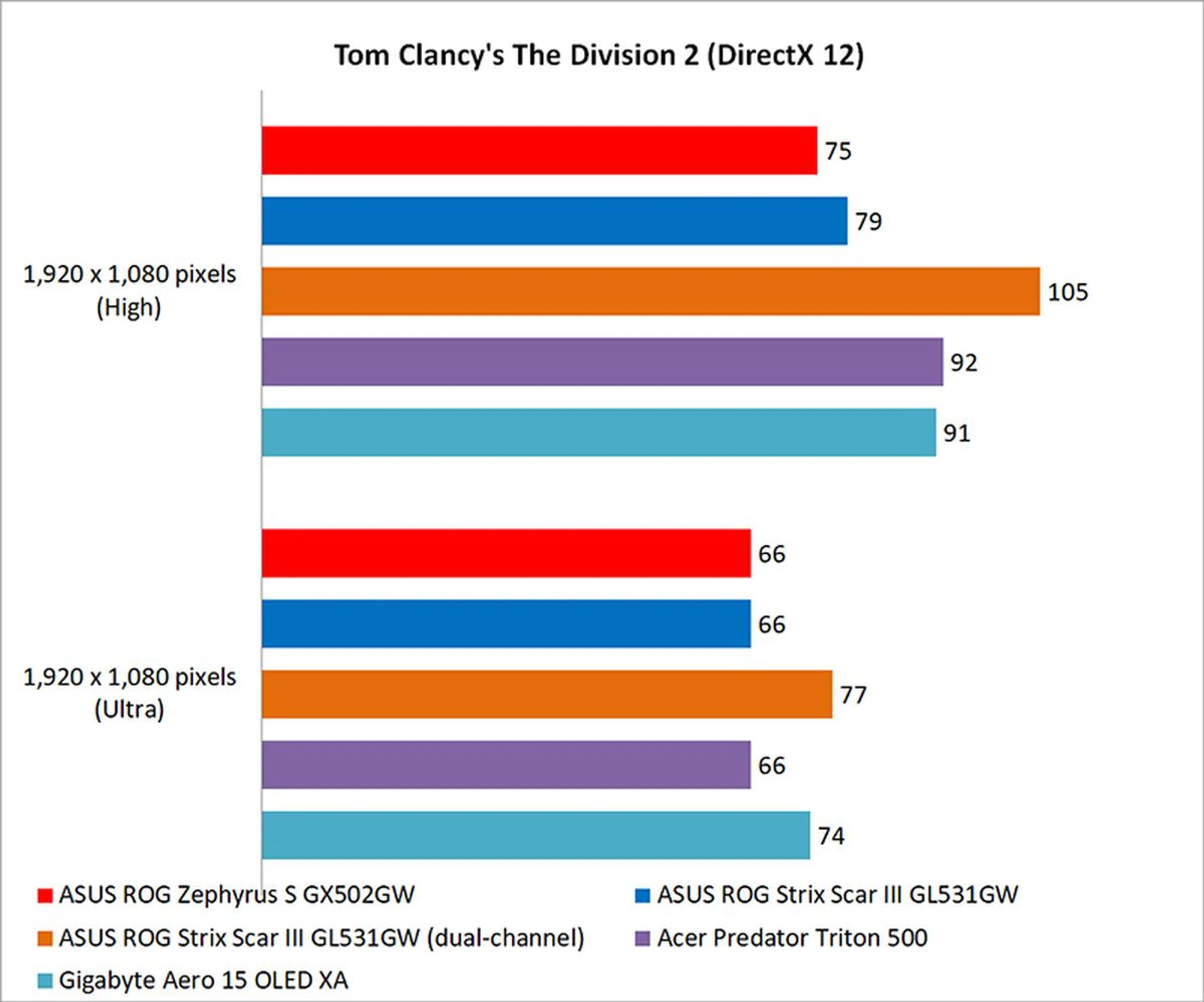
Nowhere are the downsides of having single-channel memory more obvious than in games. Since the problem is supposedly with the way games or applications manage system memory, you don't see the same deficits everywhere. For example, 3DMark and Metro Exodus appear unaffected, and all the laptops turned out numbers that were pretty close to one another.
In fact, the Zephyrus S had a slight edge in 3DMark, inching ahead in the Fire Strike, DirectX 12 Time Spy, and Port Royal ray tracing benchmarks. It's just a pity that it's not able to replicate that performance in most games, where it is punished heavily for having just a single RAM stick.
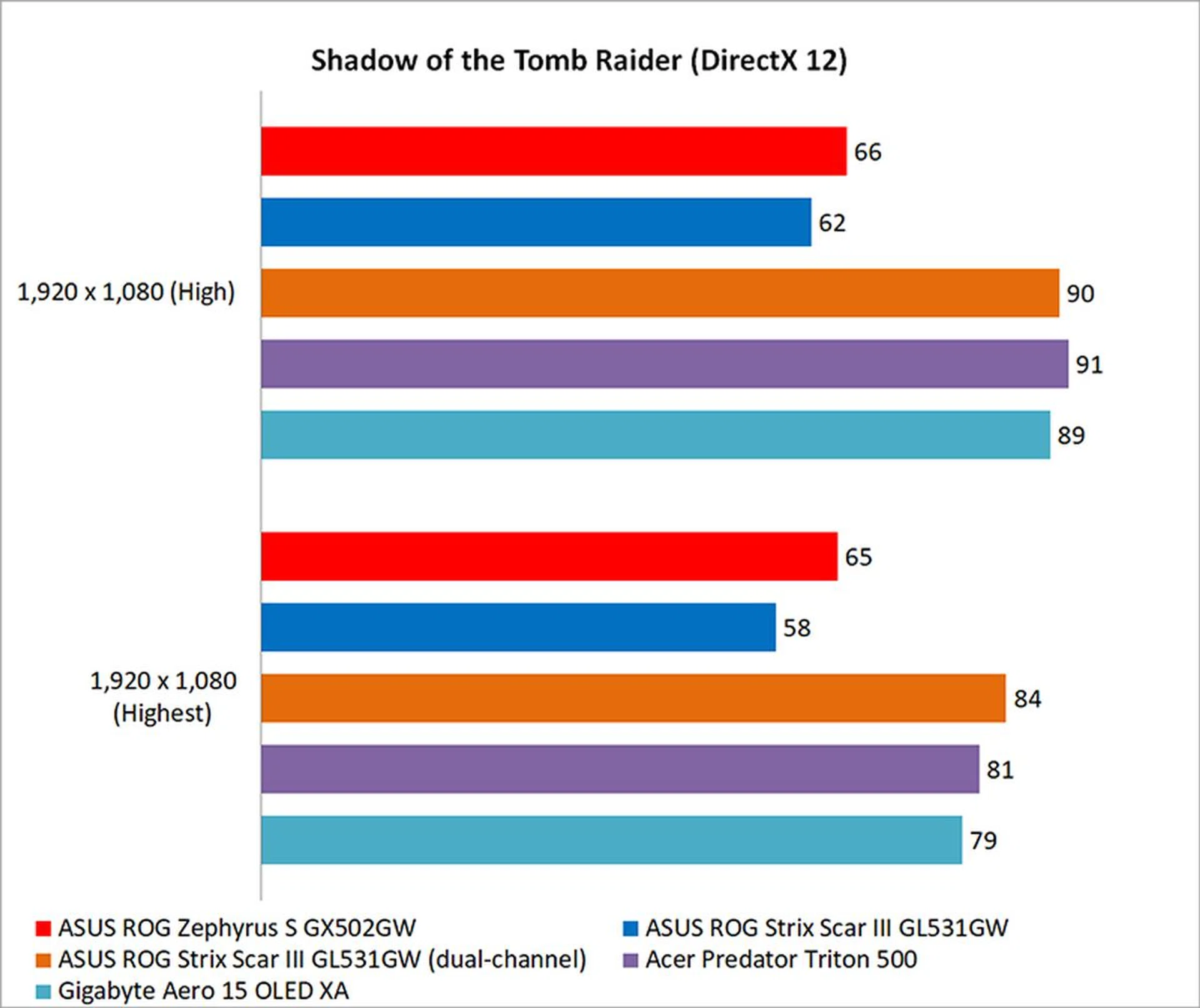
Deus Ex: Mankind Divided is a good example of the massive performance deficit you can expect. The ROG Strix Scar III with dual-channel memory (which isn't a default configuration) was a good 36 per cent faster, an idea of the kind of performance you should be able to achieve with the Zephyrus S, if only ASUS shipped it with two memory modules.
Similarly, the dual-channel ROG Strix Scar III was 30 per cent quicker in Shadow of the Tomb Raider. That's the difference between sailing past its Max-Q competitors or languishing behind them. For S$3,998, I think you should expect nothing less.
How good is the battery life?
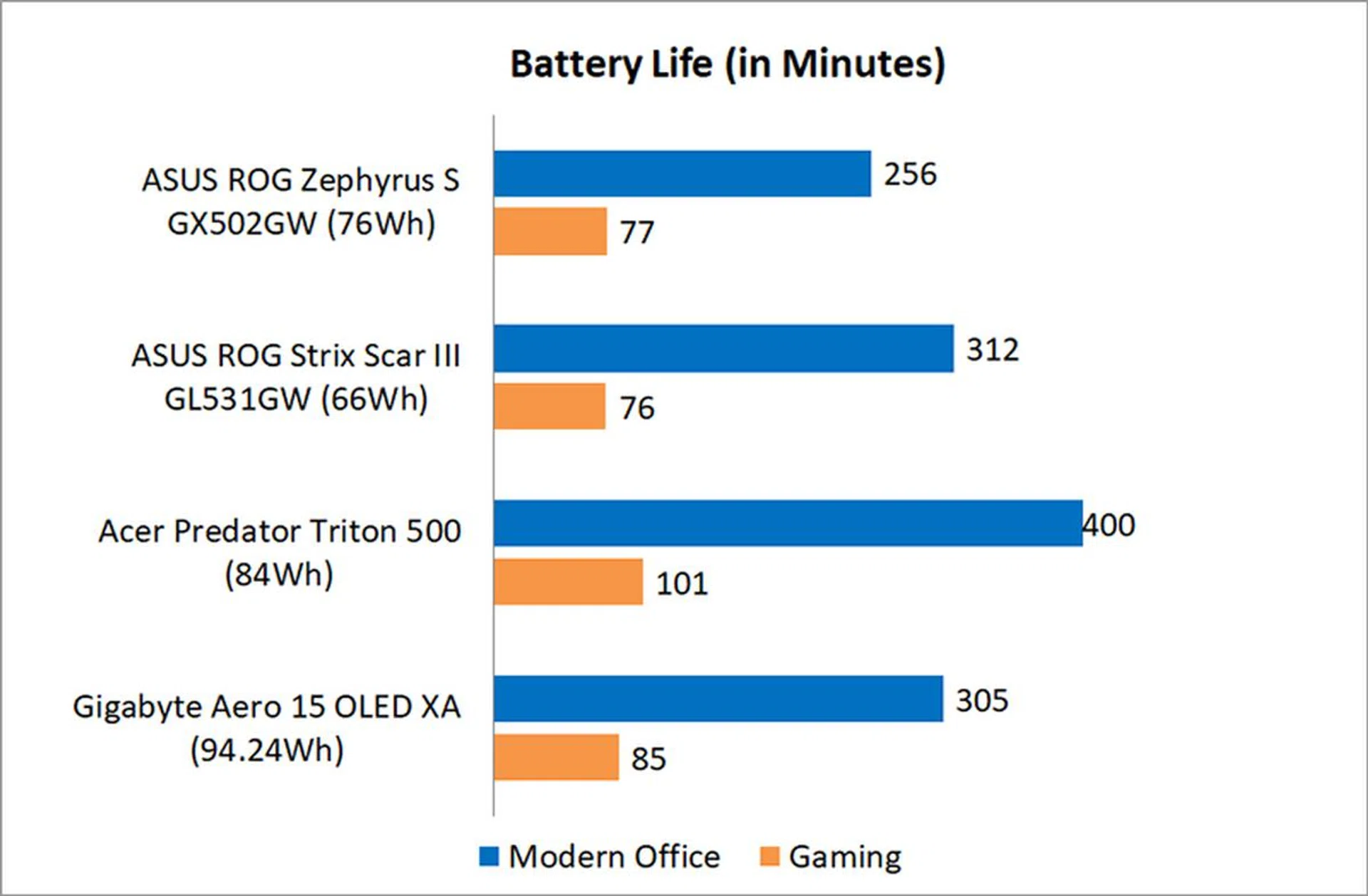
I tested the battery life using PCMark 10's new Modern Office and Gaming battery life benchmarks. All the notebooks were set to 100 per cent display brightness and had Wi-Fi enabled. The keyboard backlight was disabled.
I tested the battery in Optimus mode, but that didn't seem to help much. Overall, battery life was mediocre. Unfortunately, the Zephyrus S wasn't able to keep up with the ROG Strix Scar III either in the Modern Office benchmark, despite the latter not being a Max-Q laptop either and having a smaller 66Wh battery.
Power consumption numbers were markedly higher than the other notebooks, but they were on par with the Gigabyte Aero 15 OLED XA which features an OLED panel. This is probably due to a combination of factors, including higher clock speeds on the Zephyrus S' GeForce RTX 2070 and the absence of any Max-Q efficiency optimisations.
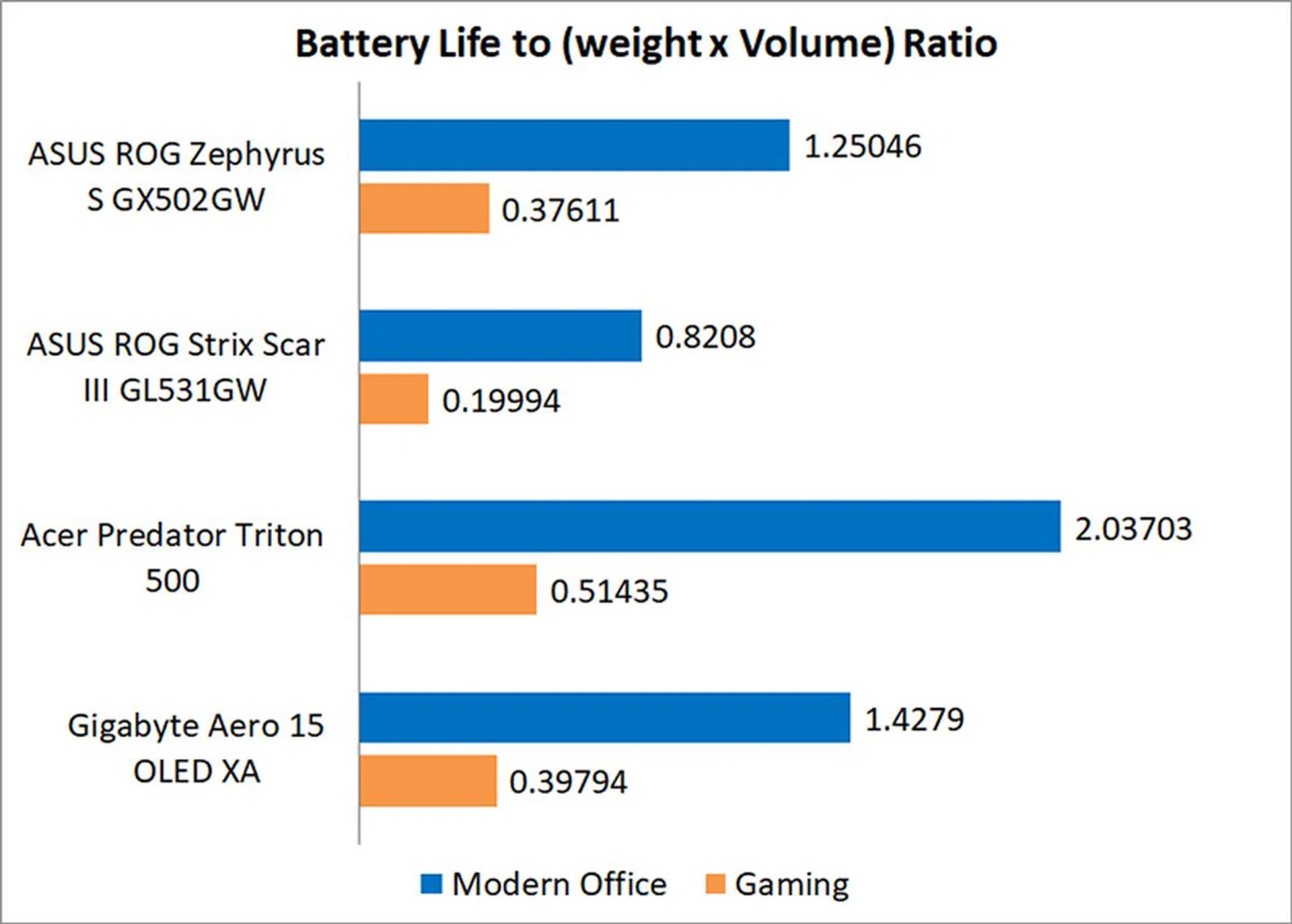
However, the Zephyrus S is still somewhat more portable than the ROG Strix Scar III. Our portability index takes into account things like battery life, weight, and the chassis dimensions, so the Zephyrus S' svelte form factor helped make up for its middling battery life. In addition, you can charge the Zephyrus S over USB-C Power Delivery, which may help further mitigate battery life concerns.

Is the cooling performance good?
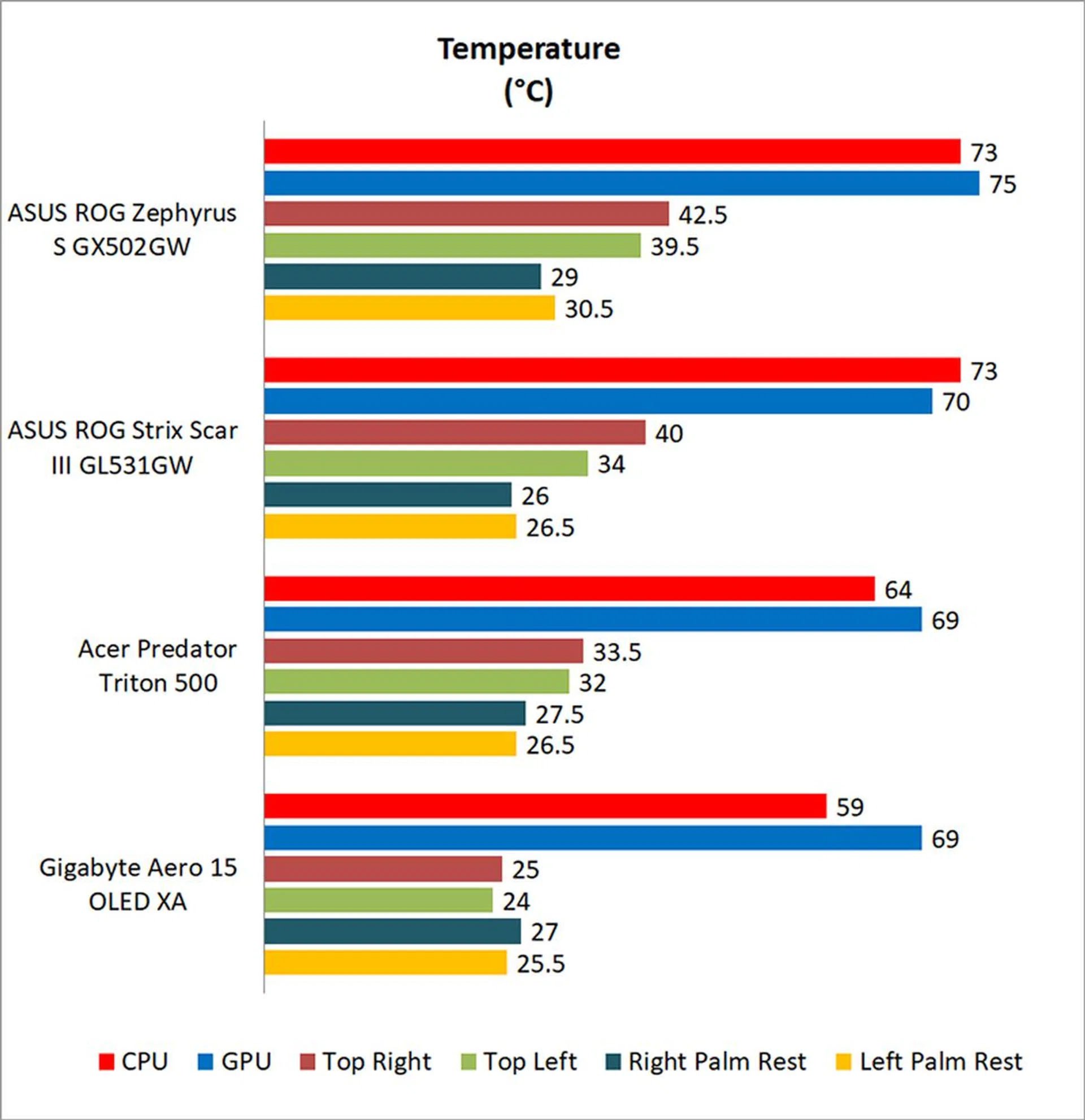
Thermal performance is decent, but not class-leading. The palm rests do get noticeably warm to touch, but that's pretty much the case with most gaming notebooks. More importantly, they never got uncomfortably hot, although I did notice that the areas to the left and right of the keyboard had a tendency to get quite toasty.
Like most other gaming laptops I've reviewed, the fans can get quite loud in Turbo mode. If the noise bothers you, you can try setting the profile to Balanced or Silent mode instead, but that of course comes at the expense of higher surface temperatures.
Sometimes tried-and-tested designs work best
The latest iteration of the Zephyrus may just be my favourite. The ROG Zephyrus S GX502GW doesn't dazzle with a non-traditional keyboard and digital number pad, but that's perfectly okay. It's understated and tasteful design holds great appeal for me, and I enjoy the soft-touch matte surface and simple lines that make up its chassis.
It's also packing some great hardware under the hood, including a GeForce RTX 2070 Max-P and a generous 1TB SSD. However, the best thing about it may be the fact that it packs all that in a body that is as slim and light as any Max-Q laptop out there. Sure, battery life does take a hit from the lack of Max-Q optimisations, but it's a small price to pay for so much performance potential in a portable package. In fact, this is to my knowledge the only such laptop you can buy right now.
However, that brings me to the biggest flaw of the notebook. It holds so much potential and could be blazing fast, except that it isn't, all because ASUS has opted to go with a single-channel memory configuration. Yes, I know I could easily pop the bottom off and install a second 16GB stick to get 32GB of memory. But I don't want to have to do that. What's more, bumping up the memory to a 2x16GB configuration would simply make the laptop perform as it should, and you're not going to get better gaming performance from the whopping 32GB of system memory.

The laptop is as slim as most other Max-Q laptops. (Image Source: ASUS)
If I'm paying S$3,998 for this laptop, I really shouldn't have to pony up extra to get it running properly. This may be a memory management issue that is no fault of ASUS, but the Zephyrus S is a premium laptop, and it should offer top-notch performance right out of the box. These memory shenanigans might have been somewhat acceptable on the mid-range models, but nobody expects this from a flagship model like the Zephyrus S.
Having said that, I also feel like the Zephyrus S is too good a laptop in other aspects to pass on just because it has one memory stick. If you're comfortable with performing your own upgrades and want a portable speedster of a laptop for work and play, this is definitely still worth a look.